Category: Getting Started

Learn more about how MobiLoud works and what you can achieve with it.

  • What You Need For a Successful App Launch

    At Vendrux, we’re committed to getting your mobile app live within 30 days. While our team handles the technical heavy lifting, your involvement is crucial for a smooth and successful launch. Here’s what we need from your side to make it happen.

    Required Team Resources

    The most successful launches happen when the right people are involved from day one. We need:

    • Decision makers who can approve app designs and features
    • Team members authorized to manage vendor relationships (Apple, Google, OneSignal)
    • Quick feedback on app builds and features
    • Participation in key meetings: onboarding, launch planning, and marketing strategy

    Required Access & Setup

    To build and launch your app, we need access to:

    • Apple Developer account
    • Google Play Developer account
    • OneSignal (for push notifications)
    • Google Analytics
    • A test user account for your website

    Testing Requirements

    Quality assurance is a team effort, and your team’s expertise with your own website is crucial for thorough testing. While we handle technical testing, only you know all the nuances of how your site should work.

    Your role includes:

    • Testing core app functionality thoroughly
    • Verifying all content displays correctly
    • Checking navigation and links
    • Testing any custom features specific to your website
    • Ensuring all important user flows work as expected

    For ecommerce apps, you’ll need to:

    • Test the complete shopping experience from browsing to checkout
    • Verify all payment methods work correctly
    • Process test orders in production
    • Handle any necessary refunds or order cancellations
    • Ensure backend integration works properly

    We rely on your expertise because:

    • You know your website’s functionality best
    • You have access to backend systems needed for testing
    • Only you can verify business-specific features work correctly
    • You can quickly identify if something doesn’t work as intended
    • You have the ability to process and refund test transactions

    Launch Timeline

    To hit our 30-day launch target, we need you to:

    • Complete the onboarding form within 2 weeks of signup
    • Provide quick feedback on app builds
    • Make key decisions promptly
    • Have your team available for critical meetings
    • Test the app thoroughly when it’s ready for release

    Communication Standards

    Clear and timely communication helps us maintain momentum:

    • Respond to important emails within 24 hours
    • Let us know about any potential delays
    • Flag any concerns or issues early
    • Keep us updated on any relevant changes to your website or business

    Why This Matters

    While we do the heavy lifting of building your app, your involvement ensures that:

    • The app perfectly matches your business needs
    • We can resolve any issues quickly
    • The app store submission process goes smoothly
    • Your app launches on schedule
    • You’re fully prepared to make the most of your mobile app

    Meeting these requirements helps us deliver your app on time and ensures you get the most value from your investment in mobile. When we work together effectively, we can often exceed expectations and create an outstanding mobile experience for your users.

    Need help with any of these items? Our team is here to support you – just reach out to your project manager.

  • Welcome to vendrux | vendrux Docs

    Welcome to the Vendrux documentation center. We understand that creating mobile apps can seem daunting, especially when you’ve invested significant time and resources into your website. Vendrux bridges this gap, allowing you to leverage your existing web presence while providing your users with a premium mobile app experience.

    Understanding Vendrux’s Approach

    The mobile app landscape often presents a challenging decision: build native apps from scratch at significant cost, or settle for a basic web wrapper that fails to meet user expectations. Vendrux offers a sophisticated middle ground through a hybrid approach that brings together the best of native and web technologies.

    How Vendrux Works

    Vendrux operates on a unique three-pillar system that combines native app capabilities, your website’s existing infrastructure, and a flexible configuration layer. Let’s explore each component:

    Native Elements 📱

    The foundation of your Vendrux app is built with pure native code – Swift for iOS and Kotlin for Android. This isn’t just a technical choice; it’s essential for delivering the performance and experience users expect from mobile apps. The native layer handles critical functions like:

    • Navigation: Users experience smooth, responsive navigation through a native bottom tab bar that feels natural on each platform
    • Push Notifications: Direct integration with device notification systems ensures reliable delivery and proper handling
    • Deep Linking: Seamless handling of links between app content and external sources
    • Device Features: Access to camera, location services, and other device capabilities when needed

    Think of the native layer as a sophisticated frame that holds your website content while providing all the benefits of a true mobile app.

    Your Website Content 🌐

    Your website serves as the dynamic heart of your mobile app. This approach offers several powerful advantages:

    • Content Synchronization: Any updates you make to your website automatically appear in your app, eliminating the need for separate content management
    • Feature Parity: All your existing functionality – from e-commerce to user accounts – works seamlessly within the app
    • Development Efficiency: Your web development team can maintain both website and app content using familiar tools and processes
    • Proven Systems: Your existing backend, databases, and business logic continue to power your app experience

    This isn’t simply displaying your website in a frame – Vendrux optimizes how your web content is presented and handled within the native app container, ensuring it feels natural and responsive.

    Configuration Layer ⚙️

    The configuration layer is where Vendrux truly shines, offering unprecedented flexibility without requiring app store updates. Through the Vendrux Dashboard, you can:

    • Control Navigation: Customize how users move through your app, including tab bar organization and deep linking behavior
    • Style Your App: Adjust colors, icons, and visual elements to match your brand
    • Manage Features: Enable and configure push notifications, authentication, and other functionality
    • Set Rules: Define how different types of content and links should behave within your app

    Think of the configuration layer as your app’s control center, allowing you to fine-tune the experience without diving into code.

    The App Publishing Process

    We transform your website into native mobile apps through a streamlined 30-day process that ensures quality while maintaining efficiency. The journey includes:

    1. Kickoff & Setup: We collect your assets and requirements
    2. App Configuration: Our team builds and configures your app
    3. Testing: You preview and test your app
    4. Store Submission: We handle all technical requirements
    5. Launch: Your app goes live on both platforms

    For a detailed breakdown of each phase, see our complete App Publishing Process Guide.

    Core Features

    Navigation and Structure

    The foundation of any great mobile app is intuitive navigation. Vendrux provides powerful tools to create a navigation structure that feels natural and native to mobile users. Through our dashboard, you can configure a bottom tab bar navigation, manage deep linking behavior, and control how different types of content are displayed in your app. Our navigation system supports:

    Push Notifications

    Push notifications are crucial for engaging your mobile app users. Vendrux offers multiple ways to send notifications, supporting both OneSignal and Klaviyo integrations. Whether you need automated content notifications or targeted marketing messages, our system provides the tools you need:

    E-commerce Integration

    For e-commerce websites, Vendrux provides seamless integration with popular platforms, particularly Shopify. Our Shopify integration enables:

    • Native shopping experience
    • Push notifications for orders
    • Cart synchronization
    • Customer account management

    Learn more about our Shopify integration:

    User Authentication

    Authentication is critical for personalized experiences and secure access. Vendrux supports multiple authentication methods to match your existing system while maintaining a native feel. Our authentication system is flexible and secure:

    Analytics and Tracking

    Understanding how users interact with your app is essential for optimization and growth. Vendrux integrates with leading analytics platforms to provide comprehensive insights into user behavior and app performance:

    Security and Optimization

    We provide tools and guidelines to ensure your app is secure and performs optimally:

    Development Resources

    While Vendrux handles the complex native app development, we provide powerful tools and APIs that allow developers to customize and enhance the app experience. Whether you’re looking to modify the appearance, add custom functionality, or optimize performance, our development resources provide the flexibility you need.

    Customization

    Vendrux offers multiple approaches to customize your app’s appearance and behavior. Our customization tools allow you to create an app experience that perfectly matches your brand while maintaining native performance and functionality.

    Visual Customization

    Control how your website appears within the app environment:

    Functional Customization

    Extend your app’s capabilities through our native bridges:

    Push Notification Development

    Implement advanced notification features:

    Testing and Quality Assurance

    Thorough testing is crucial for delivering a high-quality app experience. Our testing tools and guidelines help ensure your app functions perfectly across all devices and scenarios.

    Testing Infrastructure

    Comprehensive testing resources:

    Performance Optimization

    Tools and guides for optimal app performance:

    Testing Tools

    Screen recording and debugging tools:

    Development Best Practices

    Code Organization

    • Keep custom CSS and JavaScript organized and documented
    • Use consistent naming conventions for custom elements
    • Maintain separate styles for app-specific modifications
    • Document all custom implementations

    Testing Strategy

    • Test on multiple devices and OS versions
    • Verify performance impact of customizations
    • Ensure consistent behavior across platforms
    • Monitor analytics for usage patterns

    Security Considerations

    • Follow secure coding practices
    • Implement proper error handling
    • Protect sensitive user data
    • Validate all user inputs

    Widget Development

    Vendrux provides a suite of pre-built widgets to enhance your app:

    Version Control and Updates

    Vendrux manages app updates and versioning, but you should:

    • Document all custom modifications
    • Track changes to custom code
    • Test updates before deployment
    • Maintain backup copies of customizations

    Legal Requirements and Compliance

    Successfully launching and maintaining a mobile app requires adherence to various legal requirements and privacy regulations. Vendrux helps you navigate these requirements while ensuring your app remains compliant with app store policies and international privacy laws.

    Privacy Policy Requirements

    Every app needs a comprehensive privacy policy that accurately reflects how user data is collected, used, and protected. This is not just a best practice – it’s required by:

    • App Store Guidelines
    • Google Play Store Policies
    • Privacy Laws (GDPR, CCPA)
    • Third-party Services (Analytics, Push Notifications)

    Key resources:

    User Data and GDPR

    If your app may be used by EU residents, GDPR compliance is essential. Key considerations include:

    • User consent for data collection
    • Right to data deletion
    • Data processing transparency
    • Privacy by design

    Resources for managing user data:

    Store Compliance

    Both Apple and Google have specific requirements that must be met:

    Apple App Store:

    • Account deletion functionality
    • Privacy declarations
    • Data usage transparency
    • Sign in with Apple (if using other social logins)

    Google Play Store:

    • Data safety section
    • Runtime permissions
    • Personal/sensitive data handling
    • Privacy policy requirements

    Our platform helps ensure compliance through:

    • Built-in account deletion functionality
    • Privacy-respecting analytics integration
    • Secure data handling
    • Compliant push notification implementation

    For specific requirements and implementation details, you can refer to:

    Getting Started

    1. Review the App Publishing Process
    2. Check the Launch Requirements
    3. Set up your Vendrux Dashboard
    4. Plan your Push Notification Strategy

    Support and Resources
  • The App Publishing Process | vendrux Docs

    Process Overview

    Our app publishing process consists of seven key stages, designed to get your app live within 30 days while ensuring it meets both your requirements and app store standards.

    1. Kickoff & Setup

    After signing up, you’ll receive a welcome email with a link to our onboarding form. You’ll need to provide:

    • Your website URL
    • Brand assets (logos, color schemes)
    • App icons
    • Any specific preferences for your mobile app

    Timeline: We’ll confirm receipt of your materials within one business day.

    2. App Configuration

    Our technical team begins building your app, focusing on:

    • Replicating your website’s navigation structure
    • Setting up core functionality
    • Implementing necessary backend connections
    • Configuring all required integrations

    This phase often involves multiple iterations as we refine the app based on your feedback. We handle all technical complexities while keeping you informed of our progress.

    3. Customer Testing

    Once the initial build is complete, you’ll receive:

    • Preview versions of your app
    • Test links for both phones and tablets
    • Instructions for testing different features

    We encourage you to:

    • Test all functionality thoroughly
    • Navigate through every section
    • Try out all features
    • Provide detailed feedback on your experience

    Testing can continue even after store submission, allowing us to make improvements while the app is under review.

    4. Quality Assurance

    Our QA team performs comprehensive testing, including:

    • Functionality checks across different devices
    • Testing of all interactive elements
    • Verification of forms and user inputs
    • Edge case scenarios
    • Performance testing

    Any issues identified during QA are immediately addressed and resolved.

    5. Store Submission

    We submit your app to both the Apple App Store and Google Play Store early in the process, with a delayed release option. This approach:

    • Allows us to get early feedback from app store review teams
    • Gives us time to make necessary adjustments
    • Enables continued testing and improvements while under review
    • Provides flexibility in choosing the final release date

    During submission, we handle:

    • Creating compelling screenshots
    • Writing optimized store descriptions
    • Selecting effective keywords
    • Managing all technical requirements
    • Communicating with store review teams

    Multiple submission iterations may be needed to meet all store requirements while incorporating your ongoing feedback.

    6. Final Optimization

    During the store review period, we:

    • Actively monitor your app’s status
    • Address feedback from store reviewers
    • Continue implementing your requested changes
    • Make necessary adjustments quickly
    • Ensure all requirements are met

    7. Launch & Growth

    Once you’re satisfied with the app and store approvals are received, we:

    • Coordinate the release on your preferred timeline
    • Provide promotional materials for your app launch
    • Offer guidance on app marketing strategies
    • Help set up:
      • Push notifications
      • App promotion banners
      • User engagement tools

    Timeline Expectations

    Our target is to get your app live within 30 days. However, the actual timeline can vary based on:

    • Complexity of required features
    • Number of iterations needed
    • App store review processes
    • Your feedback and requested changes

    It’s not unusual to go through multiple rounds of configuration and approval until both you and the app stores are completely satisfied with the result.

    Communication & Support

    Throughout the entire process, you can expect:

    • Regular status updates
    • Clear communication channels
    • Quick responses to your questions
    • Guidance at every stage
    • Technical support as needed

    Need Help?

    If you have questions about the process or want to discuss your specific needs:

    Our team is here to ensure your app launch is successful and meets your business objectives.

  • Slack Support Guidelines | vendrux Docs

    Corporate customers get access to a dedicated support channel in Slack.

    To ensure the best support experience for everyone, please follow these guidelines when using Slack as a channel for support.

    Your dedicated Slack channel is designed to provide support for issues related to our products and services, request changes and status updates for your app’s submission or updates.

    We recommend you invite anyone on your team collaborating on your app project to this channel.

    The goal with offering support using Slack is to give you a convenient channel to communicate with our team, while involving multiple team members from your company.

    You can expect a response within the same business day. While we always try to respond promptly, our typical response time is within a few hours during business hours.

    Slack is not a live chat support channel.

    Raising issues

    To help us address your issues effectively, please include the following information when raising a support request:

    • Problem Description: A clear and detailed explanation of the issue you’re experiencing. Remember, what may seem obvious to you might not be to others.
    • Steps to Reproduce: Provide a step-by-step description of how we can replicate the issue. Include where to click/tap, what to expect, and what actually happens.
    • Screenshots & Videos: Attach screenshots or videos if possible. Visual context can significantly aid in understanding and resolving your issue more quickly.
    • System Details: Specify the system you’re using (iOS, Android, or both) and the version number.
    • Device Model: Inform us of the device model you’re using (e.g., iPhone X, Galaxy S20, etc.) to help us pinpoint device-specific problems.

    By including this information in your initial message, you help us minimize back-and-forth and expedite the resolution process.

    Response times

    Our support team will respond to your queries within a few hours. Response times may vary depending on the complexity of the issue and the volume of inquiries.

    You can expect a response within the same business day. While we always try to respond promptly, our typical response time is within a few hours during business hours.

    Escalation for urgent issues

    If your issue is urgent or you haven’t received a response within the expected timeframe, please escalate it by sending a direct message to our support lead on Slack or by emailing support@vendrux.com.

    We maintain a professional and respectful environment. Please be courteous in your interactions with support staff and other members of the Slack channel.

    Thank you for reading these guidelines. We’re here to help and look forward to assisting you effectively through your Slack support channel.

  • vendrux dashboard | vendrux Docs

    vendrux dashboard | vendrux Docs

    The Vendrux Dashboard is the configuration area for your app, it allows you to easily adjust the bottom navigation, login options, alerts, and many other elements.

    In this guide, we will go through the most used settings and how to modify them.

    Making changes to your app

    Before anything, it is important to understand that your app configuration is live, meaning that any changes you make will be instantly applied to your apps as soon as you save them.

    Once you modify the values of your settings, you just need to click the “Save changes” button and your changes will be applied.

    In order to be able to see the changes on the apps you will need close and reopen them.

    Menu

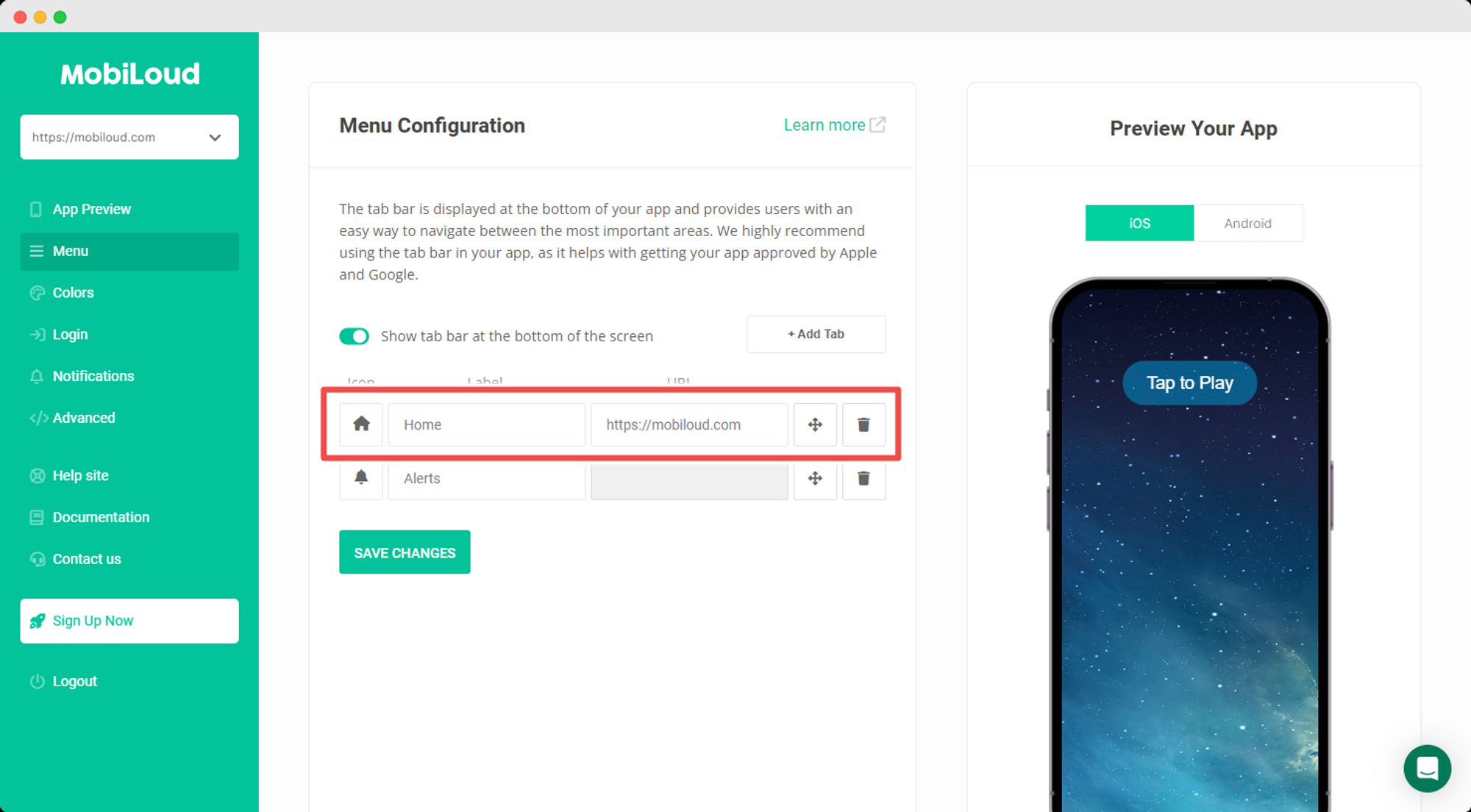
    In the menu area, you will be able to configure the menu displayed at the bottom of your app, which consists of a set of tabs, each with its own label and icon.

    Labels and links will be available as text inputs, see below:

    Notion Image

    You can easily drag and drop the tabs to re-order them:

    Notion Image

    We have a set of default icons that you can pick from:

    Notion Image

    If you prefer to use something different you can easily upload your own .png icon, making sure to follow these requirements:

    • The icon must have a transparent background
    • The icon must have the final color for the active and default states (the values from the app configuration will not be applied to custom icons)
    • The icon must have a maximum size of 250x250px
    • The icon must be in .png format

    Colors

    As the title suggests, here you will be able to configure the colors of different elements displayed throughout your app.

    The main elements you might want to adjust are the colors of tabs and loading spinners.

    Notion Image

    Notifications

    Under Notifications you will be able to create and manage the notification tags, which allow users to select from which topics they want to receive notifications from.

    We have a more detailed guide with more details on how the notification tags work here: How to use notification tags

    Notion Image

    Login

    If you want to require users to login before they can access the content of your app, this is the place where you will be able to configure that behavior.

    We highly recommend that you contact Vendrux fore more details on how to properly configure your app login.

    Notion Image

  • Login feature | vendrux Docs

    The Vendrux platform allows you to configure a page of your website to be used as the login screen of your app. The login screen has a unique behavior, as it will reload the app and be dismissed after a successful login.

    The reload is important in most cases so the content can be updated, displaying specific elements in their logged-in state.

    Note that you can configure the login screen in two different ways:

    • On app start: in this case, the login screen will be displayed as soon as your app is opened, requiring users to log in before they can access the content of your app
    • Inside your app: the login screen will be triggered as soon as the user clicks a button or link that matches the URL used as the “Login URL” in your configuration

    The user authentication is controlled exclusively by your website, meaning that the user will be providing his website username and password, and your website will be responsible for validating that information.

    What happens after the successful login is what matters to the app, as it will use that information to determine if the login screen should be dismissed and the app should be reloaded.

    Successful login in the app

    The app needs to know that a user has been successfully logged in, so it can dismiss itself and reload the content. There are a few different ways of doing that:

    WordPress

    When using the WordPress login method the app will communicate with our WordPress Plugin called Vendrux, and automatically identify the logged-in user.

    Cookie name

    The cookie name login method is the most reliable option for all websites outside of the WordPress space. The app will look for a specific cookie when a URL redirect is triggered in the login screen, and if that cookie is in place after the redirect it will consider the user logged in.

    You can find more details on how to set this up clicking here.

    URL Matching

    In case you don’t have control over the cookies of your website, you can use the URL matching option. When enabled, the app will be looking for a specific URL on the login screen, when that URL is loaded it will consider the user logged-in.

    The URL can look like this: https://yourwebsite.com/login-successful

  • How to test apps | vendrux Docs

    Before submitting your apps to the stores, we will be providing you with a test version so you can check the app on your own devices, for iOS and Android.

    While we do perform an initial round of tests on our end, to make sure the basic functionality is working as expected, you know your website better than anyone else, and you should be the one making sure all the internal features of your app are working as expected.

    Testing your apps 🤳

    iOS

    Apple doesn’t allow a simple installation file to be generated for testing, instead, you will need to use their own testing environment for apps, called “TestFlight”.

    There are a few steps you need to take in order to be able to use TestFlight to test your app:

    1. Download the TestFlight app on your device
    2. Make sure you and anyone who will be testing the app are invited to the Apple Developer Account
    3. Add all users who will be testing the app as testers to TestFlight

    Once you add a user as a tester to TestFlight, an email containing a redemption code will be sent to the user.

    You must then open the TestFlight app, and click “Redeem” on the top right area of the screen.

    Type in your code and click “Redeem”.

    Your app will now be displayed inside TestFlight, and you can open it to start testing.

    Android

    For Android things are slightly easier.

    Our team will share a link to an .APK file with you, which you can then download directly on your Android device and open.

    Upon opening the file, the installation process will begin.

    Note that you might see some alerts regarding security, that’s because you are installing an app from an external source, outside of the Google Play Store.

    Just make sure that you always select the option to continue with the installation.

    Once installed you will be able to find the app on your device and start using it like any other app you have.

    Sharing your feedback 🧐

    Note that the test version of the app looks and works exactly like the final version will, so this is your chance to confirm that everything works as expected before making your app available to the public.

    While testing your app we recommend that you create a list, you can do that in a simple text file, a spreadsheet, or even in your email.

    For each item in the list, you will want to provide the following information:

    • Title: in a few words describe the issue
    • Description: summarize the problem so our team can have a better understanding of what you are seeing and what the expected behavior is
    • Steps to reproduce: list all the steps you’ve taken until you were able to see the issue
    • Operating system version: since some issues are specific to certain versions of the operating systems, we need to know which version is currently installed on the device used for the tests
    • Device model: the same applies to the device model, in some cases, an issue will only happen on specific device models

    You will also want to include a video or screenshots to show exactly where the problem occurs, below you can find guide on how to record your screen on iOS and Android:

    Here is an example of what optimal feedback looks like:

    Title: Contact form doesn’t work

    Description: When trying to submit our contact form nothing happens, the page seems to load forever and the form never gets submitted

    Steps to reproduce: 1) On the home screen, click the green button 2) On the new page, click the “Contact us” link 3) Fill all fields in the form and click “Submit”

    Operating system version: iOS 16

    Device model: iPhone 13 Pro

    Attachments: video-issue.mp4

    With all the details about the problem, it becomes much easier for our team to investigate and come up with solutions.