If you are using Shopify and want your app users to receive push notifications for order and shipping updates, you will want to assign a common identifier to your users in your prefered push notifications platform.
To do this, we can use the Shopify user IDs, and a simple code snippet.
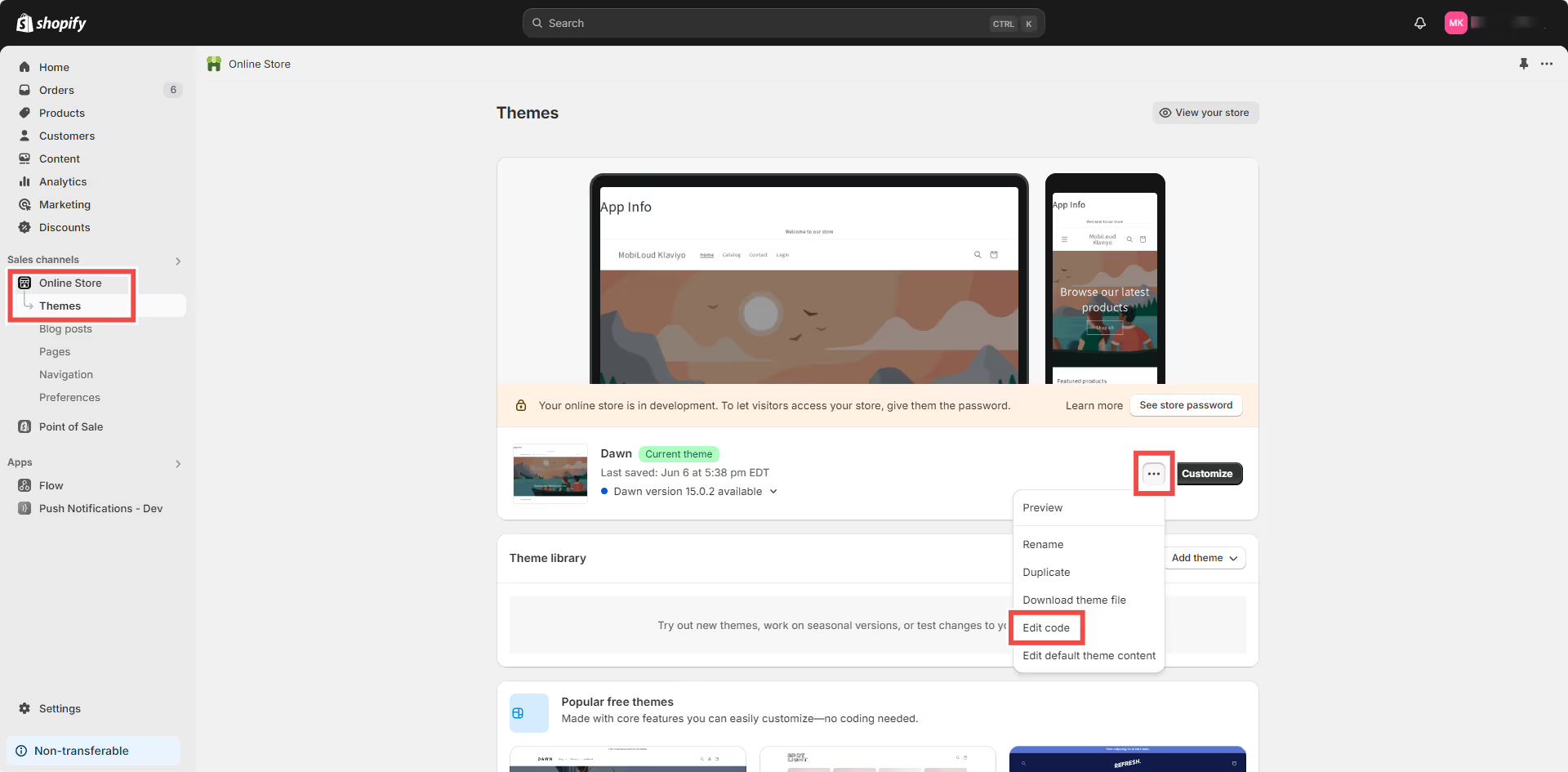
First, in your Shopify Dashboard go to “Online Store > Themes” then click the three dots and click “Edit Code”, as you can see below:
.avif)
Select the “theme.liquid” file on the left sidebar, and drop the code for your selected push platform right before the closing “” tag:
.avif)
Klaviyo
  // Function to check if user agent contains "canvas"
  function mlCheckUserAgentForCanvas() {
    const userAgent = navigator.userAgent.toLowerCase();
    return userAgent.includes('canvas');
  }

  // If the user agent contains "canvas"
  if (mlCheckUserAgentForCanvas()) {
    {% if customer %}
      // If the user is logged in, set their Shopify user ID
      nativeFunctions.klaviyoSetExternalUserId("{{ customer.id }}");
    {% else %}
      // If the user is not logged in, set an empty value
      nativeFunctions.klaviyoSetExternalUserId('');
    {% endif %}
  }
OneSignal
  // Function to check if user agent contains "canvas"
  function mlCheckUserAgentForCanvas() {
    const userAgent = navigator.userAgent.toLowerCase();
    return userAgent.includes('canvas');
  }

  // If the user agent contains "canvas"
  if (mlCheckUserAgentForCanvas()) {
    {% if customer %}
      // If the user is logged in, set their Shopify user ID
      nativeFunctions.onesignalSetExternalUserId("{{ customer.id }}");
    {% else %}
      // If the user is not logged in, set an empty value
      nativeFunctions.onesignalSetExternalUserId('');
    {% endif %}
  }
Leave a Reply