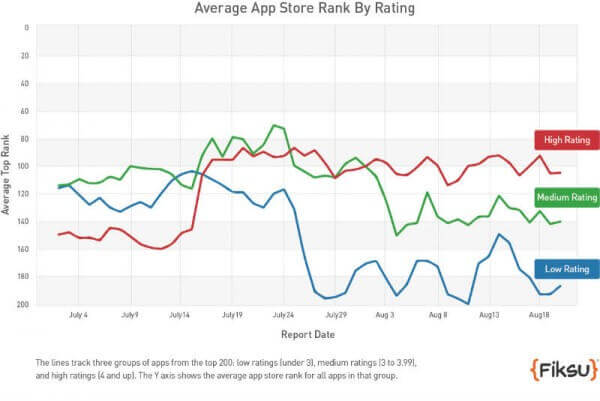
Writing an app press release has two main purposes: it takes some of the work out of reporting on the release of your app (which news sites will love because it makes their lives easier) and allows you to control the initial perception of your app.
This is an important step when it comes to getting initial visibility and traction for your mobile app.
Read on to learn more, as well as a few tips on writing your app press release.
Why Write an App Press Release?
The aim here is to create awareness amongst your target audience and gain some interest on blogs/news sites. That awareness will (hopefully) translate into app installs.
You need to get a bit of initial momentum in the way of app installs for your app to start showing up in app store searches. Once this happens, you can start getting organic installs from the app stores.
A press release also gives another layer of legitimacy and trust to your brand, and you app. It makes you look like a real business, which people should take seriously.
Tips for Doing Your App Press Release
If you get blogs and news sites talking about your app, you’ll naturally increase awareness with your target audience – but you also want to make sure that it’s the right kind of awareness.
Bloggers usually share the interests of their readers, but they may be more technically interested or have greater expertise than their audience. News sites are typically less of a problem, since they are less about personal opinion and more about audience-focused reporting.
So, as well as intriguing bloggers, a good press release will steer them towards helping to sell your app to the intended audience rather than a select few hardcore enthusiasts.
Here are some other points to consider:
Timing:when you decide to put out your press release is important. There will be optimum times of the week in terms of blog readership levels. Find out what they are and really push to get your app talked about on those days.
SEO: just as you want to ensure your website hits the right keywords, make sure your press release shows up prominently in search results. Publishers will love this because it will drive traffic to their sites (making them more likely to publish it) and it will increase the likelihood that your audience will actually find it if they don’t subscribe to the blog it’s posted on.
Avoid feature lists: the purpose of a press release is to generate some excitement or enthusiasm around your app. Don’t list every feature, focus on what makes your app distinctive when compared with your competitors: what’s unique about what you offer and why should your target audience be excited about that? If it’s something every app does, you can probably skip mentioning it.
Link to the App Store: don’t just link to your website. Make sure you also provide direct links to the App Store or Google Play. If a press release has been really successful your target audience may just want to go try it out. Don’t force them to jump through the unnecessary hoop of visiting your website first.
I’d also recommend wikiHow’s (more general) article on writing press releases. It doesn’t deal with app-specific stuff, but you’ll get a good idea of how to structure a release, how long it should be, what you should focus on, etc.
Final Thoughts
One of the toughest parts of launching something new (such as an app) is getting your first users.
You need a clear strategy in place to do this. A press release for your app is a great way to go about it, by getting eyeballs on your app, as well as painting your brand as something to be trusted.
Take our tips above on board when writing your own press release, and launch your app the right way.
You’ve got your app name and mobile app icon sorted. Your potential user was interested enough to open your app’s page, now it’s time to convince and convert that opportunity in a download. That’s what your app store description is for (along with icon and screenshots).
When it comes to app store optimization, your description is a big part. It’s the part that’s going to seal the deal, after your hard work to get potential users on the hook.
Read on and we’ll share some tips on how to write an app store description that produces more app downloads.
App Store Description Writing Tips
Want to write better app store descriptions? It’s not rocket science – you don’t need a degree in marketing or copywriting to figure it out.
Anyone can write an app store description that captures the reader’s attention, clearly and concisely explaining why they should download your app.
Here are some tips.
Start your description with something that really grabs the attention.
Go take a look at the App Store and have a look at how much of the app store description is shown by default (before you click ‘More’). Not much, is it? On Apple’s App Store you have about three lines of text. That’s how long you have to convince a user that your app might be worth their attention.
Unless that first sentence makes you want to read more or take a look at the screenshots, you’re going to be losing potential customers at the first hurdle. Be concise and make it interesting.
So make it the best pitch you can come up explaining what your app does, who it does it for and why it’s unique or better than others.
Lead with the most powerful, crisply stated message that your visitor wants to see
Cut the nonsense or filler – like “Our product is designed in Florida to…” – and just get straight to what the damn thing does and why that’s awesome
Make the user want to click to learn more (so, in many cases, TEASE!)
Be clear about the category of app that you’re selling
Clarity is key here. If it’s a game, don’t leave them guessing. Tell them.
Explain exactly what makes your app unique – why should people choose you over the competition? Make sure it isn’t just a long list of features.
Include social proof and validation
You can tell someone that your app is the best. But anyone can say that about their app, whether it’s true or not. You need to include something in your app store description to convince the target user that it’s worth downloading.
Add any press mentions, blog reviews or customer testimonials. Anything that can back up your claims on how good your app is.
Talk about benefits and features
The meat of your app store description is the features and benefits.
What does the app do – and how does it benefit the user?
The best technique to list features and make sure they’re relevant and help you “close the sale” is to always ask yourself why each is important for your user/customer. Answer the “why it’s important” question for each of your features, and mention it just before or after the feature itself.
By following this simple technique, you take the perspective of your user or customer and explain your features together with the benefit they offer. If you come across a neat technical feature but you can’t come up with a reason why it matters, then just skip it, it’s not about quantity.
Remember, this is a sales and marketing document not a tech spec
This is especially important if you’re using bullet points. Make it about them, your users, not your app or its technical superiority.
This is sales, you need to convince and overcome objections. Some of these might be about whether the app is completely free or not, whether an iPad or tablet version is available or how frequently content in the app is updated. Make sure to mention these points, perhaps using a bullet point list, to overcome common objections (you’ll learn from user reviews what people are concerned with).
How about keywords?
While on Apple’s App Store descriptions are not considered in the ranking algorithm, they do count on Google Play, so you should be quite careful about how and what words you use. Our recommendation to improve the discoverability of your app is inserting your main keyword once in the title, and 5 times in the description.
A great app store description will increase your app’s relevance to potential users, and increase your chance of getting featured in the app store.
If your brand has a mobile app, understanding your app acquisition costs is crucial for sustainable growth.
Cost Per Install (CPI) is one of the most important metrics to track when growing your mobile app user base. Keep reading and we’ll explain all you need to know about this key metric.
Vendrux helps you convert your website into a high-ROI mobile app, with minimal effort and overhead. Want to learn how? Start by getting a free preview of your app now.
What exactly is Cost Per Install?
Cost Per Install (CPI) is a key mobile marketing metric that measures how much you spend to acquire each new app install. It’s the average cost to get one user to download and install your mobile app through paid advertising.
This metric is especially critical for ecommerce and DTC brands with mobile apps because it directly ties marketing spend to user growth.
The less you spend to get users, the more profit you get from your app.
In a world where app users tend to be high-value customers, understanding and optimizing CPI is vital for launching apps that contribute real business results.
Want to know how much revenue your ecommerce app could add for your business? Our free Ecommerce App Revenue Calculator gives you an accurate estimate of what you stand to gain.
How do you calculate CPI?
Calculating CPI is straightforward. The formula is:
CPI = Total Ad Spend / Number of App Installs
For example, if you invest $10,000 in mobile ads and gain 3,500 new installs, your CPI is about $2.85 per install. This simple ratio tells you the average price of each acquired user.
In practice, marketers often calculate effective CPI (eCPI) after a campaign to evaluate performance. If you run multiple campaigns, you might compare their CPIs to see which channel or creative yielded cheaper installs.
A low CPI means you’re getting installs efficiently, whereas a high CPI means each user is expensive to acquire.
Consider this practical example: Imagine a DTC skincare brand runs a Facebook app install campaign with a $50,000 budget. If that campaign brings in 20,000 installs, the CPI is $2.50.
If another campaign on TikTok costs $30,000 and drives 15,000 installs, its CPI is $2.00. The marketing team would note that TikTok delivered a lower cost per install in this case and could allocate more budget there to scale user acquisition.
Why does CPI matter for ecommerce and DTC mobile apps?
For ecommerce and DTC brands, CPI isn’t just a vanity metric – it’s a window into customer acquisition efficiency.
Mobile app users are often highly valuable: they engage frequently, have higher conversion rates, and drive repeat business. If your brand’s app is a major sales channel, then scaling app installs can directly boost revenue.
But you need to acquire those users at a sustainable cost. This is where CPI guides your strategy.
Tracking CPI helps you ensure your user acquisition cost is in line with the revenue each user generates. It complements metrics like Average Revenue Per User (ARPU) and Lifetime Value (LTV) to ensure that revenue from app users exceeds the cost to acquire them.
For example, if your average customer spends $50 on your app over time (LTV) and your CPI is $5, you’re in good shape; but if CPI creeps up to $50, you’re paying as much as you earn, which is unsustainable.
CPI is also a diagnostic metric for campaign effectiveness. A relatively low CPI can indicate that your ads are reaching the right audience with the right message. A spike in CPI, on the other hand, might signal ad inefficiency or saturation of your audience.
Lastly, focusing on CPI can help drive rapid growth and visibility. A strong app install campaign can create buzz and propel your app up the app store rankings, leading to more organic downloads. This was important for many DTC brands launching apps – an early burst of installs improves app store visibility, which in turn attracts even more users without extra ad spend.
What are the key benchmarks and related metrics for CPI?
When evaluating CPI, it’s helpful to know industry benchmarks and related metrics.
What is a “good” CPI?
The answer varies by industry, platform, and region.
As of 2024, the average CPI for shopping/ecommerce apps tends to fall in the few-dollar range in mature markets.
For instance, North America’s average CPI for mobile apps is around $5 (reflecting higher competition and user value), whereas in regions like Latin America it can be well under $1.
Globally, Android app installs often cost less than iOS installs – one analysis showed Android’s average CPI around $1.2 versus about $3.6 for iOS apps.
These benchmarks underscore that what’s “normal” for one market may be high or low for another.
Related metrics
Other key metrics to track alongside CPI include:
Install Conversion Rate: The percentage of people who see your app ad or app store page who actually install. A well-optimized App Store page might convert ~3-5% of viewers into installers. Improving this conversion means more installs for the same spend, effectively lowering CPI.
Post-Install Conversion (Activation Rate): In ecommerce, a crucial metric is how many of those installs become purchasers. Industry data shows that only about 5-10% of new installers make a purchase. This conversion to first purchase is vital – if it’s low, even a cheap CPI won’t save your ROI.
Retention & Engagement: How many of your acquired app users stick around? Many brands monitor metrics like Day 7 or Day 30 retention rate for installs from each channel. CPI must be evaluated in context of user quality.
Cost per Purchase (CPP) or CAC: Some teams calculate a downstream metric like cost per first purchase or customer acquisition cost for app users. For instance, if your CPI is $4 and 10% of installers buy something, the cost per purchaser is $40.
In summary, know your baseline CPI for your sector and region, and keep an eye on how those installs translate into engagement and revenue.
The key is tracking a holistic set of metrics so you don’t optimize for cheap installs at the expense of business outcomes.
Strategies to optimize CPI
Tracking and improving CPI requires a strategic, data-driven approach. Here’s how seasoned marketing teams approach CPI optimization:
Set clear CPI targets aligned with ROI
Determine the maximum CPI you can afford while still making a profit per user.
For example, if an average app customer is worth $100 to you in lifetime revenue, you might set a target CPI of $10 or $20 to ensure a healthy margin.
Channel and campaign selection
Different advertising channels yield different CPIs. Social platforms, search ads, display networks, and influencer partnerships can all drive installs – but their cost efficiency varies widely.
Many businesses use a mix: broad reach channels for volume and niche channels for cost-efficient pockets of users.
Precise audience targeting
To lower CPI, focus your spend on audiences most likely to install (and eventually purchase).
Use lookalike audiences based on your best customers, retarget website visitors who haven’t downloaded the app, and tailor demographics to your buyer persona.
Companies can significantly reduce CPI by honing in on high-intent users.
Compelling creatives and app store optimization
Ads need to grab attention and clearly sell the value of your app.
Test different ad creatives – videos, images, copy – and see which drives more installs per impression.
App Store Optimization (ASO) is another crucial piece: ensure your app store pages have high-converting visuals, clear messaging, and strong social proof.
Leverage social proof and urgency
Highlighting positive reviews, user testimonials, or download counts in your ad or app store listing can nudge more users to install.
Similarly, creating a sense of urgency (e.g., “Limited-time 20% off first order in-app”) can improve conversion rates, effectively reducing CPI by increasing the install rate.
Retarget and re-engage
Don’t forget about those who showed interest but didn’t install, or those who installed but haven’t made a purchase.
Running retargeting campaigns can be a cost-effective way to boost installs and conversions.
Monitor and adjust bids and budgets
Keep an eye on CPI in each channel and campaign.
If one campaign’s CPI starts creeping up, adjust your bids. If another channel is delivering CPI below your target and users are high quality, consider scaling up budget there.
The goal is to find that sweet spot where you’re getting the maximum number of high-value users for the lowest cost.
Vendrux is more than just a website to app tool. We’re a full partner for your mobile app. We even help you craft a launch and promotional strategy to get app users, to ensure your app delivers actual results. Want to know more? Book a consultation now.
What can we learn from real-world DTC brand examples?
Real-world examples illustrate how CPI drives growth for DTC brands:
Aggressive user acquisition by new market entrants
In recent years, fast-growing shopping apps like Shein and Temu have exploded in user numbers by aggressively driving app installs.
They poured budget into mobile ads and referral incentives to acquire users at scale, accepting a higher CPI because they know a percentage will become big spenders.
Their example shows that if the LTV is there, even a substantial CPI investment can be profitable.
Boosting loyalty through app-only perks
Many DTC and retail brands use their app to foster loyalty.
Consider a brand like Sephora – they’ve promoted their app by integrating their loyalty program and offering app-exclusive deals and content.
While they might incur a cost per install in ads or promotions, those users typically have higher lifetime value due to repeat engagement.
Referral-driven growth campaigns
Some DTC brands have turned their customers into marketers by using incentivized referrals to drive app installs.
For instance, fashion resale platform Poshmark ran a “give $10, get $10” referral program. Many brands have used referral credits or friend-invite bonuses to successfully lower their effective CPI.
Looking ahead: Mobile acquisition trends to watch
The landscape of app user acquisition and CPI is evolving.
Future CPI optimization will demand that app marketers be more data-savvy and privacy-conscious in how they drive app growth.
CPI will remain a north-star metric for user acquisition, but the tactics to optimize it will evolve with technology and policy changes.
As you build your mobile growth strategy, remember that CPI is just one piece of the puzzle – it needs to be paired with user quality metrics and long-term ROI analysis to drive truly sustainable growth.
Driving traffic to your app from your mobile site is the smartest way to gain new app users and retain mobile visitors. To get these people to down load your app, you can use smart app banners.
We highly recommend promoting your app using Apple’s smart app banners and the equivalent solution for Android – with these you’ll show a banner suggesting to install your app only to your website visitors using either an iOS or an Android device.
Read on to learn more about smart banners, and how to implement a smart app banner on your site.
What Are Smart App Banners?
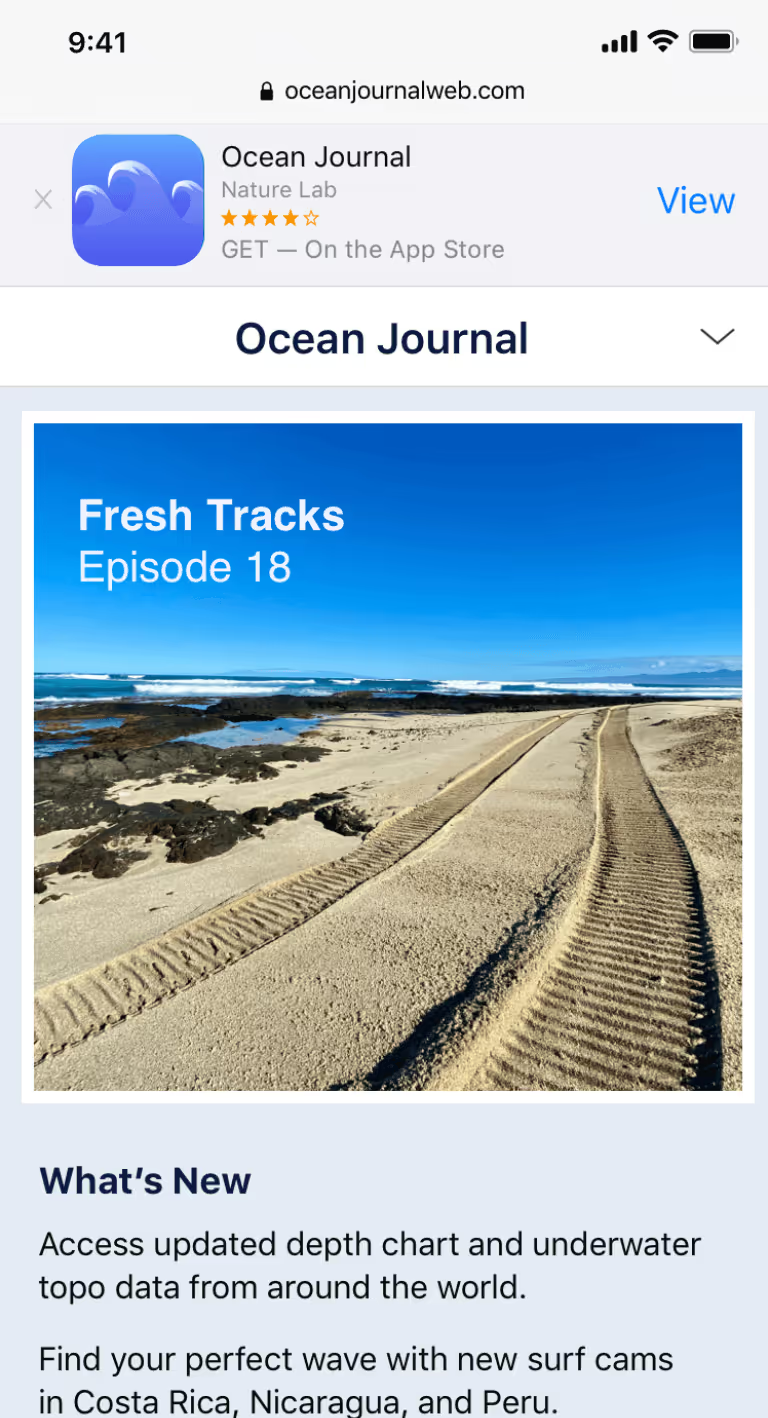
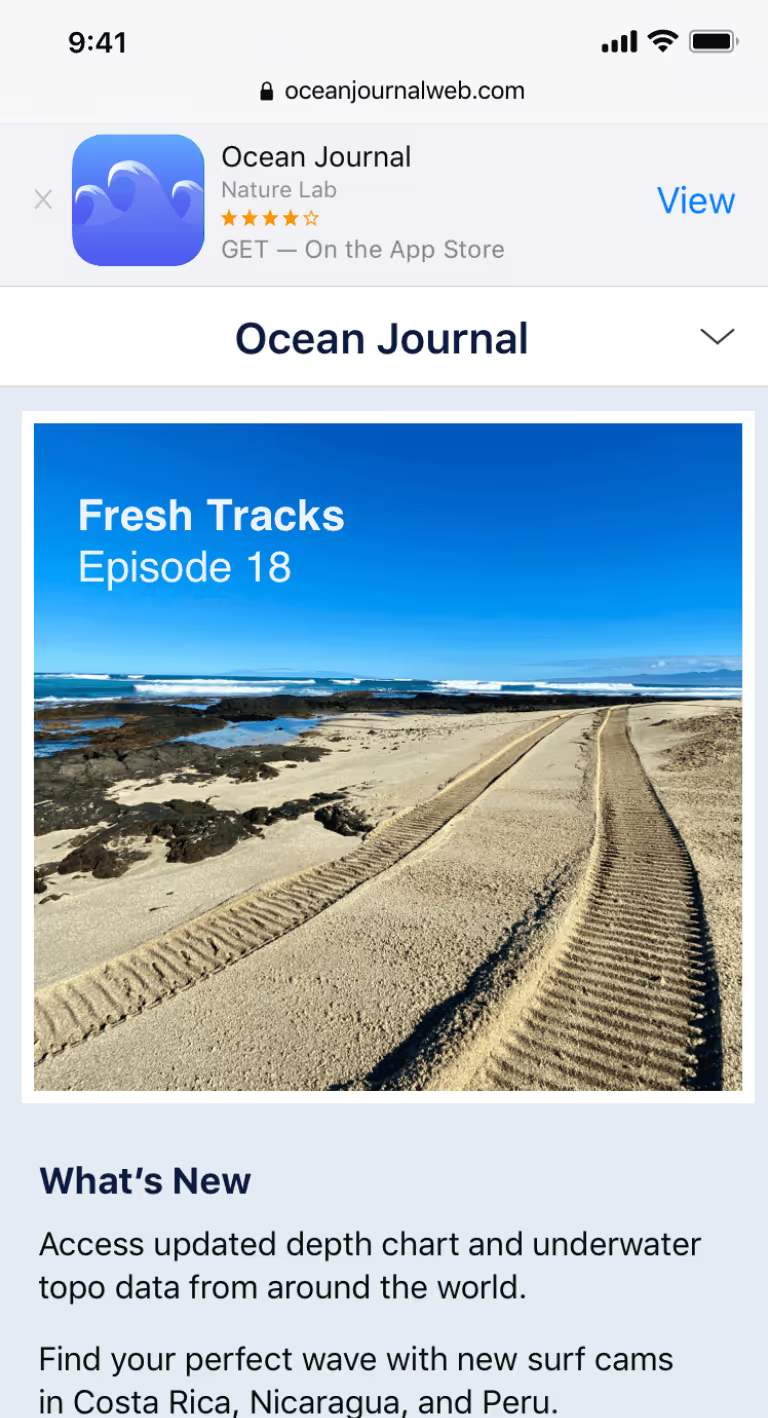
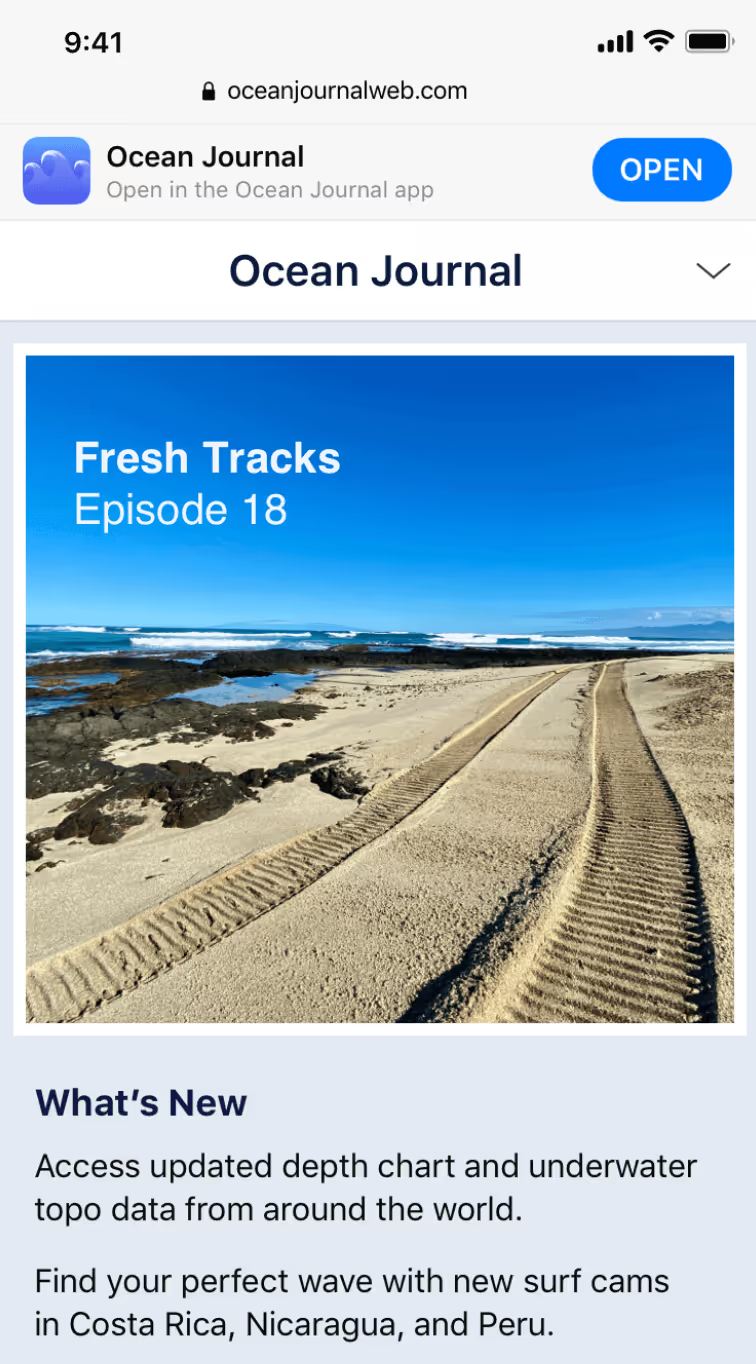
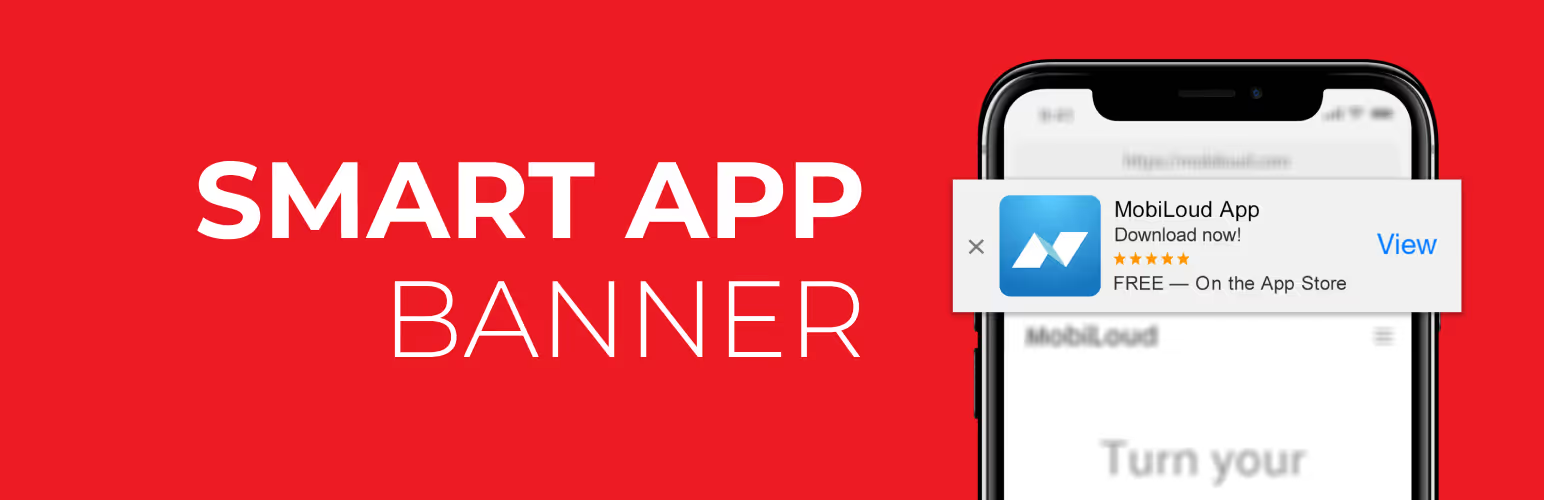
Smart app banners are banners that show up when someone lands on your mobile website, prompting them to get your app.
“Smart App Banners vastly improve users’ browsing experience compared to other promotional methods. Users will trust that tapping the banner will take them to the App Store and not a third-party advertisement. They will appreciate that banners are presented unobtrusively at the top of a webpage, instead of as a full-screen ad interrupting the web content. And with a large and prominent close button, a banner is easy for users to dismiss. When the user returns to the webpage, the banner won’t reappear.”
Apple smart banners (like the one above) have the added benefit of automatically detecting if the user already has the app installed. If so, it will change the word “View” to “Open”. It will also only show the banner if the the app is available on the user’s device, and in the user’s location.
An Android smart app banner works the same way, but will link to the Google Play Store instead of the Apple App Store.
How Do I Add App Banners To My Site?
Apple gives you a way to add iOS smart banners to your mobile website, by adding a line of code to your site.
There are a few issues with this, though.
The smart app banners only work on iOS
They only work on Safari
They’re not customizable at all
The best way to add smart app banners to your site, for both Apple and Android, is with our free plugin Smart App Banners.
Activate the plugin, then go to Settings -> App Bannersand enter your Apple App Store App ID and Google Play App ID, Author, App title and price (if you’re selling your app).
This is the best way to add app banners if you’re on WordPress, and you want your app banners to show for both Android and Apple.
How to Add App Banners Using Code
If you don’t want to install a plugin, you’re only interested in the iOS smart app banners to show, and you’re happy with the limitations, you can do it with a line of code.
Go to your WordPress dashboard and click on Appearance -> Editor, and select header.php on the right, or whatever file in your theme controls the
section of your site’s HTML.
In the
section, add:
[codesyntax lang=”php”][/codesyntax]
Where 123456789 is your App Store ID (see below on how to find it).
Save and you’re done.
It’s just as easy to do it with our plugin, though. All you need are your Apple and Android App IDs.
How to Find Your iOS App Store ID
The easiest way to find your iTunesStoreID or AppId is by opening iTunes and copying the information directly from the App Store url.
Please follow these steps:
Open iTunes.
Search for your app.
Click your app’s name and copy the URL (In case of PC users, mouse right-click on App Name).
App store URL’s will be in the following format:
http://itunes.apple.com/[country]/app/[App–Name]/id[App Id or Store Id]?mt=8
Visit Google Play and search for your app. The URL of your app will look like this: https://play.google.com/store/apps/details?id=com.vendrux.android.yourappname.
You have to copy everything after “id=“, in this case: com.vendrux.android.yourappname – this is the app ID of your Android app.
Benefits of Using Smart App Banners for Android & iOS
Smart app banenrs are a powerful way to get people to download your app. Perhaps the most effective way you’ll get app users. You’re showing them an easy way to get a better experience than they’re currently getting (this is why 90% of our mobile time is spent on apps, rather than mobile browsers).
That means there’s a good chance a lot of people will discover you on the mobile web. You want to get them out of the browser and into your app, to:
Provide a better user experience for your users
Boost retention
Get users to spend longer with you
Increase engagement
Increase revenue metrics
Once these users download your app, they’ll be much more likely to come back to your site in the future. They’ll be able to get back in with one tap, instead of needing to open their browser and type the URL every time.
They’re also more likely to spend more time and take more important actions (such as purchases for an ecommerce store) if they access your site via app, as opposed to the browser.
This post goes more into detail on the benefits of mobile apps vs mobile websites. While you definitely need a well-optimized mobile website, your end goal should be to take these people and get them to download your app.
Smart app banners for Apple and Android are the best way to do this.
Final Thoughts
Utilizing iOS and Android smart app banners is something all site/app owners should do. It’s simple to do – just download a plugin and away you go.
Many people put in a lot of work to create an app, but don’t have a plan for how they’re going to get users for that app. If you have a mobile web presence, smart app banners are an easy, low-friction way to get users.
Putting a smart banner on your site may result in a huge uptick in app downloads – which will, in turn, boost a lot of key metrics for your business.
You only get one chance to make a first impression. Whilst users get some idea of what your app is about from your description and screenshots in the App Store, where does their first impression of the actual app in-action come from? Your launch screen.
Also referred to as a “splash screen”, this is the very first thing your app users will see when they click to open up your app. As such, its importance should not be underestimated!
Get it right — bold, simple and relevant launch screens tend to work best — and you’ll make your audience sit up and take notice, feel genuinely excited about what’s in store for them, and make them far more willing to spend time trying your app out.
Get it wrong and you’ve lost your audience, giving them a negative perception of your app before its even loaded.
We’re going to help you make sure your app opens with a bang by showing you some real-world examples of what a good launch screen looks like.
(Note: Vendrux is not affiliated with any of the companies whose apps we have listed below – we simply believe they have done a great job with their launch screen!)
What is an App Launch Screen?
First up, let’s take a look at what a launch screen actually is. Despite their importance, from a functional point of view a launch screen actually does very little — your app could still work perfectly well without one.
A launch screen is simply a visual placeholder displayed to the user whilst the app is loading. The idea originated from iOS as a way of creating the perception that an app was fast and responsive – rather than opening up an app and having to wait a number of seconds for it to load, users would instantly be presented with the launch screen.
This played a crucial role in improving user experience, so much so that Apple made it a mandatory part of an app’s design, continuing to this day. Because the launch screen’s role is aesthetic rather than functional, some people sit firmly in the anti-launch screen camp.
The main argument lobbied against the launch screen is the belief that its continued usage is largely down to expectation; users just expect to see a launch screen, even though the overwhelming majority of apps just don’t use enough resources to justify one – as mobile OSs become increasingly fast, they’re only truly necessary for the most resource-intensive of apps.
That argument makes a fair point but misses the power of launch screens from a branding perspective. Every time a user launches your app they see the same welcome screen, which breeds familiarity and reinforces your brand. If the user loves your app, each time they’re greeted with that launch screen – plastered with your branding – it starts to fill them with a sense of excitement. That’s a powerful thing to be associated with.
Example Launch Screens
Now we’ve covered what a launch screen is and why they’re important, let’s take a look at some great examples of effective launch screens. Take note of what similarities they all have and you may be able to create one that is just as effective for your own mobile app!
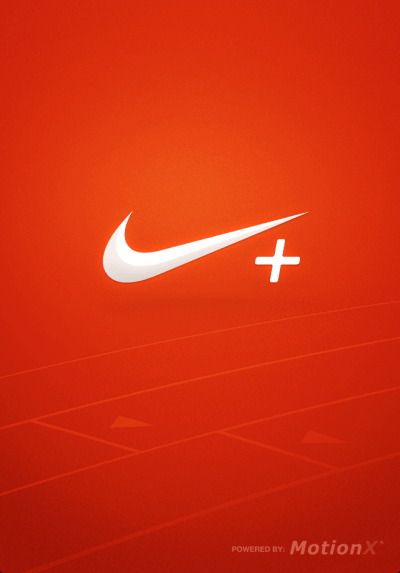
Nike+ Running: The Nike launch screen is a textbook example, with the bold red background in sharp contrast to the simple white logo. The faint outline of the running track at the bottom is also highly relevant to the purpose of the app.
Grasshopper: The “coding app for beginners” – Grasshopper – has a sleek, effective loading screen. The dark background looks professional, and the text on the screen instantly lets users know what the app is about. Although not visible in a still image, those 4 colored dots rotate in a circle as the app loads, which make it animated and interesting to look at.
The Financial Times: If you’re reading the news, you want to make sure that your sources are accurate and trustworthy. The Financial Times have created an app launch screen during which builds trust as early as possible by highlighting the quality and depth of their journalism, as well as a nice newspaper-like icon. Another interesting point to note is that you can scroll between different three versions of the launch screen, with each one containing different value propositions.
Dropbox: The Dropbox launch screen is simple but effective — a bold navy background with their recognizable logo and company name in a very light blue color. There’s no need to overcomplicate your app launch screen, and Dropbox is a great example of this.
Medium: This launch screen is smart, up-to-date, and reflects the user experience on both the mobile app and the website. Being a platform for content creators and writers, Medium have used a unique image of a piano combined with a typewriter, reflecting their slogan, “Ideas and perspectives you won’t find anywhere else”. The illustration style is modern and friendly.
Citymapper: “The ultimate transport app” reflect their mission in this launch screen effectively. The minimal use of graphics means that the launch screen isn’t cluttered, but the arrows and circular icon highlight the app’s relationship with transport.
Wikipedia: Wikipedia’s app launch screen looks professional and clean, reflecting Wikipedia’s regular website. The image is high resolution and instantly recognizable as Wikipedia. This launch screen is minimalistic but effective
TripAdvisor: The TripAdvisor app launch screen does a great job of capturing the look and feel of the app itself. The signature TripAdvisor green background with the logo is instantly recognizable as TripAdvisor, and the text underneath highlights some of the key benefits of using TripAdvisor to someone who has just downloaded the app!
Lyft: Another simple (are you noticing a trend here?) but effective launch screen is Lyft’s. The color scheme is taken straight from their logo and app icon, which effectively promotes their brand as you open the app. The light text on a dark but distinctive colored background with a gradient stands out and draws the app user’s eyes towards the logo.
Soompi: Soompi’s app launch screen is effective for a few reasons. Firstly, the logo is clear and stands out against the dark background. The background is fun and animated, containing illustrations and text relating to the app contents (it’s a news app focused on the K-Pop industry). Despite the animated look, the color palette maintains a professional look, and the loading circle at the bottom of the screen lets the user know that the app is loading.
Takeaways
Having looked at some of the best app launch screens around, is there anything we can take away and apply to our own launch screens?
The overwhelming majority of launch screens – well, the good ones anyway – use the following formula:
Background — Whilst there is no set rule for the background, the best ones are bold and distinct. Usually, the colour chosen is bright to make it stand out, although it’s perfectly acceptable to pick a color around your brand’s color scheme. While simplicity is often chosen, in some cases, using an intriguing texture is a great way to create a distinct feel to your app, and relevant images also prepare the user for the in-app experience.
Logo — The logo is clear and positioned prominently in the center of the screen. Most choose a colour in sharp contrast to the background, to make it jump out.
Name — Unless you’re already a household name, most developers will also choose to include their app’s name underneath the logo to further build brand awareness.
Slogan — Many smaller, less well-recognized apps will also include a short slogan on their launch screen. This tells the user what your app does which will prepare them for the experience they have in store.
Follow this structure to give your app a great launch screen and deliver a knockout first impression! Remember, your app itself needs to look great after the launch screen too! If your app has been created, or you are planning to create your app from a WordPress website, we’ve compiled a list of 5 WordPress themes that will help you build a high performing app landing page.
If you’re thinking about launching an app for your website, but feel put off by the cost, time investment and stress of the entire process, check out Vendrux. Vendrux allows you to convert any website, on any platform or tech stack, to fully-functional, fast, powerful mobile apps, for minimal time and money.
We do everything for you – you don’t need to write a line of code. We also help with putting together your app store listing, getting your app approved by Apple and Google, and can even take care of the graphic design work for your app (including your app splash page).
Launching a native app is a great move for brands across diverse sectors like ecommerce, SaaS, media, and more.
The potential benefits of launching an app are substantial – from revenue to engagement to user retention.
But to truly understand the impact of your mobile app on your business, you need some real business metrics to point to.
This guide focuses on measuring real business outcomes, to give you a structured approach to understanding mobile app performance.
We’ll explore key metrics related to revenue, user engagement, customer retention, and brand perception, giving you clear benchmarks to aim for and practical strategies to maximize your app’s return on investment.
Vendrux helps businesses of all types – from ecommerce to SaaS to media – launch high-quality, revenue-driving mobile apps for minimal investment and effort. Want to see how it works? Go here to get a free preview of what your website will look like as an app.
Most Common Business Results to Measure for Mobile Apps
Let’s look at a range of different ways to measure mobile app performance, using hard, clear metrics. Keep in mind that not all of these metrics will be relevant to all types of apps – we’ll go into the most important ones for different types of business a little later.
Revenue
Revenue is where the rubber meets the road for most businesses. Your mobile app should be contributing meaningfully to your bottom line, and there are several key ways to measure this impact.
Conversion Rates
Look at conversion rates – the percentage of users completing valuable actions like purchases or subscriptions.
Mobile apps typically outperform mobile websites by a factor of 3x or more in conversion rates. This dramatic improvement comes from the seamless experience apps provide: stored payment information, personalized recommendations, timely & relevant push notifications, and even offline functionality that lets transactions happen without constant connectivity.
Measurement Strategy: Track conversion rates across different user segments, acquisition channels, and app versions to identify optimization opportunities.
Average Order Value (AOV)
Examine your Average Order Value (AOV). Well-designed apps can increase AOV by 15-40% compared to mobile web experiences.
Think about it – when a customer is using your app, you can offer tailored product recommendations based on their purchase history, suggest complementary items, and create a checkout process that’s virtually frictionless.
Apps also tend to keep shoppers
All these elements encourage customers to add more to their cart.
Measurement Strategy: Monitor AOV trends over time, across different user cohorts, and in relation to specific app features or marketing campaigns.
Revenue Generated
Track the total revenue generated through your app. While this doesn’t always tell the full story, it’s a simple way to assess how much business your app facilitates.
For established businesses, mobile apps typically account for 35-65% of total digital revenue within 12-18 months of launch.
Don’t just look at absolute numbers, though. Compare growth rates between your app and other channels, analyze how much revenue comes from first-time versus repeat customers, and try to measure incremental revenue (sales that wouldn’t exist without the app).
Measurement Strategy:
Track both absolute revenue figures and percentage of total business revenue
Compare revenue growth rates between app and other channels
Analyze revenue attribution between first-time and repeat customers
Measure incremental revenue that wouldn’t exist without the app
User Engagement
Revenue tells you what’s happening now, but engagement metrics help you predict future success. Engaged users become loyal customers, make repeat purchases, and often become brand advocates.
Daily Active Users (DAU)
Daily Active Users (DAU) is your fundamental engagement metric. Healthy apps maintain a steady number of people who regularly use the app, which should ideally grow over time.
Track this not just as an absolute number but as a percentage of your total user base. Look for patterns across different days of the week and monitor how DAU responds to marketing efforts and app updates.
Measurement Strategy:
Track DAU as both absolute numbers and as a percentage of total user base
Monitor DAU patterns across different days of the week
Analyze DAU in relation to marketing efforts and app updates
Compare DAU growth against Monthly Active Users (MAU) to assess stickiness
Session Length
Session length (how long users spend in your app per visit) reveals engagement depth. Optimal times vary by industry.
Ecommerce apps might aim for 3-8 minutes (enough time to browse and buy without frustration). Media apps might target 8-15 minutes (enough time to consume content).
You need to look at this number in context with your overall metrics. Comparing session length in the app vs session length on your mobile/desktop websites is a great way to see the engagement impact of your mobile app.
Measurement Strategy:
Examine session length distribution rather than just averages
Identify key user actions accomplished within different session durations
Correlate session length with conversion metrics
Compare trends across different app versions and features
Session Frequency
Session frequency tells you how often users return to your app. It’s like session length; increasing this metric shows the app is doing a good job engaging users – and more sessions typically translates to higher revenue.
Measurement Strategy:
Segment users by frequency cohorts (power users vs occasional users)
Analyze patterns in session timing (time of day, day of week)
Correlate session frequency with user lifecycle stage
Measure impact of notifications and re-engagement campaigns on frequency
Screen Flow and Feature Usage
You might even get really deep into the weeds and track usage patters for specific mobile app features.
This won’t be relevant for all types of apps. But if you have a mobile app with exclusive features (not available on the website), you may have an interest in how often these features are used.
Measurement Strategy:
Create flow visualizations to identify common paths and drop-off points
Track feature adoption rates for new and existing features
Analyze time spent on different screens and features
Identify correlation between specific feature usage and retention
App Retention
Attracting downloads is just the beginning. True success comes when users keep your app installed and return to it regularly. This is where retention metrics come into play.
Retention Rates
Track retention rates (the percentage of users who return after their first visit) at key intervals like Day 1, Day 7, Day 30, and Day 90.
Industry averages for 30-day retention hover around 35-40%, with top-performing apps reaching 58% or higher.
Compare retention across different user cohorts and acquisition channels to identify what’s working best.
Measurement Strategy:
Track retention curves across different user cohorts
Compare retention between acquisition channels
Analyze impact of onboarding improvements on retention
Correlate feature usage with retention rates
Churn Rates
The flip side of retention is churn – the percentage of users who stop using your app (you’ll want a low number for this metric).
Understanding why users leave is just as important as the raw numbers. Consider implementing exit surveys or analyzing behavior patterns preceding churn.
Measurement Strategy:
Conduct exit surveys to understand churn reasons
Identify patterns in user behavior preceding churn
Analyze churn by user segments and acquisition sources
Calculate customer lifetime value impact of reduced churn
User Lifecycle Progression
Think about your user lifecycle as a progression: new users become casual users, who become active users, and eventually power users.
How you define a “power user”, as well as users at other stages in the lifecycle, is up to you. But the main idea is that an app should help nurture one-time customers or sporadic users into regular, high-value customers.
Measurement Strategy:
Define clear criteria for each lifecycle stage
Track progression and regression between stages
Identify key actions that correlate with stage advancement
Measure time-to-power-user across different segments
Beyond app-specific retention, your mobile app could also deliver success by increasing your overall retention rate (how many customers remain actively buying, or how many users continue to engage with you).
Customer Retention Rate
Look at how app users compare to non-app users in terms of overall loyalty to your business. You can also assess your overall retention rate over time, paying specific attention to when the mobile app was launched and whether it correlates with a noticeable change in your retention rate.
Measurement Strategy:
Compare retention between app users and non-app users
Track changes in overall retention before and after app launch
Analyze retention across different customer segments
Measure retention impact of cross-platform vs single-platform usage
Customer Churn Rate
Just like above; look at what difference (if any) the mobile app makes on your overall churn rate. Has churn decreased since launching the app? Do users with the mobile app downloaded churn at a lower rate?
Measurement Strategy:
Calculate economic impact of reduced churn
Analyze patterns in customer behavior before churning
Compare churn rates between different customer segments
Measure effectiveness of app-based re-engagement campaigns
Customer Lifetime Value (LTV)
The best measure of long-term retention is customer lifetime value, or LTV – the typical amount a customer spends with you over their lifetime as a customer.
Higher retention = more purchases/longer as a subscriber, and higher LTV.
Measurement Strategy:
Compare LTV between app users and non-app users
Track LTV changes as users adopt additional channels
While harder to quantify than revenue or engagement metrics, brand perception significantly influences long-term success. Your app is often the most frequent touchpoint customers have with your brand, making its quality a critical component of overall brand experience.
App Store Ratings and Reviews
App store ratings and reviews provide the most visible measure of satisfaction. Top-performing apps maintain average ratings of 4.5+ stars.
But don’t just count stars. Analyze review content for common themes in both positive and negative feedback. Responding thoughtfully to reviews (especially critical ones) demonstrates your commitment to customer experience.
Measurement Strategy:
Monitor rating trends over time and across app versions
Conduct sentiment analysis on review content
Track common themes in positive and negative feedback
Measure impact of addressing user concerns on ratings
Net Promoter Score (NPS)
You might want to use Net Promoter Score (NPS) surveys within your app to measure how likely users are to recommend it.
Leading apps maintain NPS scores of 50+, significantly above the industry average of 30-40. Track NPS trends over time and across different user segments to identify areas for improvement.
Measurement Strategy:
Implement in-app NPS surveys at key moments
Track NPS trends over time and across user segments
Correlate NPS with specific features and experiences
Compare app NPS with overall brand NPS
Social Media Sentiment
Social media sentiment offers another window into perception. Monitor conversations about your app across platforms, paying attention to both volume and sentiment.
For healthy apps, positive mentions should outweigh negative ones by at least 3:1. Social listening tools can help automate this process and identify influential users whose opinions carry particular weight.
Measurement Strategy:
Implement social listening tools to track mentions
Analyze sentiment trends during key events (updates, campaigns)
Identify influential users and their impact on sentiment
Measuring Mobile App Success for Different Verticals
Different types of businesses naturally prioritize different metrics when evaluating mobile app performance. Let’s explore what matters most for various sectors.
Ecommerce Apps
For ecommerce businesses, the primary goals are driving incremental revenue, increasing purchase frequency, and enhancing customer loyalty.
Mobile apps typically drive higher conversion rates and AOV than the brand’s mobile website, with higher shopping frequency and session length, with lower cart abandonment (or higher recovery rate for abandoned carts). All this leads to more LTV from app users.
Media companies want to maximize content consumption, increase subscriptions, and build habitual usage.
You want to get people reading your content more often; consuming content for longer; and more upgrades to premium offerings (e.g. subscriptions or purchases).
Key Metrics:
Content Consumption
Session Frequency
Time Spent In-App
Subscription Conversion
Ad Engagement
Push Notification Effectiveness
Offline Reading/Viewing
SaaS Mobile Apps
For SaaS businesses, mobile apps often serve a different purpose. The primary goals are enhancing platform stickiness, increasing feature adoption, and reducing churn.
A mobile app may come as part of a subscription. The mobile app itself is not the product, but another feature of your overall product. It’s a success if it helps users stay subscribed for longer (or pushes users to subscribe to a higher tier).
Key Metrics:
Feature Usage
Daily Active Users
Session Frequency
Adoption Rate (how many subs use the app?)
Cross-Platform Retention (how does the mobile app affect your overall retention/churn rates?)
LTV (do people who download the app stay subscribed for longer, or sub to higher plans more often?)
Marketplace Apps
Marketplace businesses have unique challenges in measuring mobile success, as they need to balance activity on both sides of their platform.
Many success metrics are the same as for regular ecommerce apps; more revenue, higher conversion rates, higher customer retention.
But you might focus more on engagement-related metrics. Since the network effect is so crucial for marketplaces, if your app succeeds in getting more activity (on both the buyer side and seller side), it can have a huge impact on the overall health of the business.
Key Metrics:
Transaction Share
Buyer/Seller Ratio
Buyer/Seller MAU
Listing Creation
Message Response Time
Transaction Completion Rate
Return Frequency
Community & Social Apps
Community and social platforms live or die by engagement. The DAU/MAU ratio (daily active users divided by monthly active users) is a key stickiness indicator, as is the number of sessions, session length and interaction rates.
Key Metrics:
DAU/MAU Ratio
Content Creation
Interaction Rate
Notification Engagement
Time in App
Return Rate
Community Growth
Want to launch a mobile app that drives real results for your business, with little to no risk? Vendrux helps you do this, by converting your existing website into an app. Book a free consultation with our team of experts to learn more about how it works.
ROI: Performance vs Investment
There’s one more aspect to understand: mobile app success has to be measured relative to the investment you put in.
This is ROI – return on investment.
What this means is that an app that drives $10k in monthly revenue can be a great success or a monumental failure, depending on what it cost to make (and to acquire users).
If it cost $150,000 to build your app, another $5-10k per month to maintain, and you’re paying around $50 to acquire each user, your app is probably not a net positive for your business.
But if that same app – $10k monthly revenue – cost just around $1-2k to build, a few hundred per month to maintain, and minimal cost to get users, it may be a roaring success.
ROI is key to any business decision. Make sure you know the path to a positive ROI for your mobile app.
How Vendrux Maximizes Your App’s ROI
Vendrux lets you launch a high-performance mobile app for iOS and Android without:
Rebuilding your website
Managing a second codebase
Taking on significant overhead and operational complexity
A steep upfront investment
For around $500/month, you get a fully managed service that handles everything from app configuration to app store submission and ongoing maintenance.
The upfront cost is low, the overhead is low, yet results are practically equal to what you’d get from a fully custom app.
This means your app doesn’t have to generate millions in new revenue to be worth it. Even a modest increase in repeat purchases, push notification-driven conversions, or customer retention can make your investment profitable. Everything else is upside.
Unlike cookie-cutter app builders, Vendrux gives you a fully branded, premium native app experience without limitations. Your tech stack, your site functionality, your checkout flow – it all works out of the box, just like it does on your site. But you also get the mobile-native features that matter for business results: push notifications, home screen presence, and an App Store listing that boosts brand credibility and discoverability.
A few examples of mobile apps launched with Vendrux. Want more? Check out our app showcase here
Most importantly, you’re not doing this alone.
Vendrux isn’t a tool. It’s a team. We take full ownership of your app’s success, helping you drive adoption, improve engagement, and continually optimize your app’s performance post-launch.
That includes strategy sessions, Slack access to our team, and done-for-you push notification flows that help turn your app into a serious retention and revenue channel.
For businesses focused on outcomes, not just launching an app for the sake of it, Vendrux offers the highest probability of positive ROI with the lowest possible barrier to entry.
Want to see what your app could look like? Start with a free preview and we’ll show you exactly what’s possible.
Final Thoughts
Measuring your mobile app’s performance effectively means:
Picking the right metrics to track
Weighting metrics correctly (find your North Star – most important success indicators)
Putting these metrics into the overall context of your business
Looking at your app’s return against the investment you put in
You’ll also need to look beyond surface metrics to understand true business impact.
Yet while downloads and ratings matter, revenue, engagement, retention, and brand perception tell the real story of your app’s success. You can’t pay for stock or cover payroll with a screenshot of your app store reviews.
To launch an app that contributes measurable results for your business, think about the metrics you need to track and the benchmarks you’re looking for before you launch – and take into account how much you’re going to spend on the app as well.
Less investment (not just upfront, but the time and headspace required to manage) = a higher chance of a positive return.
Vendrux helps you get that positive return, by stripping away the cost and effort involved in launching and managing your app, drastically lowering risk, and also the bar required for a positive ROI.
At around $500 per month, even just a small boost in revenue and engagement from your mobile app and it’ll be worth it.
Launching your mobile app is a huge step toward growing your brand and deepening customer engagement.
But many brands put time and effort into building their app, just to have it flop on launch because they don’t have a clear plan in place.
This is something that Vendrux helps you with. When you partner with us to turn your website into an app, you don’t just get an app – you get a carefully crafted app launch and promotion plan with it.
That’s because we know this is the most important barrier to get past to get a positive ROI from your app.
Once you get a few users for your app, it’s almost impossible not to turn a profit from your app (considering it takes zero effort and just a few hundred per month to maintain).
Whether you’re building your app with Vendrux and want to see what we do to help you, or you’re launching on your own, we’re going to help you with this in-depth app launch guide.
We cover:
Things you need to set up prior to launching
Different ways to incentivize app downloads
Channel-specific strategies for owned channels like your website, email list, SMS and social
Example flows and promotional copy
Let’s get to it!
First Steps
Before we dive into marketing tactics, it’s important to set up a solid foundation to ensure your app gets the visibility and success it deserves.
Our team is here to help with the initial setup and promotional tools, but we’ll need your support to move quickly and make adjustments in a timely manner. Together, we’ll cover everything needed to give your app the best possible start.
Here’s what we’ll work on first:
Setting up tracking and analytics
Planning your app launch offers
Adding app promotional elements to your website
Preparing your email and SMS campaigns
Adding app promotion to your social media channels
Let’s get into our recommended playbook for a successful initial launch.
Setting Up Analytics
Tracking and analytics are essential for monitoring your app’s performance from day one.
We’ll integrate app tracking into your existing GA4 setup, giving you a single dashboard to view performance metrics across all channels.
This is a quick and straightforward process that requires temporary admin access for our team to get everything configured. Once it’s set up, you’ll have full visibility into key metrics like:
Engagement
Revenue
Retention metrics
Push notifications
Any other important metrics you already track
With this setup, you’ll gain clear insights into how your app users behave and the results you generate.
Setting Up the Essentials
There are four key channels that will drive the majority of your app downloads:
Your website
Your email list
Your SMS list
Your social media accounts
These channels provide the most direct access to your audience, and they’re where your app promotion efforts will have the most impact.
Promotion on these channels can be as simple or as detailed as you want to make it.
To keep things manageable, we recommend starting with simple, high-impact tactics that can easily grow over time.
The main goal of your initial app launch is to target your best customers – those who already love your brand and are most likely to download the app. Quality downloads matter more than sheer numbers, so focus on customers who will engage and return.
If you can get app downloads for free, just by letting your customers know that it exists – great!
But usually, you’ll need to offer some kind of incentive to convince someone to download it, instead of just shopping on your mobile website.
And while you might not want to spend more to acquire a customer you already spent money on acquiring, it’s worth it.
Our data shows that app users are approximately 6x more valuable than desktop users, and 11x more valuable than the average mobile web user. (get someone on the app, there’s a good chance they’ll deliver a lot more revenue for your business).
Here’s a list of proven incentive tactics that work across industries. Choose the ones that resonate most with your brand and customers:
1. App-Exclusive Discounts
What it is: Offer a special discount exclusively for app users
Why it works: Provides a clear, tangible benefit that rewards customers immediately for downloading
Example: “Download our app and get 20% off your first order!”
Additional Development Needed? No
2. Early Access to Sales or New Products
What it is: Give app users a head start on your most popular sales or launches
Why it works: Creates urgency and FOMO, especially for customers eager to secure limited-stock items
Example: “App users get early access to our Black Friday sale—download now!”
Additional Development Needed? No
3. Loyalty Program Perks
What it is: Offer extra loyalty points or faster rewards for customers who shop through the app
Why it works: Builds long-term engagement and aligns with existing customer behavior
Example: “Earn 2x points on all purchases made through the app”
Additional Development Needed? Potentially (if loyalty programs need deeper app integration)
4. Free Gifts with Purchase
What it is: Include a free item with the first purchase made in the app
Why it works: Simple way to reward customers and encourage them to test the app
Example: “Get a free travel-size [Product Name] when you shop in our app”
Additional Development Needed? No
5. Exclusive Content or Experiences
What it is: Provide app users access to exclusive guides, playlists, videos, or community events
Why it works: Makes app users feel like part of an inner circle, building brand affinity
Example: “App-only tutorials, playlists, and behind-the-scenes content await—download today!”
Additional Development Needed? No (unless content requires complex features like live streams)
6. App-Exclusive Products or Collections
What it is: Launch special products, colors, or collections only available on the app
Why it works: Creates excitement and gives your most engaged customers a reason to download and shop regularly
Example: “Limited-edition [Product Name] available only on our app!”
Additional Development Needed? No
7. Flash Sales and Time-Limited Offers
What it is: Offer short-term, high-value discounts exclusively through the app
Why it works: Creates urgency and rewards frequent app visits
Example: “Flash sale happening now in the app—up to 50% off for the next 2 hours!”
Additional Development Needed? No
8. Pre-Order Access
What it is: Let app users place pre-orders before products are available to the general public
Why it works: Builds loyalty and excitement among your most engaged customers
Example: “Be the first to shop our new collection—pre-order in the app today!”
Additional Development Needed? No
How to Choose the Right Incentives
Not every tactic will make sense for your brand, and that’s okay.
To choose the best options:
Know your customers. What motivates your audience? Discounts? Exclusive access? Free perks?
Align with your brand, and pick incentives that feel authentic to your voice and customer experience
Think long-term. Focus on strategies that encourage repeat engagement, not just one-time downloads
Promoting Your App Across Key Channels
Once you’ve decided on your incentive(s), you’re ready to integrate them into your promotional strategy across channels.
The first place to start? Your website.
Start with turning website visitors to app users
Your website is one of the most powerful tools for driving app downloads – after all, it’s usually the first place customers interact with your brand.
By integrating simple, persistent app promotions into key areas of your site, you can effectively convert casual visitors into loyal app users without disrupting their shopping experience.
Here are some high-impact placements to get your app front and center:
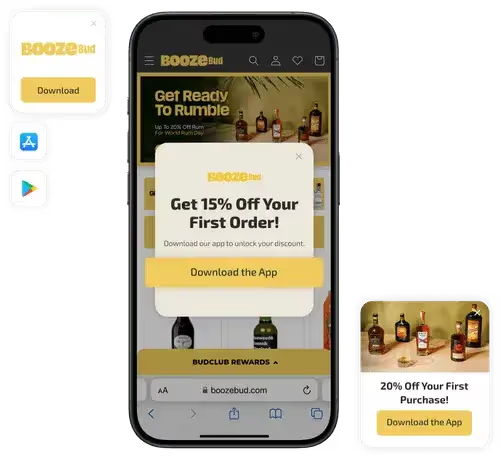
Smart App Banners
Smart app banners are a no-brainer for driving downloads directly from your mobile site.
What They Are: These are banners that show up at the top of your mobile site on iOS and Android devices, giving users an easy way to download your app
Why They Work: They’re built right into the device, so customers trust them and don’t have to jump through hoops to get to the App Store
What You Need to Do: Our team will handle the setup for you. All we need is admin access to your site to get everything running smoothly
Pro Tip: Keep your banner copy short and benefit-driven. Something like, “Shop faster and save 20% with our app →” works wonders
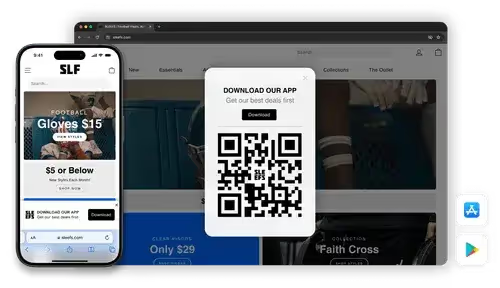
QR Code Widget
Our QR code widget makes it easy for customers to scan and download the app wherever they interact with your brand.
What It Does: Displays a branded, dynamic QR code for both iOS and Android app stores. Visitors can simply scan the code to download your app in seconds
What to Say: “Scan to download our app and unlock exclusive perks”
Note: Our team will set this up for you. We’ll need your input to finalize placement and design choices.
Persistent Download Links
Ensure your app is always within reach by incorporating persistent download links in key areas of your site.
Key Placements:
Footer: Add app store badges or a simple “Download Our App” link
Main Navigation Menu: Include a visible “Get the App” link, ensuring users can easily find it
Dedicated Landing Page: Create a page highlighting the app’s features, user benefits, and unique offerings, like exclusive deals or early access
Pro Tip: Make the landing page visually engaging and clear, focusing on how the app enhances the shopping experience. Include app store links, screenshots, benefits for the customer, and customer testimonials (once available).
Strategic Banners and Pop-Ups
Use banners and pop-ups to bring attention to your app in a way that aligns with the user’s shopping journey.
Hero Banners: Announce your app prominently on the homepage with a compelling message. Example: “The [Brand] App is here—download now and enjoy exclusive perks!”
Mid-Page Banners: Insert banners on high-traffic pages like your collection pages, blog posts, and guides to promote app-specific benefits
Exit-Intent Pop-Ups: On desktop, encourage visitors to download the app before they leave. Example: “Don’t miss out—get 15% off your next purchase when you download our app!”
This setup ensures your app is front and center at every key touchpoint on your site, making it easy for customers to take the next step.
Making The Most Of Your Email Subscriber List
Your email list is one of the best tools to let your customers know about your app. These are people already familiar with your brand, and email gives you a chance to highlight why the app is worth downloading.
There are two ways to approach launching your app (and doing ongoing promotion) through your email list:
Launch Campaigns: A series of emails designed to build excitement and drive downloads before, during, and right after your app launch
Automations (Flows): Adding your app to existing email sequences, so it becomes an easy next step in the customer journey
Email Launch Campaigns
These are your high-impact, short-term emails designed to create buzz and drive downloads.
A well-timed sequence will keep your audience engaged without overwhelming them.
Teaser Email
When to Send: 2 weeks before launch
What It Does: Builds curiosity and gets your audience thinking about the upcoming app
What to Say: Highlight a few app benefits and hint at an exclusive launch offer
Example Subject Line: “Something exciting is coming soon… 👀”
Pro Tip: Don’t give away all the details – keep it light and exciting. For example:
“We’re about to make shopping [Brand] even easier. Stay tuned for early access and exclusive perks!”
Pre-Launch Reminder
When to Send: 3-5 days before launch
What It Does: Reinforces the teaser, builds anticipation, and preps your audience for launch day
What to Say: Drop more specific hints about the app’s features and highlight the upcoming launch offer
Example Subject Line: “3 days until your VIP access begins!”
Pro Tip: Use visuals, like a mockup of the app or a countdown timer, to keep the momentum going
Launch Day Email
When to Send: The day your app goes live
What It Does: Drives immediate downloads with a clear CTA and an irresistible launch offer
What to Say:
Lead with the app’s top benefits and exclusive perks. For example:
“Shop faster, save bigger, and get early access to drops. Download the [Brand] app today and enjoy 20% off your first purchase →”
Include App Store links with bold buttons for easy access
Example Subject Line: “It’s here! Download the [Brand] app now and save 20% →”
Follow-Up Email
When to Send: 3-5 days post-launch
What It Does: Reaches anyone who missed the launch or hasn’t downloaded yet
What to Say:
Reinforce the app’s value with testimonials or stats. For example:
“Join thousands already shopping smarter with our app. Don’t miss out on exclusive perks!”
Extend the launch offer if possible to drive urgency
Example Subject Line: “Thousands are loving the [Brand] app—are you in?”
Pro Tip for Campaigns: Keep the focus on why customers should download the app (e.g., convenience, exclusive perks, faster shopping) and make the path to downloading as frictionless as possible.
Use Automated Flows To Further Promote Your App
While launch campaigns create buzz, flows ensure your app remains a key part of your ongoing customer journey.
These are the emails your customers will naturally receive based on their behavior or milestones, and they’re perfect for reinforcing the value of your app over time.
These emails typically get much higher open rates than campaign emails, making them perfect for driving visibility for your app.
The key is to weave your app into these without it feeling forced – just another way to make shopping with your brand even easier.
Let’s explore where your app can fit in.
Welcome Flow
The welcome flow is your first impression with new customers, and it’s a great opportunity to introduce your app.
When to Mention the App: After the first or second email, once you’ve set the stage with who you are and what makes your brand unique
What to Highlight:
Benefits like app-exclusive deals, faster checkout, or early access to sales
A simple call-to-action: “Make your next order even easier—download our app today”
Post-Purchase Flow
Post-purchase emails are sent when customers are most engaged. It’s a prime moment to encourage them to download your app.
When to Mention the App: In the thank-you or shipping confirmation emails
What to Highlight:
Features like real-time order tracking (if available) or app-exclusive content like care guides or product tutorials
Messaging example: “Keep track of your order and get exclusive perks—download our app”
Abandoned Cart Flow
Abandoned cart emails are all about nudging customers to complete their purchase, and your app can be part of the solution.
When to Mention the App: After the first reminder email
What to Highlight:
The convenience of saving their cart for easy access later
Messaging example: “Pick up where you left off—download our app for a faster checkout experience”
Your VIP customers (those who spend the most and return often) deserve special treatment, and your app can play a big role in deepening their loyalty.
When to Mention the App: After introducing the benefits of being a VIP and offering personalized perks
What to Highlight:
App-exclusive VIP perks like early access to new collections, special discounts, or exclusive content
Messaging example: “Your VIP perks just got better—unlock early access and exclusive rewards in our app”
Pro Tip: Include an offer tailored to your VIPs, such as “20% off your first app purchase” or “Early access to our holiday collection just for VIPs”
Using SMS to Drive App Downloads
SMS is one of the most direct ways to reach your audience. It’s quick, attention-grabbing, and perfect for driving app downloads.
Since people are already on their phones, getting them to download your app is a natural next step.
But there’s more to it than that. SMS can also act as a bridge to building your push notification subscriber list.
Push is less intrusive, feels more integrated into the app experience, and gives your audience a way to stay connected without overloading their inboxes or messages.
Here’s how to make SMS work for your app launch:
App Launch Campaigns
Teaser Message
When to Send: About 1 week before launch
Goal: Build curiosity and anticipation for your app
Example Message: “We’ve got something exciting launching soon… 🎉 Any guesses? Stay tuned!”
Launch Day Announcement
When to Send: Morning of launch day
Goal: Drive downloads with a clear CTA and incentive
Example Message: “It’s here! 🚀 The [Brand] app is live. Download now for app-only perks + 20% off your first order → [Link]”
Reminder Message
When to Send: Later in the evening on launch day or the next day
Goal: Capture anyone who missed the initial announcement
Example Message: “Don’t miss out! 🎉 Download the [Brand] app today and claim your 20% discount → [Link]”
Tips for SMS Campaigns
Here are a few additional tips to help you maximize the number of app downloads you get from SMS subscribers:
Use SMS to highlight the benefits of enabling push notifications in your app, like first dibs on sales or restock alerts
Always include a direct link to your app download page for a frictionless experience
Send your messages at times when your audience is most likely to engage – usually midday or early evening
Using Social To Reach An App-Native Audience
Social media is the perfect place to connect with your app’s ideal audience: engaged, mobile-first customers who are already interacting with your brand.
With the right approach, you can create buzz, drive downloads, and build long-term engagement, all while making the most of the content and assets you already have.
Here’s how to break it down into actionable steps:
Start with Your Profile
Ensure your profile bio, link-in-bio, and pinned posts point users directly to your app download page.
Update Your Bio: Example: “The [Brand] app is here! 🎉 Shop faster, unlock app-only perks, and more. Download now → [Link]”
Create a Pinned Post: Use a standout image or video to highlight the app launch and its benefits Example Caption: “Big news! 🚀 The [Brand] app is live. Download today for exclusive perks, faster shopping, and a 20% welcome discount → [Link]”
Create Reels and Stories
Short-form video is the most engaging content format right now. Use Reels and Stories to show off your app and its features.
You can leverage AI video editor tools to create amazing Reels and Stories. Use tools that support AI dubbing, eye contact AI, and video generation to make your content look professional without extra effort.
What to Include:
A walkthrough of your app (shopping flow, app-exclusive perks)
Testimonials from your team or customers
Teasers for upcoming app-only deals or exclusives
Example Story Flow:
Teaser: “The wait is almost over… 👀 Our app drops tomorrow!”
Announcement: “It’s here! 🚀 Tap the link in our bio to download now and get 20% off your first order”
Reminder: “Haven’t downloaded the app yet? Don’t miss out on app-only perks like exclusive deals and faster shopping! [Link]”
Highlight Customer Benefits with Visuals
Social media is visual by nature, so focus on eye-catching creatives that showcase why downloading your app is a no-brainer.
Examples of Creatives:
Infographics comparing app vs. web perks
Mockup of your app screen alongside a call-to-action
GIFs or animations highlighting app-exclusive benefits
Use Highlights to Build Longevity
Instagram Highlights are perfect for keeping your app front and center. Create a dedicated highlight for your app launch, and update it regularly with new content.
Highlight Content Ideas:
Step-by-step app walkthroughs
Testimonials from early adopters
Promotions or app-only deals
FAQs about the app
Always highlight what’s in it for the customer – exclusive perks, faster shopping, or early access to sales. You can also explore co-marketing the app with influencers as an ongoing promotion strategy (which we’ll explore in a separate guide).
Bringing It All Together
Launching your app is an exciting milestone, and the strategies we’ve outlined here will help ensure a strong start.
The key is to start simple. Focus on the tactics that align with your brand and resonate most with your audience.
Here’s a quick recap of what we’ve covered:
Start by setting up your foundation with analytics and tracking – this gives you clear visibility into what’s working
Plan compelling incentives that give customers real reasons to download
The first step is maximizing your website’s potential with smart app banners, QR codes, and strategic placements
Next, create email and SMS campaigns that build excitement and drive downloads
Use social media to reach your most engaged, mobile-first customers
Remember, quality downloads matter more than quantity.
Focus on converting your best customers first. They’re the ones who will engage most with your app and help drive its long-term success.
And remember, Vendrux is here to support you every step of the way.
If you want to launch your own app, and have an expert team behind you to help you get traction, get in touch.
So you’ve launched your mobile app. Great. Even better, you’ve managed to convince users to download it – maybe with an incentive like a 10% discount or app-only features and product drops.
But here’s the reality check: that download doesn’t mean much unless the user sticks around.
Most people have over 40 apps installed on their phone. The majority rarely use more than a handful. If your app doesn’t become a habit, it’ll be forgotten. Or worse, deleted.
With mobile apps, success isn’t about how many downloads you get. A mobile app is a long-term play. The key is how many of those downloads turn into regular users.
At Vendrux, we’ve helped more than 2,000 companies launch mobile apps. We’ve been in the trenches, we’ve seen launches that set off fireworks, but that struggle to get over the hump of long-term user retention. And we’ve helped brands overcome the common problems that lead to mobile app user churn.
With that experience, we’ve crafted this guide to help you not just launch a mobile app, but launch a mobile app that keeps your customers consistently engaged. Interested? Keep reading for more!
Want to discuss how we can work with you to not only launch the perfect app, but craft an engagement strategy that makes users stick around? Get in touch now and book a free consultation.
9 Things to Know to Maximize Mobile App User Retention
One of the objections we often get from brands considering building an app is, ‘will people actually use my app?’
It’s certainly a valid question, especially when your mobile website likely already provides a great user experience, and you might be wondering if it’s really worth it to launch an app.
The answer to the earlier question is yes – people will use your app. But you need to give them a helping hand.
Here’s how successful brands, in verticals such as ecommerce, SaaS, media, communities and more, launch mobile apps that maintain solid long-term retention rates.
1. Understand App Retention Benchmarks
Before you try to improve retention, it helps to understand what’s ‘normal’.
These numbers can make mobile app retention sound like a losing battle. But the truth is, most brands simply do a poor job of driving long-term retention.
They launch an app without a clear plan, use cheap app builders that produce clunky or unreliable user experiences, or fail to properly maintain and improve the app over time.
When done right, with the right strategy and execution, you can keep a much higher share of your app users engaging with the app.
Well-built, well-promoted ecommerce apps can retain 80-90% of their users long-term. If you can do this, you’ll be well ahead of the curve.
2. Make the First Impression Count: Onboarding & Activation
Onboarding is your best opportunity to turn a download into a regular user. It’s the moment when the user is most curious, most interested, and has the fewest objections.
Don’t waste that attention.
Make it easy to log in, especially for users coming from your website. Then craft an onboarding experience that immediately gets users engaging with the app.
Provide a quick, clear tour of how to get value from the app, and highlight what’s different or better in the app experience. Make sure it’s easy to get around, and that key parts of the app (search or product categories for ecommerce apps, content preferences for news apps) are easy to find.
This is also your best shot at maximizing opt-in rates for push notifications. Get this part right, and you’re setting the foundation for habit formation.
3. Ensure a Seamless, Frictionless UX
Bad UX is one of the most common (and most preventable) reasons users churn.
Make sure users stay signed in (users will stop using if they need to keep re-entering their login details).
Eliminate bugs and performance issues that frustrate users.
Simplify navigation so users can get what they want quickly.
If you’re having retention problems, UX is the first place you should look. If it sucks to use, if it’s more confusing or less intuitive than your website, no one’s going to use your app.
This is a big reason why it’s a mistake to build your app with cheap, DIY app builders. The user experience is unlikely to measure up to your website, and you’ll often have to drop key features or integrations that you use on your site, due to issues integrating them into your app.
You might succeed in getting an app live for just a couple of hundred dollars, but it ultimately means nothing if it’s a downgrade from your website.
4. Use Push Notifications to Keep Users Coming Back
Push notifications are one of the most powerful tools for driving retention, when used well.
Most users don’t stop using your app because they dislike it. They stop because they forget about it.
Push helps you stay top-of-mind, build usage habits, and drive re-engagement. While overuse of push notifications can lead to churn, more retention problems are due to brands underusing push notifications.
They think, ‘once someone’s downloaded my app, of course they’re going to use it.’
Well, most of us have multiple screens of apps on our phone. Your user probably has 50+ apps downloaded. A lot of those are apps they thought were interesting, so they downloaded it, just to forget about it.
The best brands use regular push notifications so users don’t forget about them, and slowly make their app feel indispensable.
For ecommerce, promote app-only drops, abandoned cart reminders, and loyalty incentives.
Media brands can send breaking news alerts or trending articles.
SaaS apps might use push for relevant updates or feature tips.
You don’t even need to be aiming for a conversion every time. Simple, non-intrusive push notifications provide value just by capturing a small amount of mindshare.
Simple reminders of relevant products, or even motivational messages with zero promotional intent can be enough to stop the user from forgetting about you – which is a death sentence for mobile apps.
The key is to be positive and non-intrusive, so your users are happy to receive your app’s notifications, not annoyed.
Do this, and you can even send daily notifications without causing users to delete the app.
Think – why should someone keep your app installed?
The answer doesn’t need to be groundbreaking. You don’t necessarily need flashy, bloated features in the app. Just make it slightly more valuable or convenient than your mobile website.
App-only benefits: early access, exclusive content, saved preferences.
Easy order tracking via push notifications.
Loyalty points or rewards programs.
More personalized experiences and persistent login.
Exclusive product drops or promotions (for ecommerce apps).
Custom content feeds or saved lists (for media apps).
If you have none of this, you’ll get some people – those most protective of their mobile phone’s storage space – who question why they’ve got the app when they can just use the website.
Even if your app is just your website packaged into a native container, you can still provide value to regular users by offering faster launching (via a home screen icon) and more convenient, mobile-native navigation.
But ideally, take it a step further with small app-exclusive features, like early access product drops, that make it a no-brainer for your customers to keep the app on their phone.
And don’t just offer these features – promote them. Make sure the user knows what they’re getting with the app, and why it’s an upgrade.
6. Reinforce App Usage Through Deep Linking
Once someone installs the app, guide them back to it consistently.
Use deep links whenever you link to your site from email, SMS, and anywhere on the web (including your socials). Deep links are links that automatically open in the app, if the user has the app installed.
For example, download the Amazon app, then click an Amazon link. You’ll notice it opens the app – not the website.
This is crucial if you’re using other channels to drive repeat visits. You want to build a habit of using your app, rather than your website.
The more your users interact with your brand inside the app, the more likely they are to build the habit of using it. But if they keep getting sent back to the website, they might end up forgetting they ever had the app installed.
7. Re-Engage Lapsed Users
You can re-capture a lot of users who stopped using the app (or even deleted it).
Ideally, capture app users before they churn. Identify common churn points (like Day 7, 14, or 21) and set up re-engagement campaigns to get them to come back to the app.
Push is good for this – though you might also use email or SMS (as inactive users may have tuned out or disabled push).
Trigger nudges based on user behavior (or inactivity), and use incentives or reminders that feel relevant to their past actions.
If someone hasn’t used the app in a while, but they still have it downloaded, they probably don’t hate it. They just need a nudge.
8. Learn from Your Users
You don’t have to guess why users are churning. Ask them.
Use in-app surveys or feedback prompts, and monitor reviews and ratings for recurring issues. Talk to your most loyal users to find out what’s working and what could be improved.
Then act on what you learn. The best retention strategies are built with your users, not just for them.
9. Target the Right Users
Your app isn’t for everyone – and that’s okay.
Realistically, your app is for your top customer segments; your most loyal, engaged customers.
A mobile app can nurture customers into joining these segments, but it’s not going to turn all your one-time shoppers into super fans, and some people are going to download the app, use it once or twice, and decide that it’s not worth their storage space.
If you have high churn rates or low engagement rates, it may be that you’re attracting a lot of non-ideal users. It’s not necessarily a bad thing if these people download (and subsequently delete) your app. But make sure you optimize for your top users.
It can be a big win for you even if only 10-15% of your customers use the app. Focus on making it a hub for VIPs – not using it to try and replace your website.
Related: Launching your app? Get everything you need to know to craft a successful launch with our step-by-step Mobile App Launch Playbook.
Case Study: What We Can Learn About Mobile App Retention from Shein and Temu
Shein and Temu have set a new standard for mobile app retention by transforming shopping into a habit-forming, entertainment-driven experience. Their apps aren’t just for buying – they’re designed for daily engagement.
Both brands use interactive elements like daily check-ins, spin-to-win games, and referral rewards to keep users coming back.
They also leverage aggressive push notification strategies. Users receive frequent, compelling messages that highlight flash sales, expiring offers, or cart reminders, helping the brand stay top-of-mind and driving urgency-driven re-engagement.
Shein and Temu are all about getting you into the app – and then going heavy on push and gamification to get users regularly engaging
The apps also blur the lines between ecommerce and social platforms. Personalized feeds with infinite scroll make browsing addictive, and features like group buying or shared rewards tap into social behavior.
The result: users check the app as casually as they’d open Instagram or TikTok.
While not every brand can or should copy Shein and Temu wholesale, you can borrow key principles to boost user retention in your app. You’ll see how an exciting, habit-forming user experience plays a huge part in making the app a fixture in the user’s life.
Final Thoughts: Retention Is About Engagement
At the end of the day, retention is really just about engagement.
If your users regularly engage with the app – opening it, scrolling around, reading content, looking at products – they’re going to keep it installed. And, eventually, they’ll buy through the app.
Your mobile app doesn’t need to have a bunch of flashy features. For regular users, it’s always going to be more convenient to use the app than to load up the browser and go to your website, even if what’s served to them is basically just a repackaged version of the website.
Your primary job is to make sure the app isn’t less convenient than the website (by being buggy, confusing, or missing key features from your website because they’re not supported by your app provider).
Once you’ve checked this box, start building a usage habit, through easy to follow onboarding and regular push notifications, to make opening the app a regular part of your users’ day.
This is how brands launch mobile apps that add money to their bottom line.
Want our help? Vendrux helps web-first brands turn their websites into mobile apps, for a low upfront cost, minimal ongoing costs, with zero effort required from you to build and maintain.
A few examples of the apps we’ve built for successful web-first businesses
We also support you with your app launch strategy, and ongoing engagement via push notifications. Unlike other no-code solutions, we don’t just hand you an app and ask you to run with it. We help ensure your app is a success.
Getting featured on the App Store can transform your app’s trajectory overnight.
I’ve helped launch dozens of apps, and I can tell you that in 2026, with thousands of submissions flooding Apple’s gates daily, the game has changed.
But the fundamentals? They’re still gold.
Ratings matter
Your rating should be sitting at 4.5 stars or higher – anything less and you’re fighting an uphill battle. But here’s the part most miss: it’s not just about the average rating. You need a steady stream of recent positive reviews.
Set up an intelligent review prompt system. The key word here is intelligent.
Don’t ask for reviews randomly. Trigger your prompt after success moments – when users complete a task, achieve a goal, or receive value from your app.
For a task management app, that might be after they complete their fifth task. For a fitness app, maybe after their third workout.
Your update cadence matters more than you think.
Establish a regular release cycle. Each update should mix bug fixes with meaningful improvements. Don’t just fix things; enhance things. Show Apple and your users that your app is alive and evolving.
Build a clear path to revenue
Your monetization strategy needs to be crystal clear, both to users and Apple.
Free apps need a clear path to revenue. Paid apps need to justify their price tag. But here’s what really works in 2026: value-based pricing tiers.
Start with a free tier that provides genuine value. Not a crippled version of your app – a complete experience that solves a real problem. Then layer on premium features that enhance that experience.
Structure your subscriptions logically. Monthly plans work for content-driven apps. Annual plans work better for utility apps.
Focus on a core feature
Here’s where most apps go wrong. They try to be everything to everyone. Stop that. Look at your analytics. Find the one feature that gets the most engagement. The one thing users rave about in reviews. That’s your core. Double down on it.
Take your main feature and make it exceptional. If you’re a photo editing app, pick one type of editing you do better than anyone else. Maybe it’s portrait enhancement, maybe it’s landscape optimization. Whatever it is, make it so good that users come to you specifically for that feature.
Strip away features that dilute your core experience. Each feature in your app should support your main value proposition. If it doesn’t, it’s just adding complexity. Complexity is your enemy when trying to get featured.
It sounds simple but it’s probably the hardest thing ever, so it can be a source of differentiation and what ultimately makes you stand out.
Yes, consider adding AI
Let’s get practical about AI. First, forget about slapping ChatGPT into your app. That’s not what Apple wants to see. Instead, focus on using AI to reduce friction in your user experience.
Start with CoreML. Build models that learn from user behavior to make their experience better. If you’re a productivity app, use on-device AI to predict the user’s next action. If you’re a fitness app, use it to adjust workout recommendations based on performance patterns.
The key is to make AI invisible. Users shouldn’t know they’re interacting with AI – they should just notice that your app seems to understand them better over time.
Build with privacy in mind
Privacy isn’t just about compliance anymore – it’s a feature set. Start by mapping out your data collection. For every piece of data you collect, ask yourself: “Can we provide this feature without this data?” If yes, don’t collect it.
When you do need data, be transparent about it. Create a privacy dashboard in your app. Show users exactly what you’re collecting and why. Give them granular control. Let them opt out of optional data collection while keeping core functionality.
Implement Sign in with Apple even if you have other sign-in options. Make it the first option users see. It shows Apple you’re aligned with their privacy vision and gives users an easy, secure way to try your app.
Consider Digital Wellbeing
Digital wellbeing isn’t just about adding a screen time tracker.
Start by auditing your notification strategy. Create a hierarchy: urgent, important, and optional. Time-sensitive notifications should be rare – reserve them for things that genuinely need immediate attention. Tag your notifications properly. Build different experiences for different Focus states.
Don’t chase engagement for engagement’s sake. Build features that encourage meaningful use rather than addictive patterns. If your app helps users accomplish their goals faster and then get back to their lives, you’re doing it right.
Pay attention to your App Store Presence
Your App Store page needs to sell your app in seconds. Start with your first screenshot – it should communicate your core value proposition instantly. Don’t waste it on a login screen or splash page. Show your app solving the user’s primary problem. Read our recommendations on how to design screenshots that convert.
Write your app description like you’re telling a story. First paragraph: the problem you solve. Second: how you solve it. Third: what makes your solution unique. Use short sentences. Break up text into scannable chunks. Remember, most users will only read the first three lines.
We’ve built an AI tool to help you generate optimized App Store descriptions. Try it here, it’s completely for free.
Your preview video should be watchable without sound. Lead with your best feature in the first 3 seconds. Show real usage scenarios, not marketing fluff. Keep it under 30 seconds. End with a clear call to action.
Update your screenshots seasonally. When Christmas comes around, show holiday-themed content. During back-to-school season, highlight relevant features. This shows Apple your app is actively maintained and culturally aware.
Interface design is everything
Start by mapping every user action to its impact. Each tap should have a clear, immediate result. If a user has to tap more than three times to reach a core feature, redesign that flow. Remember: the best interface is one the user doesn’t have to think about.
Implement progressive disclosure. Don’t show all options at once. Surface basic features first, then reveal advanced features as users become more experienced. This keeps your interface clean while supporting power users.
Design for interruption. Users will switch apps mid-task. Make it easy to resume where they left off. Save states automatically. Provide clear visual cues about progress and status. Consider adding a “continue where you left off” section on your home screen.
Accessibility isn’t optional. Start with dynamic type support. Test your app with VoiceOver. Ensure all interactive elements have proper labels. Add proper contrast ratios. These aren’t just accessibility features – they make your app better for everyone.
Consider the whole Apple ecosystem
Don’t just port your iPhone app to iPad. Rethink how the larger screen can enhance your core features. Use split views meaningfully. Add drag and drop support. Make use of the Apple Pencil if it makes sense for your app.
For Vision Pro, think spatial. Don’t just float your 2D interface in space. Consider how spatial computing can enhance your core functionality. If you’re a home design app, let users visualize furniture in their actual space. If you’re a productivity app, think about how infinite canvas could change how users organize information.
Watch integration needs to be purposeful. Focus on glanceable information and quick actions. Don’t try to replicate your full app experience. Think about what makes sense in a five-second interaction on your wrist.
Optimize performance
Start with launch time. Measure your cold start time. If it’s over two seconds, you’ve got work to do. Use background fetch to pre-load data. Implement progressive loading. Show useful content before everything’s loaded.
Monitor your battery impact. Use Instruments to profile your app’s energy usage. Background operations should be batched and scheduled intelligently. Network requests should be combined and cached where possible.
Storage optimization matters more than ever. Implement proper cache management. Use On-Demand Resources for content users don’t need immediately. Add a cache clearing option in your settings. Users notice when an app respects their storage space.
Build an app they can’t ignore
Sustainability isn’t just trendy – it’s becoming essential. Add features that help users understand their environmental impact. If you’re a delivery app, show the carbon footprint of different delivery options.
Build for international audiences from day one. Implement proper localization. Consider cultural differences in your feature set. What works in the US might not work in Japan. Show Apple you understand global markets.
Getting featured isn’t about luck. It’s about building an app that Apple can’t ignore. Focus on quality. Be intentional about every feature. Think about how your app contributes to the broader iOS ecosystem. Make it easy for Apple to see the thought and care you’ve put into your app.
Most importantly, think long-term. The apps that get featured aren’t usually the ones trying to get featured. They’re the ones focused on building something genuinely valuable, maintaining quality, and consistently improving based on user feedback.
Anyone with a keen interest in SEO will tell you the importance of your App Store ranking.
With approximately 63% of users finding an app through general browsing in the App Store, this is important stuff. A higher ranking gives your app more exposure and brings more traffic and downloads. So what determines whether your app features at the top of the App Store results, or the bottom?
Today we take a look at the four factors that really impact your App Store Ranking.
Your App’s Title
Your targeted Keywords
Number of Downloads
Positive Ratings
Let’s dive in to each factor now.
1. Your App’s Title
Of all the keywords attached to your app, the ones included in your title are weighted most heavily by Apple. In fact, apps which include keywords in their title rank on average 10.3% higher than their keywordless counterparts.
Many app developers neglect this, opting for a short, brandable title for their app. This seems perfectly reasonable, but the two aren’t mutually exclusive. You can include your most important keywords and still create something that reflects your app and company brand.
Consider an app for insomniacs: ‘Sweet Dreams’. Is your app really any less related to your brand if you re-named it ‘Sweet Dreams: Deep Sleep for Insomniacs’? Not at all.
The revised title maintains the ‘Sweet Dreams’ branding, boosts your rank for targeted keywords by including them in your title and removes any ambiguity around your app’s purpose, bringing more targeted clicks. It’s a no-brainer, right?
2. Your Targeted Keywords
Your keywords in the App Store are somewhat similar to keywords for SEO purposes: the keywords you target directly impact the search terms you rank for. However, unlike with SEO, where theoretically you could produce enough content to rank for thousands of keywords, in the App Store you’re restricted to 100 characters.100 characters is nothing, so choose wisely.
Make sure you use your full allocation of characters, and avoid targeting unnecessary search terms; if your keyword appears in your title, you don’t need to target it again.
What does a winning keyword look like?
The simple answer: high traffic volume, low competition.
The right answer: It has a good volume-competition trade off, but crucially matches the search intent of your ideal app user.
Your keywords are an important App Store ranking factor on both iOS and the Google Play store, so choose them wisely.
3. Number of Downloads
Of course, App Store Optimisation will only get you so far. Apple is more interested in giving users a great experience than how well optimised your app description is.
The key metric Apple looks at is the number of downloads your app gets. If more people are downloading your app, this will significantly improve your ranking.
More accurately, Apple focus on download velocity. An app released only a month ago might have fewer total downloads than a much older app, but if it’s being downloaded more frequently right now it will still rank strongly.
4. Positive Ratings
A relatively new addition to the App Store ranking algorithm: your app’s ratings will also impact your rank.
From Apple’s point of view, this makes a lot of sense. Giving ‘better’ apps -at least in terms of rating- more exposure should improve user experience.
The significant points seem to be around the 3-4 star mark. Apps above 4 stars receive a ranking boost, apps below 3 receive a penalty, as shown in this chart from Fiksu.
Sure, it’s important to create an app users love, but arguably more important is creating an app that is glitch free- glitches are the number one reason people leave a dreaded one-star rating.
Even if your app has attracted some negative reviews, don’t write it off just yet. Work on creating an update that fixes the problems with your app as Apple weights the more recent ‘post-update’ reviews more heavily.
After that, a flurry of good reviews is often enough to cancel out any penalty your app was given and get you moving back up the rankings.
And, don’t forget, there is a strong positive correlation between your ratings and the number of downloads you get, so creating an awesome app will boost your rank on two accounts.
Wrapping Up
Focus on these four factors and you should benefit from a ranking boost in the App Store. And remember, many of these factors are strongly linked: Picking relevant keywords brings targeted traffic who are more likely to like your app and leave positive ratings.
It’s also important to make sure that you have a great app in the first place. This naturally leads to good ratings and reviews and will organically help your app to rank better.If you already have an app live – make sure you keep it well maintained and updated. If you are planning to build one – consider Vendrux.
Vendrux is for converting websites into mobile apps for iOS and Android. There’s no code required, you can go live in just a few weeks, our team handle all the tricky parts, and the apps will have all the features you need to grow and thrive on Google Play and the App Store.
We hope that these tips help you to rank higher on the App Store and Google Play. It is a competitive space, but with time, effort and knowledge you can succeed!