Your app listing has about seven seconds to make its case. In that window, screenshots do more persuading than your description, your feature list, or your release notes.
And yet most brands treat screenshots as a compliance checkbox: snap a few screens, upload them, move on.
That’s a missed opportunity. Screenshots are the second most influential factor in download decisions, right behind ratings. Getting both the technical specs and the design right is worth the effort.
This guide covers everything in one place: the exact dimensions Apple and Google require, the design principles that drive conversions, and the tools that make the whole process faster.
Apple App Store Screenshot Requirements
Apple is strict about screenshot specs. Non-compliant images will delay or block your app submission.
What You Need to Know
Formats: JPEG or PNG
Quantity: 1 to 10 screenshots per localization
Content rules: Screenshots must show actual app content in use, not browser captures or mockups that misrepresent the experience
No transparency: PNG files must have solid backgrounds (no alpha channel)
Required iPhone Dimensions
You must submit screenshots for the 6.9-inch display (or 6.5-inch, which Apple will scale up). Apple automatically generates smaller sizes from your largest submission.
Display Size
Example Devices
Portrait (px)
6.9″ (required)
iPhone 16 Pro Max, 16 Plus, 15 Pro Max
1290 x 2796
6.5″
iPhone 14 Plus, 13 Pro Max, 11 Pro Max, XS Max
1284 x 2778 or 1242 x 2688
6.3″
iPhone 16 Pro, 16, 15 Pro, 15
1206 x 2622 or 1179 x 2556
6.1″
iPhone 17e, 14, 13, 12, 11 Pro
1170 x 2532 or 1125 x 2436
5.5″
iPhone 8 Plus, 7 Plus, 6S Plus
1242 x 2208
Tip: Design for 6.9″ first. Apple scales down to smaller sizes automatically, so you only need to create one set of iPhone screenshots unless you want device-specific designs.
Required iPad Dimensions
You must submit screenshots for the 13-inch display. Apple scales down to smaller iPad sizes.
Color space: sRGB recommended (avoid wide-gamut like Display P3)
Recommended Dimensions
Device Type
Portrait (px)
Landscape (px)
Phone
1080 x 1920
1920 x 1080
7″ Tablet
1200 x 1920
1920 x 1200
10″ Tablet
1920 x 2560
2560 x 1920
Tip: Always fill all 8 phone screenshot slots. Every empty slot is a missed opportunity to sell your app.
Apple vs Google Play: Quick Comparison
Apple App Store
Google Play Store
Formats
JPEG, PNG
JPEG, 24-bit PNG
Max per listing
10
8
Min required
1
2
Transparency
Not allowed
Not allowed
Max file size
Not specified
8 MB
Primary size (phone)
1290 x 2796 (6.9″)
1080 x 1920
Auto-scaling
Yes, scales down from largest
No
7 Design Tips for Screenshots That Convert
Getting the dimensions right is table stakes. What actually drives downloads is the design. These seven principles apply to both stores.
1. Use Large, Scannable Captions
Only 4% of users enlarge portrait screenshots on the App Store. Your text needs to be readable at thumbnail size.
Add a single, bold headline to each screenshot that communicates the core benefit of what’s shown. Think of each caption as a billboard: if it needs two reads to understand, it’s too long.
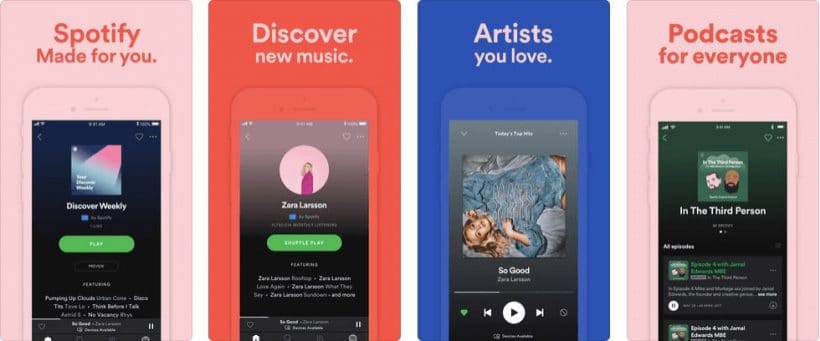
Spotify does this well, with simple one-line captions in large, clean type over each screenshot.
2. Lead with Benefits, Not Features
Each screenshot should answer “What’s in it for me?” not “What does this button do?”
Structure your screenshot set like a landing page. The first screenshot is your hero, the next few highlight your strongest benefits, and the last one is your closer. Revolut is a good example: each screenshot highlights a distinct benefit (save money, send money, get paid early) rather than listing features.
Revolut highlight one benefit per screenshot
3. Show Your Brand
Use your color palette, typography, and logo throughout your screenshots. This isn’t just about aesthetics. It reassures potential users that they’re looking at the real app, not a knockoff.
Consistent branding across your screenshots also makes your listing look polished and professional, which matters more than most teams realize.
Flair Belgie’s bold and unique color choice instantly shows their audience that they’re in the right place.
4. Combine Screenshots Into Panoramic Designs
Some brands treat their screenshot set as a single canvas, with designs that flow across multiple frames. This creates a “landing page” effect that tells a story as users swipe.
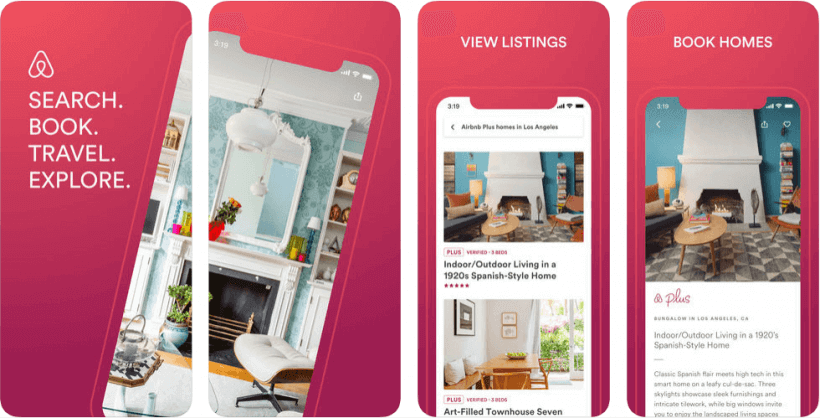
Airbnb and TripAdvisor use this approach, with isometric designs and branded backgrounds that make their listings visually distinctive.
Airbnb combine screenshots to create a strong opening image
TripAdvisor use their signature colors combined with a sleek visual
5. Highlight What Makes You Different
Don’t waste screenshots on generic features every app has. Show the functionality that sets your app apart from competitors.
If your app has a unique search experience, a standout loyalty program, or an innovative checkout flow, that’s what deserves screenshot real estate.
6. Add Social Proof
If you have strong ratings, press mentions, or notable user numbers, work them into your screenshots. A frame that says “Rated 4.8 by 50,000+ users” or “Featured in TechCrunch” builds credibility faster than any feature description.
This works especially well as the last screenshot, a closer that reinforces trust before the user decides.
Strava‘s use of a quote from The Running Awards instantly increases their social proof wit their target audience
7. Include a Video Preview
Four times more consumers prefer watching a video about a product than reading about it, and video previews can increase install rates by over 25%.
Resolution: Match your screenshot dimensions (e.g., 1290 x 2796 for 6.9″)
Google Play video specs:
Format: YouTube video link
Length: 30 seconds to 2 minutes recommended
No fixed resolution requirement (YouTube handles scaling)
Keep videos short, focused, and subtitled. Most users watch without sound.
Screenshot Design Tools
You don’t need a design team to create professional screenshots. These tools handle templates, device frames, and store-compliant exports.
AppScreens.com – Template-based editor with device frames for both stores. Good for teams that want to move fast without a designer.
TheAppLaunchpad.com – Drag-and-drop screenshot builder with a library of layouts and backgrounds. Solid free tier.
Launchmatic.app – Focused on Apple App Store screenshots with pre-built templates designed around Apple’s guidelines.
MockUPhone – Free tool specifically for wrapping screenshots in realistic device frames. Useful if you’re designing in Figma or Photoshop and just need the frame layer.
Figma / Canva – If your team already uses Figma or Canva, both have app store screenshot templates available. Figma gives more control; Canva is faster for non-designers.
A Quick Design Checklist
Before you upload, run through this:
Screenshots match the required dimensions for each store
No transparency in PNG files
Text is readable at thumbnail size (don’t enlarge to check, shrink your screen)
First screenshot communicates your strongest value proposition
Each screenshot highlights a different benefit or feature
Branding is consistent across all frames
You’ve filled all available slots (10 for Apple, 8 for Google Play)
Device frames are current (no outdated bezels or notch styles)
Video preview is under 30 seconds (Apple) or 2 minutes (Google Play)
Doing screenshots right is closer to a science than an art. Nail this, and you give yourself the best change to get the download after doing the hard work to get someone to land on your listing.
Need screenshots for your mobile app?
If you’re launching a native app with Vendrux, our team handles App Store and Google Play submissions for you, including screenshot guidance and store listing optimization.
Book a free strategy call to see how your store would look as a native app, and what your listing could look like.
Google Play is the largest mobile app store in the world, with more than 3 million apps available for Android users to download.
Impressive, right?
Standing out is important. You need a great product page to rank well for key search terms and to entice potential users to download your Android apps.
When you build apps with Vendrux, we support you heavily in this process, but it’s still important to understand what makes a great Google Play product page.
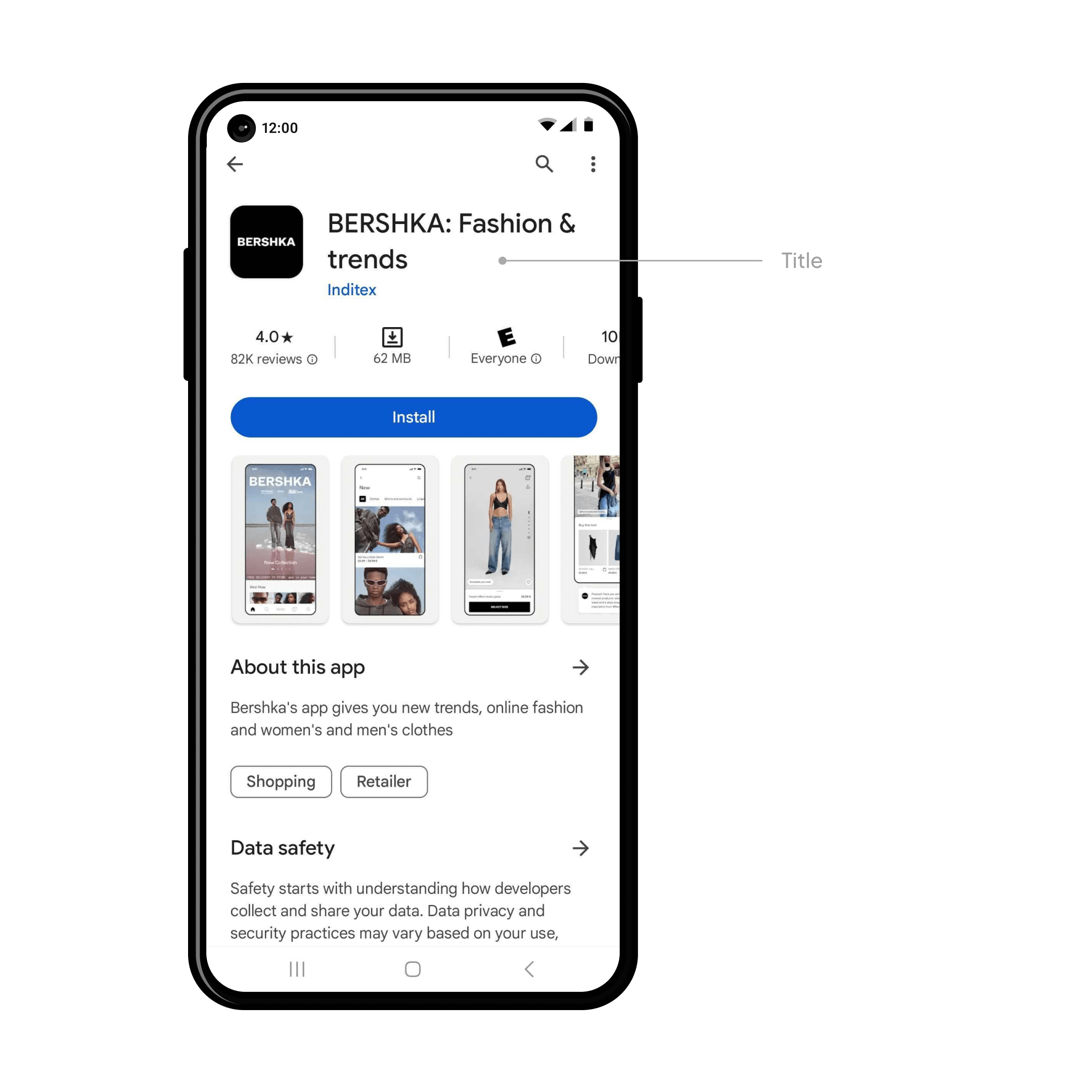
What is a Google Play Product Page?
Your product page is the key landing page for your app in the Play Store. It’s designed to show off the core functionality and value propositions of your app in a digestible and appealing way.
Go and visit the Google Play store now if you have an Android device, and click through to any app that catches your eye. You’ll be taken straight to the app’s product page – which we’re now going to break down into its essential parts.
Title
The title of your app is all-important, the cornerstone of your brand in the search results, categories, the user’s home screen, and everywhere else.
Google has a few specific requirements. Your title should:
Be unique, easy to spell and remember, catchy and brandable
Accurately communicate what your app is all about
Be no more than 50 characters long
Not include misspellings of popular terms or trademarked terms
Localized into different languages if appropriate
With Vendrux apps, usually the name is straightforward. Because we convert your existing website or ecommerce store, generally you’ll just use your existing brand name. This generally makes the most sense – unless your app deviates in some major way from your web presence.
Icon
The icon is the first thing people will see in the search results, top charts, and the product page.
More specifically, Google Play’s requirements are:
32-bit PNG (with alpha)
Dimensions: 512px by 512px
Maximum file size: 1024KB
When you build apps with Vendrux, our set up fee covers all this. We work with experienced designers to create the perfect app icon for you that perfectly fits both your brand and Google’s requirements.
Short Description
Writing a compelling short description for your Play Store listing is key for grabbing the attention of users and enticing them to download.
It’s important to be concise. You’ve only got 80 characters to highlight the core value proposition of your app and tell users why they should install it on their device. Think of what sets your app apart, why should the user download it.
Use your existing knowledge of your audience from the web to focus on your key messages and to speak directly to your target user.
There are a few important best practices to follow too. Descriptions should avoid specific performance claims, CTAs, special characters and unusual punctuation. You should also localize the description for different languages where appropriate.
Description
Users can expand the short, 80 character description into the full description – up to 4000 characters. This is where you can go more into depth, and really give a comprehensive overview of your app’s features and functionality.
It’s important to really focus on what sets your app apart and why they should install it. You can use bullet points to summarize key features and social proof to win the user’s trust.
Of course, it is as important as ever to adhere to Google’s content guidelines and metadata policy.
Screenshots
It’s recommended to have at least four high quality screenshots from your app on the product page.
These demo the core features of your app in a visual manner – making it easy for potential users to understand what your app is all about.
It’s important to create high quality and informative images that comply with Google’s in-depth guidelines.
When you build apps with Vendrux, our designers and app experts handle all of this for you.
Ratings and Reviews
Ratings and reviews are a crucial piece of social proof for your Google Play product page. High ratings can really boost trust and downloads, offering page visitors valuable insights into your app’s features and UX.
They’re prominent on your product page and one of the first things users see below the fold. At the top of the ratings and section you’ll see summary statistics like overall average rating, and below that the individual reviews (and your replies) for users to read.
It’s really important to get as many reviews as possible, which helps you both to rank for your key search terms and to get more downloads. Vendrux apps come with automatic ratings reminders, so you’ll maximize this on autopilot.
Get ready for the Google Play Store today
At Vendrux, we’ve built thousands of apps for clients ranging from small startups to multibillion dollar multinationals. We build iOS and Android apps from your existing site – allowing you to reuse everything you’ve already built.
It’s the perfect way to build native mobile apps fast and cost-effectively.
We build the apps for you, through a full service.
Part of this service includes publishing on both the Apple App Store and Google Play. We’ve been through the process countless times, and know exactly how to navigate it and guarantee approval.
We help you to prepare everything we’ve mentioned in this article – from the description to the screenshots prepared by our design team.
Mobile apps aren’t just a nice-to-have anymore. They’re a retention powerhouse.
With mobile usage at an all-time high and acquisition costs continuing to rise, your app is one of the best tools you have to build sustainable, long-term revenue.
But here’s the reality: an app that nobody downloads won’t drive results.
That’s the #1 reason most apps fail. It’s not about bad code or missing features. It’s that the business didn’t have a solid plan to get users.
This guide is here to help you avoid that. Based on data, industry benchmarks, and insights from launching over 2,000 apps, we’re breaking down the best channels for mobile app user acquisition – primarily for successful ecommerce and media brands who want to launch a new asset that actually makes a difference to the bottom line.
Want our help to build (and launch) your app? Vendrux helps web-first businesses launch apps for minimal cost, with little effort, and little work to maintain. Curious? Get a free preview of your app now – all you need is your website’s URL.
Organic vs Paid Acquisition: What’s the Right Balance?
When acquiring users, your strategy falls into two camps:
Organic acquisition: Users find your app naturally, through search, word-of-mouth, your website, or content.
Paid acquisition: You pay to get users, via ads, sponsored content, or influencers.
As of 2022, roughly 60% of installs were organic and 40% paid.
Most users still discover apps on their own; but paid channels are essential for fast growth.
Organic downloads are, obviously, preferable. The less you spend on user acquisition, the faster you make a profit.
But they also tend to yield better results over time. In fact, while organic users made up 58% of installs, they drive 72% of all app sessions.
They’re more likely to stick around because they sought you out. If someone is an active customer, or actively looked for your app, there’s a higher level of intent, which means they’re more likely to be long-term, engaged users.
That said, paid acquisition isn’t dead; it’s just expensive.
In 2023, the average cost to acquire a user in Western markets hit $29, up 60% from five years earlier. And Apple’s privacy changes (ATT) made tracking harder, though advertisers adapted by late 2023.
A sustainable user acquisition strategy is about balancing reach with retention – and knowing which channels to invest in at each stage.
The Top Mobile App User Acquisition Channels
Let’s dive into the most effective acquisition channels in 2026, starting with your most valuable (and underused) asset: your existing audience.
1. Your Website
The mobile version of your site is likely your highest-traffic touchpoint. It’s the most direct path from interested visitors to app installs.
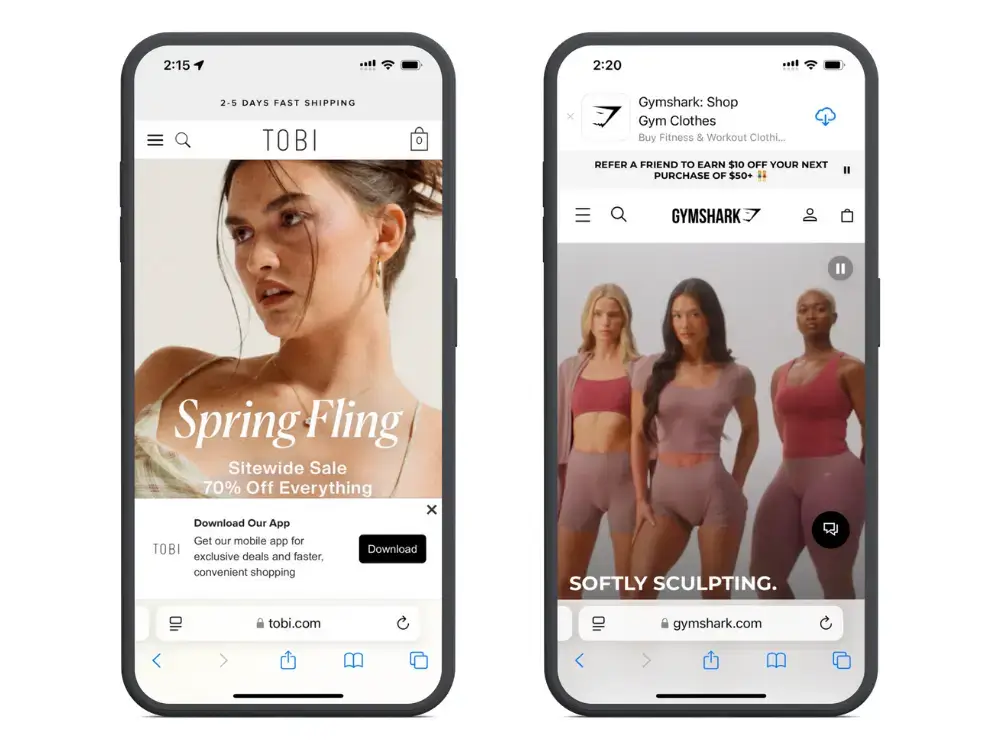
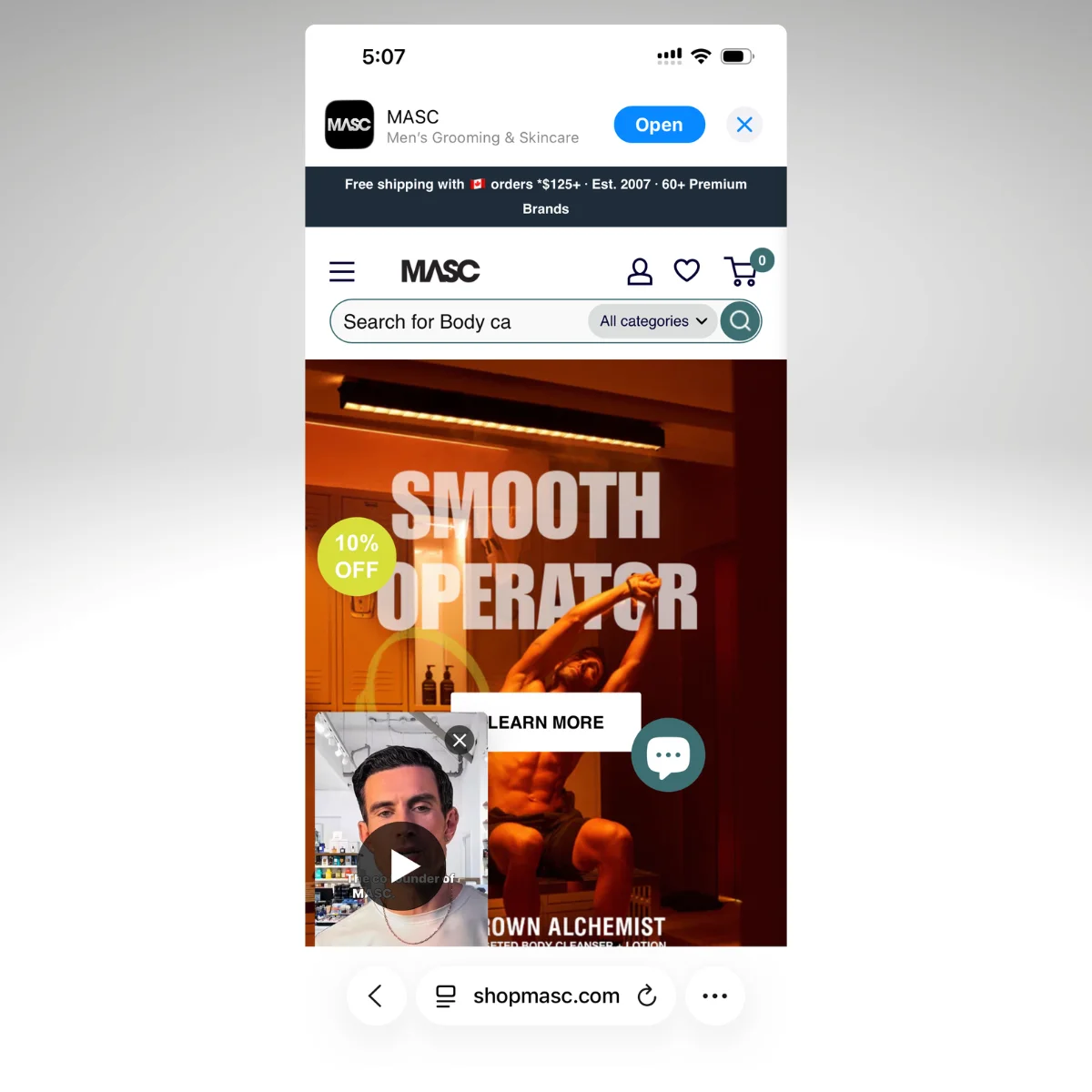
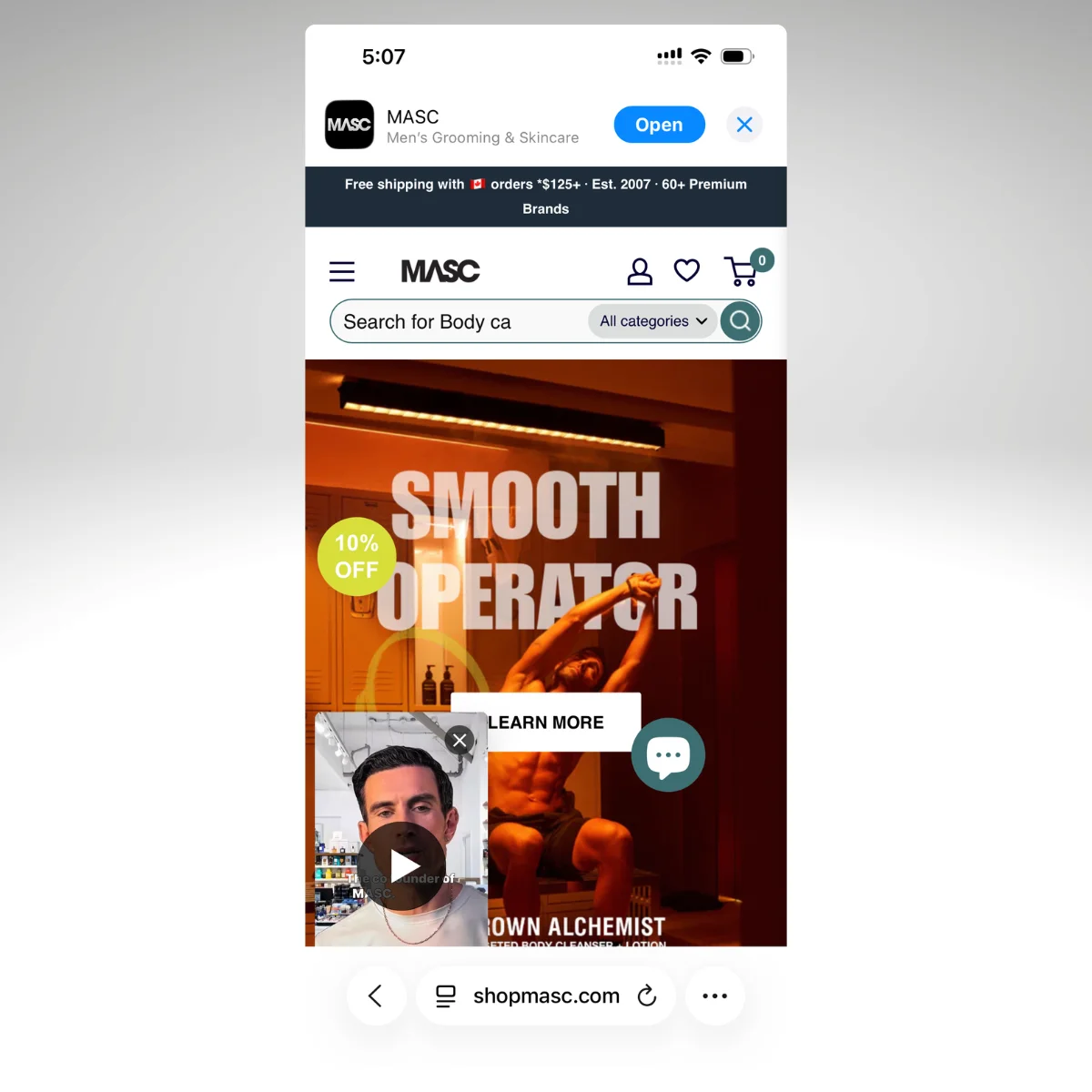
Use smart banners or modals prompting users to download the app. Sell the benefits to website visitors of using the app, like faster checkout or exclusive features, to make the app feel like an upgrade.
While you’d love to get these downloads for free, you’ll often need to pair it with an incentive. Incentives could range from discounts on the customer’s first in-app purchase, to exclusive content or free gifts.
Pros:
Low cost
High intent
Reaches users already browsing your brand
Cons:
Requires some development setup
May come off as intrusive
Tips for success:
Use personalized messaging (e.g. “Shop faster with our app”)
Test when and where banners, popups appear
A/B test CTAs, incentives for install rates
2. Customer Lists (Email & SMS)
Your existing customers lists (email, SMS) are another key channel to tap into for mobile app users.
Like with your website, these are more likely to be engaged, high-intent users, than if you were to promote your app to people new to your brand.
It’s also free – you already have direct access to these people (though you may also add incentives to increase the chance of getting downloads).
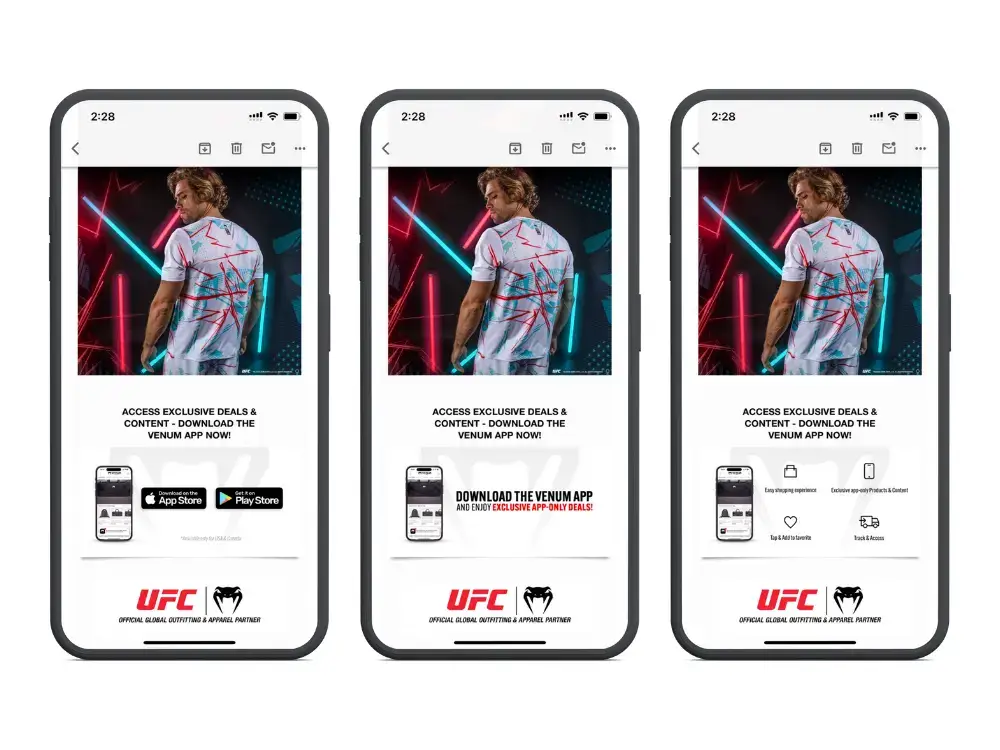
Include download links in your regular campaigns, launch announcements, or even transactional messages (like order confirmations). Incentivize with app-only offers or early access to new products and promotions.
Pros:
Zero CAC
Direct access to your best customers
Highly measurable
Cons:
Limited to your list size
Needs segmentation to avoid over-messaging
Tips for success:
Add a “Get the App” CTA in email footers
Create a dedicated install campaign with incentives
Segment by device type (iOS vs Android) for personalized messaging
3. App Stores
Make sure your app is discoverable in the Apple App Store and Google Play.
Optimize your app title, keywords, screenshots, and description. Higher ratings and reviews improve both visibility and conversion rates.
Ecommerce and media apps typically don’t get a lot of new users from the App Stores – people who download your app are likely to know about your brand already. They might be directed to the App Store from an email or your website, or they might seek out your app by searching on the App Store.
Regardless, it’s low-hanging fruit. Make sure your App Store listing is optimized, primarily so that your web users can easily find you, but also so you might get some bonus visibility in front of new people.
Pros:
Organic and cost-effective
Users can be high-intent (already searching for apps)
Cons:
Not the most natural way for people to find new ecommerce/media brands
Tips for success:
Target keywords tied to your brand + use case (e.g. “discount fashion app,” “aviation news”)
Use video previews that demonstrate real benefits
Prompt power users for ratings right after positive actions
4. Word-of-Mouth & Referrals
Some users may find your app through friends, family, creators, or community chatter.
These downloads are extremely valuable; they’re cheap, come with a lot of trust, and have the potential to drive viral acquisition spikes.
You can influence this by setting up and promoting referral programs, viral loops, or shareable content to make it easy to recommend the app.
Pros:
High trust
Organic reach
Potential for virality
Cons:
Hard to control or scale
Relies on product satisfaction
Tips for success:
Ecommerce: Reward both referrer and referee (e.g. “Give $10, Get $10”)
Media: Build social sharing into the app (e.g. “Share this clip”)
Spotlight UGC and testimonials across your channels
5. Paid User Acquisition (Mobile Ads)
To scale app downloads past your existing audience, you may consider advertising your app across channels like Meta, TikTok, Google, and Apple Search Ads.
This is more expensive, obviously, than promoting to your existing audience. There’s also research indicating lower retention rates from app users acquired through paid ads.
But paid advertising is still the most dependable, scalable promotional channel, once you’re able to get your CAC low enough through testing and iteration.
Run campaigns targeted by interest, behavior, or previous interaction with your brand, and track results (including engagement and retention rates from users from paid ads) to assess whether these channels are viable for you.
Pros:
Highly scalable
Great for launches or promo pushes
Cons:
Expensive (avg. $29 CAC)
Lower retention than organic
Tips for success:
Use deep links that take users straight to the right app page
Test creatives constantly
Track ROI by purchase/subscription, not just installs
6. Influencer & Creator Marketing
Another proactive way to get mobile app users is partnering with creators to showcase your app in authentic content.
This can be paid or organic – it typically involves a walkthrough, demo, or app-related story that links to the app stores.
It’s not going to work in all situations, and requires some creativity, but can be high-upside if done right.
Pros:
High engagement
Trusted voice among niche audiences
Cons:
Variable pricing and performance
Harder to attribute direct installs
Tips for success:
Ecommerce: Focus on value (e.g. deals, app-only access)
Media: Let creators tease app-only content (early drops, behind-the-scenes)
Use trackable links or promo codes to measure performance
7. Offline & Traditional Media
This involves using physical channels, like packaging, signage, TV, or print, to promote your mobile app.
You’ll typically use QR codes or branded CTAs to push people to install. Most ecommerce brands can easily and cheaply promote their app with QR codes on product packaging, while brands with a brick-and-mortar presence can create some simple physical assets to promote the app in-store.
Larger brands might find traditional media beneficial, while direct mail can be an interesting wrinkle to try.
Pros:
High visibility
Great during major campaigns or launches
Cons:
Expensive
Harder to measure ROI
Tips for success:
Include app CTAs in product packaging
Use TV/radio to drive app installs during peak content drops
How does user acquisition differ for brands in different industries?
Media brands tend to get more organic installs thanks to strong brand recognition and high-value content.
Their apps are more likely to provide obvious utility to users, by allowing regular users to consume content with less friction and get notifications for breaking news and updates.
With an ecommerce mobile app, it’s more likely that you’ll need to provide incentives for someone to download the app.
A customer might ask, “Why should I download the app when I can just buy through the website?”
While some of your top fans, or regular buyers (such as B2B customers) will see the natural utility in a faster and smoother buying process, you’ll need to convince others, via incentives like discounts or exclusive access to app-only deals or product launches.
The good news is that app users are much more valuable (our research shows that app users spend 6-11x more than website users), so small incentives like this almost always pay off.
Crafting Your Mobile App Launch Plan
Before launching your app, you should put together a structured launch plan.
A good launch isn’t a single event – it’s a series of intentional steps:
Pre-Launch
Optimize your App Store listing (keywords, visuals, metadata)
Build email, SMS, and web-based install campaigns
Prepare creatives and targeting strategy
Launch Week
Announce to your full audience across every owned channel
Launch paid ads targeting warm leads (optional)
Push referral programs and influencer partnerships live
Post-Launch (Weeks 2–4)
Review ASO performance and update as needed
Scale winning paid ads, cut what’s not working
Implement retention flows: onboarding, push notifications, and offers
Want a comprehensive look at how top brands launch their apps, and get hundreds (or thousands) of new users soon after going live? Check out this guide.
Final Tips & Best Practices
Here are a few best practices to follow when crafting your user acquisition strategy:
Start with what you own – your customers, your traffic, your brand
Don’t rely on one channel. The best strategies blend multiple touchpoints
Think long-term. Optimize not for installs, but retention and lifetime value
Ride seasonal waves – plan big pushes around holidays, launches, or events
Your mobile app is one of your best tools for building long-term growth. But for it to work, people need to actually use it. And that starts with a smart acquisition strategy.
When you launch with Vendrux, we’re here to support you with a crafted launch strategy, drawn from our decade plus experience in mobile apps.
That means, not only do we help you turn your website into an app with no coding, no rebuilding, no effort on your part, we also help you get past the roadblock that stops so many brands from experiencing the benefits of their own mobile app.
We’ll help you create assets for your website and email list, and set up tracking in your analytics to see the results.
Our team also helps you set up automated push campaigns, so once you do get users, they won’t slip away – they’ll become engaged, loyal fans who regularly use the app.
If you’re interested in launching an app for your brand that actually drives results, start with a free preview.
With just your website’s URL, you can generate an interactive demo to see what the end result will look like. Then once you’re ready to move forward, get in touch – and we’ll help you launch an app that moves the needle.
Every day, more and more mobile apps are being built and published.
If you can successfully pass Apple’s rigorous review process and get your app approved by the gatekeepers the first time around, you’ll find that great benefits await!
For example, upon approval:
You’re no longer left waiting for users to find you in search, on social media, or by word-of-mouth. The apps stores open up a completely new acquisition channel for you.
Users can begin downloading your app right away, and you can start to generate more revenue through mobile advertising immediately.
Push notifications will enable you to instantly connect and engage with users, sharing with them real-time updates regarding new content, in-app activity, special offers, and more.
Unfortunately, some apps do get rejected straight out the gate. It’s not always easy to find out what you need to do in order to avoid app store rejection.
It’s clear that even making it into the app store is a labor in and of itself.
But that doesn’t mean you can afford to miss any of Apple’s guidelines. If your app isn’t accepted the first time you submit–especially if the reason is due to poor quality of content or app construction – it will be very difficult to change Apple’s mind when you resubmit.
If you want to maintain a strong reputation as you submit more apps to the iOS app store, you must play by their rules.
That’s why we’ve compiled a list of tips that will help you traverse the minefield of guidelines that lie between developers and a space on the iOS app store, to help you avoid app store rejection!
If you prefer to get this content in video form, check it out below via our YouTube channel:
Launch your app with Vendrux and you won’t have to worry about getting rejected by the app stores. We handle the publishing process for you, guaranteeing your apps will be approved. Book a free demo with one of our app experts to learn more about how we can help.
Technical Reasons for App Store Rejection
There are generally two categories of reasons for app store rejection. Technical reasons are the first:
1. Crashes and Bugs
We will reject incomplete app bundles and binaries that crash or exhibit obvious technical problems. Guideline 2.1 – App Completeness
As you can imagine, Apple doesn’t take too kindly to apps that contain explicit bugs or full-out system failures. If your testing of the app demonstrates an unstable performance and ongoing crashes, get that fixed first before submitting for review – if not your app is almost guaranteed to be rejected. Make sure your app works
2. Poor Performance
It doesn’t matter how stunning your app looks or how entertaining it is, Apple expects it to run fluidly. If the entry screen causes confusion or frustration, if navigation is choppy, if pages take too long to load – users will be unhappy. Apple will keep that from happening by outright rejecting your app.
3. Privacy
All apps must include a link to their privacy policy in the App Store Connect metadata field and within the app in an easily accessible manner. Guideline 5.1.1 – Privacy – Data Collection and Storage
Apple has a very strict privacy policy requirement for all apps that appear in the iOS app store. Specifically, this includes:
Placing a privacy policy statement in your metadata
Providing an explanation of your data retention policies
Enabling users to withdraw consent to data collection, among other things.
Specifically, Apple has made a point of mentioning that there are two kinds of links it requires apps to have. First, all apps must include a direct link to Support along with contact information.
Secondly, if you have an app for children or there is a subscription service offered through the app, you must include a link to a Privacy Policy page.
If you’re not already, make sure you’re compliant with GDPR as well as with Apple’s privacy policy.
4. Broken Links
Submissions to App Review, including apps you make available for pre-order, should be final versions with all necessary metadata and fully functional URLs included; placeholder text, empty websites, and other temporary content should be scrubbed before submission. Guideline 2.1 – Performance – App Completeness
Apple has explicitly called out broken links as one of the top reasons for rejecting an app. If you haven’t taken the time to walk through your mobile app and test out each page and link, do so now.
5. Hardware and Software Compatibility
We noticed that your app did not run or display as expected when viewed on [Apple’s latest devices] Guideline 2.4.1 – Performance – Hardware Compatibility
Per Apple’s guidelines, your app must work on all the latest systems–hardware and software. They’ve placed extra importance on apps’ ability to run on the iPad, so take note of that for your tests.
Apple also stresses the importance of designing apps so they don’t inefficiently use up the resources or put strain on devices (e.g. excessive heat, battery draining, etc.) They also strongly discourage apps from encouraging or asking users to disable core iOS features. In other words, if your app can’t work everywhere and on every Apple mobile device, you have a problem.
6. Payment System
Use payment mechanisms other than in-app purchase to unlock features or functionality in the app Guideline 3.1.1 – Payments – In-App Purchase
If your app takes payments to unlock functionality or allow the user to download digital content, transactions must go through the official Apple in-app purchasing system. This is to ensure that money is securely transferred via Apple’s marketplace.
When using Vendrux News, you can sell access to content, remove ads, and so on for a subscription fee using in-app payment tools from Apple, and eCommerce apps built with us can integrate whatever payment gateway necessary!
7. Lacking Standard Functionality
Your app appears to be a pre-release, test, or trial version with a limited feature set. Apps that are created for demonstration or trial purposes are not permitted on the App Store. Guideline 2.2 – Performance
Creating a mobile app for the wrong reasons–i.e. for the purposes of giving customers another contact channel–could result in app store rejection.
The key thing to remember is that a mobile app must be useful. If all you want to do is share a contact form, and there’s no other functionality or features to the app, then there’s no reason to have it in the first place.
Demo content or trial versions are also to be avoided. All content in your app must be real and final.
Content-Related Reasons for App Store Rejection
The second type of reason Apple rejects apps is because the quality of the content is lacking:
8. Copycat of Another App
Are a duplicate of another app or are conspicuously similar to another app Guideline 4.1 – Design – Copycats
Think twice before going to the trouble of remodeling the latest mobile craze. Apple may not feel that it’s a welcome addition to its market (along with the 15 other versions of it already out there…). Plus, Apple hates wasting its reviewers’ and users’ time with unoriginal content. Creating your own unique app and content is a good way to avoid app store rejection.
9. Website or Application?
Your app provides a limited user experience as it is not sufficiently different from a mobile browsing experience. As such, the experience it provides is similar to the general experience of using Safari. Including iOS features such as push notifications, Core Location, and sharing do not provide a robust enough experience to be appropriate for the App Store. Guideline 4.2 – Design – Minimum Functionality
If your app is based on a website, make sure that what you upload is, in fact, an app rather than a website in an app wrapper. If you’re looking for a solution to convert your site into an app and want to avoid any risk of a rejection, check out Vendrux. While the apps are built from your existing site or web app – Vendrux gives them functionality that goes way beyond that, and there’s no chance of an Apple rejection!
10. Placeholder Content
One of the most frustrating things for anyone on the receiving end of an app–Apple’s review team or the end users that encounter it in the store–is to find placeholder content still in there.
This is a sign that your mobile app is incomplete and wasn’t ready to be sent over. It will also give reviewers an extra reason to dig and find more things wrong with it.
11. Inaccurate Description
Make sure your app description is as to the point and accurate as possible. Also, make sure your app doesn’t describe itself as something it’s not. In sum, if your description misleads users to download the app, you’ll find yourself in hot water.
12. Lack of Valuable Content
Similar to the point made about the lack of standard functionality, the same goes here if there is a lack of valuable content. If you’re simply aggregating a bunch of web pages with no rhyme or reason, or there isn’t much substance in the content, you can’t expect users to gain much from the experience.
13. Poor UI
Before designing your app, get up to speed with Apple’s Human Interface Guidelines. They’ll provide you with a good baseline on how to properly design a user interface that leads to good results. As you can see from this example from Apple, there are clear dos and don’ts when it comes to designing mobile interfaces:
14. Bad UX
The first thing you should ask during testing is: “Is my app easy to use?” This includes reviewing the navigation, the customer journey through design, as well as custom features and functionality you’ve introduced to the app. If it doesn’t comply with standard iOS design specifications, take it back to the drawing board.
15. Mentioning Other App Platforms
If it’s clear the app wasn’t built strictly for iOS, you’re going to have a difficult time getting it approved. In other words, don’t mention Android apps or any other platforms. And, when creating screenshots for the store, make sure they come from iOS devices.
16. Incomplete Information
The last reason why Apple might reject your app is if the information you provide for the store and for review purposes is incomplete or out-of-date. In other words, make sure to include:
Your contact details
The title, description, specifications, and other details about the app
Categorization information
Special configuration notes
Demo video if there’s something regarding hardware or software you have to explain
Other Reasons for App Store Rejection
If you have submitted your app to the store and it was rejected for a reason not listed here, call Apple directly to get more details.
Apple’s support team is really helpful during the review process and can walk you through whatever went wrong.
Wrapping Up
If Apple became lenient in its rules and allowed buggy, spammy, or misleading apps into the store, how long do you think its users would continue to trust the store’s ability to provide high-quality apps for their devices? Needless to say, there’s a valid reason behind each app store rejection from Apple.
That’s why you should invest more time and energy in making your app. If you can spare yourself the hassle of being rejected by Apple, you can start reaping the benefits of having an app in the iOS store right away.
We hope that this guide will help you avoid app store rejection when you go to publish your own mobile app. If you want to do away with stress of building your app, conforming to the iOS app store requirements, and setting up your app store listing, get in touch with us.
At Vendrux we do all the work to create mobile apps from your website, for minimal lift, expense, and overhead.
That includes app store publishing — we’ve published more than 2,000 apps to the app stores, so we know what it takes to get approved.
We’re so confident in our process that we guarantee 100% of your money back if we can’t get Apple’s approval.
If you’re interested in turning your website into mobile apps with a full-service approach, book a demo now to learn more about how we can help.
Once your app has been successfully published, follow these App Store Optimization strategies to make sure you’ve optimized your app to rank well on the iOS and Google Play App Stores to start getting more downloads!
Your app store product page is crucial for driving downloads of your app. As with any important landing page, you need to understand each element, and take time to thoughtfully craft the perfect design and copy.
You can build and maintain your product page through App Store Connect or through the Connect API, and our team is on hand to guide you.
Let’s look at each element of the App Store product page and how you can optimize to drive downloads and App Store rankings.
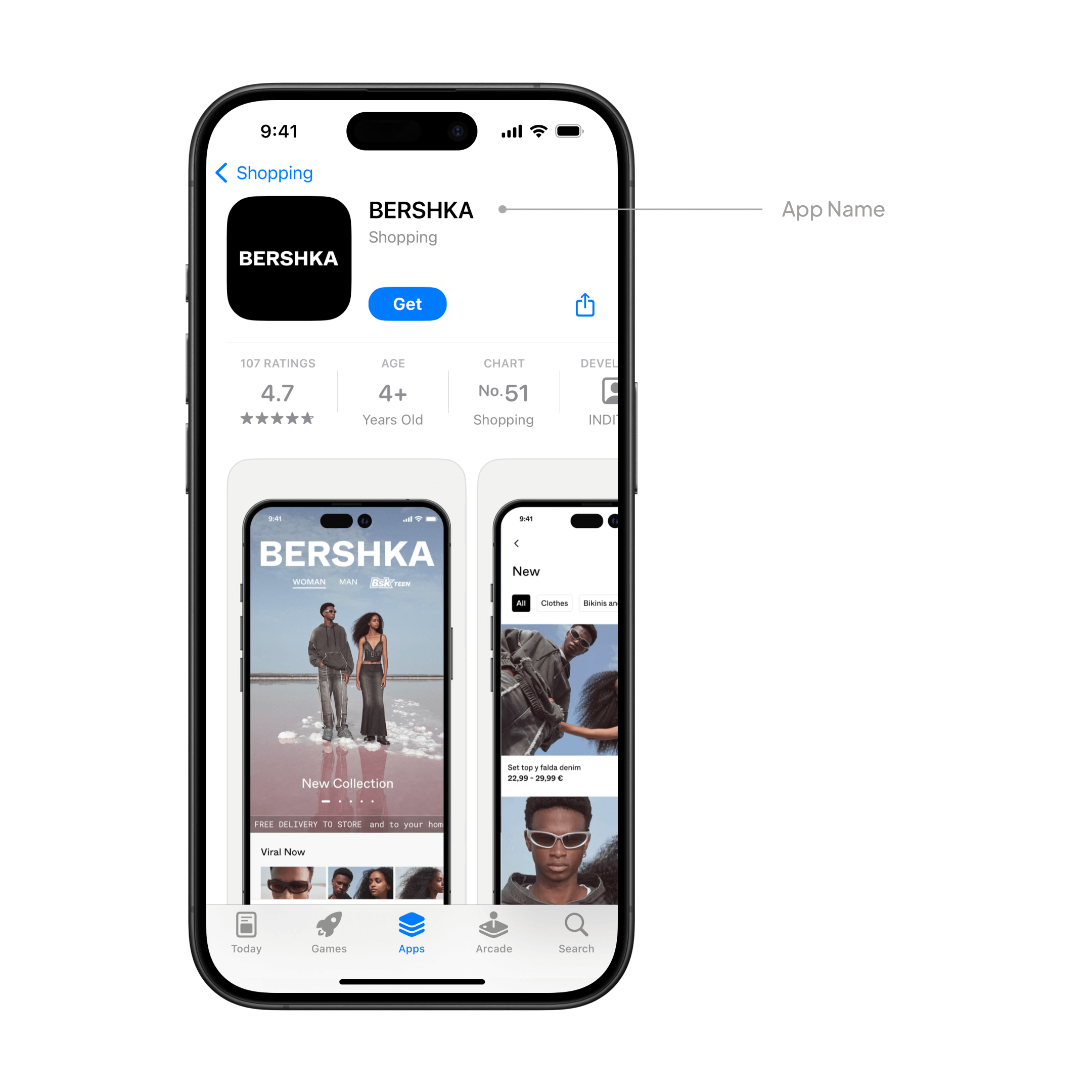
App name
The name of your app is all important, playing a crucial role in discovery and conversion. For most ecommerce brands, there’s no need to overthink it though. Since you used Vendrux to convert your web store into native shopping apps, in 99% of cases you’ll use your main brand name for the like our customers Rainbow Stores, Jack & Jones, SYN*DI*CATE, and many others.
If you do deviate from your main brand name, choose something distinctive, punchy and memorable. Be sure to avoid names that are boring, generic, already taken, or over 30 characters long.
Icon
Your app icon is all important. It is the first thing that potential customers see on the App Store, as well as what they see on their home screen after they install it.
It’s important to make a great first impression with a professionally designed, sharp icon that’s recognizable, distinctive and visually pleasing.
As part of our full set up, we work with professional graphic designers to create the perfect icon for you that is simple and eye-catching. We prepare it in all the necessary formats, resolutions and sizes, and tailor it to your brand and target customer.
This is where you summarize the core value proposition of your app in a concise, simple phrase. It’s a great opportunity to explain the value of your app in more detail, and highlight exactly why potential users should learn more and ultimately download.
Some examples from Vendrux customers:
Elevate Your Style with rue21
Shop women’s clothes & shoes
Hot Trends for Less
Your subtitle isn’t set in stone, you can always update it when submitting a new version of your app if you think something new could engage users better.
Your subtitle can be up to 30 characters and will appear throughout the App Store below the main name.
We can help you out with this for your Vendrux app if you’re short on ideas.
App previews
No less essential is the app preview, a short video on your product page that demos the core functionality, UX, and features of your app.
It can be up to 30 seconds long, and can use footage of real user interaction with your app. It’s possible to feature up to three previews on the App Store and Mac App Store pages, and to localize them for different languages.
An important consideration is that app previews are muted by default, so it’s even more important to make the beginning of the video visually compelling and encourage visitors to watch.
You can read more about creating a great app preview here.
Screenshots
Humans are visual, and like to be shown things rather than just told about them.
That’s why screenshots demonstrating your app’s UX are an essential part of your App Store product page. You can use up to 10 images in total, with the first three appearing in the app store search result pages when there’s no preview available.
Make sure these really show off the core, most valuable features of your app, and that each one is distinct and demos a specific important screen or functionality.
Apple also recommends adding at least one dark mode screenshot if appropriate, since this is important for some users.
As part of our setup service, we handle all your App Store screenshots for you, working with our design team to make sure they really work to show off your app and entice potential users to download.
This is the part where you write an engaging, concise and informative description of your app, showing users why they’ll love it and why they should download.
Begin with a punchy introductory sentence that sums up the essence and core value of your app, letting users see it immediately without needing to expand the description. Use your brand voice and speak directly to your target audience, using the language you know they’ll connect with and understand.
Every word counts.
It’s then good to follow up with a bullet list that ranks and explains the key features so that users can quickly scan and learn what your app is all about.
Apple recommends that you avoid stuffing in prices, accolades, or excessive keywords – these are all better suited for the promotional text. Focus on value and informing the user above all.
Remember that this too isn’t set in stone, and you can edit and change your description each time you update your app. If you want to make more frequent changes, you can use the promotional text instead.
Promotional text
The promotional text is at the top of the description, and can be updated any time without the need to submit a new version of your actual app.
This is a great place to show the latest news, new shipped features, cool anecdotes and figures about your apps, or special offers and promotions..
You’ve got 170 characters to make your points, so keep it fresh, concise and engaging.
Keywords
The App Store is a search engine and so the results are partially determined by keywords.
Think about which key terms, words or phrases potential users might search for to look for an app like yours. What would they call it? How would they describe it?
Including these will help to make your app more discoverable for your target users.
Like on the web, there’s often a tradeoff between the search volume of a keyword and how difficult it is to rank highly for it. So we recommend focusing on longer tail, specific keywords that can bring you in targeted traffic.
You can include keywords up to 100 characters in total, separated only by commas. Apple specifically warns against the following:
Repeating words in plural form
Using the word “app”
Various forms of synonymous or duplicate words
Special characters like hashtags or @ symbols
The real things to avoid are unauthorized usage of any trademarked terms or the names of real people like celebrities. You should also not use anything offensive or inappropriate, or the brand names of your competitor’s apps.
This is one of the main reasons why apps get rejected from the App Store, so it’s important to get it right.
In-app purchases
If your app has in-app purchases & subscriptions, the user can view and buy from the product page. You can display up to 20 items, defining the copy in the description & title, the promotional images, and the order they’re displayed.
Again there’s a strict character limit of 30 for titles and 45 for descriptions, so concision is important as always.
Now, if like most of our customers you’re an ecommerce brand selling physical items, these are not classed as in-app purchases. Thankfully, because otherwise you’d need to pay Apple a 30% cut. So you really only need to worry about this if you sell purely digital products. Speak to one of our team if you need clarification.
What’s New
What’s new is the perfect place to inform users and potential users of important changes after an update.
Whether you shipped new features, squashed a bug, or made a UX improvement – you can share it here, with it appearing on both the main product page and the updates tab. Apple recommends listing new features in order of importance and using punchy copy to excite users about the updates.
At Vendrux we handle all updates and maintenance for you, so we also handle this part of the product page. You’ll have the freedom to make changes or updates to the copy as you see fit.
Ratings and reviews
Ratings and reviews are really crucial. Not only do they provide social proof and entice new users to download your app – but they’re an important ranking factor on the App Store. Here you can see individual reviews as well as a summary rating.
All Vendrux apps are designed to be slick, performant, and to give the user a great native UX. Vendrux apps get overwhelmingly positive reviews, which will encourage even more users to download.
It’s important to get as many reviews as you can, that’s why all Vendrux apps have automatic ratings prompts which remind your users to leave a review and rating at key times.
On your end, it’s a good idea to respond to App Store reviews to address users feedback and questions. The original reviewer will be notified when you respond, and other users browsing the page will see that you proactively engage with and value your user base. You can read more about ratings from Apple here.
Categories
Categories are helpful for users browsing for and discovering new apps, and you’ll give your app both a primary and a secondary category.
The primary is particularly important, helping to rank the app for specific keywords and allowing users to find it through searching and filtering results. The primary category should be as accurate as possible.
The secondary category gives you a bit more flexibility to niche down, allowing your app to appear in a wider range of searches.
It’s really important to be accurate and honest when it comes to categorisation, not least because getting it wrong can lead to rejection by Apple.
Localization
At Vendrux, our apps are multi-language, supporting most major languages as well as RTL for Arabic and Hebrew.
If your app is multi-language, it’s important to localize your description, keywords, preview, screenshots, and keywords for all the markets you offer your app in.
You might want to translate your app’s name and branding too so that it resonates better with the local audience.
Product page testing & optimization
Apple has an inbuilt testing feature where you can test out alternative versions of your product page with different icons, screenshots, and previews to see which one performs the best.
Users are randomly selected to see different versions, and you can measure the results in your App Analytics.
If you get a high volume of traffic, this might make sense for you. Speak to one of our team about the possibility.
Custom product pages
You can make specific versions of your product page to highlight a particular feature or key selling point. You can then share them with your audience through unique URLs.
These can have unique copy, images and localization, so you can really drill down to what you want to show off on each page!
Ready for the App Store?
At Vendrux, we build apps for you, based on your existing website, online store, or web app. With our custom platform and experienced team, we build you top class iOS and Android apps that let you reuse everything you already built for the mobile web.
It’s the perfect way to build apps fast and cost-effectively, as the model is proven – having worked fantastically for thousands of businesses from small startups to multibillion dollar global brands.
We built the apps for you, handling everything from the app build to ongoing updates and maintenance. That includes publishing to both the Apple App Store and Google Play. All the elements we covered above, we handle for you – our team of app experts and designers have it covered.
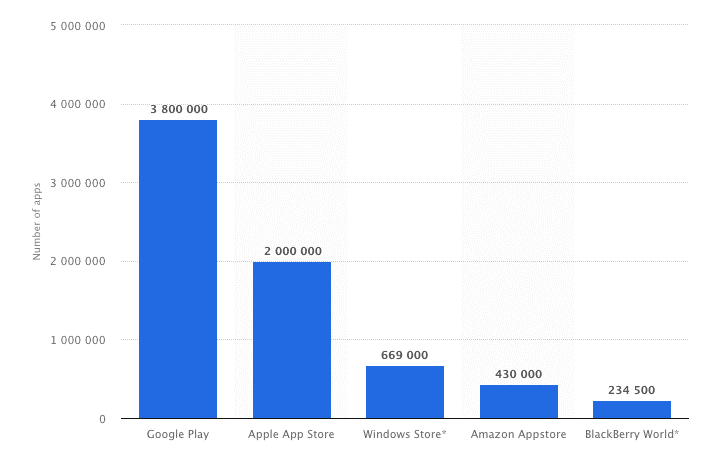
We crunched the data – there are over 2.6 million Android apps in the Google Play store and over 2 million apps in Apple’s App Store, used by approximately 3 billion smartphone users worldwide, which these figures growing every year.
These are enormous, staggering numbers, especially if you’re a developer trying to get your app noticed.
How do you stand out in a crowded field of competitors? And perhaps more importantly, how do you get your app to rank high in an App Store search, and make sure it matches the intent of searches in the App Store searches?
The key is using strong App Store Optimization strategies for the Google Play and iOS App Store.
To help your mobile app rank highly in the App Stores and be seen by more potential users and fans, you’re going to need an App Store Optimization strategy.
Want to enter the app stores without spending 5-6 figures on developing a native app? Vendrux is the perfect solution to convert your existing site into a like-native mobile app. Click here to schedule a free consultation to see exactly how it works.
Unfortunately, the true algorithms for ranking in both Apple’s App Store and the Google Play store for Android apps, just like the true algorithms for SEO, are not actually known, and change regularly.
However, we do know that certain things affect your App Store rankings more than others.
By taking advantage of this these App Store Optimization tips, your app could rank higher, be seen by more people, and receive more downloads.
Here are ten important steps you’ll want to take to improve your ASO in both the Apple App Store and Google Play.
Use a Descriptive Title
Use Keywords Wisely
Describe Your App Well
Use High Quality Screenshots
Add an App Preview Video
Pick the Right Category
Focus on Icon Design
Encourage Positive Reviews
Use App Store Analytics
Re-evaluate Regularly
1. Start With a Descriptive Title
What’s in a name? Plenty, especially when you’re talking about the name of your app and ASO.
A good name not only identifies what your app does to prospective users, but it can also improve your rankings.
Of course, both the Apple iOS App Store and Google Play handle titles and keywords differently, so how you approach your title should depend on if you’re marketing to Apple or Android users.
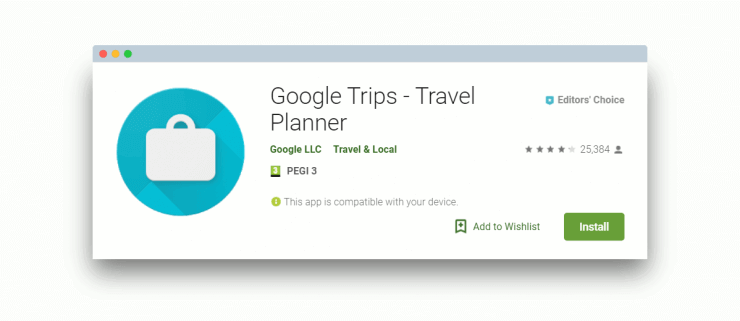
Here’s how Google Trips includes their main keyword (“Travel Planner”) in their app title to improve rankings:
Use relevant keywords in your App name
The Apple App Store
The Apple App Store gives you 255 characters for your title. So, while a succinct title can help with your branding efforts, it will do you no favors if you’re trying to boost your Apple ASO.
Take the time to come up with a creative title that is unique, descriptive, and keyword rich; it’s not a bad idea to create a title and then a subtitle with your keywords. Doing so will help you both establish market share and improve your ranking.
The Google Play Store
Titles are handled a bit differently in the Google Play store. There, you get a paltry 30 characters for your title, so you have to be extremely concise.
However, you don’t have to be as concerned about keywords in the title with Android apps; for Google Play, the keywords should go in the description, as we explain in step two.
2. Use Keywords Wisely
Like in SEO, Keywords are an important factor in ASO.
Just like with app titles, how you should handle app keywords differs from the Apple App Store to Google Play.
With Apple, you get only 100 characters for all of your keywords, so obviously, you need to choose wisely; it should go without saying that you should get as close to this 100 character limit as you possibly can.
With Google Play, though, there is no specific keyword field. However, the app description is searchable, and you have a comfortable 4000 characters to work with.
For the best App Store Optimization, you’ll want to put your most important keywords in your description five times. However, be careful not to overdo it – keyword stuffing will get your app penalized (just like keyword stuffing on a website would get your site penalized by Google), leading to a drop in your ranking.
There’s a fine line between optimizing your app description, and stuffing it with keywords – the key is to make sure it reads well and makes sense for a person reading it, not just for the App Store algorithm!
Keyword Research
Before you actually publish your app with the keywords you have selected, though, you will want to do some research to learn about the traffic, difficulty, and demand for those keywords, as well as how many apps are already using it.
MobileDevHQ and TheTool are a couple of App Store Optimization tools that’ll help find the best App Store keywords for your app. Be sure to include select keywords in your app’s title and description. According to Fiksu, this simple step can potentially up your rankings anywhere from 80-100 positions, and 10-20 positions, respectively.
Keywords with high traffic and a low to moderate number of apps will be best for your ASO.
It’s also a good idea to take a look at what the top apps are for each keyword to get an idea of what people are looking for when they search for that term. If your app does something completely different than the top apps for that keyword, you may not have as much interest as you’d like.
App Store Optimization tools like SensorTower can help you evaluate your keywords and much more. We’ll discuss more tools to help your ASO efforts in Step #8.
Finally, here are a few other tips to help you pick the best keywords for your app:
Try to put your top keyword in your app name – a test conducted by MobileDevHQ reveals that placing a keyword in the title alone can improve your app’s search ranking (for the keyword inserted) by 10.3 percent.
Use words rather than phrases, unless a phrase is an absolutely integral keyword (such as “tug of war”).
When researching keywords, look at singular versus plural and choose the one with the best numbers.
Try to avoid using conjunctions and prepositions as keywords.
Use commas rather than spaces to separate keywords.
Use digits instead of spelling out numbers.
3. Describe Your App Well
For both Apple and Android apps, your app description is like your website’s landing page.
If you’ve brought your potential buyer this far, you want to be able to close the deal and make the sale! Therefore, your app’s description and page within the app store should be viewed as an important part of your App Store Optimization Strategy.
Start by assuming that users know very little about your app besides, its name. You need to think like your customer would. It often helps to think in terms of bullet points:
What does your app do?
What problem does it solve?
How will it make the buyer’s life easier?
Why is it worth the price?
Be persuasive yet succinct, saving the more extensive write-up and how-to guide for your app’s website, or in-app onboarding process.
And, as we mentioned in Step 2, you’ll want to pay extra attention to keywords for your Google Play description.
Visually, you’ll want to include useful screenshots that look appealing in your app description and are relevant to what your potential customers are looking for. These should showcase the key parts of your app, making it look approachable to encourage downloads and, in turn, boost ranking.
A good example of how to create visuals that represent the benefits of your app can be seen in Sleep as Android‘s app page:
Notice how they highlight the key benefits of using the app alongside screenshots of the app itself? This should help improve your conversion rate of people viewing your app to downloading it.
4. Use High-Quality Screenshots
People only spend 7 seconds deciding if they’re going to download an app or not. How your app store page looks is a crucial factor in their decision, and high quality app store screenshots are going to make a big difference.
In fact, they’re cited as being the second most influential factor when it comes to convincing someone to download your app (second only to your App Rating).
You should use your screenshot real estate wisely, and focus on the key benefits and most engaging parts of your app. There are a host of tools available to help you create app screenshots that look great, such as Figma, MockUPhone, and AppLaunchpad.
If you build apps with Vendrux – we can prepare the screenshots (as well as all other design assets) for you to the highest standard.
You can harness the power of video for your App Store page to give prospective users a better insight into what your app can offer them.
Pro Tip: “Most people will view this on auto play with muted audio. So have text overlays to explain pertinent sections or features that you’re showing. And, only include footage of the app itself, don’t waste precious seconds filming happy, smiling people using the app. This isn’t 2009 anymore, people!”
– Lionel Valdellon, Content Marketing Manager at CleverTap
App Previews in the iOS App Store allow you to upload 30 second long videos to showcase the features and benefits of your app. You can merge videos of different features into one smooth preview to make the most of the time limit.
You can only show recordings of the in-app experience, so make sure your mobile app UX looks good, and matches what your prospective audience is looking for!
This App Store Optimization technique is going to help your App Store page convert higher as you’re providing valuable content.
When you build an app with Vendrux, our team is here to help you submit your app to the app stores, as well as crafting the perfect app store listing. Hit the button below for a free demo of the platform to see how it works.
6. Pick the Right Category
Placing your app in the proper category on both the Apple App Store and on Google Play is not only helpful for users who are browsing apps by category, but it is also best practice for helping your app to rank well.
If you feel like your app fits into more than one category, there are 3 ways to approach your problem:
First, and most obviously, you’ll want to pick the category that best describes your mobile app.
Next, it’s a good idea to check out just how many apps are in each category; choosing the least competitive category gives your app a better chance of ranking closer to the top.
Finally, look at the estimated app worth (EAW) of the apps near the top of those categories. Put your app in the one with the lower numbers may be to your advantage as well.
It’s also important to remember that putting your app in a category that’s blatantly wrong can lead to trouble.
Apple reviews all submitted apps before publishing them to the App Store, and adding your app to the wrong category for App Store Optimization purposes will probably mean a rejection stamp.
As for Google Play, users can report violations for review. If you have a major error like Sports app in the Medical category, it’s only a matter of time before someone points that out.
7. Focus on Icon Design
There’s a direct correlation between downloads and ranking: the more downloads your app has, the more popular it is perceived to be, therefore the higher it’s ranked.
Knowing how to design and an engaging app icon is very important as well. You only get one image to show app store audiences why your app is worth their time for consideration, so choose carefully!
Pro Tip: “Test four app icon variants before launch. Just because you like the icon, doesn’t mean your target audience will. The app icon is the first visual impression people have of your app and it’s crucial to get it right. It also doesn’t hurt to do the same with screenshots.”
And, since it’s been demonstrated that icon design plays a significant role in how many downloads an app gets, it definitely pays to spend some time and energy coming up with a great one, and it’s a crucial part of App Store Optimization.
You can argue about the injustice of judging a book by its cover (or an app by its icon), but at the end of the day, that’s exactly what a lot of people do.
Your app’s icon should be engaging, eye-catching, and not too similar to other apps.
Of course, that’s easier said than done, which is why it is worth the investment to bring in an experienced designer to develop a few icon options. Try to choose the one that is most visually appealing and most representative of what the app actually does. If you build apps through our Vendrux platform we’ll create a great app icon for you!
Remember, if app store visitors are drawn to your app icon while browsing, they’ll take a look and may decide to download it. Make sure you’re staying on the safer side in regards to explicit content, and that you don’t copy any another app’s icon too similarly.
8. Encourage Positive Reviews
Positive ratings and reviews, both in terms of quality and quantity, have a huge impact on your App Store Optimization efforts. It’s in your best interest to get as many as you can.
Of course, they need to be honest reviews from people who have actually downloaded the app.
Pro Tip: “Nothing is better for App Store Optimization than an app that has a great user experience! If people like the app, understand it, and are easily able to incorporated it into their daily routine, they’re going to be happy to provide a glowing review.”
You can encourage users you know through word of mouth to leave a good review of your app on the App Store or Google Play.
Another way to get app store reviews might be sending a push notification to encourage users to review your app (as long as you’ve gotten permission to send push notifications!).
You can also have an in-app pop-up notification asking the user to leave a good review if he or she liked it. (Vendrux includes this features in your apps for you and the results are encouraging, with a 4.5 average rating for Vendrux customer apps.)
We would recommend having the notification appear after a certain number of times the app has been opened; if a user is opening the app frequently, chances are that they like it and will put in a good review. If they haven’t used your app much, the review won’t reflect their experience accurately.
9. Use App Store Analytics
Just like Google Analytics for web page marketing, there are a number of powerful app store analytics tools that are designed to help your mobile marketing strategy. You will be able to see where your app stands in relation to the competition, and boost your store ranking accordingly.
Just to name a few, there are:
These app analytics tools are helpful because they give you hard data about all sorts of measurements related to your app. They can show you what you’re doing wrong in marketing your app, what you could be doing to improve your app store ranking, and much more.
10. Re-evaluate Regularly
If it’s been a few weeks, and you’re not pleased with your app’s current app store ranking, it’s time to take a look at your data, make some assessments, and change some things around:
Maybe the keywords aren’t right?
Is the description isn’t persuasive enough?
Are you sure it’s in the right category?
Does the icon needs some fine tuning?
All of these things and more can be improved upon to get a higher ranking.
When you do make changes, it’s important to make them one at a time, and then wait a week or so to see if there’s any impact.
What you want to avoid is changing everything at once; doing that won’t give you any idea what the initial problem was, and it could lead to a fall in your app store ranking if the changes a
The Bottom Line
If you want to have a successful app with lots of visibility and downloads — and income-generating potential — you’ve got to pay close attention to your App Store Optimization strategy. While Apple and Google do not share their exact methodology for establishing app rank, it has been established that there are certain things that will have a positive impact on how well your app ranks.
One thing to mention is that a lot of this is based on making sure you have a great app to begin with.
If you already have an app – be sure to keep the UX fast and smooth, and keep it updated and well maintained. This will naturally lead to good reviews which are a ranking factor. If you have not built an app yet but you’re researching the possibilities make sure that you either build it yourself to a high standard, or you hire reputable and skilled developers (which don’t come cheap).
If you already have a website or web app – the best option is to convert your website into apps for iOS and Android. This is what our platform Vendrux does best.
Vendrux works for any kind of site:
We add all the elements to ensure the optimal app UX and a provide you with a wide range of features to guarantee great reviews and ratings. We also equip you with unlimited push notifications, automatic ratings prompts, and all the other features you need for effective ASO.
App Store Keyword Optimization is an important step in ensuring that people can find your app listing the Google Play and Apple App Stores.
You need to pick the right keywords, put them in the right places, and incorporate a range of different keywords, all the while making sure your listing reads well and converts visitors.
Where do you start with this? We’re here to help with that question and provide some key App Store Optimization (ASO) tips to help you organically grow your app.
What is App Store Optimization (ASO)?
App Store Optimization, or ASO for short, is the process of adjusting app listing information to increase search result rankings and conversions. You could have a great app, but without an effective ASO strategy, you’ll struggle to attract users. However, by incorporating ASO best practices into your mobile marketing strategy, you can increase your app’s organic growth potential.
When it comes to succeeding in the App Store and Google Play Store, several different factors come into play. From selecting the right creatives and developing engaging copy, to making your in-app experience smooth and enjoyable, many steps affect your App Store Optimization (ASO) strategy. However, one of the most important is implementing a keyword strategy and continuously refining its execution.
Below, we’ll touch upon how you can set your app up for success using keywords. We’ll show you a few strategies that have proven useful in the past and continue to work today.
Source: Unsplash
Understanding Keywords for ASO
Keywords are the backbone of your rankings in the App Store and Google Play Store. They are the terms users search for when looking for an app and are the ones you determine as essential to your app identity, feature set, and category.
Your title, subtitle, keyword bank, short description, and full description are the areas provided by Apple and Google that should contain keywords you believe are relevant to your app. The app store algorithms will use these terms to rank your app in search results, depending on how well you establish relevance for them. For visible fields, it’s recommended to structure copy around keywords in a way that keeps the reading experience engaging for users.
Optimal Keyword Selection
Understanding your current metadata is the first step in keyword selection. If your app is published, consider looking at which keywords it currently ranks for and deciding which ones are relevant to your overall App Store keyword optimization strategy. This baseline is important in determining which terms contribute more to higher visibility and which ones should be phased out in favor of potentially better-performing ones.
After establishing a baseline understanding of your existing keyword rankings, we recommend taking a look at the top-performing competitors in your industry. Observe which keywords they are using in their metadata, and how they are implementing them. This is an important step in your App Store Optimization strategy to understand how competitors’ strategies differ from yours. It can also provide insight as to what could work for your app.
ASO technology is critical in proper App Store keyword optimization. Using the right tools will allow you to understand competitor performance and overall trends in the larger market to help shape your ASO strategy.
The Relationship Between Keyword Search Volume & Relevancy
While it may be tempting to specifically target high-volume keywords, incorporating lower volume terms of higher relevancy can help create a solid baseline for the type of terms you want your app ranking for. Your target audience is also much more likely to use terms with a low search volume given their relevance to your app. Ideally, select a mix of relevant high-volume, highly searched terms and low-volume but hyper-relevant terms.
Many mobile marketers and developers often assume that the more they use a keyword in their metadata, the better their chances of ranking for it. However, keyword stuffing on both platforms neither helps in the indexation process nor does it help you gain relevance.
Sweeping a keyword strategy with a broad brush to capture as many keywords as possible misses the fundamental element of relevance – the critical factor that helps you find your most receptive and lucrative audience. Visible keywords speak to your audience and the algorithm simultaneously, so it’s crucial to hit a balancing point.
Once you have determined the keywords you want to include, decide which of those terms are most essential to your app, your App Store Optimization objectives, and current market conditions.
How Keywords Affect Visibility
When the algorithms have enough information to provide an initial baseline ranking for your keywords, you can adapt your keyword strategy accordingly. Correctly optimizing your keywords will increase your app visibility and its chances of being clicked on in app stores.
These new views to your app listing affect your clickthrough rate, which represents the percentage of users who saw your listing and tapped on your app. An increase in the clickthrough rate further provides the app stores’ algorithms with the information needed to adjust your app ranking.
Constantly analyzing and adapting your keyword placement is what will help your app rank higher. Pair this with engaging copy and you’re on the right track to increasing downloads too.
Source: Unsplash
Including Keywords in Your ASO Strategy
Where you place your keywords also plays a major role in your App Store Optimization efforts. The Apple App Store and Google Play Store indexation process determine how relevant certain keywords are to your app in comparison to others.
Here’s how you can use the provided fields to effectively place keywords that will help your app rank higher.
For the App Store, include keywords in the title, subtitle, and keyword bank. Apple takes these three fields into account when ranking your app for keywords, so incorporating the most important terms here is the recommended strategy.
The title and subtitle are the two areas where your keywords are visible to users. You’ll want to include hyper-relevant terms that accurately describe your app or its feature set here. However, avoid repeating keywords since these fields provide a limited character count. The same term will not cause your app to rank higher simply by being listed twice.
The keyword bank, while not visible to users, is an area you can use to include relevant terms not mentioned in the two previous fields. Utilizing terms of varying volume while staying hyper-relevant can help cover a broad range of search terms.
Apple’s App Store currently provides 30 characters for the title and subtitle, and 100 characters for keywords included in the keyword bank.
Google Play Store
For the Google Play Store, indexation takes place in the title, short description, and full description. Although there is no dedicated keyword bank, Google offers considerably more characters to include a higher number of keywords when compared to the App Store. Google provides 30 characters for the title, 80 characters for the short description, and 4000 characters for the full description.
However, this doesn’t mean that you should use as many keywords as possible just for the sake of it. Rather, it is recommended to incorporate relevant phrases that include the terms you are trying to target while also maintaining high readability.
Source: Unsplash
App Store Indexation
To accurately report the results of any metadata update you should generally wait at least 30-45 days for full indexation. During this time, Apple and Google are still determining where your app should be positioned, so don’t panic if the rankings aren’t what you expect. Take this opportunity to learn what is currently working in the market and perform your competitive analysis.
After indexation, you’ll have a better idea of how to adapt your App Store keyword optimization strategy. Insights into your keyword performance will help you adjust your keyword selection to better align with your ideal user profile.
Don’t Ignore Creatives
Another area where keywords could contribute to your app store performance is in the app creatives. While creatives are not indexed by the App Store or Google Play Store, including terms that describe the app functionalities and features can help users further relate to the content, potentially resulting in more downloads.
Illustrating the words that individuals are searching for, while at the same time providing a visual representation of the in-app experience is an effective strategy for attracting potential users. By combining engaging visuals and relevant keywords, your creatives can be another avenue to increase downloads.
Regularly updating your metadata’s visual experience can contribute to higher downloads as creatives are primarily a conversion-driving element. These continuous tests can then provide you with the data necessary to make future decisions on which creatives to change and update. Gradual modifications and performance analysis will allow you to fine-tune your creative strategy and determine what attracts more users.
From different calls to action, feature callouts, to seasonal keyword inclusions, there are several elements within your creatives that developers can adjust when testing.
Strategically modifying your app listing images and keywords depending on seasonality, new features, and promotions are a great way to see what drives conversions for your app with each iteration.
The Importance of Iterations
Adding keywords to your metadata is not a one-and-done task. Some developers make the mistake of believing a one-time App Store keyword optimization is enough to launch their app to the top of search results and maintain that position.
The reality is that stagnation does happen and will affect any app that doesn’t regularly update its metadata. With new apps joining the App Store and Google Play Store every day, many will target the same keywords you are. While your metadata stays the same, competitor apps are being freshly indexed, eventually causing a steady decline in your keyword positioning over time.
It’s best to prioritize regular updates and improvements to your fields as part of your App Store Optimization strategy. Regular modifications are enough to keep the App Store and Google Play algorithms up to date with what terms you feel your app should be ranking for.
How to Update Your App Metadata
As a general rule, it’s a good idea to update your metadata every 30-45 weeks. This is the sweet spot for keyword optimization as you allow the algorithm enough time to scan your metadata, but also perform consistent updates to avoid stagnation. Any more changes made within the same timeframe will result in inaccurate data representing the keywords you are trying to target.
Consider adding seasonal themes, app updates, standout features, promotions, and other aspects of your app as part of your metadata edits. This will keep your metadata content relevant to the current state of not only your app but the market itself. Constant iterations and continued analysis will help maintain momentum in growing your app. They can also contribute to an increase in conversions as you regularly include new features and information in the description that may be more effective in driving downloads than the previous copy.
An effective way to decide how to modify your existing metadata is to take a look at what your competitors are doing. By studying strategies that are proving successful in your app category, you can learn how to adapt your approach to what users are responding well to. This includes targeting similar keywords and adjusting your copy to see what works and what doesn’t. Regular updates to your metadata fields will equip you with the insight necessary to further understand your target audience and cater your offering to them.
One of your main objectives with your new app is to set it up for success in the app stores. Your App Store keyword optimization efforts are sure to contain a plethora of moving parts both in and out of the App Store and Google Play Store that will ultimately affect your positioning and overall conversions.
From understanding how keywords affect your app ranking, selecting those that balance volume and relevancy, to performing regular adjustments to your metadata, many steps encompass your ASO strategy.
Analysis of one’s current position, competitor research, and market knowledge will determine which terms you decide to include in your app metadata fields, while studying current conversion performance will allow you to adjust other areas, such as creatives. Having access to this information with ASO technology will equip you with the data you need to make more informed decisions. Approach keyword optimization as detailed above so you can better position your app in the long run.
About the Author
Dave Bell, Gummicube Co-Founder & CEO
Gummicube is a global leader in App Store Optimization with more than 12 years of experience optimizing and marketing apps. We offer the leading enterprise ASO technology and agency services, providing support to clients around the world. Our company is trusted by thousands of enterprise brands and leading startups including Microsoft, LinkedIn, Bethesda, SWEAT, GrubHub, McAfee and many others.
Finding the right agency for mobile app marketing can feel like scrolling through an endless app store: everyone claims to be the best, and every portfolio shines.
But when it’s your app on the line, you need real results: installs, engagement, and growth you can actually see on the charts.
After all, more than half of all installed appsare uninstalled within just 30 days, and the difference between staying or getting deleted often comes down to how well you market.
That’s why it pays to go straight to the pros who live and breathe app marketing.
We’ve rounded up the best to make your choice simple.
In this article, you’ll find:
Agencies that specialize in user acquisition and retention
Their standout strengths and strategies
Real examples of their results
Scroll on, your next partner might be just a few lines away.
TL;DR: Top Mobile App Marketing Agencies
inBeat: inBeat is the top choice for mobile app marketing, combining influencer partnerships and UGC to turn installs into long-term users. They specialize in ROI clarity, cross-platform attribution, and performance-driven growth across iOS and Android. Their full-service mix, from ASO and PPC to influencer and content marketing, makes them the best overall option for scaling app visibility and retention.
Udonis: Udonis approaches mobile marketing like an investment portfolio, every dollar is tracked, tested, and optimized. With $500M+ in managed budgets and 300M+ users acquired, they excel at user acquisition and creative production backed by precise analytics.
App Radar: App Radar delivers measurable app growth through data-led marketing. Their ASO and user acquisition strategies consistently raise app performance by 30% on average. With 500+ successful projects and a track record of triple-digit ROI, they’re ideal for brands seeking structured, analytics-based marketing.
Avirise: Avirise blends marketing strategy with hands-on product expertise, leveraging insights from developing 110+ apps themselves. Their campaigns increase installs by up to 80%, using ASO, Google UAC, and social ads tailored to each niche.
Yodel Mobile: Yodel Mobile brings over 16 years of app marketing experience with award-winning ASO and user acquisition strategies. Having helped launch or scale more than 1,500 apps, their methods focus on sustainable growth and retention.
What is a Mobile App Marketing Agency?
A mobile app marketing agency helps apps find their place in crowded stores and even more crowded minds. They handle the strategy, content, and paid campaigns that put your app in front of real users.
It’s a blend of psychology, analytics, and design thinking all aimed at one goal: visibility that converts. They test, track, and tweak every move to stay ahead of algorithm shifts.
With the basics covered, it’s time to see why partnering with one changes everything.
The Real Benefits of Partnering with an App Marketing Agency
Once you work with a real app marketing agency, the results feel different: faster, smarter, and way more measurable.
You Tap Into Specialized Ad Networks and Channels
Most generic agencies stick to Meta and Google Ads. App marketing teams go further: they navigate TikTok Spark Ads, Apple Search Ads, Unity, ironSource, and influencer-driven installs.
Because they already know which creatives convert on which network, they can stretch every dollar across performance channels more effectively.
In fact, advertisers that leverage six or more ad networks see up to 75% lower cost per install compared to those using fewer. That means you reach users where they actually play, scroll, and spend time, and your campaigns hit faster because the data’s already in their pocket.
Source: Singular
You Expand Reach Beyond Local Boundaries
These agencies think globally by default. They track audience behavior across markets, adjusting messaging and creatives to fit cultural context and platform habits.
Since nearly80% of app downloads and spending come from international markets, this global mindset ensures your app connects with users where real growth happens.
That awareness helps your app scale naturally instead of forcing growth through one-size-fits-all campaigns, giving you a wider, more sustainable user base shaped by genuine global engagement.
You Save Resources Without Building an Internal App Marketing Setup
Handling app promotion inside your own team means hiring performance marketers, creatives, analysts, and user acquisition pros: all expensive and hard to align. A specialized agency already runs with that full crew in place, ready to plug into your goals from day one.
Roughly60% of companiesreport that outsourcing digital marketing enables rapid operational scaling, a clear signal that flexibility and expertise often outweigh in-house setups.
You get seasoned experts without fixed payroll or wasted ramp-up time, so every dollar goes into strategy and execution instead of assembling a team.
Let’s move from insight to examples and look at the agencies setting the bar for app growth.
An In-Depth Look at Leading Mobile App Marketing Agencies
This is where names meet proof. Every agency here has a track record that speaks louder than any tagline.
1. inBeat
inBeat ranks among the top mobile app marketing agencies that turn installs into real users.
Their edge lies in precision influencer marketing and UGC production: two areas that power visibility and trust for app-based brands.
By connecting you with the top 2% of creators, inBeat builds campaigns that generate organic buzz, high-quality downloads, and user retention long after launch.
Their work with Unroll.me shows exactly how this plays out.
Through a blend of influencer and performance marketing, Unroll.me achieved 7M+ app installs across Android and iOS, supported by a $3M+ paid media budget.
Every month, eight creators delivered more than 40 unique assets, driving a highly competitive blended CPA while keeping sign-ups cost-effective and growth measurable.
You’ll get full clarity on ROI thanks to inBeat’s data-driven execution. From platform-specific tracking to refined attribution, they deliver insights that go beyond spreadsheets, helping you make smarter spend decisions.
Beyond influencer marketing, inBeat fuels app growth with ASO, PPC, Meta &Google Ads, SEO & link building, and more.
Each service complements their performance focus, amplifying reach and efficiency across acquisition channels.
Industries: Mobile Applications & Games , CPG and DTC brands, Retail, eCommerce, Agencies, Fashion, Food & Beverage, Beauty
Notable clients: Booksy,New Balance, Deux par Deux, Linktree, Hopper, Nissan, Disney
Key services:
Mobile App Marketing
Mobile App User Acquisition
ABM Campaigns
ASO
Digital Marketing Services
Link-Building
Paid Media
Social Media Marketing
Brand Voice Strategy
UGC Creation
TikTok and Instagram Marketing & Advertising
TikTok Shopping Integration
Spark Ads
Micro-Influencer and Nano-Influencer Marketing
SEO Solutions
Content Marketing Services
Video Production
Paid Traffic Acquisition
Programmatic Marketing
User Analytics
Lead Generation
Reason to work with inBeat: You gain access to campaigns that deliver 7M+ app installs and scale efficiently across iOS and Android.
2. Udonis
Udonis runs mobile marketing like an investment desk: they know where every cent goes and why. With over $500 million in managed marketing budgets and 300 million+ users acquired, they’ve built one of the most performance-driven user acquisition engines in the mobile space.
Their mix of user acquisition, creative production, media buying, app store optimization, mobile business development, and real-time marketing dashboards gives you full control over spend and scale without the usual blind spots.
Their work with Playsome helped launch a mid-core game globally, hitting 500,000+ downloads and attracting high-value mobile game whales.
Meanwhile, Tastypill went from a two-man studio to a multimillion operation, hitting 70+ million downloads for Bottle Flip 3D and 300+ million downloadsacross other titles.
Industries: Mobile Games, Consumer Mobile apps, Digital Entertainment / Interactive media, Start‑ups in the mobile software space
User acquisition for mobile apps and games (ads, targeting, optimisation)
Creative production (in‑house ad creative, video visuals, variation testing)
App store optimisation (ASO) and strategy for visibility in app stores
Media buying across mobile‑specific channels and networks
Mobile advertising
Marketing dashboards & analytics
Reason to work with Udonis: You partner with a team that has delivered 300 million+ users and managed $500 million in ad spend for top-performing mobile apps and games.
3. App Radar
App Radar runs mobile app marketing with a data-first focus that delivers precision instead of fluff.
They’ve handled 500+ app-marketing projects, work across 12+ languages, and consistently deliver an average 30% increase in app performance through their integrated services.
Their full-stack offering covers App Store Optimization (ASO), paid user acquisition, creative asset production, and product optimization, all tied to performance insights that actually drive installs.
A full-service ASO revamp for a long-established title resulted in a 300% increase in organic installs and a 1,000% ROI, achieved through deep consulting, asset refinement, and continued optimization.
Industries: Mobile Applications, Health & fitness, Mobile games, Consumer‑mobile apps, SaaS/mobile utilities apps
Notable clients: Kingdom Rush, Ironhide Game Studio, Cocologics, Kolibri
Key services:
App Store Optimization (ASO) for Apple App Store & Google Play
Paid User Acquisition (UA) across channels (Apple Search Ads, Google UGC, social, DSPs)
App launch strategy and metadata management (localisation, keywords, store listings)
Consulting, auditing & coaching (growth audit, workshop, process setup)
Reason to work with App Radar: You gain a partner that’s delivered 1,000% ROI and helped over 500 apps outperform their competition with data-led marketing.
4. Avirise
Avirise delivers mobile marketing built on real metrics, not vague claims.
They’ve completed 256 promotion projects for mobile apps, helping clients achieve up to 80% more installs through a mix of ASO, Google Ads (UAC), and social media campaigns.
With 4+ years of experience and 50+ specialists, they strike the right balance between agility and expertise, tailoring every strategy to the app’s category and audience.
Their technical background adds another layer.
Having developed 110+ apps with 120 million downloads, they bring product insight most marketing teams never reach.
As one client shared:
“I turned to Avirise to create a marketing strategy for our new mobile app, and we were very satisfied with the results. Their team suggested launching an ad campaign on Google Ads and leveraging targeted advertising on social media. Thanks to Avirise, we successfully launched our app into the market!”
Industries: Healthcare / Medical Apps, Logistics and Transportation apps, Education / E-learning apps, eCommerce & Retail Mobile Solutions, Utilities, Mobile Services (e.g., VPN, cross-platform)
Notable clients: Easy Health, OnePhone, SkillStack, Find My Family
Key services:
App-Store Optimisation (ASO) for iOS & Android
App Development Services & App Design Services
Paid user-acquisition campaigns via Google UAC, Apple Search Ads, Facebook/Instagram
Market research & strategy: target-audience, competitive niche, budgeting
Campaign execution, A/B testing and analytics-driven scaling
Organic traffic growth: improving app ratings & visibility in stores
Reason to work with Avirise: You collaborate with a team that’s delivered 120 million downloads and helped apps achieve 80% higher installs through performance-led strategies.
5. Yodel Mobile
Yodel Mobile operates with over 16 years of mobile-first experience, focusing entirely on app performance through ASO, user acquisition, retention, and creative strategy.
They’ve helped 1,500+ apps launch or scale worldwide, positioning themselves as a long-term partner for both startups and global brands.
Their campaigns consistently earn industry recognition, including titles like App Marketing Agency of the Year and Most Effective ASO Campaign.
For B&Q, they drove a 548% increase in new users and lifted app revenue by 190%, using a data-led ASO approach with refined keywords and seasonal creative.
Their method also increased transaction volume by 37%, proving how strategic optimization ties directly to business results.
Industries: Mobile Applications, Retail & eCommerce, Media & Entertainment / Streaming apps, Finance & Fintech apps, Healthcare & Wellness apps, Travel & Mobility / Transportation apps
Reason to work with Yodel Mobile: You team up with an agency that’s launched 1,500+ apps and delivered 548% user gains with ASO strategies that scale across markets.
6. M+C Saatchi Performance
Founded in 2006, M+C Saatchi Performance was one of the first agencies to specialize in mobile marketing and has since evolved into a full-scale media and app marketing powerhouse.
Their data-led approach starts with an in-depth audit of your app-store presence, followed by full-funnel media buying and daily optimization reporting to keep every metric under control.
With offices in London, New York, Singapore, Dubai, and other key markets, they manage campaigns that perform consistently across regions.
Their work with Maya Bank highlights their precision.
Through keyword-specific custom store listings and optimized metadata, they achieved a 31% rise in visitor-to-acquisition, a 22% rise in visitor-to-open, and an increase in top-keyword conversion rates within six months.
Reason to work with M+C Saatchi Performance: You partner with an agency that’s increased keyword conversion by 106% and delivers consistent app performance across multiple global markets.
7. Kurve
Kurve approaches mobile app marketing with a data-led performance mindset that connects strategy to real results.
Their expertise spans ASO, influencer marketing, paid social across TikTok, Meta, Snapchat, and Twitter, plus full analytics dashboards designed around the app’s lifecycle, whether you’re scaling from 100K users to 100M+.
Every campaign is built on quantified targets and creative precision, balancing analytical rigor with fast execution.
For BackThen, Kurve drove expansion from 600K to 3M+ users in 12 months, cutCPM from £50 to £5, and improved efficiency by 20-30%.
Their strategy shifted optimization from installs to registrations, applying data-science ratios (4 uploads : 2 invites : 1 comment) tied to subscription behavior.
They amplified the effect with viral baby-video content that built engaged audiences ready for retargeting.
Industries: Mobile Applications, Health & Fitness mobile apps, Fintech & Finance apps, eCommerce / Retail mobile apps, Web3 / Crypto apps, Gaming & Entertainment apps
Creative Studio / Media – ad creative development, video, banners, optimized for mobile-app campaigns.
Reason to work with Kurve: You get a partner that scaled an app from 600K to 3M+ users and cut CPM by 90% through strategy grounded in data and creative alignment.
8. App Media
App Media calls itself Australia’s #1 mobile app marketing agency, running mobile and web app launches with a clear focus on data-driven acquisition and retention.
With 12+ years of experience, they’ve refined a process that ties creative execution directly to business performance.
Every partnership starts with a full audit of the app’s business model, UX onboarding flow, and marketing funnel, setting the foundation for targeted, scalable campaigns.
Their services cover the entire funnel: from pre-launch strategy and App Store / Google Play optimization to viral video campaigns across TikTok, Reels, and Shorts, as well as Apple Search Ads management.
Clients consistently highlight their reliability, like Hitch-a-Ride, who shared:
“App Media say what they mean and do what they say. They are highly trustworthy and always provide outstanding advice and service. We have no hesitation in recommending them.”
Industries: Mobile Games (iOS & Android), Consumer-apps: health & fitness, productivity, education, finance, Web-apps & hybrid mobile-web solutions, Shopify ecosystem apps (web + mobile)
Notable clients: Hitch-a-Ride, CancerAid, Foyster Media, Fish Assist
Key services:
App Store & Google Play Optimisation (ASO-metadata, visual asset design, keyword research)
Reason to work with App Media: You work with a team that’s launched apps for over 12 years and runs end-to-end campaigns across ASO, video, and paid search with tailored funnel audits.
9. Growthcurve
Growthcurve presents itself as a next-generation mobile marketing agency blending creative, media, and engineering into one performance-driven system.
Their services span user acquisition, ASO, conversion-rate optimization, creative production in 30+ languages, and full-funnel marketing, giving apps an end-to-end growth cycle under one roof.
Their team uses precision audience targeting, programmatic campaigns, and AI-powered tools to find and convert the right users efficiently across global markets.
Their partnership with King of Crabs shows this in action.
They ran a high-frequency experimentation program across Europe and Asia, optimizing audiences, creatives, and media channels.
By localizing hundreds of ad variants and applying machine-learning models to identify high-value users, they achieved 3 million installs, multiple top-10 chart positions, and an iOS Game of the Day feature in markets like the UK and Japan.
Industries: Mobile consumer apps (B2C), Start‑ups, Games, Finance
Notable clients: King of Crabs, Lungy, The Tenn, ANNA Money
Key services:
App Store Optimisation (ASO) for app‑store visibility and conversion
Paid user acquisition using AI‑driven audience segmentation and programmatic media
Creative production of mobile‑optimized assets (ads, creatives) to improve conversion and retention
Full‑funnel strategies including retention, engagement, and lifetime value maximisation
Reason to work with Growthcurve: You team up with an agency that’s delivered 3 million installs and top-10 rankings through AI-driven global app marketing.
10. Dot Com Infoway
Dot Com Infoway blends broad digital expertise with a full suite of mobile app marketing services.
Their team handles performance campaigns, ASO, influencer marketing, and analytics, supported by certified ad specialists across Apple, Google, and Meta platforms.
With offices in India, the USA, Australia, and beyond, they position startup and emerging apps for global reach through structured, data-led campaigns.
Their work with IRIS Peridot demonstrates their strategic range.
By repositioning the app from a niche GST compliance tool to a broader MSME growth platform, they ran ASO, paid campaigns through Meta and Google UAC, and targeted content efforts.
In six months, the project delivered 10,000+ installs, a 35% rise in active MSME users, and a 40% lift in engagement for new features like MSME TV and AI Scheme Matchmaker.
Industries: Mobile games, Consumer apps, Subscription-based apps, Global / multi-language apps requiring localisation
Pre-launch/Launch Campaigns & Monetisation Support
Reason to work with Dot Com Infoway: You collaborate with a certified ad team that increased user engagement by 40% and delivered 10,000+ installs for business-focused mobile apps.
How to Choose the Best Mobile App Marketing Agency for Your Business
We’re skipping the usual advice like “check case studies” or “read testimonials”, you’ve already done that. Now here’s what to actually dig into before signing anything:
Judge Their Depth in Data and Attribution Tracking
App growth lives or dies on attribution accuracy. If they can’t tell you which ad drove which install, your budget’s already slipping. A top-tier agency uses tools like Adjust, AppsFlyer, or Singular to link spend with lifetime value.
That precision decides how efficiently you scale. It’s no surprise that87% of marketersreport better ROI when attribution improves, because knowing what’s working lets you double down with confidence.
Ask them to break down a campaign report and explain the ROI logic behind every number. If they dodge specifics, that’s a clear warning sign. Real app marketers speak in cohorts, retention curves, and revenue per user – vibes alone won’t cut it.
Verify Their Grip on Laws, Guidelines, and Platform Policies
Mobile app marketing runs on tight rules. Every platform has its own limits for data use, targeting, and ad formats, and breaking those can freeze campaigns or kill accounts. A serious agency knows these policies inside out and keeps your campaigns compliant without slowing performance.
This is more than a legal checkbox. Studies show that approximately 80% of the data collected by mobile apps is used for purposes unrelated to the app’s core functionality, and regulators are watching.
Ask how they handle privacy frameworks and consent management. Check if they mention GDPR, FTC guidelines, or platform-specific ad policies without looking it up mid-call. Red flag: vague answers like “we have a team for that.” Real experts explain compliance as confidently as they talk metrics because both shape long-term ROI.
Explore Their Influencer and Social Media Strategies
Influencer marketing looks easy until contracts get messy. A solid agency manages collaborations with clear deliverables, transparent usage rights, and no surprise fees buried in fine print.
Considering that brands typically earn around $5.78 for every $1 spent on influencer marketing, your agency should deliver performance that comes close to that benchmark.
Ask who owns the content after each campaign and where it can be reused. Make sure they disclose platform partnerships and agency margins on influencer deals. A good agency works like a talent manager and a legal partner combined, protecting your creative assets while keeping every collaboration clean and traceable.
Wrapping Up
You’ve just gone through the top mobile app marketing agencies that actually drive traction, build awareness, and keep users coming back. Each one brings its own edge (data, creativity, or speed) built for brands that want to scale.
Hiring the right team means outcomes you can measure in growth, engagement, and consistent revenue. These agencies turn downloads into users and users into loyal customers. You get clarity, execution, and results that hit the charts instead of living in reports.
If you’re ready to take that step, inBeat deserves a serious look. The team understands how to build campaigns that attract real users through influencer marketing and data-backed performance. It’s the kind of partnership that makes your app stand out in a market full of noise.
The next move’s yours. Pick the agency that matches your goals and growth stage, and get moving while the market’s hot.
It depends on your app, budget, and goals. Typical agency projects run between $10,000 and $50,000. Hourly rates fall around $25-$50 per hour for entry-level agencies, rising with specialization and global reach.Make sure you clarify what the fee covers: installs, retention campaigns, creative assets, analytics.
Why should you hire a mobile app marketing agency?
Because you get specialists who understand app ecosystems, store algorithms, and user behavior. They build campaigns that connect with audiences already primed to download and engage. You skip trial-and-error and go straight to proven frameworks. Every decision ties back to app growth: acquisition, retention, and monetization.
Are mobile app marketing agencies worth it?
Yes, when your goal is sustained growth. These agencies bring experience, creative testing systems, and access to premium ad networks. Every decision they make ties back to retention and revenue. You pay for proven processes that already work at scale.
What’s the difference between a general marketing agency and an app-oriented marketing agency?
A general agency focuses on broad digital visibility, while app-oriented teams live inside the app economy. They know platform trends, ad formats, and audience triggers unique to mobile products. Every creative decision ties back to installs, user flow, and retention. That focus changes how they test, optimize, and scale.
How do I choose the best mobile app marketing agency?
Choose an agency that handles attribution, compliance, and influencer deals with the same precision they bring to campaign strategy. inBeat checks every box: clear data logic, transparent contracts, and performance rooted in real growth.
The single biggest reason ecommerce brands hesitate to launch a mobile app isn’t cost. It isn’t technology. It’s this question:
“Is anyone actually going to download it?”
It’s a fair concern. Margins are tight, and most brands don’t have money or labor to spare on a channel that’s going to sit around and collect dust.
You might also think: “I don’t download apps. I don’t think my customers will either.”
But here’s what you need to know:
Apps aren’t for everyone; they’re for your top customers, those who want to be closer to your brand.
You don’t need a huge share of your customers on the app to drive meaningful ROI.
You also don’t need anything overly complicated to promote the app – it’s primarily just about putting it in front of the right people.
At Vendrux, we’ve helped over 2,000 brands launch mobile apps. We’ve seen the impact an app can have, with a little bit of promotion.
This guide covers what realistic download numbers look like, the strategies that actually move the needle, and how to turn a modest install base into a meaningful revenue channel.
Setting Expectations
Before we get into tactics, let’s calibrate what success looks like. Because if you’re coming in expecting 50% of your customer base to download the app, you’re going to be disappointed, and you’ll probably give up too early.
Your App Is for Your VIPs
The customers who download your app are not a random cross-section of your traffic. They’re your most loyal, highest-value customers, the ones who already buy from you repeatedly and want a faster, more convenient way to do it.
For most ecommerce brands, that’s somewhere between 5% and 20% of your customer base.
That sounds small. But look at what that segment actually does:
The pattern is consistent: a small percentage of users generating a disproportionate share of revenue. This is the math that makes mobile apps work for ecommerce brands.
You don’t need mass adoption. You need your best customers in the app.
What Adoption Rates Actually Look Like
Based on what we’ve seen across 2,000+ app launches:
First 90 days: With active promotion, you could reach 2,000-10,000 installs, depending on existing customer base size and traffic volume.
Steady state: 5-15% of your customers (not website visitors, customers) can become app users with consistent promotion. This number grows over time.
The engagement difference: App users typically generate 3-10x more revenue per user than mobile web visitors, with higher conversion rates, longer sessions, and more frequent purchases.
Some brands see faster adoption based on their vertical. Brands with high repeat purchase rates (consumables, beauty, food and beverage, fashion) tend to see faster adoption than brands with longer purchase cycles (furniture, electronics, luxury).
The key insight: you don’t need to change anyone’s behavior. You don’t need to push people who aren’t really keen on it to download the app.
Your best customers already want to buy from you frequently. The app just gives them a better way to do it.
Already have the customers. Just need the app?
You’ve built the store, the email list, and the repeat buyers. The promotion playbook above works best when you have a native app that matches your full website experience, not a stripped-down version your customers won’t bother with.
Vendrux turns your existing website into a native iOS and Android app, done for you, live in 30 days. No rebuilding, no compromises on functionality. Book a free strategy call to see how it works for your store.
Let’s start here because it’s the lowest-hanging fruit, even though it won’t be your primary download driver.
Why ASO Matters (But Not the Way You Think)
People usually don’t browse the App Store looking for shopping apps the way they browse for games or productivity tools. Nobody is searching “cool stores to buy clothes from” in the App Store.
What they do search for is your brand name.
A customer sees your email, visits your site on mobile, or hears about you from a friend. They go to the App Store, type in your brand name, and expect to find your app. If they can’t find it, or if your listing looks unprofessional, you’ve lost a download you should have had.
That’s the real purpose of ASO for ecommerce: making sure you’re findable and credible when someone comes looking for you.
The Basics to Get Right
App title and subtitle: Include your brand name and a clear descriptor. “YourBrand: Shop [Your Category]” works. Don’t stuff keywords.
Screenshots: Show your actual app experience. Product pages, collections, the checkout flow, and any standout features (loyalty rewards, push notification examples). On the Apple App Store, about 33.7% of product page views convert to an install. On Google Play, it’s about 26.4%. Good screenshots and a clear description improve those numbers.
App description: Lead with what the customer gets, not what the app does. “Shop new arrivals first, get exclusive offers, and check out in seconds” beats “Download our native mobile application for iOS.”
Ratings and reviews: Encourage happy customers to leave reviews. A 4.5+ star rating is table stakes. Yon-Ka Paris maintains a 5/5 app store rating; John Varvatos has 4.9/5. These ratings build trust for anyone who lands on your listing.
Category selection: Choose the most relevant primary category (typically Shopping). Add a secondary category if applicable.
ASO is a “set it and update it periodically” task. Spend a few hours getting it right at launch, revisit it quarterly, and move on to the channels that will actually drive volume.
Smart Banners on Your Mobile Website
This is, consistently, the single highest-converting download channel for ecommerce apps.
Think about the user flow. Someone visits your website on their phone. They’re already interested in your brand, they’re already browsing your products, and they’re on a mobile device where they can install the app immediately.
A smart banner at the top or bottom of the screen says: “Shop faster in our app. Download free.” One tap takes them to the App Store.
You’re catching people at the exact moment they’re most receptive: already engaged with your brand, already on mobile, and already browsing.
The John Varvatos Example
When John Varvatos initially launched their app, they saw slow adoption. Why? Because their customers didn’t know about it.
“If you went on johnvarvatos.com prior, you didn’t know that we had an app.” – Nick Barbarise, Director of IT at John Varvatos
The inflection point was adding smart banners and QR codes. It was that simple – no complicated paid ad funnels or huge incentives. These two tactics alone drove measurable increases in downloads, usage, session time, and spend.
The app went from “we have it but nobody knows” to an active revenue channel with 10x revenue per app user compared to mobile web.
Implementation Tips
Don’t be aggressive. A persistent but dismissable banner is better than a fullscreen interstitial that frustrates visitors. You want to invite, not interrupt.
Customize the message by page. A banner on a product page can say “Get back-in-stock alerts in our app.” A banner on the homepage can highlight the app generally. Context-specific messaging converts better.
Show it on every mobile visit. Some brands only show the banner to first-time visitors. This is a mistake. Repeat visitors are actually more likely to install, because they already know and trust you.
Test placement. Top-of-page banners are standard, but bottom-of-screen sticky banners can perform well too. Test both.
QR Codes: The Smart Banner for Desktop (and Beyond)
Smart banners work on mobile because your visitor is already on the device where they’ll install the app. But what about desktop visitors? They can’t tap through to the App Store from their laptop.
That’s where QR codes come in. A popup or slide-in on your desktop site with a QR code and a clear reason to scan (“Get 15% off your first app order”) is the desktop equivalent of a smart banner. Your visitor grabs their phone, scans, and they’re in the App Store. It’s the lowest-hanging fruit for converting desktop traffic into app installs, and most brands overlook it entirely.
Popup or slide-in with a QR code. Trigger it after a few seconds on site, on exit intent, or on specific high-value pages (product pages, post-checkout confirmation). Keep the design clean: QR code, one line of copy, and a dismiss button.
Dedicated banner or footer section. A persistent QR code in your site footer or a banner on your homepage gives desktop visitors an always-available path to the app without being intrusive.
Post-purchase confirmation page. The customer just bought something on desktop. They’re engaged, they trust you, and they’re about to wait for shipping. “Track your order and get exclusive deals in our app” with a QR code is a natural next step.
Beyond the Screen
QR codes also bridge the gap between physical touchpoints and your app.
Packaging inserts. A card inside the shipping box that says “Get 10% off your next order. Download our app.” This catches customers at a high-satisfaction moment: they just received something they bought and are excited about it.
In-store signage. Near the register, on table displays, on fitting room mirrors. John Varvatos uses QR codes on business cards and at the register in their retail locations.
Receipts. Both digital and paper receipts. Your customer just completed a purchase, so they already trust you. Low friction.
Event materials. If you sponsor an event, run a popup, or get out in the world for any other reason, use this as an opportunity to promote your app.
Tips
Make sure the QR code goes to the right store. Ideally, detect the device and route to the Apple App Store or Google Play automatically.
Track it. Use UTM parameters or unique landing pages so you can measure which placements drive the most installs.
Vendrux helps you set up all the promo material you need to drive app downloads: smart banners, QR codes and more. When you launch with us, you don’t just get an app – you get a partner, invested in your success.
Your email list is full of people who’ve already bought from you or expressed interest. They’re the exact audience most likely to download your app.
Yet still we see many brands with a great app, who are sending daily emails, but not promoting the app to their email list.
This is a huge miss. Here’s how to use your email list to drive app downloads:
Launch Campaign
When your app goes live, send a dedicated launch email to your full list. This single email will likely drive more installs than any other tactic in the first week.
Keep it simple:
Announce the app
Show 2-3 screenshots
Highlight the top benefit (usually push notifications for early access / exclusive deals)
Link directly to the App Store and Google Play
Ongoing Promotion
After the launch blast, weave app promotion into your existing email flows:
Welcome series. Add a “Download our app” step. New subscribers are at peak engagement; some percentage will install.
Post-purchase emails. “Love your order? Shop faster next time in our app.” This catches customers in a positive moment.
Email footers. Add App Store and Google Play badges to your email template footer. It’s passive but consistent; over thousands of sends, it adds up.
Win-back flows. For lapsed customers, “We’ve launched a new app with exclusive offers” gives you a fresh reason to re-engage.
What Not to Do
Don’t send weekly “download our app” emails. One strong launch email, integration into your flows, and a footer badge is enough. Repeated standalone app promotion emails will fatigue your list fast.
First-Purchase App Discounts
Offering a discount on the first purchase through the app (typically 10-15% off) is one of the most effective install drivers, and the economics behind it make more sense than most merchants realize.
Why It’s Worth the Discount
The instinct is to resist discounting. You’re already acquiring these customers through other channels; why give them a discount just to change where they shop?
Here’s why: the lifetime value math changes once someone is in the app.
App users generate 3-10x more revenue per user than mobile web visitors. They visit more often, convert at higher rates, and spend more per order. A 10% discount on one order to move a customer into a channel where they’ll spend 3-10x more over time is a strong trade.
Think of it the same way you’d think about a first-time email subscriber discount. You’re not discounting for charity. You’re investing in a higher-value relationship.
“Those app-specific promotions are very popular and they’ve been driving a solid amount of downloads…these customers are staying active on the app.” – Myracle McCoy, Lifecycle Marketing Manager at Canna River
How to Structure It
10-15% off the first app purchase is the sweet spot. High enough to motivate, low enough that it doesn’t condition customers to expect constant discounts.
Make it a one-time use code. You’re incentivizing the install, not creating a permanent discount expectation.
Promote it everywhere. The discount becomes the hook for your smart banners, QR codes, email campaigns, and social media posts. “Download our app, get 15% off your first order” is a more compelling CTA than “Download our app.”
Set an expiration. A 7-14 day window creates urgency without being too pushy.
Social Media and Paid Promotion
Most people think of running ads or social media campaigns first when they think of app marketing strategies.
But these are supplementary channels. They work, but they’re rarely the primary download driver for ecommerce apps.
Here’s how you could use them in your download strategy:
Organic Social
Announce the app launch across your channels. Pin the post for a week. After that, mention the app occasionally in relevant contexts (new product drops, flash sales, loyalty rewards) rather than posting standalone “download our app” content.
The brands that do this well tie app promotion to something the customer cares about. “New collection dropping Friday at noon. App users get early access” is infinitely more effective than “Download our app today!”
Paid App Install Campaigns
Running paid campaigns specifically for app installs (through Apple Search Ads, Google App Campaigns, or Meta) can work but isn’t necessary for most ecommerce brands.
The average cost per install in Western markets is about $4.50 on iOS and $3.20 on Android. If your average app user generates significantly more revenue than a mobile web visitor (which the data consistently shows), the math can work.
But start with the free/owned channels first. Most brands don’t need paid installs to build a profitable app user base.
If you do run paid campaigns, start with retargeting: show app install ads to people who’ve already visited your website or purchased from you. They’re far more likely to install than cold audiences.
The 90-Day App Download Playbook
If you’re launching an app (or relaunching promotion for one that’s been underperforming), here’s a practical timeline.
Week 1: Foundation
Finalize your app store listing (screenshots, description, keywords)
Set up smart banners on your mobile website
Prepare your launch email
Create a first-purchase discount code for app users
Weeks 2-3: Launch Push
Send your launch email to your full list
Post on social media (pin the announcement)
Add QR codes to packaging inserts and any physical locations
Add App Store/Google Play badges to your email footer template
Start your welcome push notification flow
Weeks 4-8: Sustained Promotion
Integrate app mentions into your email flows (welcome series, post-purchase, win-back)
Begin regular push notification campaigns (2-3 per week, mixing promotional and contextual)
Monitor install rates by channel and double down on what’s working
Adjust smart banner messaging based on performance
Weeks 9-12: Optimize and Measure
Review per-user revenue: app vs mobile web
Calculate push notification ROI
Assess which install channels drive the highest-value users (not just the most installs)
Decide whether paid install campaigns are worth testing
Share results with your team to build internal buy-in for continued app investment
You Don’t Need Everyone. You Need the Right People.
The brands that succeed with mobile apps don’t chase download counts. They focus on getting their best customers, the ones who already love their brand and buy repeatedly, into a channel where the experience is faster, the engagement is higher, and the communication is direct.
A few thousand highly engaged app users will outperform hundreds of thousands of casual mobile web visitors. That’s not a theory. It’s what we see every day across the 2,000+ apps we’ve helped launch.
We’ll help you launch your app for a minimal investment in time, effort and money – and we’ll also support you with everything you need to actually get downloads.
If you’re holding back on an app because you’re worried nobody will download it, the data says otherwise. Your best customers are waiting for a reason to get closer to your brand. Give them one.