Category: Shopify

  • How to Set Up a Chatbot For Your Shopify Store

    How to Set Up a Chatbot For Your Shopify Store

    Chatbots aren’t new – online brands have been putting conversational chatbots on their site for years now. But with AI, the ability of these tools is going up, and they’re becoming an indispensable tool for ecommerce brands.

    You can become over-reliant on chatbots, though, or implement them in a way that either contributes no value, or worse, actively takes away from your customer experience.

    This guide will walk you through doing it the right way, and building chatbots that drive revenue and decrease the workload for your team, without over-automating and driving customers away.

    Want the latest insights into how 7, 8 and 9-figure brands are driving sustainable growth? That’s what you get with our weekly newsletter, The Retention Edge. Subscribe for free today.

    What a Shopify Chatbot Is (and What It Isn’t)

    A chatbot is an automated conversation surface on your store. A customer types a question, the bot answers, and the conversation either resolves there or escalates to a human.

    There are four jobs a Shopify chatbot is good at:

    • Pre-sale product Q&A. Sizing, fit, compatibility, “is this in stock,” “does it work with X.” The questions that block a purchase but don’t need a human.
    • Cart recovery. When a customer hesitates at the cart or checkout, a well-timed chat prompt can answer their last question and get the order through.
    • Post-purchase support. Order status, shipping ETAs, returns initiation, “where is my package.” The single biggest source of repetitive support tickets in ecommerce.
    • Tier-1 customer support deflection. FAQ-style questions that have a documented answer somewhere on your site. The bot serves the answer instantly; the customer doesn’t email and wait.

    It’s worth distinguishing a chatbot from live chat, because the two tend to get used interchangeably:

    • Live chat is a human typing answers in real time.
    • A chatbot is automation answering on its own.

    Modern Shopify apps usually offer both in the same widget, with the bot handling tier-1 and a human picking up when the bot escalates.

    Both are powerful tools for your store. While chatbots are more about automating support tickets or questions, live chat, including WhatsApp/chat apps, are great for higher-touch conversations.

    (WhatsApp marketing is especially effective for stores with international customers, where email open rates tend to be lower and WhatsApp is the default communication channel.)

    Why Your Shopify Store Should Use a Chatbot

    In short: a chatbot can be a great way to deal with repetitive support questions, and provide instant information to customers, without having to pay staff to sit at a computer 24/7.

    It can also be a sneakily powerful revenue driver and a great tool for collecting first-party customer data.

    Let’s dive deeper. Here are the top five reasons to use a chatbot on your Shopify store.

    Tier-1 support deflection

    Gorgias, Tidio, and Re:amaze all report their automation customers regularly deflect 30-50% of routine support tickets through bot resolution. 

    The exact number depends on how broadly you train the bot and how cleanly your existing FAQ and order data feed it, but a third of your tickets going away is the floor for most stores that bother to set the bot up properly.

    It’s not about reducing headcount in your support team, necessarily. It’s about making your existing team more focused, and freeing them up to put more effort towards the conversations that actually need them.

    24/7 availability without staffing

    Most ecommerce shopping happens outside business hours. The customer asking “does this run small?” at 11pm isn’t going to wait until 9am the next morning to find out. They’ll bounce, or buy a competitor’s version that answers the question on the spot.

    A chatbot covers those hours at basically zero marginal cost. The bot doesn’t sleep, doesn’t take holidays, doesn’t call in sick or show up hungover, and doesn’t add to payroll.

    Faster responses

    Research finds that that buyer-vendor response times under five minutes correlate with substantially higher conversions than hour-plus responses. 

    For ecommerce specifically, the window is tighter still: most product-page questions that delay a purchase get abandoned within minutes if no answer arrives.

    A chatbot collapses that window to seconds. Even imperfect answers beat no answer arriving.

    Cart recovery intervention

    Average ecommerce cart abandonment sits around 70%. A meaningful chunk of that is friction the customer can’t resolve in the moment – a sizing doubt, a shipping question, a coupon issue.

    A well-scoped chat prompt at the cart or checkout (offering to answer questions, surfacing recent reviews, applying a recovery code) reframes the abandonment moment. Cart recovery on top of email recovery flows is one of the highest-ROI surfaces a chatbot can run.

    First-party data and intent capture

    Every conversation is owned, structured first-party data. Customer questions tell you what’s confusing on your product pages, which sizes are missing from your size guide, which products customers can’t find, which policies aren’t clear.

    That’s a continuous feedback loop most Shopify stores don’t have. The bot pays for itself on the support deflection alone, and the data is a bonus that compounds over time.

    Where Your Chatbot Does Its Work

    There are various steps of the customer journey where a chatbot delivers value. At each step, customers are asking different questions, they’re at different parts of your site, and there are different objectives for your chatbot.

    Pre-purchase

    The customer is researching. Common questions include: “what size am I,” “does this work with X,” “is this in stock,” “how long until it ships.” These questions block the purchase if unanswered, and they’re the highest-leverage place to deploy a bot because the answer often unlocks the order directly.

    Cart and checkout

    The customer is committing. The bot’s job here is friction reduction, not selling. Your chatbot is surfacing recent reviews, answering a sizing concern, offering a shipping calculator, validating a discount code that’s not working.

    The risk is interruption. You want to provide value, but it’s crucial that you don’t get in the way of customers who are otherwise ready to buy.

    A pop-up that hides the checkout button kills conversions faster than the bot can recover them. Slide-in or low-friction surfaces work; full-screen modals don’t.

    Post-purchase

    Where the highest-volume support questions live. Order status, shipping updates, returns initiation, “I bought the wrong size.” Most of these have documented answers in your store data. A chatbot connected to your order system can resolve them without a ticket ever opening.

    This is also where your support team is most likely to be drowning, which makes it the highest-ROI place to deploy a bot.

    Customer support and FAQ

    The catch-all. The bot fields tier-1 questions across the site, escalates to a human when it hits something it can’t handle, and routes the conversation to the right helpdesk inbox.

    What’s important to remember, though, is that the bot should never get in the way of reaching a human. Automating basic tickets is fine, but it should be simple to elevate this to a real support staff.

    AI vs Rule-Based Chatbots

    This is the biggest evolution in chatbots right now. For years, chatbots have just been simple rule-based programs. Yet now, with the evolution of AI, chatbots are becoming increasingly intelligent, and are often able to veer off script, potentially covering a greater range of queries.

    Here are the different kinds of chatbots, and how they work, from a practical point of view.

    Rule-based chatbots

    The customer follows a scripted conversation tree. “Are you asking about an order, a return, or a product?” with branching responses based on what they pick.

    • Strengths: predictable, fast, cheap, never says anything off-brand. Excellent for high-volume, well-defined jobs (order status, return initiation, FAQ).
    • Weaknesses: rigid. Anything off-script returns “I don’t understand” or hands off to a human, which can frustrate customers who expected a smarter bot.

    AI / LLM-based chatbots

    The bot understands natural language and answers based on training data (your product catalog, FAQs, policies, support history). The customer types whatever they want; the bot interprets and responds.

    • Strengths: better customer UX, handles open-ended questions, can answer product questions across your entire catalog.
    • Weaknesses: harder to control, can hallucinate if trained on bad data, more expensive, slower to deploy. Needs guardrails (you don’t want it inventing return policies).

    Hybrid (most modern apps)

    Rule-based flows for the predictable jobs; AI layered on top for the open-ended Q&A. This is what apps like Tidio, Gorgias Automate, Ada, Zowie, and Re:amaze ship with by default.

    For most Shopify stores, the best approach is a hybrid chatbot. Start with rule-based flows for the highest-volume jobs (order status, returns, sizing), then layer AI on top once those are running cleanly. Don’t lead with AI; it’s harder to debug when it goes wrong.

    What Separates a Good Chatbot from a Bad One

    A well constructed chatbot is a meaningful value-add for your business. A bad one can be seriously damaging for your customer relationships.

    Do a quick check before you put your chatbot live, and make sure it falls into the first camp.

    Here are some of the hallmarks of good and bad Shopify chatbots:

    Good chatbots:

    • Scoped to specific jobs the bot is actually good at
    • Sub-2-second responses
    • One-click handoff to a human, no friction
    • Brand-consistent voice
    • Knows when to stop (doesn’t try to answer questions outside its scope)
    • Trained on your real data (catalog, policies, ticket history)

    Bad chatbots:

    • Aggressive pop-ups that interrupt browsing
    • “I didn’t quite get that” loops with no obvious exit
    • Burying the human-handoff button three menus deep
    • Generic AI voice that doesn’t match the brand
    • Trained on someone else’s FAQ data because nobody set it up properly
    • Trying to sell when the customer asked a support question

    Just make sure your chatbot isn’t annoying to use, doesn’t sound like an automated telemarketer, and isn’t intrusive for people who don’t need it.

    How to Set Up a Chatbot on Your Shopify Store

    One of the best things about being on Shopify is that the “how to” for adding just about any feature to your site is the easiest part.

    The ecosystem of tools you have to work with is extremely deep, and setup is generally easy for anyone to do.

    First, decide what you want the chatbot to do – why you’re adding it, what features you need, how it fits into your customer journey.

    Second, choose an app. Here are some popular examples:

    • YourGPT is a leading AI-first platform that provides a complete system for automating customer support, sales, and internal operations. 
    • Tidio provides a comprehensive customer experience platform with live chat for proactive selling, an AI chatbot (Lyro) for automatic question resolution, and customer interaction tools like cart preview, order history, and product recommendations in chat. 
    • Gorgias is one of the most widely used tools in the Shopify world, and gives you a clean chatbot/helpdesk integration.
    • Re:amaze is another helpdesk tool with AI chat (as well as live chat) built in.

    Check out a few tools, see which one(s) fit with what you want to do, and what your existing stack looks like.

    After setting up your chatbot, make sure you continually monitor it. Track deflection rate (% of conversations resolved without a human), CSAT score after bot conversations, cart recovery conversion rate, and time-to-first-response. 

    Keep tuning it, especially during the first 90 days after installing it. You’ll likely need to prune and adjust it over time, to ensure customers keep getting helpful results.

    One Step Further: Why Chatbots Work Even Better in a Native Mobile App

    A chatbot on the web lives in a floating widget that disappears the moment the customer closes the tab. Half its work gets stranded on a surface customers don’t keep open.

    In a native mobile app, the same chatbot does more.

    If you’ve built a great chatbot, that just increases the benefit of extending your customer experience to a native app. Here’s why:

    Push notifications turn the bot into a proactive channel

    A customer who started a chat earlier and bounced can be re-engaged with a push: “your sizing question, here’s what we’d recommend.” Email opens are inconsistent; push reach is near-universal. The bot becomes a two-way channel rather than a passive widget.

    In-app conversations persist

    A chat that started on Tuesday is still there on Thursday with full context. The customer doesn’t have to repeat themselves. The bot has more history to work with. Your helpdesk doesn’t lose continuity when a tab closes.

    Native chat UX beats a floating browser widget

    Native message threads feel like the messaging apps customers already use – WhatsApp, iMessage, Messenger. Tap to open, swipe to dismiss, notifications inline. A floating widget on a mobile browser is small, easy to miss, and competes with the URL bar for attention.

    Your highest-LTV customers live in the app

    App users buy more often, spend more per visit, and retain longer. Your most engaged audience is sitting inside the app, not on mobile web – and they’re the ones the chatbot can do the most for.

    Looking for the best way to extend your web experience into a native app?

    Vendrux turns your existing Shopify store into native iOS and Android apps with full feature parity with your site. The chatbot you’ve installed on your site works in the app the same way it works on the web, with push notifications and a home-screen icon layered on top.

    Want to see what’s possible? Get a free preview of your mobile app now.

    Ready to Add a Chatbot?

    A chatbot isn’t going to replace your support team, your product pages, or your customer relationships. It’s not supposed to. The job is to handle the 30-50% of customer interactions that are repetitive and predictable, fast, so the rest of your business can focus on what isn’t.

    Pick the jobs first. Pick the type (rule-based, AI, or hybrid) that matches the jobs. Pick an app that does both well. Test it before you ship it.

    And if you want the chatbot working where your most engaged customers actually shop, put it inside a native mobile app. Get a free consultation to see what your Shopify store could look like as a native app, and how a chatbot fits inside it. No commitment – if it doesn’t make sense for your brand, we’ll tell you.
  • Pros and cons of using the Shopify API for mobile apps

    Pros and cons of using the Shopify API for mobile apps

    If you’re exploring a mobile app for your Shopify store, you’ll find there are two ways brands typically do this: custom app development, or no-code Shopify app builders.

    Both approaches use the Shopify Storefront API to pull data from your store and display it inside the app. Product titles, images, prices, collections, cart functionality, and checkout all flows through the API. 

    The app is essentially a separate frontend that queries Shopify’s backend for data, then renders it in its own interface.

    While the API-driven approach might seem like it makes the most sense for your app, it actually comes with some notable downsides. We’ll explore this and more below.

    What is the Shopify Storefront API & How Does It Work?

    API stands for Application Programming Interface. It’s essentially a piece of code that lets software applications communicate with each other and share data, and is commonly used for websites or apps to get data from an external tool or server.

    Shopify provides a number of APIs that allow third-party developers to create software applications for Shopify stores, or for Shopify businesses to extend the capabilities of their own store.

    Most relevant if you’re building a mobile app for a Shopify store is the Storefront API – a GraphQL API designed for customer-facing experiences. It handles:

    • Product data – titles, descriptions, images, variants, pricing
    • Collections – product groupings and basic sort orders
    • Cart and checkout – creating carts, adding items, initiating checkout
    • Customer accounts – login, order history, saved addresses
    • Search – basic product search queries

    In basic terms, it’s what allows your mobile app to run share data with your web storefront.

    To use it, you generate access credentials through a custom app in Shopify Admin, configure API scopes (what data the app can access), and retrieve a Storefront API access token. The API works with iOS, Android, React Native, Flutter, and any language that can make HTTP requests.

    Shopify’s documentation has instructions on how to generate API credentials. Here’s a quick rundown:

    • Start by creating a custom app in the Settings section of your Shopify Admin panel.
    • Now configure your API access scopes (what the API can do – such as read and modify checkouts, read content, read and modify customer details).
    • Install the app.
    • Go to “API credentials”, where you’ll see your Storefront API access token, which you’ll use in your application.

    Build a Mobile App with the Shopify API (Why It’s Not Always Optimal)

    If you’re building a custom mobile app (an app built from scratch, with a framework like React Native, Flutter, or native Swift/Kotlin builds), or you’re using a Shopify app (one of the dozens of mobile app builders in the Shopify App Store), you’re likely using the Storefront API.

    Let’s look briefly at each option now, followed by the pros and cons of using the Shopify API to build an app.

    Custom Development

    Building a custom app means using mobile programming languages or frameworks to create a native mobile app, and using the API to link this app with your Shopify store.

    Popular frameworks and languages for eCommerce apps include:

    • Swift (for iOS only)
    • Java/Kotlin (for Android)
    • React Native (cross-platform)
    • Flutter (cross-platform)

    If you want to build a custom app, you’ll need a team of developers. You could bring them in on a permanent basis, hire freelancers, or contract an agency to supply the developers to build your app.

    Custom development allows the most flexibility when building an app, but it’s also extremely expensive, time-consuming and complicated.

    You’ll not only need to build a mobile UI from scratch, but build custom integrations for any Shopify apps or tools you use on your site.

    Expect this to cost $50,000 minimum – not including ongoing maintenance after you launch, which can easily by 5 or 6 figures per year.

    Shopify App Builders

    The other option is to use a Shopify app builder, which is a no-code tool that’s already integrated with the Shopify API.

    These tools let you build a mobile app yourself, without coding or hiring developers, with pre-built templates and a drag-and-drop builder.

    App builders are more convenient and much cheaper than building custom apps from scratch, and are more likely to work within the budget and capabilities of small or medium-sized eCommerce businesses.

    However, they’re also very limiting, and you may find it difficult to create the ideal app for your store. Many of these limits are due to the Shopify API itself, which we’ll discuss in more detail in the next section.

    Learn more about the pros and cons of DIY app builders here.

    Pros and Cons of the Shopify API

    There are definitely a lot of good things about Shopify’s APIs and the tools they give developers. But in our opinion, there is also some downside to it.

    Here’s a closer look at the pros and cons.

    Pros

    • Stable, well-constructed with good documentation.
    • Works with a variety of programming languages and frameworks.
    • Scalable, with a high level of security and no rate limits.
    • A convenient way to integrate the basic necessities of your store in a mobile app.

    Cons

    • Building custom mobile apps with the API requires a high level of technical expertise.
    • There are limits to what the API allows you to do; syncing things like order details and simple product information is easy, but more precise features (such as complex collections, sort orders and checkout flows) are limited with the API.
    • Some apps or plugins aren’t supported by the API.
    • The API won’t support any custom features you’ve built on your Shopify store.

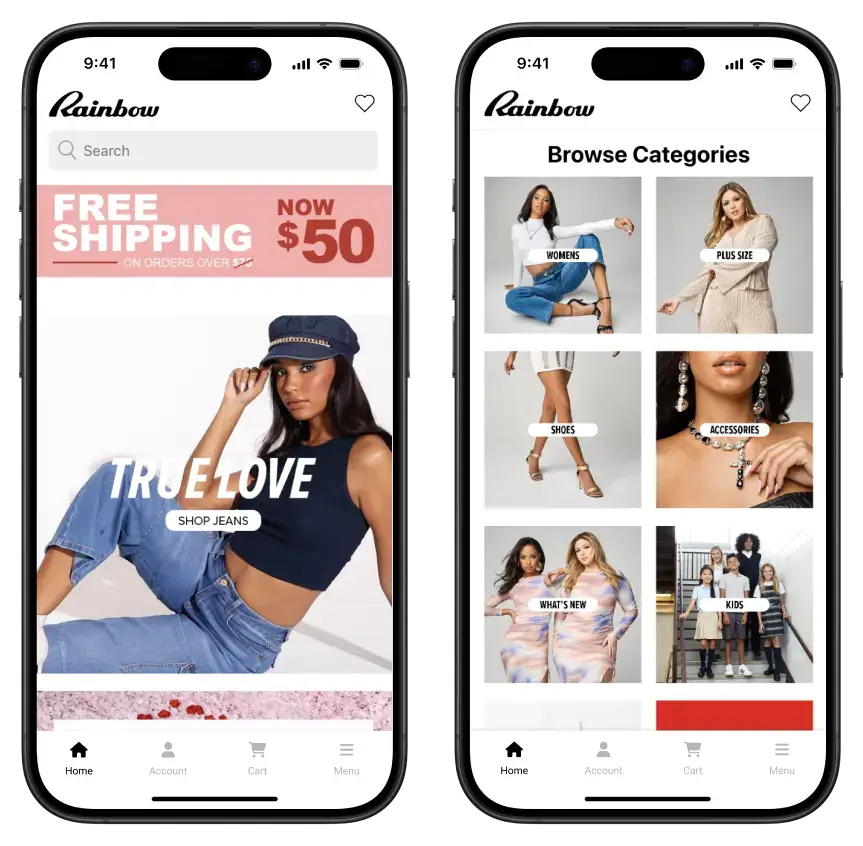
    Rainbow Shops ran into issues with their app, which was built with an API-based app builder, as their VP of eCommerce and Marketing, David Cost, says:

    “The Shopify API only enables certain things and all the major providers of apps for Shopify had limitations that the Shopify API would not let them get around.”

    Rainbow had problems integrating the extensive optimizations they had made with collections and product variations in their app, due to the limitations of the API. These changes had proven to make a significant impact on conversions on the website, so it put a cap on the potential of their mobile app.

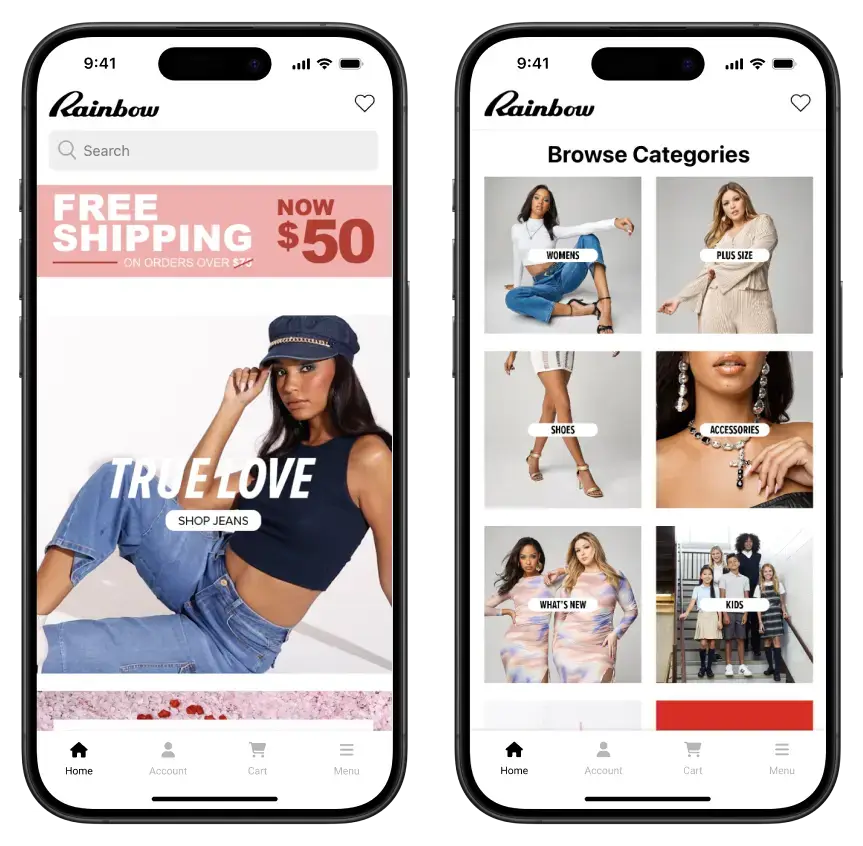
    The Rainbow Shops app, built and managed in sync with their Shopify store

    A Better Option: Convert Your Store to Mobile Apps with Vendrux

    The solution for those who want to build an app for their Shopify store, that syncs with their website, but doesn’t have the constraints and limitations of the Shopify API, is to convert the site to apps with Vendrux.

    Vendrux is a managed service that converts websites into mobile apps. The apps look and feel just as good as custom mobile apps, and are fully synchronized with your website, but without relying on any APIs.

    We reuse most of what is already on your website – the same design, product information, apps and integrations – and mix it with native features to give a proper native look and feel to your mobile apps.

    This offers a lot more flexibility and fewer limitations, without the headache and expense of hiring developers.

    More than 2,000 businesses have used our service to create their mobile apps, including many high-revenue Shopify stores (check out some examples here).

    To get an idea of how Vendrux works, book a demo and get a free preview of your app now.

    What Makes Vendrux a Better Option?

    Vendrux is ideal for eCommerce businesses, because your app doesn’t need to do anything significantly different to your website.

    If you have a well-optimized and responsive mobile website, you’re 90% of the way to having a great-looking mobile app. All that’s needed are some small UI tweaks, and integration with native mobile push notifications.

    Custom development is overkill for Shopify sites, while app builders limit you too much.

    Here’s more reasons why Vendrux is the best way for Shopify stores to launch a mobile app:

    • We convert everything from your website into the app, including all apps and integrations and custom features.
    • No integration limits or hidden fees to use specific Shopify apps (e.g. Klaviyo, Yotpo, etc) in your mobile app.
    • It’s fully managed – virtually nothing for you or your team to do.
    • Fast and affordable – launch in less than a month, for a minimal investment.
    • There’s no rebuilding required, and all your website features work seamlessly, out of the box.
    • Your app updates as your site does – no difficulties or inefficiencies trying to stay consistent across app and website.
    • There’s minimal overhead, as you don’t need to manage the app separately.
    • Unlimited push notifications are included and built in, using leading push provider OneSignal.
    • App maintenance and updates are included.
    • App store submission is done for you.

    How to Build a Shopify App with Vendrux

    With Vendrux, you can launch an app for your Shopify store in three simple steps:

    1. Book a demo and get a preview of your app – it’s free, with no obligation, and you can get answers to any questions you have about how Vendrux works.
    2. Share any special requirements you have for the app, then pass it off to our team.
    3. Leave it to us. We’ll build your app, test it (you’ll have the ability to test and give feedback too), and finally submit it to the app stores for publishing. In essence, we handle everything app-related. You just keep managing your website and business like normal.

    It’s really that simple. It costs a tiny percentage of what a custom app does, yet the end result is indistinguishable from the kind of app some brands pay millions of dollars for.

    Book your free preview now and start building your hassle-free Shopify mobile app, with no limitations and no risk.

  • Does Shopify Offer an App For Your Store?

    Does Shopify Offer an App For Your Store?

    If you’re running a Shopify store, you’ve probably wondered: is there an app for my customers to download? 

    You’re thinking about how to give loyal shoppers easier access, faster checkout, and push notifications. Just like your customers are getting when they shop on major sites like Amazon.

    The answer is a bit more complicated than a simple yes or no. Shopify does offer mobile apps. But not the kind most merchants are really asking for.

    In this article, we’ll break down exactly what Shopify provides its merchants, what’s missing, and how you can get a fully branded mobile app for your store without rebuilding anything from scratch.

    What Shopify Already Gives You

    Shopify offers two official mobile apps, but they serve very different purposes. And neither is a branded shopping app for your store.

    1. Shopify Admin App

    This app is built for you and your team, not your customers. 

    It lets you manage your store’s backend from anywhere – view orders, track inventory, manage products, and respond to customer messages. 

    It’s a powerful tool for store operations (and for checking every five minutes how many sales you’ve made today). But it’s not a mobile app for your store, like you’re thinking of.

    2. Shop App

    Shopify also offers the Shop app, a consumer-facing mobile app where shoppers can browse and buy from thousands of Shopify-powered stores. 

    It’s essentially a marketplace, similar to Amazon or Etsy. It’s worthwhile being on the Shop App. However:

    • Your store appears alongside competitors
    • Your brand experience is diluted
    • You have limited control over design, merchandising, and customer engagement

    You want to provide your customers with an “Amazon-like” experience. But you want to be Amazon – not just another merchant among tens of thousands.

    How You Can Get a Branded, Store-Specific Shopify Mobile App

    What’s missing from Shopify’s ecosystem is simple: a mobile app that’s just for your store, with your branding, your product catalog, and your customer experience.

    Loyal customers expect a one-tap shortcut on their home screen, personalized push notifications, and a seamless checkout that feels like an extension of your site.

    You want to provide it them; not force them to buy from crowded marketplaces

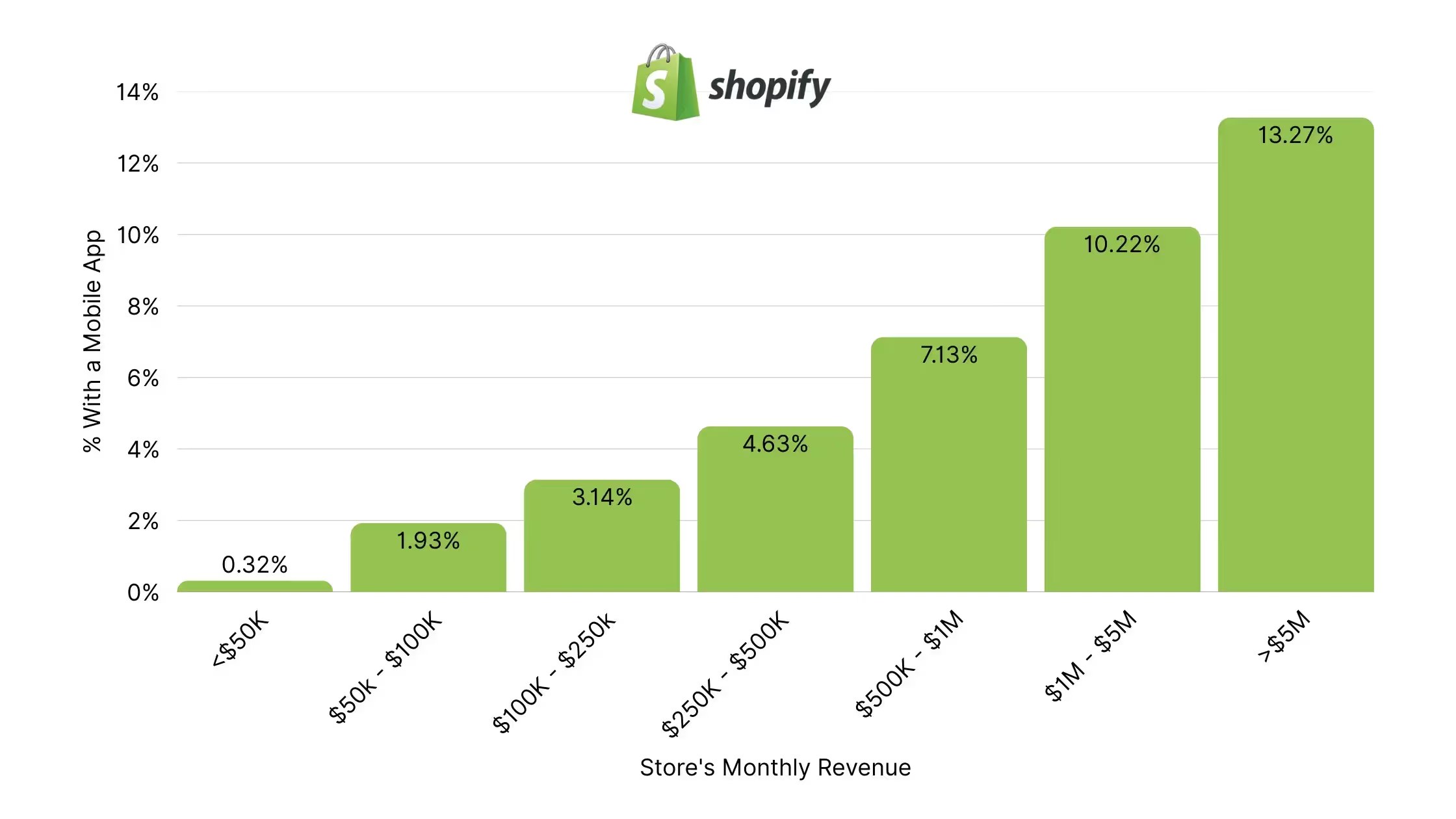
    Shopify’s native apps do not provide this. But you can build it on your own. Around 4% of Shopify brands doing 7 figures or more have their own mobile app.

    Here are two ways to do it.

    1. Build a Custom App with Shopify’s Storefront API

    First: you can develop a custom mobile app from scratch and connect it to your Shopify store.

    Shopify has an official API (application programming interface – the way two platforms, like a website and mobile app, or a server and a website, communicate and share data between each other).

    It’s called the Storefront API, and it essentially lets you create a mobile app on top of your Shopify backend.

    This is great – but not as simple as I made it sound.

    Mobile app development is a lot of work. It’s expensive, time-consuming, and you probably don’t have the budget, expertise or time to build custom iOS & Android apps (you’re looking at a $100K+ cost, and that’s just for the initial version).

    For lean ecommerce teams, this level of complexity and cost isn’t practical.

    2. Use a Shopify Mobile App Builder

    Instead of starting from scratch, you can use a third-party tool to convert your existing store into a mobile app. 

    These tools connect to your Shopify backend and recreate key elements of your site in a native app environment. And they let you go live without coding, which is important (since most brands don’t moonlight as app development studios).

    It’s a more accessible route. But you’ve got to choose the right mobile app builder.

    Many are generic drag-and-drop tools. They’re built on top of the storefront API, with pre-built blocks and templates for the front-end of your app.

    They’re typically quite limiting, especially if your store has custom features or unique design elements you want to transfer over to your mobile app (these often don’t work with drag-and-drop app builders).

    It also takes more work to build and manage apps with these builders, since it creates an app that lives separately from your website.

    Every update, every new promo or seasonal hero update or new collection needs to be done twice. Once for your site, once for your app.

    On the other hand, you’ve got Vendrux. Vendrux directly converts your Shopify website into an app.

    No rebuilding. No templates. Just your Shopify store as an app.

    Learn more about how Vendrux turns your Shopify site into a mobile app

    Why Vendrux Stands Out

    Most app builders ask you to rebuild your store inside their system. Vendrux takes a different approach. It’s more flexible, and doesn’t force you to recreate layouts or manage content in two places.

    It’s not a template. It’s not a drag-and-drop tool. It’s a full-service solution built for growth-focused ecommerce brands.

    Here’s what makes Vendrux the best choice for turning your Shopify store into an app:

    • Done-for-you service. We handle everything: setup, configuration, customization, testing, and publishing.
    • No duplication of effort. Your app stays in sync with your website automatically. No rebuilding, no extra maintenance.
    • It works with your existing design. Your current theme, custom features, and third-party integrations all work in the app, out of the box.
    • You get human support, not just software. You’ll work with a team that’s helped hundreds of Shopify brands launch high-performance apps.

    Vendrux is built for serious ecommerce brands that want to launch fast, keep their tech stack simple, and provide a premium mobile experience without custom dev headaches.

    It’s particularly powerful for brands with unique store setups.

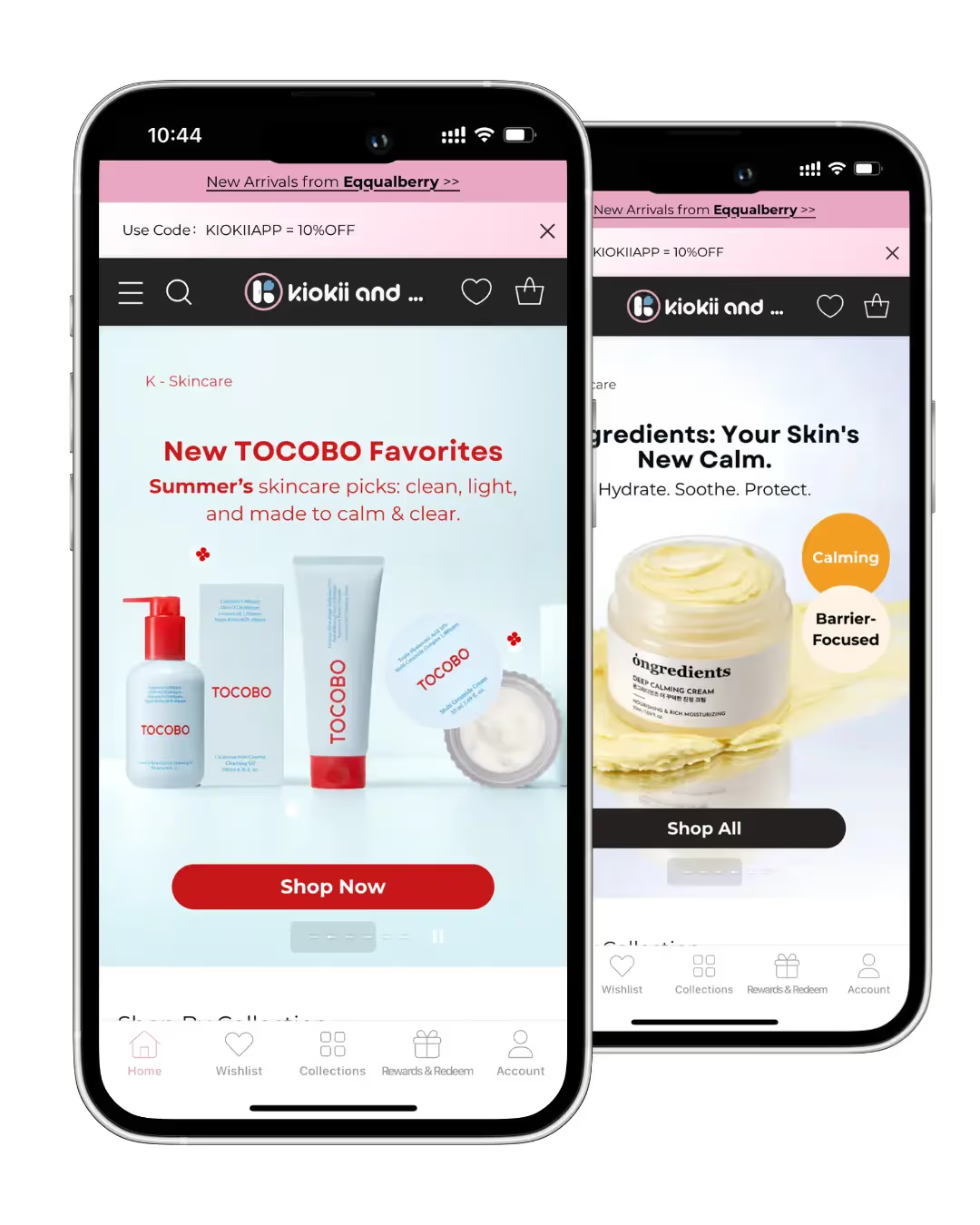
    Kiokii, for example. They invested a lot of time, effort and money into building a visually striking site, and were able to replicate that perfectly in their app.

    MASC is another perfect example. A key part of their site is Instagram-style shoppable videos; a unique feature that other app builders can’t replicate. 

    With Vendrux, they’re able to include these videos in their mobile app, creating an engaging TikTok-style user experience that has been extremely successful for them.

    For brands like these two (or just brands with limited time to build and manage a separate platform), a full-conversion, fully-managed website to app service like Vendrux is a better way to launch.

    Want to see what your app could look like? Get a free preview now.

    How the Vendrux Process Works

    We’ve spent the last decade perfecting the mobile app launch process for Shopify stores. With Vendrux, you’re not buying a tool; you’re getting a partner, as invested in your growth as you are.

    Here’s how we take your store live on the App Store and Google Play in just a few weeks:

    1. Kickoff & Setup

    We start with a personalized onboarding session to understand your brand, tech stack, and goals.

    2. App Configuration

    Our team configures your app for optimal performance, navigation, and native functionality, based entirely on your live Shopify store.

    3. Testing & QA

    In a couple of weeks, you’ll get a test version of the app to explore and provide feedback. We refine the experience to match your vision.

    At the same time, we thoroughly test the app across devices and operating systems to ensure stability, speed, and consistency.

    4. App Store Submission

    We prepare and submit your app to the App Store and Google Play on your behalf, handling all requirements and rejections if they come up.

    5. Launch & Growth

    Once live, we stay involved with proactive support, app updates, strategic push notification planning, and app promotion best practices.

    You stay focused on running your store. We handle your app from concept to conversion machine.

    Ready to see what can be done? Book a free preview now.

    Final Thoughts & Next Steps

    So – does Shopify offer an app for your store? 

    Technically, yes. But if what you’re looking for is a fully branded, customer-facing mobile app, the kind your loyal customers can download, shop from, and stay engaged with… the real answer is no.

    If you want one, you’ve got two paths forward:

    • Build from scratch with the Storefront API (expensive, slow, resource-heavy)
    • Use a platform like Vendrux to convert your existing Shopify site into an app (fast, affordable, low-effort)

    If you’re serious about growing repeat revenue and giving mobile customers the experience they expect, you need a native app.

    And with Vendrux, you can launch one without starting from zero, without sacrificing the best features from your website.

    Book a free preview now to see how your Shopify store would look as a native app. We’ll show you a working prototype, walk you through the process, and help you decide if it’s the right move for your brand.

  • 10 Reasons Why Your Shopify Store Needs a Mobile App

    10 Reasons Why Your Shopify Store Needs a Mobile App

    Most of your customers are on mobile. They browse on their phones, they buy on their phones, they do everything on their phones.

    You’re serving these customers with a responsive, mobile-friendly website. But your mobile website should be the start of your mobile strategy – not the end.

    Your most engaged customers, the top cohort driving most of your revenue, want an easier way to come back to your store, to shop and buy, and to get updates on the latest product drops or promotions.

    A mobile app is a channel still relatively few Shopify brands have. It’s a competitive advantage – and it’s easier to launch one than you think.

    Keep reading and we’ll break down ten compelling reasons why your store should have an app, along with the best way to build it.

    Key takeaways

    • An app holds onto the top cohort of customers who already drive most of your Shopify revenue.
    • App users open more often and spend more per order than the same customers on mobile web. Pharmazone, a Shopify retail pharmacy, runs 63% of their online revenue through their app, from just around 15% of their total customer base.
    • Push notifications reach the lock screen in real time, cost nothing per send, and outperform email on click-through and triggered conversions.
    • Fewer than 0.5% of Shopify stores have a mobile app, making it a huge competitive advantage.

    Vendrux is the best way to build one, letting you go live with minimal effort, and without the overhead of having to maintain a second platform.

    1. An app keeps your best customers close

    One thing is crucial for sustainable growth today: retention.

    If you want to run a profitable Shopify store, you need customers coming back, buying regularly. Yet the state of ecommerce right now is making this harder than ever.

    It’s getting harder to reach customers via email, SMS gets costly, and retargeting ads cost more and more.

    Your best customers are getting harder to reach, and brands that don’t have a reliable connection to these customers risk letting them slip away.

    An app fixes that. It provides one-tap access to your store from the customer’s home screen, and you can reach them directly on their lock screen, with no intermediaries, via push notifications.

    It’s a direct line to your best customers. That, alone, is reason enough to have an app.

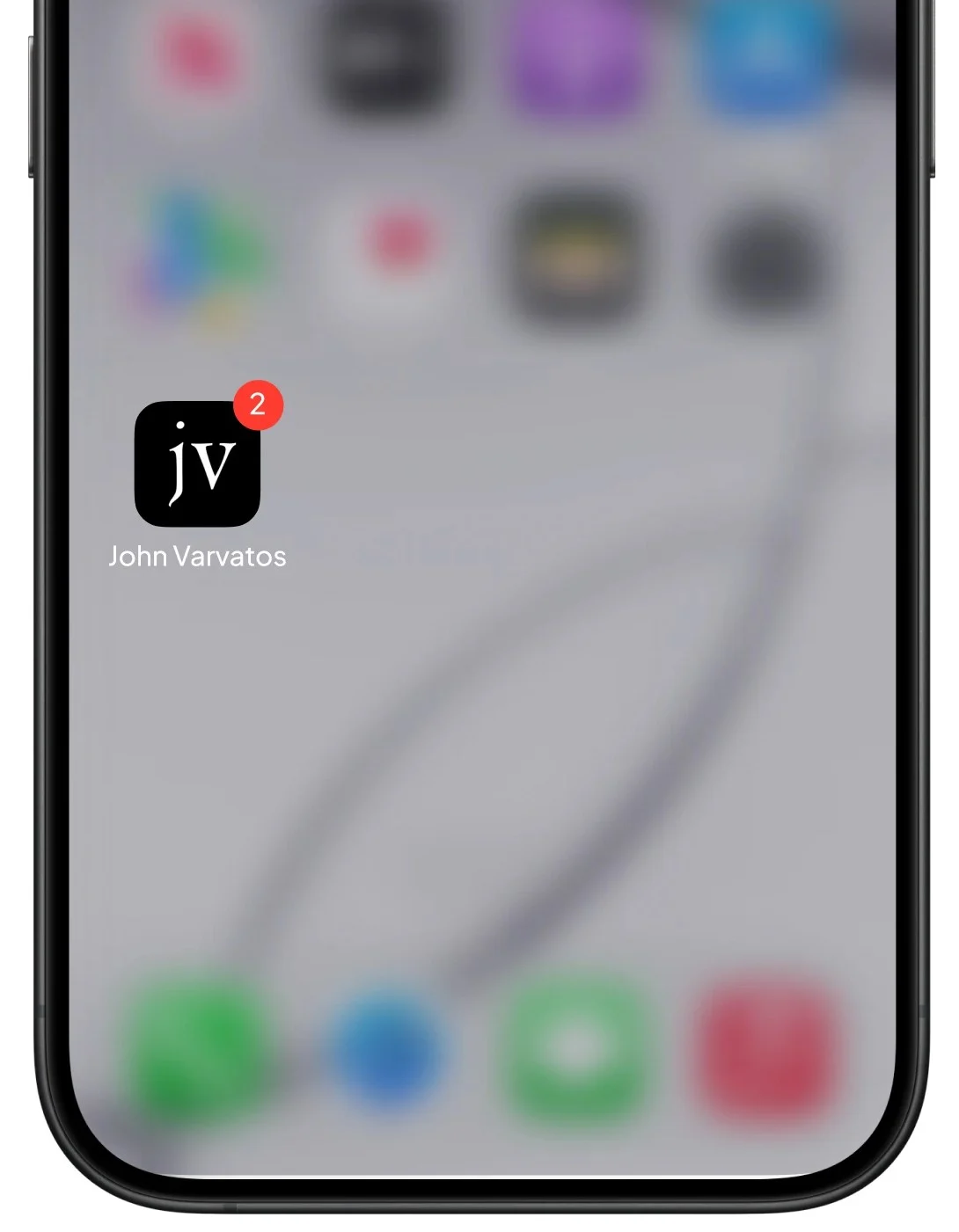
    An app puts your brand’s icon on the customer’s home screen – the most valuable real estate in ecommerce.

    2. App users buy more often and spend more per order

    Something changes when a customer installs your app. They start opening it more often. They browse longer. They place bigger orders. Same person, same brand, different behavior.

    The numbers we’ve seen from our customers tell the story.

    Pharmazone is a 65-store retail pharmacy on Shopify out of Kuwait. Their app drives 63% of their online revenue, on just around 15% of their total customer base. The app does 7x higher conversion rates than their mobile website, 7x higher AOV, and drives 5x as many sessions. The result is 15x more revenue per user in the app vs the website.

    Kiokii, a Canadian beauty brand on Shopify, gets 35% of their total online revenue from their app, with about 10% of their customer base installed. XCVI, a women’s fashion brand, sees 4.8x higher revenue per user from their app cohort, plus a 30% lift in AOV.

    Part of this lift comes from the higher quality of customer: these are already your top customers, your most engaged segment. But it’s also a channel that incentivises more usage, and actively drives lifts in your most important metrics.

    3. A mobile app reduces your dependence on paid ads

    Meta and Google ads cost more every year. iOS attribution has been broken since 2021, and gets worse with every Apple privacy update. Most operators paying attention to their MER will tell you efficiency has been consistently dropping every single year.

    The fix isn’t switching agencies, or better creative, or an AI tool that lets you generate 1000 UGC ads in 20 seconds.

    The real fix is getting more out of the customers you already paid to bring in.

    That means three things. Getting them to come back more often. Getting them to spend more over their lifetime. And finding ways to reach them, to drive follow-up purchases, that don’t cost money every time.

    A mobile app helps with all three. Not every customer will download your app, but those that do will contribute meaningfully higher LTV, increasing your profit margins and average revenue per customer acquired.

    When customer lifetime value goes up, the math on customer acquisition cost gets a lot less painful.

    4. Push notifications

    Push notifications are the most economically effective marketing channel for ecommerce brands.

    They show up on the lock screen. The customer sees them right away. There’s no Gmail Promotions tab to get filtered into, no Facebook algorithm deciding whether the message gets through.

    What’s more, they’re free to send, and there’s about a 95% chance that the customer will see your message.

    What would you pay for a channel with 95% open rates?

    At a time when the noise in every other channel is just getting louder and louder, a direct channel like this is priceless.

    Push notifications, the strongest and most direct communication channel for ecommerce brands.

    5. Abandoned cart push notifications

    Push notifications are a compelling reason, on their own, to launch an app.

    But we can go even further, and say abandoned cart notifications are also enough of a reason to have an app.

    This one automation does a crazy amount of work. We’ve had brands driving six figures in revenue per month, just by recovering abandoned carts through their app.

    It works so well because of the benefits we laid out in the section above. Messages are instant, they’re almost guaranteed to be seen. And abandoned cart push notifications are incredibly easy to automate, and give customers a one-tap path back to their cart.

    Pharmazone’s abandoned cart campaign converts at 22%. Your abandoned cart emails might not even get 22% open rates. Push is just on another level for cart abandonment.

    6. Reordering on mobile web is a six-step path; an app is one tap

    The path for a customer to come back and buy again from your website is longer than it should be. And that friction will inevitably lead to lost sales.

    Here’s what a returning customer has to do to buy on mobile web:

    • Remember your brand name
    • Open a browser
    • Type or search for you
    • Scroll past competitor ads, AI overviews.
    • Click through and wait for the page to load
    • Log in (if cookies expired)

    Each one of those is a place they can drop off, get interrupted, or decide to check Instagram and get lost in a rabbit hole of dog videos.

    In an app, it’s so much faster. One tap and they’re in. No remembering a URL or searching for your brand.

    For brands in natural repeat purchase categories, such as beauty, supplements, pet, food and beverage, this can make an immense difference to your repeat customer rate, which is basically life or death for your business.

    7. An app makes your loyalty program work harder

    Every brand has a loyalty program. But not many of them really move the needle.

    That’s usually not a problem with the program or how it’s set up. It’s positioning – the program’s landing in front of the wrong audience.

    On your website, it’s buried. That’s natural; you’re not going to bombard someone who’s learning about your brand for the first time with a pitch to join your loyalty program.

    A loyalty program is for your best customers. The same people who use your app.

    In an app, your loyalty program can be more visible. Customers can see their points balance every time they open the app. You send them a notification when they hit a new tier. You offer exclusive loyalty perks for app users.

    It becomes your VIP hub, not a thing you installed just because you felt you had to.

    8. An app cuts through the noise during BFCM

    BFCM is the biggest sales event of the year. It’s also by far the most competitive time of the year, with every brand fighting like mad for customers’ attention.

    An app is the best way to cut through the noise of overflowing inboxes and ad feeds that cost 5x more than usual. You get push notifications that land on the customer’s lock screen, a benefit that’s worth 10x as much during crowded sales events like Black Friday.

    Your app can be the hub for all your BFCM sales, and can help you convert more of your BFCM sales into long-term, engaged customers, who don’t drop off once November ends.

    9. Less than 1% of Shopify stores have a mobile app

    We pulled the data, and the results were surprising.

    Under 0.5% of all Shopify brands have a mobile app. Remove small-scale stores and filter to brands doing $100K+ a month (roughly $1M annually), and the number only goes up to 4.24%. 

    That means less than one in twenty serious Shopify brands have a mobile app.

    And that means it’s a powerful competitive advantage to have.

    With ecommerce and Shopify becoming more saturated by the day, you need a way to stand out. To show shoppers that you’re not just another store. You’re a serious brand, with real weight.

    10. A powerful churn-buster for subscription brands

    Shopify runs more subscription businesses than any other ecommerce platform. And subscription brands are the type of brands where mobile apps really excel.

    This category lives and dies on churn. Even small improvements here compound and make an overwhelming difference to your bottom line.

    An app helps you reduce churn in a number of ways. It makes subscription management easier – customers can easily log in and pause, skip or alter their orders, keeping them subscribed instead of churning.

    You can send smart renewal reminders and shipping notifications via push, which lands on the customer’s phone instantly, and prevents the kind of surprises that lead to churn.

    Proactive communication is the key to lower churn, and that’s one of the biggest value-adds of a mobile app.

    The best way to launch your Shopify mobile app

    There are many brands that would love to have their own mobile app – but just have the impression that it’s too much work and too high of a cost to launch one.

    With a Shopify mobile app builder, that’s not true anymore. Any successful Shopify store can create a mobile app, without the tax and huge operational lift of a custom development project.

    There are two ways to look at this. If you’re a smaller store, needing a simple app with few complicated features (basically just a static, vanilla storefront), you can check out the Shopify App Store for cheap DIY tools that let you launch a mobile app for your store.

    If you’re running the kind of brand that doesn’t fit these tools – mid-market to enterprise-level brands, with more complex requirements that a no-code tool can’t handle, Vendrux is for you.

    Vendrux turns your existing store into a powerful, custom mobile app. Everything great about your store carries over to the app, from your integrations to theme customizations to custom features.

    It’s fully managed for you, letting you keep your team focused on marketing and merchandising, while an expert team manages your app.

    “Vendrux keeps this whole thing simple and streamlined. No more juggling two different platforms, no more wasted time on maintenance. Vendrux made a lot of sense because it literally uses Shopify. When Shopify upgrades, the app is updated.”
    – Eric Lowe, Director of Ecommerce at XCVI

    If you’re ready to build your app, get in touch. Book a free strategy call and we’ll walk you through a preview of what your app would look like, answer any questions you have, and help you map the best way to go live with your own, branded mobile app, and put your brand on your customer’s home screen.

  • The Best Shopify Inventory Management Apps in 2026 (Free & Paid)

    The Best Shopify Inventory Management Apps in 2026 (Free & Paid)

    Finding the best Shopify inventory management apps matters now, more than ever before.

    Your customers refuse to wait. In fact, 91% of shoppers will switch brands if what they want is unavailable, instead of waiting for a restock.

    And inventory management in 2026 is no longer just about tracking stock levels. 

    Choosing the right Shopify inventory management app makes the difference between smooth growth and daily operational stress.

    This guide explains when you need one and highlights the best Shopify inventory management apps worth your attention this year.

    What Is a Shopify Inventory Management App?

    A Shopify inventory management app is a third-party tool integrated through the Shopify App Store to help you track, control, and optimize stock across products, locations, and sales channels in real-time. 

    These apps automate and scale inventory processes for ecommerce merchants, preventing issues such as overselling or stockouts that plague poor management. 

    Compared to Shopify’s native dashboard, these apps go beyond it by adding features such as automated low-stock alerts, bulk CSV imports/exports, and barcode scanning for warehouse efficiency.

    Shopify built-in inventory vs inventory management apps

    Shopify’s built-in core stock tracking lives inside your Shopify admin. It provides a great solution for small stores with simple needs. It allows you to track stock by product and location, adjust quantities, and receive low stock alerts.

    However, Shopify’s built-in inventory is limited when your business scales. It does not support advanced forecasting, multichannel management, manufacturing workflows, or deep reporting.

    Inventory management apps extend Shopify by adding automation, analytics, and control that growing sellers need. They extends Shopify with advanced capabilities like forecasting, automated purchase orders, multi-warehouse and multichannel orchestration, deeper analytics, and more complex workflows.  

    5 Best Shopify Inventory Management Apps In 2026 

    After reviewing features, pricing, use cases, and real seller needs, we put together the 5 best Shopify inventory management apps in 2026. 

    This list is designed to help you quickly find the right solution to manage inventory more efficiently and scale your Shopify business with confidence. Let’s dive into it! 

    LitCommerce

    LitCommerce is one of the best Shopify inventory management apps for sellers who operate across multiple sales channels. It works as both a multichannel selling tool and an inventory management solution, allowing Shopify sellers to control listings, orders, and stock levels from one central dashboard. 

    With real-time inventory sync, bulk editing, and automated updates, LitCommerce helps reduce overselling, save time, and keep inventory accurate as your business scales. You will get prompt notifications when inventory levels approach predefined thresholds.  

    Additionally, instead of manually adjusting price and product quantity on each listing, you can create rules to display the desired information across Shopify and sales platforms automatically and quickly. 

    Pricing

    7-day free trials | Pay-as-you-go paid plans from $29 scale (up to 3 channels) (4.8 stars from 702 reviews) 

    Key features 

    • Real-time inventory sync across Shopify and multiple marketplaces
    • Centralized dashboard for managing products and stock
    • Bulk listing and bulk inventory updates using smart templates and recipes
    • Automatic stock adjustment after each sale 
    • Easy integration with major marketplaces
    • Price and order sync help centralized order management 

    Pros

    • Near real-time inventory and price sync. 
    • Strong bulk listing tools, templates, and QuickGrid-style editing.
    • Easy for beginners with simple onboarding
    • Flexible pricing with a free trial, pay-as-you-go style plans. 
    • Excellent customer support.

    Cons

    • Advanced analytics features are limited
    • Bulk edits can be slower with large catalogs.

    Best for:

    Small to medium Shopify brands selling on Etsy, eBay, Amazon, Walmart, and TikTok Shop who need simple, accurate inventory sync and easier listing management.

    Stocky Shopify

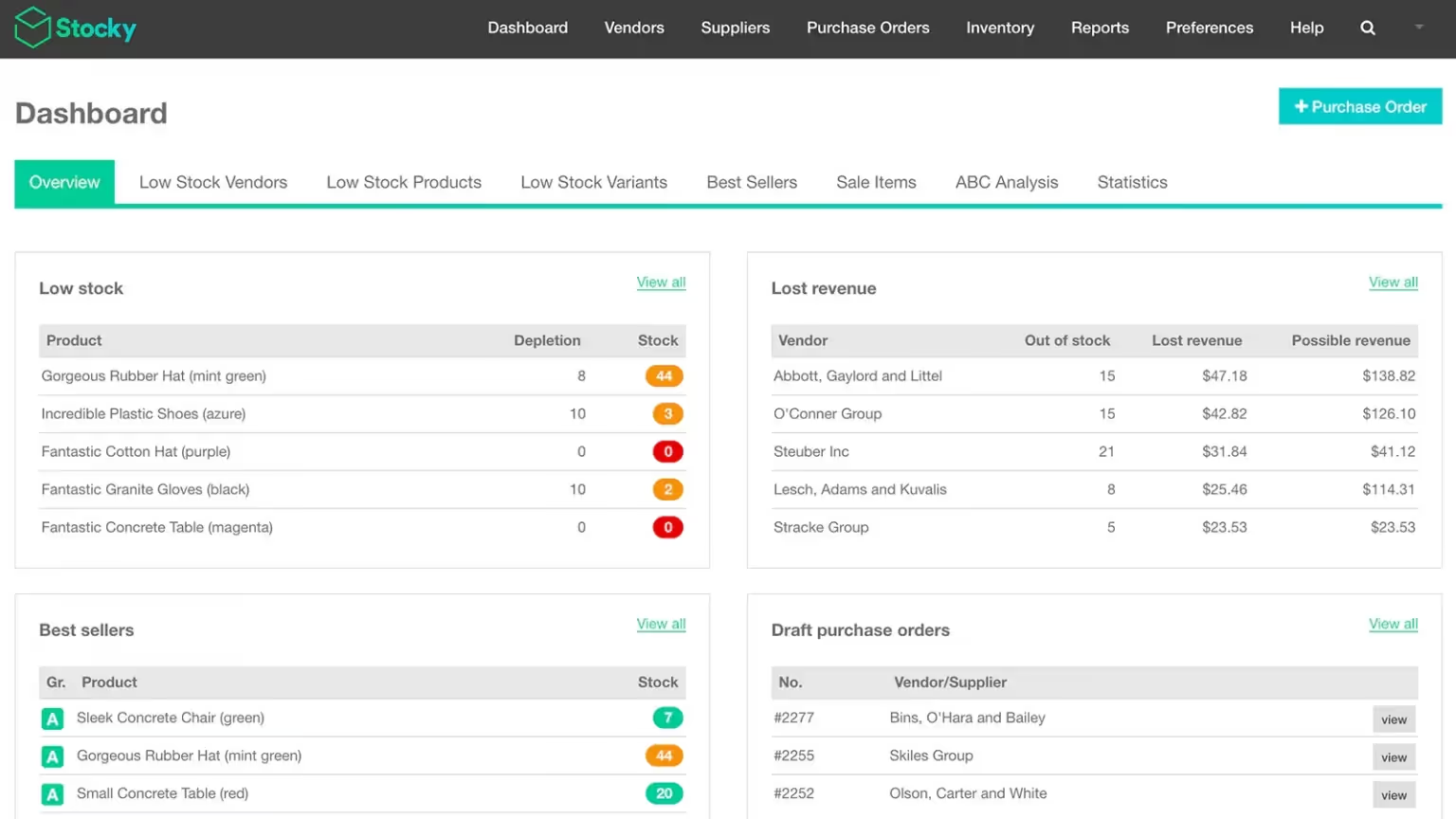
    Stocky is a Shopify owned inventory planning app designed for merchants who use Shopify POS Pro. The app focuses on demand forecasting and purchase order management for retail businesses. 

    Stocky uses historical sales data to suggest what to reorder and when. This helps physical and hybrid stores avoid stockouts and overstocking. 

    Pricing

    Free with Shopify POS Pro subscription (2.7 stars from 209 reviews) 

    Key features 

    • Inventory tracking across multiple locations
    • Stocktakes (cycle counts) and stock transfers between locations to rebalance inventory based on demand.
    • Create and manage purchase orders in one place
    • Forecast‑based reorder suggestions using sales history
    • Product recommendations for replenishment

    Pros

    • Deep integration with Shopify POS
    • Accurate sales-based forecasting
    • No extra app cost with POS Pro

    Cons

    • Only available for POS Pro users
    • Not suitable for multi-channel selling

    Best for:

    Brick and mortar or hybrid retailers using Shopify POS Pro

    If you also sell on marketplaces, this guide to Shopify marketplace apps can help you expand without losing control.

    Prediko

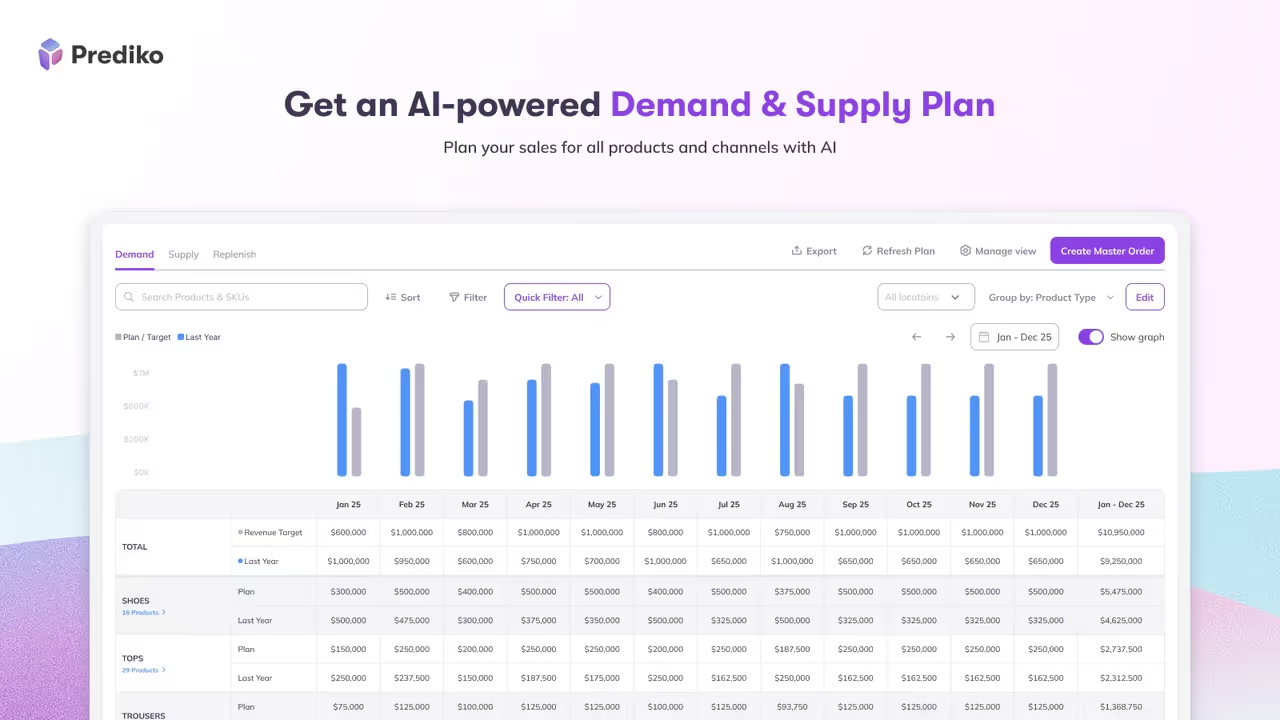
    Prediko is an AI-powered inventory forecasting and planning app built for data-driven Shopify brands. The app focuses on helping you understand future demand and plan inventory accordingly.

    Prediko analyzes sales velocity, seasonality, and trends to generate smart restock recommendations. This app on the list of best Shopify inventory management apps is a top choice for D2C brands that rely on accurate forecasting and want a smarter, less manual replenishment process.

    Pricing

    Free to install | Paid plan from $49 – $199/month (4.9 stars from 175 reviews)

    Key features

    • AI-powered demand forecasting and supply planning 
    • Smart replenishment alerts and health bars 
    • Purchase order management to create, track, and bulk-edit POs
    • Real-time inventory tracking with restock alerts, low-stock notifications, and out-of-stock prevention tools.
    • Raw materials management with bills of materials (BOMs) 

    Pros

    • Strong AI analytics and forecasting
    • Clean and modern interface
    • Useful for scaling brands

    Cons

    • Advanced features require paid plans
    • Not an all-in-one inventory system (forecasting only)

    Best for:

    Shopify stores with fast-moving products, multi-location stock, or teams that want AI-driven forecasting and inventory planning. 

    Syncio

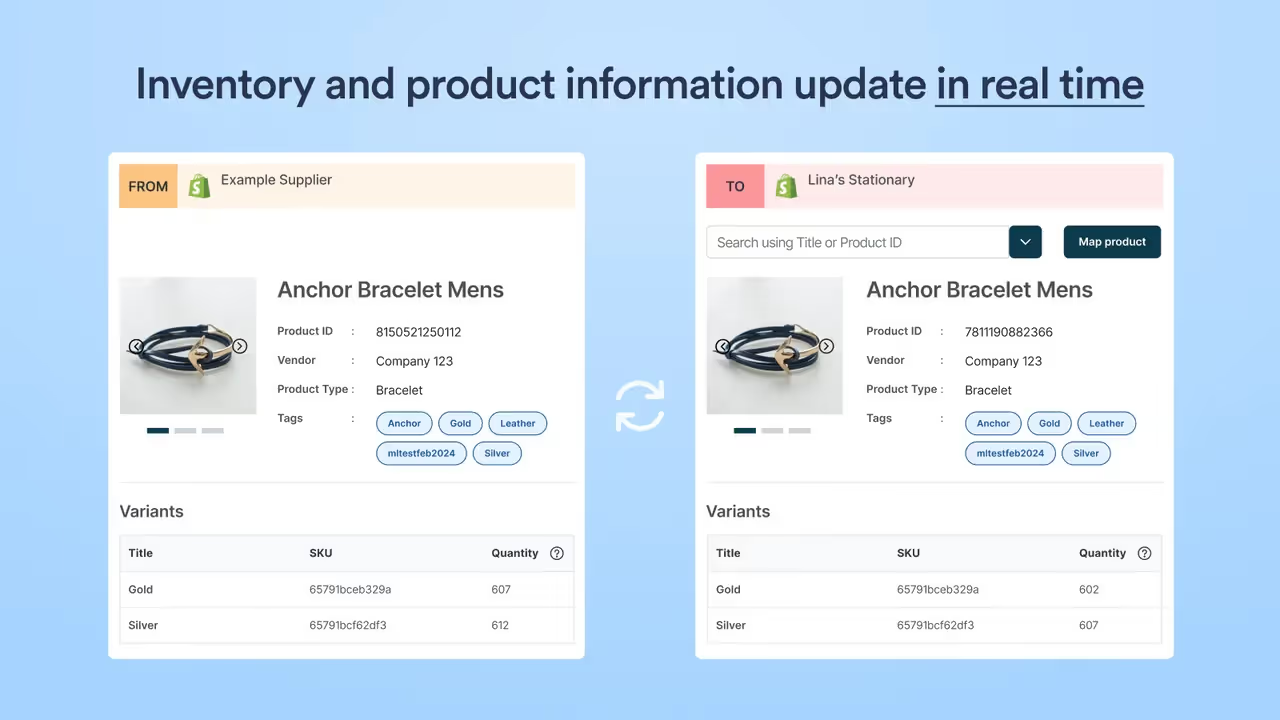
    Syncio is a Shopify app that connects multiple stores so inventory, products, and orders stay in sync in real time, helping prevent overselling and cutting out manual updates across shops.

    Syncio lets one store act as the source with master inventory and product data, while other “destination” stores automatically mirror stock levels and selected product details from it.

    It is designed for brands with multiple Shopify stores, supplier–retailer networks, dropshippers, and marketplaces that need centralized control but separate storefronts. 

    Pricing

    Free | Paid plan from $19 – $39 monthly (4.9 stars from 151 reviews)

    Key features

    • Inventory sync & real-time stock adjustment using SKU or barcode
    • Import and sync product fields 
    • Sync order information 
    • Find and connect with new suppliers or retailers 

    Pros

    • Reliable real-time inventory sync between multiple Shopify stores 
    • Strong support for multi-store and supplier–retailer workflows
    • Handles large SKU volumes

    Cons

    • Can be complex for unique, multi-location, or large-scale needs
    • Sync speed can slow down on very large catalogs

    Best for:

    Brands managing multiple Shopify stores or wholesale relationships.

    Katana Cloud Inventory

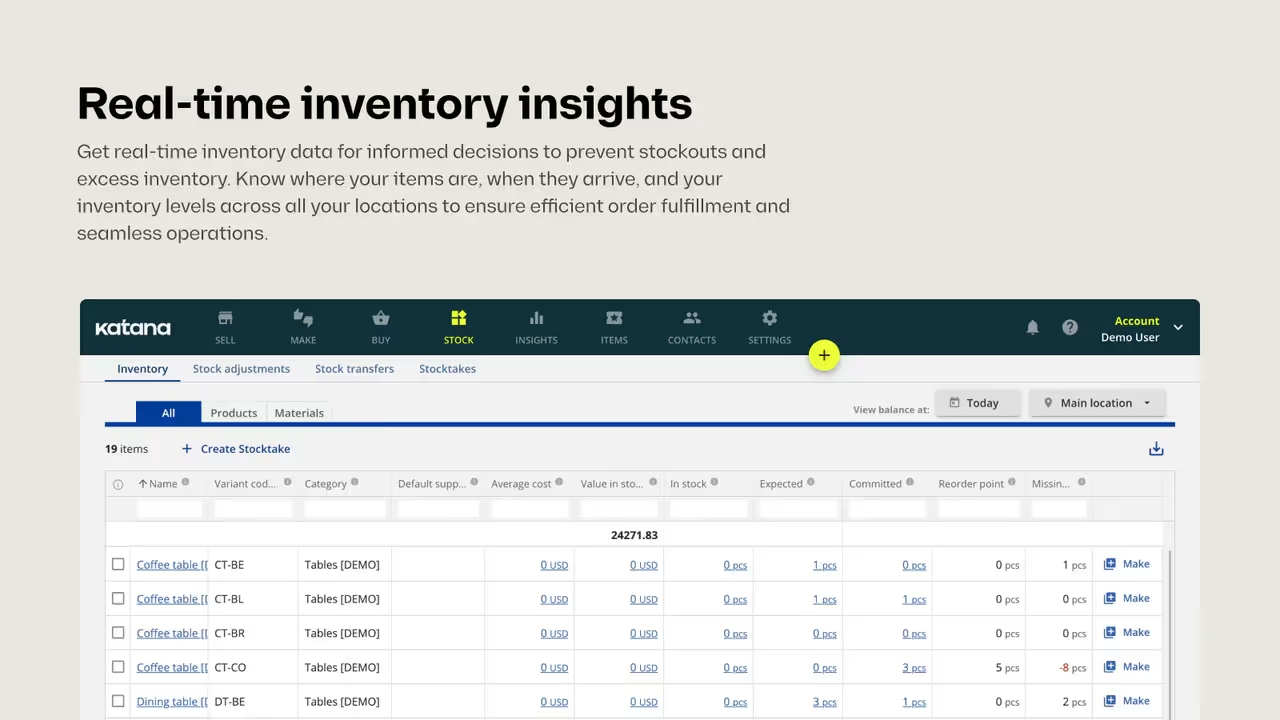
    Katana is a cloud inventory and light-ERP platform for Shopify sellers that centralizes stock, production, and order management. It syncs inventory in real time, automates material planning and purchase orders, and connects multiple Shopify stores to prevent stockouts and keep fulfillment accurate and efficient. 

    This best Shopify inventory management gives you visibility into what is in stock, what is being produced, and what materials are required to fulfill orders.

    Pricing

    Free | Paid plans from $399 to 1.999 monthly (4.6 stars from 134 reviews)

    Key features

    • Multilocation inventory management 
    • Production planning and scheduling
    • Smart purchase orders based on material requirements
    • Centralize fulfillments across multiple locations and sales channels

    Pros

    • Excellent for manufacturing and raw material tracking
    • Strong automation and centralized workflows
    • Very high customer satisfaction
    • Easy to use, with a modern, visual interface and clear workflows

    Cons

    • High monthly pricing for full features
    • Not so friendly with the mobile app. 
    • Less optimal for larger, highly complex operations that need extensive customization

    Best for:

    Product-based businesses that need to manage both inventory and production, manufacturers, and D2C brands selling via Shopify and other channels.

    When Do You Need a Shopify Inventory Management App? 

    A Shopify inventory management app becomes necessary when your store operations outgrow manual tracking or basic Shopify inventory features.

    As order volume increases, inventory mistakes can quickly lead to lost sales and unhappy customers. 

    Here are the traits that you need in a Shopify inventory management app:  

    • You sell on multiple channels, such as Amazon, Etsy, eBay, …, and need real-time inventory syncing to avoid overselling.
    • You manage multiple locations or warehouses and lack clear stock visibility.
    • You frequently experience stockouts or overstocking due to poor forecasting.
    • You handle bundles, kits, or wholesale orders that Shopify cannot track accurately.
    • You manufacture products and need to manage raw materials and finished goods.
    • You spend too much time updating inventory manually instead of growing the business. 

    If one or more of these situations apply, Shopify built in inventory is no longer enough.

    How to Choose the Best Shopify Inventory Management Apps

    Not all apps solve the same problems, even with the best Shopify inventory management app. The best option depends on how and where you sell. Here’s the list of the criteria below, and reference real app examples to choose the best apps for your Shopify store: 

    You can start by identifying your sales channels.  

    • Choose LitCommerce if you sell on multiple marketplaces and need real-time inventory sync across channels
    • Choose Syncio if you manage multiple Shopify stores or wholesale and retail stores together

    Next, consider how complex your inventory operations are. 

    • Basic stock tracking works with Shopify’s built-in inventory or light tools
    • Advanced planning apps like Prediko are better for forecasting and replenishment decisions

    Then, define your business model to make the right choice. 

    • Retail and POS focused stores benefit from Stocky Shopify, which supports demand forecasting and purchase orders
    • DTC brands benefit from Prediko, which focuses on sales trends and cash flow planning.
    • Manufacturing businesses should choose Katana Cloud Inventory for production and material tracking.

    Make sure the app can grow with your business by considering pricing and scalability. 

    • Apps like LitCommerce offer free plans for small sellers and scalable pricing for growth
    • Forecasting and manufacturing tools like Prediko and Katana usually follow premium pricing models

    Finally, look at how easy the app is to adopt and maintain. 

    • Apps such as LitCommerce and Syncio are known for simple setup and user-friendly dashboards
    • More advanced systems like Katana require onboarding time but offer deeper operational control. 

    The best inventory management apps for Shopify are the one that meets your needs today while supporting where you want your business to go next. 

    Best Shopify Inventory Management Apps: FAQs

    What is the best inventory app for Shopify?

    The best Shopify inventory management app depends on your business needs, with top contenders including LitCommerce, Stocky, Prediko, Syncio, and Katana Cloud. For basic needs, Shopify’s built-in tools are sufficient, but growing businesses require apps for forecasting, multi-channel synchronization, and complex stock tracking. 

    Does Shopify have an inventory management system?

    Yes, Shopify has built-in inventory management tools that allow you to track stock levels, manage quantities, create purchase orders, handle transfers, and view basic reports, syncing across online sales and Shopify POS for unified stock control. 

    For more advanced features, like low-stock alerts or deeper analytics, you can use apps, such as LitCommerce, Prediko, and more! 

    Which app is best for inventory management? 

    The best inventory management apps depend on your business needs. LitCommerce is best for multichannel inventory syncing. Stocky works best for Shopify POS retailers. Prediko is ideal for forecasting and planning. Katana is best for manufacturing. Choose the app that matches how you sell and scale. 

    Wrapping Up!

    Choosing the right inventory tool can shape how smoothly your Shopify store grows in 2026.

    From multichannel syncing with LitCommerce to forecasting with Prediko and production control with Katana, each solution serves a different selling model and a specific growth stage. 

    The best Shopify inventory management apps are those that reduce errors, save time, and support smarter decisions, so you can focus on scaling with confidence.

  • The Shopify Page Builder Playbook: How to Build Custom Pages That Convert

    The Shopify Page Builder Playbook: How to Build Custom Pages That Convert

    You can build a decent-looking store with Shopify’s out of the box features, and a basic theme. Homepage, collections, basic PDPs – all clean and serviceable.

    But once you want to really elevate your CRO and customer experience, you’ll want to build something more custom.

    Landing pages; hero PDPs; brand story pages. A content hub built for SEO and AEO. 

    These are the pages on your site that are well worth putting the effort into.

    Keep reading and we’ll break down everything you need to know about building custom Shopify pages that drive real results.

    Read more: How to Carry Over Your Shopify Custom Pages To Your Mobile App

    The Pages Worth Building Custom (and the Ones That Aren’t)

    A typical Shopify catalog has hundreds of pages. Trying to design every one of them custom is how stores end up with bloated sites, inconsistent UX, and a maintenance burden that strangles your marketing team.

    The pages worth putting the most effort into are those that carry disproportionate weight in the customer journey. A handful of pages drive the majority of revenue, conversions, or brand impression. Those are the ones that earn the design investment.

    Campaign and paid-traffic landing pages

    If you’re spending money to send traffic to a page, it should be designed for that traffic. Generic homepages are the wrong destination for paid social, paid search, or influencer campaigns – the offer, the audience, and the intent are too specific.

    Custom landing pages for campaigns typically lift conversion rates 20-40% over sending the same traffic to a generic homepage or category page. That’s the highest-ROI use case for a page builder.

    Hero or flagship product pages

    Most Shopify stores have one or two products that drive the bulk of your revenue. The default PDP template treats those products the same as a long-tail SKU.

    A custom PDP for a flagship product – with bespoke imagery, deeper storytelling, more proof, and tighter CTAs – is one of the easiest wins in CRO. The marginal lift from a 1% conversion improvement on a hero product is usually worth more than 10% on a long-tail one.

    Brand and editorial pages

    About pages, sustainability pages, founder stories, mission pages. These don’t convert directly, but they’re load-bearing for first-time visitors deciding whether to trust your brand.

    Default theme templates can’t carry the weight here. Custom design is what turns “another DTC brand” into “a brand I’d buy from again.”

    SEO and content pages

    Long-form content pages targeting commercial-intent keywords, gift guides, comparison pages, glossary pages. These are organic traffic magnets when designed well, and the default theme rarely supports the structure they need (custom layouts, internal link blocks, sticky tables of contents, embedded CTAs).

    Worth noting: Shopify is not the strongest CMS for content-heavy publishing. Custom blog pages make it more workable.

    Editorial collection pages

    Stock collection pages list products. Editorial collection pages tell a story about why those products belong together – seasonal edits, “as seen in,” gift collections, curated drops. The shoppable-editorial format can lift category page conversion meaningfully when done well.

    The pages that aren’t worth it

    Equally important is what to skip. 

    Long-tail product pages that drive 1% of revenue each don’t justify custom design – the default theme template is fine. Homepage rebuilds for the sake of a refresh, with no clear conversion goal, are vanity work. Blog posts that should stay in the default theme don’t need a builder pasted on top.

    If a page can’t credibly be tied to a revenue or pipeline goal, it doesn’t belong in the custom-design queue.

    What Makes a Custom Page Actually Convert

    Once you’ve decided which pages to build, the next question is what makes those pages perform. Five principles separate the custom pages that pay back from the ones that just exist.

    Single intent per page

    Every custom page should answer one question or drive one action. The campaign LP exists to convert paid traffic on a specific offer. The hero PDP exists to sell that one product. The brand page exists to build trust.

    Pages that try to do everything end up doing nothing. The most common page builder failure mode is treating a custom page like a billboard for every offer, every product line, every value prop.

    Clear hierarchy

    Hero, then proof, then offer, then call to action. Every custom page should walk the visitor down the same arc.

    The pages that convert are the ones a visitor can navigate without thinking – they hit the hero, see the proof, understand the offer, and find the CTA right where they expect it. The pages that don’t convert are the ones with creative-but-confusing layouts that prioritize design over decision-making.

    Mobile-first design

    Most Shopify stores still build pages on a desktop screen and squish them down for mobile. That’s backwards.

    70%+ of Shopify traffic comes on mobile. The custom page should be designed mobile-first – what does it look like on a phone, with a thumb scrolling, in three seconds? – and then expanded for desktop.

    Page builder apps make this easier than ever, but only if you start in the mobile view, not the desktop one.

    A real speed budget

    Custom pages can quietly tank your site speed. Every additional section, every image, every embedded video, every third-party widget adds load time. Slow pages don’t convert, no matter how nicely designed they are.

    Set a speed budget per page (e.g., LCP under 2.5 seconds on mobile) and measure against it on every iteration. Cut the section that doesn’t earn its weight. The page builder doesn’t enforce this for you – you have to.

    Dynamic over static

    Static custom pages get built once and forgotten. Dynamic ones – with live inventory, real-time reviews, AI recommendations, time-bound offers – keep working as the underlying catalog and audience change.

    The strongest custom pages mix custom design with dynamic content, so the page itself stays fresh without manual rebuilds.

    The Biggest Mistakes with Custom Shopify Pages

    Most underperforming page builder pages fail for the same set of reasons.

    1. Designing in isolation from the rest of the site. A custom page that looks nothing like the rest of your store creates a brand-mismatch moment when visitors click through to the cart or another page. Custom doesn’t mean disconnected.
    2. Theme-update conflicts. When your underlying Shopify theme updates, page builder pages can break in subtle ways – fonts shift, sections misalign, buttons stop styling. Audit custom pages after every theme update, especially around major Shopify releases.
    3. Page-builder bloat. Most builders inject their own JavaScript and CSS. Use multiple builders or stack heavy widgets and you end up with an LCP that pushes 4+ seconds. Choose one builder and stick to it.
    4. Desktop-first design. Already covered above – it’s worth flagging twice. The single biggest reason custom pages underperform is that they were built and tested on desktop, then shipped to a mobile-majority audience.
    5. Build and forget. Pages rarely perform on the first ship. The custom pages that compound their value are the ones that get measured, A/B tested, and refined over months. The ones that don’t are the ones that get built once and left to rot.

    A note on Shopify themes

    Page builder apps don’t replace your theme – they extend it. Your theme still controls the underlying styles (colors, fonts, button shapes), and page builder pages should inherit those styles for visual consistency. If you’re rebuilding your theme and customizing pages at the same time, sequence the theme work first; otherwise the page builder pages will need a second pass once the theme settles.

    The Workflow: How to Build a Custom Page That Pays Back

    Here’s the sequence we’d recommend a Shopify brand follow when designing a custom page from scratch.

    Step 1: Define the goal in one sentence

    Before opening any page builder, write down what the page is for. “Convert paid Meta traffic on the Spring Sale offer.” “Sell the flagship moisturizer to first-time visitors from search.” “Build trust with returning customers researching our sustainability story.”

    If you can’t write the goal in one sentence, the page isn’t ready to be built.

    Step 2: Map the customer journey to the page

    Where is the visitor coming from, what’s their intent, and what do they need to see to take the next action? A campaign LP from paid Meta has different needs than a flagship PDP from organic search.

    Map the entry point → intent → friction → desired action chain before you design. This is what tells you which sections belong on the page, in what order, and which to leave off.

    Step 3: Wireframe before designing

    Most page builder apps have 100+ templates, which is a blessing and a curse. The blessing is you don’t start from blank. The curse is it’s tempting to pick a template that looks nice and try to retrofit your content into it.

    Sketch the section order on paper or in Figma first, then pick the template that fits the wireframe. Not the other way around.

    Step 4: Build mobile-first

    Open the page builder in mobile preview mode and design there first. Once the mobile experience works, expand the design for tablet and desktop.

    This is the single highest-leverage habit change for stores serious about CRO. It costs nothing, takes minimal extra time, and dramatically improves the floor of every page you ship.

    Step 5: Ship, measure, iterate

    Custom pages are not a launch-and-leave investment. Ship the page, set up tracking, and define what success looks like (conversion rate, AOV, bounce rate, time on page, paid-traffic ROAS).

    Most page builder apps now include built-in A/B testing. Use it. The lift between V1 and V3 of a page is usually larger than the lift from picking the “right” template in the first place.

    Carrying Custom Pages Into Your Mobile App

    You invest weeks designing a custom flagship PDP, a campaign LP, and a brand story page. They convert well on web. 

    Then you go to launch a mobile app and most of those pages either disappear or render as broken approximations.

    The reason? Most of the time, when you build a mobile app, you’re rebuilding a brand new storefront from scratch.

    Product data gets pulled into your app via the Shopify API, but the frontend – the UI – is brand new. You’ve just lost the hard work and iteration you put into building custom, high-converting, on-brand pages.

    That’s why Vendrux works so well for brands with custom pages and unique user experiences. Vendrux carries over everything from your website and converts it to a full-featured mobile app.

    That includes the custom PDPs, homepage, collection pages you’ve built with a page builder like Instant or Tapita.

    You don’t work within the limitations of a separate platform. You can keep designing custom pages with all your existing tools, and shipping these both for the web, and for your app.

    You can even use page builders to put together custom pages for the app, and build a unique user experience for your app users, all managed through your existing website and tools.

    It’s just an easier way to build and manage a custom app.

    Your site converts. Now turn it into an app.

    Your team has invested in custom landing pages, hero PDPs, and editorial content that converts on the web. The question is whether all of that survives the move to a mobile app, or whether you start over.

    Vendrux extends your Shopify website into a native mobile app, with every custom page, every AOV and CVR boost carrying over.

    Get a Free App Preview

    The Page Builder Apps Top Shopify Brands Use

    Once you know which pages to build and how to design them, the tool itself becomes a smaller decision than most operators assume. Any of the apps below can produce a high-converting page in the right hands.

    Here are some of the most popular tools used by brands we work with.

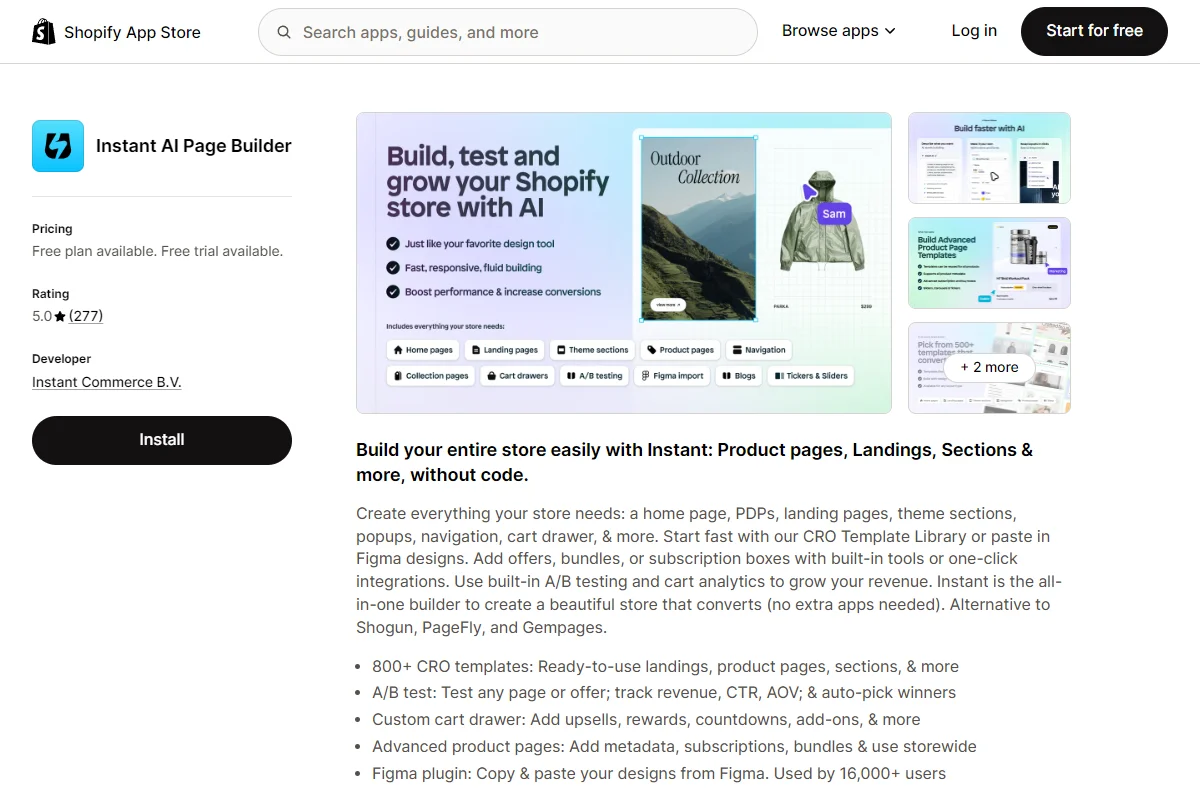
    • Instant Section & Page Builder – A no-code visual builder that publishes as native Shopify Liquid, with built-in A/B testing and a Figma-to-Shopify plugin. Best for design teams that work in Figma and brands that A/B test their pages regularly. Website | Shopify App Store
    • Foxify Smart Page Builder – A free-form, canvas-style builder with AI layout generation and bundled CRO extensions (Ajax cart, color swatches, quick view). Best for design-forward stores that want creative freedom without a row-and-column editor. Website | Shopify App Store
    • Tapita SEO AI Blog Builder – An AI-powered builder and blog content generator with integrated keyword research. Best for content-driven stores that want page building and AI content in one tool. Website | Shopify App Store
    • LayoutHub Easy Page Builder – A template-library-first builder focused on speed and ease of use, with strong customer support. Best for non-technical merchants who want polished pages quickly without a design background. Website | Shopify App Store
    • Canvify – A Shopify app that turns Canva designs into native Shopify pages. Paste a Canva share link, publish. Best for Canva-native teams that want visually rich brand pages without learning a separate builder. Website | Shopify App Store
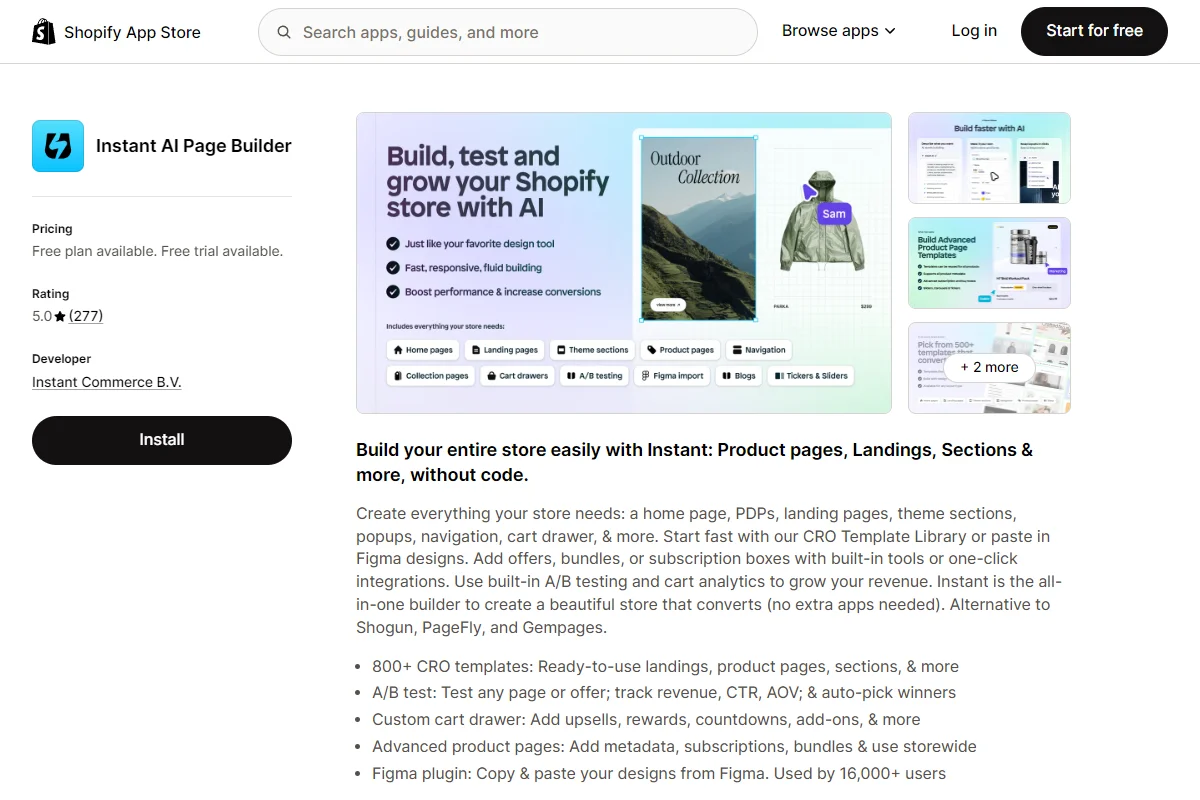
    Instant AI page builder, one of the top page builder apps on the App Store

    There are many solid tools for building custom pages on Shopify. The best is the one your team feels most comfortable using, and brings the features you need to build the right kind of pages for your site.

    Final Thoughts: The Tool Is the Smallest Decision

    Customizing and improving key pages on your site is one of the highest-ROI moves any Shopify store can make.

    Your custom page strategy should follow that order:

    1. Pick the pages that actually deserve custom design (campaign LPs, hero PDPs, brand pages, SEO content – not everything).
    2. Design each page for a single intent, with a clear hierarchy and a real speed budget.
    3. Build mobile-first, every time.
    4. Pick a single page builder app that fits your team’s workflow.
    5. Ship, measure, and iterate. The lift between V1 and V3 is bigger than the lift between picking the “right” or “wrong” app.

    If you do all five, custom pages stop being a vanity exercise and start being one of the highest-ROI surfaces on your store.

  • Shopify Headless Commerce: When Hydrogen Makes Sense (and When It Doesn’t)

    Shopify Headless Commerce: When Hydrogen Makes Sense (and When It Doesn’t)

    “Going headless” on Shopify used to mean stitching together the Storefront API with a third-party frontend framework and figuring out hosting yourself. It worked, but it was a custom build from the ground up.

    Shopify changed that equation with Hydrogen and Oxygen. Hydrogen is Shopify’s React-based framework purpose-built for headless Shopify storefronts. Oxygen is the hosting layer that runs Hydrogen apps on Shopify’s global infrastructure. 

    Together, they give Shopify Plus merchants an official path to headless commerce without leaving the Shopify ecosystem.

    But “official path” doesn’t mean right for everyone. This guide covers how Shopify headless actually works, what you gain, what you lose, and how to decide if it’s the right move for your store.

    How Shopify Headless Works

    In a standard Shopify setup, the frontend (your theme) and backend (products, orders, checkout) are tightly coupled. You customize the storefront within the theme editor, using Liquid templates and Shopify’s built-in page builder.

    In a headless Shopify setup, the frontend is completely separate. 

    Shopify’s backend still handles everything it always has: product management, inventory, pricing, checkout, orders, payments, and fulfillment. But instead of rendering a Liquid theme, the backend exposes data through the Storefront API (a GraphQL API), and your custom frontend fetches that data and renders the experience however you want.

    The Hydrogen/Oxygen Stack

    Hydrogen and Oxygen are not just core elements of the Earth’s atmosphere; they’re also core elements of the headless Shopify discussion.

    Hydrogen is a React framework built specifically for Shopify’s APIs. It comes with pre-built components for common commerce patterns (product galleries, cart drawers, variant selectors) and hooks for Shopify’s Storefront API. You get server-side rendering, streaming, and caching out of the box.

    Hydrogen isn’t required for headless Shopify. You can build a headless Shopify frontend in Next.js, Nuxt, Gatsby, or any other framework. 

    But Hydrogen is Shopify’s first-party framework with the deepest integration, and Oxygen provides hosting optimized specifically for it.

    Oxygen is Shopify’s edge hosting platform for Hydrogen apps. It deploys your storefront globally across Shopify’s infrastructure, handles scaling during traffic spikes, and is included with Shopify Plus at no additional hosting cost.

    Rounding out the core tech stack is the Storefront API.

    Storefront API is the GraphQL API that powers headless data access. It exposes products, collections, customers, carts, and checkout data. 

    It’s read-heavy by design: great for browsing and cart management, with checkout handled by Shopify’s managed checkout experience.

    Learn more: the Top 10 Headless Commerce Examples

    What You Gain by Going Headless on Shopify

    Here’s why brands opt for a headless Shopify build:

    Full Frontend Control

    This is the primary motivation. Standard Shopify themes, even with Online Store 2.0’s section architecture, have constraints. The layout system, the Liquid templating language, and the theme editor impose limits on what you can build.

    With Hydrogen, you’re writing React. There’s no theme editor to work within and no Liquid syntax to learn. If your frontend team can build it in React, it can be your storefront. Custom product page layouts, interactive configurators, unconventional navigation patterns, rich animations: all possible without workarounds.

    Brands like Gymshark, SKIMS, and Allbirds went headless on Shopify specifically for this reason. Their brand identities demanded storefronts that standard themes couldn’t deliver.

    Performance Optimization

    Hydrogen gives you server-side rendering and streaming with fine-grained caching control. Standard Shopify themes load the entire Liquid rendering pipeline; Hydrogen lets you optimize exactly what gets rendered, when, and how it’s cached at the edge.

    For high-traffic stores, this translates to measurably faster page loads. Gymshark reported 30% faster load speeds after moving to Hydrogen. Faster pages mean better Core Web Vitals scores, which affect both conversion rates and search rankings.

    Modern Developer Experience

    For development teams, Hydrogen is a fundamentally different experience than working with Liquid themes. React, TypeScript, GraphQL, modern tooling, component-based architecture. 

    Recruiting developers who want to work with these technologies is easier than finding Liquid specialists, and the development workflow (local dev, hot reloading, testing, CI/CD) is more productive.

    If your team already works in React for other projects, Hydrogen eliminates the context-switching cost of maintaining a Liquid codebase alongside a modern frontend stack.

    Shopify’s Backend Is Still Running Everything

    This is the underrated benefit of headless Shopify vs going headless on a different platform. You keep Shopify’s entire backend: product management, checkout, order management, fulfillment, Shopify Payments, Shopify Capital, Shop Pay. 

    You keep your Shopify admin. You keep your existing backend workflows.

    Going headless on Shopify is a frontend decision, not a platform migration. Your operations team, your finance team, and your fulfillment team see no difference.

    What You Give Up with Headless

    As with any tech decision, there are downsides to going headless. Here are some tradeoffs to be aware of:

    Most Shopify Apps Won’t Work

    This is the biggest practical downside. The Shopify App Store has thousands of apps, and the vast majority are built for Liquid themes. They inject scripts, add theme blocks, or modify the storefront through Shopify’s theme architecture. 

    In a Hydrogen storefront, none of that works.

    Some apps have headless-compatible versions (Klaviyo, Yotpo, Recharge, and a growing number of others offer APIs or SDKs that work with custom frontends). But many don’t. 

    Features you get by installing an app in standard Shopify (reviews, wishlists, loyalty programs, upsell widgets) may need to be built manually in Hydrogen by connecting to the app’s API directly.

    Before going headless, audit every app you’re using and check for headless/API compatibility. The apps that don’t support it either need to be replaced or their functionality rebuilt.

    The Theme Editor Disappears

    Your marketing team can no longer make storefront changes through Shopify’s theme editor. Content updates, banner changes, promotional layouts: all require developer involvement unless you set up a headless CMS (Contentful, Sanity, Builder.io) with a visual editor.

    This is a workflow change that affects more than the development team. If your marketing team is used to making quick storefront updates without filing dev tickets, going headless will slow them down unless you invest in the CMS layer.

    Higher Development and Maintenance Cost

    A Hydrogen build requires React developers with ecommerce experience. The initial build takes longer than customizing a theme, and ongoing maintenance is more complex. 

    You’re responsible for frontend performance, security, and updates that Shopify’s theme infrastructure would otherwise handle.

    The hosting cost is covered by Oxygen (included with Shopify Plus), but the development cost is the real expense. Budget for 2-4 months of build time with a small team, or shorter with an experienced Shopify headless agency.

    Shopify’s Storefront API Has Boundaries

    The Storefront API is powerful but not unlimited. It’s designed primarily for reading product and collection data and managing carts. Some backend functionality available in the Admin API isn’t exposed to the Storefront API. Metafield access, complex filtering, and certain checkout customizations have constraints.

    Shopify continues expanding the API’s capabilities (checkout extensibility has improved significantly), but if you need advanced backend customization, verify that the Storefront API supports your use case before committing to a headless build.

    When Shopify Headless Makes Sense

    Let’s give a simple decision framework for whether or not you should consider a headless Shopify build.

    Go headless on Shopify when:

    • Your brand needs a storefront that standard themes can’t deliver, and the limitation is clearly the theme architecture, not just the theme you’ve chosen
    • Your development team works in React and finds Liquid unproductive
    • Page load performance is measurably impacting your conversion rate, and you’ve exhausted theme-level optimizations
    • You need to share the Shopify backend across multiple storefronts (headless Hydrogen for your primary store, different frontends for sub-brands or international markets)
    • You’re on Shopify Plus and committed to Shopify as your commerce backend long-term

    Stay on standard Shopify when:

    • A well-built Online Store 2.0 theme meets your design and performance needs
    • You rely heavily on Shopify apps that don’t have headless-compatible versions
    • Your marketing team needs to make frequent storefront changes without developer involvement
    • You don’t have React developers (or budget to hire them)
    • Your current conversion rates and Core Web Vitals are adequate

    There’s no shame in standard Shopify. Online Store 2.0 with a well-optimized theme handles the needs of most brands, including many doing eight figures. 

    Headless is for brands where the theme ceiling is genuinely limiting growth.

    Getting a Mobile App from a Headless Shopify Store

    Going headless on Shopify improves your web storefront. It doesn’t give you a mobile app.

    Your Hydrogen storefront is a website. A fast, custom, React-powered website, but still a website. 

    • It’s not on the App Store.
    • It doesn’t send native push notifications.
    • Customers can’t add it to their home screen with the same reliability as a native app.

    For headless Shopify brands that want a native iOS and Android app, there are a few ways to do it:

    • Custom build: Build native apps that consume Shopify’s Storefront API directly. This is expensive ($250K+), time-consuming (6-12 months), and creates a separate codebase to maintain alongside your Hydrogen frontend.
    • Shopify app builders: These connect to Shopify’s backend but build their own app frontend. They don’t use your Hydrogen storefront, so the app experience won’t match your headless web experience.
    • Extend your Hydrogen storefront into a native app: Vendrux takes your Hydrogen storefront and delivers it inside a native iOS and Android app. Your custom design, your integrations, your checkout flow: all carried into the app because it’s the same codebase. Push notifications, deep linking, and App Store distribution are layered on top.

    For most headless Shopify brands, the third option makes the most sense. You’ve already built the storefront. Extending it into a native app means you get mobile app benefits (push notifications, App Store presence, native UX) without duplicating the frontend work.

    Have a headless storefront, and want to see what it could look like as a native app? Book a free app strategy call and we’ll show, and break down your most cost-efficient path to a native app.

    Headless Shopify vs Other Headless Platforms

    If you’re already on Shopify Plus, going headless with Hydrogen is usually the path of least resistance. You keep Shopify’s backend, you get purpose-built tooling, and hosting is included.

    But if you’re evaluating platforms from scratch (or considering a migration), it’s worth knowing how Shopify headless compares:

    • Shopify Plus + Hydrogen is the best headless option for brands that want Shopify’s backend (checkout, payments, order management, fulfillment, app ecosystem) with full frontend control. The tradeoff is that you’re still on Shopify’s backend, with its API boundaries.
    • Commercetools is headless-first with no built-in frontend at all. It offers more backend flexibility than Shopify (custom data models, complex pricing logic, multi-tenant architectures) but requires significantly more development work and doesn’t come with a managed checkout.
    • BigCommerce offers a headless approach similar to Shopify’s, with their own APIs and frontend flexibility. The headless developer ecosystem is smaller than Shopify’s, but the platform handles some use cases (multi-storefront, complex catalogs) more natively.

    For detailed platform comparisons, see our headless ecommerce platforms guide. For the broader architectural context, see our composable commerce overview.

    Final Thoughts

    Shopify headless with Hydrogen is a powerful option for Shopify Plus merchants who’ve hit the ceiling of what standard themes can do. It gives you full frontend control, better performance, and a modern development stack while keeping Shopify’s proven backend running your commerce operations.

    It’s not a universal upgrade. You’re trading the simplicity of the theme editor and App Store ecosystem for flexibility and performance that require developer resources to build and maintain. 

    If your team has the skills and your brand needs the creative control, Hydrogen is a strong choice. If you’re not sure, start by pushing your current theme to its limits first.

    And if you do go headless, plan your mobile strategy early. A native app is the natural next step for a headless Shopify storefront, and it’s significantly easier to do when you’ve already built a strong web frontend to extend.

    Book a free strategy call to see how your headless Shopify store looks as a native app.

  • Shopify Checkout Extensibility: All You Need to Know

    Shopify Checkout Extensibility: All You Need to Know

    If you run a Shopify store, your checkout is the most important page on your site. It’s where literally revenue happens. Customizing this is one of the highest-leverage improvements you can make.

    In 2024, Shopify deprecated checkout.liquid, the template file that gave merchants full HTML, CSS, and JavaScript control over their checkout pages. In its place: Checkout Extensibility, a structured framework that lets you customize checkout through approved extension points, APIs, and server-side logic.

    This wasn’t a minor update. It affects how you add trust badges, run discount logic, track conversions, display post-purchase upsells, and brand your checkout. Every Shopify merchant needs to understand what changed, what you can do now, and what this means if you’re planning to launch a mobile app.

    This article covers all of it: the components, the capabilities, the limitations, and why checkout extensibility makes your choice of mobile app solution more important than ever.

    What Is Shopify Checkout Extensibility?

    For years, Shopify Plus merchants could edit checkout.liquid directly, injecting custom HTML, CSS, and JavaScript into the checkout flow. It was powerful, but it created real problems.

    Merchants could (and did) break their own checkouts with bad code. Shopify couldn’t guarantee page load performance or security when arbitrary scripts were running.

    Every time Shopify updated the checkout infrastructure, custom code could break. And there was no way for Shopify to roll out platform-wide improvements without risking conflicts with thousands of custom implementations.

    Checkout Extensibility is Shopify’s solution. Instead of giving merchants raw access to the checkout template, Shopify now provides a set of structured extension points, APIs, and tools that let you customize checkout without touching the underlying code.

    The principle is straightforward: Shopify controls the checkout infrastructure (performance, security, accessibility, payment processing), and merchants customize through sanctioned extension points that can’t break the core experience.

    The Migration Timeline

    The transition happened in stages:

    • August 13, 2024: checkout.liquid stopped working for the main checkout pages (Information, Shipping, Payment) on Shopify Plus stores
    • January 2025: Shopify began auto-upgrading stores that hadn’t migrated their checkout pages
    • August 28, 2025: Thank You and Order Status pages stop rendering legacy customizations for Plus stores; Additional Scripts stop working
    • August 26, 2026: Non-Plus stores must complete the migration for Thank You and Order Status pages

    If you’re on Shopify Plus, the main checkout migration is already done. The Thank You and Order Status page deadline is August 2025. If you’re on a standard Shopify plan, you have until August 2026 for those pages.

    The Five Pillars of Checkout Extensibility

    Checkout Extensibility isn’t a single feature. It’s a framework made up of five distinct components, each handling a different aspect of checkout customization.

    Checkout UI Extensions

    These are custom UI components that render at specific points in the checkout flow. Think trust badges below the payment form, gift message fields in the shipping step, delivery date pickers, loyalty point displays, or upsell offers before the purchase button.

    UI Extensions run in Shopify’s secure sandbox. You build them using Shopify’s component library (not arbitrary HTML), which means they’re consistent with the rest of the checkout experience and can’t break the page. Extensions on the Information, Shipping, and Payment steps require a Shopify Plus plan.

    You can also add custom banners, customize headers with branded imagery, update footers with store policies, add address autocomplete providers, and build client-side validation that controls whether a customer can proceed to the next step.

    Checkout Branding API

    The Branding API gives you control over the visual identity of your checkout: colors, typography, logos, button styles, form field appearance, corner radius, and spacing. You can access it through the GraphQL Admin API or through the visual checkout editor in your Shopify admin.

    The goal is to make your checkout look like your storefront, not like a generic Shopify page. You can match your brand colors, use your custom fonts, and create a checkout that feels like a seamless extension of your shopping experience.

    Shopify Functions

    This is where the server-side logic lives. Shopify Functions replace the old Shopify Scripts (which were limited to Plus merchants) with a more powerful, more flexible system.

    Functions run on Shopify’s infrastructure and handle backend checkout logic:

    • Discount Functions – order discounts (e.g., $10 off the entire cart), product discounts (e.g., 15% off specific items), and shipping discounts (e.g., free shipping over $100)
    • Payment Customization – reorder, rename, or hide payment methods based on cart contents, customer tags, or order value
    • Cart and Checkout Validation – enforce minimum order quantities, validate product combinations, verify address formats
    • Delivery Customization – modify shipping rate names, descriptions, and sort order
    • Cart Transform – create bundles by merging line items, override prices, titles, or product images
    • Order Routing – control which fulfillment location handles each line item based on custom logic

    Functions are compiled to WebAssembly and execute in microseconds on Shopify’s edge infrastructure. They’re fast, and they scale without any performance cost to the merchant.

    Web Pixels

    Web Pixels are Shopify’s replacement for the old Additional Scripts approach to conversion tracking. They let you subscribe to checkout events (like checkout_completed, payment_info_submitted, checkout_address_info_submitted) and run tracking code for GA4, Meta Pixel, TikTok, Microsoft Ads, and other platforms.

    The key difference from the old system: Pixels run in a sandboxed environment. They can fire tracking events, but they can’t manipulate the checkout DOM or read page content. 

    This is a deliberate trade-off: merchants get reliable, privacy-compliant tracking without the risk of scripts interfering with the checkout experience.

    Post-Purchase Extensions

    These let you add upsell and cross-sell offers to the page between checkout completion and the Thank You page. The customer has already entered their payment information, so accepting an additional offer is a one-click action with no re-entry of payment details.

    Post-purchase extensions are built using Shopify’s UI components and can display product recommendations, bundle offers, or limited-time discounts based on what the customer just purchased.

    What Can You Actually Customize?

    Here’s what a fully customized Shopify checkout looks like with Extensibility:

    • Visual branding. Your checkout matches your storefront, with your colors, fonts, logo, button styles, and form field appearance. A customer shouldn’t feel like they’ve left your store when they hit checkout.
    • Trust and conversion elements. Trust badges, security seals, satisfaction guarantees, countdown timers, and free shipping thresholds displayed at strategic points in the checkout flow.
    • Custom input fields. Delivery instructions, gift messages, gift wrapping options, company purchase order numbers, or any other information you need to collect during checkout.
    • Dynamic discounts and pricing. BOGO deals, tiered pricing (spend $200, get 20% off), automatic bundle discounts, and conditional free shipping, all powered by Shopify Functions and applied automatically at checkout.
    • Payment method logic. Hide COD for orders over a certain value, show installment options only for high-value carts, rename payment methods for clarity, or reorder them based on customer location.
    • Custom validation. Enforce minimum order values, restrict certain product combinations, validate addresses against a shipping provider’s database, or block checkout for out-of-service-area addresses.
    • Post-purchase upsells. One-click upsell offers after payment, personalized to the order the customer just placed.
    • Conversion tracking. GA4, Meta, TikTok, Pinterest, and other pixels firing reliably in Shopify’s sandboxed environment, without conflicts or script errors.

    Already customized your Shopify checkout?

    If you’ve invested in Checkout UI Extensions, custom branding, Shopify Functions, and post-purchase upsells, your mobile app should reflect all of that work, not rebuild it from scratch.

    Vendrux extends your Shopify storefront into a native iOS and Android app. Your checkout customizations carry over automatically.

    Get a Free App Preview

    What You Can’t Do Anymore

    Checkout Extensibility is more structured than checkout.liquid, and that means some things are no longer possible:

    • No arbitrary JavaScript. You can’t inject custom scripts that manipulate the checkout DOM. If checkout.liquid let you rewrite how the payment form looked or behaved, that’s gone. Customizations now go through Shopify’s approved extension points.
    • No moving core elements. You can’t reposition the payment form, rearrange the checkout steps, or restructure the page layout. Shopify controls the placement of core checkout components.
    • Limited to designated extension points. You can add UI elements at specific locations (before/after the order summary, in the shipping step, etc.), but you can’t add them anywhere you want on the page.
    • Tracking is sandboxed. Your pixels can fire events, but they can’t read the DOM, access cookies directly, or run code that interacts with the checkout page itself.

    These restrictions exist for good reasons. Shopify’s checkout processes billions of dollars in transactions. Letting merchants inject arbitrary code into that flow created security vulnerabilities, performance issues, and broken checkouts that cost merchants revenue. 

    The new system is more constrained, but the checkout it produces is faster, more secure, and more reliable.

    For most merchants, Checkout Extensibility provides enough flexibility to build the checkout experience they need. The merchants who feel the limitation most are those with highly custom loyalty integrations or complex multi-step flows that went beyond what a standard checkout should do.

    Your Web Checkout is Sorted… How About Your App?

    Here’s where checkout extensibility gets directly relevant to your mobile strategy.

    If you’ve invested time and money customizing your Shopify checkout (branding, UI extensions, discount functions, post-purchase upsells, conversion tracking), you need that to carry over when you launch a mobile app.

    But unfortunately it’s not always the case.

    The Rebuild Problem

    Many Shopify mobile app builders construct a separate storefront using Shopify’s Storefront API. The product catalog and cart sync over, but the checkout experience is rebuilt from the API up. 

    That means your Checkout UI Extensions, your Branding API customizations, your Shopify Functions logic, and your post-purchase extensions may not render the same way in the app, or at all.

    You end up with two checkouts: the one on your website (with all your customizations) and the one in your app (with whatever the app builder could replicate). That’s two experiences to test, two flows to maintain, and a gap between what your web customers see and what your app customers see.

    For brands that have invested heavily in checkout optimization, that gap is a real problem.

    How Vendrux Handles Your Checkout Optimizations

    Vendrux takes a different approach. Instead of rebuilding your storefront from an API, Vendrux extends your existing Shopify store into a native iOS and Android app. 

    Your website powers the app experience, which means your checkout, with every customization you’ve made through Checkout Extensibility, works exactly as it does on the web.

    Your Checkout UI Extensions render. Your Branding API styles apply. Your Shopify Functions run. Your post-purchase upsells display. Your Web Pixels fire. There’s nothing to rebuild, nothing to re-test, and no gap between your web and app checkout.

    When Shopify updates the Extensibility framework or you add new checkout customizations, those changes appear in your app automatically. No app update required, no coordination with a development team.

    “Vendrux made a lot of sense because it literally uses Shopify. When Shopify updates…the app is updated.”
    – Eric Lowe, Director of Ecommerce at XCVI

    This is particularly important for brands running sophisticated checkout setups: custom discount logic, conditional payment methods, address validation, branded visual identity. The more you’ve customized your checkout, the more you stand to lose when an app builder can’t replicate it.

    What This Means in Practice

    When you launch a mobile app with Vendrux, your checkout is the same checkout your web customers use. Specifically:

    • Checkout UI Extensions (trust badges, custom fields, upsell blocks) display in the app exactly as they do on web
    • Checkout Branding (colors, fonts, button styles) carries over with no additional configuration
    • Shopify Functions (discounts, payment rules, cart validation) execute identically because the checkout is the same
    • Web Pixels (GA4, Meta, TikTok) fire the same events, in the same sandbox, with the same data
    • Post-Purchase Extensions display between checkout and the Thank You page, just like on web

    There’s no second checkout to build. No feature parity to chase. No testing two separate flows every time you make a change.

    Your Checkout Is Already Built. Your App Should Use It.

    You’ve already done the work. You’ve migrated from checkout.liquid. You’ve set up your UI Extensions, configured your branding, written your discount functions, and connected your tracking pixels. Your checkout converts.

    Your mobile app should reflect all of that, not start over.

    Here’s how to get started with Vendrux:

    1. Book your strategy call. We’ll walk through your current Shopify setup, your checkout customizations, and how they’ll work in your app. No commitment. Book a free 30-minute strategy call.
    2. Get your custom app preview. We’ll build a personalized preview of your native app so you can see your store, your checkout, and your brand experience on a real device.
    3. Launch in 30 days. We handle everything: App Store submission, Google Play submission, configuration, and QA. Your checkout customizations carry over from day one.

    We’ve built 2,000+ apps for brands like yours. From first call to App Store in weeks, not months. Predictable pricing, no revenue share.

    If you’ve invested in making your Shopify checkout great, why would your app offer anything less?

    Get a free app preview and see what your app could look like.

  • Will My Shopify Upsell and Cross-Sell Apps Work in a Mobile App?

    Will My Shopify Upsell and Cross-Sell Apps Work in a Mobile App?

    Let’s set the stage.

    You’ve spent months setting up your upsell and cross-sell flows. ReConvert for your post-purchase page. Rebuy for your in-cart recommendations. Maybe you’re using Bold Upsell for pre-checkout offers or Candy Rack for one-click pop-ups.

    Now you’re ready to launch a mobile app, and you’re thinking… are all my upsell and cross-sell apps going to carry over?

    In this article we’ll answer that question, along with everything else you need to know to launch a mobile app that’s just as powerful as your website.

    The Short Answer: It Depends on How Your App Is Built

    With many Shopify app solutions, there’s no guarantee that all your third-party apps carry over.

    API-based, DIY app builders come with support for just a select few integrations – and, often, a limit on the number of integrations you can bring into your app.

    If you’re building a custom mobile app, you can integrate anything you like into your app. But the more custom your setup, the more complicated (and costly) it will be.

    Vendrux is the only way to ensure that everything carries over. Vendrux converts your entire site, all integrations and third-party tools and custom features included, into a full-featured mobile app.

    No limits, no unsupported integrations. Everything works out of the box.

    Keep reading and we’ll dive deeper into how this works, plus why the alternatives struggle to fully integrate every app from your store.

    How Shopify Upsell and Cross-Sell Apps Actually Work

    To get a clear idea of how your upsell and cross-sell features carry over to your mobile app, we first need to understand how these work on your site.

    Most Shopify upsell and cross-sell tools work in one of three ways:

    Theme-Level Integrations

    Apps like Candy Rack, Frequently Bought Together, and Also Bought inject UI elements directly into your Shopify theme.

    They add product recommendation widgets, pop-up offers, and “customers also bought” carousels by inserting code into your theme’s Liquid templates or using Shopify’s app blocks.

    Candy Rack‘s mobile upsell features

    These integrations are tied to your storefront. They render as part of your web pages.

    Checkout and Post-Purchase Extensions

    Apps like ReConvert, AfterSell, and Zipify OCU use Shopify’s Checkout Extensibility framework to display upsell offers during or after checkout.

    Post-purchase upsells appear between the payment confirmation and the Thank You page, letting customers accept additional offers with one click (no re-entering payment details).

    HexClad’s post-purchase upsell, using AfterSell

    These extensions run within Shopify’s checkout infrastructure, using Checkout UI Extensions and Post-Purchase Extensions.

    Cart-Level and AI-Powered Recommendations

    Tools like Rebuy, Bold Upsell, and Nosto use a combination of JavaScript widgets, API calls, and machine learning to power recommendations throughout the shopping experience: product pages, cart drawers, slide-out panels, and dedicated recommendation sections.

    Magic Spoon’s Rebuy-powered cart drawer recommendations

    Some of these tools also use Shopify’s Script Editor or Shopify Functions for backend discount logic that triggers based on cart contents, customer tags, or order value.

    Why This Matters

    The technical implementation matters because it determines whether the integration survives the transition to a mobile app. 

    If you build your app with an app builder that doesn’t render your Shopify theme, theme-level integrations disappear. 

    If it rebuilds the checkout from an API, your checkout and post-purchase extensions may not render. 

    And if the recommendation engine relies on JavaScript running on your storefront pages, an API-based app won’t execute that code.

    What Happens with API-Based App Builders

    Most popular Shopify mobile app builders use the Storefront API to construct a native app. This is how virtually any tool you install from the Shopify App Store works.

    The storefront API provides certain functionality for your app:

    • Product catalog (titles, descriptions, images, variants, pricing)
    • Collections and navigation
    • Cart functionality (add to cart, update quantities, apply discount codes)
    • Customer accounts (login, order history, addresses)
    • Basic checkout (through Shopify’s web checkout or a custom checkout flow)

    Here’s what it doesn’t provide:

    • Your Shopify theme and its customizations
    • Third-party app front-end integrations
    • Theme-injected widgets, pop-ups, and recommendation carousels
    • Custom JavaScript running on your storefront pages

    What This Means for Your Upsell and Cross-Sell Apps

    When an API-based builder reconstructs your store, your upsell and cross-sell apps don’t come along for the ride. 

    The app builder isn’t loading your website; it’s building a new front end that reads product data from Shopify’s API. In essence, everything you’ve built on your website is stripped away.

    Theme-level integrations (Candy Rack pop-ups, Also Bought carousels, Frequently Bought Together widgets) won’t render. They don’t exist in the API-based app because the theme code that triggers them isn’t running.

    Cart-level recommendations (Rebuy’s smart cart, Bold Upsell’s cart offers) may or may not work. 

    Some app builders offer their own built-in recommendation features or direct integrations with specific tools. But the experience typically won’t match what you’ve set up on your website. You’ll need to configure it separately within the app builder’s dashboard.

    Checkout and post-purchase extensions depend on whether the app builder uses Shopify’s native web checkout or a custom one. 

    If the builder redirects to Shopify’s web checkout for the actual payment flow, your Checkout Extensibility customizations (including post-purchase upsells) should render. If the builder uses its own checkout flow, they likely won’t.

    Mobile App Integrations for Upsell and Cross-Sell Apps

    These app builders all provide purpose-built integrations with various Shopify apps.

    This will include some popular upsell and cross-sell apps. The more popular, the more likely it’s supported.

    But it’s not always the perfect solution.

    • Your full upsell stack may not be supported
    • The tool may have a limit on how many integrations you can bring; you could be forced to make a tough choice on leaving some integrations behind
    • The integrations may not include the upsell app’s complete functionality. It may not work the same in your app as it does on your site.
    • The integration has to be managed separately in your app vs on your website. If you change your setup on the web, you need to remember to make the same changes in your app’s upsell/cross-sell flow.
    • Each integration provides a potential point of failure. Maybe the Shopify app makes an update, it breaks the integration, and you’re waiting for it to be fixed.

    The more powerful and customized your setup, the more you’ll notice the difference between what it does on the web, and what the integration in your mobile app allows.

    Don’t lose what makes your site great.

    If you’ve invested in tools like ReConvert, Rebuy, or Bold Upsell, your mobile app should preserve all of that work, not force you to rebuild it on a separate platform.

    Vendrux extends your Shopify store into a native iOS and Android app. Your upsell flows, cross-sell widgets, and post-purchase offers carry over automatically.

    Get a Free App Preview

    What Happens with Custom App Development

    Custom development is the most flexible option for building a mobile app – but also by far the most complicated (and expensive).

    And it’s not so simple when it comes to integrating all the features from your website in your app.

    Your development team will have to build a custom integration for the Shopify apps on your site, which is more complicated and expensive than you think.

    The Integration Problem

    Each upsell and cross-sell app you use has its own API (or doesn’t have one at all). To replicate your web experience in a custom app, a development team needs to:

    1. Understand how each tool works on your website (where it triggers, what data it uses, how it displays)
    2. Check if the tool offers a mobile SDK or API that can be used in a native app context
    3. Build the front-end UI for each upsell and cross-sell interaction (pop-ups, product carousels, one-click offers, cart recommendations)
    4. Connect the backend logic (discount rules, recommendation algorithms, customer segmentation)
    5. Test the entire flow across iOS and Android

    Some tools, like Rebuy, offer APIs that a development team can work with. Others, like Candy Rack or Frequently Bought Together, are designed to work within Shopify themes and don’t have standalone APIs for native apps.

    If that’s the case, you probably won’t be able to use these features in your mobile app.

    Cost Scales with Complexity

    The more upsell and cross-sell tools you use, the more expensive your custom app becomes. Each integration is a separate development effort.

    A basic Shopify app with no third-party integrations might cost $50,000-$100,000 to build. Add in custom upsell flows, AI-powered recommendations, post-purchase offers, and dynamic cart features, and you’re looking at significantly more, both upfront and in ongoing maintenance.

    And every time you change your upsell setup on the web (swap out ReConvert for AfterSell, update your Rebuy rules, add a new cross-sell widget), the app needs a separate update. That’s a development ticket, a code review, a QA cycle, and an app store submission. Every time.

    The Maintenance Trap

    This is the part that catches most brands off guard. Building the initial integration is a one-time cost. Maintaining it is ongoing, for situations when:

    • Shopify updates its APIs
    • Upsell apps release new versions
    • Your marketing team wants to test a new offer format

    Each change requires developer time in the app, even if it takes five minutes to update on your website.

    Worst case (and actually very common) is you forget to update the app on your website (or put it off), and you end up with a growing feature gap between website and app.

    “There were a lot of frustrating things where customers would be experiencing one thing on the website and then a different thing on the app.”
    – Patrick Levesque, Co-Founder at MASC

    How Vendrux Keeps Your Upsell and Cross-Sell Apps Working in Your Mobile App

    Vendrux takes a fundamentally different approach to other Shopify mobile app builders. 

    Instead of rebuilding your storefront or asking a development team to replicate each integration, Vendrux extends your existing Shopify website into a native iOS and Android app.

    Your website powers the app experience. That means every Shopify app, every third-party integration, every custom code snippet that runs on your storefront also runs in the app.

    Here’s what this means for your upsell and cross-sell setup:

    • Theme-level integrations (Candy Rack, Frequently Bought Together, Also Bought) display in the app exactly as they do on your website. The same widgets, the same placement, the same triggers.
    • Cart-level recommendations (Rebuy smart cart, Bold Upsell offers, Nosto widgets) work because the app is rendering your actual cart page and cart drawer, including all the JavaScript those tools use.
    • Checkout and post-purchase extensions (ReConvert, AfterSell, Zipify OCU) render within Shopify’s checkout flow, which the app uses directly. Your post-purchase upsells, one-click offers, and Thank You page customizations all carry over.
    • Shopify Functions (discount rules, payment customizations, cart validation) execute identically because the checkout is the same checkout your web customers use.
    • Custom scripts and pixels that you’ve added through Shopify’s admin continue to fire in the app.

    There’s no rebuilding. No separate configuration. No limited integration list to check against.

    “Vendrux made a lot of sense because it literally uses Shopify. When Shopify updates…the app is updated.”
    – Eric Lowe, Director of Ecommerce at XCVI

    Updates Happen Automatically

    This is where the approach pays off long-term. When you update your upsell flows on your website, those changes appear in the app immediately. No app store update required. No development ticket. No QA cycle.

    Swap ReConvert for AfterSell? It works in the app the moment it works on your website. 

    Update your Rebuy recommendation rules? The app reflects the new rules instantly. 

    Add a new cross-sell widget to your product pages? It shows up in the app with zero additional effort.

    “You don’t need to maintain two systems – you update the website, and it shows up in the app. That saves us so much time.”
    – Eric, Web Developer at Kiokii

    This is the same principle that makes Vendrux work for all your Shopify apps, not just upsell and cross-sell tools. Your reviews app, your loyalty program, your size chart tool, your live chat widget: if it works on your website, it works in the app.

    Your Upsell Flows Already Work. Your App Should Too.

    You’ve invested in your upsell and cross-sell setup because it drives real revenue. Higher AOV, better post-purchase engagement, more repeat purchases. That setup should carry over to your mobile app without compromise.

    Vendrux is the only way to reliably do this, without custom development or sacrificing functionality.

    Here’s how Vendrux helps you go from website to app in three steps:

    1. Book your strategy call. We’ll walk through your current Shopify setup, your upsell and cross-sell tools, and how they’ll work in your app, including a live demo of your app to see it for yourself.
    2. We build and test your app. Vendrux’s team handles everything for the build, from configuration through to testing and deployment. There’s virtually no lift for your team.
    3. Launch in 30 days. We handle App Store submission, Google Play submission, and ongoing support. In just 30 days, you can be live and getting your first users.

    We’ve built and launched over 2,000 apps, including numerous high-revenue, complex, custom ecommerce stores.

    When you launch a mobile app, you should be comfortable with knowing it’s at least going to be as good as your website. Vendrux is the only way to ensure that happens.

    Ready to see what’s possible? Get a free preview of your app and we’ll show you.

  • Will My Shopify Page Builder Pages Work in a Mobile App?

    Will My Shopify Page Builder Pages Work in a Mobile App?

    You’ve spent hours building custom landing pages, product pages, and promotional pages with a Shopify page builder. Maybe it’s GemPages powering your seasonal campaigns, PageFly running your product storytelling layouts, or Shogun handling your A/B tested landing pages.

    These pages convert. They’re tuned to your brand, optimized for your audience, and you’ve iterated on them for months. Now you want a mobile app, and the question is straightforward: do all those custom pages come with it?

    The answer depends on how the app is built. This article covers which approaches preserve your page builder investment and which force you to start over.

    Why Your Custom Pages Are Worth Protecting

    Page builders exist because Shopify’s default theme editor can only take you so far. Brands use tools like GemPages, PageFly, and Shogun to build pages that their theme can’t produce:

    • Custom landing pages for paid campaigns, seasonal promotions, and product launches
    • Enhanced product pages with comparison charts, ingredient breakdowns, size guides, and video sections
    • Collection pages with curated layouts and storytelling elements
    • About and brand story pages with custom section designs
    • Sales funnel pages built with Zipify Pages or similar funnel-focused tools

    These pages are the core of your brand experience – and likely built and endlessly tweaked to maximize conversions.

    Some pages aren’t important when it comes time to launch your app. A landing page or a funnel built for first-time visitors, for example, doesn’t need to carry over to the app (because people who land on these pages do so via the web).

    However, you likely have also used your page builder to create highly optimized PDPs and collection pages, or other pages that you would ideally like to carry over to the channel that serves your highest-value customers.

    How Shopify Page Builders Work Under the Hood

    The mobile app compatibility question comes down to a technical detail about how page builders generate content.

    Shopify page builders create HTML, CSS, and JavaScript that renders inside your theme. The delivery mechanism depends on the builder and your Shopify version:

    • Shopify 2.0 Sections and App Blocks: Modern builders like GemPages, PageFly, and Shogun generate custom Sections that integrate with Shopify’s theme architecture. You can place them alongside your theme’s native sections in the theme editor.
    • Custom Liquid templates: Some builders generate entire page templates with their own Liquid code, HTML structures, and CSS.
    • JavaScript-rendered components: Interactive elements (countdown timers, tabs, accordions, sliders) use JavaScript that executes in the browser.

    The common thread: all of this renders in a web browser. When a customer visits your page builder page, their browser receives HTML, CSS, and JavaScript, then displays the page. The page builder app generates the content; the browser displays it.

    This is why the mobile app approach matters. If the app includes a browser engine that renders your Shopify pages, your page builder content displays. If the app builds its own native interface from Shopify’s data APIs, your page builder content doesn’t exist in that context.

    What Happens To Your Custom Pages in a Mobile App?

    Here’s what happens when you build a mobile app – specifically, what happens to the custom pages you’ve spent years perfecting and optimizing.

    Vendrux: Every Page Carries Over

    Vendrux’s approach to building mobile apps for Shopify stores is the only way to ensure all your custom pages carry over to your app, 100% intact.

    Vendrux renders your full Shopify storefront inside a native app. Every page your customers can visit on your mobile website appears the same in the app (with native improvements layered on top).

    No matter which page builder you use; GemPages, PageFly, Replo, Shogun, or even custom-built pages; they all work in your mobile app.

    The custom CSS, the interactive JavaScript elements, the responsive layouts: everything renders because the app runs your actual site.

    This also means page builder updates carry over automatically. When you make an update to a page on your site, the change appears in your app immediately. There’s no duplicate work required.

    That’s a big difference. It means you can continue to optimize and improve your site, and if you come upon a small but notable tweak that improves AOV or conversion rate, your improvements go live in your app with no extra work.

    “We don’t want to have to manage two different UX, UIs.”
    — Jamie, CEO at Sleefs (3x revenue per user, 30% higher AOV in app)

    DIY App Builders

    The most common alternative to Vendrux’s approach are the dozens of Shopify mobile app builders in the Shopify App Store.

    These tools build custom native interfaces for your mobile app. The app is essentially a separate surface to your website, with its own product pages, collections, layouts, homepage, etc.

    The backend integrates with Shopify to pull and share product data, but the frontend is unique.

    So, essentially, this means that your page builder apps don’t work with your mobile app, unless the app builder has a specially-built integration for your page builder app.

    You can build custom pages with the app builder (this is one of the benefits, in theory, of a DIY app builder). But they’re unlikely to be as detailed and powerful as what you can build with a dedicated page builder tool.

    Custom Native Apps

    Alternatively, if you’re building a custom native app, it’s a different story again.

    If you’re building a fully native app with React Native, Flutter, or native Swift/Kotlin, you’re probably doing it for the full benefits of native UI.

    You could certainly build webviews into your app, and display certain pages or content from your website inside of the app.

    However, there are a couple of issues:

    • It adds even more to the cost and complexity of your project (though you’re already spending a lot if you’re building a custom app).
    • You’re basically now just doing what Vendrux does, except for 10-100x the cost.

    Integrating your custom pages is basically a non-factor if you’re building native. It’s unlikely to be a deal-breaker (and the benefits of a fully custom app vs the cost means most Shopify brands aren’t going down this route to begin with).

    Your GemPages, PageFly, and Shogun pages. All in the app.

    Vendrux turns your Shopify store into native iOS and Android apps with every page builder page intact. Your custom layouts, interactive elements, and campaign pages all display because the app runs your actual website.

    Update a page in your builder, and it’s live in the app immediately. No app store update required.

    Get a Free App Preview

    Page Builders & Mobile Apps: The Full App Builder Experience (Without the Downsides)

    Here’s where choosing the right mobile app solution can actually make your page builder app do 10x more.

    With a page builder, you can build fully custom, fully optimized page layouts, fast and responsive for mobile, with A/B testing, personalized sections, dynamic elements… everything you need.

    And with Vendrux, you can effectively design your mobile app’s screens with your page builder too.

    You get the benefits of Vendrux’s fully synced website-to-app approach, with the benefits of a drag-and-drop app builder as well (via your page builder app).

    You can build pages for app-exclusive promotions, app-exclusive homepages or PDPs, run A/B tests, create rich product pages, and a lot more.

    This means you can create an app experience that’s as polished and customized as anything you’d get with a DIY app builder, or realistically, even a custom native build.

    The difference is you’re using a tool you already know, building on work you’ve already done, and maintaining one set of pages instead of two. 

    You get the customization of a DIY app builder with the full feature parity and native capabilities (push notifications, app store presence, native navigation) that Vendrux provides.

    The Difference vs a DIY App Builder

    The alternative: with most mobile app builders, you’re managing two sets of designs.

    Your mobile app pages are separate from the pages on your website. They run on a different system.

    If you’re constantly making changes, optimizing and improving your storefront, it becomes a full-time job just keeping your site and app consistent.

    And sometimes, the functionality offered by your mobile app lags behind what you can do on your website. Meaning it’s a worse experience, for your best customers (your app users).

    That’s backwards.

    “The app needs to be at least as functional as the website. It doesn’t need to be better than the website, but the user experience can’t be worse.”
    — David Cost, VP of Ecommerce at Rainbow Shops

    With Vendrux, it’s all synced. You manage everything from one place. Even if you want to build app-exclusive pages and layouts, you still do this from one place, with one tool (Vendrux’s team helps you define what shows on your app and what shows on your site).

    The AI Commerce Era

    The next step in page builders’ evolution is upon us now as well – personalized AI layouts.

    Many tools are now building out AI personalization features that dynamically show content and layouts personalized to each shopper.

    Shopify’s building its own AI commerce features. Some mobile app builders are now branding themselves as AI-first, promoting AI mobile apps that adapt to every shopper.

    But with the Vendrux approach, you can build all of the AI-native, personalized experiences you want on your site, and have this carry over to your mobile app as well.

    You build and maintain it in one place, and as you iterate and improve, your changes go live in both places at once.

    AI commerce experiences work best when your store is one big system, all data funneling to the same place – not fragmented experiences run by separate tools.

    Vendrux + AI-native page builders is most efficient way to do that.

    Final Thoughts

    Your page builder pages represent real conversion optimization work: custom layouts, promotional content, and brand storytelling tuned to your audience. 

    That work should carry over to your mobile app, not be abandoned.

    Vendrux extends your Shopify store into native iOS and Android apps with every page builder page displaying exactly as it does on your website. GemPages campaigns, PageFly product layouts, Shogun landing pages, dynamic AI personalization, and any other builder content all work because the app renders your actual storefront.

    Book a free strategy call to see your Shopify store, custom pages and all, as a native mobile app.