Yes, it will be necessary for you to register your own accounts on Google Play and App Store to ensure your app is approved and you’re in control of it.You can read more on how you can register your own accounts.
Category: Help Knowledge Base
-
Can you add more functionality to my app? | vendrux
Of course we can, we’re app developers and can work with you to build apps according to your requirements.Ask us for a quote at support@mobiloud.com or call us on +1 415 5130 886.
-
Can I charge for my App? | vendrux
Yes. It’s your own app and you can choose to charge for downloads.However, the app will need to be published on your own App Store or Google Play account.Follow the links below to get your own accounts:iOS Developer ProgramGoogle Play Developer
-
Cancelling your vendrux account | vendrux
We’re sorry to see you leave!We invite you to email us at support@mobiloud.com to try and work out a solution.If we can’t resolve the problem, we’ll proceed to cancel your account and remove your apps.
-

Why You Don’t Need In-app Purchase In Your Canvas App
For many years now Apple and Google have both imposed the use of in-app purchases for apps available in their app stores. This means that app developers, startups and site publishers with a mobile app must use in-app purchases as a way to charge for in-app content or functionality.
This has been met with lots of criticism, especially in recent years, from small developers and large web companies alike. Both complain it is too difficult to use in-app purchases alongside other payment methods and that it limits how they can monetize their apps. On top of that, clearly, everyone is tired of paying Apple and Google 15-30% of their revenue – for companies that have an existing web presence, it’s hard to argue in-app purchase is a better user experience. It’s usually a hassle for the companies and the users!
If you’re selling digital content or functionality in your app e.g. unlocking premium articles, courses, or parts of your app, there’s no way around it. To sell in your app, you must use in-app purchase.
You can’t use Paypal, Stripe or any other payment processor to directly sell access to your app’s content. Even if that’s what you’re doing on your website and the only method your website or platform supports.
If you’re using our News platform for WordPress content sites and digital magazines, we do support in-app purchase and can make it part of your app’s experience. Consider this though as a way to unlock premium content for mobile app users, and not a way to sell them access to the website and other membership benefits. If you accept the downside of having two types of subscribers – app subscribers and site subscribers – then this can work quite simply and provide additional revenue directly generated by the app.
In the context of a Canvas mobile app, so a mobile app that leverages your website or web app for its content and functionality, there’s a few solutions or workarounds in this situation, though none allows you to sell content within your mobile app:
- Offer users only the option to log in to access an existing content and what they’ve purchased. All purchases will need to happen outside the app.
- Allow free user registrations and offer free content and functionality. Lock down premium features and content without the ability to purchase in the app. Contact users outside of the app to upsell them to a subscription. This has only recently been allowed by Apple.
- Don’t sell inside the app, sell the app. That means making your app a paid application, with a one-time fee, offering access to all (or a subset) of your premium features or content. This is straightforward on the app-side of things and is much simpler to manage compared to subscriptions. It’s not recurring, but one-time app sales could be a nice addition to your revenue streams, if compatible with your business model. The only difficulty might be for you to create an alternative view for app users that gives users access to premium content – this is something you should build on your site, we can provide more guidance if needed.
For Apple to accept the solution 1 and 2 above, your app needs to be considered a “reader” app. That’s an app that displays outside content on iOS devices, like videos, music, magazines, newspapers, and books that have been previously purchased.
If you have already subscribed to a service like Netflix or Spotify, then you can use their app on your iPhone and enjoy your premium content. But you won’t be able to subscribe to either service directly from the app.
This might sound very inconvenient, and it is. You might think you’d want to find a solution allowing you to sell content or functionality in your app using in-app purchase alongside direct sales on your website, but here’s a few reasons why we think you really shouldn’t.
Why you don’t want to sell on your website AND with in-app purchase in your app
- If you have both a site and a mobile app (like all Vendrux customers), selling on the web and in the app using in-app purchases would create a lot of extra complexity you don’t want. It’s not just the app that should integrate with Apple and Google, your website platform should integrate with Google and Apple to validate subscriptions and handle cancellations correctly (e.g. what happens when an Apple subscriber cancels your subscription with Apple? The information needs to be updated on your site’s database…) – this means a lot of additional investment for almost no return.
- In addition to what it would cost to integrate Apple and Google in-app purchases, you’ll also pay a 15-30% fee to Apple and Google for the privilege. So the economics will always be better on the web. It keeps getting harder and harder to justify investing in supporting in-app purchase payment methods on top of what you’re already using on the web.
- This is not something specific to Vendrux or Canvas. It would be the same with any other platform or service you’d use or if you built an app with an agency.
- Even if a competing app platform offers in-app purchase and it works out of the box with your back-end (unlikely), using in-app purchases would still be a lot of extra complexity your business really doesn’t need. Think about having to deal with subscribers on three different platforms (Web e.g. Stripe, Google, Apple…). That alone sounds like a situation a small business should avoid.
- Adding to that, you’ll have zero visibility into customer data and subscriptions with Apple and Google, making supporting your users with billing issues a real nightmare. It doesn’t look like Stripe. Apple doesn’t let you search by customer name and handle a customer’s subscription. The only information they share is a token (imagine a number) representing a transaction. Your systems need to tie that information to your user and subscription records.
Your app is about engagement and retention
This is not necessarily as bad as it sounds. Your mobile app could help with user/customer acquisition, but the main function it serves is to provide convenience to your users/students/readers when consuming your content or making use of what you’ve built – ideally, after they’ve purchased with you.
Your mobile app will keep people engaged, returning to the content, getting value from it and so helps you improve retention, course completion rates, engagement rates, return traffic etc.
Ultimately, you’ll have a simpler, better business if you focus on selling on the web and use your mobile app as an additional benefit for users/subscribers and a tool to grow engagement and retention.
Things might change in the future
Things will change in coming years, mostly through litigation and pressure from large web companies like Netflix and Spotify and gamig companies. It’s possible Apple will eventually be forced to allow payment systems different from their in-app purchase system. They might still impose a fee, but at least on the technical front it might soon be possible to charge users using the same payment methods and user flows you’re using on the web.
Overall, in most cases, a mobile app is valuable even without the ability to sell subscriptions and content within the application. After all, the workarounds listed above are the same used by Netflix, Spotify, Kindle and hundreds of other big web brands. The app provides a reader or companion experience to the site, gives access to the content and convenience, but it’s not a storefront.

-
Building a News Aggregator mobile app with WP RSS Aggregator & vendrux
We’ve worked with the fine folks at WP RSS Aggregator to help them build mobile apps for their WP News Desk website.The result is a great example of what can be achieved combining their fantastic RSS aggregation plugin with our News mobile app platform.The WP News Desk app aggregates all the most interesting WordPress news from the community and makes it available on your mobile (on iOS and Android), which you can download for free and test out.Want to build an app like this?Here’s what you need:
The app will show your aggregated content out of the box, but there might be some changes you’d want to do to ensure you’re respecting the original author’s rights.WP News Desk asked us to make the following edits:
- The source name should appear below the article’s title
- An excerpt should be displayed, no full content unless it’s a post we created ourselves
- A button should be added to let users navigate to the news source
So what follows is the exact code we used on their site, using the Vendrux’s plugin own code editor.PHP right of date:We show the content source below the title, aligned right$post_id = $post->ID;
$src = ”;
$source = get_post_meta( $post_id, ‘wprss_ftp_feed_source’, true );if ( ! empty( $source ) ) {
$src = get_the_title($source);
print($src);
}PHP before content:We print the excerpt (summary), only when the article is imported from RSS Aggregatorif ($post->ID == 232241) echo do_shortcode( ‘[wprss_custom_feed_listing order=”ASC”]’ );$excerpt = html_entity_decode(urldecode(strip_tags(get_the_excerpt($post->ID))));
$excerpt = str_replace(‘Continue Reading →’, ”, $excerpt);$source = get_post_meta( $post_id, ‘wprss_ftp_feed_source’, true );
if (! empty( $source ) ) {
print($excerpt);}
ob_start();PHP after content:We add a button linking to the original article source.$data = ob_get_clean();
$src = ”;
$url = ”;
$source = get_post_meta( $post_id, ‘wprss_ftp_feed_source’, true );
if ( empty( $source ) ) {
echo $data;
}
if ( ! empty( $source ) ) {
$src = get_the_title($source);
$url = esc_url( get_permalink( $source ) ); -
WordPress Mobile App Plugin | vendrux
The Vendrux WordPress mobile app plugin provides an interface for configuring your mobile app and makes it possible for your app to retrieve content from your site.The plugin has a number of tabs offering access to a range of settings to customize how your mobile app works.
Key features
- Customize all menus in your app, including header navigation, hamburger menu and tab menu
- Update the branding such as logo and colors
- Change text used throughout the interface for logins & in-app purchase subscriptions
- Configure advertising units for Admob, Facebook or Google DFP
- Access the Code editor for further customization
- Configure settings for automatic push notifications
- Send push notifications manually
Configuration
The Design tab
The Design tab will allow you to upload and update the logo displayed on the top navigation of your app. You can also adjust the navigation bar color, which affects both the navigation bar and top tab bar navigation, which can be used for categories, pages or tags.The Menu tab, to control all app menusThe Settings tab, to change settings affecting lists and article screenThe Advertising tab, to configure advertising integrationsThe Subscriptions tab, to adjust settings related to in-app purchase subscriptionsThe Analytics tab,The Editor tabThe Push tabThe Login tab
Send push notifications manually
-
Why do I have to pay monthly or annually?
In short, two reasons why you pay a recurring fee:
- To pay for the license that gives you access to our platform
- To get our support and maintenance service for required updates and improvements that make sure your app works as it should on the latest iOS and Android versions and latest devices.
If you were to go out to an agency or hire developers and get your app built from scratch, you’d own the IP in the product, but you’d spend at least 20x what Vendrux charges.You also wouldn’t get something as deeply integrated with your website, synced with new content, something you can manage and update from your website’s dashboard.And you’d quickly find out, you have to continuously maintain this product over time, at a rate of thousands a month if you employ someone or work with a freelance developer.
App development doesn’t stop with a first version
Apple and Google release new OS versions every year, new iPhones come on the market, new screen sizes, etc. This means your app has to routinely catch up with these changes to make sure it’s stable and works as expected.You see this in every app you have installed: they are frequently updated with new versions and that’s needed not just for improvements, but also for stability (avoiding crashes), security reasons and legal compliance (e.g. new privacy laws).Everything around your app changes all the time, Apple and Google change their platforms and SDKs. The libraries and services that are integrated into your app also get frequent updates e.g. the library used for analytics, crash logging or push notifications.When you work with Vendrux you get to benefit from a platform 7 years in development – which saves you a ton of time and money – and from all the improvements we bring to it as time goes.As its typical of every SaaS solution, you get a license to use our platform and that license needs to be renewed yearly or monthly.When you work with us, you don’t have to worry about maintaining the app, as that’s included. The annual or monthly fees you pay include all the updates required for your app to run smoothly and crash free and any updates you might need if things change on your end and the app needs an update e.g. a logo change.
-
Why my users are not receiving push notifications on Android?
Notifications may not be showing up or behaving as expected on some devices for multiple reasons.
Below we will go through the most common situations that could cause some sort of issue with notifications on Android devices.
Note that each device and operating system will have its own interface and design, but in general, the settings mentioned below are present in all devices even if using a different name or design.
The app is configured to not receive push notifications
This is definitely the first thing you will want to check as this setting must be enabled in order for a device to be able to receive push notifications at all.
In order to find it go to:
- Settings
- Apps or Applications
- Manage apps
- Find your app in the list
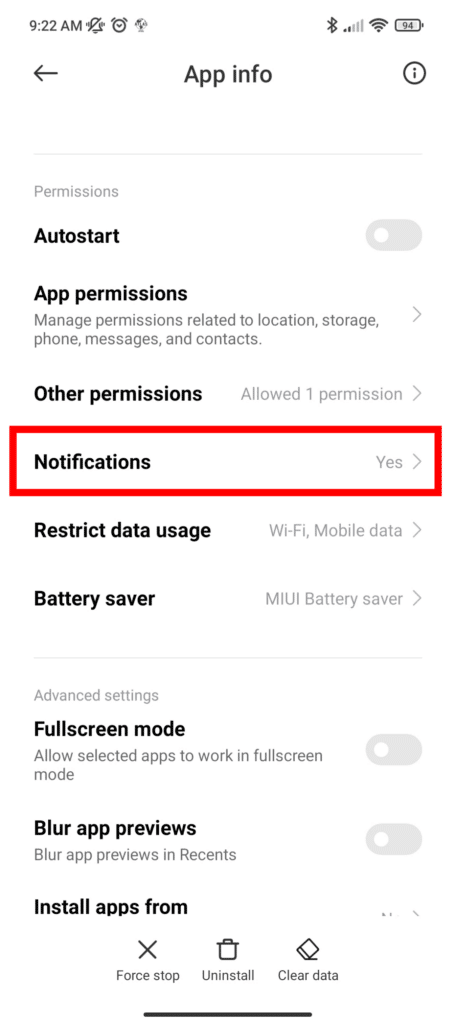
You will then see a few settings for your app, look for the “Notifications” one and make sure it is enabled.

Battery saver is enabled
One of the most common ways of saving battery is to disable push notifications, for this reason, you will want to check if any battery saver options or apps are running on your device.
There are two places where you must look, the app settings and the device settings.
For the app settings go to:
- Settings
- Apps or Applications
- Manage apps
- Find your app in the list
Make sure the following option is set to “No restrictions” so the notifications are not blocked:

For the device settings just pull down the top of your screen to show device settings, then look for the Battery Saver option and make sure that is disabled, as you can see below:

Background data is disabled
In order for your app to be able to receive push notifications, it needs to be connected to the internet, either through a wi-fi network or mobile data.
Under the app settings, make sure that your app has permissions to use Wi-fi and mobile data while in the background, as you can see here:

Still not receiving notifications?
If even after confirming that all the settings are properly configured your user is not receiving push notifications, our recommendation is to ask the user to reinstall the app.
It is possible that the user device didn’t get properly configured into the push notifications provider when the app was first installed, reinstalling it might help with resolving such a situation.
-
Why is my app no longer available in the App Store
If all of sudden your app no longer shows in the App Store, chances are that your Apple Developer Subscription has expired and needs to be renewed.
Apple charges a $99 annual fee for the Apple Developer Program, which is required in order for the apps you have on your account to remain accessible through the App Store.
In order to have your app reinstated all you need to do is renew your Apple Developer Membership.
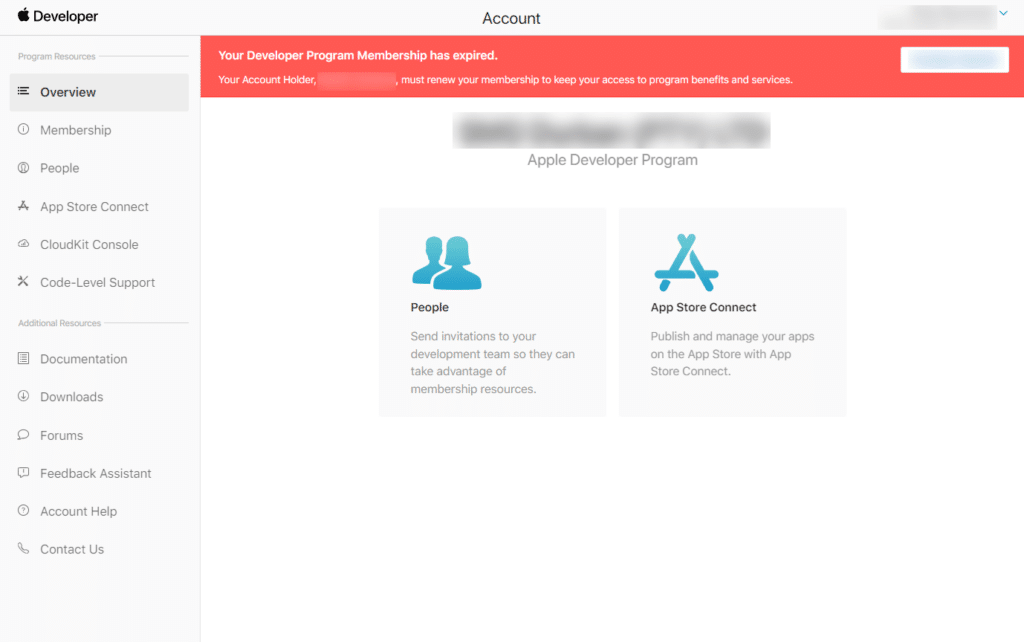
To confirm that this is really the problem you can log in to your Apple Developer Account here: https://developer.apple.com/account/
If your membership is expired you will see a red alert displayed at the top:

To resolve the problem make sure you are logged in as the account owner, you will then see a button that says “Renew Membership”.
If you are not seeing the “Renew Membership” button it is likely that you are not logged in as the owner of the account, in that case, you will need to contact the owner and ask him to renew the membership for you.
If you are still having problems contact the Apple Developer support team through this link: https://developer.apple.com/contact/topic/select