Category: Ecommerce

  • The Complete Guide to Mobile App Development for BigCommerce

    You run a BigCommerce store and you want a native mobile app for your customers. Now you’re trying to figure out what that takes: what it costs, what you get, and how to do it without handing over the next year of your roadmap to a mobile development project.

    Your options are narrower than they are for mass-market ecommerce platforms like Shopify. BigCommerce has a smaller ecosystem of mobile app tools, and most of what exists was built for simple stores with standard catalogs. 

    If you’ve customized your Stencil theme, run B2B Edition, operate Multi-Storefront across brands or regions, or built a headless storefront on Catalyst, and you want to carry all this work over to your app, your options narrow further.

    This guide covers the realistic options you have to launch a BigCommerce mobile app, the limitations and roadblocks you can expect, and how Vendrux lets you launch an app without the custom development tax.

    Does BigCommerce Have a Mobile App Builder?

    No. BigCommerce is built for web storefronts and commerce backends; it doesn’t have a native iOS or Android built tool, or a first-party customer-facing mobile app product.

    Three different things get called “BigCommerce mobile apps,” and only one is what you’re  looking for:

    1. The BigCommerce admin mobile app. A free iOS and Android app for merchants to manage their store from a phone: view orders, update inventory, check sales. It’s on bigcommerce.com/product/mobile-app. Useful for you as an operator. It has nothing to do with your customers’ shopping experience.
    2. Installable apps on the BigCommerce developer platform. BigCommerce has extensive developer documentation for building installable apps that live in the BigCommerce App Marketplace: Single-Click Apps, Connector Apps, Scripts-Only Apps. These extend the control panel or connect third-party services to merchant stores. They’re not shopping apps either.
    3. A customer-facing native shopping app for your store. This is the one you want. BigCommerce doesn’t have a product that does this.

    BigCommerce is a powerful ecommerce engine. You’ve got Stencil themes, the GraphQL Storefront API, the Checkout SDK, Catalyst for headless, and 1,200+ apps in the marketplace.

    What it doesn’t give you is a path from your storefront to a native app.

    Why BigCommerce Stores Need a Mobile App

    Most brands, today, should have their own mobile app. For a raft of reasons.

    • Most of your traffic is already on mobile. A mobile app meets your customers where they are, with a more seamless user experience.
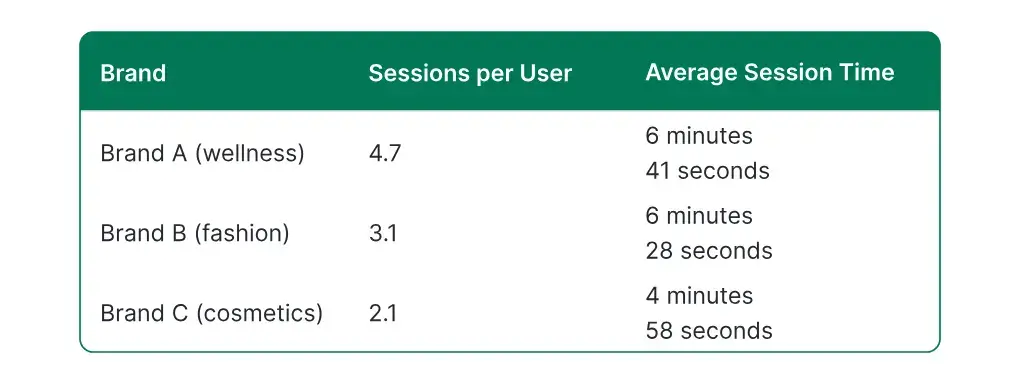
    • Apps drive stronger engagement metrics across the board:10-50% higher AOV, higher conversion rates, longer session times.
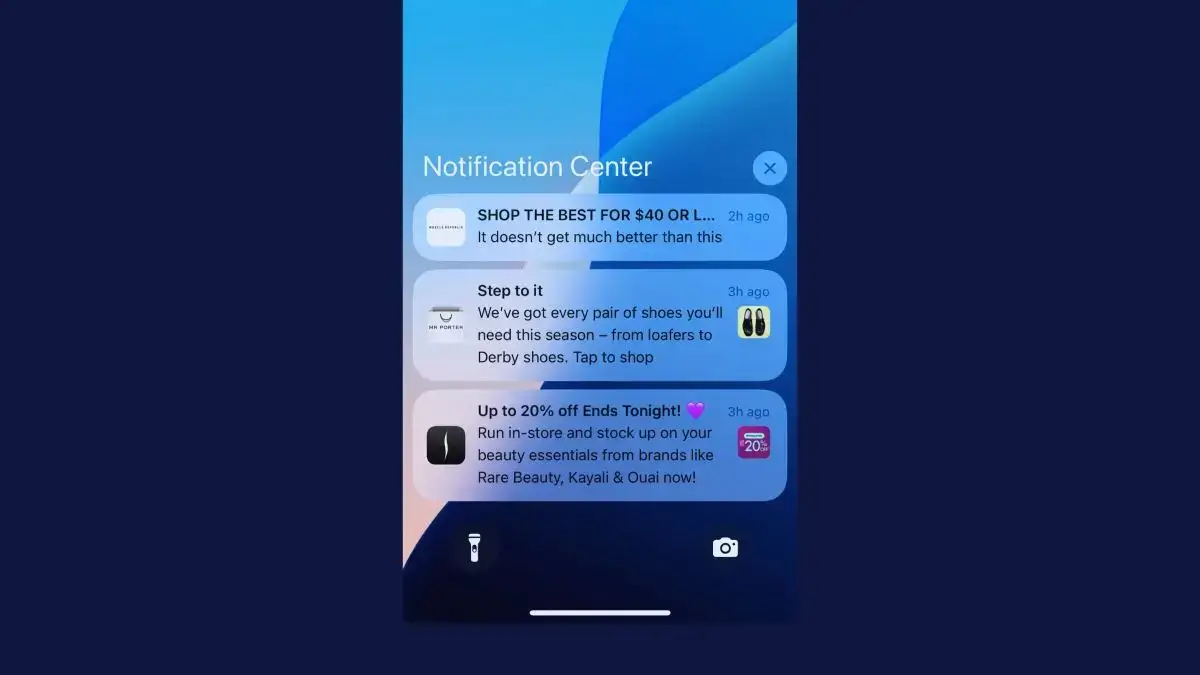
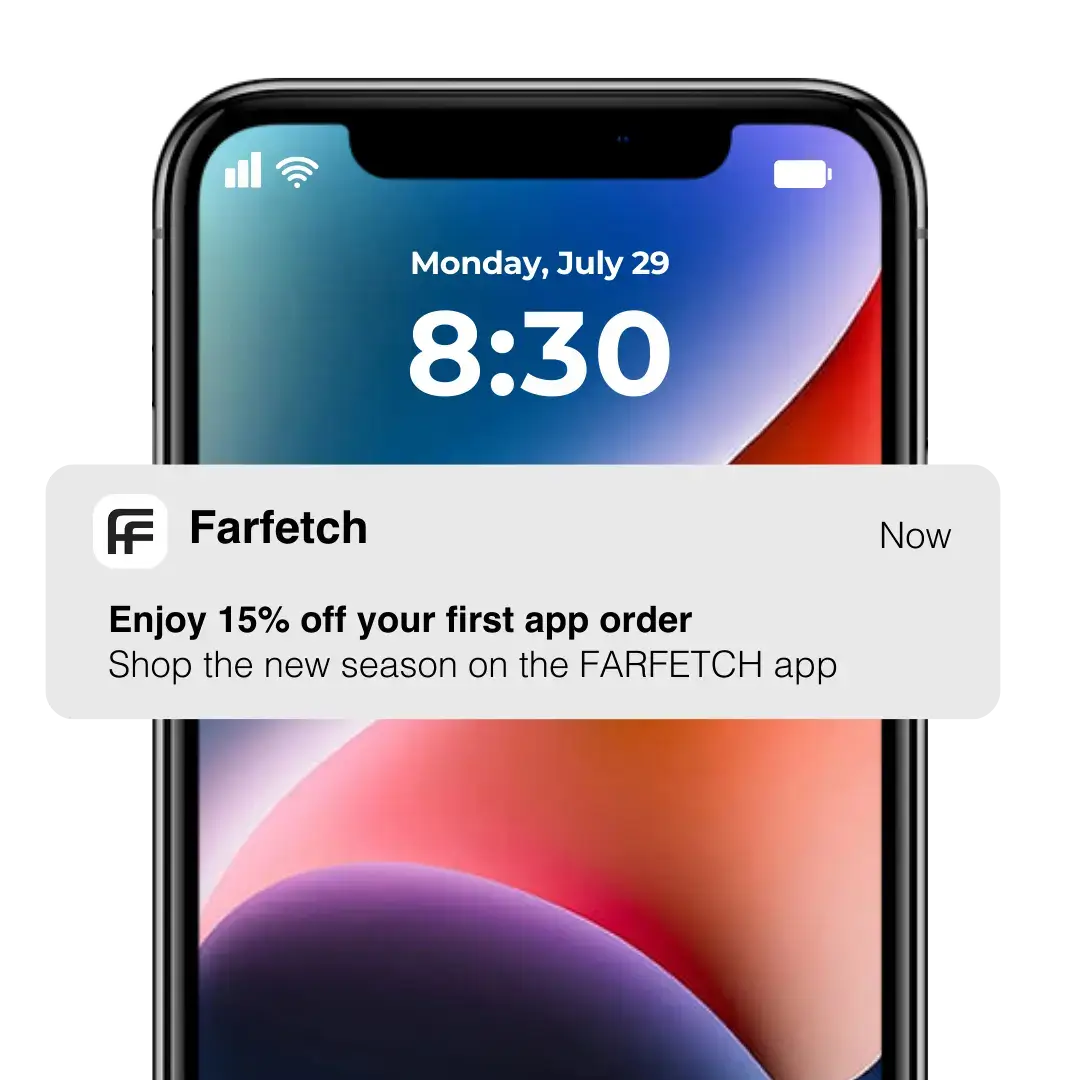
    • An app keeps you closer to your customers, driving stronger retention through an always-on home screen presence, as well as push notifications (which reach your customers instantly, for free).
    • Having an app is a crucial brand authority signal – particularly important for global, enterprise brands, like those that often use BigCommerce.

    An app can easily make up 20-35% of your overall revenue (these numbers are common from brands we work with). That’s a channel that’s worth having, period.

    The case for an app is clear. Getting there is usually the hardest part.

    The Roadblocks to Launching a Mobile App for BigCommerce Stores

    You want a mobile app, sure.

    But most BigCommerce merchants who set out to build an app end up hitting the same roadblocks.

    Let’s break them down now.

    Custom Native Development Costs $150K+ (and Never Stops)

    The traditional way to build an app is to hire a dev team or agency to build native apps from scratch, connecting them to BigCommerce through the GraphQL Storefront API, Checkout SDK, and Webhooks.

    The math for this is pretty brutal. Here’s what you’re looking at:

    • Initial build: $150,000 to $500,000+. This depends on catalog complexity, whether you run Multi-Storefront, whether you use B2B Edition, and how deep your ERP integration goes. Enterprise builds at the top of this range are common.
    • Annual maintenance: $50,000 to $100,000+. iOS and Android release new OS versions every year. The App Store Review Guidelines and Google Play policies update constantly. You need engineers on retainer to keep the app compliant, secure, and running on current devices.
    • Integration rebuild cost. Every BigCommerce app or integration your store depends on (Klaviyo, Yotpo, Searchspring, Avalara, ShipperHQ, Gorgias, LoyaltyLion, ERP connectors) has to be rebuilt in native code, often without a ready-made SDK. Each one is its own line item.

    That’s just a difficult cost to justify, especially costs rising and margins shrinking globally, as they are now.

    The Operational Complexity of Managing Two Platforms

    Launching a custom app also creates major operational overhead.

    You now have two codebases (three, if you have different builds for iOS/Android). Your website is maintained by one team on one release cycle. Your app is maintained by another team on a separate release cycle governed by App Store and Google Play approvals. 

    Every new product, pricing rule change, theme update, checkout tweak, promotional campaign, and integration swap on the website has to be replicated in native code on the app side.

    What often happens is you stop maintaining the app, it falls out of step with your website, and eventually becomes a relic no one uses anymore. 

    No-Code App Builders Weren’t Built for Serious BigCommerce Stores

    There are few no-code tools that are built for the complexity of BigCommerce setups.

    Sure, there are several tools out there that integrate with BigCommerce (you’ll find a couple in the BigCommerce app marketplace).

    They work if your store is relatively simple. But they’ll struggle to replicate complex web features in your mobile app.

    Customized Stencil themes, headless storefronts on Catalyst, Next.js, or Makeswift, B2B features, multi-storefront sites, deep integration stacks.

    All these things power your website – but they’re unlikely to work with your app.

    No-code BigCommerce mobile app builders are decent for what they’re built for. But for custom BigCommerce stores, these tools aren’t really an option.

    A Progressive Web App Isn’t a Real Mobile App

    Another alternative often mooted is settling for a Progressive Web App (PWA).

    If you’re running a headless Catalyst storefront, you’re likely already shipping a PWA by default. Catalyst targets Google Lighthouse scores of 100 out of the box and includes service workers for offline caching and add-to-home-screen capability.

    This is useful for mobile web performance. It is not a substitute for a native app.

    You don’t get the easy installation, full native push notifications, and brand authority that you get with a real mobile app.

    What Your BigCommerce Mobile App Needs to Do

    What do you really need from your mobile app?

    The one thing that’s often overlooked – yet is really all you actually need from your app – is feature parity with your website.

    Too many apps (especially cheaper builds) cut corners, sacrifice features from your website, and end up offering a watered-down version of your website.

    This is a major problem: because if your app is not as good as your website, what reason is there for someone to use it?

    “The app needs to be at least as functional as the website. It doesn’t need to be better than the website, but the user experience can’t be worse.”
    — David Cost, VP of Ecommerce at Rainbow Shops

    Your BigCommerce website probably has some combination of the following features:

    • Full catalog and pricing fidelity. Products, variants, custom fields, Customer Groups, Price Lists, B2B tiered pricing, custom facets, and active promotions, all rendered correctly.
    • Your checkout, exactly as it works on web. Optimized One-Page Checkout or a Checkout SDK custom flow. Avalara for tax, ShipperHQ for shipping rules. Apple Pay, Google Pay, and every supported gateway firing cleanly inside the app.
    • Every BigCommerce app and integration your store depends on. Klaviyo flows, Yotpo reviews, Searchspring or Klevu search, Gorgias support widgets, Smile.io or LoyaltyLion rewards, ERP connectors through Celigo. All working inside the app the same way they work on web.
    • Multi-Storefront and B2B Edition. Multiple storefronts from one BigCommerce account. Buyer Portal, Quick Order, quote management, company accounts, purchase orders, CPQ.
    • Headless and Catalyst compatibility. Works with a Catalyst frontend, a Makeswift-edited Next.js storefront, or any framework-agnostic build against the GraphQL Storefront API.

    When you launch a mobile app, you want it to carry over all of the features you rely on from your website, with some core native functionality layered on top.

    The Blueprint: How to Build a Native App for Your BigCommerce Store With Vendrux

    There’s one way to get everything you need from a BigCommerce mobile app, without the overhead and complexity of a custom native app.

    Vendrux takes your live BigCommerce storefront and turns it into native iOS and Android apps. 

    Some of the apps we’ve built for global ecommerce brands

    Your website powers the app. It carries over your Stencil theme, your headless Catalyst frontend, your customizations, your integrations, your checkout, your B2B and Multi-Storefront setup. Everything that already works on your website works inside the app, with real native capabilities on top.

    There’s no second codebase, no parity drift, and no feature lag.

    How It Works

    Vendrux builds iOS and Android apps that render your BigCommerce storefront natively. The storefront is the app. Every page, product, category, promotion, and integration that exists on your website works in the app, out of the box. The app delivers your actual storefront, not a parallel reconstruction of it.

    Vendrux adds a native layer on top of your store: push notifications, native navigation, deep linking, splash screens, and everything the App Store and Google Play require.

    It’s the most direct way to turn your BigCommerce site into a mobile app.

    What Carries Over

    Everything you’ve invested in for your website works in your mobile app, including:

    • Your Stencil theme or headless Catalyst/Next.js/Makeswift frontend, rendering natively.
    • Your full product catalog, including custom fields, variants, Customer Groups, and Price Lists.
    • Optimized One-Page Checkout, or your custom Checkout SDK flow, complete with Avalara tax, ShipperHQ shipping, Apple Pay, and Google Pay.
    • Every BigCommerce app and integration your store runs on. Klaviyo. Yotpo. Searchspring. Klevu. Gorgias. Smile.io. LoyaltyLion. Avalara. ShipperHQ. ERP connectors through Celigo.
    • Multi-Storefront configuration across brands, languages, or regions.
    • B2B Edition, including Buyer Portal, Quick Order, quote workflows, and company accounts.
    • Promotions, banners, A/B tests, personalization logic, and every piece of merchandising you’ve built.

    Whatever your website shows, the app shows. When you update your website, the app updates. There’s no resubmission, no parallel development.

    The Native Layer Added on Top

    The app isn’t just a website in a box. It looks, feels, functions like any other native app (and is fully compliant with the app stores’ requirements). 

    You get:

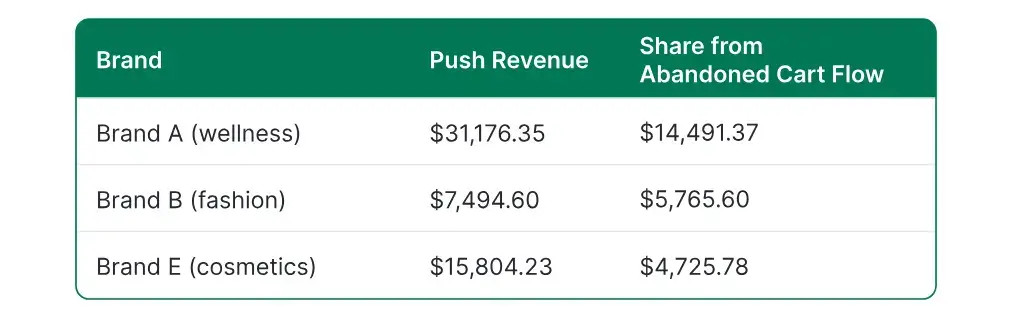
    • Push notifications – including a native abandoned cart flow, plus integrations with Klaviyo and OneSignal that allow you to set up powerful automations and segmentation.
    • Native tab bar and navigation patterns customers expect from apps like Amazon or Sephora.
    • Deep linking from email, SMS, and paid campaigns straight into product pages and categories.
    • Native splash screens and loading states.
    • Full App Store and Google Play presence with listings, creative, screenshots, and store optimization.

    Your app does everything a high-end ecommerce mobile app needs to do.

    The Project, Step by Step

    Launching a mobile app for your BigCommerce store with Vendrux is easy.

    The whole project is managed for you by the Vendrux team – configuration, build, testing, and app store submission. You can test and provide your input throughout the process, but otherwise, there’s very little required from you.

    The process takes around four weeks, and there’s essentially only three steps involved:

    1. Setup: we’ll walk through your goals, the process, and any specific requirements for your app.
    2. Build: we do all the technical work, taking all the hard parts off your plate.
    3. Launch: we handle the app store submission process, and help you set up launch materials to start getting downloads.

    After you go live, the Vendrux team stays around to handle routine updates, technical maintenance, and work with you to grow your app and make sure it’s a success.

    You’re looking at a cost in the low-four figures to go live, with a predictable monthly cost that’s a fraction of what you’d usually pay to keep developers on staff or an agency on retainer.

    Skip the $150K custom dev trap.

    Your BigCommerce storefront is already doing the work. You don’t need a second codebase, a second engineering team, and a maintenance budget that never stops growing.

    Vendrux turns your existing BigCommerce store into native iOS and Android apps, keeping your Stencil theme, checkout flow, and every integration you rely on. No parallel build. No parity drift.

    Get a Free App Preview

    Launch Your BigCommerce Mobile App Without the Custom Dev Tax

    BigCommerce is a powerful commerce engine. You’ve got a deep API, Catalyst for headless, B2B Edition, Multi-Storefront, and an integration stack that can carry a nine-figure business. 

    You’re just missing one thing: a native app.

    Vendrux is the easiest, most cost-effective, and all-round best way to create a mobile app for a BigCommerce store.

    You get all the power of BigCommerce, all your endless optimizations and iterations, carried over to a native app that lives on your customer’s phone.

    Get in touch and get a free preview of your BigCommerce app to see what’s possible.

    We’ll answer your questions, walk you through the process, and break down the business case for your brand.
  • Video Commerce: The Winning Engagement Strategy For Ecommerce Brands in 2026

    Video Commerce: The Winning Engagement Strategy For Ecommerce Brands in 2026

    Static product pages are losing attention. Shoppers who spend hours watching TikTok and YouTube Shorts do not change modes when they land on a store. They want to see the product move, hear someone talk about it, and watch a real person use it before they commit. The text-and-carousel product detail page, which has defined ecommerce for fifteen years, no longer matches how buyers actually evaluate products.

    Video commerce is how mid-market and enterprise ecommerce brands are closing that gap. It is not a tactic or a content experiment. It is becoming the default engagement layer for modern ecommerce, the surface where discovery, consideration, and conversion increasingly happen on the same screen.

    This article covers what video commerce is, why it is winning right now, the four formats driving real results, how it changes engagement economics, where to deploy it across the customer journey, and how to extend every piece of your video program into a native mobile app. It closes with a practical rollout plan for mid-market teams.

    What Video Commerce Is (And What It Isn’t)

    Video commerce is the practice of using video as the primary conversion surface of a shopping experience, rather than as a supporting asset. 

    The product is not described next to a video. It’s tagged inside the video, clickable, and purchasable without leaving the frame.

    The distinction matters. Uploading a product demo to YouTube is not video commerce. Running a video ad on Meta is not video commerce either. Both use video, but neither turns the video itself into a transactional surface.

    Video commerce covers four umbrella formats, each broken down below:

    • Shoppable video: pre-recorded video with tagged, clickable products
    • Live shopping: real-time hosted events with in-stream chat and checkout
    • User-generated video: customer and creator-filmed content embedded in the shopping journey
    • Interactive product video: video that adapts to the viewer with branching, variant selection, or personalization

    The common thread: the video sits inside the purchase journey. That is what separates video commerce from video marketing. 

    Marketing drives traffic to a store. Commerce happens inside the video.

    Why Video Commerce Is Winning Right Now

    Three forces are converging right now.

    The first is consumer behavior. Short-form video has trained buyers to evaluate products visually first. The TikTok generation is not a demographic, it’s a shopping behavior now common across every age group with disposable income. 

    When shoppers land on a text-heavy PDP after watching a 15-second product demo on social, the format mismatch is obvious. They bounce.

    The second is engagement data. Brands that have deployed video on PDPs consistently report longer dwell times and higher interaction rates on video-enabled pages.

    Shopify, Adobe Commerce, and BigCommerce have all moved native video shopping features into their core platforms in recent releases, which is the clearest signal that the behavior is no longer experimental. For the broader context, statistics show that attention is concentrating on mobile, which aligns perfectly with video as a medium.

    The third is the authenticity problem. As generative AI floods the web with synthetic text and images, buyers are increasingly skeptical of static content. 

    A real person on camera talking about a real product solves this in a way copy cannot. User-generated video and live shopping signal authenticity that AI content struggles to replicate.

    Then there’s the platform evidence. TikTok Shop, Amazon Live, and YouTube Shopping have all scaled from novelties into core retail surfaces. When the largest retail platforms in the world invest this heavily in video commerce, mid-market brands need to match the experience buyers have been trained to expect on their own stores.

    The Four Video Commerce Formats Driving Real Results

    Video commerce comes in several different forms. Each format solves a different part of the engagement problem. Most brands start with one and layer in others as the program matures.

    Shoppable Video on Product and Category Pages

    Shoppable video is the workhorse. Pre-recorded videos with tagged products sit directly on PDPs, category pages, or homepage feeds. When a shopper sees a product they want, they tap the tag and either add it to cart or view the full product page without leaving the video.

    Fashion, beauty, and home goods brands have adopted this format most aggressively. A single product page might feature a hero video, a how-to creator video, and a customer styling video, each tagged and clickable.

    The production economics are the main advantage. Shoppable video can be repurposed from social content you already own. You are not filming from scratch, you are tagging what you already have.

    Live Shopping Events

    Live shopping is the highest-engagement format in video commerce. A host goes live, demos products in real time, answers chat questions, and runs time-bound offers. Viewers buy directly in-stream.

    Live builds urgency through scarcity, community through chat, and trust through unscripted presence. The combination produces AOV spikes and conversion rates several multiples higher than static PDPs during the event window.

    The best-performing live programs are episodic. Customers know when to tune in, which turns a one-time event into a recurring engagement habit.

    User-Generated Video and Creator Content

    UGC video converts because it sidesteps the credibility problem of brand-produced content. A customer filming themselves using a product is the closest thing to a live referral: unscripted, unpolished, visibly authentic.

    Sourcing is what separates programs that work from programs that don’t. The three common models for UGC sourcing are:

    • Affiliate-driven: creators post shoppable video to social, earn commission on referrals
    • Review-incentivized: customers upload video reviews in exchange for credit or samples
    • Partner-creator programs: long-term relationships with a curated roster of creators

    Brands that treat UGC as a pipeline, not a one-off campaign, build a library that feeds shoppable video surfaces indefinitely.

    Interactive and Personalized Product Video

    Interactive video is the emerging category. Viewers interact with the video itself, switching product variants, changing colors, selecting sizes, or branching into specific feature demos.

    This format is most valuable for consideration-heavy categories: furniture, electronics, high-AOV apparel, where shoppers need to explore multiple configurations before buying. The production cost is higher than shoppable video, but interactive video pages routinely show stronger time on page of traditional PDPs in the same category.

    The tradeoff is practical. The more interactive and personalized the video, the more resource-intensive it is to create.

    Interactive video is not where most brands should start. It rewards teams with mature video programs that have already proven ROI on simpler formats.

    How Video Commerce Changes the Engagement Economics for Ecom Brands

    The case for video commerce is not primarily a conversion-rate argument. It’s an engagement-economics argument.

    A video-heavy strategy drives an uplift in certain metrics, which compound over time.

    Time on page

    Video-enabled PDPs hold attention meaningfully longer than static ones. The longer a shopper engages with a product, the more confidence they build, and confidence is what closes high-consideration purchases.

    AOV lift

    Tagged products in video naturally cross-sell. A creator styling a dress with a jacket and a bag sells the outfit, not the dress. Live shopping events drive even larger average order value spikes because hosts can bundle on the fly.

    Repeat engagement

    Episodic live content and a continuously updated video library give customers reasons to come back that static catalogs cannot match. Occasional buyers become regular viewers, and viewers become high-LTV customers.

    Recognition and habit

    Video-first brands build recognition faster. Customers remember the host, the set, the tone. That familiarity compounds into loyalty in ways text and still images rarely produce.

    The CFO-facing framing is this: video commerce is an LTV play, not a conversion play. 

    Conversion improvements are real but marginal. The meaningful wins come from repeat purchase rate, AOV, and the kind of brand affinity that makes customers choose you when they have options.

    Where to Deploy Video Commerce Across Your Whole Customer Journey

    The common mistake, when adopting video commerce, is treating it as a PDP feature. 

    You have your product image carousel, throw a video in there, and call it “video commerce”.

    It’s really a customer journey strategy, and the highest-performing programs deploy video at every stage.

    Discovery

    Shoppable social video on TikTok, Instagram, and YouTube Shorts. The goal is to convert casual viewers into owned-audience shoppers. Link-in-bio and shop tabs are the bridge, but the best programs pull that traffic back to owned surfaces where the next video can touch them.

    Consideration

    Video-enabled PDPs, category landing pages, and collection hubs. A buyer researching an expensive purchase wants multiple angles, use cases, and reviewer perspectives, all of which video delivers faster than text.

    Decision

    Live shopping events, product launch livestreams, interactive demos, and comparison videos. Decision-stage buyers need their final objections answered, and live formats answer objections faster than any FAQ page.

    Post-purchase

    Onboarding videos, how-to content, and unboxing-style tutorials reduce returns and build the foundation for repeat purchases. Post-purchase is the most under-invested video surface for most brands, and the one with the highest ROI on time spent, because it directly protects margin.

    Mobile app

    Apps are the highest repeat engagement surface for video commerce, and the one most brands leave on the table. 

    Native video feeds, push-notified live events, and app-only creator content drive repeat visits in ways mobile web cannot match.

    Extend Your Video Commerce Program Into a Native App with Vendrux

    A lot of ecommerce brands now are making the smart play to invest heavily in video commerce on their website: shoppable PDPs, live shopping events, creator content, UGC libraries. 

    The problem is that, when you go to launch a mobile app, integrating unique, video-heavy user experiences makes the job a whole lot more complex.

    Vendrux solves that problem. Vendrux turns your existing website into a full-featured native mobile app for iOS and Android, and ensures every video commerce feature that works on your store runs natively inside the app. 

    Shoppable video, live shopping, UGC feeds, interactive product video: everything carries over.

    The DIY App Builder Problem

    The most common approach for modern ecommerce brands launching a mobile app is to use a DIY mobile app builder (like those in the Shopify App Store).

    The problem (especially for sites with custom features and bespoke PDPs) is that these tools build a new storefront, inside of their own templates.

    That means features like shoppable videos and UGC feeds often don’t carry over. The tool may have an integration built for popular video commerce tools, but the integration likely won’t enable everything you can do on your site.

    This limits the potential of your app, and often results in a user experience that lags behind your website.

    The Vendrux Solution

    Instead of making you rebuild your website inside templates, Vendrux directly converts everything from your website to a native app.

    The app is powered by your website, and everything that works on your website works in the app.

    You manage the UX of both channels from one place (your website). One codebase, one content pipeline. Update a video on your site, and it appears in the app. There’s no duplicated workflows, separate management backlog, or missing features.

    MASC’s Video Commerce Strategy

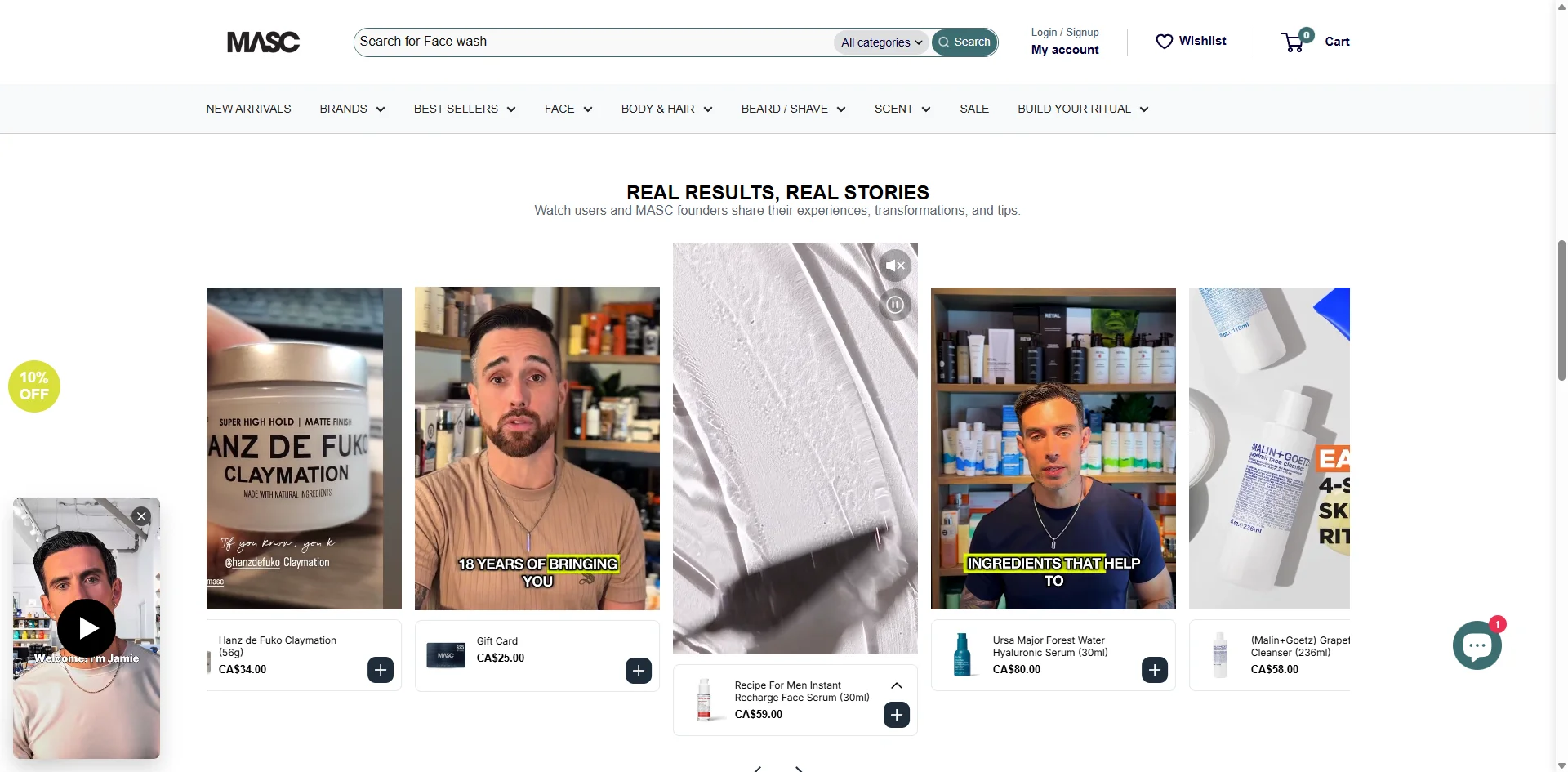
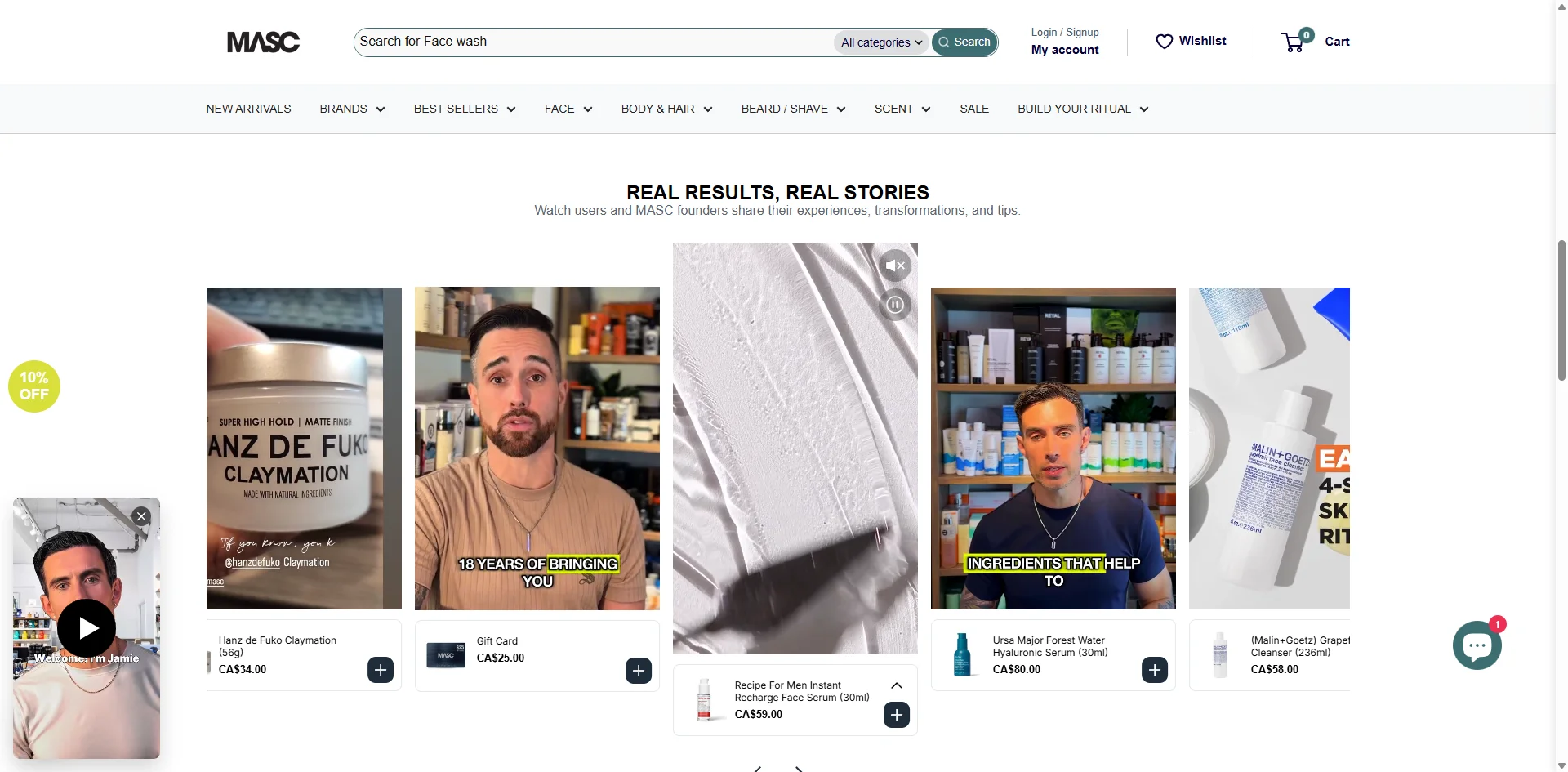
    Men’s skincare brand MASC runs on video. Their website is far from standard, with shoppable reel-style videos that makes it feel more like Instagram or TikTok than a static ecommerce site.

    The brand originally had an app built with a DIY app builder, which didn’t carry over all of their video commerce features.

    As a result, it lagged behind their website, and didn’t offer the user experience their customers expected.

    They switched to Vendrux, and were finally able to deliver their full UX in the convenient, high-touch surface of a mobile app.

    “Vendrux allowing us to use all the features that we already pay for with other companies is important.”
    — Patrick Levesque, Co-Founder, MASC

    Read more about MASC’s mobile app journey.

    Why an App Compounds Every Engagement Win

    Video commerce is an engagement economics play, and mobile apps dominate the metrics that matter most. 

    App users open more often, spend longer per session, and respond to push notifications at rates email cannot approach. That means every engagement boost from your video program is amplified inside a native app: 

    • Longer dwell times become repeat sessions
    • AOV lifts become higher reorder frequency
    • Live shopping events become recurring tune-in behavior.

    Just see the platforms that dominate video commerce: TikTok, Instagram, as well as new players like Whatnot. They’re all mobile-first.

    If you want to get the most out of your video commerce strategy, you need to replicate that, on your own channels.

    Launch your own TikTok Shop or Instagram-style app.

    Vendrux extends your existing website into a native iOS and Android app, so every video commerce feature on your site runs inside the app too. One codebase, one content pipeline, and no feature gaps between your website and app.

    Get a Free App Preview

    Getting Started: A Practical Video Commerce Rollout for Mid-Market Brands

    Four steps separate brands that see results from brands that stall after a pilot.

    1. Audit where video already lives in your stack. Most mid-market brands are more fragmented than they realize: social video, email video, PDP video, and customer service video, all managed by different teams with no shared asset library. The audit is the unglamorous first step that unlocks everything else.
    2. Pick one format and one surface for the pilot. Resist the instinct to launch everything at once. The two highest-ROI starting points are shoppable video on PDPs (if you have a creator pipeline) or live shopping events (if you have a team that can host well).
    3. Build the sourcing pipeline before investing in tooling. Video commerce tools are commoditized. The differentiator is content supply. Brands that stall are usually the ones that bought platforms before they figured out how they would continuously source video.
    4. Instrument the right metrics. For the first 90 days, track watch time, interaction rate, and repeat visit rate, not just conversion. Engagement metrics tell you whether the program is working months before the revenue shows up.

    Final Thoughts

    Video commerce is not a passing trend, or a hack. It’s a structural shift in how ecommerce brands will compete for attention over the next five years.

    Treat video as the engagement layer of your store, not just a gimmick or a marketing afterthought. Extend that engagement into every surface your customers use, including a native mobile app.

    There’s little doubt, by now, that video works. The only question left is how long you wait until you make this a core part of your marketing strategy.

  • Do Mobile Apps Boost Conversion Rates for Ecommerce Stores?

    Do Mobile Apps Boost Conversion Rates for Ecommerce Stores?

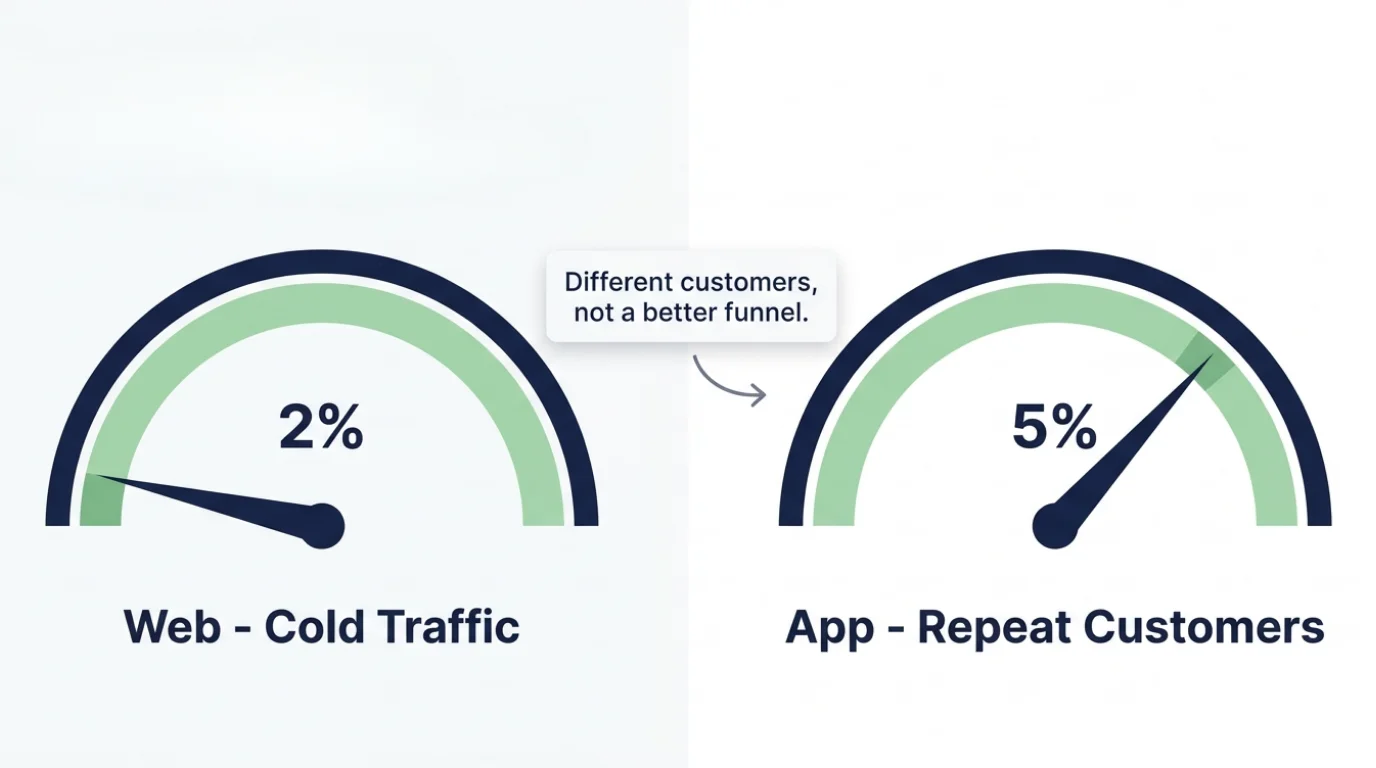
    The average conversion rate for mobile ecommerce sites is just 1.8%. Various studies (such as Vendrux’s Ecommerce Mobile App Benchmark Report) show average mobile app conversion rates can be up to 7x higher.

    So the answer is pretty clear, right? If you’re struggling with low conversion rates on your site, you should launch a mobile app.

    It’s not quite that straightforward. This is actually a common mistake – and if you’re launching an app for this reason, it may lead you down the wrong path.

    We’ve seen the impact of countless apps for countless brands, in the 10+ years we’ve been building mobile apps for online brands. So we’ve got a lot of experience seeing which metrics shift, and for what reasons, when a brand launches a mobile app.

    Keep reading for all you need to know, and the real answer to the mobile conversion rate problem.

    The Short Answer: Yes, But Not for the Reason You Think

    Mobile apps do convert better than the mobile web. The data is undeniable.

    Our Benchmark Report finds up to 7x higher conversion rates from app users, on average. That’s a huge difference.

    But, like any kind of data, looking at it on its own, without context, is misleading.

    The conversion rate gap exists primarily because of who’s shopping in each channel, not because apps inherently convert that much better.

    A mobile website gets traffic from all kinds of sources, with wildly different levels of intent.

    There’s someone coming back to reorder their staples, alongside someone who clicked a link from a Facebook ad, someone who made a Google search and opened five different brands’ sites, and someone who clicked a link from an email.

    In an app, each visitor comes with a higher level of intent. They know you, they downloaded your app. They’re built to convert at a higher rate, no matter the surface.

    Is There a Real Conversion Boost from the App Itself?

    Strip out the audience effect for a second. Same customer, same intent, same product – does the app format actually convert better than mobile web?

    Yes. Just not by as much as the headline stats suggest.

    A few things genuinely drive higher conversion rates in an app:

    • Fewer distractions. No browser tabs competing for attention, no cross-site retargeting, no banner ads, no auto-playing videos from other tabs.
    • Persistent login and saved payment details. It’s generally smoother to check out in an app, and the user is likely already logged in, reducing the number of steps required to buy.
    • Faster load times and smoother navigation. No reloads, no waiting for pages to render. The session stays warm.
    • Stable cart state. Carts don’t get lost when the browser crashes or the user multitasks.
    • No price-comparison friction. A shopper in your app isn’t toggling between five competitor tabs.

    Add it all up, and yes, the same shopper will probably convert at a higher rate inside your app than on your mobile site.

    It’s just not as high as the data suggests.

    The bulk of the buying experience really isn’t that much different. And there’s not a lot you can do in an app that you can’t do on the mobile web (such as one-click payment options like Apple Pay and Shop Pay) in the first place.

    Abandoned cart recovery in apps

    Apps also give you a free, direct channel to recover would-be lost sales. A push notification an hour after a shopper bails on checkout (or the next morning) can pull them back in to complete the purchase. Functionally, that’s a conversion lift on the same traffic, just measured a few hours later than the original session – and it’s one of the highest-ROI features an app unlocks.

    Why Conversion Rate Is the Wrong KPI for Your App

    Conversion rate is fundamentally an efficiency metric. It measures how well you turn earned and paid traffic into revenue. It tells you whether you’re squeezing enough value out of every visit.

    That makes sense for your website. Website traffic is scarce and expensive. You’re paying for clicks, fighting for SEO rankings, and competing for organic visibility against every other brand in your category. Every visit has to count.

    Apps don’t operate under the same economics.

    App Sessions Aren’t a Scarce Resource

    Once a customer installs your app, opening it costs you nothing.

    You’re not paying per visit. You’re not bidding against competitors for their attention. A push notification costs zero dollars and lands directly on the lock screen. A returning customer who opens the app because they saw your icon on their home screen also costs zero dollars.

    When sessions are abundant and free, “what percentage of sessions convert?” stops being the metric that matters. The constraint that makes conversion rate most meaningful on your website (scarce, expensive traffic) doesn’t apply.

    Habitual Engagement Beats Per-Session Conversion

    The job of an app isn’t to maximize the conversion rate of every individual session. It’s to drive repeat opens and habitual engagement.

    A customer who opens your app eight times this week and buys once is more valuable than a customer who opens it once and buys once at a higher conversion rate. 

    The first customer is in your orbit. The second one might forget about you next month.

    For most ecommerce brands, frequency multiplied by AOV beats raw conversion rate every time.

    So Why Launch an App? Retention, AOV, and Repeat Engagement

    If conversion rate isn’t the reason to build an app, what is? Is there any difference?

    Apps deliver the biggest uptick in the metrics that drive long-term revenue: retention, average order value, and engagement frequency. This is where the format genuinely changes the customer experience, and it’s where you’ll see the biggest delta if you launch one.

    Retention and Repeat Purchase Rate

    App users come back more often than web users. The mechanics are simple – your app icon sits on their home screen next to Amazon and Instagram, push notifications reach them directly, and re-entry takes one tap instead of typing your URL or digging through email.

    A customer who shops with you once every three months on the web could be a customer who shops multiple times a month in the app. That shift compounds into significantly higher retention rates and customer LTV.

    Average Order Value

    App sessions run deeper than web sessions. Users browse longer, stack more items into carts, and use features like wishlists and recommendations more often. That depth shows up in average order value.

    It’s not unusual to see $70 mobile web AOV climb to $100+ in the app, with the same product catalog and pricing, just because the app keeps the shopper engaged for longer.

    Engagement Frequency

    Mobile web sessions are short. Three minutes is typical. App sessions routinely run double that.

    More time in your store equals more product exposure, more discovery, and more repeat behavior. Over a 12-month window, that engagement gap is what produces the LTV difference between an app user and a web-only user.

    Best KPIs to Track in Your App

    So if conversion rate isn’t the right KPI for your app, what is? 

    These are the core KPIs that track how your app is performing:

    • Daily and monthly active users (DAU, MAU)
    • Sessions per user per week
    • Repeat purchase rate (app users vs web-only users)
    • 30, 60, and 90-day retention curves
    • LTV by channel over a 12-month window
    • Push engagement – opt-in rate, open rate, attributed revenue

    Monitor and optimize those numbers. Stop benchmarking your app against your mobile web conversion rate. It’s not the same job.

    The Real Fix for the Mobile Conversion Rate Problem

    Now let’s address the elephant in the room. If your mobile web conversion rate is sitting at 1.8% and you want to fix it, an app isn’t the answer.

    The fix is improving your mobile web experience. Not shifting your attention to a different surface.

    This is where most operators get stuck. They see the conversion gap, assume the app is the magic fix, and skip past the actual problem – which is that their mobile site is underperforming.

    Mobile Web Has Never Been More Capable

    The tools available to build a high-converting mobile site today are dramatically better than they were even three years ago.

    If you’re on Shopify, you have access to themes, apps, and CRO tools that can move your mobile conversion rate substantially. Personalization, dynamic content, on-page recommendations, AI-assisted product discovery, smart search, instant checkout – all of it is available, much of it for cheap or free.

    AI specifically has changed the game. Generative product descriptions, dynamic merchandising, image-based search, real-time chat agents, predictive personalization. Capabilities that required enterprise budgets two years ago now ship in $50/month apps (or even Shopify’s core features).

    If your mobile site is converting at 1.8%, there’s almost certainly significant low-hanging fruit on the table.

    The Math of a 1.8% to 2.5% Lift

    Even a small uptick in conversion rate on your website will likely drive a massive impact for your overall business economics.

    Say you’re driving 250,000 monthly mobile web visitors. Your mobile conversion rate is the industry average of 1.8%. Your AOV is $100.

    • 250,000 visitors x 1.8% CVR = 4,500 orders
    • 4,500 orders x $100 AOV = $450,000/month in mobile web revenue

    Now run a CRO push and lift that conversion rate to 2.5%. Same traffic, same AOV, same product catalog.

    • 250,000 visitors x 2.5% CVR = 6,250 orders
    • 6,250 orders x $100 AOV = $625,000/month

    That’s an extra $175,000/month, or roughly $2.1M/year, from a single round of CRO improvements on your mobile site. No new traffic acquired, no new channel launched, no platform migration.

    And there’s nothing aspirational about 2.5%. Plenty of well-optimized mobile sites convert at 3% or higher. The ceiling is well above where most brands sit.

    Fix your website first. The math is overwhelmingly in your favor.

    The Bonus – Improve Your Website’s Conversion Rate, Improve Your App

    A lot of operators want to ship a separate app, a completely different surface, as a way to “fix” conversion rates.

    Realistically this is just fixing conversion rates for the top ~10% of your customers, and ignoring the rest – and now giving you a new channel to manage.

    This is why launching an app with Vendrux is so smart. 

    With Vendrux, your app reflects your web experience. The checkout flow, design, UX, and everything else you build on the web carries over to the app.

    When you do CRO work to improve your mobile website, that carries over to your app as well. You’re not treating the app and website as completely separate storefronts. When you ship improvements, you’re shipping them across every surface your customers shop on.

    This makes your work compounding, rather than fragmented.

    Make your investments go further.

    If you’re shipping CRO upgrades to your mobile site – faster checkout, better recommendations, smarter search, sharper merchandising – you’ve already done the hardest work. The question is whether those wins stop at your website or carry over to your most loyal customers in a dedicated app.

    Vendrux extends your existing site into a fully native mobile app, synced with your website in real time. Every CRO improvement you ship shows up in both surfaces – one team, one roadmap, two channels.

    Get a Free App Preview

    The Final Word on Mobile Apps & Conversion Rates

    Mobile apps don’t fix conversion rates. They’re the wrong tool for that job.

    What apps do is deepen the relationship with the customers who already love you – the top 10-15% who drive a disproportionate share of your revenue. That’s where it’s worth launching an app – to boost retention, AOV, repeat engagement, and LTV.

    If you want to lift your mobile conversion rate, fix your mobile website. That’s where most of your traffic lands, and modern tools mean that just about anything you can build in an  app, you can realistically build on the web as well.

    Don’t look at the problem backwards, like many operators. Build a perfectly optimized mobile website, and turn it into a mobile app that extends your improvements to a new, high-retention, high-engagement mobile channel.

  • BigCommerce vs Shopify for Mobile Apps: Which Platform Makes It Easier to Launch and Maintain an App?

    BigCommerce vs Shopify for Mobile Apps: Which Platform Makes It Easier to Launch and Maintain an App?

    If you’re serious about launching a mobile app, are you better off on Shopify or BigCommerce?

    The answer is closer to a tie than the platform marketing makes it seem. Shopify has the larger ecosystem of mobile app builders, the cleaner API documentation, and the baked-in architecture (Storefront API plus Checkout Kit) that makes mobile apps fairly accessible (assuming you have access to the right developers).

    BigCommerce has more flexible APIs, a fully open checkout you can customize end to end, and deeper headless functionality for brands that want to build something more custom. 

    Each platform has the ability to be a solid backend for a mobile app. But realistically, neither one has such a strong advantage that it alone should drive your decision to replatform your website.

    Keep reading and I’ll break down how each ecommerce platform works as the backend for your mobile app, the mobile app ecosystem for each one, whether there’s any reason to switch platforms to cater to your mobile app, and how Vendrux makes the Shopify vs BigCommerce decision irrelevant.

    Why More BigCommerce and Shopify Brands Are Launching Mobile Apps

    Global mobile commerce sales reached roughly $2.07 trillion in 2024, accounting for 57% of all ecommerce transactions. For most brands, whether on Shopify or BigCommerce or any other platform, mobile is the majority of the funnel and the bulk of repeat purchases.

    Every brand has a fast and responsive mobile website. But a mobile app is less common, yet so much more powerful as a mobile-first surface.

    Apps drive the highest-value behavior: more repeat purchases, larger orders, and give you push notifications – messages that land on your customer’s lock screen, instantly, with near-guaranteed visibility.

    In a time where profit margins, retention and repeat customer engagement are more important than ever, a mobile app, too, becomes a crucial brand asset, whether you’re a DTC brand on Shopify or a B2B BigCommerce store.

    BigCommerce vs Shopify for Mobile Apps at a Glance

    Neither BigCommerce or Shopify has their own “mobile app builder” – both are primarily web platforms.

    But both platforms have their own infrastructure for businesses looking to extend their store to a dedicated mobile app: dedicated mobile app documentation, headless frameworks (Hydrogen on Shopify, Catalyst on BigCommerce), and a vendor ecosystem of mobile app builders that handle the build for merchants who don’t want to write the app from scratch.

    The platforms are closer than the marketing makes them sound, but each has a real edge. Shopify wins on ecosystem breadth and out-of-the-box tooling for self-serve app builders. BigCommerce wins on API flexibility and headless freedom, including the ability to fully customize your checkout.

    Aspect Shopify BigCommerce
    Recommended architecture Storefront API + Checkout Kit REST + GraphQL Storefront API
    Checkout Locked to Shopify (rendered via Checkout Kit) Fully customizable
    Headless framework Hydrogen Catalyst (Next.js) + MakeSwift
    Mobile app builders 96 in the App Store category Minimal (
    Transaction fees 0.5%–2% on third-party gateways None
    Vendrux support Full – including Plus and Hydrogen Full – including B2B Edition and Catalyst

    The table doesn’t tell the entire picture, of course. But it’s a helpful foundation for looking at the differences between how each platform powers your mobile app.

    How BigCommerce and Shopify APIs Power a Mobile App

    A mobile app needs to fetch products, manage carts, take orders, and read customer data from your store. 

    Both Shopify and BigCommerce expose APIs to do that, but they’re shaped differently and aimed at slightly different builds. Here’s what you need to know about each, before deciding whether going custom is even the right call.

    Shopify’s APIs for Mobile Apps

    Shopify exposes three things that matter for a mobile app: the Storefront API, the Admin API, and Checkout Kit.

    • The Storefront API is GraphQL and customer-facing. It’s how the app pulls products, search results, and cart state. 
    • The Admin API handles back-office operations like order creation and customer management. 
    • Checkout Kit is the newer piece, and it’s the one most brands miss in their first reading: it renders Shopify’s actual checkout natively inside your iOS, Android, or React Native app. You pass a checkoutUrl and Checkout Kit handles the rest, including Shop Pay, Apple Pay, and your store’s branding.

    Shopify’s official mobile commerce documentation recommends Storefront API plus Checkout Kit as the canonical path for mobile apps, which means checkout itself runs through Shopify’s infrastructure rather than something you fully control in your app. 

    This is fine for the vast majority of brands. It’s a real constraint for anyone who needs a fully custom checkout flow.

    The older Mobile Buy SDK and JavaScript Buy SDK are out of the picture. Shopify deprecated the JS Buy SDK in January 2025 and discontinued support in March 2025. If you read older guides recommending the Mobile Buy SDK, ignore them. The current path is Storefront API plus Checkout Kit.

    For deeper coverage of the Shopify side, see Vendrux’s guide to the Shopify API for mobile apps, which includes a breakdown of the pros and cons of the API-driven approach itself.

    BigCommerce’s APIs for Mobile Apps

    BigCommerce exposes both REST and GraphQL Storefront APIs, an Admin REST API for back-office operations, and a Catalog API specifically for managing products and categories. 

    The dev docs explicitly call out native mobile apps as a supported use case: the front end can be a CMS, native mobile app, kiosk, or static site, and BigCommerce handles the order, payment, and catalog backend.

    The structural advantage on BigCommerce is checkout. Where Shopify’s checkout is locked to Shopify’s surface, BigCommerce’s is open: you can fully customize the checkout flow in a headless or app context, which gives more flexibility for brands with non-standard payment requirements, B2B quote-to-order workflows, or regional payment methods that don’t fit cleanly inside a Shopify-rendered checkout.

    Catalyst is BigCommerce’s headless framework, built on Next.js and now integrated with the MakeSwift page-building tool BigCommerce acquired. 

    Like Hydrogen on the Shopify side, Catalyst is a web-side framework, not a mobile app SDK. But the same Storefront API powering a Catalyst web build can also power a mobile app, which is why headless brands tend to find BigCommerce more flexible for ambitious cross-channel architectures.

    The B2B Edition is the other place BigCommerce pulls ahead for app-relevant use cases. Customer-specific pricing, contracted catalogs, sales rep “act as” flows, and quote-to-order workflows are all exposed via API and survive the trip to a mobile app. 

    On Shopify, B2B is improving, but it’s less mature than many other platforms (including BigCommerce) for the same operations.

    For more on BigCommerce-specific app builds, see the Vendrux guide to BigCommerce mobile app development.

    The Mobile App Builder Ecosystem on Each Platform

    No-code mobile app builders are a major advancement in mobile app development for ecommerce brands over the last few years.

    With these tools, you can launch a fast, functional mobile app, without the massive cost and time required to have a fully custom app developed from scratch.

    It’s also the biggest difference to consider between BigCommerce and Shopify, when it comes to launching a mobile app.

    Mobile App Builders on Shopify

    The Shopify mobile app builder ecosystem is the largest in ecommerce by a wide margin. There are nearly 100 apps currently listed in the Shopify App Store under “mobile app builder,” which all work primarily the same way.

    These tools are virtually all DIY SaaS platforms, template-based drag-and-drop tools that let you compile a new front end for your app, which connects with your Shopify backend via the APIs mentioned above.

    These tools have limitations and pain points, as is the nature of template-driven SaaS tools. But names like Tapcart and Shopney can produce a solid result for a lot of ecommerce stores, not to mention the dozens of similar tools competing with them.

    Mobile App Builders on BigCommerce

    BigCommerce’s mobile app builder ecosystem is much thinner. The BigCommerce App Marketplace mobile app category lists a small handful of vendors, some with minimal or no reviews.

    The reason is straightforward: Shopify has the wider customer base, so most app vendors build for Shopify, not BigCommerce.

    App builders like Tapcart and Shopney don’t work with BigCommerce. To do so, they’d require an overhaul of their backend to be compatible with BigCommerce’s APIs, and for the majority of app builders, the demand from BigCommerce merchants is not big enough to justify the work to do this.

    Vendrux – Custom Mobile Apps for Shopify and BigCommerce

    There’s an exception to the above.

    Our company, Vendrux, fits into the broad “mobile app builder” conversation. We help ecommerce brands launch their own mobile apps, without the cost and complexity of hiring a development team or a traditional mobile app development agency.

    The biggest difference is, unlike a Tapcart or a Shopney, Vendrux works for sites on any ecommerce platform. Including Shopify, BigCommerce, and any other platform you can name.

    The reason is that Vendrux doesn’t rely on platform APIs to power your app. We use your existing tech stack as the foundation for a custom mobile app – meaning it works the same no matter the platform.

    You get a native, fully custom mobile app, with the core content and design all managed through your web backend (Shopify admin, BigCommerce dashboard, or a custom backend – it doesn’t matter).

    “A custom app build for our setup would have been prohibitively expensive. Vendrux was the only realistic option.”
    Nick Barbarise, Director of IT, John Varvatos

    It’s comparable in cost to an app builder, with much less work required, much easier to manage, and it’s guaranteed to work no matter your backend, no matter how custom your site is.

    The Cost of Building a Custom App from Scratch (on Either Platform)

    Skip the app builder route and you’re looking at custom development. That means hiring engineers (or an agency), writing iOS and Android code from scratch, integrating directly against either platform’s API surface, and shipping the result through the app stores yourself.

    The cost of building a custom mobile app is typically six figures plus – and could easily be $500K or more, for a store with a lot of custom parts.

    Then there’s recurring maintenance and operating costs on top of the upfront cost, which could add another $100K+ in annual expenses, just to keep up with API updates, OS releases, and routine feature additions and bug fixes.

    When it comes to building a custom app from scratch, the platform decision doesn’t make a huge amount of difference.

    Shopify’s API is well-documented; BigCommerce’s is more permissive and gives you more checkout flexibility. 

    Neither difference is large enough to make custom development meaningfully cheaper or faster. The custom app is a multi-year commitment regardless of which platform sits underneath it.

    For the vast majority of ecommerce businesses, building a fully custom app from the ground up is rarely the best choice – not when there’s an ecosystem of more cost-efficient mobile app builders out there, plus Vendrux as a tech-agnostic alternative for building custom mobile apps.

    Should You Switch Platforms Just to Launch a Mobile App?

    So, let’s say you’re on BigCommerce already, and thinking whether it’s worth moving to Shopify for the wider choice of mobile app vendors. Or you’re on Shopify, and considering moving to BigCommerce for better customizability and headless flexibility.

    Is there any merit to replatforming, for the sake of your mobile app?

    The answer: almost never. Replatforming is such a big project, especially for a well-established ecommerce brand. It’s not something you want to do on a whim.

    It’s absolutely worth having your own mobile app. But it’s not worth spending six-seven figures to migrate your whole ecommerce operation, just because you think it’s going to be easier to do a mobile app on Shopify.

    This is especially true when you’ve got Vendrux, which lets you build a custom app for your brand no matter the platform you’re on.

    It doesn’t mean there’s not a case to replatform – whether it’s moving to Shopify for the ease of use and wide ecosystem of vendors and tools, or moving off Shopify to BigCommerce for added flexibility or stronger B2B features.

    But with Vendrux powering your app, you can remove this part from the equation, and evaluate each platform on its merits – and know that your mobile app is solved either way. 

    Running a serious ecommerce store on Shopify or BigCommerce?

    Vendrux builds your iOS and Android apps on top of your existing storefront. Your catalog, checkout, integrations, and customer experience all carry over, with no rebuild and no second codebase to maintain.

    Launch in around 30 days on a flat subscription. No revenue share, no API contracts to babysit, and the app survives a future platform migration if you ever switch.

    Book a Free Strategy Call

    Choosing the Right Approach for Your BigCommerce or Shopify Mobile App

    Both BigCommerce and Shopify can be powerful backends for a successful ecommerce store – and a successful mobile app.

    Both have strong APIs, good documentation, decent flexibility. The vendor ecosystem is a big differentiating factor. But with Vendrux existing as a tech-agnostic option, these questions are largely redundant.

    Our answer: pick the platform that powers your core ecommerce operation the best. Build a strong website, make sure it’s fast, functional, and works well on both desktop and mobile: then extend it and launch a custom mobile app with Vendrux.

    Want to see what’s possible? Book a free strategy call to see what Vendrux can do for your store.

  • Ecommerce Mobile App Buyer’s Guide: How to Choose the Right App, Build Approach, and Vendor for Your Brand (2026)

    Mobile is now the dominant surface in ecommerce. Adobe Digital Insights pegged mobile at 51.4% of US online spend in October 2025, up 11.6% year over year, on track to keep climbing through 2026.

    And with mobile driving most of your traffic, the case for launching a dedicated mobile app keeps getting stronger.

    The path you pick for ecommerce mobile app development locks in your cost structure, time-to-market, and team workload for years, so picking it the right way matters more than picking it fast.

    There are four real decisions to make, in order:

    1. What type of app does your brand need? Fully native, hybrid, PWA, or a native app powered by your existing website?
    2. What build approach fits your team? In-house engineering, an agency, a DIY app builder, or a fully managed website-powered service?
    3. What does the path cost over three years, not just at launch?
    4. Which specific vendor or agency should you engage inside the category you’ve picked?

    Each section below answers one of those decisions. By the end, you’ll have a solid understanding of how ecommerce mobile apps get built, what you want yours to look like, and the best way to get there.

    The Different Types of Mobile App

    A “mobile app” can be multiple, meaningfully different products. 

    This is important to know before you start building your app may save you a lot of wasted time and money.

    Fully native

    These are separate iOS and Android codebases written in platform-native languages (Swift, Kotlin). Native apps have the best possible performance and full access to every native device feature, though two codebases mean more work to build, higher cost, and a lot more work to maintain.

    Cross-platform

    Cross-platform apps have a single shared codebase that compiles to both iOS and Android. The dominant frameworks are React Native and Flutter. When a brand says “we built a native app from scratch,” they almost always mean a React Native or Flutter app. It’s faster and cheaper than fully native; with small performance trade-offs on heavy interactions. Most modern custom ecommerce apps fall in this category.

    WebView

    A basic native shell wrapped around the brand’s website. Cheap, fast to build, but Apple specifically scrutinizes WebView-only apps and routinely rejects them under App Store Review Guideline 4.2. What the customer downloads doesn’t feel native, and the App Store presence is fragile. 

    Template native apps

    This is what you get with most SaaS app builders. The codebase is usually something like React Native under the hood, but the apps are assembled from templates rather than built feature by feature. Fast to launch and inexpensive to start, but the nature of these apps means limitations you have to work with.

    Hybrid apps

    Hybrid apps are apps that utilize web code alongside native app code. Your app ships as a real, fully-functioning mobile app, but a lot of the design and features are carried over from your existing web codebase.

    Progressive Web Apps (PWAs)

    A PWA is a website built to feel more like an app, and is installable to the home screen (albeit not a one-click install), with some access to push notifications. PWAs aren’t real native apps, and not a realistic substitute for the kind of app you find in the App Store, but it is a solid first step if you want to provide a better mobile user experience.

    The Four Most Common Ways to Build an Ecommerce Mobile App

    It’s important to know the difference between native, cross-platform, PWA, etc – but the real decision is in the kind of vendor you’re going to go with.

    In this sense, there are generally four different ways your mobile app gets built. And the investment, payback period, end result and recurring overhead can be very different, depending on which you choose.

    In-house development

    In-house means your brand hires mobile engineers and ships the app from inside the company.

    It treats the app as a permanent product the team owns, with everything that implies: roadmap ownership, release cycles, on-call coverage for production issues, and the headcount to support it.

    The realistic team is two or more mobile engineers, sometimes a backend lead and a designer, a project manager or product manager, and QA capacity. 

    It’ll likely take six to twelve months to launch v1 of your app, if everything goes well. You’ll also need to keep your team in place to maintain the app, and keeping your app and website in sync means coordination between your web and app teams has to be on point.

    “When you develop an app you can’t just have one person. When we built the app, the maintenance became very heavy. To keep a platform like this in-house I feel like you’d probably need around six people.”
    — Kenneth Chan, Founder & CEO, Tobi

    Agency or dev shop

    It’s a lot more common for brands to hire an agency or mobile development shop to build their app.

    It could be a full-stack agency or a specialist mobile firm. This is the common path when a brand wants a custom build but doesn’t want to hire engineers permanently.

    This can be costly. ScienceSoft’s published software development cost calculator estimates a moderate-complexity cross-platform mobile app at $30,000-$70,000 and a native app for a regulated sector at $150,000-$250,000. 

    Specialty mobile agencies for ecommerce typically come in higher: a custom branded ecommerce mobile app from an established agency commonly costs $150,000 to $500,000+ for a launched v1, plus a maintenance retainer or hourly rates afterward.

    It is generally more cost-effective than hiring an in-house team (as you don’t need to worry about hiring, and all the extras that come with having staff on the payroll). But it’s still, honestly, overkill for most ecommerce mobile apps. 

    DIY no-code app builder

    A DIY app builder is a SaaS platform that converts your storefront into a mobile app via a drag-and-drop editor. The brand owns the configuration; the vendor owns the codebase. 

    Builders are faster than an agency, cheaper than in-house, and don’t require engineers. And realistically, a much better way to build an ecommerce app.

    Cost-wise, you’re looking at a recurring subscription of anywhere from $200-$1500 per month (with the cost of your team’s time on top of that; potentially somewhere in the range of 40 hours per month).

    That’s a much better deal than a mid-six figure bill, plus the recurring overhead, for a native app from an agency. The difference in quality (real, but marginal) from a custom native build is not worth the difference in what it costs you.

    Vendrux

    Vendrux builds and maintains a native iOS and Android app powered by your existing web platform. 

    It’s basically a category of its own. You get a custom app, with app-exclusive experiences and features – yet without a separate codebase, no compatibility issues with your website (everything from your website works in the app automatically), and without the cost and time investment of “native” development.

    The cost is comparable to that of most app builders, but the effort required from your team is less, because Vendrux’s team does virtually everything for you.

    Brands like Jack & Jones, John Varvatos, Kiokii, and Pharmazone are a few examples of brands that shipped apps with Vendrux. Our partners see app users routinely contribute 20-30% of their total online revenue (and up to 60% for top performers, like Pharmazone) – proving their apps really resonate with their audience.

    “We couldn’t find another company that could offer the same features at the same price point, same time to market, and make it as easy as Vendrux could.”
    — Svend Hansen, Product Owner at Bestseller

    “Vendrux keeps this whole thing simple and streamlined. No more juggling two different platforms, no more wasted time on maintenance.”
    — Eric Lowe, Director of Ecommerce at XCVI

    It’s essentially an agency, except you get more control over the app (you manage the bulk of the experience though your web platform), and it’s nowhere near the cost and complexity of an agency maintaining a separate codebase.

    Ecommerce Mobile App Vendors and Agencies Compared

    Now let’s get practical. Let’s look at some of the actual companies operating in the ecommerce mobile app space, helping ecommerce brands go live with branded mobile apps.

    We’re not going to go too deep into the pros and cons of each – that would be dishonest, since we haven’t worked with all of them hands-on. And regardless, most of the upsides/downsides are shared across the category.

    Use this as a starting point for your vendor search, then go out and research each one in more detail, based on what seems like the best fit for your needs.

    DIY Shopify-focused builders

    Most DIY app builders are built specifically for Shopify. You’ll find and install the app from the Shopify App Store, sign up, (usually) compile the app yourself, and manage the day-to-day of the app yourself as well.

    Some of the popular names here include:

    • Tapcart
    • Shopney
    • Superfans
    • SimiCart
    • OneMobile
    • MageNative

    All up, there are nearly 100 apps on the Shopify App Store in the “mobile app builder” category; so you’re not short of choice.

    Tapcart (widest reach; one of the oldest tools in the category), Shopney (over 700 reviews on the app store), Superfans (over 800 reviews – formerly known as Vajro) are probably the most widely used.

    You’ll want to do your own research here. But before you do, consider the other options, and whether there’s a more efficient way to get to the app you want.

    Multi-platform app builders

    The bulk of the DIY app builder ecosystem targets Shopify merchants.

    The reason is that template-driven tools use platform APIs to sync up with your store’s product and order data. Most tools focus on building and maintaining only an integration with Shopify, since that’s the biggest market.

    Brands on other platforms typically have a much smaller market to choose from, if they’re looking for a DIY app builder.

    Some options that work for non-Shopify brands include:

    • JMango360
    • Twinr
    • AppMySite
    • BuildFire

    JMango360 is an API-driven app builder, supporting a few different platforms (Magento, BigCommerce, and Salesforce Commerce Cloud included). 

    Twinr and AppMySite are both built around webviews, which lets them convert websites from various platforms into mobile apps.

    BuildFire is more general-purpose, with a plugin marketplace and broader use cases, but it isn’t built specifically for ecommerce, so its integrations with the major platforms aren’t as deep as the alternatives.

    As with the Shopify-focused category, do your own research before picking one. But before you do, consider whether one of the other categories fits your situation better.

    Ecommerce development agencies

    There are thousands of development agencies across the world, most of whom could build you a good mobile app.

    Whether it’s the best option or not is up for debate – we covered that above. If you are looking for a custom “from scratch” build, here are some mobile app development companies to look at:

    The best tip to find a development agency is to head to Clutch and look through the options, look at reviews, and narrow the choices down.

    It’s important to do your due diligence before signing a contract here, as you’re looking at a mid-five figures cost (at the bare minimum), so the cost of choosing the wrong partner is significant.

    Vendrux

    Vendrux is really in a category of its own: the cost of an app builder, but the attention, care and flexibility of an agency.

    Vendrux has worked with 2,000+ brands including Jack & Jones, Bestseller, John Varvatos, Tadashi Shoji, Kiokii, and Pharmazone.

    Some of the apps built with Vendrux

    Some concrete outcomes:

    • Pharmazone runs 63% of online revenue through its app and sees 15x revenue per app user
    • Tadashi Shoji sees 10x ARPU and 18% of total online revenue from the app
    • John Varvatos has done close to $1M in app sales with 10x revenue per user
    • Kiokii gets close to 40% of total online revenue through the app from a small fraction of total users. 

    It’s the best option if you want an app that builds on top of your existing systems, not parallel to them, and you don’t want to be limited by templates, platform APIs, and the lag times of a native dev team.

    A native iOS and Android app powered by your existing website. Around 30 days to launch. Flat subscription, no revenue share. We handle the build, the App Store, and ongoing maintenance.

    See what your store looks like as a real native app, before you commit to anything.

    Get a Free App Preview

    How to Choose: A Decision Framework for Ecommerce Brands

    The best development approach can end up being different from brand to brand.

    The right approach for your business depends on revenue band, ecommerce platform, internal dev capacity, customization needs, and business model. 

    Here’s a rough breakdown:

    • If you want a managed solution, with relatively low overhead, low operational lift, that builds on top of your existing website (and works with any ecommerce platform): choose Vendrux.
    • If you want to manage and iterate on the app yourself; perhaps you’re in a lower revenue band (Tapcart.
    • If you want the same, but you’re not on Shopify: consider a general-purpose app builder like AppMySite or JMango360.
    • If you need heavy app-specific customizations, heavy native device integrations (and you have the budget): look for a custom development agency.

    Alternatively, if you’re not sure about launching an app yet? Don’t rush into it. Consider shipping a PWA first, perhaps gather some intel on mobile app vendors, but don’t jump in and launch an app just because you think you’re supposed to have one.

    Take your time, map out the business case – then come back to our guide once you’re comfortable it’s time to launch your app.

    Final Thoughts

    A mobile app could be the best investment you make for your brand. But like any investment, it depends on what you put in.

    If you overpay, or build an app that takes too much time, effort and money to run, your investment won’t look so good.

    Same thing goes if you build an app that doesn’t provide the kind of experience your users expect – you’ll end up with few users, minimal revenue, and an investment that provides very little return.

    We can’t tell you the best option for your specific business, your tech stack, your requirements.

    We can, however, present Vendrux as the best ecommerce mobile app solution for the widest range of brands – from Shopify to Magento, from luxury fashion to automotive parts brands.

    If you want to see what Vendrux is capable of, and discuss your options in-depth with our app experts, get in touch and get a free preview of your app.

    We’ll walk you through the process, and give an honest assessment on the best long-term approach for your app.

  • Do Customers Really Use Retail Apps?

    Do Customers Really Use Retail Apps?

    The biggest pushback I see online when someone suggests you should launch a mobile app (or asks for recommendations on how to launch one) is something along the lines of “why? No one uses apps.”

    But “do customers use retail apps” isn’t quite the question most operators are really asking. The real version is closer to “do enough of MY customers use apps to make this worth doing for my store?” 

    That version has a more interesting answer.

    And the short answer: while there’s some truth behind the objection – a lot of shoppers are not going to download your app – there’s a subset of customers who will, and that segment does not need to be very large to justify the decision to build one.

    Here’s who uses retail apps, why people like to claim that “nobody uses apps”, what the slice of your customers who would install your app looks like, and what the math comes out to for a $10M-revenue brand thinking about the channel.

    Yes, Customers Do Use Retail Apps

    Shopping apps are mainstream consumer behavior in the US and globally. The data is unambiguous.

    A 2022 NewStore survey of 610 American consumers found that 88% have at least one mobile shopping app installed on their phone, half have four or more, and 9% have more than ten. 

    31% prefer shopping in-app over shopping in-store or via mobile or desktop web. Among consumers under 44, the percentage of people with at least one shopping app on their phone hits 96%, and shopping apps rank as the preferred shopping method for the segment.

    Research from ironSource puts the engagement number higher: 90% of consumers have multiple shopping apps on their phones, and 95% use at least one of those apps at least once a month. 

    Two-thirds of respondents named a shopping app among their top ten most-used apps.

    In-store behavior tracks the same way. According to Airship research reported by eMarketer, 74% of consumers worldwide use a retailer’s app while they’re shopping in a physical store, up from 65% the year before. eMarketer also forecasts that two-thirds of US smartphone users will use shopping or retail apps by 2025.

    If you look at some of the biggest names in retail, it’s clear that at least some people use retail apps. 

    Amazon’s shopping app sits at around 197 million monthly active users globally, with most of them in the United States. 

    The app isn’t a niche channel for Amazon; it’s the dominant way Amazon’s customers interact with the brand. 

    Other big-name retailers (Walmart, Target, Sephora, Nike, Shein, Temu) are pulling enormous in-app volume, and the same pattern shows up at a smaller scale in DTC.

    The existence question is settled. The interesting question is who those users are.

    The “Nobody Uses Apps” Misconception (And Why You Feel This Way)

    This is what I often see on Reddit, on LinkedIn posts, and other places online.

    One person asks for recommendations on how to build an app for their store. The peanut gallery scoffs at why they’d want to do such a thing in the first place.

    The thing is, the objection is not totally random. It’s based on a few core misconceptions related to mobile apps and consumer shopping behavior.

    1. “I Don’t Use Apps”

    The first is the “I don’t use retail apps” projection. 

    Your personal phone is one data point; your customer base is not. People who manage ecommerce stores tend to skew toward direct, intentional shopping behavior on the web.

    People who buy from those stores skew toward whatever channel makes the next purchase easier. The 88% of US consumers with a shopping app installed includes plenty of people who would tell you, if asked in passing, that they don’t really use shopping apps.

    2. “Hardly Anyone Will Use It”

    The second is the “most of my customers won’t download the app” reasoning. 

    That’s actually true. Most of your customers won’t download the app.

    Typical install rates land between 5% and 20% of the active customer base. But that hides what that small share represents: the brand’s highest-LTV customers, the ones who’ve already bought repeatedly and want a faster way to keep buying. 

    A small slice of your total customer base routinely produces a disproportionate share of brand revenue through the app. The install rate is a small input feeding a much larger output.

    3. “Apps Are Useless”

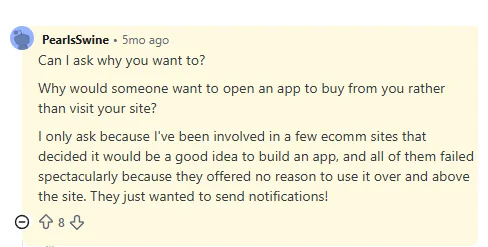
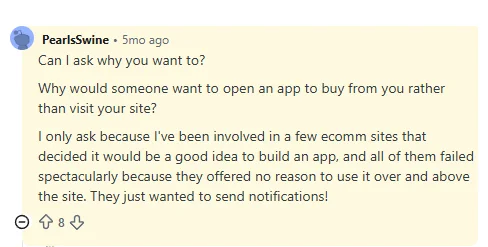
    The third idea is the “what does an app even add for the customer” objection. (see Reddit comments above)

    It’s assuming that launching an app is completely self-serving; that convincing someone to download your app is just a con job so you can ruin their life with spam notifications.

    Apps provide real value for certain customers.

    • Quicker, more convenient access to your store (one tap from the home screen)
    • A smoother shopping experience (not affected by whatever the latest thing iOS did to break Safari)
    • Direct updates from the brand about promos, new products, other perks (some customers actually do want to hear from brands)
    • A user experience built for returning customers (a brand’s website is often optimized to convert new customers; an app can be built to make it easier for regular customers to reorder/discover new products)
    • VIP perks (many brands use the app as a defacto VIP list, giving app users first dibs on promos or product drops)

    There’s a lot you can do in a new channel – especially when you can optimize every part of the user experience for people who already know your brand.

    Who Uses Retail Apps

    The through-line with all the common objections about mobile apps is that it assumes you’re launching one for everyone; that your goal is to have as many app users as email subscribers.

    The customers who install a brand’s mobile app are typically a small slice of the total customer base – often under 10%, sometimes 15-20% for brands where repeat purchases are natural (F&B, beauty).

    That segment is the most valuable segment a brand has.

    They’ve already bought, usually more than once. They liked the brand enough to install the app. They self-select toward the lower-friction channel because they want to buy from this brand more often, faster, with fewer steps.

    For these customers, the app does provide real value. They do want to receive push notifications. They want a more convenient way to interact with the brand, to buy from the brand.

    David Cost, VP of Ecommerce at Rainbow Shops, said this (which sums up the case for mobile apps perfectly:

    “In our experience, users break into two camps. There are users who prefer to buy on the app and users who prefer using the browser. You can’t convince one to go the other way, you need to meet them where they are.

    Our apps never had any functionality or usability beyond the web experience. The reason to have an app is not to have something that isn’t on the website, but for people who prefer that way to access Rainbow content.”

    The key line? “You need to meet them where they are.”

    Some people just prefer to use apps. Some specifically want an app from the brands they visit the most.

    You’re just giving them what they want.

    The Impact of Giving Your Best Customers an App 

    When you give your best customers what they want, you see some real, positive results that make launching it more than worthwhile (even if only a small share of your customers download it).

    This is where the incrementality debate comes in – and is again disproven.

    When you offer an app, the customers who download it:

    • Shop more often (since it’s easier, less friction to come back to your store)
    • Shop for longer (because the shopping experience is smoother, with fewer distractions)
    • Convert more, spend more in each order (because of the improved user experience, tailored to repeat customers)
    • Churn less (the app icon keeps your brand top of mind. Customers who otherwise might have stopped buying from you, out of atrophy, stay for longer)

    The last one might be the most important; someone who downloads your app is inherently more valuable to your brand, because they had the kind of intent to want to download your app in the first place.

    But without consistent touchpoints, brand loyalty atrophies, even for once hyper-engaged customers.

    App users have stronger revenue metrics across the board (see our Ecommerce Mobile App Benchmark Report for more on this).

    And the most important metric that improves is LTV – which often just comes from holding on to your best customers for longer, which naturally leads to more revenue and stronger profit margins over time.

    The Math: Even Small Adoption Pays Off

    We mentioned up top that you don’t need a large slice of your customer base to download the app in order for it to be a success.

    Here’s the math to show what we mean.

    Take a $10M-revenue ecommerce brand. Assume 5% of the total customer base installs and uses the app (that’s deliberately conservative by the way).

    That 5% naturally spends more; partly because of the better experience in the app, partly because they’re just wired to spend more from the average customer.

    Brands we work with always see a disproportionate revenue contribution from app users. So if 5% of your customers use the app, it’s likely that you’ll see at least 10% of total revenue come through the app – closer to 15-20% in most cases.

    (the disparity can be even greater. Junior Couture saw 50% of their peak season revenue through the app, from just 5% of their customers. Pharmazone gets 63% of their online revenue through their app, from around 15% of their customers).

    So if we take the deliberately conservative estimates – 5% of your customers contributing 10% of total revenue – the mobile app for a $10M brand is a sales channel doing $1M annually.

    It comes out to the same figure for a brand half the size ($5M annually) doing stronger in their app (20% of total revenue – which is in the midpoint of the 10-35% average revenue share we generally see from apps).

    Annual Revenue App Customer % Revenue Contribution App Revenue
    $5M 5% 10% $500K
    $5M 10% 20% $1M
    $10M 5% 10% $1M
    $10M 10% 20% $2M
    $25M 5% 10% $2.5M
    $25M 10% 20% $5M
    $50M 5% 10% $5M
    $50M 10% 20% $10M
    $100M 5% 10% $10M
    $100M 10% 20% $20M

    Cost to Revenue (ROI) of the App

    It shouldn’t be hard to see the value in a channel contributing $1M in annual revenue.

    But the case gets even better if you take the cost into account.

    With Vendrux, the cost to build and maintain your app starts at $1,499 per month, with a one-time, four-figure setup fee upfront.

    That’s nearly $100K in monthly revenue, on a cost of a little over a thousand per month. With Vendrux, everything’s done for you, there’s no separate system to manage, and no major workflow changes coming along with your app.

    That cost to benefit math makes having an app a no-brainer.

    Want to see what your app would look like?

    You’ve got the customer base, the repeat buyers, and now a rough sense of what the app channel could be worth. The piece still missing is what the app itself would look like for your brand.

    Vendrux lets you build a custom native app, without hiring developers or managing a separate platform. We’ll build you a free preview, so you can see your app in action and see what’s possible.

    Get a Free App Preview

    The Straight Answer

    Yes, customers really do use retail apps.

    They use the apps from massive brands like Amazon, Sephora, Gymshark. They also use apps from smaller brands, brands that aren’t household names, but are well-known in smaller ecommerce niches like men’s grooming and skincare, or clean protein and fitness supplements.

    The big misconception is the idea that you’re launching an app for everyone. You’re not.

    An app is for a small slice of a brand’s customer base. The most engaged, the most dialed in to the brand.

    That could only be 5% of their total active customer base. But 5% is more than enough to make an app worthwhile.

    If you’re a brand doing seven figures plus and see the case – or if you need more convincing – get in touch with us.

    Book a free strategy call and we’ll walk through it with you, show you what an app could look like, and help you decide if launching a mobile app is the right move for your brand. 

  • What Happens to Your Mobile App During a Platform Migration (and What To Do About It)

    What Happens to Your Mobile App During a Platform Migration (and What To Do About It)

    Replatforming is one of the biggest technical projects you’ll ever run. A Magento to Shopify Plus migration takes 12 to 24 weeks for a mid-sized brand, longer for complex catalogs. It’s the kind of thing that occupies all your engineering team’s attention, and requires intense planning and management to ensure your customers aren’t negatively impacted by the move.

    There’s one major issue we keep hearing about brands running into when they’re migrating their ecommerce platform: their app.

    The brand has a mobile app, which is tied to their original web platform. Migrating often means the app breaks; or requires a significant rebuild for the new platform, which adds to what is already an engineering and logistical slog.

    It’s never your primary concern. But it’s a significant one, all the more concerning if you have users on your app already, who you don’t want to disrupt.

    Keep reading and we’ll share the same advice we share with people from replatform brands that we’ve been talking to lately, on how to handle this tricky situation.

    The Problem: Why a Platform Migration Breaks Your App

    Whichever platforms you’re migrating to/from, and however your app is built, a replatform typically means your app will break.

    Your web platform and app are (or should be) tied together. They share from the same commerce backend. Inventory, orders, product details, accounts, all of this is connected, typically via platform APIs.

    Changing platforms means changing APIs. It means a new set of APIs, which may need to be built from scratch, or which may be built for you, but exposing limited functionality than you used to have access to.

    Your web UI is changing, and without updating your app, you risk showing two surfaces that look like different stores.

    The details can be a little different, depending on what your replatform looks like (which platform you’re moving from/to), and how your previous app was built.

    Let’s take a look at a few scenarios now.

    No-Code Mobile App Built on a Platform-Native Builder

    A no-code mobile app builder is a SaaS product purpose-built around one ecommerce platform’s APIs. You configure the app inside a vendor dashboard. The vendor’s product talks to your storefront. The data flow (catalog, cart, customer, checkout) runs through platform-specific connectors that only the vendor maintains.

    When you change platforms, the connectors stop working. The vendor’s product surface ends at the platform’s API surface, so there’s no rebuild path with the same vendor on your new stack. Tapcart, the largest no-code app builder in the Shopify ecosystem, states the constraint directly on its own site: it “is only able to support businesses that run ecommerce operations on Shopify.”

    This isn’t a con about Tapcart. It’s just the nature of the platform.

    It’s the same with the hundreds of other tools in the Shopify App Store, as well as app builders tied to other platforms (e.g. you’re on Magento, built an app with a Magento app builder, and now picking up and moving to Shopify).

    You’re looking at replacing your original app from scratch. Whole new vendor, whole new app.

    Custom-Built Mobile App

    Let’s say you’ve built custom. Fully custom, from the ground up. Maybe through an agency, maybe in-house.

    You’re still, more than likely, using platform APIs to connect your app with your website.

    In principle, you can rework the app to use the new platform’s APIs, and migrate your app along with your site.

    But while it “can” be done, it adds a huge amount of complexity to your migration – which is already a drain on your resources, and a lot of things to juggle. Realistically, you’re rebuilding your app for the new platform.

    If there’s a timeline you need to hit, get ready to extend it. If you need to keep within a budget, forget about it.

    We’ve come across this many times. Rarely does the business have the engineering capacity to build a new mobile app, alongside their web migration. 

    If you’re working with an agency, this means you and the agency need to be tightly aligned, or else there’ll be lag time between the website relaunch and the app relaunch. That may mean paying a premium to the agency to make your project their main priority.

    All up, it’s just not something you want to add to the scope of shifting your entire commerce operation from one platform to another.

    Your mobile app shouldn’t be a casualty of your replatform.
    See how Vendrux keeps it live through the migration.

    Book a Strategy Call

    Replatforming Directions (and What Your Options Are)

    The mobile app problem (and the solution) will look a little different depending on the direction of your migration.

    Here are three common situations we run into, and what they mean for your app.

    Off Shopify

    You’re moving off Shopify, to BigCommerce, Adobe Commerce, headless, custom, anywhere. You’ve probably got an app built with one of the app builders in the Shopify App Store (e.g. Tapcart).

    Once you migrate, your app stops working. Simple as that. Almost every Shopify app vendor only works with Shopify. So you’re now faced with a custom build for the new platform, unless there’s a no-code tool that happens to support your new stack.

    Off Shopify, the no-code mobile app ecosystem thins out fast. On BigCommerce there are a handful of options, none with the depth of the Shopify equivalents. On Adobe Commerce and SFCC, there’s effectively nothing at the no-code tier worth recommending. 

    A custom build is the default once you leave Shopify, and that means building a whole new app alongside the web replatform.

    Regular Shopify to Headless

    This one’s a niche edge case that a lot of brands don’t consider until it bites them. You’re staying on Shopify, but you’re moving your frontend to Hydrogen or a custom headless build.

    Technically, your app could still keep working. The Shopify backend is still there, and a Shopify-native app builder is still talking to the same Storefront and Admin APIs.

    The problem isn’t that the app stops working. It’s that the app stops keeping up. The whole reason you went headless is that you wanted to build custom frontend experiences the standard Shopify storefront couldn’t support. 

    Once you start shipping those experiences on the web, they don’t carry over to a templated, no-code app. The gap between your website and your app grows every month you keep building on the headless side – and eventually you might decide you need to rebuild the app anyway.

    Non-Shopify to Shopify

    This is the most common direction in enterprise replatforms right now. Magento to Shopify Plus. SFCC to Shopify Plus. Adobe Commerce to Shopify. Homegrown stacks to Shopify Plus.

    The good news: there are more app options on the Shopify side than on any other platform. Pick a Shopify-native app builder and configure something for a standard Shopify store in a few weeks.

    The catch: this is still a rebuild of your app. Your previous vendor isn’t coming with you, and even if you were on a custom build, the codebase needs to be reworked or replaced.

    There’s a second catch if you’re moving to Shopify Plus with headless or a complex custom build. The edge case from the section above kicks in early. The standard Shopify-native app builders won’t be able to match what you’re doing on the web, and you’ll outgrow them faster than you’d like. That’s the same gap, just hit sooner.

    So even on the most app-friendly platform in ecommerce, this is still a from-scratch app launch. The decision is which kind of app you launch.

    Why Vendrux Is the Best Solution for Replatforming Your App

    At Vendrux, we’re becoming specialists in this. That’s because our approach is naturally the best fit for a brand that’s replatforming, and having to rebuild or replatform an app at the same time.

    Here’s why Vendrux is the best way to handle your mobile app during a replatform.

    It’s Platform and Tech-Agnostic

    Vendrux works with whatever your new platform looks like, whether you’re moving to Shopify or away from it. We support Shopify, Shopify Plus, BigCommerce, Magento, Adobe Commerce, Salesforce Commerce Cloud, WooCommerce, and headless or fully custom commerce stacks. 

    The app is built on the same tech stack as your website – not a separate build connected by APIs.

    This is important. It means that when you migrate your website to a new platform (even to a fully custom, or headless stack), your app comes with it. We can build the app on your existing site, and have it switch to the new site once you launch, or build it on the new site that’s under development. Whichever works best for you.

    (Building with Vendrux also means, if you happen to migrate again in the future, your app will come with you. No dealing with the same headaches again.)

    The Timelines Line Up

    One of the biggest issues with rebuilding your app as a custom build is the timeline.

    A web migration might take three to six months. A custom app usually takes six months to a year.

    Do the math – even if both kick off at the same time, and you’re able to build the mobile app independently, you’re looking at one of two scenarios:

    • Pushing back the web migration until the app is ready
    • A time between the new website launching and the app being ready, where customers can’t use your app anymore.

    Neither are good outcomes. The app being unusable for any length of time is a disaster scenario, especially if you’d already built a decent sized user base.

    Vendrux takes six to eight weeks to launch; potentially quicker. The time lines up perfectly with your migration, so you can launch with zero downtime for your app users.

    Vendrux is Battle-Tested with Platform Migrations

    We’ve done this numerous times. We’ve seen many brands going through migrations, we know the issues that come up, the edge cases that have to be dealt with.

    And since we specialize in this kind of work (not exclusively – but it’s one of the things we’re best at), you know you’re getting a partner that’s working towards the same goals you are.

    We did this same thing with buybuyBaby, for instance; helping them launch a new app during their replatform, resulting in no downtime for their app users.

    “The incredible part was that we didn’t even have to think about the app during these transitions. When we finally reached out to check if our latest major redesign would affect the app, the response was immediate: ”You have nothing to worry about, everything will be fine.””
    -Steven Kachtan, CIO of Dream On Me

    It Works With All Your New Features

    You’re replatforming for a reason. You want to build something new – you want to expand your web experience, launch new features your old platform wasn’t capable of, ship a better, more modern UI.

    Whatever it is, Vendrux lets you reflect the same design, the same features in your mobile app. It’s not going to limit you to a basic template, or double the work to ship all these additions in a new channel.

    It’s fully synced with your new site, already. Whatever you’re building on the new site, you’re also building in the app.

    Replatforming doesn’t have to mean rebuilding your app.

    Your web replatform is already absorbing your engineering team’s attention. Content modeling, integrations, payments, checkout, cutover. Stacking a parallel app rebuild on top of that is the last thing you need.

    Vendrux builds custom native apps that travel with you across the migration. Same app, same App Store listing, same push subscriber base, on whatever platform you’re moving to next.

    Get a Free App Preview

    Final Thoughts

    Replatforming is already one of the most demanding technical projects you can run. Adding a mobile app rebuild on top of it just makes it messier. 

    It stretches engineering resources, breaks your timeline and budget, and risks real disruption for your app users.

    Vendrux is the ideal way to replatform your mobile app at the same time. It takes the app project off your plate during the migration. The same app keeps running through the cutover, and your team only needs to focus on the web side of things.

    If you’re planning a migration and wondering what to do with your app, that’s the conversation we’re built for. Book a strategy call and we’ll walk through your specific situation, and how we can help.

  • Ecommerce Mobile App Development: How to Build and Launch an App For Your Brand

    Ecommerce Mobile App Development: How to Build and Launch an App For Your Brand

    Ecommerce mobile app development is how established online retailers turn their most engaged shoppers into repeat customers. Apps convert at nearly double the rate of mobile websites, app users spend more per order, and push notifications are the closest thing ecommerce has to a direct, owned retention channel.

    In 2026, over 70% of ecommerce traffic comes on mobile devices. The market is projected to reach $2.4 trillion in 2026 and continue growing at 9.5% annually through 2034.

    And the more of that traffic flows through your mobile app, the better.

    If you run an ecommerce brand and have been thinking about a mobile app, there’s no better time than now to launch.

    This guide walks you through everything you need to know about ecommerce mobile app development: why you need an app, how much it typically costs, your options to build it, how to build your ecommerce app, and how to grow it to be a seven-figure plus revenue engine.

    Why Ecommerce Brands Are Investing in Mobile Apps

    A responsive website gets you in front of mobile shoppers. An app turns the best of those shoppers into repeat customers. The data on this is consistent across industries:

    • Higher conversion rates. Apps regularly convert at 1.5 to 2.5x the rate of mobile websites. Brand-level data from 2024 shows even wider gaps: Naked Harvest reported a 142% higher conversion rate on their app versus mobile web.
    • Larger orders. App users tend to spend more per transaction. Across Vendrux’s customer base, app users show a 30% higher average order value compared to mobile web shoppers.
    • More repeat purchases. 60% of first-time app buyers come back for another purchase. App shoppers spend 201 minutes per month in shopping apps, compared to just 11 minutes on mobile shopping sites.
    • Lower cart abandonment. Mobile web cart abandonment runs around 80%. Apps reduce friction through saved payment methods, one-tap checkout, and persistent sessions.
    • A direct channel you own. Unlike email, social, or paid ads, a home screen icon gives you a direct line to your most engaged customers. Push notifications land on their lock screen, not in a spam folder or an algorithmic feed.

    These aren’t theoretical benefits. Rainbow Shops saw 7x mobile customer lifetime value from their app. Kiokii, a two-person ecommerce team, generates 35% of their online revenue through their app from just 10% of their user base.

    “The app’s been invaluable to us. The cost we’re paying versus what we’re getting back is tenfold.”
    — Nick Barbarise, Director of IT, John Varvatos

    Global retail app downloads hit 6.6 billion in 2024, marking the fourth consecutive year of growth. And 76% of U.S. smartphone users now regularly use shopping apps. For ecommerce brands with repeat purchase potential, the business case is hard to argue against.

    Mobile apps provide a more frictionless buying experience – with features like mobile payment integrations

    The Different Types of Ecommerce Apps

    Before building, it helps to understand what kind of ecommerce app you’re building. The business model shapes the feature set, the user experience, and the technical requirements.

    • B2C (Business-to-Consumer): The most common model. A brand sells products directly to individual shoppers. Think product catalogs, shopping carts, checkout flows, and post-purchase engagement. Fashion, beauty, food, and lifestyle brands typically fall here. D2C or DTC (direct to consumer) also fits under this category.
    • B2B (Business-to-Business): Wholesale, trade, and procurement apps. These require features like volume pricing, quick reorder workflows, account-based catalogs, and integration with ERP and inventory management systems.
    • Marketplace: Multi-vendor platforms where multiple sellers list products and the platform facilitates transactions, taking a commission on each sale. Marketplace apps need vendor onboarding, commission management, dispute resolution, and review systems. Amazon and Etsy are the obvious examples.
    • C2C (Consumer-to-Consumer): Peer-to-peer selling platforms. Think Poshmark or eBay-style apps where individual users list, buy, and sell from each other.

    Most ecommerce brands will fall into the B2C or D2C model. The rest of this guide focuses primarily on that use case – though much of the advice applies across models.

    Essential Ecommerce Mobile App Features

    The features you need depend on your business model and complexity, but most ecommerce apps share a common core. Here’s a practical breakdown.

    Core Commerce Features

    These are the core features of any ecommerce mobile app:

    • Product catalog and search. Browsable categories, product detail pages with multiple images, zoom, and variants. Search with filters (price, category, size, color, availability) so shoppers can find what they need fast.
    • Shopping cart. Add, remove, and adjust quantities. Apply coupon or promo codes. Persistent across sessions so items aren’t lost.
    • Checkout flow. Streamlined, ideally single-page. Guest checkout option. Saved shipping addresses and payment methods for returning customers. One-click checkout for repeat purchases.
    • Payment processing. Integration with gateways like Stripe, PayPal, Apple Pay, Google Pay, and Buy Now Pay Later providers (Klarna, Afterpay, Affirm). Multiple payment options reduce checkout friction.
    • Order management and tracking. Order confirmation, real-time shipment tracking, delivery notifications. Returns and refund management.
    • User accounts. Registration via email, phone, or social login (Google, Apple, Facebook). Profile management, saved addresses, order history, wishlists.
    • Website sync. If you sell on the web as well (you almost certainly do), your products, inventory, orders, accounts and all other data needs to sync with your website backend. Otherwise you’re going to have a nightmare trying to manage this in parallel.

    Engagement and Retention Features

    These separate a good app from one that gets downloaded and forgotten:

    • Push notifications. Abandoned cart recovery, flash sale alerts, back-in-stock notifications, order updates, and personalized recommendations. This is the single biggest advantage of an app over a mobile website. Read our complete guide to ecommerce push notifications.
    • Deep linking. Links from emails, SMS, social, or ads that open directly to the right product or page inside the app, not the mobile web.
    • Loyalty and rewards programs. Points systems, tiered memberships, referral incentives. In-app loyalty keeps high-value customers coming back.
    • Wishlists and favorites. Save products for later, trigger back-in-stock alerts, and use wishlists for personalized recommendations.
    • Product reviews and ratings. User-generated content builds trust and helps shoppers make decisions.
    • Customer support. In-app live chat, chatbot, or links to your support team. FAQ or help center access without leaving the app.

    Advanced Features

    Worth considering for brands with more complex needs:

    • AI-powered recommendations. Personalized “you may also like” suggestions based on browsing history, purchase patterns, and similar shoppers.
    • Augmented reality (AR). Virtual try-on for fashion and beauty, or “place in your room” visualization for furniture and decor.
    • Visual and voice search. Image-based product discovery (snap a photo, find similar items) and voice-activated search.
    • Multi-language and multi-currency support. Essential for brands selling internationally.
    • Barcode/QR scanning. Useful for in-store shoppers who want to look up products in the app.

    Not every app needs every feature on day one. A common approach is to launch with a strong MVP, the core commerce features plus push notifications and deep linking, then expand based on user behavior and feedback.

    Already selling online? You’ve already built most of this.

    If you’re running an ecommerce store on Shopify, WooCommerce, BigCommerce, or any other platform, your website already handles product catalogs, search, checkout, customer accounts, loyalty programs, and everything else on the list above. You don’t need to rebuild those features from scratch for a mobile app.

    Vendrux extends your existing website into native iOS and Android apps, so every feature, integration, and customization you already have works in the app automatically. No duplicate development, no feature gaps, no ongoing maintenance of a separate codebase.

    Get a Free App Preview

    How to Build an Ecommerce App: Step by Step

    If you already have a successful, mobile-friendly website you’re selling on, you probably don’t need all this. You’re better off converting your website into an app (which we’ll expand on in more detail later.

    However, if you want the full breakdown of how to build and launch an ecommerce mobile app from scratch – here’s the process in its entirety:

    Step 1: Define Your Goals and Business Model

    Start with what you’re trying to achieve. Are you building an app to improve retention among existing customers? To create a new acquisition channel? To support a loyalty program? Your goals shape every decision that follows.

    Define your target audience. Are they mobile-first shoppers? Repeat buyers? B2B clients placing bulk orders? Understanding your user informs feature priorities, design decisions, and the development approach you choose.

    Step 2: Research the Market and Competitors

    Download and use competitor apps. Look at their navigation patterns, checkout flows, feature sets, and how they use push notifications. Check their app store ratings and read reviews. Pay attention to what users praise and what they complain about.

    Use tools like Sensor Tower for competitive intelligence on downloads and engagement. Look at category benchmarks for your industry. Identify gaps your app can fill.

    Step 3: Choose Your Development Approach

    This is the most consequential decision you’ll make. The four main approaches (custom development, cross-platform frameworks, no-code builders, and web-to-app conversion) differ dramatically in cost, timeline, and ongoing maintenance. We cover these in detail in the next section.

    Step 4: Plan Your Feature Set and MVP

    Based on your goals and research, define your launch feature set. Resist the temptation to build everything at once. A strong MVP for most ecommerce apps includes:

    • Product catalog with search and filtering
    • Shopping cart and checkout
    • User accounts with saved payment/shipping
    • Push notifications (abandoned cart, promotions, order updates)
    • Deep linking
    • Analytics integration

    Advanced features like AR, AI recommendations, and loyalty programs can come in version 2, once you have user data telling you what to prioritize.

    Step 5: Design the User Experience

    If you’re building custom, this means wireframing, prototyping, and high-fidelity design work in tools like Figma. Follow Apple’s Human Interface Guidelines for iOS and Material Design guidelines for Android.

    Key design principles for ecommerce apps:

    • Speed over flash. Users care more about fast load times and smooth scrolling than elaborate animations.
    • Thumb-friendly navigation. Bottom tab bars, large tap targets, and reachable CTAs.
    • Minimal checkout friction. Every extra step in checkout costs conversions. Saved addresses, stored payment methods, and guest checkout reduce drop-off.
    • Clear product presentation. Multiple images, zoom capability, size guides, and prominent pricing.

    If you’re using a no-code builder or web-to-app approach, much of the UX design is inherited from the builder’s templates or your existing website. Focus on configuring navigation, splash screens, and app-specific elements.

    Step 6: Develop and Test

    For custom and cross-platform builds, this is where the bulk of time and budget goes. Most teams follow an Agile methodology, working in 2-4 week sprints with regular reviews and course corrections. Development typically includes:

    • Frontend/mobile development (the app interface users see)
    • Backend/API development (server logic, database, integrations)
    • Third-party integrations (payment gateways, shipping, analytics, CRM)
    • Testing across multiple dimensions: functional testing (do features work?), performance testing (does it handle load?), usability testing (can users complete key tasks?), security testing (are transactions and data protected?), and compatibility testing (does it work across devices and OS versions?)

    Beta testing through Apple’s TestFlight and Google Play’s beta program lets real users validate the experience before public launch.

    Step 7: Submit to App Stores

    Both Apple’s App Store and Google Play have review processes. Apple’s review typically takes 1-3 business days but can be unpredictable. Google Play reviews are usually faster but can flag policy issues.

    Common rejection reasons include:

    • Incomplete functionality or placeholder content
    • Violating platform design guidelines
    • Privacy policy missing or inadequate
    • Excessive use of web content without native elements (Apple specifically scrutinizes this)
    • Misleading metadata or screenshots

    You’ll also have to pay for developer accounts on each platform: $99/year for Apple, $25 one-time for Google.

    Step 8: Launch, Promote, and Optimize

    Getting the app into the stores is the starting line, not the finish. Your launch and ongoing promotion strategy determines whether the app actually gets used.

    App Store Optimization (ASO):

    • Keyword-rich app title and subtitle
    • Compelling screenshots and preview video
    • Clear, benefit-focused description
    • Encourage ratings and reviews from satisfied customers

    On-site and in-store promotion:

    • Smart banners on your mobile website prompting app downloads
    • QR codes on packaging, receipts, and in-store signage
    • Dedicated landing page for the app on your website

    Campaigns:

    • Email and SMS campaigns to your existing customer base highlighting app-exclusive benefits
    • Welcome incentive for first app purchase (discount code, free shipping)
    • App-exclusive flash sales or early access to new products

    Retention:

    • Push notification campaigns: abandoned cart recovery, personalized recommendations, back-in-stock alerts, loyalty rewards
    • Regular app updates with new features and content
    • Monitor analytics (session duration, conversion funnels, retention curves) and iterate

    Three Approaches to Ecommerce Mobile App Development

    Once you know what it needs to do, the next step is figuring out how to build your shopping app.

    There are three common paths ecommerce brands take – each with its own trade-offs in speed, cost, flexibility, and complexity.

    1. Custom Development: Full control, high cost

    Custom apps are built from the ground up by an in-house team or agency, using frameworks like React Native, Flutter, or native iOS/Android code.

    This route gives you maximum control over features, UI, and integrations, but it comes with a steep price.

    Pros:

    • Fully custom UX and branding
    • No limits on features or integrations
    • Full ownership of code

    Cons:

    • App development process is long and drawn-out (typically 6–12 months)
    • $50K-$200K+ in upfront costs
    • Requires ongoing maintenance by developers
    • Risk of overbuilding or underutilization

    Custom apps make sense for enterprise brands or retailers with complex workflows and large budgets. But for most ecommerce businesses, they’re overkill (and risky).

    “At first, we explored the viability of building our own native apps from the ground up. And while that was achievable, managing them effectively moving forward would not have been feasible due to the disconnected nature of such an approach.”
    — David Chamberlin, Lead Developer, Tadashi Shoji

    2. DIY Ecommerce Mobile App Builders: Fast but limited

    DIY, no-code app builders let you create an app using drag-and-drop editors and pre-built blocks.

    These tools sync with platforms like Shopify and WooCommerce and offer quick setup for stores with standard needs.

    Pros:

    • Launch in weeks, not months
    • Affordable monthly pricing (~$200-$1000/month)
    • Built-in push notifications, loyalty, reviews, etc.
    • Good UX with minimal effort

    Cons:

    • Limited customization and design flexibility
    • Vendor lock-in (you don’t own the code)
    • Feature gaps for non-standard stores
    • Performance varies across platforms

    If you want speed and simplicity (and your store doesn’t have any advanced features or niche integrations to carry over to the app), a DIY ecommerce app builder can work.

    But the end product (and work required to manage) is not ideal.

    3. Vendrux: The sweet spot between custom dev and no-code tools

    Vendrux is a premium web to app service that converts any ecommerce website into a mobile app.

    Vendrux has helped over 2,000 brands launch their own mobile apps, including major global brands like Estee Lauder, Jack & Jones and Vero Moda.

    With Vendrux’s approach to ecommerce app development, you can go live with your own app simply by converting what you’ve already built for the web.

    You keep everything that works on your site – design, features, integrations – and get a native app presence, push notifications, and App Store listings.

    All this in a fully managed service, yet a fraction of the cost and timeline of custom app development.

    Why Vendrux is ideal:

    • Fast time to market (6-8 weeks)
    • Minimal disruption – no need to rebuild anything
    • Real-time sync with your site, features, product catalog, payment gateways (no duplication of work)
    • None of the limitations of template-based ecommerce mobile app builders
    • All the standard features of a native app – push notifications, native nav, App Store presence
    • Fully managed service (no developers needed, no lift from your team)

    Vendrux is ideal for brands that already have a great mobile website and want to scale fast without rebuilding or taking on technical risk.

    You get to launch a powerful, scalable online shopping app, and at the same time keep your existing workflow. Your team focuses on growth, not managing a new platform.

    Want to see what’s possible? Book a free demo and we’ll walk you through the process, and show you what your site could look like as a mobile app.

    Post-Launch (Maintaining Your Mobile App)

    Whichever method you choose – native app development, an app builder, or a web to app service – launching an app is just the beginning.

    What happens next (how you support it, update it, and keep users engaged) is where the real ROI comes from.

    Managing updates, changes, and bug fixes

    The technical work to build an ecommerce app doesn’t end once it’s live.

    You still need to keep it running smoothly, secure, and compatible with constant changes to iOS, Android, and your ecommerce platform.

    Mobile operating systems are updated frequently, sometimes with major UI changes or technical requirements. Even small updates from Apple or Google can break key functionality or trigger app store rejections if your app doesn’t comply.

    On top of that, your own store will evolve: new features, third-party tools, promotions, or backend updates all need to be reflected in the app.

    What’s the real cost of ownership?

    When evaluating how to build your app, it’s important to look beyond the upfront launch costs and consider the total cost of ownership – including hosting, updates, maintenance, developer time, and support over time.

    Your choice of development approach makes a big difference in the long-term, recurring cost of your app.

    Custom App Development

    Expect to invest anywhere from $50,000 to $200,000+ just to get your app built.

    And that’s only the beginning. You’ll need to retain developers or an agency to handle updates, platform changes, and bug fixes.

    Ongoing costs often run $2,000 to $10,000 per month, depending on complexity. If your app breaks after an iOS update, or needs new features, you need to pay the development team to handle it.

    “When you develop an app you can’t just have one person. When we built the app, the maintenance became very heavy. To keep a platform like this in-house I feel like you’d probably need around six people.”
    – Kenneth Chan, Founder & CEO, Tobi

    No-Code App Builders

    These platforms are more affordable to start, often with little or no setup fee, and monthly subscriptions ranging from $200 to over $1,000 depending on your plan and feature set.

    While you don’t need to hire developers handle updates and platform maintenance, you’re limited to what the platform allows.

    It can be time-consuming or complicated to fix issues, and adding new features can require jumping to higher tiers or waiting on their roadmap.

    Vendrux

    Vendrux is a fully managed service, with a regular subscription cost starting at $1,499 per month (plus a one-time setup fee upfront).

    There’s no revenue share, and no hidden charges for features like push notifications. And most importantly, all app maintenance, updates, store compliance, and technical support are included.

    Vendrux handles everything post-launch. You don’t need developers, or any kind of time commitment at all to manage your app. That’s the major difference when it comes to the TCO: it’s not adding staff hours or drawing time away from other areas of your business.

    Learn more about Vendrux’s pricing here

    Promoting Your App & Driving User Engagement

    A beautiful, fast, feature-rich app that no one knows about is essentially worthless – while a “good enough” ecommerce app that’s well promoted and marketed at least has some chance of adding value to your business.

    Along with technical concerns (keeping your app fast and bug-free), you also need a plan for how to get users – and how to keep them using the app.

    What does a typical launch process look like?

    Every launch is different depending on how you build your app, but a standard process includes:

    • Branding & account setup (developer accounts, assets, permissions)
    • Initial configuration (navigation, app layout, splash screen, push setup)
    • Internal testing on real devices
    • App Store submission and approval (Apple review can take 5-10 business days)
    • Go-live and promotion (email, banners, QR codes, etc.)

    With custom development or no-code platforms, much of this is your responsibility. With Vendrux, it’s all handled for you; turnkey, guided by a dedicated team.

    Promoting your app post-launch

    Even loyal customers won’t download your app unless you give them a reason (and make it easy).

    Here’s what works:

    • Smart banners on your mobile site prompting visitors to download the app
    • Email and SMS campaigns with clear benefits (“Early access,” “App-only discounts”)
    • QR codes on packaging, receipts, and in-store signage
    • Exclusive content or flash sales available only in the app
    • Welcome incentives like 10% off for first-time app orders

    This turns the app into a natural part of your brand journey; not a separate channel, but a better one.

    Driving retention and revenue with push notifications

    Push notifications are where ecommerce apps shine. Unlike email or SMS, they’re direct, immediate, and free to send.

    They appear on the home screen, bypass inbox clutter, and don’t rely on algorithms or paid ads to reach your audience.

    When used correctly, push drives serious engagement in your app, with campaigns like:

    • Abandoned cart recovery with targeted, timely nudges
    • Flash sales to convert interest into action
    • Back-in-stock alerts and personalized recommendations
    • VIP and loyalty engagement with special offers

    Even if your push notifications don’t drive a huge amount of revenue, they serve a crucial role for your mobile app – they keep your app (and brand) top of mind, so the app doesn’t get forgotten, and your customer comes straight to the app whenever they’re ready to shop.

    Vendrux provides launch materials and guidance to help you generate installs and activate early users. Want us to walk it through with you? Book a free consultation now.

    Final Thoughts: How to Launch an Ecommerce Mobile App that Delivers Results

    Mobile apps are one of the most powerful tools in the modern ecommerce playbook.

    If you’re a growing ecommerce brand looking to boost retention, increase repeat purchases, and gain more control over your customer experience, having your own mobile app is essential.

    And thanks to solutions like Vendrux, building one no longer requires rebuilding your entire business, hiring a dev team, or taking on a huge project.

    You can launch fast. You can launch smart. And you can launch with confidence, with almost guaranteed ROI.

    Whether you’re still in the planning phase or ready to bring your app to life, this guide should give you the clarity and direction to move forward.

    If you’re curious what your store could look like as a mobile app, the best next step is to see it for yourself.

    Get a free consultation – no commitment required, and we’ll show you a preview of your site as an app, plus examples of brands like yours, and the results they’ve had from launching their own mobile apps.

  • Push Notifications for Ecommerce: 14 Examples, Best Practices & Strategy

    Push Notifications for Ecommerce: 14 Examples, Best Practices & Strategy

    Push notifications are the #1 reason for ecommerce brands to build a mobile app.

    They’re fast, direct, personal, effective, and basically zero-cost. They’re versatile: you can use push notifications to drive serious revenue (we’ve had worked with brands that made $200-$300k per month from push), or you can use them just to build awareness.

    Yet they’re still criminally underutilized.

    In this guide, we’ll give DTC and retail ecommerce brands everything they need to know to start using push notifications to their full potential.

    From a high-level overview of push notifications, to different use cases for ecommerce push notifications, the best push notification examples (real pushes from real brands), and best practices to follow, this article is a complete guide to help you increase retention, customer loyalty and LTV in a big way.

    If that sounds good, keep reading.

    Vendrux helps you leverage the full power of push notifications, by converting your website into native mobile apps. Want to see how easy it is? Get a free preview now.

    What are Push Notifications?

    Push notifications are short, clickable messages that appear directly on a user’s device – either their smartphone or desktop/laptop.

    There are two different types of push notifications that ecommerce brands should know about:

    • Mobile push notifications: Sent through a mobile app to a user’s phone or tablet. These appear on the lock screen, notification center, or even as banners while the device is in use. (they don’t require the app to be open, like an in-app message).
    • Web push notifications: Delivered through browsers like Chrome, Safari, or Firefox, even when a user isn’t actively on your website. These can reach users on desktop or Android devices, but have more limitations (especially on iOS).

    Note that we’ll be focusing on mobile app push notifications, as these are the most prevalent and effective type of push notifications.

    (Check out a deeper breakdown of web vs mobile app push notifications)

    Why Are Push Notifications So Effective for Online Stores?

    When it comes to engaging mobile shoppers, it’s tough to match the ROI of push notifications.

    Here’s why push notifications work so well for ecommerce:

    • They’re immediate: Messages land directly on a user’s screen, often drawing instant visibility and prompting action within seconds.
    • They’re low-noise: Unlike email or social media, push doesn’t compete in a crowded feed or inbox.
    • They’re cost-effective: Push notifications are free to send; there’s no cost per message like SMS.
    • They’re high-converting: High visibility, high engagement rates, and low friction (users can get straight into the app with one tap) leads to impressive conversion rates.
    • You’re in full control: Push is an owned channel. No deliverability issues like email, no throttling your reach like social. No ad spend. Just a direct line to your best customers.

    Push notifications are a powerful part of your retention toolkit. They’re more direct than email, more cost-effective and versatile than SMS (but work perfectly in concert with your other retention channels – not in competition).

    Use Cases & Types of Push Notifications for Ecommerce

    One of the best things about push notifications is how versatile they are for ecommerce & retail brands.

    There are many ways to use push. You can use them as a direct response channel (for promotions, launches or product recommendations), an engagement channel (quick prompts to stimulate action), or simply an awareness play (like a tiny billboard on the user’s phone).

    Here are some specific use cases for push notifications in ecommerce:

    • Welcome and onboarding flows
    • Abandoned cart reminders
    • Order and delivery updates
    • Price drops and back-in-stock alerts
    • Flash sales or limited-time promotions
    • Loyalty and reward program updates
    • App-exclusive deals
    • Post-purchase follow-ups

    Push Notification Best Practices for Ecommerce

    Like any marketing channel, push notifications don’t deliver results on their own. They need to be done right.

    It’s especially important to handle push correctly, because there’s a thin margin for error, where push notifications go from being a welcome update to an annoyance.

    Once they start to become annoying, the user’s going to to turn off notifications – and you lose access to them forever.

    To make sure that doesn’t happen, AND you get the most return from your push notifications, here are some best practices to follow.

    1. Segment and personalize

    Personalized push notifications have been shown to achieve 10% higher open rates, according to CleverTap.

    Don’t send the same message to everyone. Use data like browsing behavior, past purchases, location, and engagement history to tailor notifications to the individual, and ensure a great user experience.

    2. Be concise, clear, and actionable

    Push messages should be short and direct. You’ve got a limited amount of space to work with, so make it count.

    For promotional push notifications, focus on one clear action per notification, and lead with the value.

    Use strong calls-to-action like “Shop Now,” “Claim Your Reward,” or “View Your Order” to increase conversions.

    3. Create urgency and exclusivity

    Push works great when paired with urgency and scarcity. To get more conversions, urge the customer to act quick.

    Phrases like “Ends today,” “Back in stock,” or “App-only deal” work brilliantly. Limited-time offers paired with push are especially powerful for flash sales and promotions.

    4. Get the timing right

    Avoid sending messages too early, too late, or too often. You’ll get the best results if you catch the user right when they’re free and in the mood to take action.

    If not, there’s a chance they’ll come back to your notification later; but also a chance your notification get swiped to the side and forgotten.

    Analyze your audience’s time zones and behavior to determine ideal delivery windows. A few well-placed messages per week often outperform daily blasts.

    Read more: What’s the Best Time To Send Push Notifications?

    5. Use automated flows

    Trigger messages based on user behavior, like cart abandonment, post-purchase milestones, or app browsing activity.

    These flows run in the background and deliver consistent results with no manual effort. Automated push notifications also tend to perform the best, because they’re inherently personalized (tied to user actions, rather than wide, generic blasts).

    Read more: 12 Automated Push Notifications that Drive Revenue on Autopilot

    6. A/B test and iterate

    There’s no one-size fits all playbook. Test different messages, send times, CTAs, and formats to see what performs best for your brand.

    Even small optimizations can lead to significantly higher click-through and conversion rates.

    14 Push Notification Examples for Ecommerce Brands

    Want inspiration? We collected a ton of examples of push notifications from major ecommerce brands, to show you how the big players are using push.

    Here are 14 different types of push notifications, with the best examples of each, from brands like True Classic, Sephora, H&M, Mango and more.

    1. Promotions and Deals

    Notify users of site-wide sales, limited-time discounts, or exclusive offers to drive immediate traffic and purchases.

    Tips for Writing:

    • Use action-oriented language to prompt immediate responses.
    • Highlight the urgency by including phrases like “limited time” or “today only.”
    • Be clear and concise, focusing on the main benefit to the user.

    Examples:

    1. Rainbow Shops: “FROM $4.99. Nothing short of fabulous!”
    2. True Classic: “Make This Your Hottest Summer Ever With 40% Off Sitewide Using Code: HOT.”
    3. H&M: “Summer sale starts NOW. Up to 50% off in stores and online.”

    2. Abandoned Cart Recovery

    Abandoned cart push notifications remind users about items left in their cart with a compelling message or discount to encourage them to complete the purchase.

    These notifications significantly reduce cart abandonment rates and deliver major revenue boosts.

    Some of our users have recovered six figures ($200,000+) in just thirty days using abandoned cart notifications alone.

    We built cart abandonment push notification sequences into the Vendrux platform. Each time a customer activates abandoned cart notifications, they see a near-immediate ROI, and literally tens of thousands of dollars generated in days, simply by reminding people about the items left in their cart.

    Book a free demo now to learn how to do the same for your brand.

    Tips for Writing:

    • Offer an incentive, like a discount code, to encourage completion.
    • Create a sense of urgency to prompt quick action.
    • Don’t stop at the first message, we find a sequence of 3 is ideal.

    Examples:

    1. Chubbies Shorts: “So you’re just gonna leave this cart unattended? Use code BACK15 to get 15% off the world’s best weekend-wear.”
    2. Hobbiesville: “You left something in your cart! Tap here to start your checkout.”

    3. Product Announcements

    Launch new products or collections with excitement. Push lets you reach your audience instantly when something fresh drops.

    Over time, you’ll train your customer to expect exclusive product drops and opportunities coming just by keeping the app active and push notifications active (improving long-term engagement and retention rates).

    Tips for Writing:

    • Highlight the exclusivity or novelty of the product.
    • Use engaging visuals if possible to showcase the product.
    • Include a call-to-action to drive users to the app or website to view the product.

    Examples:

    1. Kith: “Hey, promise to keep a secret? You’re getting a super exclusive first look at our new arrivals way before the rest of the public.”
    2. H&M: “NEW ARRIVALS. Summer resort style in focus.”

    4. Seasonal and Holiday Campaigns

    Capitalize on seasonal shopping peaks with timely messages around holidays, gift guides, and time-limited themes, and drive sales for low cost (while bypassing crowded inboxes and social feeds).

    Tips for Writing:

    • Align your message with the holiday or season to make it relevant.
    • Use festive language and visuals to capture the holiday spirit.
    • Include specific dates and times to create urgency.

    Examples:

    1. True Classic: “Happy Father’s Day from True Classic! Here’s to every shoelace tied, every set of training wheels retired, and every little league game reffed. Dads, we couldn’t do it without you.”
    2. True Classic: “Order TONIGHT to get your gifts in time for Father’s Day!”
    3. Rainbow Shops: “It’s a Summer Sale! Get it online and in-store.”

    Learn more about running push notification campaigns for the holiday season in this guide.

    5. Special Events

    Promote live sales, influencer takeovers, or in-person activations. Push notifications create buzz and boost attendance or engagement.

    Push notifications create a sense of urgency and exclusivity, which are great tactics for boosting conversion rates.

    Tips for Writing:

    • Clearly state the event and its benefits.
    • Use countdowns or time-limited language to emphasize urgency.
    • Encourage immediate action with phrases like “shop now” or “don’t miss out.”

    Examples:

    1. Kith: “End of Season Event. Shop our selection of apparel, footwear, and lifestyle products—now at exclusive prices.”
    2. Farfetch: “Trending pieces in sale. Tap to shop the most-wanted pieces from our global network of brands in the sale, now with up to 60% off selected styles.”

    6. Personalized Recommendations

    Suggest products based on browsing or purchase history. Personalization increases relevance and conversion rates, and enhances the shopping experience for the customer.

    Some studies find as much as 4x higher open rates from personalized notifications.

    Tips for Writing:

    • Use the user’s name to make the message feel personal.
    • Recommend products that align with the user’s browsing or purchase history.
    • Provide a direct link to the recommended products.

    Examples:

    1. Rainbow Shops: “HEY GRILL MASTER, Take a little shopping break to cool off. 25% off Mens Styles.”
    2. Chubbies Shorts: “The fellas on the golf course won’t know what hit ’em. Turn heads with our summer golf collection.”

    7. Loyalty and Rewards

    Notify users when they’ve earned points, unlocked perks, or are close to a reward threshold, motivating continued engagement and purchases.

    Tips for Writing:

    • Clearly communicate the user’s current points or rewards status.
    • Encourage further engagement by highlighting the benefits of accumulating more points.
    • Offer exclusive rewards or early access to sales for loyalty members.

    Examples:

    1. True Classic: “You’ve earned 500 points! Redeem them on your next purchase.”
    2. Farfetch: “Welcome Reward +50 Points. Completing Your Shopping Preferences +50 Points.”
    3. Kith: “Achievement Completed. Welcome Reward +50 Points.”

    8. Order and Shipping Updates

    Keep customers informed post-purchase with shipping confirmations, tracking info, and delivery alerts to build trust, reduce support requests, and improve the overall customer experience.

    Tips for Writing:

    • Be clear and concise about the order status.
    • Include tracking information or expected delivery dates.
    • Reassure customers with friendly and professional language.

    Examples:

    1. “Your order has shipped! Track it now.”
    2. “Your order is out for delivery today.”

    9. Engagement Messages

    Keep users engaged with non-transactional nudges like “Check out what’s trending” or “People are loving these picks.”

    This keeps users active and engaged, and helps your brand (and app) stay top-of-mind.

    Tips for Writing:

    • Use engaging language to capture the user’s interest.
    • Highlight the benefits of exploring new content or participating in interactive activities.
    • Provide clear calls-to-action to drive engagement.

    Examples:

    1. Kith: “Check out our best-sellers, new arrivals & more.”
    2. Mango: “Shop the most-wanted items now!”
    3. H&M: “Top jeans picks for summer. These jeans go with everything.”

    10. Urgency and Scarcity

    Highlight low-stock alerts, expiring offers, or flash deals to drive FOMO and prompt faster decisions.

    Tips for Writing:

    • Use time-sensitive language to emphasize urgency.
    • Highlight the limited availability of products.
    • Encourage immediate action with clear calls-to-action.

    Examples:

    1. Fashion Nova: “LAST CHANCE Styles at $3, $5, $7 and $9! Shop These Major Deals B4 They’re GONE!.”
    2. Mango: “An extra 15% off on your faves for a short time more. Online code: EXTRA15.”
    3. True Classic: “LAST CALL. $40 ALL BOTTOMS expires in JUST A FEW HOURS! Shop now or forever hold your peace.”

    11. App-Specific Promotions

    Reward your app users with exclusive deals, early access, or app-only product drops and promos, reinforcing app value and retention, and giving clear incentives for customers to regularly shop on the app.

    Tips for Writing:

    • Clearly state the benefits of using the app.
    • Offer exclusive discounts or perks for app users.
    • Encourage app downloads with compelling calls-to-action.

    Examples:

    1. Sephora: “Download our app and get a free gift with your first order.”
    2. Farfetch: “Enjoy 15% off you first app order. Shop the new season on the FARFETCH app.”

    12. Event Reminders

    Send a timely reminder before a sale starts, a product restock, or a loyalty deadline. Great for maximizing campaign impact.

    Tips for Writing:

    • Provide clear information about the event and its benefits.
    • Use engaging language to build excitement.
    • Include specific dates and times to ensure users don’t miss out.

    Examples:

    1. Kith: “End of Season Event. Shop our selection of apparel, footwear, and lifestyle products – now at exclusive prices.”
    2. Sephora: “Beauty Pass Sale Coming Soon! Get up to 15% off from 9pm, 26 Jun.”

    13. Feedback Requests

    Prompt customers to leave a review, rate a product, or answer a quick survey post-purchase to generate UGC and insights.

    Tips for Writing:

    • Be direct and courteous in your request.
    • Highlight the importance of their feedback.
    • Offer incentives for completing surveys or leaving reviews.

    Examples:

    1. True Classic: “Love your new shirts? Leave a review and let us know what you think!”
    2. Sephora: “Help us improve! Take our quick survey and get a chance to win a $50 gift card.”

    14. Re-engagement

    Target inactive users with personalized win-back messages, offering incentives or highlighting new features or products that might interest the customer.

    Tips for Writing:

    • Personalize the message to make it more compelling.
    • Offer exclusive incentives to encourage return visits.
    • Highlight what’s new or improved to spark interest.

    Examples:

    1. Mango: “We miss you! Come back and enjoy 20% off your next purchase.”
    2. Rainbow Shops: “It’s been a while! Check out our new arrivals and get an exclusive 10% discount.”
    3. Sephora: “Caught you browsing! Continue your journey and add this item to your cart.”

    Push Notification Opt-Ins: (The Step Most Brands Overlook)

    Before you can send a single push notification, users need to say “yes.” You could be getting 100% click-through rates on all your push messages, but it’ll mean little if you’re only reaching 10% of your app users.

    That’s what makes the opt-in moment one of the most critical elements of your entire push notification strategy.

    Opt-in rates can vary widely. Mobile apps push averages ~60% average (81% on Android, 51% on iOS).

    Even small improvements in this number will dramatically increase your campaign reach and ROI.

    How to Optimize for Push Opt-Ins

    Here are some tips on maximizing the percentage of app users who opt-in (and stay opted in) to push.

    1. Time the ask strategically

    Most apps show an opt-in prompt as soon as the user installs the app.

    This could be a mistake. The user doesn’t know what they’re opting in to, and the default action is often to say “no”.

    Instead, consider waiting until they’ve completed a meaningful action, like browsing a product, making a purchase, or engaging with your brand. Ask when value is clear and engagement is high.

    2. Get ahead of the default prompt

    Most brands rely on the default system prompt with no context. That’s a mistake.

    Use a pre-permission screen (also called a “soft ask”) to explain what users will get (exclusive deals, order updates, back-in-stock alerts, etc).

    3. Make the value clear

    Clearly explain to the user why it benefits them to enable push notifications.

    “Enable notifications to stay up to date on your orders and get early access to sales” is far more effective than “We’d like to send you notifications.”

    Speak to the customer’s interest, not your own.

    “Turn on notifications for early access to our Black Friday sale” or “Be the first to know when your favorites are back in stock” are some

    4. Test opt-in placement and format

    Use A/B testing to compare timing, design, and messaging.

    Even small changes to when and how you ask can significantly improve opt-in rates.

    5. Make opting in feel like part of onboarding

    Rather than treating it as a system-level interruption, embed it into your onboarding flow or post-purchase experience. Position it as a feature, not a request.

    6. Make it easy to re-enable push notifications

    You can only show the default opt-in popup once. However, you can constantly communicate inside your app the benefits of having push enabled, and make it easy for customers to re-enable push if they previously opted out (like how Shein and Temu do it below).

    It’s up to you how aggressively you try to re-engage users; but at the very least, you should make this option easily visible in their account page.

    Key Push Notification Tools

    What tools do you need to send ecommerce push notifications?

    Not much. If you’re not sending push notifications at all, here’s what you need to start tapping into this powerful tool for customer engagement.

    1. A Push Notification Service

    Like with email or SMS, you’ll need a software provider that handles sending and all the technical bits and pieces under the hood.

    Like an email service provider, a good push service lets you:

    • Automate flows like abandoned cart, post-purchase, and back-in-stock
    • Segment audiences for more targeted messages
    • Track open rates, CTRs, and revenue impact
    • Integrate your email, SMS and push in one place

    Some popular push notification services include:

    OneSignal

    • Highly flexible and cost-effective. Great for both web and mobile push, with strong automation, segmentation, and analytics. Developer-friendly and widely used across ecommerce stacks.

    Klaviyo

    • Best for brands already using Klaviyo for email and SMS. Supports mobile push on all plans, and allows unified flows across channels. Strong automation and personalization features.

    PushWoosh

    • Does mobile push, as well as web push, email, SMS, WhatsApp, and more. May require more technical setup than the other platforms.

    2. A Mobile App

    The other crucial element (to send mobile app push notifications) is a mobile app.

    Mobile apps deliver a ton of benefits for ecommerce brands, above and beyond push. But if nothing else convinces you, the ability to reach out customers with a direct, personal, real-time communication channel should.

    If you don’t have an app yet, the good news is it’s easy to launch one. As long as your mobile website is fast and works well, you’re already 90% of the way there.

    Vendrux will turn your website into Android & iOS apps in under 30 days, for a low cost, while retaining all the important features from your website.

    Examples of high-revenue ecommerce apps built with Vendrux

    Your apps integrate with OneSignal or Klaviyo, with push notifications set up and ready to go, out of the box.

    Everything about the app (build, technical maintenance, updates, App Store submission) is done for you, and you’ve also got the option to have us take care of your push notification strategy too.

    For less than a day’s sales, you could have your very own branded shopping app, live, in the App Stores and on your customers’ mobile phones, ready to drive revenue with push notifications.

    Want to see how your website will look as a native app? Get a free app preview now – all you need is your website’s URL!

    Build a Direct Line to Your Best Customers with Push Notifications

    Push notifications are one of the most overlooked growth tools in ecommerce today.

    They give brands a direct, high-converting way to reach customers, right on their mobile device, in real time (without the noise of crowded inboxes or the cost of paid ads).

    Now, more than ever, brands need low-cost, dependable ways to connect with their customers.

    Push notifications are the best way to do it. Especially because they specifically reach app users – who are most likely to be your most engaged, highest value customer segment.

    That means the marketing dollars you put into push notifications will typically draw a higher return, because you’re communicating with high-intent, engaged, loyal customers.

    If you want to start integrating push into your marketing strategy, here are the action steps to take:

    • If you don’t have one already, launch your mobile app (see Vendrux for the easiest way to do it).
    • Start out with one high-impact use case, like abandoned cart recovery.
    • In time, start adding special offers and personalized messages into the mix.
    • Track performance, learn what resonates with your audience, and build from there.
    A real brand – $360k with abandoned cart notifications in just one month

    Ready to add 5-6 figures in monthly revenue, for little to no incremental cost? Start sending more push notifications.

    If you want to learn how other brands like yours are using push notifications to boost engagement and retention (and how you can replicate their success), get in touch now.

  • 32+ Ecommerce Mobile App Statistics (The Business Impact of Mobile Apps)

    32+ Ecommerce Mobile App Statistics (The Business Impact of Mobile Apps)

    Customer acquisition costs are climbing, putting a squeeze on margins. Email and SMS channels are more crowded than ever, making it harder to retain your best customers.

    For ecommerce brands looking to drive sustainable growth, the answer isn’t spending more on ads. It’s building stronger relationships with existing customers.

    Mobile apps have quietly become the ultimate retention engine for ecommerce brands. They’re driving high-margin sales, and powering high-LTV customer segments. And they work across almost every category.

    Our team broke down the data. We created a report based on 30+ industry sources, as well as our own internal data, to show the business impact of mobile apps.

    Here’s all you need to know about the state of mobile apps in ecommerce today.

    Get the full picture on how mobile apps drive real results for ecommerce businesses. Download the 2025 Ecommerce Mobile App Benchmark Report.

    The Mobile App Market Is Massive (And Growing)

    The market for shopping apps is growing fast. 

    76.5% of US smartphone users (roughly 164 million people) regularly use shopping apps, with 78% of consumers worldwide embracing mobile app shopping.

    This isn’t just casual browsing. It’s a major behavior shift:

    • Users spend 201.8 minutes per month in shopping apps versus just 10.9 minutes on mobile websites
    • 56% of global consumers shop on mobile at least once a week
    • Higher-income households show 82% adoption rates for shopping apps
    • Millennials lead usage rates, with 61% having downloaded retail apps and 58% preferring to purchase via apps

    The engagement numbers tell a compelling story about user intent. When someone downloads and uses a shopping app, they’re not just browsing. They’re actively looking to buy.

    Revenue Contribution: Small Segment, Outsized Sales

    Here’s where the data gets really interesting. 

    We analyzed real ecommerce brands across various industries to see what kind of revenue their apps actually generate.

    The results showed an outsized contribution from app users every time.

    • Brand A (Wellness): Just 16% of all customers used the app, but they generated 62% of total revenue.
    • Brand B (Fashion): Only 7% of traffic came from app users, but they drove 20% of all revenue.
    • Brand C (Cosmetics): 10% of all users were on the app, yet they contributed 15% of sales.
    __wf_reserved_inherit

    This pattern holds across industries. 

    Our research shows that retail and ecommerce brands typically see 10-30% of their total online revenue coming through their apps, with high-performers hitting 40-60% of online sales from their app channel.

    The math is simple. Not every shopper will download an app. But those who do are almost guaranteed to spend more.

    Even with a smaller user base, apps consistently punch above their weight when it comes to revenue generation.

    Engagement & Habit‑Building

    Mobile apps excel at creating regular shopping habits. App users don’t just convert more – they come back more often and engage more deeply.

    Here are some patterns we saw from brands we studied:

    • Brand A users: 4.7 sessions per month, averaging 6 minutes 41 seconds each
    • Brand B users: 3.1 sessions per month, averaging 6 minutes 28 seconds each
    • Brand C users: 2.1 sessions per month, averaging 4 minutes 58 seconds each
    __wf_reserved_inherit

    Compare this to mobile web users who typically spend 1-2 minutes per session. App users spend 3-7x longer per session, exploring products, reading reviews, and making purchase decisions.

    They also view approximately 4.2x more products per session than mobile web visitors. Indicating much deeper engagement with your catalog.

    Mobile App Conversion Rates

    The conversion data reveals why apps are such powerful revenue drivers. 

    Across every brand we studied, app users converted at much higher rates:

    • Brand A (Wellness): 9.1% app conversion vs 1.1% mobile web (8x higher)
    • Brand B (Fashion): 2.6% app conversion vs 0.2% mobile web (11x higher)
    • Brand C (Cosmetics): 2.8% app conversion vs 1.5% mobile web (1.9x higher)
    __wf_reserved_inherit

    These aren’t small improvements. They represent clear differences in how customers behave when they have a dedicated app experience versus browsing on mobile web.

    Average order values are also higher in apps.

    Our data found mobile app AOV typically 10-50% above mobile web. While industry reports show app users spend about $95 per order versus $73 on websites.

    Ecommerce Push Notifications

    Push notifications alone can justify building an app. 

    __wf_reserved_inherit

    Our data shows abandoned cart push campaigns generating substantial revenue with minimal effort:

    • Brand D (Cannabis Retailer): Recovered over $360K in a single month through abandoned cart push notifications alone.
    • Brand A (Wellness): Generated $14K+ monthly from automated cart recovery.
    • Brand B (Fashion): Recovered $5.7K monthly.
    • Brand E (Cosmetics): Recovered $4.6K monthly.
    __wf_reserved_inherit

    Push notifications consistently outperform other channels:

    • Click-through rates of 3-5% (3-5x higher than email)
    • Conversion rates of 1.5-4%
    • Up to 10x higher revenue per user compared to email and SMS

    The best part? These are automated flows that run in the background once set up. 

    No ad spend, no manual campaigns. Just recovered revenue from customers who were already interested enough to add items to their cart.

    Learn more: All You Need to Know About Push Notifications for Ecommerce

    Mobile App ROI & Cost Economics

    Traditional mobile app development used to require massive investments – $100,000-$250,000 and 10-13 months to launch. 

    But modern web-to-app solutions have changed the economics entirely.

    Here are some real ROI examples from Q1 2025:

    • Brand A: $2.07M app revenue contribution, $4,500 quarterly cost = 459x ROI
    • Brand B: $194K app revenue contribution, $1,800 quarterly cost = 108x ROI
    • Brand C: $1.82M app revenue contribution, $6,000 quarterly cost = 303x ROI
    __wf_reserved_inherit

    With managed solutions like Vendrux, brands can go live for as little as $1-2K upfront.

    Abandoned cart notifications, on their own, can easily generate $10K+ in revenue per month – which would drive a 5-10x ROI.

    When you consider that abandoned cart revenue only makes up around 10% of total mobile app revenue, that gives you an idea of the how high your mobile app’s ROI can scale.

    Want to see how you can launch your own, high-ROI mobile app? Get a free preview of your app now.

    Retention & Lifetime Value

    App users don’t just buy more initially. They become more valuable customers over time:

    • Customer lifetime value is 2.8-5x higher for app users versus web-only shoppers
    • 60% of first-time app buyers make at least one additional purchase
    • App users purchase approximately 33% more often than non-app users
    • 60% of app customers make multiple purchases in a year, compared to only 40% of mobile website customers

    This retention advantage compounds over time, making the initial investment in an app increasingly valuable as your customer base grows.

    The Competitive Landscape (How Many Brands Have Apps?)

    Despite the clear benefits, most brands haven’t adopted mobile apps yet. 

    Our research shows:

    • Only 4.56% of US brands with $100K+/month revenue have mobile apps
    • Just 3.37% of Shopify brands with $50K+/month revenue have apps
    • Ecommerce brands with custom-built websites are 2x more likely to have a mobile app

    This represents a significant opportunity for early movers. The cost to acquire app users is also relatively low – $3-4.50 per install for retail apps – often cheaper than other customer acquisition channels.

    Learn more: How Many Ecommerce Stores Have Mobile Apps?

    Ecommerce Mobile App Trends to Watch (2025‑2026)

    We’ve seen the current state of mobile apps for ecommerce. But how about the near future?

    Here are a few trends emerging in the world of mobile apps and ecommerce.

    The First-Party Data Advantage

    As third-party cookies disappear and Apple’s tracking limitations expand, brands need direct relationships with customers. 

    Apps provide first-party data and zero-party data collection opportunities. 

    Expect more brands to see the value in mobile apps, not just for driving sales, but for collecting crucial data on their customers.

    Enhanced Experiences

    AR try-on features, AI-driven personalization, and social commerce “feed” experiences are becoming standard expectations for mobile shopping.

    Watch brands build more innovative apps, utilizing these features to build immersive shopping experiences.

    Omnichannel Integration

    Apps increasingly connect online and offline experiences, with 74% of consumers worldwide using retail apps while shopping in physical stores.

    Apps aren’t just a better way to shop online. They’re becoming a powerful asset for the physical retail CX as well.

    The Bottom Line

    Mobile apps can generate up to 7x more revenue per user and contribute 40-50% of online sales for ecom brands.

    They build stronger customer relationships, drive higher conversion rates, and create automated revenue streams through app-only features like push notifications.

    The data is clear. While not every website visitor needs your app, your best customers absolutely do. 

    Apps provide a superior experience for your most valuable shoppers while giving you direct access to re-engage them.

    For brands serious about sustainable growth and customer retention, the question isn’t whether to build an app. It’s how quickly you can launch it.

    Ready to get the full picture? Download the complete 2025 Ecommerce Mobile App Benchmark Report for everything you need to know about the performance of mobile apps in ecom & retail, based on real brand data. 

    Get the full report here.