Yes, we offer an Affiliate Program allowing you to earn a 30% recurring commission for every customer you refer to us.Join the programto immediately receive your custom referral code and link.When you join the Program you’ll get:
A custom referral link to track your referrals
Materials and content to use in emails or content on your site
Banners to promote Vendrux on your site or blog
Should you have any questions, don’t hesitate to contact us.
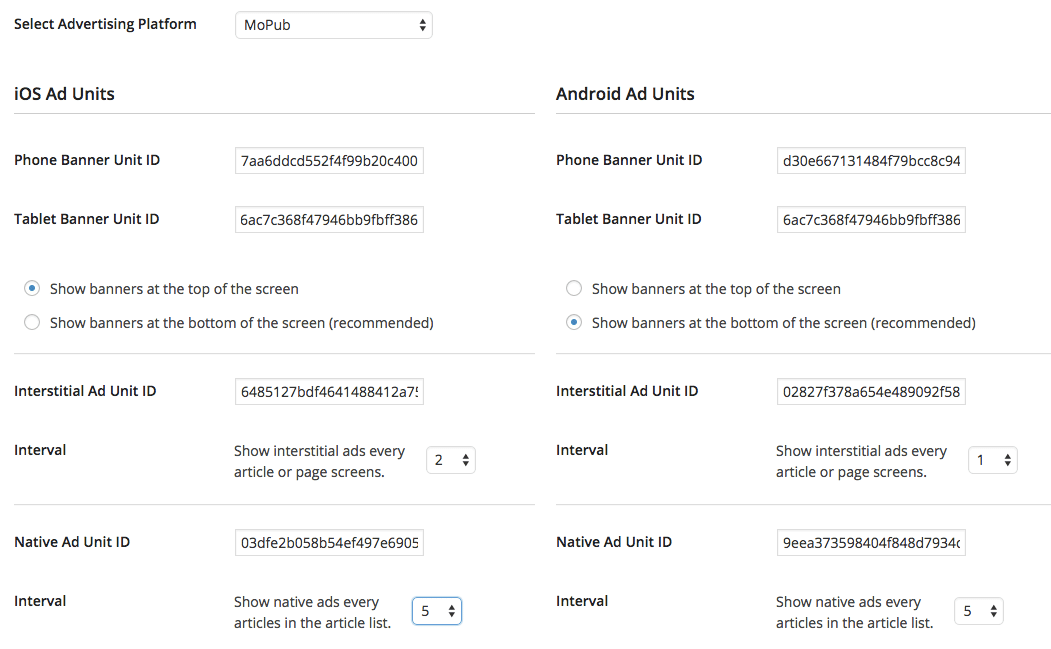
https://www.youtube.com/watch?v=Dk5KRpK-k1AStart by opening the Settings panel of the Vendrux plugin, and clicking on the Advertising tab. There you’ll find a number of options to add your own advertising to the app.MoPub, Google DFP ad serversVendrux includes out of the box integrations with the two most used ad servers for mobile publishing, MoPub and Google DFP.Thanks to this integration, you can configure your app to display a range of banner ads, interstitial ads and native ads from your own inventory, any ad network supported or a combination of the two.Start by selecting Mopub or Google DFP as the chosen advertising platform.Then add the ad positions unit IDs to the appropriate fields for iOS and Android and hit save settings. If your plan or license includes the advertising functionality, the ads will start working on your app.
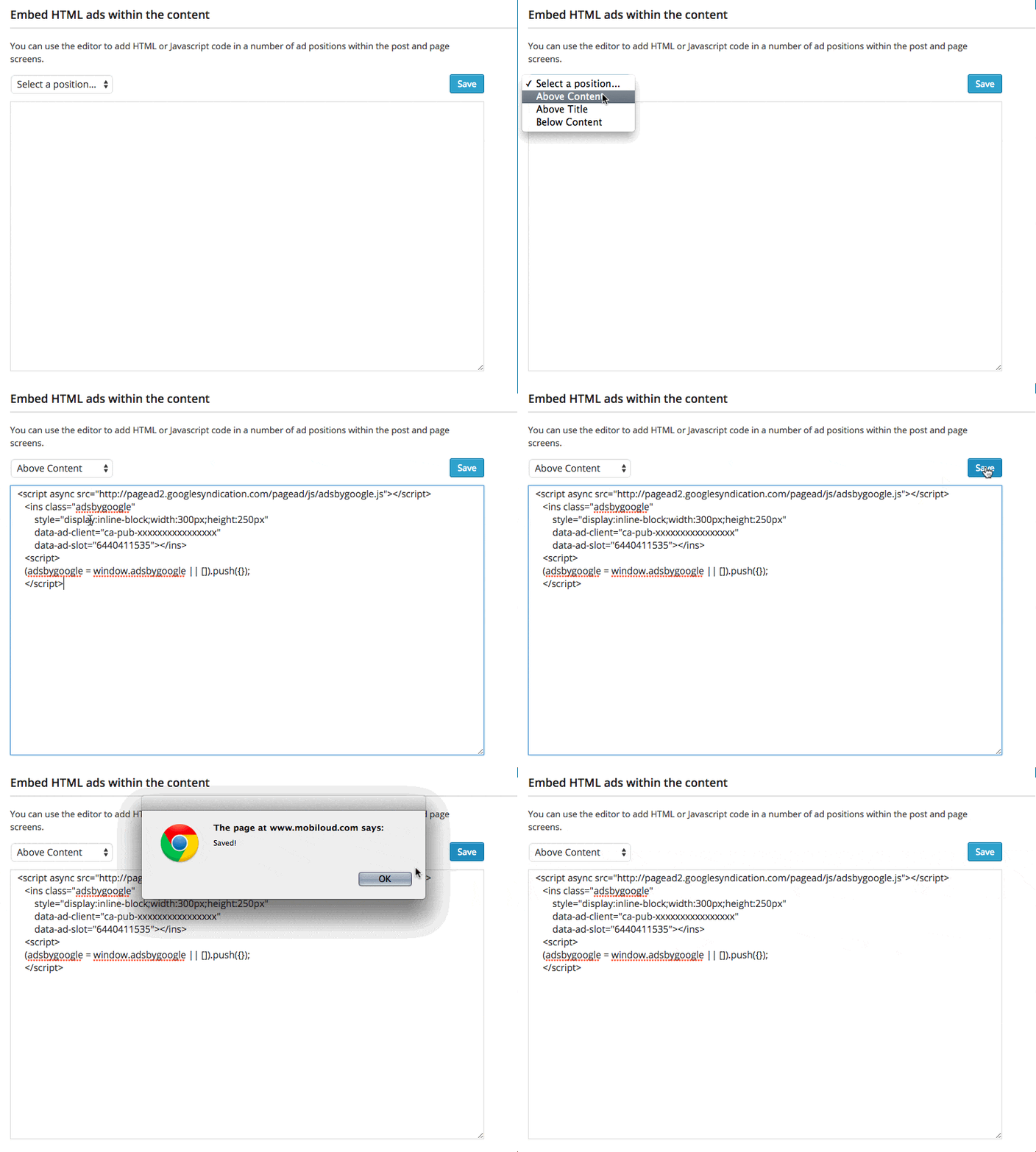
Admob ad networkOut of the box you can also easily add Google Admob banners and interstitial ads to your app (more information on Admob here).Start by selecting Admob as the chosen advertising platform.Simply add the ad positions unit IDs to the appropriate fields for iOS and Android and hit save. If your plan includes the advertising functionality, the ads will start working on your app.HTML ads within the content screensAny Vendrux customer, whether you’ve purchased a plan with the advertising package included or not, can add any HTML or Javascript code within the article/page screens. This works well for Google Adsense or your own image banners.To do so use the Advertising tab screen in the plugin Settings, scroll to the bottom of the screen to the section called “Embed HTML ads within the content” and choose a suitable position where to insert your code.
Custom Ad SDK integrationsOur developers can add any sort of third party ad network that provides an SDK, both for banners and interstitials, in any position within the app.Any custom development to integrate these is charged at our consulting rates and we provide a do-not exceed quote for any request. To get a quote, contact us at support@vendrux.com.
We can add custom CSS to apps by performing a check to the user-agent.
If the “canvas” string is included in the user-agent, it means that the content is being displayed inside the app.
Below you can find a code snippet that will save the user agent and then check if the “canvas” string is present, if so it will add custom CSS to the HTML head.
// Check if the user agent contains the canvas string if (isApp) {
// Outputs the custom CSS in case canvas is present in the user-agent document.head.innerHTML += ”;
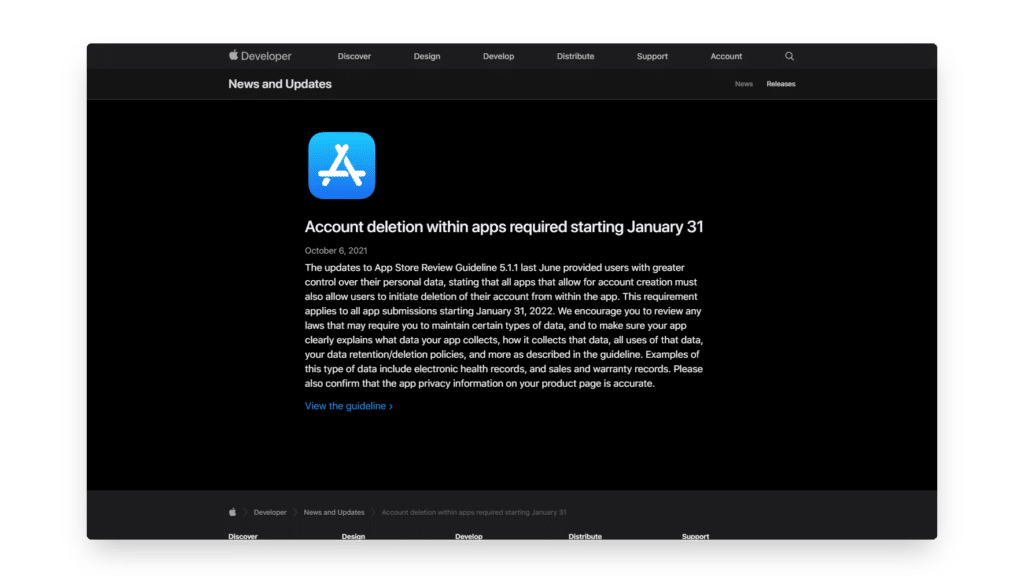
On October 6th of 2021, Apple announced that it will now require apps that allow users to create accounts, to also offer a way for them to request the deletion of their accounts.
You can find the specific guideline by clicking here.
Fortunately, this is not as complicated as Apple makes it look. In order to comply with this new guideline all, you need to do is include a link in your app, which should take the user to a page that provides more details on how he can delete his account.
An automated feature where the user can simply click a button to delete his account sounds great and will certainly make your app compliant with this new guideline, if you are a WordPress user you can find several plugins that will provide you with such functionality, here are some examples:
Not a fan of using plugins? You can also create your own account deletion feature, you can find a nice guide for that by clicking here.
What happens if you are not using WordPress or if you just don’t want to spend the time developing a feature like this? There are easier alternatives. You can create a simple page that displays a form where the user can request his account to be deleted and this will make your app compliant, just make sure to include a nice explanation of how the deletion process works.
Remember to make sure that your link is visible and that the user experience on your app is optimal, this will ensure a quick approval of your app.