You’re searching “how much do push notifications cost” because you’re trying to figure out what this will actually run you. Fair question. The answer depends on a few things: how many subscribers you have, which service you use, and whether you’re sending web push, mobile push, or both.
This article breaks down the real numbers: what push costs at different scales, how pricing models work, what hidden costs to watch for, and how push compares to email and SMS in real dollar terms at specific sending volumes.
How Push Notification Pricing Works
Push notification services don’t all charge the same way. There are three main pricing models, and understanding which one a provider uses will save you from sticker shock.
Per-subscriber (or per-MAU) pricing
This is the most common model. You pay based on how many subscribers or monthly active users (MAUs) you have, not how many messages you send. Most plans include unlimited notifications.
OneSignal uses this model. Their Growth plan charges $0.012 per monthly active user for mobile push. If you have 50,000 MAUs, that’s $600/month for mobile push alone, but you can send as many notifications as you want.
PushEngage also uses subscriber-based tiers but packages them differently: their Business plan at $14/month covers up to 50,000 subscribers with unlimited campaigns.
Feature-tier pricing
Some providers charge a flat monthly fee that includes a set number of subscribers, and you upgrade tiers for more features or higher limits.
PushEngage and Airship follow this model. The price jump between tiers is driven as much by advanced features (A/B testing, automation, segmentation) as by subscriber volume.
These services are raw delivery infrastructure, not marketing platforms. You handle the segmentation, analytics, and campaign management yourself (or build it).
For most ecommerce brands, per-subscriber or feature-tier pricing is the right fit. Infrastructure pricing only makes sense if you already have an engineering team managing your notification stack.
What Does Push Actually Cost?
Here’s the short version: push notification costs scale with your audience size, not your send volume.
Every major provider includes unlimited sends. How much you spend depends on how many active users you have in your mobile app.
The table below shows what you can expect to pay based on subscriber count.
Subscribers
Monthly Cost
Annual Cost
Sends Included
Under 1,000
$0
$0
Unlimited
1,000 – 10,000
$0 – $140
$0 – $1,680
Unlimited
10,000 – 50,000
$14 – $620
$168 – $7,440
Unlimited
50,000 – 100,000
$29 – $1,220
$348 – $14,640
Unlimited
100,000 – 250,000
$60 – $3,000
$720 – $36,000
Unlimited
250,000+
Custom
Custom
Unlimited
The range at each tier is wide, and that’s because providers price differently.
The low end reflects subscriber-tier platforms like PushEngage (flat monthly fee covering a subscriber cap, e.g. $14/month for up to 50,000 subscribers). The high end reflects per-MAU platforms like OneSignal (base fee plus $0.012 per monthly active user on their Growth plan). Both include unlimited sends.
A few reference points to make this concrete:
OneSignal free plan: Unlimited mobile push sends, no subscriber cap. Limited to basic features (fewer segments, 30-day reporting, simple journeys). Genuinely useful for small brands, not just a trial.
PushEngage Business ($14/mo): Up to 50,000 subscribers with unlimited campaigns, rich notifications, and audience targeting. Jumps to $29/month (100K subs) and $60/month (250K subs) at higher tiers.
OneSignal Growth ($19/mo + $0.012/MAU): Cross-channel messaging (push, email, in-app), advanced journeys, intelligent delivery. Cost scales linearly with your audience: 10K MAUs runs about $139/month, 50K runs about $619/month.
Klaviyo: Mobile push bundled into existing email/SMS plans at no extra per-send cost. If you’re already on Klaviyo, push is effectively included.
Enterprise (Airship, Braze, OneSignal Enterprise): Custom pricing, typically $10,000+/year. Includes dedicated support, SLAs, advanced personalization, and custom integrations.
The important pattern: your push notification bill is a fixed monthly cost based on audience size. Whether you send 2 campaigns a week or 20, the cost doesn’t change. This is the fundamental pricing difference between push and channels like SMS, where every message adds to the bill.
Can You Send Push Notifications for Free?
Yes, but the definition of “free” depends on what you’re willing to build yourself.
Truly free: platform free tiers
OneSignal’s free plan supports unlimited mobile push sends. PushEngage’s free tier covers 200 subscribers with 30 campaigns.
These are functional, not just trials. For a small business sending notifications to a few hundred or few thousand users, they work.
Free delivery, DIY everything else
Firebase Cloud Messaging (FCM) and Apple Push Notification Service (APNs) are free to use. FCM has no message limits and no per-send fees. APNs is the same. These are the underlying delivery pipes that every push notification ultimately flows through.
But FCM and APNs are infrastructure, not products. To use them directly, you need to:
Build a backend to store and manage device tokens
Handle token refresh (tokens change periodically, after reinstalls, etc.)
Build segmentation logic so you’re not blasting everyone with the same message
Create a campaign management interface for your marketing team
Set up analytics to track delivery, opens, and conversions
Handle error cases, retry logic, and delivery receipts
That’s weeks or months of engineering work. For a company with a dedicated mobile engineering team, this can make sense at scale. For most ecommerce brands, the cost of building and maintaining this infrastructure far exceeds what a managed service charges.
A note on “free forever” services
Some lesser-known push notification providers advertise free unlimited plans. Be cautious. The common tradeoffs include data monetization (your subscriber data gets sold to third parties), limited GDPR compliance tooling, and minimal support when things break.
If the service is free and the company doesn’t charge anyone, figure out what the actual business model is before handing over your customer data.
Extra Costs Associated with Push
The sticker price on a push notification platform’s pricing page isn’t always the full picture. Here’s what can add to your actual spend.
Rich media bandwidth
Sending images in push notifications uses bandwidth. For most ecommerce brands sending product images in notifications, this is negligible. But at serious scale (millions of subscribers, large image attachments), bandwidth costs can add up. One estimate puts the cost of sending a 1 MB image to 3 million devices at roughly $450 in bandwidth alone.
Analytics and segmentation upsells
Most providers gate their best features behind higher tiers. Basic push delivery might be cheap, but behavioral segmentation, A/B testing, conversion tracking, and journey orchestration often live on the professional or enterprise plan. Check what’s actually included in the tier you’re evaluating, not just the subscriber limit.
Integration and development time
Even managed platforms require integration work. Connecting push to your ecommerce platform, setting up event tracking for abandoned carts and browse behavior, configuring deep links, and testing across devices all take engineering time. Budget for this as a one-time setup cost.
Platform lock-in costs
If you’ve built automations, segments, and analytics in one provider and need to switch, migration is non-trivial. Subscriber data may or may not be portable. This isn’t a monthly line item, but it’s a real cost to consider when choosing a provider.
The app itself
Mobile push notifications require a native app (you can send push from a website too, but it’s a lot less effective) If you don’t have an app yet, the cost of building or launching one is the real upfront investment, not the push notification service fee.
Push vs Email vs SMS: What Does It Cost to Reach Your Audience?
Abstract per-message rates are useful, but what most brands really want to know is: “If I have X subscribers and message them Y times a week, what am I paying?”
Here are three real scenarios, to give you an idea.
Scenario 1: 10,000 subscribers, 2 messages per week
~80,000 messages per month.
Push
Email
SMS
Platform fee
$0 – $140/mo
$100 – $200/mo
$50 – $150/mo
Per-send cost
$0
Included
$1,200 – $4,400
Total monthly cost
$0 – $140
$100 – $200
$1,250 – $4,550
Annual cost
$0 – $1,680
$1,200 – $2,400
$15,000 – $54,600
At this scale, push and email are in the same ballpark. SMS is 10-30x more expensive because every message carries a per-send cost of $0.015-$0.055 (base rate plus carrier surcharges).
Scenario 2: 50,000 subscribers, 3 messages per week
~650,000 messages per month.
Push
Email
SMS
Platform fee
$14 – $620/mo
$350 – $720/mo
$200 – $500/mo
Per-send cost
$0
Included
$9,750 – $35,750
Total monthly cost
$14 – $620
$350 – $720
$9,950 – $36,250
Annual cost
$168 – $7,440
$4,200 – $8,640
$119,400 – $435,000
This is where the gap becomes impossible to ignore. Reaching 50K subscribers three times a week via SMS runs $10,000-$36,000 per month. The same reach and frequency via push costs $14-$620. That’s a 15x-60x difference, and it widens every time you add another campaign.
Scenario 3: 100,000 subscribers, 3 messages per week
~1,300,000 messages per month.
Push
Email
SMS
Platform fee
$29 – $1,220/mo
$600 – $1,400/mo
$500 – $1,000/mo
Per-send cost
$0
Included
$19,500 – $71,500
Total monthly cost
$29 – $1,220
$600 – $1,400
$20,000 – $72,500
Annual cost
$348 – $14,640
$7,200 – $16,800
$240,000 – $870,000
At 100K subscribers, SMS costs $20,000-$72,500 per month. Push costs $29-$1,220. The math is unambiguous.
What these numbers mean (in practice)
Each channel reaches a different audience.
SMS reaches anyone with a phone number.
Email reaches anyone who gave you an address.
Push reaches your app users only.
You’re not choosing one over the other; most ecommerce brands use all three. (We break down the strategic tradeoffs in our push vs email and push vs SMS comparisons.)
But the cost comparison reveals something important: for high-frequency use cases like abandoned cart sequences, flash sale alerts, back-in-stock notifications, and loyalty updates, push is dramatically cheaper at every scale.
Any campaign you can shift from SMS to push, without losing effectiveness, saves real money. According to Omnisend’s 2025 data, push generates 15% of attributed ecommerce revenue from just 3% of total message volume, so the per-message efficiency is there too.
—
Email platform costs in the scenarios above are based on typical pricing from Klaviyo, Omnisend, and Mailchimp, where sends are generally included in the subscription. SMS per-send costs use $0.015-$0.055 per message (base rate plus carrier surcharges, based on industry benchmarks from Textline and Mobile Text Alerts).
Are Push Notifications Worth the Cost?
The short answer: for ecommerce, they’re one of the highest-ROI channels available.
Here’s a simple way to think about the return. According to Omnisend’s 2025 ecommerce report, push notifications generate 15% of attributed ecommerce revenue from just 3% of total message volume.
That’s the highest revenue-to-send ratio of any direct messaging channel.
The engagement data backs this up:
Ecommerce push notification CTR averages 3-4%, with behavior-triggered automations (abandoned cart, price drop, back-in-stock) converting at 22.9% (Omnisend 2025)
Users receiving push notifications show nearly 3x higher retention than users who receive none (Airship)
A back-of-the-napkin ROI calculation
Say you have 20,000 push notification subscribers and you’re paying $200/month for your platform.
You send 8 campaigns per month.
At a 3.5% CTR and 4% conversion rate from those clicks, with a $75 average order value:
20,000 subscribers x 8 sends = 160,000 impressions
160,000 x 3.5% CTR = 5,600 clicks
5,600 x 4% conversion = 224 orders
224 orders x $75 AOV = $16,800 in monthly revenue
Monthly platform cost: $200
Even if your actual numbers are half this, the return more than justifies the cost. And unlike SMS, your per-send cost doesn’t increase as you scale up your sends.
The real question for most ecommerce brands isn’t whether push notifications are worth it. It’s whether they have an app to send them from.
“The power of push notifications is so strong. In a world where people open email less and less each day, everyone is jumping into SMS which is crazy expensive, and people are starting to tune these out too, being able to do push notifications is the reason you do an app.” — David Cost, VP of Ecommerce, Rainbow Shops
How to Start Sending Push Notifications
Native push notifications require a mobile app. That’s the prerequisite. Web push notifications work through browsers, but opt-in rates are much lower, they don’t work on iOS, and they only send when the browser is open.
Long story short, web push and native push are two very different things.
For push to be a real revenue channel, you need a native app on the App Store and Google Play.
If you’re an ecommerce brand with an existing website, you don’t need to rebuild everything from scratch.
Vendrux turns your existing website into native iOS and Android apps with full push notification support built in. Your storefront, checkout flow, loyalty program, and third-party integrations all carry over, because the app is powered by the site you’ve already built.
Here’s how you can get your brand in the app stores, and start sending powerful push notifications (in as little as 30 days):
Book a strategy call. Share your website URL and talk through your goals. We’ll assess fit and answer your questions. No commitment.
Get a custom app preview. Our team builds a personalized preview so you can see how your store looks and performs as a native app, before you decide anything.
Launch on the App Store and Google Play. We handle the build, QA, and submission, as well as maintenance and updates after you launch.
Want to see what your store looks like as a native app? Book a free strategy call to discuss it with our team of experts. We’ve built over 2,000 apps, and we’ll guide you through every step of the process to help you launch with zero stress, and zero risk.
It’s up to 25x more expensive to acquire a new app user than to retain an existing one.
One of the crucial metrics for mobile apps is retention rate. Thanks to the power of push notifications, you can keep your users engaged and make sure they keep returning to your app.
If you’re not sending push notifications, you’re missing out on a key benefit of mobile apps.
Frequent messaging via push notifications can increase app retention anywhere from 3x to 10x according to an Urban Airship study.
A higher rate leads to successful conversions for your business goals. Without a solid push notification strategy you sacrifice valuable user growth.
What is the Average Click-Through Rate For Push Notifications?
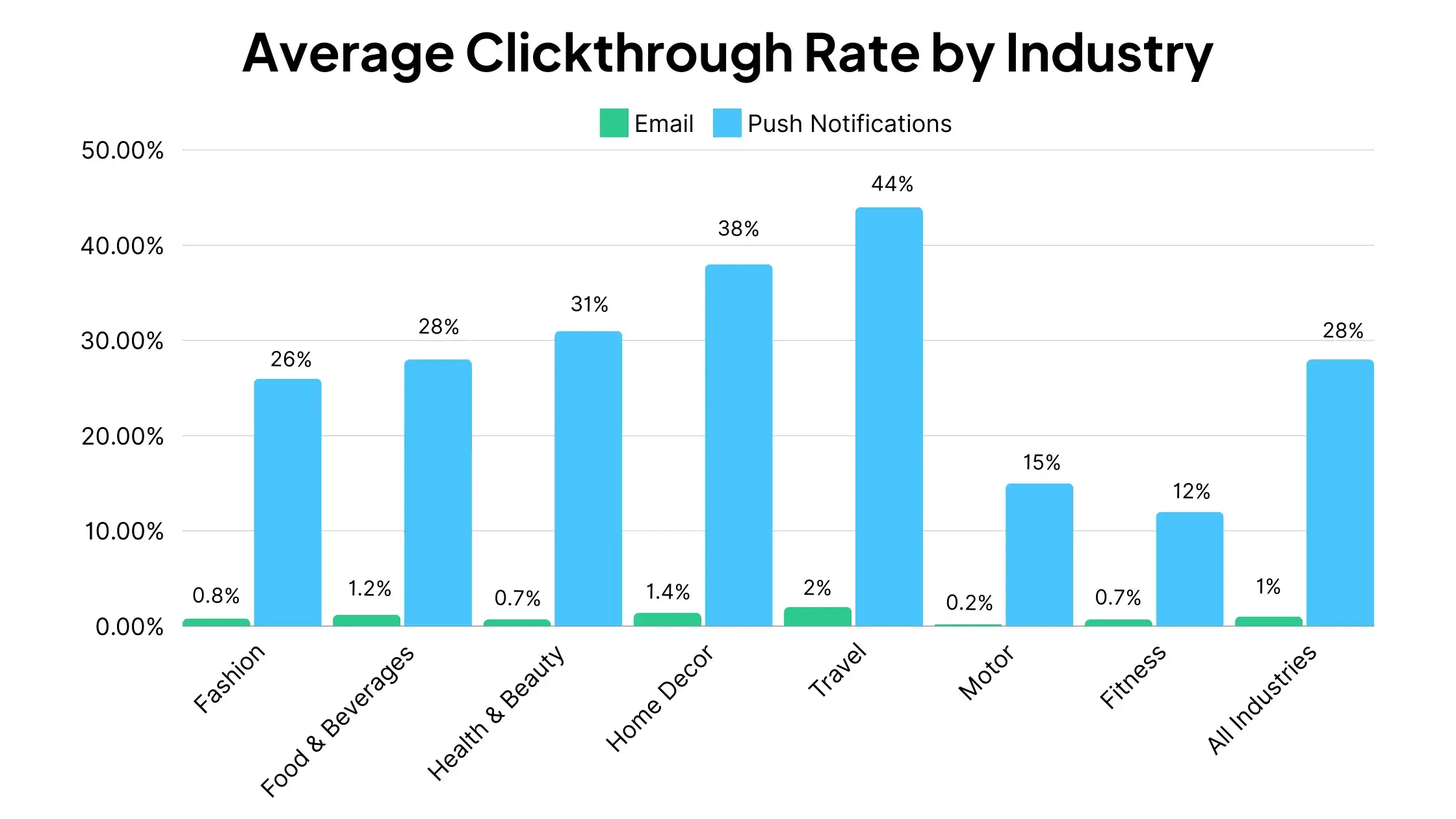
The average click-through rate for push notifications is 28%, according to a study by Airship.
This can be as high as 44% in certain industries.
For perspective, the average CTR for email is just 1-2%.
However, just because this is what the data says regarding push notification CTR, doesn’t mean you can send push notifications on autopilot and automatically get the same results.
It’s important to know what contributes to a good push notification click-through rate, and craft our messages in a way to make them stand out, catch attention, and really speak to your users.
To get better CTR from your push notifications, you should understand how people consume push notifications, what they find engaging about push notifications, and what turns them off.
We can point to five important factors at play with push notifications, which you need to get right if you want your users to click and take action when they see your push messages:
Transparency
Brevity
Tone
Emojis
Timing
Let’s examine these factors in more depth, and discuss how this can help you run better push notification campaigns and get a higher push notification CTR.
1. Transparency
Now that you understand how important push notifications are, how do you get users to opt-in and receive them?
Well, here’s where the bad news comes in. A large percentage of mobile users don’t opt-in to receive these messages.
People don’t want to deal with the chaotic barrage of messages from companies all over their screen.
The best way to overcome this uphill battle is to be transparent with what content you’ll give to your customers.
You’ll want to illustrate a crystal clear picture for what your customers can expect out of your push notifications from the moment they start using your app.
2. Brevity
You don’t want to experiment with long-form content in your push notifications. They’re great for reminding customers about your product or service, but brevity is key.
You would be annoyed if your phone buzzed with rambling messages all day too, right? Annoyed users will opt out of your notifications. When they opt out, you lose relevancy and your hard work begins to fade away.
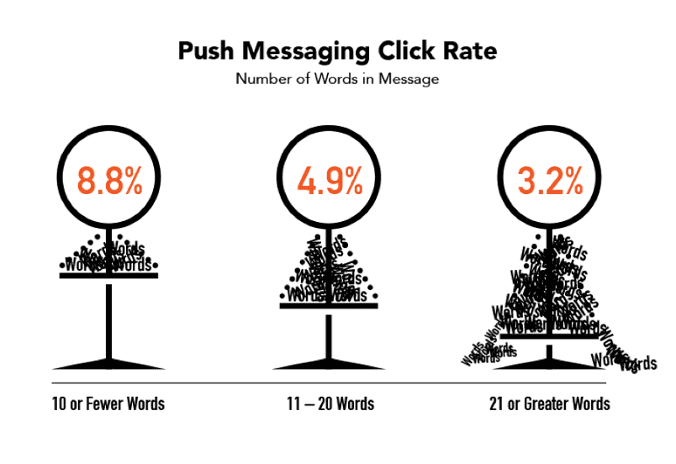
Localytics data found that the optimal range is under 10 words long.
While there is no ‘perfect’ length for a push notification, there are a few key things you should keep in mind according to Urban Airship:
Make your notifications short
Frontload the most important content
Test on the devices that the majority of your audience use
Your audience don’t want their time wasted.
Design your push notifications to be bite-sized snippets of valuable information. You want your users to see high-quality messages when they take a look at their screen, therefore keeping them engaged.
3. Tone
A little personalization can go a long way for your open and click-through rates.
Throw in some humor or emojis to give your customers the impression they’re receiving a text from a good friend (it it makes sense given the message context!).
If the context is right, your audience will be more engaged and more inclined to follow through your notification messages.
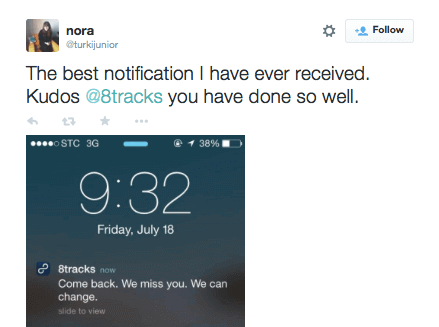
Humor won’t work if it’s used at the wrong times – but do it right, and you’ll be able to bring back more users to your app than you would without it (and if you do it really well, your users might praise you on Twitter).
4. Use Emojis in Push Notifications
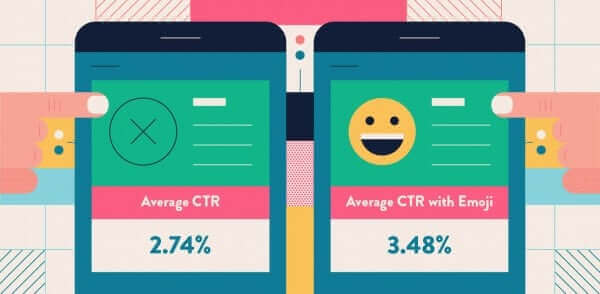
A Clevertap study found that the benchmark click-through rate for all industries is 2.74%.
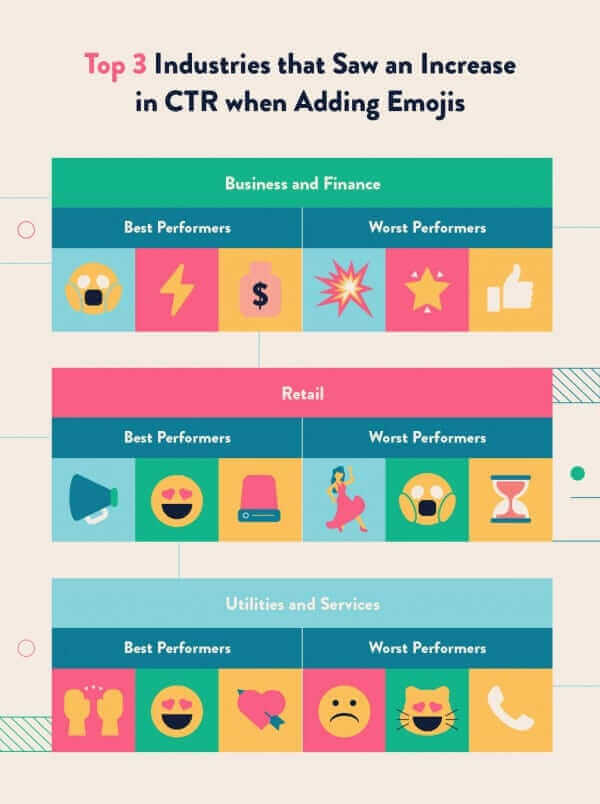
With emoji’s, the average CTR is 3.48%, giving an industry-wide average increase of 38%. Mobile apps in the business and finance industry that use emojis in their push notifications receive a 128% boost in CTR.
Check out this infographic for a quick rundown of the best performers for these industries.
Select your emojis carefully and make sure you test them – you don’t want to be sending them to an audience who isn’t receptive to them, or in messages that are on serious topics.
Emojis aren’t a magic wand you can wave to bring a higher CTR. You must strategically implement them into your marketing messages, and keep the other key factors mentioned previously in mind.
It might surprise you, but the three industries in which emoji usage negatively impacted marketing efforts include entertainment and events, travel and hospitality as well as health and fitness.
Adding emojis to your push notification messages is an easy way to make them stand out more than others that your users may be receiving from their other apps, and should help you boost CTRs
5. Timing
You can send the most engaging push notification, with a charming emoji, speaking your user’s language, but if it comes at the wrong time, it may get lost or ignored.
Data shows that certain days and times have a pronounced effect on push notification CTR.
Each industry has their own times when CTR is highest and lowest. For example, for retail apps:
The best CTR is between 8-9am or between 6-8pm.
The lowest CTR is between 4-5pm.
Monday and Tuesday are the days of the week with the highest CTR, while Saturday is the lowest.
For business & finance apps, the hours of 3-5pm, 1-2pm and 7-8am deliver a better CTR, while sending notifications at later times correlates with worse CTRs.
Part of your strategy can be to avoid peak times, and send push notifications at a time when users aren’t barraged with notifications from 100 other brands.
77% of push notifications are sent between Monday and Friday.
17% of push notifications are sent on Fridays, making it the most popular day of the week for push.
Sunday is the least popular, with 10% of all push notifications sent.
The most popular times to send push notifications are between 6-8am and 10pm-midnight.
Alternatively, you could take this data to mean the most effective time to send notifications.
Either way, you’ll want to test for yourself. Try a few different timings, measure CTR for each campaign, and see which one comes out on top.
Learn more: see how Vendrux’s OneSignal integration makes implementing push notifications a breeze.
Wrapping Up
Used correctly, these Push Notifications tips will help increase your click through rates and improve your app user retention rates.
Remember: Craft your push notifications to urge your customers to take action. Then, present them with straightforward and high-quality content.
Your push notifications are the medium to help beat your app retention issues, so use them wisely!
Remember, testing is crucial. Every business today must be tuned into the key metrics driving business growth. Without the ability to measure the success or shortcomings of various strategies, those that don’t work will continue to do so.
Push notifications may be the most effective marketing and communication channel available to brands today. But don’t take our word for it – take these push notification statistics as proof.
We’re about to share all the data you need to know about push notifications, from open and engagement rates, to push notifications’ impact on retention, to the difference emojis make.
If you’re on the fence about using push notifications for your brand, or simply curious about the state of push notifications in marketing today, keep reading for these amazing insights.
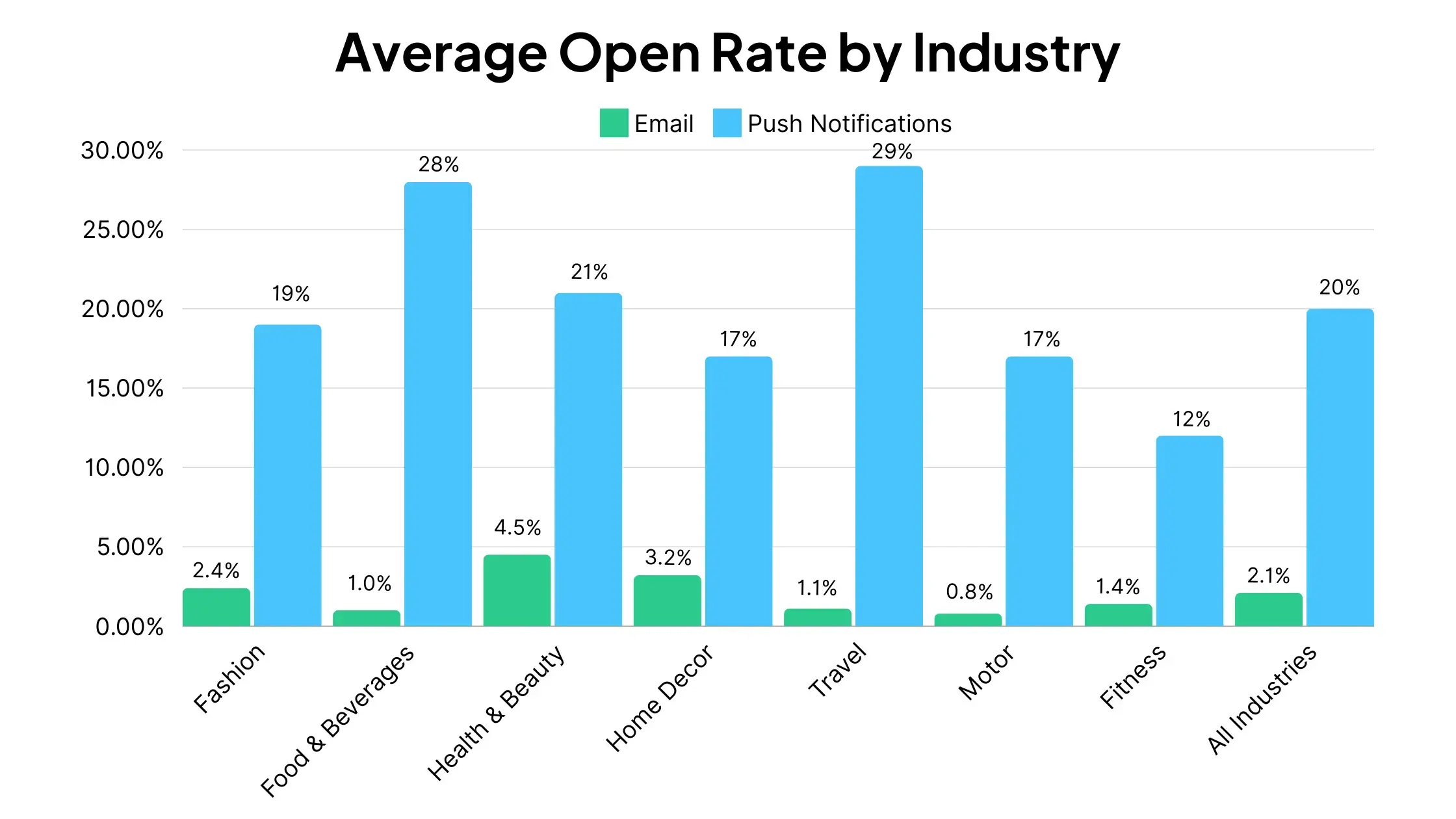
Digital marketing agency Reckless puts the average open rate for push notifications at 20%.
This figure is the average push notification rate across all industries, for the study the agency conducted, which analyzed marketing campaigns from 22 different brands in a variety of industries.
The best-performing industries were Travel and Food & Beverage, while Fitness, Motor and Home & Decor all performed below average.
For all industries, this data put the open rate for push notifications well above that of email:
Keep in mind that this figure is quite high, and different sources have very different information.
Customer.io, for instance, places the average push notification open rate at around 4%.
The reason for wildly different figures in terms of push notification open rates is that an “open” for push notifications is somewhat vague.
It’s not always clear whether an open means the notification has been viewed in full on the lock screen, or that the app has been opened, or some other criteria.
Besides, for many push notifications, a user can get all the information they need right on their lock screen, without interacting with the notification or “opening” it. So a low open rate is not necessarily a cause for concern.
Push Notification Engagement Rates
It’s generally a better idea to look at the engagement generated by push notifications for gauging their effectiveness.
So how do push notifications stack up in terms of engagement?
Reckless’ study had the average clickthrough rate for push notifications at 28%.
For comparison, this again was well ahead of email in all industries looked at.
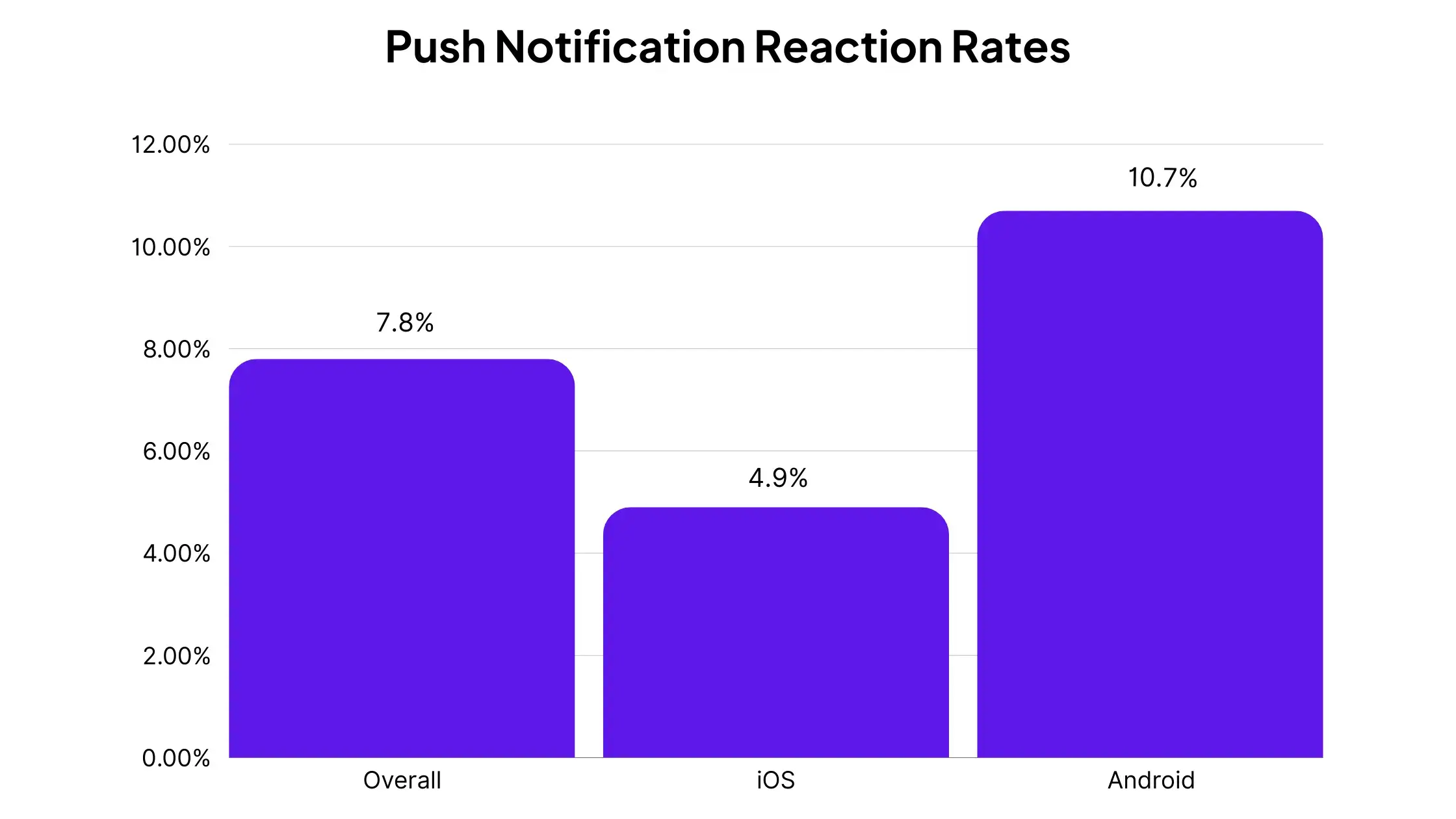
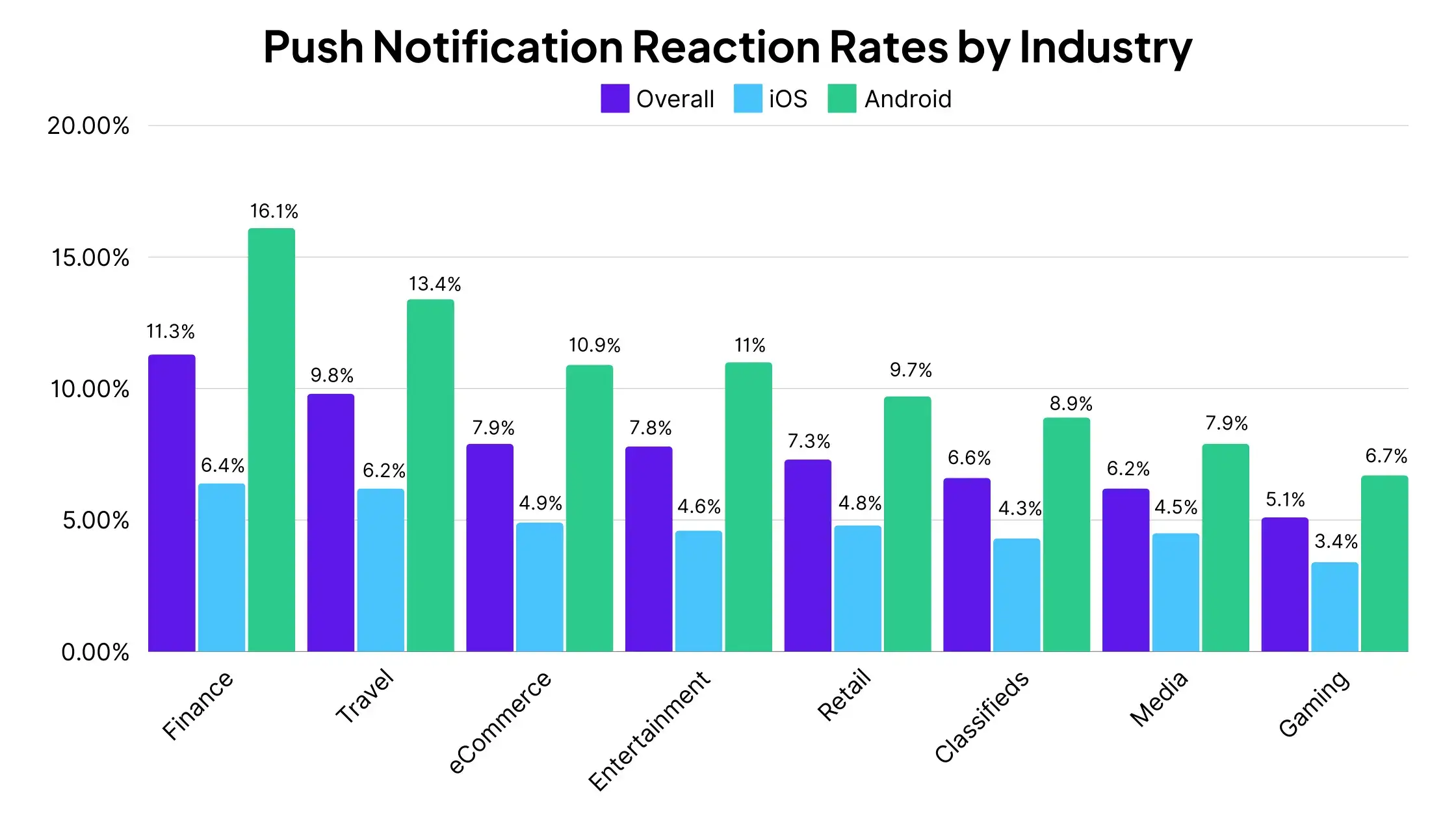
To dive deeper, Airship analyzed a total of 50 billion push notifications, and came up with some benchmarks for push notification reaction rate (judged as when a user clicks/taps on a push notification).
They found the average reaction rate for all push notifications was 7.8%.
For iOS, the average reaction rate drops to 4.9%, and 10.70% for Android.
Here’s how the benchmarks vary in different industries:
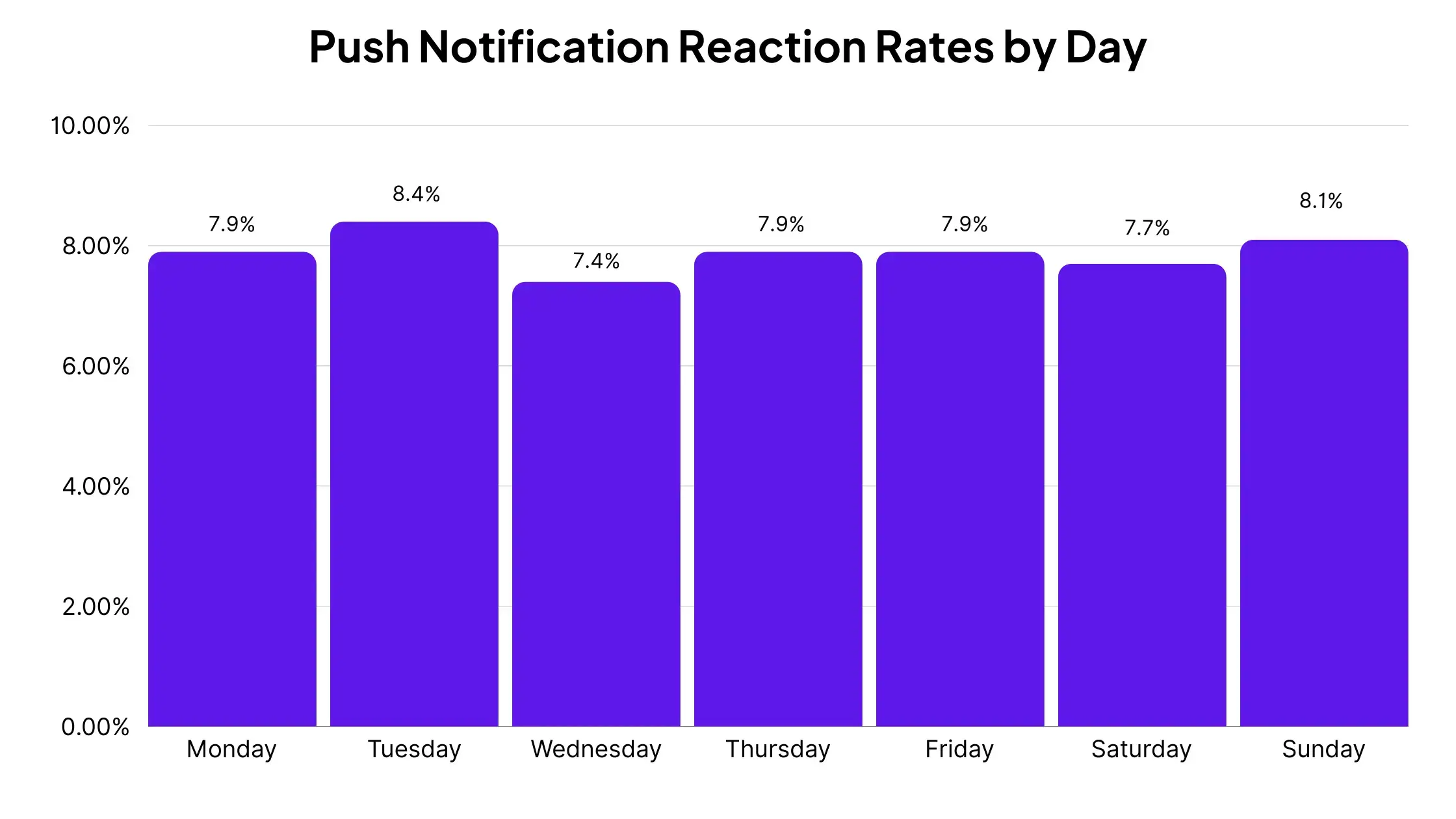
Reaction rates are fairly standard for each day of the week, but slightly higher on Tuesdays and Wednesdays:
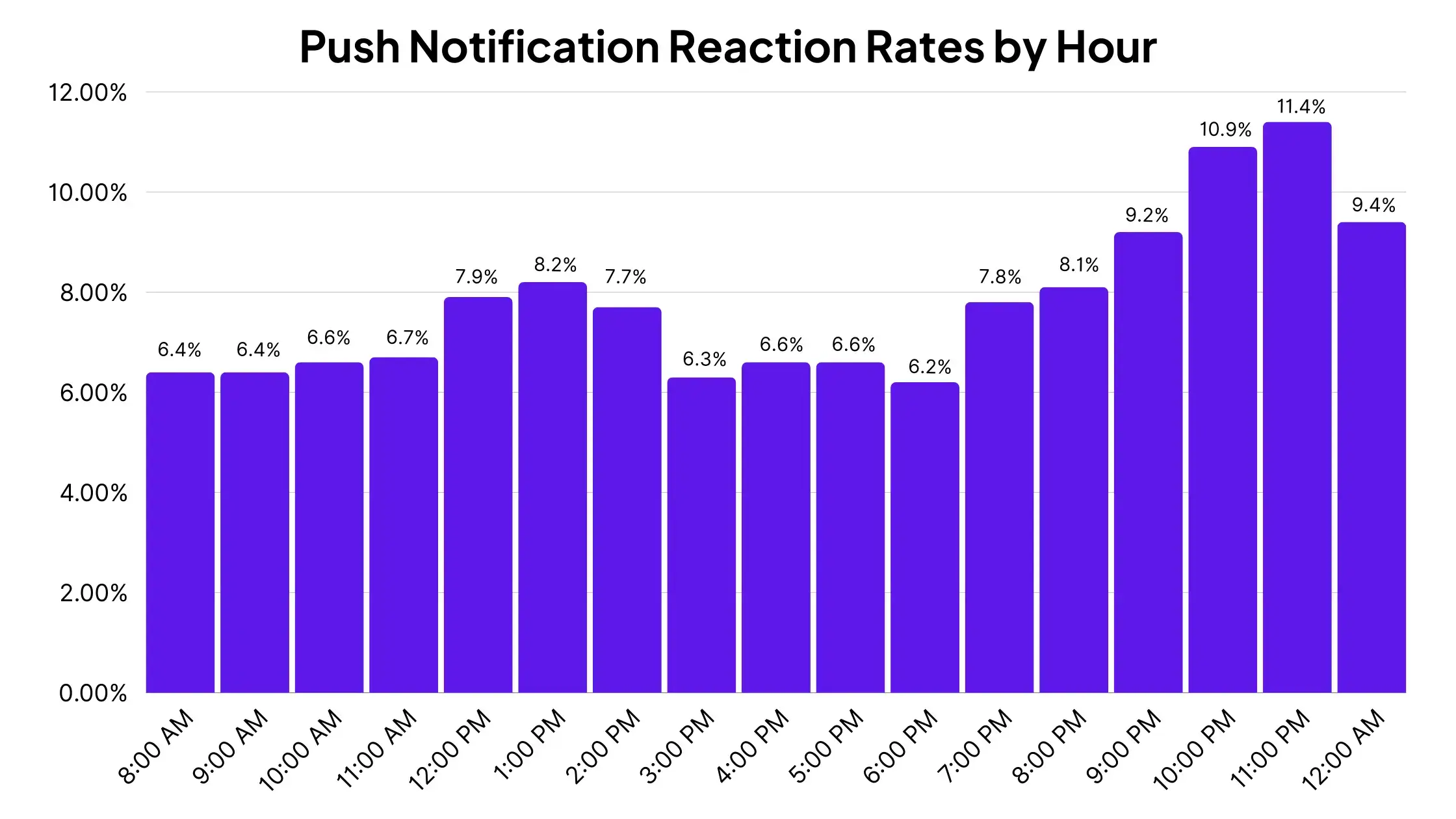
For the time of the day, reaction rates are lower in the morning and mid afternoon, and get higher towards the end of the day.
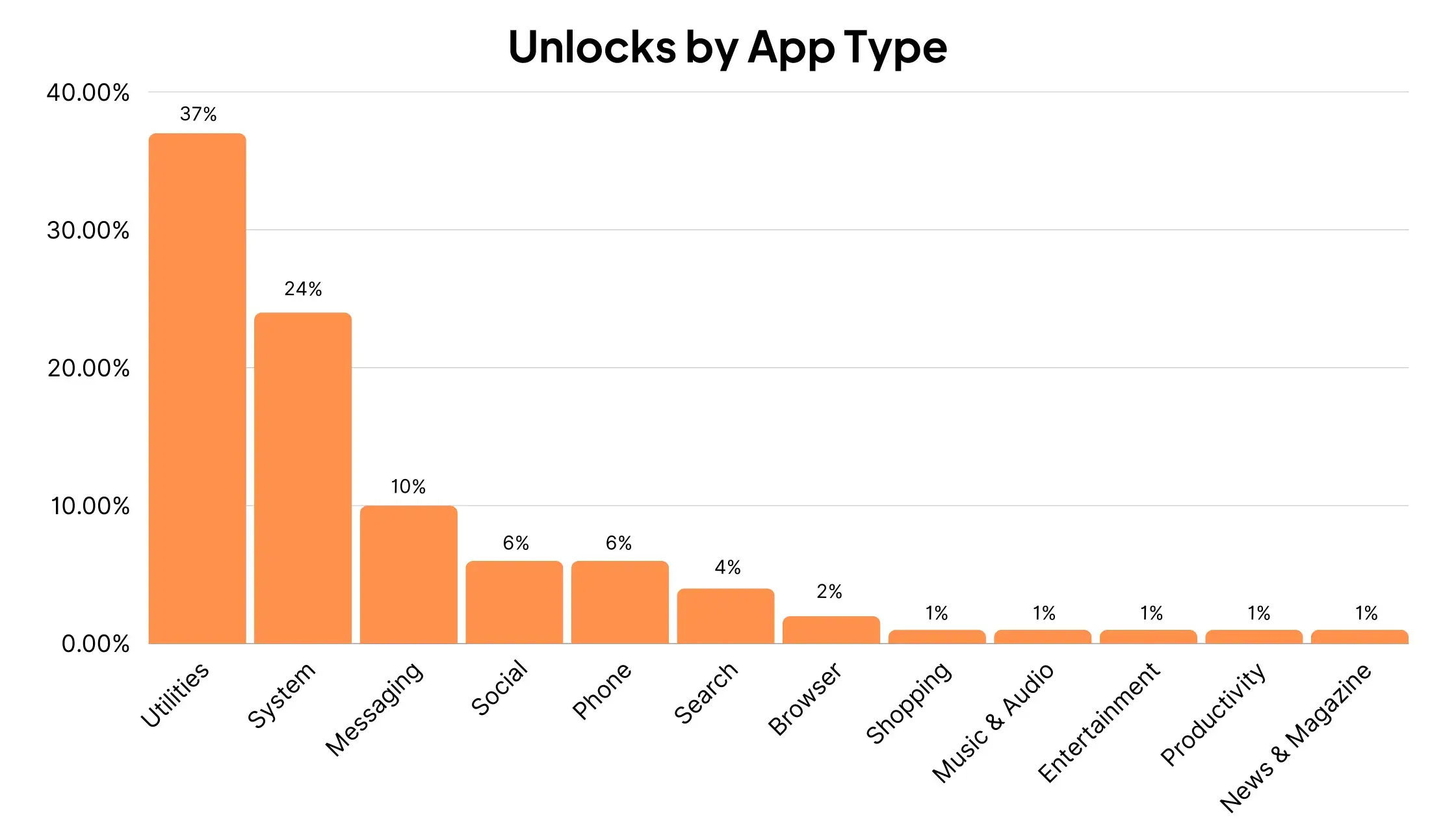
Statista also gives us data on the types of notifications that cause users to unlock their phone.
The majority of unlocks come as a result of push notifications from utility apps, followed by system notifications, and messaging apps:
Push Notification Opt-in Rates
One of the most important metrics for push notifications is opt-in rate.
It’s only possible to reach someone with a push notification if they have given permission for the app or website to do so.
That means opting in to push notifications (and not subsequently opting out).
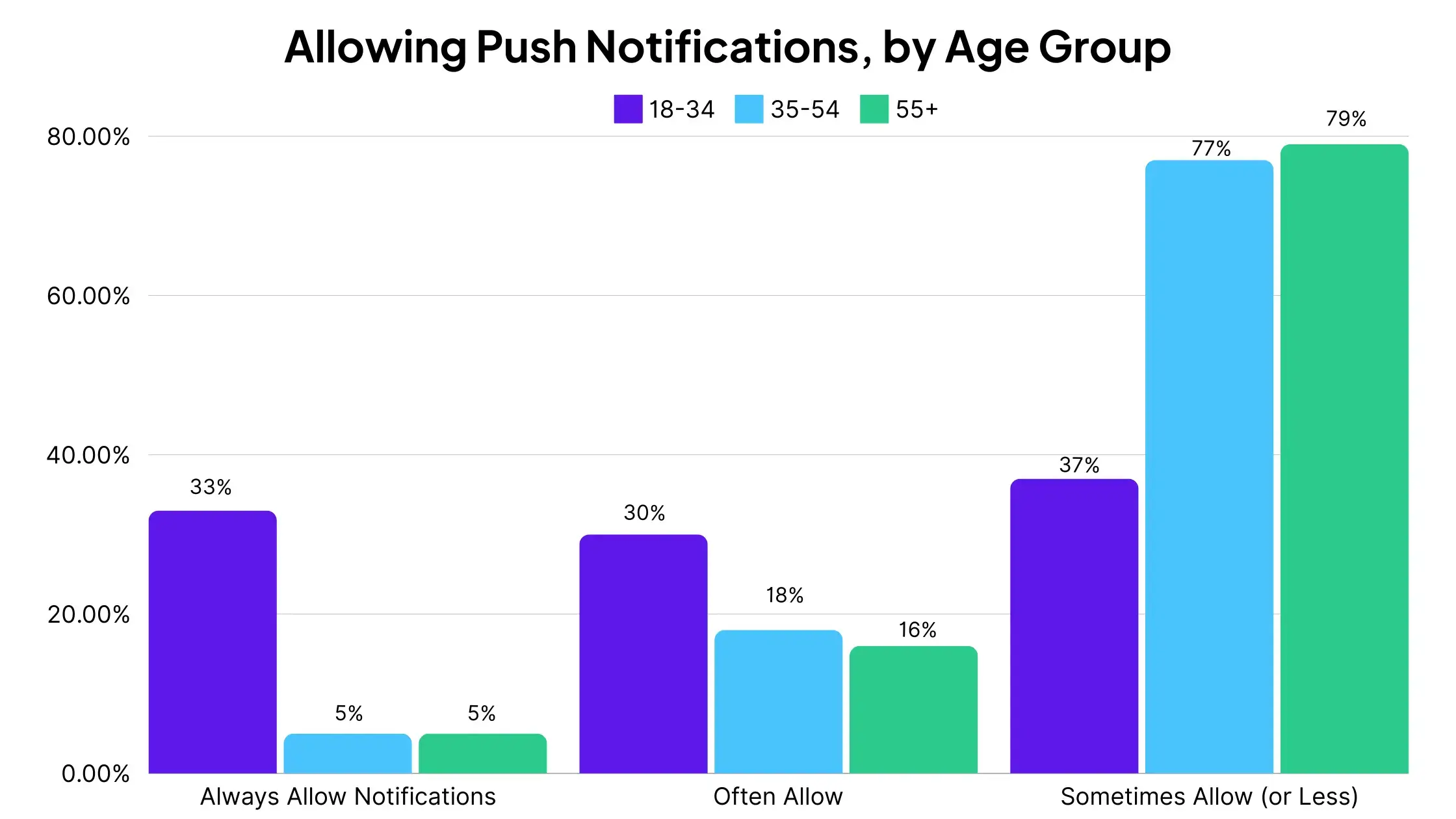
Survey answers indicate that younger age groups are much more likely to allow notifications.
In the 18-34 age group, 33% always allow notifications, while 63% say they allow notifications “always” or “often”.
23% of 35-54 year olds allow notifications “always” or “often”, and 21% of 55+ year olds answer the same.
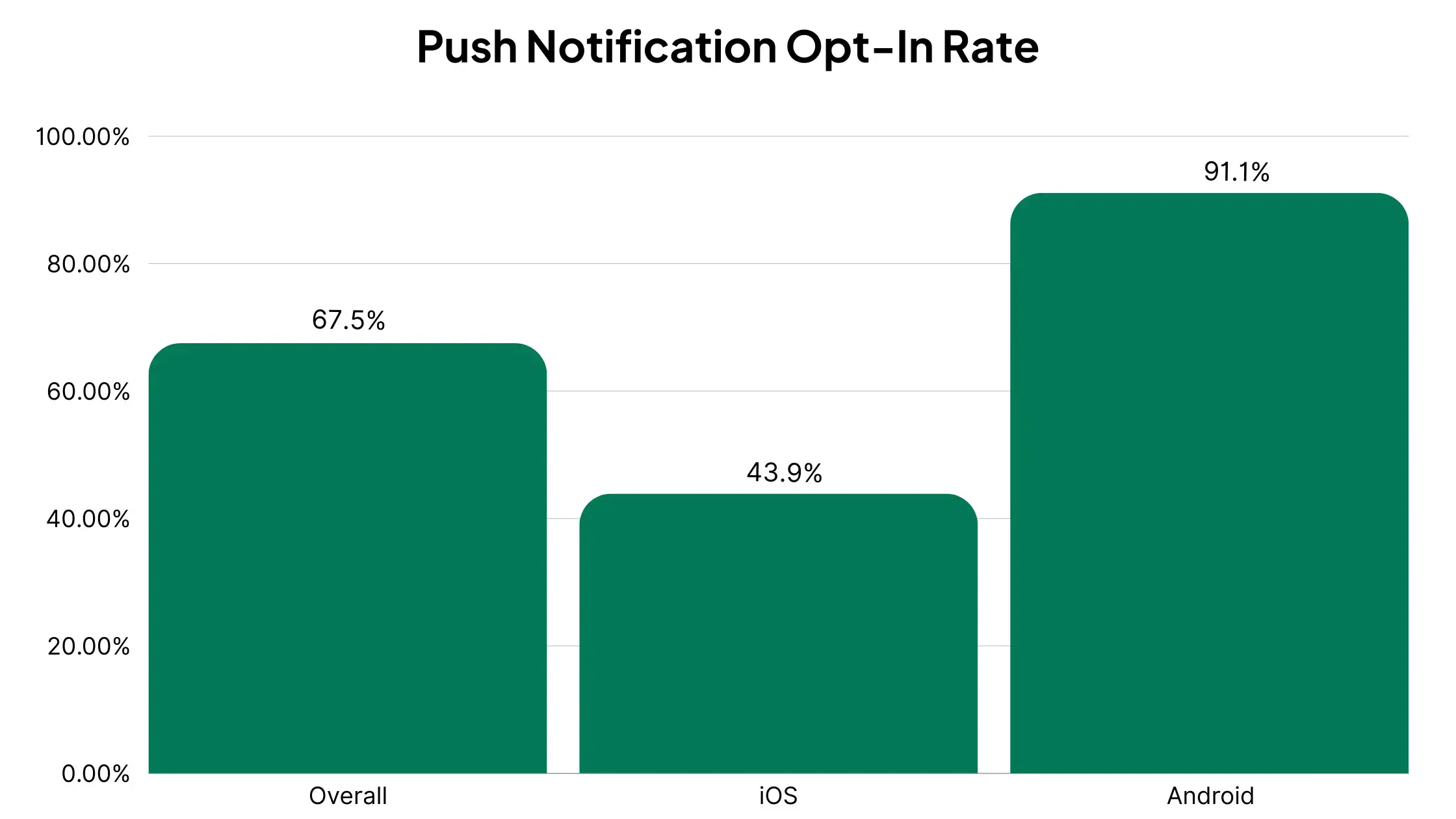
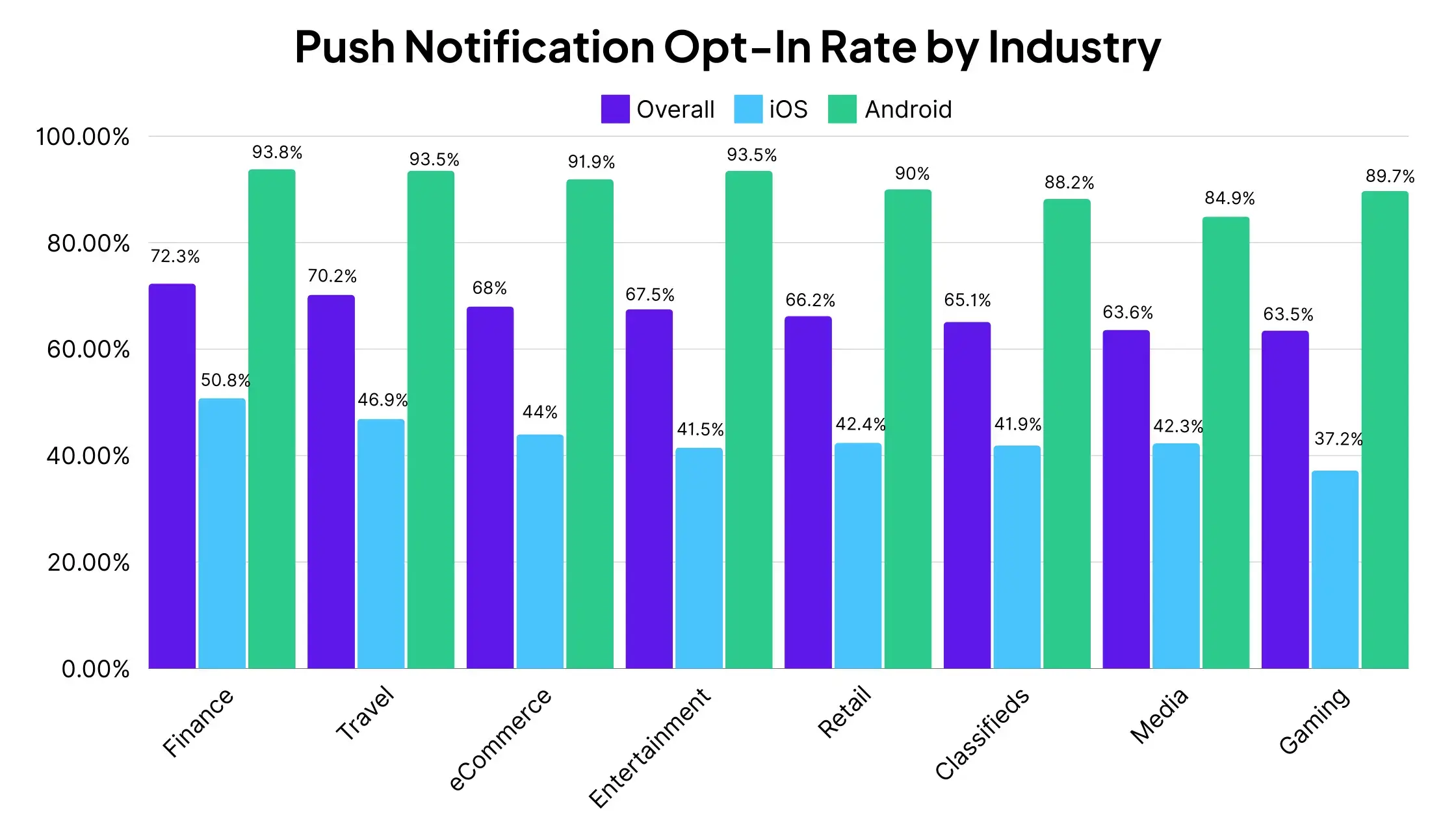
Data shows that the overall opt-in rate for mobile app push notifications is 67.5%.
And with iOS having a much bigger focus on user privacy, the average opt-in rate is significantly lower on Apple devices – 43.9%, compared to 91.1% for Android.
We can also see how push notification opt-in rate differs by industry.
Finance and Travel apps have a higher average opt-in rate, at 72.3% and 70.2% respectively.
Media and Gaming are at the lower end, with 63.6% and 63.5% opt-in rates.
eCommerce apps have an average opt-in rate of 68%.
Each industry follows a similar split in terms of OS, with Android apps having far higher opt-in rates than iOS apps.
The takeaway from this data is that opt-in rate is key, especially for iPhone users.
On average, less than half of these users will opt-in to push notifications – give them a good reason and a clear incentive to opt-in, and there’s significant upside to be had.
Push Notification Retention Statistics
Data shows that push notifications can be an amazingly effective way to boost retention in mobile apps.
Airship studied 63 million app users, across 1,500 apps, to see how push notifications influence whether or not a user remains active past 90 days.
The data found that push notifications were strongly correlated with retention.
Retention rates were nearly 3x higher when users received one or more push notifications in their first 90 days using the app (compared to those who received zero notifications).
95% of users who opted in to push notifications, but didn’t receive a notification in the first 90 days, end up churning.
Interestingly, it also showed a strong correlation between push notification frequency and retention.
App users who received one notification had 120% higher retention rates, compared to users who received zero notifications.
Users who received weekly notifications had 440% higher retention rates than those who received zero.
Users who received daily notifications (or more) had 820% higher retention rates than those who received zero.
For retail apps, sending weekly push notifications resulted in 2-5x higher retention rates, and daily push notifications resulted in 3-6x higher retention rates.
How Often Should You Send Push Notifications?
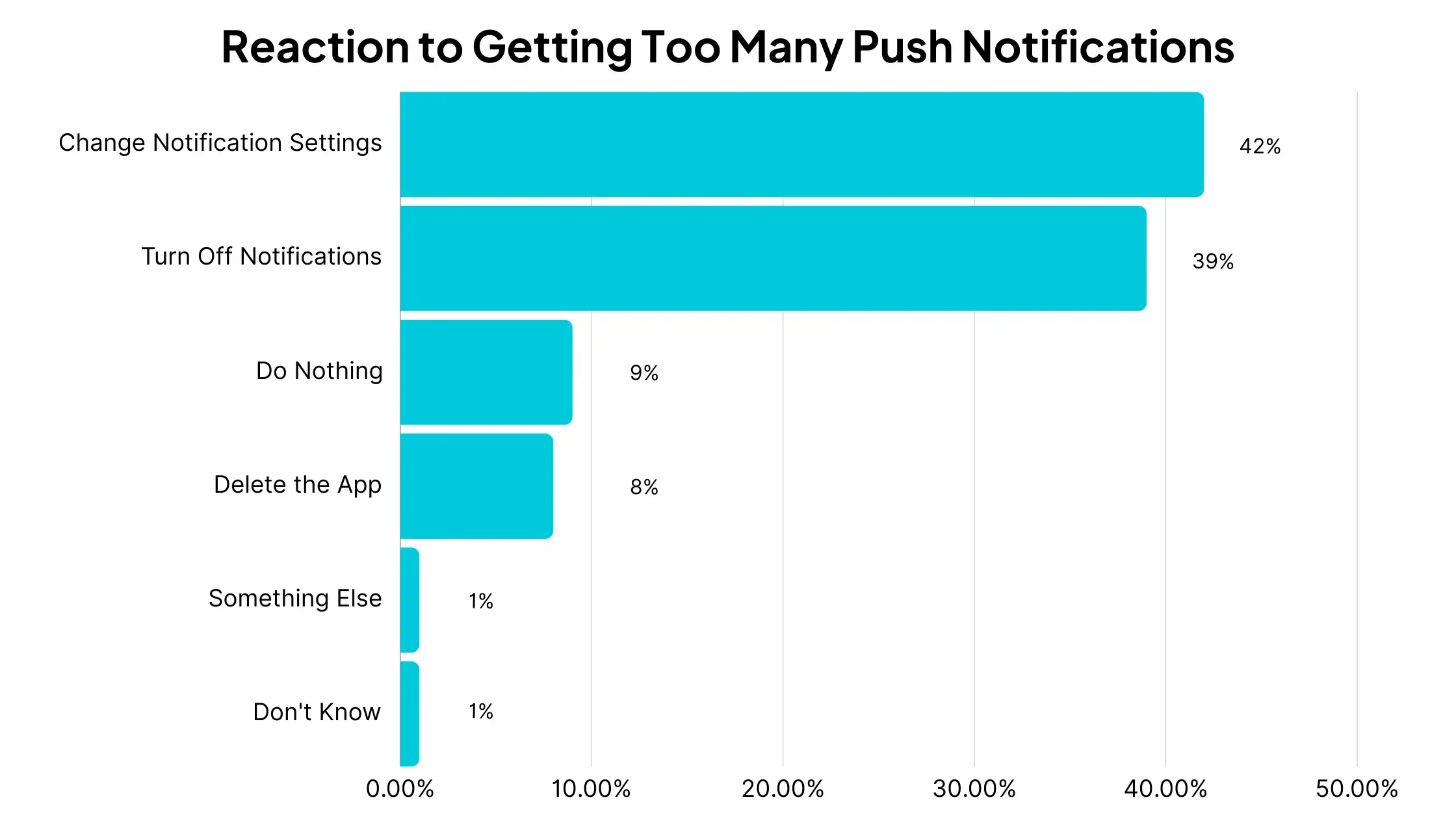
A large percentage of users will take action if they feel an app is messaging them too much.
42% will change their notification settings.
39% will turn off notifications.
8% will delete the app.
Just 9% of users say they will do nothing if they feel they’re getting too many push notifications.
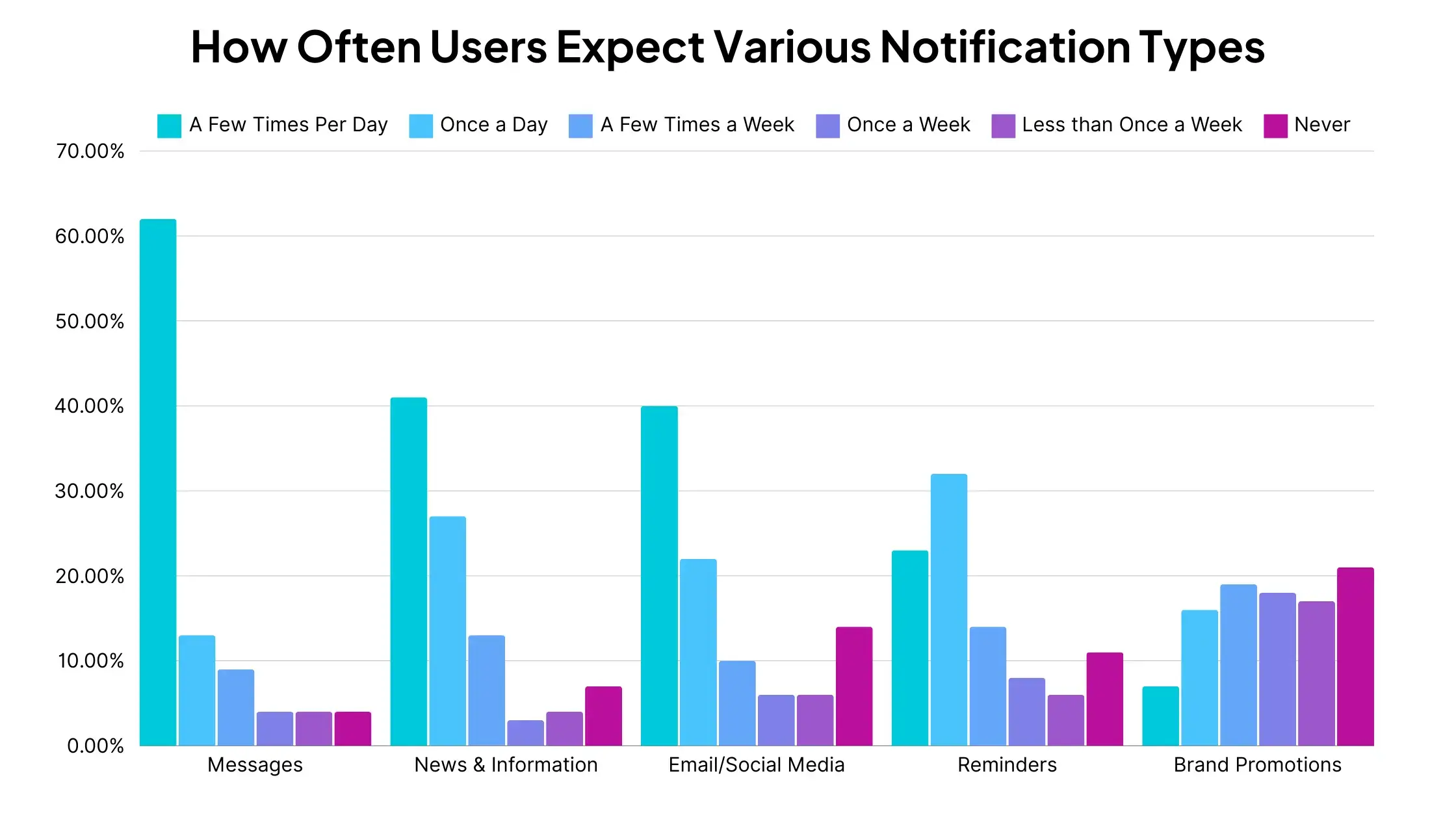
Yet many users say that they feel it’s appropriate to receive regular push notifications.
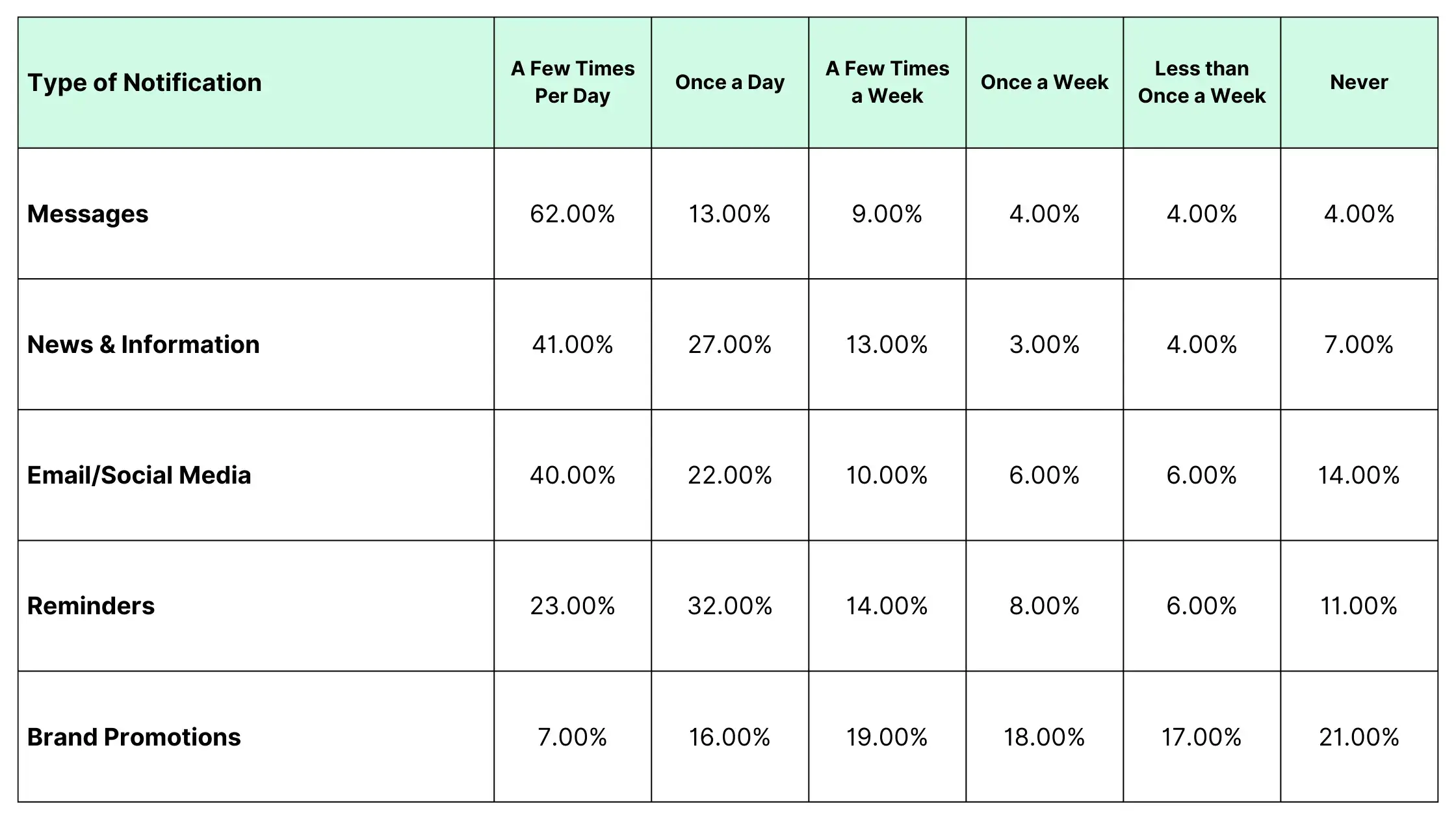
75% of app users say it’s appropriate to push notifications from messaging apps daily or multiple times per day.
68% of users say they are ok with receiving news and information notifications at the same frequency.
Users expect notifications for brand promotions less often – but that’s not to say never.
60% of app users believe it’s appropriate to receive notifications from brands once a week or more.
16% say they are ok receiving notifications from brands once a day, and 7% are fine with receiving these notifications multiple times per day.
On top of this, the data shared in the previous section showed that app retention rates are significantly higher for apps that send push notifications regularly, even as much as multiple times per day.
So as long as your notifications deliver some form of value to the user, you shouldn’t be scared of sending regular push campaigns.
How to Craft Effective Push Notifications
Data suggests that short, snappy push notifications are best.
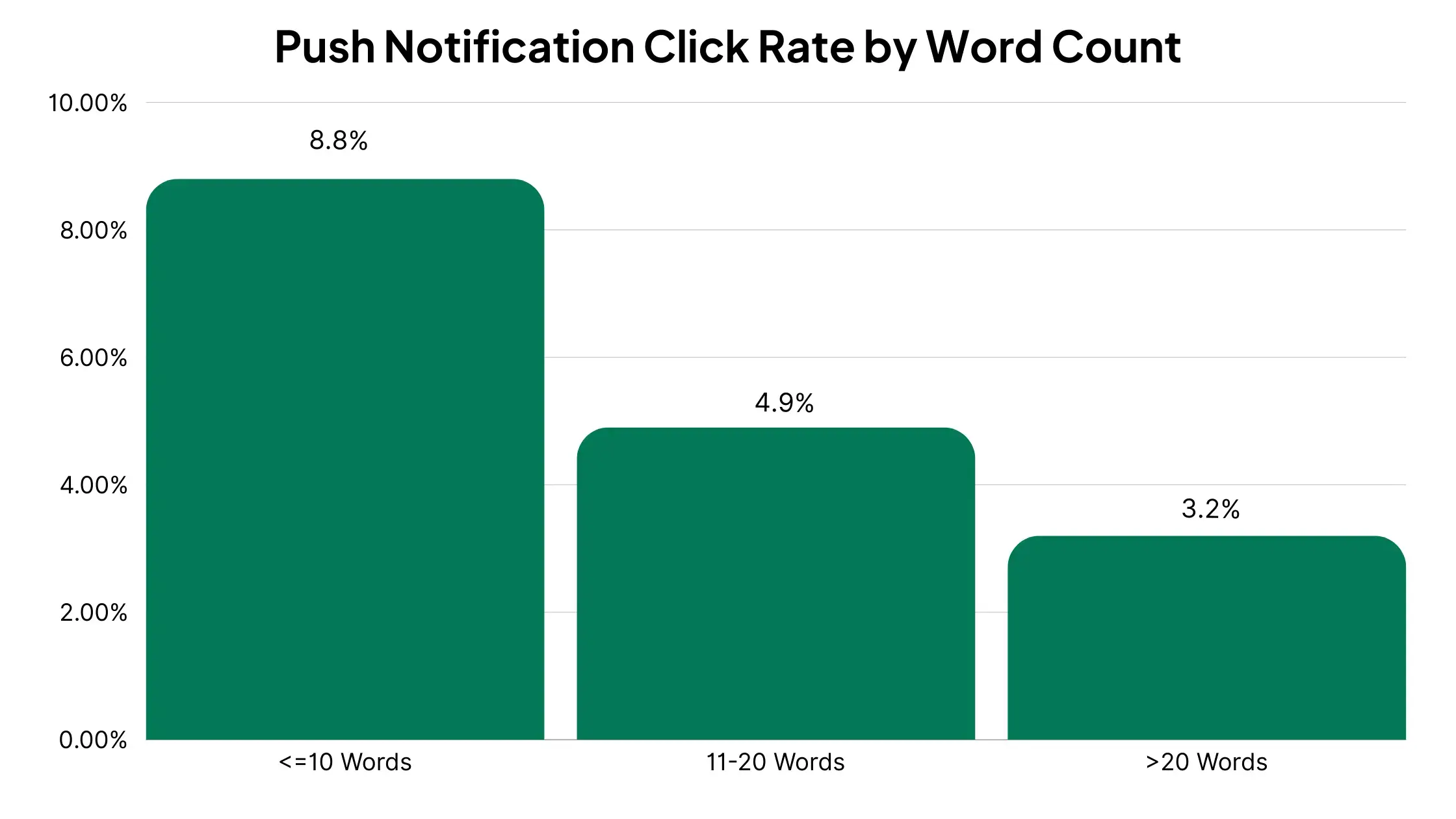
A Localytics study found that push notifications with 10 or fewer words had nearly twice the click rate as those with 11-20 words, and nearly 3x the click rate of those with more than 20 words.
And Airship’s study of 50 billion push notifications found that certain features make it more likely for users to react to your push notifications.
Emojis in push notifications increase reaction rates by 20%.
Rich media (images, GIFs and videos) increase click rates by 25%.
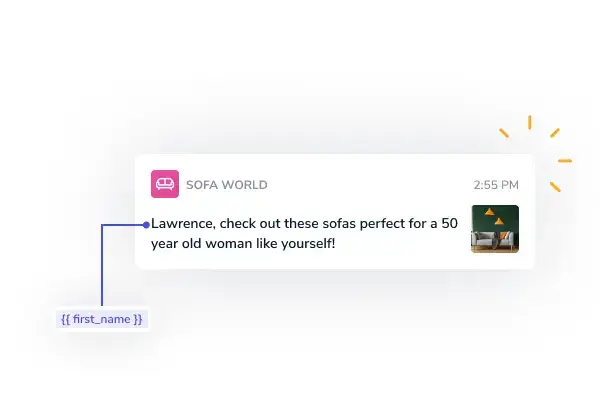
Personalized notifications (e.g. including the user’s name) have 4x higher reaction rates.
Advanced targeting (e.g. using data based on preferences, behavior, location) increases retention rates up to 3x.
A/B testing the sending time can increase reaction rates by 40%.
Of course, you’re going to get better engagement from your push notifications if you send the kind of content that users want.
A Localytics survey asked users what kind of push notifications they most wanted to receive.
48% wanted special offers based on their preferences.
35% wanted to see breaking news alerts.
34% wanted new content based on their preferences.
34% wanted special offers based on their location.
In terms of timing, most brands send push notifications during the week – you’ll want to test and see if this is right for your brand as well.
CleverTap studied 301 billion push notifications, and found the following trends:
77% of push notifications are sent between Monday and Friday.
17% of push notifications are sent on Fridays, making it the most popular day of the week for push.
Sunday is the least popular, with 10% of all push notifications sent on this day.
The most popular times to send push notifications are between 6-8am and 10pm-midnight.
For retail brands, morning and evening are the most effective times to send push notifications, and earlier in the week is better.
Retail apps get the best CTR from push notifications when sent between 8-9am or between 6-8pm.
The lowest CTR is between 4-5pm.
Monday and Tuesday are the days of the week with the highest CTR, while Saturday is the lowest.
More Push Notification Stats: Quick Hits
We’ve already gone through a trove of data on push notifications, looking at average engagement rates, opt-in rates, frequency, consumer behavior and more.
Let’s cap it off with some more interesting push notification statistics we’ve dug up around the internet:
Rich push notifications average a 56% higher open rate. [Airship]
46% of users will opt out of push if they receive 2-5 messages in one week.
32% of users will opt out if they receive 6-10 messages in one week. [Localytics]
Push notifications have an average conversion rate of 4.4%.
The average app user receives 46 push notifications per day.
77% of people say they have engaged with a push notification in the last month.
48% say they have made a purchase as a result of getting a push notification.
60% of app users say that push notifications make them use an app more frequently.
Transactional push notifications have an average open rate of 69%.
43% of app users say that push notifications are less intrusive than email or SMS. [Gitnux]
29% of push notification campaigns use emojis.
The most popular emojis used in push notifications are the fire emoji 🔥, pizza 🍕, thumbs up 👍, hourglass ⏳ and blue heart 💙. [CleverTap]
Email, though not dead, can be impersonal, and emails can be easy to miss or ignore. SMS is direct and personal, but is rigid and inflexible.
Push notifications are personal, direct, customizable, and offer the least amount of friction of any communication channel.
Just one tap from their home screen and a user can be in the app. Push notifications are also a great way to stay top of mind, when you light up a user’s screen with a friendly message from your brand.
Any modern brand should be using push notifications. They’re an incredible tool for many use cases, from sending new product offers and promotions, to order updates and abandoned cart notifications.
To make the most of push notifications, you’ll need an app – and if you don’t already, Vendrux is the best way to turn your existing website into an app, with push notifications built in, out of the box.
Vendrux apps come with push notifications set up and ready to go
Click here to learn more about how easy it is to launch a mobile app for your eCommerce store, and click here to learn about how we integrate push notifications in your app.
If you’re ready to chat further, get a free demo now, and start using push notifications to grow your brand.
Push notifications can be an incredible tool to drive revenue for your brand, whether it’s by sending notifications for promotions, new product launches, abandoned cart reminders, or any other way you can dream up.
But before you can start generating sales on autopilot, you need to make sure your app users actually receive your push notifications.
That means maintaining a high opt-in rate for push notifications. Keep reading and we’ll explain what this is, the average push notification opt-in rate for iOS and Android apps, and how you can ensure your opt-in rate stays as high as possible.
Push notifications are one of the more under-utilized ways for brands to grow retention and long-term revenue. But to use push to the fullest extent, you need an app. Vendrux makes this easy. Book a free demo now to learn how we can help you turn your website into an app, and unlock the benefits of push notifications.
What is Push Notification Opt-In Rate?
Push notification opt-in rate is the percentage of your app users who have opted in (i.e. given permission) to receive push notifications.
Just having someone download your app doesn’t necessarily let you send push notifications to their device. The user can enable or disable push notifications at any time through their device settings.
When you send a push notification, your push notification service will check whether the user’s device has given permission to the app to send push notifications, and if this permission is not granted, the notification will not be sent.
How Does Opt-In Permission Work?
Today, app users need to give explicit permission to apps in order to receive push notifications, on both iOS and Android.
On earlier versions of Android, installed apps had push notifications enabled by default. But since Android 13, apps must request permission for push notifications, as iPhone apps have had to for some time.
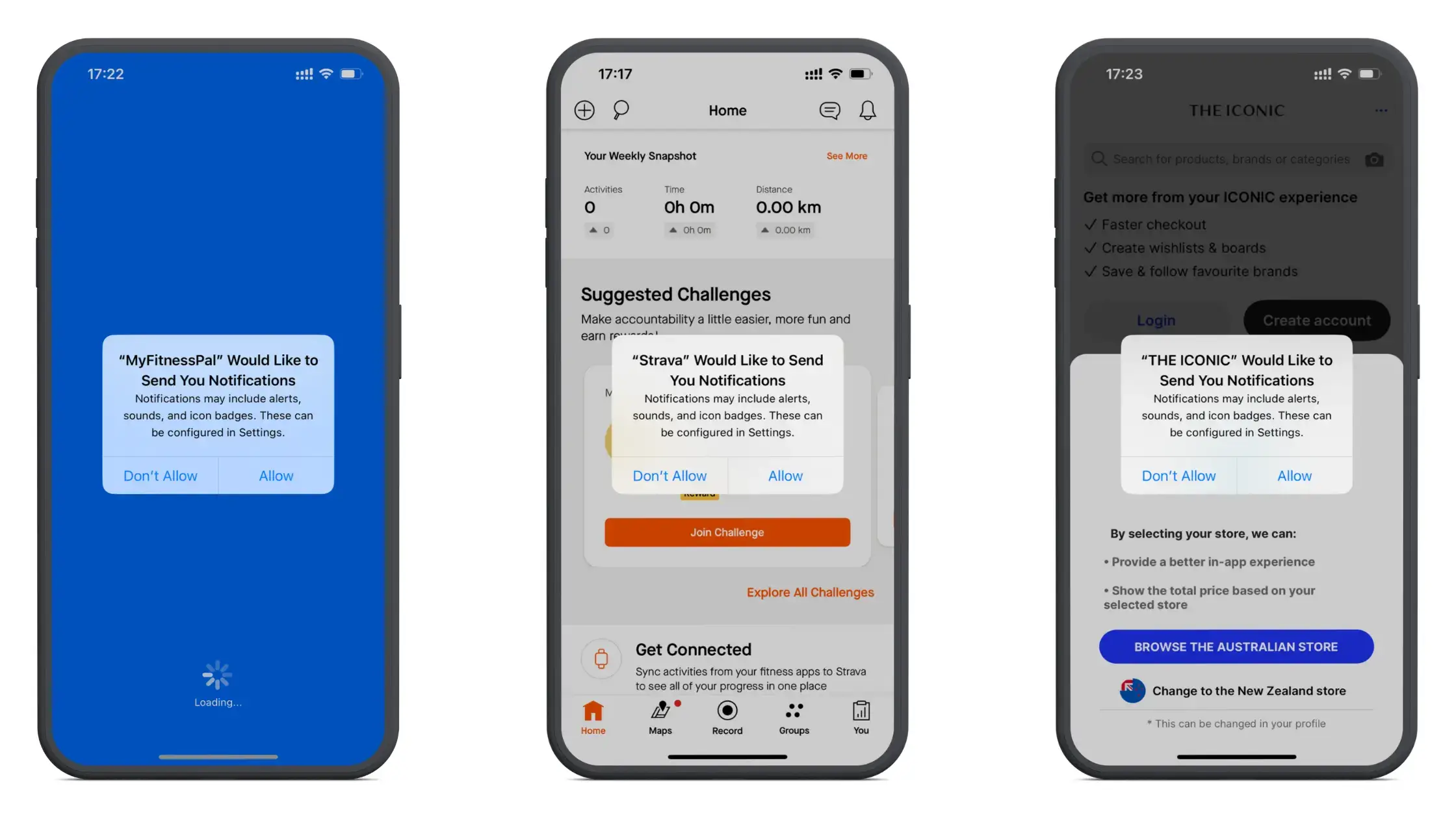
To do this, the app will show a popup asking the user if they want to allow push notifications. Many apps send this prompt soon after the user downloads the app.
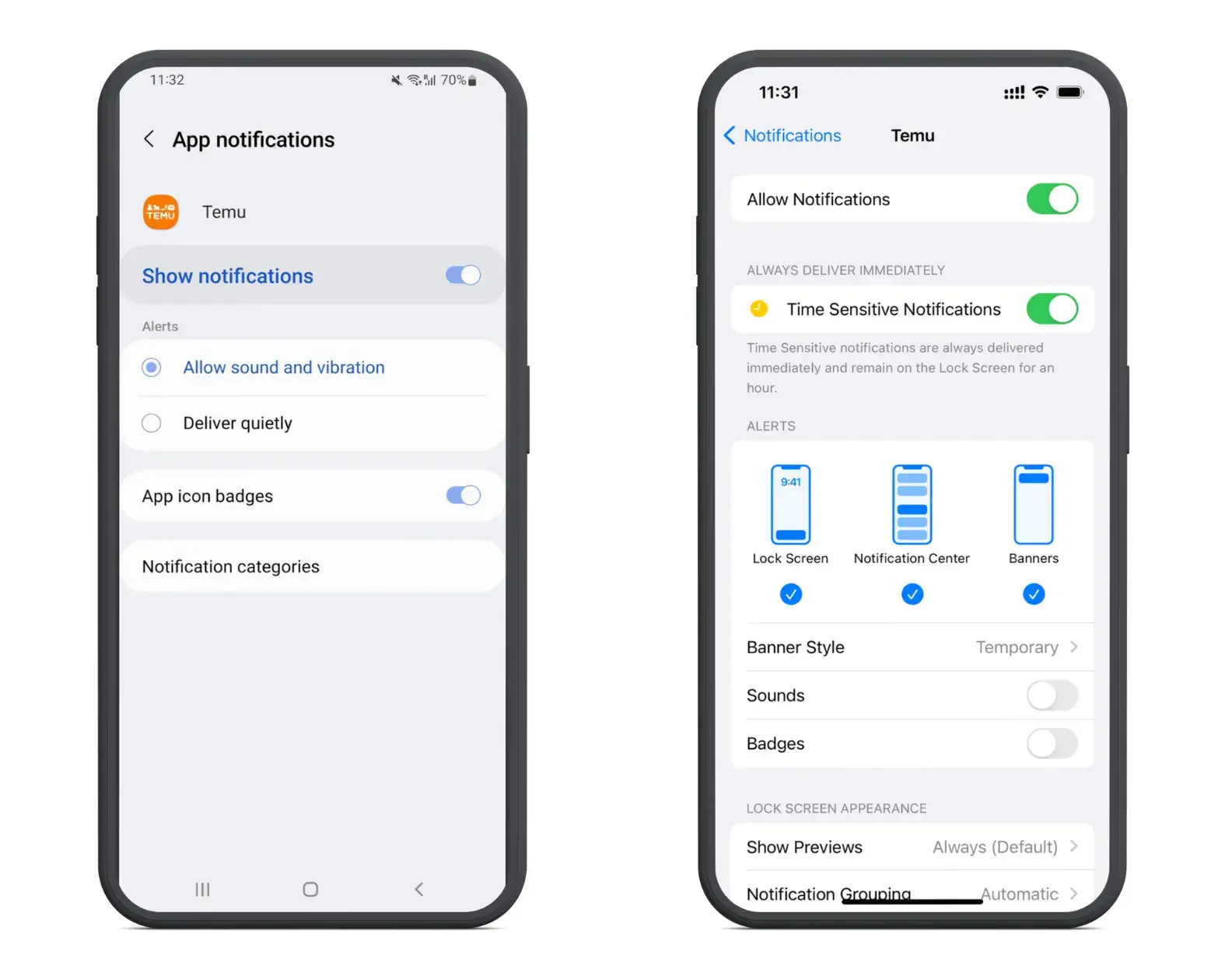
By hitting “Allow”, the app will log that the user has given permission to receive push notifications. At any time, however, the user can go into their device settings and turn notifications on or off.
App settings for push notifications on Android (left) and iPhone (right)
What’s the Average Opt-In Rate for Push Notifications?
The average opt-in rate for push notifications, across all devices, is 67.5%.
This is vastly different for iOS and Android users, however. The average opt-in rate for Android is 91.1%, versus just 43.9% for iOS.
This makes sense, as most of the data is from Android versions 12 and below, which opt users in to push notifications by default, whereas iOS users have to explicitly allow push notifications when prompted.
As a greater share of Android devices move onto Android 13, we can expect the average opt-in rate for Android to decrease as well.
Average Opt-In Rate by Industry
The average opt-in rate is slightly higher for Finance and Travel apps, and lower for apps in the Media and Gaming industries.
Here’s how the average push notification opt-in rate differs by industry:
Typically, younger age groups are more likely to allow push notifications.
Data shows that 33% of people between the ages of 18 and 34 “always” allow push notifications. 30% “often” allow push notifications, while 37% say they allow push notifications “sometimes” or less.
In comparison, only 5% of people 35 and above say they “always” allow push notifications, while 18% of 35-54 year olds and 16% of those aged 55+ say they “often” allow push notifications.
9 Ways to Increase Push Notification Opt-In Rate
The wider your reach, the more potential revenue you can drive using push notifications. Increasing reach can mean getting more app users, but it can also mean making sure a higher percentage of your app users are opted in to push notifications.
Boosting your opt-in rate can have a direct positive impact on revenue, allowing you to reach more people with free promotional messages, capture more abandoned carts, and nurture greater long-term revenue from a larger share of your customers.
If you want to start getting a better return from your push notifications, here are some things you can do to increase your push notification opt-in rate.
Send Opt-In Prompts at the Right Time
Sending an opt-in prompt right after a user installs the app may not always be the best approach.
At this time, users are often at a lower stage of trust and awareness of your brand, and less likely to say yes to push notifications as a result.
The worst part is that you get one shot at it – this opt-in prompt will be shown once. If the user hits “Don’t Allow”, the only hope you have left is getting them to manually change their push settings, which requires a lot more convincing.
You may have better results by waiting a little while, and sending your prompt once you’ve warmed up the user a little more.
Set Up a Custom Pre-Permission Prompt
The operating system’s default opt-in prompt is very basic, can’t be customized, and is not optimized to convince people to hit “Allow”.
That’s why many apps set up a custom in-app message that serves as a sort of “pre-permission” prompt, before they take their one shot at sending the system opt-in prompt.
This message can be designed to your liking, and should do a better job of convincing people why they should allow push notifications.
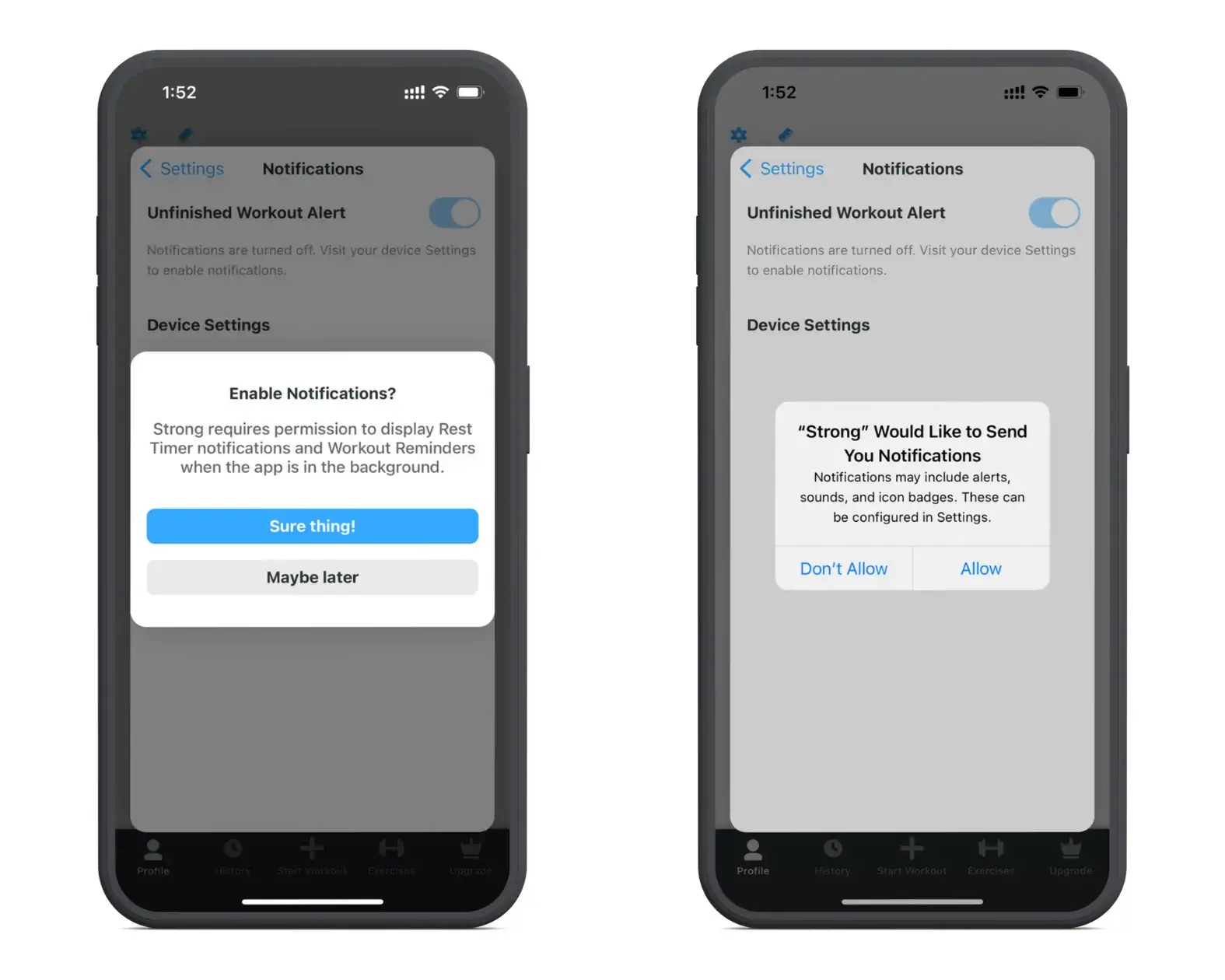
The Strong app uses a custom prompt which, when clicked, triggers the system prompt
You can send custom prompts prior to the system prompt, but you can also re-use this custom in-app message to convince users who previously disabled push notifications to re-enable them (just be careful not to make these too annoying and overbearing, or it could cause the user to delete the app altogether).
Shein sends an in-app message reminding users to enable push notifications
Explain the Benefits of Opting In to Push Notifications
In your pre-permission prompt, you can make the case to the user why they should allow push notifications – such as that they’ll get access to exclusive product launches, discounts, or any reasons that the user might get value out of push notifications.
As part of the onboarding sequence, the Balance app explains why the user should enable push notifications
The example above explains why the app needs to send push notifications, making the user confident that it’s for their benefit, not that they’re just going to be spammed with low-value messages.
This is not restricted to pre-permission prompts, however. You can explain these benefits in other areas of your app, especially if they have push notifications disabled, helping to recapture those who previously said no to push.
Temu’s settings page includes a reminder to users if they have notifications disabled
Incentivize Users to Opt In
The best way to convince someone to opt in is almost always to give them a clear incentive to do so.
This is not a future benefit, or something vague like “you’ll stay in the know”, but a real incentive.
For example, you could offer a one-time discount in exchange for someone opting in to push notifications.
This strategy can be a little risky, as there’s generally nothing against the user turning on notifications, getting their discount and turning them off again. But it may be worth a try if you really want to get opt-ins up.
A/B Test Your Opt-In Prompts
As with anything in business and marketing, the best way to know what works is to test and make decisions based on data.
If you have a big enough user base, it might benefit you to A/B test different approaches to getting push notification permission.
You could test different types of pre-permission prompts, or test sending your prompts at different times (such as immediate prompts vs delayed prompts).
Deliver Value In Your Push Notifications
Maximizing opt-in rate does not just mean getting people to say “yes” initially, but ensuring they continue to allow push notifications, and minimizing the number who go to their settings and turn notifications off.
This means making sure your push notifications consistently offer value to the user. If you don’t do this, users will eventually get frustrated with receiving your notifications and disable them.
Optimize Sending Frequency
Another way to ensure fewer people disable notifications is to send the right amount of push notifications.
You want to avoid sending so many push notifications that users get annoyed and turn off your notifications.
However, sending notifications too rarely may also hurt you. If users aren’t used to seeing notifications from your app, they may be surprised when one pops up and automatically go to their settings to revoke permissions.
You’ll want to figure out the ideal formula and frequency for your brand and your audience. In most cases, try and find a sweet spot where you’re messaging users regularly, but not going over the top.
Re-Engage Users Who Opt Out
Once someone has disabled push notifications, you may still be able to turn it around.
There are many ways to go about re-engaging these users and convincing them to enable push notifications again.
You can place reminders around the app of why it will benefit them to enable push notifications, as well as sending prompts every so often asking them to opt in again.
You could also contact these users on other channels, such as email, explaining the benefits of enabling notifications, and even consider offering an incentive for doing so as we discussed earlier.
Let Users Customize their Push Preferences
Users who disable push notifications may still get value from some of the notifications they receive. But if they get too many irrelevant notifications, it might seem like the only option is to turn off notifications altogether.
If you give users the option to customize their notification settings, and only receive notifications that are relevant to their interests, you’ll likely be able to retain push notification permissions from a greater percentage of your app users.
Harness the Power of Mobile Push Notifications with Vendrux
If you’ve got a website that drives revenue, such as a SaaS app, an ecommerce store, an eLearning platform, or any other kind of online business, you’ll be able to drive a ton of long-term revenue with push notifications.
While you can send push notifications from a website, the potential for what you can do is limited. The only way to really access the power of push notifications is with an app.
Just a few of the successful apps we’ve launch for our users
We convert your website, with all of its features, all the design quirks, optimizations, custom tools and integrations, into full-featured mobile apps for iOS and Android.
We do this with no effort or technical expertise needed from you, with a minimal investment, and a time frame of around a month or less.
This lets you launch your own mobile apps without a ton of capital or massively pivoting your business model by investing in an app development team.
We help you manage your apps, and they’ll always be fully synced with your website, meaning there’s very little dedicated maintenance or overhead that comes with your apps.
The best part is, your apps will have push notifications built in out of the box, so you can start engaging your users and growing revenue from day one.
To see what’s possible, check out these great apps we’ve built for other high-revenue companies like yourself, and for a personalized walk through the process and the benefits we offer you, book a free demo now with one of our team of app experts.
You built a Progressive Web App. Now you want it in the App Store and Google Play. Is this possible?
The short answer: Google Play will let you in (with some work), but Apple won’t; at least not as a PWA.
That’s been true for years, and it’s still true in 2026. Apple’s App Store Review Guidelines explicitly reject apps that are “repackaged websites,” and PWAs fall squarely into that category. Google Play is more accommodating through a technology called Trusted Web Activity, but the process isn’t as simple as uploading a URL.
This guide breaks down what each app store actually allows, what the official policies say, and what your real options are if you want your web app in front of users who search the App Store and Google Play.
Vendrux can help you get your PWA into the app store in just a couple of weeks, by converting it into native apps that sync completely with your website. Book a free consultation with one of our app experts to learn more.
Can You Publish a PWA to the Apple App Store?
No. Apple does not accept PWAs in the App Store.
The App Store requires native binaries compiled through Xcode. A PWA runs in a browser engine – it’s a web app, not a native binary, and Apple draws a hard line between the two.
“Your app should include features, content, and UI that elevate it beyond a repackaged website. If your app is not particularly useful, unique, or ‘app-like,’ it doesn’t belong on the App Store.”
Guideline 4.2.2 goes further:
“Other than catalogs, apps shouldn’t primarily be marketing materials, advertisements, web clippings, content aggregators, or a collection of links.”
“Web clippings” is Apple’s term for a website packaged inside a web view – which is exactly what a PWA wrapper is.
When Apple rejects these apps, the review team typically responds with something along the lines of: “Your app is not sufficiently different from a mobile web browsing experience.”
What About Wrapping a PWA in a Native Shell?
Technically, you can embed a PWA inside a WKWebView and submit that to the App Store. But the app still has to pass Guideline 4.2.
If Apple’s reviewers determine that it’s essentially a website in a thin native wrapper, it gets rejected.
The apps that do pass review are the ones that genuinely add native functionality: push notifications that work through Apple’s own notification system, native navigation, deep linking, and other features that make the experience feel like a native app rather than a browser window without an address bar.
In February 2024, Apple attempted to remove Home Screen web app functionality entirely for users in the EU, as part of their Digital Markets Act (DMA) compliance changes for iOS 17.4. Their stated reasoning:
“Addressing the complex security and privacy concerns associated with web apps using alternative browser engines would require building an entirely new integration architecture that does not currently exist in iOS.”
After significant backlash from developers, the Open Web Advocacy group, and the European Commission, Apple reversed the decision in March 2024:
“We have received requests to continue to offer support for Home Screen web apps in iOS and iPadOS, therefore we will continue to offer the existing Home Screen web apps capability in the EU.”
The incident highlighted how fragile PWA support is on Apple’s platforms; the company was willing to remove it entirely, and only public pressure brought it back.
Can You Publish a PWA to Google Play?
Yes, through Trusted Web Activity (TWA). Google has officially supported this since Chrome 72 in February 2019.
“Trusted Web Activity is a new way to open your web-app content such as your Progressive Web App (PWA) from your Android app using a protocol based on Custom Tabs.”
TWA is not a WebView. It uses the actual Chrome browser engine and renders your site exactly the way users see it in Chrome, but without any browser UI.
The key characteristics, per Google’s documentation:
Trust: The app and website must be verified as coming from the same developer, through Digital Asset Links.
Web rendering: Content is rendered by the user’s browser, in the same way a user would see it in Chrome.
Independent updates: The browser is updated independently of your app – you don’t need to ship app updates when you change your website.
Google’s Quality Requirements
Getting into Google Play via TWA isn’t just a packaging exercise. Google enforces real quality standards:
Your PWA must meet installability criteria (manifest with proper icons, HTTPS, service worker with a fetch handler)
Minimum Lighthouse performance score of 80/100
Digital Asset Links must verify your domain ownership
“Apps which fail to meet TWA quality requirements or Play store policy may be denied entry or delisted.”
Tools for Packaging Your PWA for Google Play
You don’t build a TWA from scratch. You use a tool that takes your PWA’s URL and generates the Android app package with the TWA configuration baked in.
There are two main options:
Bubblewrap
Google Chrome Labs’ official CLI tool. It generates Android App Bundles (AAB) from your PWA, handles JDK and Android SDK setup, and supports features like push notification delegation and geolocation. It’s free, but requires comfort with command-line tools.
PWABuilder
Microsoft’s GUI-based tool. It uses Bubblewrap under the hood but provides a visual interface.
You enter your PWA’s URL, configure options, and it generates your Android package. It also supports iOS and Windows packaging, though the iOS output faces the same App Store approval challenges described above.
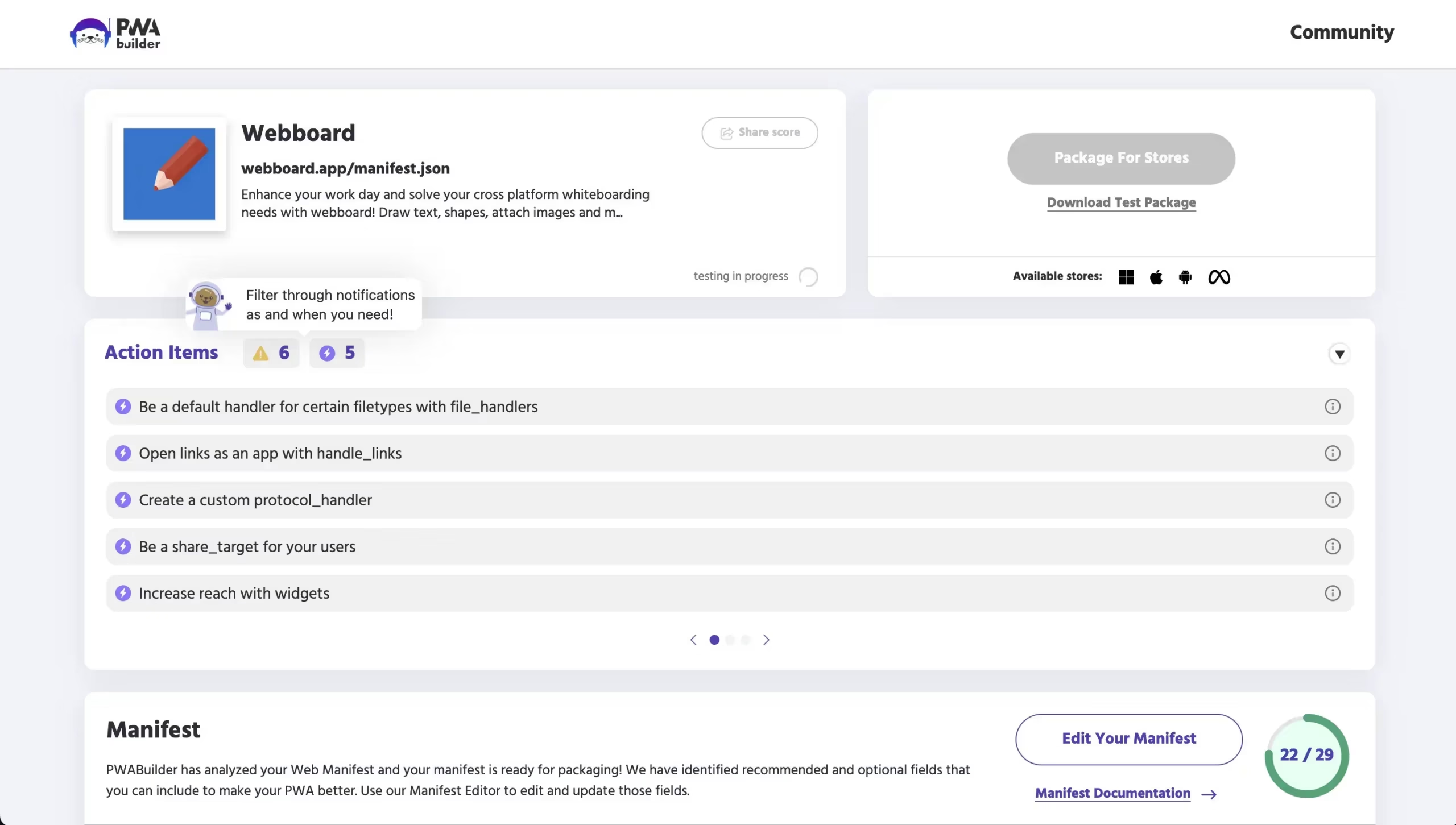
A snapshot of the PWABuilder backend
The Catch
Even though Google Play accepts PWAs, the resulting app is still fundamentally a web app.
You’re limited to what the browser engine supports. That means the features you can offer (and the experience users get) depend on the browser, not on your code.
Why Publishing a PWA to App Stores Is Only Half the Problem
Getting listed is one thing. Delivering an experience that keeps users coming back, and that competes with truly native apps, is another.
PWAs have real limitations that don’t go away just because the app is distributed through a store.
Push Notification Limitations
Push notifications are the single biggest reason ecommerce brands want an app in the first place.
PWAs technically support push notifications on both platforms now (iOS added support in iOS 16.4), but the real-world performance gap is significant.
On iOS:
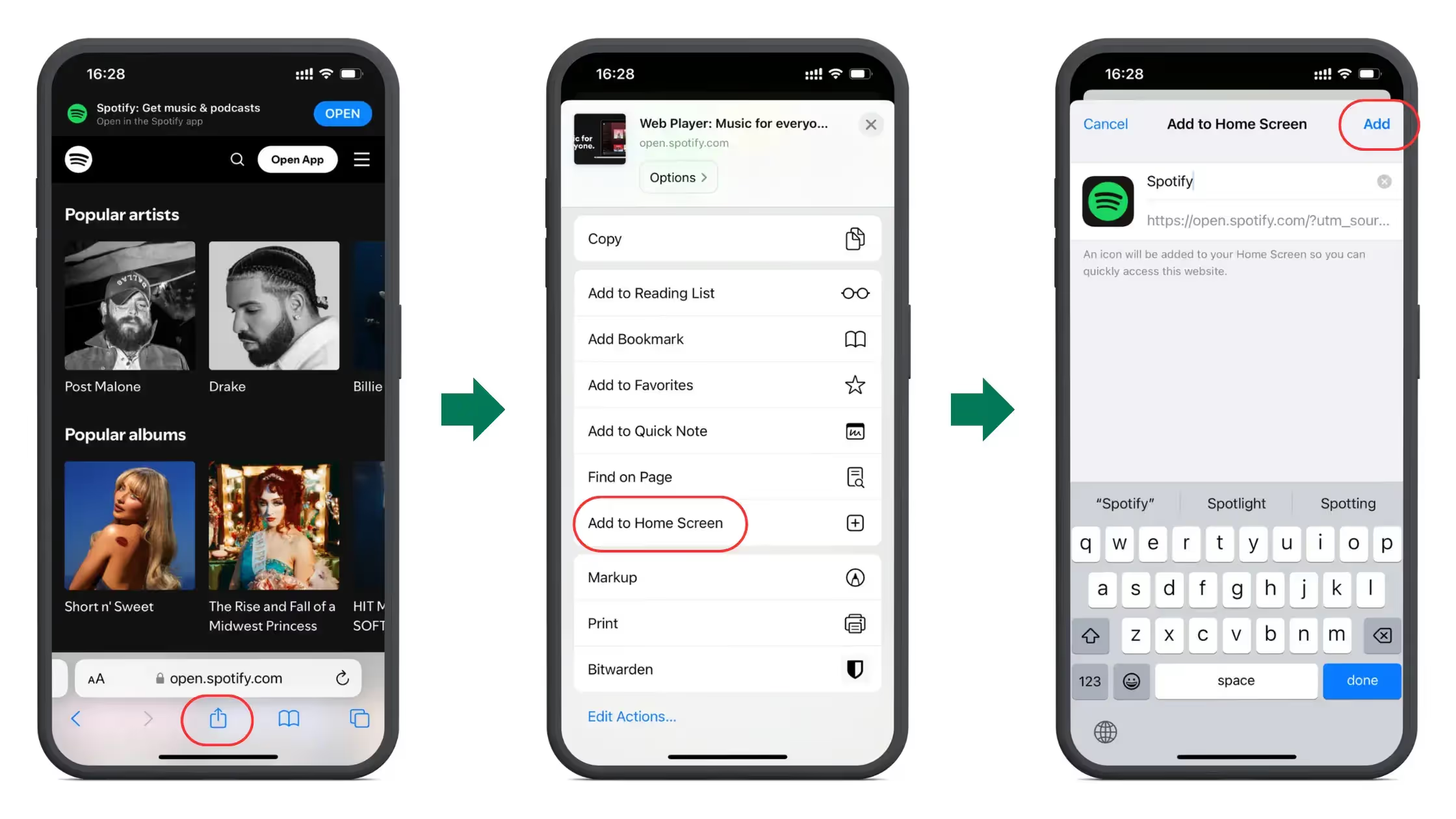
Push only works if the user has manually installed the PWA to their Home Screen via Share > Add to Home Screen
There is no automatic install prompt. Users have to know how to do this themselves
Opt-in rates for PWA push notifications are 10 to 15x lower than for native app push notifications, largely because of this multi-step process
Silent or data-only push (for pre-fetching content in the background) isn’t supported
On Android, PWA push works well and the gap with native is smaller, but there are still differences in reliability and the ability to reach users with their device locked or in power-saving mode.
iOS Data Eviction
This one surprises a lot of people. On iOS, Safari can evict all cached PWA data, including saved carts, offline content, and user preferences, after just 7 days of inactivity.
There’s no workaround on the web side. If a customer doesn’t open your PWA for a week, they may come back to a blank slate.
Native apps don’t have this problem.
No App Store Discovery (Even on Google Play)
A PWA published via TWA shows up in Google Play search results, but it doesn’t benefit from the same discovery mechanisms as native apps.
There are no ratings or reviews tied to the app store listing in the same way, no featured placement, and the app’s credibility signals are limited compared to a fully native app.
On iOS, there’s no app store presence at all. Your PWA is invisible to anyone searching the App Store.
Limited Payment Integration
On iOS Safari, the Payment Request API only supports Apple Pay. There’s no native in-app purchase integration, and checkout flows tend to be less seamless than what native SDKs provide.
The trade-off: you also avoid the 15-30% app store commission on transactions. For some businesses, that math works out. For others, the friction in checkout conversion outweighs the savings.
What Actually Works: Your Real Options
If you want your web-based business in both app stores with an experience that actually performs, here are the practical paths.
1. Publish to Google Play via TWA (Android Only)
Use Bubblewrap or PWABuilder to package your PWA for Google Play. This is a viable, Google-supported approach, and it’s free aside from the $25 developer account fee.
It works well for brands that only need Android coverage, have technical resources to handle the packaging and maintenance, and are comfortable with the limitations of browser-based features.
But keep in mind this doesn’t solve iOS at all. And you’re still delivering a web experience – you don’t get native push notification performance, background processing, or the other capabilities that make native apps stickier.
2. Use PWABuilder for Both Platforms
PWABuilder can generate packages for both Android (via TWA) and iOS (via a WebView wrapper).
The Android side works well. The iOS side is where things get complicated – the output may not pass Apple’s Guideline 4.2 review without additional native functionality.
It can be viable for technical teams willing to iterate on the iOS submission and potentially add native features to pass review.
However, Apple rejections are common with this approach, and each rejection-resubmission cycle takes days to weeks.
3. Convert Your Website Into a Native App
Instead of trying to squeeze a PWA through app store gates, smart businesses take a different approach: they turn their existing website into a full native app that uses their site as the foundation while adding genuine native capabilities.
Rather than wrapping a PWA in a thin shell and hoping it passes review, Vendrux extends your existing website into native iOS and Android apps with real native features – push notifications through Apple and Google’s native systems, deep linking, native navigation, and the full app store presence that comes with a genuine native binary.
Vendrux lets you publish your website as fully-functional mobile apps
The key difference from a PWA wrapper: the apps Vendrux builds actually pass App Store review because they include the native functionality Apple requires.
Your website’s content and functionality carry over, but the delivery mechanism is native.
Vendrux handles the entire build and submission process, including app store approval. For ecommerce brands that have already invested in their website and don’t want to rebuild from scratch on a separate platform, this tends to be the most direct path to both app stores.
Lighthouse 80+, Digital Asset Links, Service Worker
Push notifications
PWA push limited; native required for reliable delivery
PWA push works, but native is more reliable
Cost
N/A
$25 developer account
Practical for ecommerce?
No — PWAs can’t get listed
Possible, but limitations affect retention
Frequently Asked Questions
Does Apple allow PWAs in the App Store?
No. Apple’s Guideline 4.2 requires apps to “include features, content, and UI that elevate it beyond a repackaged website.” PWAs wrapped in a WebView are routinely rejected. To get into the Apple App Store, you need a native app binary with genuine native functionality.
Can I publish a PWA to Google Play?
Yes. Google supports PWAs in the Play Store through Trusted Web Activity (TWA). You’ll need to package your PWA using a tool like Bubblewrap or PWABuilder, meet a minimum Lighthouse score of 80, and set up Digital Asset Links to verify domain ownership.
What is Trusted Web Activity (TWA)?
TWA is a Google-supported protocol that lets you display your PWA content inside an Android app without browser UI. Unlike a WebView, TWA uses the full Chrome rendering engine. The app and website must be verified as coming from the same developer.
Do PWA push notifications work on iOS?
Push notifications were added to PWAs on iOS in version 16.4 (March 2023), but they only work if the user has manually installed the PWA to their Home Screen. There’s no install prompt, and opt-in rates are significantly lower than native app push notifications.
What’s the cheapest way to get my web app in both app stores?
For Google Play, packaging your PWA via TWA using Bubblewrap is free (beyond the $25 developer account). For the Apple App Store, there’s no free path — you need a native app that passes Apple’s review guidelines. Services like Vendrux handle both stores by converting your website into native apps.
Will Apple ever accept PWAs in the App Store?
There’s no indication that Apple plans to change Guideline 4.2. The 2024 EU controversy, where Apple tried to remove even Home Screen PWA support before reversing course, suggests the company views PWAs and the App Store as fundamentally separate. The most reliable path to the App Store remains building or converting to a native app.
Get Your PWA in the App Stores
Vendrux is the most effective way to get your PWA in the app stores, while also building upon your PWA to provide a more complete mobile user experience.
You’re more assured to get your apps approved, because you’ll get an app that’s more than just a repackaged website (which is exactly what Apple, in particular, wants from apps on their app store).
With more than 2,000 successful apps built over the course of 10 years, we’ve got the experience to know what needs to be done to give your app a native experience.
You can go live in a number of weeks. It does come with a cost, unlike the free options provided by Google and Microsoft, but you get all the work done for you, including ongoing technical support for your mobile apps.
If you’re looking for a way to get in the app stores that’s more than just a workaround, Vendrux is for you.
To learn more, book a free consultation now. We’ll walk you through the process step-by-step, show you a preview of your mobile apps, and help you to understand if Vendrux is the right option for you to get your PWA in the app store.
Trying to decide between building a progressive web app or a native app? The right choice depends on what you’re aiming for.
If your priority is getting to market fast and reaching the widest possible audience, a PWA makes sense as a starting point. If you’re focused on customer retention, engagement, and building a direct relationship with your best buyers, a native app is hard to beat. And if you’re an ecommerce business that already has meaningful traffic and revenue, you probably should have both.
Keep reading and we’ll explain all you need to know about PWAs and native apps, how they differ, and which direction is the right choice for your business.
What is a Progressive Web App?
Progressive Web Apps are something between a responsive website and a mobile app.
They are mobile sites built with modern JavaScript frameworks, designed to give an app-like experience. They can be added to a mobile device’s home screen with an icon. Like apps, they offer a full-screen experience to engage users. However, they are still just a website when opened.
With the development of Service Workers, PWAs do get some more benefits that native apps have. However, these benefits are still limited (particularly on iOS).
Reliable – Load instantly and never show a website as being down, even in uncertain network conditions.
Fast – Respond quickly to user interactions with silky smooth animations and no janky scrolling.
Engaging – Feel like a natural app on the device, with an immersive user experience.
SD Times reported that Todd Anglin, VP of Product and Developer Relations at Progress believes “PWAs are about making the web a more reliable, enjoyable experience, but there will always be a category of apps best served by native“.
This leads us to some questions for business owners trying to decide:
“What’s best for my company”.
“How do progressive web apps really compare to native apps?”
“Can progressive web apps replace native apps?”
We’ll answer all these questions below.
What Is a Native App?
A native app is a mobile application built specifically for a single platform, typically iOS or Android, using platform-native languages like Swift or Kotlin. Native apps are distributed through the Apple App Store or Google Play Store, have full access to device hardware (camera, GPS, Bluetooth, NFC), and can run entirely offline.
Because native apps are compiled for a specific operating system, they typically deliver the best performance, smoothest animations, and deepest integration with the device. The tradeoff is higher development cost and longer timelines: you’re building and maintaining a separate codebase for each platform.
PWA vs Native App: The Key Differences at a Glance
Here’s a quick summary of the differences between Progressive Web Apps and native apps:
PWA
Native App
Installation
Browser-based; manual “Add to Home Screen”
One-tap install from App Store / Google Play
Cross-platform
One codebase, all platforms
Separate iOS and Android builds
Offline
Cached content only
Full offline functionality
Push notifications
Supported, but limited on iOS; lower reach
Full support on iOS and Android
App Store presence
No (Google Play via TWA only)
Yes, both stores
SEO / discoverability
Fully indexed by search engines
App Store search only (ASO)
Device features
Limited (especially iOS)
Full hardware access
Security
HTTPS encryption
HTTPS + MFA, cert pinning, store review
Dev cost
30-75% less than native
$50K-$100K+ for iOS + Android
Time to launch
Weeks
3-6+ months
Now let’s look at each of these in more detail.
10 Key Differences Between PWAs and Native Apps
1. Installation and Distribution
Native apps are discovered and installed through app stores: Google Play and Apple’s App Store. One tap to install, and the app sits on the user’s home screen with a recognizable icon. App stores also act as a discovery channel, where users browse categories, read reviews, and search for solutions. If you do App Store Optimization well, your app can surface for relevant keywords and attract users who don’t already know your brand.
PWAs run in the browser. Users access them by visiting a URL, just like any website. They can then be added to the home screen, but the process isn’t intuitive for most people, especially on iOS, where the user must tap Share, then scroll down to “Add to Home Screen” with no visual prompt that the site is a PWA.
Android has made this easier with automatic install prompts. And starting with iOS 26 (Fall 2025), Apple defaults every website added to the home screen to open as a standalone web app. That’s a meaningful shift, but users still need to initiate the add-to-home-screen step manually. There’s no equivalent of the App Store’s one-tap install.
This distinction matters. Customers expect to find your brand in the App Store. Having an app listed there signals legitimacy, and it gives you a storefront that lives on their phone alongside Amazon, Instagram, and every other app they use daily.
2. Cross-Platform Development
Native apps are built for a specific platform. An iOS app is typically written in Swift; an Android app in Kotlin. This means two separate codebases, two development tracks, and two sets of platform-specific requirements.
Cross-platform frameworks like React Native and Flutter can reduce that duplication, but they introduce their own tradeoffs around performance and native API access.
PWAs take a fundamentally different approach. One responsive web codebase works across all platforms and browsers. Build it once, deploy everywhere. That’s a significant cost and time advantage, especially for teams without dedicated mobile developers.
The tradeoff is that a single responsive design can’t be tailored to each platform’s UX conventions the way a native app can. iOS and Android users have different expectations around navigation, gestures, and interaction patterns, and a PWA has to compromise between them.
3. Offline Capability
Native apps can store data locally and function fully without an internet connection. An ecommerce app can let users browse a cached product catalog, manage their wishlist, or review past orders, all while offline.
PWAs use Service Workers to cache resources and serve cached content when the device is disconnected. This works well for static content (articles, product images, basic page layouts), but falls short for anything dynamic. A user can’t submit a form, complete a checkout, or load real-time inventory data in a PWA when offline.
The gap is especially pronounced on iOS. Safari doesn’t support Background Sync, which means PWAs can’t sync data in the background or pre-fetch content before the user opens the app. And Safari’s storage eviction policy can delete cached PWA data after periods of inactivity, meaning a customer who hasn’t visited your PWA in a while may find their saved cart or preferences wiped.
4. Storage, Data, and Power
Both PWAs and native apps consume device resources: battery, storage, and data. The actual impact depends more on how the app is built and how often it’s used than on whether it’s a PWA or native.
Where PWAs have a real advantage is data efficiency. When Konga, a Nigerian ecommerce platform, converted their mobile site to a PWA, they reduced data usage by 92%, a critical improvement for a market where most users rely on expensive 2G connections.
For brands serving customers in developed markets, this difference is less significant. Both approaches will perform similarly in terms of resource usage if well-built.
5. Updates
PWAs update automatically whenever a page refreshes or a new session begins. There’s no app store review process, no waiting for approval, and no relying on users to update manually. Changes go live the moment you deploy them.
Native apps update through the app stores. Most devices handle this automatically in the background, so the experience is mostly seamless. But there is a delay: you submit your update, it goes through review (typically 24-48 hours for Apple, faster for Google Play), and then it rolls out to users. For urgent fixes, that delay can matter.
In practice, the update experience feels similar for users of either approach. The difference is mainly on the developer side, where PWAs offer a faster iteration cycle.
6. Discoverability and SEO
This is one area where PWAs have a clear structural advantage. Because a PWA is just a website, its pages are indexed by Google, Bing, and other search engines. Every product page, category page, and blog post can rank in organic search results and drive traffic directly to the app experience. Standard SEO practices apply.
Native app content, by contrast, isn’t indexed by search engines. Discoverability depends on App Store Optimization (ASO): keywords in your app title and description, positive ratings and reviews, download volume, and category placement. App store search is a meaningful channel, but it’s a separate discipline from web SEO and reaches a different audience.
The strongest approach combines both. A PWA (or responsive website) captures search traffic and brings new customers in through the front door. A native app gives existing customers a reason to come back and builds a direct retention channel outside of search.
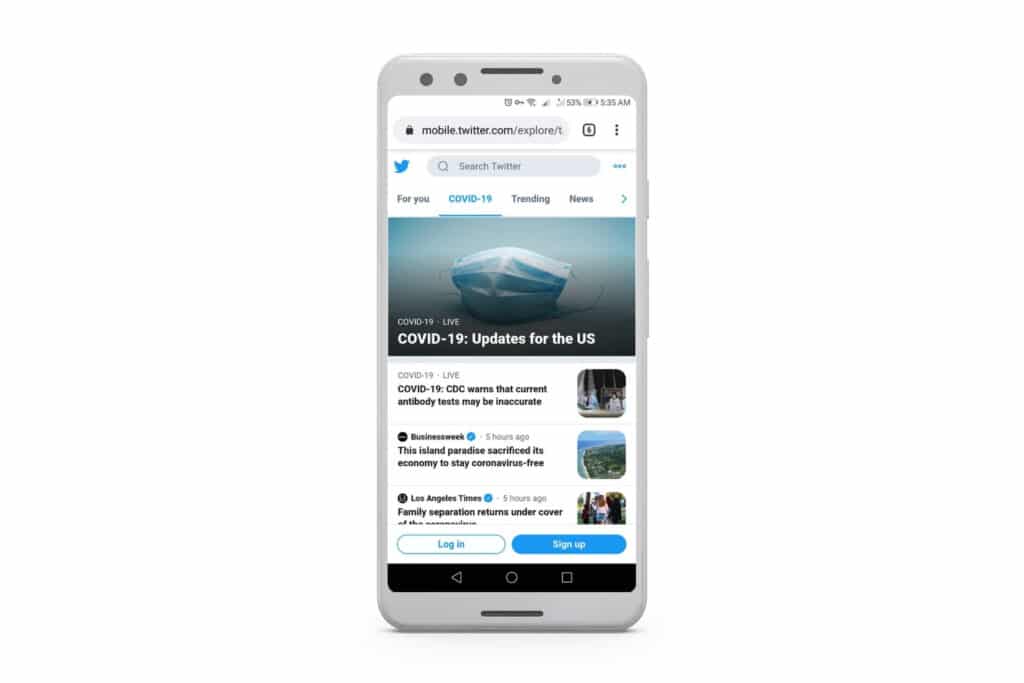
Progressive Web Apps can send push notifications – but with a crucial difference.
PWA push notifications are web push; not native push notifications.
Native push offers richer functionality: action buttons, rich media, deep linking into specific screens, and 95%+ delivery rates compared to roughly 33% for web push.
They land directly on the user’s lock screen, whatever they’re doing – while web push notifications use the browser to send, so can only be sent while the browser is running.
Up until recently, PWA push notifications didn’t work on iOS either.
Home screen install required. Push only works for PWAs that have been manually added to the home screen. Browser-based push still doesn’t work in Safari on iOS.
Multi-step opt-in. The user must first discover your PWA, then add it to their home screen, then grant notification permission. Compare that to a native app, where a single permission dialog appears on first launch.
No background sync. When a push notification arrives, the PWA can’t pre-fetch content before the user opens it. Native apps can.
No silent push. You can’t send data-only push notifications to update the app in the background.
Reliability issues. Developers have reported that service worker push listeners don’t always trigger after device restarts, and users can become unsubscribed without clear cause.
The core factor still at play: push notifications sent from PWAs are web push, not native.
Both PWAs and native apps can be built securely. PWAs are served over HTTPS, which provides encryption between the browser and server. Native apps can go further with Multi-Factor Authentication (MFA), certificate pinning, and device-level security features.
There’s also a distribution gatekeeping difference. To publish a native app on the Apple App Store or Google Play, it must pass a review process. Apps with obvious security flaws get rejected. PWAs, like any website, have no such review process, which places the security burden entirely on the developer.
For businesses handling payment data, customer accounts, or sensitive personal information, native apps offer more security tools out of the box. That said, a well-built PWA with proper HTTPS, authentication, and GDPR compliance can be just as secure in practice. Security depends more on implementation than on whether the app is “native” or “web.”
9. Device Feature Access
Native apps have full access to device hardware and OS features:
Camera (including advanced controls)
GPS and background location
Geofencing (for proximity-based marketing)
Bluetooth and NFC (for in-store payments and hardware integrations)
Contacts, calendar, and system notifications
Biometric authentication for payment confirmation (Face ID, Touch ID)
PWAs can access some device features through web APIs, including the camera, geolocation (foreground only), and motion sensors. But Apple has explicitly declined to implement 16 web APIs in Safari due to privacy and fingerprinting concerns, including Web Bluetooth, NFC, USB, and several sensor APIs.
Because all browsers on iOS still use Apple’s WebKit rendering engine, these limitations apply to every browser on iPhone, not just Safari. This means PWAs on iOS are significantly more limited than PWAs on Android, where Chrome supports a broader set of web APIs.
For most ecommerce brands, the features that matter are push notifications, home screen presence, and a smooth checkout experience, not NFC or Bluetooth. But if your business relies on in-store hardware integration, contactless payments, or location-based triggers, native is the only option.
10. Development Cost and Time to Market
This is often the deciding factor, and PWAs have a clear advantage.
PWA development typically costs 30-75% less than building separate native apps for iOS and Android. You’re writing one web codebase instead of two platform-specific ones. Updates are instant (no app store review), and maintenance is simpler because there’s only one codebase to manage.
Custom native app development, on the other hand, typically runs $50,000 to $100,000+ for initial iOS and Android versions, plus roughly 20% of that annually for ongoing maintenance. Development timelines are usually 3-6 months at a minimum, and you need developers skilled in Swift/Xcode (iOS) and Kotlin/Android Studio.
Cross-platform frameworks like React Native and Flutter can bring those costs down by sharing code between platforms, but they still require specialized mobile development expertise.
There is a third option that most brands overlook. Services like Vendrux let you extend your existing website into native iOS and Android apps without rebuilding anything, for a fraction of the cost of custom development. More on that below.
Already have a website that’s driving revenue?
You don’t need to choose between a PWA and a native app, and you don’t need to rebuild anything from scratch. Vendrux extends your existing website into native iOS and Android apps, complete with push notifications, App Store presence, and your full checkout experience.
See how your website looks as a native app. No commitment.
The right choice depends on where your business is and what you’re trying to achieve.
A PWA makes sense if you’re:
Early-stage or budget-constrained. You need a mobile presence fast and can’t afford $50K+ for native development.
Content-first. Your business is driven by SEO and organic traffic, and discoverability matters more than retention features.
Serving markets with limited connectivity. PWAs shine in regions with expensive data or slow networks.
Testing mobile demand. You want to see whether your audience engages on mobile before committing to a native app.
A native app makes sense if you’re:
Focused on retention and repeat purchases. Push notifications, home screen presence, and a dedicated app experience drive repeat visits from your best customers.
Building a direct channel. You want to own the customer relationship outside of search, social, and paid ads.
Selling through app stores. Your customers expect to find you there, or you want to acquire users through App Store search.
Using device features. Your product requires access to GPS, camera, Bluetooth, or other hardware that PWAs can’t reliably access on iOS.
Most established ecommerce brands should have both.
A PWA improves the mobile web experience for customers who discover you through search, social, or ads. It loads fast, works well on any device, and supports SEO-driven acquisition.
A native app gives your most engaged customers a reason to keep coming back. It sits on their home screen, sends reliable push notifications, and creates a shopping experience that feels like it was built just for them. These are typically your highest-LTV customers, the ones worth investing in.
This isn’t a fringe recommendation. Brands like Starbucks, Pinterest, and Twitter/X all maintain both a PWA and native apps. They’re complementary strategies, not competing ones.
Vendrux: Get the Best of Both Without Building From Scratch
For ecommerce brands that want native app benefits without the $50K-$100K price tag and 6-month timeline, there’s a more practical path: extending your existing website into native iOS and Android apps.
That’s what Vendrux does. Your website, with all its existing functionality (checkout, search, account management, loyalty programs, third-party integrations), becomes a native app on both the App Store and Google Play. No rebuilding. No maintaining a separate codebase. No losing feature parity.
You get the native app advantages that PWAs can’t deliver: full push notification support on iOS and Android, one-tap app store installation, a home screen icon, and the credibility that comes with being listed in the stores. And because everything is powered by your existing website, any change you make to your site is automatically reflected in the app.
“Nothing out there provided us with the ease and accessibility that Vendrux did to our team. Lots of companies we reached out to wanted a lot of time, money, and resources.” — Nick Barbarise, Director of IT, John Varvatos
You can still maintain a PWA alongside your Vendrux app. The PWA handles web-based acquisition. The native app handles retention and engagement. Together, they cover the full customer journey.
How It Works
Book a strategy call. Share your website URL. We’ll discuss your goals, assess fit, and answer your questions.
Get a custom app preview. Our team builds a personalized preview so you can see exactly how your app looks and performs.
Launch in 30 days. We handle the build, submission, and approval process. Your app goes live on both stores while you focus on your business.
We’ve built 2,000+ apps for brands like yours, from Shopify and WooCommerce stores to custom platforms running on Salesforce Commerce Cloud and Magento. We’ll be able to tell you whether your business is at the right stage to be thinking about a native app, and the best way for you to build it.
Progressive Web Apps promise the best of both worlds: build one web experience and have it work like an app on every device.
On Android, that promise largely holds up. On iPhone, it’s a different story.
Apple has made progress. Push notifications arrived in iOS 16.4. Storage policies improved in Safari 17. Safari 18.4 added Declarative Web Push and Screen Wake Lock. And with iOS 26, every site added to the Home Screen now defaults to opening as a web app.
But there are still significant gaps – especially for ecommerce brands that depend on their iPhone customers.
No App Store distribution. No background sync. Limited push notification reach. And Apple still forces every browser on iOS to use its own WebKit engine, which means PWA capabilities are entirely at Apple’s discretion.
This guide covers exactly what PWAs can and can’t do on iOS in 2026, what it means for your business, and what your options are.
What Is a Progressive Web App?
A Progressive Web App is a website that uses modern browser APIs to deliver an app-like experience.
The key technologies are service workers (for offline caching and push notifications), a web app manifest (which tells the browser how the app should look and behave when installed), and HTTPS.
When a user “installs” a PWA, they’re adding a shortcut to their home screen that opens the site in a standalone window, without browser UI.
There’s no app store involved. The app loads from the web, and updates happen automatically whenever the developer pushes changes to the site.
PWAs work across platforms by default. The same codebase runs on Android, iOS, and desktop. That’s the appeal: one build, every device.
What PWAs Can Do on iOS in 2026
Before getting into limitations, it’s worth acknowledging what actually works. PWAs on iOS have come a long way, particularly over the last two years.
Home screen installation
Users can add any website to their iPhone home screen. It shows up as an icon, opens in standalone mode (no Safari toolbar), and appears in the app switcher. As of iOS 26, every site added to the Home Screen defaults to opening as a web app, even without a manifest file.
Push notifications
Since iOS 16.4 (March 2023), PWAs added to the Home Screen can send push notifications. Safari 18.4 introduced Declarative Web Push, a simplified mechanism that doesn’t require a service worker.
App icon badges
The Badge API has been supported since iOS 16.4, letting PWAs display notification counts on their home screen icon (requires notification permission).
Offline caching
Service workers can cache assets and data for offline access. This works reliably for returning visitors, though storage policies apply (more on that below).
Screen Wake Lock
Since Safari 18.4, Home Screen web apps can prevent the device from dimming and locking the screen. Useful for recipe apps, dashboards, or any hands-free use case.
Improved storage
Safari 17 increased storage quotas to up to 60% of total disk space per origin (80% overall) and added support for the Persistent Storage API, which lets developers request protection from automatic eviction (though it requires notification permission to work).
Other capabilities
PWAs on iOS also support geolocation, camera/microphone access, WebAuthn for passwordless authentication, the Web Share API, and Canvas/WebGL for graphics.
What PWAs Still Can’t Do on iOS
This is where the gaps become significant, particularly for ecommerce brands.
No App Store Distribution
You cannot list a PWA in the Apple App Store. Apple’s App Store Review Guidelines require native binaries compiled in Xcode. Guideline 4.2 (Minimum Functionality) explicitly rejects “repackaged websites,” and sub-guideline 4.2.2 targets “web clippings” specifically.
There’s no official workaround. Google has Trusted Web Activity (TWA), which lets you publish a PWA to the Google Play Store. Apple has no equivalent.
This matters because App Store presence is a discovery channel. Without it, there are no ratings, no reviews, no search visibility, and no appearing in category rankings.
For ecommerce brands, that’s a significant miss, especially considering iOS captures 67% of global app spending despite holding only about 28% market share.
No Automatic Install Prompt
On Android, Chrome can show an automatic “Add to Home Screen” banner using the beforeinstallprompt event. Safari on iOS does not support this.
Instead, users have to know to tap the Share icon, scroll through the share sheet, find “Add to Home Screen,” and confirm.
Most people don’t know this option exists, and even fewer will go through the steps. Developers can build custom banners to educate users, but the conversion rate on those instructions is low compared to a native install prompt.
Push Notifications Work, but Reach Is Limited
Push notifications technically work on iOS PWAs since iOS 16.4, but the practical reach is much smaller than native push.
Here’s why:
Home Screen only. Push only works when the PWA has been added to the Home Screen. Notifications don’t work from Safari tabs.
No silent push. You can’t send data-only notifications that update content in the background, a common pattern in native apps.
No background wake. Push notifications can’t trigger background code execution the way they do in native apps.
Reliability issues. Service worker push listeners may not trigger reliably after device restarts. Unexpected unsubscriptions can also occur.
Multi-step opt-in. Users must first install the PWA to their Home Screen, then grant notification permission. Each step loses a chunk of your audience.
The numbers tell the story. When prompted, only about 16% of mobile users accept web push notifications, compared to 40-70% for native apps. But the real gap is bigger than that: most PWA users on iOS never get to the prompt in the first place because they haven’t added the app to their Home Screen.
Native apps also get features PWAs can’t access: Time Sensitive notifications that break through Focus Mode, Live Activities for real-time order tracking on the Lock Screen, and provisional notifications that deliver silently without requiring a permission prompt upfront.
No Background Sync
iOS does not support the Background Sync API, Periodic Background Sync, or Background Fetch for PWAs. None of these have a timeline for implementation.
In practice, this means your PWA can’t update content in the background. When a user taps your app icon, they see whatever was cached the last time they had it open.
A native app, by contrast, can pre-fetch fresh product data, update prices, and sync cart contents before the user even sees the screen.
The blocked list includes Web Bluetooth, Web NFC, WebUSB, Web Serial, Web MIDI, the Battery Status API, and several sensor APIs.
Apple’s position hasn’t changed as of 2026. While Chrome on Android supports many of these, PWAs on iPhone have no access to Bluetooth peripherals, NFC tags, USB accessories, or most device sensors beyond basic accelerometer and gyroscope.
For most ecommerce brands, this is a minor issue. But if your product involves connected hardware, in-store NFC, or peripheral devices, PWAs on iOS are a non-starter.
Storage Can Be Wiped
While Safari’s storage quotas have improved, PWA data on iOS is still more fragile than native app data.
Safari uses a “least-recently-used” eviction policy. If the device is under storage pressure, cached data from less-frequently-visited origins gets deleted first.
The Persistent Storage API (available since Safari 17) lets developers request protection from automatic eviction, but it requires notification permission to work.
What does this mean practically? If a customer adds items to their cart through your PWA but doesn’t come back for a while, that saved cart could be gone when they return.
A native app’s storage persists until the user manually deletes the app.
No Geofencing or Background Location
PWAs can access the user’s location in the foreground, but neither iOS nor Android supports geofencing or background location tracking in web apps. The W3C Geofencing API proposal has been abandoned.
For brands that use location-based triggers (store proximity alerts, local offers, location-aware marketing), a native app is required.
Apple Controls Everything Through WebKit
Here’s the fundamental structural issue: every browser on iOS uses Apple’s WebKit engine. Chrome, Firefox, Edge, Brave – they’re all running WebKit under the hood on iPhone. That means PWA capabilities on iOS are entirely determined by what Apple’s WebKit team chooses to support.
iOS 18.2 technically allows third-party browser engines in the EU, but Apple’s implementation through BrowserEngineKit creates so much friction that zero browsers have adopted it as of early 2026.
In other words, there’s no competitive pressure pushing PWA capabilities forward on iOS. Apple decides the roadmap.
The EU Tried to Fix This. It Hasn’t Worked Yet.
The regulatory story around PWAs on iOS has been dramatic but, so far, largely symbolic in its impact.
In February 2024, developers discovered that Apple had quietly removed PWA support in the EU in the iOS 17.4 beta. PWAs added to the Home Screen would open as regular Safari tabs instead of standalone apps.
Apple said the change was necessary because “addressing the complex security and privacy concerns associated with web apps using alternative browser engines would require building an entirely new integration architecture.”
In April 2025, the EU fined Apple 500 million euros for DMA non-compliance related to browser engine restrictions. The UK CMA followed in October 2025 by designating Apple with Strategic Market Status and finding that Apple’s browser engine requirements harm web app competition on iOS.
The regulatory pressure is real. But in terms of what you can actually build with a PWA on an iPhone today, nothing has materially changed. All browsers still use WebKit. The same limitations that existed before the DMA exist now.
PWA on iOS vs. Android: A Quick Comparison
If you’re evaluating PWAs, the platform gap matters. Here’s how iOS and Android compare:
Feature
iOS (Safari)
Android (Chrome)
PWA capability score
86/100
97/100
Automatic install prompt
Not supported
Supported
Push notifications
Home Screen only, limited
Full support
Silent / background push
Not supported
Supported
Background Sync
Not supported
Supported
Web Bluetooth
Not supported
Supported
Web NFC
Not supported
Supported
App Store listing
Not possible
Possible via TWA
Browser engine
WebKit only
Developer’s choice
Storage eviction
Under storage pressure
More permissive
Geofencing
Not supported
Not supported
The gap is clear: Android treats PWAs as first-class citizens with broad API support. iOS treats them as a limited subset of what the web can do, and Apple controls the boundaries.
What This Means for Ecommerce Brands
Technical limitations are only useful context if you understand the business impact. Here’s how these gaps translate to real outcomes for ecommerce:
Fewer customers get your push notifications
The multi-step install-then-permit process on iOS means your push audience will be a fraction of what a native app delivers. For brands that rely on push for abandoned cart recovery, flash sale alerts, and restock notifications, that’s a direct hit to re-engagement revenue.
You’re invisible in the App Store
iOS users account for 67% of global app spending. If your brand isn’t in the App Store, you’re missing the primary way these high-value customers discover and install apps. There’s no organic search visibility, no category ranking, no review-driven social proof.
Returning customers may find a blank slate
If a shopper doesn’t visit your PWA for a stretch and the device is under storage pressure, their saved cart, browsing history, and preferences can get wiped. When they come back, it’s like starting over. A native app’s data persists until the user explicitly uninstalls.
Your app can’t stay current in the background
Without background sync, a PWA can’t update product listings, prices, or inventory while the user isn’t looking at it. Native apps can pre-fetch content so the experience is fresh the moment the user opens the app.
Deep linking is typically less reliable
Driving users from an email, SMS, or social ad directly into a specific product page is harder with a PWA than a native app. Universal links and App Links in native apps typically handle this more consistently.
When a PWA Makes Sense (and When It Doesn’t)
PWAs aren’t bad. They’re a legitimate technology with real strengths. The question is whether they’re the right fit for your specific situation.
A PWA can work well if:
You’re running a content-heavy site (blog, news, documentation) where offline reading is the main value-add
Your audience is primarily on Android, where PWA capabilities are strong
You have a limited budget and need to improve your mobile experience quickly
You want to test whether an app-like experience resonates with your audience before investing in a native build
A PWA falls short if:
You’re an ecommerce brand with high-value iOS customers who drive a meaningful share of your revenue
Push notifications are central to your retention strategy (abandoned carts, restock alerts, loyalty programs)
App Store presence matters for your brand credibility and customer acquisition
You need reliable offline functionality for shoppers who browse intermittently
You’ve built a complex storefront with integrations and customizations that you don’t want to rebuild
The Better Path: Turn Your Website (or PWA) Into a Native App
For brands that have already invested in building a strong website or online store, there’s a middle ground between building a PWA and paying for a custom native app from scratch.
Vendrux takes your existing website and extends it into a native iOS and Android app.
Everything on your site, including all your features, integrations, and customizations, works inside the app without any rebuilding. When you update your site, the app updates too.
What that gets you:
App Store distribution. Your app is listed on the Apple App Store and Google Play, with full search visibility, ratings, and reviews.
Native push notifications. With native opt-in flows, you get the full reach that PWA push can’t deliver. Time Sensitive notifications, Live Activities for order tracking, and rich media support are all available.
Persistent data and sessions. No storage eviction. Your customers’ carts, preferences, and login sessions stay put.
Full website parity. Every feature on your site works in the app. New site updates go live in the app automatically, without app store resubmission.
Done-for-you service. Vendrux handles the build, submission, and ongoing maintenance. You don’t need a mobile development team.
A few examples of real mobile apps built with Vendrux
How It Works
Book your strategy call. We’ll discuss your goals, answer your questions, and assess fit.
Get your custom app preview. Our team builds a personalized preview of your native app. You’ll see exactly how it looks, feels, and performs.
Launch in 30 days. We handle everything. Your app goes live on the App Store and Google Play while you focus on your business.
We’ve built 2,000+ apps for brands like yours.
Curious whether a native app makes sense for your brand? Book a free 30-minute strategy call to see a preview of your app. No commitment. Just see if it’s the right fit for you.
FAQs: iOS PWAs
Do PWAs work on iPhone?
Yes. PWAs can be installed to the iPhone Home Screen, run in standalone mode, send push notifications (since iOS 16.4), cache content for offline use, and display app icon badges. However, they have significant limitations compared to native apps and compared to PWAs on Android, including no App Store distribution, no background sync, and no automatic install prompt.
Can you put a PWA in the Apple App Store?
No. Apple does not allow PWAs to be submitted to the App Store. The App Store Review Guidelines require native binaries, and Guideline 4.2.2 specifically blocks “web clippings.” Google Play does allow PWA submissions via Trusted Web Activity (TWA), but Apple has no equivalent.
Do PWAs support push notifications on iOS?
Yes, but with limitations. Push notifications work for PWAs that have been added to the Home Screen (not from Safari tabs). They require explicit user permission, don’t support silent push or background wake, and the reachable audience is roughly 10-15x smaller than native app push once you factor in the multi-step install process. Apple added Declarative Web Push in Safari 18.4, which simplifies the implementation but doesn’t change these fundamental reach limitations.
Are PWAs as good as native apps on iPhone?
For basic content delivery, PWAs can be close. But for ecommerce and any use case that depends on push notifications, App Store visibility, background data sync, or hardware access, native apps are substantially more capable on iOS. The PWA capability gap between Safari (86/100) and Chrome on Android (97/100) reflects iOS-specific constraints that Apple has not addressed.
Will Apple improve PWA support on iOS?
Apple has made incremental improvements (push in iOS 16.4, Declarative Web Push in Safari 18.4, default web app mode in iOS 26), but the pace is slow and the most impactful gaps, like background sync, hardware APIs, and automatic install prompts, remain unaddressed. Regulatory pressure from the EU and UK hasn’t yet translated into meaningful capability changes. Apple’s WebKit monopoly on iOS means the company controls the timeline entirely.
Progressive web apps sit in an interesting middle ground in the website vs app debate. They’re websites that behave like apps: they load fast, work offline (or at least try to), send push notifications, and can be installed on a home screen without going through an app store.
The appeal is obvious. You get a lot of native app functionality without the cost of building and maintaining a separate iOS and Android app. For many brands, that’s enough. For others, it’s a starting point.
Whether you’re thinking of launching a PWA, or just curious about the technology, we put together a list of notable examples to show you what’s possible.
Below is a list of 30+ PWA examples you can visit today on your phone, test for yourself, and install to your home screen.
Progressive Web Apps are a great way to improve mobile UX – but they’re not a true substitute for a real mobile app. Luckily, there’s an easy way to turn your PWA into a native app: Vendrux.
What Is a Progressive Web App?
A progressive web app is a website built with modern web technologies that delivers an app-like experience.
PWAs can:
Load instantly, even on slow or unreliable networks
Work offline, using cached content when there’s no connection
Send push notifications to re-engage users without an app install
Be installed on the home screen, without going through an app store
The term “progressive” refers to how these apps work for every user, regardless of browser or device, while progressively enhancing the experience for users with modern browsers.
Major brands use PWAs to reduce load times, increase engagement, and reach users who won’t download a native app. The examples below show how different industries apply PWA technology.
Quick Reference: Top PWAs (And Results)
Brand
Industry
Key Result
Starbucks
Retail
2x daily active users
Jumia
eCommerce
33% conversion increase
Lancôme
Beauty
17% conversion increase
Pinterest
Social
40% more time spent
Twitter/X
Social
65% more pages per session
MakeMyTrip
Travel
160% more sessions
Trivago
Travel
150% more engagement
Alibaba
eCommerce
76% higher conversion
Ecommerce and Retail PWAs
Ecommerce is where PWAs have had the most measurable impact.
Faster load times translate directly to lower bounce rates and higher conversion. For brands serving customers on slow connections or older devices, the difference can be dramatic.
Starbucks built one of the most cited PWAs in existence, and for good reason. Their progressive web app lets customers browse the full menu, customize drinks, and add items to their cart, all while offline. When connectivity returns, the order goes through.
The PWA is 99.84% smaller than the native iOS app (233KB vs. 148MB), which matters a lot for users on limited storage or slower networks. Starbucks reported doubling daily active web users after launching the PWA, with web-based orders reaching near-parity with mobile app orders.
Alibaba
Alibaba’s PWA was one of the earliest high-profile implementations, and the results set the benchmark for the industry. After launching their progressive web app, Alibaba saw a 76% increase in conversion rates across browsers. The PWA focused on fast load times and re-engagement through push notifications and home screen installation prompts, targeting the massive segment of users in markets where app downloads are a barrier.
AliExpress
AliExpress took a similar approach and saw even more granular results: a 104% increase in conversion rates for new users, with iOS conversions specifically rising 82%. Users viewed twice as many pages per session and spent 74% more time on site. For a marketplace handling millions of SKUs across global markets, the PWA’s fast loading on slow connections was a major driver.
Flipkart
India’s largest ecommerce platform went all-in on PWA with Flipkart Lite, effectively replacing their mobile website entirely. The results: 70% increase in conversions and a 40% higher re-engagement rate. Push notifications drove a significant share of return visits. For a market where data costs and storage space matter, the lightweight PWA was a better entry point than asking users to download a 50MB+ app.
Lancome
Luxury beauty brand Lancome rebuilt their mobile experience as a PWA and saw push notifications contribute to a 12% lift in conversions. Page load times dropped by 84%, and mobile sessions increased 53%. The case is notable because luxury brands typically resist anything that doesn’t feel premium, but the PWA delivered a fast, polished experience that matched the brand.
Debenhams
UK retailer Debenhams implemented a PWA that made their mobile shopping journey 2-4x faster, leading to a 40% increase in mobile revenue and 20% higher conversion rates. The speed improvement alone, cutting seconds off every page load for millions of mobile visitors, drove the revenue uplift.
Kaporal
French fashion brand Kaporal’s PWA (built on a headless commerce architecture) delivered a 60% reduction in bounce rate, 15% increase in desktop conversions, and 40% longer visit duration. It’s a good example of a mid-market brand getting outsized results from the technology.
Butcher of Blue
Dutch fashion label Butcher of Blue saw some of the most dramatic PWA results in ecommerce: 169% increase in conversion rate, 154% more monthly active users, and pages loading 85% faster. Proof that PWA benefits aren’t limited to enterprise-scale brands.
Lilly Pulitzer
The American fashion brand’s PWA delivers a fast, image-heavy shopping experience optimized for mobile browsing. Product pages load quickly with high-resolution imagery, and the site supports home screen installation. It’s a strong example of a fashion brand that prioritized mobile performance without sacrificing visual richness.
News, Media, and Publishing PWAs
News sites were early PWA adopters because their core challenge is speed. Readers abandon slow-loading articles, and the difference between a 2-second and 6-second load can cut an audience in half.
Financial Times
The Financial Times was one of the very first major publishers to ship a PWA, and they did it to get away from Apple’s App Store revenue sharing. Their PWA offers offline reading, push notifications for breaking news, and a fast, clean reading experience. The FT has maintained and iterated on their PWA for years, making it one of the most mature implementations in any industry.
The Washington Post
The Washington Post’s PWA loads 88% faster than their previous mobile site. Content starts rendering almost immediately, with articles loading in under a second on repeat visits thanks to aggressive service worker caching. For a publication that publishes hundreds of articles daily, the performance gain compounds across millions of page views.
Forbes
Forbes rebuilt their mobile experience as a PWA and reported a 50% increase in session completions and a 3x increase in scroll depth. The faster loading times meant readers actually stayed long enough to engage with content rather than bouncing on a slow initial load. Ad viewability improved as a direct result.
Telegram
Telegram’s web client is a full-featured PWA that handles real-time messaging, file sharing, group chats, and voice messages in the browser. It supports offline message queuing and push notifications. Telegram reported 50% more sessions per user after launching their PWA. The web version is functionally close to the native app, which is rare for messaging platforms.
Social, Community, and Communication PWAs
Pinterest
Pinterest’s PWA was a response to a specific problem: their old mobile web experience had terrible engagement in emerging markets. The rebuild delivered a 40% increase in time spent, 44% more ad revenue from those users, and a 60% increase in core engagement metrics. The PWA loads in under 5 seconds on 3G connections, compared to 23 seconds for the previous site.
X (formerly Twitter)
Twitter Lite launched as a PWA specifically for markets with slow connectivity. It uses less than 3% of the data of the native app, loads in under 5 seconds on 3G, and saw 65% more pages per session, 75% more tweets sent, and a 20% drop in bounce rate. X has continued to maintain the progressive web app, and it remains one of the most feature-complete social PWAs available.
Tinder
Tinder’s PWA cut load times dramatically while delivering the core swiping experience in a fraction of the size. The PWA is just 2.8MB compared to the native app’s 30MB+. The lightweight approach made Tinder accessible in markets where app downloads are a barrier, expanding their user base into regions with limited bandwidth and storage.
Travel, Transportation, and Booking PWAs
Uber
Uber’s PWA was built to work on 2G networks and low-end devices. The core ride-hailing flow (set pickup, choose destination, request ride) works in a 50KB initial payload. It’s engineered for the absolute worst-case connectivity scenario, which makes it useful in markets where the native app is too heavy. The PWA supports location services, real-time driver tracking, and push notifications for ride updates.
Trivago
Hotel search engine Trivago rebuilt their mobile experience as a PWA and saw 150% more engagement from users who added it to their home screen. Push notification opt-ins increased significantly, giving Trivago a direct re-engagement channel that bypassed email and paid ads.
MakeMyTrip
India’s largest travel company reported 160% increase in shopper sessions and a 3x improvement in conversion rate after implementing their PWA. The offline-capable booking flow was particularly impactful for users in areas with intermittent connectivity, which describes much of India’s mobile user base.
Tajawal
Middle Eastern travel platform Tajawal saw their conversion rate triple (from 0.3% to 1.2%) after launching a PWA that cut time-to-interactive from 13 seconds down to 3.6. In markets where mobile web is the primary shopping channel, those seconds matter enormously.
Automotive and Lifestyle PWAs
BMW
BMW rebuilt their mobile presence using a PWA approach (combining AMP content with a progressive web app shell) and the results were significant: the site loads 4x faster than the previous version, mobile visitors grew 50%, and click-throughs from BMW.com to sales sites jumped from 8% to 30%. That last number is the standout. A 4x increase in sales-qualified traffic, driven primarily by faster page loads.
Entertainment and Productivity PWAs
Spotify
Spotify’s web player is a fully functional PWA that mirrors most of the native app’s features: streaming, playlists, search, recommendations, and offline playback for Premium subscribers. It’s installable to the home screen and runs in its own window without browser chrome. The main advantage is accessibility. No download required, works on any device with a modern browser, and it’s significantly lighter than the native client.
Hulu
Hulu’s PWA delivers their streaming catalog through the browser with support for installability and push notifications for new releases. The progressive web app approach lets Hulu reach users on devices where a native app isn’t practical (older smart TVs, Chromebooks, Linux machines) while maintaining a consistent viewing experience.
Photopea
Photopea deserves a spot on this list because it demonstrates what’s technically possible with PWA technology. It’s a full Photoshop-alternative image editor that runs entirely in the browser, supports PSD/AI/Sketch files, and works offline. The fact that professional-grade image editing runs as a progressive web app would have been science fiction a few years ago.
Food Delivery and Marketplace PWAs
Swiggy
India’s food delivery giant built a PWA to address the same challenge Flipkart faced: millions of potential users on low-end devices and slow connections. The PWA delivers the full ordering flow (browse restaurants, customize orders, track delivery) at a fraction of the size and data cost of the native app.
OLX
Classifieds marketplace OLX saw an 80% reduction in bounce rate after launching their PWA. The combination of faster loading, push notification re-engagement, and offline browsing of saved listings transformed their mobile metrics in markets across India, Brazil, and Southeast Asia.
Jumia
Africa’s largest ecommerce platform built their PWA for a user base where data is expensive and smartphones have limited storage. The results: 33% higher conversion rates, 50% lower bounce rates, and 12x more users compared to their native app in key markets. Jumia’s PWA is a textbook example of the technology solving a real distribution problem.
What PWAs Can (and Can’t) Do
PWAs have come a long way, but they still have limitations compared to native apps:
PWAs can:
Load instantly and work offline
Send push notifications (on Android; limited on iOS)
Be installed on the home screen
Access camera, location, and other device features
Work across all browsers and devices
PWAs can’t (or struggle to):
Access all native device APIs (Bluetooth, NFC, etc.)
Send push notifications reliably on iOS
Appear in app store search results
Achieve the same performance as native apps for complex interactions
Leverage platform-specific features (widgets, Siri, etc.)
The bottom line: PWAs have limitations, and while they’re an excellent improvement on regular mobile websites, having a PWA isn’t a reason to say no to launching a “real” mobile app.
For many brands, the answer is both: use a PWA for broad reach and low friction, and a native app for your most engaged users who want the full experience.
Turning Your Website Into a Native App (Without Rebuilding)
The brands in this list invested in PWA technology and saw measurable results: faster load times, higher engagement, and better conversion rates.
But PWAs have limits. They can’t access all native device features, and many users still prefer apps they can find in the App Store or Google Play. Push notifications – one of the most powerful engagement tools – remain limited on iOS for PWAs.
If you already have a website that works well on mobile, or if you’ve invested in a PWA, you don’t have to start from scratch to get a native app.
Vendrux extends your existing website into native iOS and Android apps. Your site’s design, functionality, checkout flow, and every integration you’ve already built carries over. You get native app capabilities on top: reliable push notifications (including on iOS), App Store and Google Play presence, and the performance and trust that come with a native app.
It works for any website platform and any tech stack. There’s no rebuild, no separate codebase to maintain, and no features to sacrifice.
How it works
Book a strategy call. Share your website URL. We’ll discuss your goals, answer questions, and assess fit.
Get a custom app preview. Our team builds a personalized preview of your app so you can see exactly how it looks and performs.
Launch in 30 days. We handle the build, App Store submission, and launch. Your app goes live while you focus on running your business.
We’ve built 2,000+ apps over the last ten years, including numerous global ecommerce brands. We give you a way to go live with your own native apps, with no revenue share, predictable pricing, and a fully managed service from start to finish.
We’re about to answer all your burning questions about progressive web apps (PWAs). We’ll explain what a progressive web app is, how they’re different from regular web apps, and the advantages and disadvantages of progressive web apps vs traditional web apps and native mobile apps.
We’ll also give you an in-depth background on PWAs, and the results that some major businesses have had from launching their own progressive web application.
Essentially, anything you ever wanted or will want to know about progressive web apps, you can find in this article. Read on for more!
What is a Progressive Web App?
A Progressive Web App (PWA) is a browser-based website that replicates the look, feel and features of a native mobile app.
PWAs live in the browser like a traditional website and are fully connected to the web’s infrastructure of links and search engine indexes.
At the same time, like native apps, they can be launched from a home screen icon, send push notifications to the user’s device, load in a split second, and be built to work offline.
Progressive web apps are not separate from your site, they are an enhancement of your site. Generally the user doesn’t need to take any special action to access a progressive web app – it will just show up when they access the website in a mobile browser.
Twitter Lite – a great example of a progressive web app
Want to see some real, live, progressive web app examples? This article shows you 50 of the best progressive web applications out there today.
Some Background on Progressive Web Apps
The actual definition of what is and isn’t a progressive web app is pretty vague, truth be told. There’s no clear line that separates a regular mobile website and a progressive web app. So it’s worth looking at the background of PWAs and several different parties’ definitions to get a feel for what a PWA really is.
The Original Definition of a Progressive Web App
The term “Progressive Web App” was coined in 2015 by Francis Berriman and Google engineer Alex Russell. They had been observing the emergence of a new class of web applications, and over dinner decided to define and name them.
Connectivity independent: Progressively-enhanced with Service Workers to let them work offline
App-like-interactions: Adopt a Shell + Content application model to create appy navigations & interactions
Fresh: Transparently always up-to-date thanks to the Service Worker update process
Safe: Served via TLS (a Service Worker requirement) to prevent snooping
Discoverable: Are identifiable as “applications” thanks to W3C Manifests and Service Worker registration scope allowing search engines to find them
Re-engageable: Can access the re-engagement UIs of the OS; e.g. Push Notifications
Installable: to the home screen through browser-provided prompts, allowing users to “keep” apps they find most useful without the hassle of an app store
Linkable: meaning they’re zero-friction, zero-install, and easy to share. The social power of URLs matters.
You can see how these criteria fulfill the “web app” part of the definition.
For many years companies like us and others created platforms that allowed businesses to create app experiences with web technologies. This works great to this day, but there are tradeoffs. In order to create a great native app experience you lose the discoverability and linkability of the web.
New web technologies like service workers (we’ll get into those later) emerged and changed things – allowing developers to build experiences that took the best of native app UX and put that in the browser, thus retaining all the benefits of the web.
You no longer needed to accept a mediocre mobile web UX, while pushing people to download your native apps to get the real deal. You could provide a great mobile experience across the App Stores and the web, to everyone who interacted with your brand online.
This is what Berriman and Russell observed. They didn’t invent anything, they noticed a shift in the web and named it.
“Progressive” Web Apps
What about the “progressive” part?
In this context it means that the apps are built withprogressive enhancement. This is a design technique focused on building a “baseline” experience that works for everyone but that upgrades and enhances on more advanced devices. The experience of a progressive web app isn’t necessarily the same for all users, it adapts based on the power of their device as well as the permissions they grant.
Google’s Definition of a Progressive Web App
Microsoft has been enthusiastic about PWAs for some time. Apple took some convincing and is now (mostly) in. Among big tech though, it was Google that really championed PWAs from the beginning.
That said, Google themselves don’t seem to be 100% sure about the definition. Back in 2015 they put out a list of 10 characteristics, then reduced that to six, then added three new ones.
Currently, Google’s definition of a progressive web app includes three pillars. In their introduction page, they state that PWAs are:
“Web applications that have been designed so they are capable, reliable, and installable. These three pillars transform them into an experience that feels like a platform-specific application”
This is more helpful, but not that helpful as it’s so broad. It hints at the key point though, that PWAs are bringing experiences to web users that were traditionally associated with native platforms exclusively.
The Technical Definition of a Progressive Web App
A third way that we can define a PWA is by specifying the purely technical, rather than UX criteria.
Keith thinks that the confusion about PWA definitions is unfounded and that basically, three criteria must be met:
HTTPS – PWAs must run on secure servers employing HTTPS. Service workers are essential for their potential, and they can only be used if you have HTTPS in place.
A Service Worker – essentially a JavaScript file that runs separately from the main browser “thread” and allows the developer control over how the app handles network requests and caching. This helps to drive the impressive speed and offline capabilities of PWAs.
A Web App Manifest – a JSON file that provides a description of the application to the browser, including details like the name, author, icon, description, and resources to run it. This ensures that the application is discoverable.
Keith goes on to note that this is a minimal, bare-bones definition. PWAs are capable of a whole lot more, but they must fulfill these three technical criteria to make the cut.
Summing Up: What Does “Progressive Web App” Really Mean?
So we’ve seen the original observational/aspirational definition, Google’s UX-driven definition, and a minimalist technical definition. What can we surmise? Although there may still be a little ambiguity, we now have a good idea of what a progressive web app is.
A PWA is a modern, secure, fast-loading website that uses cutting-edge web technologies to achieve these characteristics. Unlike traditional websites, it performs and feels to the user like a native app – and “escapes” the browser tab in the process.
“These apps aren’t packaged and deployed through stores, they’re just websites that took all the right vitamins”
This is a great way to put it. PWAs are the latest generation of the web. They are web apps that are able to leverage the potential of modern browser technology. By turning your own website into a PWA, you give it the “vitamins” necessary for it to perform optimally.
Why stop at PWAs? It’s easier and more affordable than ever to convert your website into real, fully-functional mobile apps. Book a free demo of Vendrux today to see how.
Let’s get this out of the way – if you have a website, and it’s remotely important to you or your business – you need a PWA.
That may seem like a bold statement, but it’s the truth. Why?
In a nutshell, by not building a PWA you are likely leaving customers, revenue and growth on the table, the scale of which is going to continue to grow as mobile keeps taking ground from desktop as the most popular way to use the web.
As Pete LePage and Sam Richard from Google’s web team put it:
“The numbers don’t lie! Companies that have launched Progressive Web Apps have seen impressive results. For example, Twitter saw a 65% increase in pages per session, 75% more Tweets, and a 20% decrease in bounce rate, all while reducing the size of their app by over 97%. After switching to a PWA, Nikkei saw 2.3 times more organic traffic, 58% more subscriptions, and 49% more daily active users. Hulu replaced their platform-specific desktop experience with a Progressive Web App and saw a 27% increase in return visits”
Let’s take a look at the results that other well-known brands have achieved as a direct consequence of launching PWAs.
Alibaba boosted mobile web conversions by 76%, saw 14% more active users on iOS and 30% on Android
Debenhamssaw a 40% increase in mobile revenue, a 20% increase in conversions, and above market online growth
Pinterest saw a 40% boost in total time spent, 44% growth in user generated ad revenue, and 60% more core engagement
Forbes got a 43% increase in sessions per user, a 20% improvement in ad viewability, and 100% more engagement
BMWsaw a 30% increase in CTR to their sales site, 4X faster load times, 50% growth in mobile users, and 49% more organic traffic
MakeMyTrip boosted page speed by 38%, tripled conversion rates, and saw a 160% increase in shopper sessions
AliExpress boosted conversion rates for new users by 104% (+82% on iOS) and saw 74% increase in time spent per session with 2x more pages visited per session
Housing.com saw 38% more conversions, a 10% longer average session, 40% lower bounce rate – and an overall 30% faster page load time
Wego tripled ad CTR, and saw 26% more visitors and 95% more conversions overall. On iOS, they got an impressive 50% boost in conversion and a 35% increase in session duration
Treebo saw a 4x increase in conversions year on year. Repeat users converted 3x higher.
Tinder more than halved loading times from 11.91 seconds to 4.69 seconds and saw engagement up across the board with a PWA 90% smaller than their native app
How are all these amazing results possible? A lot of it boils down to the fact that PWAs provide a much better user experience, and great business results flow from that.
Benefits of Progressive Web Apps
Let’s take a more detailed look at some of the key progressive web app benefits, starting with the most important one – speed.
PWAs are Lightning Fast
Modern consumers expect instantaneous loading. If something doesn’t load in a heartbeat, many will lose interest, perhaps permanently. This is both self-explanatory, and supported by a ton of data:
Almost 50% of users say their top frustration on mobile is waiting for slow pages to load (source)
Pages that load within 2 seconds have a 9% bounce rate, pages that take 5 seconds have a 38% bounce rate (source)
A “sharp decline in conversion rate” is associated with average load times increasing from 1 to 4 seconds (source)
Every 1 second improvement in load time boosts conversion rate by 2%, while a 100 millisecond improvement generates up to 1% more incremental revenue (source)
Essentially the faster your site loads, the better. If you make your customers/readers/users wait then a decent % of them will bounce and not give you their money.
Improving site speed drives better results across the board. That’s all there is to it.
So how can a PWA help you to achieve this? Progressive web apps are fast. Really fast.
Pinterest, for example, managed to cut their “time to interactive” loading time down from a sluggish 23 seconds to just 5.6 seconds. This was on average Android hardware over a slow 3G connection. This had a welcome knock-on impact on key metrics.
“Progressive web apps use service workers to provide an exceptionally fast experience. Service workers allow developers to explicitly define what files the browser should store in its local cache and under what circumstances the browser should check for updates to the cached files. Files that are stored in the local cache can be accessed much more quickly than files that are retrieved from the network”
Grigsby goes on to explain that:
“When someone requests a new page from a progressive web app, most of the files needed to render that page are already stored on the local device. This means that the page can load nearly instantaneously because all the browser needs to download is the incremental information needed for that page”
One of the traditional advantages of native apps is that they can be lightning fast. They achieve this in a similar manner – all the files necessary to run the app are downloaded when you install it, and it only needs to retrieve new data. Service workers allow progressive web apps to bring a similar impressive performance to the web.
PWAs Provide an App-Like UX on the Web
Speed, which we’ve already discussed, is obviously a huge part of UX. There are other important factors though and PWAs help out here too.
Native mobile apps were long the gold standard for mobile UX. They still are (in some ways at least), but PWAs can now match much of their feel and functionality straight from the browser.
For example, PWAs can:
Work offline or in poor network conditions (more on this next)
Be installed on the user’s device and accessed via a home screen icon like a native app
Send push notifications to the device’s lock screen (unfortunately only on Android)
Be developed to deliver a full screen, “immersive” experience with a navigation structure that mimics a native app
Make use of animations like a native app
Be developed to access the device’s hardware like the camera and GPS
The early mobile web was pretty rough. The responsive design era improved this significantly, but there was always something lacking.
Native apps were unambiguously built for smartphones. They always fitted the experience of the device better. PWAs have blurred this line though, the distinction in terms of experience can be hard to pinpoint.
You can download them on the Google Play store and check them out – and see how they feel like any other native apps.
You would be forgiven for assuming that these are lighter, leaner versions of their main native apps. As you might have guessed though – they are progressive web applications.
This goes to show the potential of PWAs for recreating the UX that mobile app users know and love.
Note: you may have noticed that these PWAs are live on the Google Play store. Google opened the Play Store to PWAs in early 2019! This shows how confident they are about the future of PWAs as truly cross platform applications. You have to jump through a few hoops to get your PWA on there, but it is certainly possible. As of now, there is no information from Apple about whether this will ever be possible on the iOS App Store.
PWAs are Reliable
We’ve all had the experience of trying to use a website or web app on a shaky mobile connection. It isn’t fun.
Thanks again to service workers, that define specifically what the browser should cache locally – PWAs can be built to offer a fast, full experience even when the user has poor connectivity.
This can be taken a step further, too. Through “precaching”, which is when the whole application is downloaded and stored on first visit, PWAs can also provide full offline functionality!
This is really important, when you consider how many people still live in rural and poorly served areas, and the billion or so people coming online for the first time over the next few years – many of whom will not enjoy a flawless internet connection.
PWAs are Secure, Efficient and Adaptable
For service workers to do their thing, your website must be completely secure with HTTPS.
Hopefully it does already, but if not building a PWA will force you to do all the necessary work of making your site 100% secure.
PWAs are also very efficient. A key factor that puts people off downloading native mobile apps is the available storage space on their device. As the authors of The PWA Book put it:
“They treat their mobile devices like cameras, computers, notepads, assistants, and – most importantly – as a treasury of memories. If downloading an app means that they have to sacrifice precious photos or messages, they think three times before clicking yes.”
PWAs don’t force people to make such tough decisions. They are much lighter than native apps, and the installation process has less friction (one tap on a button and a shortcut is created on the home screen). The PWA does take a little space on the device, but it is negligible in comparison.
The service workers that drive this efficiency are also responsible for reducing server load and minimizing the risk of sluggish performance and crashes during intense periods.
Progressive web apps are also very adaptable. Since they are based on the web, they can be maintained, updated more easily than native mobile apps.
When you want to change or update something you can move fast, there’s no need to deal with the App Store gatekeepers, require the user to manually update, or contract specialized native app developers.
It’s as easy as updating your site is today – and the updates (deployed to a server) are available almost instantly to the user.
PWAs let you Engage Users with Push Notifications
We’ve been talking about the power of push notifications for years. They are the best way to engage and communicate with your audience on mobile – bar none. You can use them to update users, nudge them back into the apps, promote offers and products, and generally stay top of mind in their busy lives.
Here are some example of how different businesses might use push notifications:
“Breaking News, X and Y just happened!”
Push notifications work great for digital publishers, and allow them to drive traffic back into their top stories and alert users with time-sensitive breaking stories.
“Special offer / you abandoned your cart / your items have been dispatched”
Push works wonderfully for eCommerce. Shopping apps regularly send notifications out to alert users to offers and new products, keep them up to date with the delivery process, and deliver special app-only coupon codes.
Social Platforms and Communities
“Your friend just sent you a message/friend request/replied to you”
We’ve all likely experienced push messages from social platforms before. They are the secret ingredient that social apps use to get you back on their platform, engaged and interacting with other users.
These are a few of the use cases. But really push notifications can be a great boost for any business. They were (and still are) one of the strongest reasons to build native apps.
Thanks again to our friend service workers – you don’t need native apps any more to send push notifications. You can send them from your website (if you turn it into a PWA).
Push notifications need to be used properly and not abused, but they can bring a lot of benefits and are a great benefit of building a PWA.
For example, after building a PWA, Lancome saw that 8% of consumers who tap on a push notification make a purchase, and improved conversion rates on recovered carts by 12% via push notifications.
Another one is eXtra Electronics, Saudi Arabia’s leading electronics retailer. eXtra made 100% more sales from users arriving through web push, and noticed that those who opted into push notifications returned 4X more often and spent 2X as much time on site. Chief Business development officer Mujeed Hazzaa said that:
“Push Notifications are a huge part of our mobile engagement strategy. It’s a more personal way to communicate with our customers. That’s incredibly valuable to our bottom line.”
When you turn your site into a progressive web app, you can get strong results for your business too. There’s one big caveat – you can only use them on Android. iOS doesn’t support them, and it’s anyone’s guess if it ever will. If push notifications are important to you and you want to send them to all users then you’ll have to build native mobile apps.
Progressive Web Apps will Grow your Business
We’ve gone through some of the most important benefits of turning your site into a progressive web app.
The bottom line is that they make total sense for any business with a website, who cares about their mobile web presence. They allow you to upgrade your entire web UX, and offer a fast, modern experience that is all but guaranteed to improve key metrics.
Disadvantages of Progressive Web Apps
What are the downsides of building a PWA?
None really, except the time and money you need to invest to build one. Even so, a PWA is relatively affordable, and very likely to (more than) pay for itself over time – especially if your site is tied to any kind of revenue through advertising, eCommerce or memberships.
Compared to a regular website or web app, there’s little to no reason not to build a PWA, as long as you have the means to do so.
The question of progressive web apps vs native mobile apps, however, is a more interesting one. Let’s take a look at this now.
Progressive Web apps vs Native Apps
There’s an idea going around that progressive web apps and native apps are rivals. That PWAs will render native apps irrelevant and unnecessary, and that businesses will choose between building a PWA and a native app and always opt for the latter.
This narrative is misguided and presents native apps vs PWAs as an either/or choice, which is inaccurate. The truth is that PWAs and native apps are a brilliant combination, and work synergistically together. They cover each other’s bases and ensure that you are giving everyone an optimal user experience regardless of the channel.
PWAs benefit from the reach, discoverability and ubiquity of the web. They pull in organic traffic and impress first time visitors with a fast and sleek experience, persuading them to spend more time (and money) on your site. They give an easy installation option that reduces friction and gatekeepers, and can appeal even to those worried about limited device storage space.
They provide the perfect means of building a connection with new visitors on mobile web browsers, and those who are engaged enough to return but not enough to download your native apps for whatever reason. PWAs are the perfect means of nurturing people through your funnel.
Native apps on the other hand have poor reach and visibility compared to PWAs. They are behind the “walled gardens” of the App Stores, and require a higher level of commitment from the user to install and download them. On the other hand, they are more in-keeping with existing user habits, allow you to send push notifications to iOS users, and can get you brand-boosting visibility/presence on the App Stores.
Native apps are great for your core readers/customers/users. Your most loyal base should be encouraged to download your native apps and access them – behind a login screen or paywall even – so you can gather them in one place and really focus on understanding and engaging them, maximizing LTV and retention as much as possible.
Native apps are a great “home” for your biggest fans.
“PWAs don’t have to replace native apps; they can work in tandem with them. Retailers, for instance, can use a native app to engage loyal users who are more likely to install an app, but use a PWA to easily reach new users. Users who interact with the PWA can then be prompted to download the mobile app in the future”
Our recommendation – build both!
If you’re limited budget wise, go for a PWA. If you have a native app but not a PWA, you should definitely build one ASAP. If you’re fully committed to building an optimal mobile-first UX and able to invest in achieving that then build both and have them complement each other’s strengths and weaknesses.
TLDR: There’s no need to choose between PWAs and native apps. We recommend you build both, a progressive web app to serve your mobile web visitors and native mobile apps to serve repeat users on iOS and Android devices.
The purpose of this guide is to give you a complete high level overview of PWAs. The intricacies of their development isn’t something we’re going to get into, but we are going to lay out your options so that you can make the choice yourself.
There’s a lot of content floating around online about how you can build a PWA in “10 minutes”. With promises of bringing that native app feeling to a traditional web app all from scratch in just less than an hour, it’s easy to get enticed by these tutorials.
Is it legit though?
Yes and no. These PWA “hacks” also are for fulfilling the absolute minimum criteria – HTTPS, web manifest and service worker. If you are interested in creating a very basic, functional progressive web app – you could try Microsoft’s PWABuilder. With a bit of tinkering and technical know-how you could get something decent up and running.
In order to build a unique, optimized and feature rich progressive web app – that really fulfils its potential – you need to invest more. To see why, let’s break down the fundamental steps.
Purchase an SSL certificate to be configured through your hosting service
Develop an app shell
Verify if the browser supports service workers
Register the service working file
Add push notifications and web app manifest
Set up the install prompt
Test the app’s functionalities
Audit the app based Lighthouse’s checklist
Fix bugs
Launch the app
Sounds easy, right?
In reality, to do this well and build a good custom progressive web app requires front-end developers with experience building complex web apps.
The vital work of setting up the service worker and caching for optimal performance is complex and requires real skill. Then, Depending on your requirements you’ll also may also need designers who understand native app user experience and how to apply that effectively on the web.
Unless you’re a pretty big company, you probably don’t have a load of talented front-end developers sitting around waiting for you to tell them what to do. You’d need to find them, hire them and put a team together and manage them – a difficult task if you’re not experienced with such things. Good front-end developers are always in demand too, and their contract rates reflect that.
Cost and timescale of building a progressive web app
So how much would this cost? Well, it’s a bit like the classic “how long is a piece of string?”
It depends entirely on the complexity of the app you want to build. According to the authors of The PWA Book:
Building a PWA from scratch will take something between 3400 wh (for a small app) to 9000 wh (a dedicated project we’ve done). This means a cost between $400K and $1m. Using a cloud platform will be at least 75% cheaper, and Time to Market will also be 75% shorter (2-3 months instead of 8-12 months).
This seems on the pricey end, but it gives you an idea of how major brands like the ones we looked at above invest in their experiences.
Of course if you are converting a site into a PWA rather than building it from scratch it will be cheaper and easier in most cases. As a rough estimate, you’re looking at investing at least 3 months, and $20,000 to $50,000 to get a great result.
Developers follow different project phases but in most cases, it involves seven phases: discovery, design, revision, preliminary development, testing, bug fixing and final launch.
If your PWA is more complex, then expect its completion to last longer considering the advanced functionalities that have to be integrated such as GPS, social media support and camera access.
That being said, simple PWAs can take less than three months (or even just a couple of weeks if they are bare bones). If you want to have more advanced features such as backend admin panel, visualization patterns and other integrations, then you can still have your PWA in less than six months.
This may seem like a sizable amount, but if you put it in context it’s more than worth it. Not only are they more affordable and faster to build than native apps, but the speed and improved user experience is likely to more than pay for itself in the long run.
We can help to advise you on your options, and If your site is the right fit – use our custom platform to convert it into a PWA in just 2 weeks, for a fraction of the standard cost. We can also build native iOS and Android apps from your site in a similar timeframe, so you’ve got all your mobile bases covered!
You should have a good overview about the characteristics and power of progressive web apps by now.
To learn more, check out these resources:
Now it’s your turn. It may seem like a daunting task – but you need to turn your website into a progressive web app to really have an impressive, modern, optimal web presence.
When it’s ready to launch, you’ll be happy, we guarantee. And your customers will reward you by spending more time, attention and money engaging with your business.
As we mentioned though – a PWA is not a replacement for native apps. PWAs are primarily a much better website. It can be hard to get users to install them on their devices, as they are not accustomed to that yet, and you miss out on sending push notifications to iOS users and a brand presence on the App Stores.
Should You Build Native Apps Too?
A PWA is a must, but native apps are still the ultimate mobile user experience. The only reason some are wary or negative about the prospect of native apps is the large expense ($50,000+), and the long and laborious development process that traditionally came along with them.
If you share those concerns, but are interested in building iOS and Android apps for your brand, you should check out our platform, Vendrux. We help you convert your site or web app into top quality native apps in just weeks, for less than $1,000 investment out of the gate.
Our platforms can be used to convert any website to a mobile app. It doesn’t matter what your site is built with. Vendrux is great for building:
And anything in-between! You’ll be set up with unlimited push notifications on Android and iOS, and you’ll have all the features you need to build a winning cross-platform presence on the web and the App Stores.
We can also help you out with a PWA, so you’ll have the ideal mobile combo going forward.
If this sounds good, book a demo today, and join thousands of brands taking the leap to a mobile-first focus with Vendrux.
One of the best aspects of push notifications for marketers is how easy it is to set up unique, personalized communications.
It’s long been known that personalization has a huge impact on the success of marketing campaigns. Brands that send relevant and unique messages to their customers are typically going to see significantly better results than those whose content is broad and generic.
Keep reading and we’ll explain how you can start injecting more personalization into your push campaigns, including some best practices to follow, and some examples of personalized push notification campaigns your brand can start using today.
What is Personalization?
What do we mean when we talk about personalization?
Personalization means tailoring your content and your communications to each user individually.
Personalization can come from demographics, behavior, location, engagement level, or many other factors.
While it’s unrealistic for brands to compose completely unique and personal messages and promotions for every single customer, by using elements of personalization, you can make your customers feel more like they’re receiving a message that was crafted just for them, rather than making them feel like they’re just another recipient of a mass-marketing campaign.
Doing this can make a big difference for your brand, as we’ll explain next.
Why Personalization Matters
Research from McKinsey shows that companies who excel at personalization generate 40% more revenue on average.
In one case, the cashier greets you with a generic “hello”, then offers you a discount on a drink you don’t want.
In another, you’re greeted with a personalized greeting, using your name, and offers you a 25% discount on the croissant you had your eye on, and your favorite coffee order.
You’re much more likely to come back to the coffee shop from the second example.
Yet brands are still acting more like the first example, with generic messaging and irrelevant content that drives customers away.
Those brands who are able to make their customers feel special and unique, and who serve more relevant content and promotions, will see much better ROI and long-term impact from their marketing, especially as consumers come to expect a higher standard of personalization in digital marketing.
Best Practices for Personalizing Push Notifications
While smart personalization can produce amazing results in your push notification campaigns, lazy execution or simple mistakes can end up being much worse than sending a generic message to your whole user base.
Here are some best practices to follow to help maximize the effectiveness of your personalized push notifications, and avoid some killer mistakes.
Use customers’ names
The simplest way to add a bit of personalization to your push notifications is by using your customers’ names.
Instead of:
“Hi, get 50% off all products this weekend only!”
Say:
“Hi Andrew, get 50% off all products this weekend only!”
Assuming you have your customers’ names, this is the ultimate low-hanging fruit of personalization.
You don’t need to do anything complicated to implement this – just use a merge field to dynamically switch the name in each message to the recipient’s.
People love hearing (or reading) their name, and this seemingly small touch will usually have a significant positive impact.
Use placeholder default values
Using your customer’s name is great, but it’s not so great when someone receives a message like:
“Hi {customer name}, have you seen our new product release?”
This has the opposite effect, tearing down the fourth wall and making it clear to the user that they’re part of an automated marketing campaign – and that you don’t care enough to get it right.
Whenever you have a merge field like this, set a default value in case you don’t have the user’s name on file, so it sends a generic “Hi” or “Hey there,” instead of actually displaying code in the message.
Make sure your messages turn out as intended
Before you set your campaign live, test it by sending a message to yourself, or to a dummy user.
You want to make sure it comes out as you intended it, with merge tags working correctly, and no awkward issues you didn’t expect.
It’s worth the time and effort to spend a little longer thinking about how your message will turn out, to avoid making mistakes that make you look bad or offend the user, which could result in them unsubscribing from notifications.
Avoid over-personalization
Make your messages relevant and personal to the recipient, but it can get creepy and intrusive if you take it too far.
Avoid calling out very personal details about your customers, or suggesting they have interests in potentially sensitive topics.
It’s a balancing act – you don’t want the recipient of your push notifications to feel like they’re getting a generic mass-marketing campaign, but you don’t want them to feel like your app is watching everything they do either.
Test different approaches
There are many ways to personalize your campaigns, such as creating different demographic or interest segments, then sending different copy and creative to each segment, or sending messages to each segment at different times.
There are endless possibilities, and the only way to truly know what works best with your customers is to test and find out for yourself.
Constantly test and track the performance of different approaches, like specific segments and the type of notifications you send to each segment. After a while, you’ll start to put together a playbook that contains all the best practices unique to your audience.
6 Ways to Use Personalization With Your Push Campaigns
Want to start personalizing your push campaigns, but not sure where to start outside of just adding your user’s name?
We’ve got you covered. Here are six personalized push notification campaign ideas you can take and use to drive sales and engagement for your brand.
Abandoned Cart Notifications
Any brand with an app should be using abandoned cart notifications.
The good part is that this means there’s a big opportunity to get more sales by going after the low-hanging fruit – people who have already added a product to their cart.
It’s much easier to follow up with these shoppers and get them to complete their purchase than to attract a new customer, as they’ve already shown significant intent, and they’ve let you know what product(s) they’re interested in.
An automated abandoned cart campaign won’t recover every single cart, but it will likely generate a significant boost to your sales, for little to no effort once implemented.
Browse Abandonment
Similar to an abandoned cart workflow, you can reach out to users who have spent a significant time browsing, but left without buying something or adding a product to their cart.
This is particularly effective if they’ve spent a long time on a specific product page, or browsing products in a specific category.
A push notification, triggered at the right time, may be just enough to get the user to come back and buy the product they had their eye on.
Personalized Product Recommendations
Use the data you have on your users to send them product recommendations tailored to their interests.
If they have a purchase history with you, or you have data on what kind of products they usually browse, you can personalize your communications to align with their interests.
Loyalty Campaigns
Make customers feel like a valued part of your business by calling out and thanking them for their loyalty.
Whether you have a points-based loyalty program, and you send push notifications updating them of their accrued points total, or you send a periodic “thank you” notification with an exclusive offer for regular customers, this is a great way to make your customers feel like they’re seen as a real person, and not just a number.
Birthday/Milestone/Event Offers
You could also send personalized offers to customers on special occasions.
If you have their birthday, this is an easy win. You could also send an offer to people on the anniversary of their first purchase with you (tying again into the loyalty angle), or product recommendations/offers around special occasions (like father’s day or mother’s day), especially if the user has a history of buying around this time.
Re-Engagement Notifications
Finally, re-engagement campaigns are a simple, yet effective way to bring back users who haven’t shopped in a while.
Set up an automated message like “We haven’t seen you in a while! How about checking out our new range of {personalized recommendation}”, triggered after the user has been inactive for a specific length of time.
You could couple it with a personalized discount as a sweetener to get the customer to come back and start shopping again.
Small, period touches like this can go a long way in terms of keeping your brand in your customers’ mind, and building more long-term engagement and value.
Check out more examples and best practices of push notifications for eCommerce brands in our Ultimate Guide.
Start Sending High-Impact, Personalized Push Notifications Now
To start reaping the benefits of personalized push notifications, you’ll need two things.
One, you’ll need a push notification service, such as OneSignal or Klaviyo, that makes it easy to segment your users and set up custom triggers and automated push notification campaigns.
Two, you’ll need a mobile app, to make it easy to integrate push notifications into your customer experience.
If you don’t have an app yet, Vendrux is the solution for you.
Our done-for-you website to app service is an easy, cost-effective and sustainable way for brands to launch an app.
We take everything that already works on your website, and convert it into apps that look and feel great on both Android and iOS.
Your apps will have push notifications built in, out of the box, ready for you to start driving sales.
To learn more, check out some of the other high-revenue brands we’ve worked with, helping to build apps that deliver consistent value with minimal overhead.
If you’re ready to discuss how we can do the same for your brand, get in touch and book a free demo now.
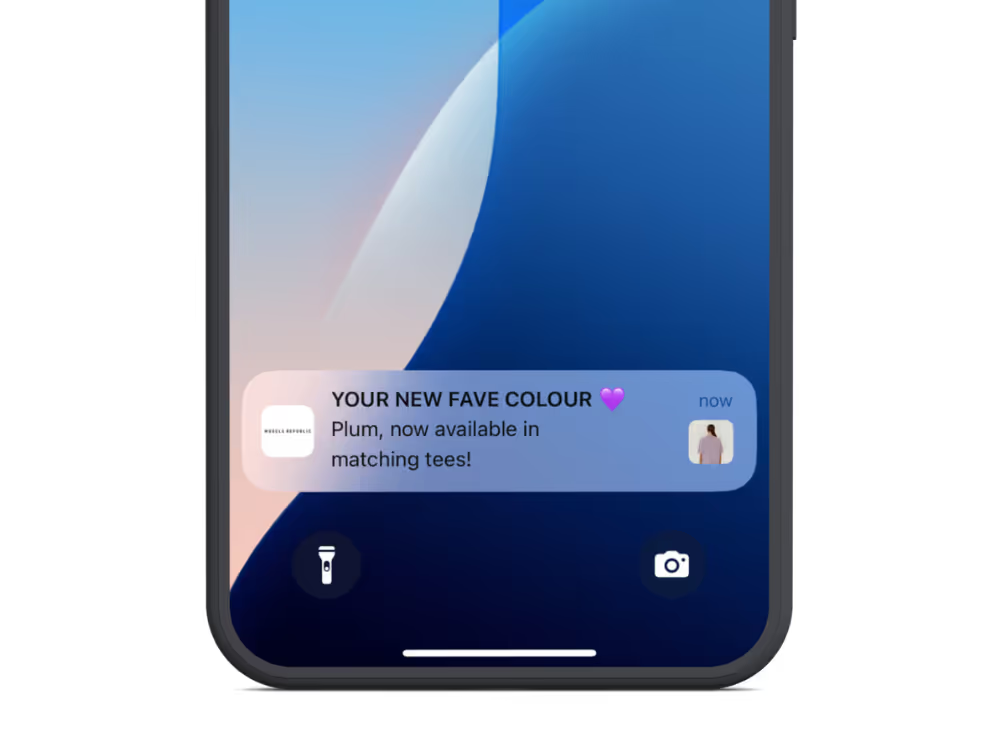
.avif)
.webp)