Author: Vendrux

  • Best Practices for Mobile Ecommerce Sites

    Best Practices for Mobile Ecommerce Sites

    Mobile is quickly becoming the favorite way for most people to shop, overtaking physical retail and traditional eCommerce. If you haven’t yet embraced mobile, you’ll quickly fall behind.

    Your site needs to be optimized for mobile commerce now, not later. The tips and best practices in this post show you how.

    Did you know that mobile app users spend more, shop more frequently, and convert at a 3x higher rate than mobile web users? Check out our eCommerce App Revenue Calculator to see just how much you stand to gain by launching an app.

    15 Best Practices for Mobile Ecommerce Websites

    If you’re an eCommerce site owner, you need to follow these best practices if you want to get the most out of your mobile visitors.

    These mobile eCommerce best practices are broken down into four categories.

    • Technical best practices, which cover the backend of your site.
    • UI best practices, covering the look and feel of your store on mobile devices.
    • UX best practices, which is how the user journey functions for mobile users.
    • Operational best practices, regarding how your business approaches mobile optimization.

    Let’s get into it.

    Technical Best Practices

    Here are a few technical best practices to follow for mobile eCommerce websites.

    1. Make sure your site is fast

    Speed is the first, and possibly most important thing when it comes to mobile optimization.

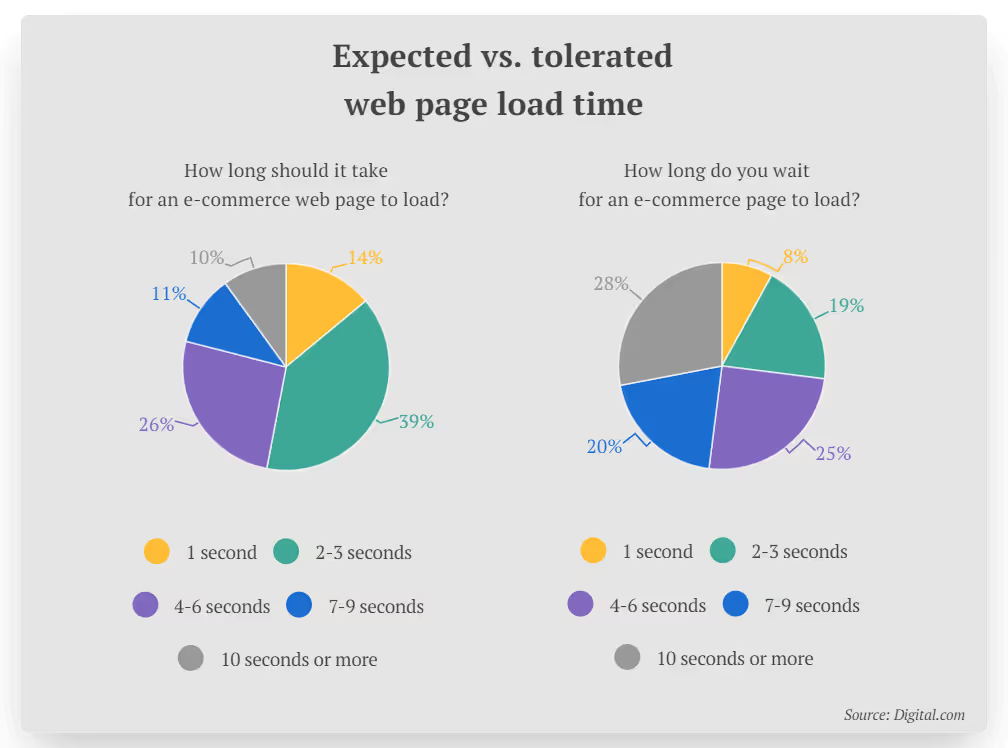
    53% of website visitors expect an eCommerce site to load in 3 seconds or less. On top of that, 1 in 2 online shoppers will abandon their cart if the website they’re on is slow to load.
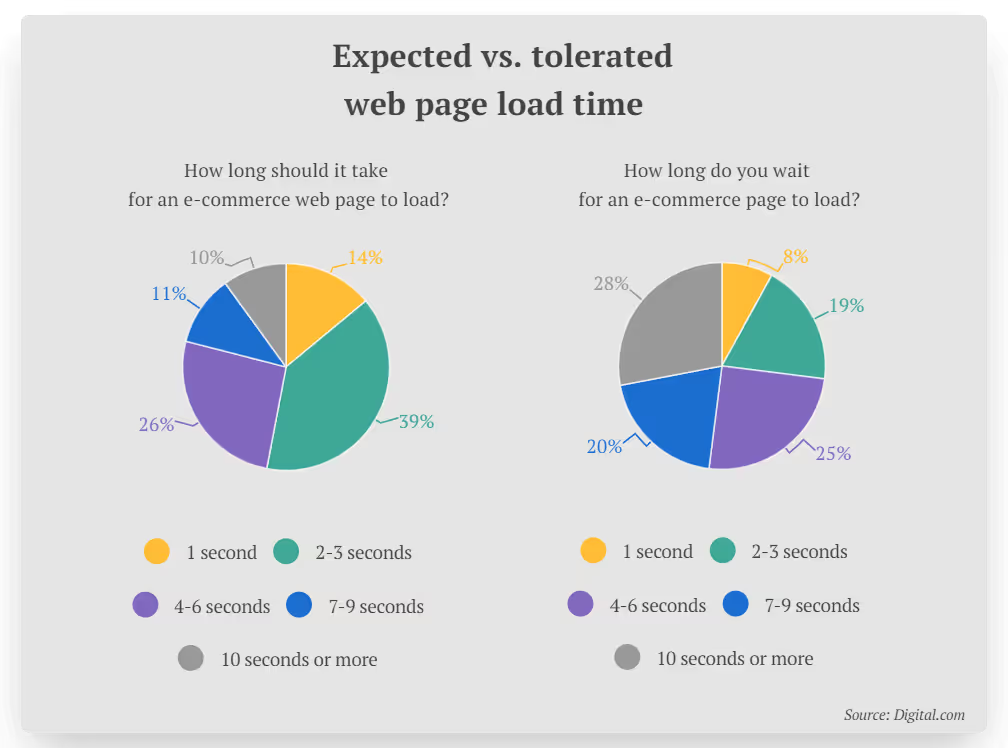
    Image via Digital.com

    We expect things online to happen instantly, or at least close to it. The benchmark for site speed has shortened massively since the dial-up age.

    These statistics are for all website visitors, mobile and desktop. We can assume that users’ expectations are even shorter on mobile, where convenience is prioritized.

    Mobile devices have less processing power than desktop and laptop PCs as well, so if you don’t take care to optimize your site speed, it’s going to be a tough time for your mobile visitors. You can guarantee that these people will jump ship and go somewhere else if they have to wait too long.

    2. Optimize your images

    Large image files are one of the most common reasons for a slow website. If you have site speed problems, start here.

    Try using a plugin or app to scale down your image files, as well as using a CDN and lazy loading to further optimize speed.

    The right image formats matter too. WebP images are optimal for mobile devices, with file sizes 25-34% smaller than JPGs.

    Mobile UI Design Best Practices

    Now let’s look at some best practices to follow for UI (user interface) design for mobile eCommerce websites.

    3. Use space effectively

    When you’re dealing with a smaller screen size, how you use space is vital.

    A lot of poorly designed mobile UIs make one of two mistakes. They either try to squeeze too much onto the page, making the UI messy and cluttered on a smaller screen, or they go the other way and leave huge pockets of empty space, glaringly obvious when you’re on a small screen.

    You need to find an ideal balance between too much and not enough white space. Enough space to let the design breathe, but not so much that your attention is drawn to the space, instead of the content.

    Space is particularly important around clickable elements. Misclicks (or mistaps) are extremely frustrating –  you mean to tap on one button or element, but end up hitting a different one and going to the wrong place. The result of a mistap can be so frustrating it causes the visitor to leave your site altogether.

    Allow enough space between buttons and clickable elements (e.g. dropdowns, clickable labels, close buttons on modals/popups) to avoid mistaps and make things easy for your visitors.

    4. Pay close attention to hierarchy

    When you convert a desktop site to mobile, make sure you wind up with the correct hierarchy. 

    On desktop, you might have several pieces of information on one screen – e.g. filters, results and sorting criteria on category pages, or images and product information on a product page.

    Yet on mobile, this will be condensed to where the user sees one part of the page and sees more as they scroll. With this setup, it’s important that the order of the elements on the page (i.e. the hierarchy) is correct.

    You don’t want your product page to show sizing information first, then the Add to Cart button, then related products, then the actual product images and name. This can easily happen if you rely on automatic mobile responsiveness provided by your theme or eCommerce platform.

    You need to put greater importance on the area above the fold in a mobile UI. This space is limited, and you need to grab your visitor’s attention right away. On product pages, for instance, you’ll usually want your images to show first, then pricing and product information.

    I always like to default to how Amazon does things when looking at eCommerce website best practices. See how their product pages make good use of visual elements first, before sizing, product information, pricing, etc.

    5. Put search bar above the fold

    Your UI needs to make it easy for visitors to get where they want to go. That’s why your website’s search functionality is key.

    On your homepage in particular, make sure you’ve got a search function and that it’s prominent and easy to find without having to scroll.

    On mobile, people will go straight for the search more than desktop, where they may be more likely to use the main navigation to find what they want. If the search function is hidden too deep, you’re going to lose some people right away.

    6. Enable touch interactions

    It’s important to embrace the differences that come with mobile touch screens. The way you navigate and perform actions on a touch screen is vastly different to using a mouse and keyboard.

    Work these differences into your mobile UI design. Let users swipe between images. Enable pinch and double tap gestures to zoom in on product images.

    Feedback for tappable elements is another plus, such as a tiny vibration when the user hits something interactive (e.g. a call to action button).

    On the flipside, get rid of any interactions that don’t make sense on a touch screen, such as hover animations, replacing them on mobile with something more touch-friendly.

    7. Prioritize one-handed interactions

    We know a lot about user behavior on mobile devices, and e-commerce sites should use this information to provide a more convenient UX.

    For one thing, 61% of people between the ages of 18 and 34 say it’s important to be able to use a website with one hand.

    We’re conditioned to using our phone with one hand, while using the other hand for something else (holding a drink, scratching your head, etc). Most people cradle the phone with four fingers and use their thumb to interact with the content.

    Image Source

    Clickable or tappable elements should always be within reach of the user’s thumb. It gets frustrating for the user if they constantly need to adjust their hand placement to interact with your site. This can lead to people abandoning your site and going to a competitor with a better mobile UI. 

    Mobile UX Design Best Practices

    Now let’s run through a few of the most important mobile user experience design best practices.

    8. Customize menus & navigation for mobile

    Your menus and navigation will need to be changed up for mobile. We’ve mentioned already that it’s extremely frustrating when the visitor can’t get where they want to go, which is not always obvious on mobile websites.

    Most eCommerce sites’ desktop menus rely on hover animations, which is one thing that needs to change on a mobile device. But fitting all this information into a smaller, touch-optimized menu can be difficult.

    You’ll most likely want to use a hamburger menu on mobile to replace this. This must be clean, intuitive and easy to navigate.

    The main nav menu is also permanently visible on most desktop sites, whereas this doesn’t make sense for mobile screens. You’ll want to provide some kind of breadcrumbs or mini navigation on product pages to make it easy for users to go back or get around after they view a product.

    A hamburger style menu in action from John Varvatos

    9. Make important pages easy to reach

    Staying on the top of navigation, certain parts of your site, such as the home page, account and cart/checkout need to be easily and obviously reachable.

    The more you make people think about how to find these areas, the more likely they’ll abandon your site. This can be disastrous. If a user’s already added products to their cart and they want to check out, you need to make it as easy for them as possible.

    The cart, checkout and home pages should all be reachable from any page, in one click. An app-like bottom menu is a great way to achieve this on mobile, as in this example from VERO MODA:

    10. Minimize and optimize text inputs

    Typing is more time-consuming on mobile, so you want to minimize the need for text inputs wherever possible.

    You will need text inputs in some places, so enable autocomplete and auto suggest to make this smoother and faster.

    On top of this, make text inputs easier by optimizing the keyboard for the type of input. If the input is numerical, such as a phone number or credit card details, show a numeric keyboard to make this faster and more intuitive for the user.

    Image Source

    11. Simplify the checkout process

    Reducing friction in your checkout flow is one of the most effective ways to improve your mobile user experience.

    Checking out is usually more difficult and more frustrating on mobile, which is probably why the average conversion rate on mobile eCommerce sites is half the average CVR on desktop.

    So how can we make this easier? Minimizing the amount of text input needed is one thing. Allow users to create an account and save their details and don’t ask for any unnecessary details – or at least, make these fields optional (and make it clear what’s optional and what’s required).

    Consider adding a progress bar to your checkout flow, to make it clear how far the user is through the process.

    You should also give users the option to save their cart and finish the checkout process on desktop, which a lot of mobile shoppers prefer to do.

    12. Integrate with mobile payment solutions

    Another way to drastically improve your checkout flow is integrating with payment methods like Google Pay, Apple Pay and PayPal.

    These payment options not only make it easier for users to check out and pay, they also increase trust and decrease the hesitancy shoppers feel about giving over their card details to a site they don’t know.

    Operational Best Practices

    Finally let’s touch on a few more holistic tips regarding how you approach mobile optimization for your eCommerce store.

    13. Keep it consistent across mobile and desktop

    Though you definitely need to change things up for mobile, ultimately your mobile and desktop sites should still look and feel consistent.

    Your store shouldn’t look completely different depending on what platform you view it on. The branding should be the same, and the navigation and site structure should be very similar too. You’ll have some customers who initially find you on one platform, shop around a bit, and come back later on another platform, so make it easy for them to get around and orient themselves.

    It should come as a given that product information and backend data – pricing, user logins, cart  and order information for example – should all be the same for mobile and desktop too. 

    14. Design for mobile first

    With many sites now serving more mobile users than desktop, it makes increasing sense to switch it up from the traditional way we design websites and design for mobile first.

    It makes perfect sense to build primarily for whichever segment makes up a majority of your users. And it’s easy to tell a site built with mobile users front of mind, versus a desktop site squeezed into a mobile screen.

    15. Turn your site into an app

    As much effort as you put into mobile optimization, there’s a limit for how much you can achieve while working within the browser.

    If you’re really serious about mobile eCommerce, you need an app.

    An app lets you make full use of the limited screen size on mobile by removing the outline of the mobile browser. This also removes the distraction of other sites open in other tabs, which lead to users abandoning their carts or leaving your site without making a purchase.

    Having an app also gives you full use of push notifications (the most powerful and most cost-effective communication channel for eCommerce), provides a big boost in key metrics like average order value, conversion rate, and retention, and lets you get your brand into the app stores.

    You don’t need to go all out and create a custom app from scratch. Just converting your mobile website, assuming you’ve followed all the mobile eCommerce best practices listed above, is enough to provide an awesome app experience.

    The State of Mobile Commerce in 2026

    The mobile commerce market is currently worth over $400 billion in the US. Mobile commerce sales are projected to reach $710 billion within the next two years.

    M-commerce is growing at a huge rate. The increased convenience is leading to more users, who spend more and shop more often.

    It’s not just eCommerce, it’s prevalent across the entire web. More internet traffic today comes on mobile than desktop, over 60% of Google searches happen on mobile and 15% of Americans only use smartphones to go online.

    Today, you can’t afford not to be mobile-friendly and mobile-optimized. If you’re offering a sub-par mobile user experience, you’re basically disregarding half (or more) of your audience.

    On top of this, the standard for mobile-optimized websites is constantly going up, so what would have felt like a mobile-friendly site a few years ago may now be significantly below average.

    Ignoring mobile commerce today is like being a physical store and ignoring eCommerce ten years ago. Don’t be left behind.

    Launch an App to Maximize Mobile Revenue

    The best way to fully optimize your business for mobile commerce is to launch an app.

    Most people prefer to go online and shop using apps. We spend 90% of our time online on mobile using apps, over browsers. They just offer a better user experience.

    App users spend more time in your store, they view more products (4.2x more per session), they convert at a higher rate (3x higher than mobile websites), and spend 10% more per order.

    Best of all, app users are much more likely to come back and shop again, since you have a direct line to a customer when they install your app on their phone.

    Mobile commerce apps are the best way to capitalize on the mobile shopping boom, and provide a mobile e-commerce experience that reflects well on your brand.

    How to Do It (Without Spending Megabucks)

    Custom eCommerce mobile apps can take hundreds of thousands of dollars to build, take up 6 months to a year of your time, and take a ton of money and effort to maintain.

    But converting your eCommerce store into an app is easy and affordable with Vendrux

    Vendrux converts your mobile site and all its features into Android and iOS apps, with no technical work required on your end. Your apps and website will be 100% in sync, which means that any changes you make to your site relay automatically to your apps.

    Vendrux works with any eCommerce platform (including Shopify, WooCommerce, BigCommerce and any custom-built eCommerce sites) and lets you launch an app and get in the app stores in less than a month.

    David Cost from Rainbow Apparel said of Vendrux;

    “The expense isn’t that big, and operationally, there’s not that much we have to do for the app. It’s a no-brainer, especially when you add push notifications on top. You’re essentially offering an app for free.”

    If you add in the benefits of getting into the app stores and using push notifications to drive up revenue and retention, there’s zero reason not to launch your own app once you realize how easy it is to do this with Vendrux.

    Getting Started

    To get an idea of how easy it is, get a free preview of your app and book a free, personalized demo. You’ll see how the process works and view a working preview of your app right away.

    You’ll be shocked at how fast you can get a live mobile app that your users can download, and how little work it adds to your workflow.

    Book a demo now and maximize your mobile commerce revenue today.

  • 40+ Mobile Commerce Statistics (2026): Sales, Trends, and Market Data

    40+ Mobile Commerce Statistics (2026): Sales, Trends, and Market Data

    Mobile commerce is no longer an emerging trend. It’s how most of the world shops.

    But the data landscape is messy. Stats get recycled from outdated reports, sourced from aggregator sites, or stripped of context. This article pulls together the most current, verifiable mobile commerce data available, sourced directly from Statista, eMarketer, Adobe Analytics, Sensor Tower, and other primary research.

    We update this page regularly. All figures include their source and year so you can cite them with confidence.

    Want weekly insights into how 8 and 9-figure brands are driving sustainable growth? That’s what you get with our value-packed newsletter, The Retention Edge. Subscribe for free today.

    What Is Mobile Commerce?

    Mobile commerce (m-commerce, or mCommerce) refers to any commercial transaction completed on a mobile device, typically a smartphone or tablet. This includes purchasing products through a mobile browser or app, mobile banking, mobile payments, and digital wallet transactions.

    For the purposes of this article, we focus primarily on retail mobile commerce: people buying products and services on their phones.

    Our Top Curated Mobile Commerce Statistics

    Data is the best way to understand a growing market, trend or phenomenon. That’s why we’ve trawled through a number of sources to come up with the best pieces of data that explain the state of mobile commerce today.

    Here are our top m-commerce statistics, along with an explanation for what these data points mean in context.

    US Mobile Commerce Sales

    US mobile commerce nearly tripled between 2019 and 2024, from $221 billion to $564 billion. By 2027, it’s projected to approach $860 billion.

    It’s grown from a niche channel to a half-trillion-dollar market in under a decade.

    Year US M-Commerce Sales
    2019 $220.67B
    2020 $321.97B
    2021 $377.73B
    2022 $431.61B
    2023 $491.14B
    2024 $564.06B
    2025* $647.95B
    2026* $744.71B
    2027* $856.38B
    *Projected. Source: Statista/eMarketer

    Mobile Commerce as a Share of US Ecommerce

    Mobile’s share of total US ecommerce sales has also been climbing steadily:

    The US is closing in on the tipping point where mobile accounts for more than half of all online sales. Holiday shopping data (which we’ve also covered below) suggests it may get there sooner than projected.

    Mobile Commerce as a Share of US Total Retail

    Looking at all retail sales (including brick-and-mortar), mobile commerce still represents a smaller but fast-growing slice:

    • 2022: 6.9% of total US retail sales
    • 2024: 7.4% of total US retail sales (Statista)
    • 2025: 10.4% of total US retail sales (Statista)

    For reference, total US ecommerce (desktop + mobile) accounted for 16.1% of all retail sales in 2024 (US Census Bureau). Mobile alone is projected to surpass 10% for the first time in 2025.

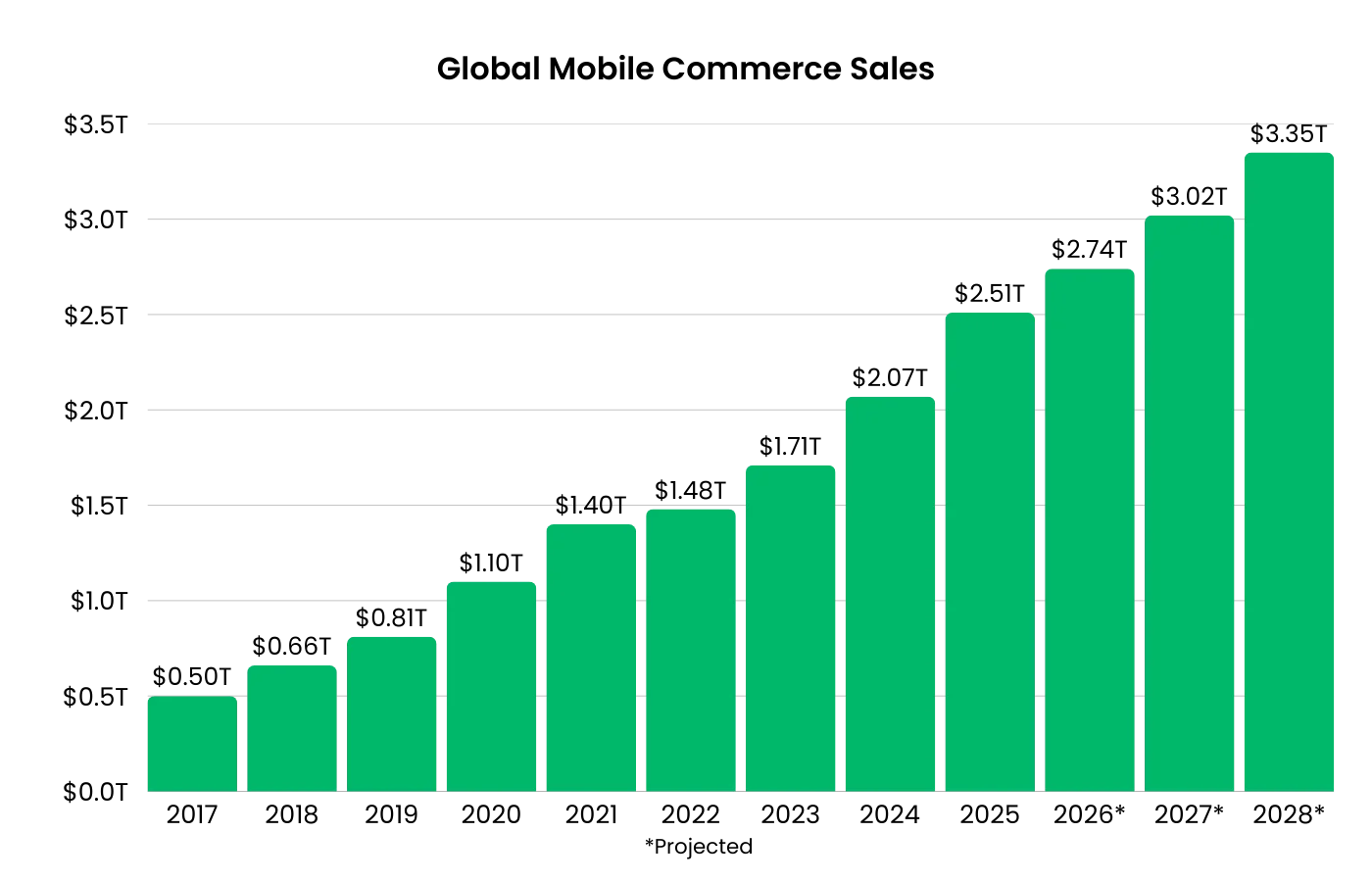
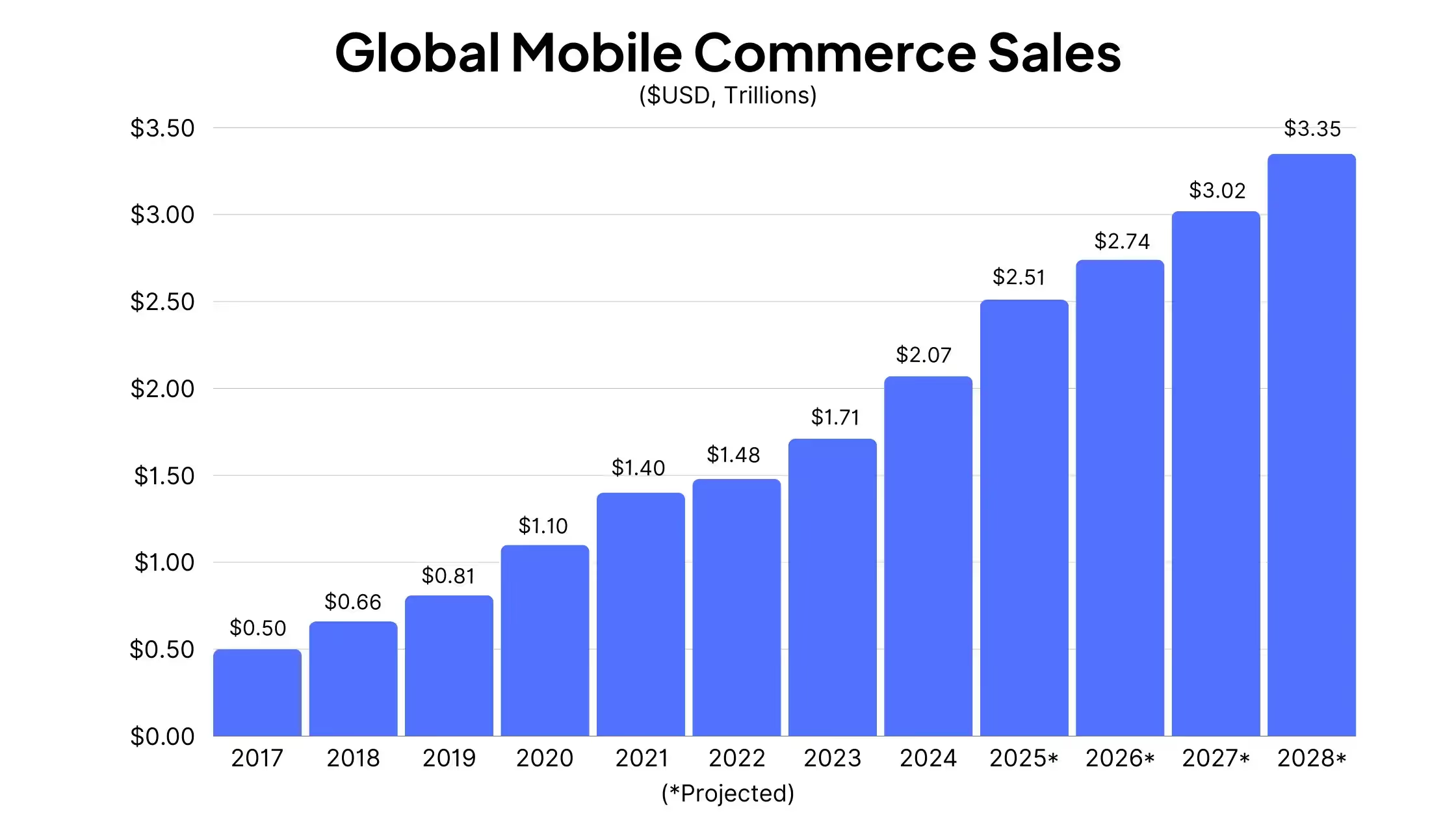
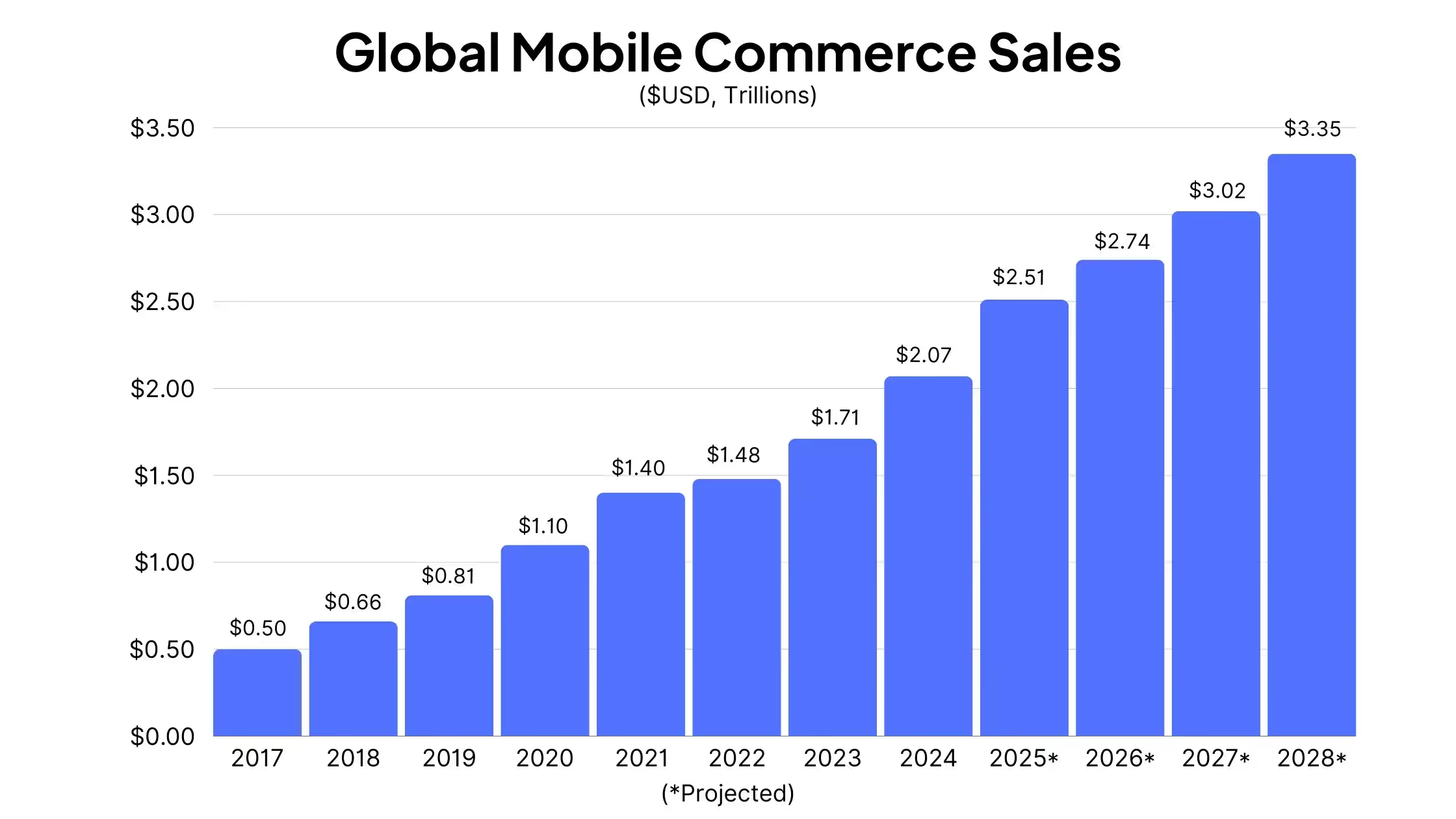
    Global Mobile Commerce Sales

    The global picture is even more mobile-dominated, driven by markets in Asia-Pacific where mobile-first shopping is the norm.

    Year Global Sales YoY Growth
    2017 $0.50T
    2018 $0.66T +32.0%
    2019 $0.81T +22.7%
    2020 $1.10T +35.8%
    2021 $1.40T +27.3%
    2022 $1.48T +5.7%
    2023 $1.71T +15.5%
    2024 $2.07T +21.1%
    2025* $2.51T +21.3%
    2026* $2.74T +9.2%
    2027* $3.02T +10.2%
    2028* $3.35T +10.9%
    *Projected. Source: Statista via Oberlo

    Global mobile commerce has more than quadrupled since 2017. The average annual growth rate from 2017 to 2028 is projected at 19.2%.

    Note the dip in 2022 growth (+5.7%), likely a normalization after the pandemic-fueled acceleration of 2020-2021, followed by a strong rebound in 2023-2024.

    Mobile Commerce as a Share of Global Ecommerce

    Year Mobile Share of Global Ecommerce
    2017 40%
    2018 43%
    2019 46%
    2020 48%
    2021 49%
    2022 52%
    2023 54%
    2024 57%
    2025* 59%
    2026* 60%
    2027* 62%
    2028* 63%
    *Projected. Source: Statista

    A key detail: the US significantly lags the global average. While mobile accounts for 57% of ecommerce globally, it’s only 44.6% in the US. Markets in Asia-Pacific are well above 60%.

    This suggests the US has significant room for mobile commerce growth.

    Mobile app users spend more, shop more frequently, and are more loyal to your brand. Use our Ecommerce App Revenue Calculator to see just how much you stand to gain by launching an app.

    Mobile Dominates Ecommerce Traffic

    One of the most important dynamics in mobile commerce is the gap between traffic and transactions.

    But Mobile Converts Lower Than Desktop

    Despite dominating traffic, mobile lags behind desktop on conversion rates:

    • Mobile conversion rate: ~2.0%
    • Desktop conversion rate: ~3.0-3.9%

    Sources: eMarketer, Smart Insights

    Desktop consistently converts 1.5 to 2x higher than mobile web. The result: mobile drives three-quarters of visits but a smaller share of revenue. This traffic-to-conversion gap is one of the central challenges in ecommerce today.

    Global Web Traffic by Device

    Looking at all web traffic (not just ecommerce), here’s the share of mobile vs desktop traffic:

    • Global: 62-64% mobile, ~35% desktop, ~2% tablet (Statcounter, Jan 2026)
    • US: 43% mobile, 57% desktop (Statcounter)
    • UK: 54% mobile, 46% desktop
    • Canada: 47% mobile, 53% desktop

    The US is notably desktop-heavy compared to the global average, likely due to higher rates of laptop/desktop ownership and workplace browsing.

    Key Holiday Mobile Stats

    The 2025 holiday season provided some of the strongest evidence yet that mobile commerce is becoming the default shopping channel. Adobe Analytics, which tracks over 1 trillion visits to US retail sites, reported record mobile penetration across every major shopping day.

    • Full holiday season (Nov 1 – Dec 31): Mobile was 56.4% of all online sales, up from 54.5% in 2024 (Adobe)
    • Thanksgiving 2025: Mobile crossed 60% for the first time, reaching 61.6% of online sales
    • Black Friday 2025: Mobile drove 52-57% of purchases; total online sales hit a record $11.8 billion (Adobe via Nasdaq)
    • Cyber Monday 2025: Mobile was 57.5% of online sales; total hit $14.25 billion (a record) (Adobe)
    • Christmas Day 2025: The highest mobile penetration of the season at 66.5% of online sales

    The total holiday online spend reached $257.8 billion, up 6.8% year-over-year.

    Check out more Black Friday Statistics here.

    BNPL on Mobile

    Buy Now, Pay Later saw massive mobile adoption during the 2025 holidays. Smartphones drove 82.2% of all BNPL purchases during the season, reinforcing that impulse and flexible-payment purchases are overwhelmingly mobile-first (Adobe).

    Mobile App vs Mobile Web Stats

    Not all mobile commerce is equal. There’s a significant performance gap between shopping in a native app versus a mobile browser.

    Conversion Rates

    • Mobile apps convert at approximately 3.5%, compared to ~2% for mobile web, roughly 3x higher (BuildFire, Criteo)
    • App users view 286% more products per session than mobile web users (22 vs. 5.7 products) (Criteo)

    Engagement

    • Shoppers spend 201.8 minutes per month in shopping apps vs. 10.9 minutes on mobile shopping websites (data.ai). That’s roughly 18x more time.
    • Globally, consumers spent 41.9 billion hours in shopping apps in 2024, up 7.4% year-over-year (Sensor Tower)

    Revenue Split

    • 54% of all mobile commerce transactions happen in apps, compared to 46% via mobile browsers (JP Morgan)
    • Average order value in apps: ~$95, compared to ~$73 on mobile web (industry benchmarks)

    Shopping App Growth

    • Shopping app installs grew 70% overall and 123% on iOS in 2025 (AppsFlyer)
    • 69.4% of internet users have shopping apps on their phones (Datareportal)
    • 70% of mobile purchases occur through ecommerce apps rather than mobile browsers (DemandSage)

    Mobile Payments and Digital Wallets

    Mobile payments have gone mainstream. Digital wallets are now the most popular online payment method globally.

    • Digital wallets account for 53% of global online purchases (Statista)
    • Digital wallets handle 31% of in-store transactions globally, and growing
    • Apple Pay: 60 million US users (21.2% of the population) in 2024, projected 63.9 million in 2025; 744 million users globally (Chargeflow)
    • Google Wallet: 48.59 million US users (14.5%) in 2024, projected 50.94 million in 2025 (Chargeflow)
    • 27% of US consumers used mobile wallets on Cyber Monday 2025 (Adobe)

    Mobile Shopper Demographics

    How Many People Shop on Mobile?

    • Globally: Approximately 1.65 billion people will shop on mobile devices in 2025 (Statista)
    • US: Over 200 million adults (76% of the adult population) have made a purchase on their smartphone (Shopify)
    • US weekly: 32% of US adults shop on their smartphone at least weekly (Shopify)
    • Global weekly: 29.9% of online shoppers purchase on mobile weekly (Statista)

    Who Shops on Mobile?

    • 92% of mobile shoppers in the US are under 50 years old (Shopify)
    • 73% of consumers say they prefer shopping on their phone (Cropink via DemandSage)

    Three out of four consumers say they buy on mobile to save time (Dynamic Yield)

    The Mobile UX Problem

    Despite the growth in mobile shopping, the experience still has friction:

    • Only 12% of consumers find mobile web shopping “convenient” (Dynamic Yield)
    • 67% of mobile shoppers cite “pages and links too small to click” as a barrier (Dynamic Yield)
    • 57% of consumers won’t recommend a business with a poorly designed mobile site (Sweor)
    • Mobile cart abandonment sits at roughly 78-83%, compared to 67-70% on desktop (XP², SaleCycle, Contentsquare)

    That gap, roughly 10 percentage points, adds up fast at scale. If your mobile checkout converts even a few percent lower than desktop, you’re leaving significant revenue on the table given that mobile accounts for 75%+ of your traffic.

    Mobile App Market and Usage

    Time Spent in Apps

    • Consumers spent 5.3 trillion hours on mobile apps in 2025, up 3.8% year-over-year (Sensor Tower)
    • The average user spends 3.6 hours per day in apps globally (Sensor Tower)
    • In the US, smartphone users average 5 hours 16 minutes per day on their devices (Backlinko)
    • 94% of mobile time is spent in apps; only 6% is in browsers (Sensor Tower)

    App Revenue

    • Global in-app purchase revenue reached $167 billion in 2025, up 10.6% year-over-year (Sensor Tower)
    • For the first time, non-gaming apps ($85.6 billion) surpassed gaming apps ($81.8 billion) in consumer spending (Sensor Tower)
    • US consumers alone spent approximately $60 billion on apps in 2025 (Sensor Tower)

    Mobile App Market Size

    What This Means for Ecommerce Brands

    The data tells a clear story – mobile is the #1 priority channel for today’s ecommerce brands.

    • Mobile dominates your traffic. Three-quarters of your ecommerce visitors are on their phones. During holidays, it’s closer to 80%. But if you’re plugged in, you’ll already know this.
    • Mobile web underperforms. Conversion rates are half of desktop. Cart abandonment is higher. Only 12% of shoppers find the mobile web experience convenient.
    • Native apps close the gap. Apps convert 3x higher than mobile web, see 18x more engagement time, and reduce cart abandonment rates. More than half of all mobile commerce transactions already happen in apps.

    The brands that are capturing mobile revenue aren’t just optimizing their websites for smaller screens. They’re meeting customers in native apps, where the shopping experience is faster, stickier, and far more likely to convert.

    Your Mobile Commerce Strategy for 2026

    For ecommerce brands looking to capture the most revenue from their mobile-first customers, here’s what you need to be building:

    • Mobile-first customer experiences. Assume the person landing on your website is doing so on their phone.
    • Checkout built for mobile. Mobile cart abandonment is higher largely due to friction in the checkout. Remove this friction; make it mobile-friendly.
    • Mobile-first content and merchandising. Your product pages, landing pages, and promotional content should be designed for the phone screen first, not adapted from desktop.
    • Communication and marketing that makes sense on mobile. Email, SMS, push – social ads and influencer marketing built around discovery and conversions on mobile.
    • Native mobile apps. The best mobile UX bypasses the browser completely, and gives your brand valuable real estate on the customer’s home screen.

    Vendrux helps you extend your website into a native app, giving you a powerful owned channel, built for mobile-first shoppers.

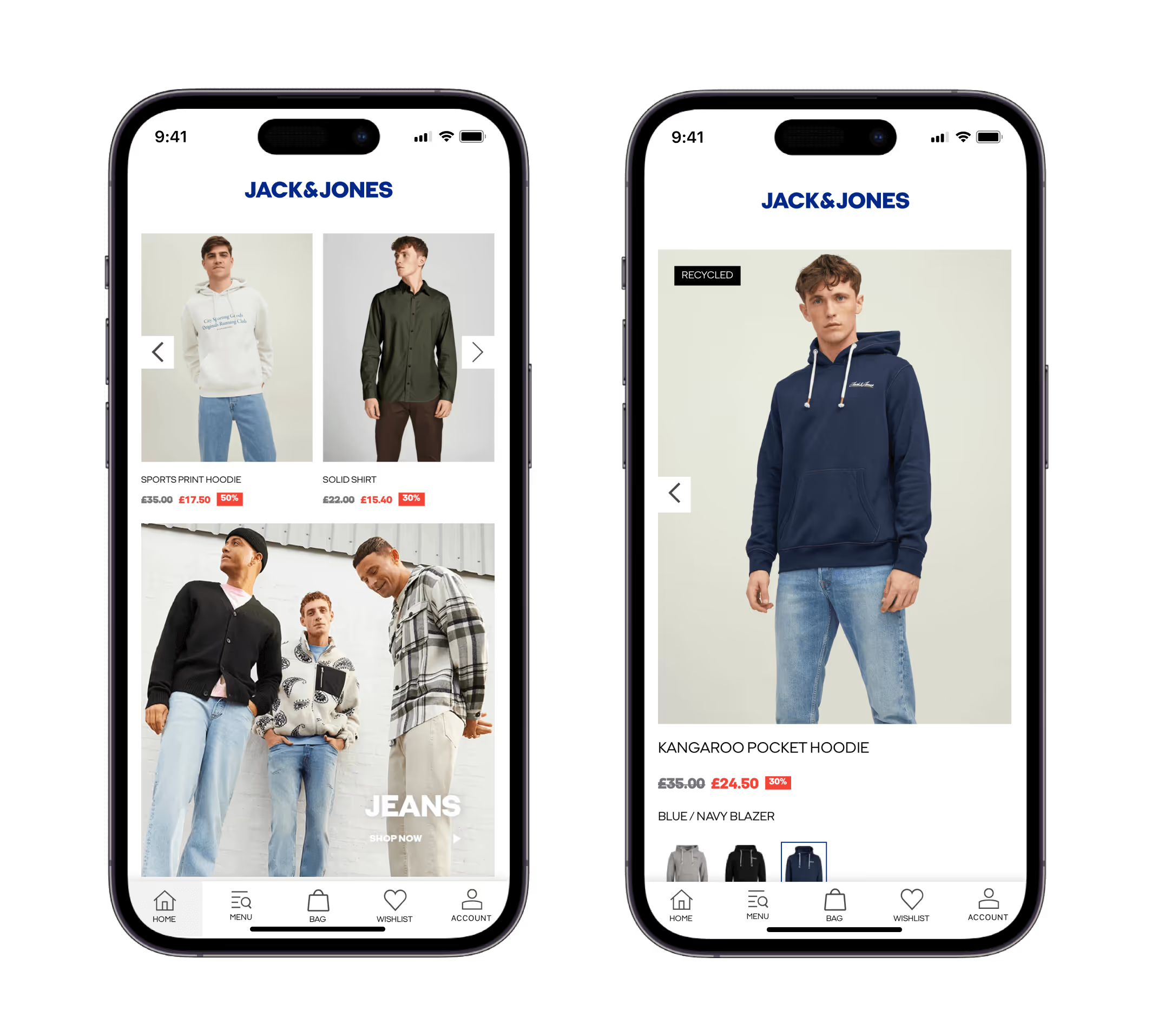
    Jack & Jones, an internationally-recognized app built with Vendrux

    It’s the risk-free way to launch a mobile app, with no dev team needed, no rebuilding, no managing a new platform parallel to your website.

    Vendrux has helped over 2,000 businesses, including many high-revenue ecommerce brands, launch their own mobile apps. Want to join them? Book a free strategy call to see if a mobile app is the logical move for your brand.

  • The Biggest and Best Mobile Commerce Platforms in 2026 (Web, Apps, and Social)

    The Biggest and Best Mobile Commerce Platforms in 2026 (Web, Apps, and Social)

    Most of your customers are shopping on a phone right now. They’re scrolling your site on the bus, abandoning their cart in line at a coffee shop, or watching a creator talk about your product inside TikTok.

    Mobile commerce, or any shopping and buying that happens on a mobile device, is the dominant surface in ecommerce. And there’s a big gap between brands who build for mobile, and those who treat it as secondary.

    Your mobile reach and user experience starts from the foundation you rely on; the mobile commerce platform(s) behind the scenes, powering your store on customers’ phones. 

    Keep reading and we’ll break down everything that goes into a powerful mobile commerce stack, from your website to other mobile-first surfaces that you need to be on.

    The Top Mobile Commerce Platforms in 2026

    We’ll dive deeper in a moment; first, here’s a quick overview of some of the top mobile commerce platforms running the world’s top ecommerce brands today:

    Platform Type Best for
    Shopify Mobile web The default for most DTC and ecommerce brands; native one-tap checkout with Shop Pay
    BigCommerce Mobile web Mid-market and B2B brands needing strong omnichannel and headless flexibility
    Adobe Commerce (Magento) Mobile web Enterprise and complex catalogs with a dev team to customize
    Salesforce Commerce Cloud Mobile web Enterprise retailers already on the Salesforce stack
    WooCommerce Mobile web WordPress-native brands and teams comfortable in the WP ecosystem
    Wix Stores Mobile web Small businesses and first-time stores wanting a drag-and-drop builder
    Squarespace Mobile web Design-led brands launching fast with a polished storefront
    Vendrux Mobile app Mid-market and enterprise brands looking for a full-service mobile app solution
    Tapcart Mobile app Shopify brands looking for a no-code, DIY app builder
    TikTok Shop Social commerce Content-driven brands with strong creator partnerships
    Instagram and Facebook Shopping Social commerce Brands already running Meta acquisition who want product tags on content
    Whatnot, Bambuser, CommentSold Live shopping Collectibles, fashion drops, beauty, and F&B with theatrical fit

    What Is Mobile Commerce, Really?

    Mobile commerce, or m-commerce, can be broadly defined as any commercial transaction that happens on a mobile device, typically a smartphone. 

    So that’s the stuffy dictionary definition. You can get that from ChatGPT.

    But what does it really mean? Because mobile commerce is more than just one channel – it’s an idea that spans every part of a buyer’s experience when they’re on their phone.

    This includes:

    Mobile web

    Your responsive ecommerce site, rendered on a phone browser. The mobile web is the largest single surface in mobile commerce – more people go online via mobile than desktop now, so the most likely way someone is going to find you is on the mobile web.

    Mobile apps

    Native iOS and Android shopping apps for individual brands and marketplaces. Another core mobile commerce channel. There are hundreds of billions of mobile apps downloaded each year, and a large number of these downloads come from shopping apps, from huge names like Amazon, Walmart and Temu, to independent DTC brands and retailers.

    Social and live shopping

    Buying directly inside TikTok, Instagram, Facebook, or a live-stream marketplace like Whatnot. Social/live shopping is the fastest-growing slice of mobile commerce, though it’s still smaller in the US than in China, where live commerce already drives a meaningful share of retail.

    Mobile payments and wallets

    Apple Pay, Google Pay, Shop Pay, PayPal one-click, and Buy Now Pay Later options like Klarna and Affirm. Digital wallets account for 53% of global online purchases (Statista). These are not “platforms” in the same sense, but they are core elements of the mobile commerce ecosystem.

    Why Mobile Commerce Is Where Brands Need to Win

    Mobile has officially become the way most people prefer to shop.

    75-77% of all ecommerce website traffic comes from a phone (Statista, SimilarWeb). During the holiday season, that figure has hit as high as 79% globally (Salesforce Shopping Index). 

    And it’s not just window shopping, but revenue too. 56.4% of all US online sales in the 2025 holiday season came from mobile, up from 54.5% the year before. On Thanksgiving Day, mobile reached 61.6%. On Christmas Day, 66.5%.

    The US has historically lagged the global average on mobile commerce share. Globally, mobile already accounts for around 57% of ecommerce sales (Statista). In the US, it’s roughly 44.6% of all ecommerce sales (eMarketer), with growth on pace to push past 49% by 2027. 

    But holiday data suggests the US is getting there faster than the forecasts assume.

    Whatever data you look at, it should be clear that mobile commerce is a major factor in ecommerce today – if not the factor.

    Ecommerce businesses should be building mobile-first. Not the other way around.

    The Best Mobile Commerce Platforms (Mobile Web)

    Now let’s take a look at the platforms powering mobile commerce today. We’re going to break it down into several different categories, covering the three major categories of mobile commerce: starting with your mobile ecommerce website.

    Shopify

    Shopify is the largest ecommerce platform in the US, powering roughly 2.8 million US stores and 4.8 million globally. It processes over $500 billion in GMV per year and reached 561 million unique customers in 2022.

    Mobile is where Shopify stands out the most. Every paid Shopify theme is responsive out of the box. Shop Pay, Shopify’s accelerated checkout, is one of the fastest one-tap mobile checkouts in ecommerce, and Shopify’s own data shows it converts up to 50% better than guest checkout. 

    For most brands, Shopify is the safest mobile web foundation you can build on.

    BigCommerce

    BigCommerce holds a smaller share of the overall market than Shopify but punches above its weight with mid-market and B2B brands. The platform includes capabilities other platforms charge for as apps: multi-currency, multi-storefront, B2B price lists, and advanced SEO are built in.

    For mobile, BigCommerce offers responsive themes and native mobile checkout, plus a more mature headless story than Shopify for brands building custom mobile front-ends via API. 

    If you’re a brand that needs flexibility on the front-end without leaving a hosted backend, BigCommerce is the strongest mobile web platform in its tier.

    Adobe Commerce (Magento)

    Adobe Commerce, formerly Magento, is the open-source platform behind a lot of the world’s complex ecommerce builds. It powers around 113,000 stores globally and shows up in roughly 9% of the top one million ecommerce sites by traffic, where you’d expect to find brands with B2B complexity, regulatory constraints, or catalogs in the tens of thousands of SKUs.

    For mobile web, Adobe Commerce supports progressive web app storefronts through PWA Studio, plus standard responsive themes for brands not going headless. It assumes you have a development team or partner agency on hand. The most flexible mobile web foundation on this list, with the highest cost of ownership to match.

    Salesforce Commerce Cloud

    Salesforce Commerce Cloud doesn’t show up in overall store count rankings, but it’s a major player at the enterprise end: roughly 8% of the top 10,000 ecommerce sites by traffic run on it. 

    These are mostly large, complex retailers that need tight integration between commerce, CRM, and marketing automation.

    For mobile, SFCC offers the Composable Storefront (formerly PWA Kit) for progressive web app builds and headless APIs for custom mobile front-ends. 

    It’s a powerful platform – the complexity and cost are overkill for independent DTC brands, but it’s a great fit for large organizations that need more than just a simple website builder.

    WooCommerce

    WooCommerce is an open-source WordPress plugin and the most widely used ecommerce platform globally, with around 4.3 million active stores. In the US it sits at around 14% market share, behind Shopify, Wix, and Squarespace, but among the top one million ecommerce sites by traffic its share jumps to 18%, closer to Shopify’s 29%.

    Every modern WordPress theme is responsive, and the plugin ecosystem covers Apple Pay, Google Pay, Stripe, PayPal, Klarna, and effectively every mobile payment method you’d want. 

    WooCommerce is the cheapest way to run a serious mobile-friendly store, provided you (or your team) are comfortable in WordPress. The flexibility is the point: if you can describe the feature, there’s a plugin or a custom build that gets you there.

    Wix Stores

    Wix has grown from a general-purpose website builder into the second-largest ecommerce platform in the US, with around 23% share and over a million stores. Its drag-and-drop visual editor makes it the easiest no-developer way to launch a mobile-friendly store.

    Wix Stores includes hosting, mobile-responsive templates, native Apple Pay and Google Pay integration, and a built-in mobile checkout. It’s particularly common among brick-and-mortar businesses adding an online sales channel for the first time. 

    There’s not as big of an ecosystem as Shopify or WooCommerce, but more than enough to run a clean mobile-friendly store at smaller scale.

    Squarespace

    Squarespace holds around 16% of the US ecommerce market, built on the strength of its design-first templates and a polished editing experience.

    When it comes to mobile, Squarespace templates are responsive by default, Apple Pay and Google Pay integrate natively, and the mobile checkout works cleanly out of the box. It’s primarily targeted towards creative businesses, artists, and brands where visual presentation matters most. Less depth on the integrations side than Shopify or WooCommerce, but easier to launch a beautiful mobile-friendly store on faster.

    Mobile Commerce Platforms (Mobile Apps)

    A mobile-friendly site is the baseline mobile commerce platform every brand needs (and, by now, has). It’s the first place a customer is going to find you, and the most important part of your mobile commerce stack.

    The part fewer brands have? A mobile app. Yet it’s another crucial part of a complete mobile commerce strategy.

    Here are the mobile commerce platforms driving this part of the ecosystem. 

    Vendrux

    Vendrux builds native iOS and Android apps powered by your existing website. 

    It works with every mobile web platform out there – including Shopify, BigCommerce, Adobe Commerce, Salesforce Commerce Cloud, WooCommerce, as well as fully custom stacks and legacy platforms. 

    As a mobile commerce platform, Vendrux lets you run a custom mobile app, without having to maintain a separate codebase. The platform comes with a dedicated team to manage your app, letting you be present on multiple facets of mobile commerce, without multiplying the work for your team.

    Tapcart

    Tapcart is a no-code mobile app builder for Shopify stores, and another platform for extending your mobile commerce strategy to a mobile app.

    Brands install it from the Shopify App Store, configure their app through a self-serve dashboard, and manage the day-to-day themselves. 

    It’s a long-standing name in the category, with brands like Princess Polly, BÉIS, and BruMate among its customers, and a focus increasingly on AI-driven personalization and in-app marketing. It only works with Shopify, but if that’s not a blocker, this (and other app builders on the Shopify App Store) is a solid way to launch a new mobile channel for your brand.

    Social and Live Shopping Platforms

    Mobile commerce isn’t only happening on your own surfaces. A growing share of mobile shopping starts (and increasingly finishes) inside the social apps where customers already spend hours a day. These aren’t replacements for your storefront, but they’re surfaces a serious mobile commerce strategy plans for.

    TikTok Shop

    TikTok Shop puts checkout directly inside the TikTok app. After a year of regulatory uncertainty, TikTok’s US operations formally transitioned to the TikTok USDS Joint Venture in January 2026 under American ownership, and TikTok Shop is operating in the US as part of that entity.

    TikTok Shop is a powerful channel for brands with content-driven discovery, strong creator partnerships, and a product mix that lends itself to impulse buys: beauty, apparel, supplements, food and beverage, accessories. It’s been one of the fastest-growing slices of mobile commerce since the US Shop rollout, and now that the ownership question has settled, it’s a more realistic channel to plan around.

    Instagram and Facebook Shopping

    Meta’s social shopping setup looks different than it did two years ago. As of September 2025, Shops on Facebook and Instagram in the US now redirect to your website for checkout rather than completing the transaction in-app (Meta). Native in-app checkout was retired.

    What’s left is still useful: product tagging in posts, Reels, and Stories that links customers directly to product pages on your site. It’s a low-friction product-tag layer on top of content marketing you’re already doing on Meta. 

    For brands running Meta as a primary acquisition channel, Shops is worth keeping live, but the dynamic has shifted from “buy without leaving” to “tap to land on the right page faster.”

    Live Shopping Platforms (Whatnot, Bambuser, and others)

    Live shopping is the format that’s been “about to break out in the US” for several years, and 2025 was the year it finally moved past pilot mode. Whatnot, the largest live-shopping marketplace in the US, drove over $8 billion in GMV in 2025, more than double the year before.

    Marketplaces like Whatnot are standalone platforms where shoppers come to discover and buy from many sellers at once; they fit collectibles, fashion drops, beauty, and trading cards particularly well. 

    On the other hand, white-label tools like Bambuser and CommentSold let brands embed live shopping directly into their own site or app, which keeps the customer relationship on your side of the wall.

    Live shopping is still smaller in the US than in China and other Southeast Asia markets, where it’s a meaningful share of total ecommerce. But the format is now real enough that brands in the right categories should at least be running it as an experiment.

    Putting Your Mobile Commerce Stack Together

    Mobile commerce is not just one channel. It’s not just your website; it’s not just your app or your TikTok livestream.

    It’s everything. It’s how you appear to customers on mobile, how you sell to these customers, and how you keep them engaged and keep them coming back.

    Here’s how you build a holistic strategy, tying multiple mobile commerce platforms together:

    1. Start with your mobile website. Whichever ecommerce platform you’re on, get the user experience dialed in for mobile. Mobile-friendly checkout, one-tap payment options, and a theme that’s fast and mobile-usable.
    2. Add a mobile app for your repeat customers. Your mobile website is the generalist: the channel built for new customers, and casual returning customers. The app is a home base for your VIPs. It’s easier for return customers, and can be optimized to provide the ideal experience for people who already know and love your brand.
    3. Layer social and live commerce if they fit your category. TikTok Shop, Instagram tags, and live drops are real channels for brands in the right verticals. Use them for discovery and acquisition, and to round out your mobile commerce strategy.

    The holistic approach is important because not all mobile shoppers are the same.

    There’s someone wasting an afternoon on TikTok, browsing livestreams. There’s someone putting a high-intent search into Google. There’s a loyal customer, window shopping the latest product drops on your site. There’s a consumable buyer coming back to re-up because they’re about to run out.

    Different buyers might come to you from different angles. It might be your website, it might be a livestream, or the ideal surface might be a mobile app.

    You need to be present everywhere.

    “Our apps never had any functionality or usability beyond the web experience. The reason to have an app is not to have something that isn’t on the website, but for people who prefer that way to access Rainbow content.”
    — David Cost, VP of Ecommerce at Rainbow Shops

    Final Thoughts

    Mobile is clearly the dominant surface in ecommerce today. And it’s a trend that’s unlikely to reverse.

    Success as an ecommerce brand is strongly tied to how well you can capture (and keep) mobile shoppers. The brands that still see ecommerce as desktop-first are going the same way as the dinosaurs.

    If you don’t want your business to become a fossil, it’s time to get serious about mobile. That means more than just having a responsive website that loads pretty fast; but having a website that feels like it was designed for mobile, and also having additional mobile commerce channels to complement your site, like a mobile app.

    If you don’t have an app yet, Vendrux makes it easy. No hiring developers, no juggling multiple codebases. You manage everything from your site, and still get to ship a custom, VIP-first experience, in an app that lives on your best customers’ phones.


    Get in touch and get a free app preview to see what’s possible, and learn everything you need to know about going live with your own branded app.

  • Mobile App vs Web App: What’s the Difference?

    Mobile App vs Web App: What’s the Difference?

    If you want to build an app and are trying to choose between building a web app vs mobile app, you’re in the right place.

    This article will give a clear definition of each, along with the key differences, pros and cons of web apps and mobile apps. It will also give you a definitive answer on which kind of app is best for your project.

    Read on for more!

    What is a Web App?

    A web app is a software application that’s accessed through an web browser. Web applications are built using web technologies, such as HTML, CSS, JavaScript, React, Python, etc. They can be accessed from any device with an internet connection, and they do not require installation.

    The code for a web application is stored on a remote server, which a web browser (e.g. Google Chrome, Firefox, Safari) accesses and delivers to the user when they input the app’s URL.

    The terms web app and website are sometimes used interchangeably, but typically a web app refers to a website with a high level of interactivity, as opposed to simply a static content site.

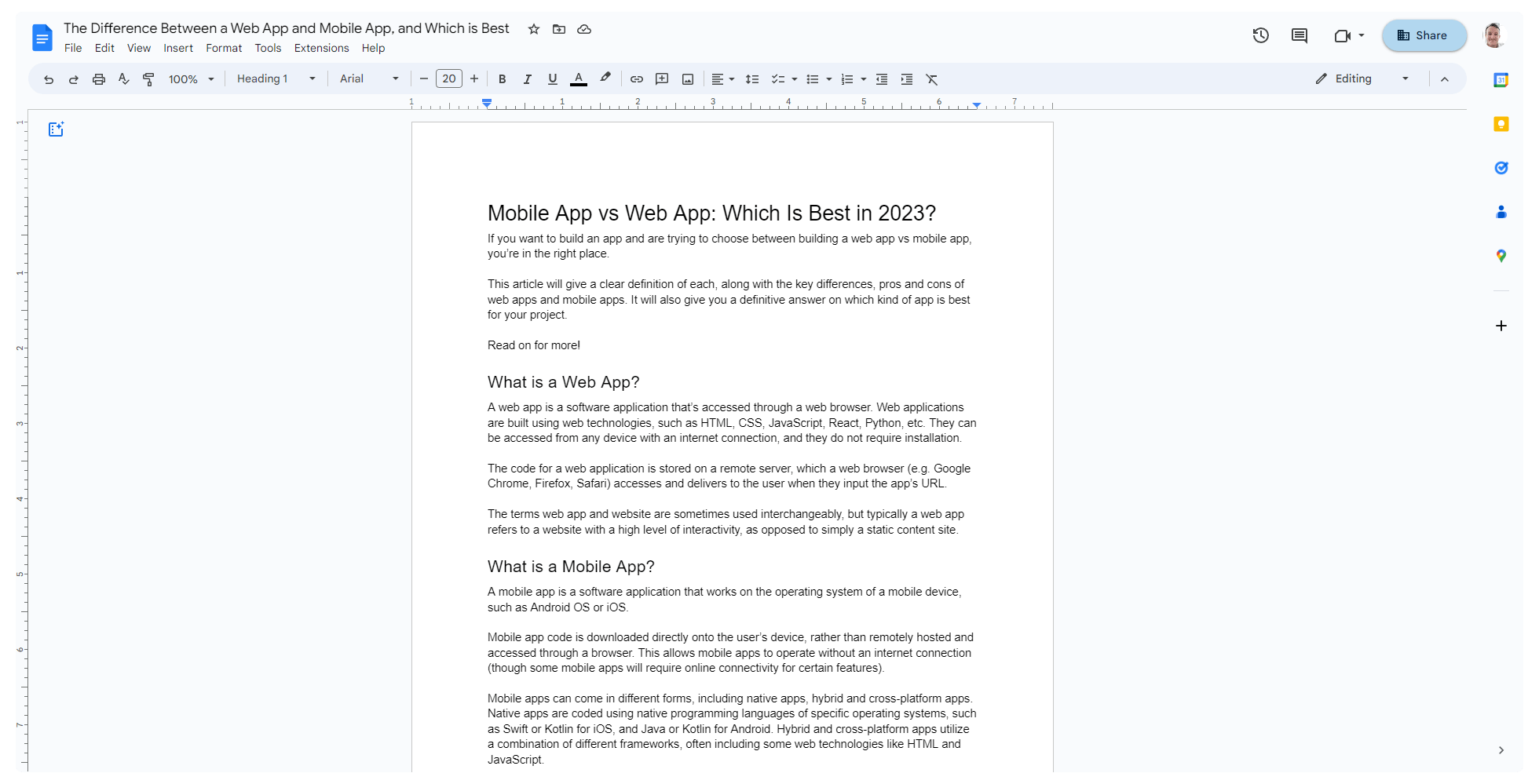
    Google Docs and Canva are two examples of web apps – interactive browser-based sites.

    This also includes Progressive Web Apps, which offer greater functionality and a mobile-like experience, while still running in the browser.

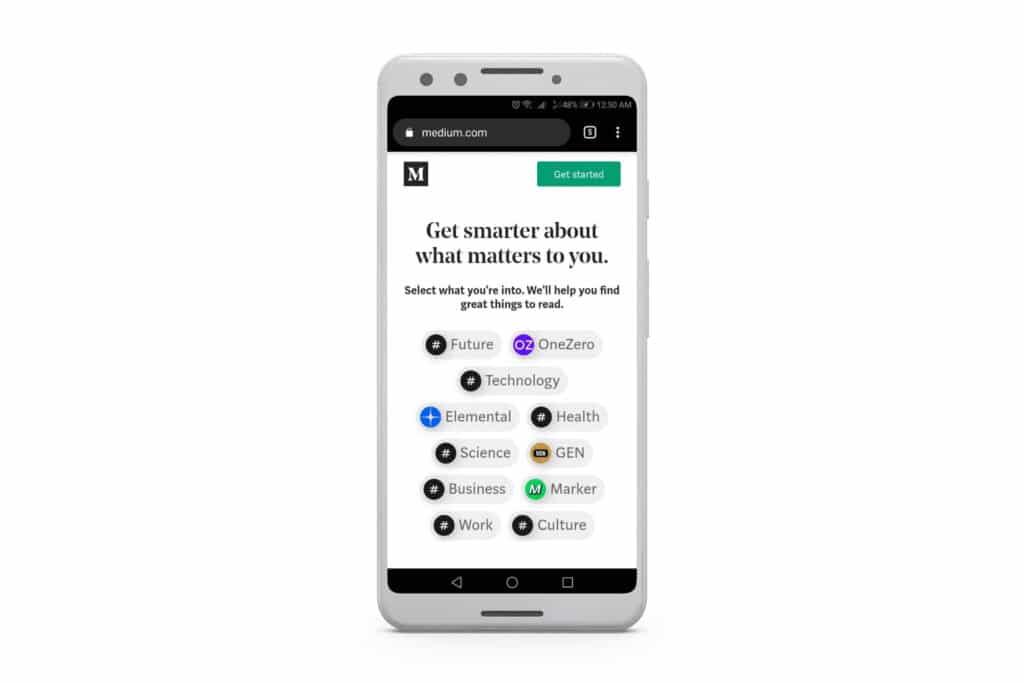
    Medium is an example of a Progressive Web App.

    To learn more about Progressive Web Apps, check out our ultimate guide.

    What is a Mobile App?

    A mobile app is a software application that works on the operating system of a mobile device, such as Android OS or iOS.

    Mobile app code is downloaded directly onto the user’s device, rather than remotely hosted and accessed through a browser. This allows mobile apps to operate without an internet connection (though some mobile apps will require online connectivity for certain features).

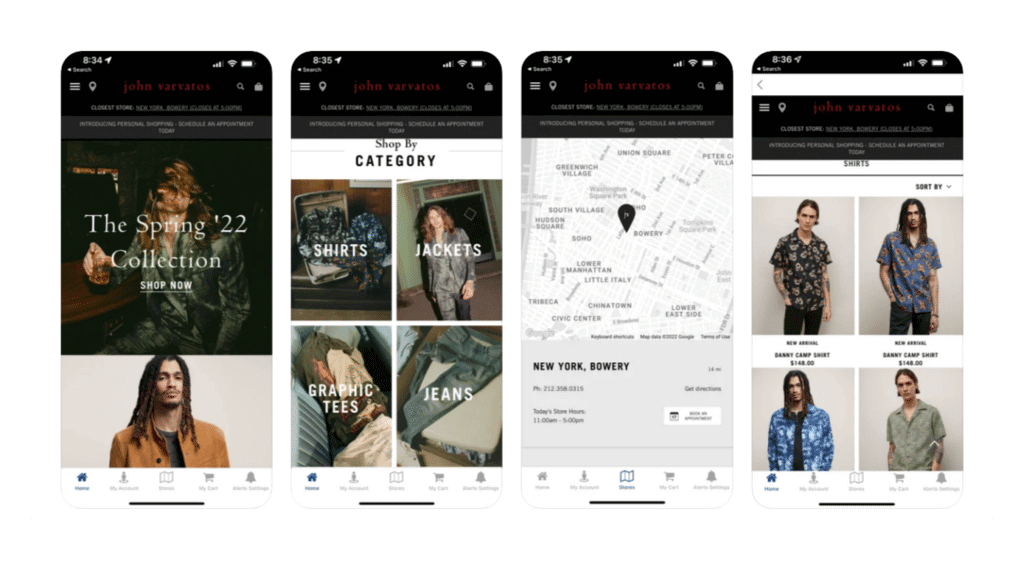
    The John Varvatos shopping app – an example of a mobile app

    Mobile apps can come in different forms, including native apps, hybrid apps and cross-platform apps. Native apps are coded using native programming languages of specific operating systems, such as Swift or Kotlin for iOS, and Java or Kotlin for Android. Hybrid and cross-platform apps utilize a combination of different frameworks, often including some web technologies like HTML and JavaScript.

    Pros and Cons of Mobile Apps vs Web Apps

    Here’s a short breakdown of the pros and cons of building mobile apps and web apps, from a business’ standpoint.

    Pros of Web Apps

    • Easy to develop and deploy.
    • Work on any platform with an internet browser and an active internet connection (desktop PC, laptop, mobile devices).
    • Easier and cheaper to update and maintain.
    • Web app development experience is easier to find than mobile developers.

    Cons of Web Apps

    • Don’t offer an optimal user experience for mobile users.
    • Web apps tend to be slow to run on mobile devices.
    • May not be as secure as mobile apps.
    • Engagement and retention is lower than with mobile apps.

    Pros of Mobile Apps

    • Offer a user-friendly, engaging and immersive experience on mobile.
    • Can provide offline functionality.
    • Can tap into mobile device features, such as GPS, camera, etc.
    • Allow businesses to send push notifications to app users on all devices.
    • Deliver higher engagement and retention.
    • Can be published and promoted on the Apple App Store and Google Play Store.

    Cons of Mobile Apps

    • Can be difficult to develop.
    • Mobile app development is generally expensive and time-consuming.
    • More difficult and expensive to maintain.
    • Native mobile apps require separate builds to serve different platforms/operating systems.

    Key Points of Difference Between a Web App vs Mobile App

    Let’s dive a little deeper into the pros and cons mentioned above, and how web apps and mobile apps stack up against each other.

    The key differences are in deployment, platform compatibility, and the investment required to build and maintain.

    Deployment

    Web apps are deployed via a mobile browser, while a mobile app has its code downloaded locally to the user’s device.

    That makes it easier for new users to access and use a web application. They can follow a link to the app or find it from Google, and start using it right away.

    With a mobile app, users need to take action and download the app to their device before they can open and use it.

    Though this acts as a point of friction, it also makes mobile apps “stickier”, as they remain on the user’s device until uninstalled. The mobile app’s icon stays on the user’s home screen, and the user can get back into the app with one tap. A web app disappears from the device when the browser tab is closed, and relies on the user to consciously enter the URL again.

    Platform Compatibility

    Web apps can work on any device with a browser and internet connection, unlike mobile apps, which can only work on the platform they’ve been coded for.

    This can be a pro or a con either way. On one hand, it’s a pro for web apps, as one code base can serve a wider number of users on a wider range of platforms.

    On the other hand, mobile apps are able to provide a deeper, more immersive and more satisfying experience on mobile devices, as they’ve been built specifically for the platform they run on.

    Though web apps are more widely accessible across different platforms, their user experience suffers by trying to cater to multiple user types.

    Investment (Time, Money, Effort)

    Web apps are quicker, easier and cheaper to build than mobile apps, in almost all cases.

    The technology behind web apps is less complicated, and there are a greater abundance of developers and development tools available for building web apps.

    Native mobile app development is difficult in comparison. It takes a long time to code mobile apps, developers are harder to find, and command a higher rate.

    A native mobile app typically costs 5 or 6 figures to build, and requires two separate builds and development teams to launch on both of the most popular mobile operating systems (iPhone and Android).

    Cross-platform and hybrid apps cut down this investment to varying degrees, though, sometimes saving as much as 80%+ of the development cost of native apps.

    How to Choose the Best Type of App For Your Project

    There’s not necessarily a “best” type of app between mobile and web apps. The best type of app depends on what you want to accomplish, your target audience, your budget, and how much time you have to spend on development.

    The following section gives a straightforward look at how to choose the type of app that’s right for you.

    Consider your target audience

    Think who you are building the app for. If your target audience primarily uses mobile devices, then you should build a mobile app.

    If you’re not sure about this, the data shows that a large part of your target audience are likely mobile users. More people worldwide today go online on mobile than desktop, and this number continues to rise.

    If you believe your audience uses a variety of different platforms, you may want to build a web app first, to cater to a wider range of users. Hybrid apps can also be a great choice here, to serve more users on more platforms.

    Necessary functionality of your app

    What features does the app need to have? 

    If your app needs to access the device’s hardware or sensors, then a mobile app is a must. The same goes if you are building an app where users take/upload pictures or videos, like an Instagram/TikTok/Snapchat-type app.

    Do you need or want your app to be accessible offline? If so, you’ll need a mobile app.

    Also consider location features, push notifications, tap and swiping functionality and more features that are not necessarily exclusive to mobile apps, but are a lot easier and work a lot better with mobile apps than mobile web apps.

    On another note, does your app need to work on desktop as well as mobile? If so, you’ll want to build a web app – or at least a hybrid app that’s able to work on more than just mobile.

    Budget

    How much money do you have to spend on your project?

    If you’re on a tight budget, you might want to build a web app instead of a mobile app. Web apps are significantly cheaper, especially compared to native mobile apps.

    They’re also much cheaper to maintain. When you build a mobile app, you need to take into account 15-20% of the initial development cost for maintenance and updates every year.

    Because of the lower investment, many companies choose to build their app as a web app first, to use as an MVP or “proof of concept” to generate backing or investment they need to build a mobile app.

    Consider, though, that there are some ways to build mobile apps that bring the cost down significantly. Hybrid app builders like Vendrux, for example, reduce the cost to build a mobile app by nearly 90%, letting you go live for low four figures.

    See 10+ examples of high-profile hybrid apps in this post.

    Timeline

    Finally, consider how long your desired launch timeline is.

    It takes a long time to build native mobile apps (often 6+ months of full-time development). Web apps can be built and launched a lot faster.

    Hybrid mobile apps, again, offer an interesting compromise between the two. Certain hybrid app builders let you go live in as little as two weeks, with fully-functional mobile apps.

    Web App vs Mobile App: Which is Better? (Final Thoughts)

    Ultimately, web apps and mobile apps can be powerful and useful tools to serve your target audience.

    The right choice depends on what you want to accomplish, and who you want to serve.

    Building web apps is cheaper, faster and easier. Web apps can be used by a wider range of users on a single build. Yet you will sacrifice usability, engagement and retention, particularly with mobile users.

    Mobile apps are more difficult and require greater investment to launch. And mobile apps built with native programming language only work on a specific platform.

    Yet mobile apps perform much better than web apps with mobile users and are easier to use on mobile.

    The optimal path, for most cases, is to build both. Most have target users on mobile and desktop, and this allows you to cater to all users, while accessing the benefits of mobile apps.

    Instead of sinking 6+ figures into a native app, a more accessible option is to build a web app first, and convert it to a hybrid app with Vendrux.

    This lets you cater to users on all devices, without the investment of native apps, and with much lower upkeep.

    There are many benefits to using Vendrux, including:

    • All the mobile development done for you (no coding or coding knowledge required)
    • Go live with both iOS apps and Android apps.
    • As little as two weeks to launch.
    • Build your app for the web, then convert all your features to your mobile apps.
    • Updates, maintenance, bug fixes and support included (no 5-6 figure recurring yearly cost).
    • 90% of the functionality of native mobile apps, for
    • App store approval guaranteed.

    It’s the most straightforward way to build a mobile application today, and far superior to native apps in 95% of cases.

    To get started, schedule a free, custom, 1:1 demo with one of our app experts. We’ll walk you through the process, show you a working prototype, and give you everything you need to give the go ahead and start your project.

  • 57 Mobile App Download, Usage and Revenue Statistics for 2026

    57 Mobile App Download, Usage and Revenue Statistics for 2026

    If you’ve launched a mobile app, planning to launch an app, or just have an interest in the mobile app market, this article is for you.

    We’re going to share a curated list of the most insightful, interesting, up-to-date mobile app statistics. These statistics give you everything you need to know about how we use our mobile phones – and in particular, mobile apps. You’ll see how massive the mobile app market is, how much money is flowing around, and how mobile apps have become an indispensable part of life as we know it.

    Highlights

    There’s a wealth of data coming up. First, here’s a snapshot of the most fascinating app statistics we found:

    – The number of apps available for download worldwide has increased by 82% since 2016.
    – The average American checks their phone 262 times per day.
    – People spent 3.8 trillion hours on mobile apps in 2022.
    – 2.6% of people will still be using an Android app 30 days after they download it. For iPhone apps, it’s 4.3%.
    – Mobile apps are on track to generate $932 billion in revenue in 2023.
    – 2 million new apps were launched in 2021 alone.
    – In 2021, $320,000 was spent every minute in the app stores.

    Now let’s get into the most interesting and worthwhile app statistics on the following topics:

    • Smartphone & tablet usage
    • Mobile app downloads
    • Mobile app usage
    • App stores
    • Mobile app revenue
    • The overall market for mobile apps

    App developers, app users, app enthusiasts, and anyone simply curious about the world around you, keep reading for more.

    6 Smartphone & Tablet Statistics

    We can start by looking at how mobile devices dominate our lives today.

    • There are more than 6.5 billion smartphone users worldwide today. [Statista]
    • This number is projected to reach 7.7 billion by 2027. [Statista]
    • There are over 1.3 billion tablet users worldwide. [Statista]
    • Mobile holds approximately 60% market share over desktop, which has 38%. The tablet market share is steady at 2%. [Statcounter]
    • The average American spends 2 hours and 54 minutes on their phone each day, and checks their phone 262 times per day. [Reviews.org]
    • 87% of millennials have their smartphone at their side day and night. [Google]

    Takeaways

    The key takeaway from this data is that modern consumers are mobile-first.

    Mobile holds around 60% market share today. We’re glued to our mobile devices. We spend nearly 20% of the time we’re awake on our phone, and check our phone hundreds of times a day. And smartphone usage is only going up.

    Smart businesses meet their customers where they are. Today, that’s on mobile.

    4 Mobile App Download Statistics

    • There are 255 billion mobile apps downloaded worldwide each year. [Statista]
    • Between 2016 and 2022, there has been an 82% increase in the number of apps downloaded per year. [Statista]
    • Combined, the Apple App Store and Google Play Store have 35-36 billion app downloads each quarter. [Statista]
    • Mobile games are the most popular category, with nearly 100 billion downloads per year. Second is mobile photo and video apps, with nearly 20 billion downloads. [Statista]

    Takeaways

    The number of app downloads per year is staggering. Whether it’s from the Google Play Store, the Apple App Store, smaller app stores or direct downloads, it seems we can never have enough apps installed on our phones.

    If you want to launch an app, but are concerned that the market is too saturated, the number of app downloads today shows that there is still more than enough demand for new players.

    If you’re running an eCommerce store, and you don’t have an app, you’re missing out. Our eCommerce App Revenue Calculator shows just how much your brand can gain from launching your own mobile app.

    17 Mobile App Usage Statistics

    • Consumers spent 3.8 trillion hours on mobile apps in 2022. [Data.ai]
    • 88% of the time we spent on mobile devices is spent using apps [Emarketer]
    • The retention rate for Android apps is 22.6% one day from download, 6.5% seven days from download, and 2.6% 30 days after download. [Statista]
    • The retention rate for iOS apps is 25.6% one day from download, and 4.3% 30 days after download.
    • The app category with the highest share of usage time for US mobile users is social media/communication apps, followed by browsers and mail apps. [Statista]
    • 70% of users who switch away from an app do so because it’s too slow. [Google]
    • 67% of users will leave an app if there are too many steps to find the information or take the action they need. [Google]
    • 61% of people between the age of 18 and 34 want to be able to use apps with only one hand. [ComScore]
    • 49% of millennials say the thing they hate the most about apps is when it drains their battery too fast. [Mindsea]
    • 37% of millennials say mobile data usage is one of their top three concerns when deciding whether or not to use an app. [Mindsea]
    • 54% of millennials have more than 3 screens of apps on their phone. [Mindsea]
    • Social networking apps are the most popular type of app with millennials, followed by messaging apps and games. [Mindsea]
    • 73% of millennials shop on mobile up to 4x per week. [Tapjoy]
    • 70% of millennials play mobile games daily. [Tapjoy]
    • Gen-Z users spend an average of 4.1 hours per month in non-gaming mobile apps (10% longer than older generations). [TechCrunch]
    • Gen-Z users also have 20% more sessions in non-gaming apps than older groups (120 sessions per month per app). [TechCrunch]
    • Mobile app users in China open apps on average 67 times per day, spend an average of 7.56 hours in apps each day, and use an average of 7 apps each day. [Statista]

    Takeaways

    There’s a lot we can take away from these mobile app usage statistics.

    The first is simple – we use mobile apps a lot. And younger generations use apps even more, indicating that total mobile app usage will only grow with time.

    The retention rate for apps is certainly worth paying attention to for app developers. On average, less than 5% of app downloads will still be using the app 30 days later. If you can’t deliver the experience that mobile users expect, they’re going to forget your app, fast.

    Social media apps, communication apps, and mobile gaming apps are the most popular app categories. But that’s not to say there’s no room for other types of app.

    As 73% of millennials shop on mobile 4x per week, shopping apps have immense potential. As for other app types – entertainment apps, business apps, productivity apps, etc – with more than half of millennials having three screens of downloaded apps, there is more than enough space in the market for different kinds of app.

    8 App Store Statistics

    • There are more than 3.7 million apps available on the Google Play Store. [42matters]
    • Approximately 500,000 apps on Google Play are gaming apps, compared to 3.2 million non-gaming apps. [42matters]
    • There are 1.15 million app publishers on the Google Play Store. [42matters]
    • Of the apps on Google Play, approximately 3.2 million (85%) are non-gaming apps, while 533,000 (14%) are gaming apps. [42matters]
    • The Apple App Store has over 1.7 million apps available for download. [42matters]
    • There are 735,000 app publishers on the Apple App Store [42matters]
    • Of the apps available on the iOS App Store, approximately 1.5 million (87%) are non-gaming apps, with 214,000 gaming apps (12%). [42matters]
    • The Google Play Store is responsible for approximately 77% of all worldwide mobile app downloads. [Statista]
    • The Amazon App Store has over 480,000 apps available for download. [Statista]
    • The Microsoft App Store (formerly the Windows App Store) has over 800,000 apps. [Windows Report]

    Takeaways

    The Google Play Store and Apple App Store are the key players in the market, with by far the highest number of app listings and app downloads.

    Though there are more apps available on the Apple App Store, the majority of app downloads come from Google Play, which comes from the fact that there are more Android users than iPhone users around the world.

    Aside from Apple/Google Play, there are a few smaller players out there, such as Amazon and Microsoft, trying to carve their own piece of the market. But the two big players are still likely to remain the same.

    11 Mobile App Market Statistics

    • 2 million new apps were launched in 2021 alone. [Data.ai]
    • Mobile ad spend amounts to more than $350 billion. [Data.ai]
    • There are more than 2.6 billion mobile gaming users worldwide. [Statista]
    • The mobile gaming market is expected to exceed $116 billion by the year 2024. [Newzoo]
    • The highest number of mobile gaming users are in Asia, with nearly 1.3 billion, followed by Europe (550 million), Latin America (309 million) and North America (207 million). [Statista]
    • 94% of iOS apps are free. [Statista]
    • 97% of Android apps in the Google Play Store are free. [Statista]
    • There are 2.3 million apps available for download on the app stores in China [Statista]
    • The number of apps on the app stores in China decreased from 4.5 million to 2.3 million between 2018 and 2022, a decrease of 48%. [Statista]
    • The Huawei AppGallery is the top app store in China, with a market share of 44%. [Statista]
    • Gaming apps account for 28% of the apps available in China. [Statista]

    Takeaways

    We know the market for apps is huge, and this data shows how huge it is.

    The gaming app market is particularly massive. It generates hundreds of billions in revenue each year, with billions of users around the world.

    This market is dominated by non-US users, though, with the largest concentration in Asia, Europe and Latin America.

    Other interesting takeaways include how many apps are launched each year – over a million, despite the number of apps already available on the Google Play/Apple App Store.

    Finally, take note of how many apps are free, versus paid. 94% of apps on the Apple App Store, and 97% on the Google Play Store, are free apps. We’ll spend money in apps, but not on apps.

    11 Mobile App Revenue Statistics

    • Mobile apps are estimated to generate $935 billion in revenue in 2023. [Statista]
    • In 2021, $320,000 was spent in the app stores every minute. [Data.ai]
    • Tinder is the leading mobile app in the App App Store by worldwide revenue, with $37 million in revenue. This is followed by TikTok ($35 million), Honor of Kings ($24 million) and Candy Crush Saga ($21 million). [Statista]
    • Coin Master is the leading Android app in worldwide revenue, with $48 million. This is followed by TikTok ($40 million), Candy Crush Saga ($38 million) and Roblox ($18 million). [Statista]
    • The subscription rate for non-gaming apps, worldwide (the rate at which users purchase a subscription vs the number of downloads) is 5.5%. [Statista]
    • There are 38.5 thousand apps in the Google Play Store priced less than a dollar. 26.6 thousand are priced between 1 and 2 dollars, and 2300 are priced between 9 and 10 dollars. [Statista]
    • 1.6 million apps in the Apple App Store are priced less than a dollar. 2800 apps are priced between 9 and 10 dollars. [Statista]
    • Mobile apps generate the most revenue through advertising, with over $208 billion USD in 2021. In-app purchases are #2, with approximately $185 billion USD in the same time frame. [Statista]
    • Paid apps are expected to generate less than $7 billion USD from app purchases by 2026. [Statista]
    • 8% of US apps are monetized by being paid apps. 26% are monetized through ads, and 11% monetized through in-app purchases. [Statista]
    • 3% of apps worldwide are monetized by being paid apps. 36% are monetized through ads, and 4% monetized through in-app purchases. [Statista]

    Takeaways

    Even though the majority of apps are free apps, there is a staggering amount of money flying around in the app market.

    Global app revenue is in the hundreds of billions, and will soon reach a trillion. Most apps make money through in-app ads, in-app purchases and/or subscriptions, with just a fraction being paid downloads.

    That being said, many follow a “freemium” model, which are technically free to download, but users need to pay to get anything meaningful out of the app, or to use it past a free trial period.

    These monetization models are still enough to generate a huge amount of cash – over 300,000 per minute in 2021.

    Wrapping Up

    There you have it – all you need to know about the state of mobile apps in 2026.

    Mobile apps are a billion-dollar industry. And since mobile usage and app usage continues to rise every year, so will the value of the mobile app industry.

    If you’re running a business, the massive mobile app market should be ignored. Your customers almost certainly spend a large amount of their time on mobile device, using apps. It will soon be non-negotiable to meet them where they are, and offer your own mobile app.

    Though custom native apps are expensive, the true cost and effort required to build a mobile app for your business is lower than you think. Vendrux lets you do this by converting your existing website or web app into an app, for a low upfront cost, in less than a month.

    Vendrux is a tech-enabled service that lets you offer a mobile app experience without sacrificing flexibility or breaking the bank.

    Just schedule a call with us to see how easy the process is. For little to no work, and minimal expense, you’ll have your business in the app stores, driving high engagement and revenue from mobile users, in no time.

    References

    https://www.statista.com/statistics/330695/number-of-smartphone-users-worldwide/

    https://www.statista.com/statistics/377977/tablet-users-worldwide-forecast/ 

    https://gs.statcounter.com/platform-market-share/desktop-mobile-tablet 

    https://www.insiderintelligence.com/content/the-majority-of-americans-mobile-time-spent-takes-place-in-apps

    https://www.reviews.org/mobile/cell-phone-addiction/ 

    https://www.statista.com/forecasts/1262892/mobile-app-revenue-worldwide-by-segment 

    https://www.data.ai/en/insights/market-data/state-of-mobile-2022/ 

    https://www.statista.com/statistics/266210/number-of-available-applications-in-the-google-play-store/

    https://www.statista.com/statistics/268251/number-of-apps-in-the-itunes-app-store-since-2008/

    https://42matters.com/google-play-statistics-and-trends

    https://think.storage.googleapis.com/images/micromoments-guide-to-winning-shift-to-mobile-download.pdf?utm_source=thenewstack&utm_medium=website&utm_content=inline-mention&utm_campaign=platform

    https://www.statista.com/forecasts/1262881/mobile-app-download-worldwide-by-segment

    https://www.statista.com/statistics/1010716/apple-app-store-google-play-app-downloads-forecast/

    https://www.statista.com/statistics/271103/top-iphone-apps-worldwide-by-revenue/

    https://www.statista.com/statistics/271674/top-apps-in-google-play-by-revenue/

    https://www.statista.com/statistics/1245570/android-app-retention-rate/

    https://www.statista.com/statistics/1248207/ios-app-retention-rate/

    https://www.statista.com/statistics/1320770/apps-conversion-rate/

    https://www.statista.com/statistics/271109/average-price-android-apps/

    https://www.statista.com/forecasts/1324000/global-app-market-revenue-monetization-segment 

    https://www.statista.com/statistics/1119916/app-monetization-methods-united-states-app-publishers/

    https://www.statista.com/statistics/307330/number-of-available-apps-in-the-amazon-appstore/ 

    https://windowsreport.com/state-windows-8-apps-windows-store/

    https://www.statista.com/statistics/512112/number-mobile-gamers-world-by-region/

    https://www.statista.com/statistics/248343/distribution-of-time-spent-ios-and-android-apps-by-category/

    https://mindsea.com/millennials-app-research/

    https://docs.google.com/document/d/1VeiNrvZwkHIsVSYxfewAT_vJnzZchi5y3nOAFtBxbNg/edit 

    https://techcrunch.com/2020/10/21/gen-z-spends-10-more-time-in-non-game-apps-than-older-users/

    https://www.statista.com/statistics/1020996/distribution-of-free-and-paid-ios-apps/

    https://www.statista.com/statistics/266211/distribution-of-free-and-paid-android-apps/

    https://www.pocketgamer.biz/news/77253/newzoo-global-mobile-gaming-market-116-billion-by-2024/

    https://www.statista.com/statistics/271644/worldwide-free-and-paid-mobile-app-store-downloads/

    https://www.statista.com/statistics/1058715/china-mobile-applications-available-app-stores/

    https://www.statista.com/statistics/1239630/china-mobile-app-usage-key-figures/

    https://www.statista.com/statistics/1058612/china-android-app-store-market-share/

    https://www.statista.com/statistics/1058743/china-mobile-app-category-share/

  • Mobile App Market Growth, Top Categories, Market Size and More

    Mobile App Market Growth, Top Categories, Market Size and More

    A large part of our lives today revolves around mobile apps. From browsing social media apps, to ordering food, transportation, playing music and watching videos, apps are more prevalent than ever. On average we spend approximately four hours a day using apps – around a quarter of the time we’re awake.

    So how do consumer habits translate into revenue for app publishers? Just how big is the mobile app market? And where does this money come from, considering most of the apps we use are free to download and free to use?

    We’ll answer all these questions about the mobile app market, and more, in the rest of this article. 

    How Big is the Mobile App Industry?

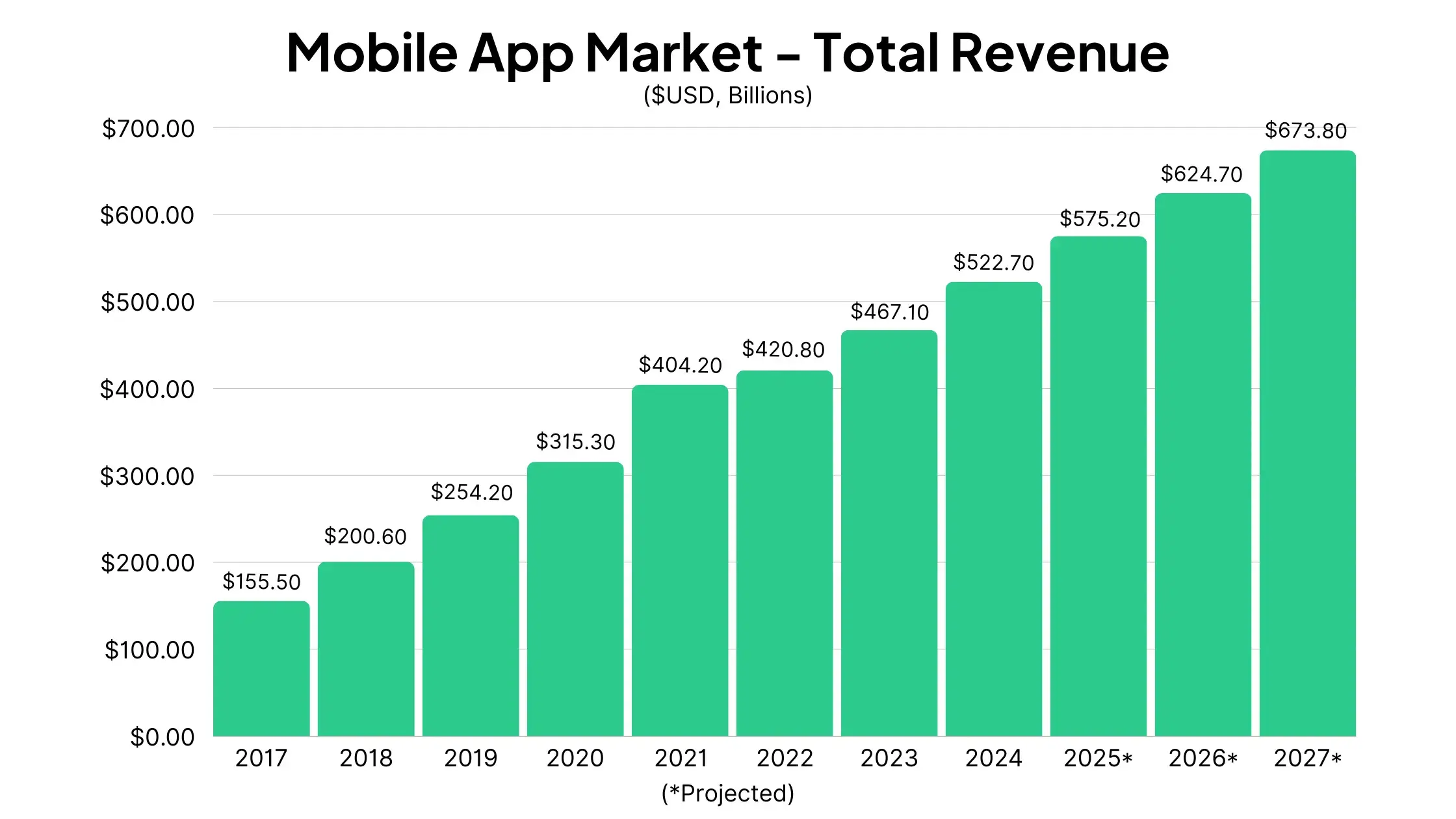
    The mobile app market is worth $522.67 billion dollars in 2024, according to research by Statista.

    This figure represents nearly 12% growth year-on-year vs 2023, and is projected to continue growing in the double digits in years to come.

    Mobile App Market Growth: 2017-2027 (Projected)

    Statista tracks ten years of growth in the mobile app development market, which gives us a clear picture of the upward trajectory of mobile apps in the late 2010s and into the 2020s.

    Worldwide app revenue was worth just $155.51 billion in 2017. The market has grown nearly 3.5x in seven years, and is projected to reach $673.79 billion by 2027, an increase of around 29% in three years.

    __wf_reserved_inherit

    How Do Apps Make Money?

    For many people, paying for a mobile app is a foreign concept. Yet the mobile app market, as we’ve seen above, is worth hundreds of billions of dollars. So how are apps making so much money?

    __wf_reserved_inherit

    Advertising is the main driver of revenue for mobile apps, contributing around 65% of total mobile app revenue.

    In-app purchases are the other significant revenue source, with 33% of app revenue. This includes subscriptions, upgrades and features purchased within apps.

    Only a small portion of app revenue comes from paid apps – $6.09 billion, a little over 1% of all app revenue.

    Advertising’s share of the market has steadily increased over the years. As far back as 2017, in-app purchases contributed the majority of app revenue, before being overtaken by advertising, to our current state where advertising generates 2x as much revenue as in-app purchases – a number that is projected to grow even further.

    __wf_reserved_inherit

    Which Mobile App Categories Drive the Most Revenue?

    In terms of the types of apps that generate the most revenue today, there are two clear winners: gaming apps and social networking apps.

    __wf_reserved_inherit

    Gaming apps generate $196.1 billion in revenue, nearly 38% of all mobile app revenue.

    Social networking apps like Facebook, Instagram and TikTok generate $153.4 billion, or nearly 30% of all app revenue.

    Together, these two categories make up over two thirds of the total worldwide app market. The jump to the next category is significant, with entertainment apps generating $39.23 billion and $33.42 billion from shopping apps, each making up less than 8% of the app market.

    Fastest Growing App Categories

    Most app categories are growing at 10% or more YoY, in line with the overall growth of the mobile app market at 11.9%.

    __wf_reserved_inherit

    The biggest increases in 2024 are from news and magazines (16.6% revenue growth) and travel apps (16.1% growth).

    Interestingly, social networking apps are the only category growing below the overall average, with 7.3% growth vs 2023.

    Most Profitable App Categories

    User for user, which apps make the most money?

    While gaming apps and social networking apps make the most money overall, shopping apps are the most profitable, generating an average of nearly $24 per download, followed by social networking apps and news & magazine apps.

    __wf_reserved_inherit

    Gaming apps, though they generate the most revenue overall, are actually near the bottom end in revenue per download, averaging just $1.30 – less than navigation apps, lifestyle apps and weather apps.

    The average revenue per download in shopping apps has decreased significantly since 2017, where shopping apps averaged more than $30 per download.

    However, this number is trending up in recent years, and is projected to continue doing so in the future.

    __wf_reserved_inherit

    Social networking apps are also trending up in average revenue per download, nearly doubling this figure over the last seven years.

    __wf_reserved_inherit

    Mobile App Markets Around the World

    As expected, the US is one of the world’s top mobile app markets. But it’s not #1, and other players are fast catching up.

    According to Sensor Tower, India is the world’s number one market for mobile apps, generating the most app downloads from the Apple App Store and Google Play Store combined.

    The US is number two, followed by Brazil, which is projected to overtake the US in app downloads by 2027.

    __wf_reserved_inherit

    The top five markets in terms of revenue are:

    1. China
    2. United States
    3. Japan
    4. United Kingdom
    5. South Korea

    According to Grand View Research, the majority of mobile app revenue comes from the Asia-Pacific region (including China, India, Southeast Asia and Australia/New Zealand), with 32% market share in 2023.

    Markets that are trending up include:

    • China (15.8% projected annual growth rate)
    • The US (14% projected annual growth rate)
    • Germany (14.4% projected annual growth rate)

    The UK, France and the Middle East and Africa region are also among those expected to see significant growth in the next five years.

    Apple App Store vs Google Play Store Revenue

    While 70% of smartphone users around the world are on Android, nearly two thirds of all app revenue comes from the Apple App Store.

    __wf_reserved_inherit

    This figure has barely changed since 2017, and is projected to stay the same in the foreseeable future.

    Why the Mobile App Market is Growing So Fast

    Mobile apps are generating tens of billions of dollars in additional revenue each year, growing at a double-digit rate. So what’s the reason behind this upward trajectory?

    The biggest reason is likely the increased share of mobile internet users. More than 58% of people today use mobile to go online.

    Around a decade ago, mobile held less than 20% of the internet traffic market share, and is now widening the gap.

    __wf_reserved_inherit

    With more people using the internet via mobile devices, it’s natural to assume that more people are using apps, too, as they provide a more natural experience for mobile users.

    We can see similar growth in other areas. The mobile commerce market now makes up 38% of all digital spending, and during Thanksgiving weekend 2023, more sales came on mobile than on desktop.

    There has also been a huge increase in the number of apps available.

    There are now over 3.7 million apps available on the Google Play Store, and 1.7 million on the Apple App Store.

    Between 2016 and 2022, the number of apps downloaded per year increased by 82%.

    This is partly due to apps becoming more accessible for brands and small businesses.

    Today, you don’t need to have a team of mobile app developers in-house, or millions of dollars to spend on development, to launch your own app.

    No-code tools have made it easier than ever for non-developers to launch apps, and services like Vendrux make it simple and affordable for any web-first businesses (such as eCommerce stores, publishers and SaaS companies) to launch an app alongside their website. 

    How to Get Your Piece of the Mobile App Market

    If you’re running a web-based business, the mobile app market trends we’ve discussed in this article may make you feel like you’re missing out if you don’t have an app.

    With Vendrux, you don’t have to miss out.

    Vendrux converts any website into mobile apps, with minimal effort and overhead required.

    You don’t need any technical expertise in mobile app development, and you don’t need to hire expensive developers.

    All you need is a website that works well on mobile, and Vendrux will convert your website to native apps that look and feel like million-dollar custom apps.

    Book a preview of your app now to see what’s possible, and carve out your share of the growing mobile app market.

    References

  • 10 Great Mobile App Launch Screen Examples

    10 Great Mobile App Launch Screen Examples

    You only get one chance to make a first impression. Whilst users get some idea of what your app is about from your description and screenshots in the App Store, where does their first impression of the actual app in-action come from? Your launch screen.

    Also referred to as a “splash screen”, this is the very first thing your app users will see when they click to open up your app. As such, its importance should not be underestimated!

    Get it right — bold, simple and relevant launch screens tend to work best — and you’ll make your audience sit up and take notice, feel genuinely excited about what’s in store for them, and make them far more willing to spend time trying your app out.

    Get it wrong and you’ve lost your audience, giving them a negative perception of your app before its even loaded.

    We’re going to help you make sure your app opens with a bang by showing you some real-world examples of what a good launch screen looks like.

    (Note: Vendrux is not affiliated with any of the companies whose apps we have listed below – we simply believe they have done a great job with their launch screen!)

    What is an App Launch Screen?

    First up, let’s take a look at what a launch screen actually is. Despite their importance, from a functional point of view a launch screen actually does very little — your app could still work perfectly well without one.

    Curious about how Vendrux can help you build an app in less than a month, with just a low-four figure investment? Click here to learn more.

    A launch screen is simply a visual placeholder displayed to the user whilst the app is loading. The idea originated from iOS as a way of creating the perception that an app was fast and responsive – rather than opening up an app and having to wait a number of seconds for it to load, users would instantly be presented with the launch screen.

    This played a crucial role in improving user experience, so much so that Apple made it a mandatory part of an app’s design, continuing to this day. Because the launch screen’s role is aesthetic rather than functional, some people sit firmly in the anti-launch screen camp.

    The main argument lobbied against the launch screen is the belief that its continued usage is largely down to expectation; users just expect to see a launch screen, even though the overwhelming majority of apps just don’t use enough resources to justify one – as mobile OSs become increasingly fast, they’re only truly necessary for the most resource-intensive of apps.

    That argument makes a fair point but misses the power of launch screens from a branding perspective. Every time a user launches your app they see the same welcome screen, which breeds familiarity and reinforces your brand. If the user loves your app, each time they’re greeted with that launch screen – plastered with your branding – it starts to fill them with a sense of excitement. That’s a powerful thing to be associated with.

    Example Launch Screens

    Now we’ve covered what a launch screen is and why they’re important, let’s take a look at some great examples of effective launch screens. Take note of what similarities they all have and you may be able to create one that is just as effective for your own mobile app!

    Nike+ Running: The Nike launch screen is a textbook example, with the bold red background in sharp contrast to the simple white logo. The faint outline of the running track at the bottom is also highly relevant to the purpose of the app.

    grasshopper app launch screen

    Grasshopper: The “coding app for beginners” – Grasshopper – has a sleek, effective loading screen. The dark background looks professional, and the text on the screen instantly lets users know what the app is about. Although not visible in a still image, those 4 colored dots rotate in a circle as the app loads, which make it animated and interesting to look at.

    financial times app launch screen

    The Financial Times: If you’re reading the news, you want to make sure that your sources are accurate and trustworthy. The Financial Times have created an app launch screen during which builds trust as early as possible by highlighting the quality and depth of their journalism, as well as a nice newspaper-like icon. Another interesting point to note is that you can scroll between different three versions of the launch screen, with each one containing different value propositions.

    dropbox app launch screen

    Dropbox: The Dropbox launch screen is simple but effective — a bold navy background with their recognizable logo and company name in a very light blue color. There’s no need to overcomplicate your app launch screen, and Dropbox is a great example of this.

    medium app launch screen

    Medium: This launch screen is smart, up-to-date, and reflects the user experience on both the mobile app and the website. Being a platform for content creators and writers, Medium have used a unique image of a piano combined with a typewriter, reflecting their slogan, “Ideas and perspectives you won’t find anywhere else”. The illustration style is modern and friendly.

    citymapper app launch screen

    Citymapper: “The ultimate transport app” reflect their mission in this launch screen effectively. The minimal use of graphics means that the launch screen isn’t cluttered, but the arrows and circular icon highlight the app’s relationship with transport.

    wikipedia app launch screen

    Wikipedia: Wikipedia’s app launch screen looks professional and clean, reflecting Wikipedia’s regular website. The image is high resolution and instantly recognizable as Wikipedia. This launch screen is minimalistic but effective

    tripadvisor app launch screen

    TripAdvisor: The TripAdvisor app launch screen does a great job of capturing the look and feel of the app itself. The signature TripAdvisor green background with the logo is instantly recognizable as TripAdvisor, and the text underneath highlights some of the key benefits of using TripAdvisor to someone who has just downloaded the app!

    lyft app launch screen

    Lyft: Another simple (are you noticing a trend here?) but effective launch screen is Lyft’s. The color scheme is taken straight from their logo and app icon, which effectively promotes their brand as you open the app. The light text on a dark but distinctive colored background with a gradient stands out and draws the app user’s eyes towards the logo.

    soompi app launch screen

    Soompi: Soompi’s app launch screen is effective for a few reasons. Firstly, the logo is clear and stands out against the dark background. The background is fun and animated, containing illustrations and text relating to the app contents (it’s a news app focused on the K-Pop industry). Despite the animated look, the color palette maintains a professional look, and the loading circle at the bottom of the screen lets the user know that the app is loading.

    Takeaways

    Having looked at some of the best app launch screens around, is there anything we can take away and apply to our own launch screens?

    The overwhelming majority of launch screens – well, the good ones anyway – use the following formula:

    1. Background — Whilst there is no set rule for the background, the best ones are bold and distinct. Usually, the colour chosen is bright to make it stand out, although it’s perfectly acceptable to pick a color around your brand’s color scheme. While simplicity is often chosen, in some cases, using an intriguing texture is a great way to create a distinct feel to your app, and relevant images also prepare the user for the in-app experience.
    2. Logo — The logo is clear and positioned prominently in the center of the screen. Most choose a colour in sharp contrast to the background, to make it jump out.
    3. Name — Unless you’re already a household name, most developers will also choose to include their app’s name underneath the logo to further build brand awareness.
    4. Slogan — Many smaller, less well-recognized apps will also include a short slogan on their launch screen. This tells the user what your app does which will prepare them for the experience they have in store.

    Follow this structure to give your app a great launch screen and deliver a knockout first impression! Remember, your app itself needs to look great after the launch screen too! If your app has been created, or you are planning to create your app from a WordPress website, we’ve compiled a list of 5 WordPress themes that will help you build a high performing app landing page.

    If you’re thinking about launching an app for your website, but feel put off by the cost, time investment and stress of the entire process, check out Vendrux. Vendrux allows you to convert any website, on any platform or tech stack, to fully-functional, fast, powerful mobile apps, for minimal time and money.

    We do everything for you – you don’t need to write a line of code. We also help with putting together your app store listing, getting your app approved by Apple and Google, and can even take care of the graphic design work for your app (including your app splash page).

    This is the best way to build mobile apps. Get started with a free preview of your app, or schedule a free consultation with an app expert today.

  • Magento Mobile Commerce: How to Build a Mobile-First Store

    Magento Mobile Commerce: How to Build a Mobile-First Store

    More than half of global ecommerce traffic comes from mobile devices. For Magento stores, that’s no different. Mobile commerce matters, and deserves your full attention.

    There are two levels to Magento mobile commerce. The first is having a fast, well-optimized mobile website. Most successful stores are at this level already, and Magento/Adobe Commerce has many built-in tools to help you with this.

    The second is having a native mobile app. This step is much less common – less than 1% of US-based ecommerce stores have their own app.

    Not having an app is a major gap in your mobile commerce strategy; a gap that Vendrux helps fill.

    In this article, we’ll dive into everything you need to know about Magento mobile commerce: the tools built into the platform, mobile optimization tips, and how to complete your mobile commerce stack with a real mobile app.

    Magento’s Mobile Commerce Tools

    Magento (Adobe Commerce) has a more developed mobile commerce foundation than many platforms. That’s part of why merchants stay with the platform, instead of migrating to more broad-appeal platforms like Shopify or WooCommerce.

    Here’s a rundown of what’s available for Magento merchants interested in maximizing their mobile commerce impact.

    Responsive theming

    The default Magento theme, Luma, is responsive and functional on mobile. That said, Luma is widely considered performance-heavy. Its reliance on RequireJS and Knockout.js generates a significant number of front-end requests, which translates to slower load times on mobile devices.

    Hyvä is where performance gets serious. 

    Hyvä replaces Luma’s heavy JavaScript stack with Alpine.js and Tailwind CSS, reducing page requests by roughly 98% and page weight by around 86% compared to Luma. More than 50% of Hyvä stores pass Google’s Core Web Vitals, compared to around 19% for Luma stores. 

    If mobile performance is a priority, Hyvä is the most impactful single investment available in the Magento ecosystem.

    Headless commerce via GraphQL

    Magento’s GraphQL API lets you decouple your storefront from your commerce backend entirely. Headless frontends like Alokai (formerly Vue Storefront), Front-Commerce, and GraphCommerce connect to Magento’s API to deliver modern, fast, fully custom storefronts.

    Headless gives you complete control over the mobile experience. The tradeoff is complexity: you’re maintaining a separate frontend codebase, which requires frontend developers who know both the framework (React, Vue, Next.js) and Magento’s API surface.

    Learn more: all you need to know about headless commerce for Magento stores.

    PWA Studio

    Adobe’s own Progressive Web App toolkit, PWA Studio, was the official recommendation for mobile-first Magento storefronts for several years. It used React and communicated with the backend via GraphQL, delivering a fast, app-like mobile browser experience.

    PWA Studio is now in maintenance mode. Adobe has shifted frontend investment toward Edge Delivery Services and the Adobe Commerce as a Cloud Service (ACCS) roadmap. 

    The last significant PWA Studio release was in early 2025. It still provides a solid mobile web experience, but it’s a framework Adobe is moving away from. If you’re evaluating frontend options today, it’s not the right starting point.

    Mobile checkout

    Magento’s checkout supports Apple Pay, Google Pay, and most major mobile wallet integrations through payment extensions. 

    Third-party one-step checkout extensions (Amasty One Step Checkout, Firecheckout, Mageworx) consolidate the default multi-step flow into a single page, which reduces friction significantly on mobile.

    Search

    Adobe Live Search (available on Adobe Commerce) provides fast autocomplete search powered by Adobe Sensei. Third-party options like Algolia and Klevu offer rich autocomplete overlays, intelligent filtering, and merchandising rules that perform well on mobile.

    How to Optimize Your Magento Store for Mobile Commerce

    The tools above offer a great foundation, but mobile commerce optimization is about more than just using the right tools. It’s how you use them.

    Here’s what to focus on.

    Prioritize Core Web Vitals

    The #1 aspect for mobile commerce is having a page that is fast and usable on mobile.

    Google’s Core Web Vitals (CWV) is the best way to measure this. Google uses this as a ranking signal, and they directly correlate with mobile conversion rates. 

    The three metrics that matter most are: Largest Contentful Paint (LCP), Cumulative Layout Shift (CLS), and Interaction to Next Paint (INP).

    If you’re on Luma and struggling with CWV scores, the fastest path to improvement is migrating to Hyvä. Hyvä stores typically achieve LCP scores that Luma simply can’t match without significant custom optimization. 

    If a full theme migration isn’t on the roadmap, focus on image optimization (WebP format, proper sizing, lazy loading), removing unused JavaScript, and enabling Magento’s full page cache with Varnish or Fastly.

    Simplify your mobile checkout

    Every additional step in the checkout flow is a potential exit point. On mobile, friction is higher than on desktop: keyboards are awkward, form fields are small, and patience is shorter.

    Some practical improvements you can make: 

    • Consolidate your checkout to a single page
    • Enable Apple Pay and Google Pay (so customers can pay with one tap)
    • Minimize the required form fields, and validate inline rather than surfacing all errors after submission. 

    If you’re running a one-step checkout extension, test the mobile experience specifically, since many of them have issues with keyboard behavior and touch targets on smaller screens.

    Design for thumbs

    Most mobile browsing happens one-handed. Navigation elements, add-to-cart buttons, and CTAs need to sit within comfortable thumb reach and be large enough to tap without precision. 

    Buttons below 44px height consistently underperform on mobile. Category filters on product listing pages are a common culprit: facets that work fine on desktop often become unusable on mobile if they require precise taps or trigger accidental navigation.

    Invest in mobile search

    Search converts at a higher rate than category browsing, and mobile shoppers use it more than desktop shoppers. 

    If your default Magento search is slow or returns poor results, third-party tools like Algolia and Klevu deliver fast autocomplete, synonym handling, and faceted filtering that meaningfully improve mobile discovery.

    Extending Your Magento Mobile Commerce Strategy into a Mobile App

    The mobile web optimization part is a given for most stores today. The gap is how many brands take it a step further, and launch their own mobile app.

    Here’s something most Magento merchants don’t realize: if you’ve invested in your mobile storefront (through Hyvä, a headless frontend, PWA Studio, or even just a well-optimized Luma theme), you’ve already done most of the hard work of building a great mobile app experience.

    You don’t need to start again from scratch to launch a mobile app for your store (and indeed, you shouldn’t).

    With the right solution, you can extend your Hyvä, headless or PWA frontend into a mobile app that lives on your customers’ home screens.

    Vendrux is the #1 mobile app solution for Magento stores. It takes everything you’ve already built, and seamlessly turns your Magento storefront into a mobile app.

    Not a rebuilt version using APIs & templates. Not a separate codebase. It’s your actual storefront, with native capabilities added on top: push notifications, App Store and Google Play presence, native navigation, deep linking, and a home screen icon that your customers can tap directly from their phones.

    An example of how Vendrux takes your mobile storefront and seamlessly converts it into a mobile app

    Why Vendrux is particularly effective for Hyvä and headless stores

    If you’re using Hyvä, you’ve made a significant investment in making your storefront fast and modern on mobile. 

    With most mobile app builders, or even with custom app builders, you’re starting again from scratch – and losing all the work you’ve put into your mobile-optimized frontend.

    But with Vendrux, your Hyvä storefront actually powers the app. You’re extending your site, not rebuilding it.

    The performance gains, the Tailwind styling, the custom component work: all of it gets used in your app. API-driven Magento app builders connect to your backend via REST or GraphQL and rebuild the interface using their own templates, which strips away all of this.

    The same goes for headless frontends. If you’ve built a custom React or Vue storefront via Alokai or a bespoke implementation, Vendrux renders that storefront as the app. 

    You keep all the work you’ve put into optimizing your frontend, and build on top of that, instead of starting over.

    Taking your Magento extensions to the app

    Along with your theme and frontend optimizations, with Vendrux, all your third-party extensions work in the app automatically.

    That means your: 

    • Checkout extension
    • Payment gateways (Adyen, Stripe, Klarna)
    • Search (Algolia, Klevu)
    • Reviews (Yotpo, Judge.me)
    • Loyalty program (Smile.io, Amasty)

    All of it – if it works on your site, it works in your app too.

    This is often not the case with no-code Magento app builders. You’ll lose a lot of your extensions when you launch your app, or pay a premium for custom integrations (which don’t always work perfectly anyway).

    Vendrux is the only way to carry over all your extensions, without adding extra complexity to your tech stack.

    Push notifications: the mobile retention channel your mobile website can’t have

    The specific capability that separates a native app from a great mobile website is push notifications

    Your mobile website has no reliable way to reach customers once they leave. Your app does.

    Push is incredibly powerful; landing on your customer’s lock screen, offering nearly 100% visibility, with zero per-send cost.

    If you only have a website, you’re missing out on this channel, which could easily help you drive 5-6 figures in new revenue per month, through largely automated notifications such as back-in-stock alerts, flash sale announcements, reorder reminders and abandoned cart notifications.

    Your mobile website is already doing the hard work

    Vendrux turns your Magento storefront into a native iOS and Android app, with every extension and customization intact. See your store as an app before committing to anything.

    Get a Free App Preview

    Getting Started: Complete your Magento Mobile Commerce Stack with a Native App

    If your Magento store is already performing well on mobile (fast load times, clean checkout, working extensions), you’re closer to having a native app than you think. The storefront work is done. What’s left is adding the native layer.

    Book a free strategy call with Vendrux and we’ll walk you through a live preview of your store as a native app, so you can see your actual storefront (Hyvä theme, extensions, checkout and all) running on iOS and Android before committing to anything.

    You’ll see you’re already 95% of the way to having your own native app, which could add 20-35% to your bottom line.

    At the cost you’ll pay, there’s no bigger no-brainer right now than launching a mobile app for your Magento store.

  • Why LTV to CAC Ratio Is One Of The Best eCommerce Metrics

    Why LTV to CAC Ratio Is One Of The Best eCommerce Metrics

    There are many metrics available to you in an eCommerce business. Some metrics tell a lot about the health of your business, while others are little more than vanity metrics.

    LTV and CAC are two figures that are certainly worth tracking. Yet the powerful part of LTV and CAC comes when you measure them in relation to one another.

    Keep reading for all you need to know about LTV to CAC ratio, what a good ratio is, and how to optimize LTV and CAC in your business.

    What Are LTV and CAC?

    LTV (sometimes referred to as CLV or CLTV), refers to customer lifetime value.

    This means the total amount of money the average customer spends with you over their lifetime as a customer.

    CAC refers to customer acquisition cost.

    Customer acquisition cost is the average amount your business spends to get a new customer. Think marketing costs, advertising, sales reps, and anything else that goes into convincing someone to come to your site and buy your products.

    __wf_reserved_inherit

    Calculating Lifetime Value

    To calculate lifetime value, you take your average order value and multiply it by the average number of times a customer buys from you.

    Let’s say, for example, your average order value is $50. With great customer service, a magical unboxing experience and attention to detail in your product design, the average customer makes seven separate purchases from your store.

    This makes your customer lifetime value $350 ($50 average order value x 7 orders on average).

    For a deeper understanding of LTV, check out this excellent infographic from Kissmetrics analyzing the customer lifetime value of Starbucks.

    Calculating Customer Acquisition Cost

    To calculate customer acquisition cost, you take the money spent on marketing and sales expenses, and divide this figure by the number of new customers acquired.

    These expenses can include:

    • Ad spend
    • Salary for marketing/sales team members
    • Outsourcing fees for marketing campaigns
    • Software costs for marketing/sales tools

    So, for example, let’s say you spent a total of $100,000 on customer acquisition in one month.

    For that month, you got 1,000 new customers.

    Your CAC would therefore be $100 (100,000 / 1,000).

    Learn more: the average customer acquisition cost (CAC) for eCommerce 

    Breaking Down LTV to CAC Ratio

    LTV to CAC ratio is, as you’d expect, the relationship between lifetime value and customer acquisition cost in your business.

    It means how much money you’re getting from each customer for each dollar you spend acquiring them.

    If we use the figures from our two earlier examples, the LTV to CAC ratio would be 3.5:1.

    __wf_reserved_inherit

    Why LTV to CAC is a Powerful Metric

    LTV to CAC is a great way to judge the health of your business and the effectiveness of your marketing.

    At its core, it’s a very simple metric – how much return you’re getting on your investment into marketing and sales.

    LTV to CAC ratio tells you a lot. If you have a negative ratio (CAC higher than LTV), it means you’re spending more on marketing than you’re making in revenue, and therefore your current path is unsustainable.

    If you have an even ratio (such as 1:1, or slightly more, such as 1.5:1), it means you’re still likely losing money when you take into account operational costs, cost of goods sold, etc.

    Yet a significantly positive ratio is a strong signal that you’re doing things the right way, and that the current path you’re on is sustainable for building a profitable business.

    Drawbacks of LTV:CAC

    Like any metric, you should always judge LTV:CAC ratio in context, and not in a vacuum.

    You could have a healthy LTV:CAC ratio, but a low volume of sales, for example, which would mean you’re not making any real money (despite being profitable).

    You could have a marketing strategy that’s not scalable at the same cost, meaning you couldn’t maintain the same LTV:CAC ratio at higher volume.

    It can also be difficult to get an accurate idea of LTV:CAC in your company’s early years, as you don’t have a clear understanding yet of the typical lifespan of a customer.

    Another issue with LTV to CAC ratio is that, if it takes you a long time to recoup your LTV, you may face short-term cashflow issues despite projecting long-term profitability.

    For example, if your LTV is $350, but over a typical lifespan of 10 years, it will take you longer to recoup the $100 you spend acquiring a customer than if the average customer lifespan is only 2-3 years.

    Make sure you take these into account when making decisions based on LTV and CAC in your business.

    What’s a Good LTV:CAC Ratio?

    Most experts say that the ideal LTV:CAC ratio for eCommerce businesses is approximately 3:1.

    A 3:1 ratio means that for every $1 you spent, you generate $3 in revenue.

    Anything lower than this, and you’re unlikely to be making much (if any) profit, after taking other expenses into account. You’re also more likely to have cashflow problems as you wait to recoup the full LTV from each customer.

    Is a High LTV:CAC Good?

    If a 3:1 LTV:CAC ratio is good, surely even higher than this (e.g. 4:1, 5:1, 8:1) is even better, right?

    Not necessarily.

    While a higher ratio means a higher return on your marketing investment, it generally means you’re missing opportunities for growth.

    For example, if you have a ratio of 8:1, there’s a lot of room to spend more on marketing to scale your total revenue and grow your business.

    Take these two situations as examples.

    • Example one, each month you spend $1,000 on acquisition which generates $8,000 in lifetime value (8:1 LTV:CAC)
    • Example two, each month you spend $8,000 on acquisition and generate $24,000 in lifetime value (3:1 LTV:CAC)

    Though the LTV:CAC is much higher in the first example, you’re making more money in the second example, which is ultimately the point of doing business.

    A high LTV:CAC ratio is not always a bad thing, however, and in many cases it’s fine to sit on an LTV:CAC of 8:1 or 9:1 and just enjoy high profits and financial stability.

    How to Optimize LTV & CAC

    Now we know what LTV and CAC are, what LTV:CAC ratio is, and what the ideal benchmark is, let’s look at how to make your LTV:CAC ratio as healthy as possible.

    The most likely situation you’ll find yourself in is a low LTV:CAC ratio (less than 3:1). In this case, you can improve it by either increasing LTV or lowering CAC.

    If you find yourself on the other end of the scale, with a LTV:CAC ratio significantly higher than 3:1, you may also want to take action to balance it out.

    Let’s run through a few ways to go about doing this now.

    5 Ways to Reduce CAC

    You’ll often find a poor LTV:CAC ratio is caused by inefficient marketing – spending too much on customer acquisition.

    If you’re in this situation, here are five ways to remedy it.

    Improve Your Conversion Rate

    If you’ve got a poor conversion rate, you’ll probably have a high CAC.

    It generally costs a lot to get someone to come to your site, so it’s essential that your site does a good job of converting these people into buyers, in order to keep CAC down.

    Look for any opportunities you have to improve user experience on your website (e.g. improving site speed, simplifying site structure, making your website mobile-friendly) and streamline your checkout process to minimize the number of people who drop off in the purchase flow.

    Recover Abandoned Carts

    A low-hanging fruit for reducing CAC is to recapture lost revenue from abandoned carts.

    On average, 70% of online shopping carts are left abandoned. That’s a huge opportunity for additional revenue, from shoppers who have already signaled their interest in your products.

    There are numerous ways to go about recovering abandoned carts, including reaching out to these people with emails or push notifications. Abandoned cart notifications come with very little cost, so even recovering a small percentage of these carts will make a big difference to CAC.

    __wf_reserved_inherit

    Start a Referral Program

    Referrals are a powerful, low-cost way to drive more customers to your store.

    A referral program typically takes very little upkeep, referrals cost you less than most other marketing channels, and customers coming from referrals tend to have a higher lifetime value as well.

    All that adds up to reduce CAC, working more or less on autopilot once you get the program set up.

    Find More Affordable Marketing Channels

    High CAC usually means you’re spending a lot on expensive paid advertising channels.

    Try finding more affordable ways to get customers, such as email marketing, content marketing/SEO and influencer marketing.

    You don’t need to pivot your marketing strategy completely to these channels (as more affordable channels tend to be harder to scale), but generating some low-cost sales from other channels can offset your ad spend and reduce overall CAC.

    Narrow Your Target Audience

    Spending a lot on CAC (especially via paid ads) might mean you’re trying to market to a much too broad audience.

    For most businesses it will be more efficient and more profitable to target a narrower audience. Look at your ideal buyer persona, and see how you can make this persona more targeted, based on the type of people who have bought from you and converted at a higher rate in the past.

    5 Ways to Increase LTV

    To increase customer lifetime value, you’ve got two options: get people to spend more in each order, or get them to buy from you more often.

    Here are five ways to achieve this.

    Provide an Amazing Post-Purchase Experience

    It’s important to understand that once a customer completes their purchase, your job is not done.

    You want to make the customer feel great after they hit the “buy” button, so they’re more likely to remember your brand and come back to buy from you again.

    Prompt, automatic order updates, speedy and helpful customer service, and a great unboxing experience all contribute to a great post-purchase experience, making it more likely that the customer will bring you return business.

    Push Up-Sells and Cross-Sells

    Once a customer makes a purchase, use this opportunity to recommend complementary products to increase their basket size (or get them to come back and make another purchase soon after).

    If someone buys a pair of shoes, recommend a pair of socks to go with it. If they buy a bike, recommend a helmet.

    You don’t need to be too pushy about it, and a simple addition to your checkout flow or an automated post-purchase email/push notification could add a small but significant amount to your LTV.

    Offer a Loyalty Program

    Loyalty programs are a powerful tool to get customers to spend more and shop more often.

    Giving people a clear incentive to spend money works, and it’s why just about all major brands, from H&M to Starbucks, have their own loyalty program in place.

    Run Email Marketing, Push Notification Campaigns to Existing Customers

    Acquiring a new customer is typically five times more expensive than selling to an existing customer.

    Pair that with the extremely low cost of channels like email marketing and push notifications, and you have an excellent, low-cost way to increase lifetime value.

    If you’ve been in business for a while, you’ll almost certainly have a sizable customer list, which you should be messaging regularly to stimulate higher loyalty, retention and LTV.

    __wf_reserved_inherit

    Launch a Mobile App

    Finally, one of the best things you can do to increase lifetime value is to launch a mobile app.

    The world is getting more mobile-centric, and mobile commerce is now worth more than $500 billion in the US, and more than $2 trillion worldwide (over 50% of total global eCommerce sales).

    A mobile app lets you offer the best user experience to the growing share of mobile shoppers.

    It’s also a perfect tool for boosting retention and long-term revenue from your customers. An app keeps your brand top-of-mind, incentivizes repeat purchases, and lets you use mobile push notifications to consistently re-engage your customers.

    To launch a mobile app for a manageable cost, minimal effort, and without adding any complexity or hassle to your existing workflow, check out Vendrux.

    You can go live with an app in less than a month, simply by converting what already works for you on your website.

    __wf_reserved_inherit
    Examples of high-revenue eCommerce apps built with Vendrux

    Use our free eCommerce App Revenue Calculator to get an idea of how much new revenue you can drive by launching an app.

    If you’re ready to learn more about bringing your app to life, book a free demo today.

    3 Ways to Balance LTV:CAC Ratio (Increase CAC)

    So how about if your LTV:CAC ratio is too high?

    In most cases, this means you want to spend more on CAC, to increase revenue and grow your business.

    (Don’t take this to mean you need to reduce LTV in order to get your LTV:CAC closer to 3:1).

    If you’re in this situation, and you’re riding high with an extremely high LTV:CAC and feel like you want to reinvest that into growth, here are a few options to consider.

    Increase Ad Spend

    The simplest solution to this is to spend more on advertising.

    Earlier we said that you may be targeting too broad an audience, but it can also be the case you’re targeting an audience that’s too narrow.

    A wider audience may be less profitable, but if your LTV:CAC ratio is already very high, it may be worth the higher CAC to increase revenue as well.

    Reduce Prices or Run More Promotions

    You may find success scaling revenue by selling your products at a lower price, or running more discounted promotions, to increase total number of purchases.

    This is something you could experiment with. Remember, the goal is not to decrease revenue; it’s to increase revenue, by sacrificing profit to generate higher volume.

    Increase Team Size

    If you’re generating revenue efficiently with a small team, you might be able to scale higher and faster with a larger team.

    Consider hiring more people for your marketing/sales teams, or additional team members like graphic designers and content creators, in order to improve your marketing efforts, reach more customers and generate more revenue.

    Final Thoughts

    LTV to CAC is an effective way to measure the health and sustainability of your business.

    Like with almost any metric, only looking at this on its own, without context, can get you into trouble. But as long as you consider the broader scope of your business, LTV and CAC tell you a lot about where your business is going and what needs to change.

    One of the best ways you can get your LTV:CAC ratio to a healthy level is by launching a mobile app.

    Mobile apps help you generate more LTV by increasing customer loyalty and retention, as well as boosting AOV and conversion rate for mobile shoppers.

    And apps also help reduce CAC, giving you a cheap and powerful way to sell to your existing customers.

    More than 2,000 businesses, including high-revenue eCommerce brands including Rainbow Shops, Jack & Jones and John Varvatos, used Vendrux to build their apps, with none of the effort and overhead of custom development, and without the limitations of app builders.

    Vendrux let them take what already worked for them on their website, and turn it into an amazing app experience that elevated their brand.

    You can do the same – just get in touch with us today and book a free demo to learn how, and see if Vendrux is the right fit to help you grow your business.

  • Low Code vs No Code vs Developers: Key Differences and Benefits

    Low Code vs No Code vs Developers: Key Differences and Benefits

    The emergence of low code and no code development has changed the game when it comes to building and launching apps.

    You no longer need to be a skilled developer to launch a web app or mobile app. New solutions let anyone do this – all you need is a problem to solve, and a vision for how your app will do it.

    There are pros and cons to this approach, and some still raise the question whether no code or low code platforms are better than manual development. We’ll answer those questions, and break down just what each of these options entail, in the post ahead.

    Want to get this post in video form instead? Check it out via our YouTube channel:

    What is No Code?

    No code development is a way of building apps or software without writing code.

    Traditional development requires knowledge of a programming framework, such as HTML, CSS, JavaScript, React, Vue, Java, etc.

    No code requires none of this. Each no code platform may work a little differently, but most feature a drag and drop interface with pre-coded elements that enables users to create workable software.

    For example, if the user wants to add a header section and a button, they just need to add these two elements to their canvas, without needing to write a single line of code. Once published, the elements work the same as if they had been written by a developer.

    A no code development tool may also use a different kind of mechanism to generate a web app, mobile app, website or software tool – not just a component-based visual builder. But the idea is that it should allow the user to build and launch software without writing any code.

    No Code Platform Examples

    Website building platforms like Wix and Squarespace are two examples of no code software. These platforms allow non-technical people to easily build and launch websites, from basic blogs or portfolio sites, to ecommerce stores.

    These two no code platforms make up over 6% of the CMS (content management system) market share – which might not sound like much, but equates to millions of live websites.

    There are also popular no-code app builders like Glide and Bubble, which are made primarily for small websites, web apps and landing pages.

    Bubble no code UI builder
    Example of the drag and drop UI builder of Bubble

    Vendrux is an example of a no-code solution for building mobile apps. It lets anyone convert a website or web app into functional apps for Android and iOS, with zero technical expertise or coding required.

    Vendrux no code app builder
    Vendrux converts a website (right) to native mobile apps (left) with zero coding required

    Advantages of No Code Platforms

    Let’s take a look at some of the major benefits of no code development platforms.

    • Ease of use: just about anyone can build software with these tools, regardless of coding knowledge, breaking down what was once a huge barrier of entry to app/software development.
    • Speed: no code is not only user-friendly, it’s fast. With all the underlying code pre-written, you save a lot of time by simply dragging and dropping the components you need.
    • Cost: developers aren’t cheap; you’re paying for the years of education and practice that goes into becoming a competent developer. No code builders, however, are available for a low and predictable subscription fee, which almost always works out to be more cost-effective.

    Disadvantages of No Code Platforms

    No code platforms have their drawbacks, as well. Here are some of the reasons to consider other options:

    • Lack of flexibility: many no code solutions trade usability for flexibility. It may be easy to build something that looks decent, but customizing it outside of the template is difficult.
    • Speed (for end users): with code blocks awkwardly pieced together, apps built on no code platforms often run slower, due to inefficient code bloat on the back end.
    • Compatibility with legacy systems: integrating your app or software with other platforms can be difficult with no code builders, making it less of a fit for business users.

    Of course, not all no code builders are the same, and these advantages and disadvantages don’t apply to every tool the same way. If you’re considering using a no code platform, think about what you’re using it for, and weigh up a few different platforms to see what might fit your job the best.

    What is Low Code?

    Low code development is a way to build software or apps that requires some coding skills or understanding of coding, without needing the user to write every single line of code themselves.

    It’s similar to no code development, and a low code platform may also use pre-coded blocks or elements in a visual drag and drop builder. But low code platforms are a bit more technical, and may utilize a combination of no code elements and manual coding.

    While no code platforms allow non-developers to develop apps, low code platforms are made to allow developers to create apps quicker, speeding up the development process compared to coding from scratch.

    Low Code Platform Examples

    Retool, Kissflow, Google AppSheet and Mendix are just a few examples of low code solutions on the market today.

    On the surface, many low code platforms look a lot like no code builders. You’ve got a blank canvas, with pre-built widgets, components and elements you can drag and drop onto your canvas.

    Mendix - low code/no code UI builder
    Example of the backend of low code tool Mendix

    They’re less beginner-friendly, however. There is also the space to add your own custom code with low code development platforms.

    Other than complete low-code platforms, there’s a burgeoning market of low-code tools available that can speed up your app development workflow.

    Momentic, for example, which uses AI to automate and streamline testing and production monitoring.

    There’s also GitHub Copilot, an AI editor that integrates with your workflow, and countless other AI coding assistants that reduce the number of lines of code you need to write to ship a functional app.

    Advantages of Low Code Platforms

    Low code platforms offer the following benefits:

    • Flexibility: compared to no code, you can do a lot more with low code platforms. You’ve got more power at your disposal to build custom functionality, and business users may find low code platforms easier to integrate with tools they already use.
    • Speed: like no code, low code is also a much quicker way to build than coding from scratch.
    • Cost: it’s still a lot cheaper to build with a low code development platform, versus manual coding, due to the significantly faster process.

    Disadvantages of Low Code Platforms

    Here are some of the downsides of working with a low code development platform:

    • Usability: low code requires at least a fundamental coding knowledge. This may make these tools difficult to use for beginners and non-technical people.
    • Speed (vs no code): while it offers a faster time to launch than manual coding, low code takes longer than building with no code platforms. For simple jobs, you may be able to do the same thing with a no code builder in less time.

    Low Code vs No Code: What’s Best?

    Both low code and no code are forms of “rapid application development”. They speed up the time it takes to build apps or software tools.

    One style of development is not necessarily “better” than the other, because they each have their own use cases and target users in which they excel.

    For beginners, building simple web apps, single-page websites or landing pages, a no code tool may work perfectly.

    No code is also great for building MVPs, even if you do have the resources for manual coding, as it allows you to go to market or test your app significantly quicker (and cheaper).

    Low code solutions, on the other hand, allow greater power and flexibility, making them better for technically-minded people to build more complex apps. Low code is generally better if you have plans to scale your app past a simple MVP.

    We can look at a few different use cases, and pinpoint which tools (low code or no code) are best suited for each:

    Best Low Code/No Code Platforms for Landing Pages & Small Web Apps

    No code systems tend to be better for things like landing pages, one-page websites, and small websites.

    These projects are not overly complex, and mostly visual in nature. That makes drag and drop builders a good fit.

    Bubble and Glide are two popular examples, both user-friendly and catered towards non-professional developers.

    Best Low Code/No Code Platforms for Mobile Apps

    Most no code app builders can be limiting when it comes to building mobile apps. Vendrux, however, offers a simple path to build and launch mobile apps without coding.

    Vendrux converts any existing web-based app or website into mobile apps for Android and iOS, with zero coding or programming knowledge required. This is huge, because mobile app development is an extremely specialized area, even more so than most other areas of programming.

    A no code tool that’s as simple and powerful as Vendrux is rare. Most no code or low code mobile app builders either have limiting templates or a steep learning curve. Vendrux has neither – as long as you’ve already built an app for the web, you can launch on mobile with zero hassle and minimal cost.

    Best Low Code/No Code Platforms for MVPs

    Low code and no code tools are both great for building an MVP (minimum viable product) or to test out app ideas.

    Instead of dedicating the time and resources to build something that may not take off, it’s often better to use a no code builder to put together a simplified version, which shows what you want to do without getting too complex under the hood.

    Bubble is a good fit if what you want to build is mostly visual. Low code solutions also fit really well here, particularly for professional developers who have the ability to build an app, but to use a rapid application development platform to come out with an MVP.

    Retool and Google AppSheet are two low code examples that fit nicely for this use case.

    Low Code/No Code Platforms vs Custom Development

    So where does manual development fit into this? Does it still make sense to hire developers to build apps/software, or to keep developers on staff?

    Manual coding still has its advantages. You have much greater flexibility and scalability when coding apps from scratch. That’s because you can customize each line of code, and build out features exactly how you want them.

    With no code or low code, you’re often confined to the limitations of the templates or code blocks provided (though a lot of low code builders give you the ability to edit/add code as well).

    Using developers to build your software will generally result in a better and cleaner backend as well, which will make for a smoother and faster end user experience.

    The big tradeoff is in time and money. Good software developers cost a lot, and even the best take some time to complete a project. There’s also the likelihood of communication issues – you may have a clear idea in your head for what you want the project to look like, but getting the developer to understand as well is easier said than done.

    Pros of Manual Coding

    • Flexibility
    • Backend architecture
    • Scalability

    Cons of Manual Coding

    • Cost
    • Time
    • Communication barriers

    Ultimately, the choice depends on the budget and resources available to you, and the complexity of your project. You may want to combine a few different methods, such as using a no code tool to build an MVP, and if that goes well, hire a developer to build the thing for real.

    Summing Up: Can You Launch a Mobile App Without Developers?

    Today, there are many different options available to someone who wants to build an app.

    If you’re a competent developer, or you have the means to hire developers, you can build an app from scratch. However, those who don’t – or don’t want to spend the time, money and hassle on hiring and managing developers – can opt for no code or low code tools.

    No code is not going to replace developers. Instead, it makes smaller projects more accessible for non-technical folk. It also lets developers test and play around with more ideas, without dedicating significant time towards coding an app from scratch, before getting market validation or buy-in from stakeholders.

    It’s a good idea to try using no code or low code platforms first, and if these tools can’t accomplish what you want to do, try moving on to custom development.

    If you’re a website owner looking to launch a mobile app for your site, Vendrux is the perfect no code tool to do it, and much better than hiring a developer to write your apps from scratch. Want to learn more? Get started with a free preview of your app, or schedule a free, personalized demo and get a first-hand look at the platform’s possibilities with one of our app experts.

    For simple web apps, landing pages and user interfaces, try visual design tools like Bubble or Glide.

    No code tools also fit for MVPs or demoing more complex project ideas.

    For more elaborate apps or software tools, manual coding may still be required. But try out low code tools, such as Retool or Google AppSheet, before committing to building it from scratch.