Author: Vendrux

  • How to Drive Organic Traffic (And Sales) To Your Ecommerce Site in 2026

    How to Drive Organic Traffic (And Sales) To Your Ecommerce Site in 2026

    In 2024, CAC for ecommerce brands increased by 30%. 

    If your brand relies on paid traffic, this is a problem.

    The solution? 

    Organic traffic that compounds over time, bringing you customers without burning through ad spend.

    Paid ads are, and always will be, table stakes. Even Coca Cola runs ads. You’ll never get to the point where you stop running ads altogether.

    But organic traffic (and sales) are the ideal hedge, keeping you afloat when your ads’ performance dips, or the cost spikes.

    Organic traffic is one of the most important diversification plays for ecommerce brands in 2026. Keep reading and we’ll explain why, as well as everything else you need to know to start driving valuable and scalable traffic to your store.

    Looking for more high-level insights from the ecommerce & retail world?

    Check out The Retention Edge, our podcast and newsletter where ecom and retail leaders share their hot takes on the future of CX and retention.

    Why Organic Traffic Matters (More Than Ever) in 2026

    Organic traffic is the lifeblood of sustainable ecommerce growth.

    It’s how you reduce reliance on paid ads, build long-term brand equity, and acquire customers at a lower overall cost. 

    Unlike paid acquisition (which stops the moment you turn off spend), organic traffic compounds over time, creating a flywheel of recurring visitors, brand trust, and higher LTV.

    Here are four points that illustrate why organic traffic is a worthwhile play in 2026:

    Paid ads are more expensive & less reliable than ever

    Everyone in DTC knows that CAC is higher than it’s ever been.

    With platform saturation, higher competition, plus privacy changes (iOS 17+, Google’s cookie deprecation), profitable push-button traffic from Meta/Google is becoming harder to rely on.

    The potential is still there – and paid ads are still the backbone of any multi-million dollar brand – but keeping all your eggs in this basket is a risky move.

    Margins are getting tighter

    It’s not just paid ads that are putting the squeeze on. There’s also increased shipping costs, tariffs, and more economic conditions that are leading to tighter profit margins.

    Brands need a cheaper source of sales to provide some breathing room.

    Organic traffic converts better, with higher retention

    Though not all organic channels are exactly alike, most organic customers are valuable, high-intent shoppers.

    Someone scrolling through social media is not necessarily in “buy mode” right then. Your brilliant copy and creative may have stoked their interest, but they didn’t set out to spend money.

    Organic visitors are usually those who are actively searching for a solution, or actively engaging with your brand.

    That leads to higher conversion rates, and higher buy-in from the customer, which makes them more likely to come back and shop again.

    Long-term ROI of organic is unmatched

    Your competitors are thinking short-term.

    It’s not their fault. It’s human nature to put more value into what’s right in front of you. And short-term success is necessary if you want to stay in business.

    But businesses built for long-term success think long-term. And investing in organic traffic is just that – an investment, that pays off down the road.

    What is Organic Traffic, Anyway?

    There’s no universal definition of “organic” traffic.

    Some would say that organic is just a synonym for SEO. Other would say that organic means passive traffic – customers who come to your store without any kind of direct communication or marketing.

    The simplest way to define organic traffic (in our opinion) – If you stop spending money on it today, will the traffic still come in?

    This excludes channels like paid ads and influencer marketing, while including channels like:

    • Search traffic
    • Product listings
    • Owned platforms

    We could sit here for hours discussing what is and isn’t organic traffic. But we won’t.

    Read on below and we’ll get right into how to leverage organic channels to grow your sales.

    Best Organic Traffic Channels (and How to Use Them)

    SEO

    The first thing that comes to mind when we talk about organic traffic is SEO (more accurately, Google SEO).

    It can be a goldmine for ecommerce.

    “But isn’t SEO dead?”

    Not at all.

    There are still more than 8 billion searches on Google each day.

    Some traffic is being eaten up by AI overviews and AI search engines. And there’s certainly more volatility on Google these days.

    But it will be a long time before it’s no longer a viable acquisition channel.

    People still Google things, and you want your brand to be there when they do.

    And the playbook for showing up in ChatGPT searches (and other AI tools) is very similar to ranking on Google.

    SEO is becoming more effective for ecommerce

    It may be easier for ecommerce brands to get visibility in Google search now.

    Part of Google’s algorithm changes in recent years has been prioritizing real businesses, and reducing the visibility of affiliate websites and product review sites.

    That means, if someone searches for “running shoes”, Google will show more product or category pages from brands’ websites than roundup articles on affiliate sites.

    Fantastic news for DTC brands with a strong focus on SEO.

    There could even be more opportunity for brands to generate top of funnel SEO traffic, too.

    The higher volatility and stricter ranking criteria is making many affiliate sites (or those monetized by display ads) no longer viable.

    That means lower competition for mid/top of funnel terms… which you could swoop in on to build brand authority in your niche and generate leads that can ultimately turn into engaged buyers.

    Playbook:

    • Ensure your product and category pages are optimized for SEO
    • Build links to your site, and put investment/effort into growing your website’s authority
    • Create content for informational queries your customers are searching for in Google
    • Optimize your funnel to turn top of funnel search traffic into email opt-ins, and bottom/mid of funnel traffic into clicks to your product pages

    See how 21 Seeds creates recipe pages for tequila-based cocktails to generate search traffic that serves search intent while also promoting their product:

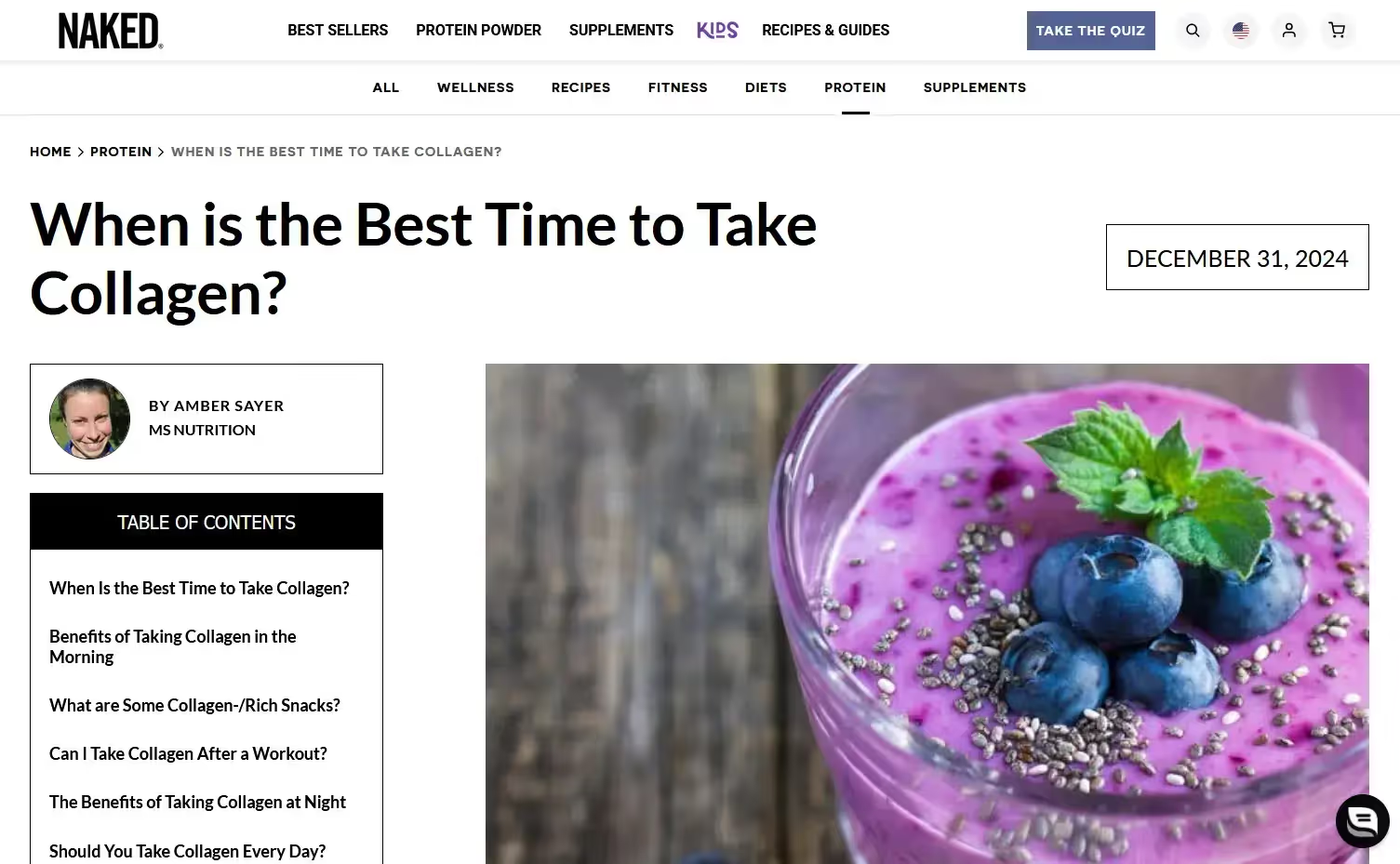
    Or how Naked Nutrition creates informational fitness & nutrition content to draw ICP search traffic to their website:

    Social Media (Instagram/TikTok)

    Organic reach on social media is not what it used to be.

    But that doesn’t mean organic Instagram, Facebook, TikTok etc is not a viable channel for your brand.

    It just requires a less direct, long-term approach, and focusing on creation rather than marketing.

    You can’t just post your ads as organic posts and expect them to drive free sales.

    This kind of content gets no visibility, and doesn’t attract followers.

    At the same time, you can’t just post random content and expect to build an audience of potential buyers.

    Post the kind of content that people actually want to see in their feeds.

    A few types of content that work:

    • “Try-On” & “POV” Content – Show products in real-life scenarios (not just polished studio shots).
    • Founder/Team Videos – If your founder is charismatic and wants to get in front of the camera, leverage their face and voice.
    • UGC Loops – Repost customer videos with compelling captions to reinforce social proof.

    Bugaboo’s Instagram is a great example of using organic social effectively, and putting real faces at the front of your content.

    Additionally, build content that generates engagement.

    Social platforms reward posts that get a lot of likes, comments and shares. So if you want to grow your reach, create the type of content that attracts user engagement.

    See how Glossier does this – inviting comments on that post that build a sense of community, as well as growing their organic reach.

    Ultimately organic social is more difficult, but the rewards are still there for brands willing to put in the work.

    Playbook:

    • Create useful content (not just content blatantly promoting your brand)
    • Tailor content to the platform (don’t post the exact same content on Insta/TikTok/Pinterest)
    • Leverage UGC – put real people in your content
    • Stimulate engagement as much as possible
    • Make your followers feel part of a community

    YouTube

    YouTube is an underutilized channel for brands.

    It’s part SEO, part social media.

    YouTube isn’t just a video platform. It’s the second-largest search engine in the world. 

    And with Google integrating video results into search more than ever, brands that invest in YouTube build an evergreen traffic machine.

    It’s like Google, in that you can generate passive traffic once your content begins to rank.

    But the advantage is that YouTube content is much more engaging. It’s typically easier to get someone excited about your product with a video than a written blog post.

    Another benefit is that you can easily repurpose videos into content for other channels.

    Create the full video for YouTube, then cut down and post on YouTube shorts, Instagram, TikTok and Facebook.

    The biggest reason more brands don’t make a killing with YouTube is generally one of the following:

    • They don’t have the resources to (or don’t want to) create good quality video content
    • They don’t create the right kind of content (boring, ad-style content that gets zero engagement)

    It’s true there’s a higher barrier of entry for YouTube. But that just means more opportunity for those who do the work.

    See how Ridge Wallet creates educational videos showing off their product while also generating engagement.
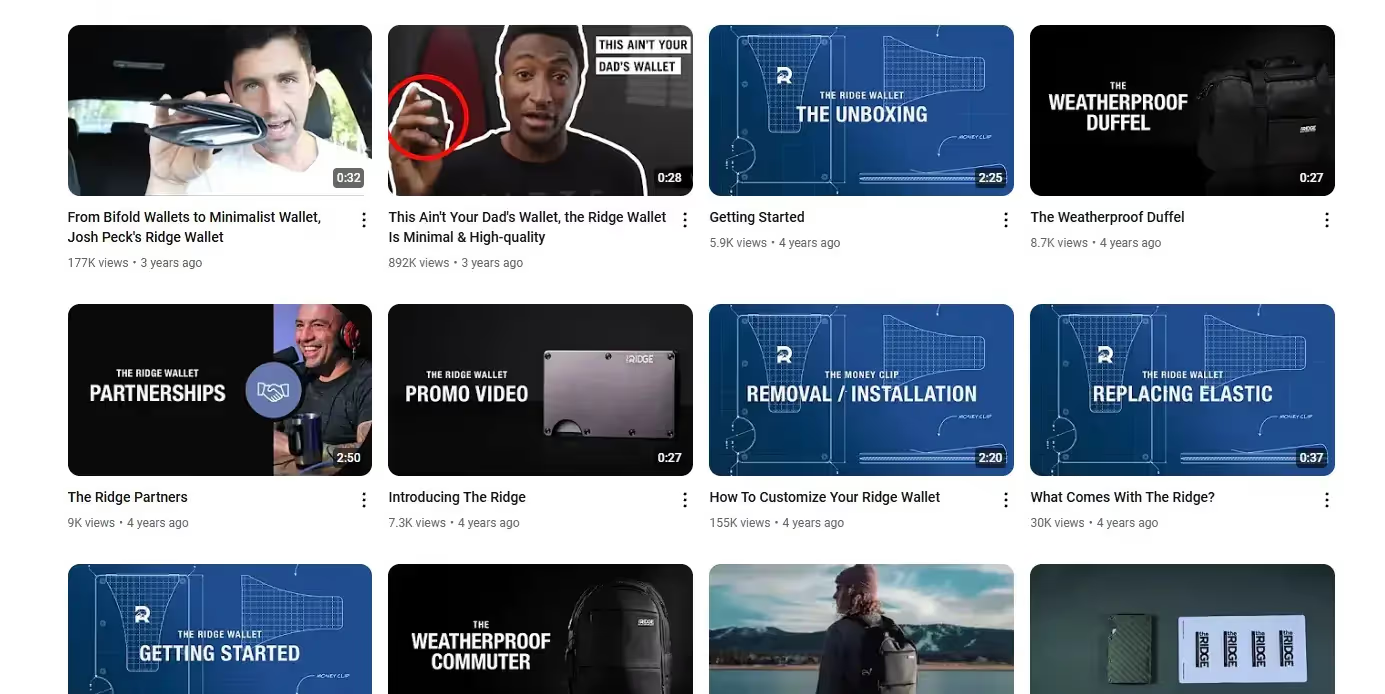
    YouTube is also the backbone of Luxy Hair’s marketing strategy, with a channel boasting over three million subscribers, and videos generating hundreds of thousands of views.

    Is it easy to create engaging content for YouTube, and grow a channel like this? No.

    But that’s why it’s such a big competitive advantage for those who do.

    Playbook:

    • Play the YouTube SEO game (long-tail keywords = free traffic)
    • Make product-focused content (without feeling like an ad)
    • Leverage YouTube shorts for discovery and organic reach
    • Drive traffic to your site with strategic links & CTAs

    Retail Marketplaces

    If we’re talking about search traffic, Google is not even the #1 player when it comes to ecommerce.

    Only 21% of product searches start on Google. The majority – 56% – come on Amazon.

    Amazon (along with other online marketplaces, like Walmart), can be a goldmine for organic sales.

    You’re putting your brand in front of buy-ready shoppers, and piggybacking off their brand name, social proof and CRO, leading to higher conversion rates than DTC websites.

    Of course, it’s not all sunshine and rainbows.

    • There are lower margins, as the marketplace takes a cut
    • You don’t own your traffic; it’s difficult to follow up with customers and drive LTV
    • The marketplaces can boot you off at any time
    • There’s a lot of competition – many marketplaces are hard to get traction without spending on ads

    Yet as long as Amazon is as big a name as it is now, the benefits of being on Amazon outweigh the downsides for most brands.

    And, with some effort to build your SEO specifically for the platform, they can be powerful sources of organic traffic.

    Just don’t make marketplaces your only business.

    Playbook:

    • Expand to marketplaces like Amazon after growing your DTC business (or, if you start on Amazon, expand to DTC as soon as you can to negate the platform risks)
    • Invest in SEO for the platform to grow your organic reach and sales

    See how Boka leverages both Amazon and their DTC site; getting Amazon’s Best Seller badge (and selling over 300,000 units) for their fluoride-free toothpaste product.

    Mobile Apps

    Every brand has a website – but not many have a mobile app.

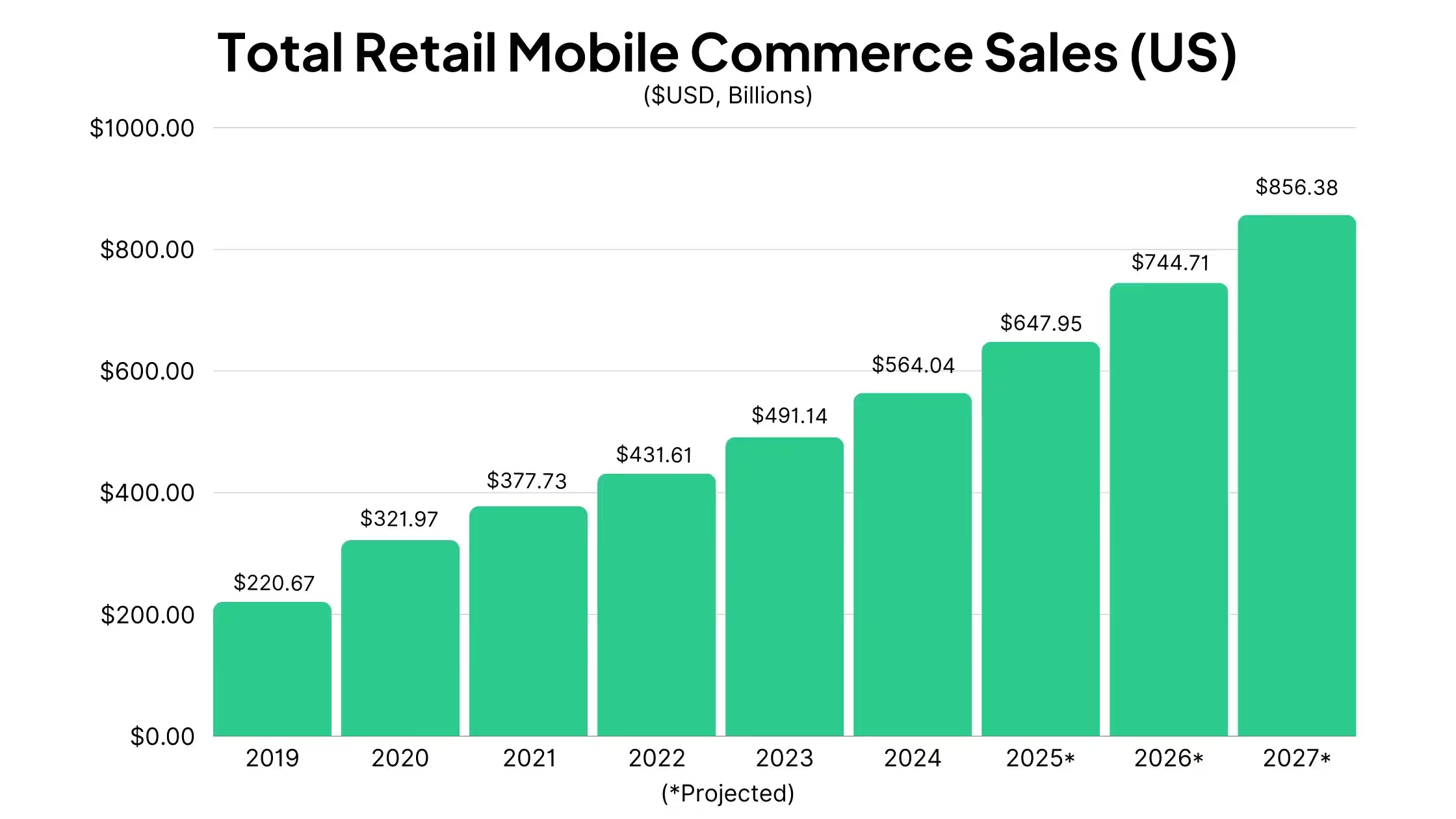
    With mobile shopping becoming more and more popular, mobile apps are becoming a powerful traffic channel.

    App sales are organic sales. Every time someone pulls out their phone, opens your app, and makes a purchase, that’s an organic sale.

    It’s a powerful retention tool. There’s a reason some brands generate as much as 700% LTV from their app users.

    You won’t get as many visits to your store as you do on your website, because of the extra friction required to download it.

    But those who do shop in your app will convert at a higher rate, spend more, and spend more often, all in a channel that you have 100% control over.

    See BoozeBud, a liquor retailer who drives 10% of their total revenue through their app, with 4x higher ARPU and 5x higher LTV from app users.

    $90 million brand Obvi is another great example – 21.8% of their total revenue comes through their app, with 2x the conversion rate in the app and 15.2% higher AOV than their website.

    Having an app also opens up push notifications as a low-cost traffic channel.

    You’ll be able to benefit from the high open rates and engagement rates of push, to drive traffic to your site quickly and easily, and offset the rising cost of paid acquisition.

    Playbook:

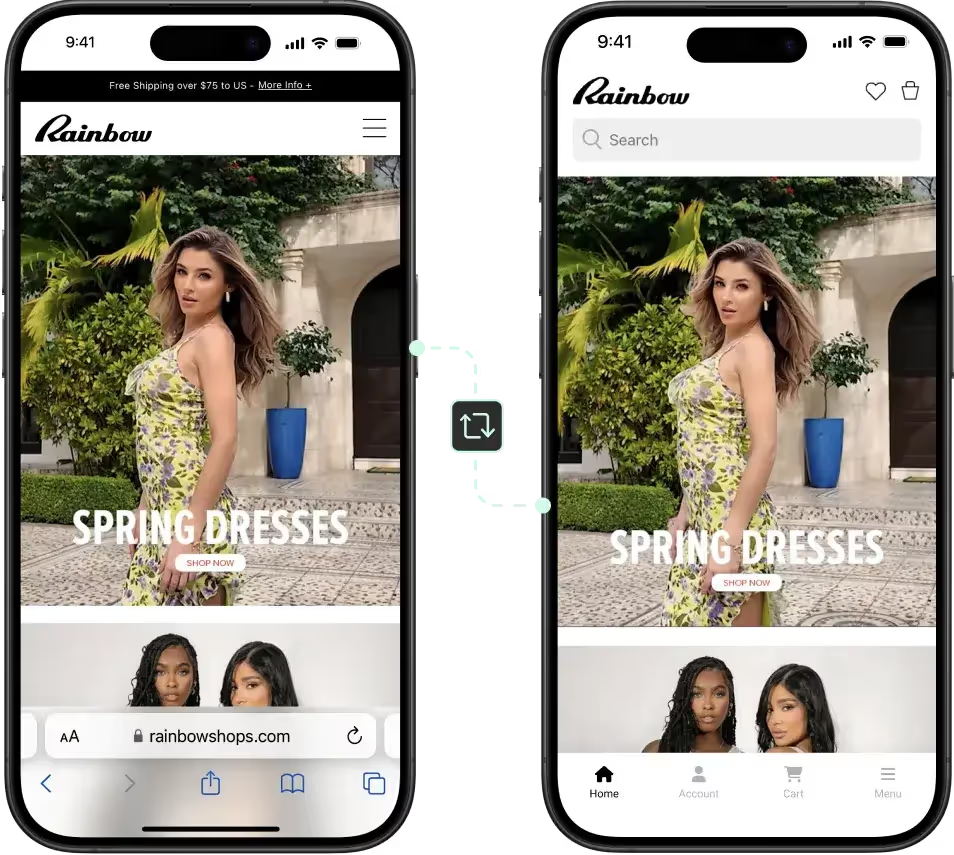
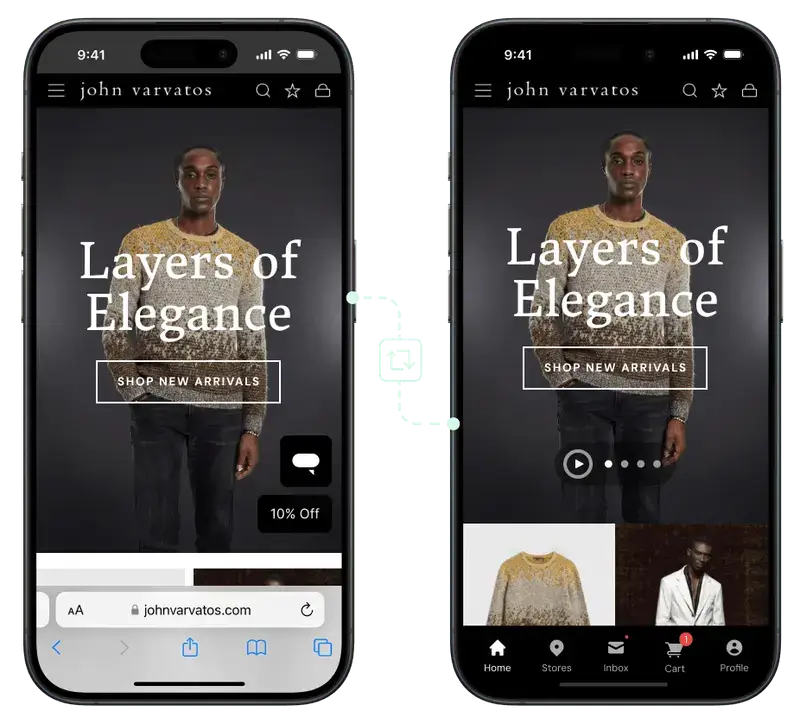
    • If you don’t have an app already, convert your website into a mobile app to launch in less than a month, without hiring developers
    • Promote your mobile app on your website, to your email list, and on social media
    • Use creative strategies such as app-only discounts and exclusive product launches to encourage people to download your app
    • Once you have people in your app, use push notifications to build a habit of regular engagement

    If you want to launch your own mobile app, without spending 6 figures+ on developers, check out Vendrux. As long as you have a mobile-friendly website, we can turn it into a full-featured, custom mobile app, fully synced with your web store.
    Keen to learn more? Book a free consultation now!

    Email/Push

    Some would argue that email (and other direct marketing channels, like push notifications) don’t count as “organic”.

    But these channels have much of the same benefits as truly organic channels.

    You can use these channels to get traffic to your site for basically no cost. Emails cost virtually nothing to send, and clicks from automated email campaigns fit the definition of passive traffic.

    These passive email campaigns are even shown to perform better.

    According to Omnisend, automated emails (such as abandoned cart emails, welcome messages, and browse abandonment emails) have:

    • 52% better open rates
    • 332% higher click rates
    • 2361% better conversion rates

    than manual email campaigns.

    And while the overall reach of email is declining, Omnisend reports that click-to-conversion rates grew by 27.6% in 2024 (so those who engage with your emails are more likely to lead to a sale).

    Email is still a high-ROI play, and requires little investment to get results.

    The bigger your list, the more you can profit.

    Push notifications fall in this category as well.

    Though it’s harder to get subscribers (an app download is a lot more friction than an email signup), push notifications are much more effective on a user by user basis, thanks to higher visibility).

    Like email, automated push notification campaigns are particularly powerful – such as abandoned cart notifications, which passively recover sales that would have been otherwise lost.
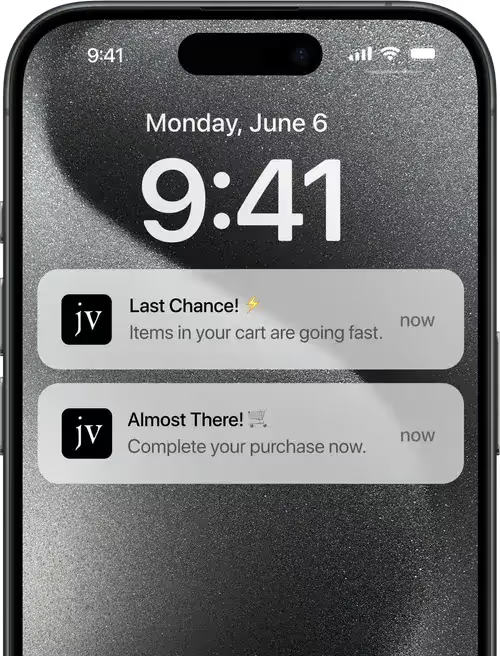
    Top brands make owned channels like these a key part of their marketing strategy, in order to take more control over their audience and offset rising acquisition costs.

    Playbook:

    • Focus on building your email list and push subscribers
    • Set up automated sequences that drive traffic on autopilot
    • Regularly message your list
    • Constantly test and optimize your campaigns to increase engagement

    Learn more about the best ways to use push notifications for ecommerce, including real examples from real brands making a killing with push.

    Converting Organic Traffic Into Sales

    Traffic, of course, is just the first part.

    If you choose to make organic traffic a key part of your marketing strategy in 2026, it’s important to spend the time to plug up any leaks in your conversion funnel.

    Key website optimizations to turn organic traffic into sales:

    • Fast, mobile-first pages (soon, if not already, the majority of your traffic will be mobile)
    • Product detail pages that follow CRO best practices
    • Intuitive navigation, making it easy for customers to get to your money pages
    • On-site search optimization (so customers find what they want)
    • Consistent branding and voice on your website as whichever channel the customer arrived from
    • Trust signals (getting a click to your site is easy; to give someone the confidence they need to buy is another story)

    Why It’s Not Buy or Bust (Or, Nurturing Low-Intent Organic Traffic)

    CRO should be nothing new. If you’re running paid ads, you’re aware of the impact a strong conversion funnel can have.

    But the difference between organic and paid traffic is that organic traffic can have varying levels of intent.

    Some – like someone who searches for “guatemala coffee beans” and lands on your product page – are high-intent.

    But those who come from top of funnel keywords, or who find you from a viral Instagram post or a YouTube video, may not have the same buying intent.

    The biggest difference you need to make with organic traffic is to cater to customers at different awareness stages, and nurture those who are not yet holding their credit card in front of them.

    • High-intent traffic: send to PDPs, show product recommendations
    • Medium-intent traffic: offer discount codes in exchange for email signup or app download
    • Low-intent traffic: offer free content – ebooks, tutorials, video courses, etc – in exchange for email signup

    Just getting someone on your email list from an organic Google/social click is a big win. That’s now a customer you can contact directly, and potentially sell to, basically for free.

    With low-cost traffic, you can afford to play the long game, unlike paid traffic where you need to convert in order to make your money back.

    Don’t make the mistake of going all out for the immediate sale and ignoring everything else.

    Final Takeaways: The New Organic Growth Formula for Ecommerce

    The days of easy, profitable paid acquisition are over. With rising CAC, tighter margins, and the ongoing unpredictability of ad platforms, organic traffic is no longer optional… it’s a necessity.

    DTC brands that win in 2026 will prioritize a multi-channel organic growth strategy that compounds over time, reducing reliance on paid while increasing long-term profitability.

    Focus on:

    • SEO – taking advantage of the fact that Google has made the affiliate site model more or less unfeasible in 2026.
    • A content-first social media strategy, building community with human content on Instagram, TikTok and YouTube.
    • Leverage marketplaces to drive buy-ready organic traffic (while maintaining DTC as your primary channel).
    • Owned channels like email and push (automated campaigns are, functionally speaking, another form of organic traffic).
    • Mobile apps – your secret weapon to drive more engagement from your best customers and increase LTV.

    Understand that organic growth is an investment, not a quick win. 

    Organic doesn’t necessarily mean free. It costs money, time and effort to grow these channels; whether it’s creating Instagram content, building links to your website, or promoting your mobile app.

    But like any good investment, organic pays off over time.

    Brands that commit to it will build sustainable acquisition channels, lower their CAC, and outlast competitors who are still addicted to expensive, unpredictable paid media.
  • Optimizing the Checkout Process to Reduce Abandoned Carts

    Optimizing the Checkout Process to Reduce Abandoned Carts

    Cart abandonment is a major profit-killer for ecommerce brands. On average, 70% of shoppers who add items to their cart leave without completing their purchase. That’s a massive leak in potential revenue.

    According to the Baymard Institute, 35.3% of these lost checkouts are recoverable through better design and optimization.

    Across the U.S. and EU ecommerce markets, this represents an estimated $260 billion in potential sales recouped. Even a modest 5-10% reduction in cart abandonment can yield substantial revenue gains.

    This guide shares proven, actionable tactics that leading DTC brands use to optimize their checkout experience, recover more abandoned carts, and maximize conversions.

    Want more insights from what 8 and 9 figure brands are doing to boost retention, LTV, and build sustainable revenue streams? Check out our new podcast and newsletter, The Retention Edge.

    7 Actionable Ways to Plug Revenue Leaks in Your Checkout

    We’re going to help you build and execute a CRO audit that will stop potential sales leaking out of your funnel due to common issues such as trust, friction and usability.

    Of course, a lot of this you’ll want to test for yourself, and analyze what the data says. There are a lot of best practices, but best practices don’t always translate from paper to practice.

    So follow this as a guide, but be ready to override if your own data finds better results from a different approach.

    Let’s get into it.

    1. Prioritize Page Speed

    A sluggish checkout experience is conversion suicide. Here’s why:

    • A 1-second delay in page load time can lower conversions by 7%.
    • 53% of mobile users abandon a site if it takes longer than 3 seconds to load.
    • Deloitte found that a 0.1-second improvement in mobile site speed led to an 8.4% increase in retail conversions.

    We’re used to sites that load instantly. No one’s waiting around for a slow-loading site anymore.

    If your site isn’t blazing fast, fix it asap.

    • Compress images and scripts, leverage a fast hosting service/CDN.
    • Offer express checkout options like Shop Pay, PayPal, and Apple Pay.
    • Enable autofill for addresses and payment details.
    • Use Google’s Lighthouse to diagnose and fix slowdowns.

    2. Minimize Form Fields

    Friction = abandonment.

    Every additional form field increases drop-off rates. 22% of shoppers cite ‘too long/complicated checkout’ as their reason for abandoning a purchase.

    Baymard Institute’s UX benchmarking shows that an optimal checkout flow can be as short as 7–8 form fields. However, the average US checkout flow contains about 15 form fields by default. 

    Most sites could remove 20-60% of their form content while still collecting all necessary info.

    You really only need:

    • Email address (for sending order info & remarketing)
    • Shipping address
    • Payment details

    Auto-fill these wherever you can. Show inline validation errors as they happen vs after submitting the form. The less effort required, the higher the completion rate.

    Additionally, express checkout options (and saving returning customers’ info) are essential for providing the most frictionless buying experience possible.

    3. Build Instant Trust & Eliminate Doubt

    18% of shoppers abandon carts because they “don’t trust the site with credit card information.”

    Overcome this with:

    • SSL certificate and “https” in your domain (par for the course today)
    • Consistent branding (make sure it doesn’t look like the customer has been taken to another site for their checkout – keep your logo and brand visible)
    • Digital wallet payment options (e.g. Shop Pay, Apple Pay, PayPal)

    Customers also need to be able to trust that the product they’re getting is the real deal, and not some cheap knockoff.

    You can get past these trust issues with:

    • Money-back guarantees and free return policies 
    • Responsive customer support via live chat or chatbot
    • Social proof like customer reviews and real-time purchase notifications (which can lift conversions by up to 15%)

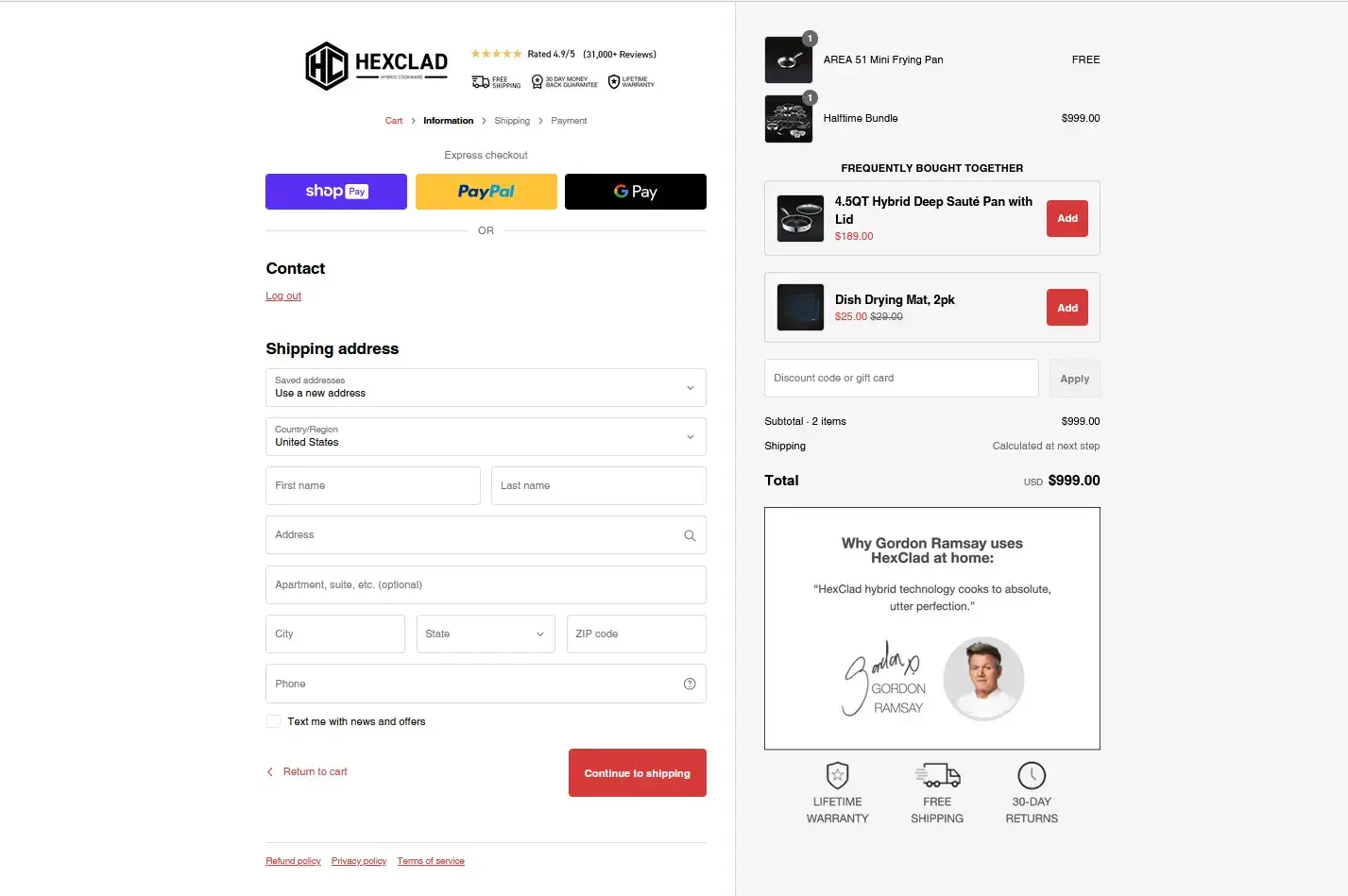
    HexClad‘s checkout is a masterclass in trust signals.

    __wf_reserved_inherit
    • Reviews & star rating
    • Advertises free shipping / money back guarantee / lifetime warranty / 30-day return policy
    • Gordon Ramsay’s blessing

    It’s just what you need to make conversions for high-ticket products, like the example above.

    You can also follow Divi‘s example:

    __wf_reserved_inherit
    __wf_reserved_inherit

    Two things to note:

    1. The padlock icon and “Secure Checkout” wording is a small touch that makes the shopper feel more comfortable making a payment
    2. Shipping protection offered in checkout, helping to overcome the fear that the customer’s shipment could get lost and they’ll be out $65

    Checkout is the moment of truth, where the smallest lack of trust can kill the sale. Do all you can to give your customer 100% trust that you’re going to deliver.

    4. Offer Flexible Payment Options

    Let shoppers pay how they want, or they won’t pay at all.

    Each person has a different preferred payment method. You want to provide enough options to make sure you cover all the bases for your target audience.

    Include:

    • Credit/debit cards
    • Digital wallets (PayPal, Apple Pay, Google Pay) 
    • Buy Now Pay Later (Affirm, Afterpay, Klarna)
    • Subscription payments for repeat orders
    • Localized options, where applicable, for international markets

    The impact of adding a range of flexible payment options can be huge.

    According to Stripe, enabling Apple Pay increased checkout conversions up to 250% for some merchants. And adding a BNPL option increased revenue up to 14% in one A/B test, with two-thirds of that being net-new sales.

    That’s because it’s not just a desire to pay a certain way – payment options like Apple Pay also address other common CRO issues we discussed above (lack of trust, friction).

    Instead of asking the customer to get up, find their credit card, then type their card number into a strange website, they could click “Pay with Apple Pay” and make a payment in just a single click, without handing over their actual payment details to the website.

    Google/Apple Pay, PayPal and Shop Pay (for Shopify brands) is a minimum today (as seen in Dr Squatch‘s checkout):

    __wf_reserved_inherit

    Be sure to balance against simplicity. Offering 20+ payment options will become overwhelming, and will be more likely to kill conversions.

    But covering the major bases will meaningfully lift conversion rates and recover sales that otherwise wouldn’t happen.

    5. Create Urgency & Reduce Decision Fatigue

    Remove the “I’ll buy later” mentality.

    Often customers abandon carts not due to a concrete obstacle but because they tell themselves they’ll buy it later, or simply get distracted or second-guess the purchase. 

    Introducing urgency (a reason to buy now) and minimizing distractions (to keep focus) are powerful techniques to combat those scenarios.

    You have someone on the hook – now don’t let them get away.

    Use:

    • Countdown timers (“Order within 10:00 minutes!”)
    • Low stock alerts (“Only 2 items left at this price!”)
    • Special offers (“Use Code 10OFF – Ends at Midnight!”)
    • Exit intent popups with limited-time discounts
    • One-page checkout, removing all unnecessary distractions

    Scarcity and urgency compel customers to commit now vs deferring the decision and likely forgetting.

    At the same time, focusing the entire page on the purchase keeps the customer’s attention from drifting away.

    An Optimizely case study showed removing navigation menus in checkout increased revenue per visitor by 14%.

    You might think that encouraging customers to keep shopping for longer will increase AOV, but it’s just as likely that they’ll either become distracted, or start to second-guess the decision.

    See Chamberlain Coffee‘s checkout as an example:

    __wf_reserved_inherit

    It doesn’t lock you in – clicking on the logo takes you back to the home page, in case you really need to add something to your order.

    But there’s no navigation, no up-sells.

    It’s all about getting the customer to finish their purchase as soon as possible – strike while the iron’s hot.

    6. Optimize for Mobile-First Buyers

    Over 70% of ecommerce sales now happen on mobile. Your checkout must be mobile-native.

    As mobile shopping becomes the norm, conversion rates and cart abandonment will get worse.

    Why? Because mobile just makes usability and friction problems worse.

    That’s why the average mobile conversion rate is half of desktop, and cart abandonment is higher (86% vs 69%).

    To make your checkout mobile-friendly, do the following:

    • Ensure tap-friendly buttons and adequate space between fields
    • Include a sticky “Checkout” button that’s always visible
    • Eliminate distractions like pop-ups and crowded visuals
    • Allow mobile wallet payments for one-tap purchasing

    German online supermarket AllyouneedFresh saw a 14% increase in mobile conversion rate, 51% increase in mobile transactions and 21% fewer drop-offs from their order confirmation page after a mobile checkout UX overhaul.

    Osmo Salt ticks all the boxes for mobile checkout optimization:

    __wf_reserved_inherit
    • Clean layout
    • Range of payment options (including BNPL)
    • Option to save info for easy repeat purchases

    Too many brands still don’t realize the importance of building a customer experience catered to mobile shoppers, and the impact this can have on conversions.

    7. Save the Sale with Abandoned Cart Follow-Ups

    Some carts will be abandoned no matter how tight your checkout process is.

    Maybe the doubt was too much, or the card declined, or real life got in the way.

    Don’t treat this as the end of the relationship. Follow-up, if you can, in the following ways:

    Abandoned cart emails can be extremely simple, and automated to require zero lift; as show by Waterboy‘s example:

    __wf_reserved_inherit

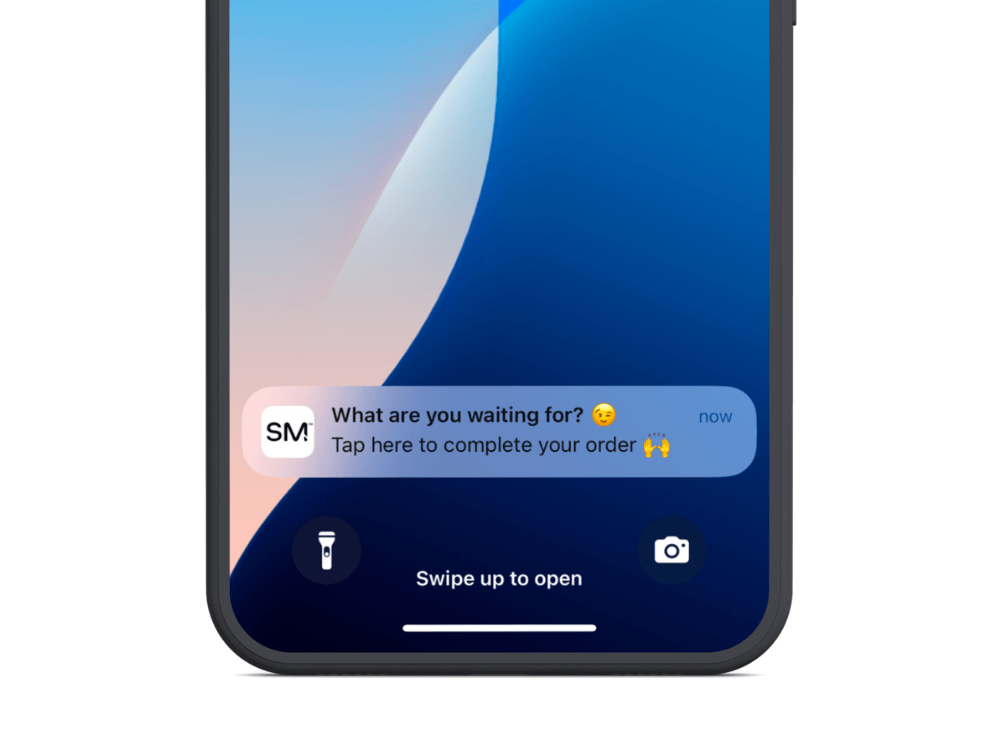
    Push notifications are even simpler. See examples from Muscle Republic and Tobi:

    __wf_reserved_inherit
    __wf_reserved_inherit

    Take a multi-pronged approach. Research from Klaviyo found that sending 3 cart recovery emails resulted in nearly 7x more sales than sending just one.

    It may also pay to retarget shoppers in multiple channels – email, SMS, push, and if they still don’t convert, add them to a retargeting campaign.

    Final Takeaway: Small Fixes = Big Wins

    Optimizing your checkout is all about eliminating points of friction, doubt and distraction that cause customers to abandon their purchase. 

    By implementing these tactics, you’re removing barriers and making it as easy as possible for more shoppers to convert into buyers. Even a small lift – an extra 5 in 100 – can mean major revenue gains.

    The key is testing, iterating, and doubling down on what moves the needle for your unique customer base and checkout flow. 

    Start optimizing your checkout this week and watch your sales climb. The effort is well worth it.

    Next Steps

    1. Audit your checkout process today and find friction points.
    2. Implement 2-3 of these quick wins this week.
    3. Test & iterate: track conversions and keep optimizing.

    Start optimizing today, and watch your abandoned carts turn into completed checkouts, while revenue and ROAS go up, and CAC goes down.

  • What’s the Optimal Sending Frequency for Ecommerce Push Notifications?

    What’s the Optimal Sending Frequency for Ecommerce Push Notifications?

    Push notifications can be a game-changer for ecommerce brands. But there’s also a risk involved with sending too many push notifications.

    Get it right, and you have a direct line to your customers, driving engagement, conversions, and repeat purchases. Get it wrong, and you risk annoying users, leading to opt-outs, uninstalls, and lost revenue.

    So, how often should you send push notifications?

    The key is balance; a frequency that keeps your brand top-of-mind without overwhelming users. 

    In this guide, we’ll break down industry benchmarks, best practices, and real-world case studies to help you fine-tune your push notification strategy for maximum engagement and retention.

    Want the latest insights into how 8 and 9-figure brands are driving sustainable growth? That’s what you get with our weekly newsletter, The Retention Edge. Subscribe for free today.

    Why Sending the Right Amount of Push Notifications is Crucial

    The optimal push notification frequency is about finding the point where you maximize engagement, without going too far and causing a negative response.

    Send too few notifications, and you’re leaving money on the table:

    • Missed opportunities to re-engage users who might be ready to purchase
    • Reduced conversion potential from abandoned carts or wishlist items
    • Lower customer lifetime value as shoppers forget about your brand between purchases

    It’s worse than just missed opportunities to engage users, though.

    If you rarely send notifications, many of the people who download your app will forget about you.

    The average person has 35 apps installed on their phone. The average millennial has 50+. It’s easy for one, silent app to be forgotten. When you finally do send a notification, you’ll be met with just strange looks, and likely a few uninstalls.

    The retention impact of push notifications: Well-timed push notifications can improve 90-day retention by up to 3-10% according to industry studies.

    But if you send too many push notifications, you’re in danger of triggering what experts call “notification fatigue”:

    • Increasing opt-out rates as users become overwhelmed
    • Higher app uninstall rates when notifications become perceived as spam
    • Damaged brand perception that can be difficult to repair

    The stakes are high: research shows that 71% of app users uninstall apps because of excessive notifications, while well-timed push notifications can increase app engagement by up to 88%.

    Learn more: The Economics of Push Notifications for DTC Brands

    Industry Benchmarks & Data on Push Notification Frequency

    Let’s get into how often you should be sending push notifications.

    The optimal push frequency depends on a few different factors. One factor is the industry your brand is in. Some industries tolerate/expect more frequency push notifications.

    Here are some general benchmarks:

    Fashion & Apparel

    • Suggested frequency: 2-5 per week
    • Common use cases: New arrivals, flash sales, trending items

    Electronics & Gadgets

    • Suggested frequency: 1-2 per week
    • Common use cases: Major product launches, price drops

    Groceries & Essentials

    • Suggested frequency: 2-4 per week
    • Common use cases: Fresh stock alerts, weekly deals

    Health & Beauty

    • Suggested frequency: 2-3 per week
    • Common use cases: Replenishment reminders, seasonal promotions

    The Golden Rule: Context Determines Frequency

    Some brands can get away with a wildly different push frequency compared to other brands in the same industry, sending to the same customers.

    The real key to understanding how many push notifications to send, and how often, is the context.

    Not all push notifications are created equal, and their appropriate frequency varies based on the type of message you’re sending:

    Transactional Notifications (High urgency, low annoyance)

    Transactional push notifications are the least likely to be annoying, as they serve a real purpose for the user – such as updating them about their order.

    These notifications have real utility, thus you don’t need to be concerned with sending too many (within reason – don’t send 15 notifications just to let someone know their order has been received).

    • Context: These notifications provide immediate value and expected information. They have high engagement rates and minimal opt-out risk.
    • Examples: Order confirmations, shipping updates, delivery notifications
    • Recommended frequency: Send as needed

    Behavioral Notifications (Personalized, medium frequency)

    Personalized notifications have more leeway than generic promotional notifications.

    These are typically relevant and timely; they might be in relation to an action the customer took (such as cart abandonment or browse abandonment), or notifications with personalized recommendations.

    • Context: These notifications are relevant to specific user actions, making them feel personalized rather than promotional.
    • Examples: Abandoned cart reminders, price drop alerts for wishlisted items, back-in-stock notifications
    • Recommended frequency: 1–2 times per week per trigger
    __wf_reserved_inherit

    Promotional Notifications (High risk, lower tolerance)

    The most common issue with brands sending too many push notifications is actually that they send too many promotional push notifications.

    If a brand sends a notification begging for a sale every day, you’re going to get sick of it quick. If the brand is lucky, the user just disables notifications. If not, they delete the app, and the negative sentiment lives on whenever they see that brand again.

    • Context: These have the highest opt-out risk if overused, as they’re perceived as marketing rather than service.
    • Examples: Sales announcements, new product launches, general promotions
    • Recommended frequency: No more than 2–3 times per week
    __wf_reserved_inherit

    The key?

    The less annoying or salesy your push notifications are, the more often you can send them.

    If your customers actually enjoy receiving your notifications, you can message them everyday. But if you’re butting in and trying to sell something on every notification, you want to limit it to 2-3 per week max (though transactional notifications can be sent as needed).

    __wf_reserved_inherit
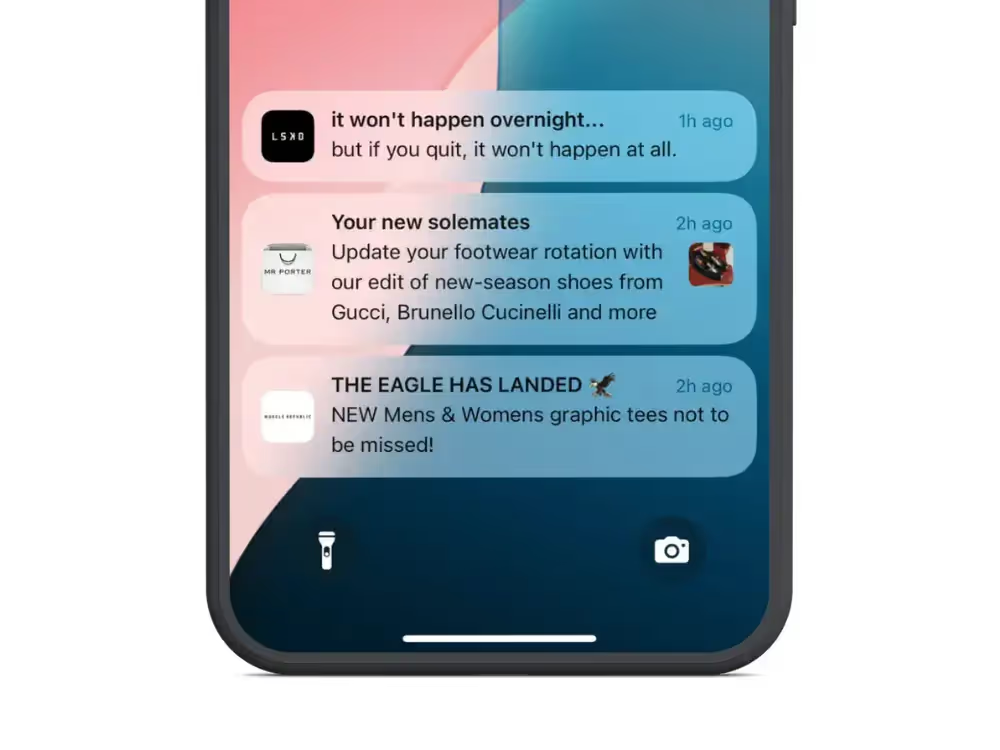
    Non-intrusive, non-salesy messages give you a lot more freedom to send regular push notifications

    Real-World Case Studies: Lessons from Top Brands

    Amazon: Personalized Product Recommendations

    Amazon has mastered behavioral notifications by leveraging browsing history, purchase patterns, and wishlists to suggest highly relevant products. By focusing on personalization over frequency, Amazon maintains high engagement despite sending multiple weekly notifications.

    Key insight: Relevance can compensate for higher frequency. Amazon’s data shows that personalized recommendations have 3-5x higher engagement rates than generic promotional pushes.

    Nike: Product Launch Hype and Exclusivity

    Nike’s SNKRS app uses push notifications strategically to build anticipation for limited-edition sneaker drops. The exclusivity and urgency of these notifications make them highly anticipated rather than annoying.

    Notifications for high-demand, limited-quantity items are welcomed by users when they provide genuine value (access to products that might sell out).

    Domino’s: Effective Use of Time-Sensitive Offers

    Contextual timing dramatically improves effectiveness.

    Domino’s has perfected the time-sensitive push notification, sending discount codes during peak meal-ordering hours. These notifications have clear context (hunger) and immediate value (savings).

    Shein & Temu: High-Frequency Push Strategy

    Fast-fashion retailers like Shein and Temu push notifications multiple times daily, reinforcing flash sales, limited-time deals, and personalized recommendations. This high-volume approach works for their business model but comes with higher opt-out rates.

    __wf_reserved_inherit

    An aggressive frequency strategy can work for rapid customer acquisition and high-turnover inventory, but it requires accepting higher user churn. These brands compensate by constantly acquiring new users.

    Learn more: 10 Push Notification Best Practices for Ecommerce Brands

    Conclusion: The Right Balance is Brand-Specific

    Your optimal push notification frequency isn’t something you can copy from a competitor or benchmark report. It depends on:

    • Your specific audience demographics and engagement patterns
    • Your industry category and customer purchase frequency
    • The value proposition of your notifications
    • Your overall marketing mix across channels

    Data is your friend. Track key metrics related to push to get an idea of how your push notifications are affecting engagement and retention.

    These metrics include:

    • Open rates
    • Revenue attribution
    • Cart recovery rates
    • App engagement metrics
    • Opt-outs
    • Uninstalls

    The mistake a lot of brands make is looking at CTR or conversion rate on a message-by-message basis to understand the impact of their push notifications.

    Your goal should be overall app engagement. Since there’s no cost per send, it doesn’t matter whether you send 3 push notifications or 1 to get an app open.

    The real goal is to build a shopping habit, for which push notifications (when used strategically) are the best tool for the job.

    – 

    If you’re not sure where to start with push, or you just want to have your push notifications handled for you, we can help.

    Vendrux plans come with an optional done-for-you push notification service, in which we handle the strategy & planning, campaign management, analytics & reporting, and implementation of key automated flows like welcome messages and abandoned cart notifications.

    We’ll take care of strategy, creation, scheduling, and optimization, so you don’t have to.

    Our team of experts use the same playbook that numerous brands have followed to drive $10k+ in additional monthly revenue from push.

    Get a free consultation to discuss how Vendrux can help you manage your mobile app and push notifications for the highest return on your investment.

    Final Thoughts

    The most successful push notification strategies share these characteristics:

    1. They’re continuously tested and refined based on data, not assumptions
    2. They respect user preferences, often allowing customers to set their own notification frequency
    3. They prioritize relevance over volume, understanding that personalization allows for higher frequency without fatigue
    4. They vary frequency by notification type, sending transactional updates as needed while being more conservative with promotional messages

    When you find the right balance, push notifications become a powerful tool for increasing customer lifetime value, improving retention, and creating a more profitable app experience.

  • How to Integrate Onesignal With vendrux

    How to Integrate Onesignal With vendrux

    We’re excited to announce a new integration between OneSignal and Vendrux. This integration helps site owners take advantage of powerful mobile push notifications by launching their own mobile apps.

    With Vendrux, you can convert your website to mobile apps for Android and iOS devices, enter the app stores, and do it at a fraction of the time and cost of native development. Add OneSignal, and you can send push notifications from your apps and engage your audience like never before.

    About Vendrux

    Vendrux lets website owners convert their site to mobile apps. These apps look and feel like native apps, and retain 100% of the functionality of your website.

    Most companies don’t need fully native apps. Typically building the first version of a native app will cost anywhere from $20,000 to $300,000, and then take a huge amount of time and effort on an ongoing basis for maintenance and new feature releases, duplicating your efforts across web, iOS and Android.

    If your site is already optimized for mobile, it’s easy to convert it to a mobile app with Vendrux and go live in just a couple of weeks.

    Beyond the cost and time, the biggest advantage is you’ll have a single code base for your whole product. Make a change or add a new feature to your site and it’s immediately available on your iOS and Android apps.

    Example of an app built with Vendrux

    You’ll start by getting a preview of your app using the Vendrux builder, then work with their team to get a final version polished and perfected, ready to be submitted to the App Store and Google Play. The Vendrux team will take care of all the technical aspects and submission to the stores.

    You’ll retain everything that makes your website great, with added benefits like native navigation, mobile push notifications, and an app store presence.

    Vendrux has published thousands of apps with millions of app store downloads.

    Recent examples include global fashion company Besteller’s ONLY and ONLY & SONS ecommerce apps and the Riot Fest app.

    How OneSignal & Vendrux Work Together

    OneSignal makes it easy to enable powerful push notifications from your mobile apps.

    Whether or not you already use web push notifications, integrating this feature into your apps is easier than ever.

    You can customize and automate your notifications to reach the right person, with the right message, at the right time.

    WordPress site owners can even manage their mobile push notifications straight from their WordPress dashboard with the Vendrux WordPress plugin.

    Vendrux users love how easy it is to reach and engage users with push notifications.

    The Simple Flying app is a great example using push notifications from OneSignal successfully, as Arran Rice, the founder, described:

    “I’ve seen return visit rates go up since launching the apps, thanks to people getting notifications on their phone.”

    You can read more on how OneSignal push notifications work with Vendrux in the knowledge base.

    Engage Users and Boost Retention with Mobile Push Notifications

    Mobile push notifications are one of the biggest benefits of converting your site to mobile apps. 

    They allow you to reach your users in a personal and direct way, getting them into your apps more often.

    E-commerce sites, news sites, courses, learning platforms, forums and many other types of websites and web apps can benefit from using mobile apps and push notifications to enhance customer engagement and improve retention.

    Mobile push works great for promotions, order updates, new message notifications, abandoned cart notifications, new content announcements, and much, much more.

    Vendrux makes building mobile apps simple, affordable and straightforward, and OneSignal makes sending notifications easy. It’s the perfect combination. Want to learn more? Get started with a free preview of your app, or schedule a free, personalized demo and get a first-hand look at the platform’s possibilities with one of our app experts.

  • How to Offset Rising CAC with Retention Marketing

    How to Offset Rising CAC with Retention Marketing

    The golden era of cheap Facebook ads for DTC brands is long gone.

    Increased competition, privacy regulations (RIP third-party tracking), and consumer fatigue with digital ads are all causing CAC to go up and to the right.

    It’s quickly turning into a losing game, with CAC up as much as 60% for some brands, and the average marketing spend for US brands up by 41%.

    The math doesn’t lie anymore. If you’re still pouring your budget into acquisition without a solid retention strategy, you’re playing a losing game. What worked for DTC darlings like early Gymshark or MVMT simply isn’t viable in 2026. The winning formula has fundamentally changed.

    Retention is your lifeline; and brands with a clear and effective retention marketing strategy will soon rise to the surface, while those who depend on profitable acquisition will begin to fall off.

    In this guide, we’ll break down how to maximize retention to counteract rising CAC—with real-world DTC examples, actionable tactics, and quick wins to implement today.

    Want the latest insights into how 7, 8 and 9-figure brands are driving sustainable growth? That’s what you get with our weekly newsletter, The Retention Edge. Subscribe for free today.

    The Economic Reality – CAC Is Only Going Up

    Let’s face reality: those acquisition costs aren’t coming back down. 

    We’re facing a perfect storm of factors driving CAC skyward. Every brand is competing for the same eyeballs, resulting in a brutal bidding war. iOS privacy changes and cookie restrictions have decimated targeting efficiency. 

    Meanwhile, consumers trust ads less than ever, and engagement metrics keep sliding downward.

    The Business Model Shift: From Acquisition-First to Retention-First

    The business model that worked just a few years ago is officially obsolete. 

    The old playbook (spend heavily on acquisition and hope customers return) has been replaced by a new mandate:

    • Acquire strategically
    • Retain aggressively
    • Maximize lifetime value at every turn.

    Why Retention is Now Essential For Survival

    Once upon a time (in a land not so far away), brands were able to pump $1 into Meta ads, get $4-5 back, and rinse and repeat to build a successful business.

    Now, it’s not so easy. Many brands struggle to consistently get enough immediate profit on each sale, once ad costs are taken away, to cover operating costs and fuel growth.

    Yet you can absorb low initial margins (and even negative CAC) if your customers consistently come back and buy again.

    Acquiring a new customer costs five times as much as selling to an existing customer, and existing customers spend 67% more on average than new customers.

    This is because you don’t need to pump money into the Meta machine to convert most people a second time.

    They remember your brand. You have their email, possibly their phone number, they may have downloaded your app.

    Repeat customers are pure margin—offsetting a small profit (or even a loss) on the initial sale.

    If you don’t have this dependable retention revenue, your business quickly becomes unsustainable if you’re not able to consistently drive large margins on each new customer acquisition.

    The Retention Formula – Driving More LTV per Customer

    To drive dependable retention revenue, you need a formula in place to consistently re-engage customers after their first purchase.

    You can’t just scramble to send an email blast every now and then when you realize that profits have dried up. 

    It needs to be a deliberate strategy that shows you can rely on a certain number of customers buying multiple times, contributing enough revenue to cover the cost to acquire each customer.

    1. Product Strategy Designed to Maximize Repeat Purchase Rate

    As much as we want to talk about retention marketing, retention really begins with your product.

    If your business isn’t built for repeat purchases, no amount of email flows or loyalty points will magically drive LTV. Some products just aren’t designed for high purchase frequency.

    It may seem counterintuitive, as they’re now a nine-figure brand, but book at Ridge as an example.

    They sell durable wallets with a lifetime warranty. Nobody’s buying a second wallet unless they lose the first one. That’s a low-LTV product by nature.

    As CEO Sean Frank admits

    “Building Ridge today would not work because attention costs 10x what it did a decade ago. Medium AOV, low LTV, big TAM. On the surface, I would give Ridge’s thesis a 5/10. We were an early advertiser, and we got super lucky to be there.”

    They scaled because they were early to paid media, but that strategy alone wouldn’t work today.

    They had to expand their product line—rings, luggage, apparel—just to create second-purchase opportunities. Without that, they’d be stuck fighting for new customers forever.

    You need to give customers a reason to buy again.

    Ideally, repeat business should be built into your business model:

    • Complementary products – Apparel wins because people don’t buy just one shirt or one dress. 
    • Newness & novelty – Fashion, tech, collectibles; people always want the latest drop.
    • Consumables – Beauty, supplements, food; things that run out forces repeat purchases.

    Retention marketing works when there’s something to retain. 

    If your product isn’t built for LTV, fix that first. If you can’t do this, your only choice is to maintain first-order profitability.

    2. A Dependable Retention Strategy (Running on Autopilot)

    Closing the first sale is just step one. If you don’t have a system in place to turn one-time buyers into repeat customers, you’re leaving money on the table.

    Your post-purchase strategy should run on autopilot—nurturing, re-engaging, and guiding each customer toward their next purchase without extra effort. Here’s what that looks like:

    • Post-purchase sequences that build momentum for repeat purchases.
    • Value-driven educational content – Increase product adoption, usage, and satisfaction to make repeat purchases a no-brainer.
    • Pulling customers into owned channels – Email, SMS, mobile apps, and communities lock in engagement beyond paid ads.
    • Timely replenishment reminders – If your product runs out (beauty, supplements, etc.), customers should never have to remember to reorder.
    • Loyalty programs & VIP communities – Gamify retention and make customers feel like insiders.

    You can set all of this up with automated workflows that run in the background of your business, with zero operational overhead.

    Here’s a simple but effective automated email sequence to drive repeat sales:

    • Thank You + Cross-Sell Email (1 day post-purchase) – “Here’s how to get the most out of your [product].” Include complementary product recommendations.
    • Educational Content Email (7 days post-purchase) – Teach them how to use and enjoy the product. At the bottom, promote your mobile app and loyalty program (FOMO sells).
    • Replenishment Reminder (30-45 days later, if relevant) – “Running low? Reorder now with 10% off.”
    • Win-Back Offer (90 days later, if no repeat purchase) – “We miss you—come back and save 15% on your next order.”

    These workflows turn one-time buyers into lifelong customers—all on autopilot.

    If you’re not doing this, you’re missing the easiest money in ecom.

    Read more: How to Craft High-Impact Welcome Emails and Push Notifications

    3. Building Owned Channels

    Retention isn’t just about getting customers to buy again. It’s about owning the relationship so you’re not dependent on paid ads forever. 

    The key to long-term profitability is building and nurturing owned channels that let you drive sales at near-zero cost.

    Owned channels are pure profit:

    • Email: High-margin, scalable, and still one of the best-performing sales drivers.
    • SMS: High open rates, direct-to-customer reach, perfect for urgency.
    • Mobile apps: Push notifications convert at 3x the rate of email (and cost you nothing).
    • Loyalty programs: Gamify repeat purchases, increase AOV, and deepen retention.
    • Communities: Whether it’s a Facebook group, Discord, or forum, an engaged customer base sells itself.
    Mobile apps and push notifications are a simple, yet effective way to keep the conversation going and drive repeat sales

    Read more: Does Your Brand Need a Mobile App?

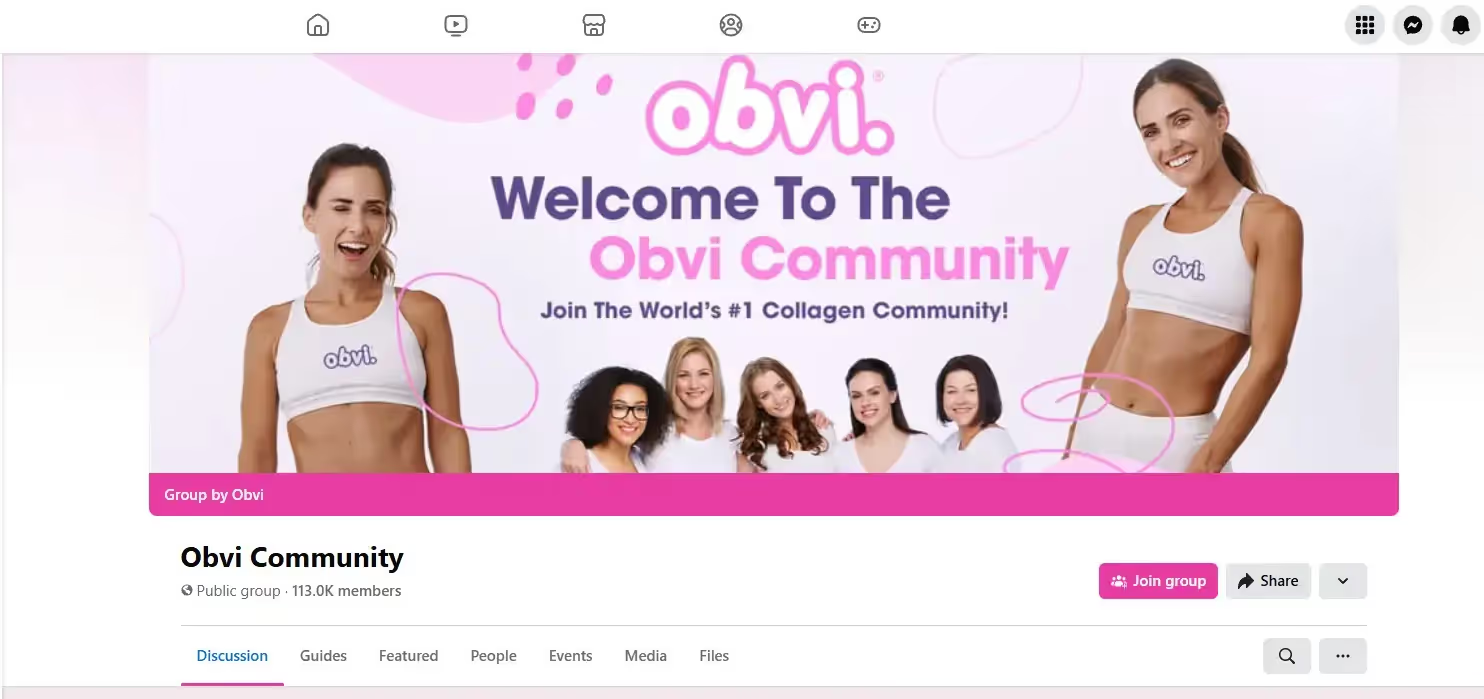
    Obvi’s Facebook community is a powerful owned channel, with over 110k fans of their brand they can reach any time, for zero cost

    Why Owned Channels Outperform Paid Ads

    Paid ads give instant sales, but they come with a never-ending cost.

    Owned channels take time to build, but once they’re running, they drive sales without needing constant investment:

    • A massive email list or a mobile app with push subscribers means every sale is all margin—no ad spend required.
    • Loyalty programs & communities feed themselves, creating habitual engagement and organic sales without constant selling.
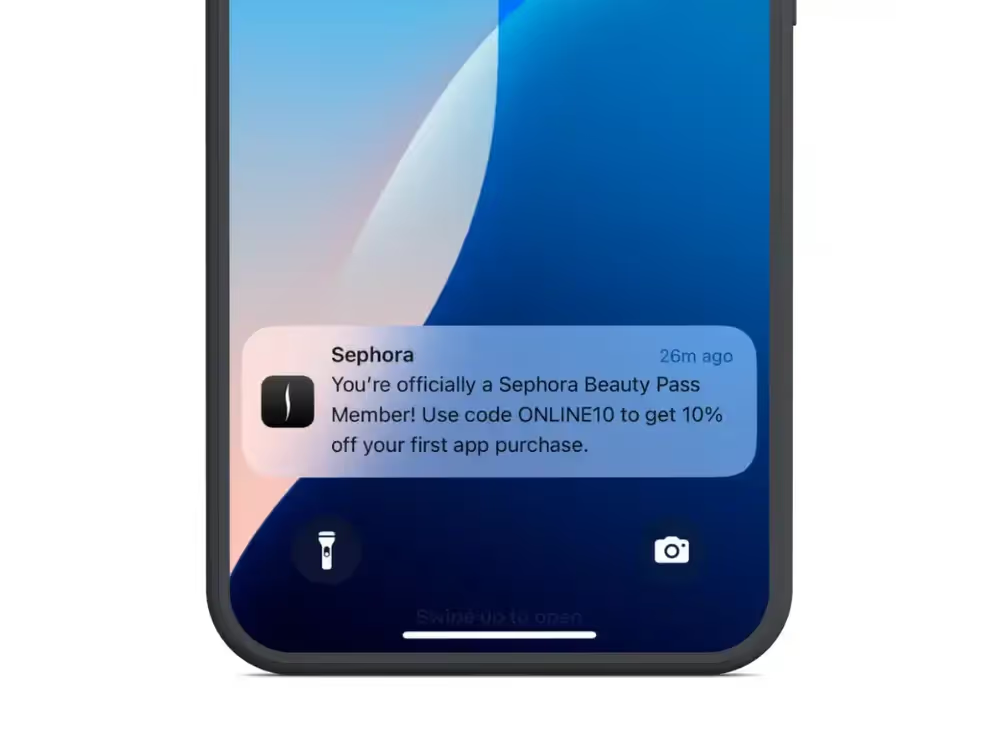
    Sephora leverages both their mobile app and loyalty program together to drive long-term retention

    The Biggest Mistake Brands Make? Thinking Short-Term.

    Many brands chase short-term sales instead of long-term retention. 

    Their entire post-purchase strategy is “Buy this, buy this, buy this.” That’s a transactional mindset that burns customers out.

    Winning brands build relationships first, educating, engaging, and keeping customers in their ecosystem. 

    When the time comes to buy again, they don’t need an ad to remind them—you’re already in their inbox, texts, and notifications.

    4. Seek Out High-Value Customers

    Instead of chasing one-off buyers, focus on acquiring customers who are more likely to become repeat purchasers and high-LTV customers.

    Your top customers aren’t random. They have common traits. Identify them and double down on acquiring more of them.

    • Analyze your highest-LTV customers – Who buys again and again? What do they have in common?
    • Follow the 80/20 rule – 80% of revenue typically comes from 20% of customers—find those 20% and scale them.
    • Identify what makes them tick – Look at demographics, behaviors, and purchasing patterns to understand why they stay loyal.

    You can turn these insights into a high-ROI acquisition strategy:

    • Segment high-LTV customers – Create VIP cohorts and build retention strategies around them.
    • Build lookalike audiences – Use your best customers as the blueprint for finding more buyers who fit the same profile.
    • Speak directly to their pain points & aspirations – Generic ads won’t cut it—use messaging that resonates with what they actually care about.
    • Invest more in what works – Stop spreading your budget across every segment—prioritize the customers who actually drive profit.

    Instead of throwing money at every type of buyer, put your resources into attracting and retaining customers who will keep buying from you. This isn’t about more customers…. it’s about the right customers.

    5. Optimize Messaging & CX for Retention

    Retention doesn’t come from blasting another discount email. It comes from the entire customer experience. If people don’t love shopping with you, no email or SMS campaign is going to fix that.

    A seamless, memorable shopping experience builds more loyalty than any email flow ever will. If buying from you feels effortless, people will come back, not because of a discount, but because they want to.

    Your marketing shouldn’t just be a constant push to “BUY NOW.” Brands that give as much value as they ask for build long-term relationships. Instead of treating post-purchase emails like a sales pitch, use them to:

    • Educate – Teach customers how to get the most out of their purchase (the more value they get, the more likely they are to come back).
    • Engage – Share community-driven content, behind-the-scenes insights, or user-generated content.
    • Reward – Give them a reason to stick around with loyalty perks, early access, or VIP benefits.

    Many brands struggle with retention because they’re too focused on immediate ROI. They want to see a return from every marketing effort right now. 

    But that mindset keeps you stuck on the acquisition treadmill.

    Retention is how you break free. The brands that win play the long game—focusing on customer relationships instead of one-time sales. 

    Do that, and you’ll build a business that grows on its own, without constantly paying for new customers.

    Read more: How to Own Your Website Traffic (Building Unstoppable Moats)

    Execution Plan – Apply This Now

    Ready to start making more from every customer?

    Here are short and long-term plans to help you do it, and reduce the impact of those rising CACs.

    Quick Wins for Immediate Impact

    1. Audit Your Email & SMS Automations – Are you missing re-engagement opportunities?
    2. Launch Post-Purchase Upsells – Increase AOV/LTV instantly.
    3. Examine Owned Channels – Are you building assets like an email list, mobile apps, brand community that lead to cheap long-term revenue?

    Long-Term Retention Playbook

    • Quarterly LTV Analysis – Track cohorts, ID churn risks, and optimize retention flows.
    • Reinvest Retention Profits into High-ROI Channels – Use direct mail, SMS, and community-building for deeper engagement.
    • Leverage First-Party Data for Proactive Retention – Track early churn signals and re-engage before customers leave.

    Conclusion: The Brands That Win Retention, Win DTC

    The brands that prioritize retention will outlast those who chase cheap CAC.

    There’s only so low your CAC can go, and the landscape for advertisers is getting tougher and tougher.

    Yet in terms of retention and LTV, the sky is the limit.

    It’s not about cost-saving; it’s about limitless growth.

    • Retention marketing isn’t just a cost-saving strategy—it’s a profit-generating machine.
    • If you’re not doubling down on retention, you’re leaving easy money on the table.
    • Your move: Implement 2-3 retention-boosting tactics, and start stacking LTV against CAC.

    Retention isn’t a bonus strategy—it’s survival. The future belongs to brands that turn every customer into a repeat buyer.

  • Native, Web or Hybrid App: Which Is Right For You?

    Native, Web or Hybrid App: Which Is Right For You?

    “Building an app” is not as simple a statement as it once was.

    Today, apps can fall into a great many buckets, from simple web apps, to Progressive Web Apps, to native apps, hybrid apps, cross-platform apps.

    Trying to understand it all is exhausting. Thankfully, we’re here to help! With more than 10 years experience in the app game, we’ve learned all there is to know about web, native and hybrid apps, and the pros and cons of each.

    While there’s no catch-all answer to which type of app is right for your project, we can give you guidance on choosing the right approach, and avoiding disruptions and added expense from having to start over or pivot partway through development.

    Keep reading for more, or check out this video for the key takeaways:

    At Vendrux, we can help you turn your mobile website into high-quality apps, doing all the setup work for you and with little to no maintenance and overhead required. To learn more, and get a free preview of your mobile app, book a free demo now.

    Perspectives from Building 2,000+ Mobile Apps Over the Last 10 Years

    An app, broadly speaking, is a piece of software that allows a user to do “something”.

    That something could be ordering a new pair of sneakers, analyzing data, writing an article, listening to a song – anything.

    This is very broad, so let’s narrow things down.

    On mobile, there are three main types:

    • Web apps, which run in a browser.
    • Native apps, that run on iOS and Android devices.
    • Hybrid apps, which are a blend of web and native technologies.

    So, which is right for your business?

    At Vendrux, we specialize in converting websites, eCommerce stores and web apps into high end mobile apps. More than 2,000 brands have trusted us, including Jack & Jones, Vero Moda, and Estee Lauder, with 150+ reviews averaging 4.8/5.

    Over the past 10 years, we’ve got a few opinions on mobile app technology, the different options on the market, and the crucial considerations for businesses.

    We’ve seen every use case, business requirement, and edge case out there. We’ve also seen years of results from our clients, which range from small startups to global multi-billion dollar brands.   

    It’s that experience that we’ll use to provide you with a thorough understanding of the difference between each type of app, and which one is best suited for you.

    What is a Web App?

    A web app runs on a web server and is accessed through a browser. Web apps are built with web technologies like HTML, CSS, JavaScript, and a massive ecosystem of frameworks and tools.

    The line between a website and a web app can be hazy, but generally it’s considered a web app if it has some deeper functionality beyond a static site. 

    Web apps provide interactive and dynamic user experiences, while websites present fixed content. These days, basically all sophisticated web tools and platforms are web apps. 

    Most eCommerce stores, social media sites, business tools, even media sites can be classed as web apps today. 

    Take amazon.com for example.

    It has a massive range of features and interactive functionality, far beyond just displaying content.

    Even small eCommerce stores these days have user authentication, product search and filtering, advanced cart features, payment processing – and even sophisticated product recommendation algorithms. 

    In short – they’re web apps!

    At Vendrux, we create native iOS and Androids apps from our clients’ web apps. So we can attest to the amazing development of the web in recent years. In fact, if you have a web app, you can go and preview exactly what your native apps would look like right now.

    Over the past decade the adoption of new web standards like HTML5 and CSS3, frameworks like React and Vue, and new paradigms like WebAssembly have empowered web developers to create better and better experiences.

    Mobile browsers and design have improved rapidly, and as a result, eCommerce and other web based industries have exploded. 

    New technology has also given birth to Progressive Web Apps, which replicate some of the same features as mobile apps. But as we’ll see later, they’re not a substitute. 

    Web apps are typically easier, faster, and cheaper to build – partially because hiring web developers is easier and less expensive.

    But the main question is whether a web app is enough for what you want to achieve.

    Are Web Apps Good Enough? 

    As we’ve seen, web apps are great, and you can build almost anything on the web these days.

    Web apps are simpler to build, easier to maintain and update, and are universally accessible across devices through the browser.

    But, they’re not a substitute for mobile apps.

    Web and mobile apps are not equivalent substitutes, but rather complementary and mutually supporting. 

    Not only is the experience very different, but they tap into different habits and audiences. There will always be a segment of customers who want and expect a mobile app.

    Let’s take a deeper look at how they are different. 

    Mobile UX

    With a web app, the user puts the URL into their browser, log in (maybe), and interact with the app in the browser. It’s competing for their attention with dozens (hundreds) of other tabs, and the experience isn’t optimal.

    Modern mobile browsers are good, but they fundamentally evolved from janky and borderline unusable browsers of the early mobile web days. They were a desktop thing that was “bolted” on to the new internet capable mobile devices.

    Though much better on modern phones, the browser is not native to smartphones.

    Apps, however, are. 

    That’s why the experience on them tends to be smoother, more engaging, and more sticky. 

    App Store Listings & a Home Screen Icon

    Users are also accustomed to heading to the App Store on iOS or the Google Play Store to look for apps that solve their specific problems.

    They’re then used to seeing the icon appearing on their home screen and tapping it to enter an immersive experience. 

    They’re highly visible, giving businesses a more permanent brand presence on the customer’s home screen, and easy to access with one tap.

    Push Notifications

    Another key point in favor of mobile apps is push notifications.

    They are one of the most direct and effective ways to reach customers – and one of the most common reasons why our clients want apps in the first place.  

    Once someone has your app installed on their home screen, you can connect with them directly through push. Web push notifications just don’t compare. 

    Aren’t PWAs Like Native Apps?

    Progressive Web Apps (PWAs) were an important evolution of the web. 

    They leverage modern web tech like service workers, a web app manifest, and responsive design to create an experience that is closer to a mobile app. 

    For example, PWAs can:

    • Be “installed” on the device home screen (shortcut added)
    • Send push notifications 
    • Have an “App like” navigation and UX 
    • Offer some offline functionality 

    PWAs are indeed great and you should consider building one. We wrote about them in depth here

    They aren’t a substitute for mobile apps though, more like a better type of modern web app.

    You won’t get the exact same functionality from a PWA, and though you can do some of the same things as you can with a native app (such as installing on the user’s home screen, and sending push notifications), the experience for the user does not measure up.

    Web Apps are for Desktop, Mobile Apps are for Smartphones 

    Web apps are great for desktop, and good for some level of use on mobile. But they just are not the same. 

    Think about the massive mobile app hits over the past decade – Uber, TikTok, DoorDash, Twitter, Messenger. 

    Would any of these have become so big if you had to use them through a web browser? Probably not. 

    Using the Twitter or Facebook web app on desktop is fine, just like using Google Drive or your email on a desktop browser. But you take out your phone, you’ll always go for the dedicated app over accessing it via the browser.

    The Verdict on Web Apps vs Mobile Apps

    Our advice is to build great web apps as V1 of your product.

    It will be (relatively) easy to build and distribute, and will work great for building an initial user base and for desktop users. 

    The web apps can always form the core of your experience. A way to get organic traffic, and build the initial connection onboarding new users. 

    Then build mobile apps to deepen loyalty and engagement with your core customers. 

    Vendrux makes this very easy.

    All you need to do is build for the web, then you can easily and efficiently translate that into iOS and Android apps through our service. We convert your web app (or static website) into native iOS and Android apps in just days, keeping all the functionality you already built for the web. 

    More on that later. For now, just note that this has been a very successful approach for many large brands

    Facebook, Quora, Instagram, Trello, Basecamp, Uber, and Slack are just a few of the successful tech businesses that reused some or all of their web apps as native apps.

    But, when it comes to mobile apps, there’s a few more variations to be aware of.

    Let’s start by moving on to the original mobile app type – native. 

    Native Mobile Apps

    Native apps are native to the iOS or Android operating systems. 

    The “classic” way to build native apps is with the native languages of the platform (Swift or Objective-C for iOS apps, and Kotlin or Java for Android).

    Native apps are often seen as the “gold standard” of mobile apps, because for many use cases they give you the widest range of possibilities and the highest level of performance. 

    Native apps are able to tap into all the features of the device itself, have offline functionality, and (if they’re built well) are fast, performant and have a great UX. 

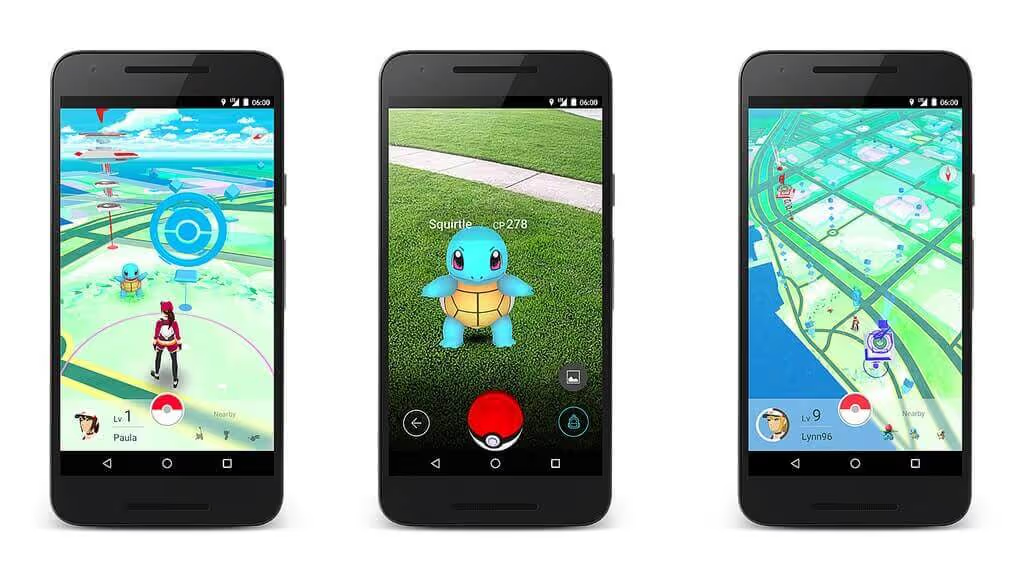
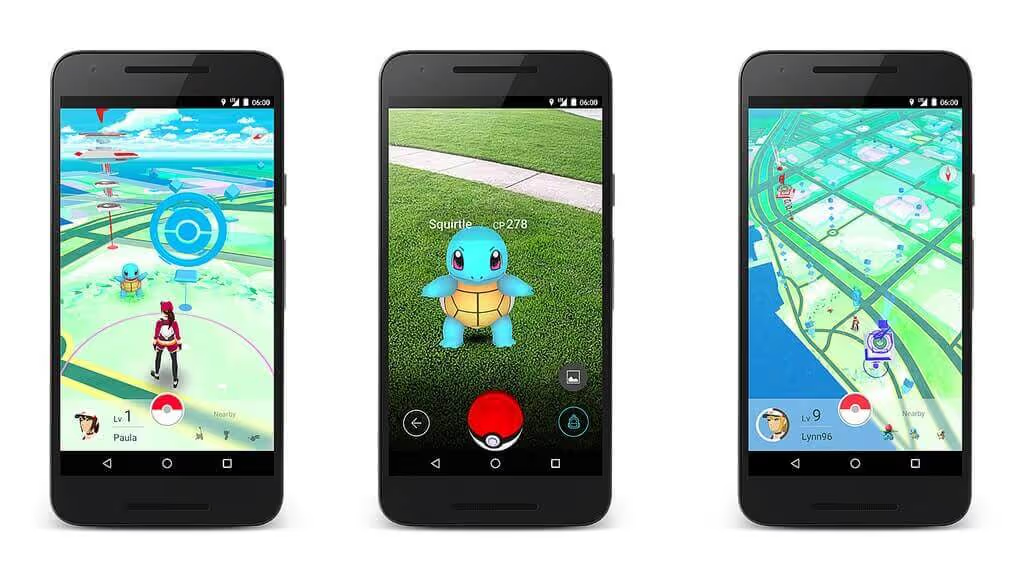
    Screenshots of Pokemon GO, a fully native app
    Pokemon GO is a native app

    Sounds good, right?

    Superior Performance – At a Cost

    Native development is indeed powerful, and can really give you the cutting edge in performance and capabilities.

    To put it bluntly though, it’s (probably) not worth it.

    That’s because of the two major downsides – the classic constraints of time and money. 

    Native app developers are highly skilled and sought after, and building apps for iOS and Android is a complex project with a lot of moving parts. 

    Asking how much it costs is a bit like the old “how long is a piece of string” – it depends. 

    But we can offer a minimum baseline: it costs several hundred thousand dollars and takes at least six months.

    Why is native development so expensive? 

    The key reason is that the field is very technical and labor-intensive. There are relatively few skilled native app developers, and they’re in high demand. 

    You need at least two of them as well, one for Android and one for iOS. 

    This is an absolute bare minimum. Realistically, for anything remotely sophisticated you’d also need UX designers, graphic designers, QA testers, and PMs. If you need to integrate the apps with any existing assets or databases you’ll also need specialist backend developers too. 

    You need to hire all these specialists, or contract a top agency, and manage a long project with many moving parts.

    Realistically, as a small to medium sized business without tens of millions lying around, you probably aren’t going to do all this. 

    Don’t worry though – the good news is that this is not necessary for you.

    All you need is a great web experience, and with Vendrux you can convert that into a great native app experience without any of the usual pain and expense. 

    If your web app is already optimized for the mobile web, it is ready to be converted into native iOS and Android apps!

    Why You Probably Don’t Need a “Native” App

    Gone are the days when native was the only viable route to amazing mobile apps. 

    There are only two types of app that really need to be built this way:

    1. Computationally demanding apps, where tiny performance optimizations are crucial, like graphics-intensive games or animations
    2. Apps that need to interact with the device hardware in a novel, innovative, or a particularly deep manner.

    So unless you need to build cutting edge gaming apps, or apps that use special hardware features like the various sensors, high-precision geolocation, biometrics, or something of that manner, you do not need to build apps natively. 

    For most web-first businesses from common categories (such as eCommerce, educational, productivity, news, or finance) native will be overkill. 

    Native will not necessarily give the user a better experience compared to more efficient development methods.

    So let’s go one step up the efficiency ladder and look at another type of native app that’s simpler than going fully native.

    Cross-Platform Development – a Simpler Way to Build Native Apps 

    When native apps first became a “thing”, true native development was the only option.

    This has changed in recent years.

    In recent years, cross-platform app development has become very popular. There’s one key reason why.

    Remember when we said that you needed at least two developers for native development?

    Well, that’s because you need two completely different codebases. That’s two different codebases for different specialists to write, test, and maintain over time.

    A real challenge and expense. 

    Cross-platform development solves this by allowing teams to build apps for iOS and Android with one framework like React Native, Flutter, or Kotlin. 

    cross platform native apps
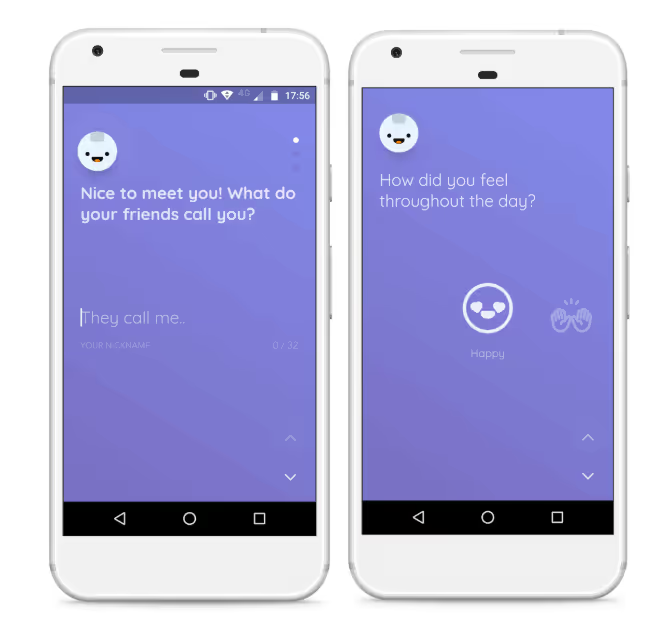
    Reflectly is a cross-platform native app, built with Flutter

    How Does Cross-Platform App Development Work?

    Cross-platform frameworks lets you write code once, then deploy it on both platforms.

    These frameworks all work differently, but on a high level they act as a sort of “universal translator” that adapts a single codebase into a form that the different operating systems understand.

    You start off by writing the app’s code in a single, high-level language that the cross-platform framework understands (like JavaScript for React Native or Dart for Flutter).

    React Native mobile apps
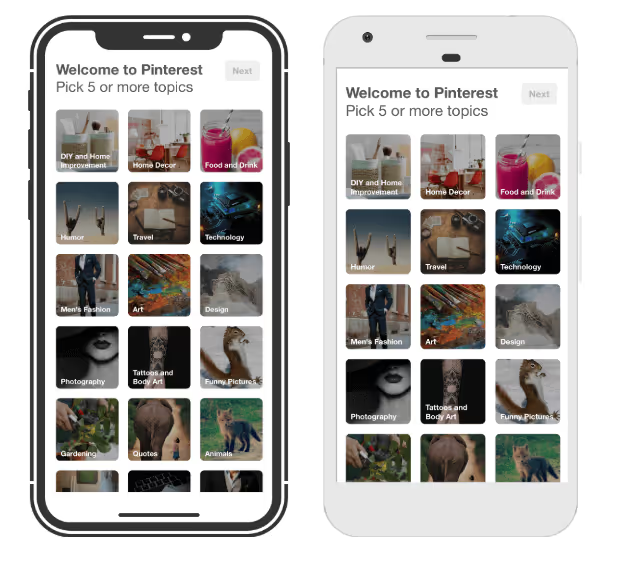
    Pinterest’s Topic Picker is powered by React Native

    The framework then takes this code and works a little magic.

    With some, like Flutter, the code is compiled into native iOS and Android code, which can then run easily on the device.

    With others, like React Native, the code is “bridged” to native code in a process more like real time, on-the-fly translation. 

    This is somewhat similar to the compiled vs interpreted distinction in traditional programming languages. 

    Though each cross-platform framework has its strengths and tradeoffs, functionally, both achieve the same result – allowing you to run apps on (very) different platforms from one codebase.

    Is Cross-Platform the Answer? 

    Cross platform development works very well. Load of large tech companies build cross-platform. For example:

    • The Shopify, Pinterest, Discord, and Coinbase apps are built with React Native 
    • The BMW, Google Pay, and AliBaba apps are built with Flutter
    • The Memrise, McDonalds, Forbes, and Meetup apps use Kotlin Multiplatform 

    The core advantage is that you can work from a single codebase, sharing and reusing logic across multiple platforms. 

    This means that you can build the apps, fix bugs, and release new features and updates more efficiently. 

    Overall, this can reduce development time and cost. Compared to classic native development, you can expect to save 30-50% of development time and effort. 

    Although the frameworks do simplify things compared to classical native development, and can get you to market faster within a (slightly) more reasonable budget, there are downsides.

    Performance

    The first tradeoff is performance.

    While cross-platform frameworks have come on tremendously, they still lag behind true native apps in performance terms – especially for apps relying on intensive graphics or deep device integration.

    It can sometimes be harder to achieve a “native look and feel”, although this gets better all the time.

    Not to say they perform poorly, but performance is objectively lower for cross-platform apps than native apps.

    Cost and Effort

    Cross-platform can be a great option for those with the resources, but it’s still a massive project, that is only a bit easier than native from the perspective of a small-to-medium sized business.

    You still need to contract or hire highly skilled and specialized developers, and it will still be a serious project to manage.

    Though you’ve made things easier, it’ll still take $100k+ and months of effort to get the apps released.

    For most businesses, this means the apps will struggle to pay for themselves, and the risk is huge.

    Is It Necessary?

    As we’ve said earlier also, you probably do not need them.

    A lot of our clients are eCommerce brands, eLearning startups, or media companies. If that’s you too, you do not need the capabilities of a native or cross-platform app for these use cases.

    It’s overkill, will be a nightmare to develop and connect with your existing tech stack, and will never get you the ideal result anyway for several reasons we’ll cover shortly. 

    That’s why we’re going to move up the efficiency scale, reducing the risk for you and introducing the next app development method: Hybrid.

    Hybrid Apps

    A hybrid app is a hybrid between native and web. 

    They’re built using web technologies like HTML, CSS and Javascript, and use the device’s browser engine to render and execute the web code locally, displaying it to the user in a native container called a webview.

    Even though hybrid apps are built with web languages, they can interface well with mobile device features thanks to platforms like Ionic and Cordova

    Cordova provides the webview infrastructure, and a set of APIs for accessing device-native features like the camera, GPS, and file system through plugins. Ionic is built on top of Cordova, and adds a layer of UI tools for developing quality user interfaces. 

    There are significant advantages to building hybrid apps compared to native.

    For a start, they’re much easier to build and maintain. 

    Because the web codebase is wrapped in native containers like Cordova or Capacitor for both iOS and Android, the same code can run on each platform. This allows code reuse and simplifies maintenance, like the cross-platform native apps we covered earlier. 

    It’s also easier to find developers who can do the work. There are far more developers skilled in web development compared to the rarer and more specialized native devs. 

    Your existing team might even be up to the challenge, especially when it comes to maintenance.

    Hybrid apps can be downloaded from the App Store or Google Play, and from a user’s perspective can function exactly like a high end native app (if they’re built well). 

    Typically, hybrid apps will cost less than half the price, and take half the time to build, compared to native.

    3 months and $30,000 is a good ballpark to start off with, but it could be significantly more. 

    The Downsides of Hybrid 

    So, hybrid apps are faster and cheaper to build, and easier to maintain without specialist skills. 

    But they still take a lot of work and expertise, especially if you want them to work well and actually please your users with a great UX. 

    Other potential downsides are performance and features.

    While hybrid apps can be fast and performant, well-built native apps have the edge here. So for a trading app or something that relies on cutting edge performance, you may want to go native (if you can afford it).

    Hybrid apps can also interface with the device’s features, but not always as well as native. So if your app relies heavily on the accelerometer, compass, or similar features (like a fitness app), hybrid may not be completely optimal. 

    Now let’s look at Vendrux apps – a special type of hybrid app.

    “Wrapper” Apps and Vendrux

    A standard hybrid app is just a normal “app” built with web rather than native technology. It doesn’t mean you can easily recreate an existing web app in iOS and Android form. 

    For that, Vendrux “wrapper” apps are the best.

    We built Vendrux more than 10 years ago to give businesses a way to convert their websites and web apps into native apps. 

    Vendrux is extremely affordable and fast compared to native development. It’s much less fiddly and more efficient than trying to build hybrid apps yourself. 

    How Does Vendrux Work?

    Vendrux apps are a special type of hybrid app that uses webviews to “wrap” your existing website, online store, or web app in mobile code.

    On top, we layer on the native elements and components needed to give the apps a rich functionality and great user experience (including unlimited push notifications).

    Three examples of hybrid “wrapper” apps built with Vendrux
    Vendrux apps have full use of push notifications, just like any native app

    The difference between a native app and an app built with Vendrux is basically all under the hood. For most types of apps, the end user would not be able to notice that it wasn’t built for a mobile OS from the ground up.

    Why Vendrux?

    The key advantage for you, apart from saving huge amounts of money and time relative to other options, is that you can reuse everything from your existing web app or site.

    It would be ridiculously hard to recreate the functionality you built for the web in app form, whether you used native code, cross-platform frameworks, or hybrid methods.

    In many cases, it would be so impractical for a normal business as to be functionally impossible.

    Thankfully, it’s completely unnecessary too.

    Vendrux gives you the ultimate code reuse, reusing everything you already built for the web. Every part of your tech stack, every plugin and custom feature, everything will work in your Vendrux iOS and Android apps straight out of the box. 

    There’s no rebuilding, and no compromising on features.

    Vendrux makes it as simple as converting your existing website into a mobile app

    Who is Vendrux For? 

    Of course, Vendrux is not appropriate if you want to build something like a cutting edge gaming app from scratch, or if you don’t already have a web based business. 

    It’s perfect for a few use cases – most notably, businesses that already have an eCommerce store, a web app, or a content brand on the web.

    If that’s you, it’s easy use Vendrux to convert what you’ve already built into high end apps for iOS and Android. 

    The apps are built by our team, with many years of experience and thousands of successful apps under their belt, on our own platform.

    The apps will be easy for you to incorporate into your existing workflow, as you’ll add very little extra work for yourself or your team members – and you definitely won’t need to hire anyone new.

    That’s because of two main reasons:

    1. The apps sync completely with your website or web app, and update automatically with any changes on the web. For example, if you have an eCommerce store, the apps will sync your entire product catalog and update with any new products you add.
    2. Our team handle all necessary updates and maintenance, forever, as part of our full service 

    The apps practically run themselves.

    This makes it low risk, and much more likely that you’ll see ROI compared to other routes.

    You can get apps just as good as $100k+ native ones for a fraction of the cost, ready to launch in just weeks. 

    The model is proven and has worked amazingly for our 2,000+ customers, like David Cost, VP of eCommerce and Marketing at multinational retailer Rainbow Shops. 

    They’d tried different hybrid and wrapper approaches before finding Vendrux and realizing that:

    “The expense isn’t that big, and operationally, there’s not that much we have to do for the app. It’s a no-brainer, especially when you add push notifications on top.”

    Or Svend Hansen, Product Owner at BESTSELLER who echoed:

    “Through history we’ve tried doing what Vendrux does. But we wanted a solution that could enable push notifications, and Vendrux has a way of doing that with OneSignal. We couldn’t find another company that could offer the same features at the same price point, same time to market, and make it as easy as Vendrux could.”

    You can get more of a feel of what our customers think by checking out our reviews, case studies, and app examples. 

    What’s Your Best Option?

    By now, you should have a good idea of which is the best route for you. 

    We’ve seen that native development, while the “gold standard” of mobile apps, is prohibitively expensive, impractical, and likely unnecessary. 

    While hybrid apps make things a bit easier, they have the same flaws on a smaller scale. 

    With Vendrux (as long as you already have a web presence) you get all the benefits of native apps while dramatically reducing the financial investment, management overhead, and risk. 

    We handle everything for you from the initial app design, to publishing on the App Store and Google Play, all the way to ongoing updates and maintenance. 

    The process starts with a no-pressure chat with one of our app experts. They’ll explain everything in depth, and answer all your questions. 

    Let’s get you on the App Store and Google Play – the smart way. 

    → Book a call today!

  • Native vs Hybrid eCommerce Apps: Choosing the Right Option for Your Business

    Native vs Hybrid eCommerce Apps: Choosing the Right Option for Your Business

    Launching your own ecommerce mobile app is a great brand-building and retention move.

    With mobile commerce making up more than 50% of all eCommerce sales worldwide, launching an app is an opportunity to provide a better user experience for mobile shoppers, and boost conversion rates and AOV as a result.

    Then there are the long-term benefits you get when someone downloads your app, as the stickiness of an app and access to mobile push notifications leads to much higher lifetime value.

    Add in the authority and trust having an app gives your brand, and there are many reasons why you’d want to have an app.

    The biggest issue for most brands is how to launch an app. Most eCommerce businesses are versed in web development, not mobile app development, and you might not be aware of the different avenues available to launch an app (and that you can save hundreds of thousands of dollars and months of development time depending on which option you choose).

    Keep reading to get a deeper understanding between native and hybrid eCommerce apps.

    What is Native vs Hybrid Development?

    Let’s start by helping you understand what native development and hybrid development means.

    Native development means building apps written in the native code of mobile operating systems (namely iOS and Android).

    Generally, iOS (aka iPhone) apps are written in Swift or Objective-C code, and can only run on Apple operating systems.

    Android apps are usually written in Kotlin and/or Java code, and can only run on Android phones.

    This means you need to develop separate apps for each mobile operating system, as an iPhone app won’t work on an Android phone, and vice versa.

    And, most importantly, these apps are completely separate from your website, which is likely written in HTML, CSS and JavaScript, coding languages that require the browser to work.

    So what are hybrid apps?

    Hybrid apps are apps that combine web code (i.e. HTML, CSS, JavaScript) with mobile code.

    Hybrid development takes elements of both web and mobile, to allow you to share part of your website code with your mobile app.

    People can still download the app and open it on their phone, but some of the functionality and design works the same as it does on your website.

    Hybrid means you don’t need to build your entire app from scratch, instead you can reuse the parts of your website that work well on mobile already, to significantly decrease development time, as well as the workload required to maintain your app and website.

    Today, many high-profile apps are made with hybrid development, as companies look to maximize efficiency in their tech stack.

    Pros and Cons of Native eCommerce App Development

    Now we’ll take a look at what native and hybrid development means in terms of pros and cons, to help you start to understand why a brand might opt for one development approach over another.

    Let’s start with the pros and cons of building native eCommerce apps.

    Pros

    • Native apps generally perform better, and are faster and smoother to use.
    • The user experience is better due to code being written specifically for the user’s device.
    • No limits as to what the app can do; full access to device features and native APIs.
    • Native apps can be built to work offline.
    • Native apps generally have a higher level of security.

    Cons

    • The cost of native development is significantly higher; you can expect to pay around $50,000 at a minimum (multiplied by two, for separate Android and iOS apps).
    • Native apps come with a high cost of maintenance as well (potentially five or six figures per year).
    • Development can take months to complete (expect 6-9 months for an average native eCommerce app).
    • You need to juggle multiple codebases (web, Android, iOS).
    • It takes extra work and extra development to make sure your web and mobile platforms are connected (your developers will need to build custom APIs to sync data across each platform).
    • You probably don’t have anyone with native development experience on your team; introducing the risk and expense that comes with hiring new staff or dealing with outside development agencies.

    Pros and Cons of Hybrid eCommerce App Development

    Now let’s dive into the advantages and disadvantages of hybrid app development for eCommerce stores.

    Pros

    • Significantly lower cost to build and launch your app.
    • Much shorter development timeframe (you may be able to launch an app in less than a month).
    • Cheaper and easier to maintain, with less unique code to manage.
    • User experience and branding is easy to keep consistent across all your platforms.
    • Since it’s quicker and more affordable to launch, you can gather feedback from users faster and accelerate the process of iterating and improving on the first version of your app.

    Cons

    • Hybrid apps’ performance can suffer compared to native apps.
    • User experience may not be 100% optimal on each platform.
    • You may not be able to use all device features (though hybrid apps can generally use some hardware features, such as camera, microphone and GPS, and hybrid technology is constantly improving).
    • Bugs can show up on certain platforms, since code is not customized for each environment.

    Choosing the Best Option for Your Store

    Above, we ran through a summary of the pros and cons of native app development for eCommerce, as well as hybrid development.

    So which is the best way to build an app for your store?

    The answer might be different from brand to brand, since each business is unique, and certain pros or cons might hold different weight for your business, compared to another.

    So it’s important to consider how important each area is for you. 

    Is cost and time a priority? Do you need extensive use of native device features? Do you already have mobile developers on staff?

    Though choosing your tech stack is certainly a complex decision, the most significant pros and cons of native vs hybrid app development center around the lower cost of hybrid vs the higher level of performance from native apps.

    Just How Big Are the Differences in Cost and Performance?

    So how significant is the gap in performance between native and hybrid apps? And how about the difference in cost?

    Let’s examine this now.

    Cost

    Building native apps costs a lot of money.

    This is because app development is time-intensive, and all this time, you need to pay high rates for specialized developers.

    The average salary for mobile app developers is between $95,000 to $115,000 per year. With a six-month development timeframe (which is conservative), you could estimate that it will cost approximately $50,000.

    Yet it’s likely to be more than that; you’ll likely need more than one developer to work on your project, as well as designers, project managers and QA testers, and a six month timeframe is really a best case scenario.

    So don’t be surprised if building a native app costs $100,000+.

    The cost of a hybrid app can vary as well, depending on how native you go, and the level of native features you build into your app.

    But you can easily build high-quality hybrid apps (like high-revenue brands Tobi and Sleefs did) for around $1,000.

    That’s a big difference – and there’s also the difference in recurring maintenance costs, which is even steeper considering native apps require more work to keep up to date and in sync with your website.

    “If we had unlimited time and money, we would probably go for a custom native app, but that is half a million to a million a year to maintain.”

    – David Cost, Rainbow Shops

    Learn more about the cost of building an app here.

    Performance

    The area in which native apps have the edge is performance.

    Native apps are faster, smoother, generally easier to use, and have a more natural integration with the user’s device.

    It’s easier for native apps to tap into device features, such as the GPS and biometric features.

    It’s difficult to quantify just how large the difference in performance is. But we can say that hybrid technology has improved greatly over the last ten years, and depending on the type of app, the difference can be negligible.

    For apps with a high level of interactivity – like TikTok, Snapchat, for example – there may be a noticeable difference in using native or hybrid technology.

    But for an eCommerce app, the difference will be a lot less significant.

    Shopping apps generally don’t need any overly complex features, or even anything drastically different to what the website does.

    There may be incremental improvements in load speed, and the UI and UX may be slightly more optimized with a native app.

    You will need to decide whether this difference is enough to justify the difference in cost, time to market, and ongoing complexity from building native apps.

    Other Options (PWA, Cross-Platform)

    Briefly, before we give our verdict on how we recommend you build your app, we’ll touch on two other ways to build an ecommerce app: Progressive Web Apps (PWAs) and cross-platform mobile apps.

    Progressive Web Apps

    Progressive Web Apps are mobile websites that are “supercharged” to provide something closer to an app-like experience.

    They still run via the browser, but users can download an icon to their home screen and launch your site with one tap, rather than by typing in the URL.

    The user experience inside of the PWA is designed to feel more like using an app, though it’s not quite the same level (you’ll notice the difference if you switch between a PWA and a native app).

    Ultimately, PWAs are much cheaper and easier to build than either hybrid or native apps, but they’re not a worthy replacement for actual mobile apps. The user experience is not as good, you can’t get your PWA into the app store, and it doesn’t carry the same authority for your brand.

    Learn more about the difference between Progressive Web Apps and Native Apps here.

    Cross-Platform Mobile Apps

    Cross-platform apps are apps built with frameworks like React Native or Flutter, which can use much of the same code to run on multiple operating systems (iOS and Android).

    They’re a lot closer to native apps. Indeed, there’s not too much difference these days between a cross-platform app built with React Native, for example, and fully native apps.

    The advantage with cross-platform is that it’s cheaper and more straightforward than building natively, as you don’t have so much unique code to juggle.

    However, cross-platform development is still expensive. You might save 20-50% of the cost of native development, but you’re still looking at a $50,000+ price tag to build an eCommerce app.

    Learn more about cross-platform mobile apps here.

    Why We Recommend Hybrid eCommerce Apps

    In most cases, we recommend eCommerce brands to build hybrid mobile apps over native (or cross-platform).

    It comes down to the lopsided differences in cost and performance, and what you ultimately want from an eCommerce mobile app.

    All eCommerce brands today should know the importance of having a mobile-optimized website, and if you’re generating steady revenue, you’ve probably already put work into making your mobile UX as good as it can be.

    You just need to translate that same experience into the app, with a few app-specific additions, such as a tab menu, native navigation, and mobile push notifications, all of which you can do with hybrid apps.

    Any flashy or complicated features, which are only possible with native development, are likely overkill for an eCommerce store.

    It’s just not worth paying tens or hundreds of thousands more for a complicated, expensive, native app, just for minor improvements that most customers won’t notice.

    Hybrid development lets you launch an app that’s 99% as good as what a native app would be, for less than 5% of the cost, and even less hassle moving forward.

    How to Build a Hybrid App with Vendrux

    __wf_reserved_inherit

    Vendrux lets you launch amazing eCommerce apps, for a manageable cost, without the stress of hiring new staff or managing developers.

    Vendrux is a full-service platform that does all the heavy lifting to turn your eCommerce store into a mobile app.

    We’ll take everything from your website and have it work just as well in the apps – all the plugins, integrations and custom features and optimizations you’ve made to your website will work the same.

    And everything is fully synchronized between your website and apps.

    It doesn’t matter what platform your site is built on, such as Shopify, WooCommerce, Magento, BigCommerce, and even custom-built websites.

    __wf_reserved_inherit
    eCommerce apps built with Vendrux. View more examples here

    All this happens with zero work on your part. We build your apps, test them, submit them to the app stores for publishing, and handle technical maintenance and updates after launch, for a fraction of the cost of paying developers to do it.

    This is the easiest and most effective way to get your store into the app stores, and sell more and grow your brand with mobile apps.

    Learn more about building eCommerce apps with Vendrux here, or to dive deeper and get a personalized look at what the process and end result will look like, book a free demo now.

    Ready to Launch Your App?

    Start now, and you could enter the app stores and start getting app users in less than a month.

    We’ve helped huge brands launch mobile apps, including Rainbow Shops, John Varvatos and Jack & Jones, and all have raved at how much easier and more affordable it is than native development, without sacrificing anything important from their apps.

    “We couldn’t find another company that could offer the same features at the same price point, same time to market, and make it as easy as Vendrux could.”

    – Svend Hansen, Bestseller

    “I expected the app to be somewhat functional, but I thought it wouldn’t be as high quality as some of the apps I’ve seen that have been built from scratch. But I was incredibly surprised. I saw no difference in terms of quality or functionality in our app and an app that could have cost us hundreds of thousands of dollars.”

    – Gavin McGarry, Gear2Go

    As long as you already have a working, mobile-optimized website, it takes virtually nothing at all for us to turn it into amazing mobile apps, which your customers will think you spend hundreds of thousands to build.

    Just book a free demo now to get started, or simply to learn more about what’s possible with Vendrux.

  • Native Apps vs Webview Apps: What’s the Difference, and Which Is Right for Your Business?

    Native Apps vs Webview Apps: What’s the Difference, and Which Is Right for Your Business?

    When you start looking at launching a mobile app for your business, you’ll come across terms like “native app” and “webview app”.

    You might be wondering what the difference actually is. You might also hear some negative connotations of one or the other online, and come in with some pre-conceived biases.

    Let’s clear it all up.

    Here’s the short version: native apps are built from scratch using platform-specific code. Webview apps take existing web content and deliver it inside a native app framework.

    Both end up in the App Store and Google Play. Both can look and feel identical to the end user.

    The longer version matters, because how you build your app affects what it costs, how long it takes to launch, how much work it takes to maintain, and whether it actually does what your business needs it to do.

    This guide breaks down the difference in plain terms, covers the real pros and cons of each approach, and helps you figure out which one makes sense for your situation.

    What Is a Native App?

    A native app is built specifically for one platform (typically iOS or Android) using that platform’s own programming language and tools.

    Think of it like building a house from the ground up. 

    You hire architects, pour a foundation, frame the walls, run the plumbing. Every detail is custom. The result is exactly what you want; but it takes a long time, costs a lot, and if you want a second house on a different street (the other platform), you’re starting over.

    In technical terms:

    • iOS native apps are built with Swift or Objective-C
    • Android native apps are built with Java or Kotlin
    • Each platform requires its own codebase, its own developers, and its own maintenance cycle

    Because iOS and Android are different operating systems with different design conventions, a native iOS app can’t run on Android (and vice versa) without being rebuilt.

    Together, iOS and Android account for over 99% of the global mobile OS market – so those are the only two platforms that matter for most businesses.

    (technically “native app” can also refer to native apps for PCs, smart TVs, smart watches… but the majority of the time, this is used in a mobile app context)

    What Is a Webview App?

    A webview is an embedded browser engine inside a mobile app. 

    It renders web content (HTML, CSS, JavaScript) but without the browser’s usual interface (no address bar, no tabs, no bookmarks). The user just sees app screens.

    Think of it like a furnished modular home.

    The rooms are pre-built in a factory (your existing website), then delivered and installed on a proper foundation (the native app framework). From the outside (and from the inside) it looks and feels like any other house. It just got there a different way.

    A webview app combines this embedded browser engine with native mobile components, things like navigation bars, tab menus, push notifications, and deep linking. 

    The result is a hybrid: web content on the inside, native experience on the outside.

    Example of an app that uses webviews to recreate a mobile website, swapping the browser UI for native app elements.

    How Is a Webview Different from a Browser?

    A web browser has two parts:

    1. The rendering engine — takes HTML/CSS/JavaScript and turns it into something visual
    2. The browser UI — the address bar, tabs, bookmarks, extensions

    A webview is just the engine, without the browser UI. 

    That lets developers replace the browser’s interface with native app elements, so the web content appears as part of the app, not as a web page.

    How Common Are Webview Apps?

    More common than most people think. Multiple studies of Android apps have found that 83-90% contain webview components in their code. 

    Even among the most popular apps (those with 100,000+ users) more than half use webviews as part of their architecture.

    This isn’t a shortcut used by small teams cutting corners. Some of the biggest apps in the world rely on webviews:

    • Shopify published a detailed engineering post in 2025 about “Mobile Bridge,” their framework for making webviews feel native. Their mobile app has around 600 screens, and they describe webviews as “a critical part of Shopify’s mobile strategy.”
    • Amazon uses a hybrid approach with webviews for product detail pages and content-heavy sections.
    • Instagram uses webviews for comments, profiles, and stories.
    • Gmail uses webviews and HTML rendering for cross-platform consistency.

    These companies could build everything natively. They choose not to, because webviews let them ship faster, maintain less code, and keep the experience consistent across platforms.

    Can Webview Apps Get into the App Store?

    Yes, but not all webview apps are created equal.

    Apple and Google both have review guidelines that reject apps that are just a website stuffed into a frame with no added value. 

    A bare webview with no native elements, no app-specific functionality, and no meaningful user experience beyond what the browser already provides will get rejected.

    But a well-built webview app, one with native navigation, push notifications, proper loading states, deep linking, and a genuine app experience, passes review consistently. 

    The app stores care about the quality of the experience, not the underlying technology.

    This distinction matters. There’s a big gap between a basic “website in a box” and a properly engineered webview app, and the app stores know the difference.

    Another example of a successful app built with webviews

    Webview App Advantages

    Here are some of the top advantages of building a webview app.

    Single Codebase

    Building natively means maintaining separate codebases for iOS and Android (and potentially a third for your website). 

    That’s three codebases in different languages, often requiring separate dev teams.

    A webview app draws from your existing web code. When you update your website, the app reflects those changes automatically. One codebase to maintain instead of three.

    For ecommerce brands running on Shopify, WooCommerce, or similar platforms, this is a major advantage. 

    Every product update, every new collection, every landing page – it’s live in the app the moment it’s live on your site.

    Faster Time to Launch

    Native app development typically takes six months or longer for a first version, with dedicated teams working on iOS and Android in parallel.

    A webview app can launch in weeks, not months. The heavy lifting (your product catalog, checkout flow, account management, content) already exists on your website. 

    The app build adds the native layer on top.

    Lower Cost

    This is often the deciding factor.

    Building a native app from scratch typically costs $50,000 to $150,000 for a moderately complex app. And that’s just for one platform. Double it for iOS and Android. Then factor in ongoing maintenance at 10-20% of the initial build cost per year.

    A webview-based approach is a fraction of that. You’re not rebuilding your entire product experience from scratch. You’re extending what you’ve already built into a native app.

    Full Feature Parity with Your Website

    One of the underrated benefits: everything that works on your website works in a webview app. 

    Every plugin, integration, theme customization, and third-party tool carries over without additional development.

    If you’ve spent months fine-tuning your checkout flow, configuring your loyalty program, or integrating review widgets. All of that comes with you. You don’t have to rebuild or re-integrate any of it.

    Native App Advantages

    Sometimes, native is best. Here are the main reasons why you’d want to consider a fully native app.

    Full Control Over Every Detail

    Native development gives you pixel-level control over the interface. Every animation, transition, and interaction can be tuned specifically for each platform’s design conventions.

    If your app’s UI needs to do things that the web can’t: complex gesture-driven interfaces, custom camera experiences, augmented reality; native is the way to make that happen.

    Performance Edge

    Native apps store most of their files locally and are built specifically for the device’s operating system. 

    This can make them feel slightly snappier, particularly for computationally intensive tasks like 3D rendering, real-time video processing, or complex animations.

    They can also run without an internet connection; though for most ecommerce and content-based apps, offline functionality isn’t a meaningful differentiator (because you need up to date content anyway; and besides, the majority of your customers these days have an internet connection live at all times).

    Deepest Hardware Access

    Native apps have the most direct access to device hardware: camera, microphone, GPS, Bluetooth, NFC, and other sensors. 

    If your core functionality depends heavily on hardware features, native gives you the most flexibility.

    That said, webview apps can also access most hardware features through native bridge layers. The gap here is narrower than it used to be.

    App Store Approval Is Straightforward

    A well-built native app will generally pass app store review without issues. There’s no ambiguity about whether it meets Apple’s or Google’s guidelines for what qualifies as a “real app.”

    This is an advantage over poorly built webview apps – but not over well-built ones. A quality webview app with genuine native elements passes review just as reliably.

    What About Cross-Platform Frameworks?

    You might be wondering where frameworks like React Native and Flutter fit in.

    These are a middle ground. They let developers write code once and deploy to both iOS and Android, while still rendering native UI components (rather than web content in a webview).

    They’re popular for apps that need more custom native UI than a webview approach provides, but where building fully native for each platform is too expensive or slow.

    The tradeoff: they still require developer teams who know the frameworks, they still involve building the app experience from scratch (rather than leveraging an existing website), and they still take months to build and maintain. 

    For businesses that already have a well-built website and want to extend it to mobile, they solve a different problem than webview apps do.

    Why Mobile Apps Matter (Native or Webview)

    Regardless of how you build it, having a mobile app matters. And the data backs that up.

    Mobile dominates your traffic. Roughly 60% of global web traffic now comes from mobile devices, and in categories like ecommerce and media, it’s often higher.

    Users prefer apps over browsers. Over 90% of mobile screen time is spent inside apps, not in the browser. Apps are stickier – one tap to open, stay logged in, less friction to browse and buy.

    Apps convert better. Mobile app users view significantly more products per session than mobile web visitors, and app conversion rates run 3-6x higher than mobile web for many ecommerce brands.

    Push notifications are a game-changer. Mobile app push notifications have an average opt-in rate of around 67%, with ecommerce apps seeing 68%. As a direct communication channel, push outperforms email on open rates and engagement – and unlike SMS, push notifications are free to send.

    These advantages apply equally to native and webview apps. Push notifications, app store presence, home screen placement, faster load times – you get all of these regardless of how the app is built under the hood.

    The Gap Between a Bad Webview App and a Good One

    This is the part most “native vs webview” articles skip over. And it’s the part that matters most.

    A bad webview app is just a website opened inside a frame. 

    • No native navigation
    • No push notifications
    • Slow loading with no visual feedback

    The browser’s default behaviors leak through; pull-to-refresh behaves weirdly, links open in unexpected places, the back button doesn’t work right. 

    It feels like a website pretending to be an app, and users notice immediately. Apple notices too, and rejects it.

    A good webview app is nearly indistinguishable from a native app. Here’s what separates the two:

    • Native navigation: tab bars, headers, and back button behavior that follow iOS and Android conventions
    • Push notifications: real native push, not web push, delivered to the lock screen with full notification center integration
    • Deep linking: URLs that open directly to the right screen in the app, not a generic homepage
    • Loading states and transitions: native animations and skeleton screens instead of a blank white page while content loads
    • App-specific customization: splash screens, onboarding flows, login screens that feel built for mobile
    • Smart handling of web content: hiding browser-specific elements, adapting layouts for the app context, handling navigation edges gracefully

    When all of this is done right, the user doesn’t know (or care) whether the app was built natively or with webviews. They just know it works well.

    How to Decide: Native or Webview?

    Go native if:

    • The app IS your product. Think Uber, Duolingo, or a mobile game. The entire business runs through the app, and the experience needs to be built from the ground up for mobile.
    • You need heavy device integration. Bluetooth peripherals, augmented reality, complex camera features, offline-first workflows; these are areas where native development gives you the most flexibility.
    • You have the budget and timeline. Native done well costs six figures and takes 6+ months. If that fits your roadmap, and the use case demands it, native is the most powerful option.

    Go webview if:

    • You already have a website that works well. If your site is responsive, your checkout flow is dialed in, and your tech stack is solid, a webview app extends all of that to mobile without starting over.
    • You want to launch faster and spend less. Weeks instead of months. A fraction of the cost. For most businesses converting an existing web presence to mobile, this is the practical choice.
    • Your app experience is content or commerce-driven. Product browsing, shopping, content consumption, account management, these are exactly the use cases where webview apps perform on par with native.
    • You don’t want to maintain separate codebases. Update your site, and the app updates too. No parallel development tracks, no version drift between platforms.

    A simple test:

    Ask yourself: Is what I want to show in the app fundamentally different from what’s on my website?

    If the answer is no; if the core experience is the same; a webview app is almost certainly the right call. You’ll get the same result for a fraction of the investment.

    What Vendrux Does (and Why It Matters Here)

    Vendrux is the best example of what’s possible when webviews are used correctly.

    Vendrux’s team takes your existing website and builds it into a full native app – with native navigation, push notifications, deep linking, and all the details that separate a quality app from a website in a box.

    A few examples of mobile apps built with Vendrux

    The approach works because Vendrux doesn’t just drop your site into a frame. We add the native components that make the experience feel right: tab bars that follow platform conventions, smooth transitions, proper back-button behavior, native splash screens, and push notification infrastructure that integrates with tools like Klaviyo.

    A few proof points:

    • 2,000+ apps launched since 2013, with a strong track record of App Store and Google Play approval
    • John Varvatos saw 10x revenue per user and a 4x purchase rate through their app
    • Pharmazone drives 63% of online revenue through their app, with a 22% abandoned cart recovery rate via push notifications

    Vendrux handles app store submission, ongoing maintenance, and updates; so you’re not managing another development project on top of your existing site.

    If you’re curious whether this approach makes sense for your business, get a free app preview to see what your site would look like as a native app, or book a consultation to talk through the details.

    Frequently Asked Questions

    Are webview apps slower than native apps?

    For most use cases, no. The performance gap between native and webview has narrowed significantly as mobile hardware and web rendering engines have improved. For content browsing, ecommerce, and standard app interactions, users typically can’t tell the difference. Native still has an edge for computationally intensive tasks like 3D graphics or real-time video processing – but those aren’t relevant for most business apps.

    Can webview apps use push notifications?

    Yes. A properly built webview app uses native push notification infrastructure – the same system that fully native apps use. Push notifications are delivered to the lock screen, appear in the notification center, and can be personalized and automated just like in any native app. This is different from web push notifications, which are more limited and have lower opt-in rates.

    Will Apple reject a webview app?

    Apple rejects webview apps that are just a website in a frame with no added value. They don’t reject webview apps that provide a genuine native app experience, with native navigation, push notifications, and functionality beyond what the mobile browser offers. The key is the quality of the experience, not the technology behind it.

    What’s the difference between a webview app and a PWA?

    A Progressive Web App (PWA) runs in the browser and can be “installed” to the home screen, but it doesn’t go through the app stores and has limitations on iOS – particularly around push notifications, background processing, and access to certain device features. A webview app is a real native app distributed through the App Store and Google Play, with full access to native features. It just happens to render some of its content using web technology.

    How much does it cost to build a webview app vs. a native app?

    Native app development for a moderately complex app typically runs $50,000-$150,000 per platform, with annual maintenance costs of 10-20% of the initial build. A webview-based approach (such as using a service like Vendrux) costs a fraction of that, since you’re building on top of your existing website rather than starting from scratch. Exact pricing depends on the provider and your specific needs.

    Do webview apps work offline?

    Most webview apps require an internet connection to load content, since they’re pulling from your website. Native apps can store more data locally for offline use. In practice, this matters mainly for apps where offline access is a core requirement (like note-taking or field service apps). For ecommerce, media, and most business apps, users expect to be online when they’re shopping or browsing; so offline capability isn’t typically a deciding factor.

  • Mobile Marketing for eCommerce Brands

    Mobile Marketing for eCommerce Brands

    The eCommerce landscape is vastly different than it was even just a few years ago.

    Attention spans are shorter, convenience is more important than ever, and any brand with an online presence needs to be all-in on mobile.

    This guide explores the essentials of mobile marketing for eCommerce brands in 2026, detailing the significance of mobile commerce and key strategies to help your brand get ahead and make more revenue from mobile shoppers.

    Want to boost key metrics such as CVR, AOV and LTV on mobile? Try launching an app. Check out these brands who successfully converted their websites into mobile apps to generate higher customer engagement and retention on mobile.

    Introduction to Mobile Marketing for eCommerce

    With the rise in smartphone adoption and mobile internet usage, mobile marketing has become a non-negotiable area of focus for eCommerce businesses.

    Your mobile marketing strategy is how you use various platforms, tools and tactics to specifically connect with mobile shoppers, and drive higher conversion rates and more sales on mobile devices.

    Why Your Mobile Marketing Strategy Matters

    Here are the top reasons why prioritizing mobile marketing is crucial for eCommerce brands today:

    • As of 2024, over 60% of global eCommerce traffic comes from mobile devices.
    • Many customers now prefer shopping on mobile due to convenience and the availability of seamless mobile payment solutions.
    • Mobile marketing allows brands to engage users anytime, anywhere.
    • A well-executed mobile marketing strategy can lead to higher conversion rates due to personalized and timely interactions.
    • Many brands still provide a sub-optimal mobile user experience, leaving significant upside for brands who do it well.

    The Rise of Mobile Commerce

    Each year, more and more customers are choosing mobile first as their preferred way to shop online (and for some, to shop in general).

    Retail mobile commerce sales in the US are rising steadily each year, and are projected to reach more than $850 billion by 2027.

    Globally, mobile commerce accounts for over $2 trillion in sales each year, and nearly 60% of all eCommerce sales.

    People prefer shopping on mobile because it’s faster, more convenient, and better aligned with modern lifestyles, which revolve heavily around smartphones.

    They’re also being driven towards mobile by retailers, who understand that mobile presents more opportunities to engage customers, generate impulse buys, and retain their attention (and business) for longer.

    See more key mobile commerce statistics here.

    5 Core Elements of Your Mobile Marketing Strategy

    Let’s look at the various parts of a well-optimized mobile eCommerce marketing strategy, and what your brand needs to get right to maximize mobile revenue.

    Responsive, Mobile-Friendly Website

    A mobile-friendly website is table stakes for any business today.

    Approximately 60% of all internet traffic worldwide comes on mobile devices. And as we shared earlier, mobile eCommerce has overtaken desktop as the most popular way to shop online.

    Your website absolutely must be mobile-friendly. That means it should load fast on mobile, content and layout should adjust for smaller screen sizes, and navigation and other interactive elements (e.g. buttons, input fields) should be easy to use on touch screens.

    You could even argue that, in 2026, brands should be designing for mobile first, then adapting this design for desktop, as opposed to the other way around, which makes mobile almost an afterthought.

    Checkout Process Optimized for Mobile

    Part of building a mobile-friendly website is ensuring your checkout flow is optimized for mobile. But this is so important that it warrants a section for itself.

    Your checkout process needs to be fast and mobile-friendly, with minimal friction.

    Mobile shoppers value speed and convenience more, so any inefficiencies are more likely to cause a dropoff in conversions.

    This is why the average mobile conversion rate for eCommerce stores is less than half of the average conversion rate on desktop.

    Here are some things to consider for a well-optimized, mobile-friendly checkout process:

    • Minimize steps in your checkout flow.
    • Offer guest checkout options.
    • Enable autofill for payment details and addresses.
    • Display secure payment badges to build trust.
    • Integrate with mobile payment solutions, such as Apple Pay, Google Pay, etc.

    As your mobile customer base grows, making these improvements to your mobile checkout may result in a significant increase to your bottom line.

    Mobile Apps

    The most impactful thing you can do to maximize mobile eCommerce revenue (assuming your website is already usable on mobile), is to launch your own mobile app.

    Mobile apps provide a better shopping experience for mobile users, leading to 3x higher conversion rates, 4.2x more products viewed per session, and 11-19% higher AOV, depending on the industry.

    They’re also optimized for repeat business. Customers are more likely to return to a store and shop multiple times if they download an app, compared to shopping on that store’s mobile website.

    Today, no mobile eCommerce strategy is complete without an app. There’s going to be a segment of your customer base who prefer to shop on an app, and giving them the option will result in higher revenue per session, and significantly higher LTV from your app users.

    Expense has traditionally been a blocker, but with Vendrux, it’s now easy and affordable for any brand with consistent revenue to build their own apps.

    You simply convert your website into an app, bypassing the need to hire expensive developers and manage a complex and resource-intensive project.

    If you don’t have an app yet, make it a priority, and you should see a huge increase in mobile revenue in no time.

    Want to see how much you stand to gain from launching a mobile app? Use our eCommerce App Revenue Calculator and get an estimate.

    SMS & Push Notifications

    Part of your mobile marketing strategy is using mobile-friendly channels to communicate with your audience.

    SMS and push notifications are perfect for brands looking to connect with mobile shoppers. They let you get in front of shoppers wherever they are, with high visibility and engagement rates.

    Of the two, push notifications are typically the most effective. Mobile push notifications are direct, personal, versatile, and extremely low cost.

    You can essentially contact subscribers for free, with messages that they’re unlikely to miss or ignore.

    Push is great for promotions, abandoned carts, new product launches, order updates, loyalty program updates, and much more.

    “Push notifications are the cheapest and most powerful communication channel we have. We find that users who prefer to interact via an app are more loyal, buy from us more often and spend more time with our content.”
    – David Cost, VP of eCommerce & Marketing at Rainbow Shops

    SMS has a place in your mobile marketing strategy too, though with a higher cost, you need to be more selective about when you use SMS, compared to push.

    One thing to mention is that you really need a mobile app to make full use of push notifications, which is just another reason why it’s so valuable for brands to have an app in 2026.

    Learn more about using Push Notifications for eCommerce in this guide.

    Mobile Advertising Strategies

    Finally, consider how your advertising strategy is geared towards mobile shoppers.

    Whether you’re doing social media ads, display ads, or advertising on any other platforms, make sure your ads are optimized for mobile.

    Format, media, copy, CTAs all need to work well for users on smaller devices, with shorter attention spans.

    When tracking results, make sure you track mobile and desktop separately, so you know if you’re underperforming for users on specific platforms.

    Push notifications, again, can be a powerful part of your mobile advertising strategy. You may even want to consider running ads to get people to download your app, at which point you’ll unlock the ability to target them with push notifications for future marketing campaigns.

    Boost Engagement, Retention and Revenue from Mobile Shoppers Now

    To optimize your mobile eCommerce marketing strategy, start with the fundamentals.

    Before anything, you should have a website that’s responsive and optimized for mobile shoppers.

    Your checkout should be free of any unnecessary friction, and mobile-friendly.

    Once you’ve checked these two boxes, we’d argue the next core pillar for your business is a mobile app.

    Mobile apps drive higher conversion rates, higher AOV, and higher LTV from mobile shoppers.

    As mobile commerce continues to grow, the value of having your own app grows as well.

    Convert Your Site to an App with Vendrux

    Vendrux makes it easy to launch your own app.

    You don’t need to have mobile developers on staff, or invest hundreds of thousands into hiring outside developers.

    We do all the work for you, converting everything that already works well for you on your website.

    Your app is fully synced with your website, meaning minimal effort to maintain, and full feature parity with your website.

    The John Varvatos app, built with Vendrux, shows how we seamlessly convert your website into an app

    With low cost, overhead and effort required to build and manage your app, it’s an easy, high-ROI play.

    Some of our users have seen as much as 53x ROI from converting their website into an app.

    Get in touch now to schedule a free consultation, and learn more about how launching a mobile app can take your brand to the next level.

  • How to Design Mobile-Friendly Ecommerce Websites (With Examples)

    How to Design Mobile-Friendly Ecommerce Websites (With Examples)

    What makes a mobile-friendly website? How can you ensure that your website is fully optimized for mobile users? Is it even that important to put effort into your mobile website, if using a mobile app is the preference for both you and your users?

    These are all questions we’ll address in this article. Read on for everything you need to know to make sure you cover all the bases of mobile optimization for your e-commerce website.

    Quick Summary:

    • Optimizing your site for mobile is the first thing you should do, before you think about building an app.
    • Mobile-friendly sites are easy and intuitive to use on smartphones, and optimized to convert mobile shoppers into buyers.
    • Mobile optimization requires a number of key principles to be followed, including optimal spacing, placing key details above the fold, intuitive navigation and checkout flow and touch-friendly buttons and clickable elements.

    This video goes into some of our top tips on mobile website optimization. Give it a watch, then keep reading for more:

    Why Mobile Web Optimization is Your First Priority

    First of all, how important is it to have a mobile-friendly, mobile-optimized website? Particularly if you want to get users on your app eventually anyway?

    It’s true that you ultimately want to convert website visitors into app users, where they’re likely to spend more in each shop and much more likely to become repeat customers. However, your first step should always be optimizing your mobile website.

    There are three reasons for this.

    #1: More people will discover your store via the web

    In all likelihood, when someone enters your online store for the first time, it’ll be via the web. Whether they come to you via social media ads, Google or any other channel, it’ll be the website they land on. And there’s a strong chance that this happens on mobile.

    You need to be set up to offer the best possible user experience for these web visitors. In time, you’ll ideally be able to get them on the app. But for now they’re on your website, and you risk losing these customers if your web user experience is not optimal.

    #2: Some users simply won’t download the app

    Despite your best efforts, not all your customers will download your app when you launch it. You’ll get repeat customers who don’t want to download an app, but they’ll still shop on your mobile store.

    Don’t cast these customers aside just because they don’t want to use the app. Provide a great mobile user experience for them and maximize the revenue you get from each customer, no matter where they shop.

    #3: It’s easier to convert your site into an app

    As mentioned in the previous article, e-commerce sites are easy to convert into apps, as long as they’re optimized for mobile already.

    It’s far more difficult to build an app for your site if it’s not already mobile-friendly. It’ll require you to do the same work you’d do to optimize your website for mobile in the first place.

    Think of this as two birds with one stone; you’re designing your mobile app, and at the same time building a user experience that’s going to boost revenue and retention for web users.

    What Makes a Website Mobile-Friendly?

    There are varying degrees to which a website can be considered mobile-friendly. There are also tools that can test this, such as Google’s mobile testing tool.

    These tools generally just test that a site is usable on mobile and that there are no significant issues, like anything that’s completely broken on mobile.

    But to be truly mobile-friendly or mobile-optimized, your website should not just be usable on mobile, it should provide an excellent experience for people who come to your site on mobile.

    It should:

    • Be easy and intuitive to browse the site.
    • Feel like it’s made with mobile users in mind.
    • Be optimized to hold the attention of mobile users.
    • Be optimized to convert mobile users into buyers.
    • Follow key mobile UX and SEO principles.

    We’ll show the specifics on how to do this next.

    Key Elements of Mobile-Friendly E-Commerce Sites

    Here are some specific tips and best practices to follow to ensure your website is fully optimized for mobile users (and thus also in the best state to convert to an app).

    Responsive to Screen Size

    Your site should look good and be usable on a number of different resolutions. From tablets and smartphones, to different smartphone models, there are many screen sizes you need to cater to.

    It’s not great if your site looks fine on an iPhone 13, but awful on a Samsung Galaxy.

    Clear Images

    It’s easy for images to look bad or unclear when scaled down to smaller screen sizes. With the shorter attention span of mobile users and lower reliance on text for mobile websites, it’s even more important that your images are not only clear, but that they really stand out on smaller screens.

    Text That’s Easy to Read

    As with images, ensure that text is clear and easy to read on smaller screens. Text can get scaled down for mobile to where it becomes too small and hard to read.

    On the other hand, text should not be so big that it forces a horizontal scroll or gets cut off (this is common with headlines in particular).

    Large blocks of text are also suboptimal on mobile. You may need to increase spacing, break up text or perhaps avoid large blocks of text altogether to best serve mobile users.

    Optimal Use of White Space

    Your page layout on smaller screens should have enough white space, but not too much.

    Common with poorly optimized mobile websites is either large blocks of empty space, or content areas that stretch to the very edge of the screen and don’t have enough white space.

    Your site, specifically areas with text, should use just the right amount of negative space.

    Key Information Above the Fold

    With less visible on the screen, and more scrolling necessary to view the entire page, you need to ensure that the most important information is available above the fold, or at least high up on the page with minimal scrolling necessary.

    For e-commerce websites, this means putting product images, critical product information and CTAs early in the page.

    Smooth Navigation

    Navigation and menus may need to work differently on mobile. You won’t have room to display the full menu at all times, as you might do on desktop. As you’re dealing with touch screens, hovering to show sub-items on the menu won’t work.

    Yet it’s even more important on mobile that you give users a smooth process to navigate between pages and get to where they want to go. Make sure important pages, such as the checkout, collections and account are easy to find and easy to get to.

    Fast Load Speed

    People today want websites to load instantly – particularly on mobile, where speed and convenience is more important to users. 

    With each second of load time, website conversion rates drop by an average of 4.42%. And nearly 70% of customers become less likely to buy if a site loads slower than expected.

    Poor load speed is a common issue with mobile websites, due to the lower processing power of mobile devices and mobile browsers. You need to optimize your site well to load fast on mobile, by compressing images and media, caching content and maintaining clean code in the backend of your site.

    Easy Checkout Flow

    You may need to think about how well your sales funnel works on mobile. Checking out and paying can be frustrating on mobile, if you can’t figure out how to get to the checkout page or it’s too hard to enter your payment information.

    This could be the reason why the cart abandonment rate on mobile websites is 85.65%, significantly higher than the average of 69.57%.

    Make it as easy as possible for people to pay you. Make it clear how people can buy with big, clear CTAs, reduce friction in your checkout flow where possible, and allow users to pay with one-click payment options like Google Pay and Apple Pay.

    Intuitive for Touch Screens

    Consider that people are using a touch screen to navigate on mobile instead of a mouse. They’ll be scrolling and swiping, and your site should work with this. 

    Let them swipe through product images instead of having to tap a button to move to the next image, for example. Drop anything that requires the hover function, and only use UI elements that work intuitively with touch screens.

    Easily Clickable Buttons and Elements

    It’s harder to click on elements, such as buttons and links, on touch screens than it is with a cursor. You’ll likely need to increase the size of clickable elements to make this easier.

    It’s also more difficult to notice what is clickable, as desktop sites often use a hover animation to show this. You might need to adapt CTA text on mobile to make it totally clear to users what they can (and should) click on.

    Also consider where you place clickable elements on the screen. 61% of younger mobile users (between the ages of 18 and 34) want to be able to use apps with only one hand. The same can be expected when people use mobile websites. Thus you may want to put important elements, such as “Buy Now” buttons, within reaching distance of the thumb.

    As Few Text Inputs/Forms as Possible

    Text inputs and forms are notoriously annoying on mobile. Requiring your user to do too much of this makes for a poor mobile UX. Simplify this as much as possible, and use one-tap sign in functionality to let users sign up/sign in with Google, Facebook etc to make it easier.

    Minimal Popups

    Popups are even more annoying than usual on mobile. While invasive popups are not great on any device, on mobile screens they cover up more of the content and are often harder to X out of. Reduce how much you use popups on mobile, and if possible switch to other more mobile-friendly notifications and callouts.

    Consistency Between Mobile and Desktop

    Though you may want to change some things for your site to look and work well on mobile, you don’t want to completely overhaul your site and design. It should still be consistent with your desktop site, in terms of both design and functionality.

    It should be clear to the user that they’re looking at the same company when they view the desktop and mobile sites next to each other. The content should be mostly the same, and for e-commerce stores, products, and collections should be the same. It should also be easy for users to start orders on mobile and complete their checkout on desktop.

    Examples of Good and Bad Mobile Optimization

    Here are some examples (good and bad) that show what we discussed above.

    Example: Responsiveness & Mobile Navigation

    The Jack & Jones mobile website is a great example of how to make minor changes in sizing and spacing to look perfect on slightly different screen sizes of different smartphone models.

    It’s also a great way to show how site navigation can be changed to be more intuitive for mobile users.

    Example: Good Use of Space

    Rainbow Shops makes excellent use of space on mobile, with no excessive white space while not feeling cluttered or overloaded on a smaller screen.

    Example: Clear Images, Well Scaled to Mobile

    Gold BJJ’s mobile website shows how you can scale down your product listings well for smaller screens, while ensuring that images remain clear and high-quality.

    Example: Text Difficult to Read on Mobile

    This is an example where spacing and text is poorly translated to mobile. The mobile site looks cluttered and the text at the top of the page comes out too small and hard to read.

    Example: Poor Text Spacing on Mobile

    Here’s another example of not-so-good mobile optimization. This page feels cluttered – the text in the banner is too small, the black on red coloring (exclusive to the mobile version) is hard to read, and placing long product titles, pricing and promotional details next to the image makes for poor use of space.

    Example: Good Use of Space, Easily Clickable Elements, CTAs that Stand Out

    If you can learn about how to structure an e-commerce site effectively from anyone, it would be from Amazon. In their mobile product pages, their CTA buttons stand out, it’s easy to see (with icons, design or simply a different color text) what’s clickable and not, and they use space and visual hierarchy well on the smaller screen.

    Example: Intuitive Mobile Navigation

    Rainbow Shops shows up again as an example of good mobile optimization, this time in regards to their navigation. Instead of the hover-based nav menu on their desktop site, the mobile site utilizes a native navigation menu that’s easy to use on touch screens, and easily shows how to exit/go back to the previous menu.

    Example: Altering Hover Animation to Fit Mobile

    In one more example, Culture Kings makes a small but very effective change. Where on the desktop site you can hover to reveal size choices and quickly add a product to your cart, the mobile site alters this (as hover animations don’t work on mobile), giving a large and obvious “Add to Cart” button that does the same thing.

    How to Ensure Your Site is Optimized for Mobile

    So how can you be confident that you’ve done all you can to optimize your website for mobile visitors?

    First, follow the best practices for mobile optimization by checking off each of the key elements listed above. Use this as a checklist when doing your first run on mobile optimization.

    Second, be sure to test it out on mobile, and test on a variety of devices and screen sizes.

    You can do this using Google’s inspect tool, which lets you view your site between different resolutions, and includes numerous presets for popular smartphone models.

    Even better, actually test your site on real mobile devices and note down any design or usability issues you notice.

    Better yet, when you first design your site, design it for mobile first. The majority of site owners still build desktop-first, even if the data shows that more people access the site on mobile. You can really stand out by building your site specifically for mobile users.

    Today, mobile optimization is no longer a “nice to have”. It’s essential for just about any business – but specifically for e-commerce businesses – to have a website that works well and looks great on mobile.

    If your site is not yet mobile optimized, do that now before anything else.