Author: Vendrux

  • How Much Does SMS Marketing Cost? (Comparison to Push & Email)

    How Much Does SMS Marketing Cost? (Comparison to Push & Email)

    SMS marketing (aka text message marketing) is an effective way for brands to reach their customers with direct, time-sensitive messages.

    SMS also has a reputation for being somewhat expensive. But just how true is this? And how does the cost of SMS marketing compare to other channels, such as email and push notifications?

    This article will answer all of these questions for you, and help you understand whether SMS marketing is a good fit for your business.

    Vendrux helps brands launch mobile apps, which lets you unlock the power of push notifications for direct, mobile-first communications. Click here to learn more about how Vendrux helps your business boost engagement, retention and revenue.

    How SMS Marketing Pricing Works

    SMS is typically charged per text message sent.

    This differs from email and push, both of which you usually pay for a subscription to a marketing platform (e.g. MailChimp, Drip, Klaviyo), and you can essentially send as many emails/push notifications as you want without any extra costs.

    In most cases, with SMS marketing you’ll sign up for a subscription to a marketing platform as well. However, unlike these other channels, the cost of your SMS messages is calculated on top of the monthly subscription cost.

    Take note of this pricing structure, as it will make a big difference in how you decide what to use text messages for in your marketing strategy.

    The Cost of SMS Marketing

    So how much does SMS marketing actually cost?

    The exact cost depends on your choice of provider. Here are a few popular tools:

    • Klaviyo
    • Omnisend
    • Twilio
    • Sender
    • SimpleTexting

    Let’s see how much it costs to send text messages with each of these platforms.

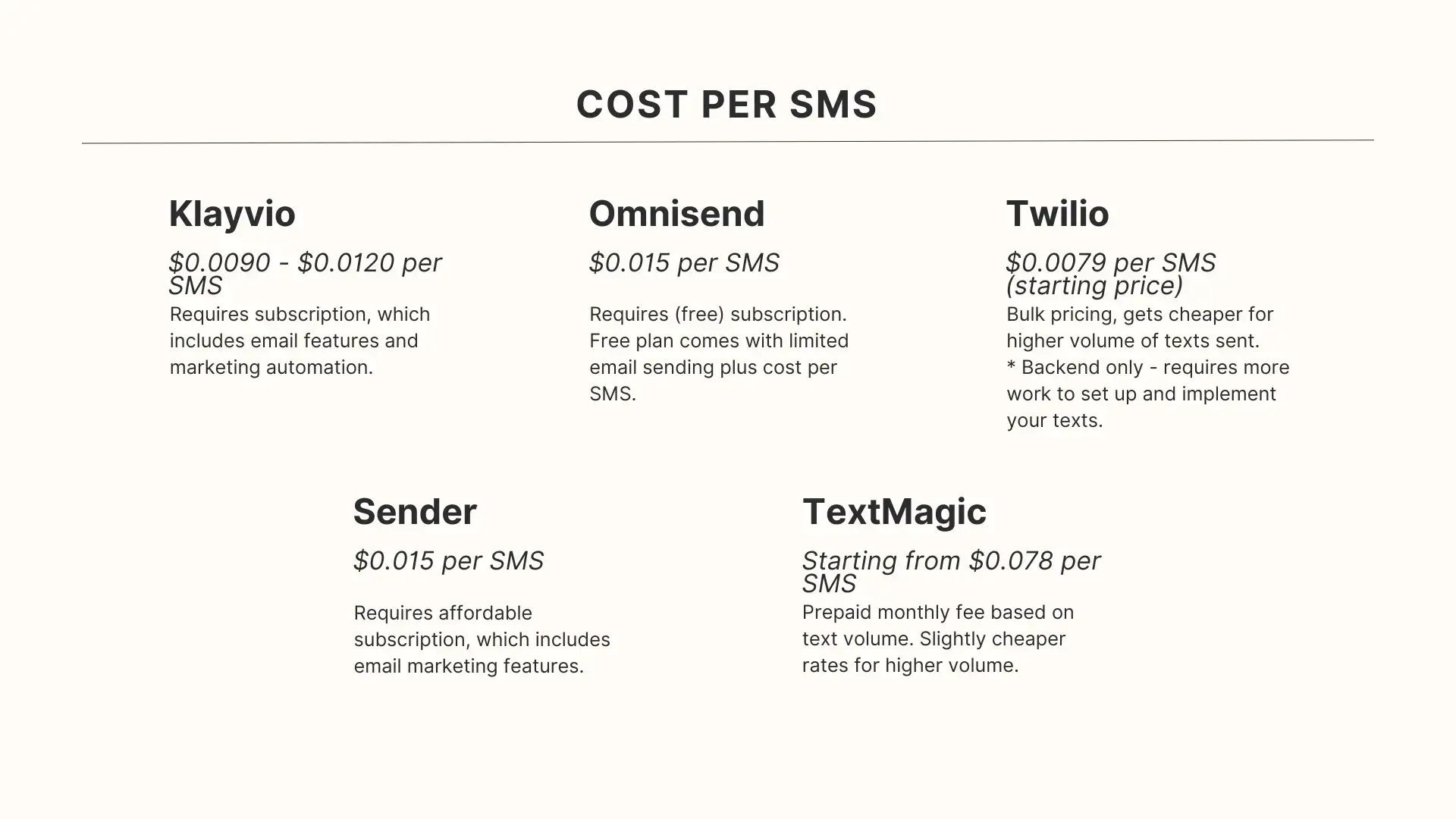
    __wf_reserved_inherit
    • Klaviyo – $0.0090 – $0.0120 per SMS
    • Omnisend – $0.015 per SMS
    • Twilio – $0.0079 per SMS (cost decreases for bulk sends, starting after the first 150,000 monthly messages)
    • Sender – $0.015 per SMS
    • SimpleTexting – starting from $0.078 per SMS for 500 monthly texts, with the cost per SMS decreasing as volume increases.

    Some tools (Klaviyo and Sender from the list above) require an additional monthly subscription to their email marketing platform in order to access SMS marketing.

    In general, you’re looking at a baseline of 1-2c per SMS. (Twilio is cheaper, but is just a backend provider, and means you need to build the integration with your website or your app separately).

    *Note that sending messages with images or videos (MMS) or messages to non-US numbers may cost more.

    Comparing the Cost of SMS vs Push Notifications and Email

    So we now have a rough idea of how much SMS marketing costs. Does this make it cheaper, more expensive, or the same as email and push notifications?

    SMS marketing is roughly the same as email and push if you send a low quantity of messages, but scaling is a lot more expensive for SMS.

    Let’s look at an example.

    First, imagine you have 1,000 subscribers, who you want to message once per month.

    With SMS, assuming a cost of $0.015 per text, this would cost $15.

    For email and push notifications, most tools will charge you somewhere between $15-$40 per month for 1,000 subscribers, unless you have more complex automation needs.

    So at this volume, the cost of SMS works out to be similar or slightly less than email/SMS.

    There’s an important piece of information to note, however – if you want to send more messages, let’s say messaging your customers every two weeks, or even every week, it will cost 2x/4x as much with SMS, but no additional cost for email and push.

    You could even send multiple messages per week with email and push for no extra cost, while this would get expensive fast with SMS.

    Learn more about The Cost of Push Notifications, and why this channel is one of the most cost-effective ways to communicate with your customers.

    Is SMS Marketing Worth It?

    SMS marketing can be extremely effective in some situations.

    Text messages have high deliverability, extremely high visibility, with open rates averaging a massive 98%.

    They’re a great way to get in front of your customers, wherever they are (most people have their phones on them at all times), with messages that are almost certain to be seen.

    It can be expensive at scale, though. Our best advice is to pick and choose when to use SMS marketing.

    In a lot of situations, you can substitute SMS for push notifications (assuming your customers are also subscribed to push), and unlock greater flexibility with your messaging, and a better ROI when messaging at a higher scale.

    Best Use Cases for SMS Marketing

    SMS is typically best for important, time-sensitive messages, such as alerts or urgent updates.

    Some examples include:

    • Appointment reminders or confirmations of scheduled appointments.
    • Login/activity alerts.
    • Small-scale promotional messages.

    You could use SMS for a wider variety of promotional use cases, such as:

    • Product launches, sales and discount offers.
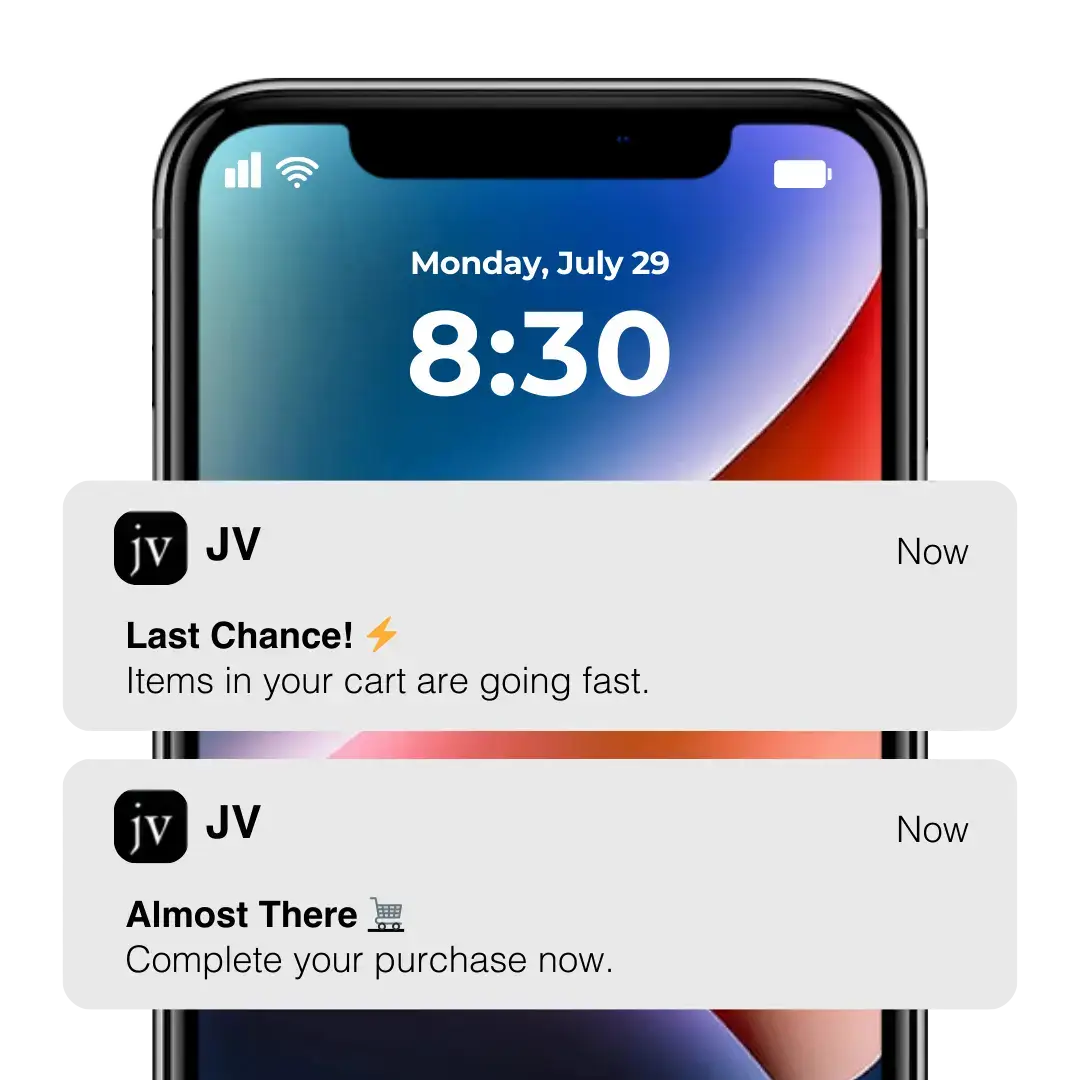
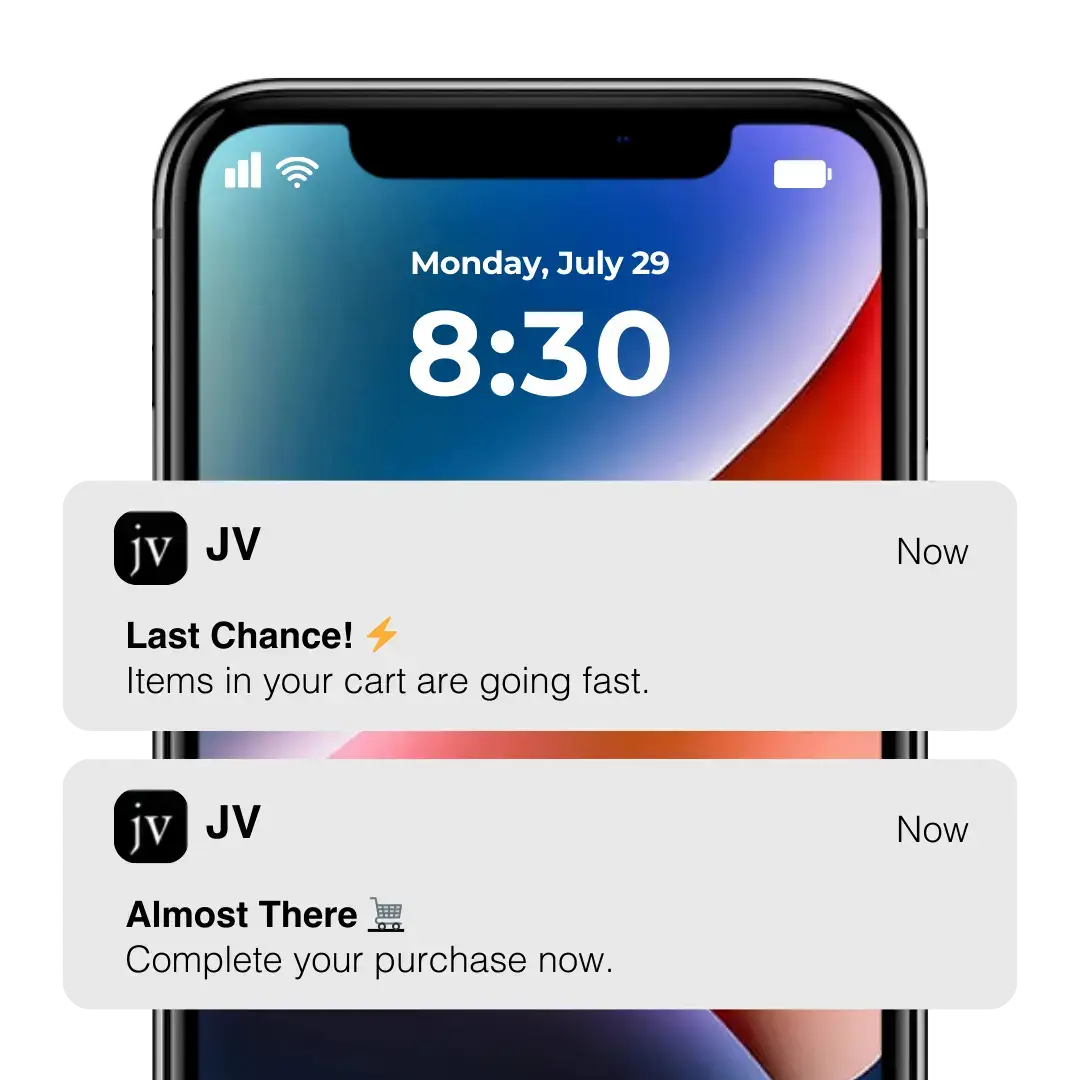
    • Abandoned cart notifications.
    • Order notifications and shipping updates.
    • Post-purchase cross-sells and up-sells.
    • Personalized promotions (e.g. birthdays, re-engagement offers).

    However, be aware that the cost of sending these messages in bulk will add up. If you can get customers to download your mobile app, you’ll be able to use push notifications instead, and send more messages for a lot less cost.

    Can Push Notifications Reduce SMS Spend?

    Push notifications can be a great way to spend less on SMS.

    Once you get a customer in your app, with push notifications enabled, you can contact them with push notifications for zero cost per message (unlike SMS).

    You could potentially save thousands in SMS spend by porting a large share of your SMS list over to your mobile app, and replacing SMS spend with low-cost push notifications (though consider that you won’t be able to get all of your SMS list over to push).

    How to Integrate SMS, Email and Mobile Push in Your Marketing Strategy

    Smart brands make use of multiple messaging channels in their marketing strategy, taking advantage of the benefits of each.

    Many marketing automation tools, such as Klaviyo, allow you to build flows with email, SMS and push together. This way, you can send out multiple touchpoints on multiple channels, and have a greater chance of getting your customer’s attention and making them take action.

    For example, you could send an abandoned cart sequence that starts with a push notification, then sends a text message if the customer hasn’t completed their purchase, and then an email after that.

    Omnichannel workflows are also great for promotions – the urgency of SMS fits well with opening/closing messages of your sequence, while the flexibility and affordability for email and push

    Blending multiple channels is particularly important today, with many consumers going mobile-first, increasing the potential of mobile-optimized channels like SMS and push.

    Vendrux’s abandoned cart notifications have helped some brands recover as much as $200,000 in would-be lost revenue in just 30 days. Learn more about how to recover abandoned carts, or get a free consultation call to discuss it with one of our app experts.

    How Vendrux Brings It All Together

    If you don’t have a mobile app, you won’t be able to utilize the incredible benefits of native push notifications.

    Vendrux makes it easy to launch your app. We help you turn your website into native mobile apps, with push notification functionality built in from the start.

    “The power of push notifications is so strong. SMS which is crazy expensive, and people are starting to tune these out. Being able to do push notifications is the reason you do an app.”
    – David Cost, Rainbow Shops

    Our full-service approach leaves minimal lift for your team, and your apps fully reflect your website, with all the features and integrations from your website working within the apps.

    That means any SMS or email marketing providers you use will continue to gather customer data from within your apps, and you can build powerful omnichannel flows that boost revenue on autopilot.

    It’s easy and affordable to launch your own app, with no risk and minimal overhead. Start the process by getting a free preview of your app now, and let our experts show you what’s possible.

  • How Much Does It Cost to Convert a Website into an App?

    How Much Does It Cost to Convert a Website into an App?

    To convert a website into an app, you’ll typically need to bring mobile developers on staff, hire an agency, or use some kind of software or managed service.

    And that can come with a pretty large price attached.

    Converting a website into a mobile app can range from a modest project to a major investment for a small or medium-sized business. 

    The total cost and effort depend on the development approach, app complexity, and who builds it. 

    Below is a breakdown of key considerations, looking at several different development methods, ultimately giving you a ballpark estimate of what it costs (both for the initial build, and ongoing maintenance) to turn your website into an app.

    Learn more: Websites vs Mobile Apps: Key Functional Differences You Need to Know

    Development Approaches (& Cost Impact)

    There are a few different ways to turn a website into a mobile app. The method you choose can have a significant impact on the final cost.

    Native Development

    Native apps are built separately for each platform (Android and iOS) using platform-specific languages (e.g. Swift/Objective-C for iOS, Kotlin/Java for Android).

    This yields the best performance and user experience tailored to each platform. But it also comes with the highest price tag.

    Cross-Platform

    Cross-platform frameworks allow you to build a single codebase that runs on both Android and iOS. Popular options include React Native, Flutter, and others. The goal is to share a high percentage of code between platforms while still delivering a near-native experience in the UI.

    Cross-platform is largely preferred to fully native development today, as you can get a result of largely the same quality, with less work, maintenance, and cost.

    Hybrid (Vendrux)

    “Hybrid” in this context refers to apps that are essentially your website or web app packaged inside a native mobile framework.

    This is what Vendrux does – reusing what you’ve already built for the web to make up the bulk of your mobile app, rather than reconstructing it from scratch (while adding native features like push notifications).

    Learn more: Native, Web or Hybrid App: Which Is Right For You?

    Cost to Turn Your Website Into an App (3 Different Methods)

    Now let’s examine how much you can expect it to cost to turn your website into an app, with estimates for each of the development approaches discussed above.

    Cost of Native Development

    Developing two native apps (one for each platform) is the most expensive route. 

    You essentially have to build and maintain two codebases. Industry data shows native development can cost from around $50,000 up to $500,000 for one platform, depending on complexity​. 

    Building both iOS and Android natively often doubles the effort – for example, iOS alone might start around $75K, and Android $50K on the low end​. 

    Very simple apps may cost less, but for a website to app conversion (considering you likely need to build an API to share data between website and app), you’re unlikely to find anything less than 5 figures.

    Separate vs. simultaneous development

    With native development, you can choose to build for one platform first and the other later, or develop both in parallel. 

    Developing simultaneously (with two teams) shortens time-to-market but means paying two development streams at once. 

    Staggering the development (e.g. build an iOS app then later port to Android) spreads out costs over time, but the total cost remains about the same in the end. 

    Either way, two native apps mean roughly double the development effort and cost compared to one. There may be some savings by reusing design and backend components, but expect a substantially higher budget for true native apps on both platforms.

    Cost of Cross-Platform Development

    Cross-platform development is generally more cost-effective than separate native apps. 

    With one codebase to build and maintain, you can save a significant amount of effort. Estimates suggest this approach can save roughly 20–30% in development costs compared to building two native apps​. 

    For example, instead of spending $100K on two native apps, a cross-platform project might cost around $70K for equivalent functionality (on both iOS and Android).

    In practice, small to mid-sized apps built cross-platform often fall in the $25,000 to $60,000 range​, which is notably lower than the cost of native development. 

    These savings come from reusing code for both platforms and needing a smaller development team.

    Cost of Hybrid Development with Vendrux

    Hybrid approaches are typically cheaper and faster than building fully custom apps.

    This is because hybrid development reuses part of your web code in building the app, cutting down the amount that has to be built from scratch.

    If your website is already functional on mobile browsers, wrapping it into an app can be done at a fraction of the cost of bespoke development.

    With Vendrux, it’s likely to cost between $1-2K upfront, with a recurring cost of a few hundred per month thereon, for both iOS and Android apps, fully synced with your website.

    This approach is ideal for ecommerce sites, news sites, web apps, online courses, or any other digital-first businesses that already have a fast, well-optimized mobile web experience.

    __wf_reserved_inherit
    Just a few examples of web to app conversions from Vendrux

    Ongoing Maintenance Costs

    Aside from the initial development cost, the recurring cost of maintenance and updates must be a consideration.

    This is a crucial but often overlooked cost factor. Native apps require maintaining two separate codebases. That means if you need to fix a bug or update a feature, you have to do it twice (once in the iOS code, once in Android). 

    It also means when Apple or Google release OS updates, you may need to update each app to ensure compatibility. 

    This double workload increases ongoing maintenance costs, and typically adds 15-20% of the initial development cost per year in recurring expenses.

    Cross-platform apps simplify maintenance by having a single codebase – fix a bug once and it applies to both platforms (assuming the issue is in shared code). 

    This can reduce long-term costs and effort, but still requires extensive testing on multiple platforms and a large degree of expertise.

    Hybrid development with Vendrux is, again, the most cost-effective option.

    The subscription includes all technical maintenance and updates for the apps, costing a few hundred per month – far less than the maintenance costs for either native or cross-platform mobile apps.

    What’s the Best Way to Convert Your Website Into a Mobile App?

    The best option depends on the business – and the size of your budget, the resources at hand, and the performance and feature set required.

    In terms of cost, hybrid development (Vendrux) is easily the winner when it comes to converting your website into a mobile app.

    • Native development 
      • From $50,000-$500,000 per platform (potentially as much as $1M for native iOS and Android apps)
      • 15-20% of the initial cost per year in maintenance ($15K minimum; potentially six figures)
    • Cross-platform development
      • Starting from $25K (possibly up to six figures, for more demanding projects)
      • Likely five figures+ per year in maintenance
    • Vendrux
      • $1-2K to build (ready in under a month)
      • A few hundred per month to maintain (new features on your website sync automatically; no additional cost to integrate these with your mobile apps)

    For ROI, Vendrux gives you a much clearer path to a positive return.

    All you need is for your mobile app to generate a few thousand in new revenue, and clear four figures monthly, and you’ll be making a profit on your investment.

    For native and cross-platform development, your app needs to be a hit; or else it’ll be a loooong time until your investment is paid back.

    Want to see what’s possible?

    You might be asking; can you really build a high-quality mobile app for just $1-2K?

    The answer is yes. We’ve helped over 2,000 businesses do just that; turning their already well-optimized mobile web experience into mobile apps that drive higher mobile engagement, increased retention, and a significant boost in LTV.

    You can see a collection of case studies here to learn about the kinds of businesses that have had success with this approach.

    Even better, you can see for yourself what your own website could look like as an app.

    You can get a free, interactive preview of your app, using only your website URL. You’ll be able to play around and customize the app through our dashboard, and schedule a call when you’re ready to move forward (or if you want to learn more).

    __wf_reserved_inherit

    You’ll see how Vendrux apps deliver 95% of what a native app does, for 5% (or less) of the cost.

    Get your free app preview now and start the path towards launching your own mobile apps (without investing hundreds of thousands of dollars).

  • Ecommerce Mobile App Development Cost: How Much to Build an App in 2026?

    Ecommerce Mobile App Development Cost: How Much to Build an App in 2026?

    A mobile app can be one of the best investments you make as an ecommerce brand. But, like any investment, it depends significantly on how much you pay.

    Ecommerce mobile apps, as with any mobile apps, can come at a steep price. You could be looking at a price of $250,000 or more, along with recurring maintenance costs that add another $100K+ per year, just to keep it running.

    However, the cost can also be a lot more affordable, with more efficient development approaches that deliver an app that’s just about on the same level as what you’d get with a full custom build.

    We’ve been building mobile apps since 2013, successfully launching over 2,000 mobile apps. So we’ve got a lot of experience in the industry, and are acutely aware of the real costs you can expect.

    In this article, we’ll break it all down; from the estimated cost of custom ecommerce mobile app development, to the additional costs you need to budget for, how to cut down dev costs by hiring more affordable developers, and alternative app development approaches that flip the cost structure on its head.

    Short Answer: How Much Does It Cost to Build an Ecommerce Mobile App?

    Realistically, you could be looking at anywhere from $30,000 to $250,000 or more to build an ecommerce app.

    It’s a little bit like asking “how long is a piece of string”. The cost can vary greatly, depending on who you hire, how complicated your app needs to be, and how smoothly the project goes.

    There’s a big difference between a simple catalog app for a small retail store, and a multi-storefront app for a global fashion brand with AR try-on built in.

    There’s also a big difference between hiring the best mobile app developers in Silicon Valley and hiring a boutique dev agency from South Asia.

    What Determines Ecommerce App Development Cost

    So we’ve got a (very) rough ballpark figure. But to help you understand the cost of building an ecommerce app better, let’s take a look at what contributes to the cost, and how the cost can vary by features, hiring approach, and more.

    App complexity and feature scope

    This is the single biggest cost driver. A basic ecommerce app with product listings, a shopping cart, and payment processing is a fundamentally different project than a multi-vendor marketplace with AI-powered recommendations and AR product previews.

    Each additional feature adds development time and, in custom builds, ongoing maintenance burden. Features like real-time inventory sync, multi-currency support, and advanced search filtering can each add $2,000 to $15,000 to a custom build.

    Platform choice: iOS, Android, or both

    Building natively for iOS and Android means two separate codebases, two development teams, and roughly double the cost. 

    Cross-platform frameworks like React Native and Flutter reduce this premium to about 30-40% above a single-platform build, but still require platform-specific testing and optimization.

    Almost all ecommerce apps will want to support both platforms – so limiting yourself to just an iOS or Android version is likely not an option.

    Development approach

    Your technical approach has a major impact on cost:

    • Native development (Swift for iOS, Kotlin for Android): Highest performance, highest cost. Two codebases.
    • Cross-platform frameworks (React Native, Flutter): Single codebase, slightly lower cost. Good performance for most ecommerce use cases.
    • No-code tools and services: You can save a huge amount of money by NOT building a custom native (or cross-platform app), and using a no-code approach instead.

    Team type and location

    Who builds your app matters as much as what they build.

    Developer rates vary dramatically by geography:

    Region Avg Hourly Rate Monthly Rate (Full-Time)
    United States $150-$250/hr $25,000-$42,000
    Western Europe (UK, Germany) $100-$180/hr $17,000-$30,000
    Eastern Europe (Poland, Ukraine) $40-$80/hr $7,000-$13,000
    South Asia (India, Pakistan) $25-$50/hr $4,000-$8,000
    Latin America (Brazil, Argentina) $35-$65/hr $6,000-$11,000
    Southeast Asia (Vietnam, Philippines) $20-$40/hr $3,500-$7,000

    Sources: Accelerance Global Software Outsourcing Rates, Clutch Developer Survey 2025

    These rates explain why cost estimates vary so widely. A mid-level ecommerce app built by a US agency might cost $120,000, while a similar spec built by an Indian team could come in at $30,000-$40,000. 

    There are tradeoffs, of course, to paying lower rates. While you could get a result that’s just as good from cheaper offshore developers, there is usually some correlation between cost and quality.

    Ecommerce App Development Cost by Complexity

    Here’s what custom development typically costs at each tier, based on aggregated estimates from various ecommerce mobile app development agencies, and our own industry research.

    Basic ecommerce app ($15,000-$40,000)

    Timeline: 3-6 months

    A basic app covers the essentials: product catalog, search, shopping cart, a single payment gateway, user registration, and push notifications. Think of a simple storefront with a clean checkout flow.

    Typical feature set:

    • Product pages with images and descriptions
    • Basic search and category navigation
    • Shopping cart and checkout
    • One payment gateway (Stripe or PayPal)
    • User accounts and order history
    • Push notifications
    • Basic analytics

    Who this is for: Startups testing mobile commerce, or brands with a very narrow product catalog and simple requirements.

    Mid-level ecommerce app ($40,000-$100,000)

    Timeline: 6-9 months

    This is where most serious ecommerce apps land. You get everything from the basic tier, plus advanced search with filters, multiple payment options, product reviews, order tracking, multi-language or multi-currency support, and an admin panel for managing content and inventory.

    Typical additions over basic:

    • Advanced search with filters and sorting
    • Multiple payment gateways
    • Product reviews and ratings
    • Real-time order tracking
    • Multi-language/multi-currency
    • Wishlist and favorites
    • Admin dashboard
    • Social login (Apple, Google, Facebook)
    • Third-party integrations (loyalty programs, email platforms)

    Advanced ecommerce app ($100,000-$250,000+)

    Timeline: 9-15 months

    Enterprise-grade apps with AI-powered personalization, AR product visualization, sophisticated analytics, multi-vendor marketplace functionality, or deep integrations with ERP and inventory management systems.

    Typical additions over mid-level:

    • AI-driven product recommendations
    • AR try-on or product preview
    • Chatbot or live chat integration
    • Multi-vendor/marketplace architecture
    • Advanced analytics and A/B testing
    • Custom loyalty and rewards engine
    • Omnichannel inventory management
    • Complex third-party integrations (ERP, PIM, OMS)

    Marketplace or social commerce platform ($150,000-$500,000+)

    Timeline: 12-18+ months

    If you’re building a marketplace (multiple sellers, separate dashboards, transaction processing, dispute resolution) or a social commerce platform (user-generated content, live shopping, community features), you’re in a different category entirely.

    This isn’t a standard ecommerce app project. It’s a software product build.

    Ecommerce App Development Cost by Region

    The same app, built to the same spec, costs dramatically different amounts depending on where your development team is based. Here’s what a mid-level ecommerce app ($40,000-$100,000 at US rates) would cost by region:

    Region Estimated Cost Timeline Notes
    United States $80K-$150K 6-9 months Highest QA, easiest communication
    UK / Western Europe $60K-$120K 6-9 months Strong talent, similar timezone to US East
    Eastern Europe $30K-$60K 6-10 months Popular outsourcing, good technical talent
    India / South Asia $15K-$40K 5-9 months Lowest rates, largest talent pool
    Latin America $25K-$50K 6-10 months Nearshore, good timezone overlap
    Southeast Asia $15K-$35K 6-10 months Growing tech sector, competitive rates

    These are estimates for a cross-platform (React Native or Flutter) build including design, development, QA, and deployment. Native iOS + Android development would typically add 40-60% to each figure.

    A note on quality: Cheaper doesn’t always mean worse, and expensive doesn’t guarantee quality. But lower-cost regions often require more project management overhead, more detailed specifications upfront, and more rigorous QA. Factor that management cost into your estimates.

    Full Cost Breakdown by Development Phase

    Custom ecommerce app development isn’t a single line item. Here’s where the money actually goes:

    Discovery and planning ($3,000-$15,000)

    Before a line of code gets written, you need requirements documentation, technical architecture, wireframes, and a project plan. Skipping this phase is how $50,000 projects become $150,000 projects.

    • Requirements gathering and documentation
    • Technical feasibility analysis
    • Architecture design
    • Project planning and timeline

    UI/UX design ($5,000-$30,000)

    Your app’s interface and user experience. This includes wireframes, visual design, prototyping, and user testing. Ecommerce apps demand a higher bar here because any friction in the shopping or checkout flow directly costs you revenue.

    • Wireframes and user flows
    • Visual design (brand-consistent)
    • Interactive prototypes
    • Usability testing

    Frontend development ($15,000-$80,000)

    Building the user-facing app. This is typically the largest single cost in the project, covering everything the customer sees and interacts with.

    • Product catalog and browsing experience
    • Search, filtering, and navigation
    • Shopping cart and checkout flow
    • User accounts and profiles
    • Push notification handling

    Backend development ($10,000-$60,000)

    The server-side infrastructure: APIs, databases, authentication, payment processing, order management. If you already have a backend (your ecommerce platform), this cost drops significantly because you’re integrating with existing systems rather than building from scratch.

    • API development
    • Database architecture
    • Authentication and security
    • Payment gateway integration
    • Order and inventory management
    • Third-party service integrations

    Quality assurance and testing ($5,000-$25,000)

    Testing across devices, operating systems, payment flows, edge cases, and performance under load. This is often the first thing teams cut when budgets get tight, and almost always the most expensive mistake.

    • Functional testing across devices
    • Performance and load testing
    • Security testing
    • Payment flow testing
    • Regression testing

    Deployment and launch ($2,000-$8,000)

    App store submission, screenshots, descriptions, and navigating Apple’s and Google’s review processes. Apple’s review process is notoriously unpredictable. Budget time for at least one rejection and resubmission cycle.

    • App Store and Google Play submission
    • Store listing optimization (ASO)
    • Launch monitoring

    Total: custom build cost summary

    Phase Basic App Mid-Level App Advanced App
    Discovery & Planning $3K-$5K $5K-$10K $10K-$15K
    UI/UX Design $5K-$10K $10K-$20K $20K-$30K
    Frontend Development $15K-$25K $30K-$50K $50K-$80K
    Backend Development $10K-$15K $20K-$40K $40K-$60K
    QA & Testing $5K-$8K $10K-$15K $15K-$25K
    Deployment $2K-$3K $3K-$5K $5K-$8K
    Total $40K-$66K $78K-$140K $140K-$218K

    Cost Breakdown by Feature

    At the end of the day, the cost of an app really comes down to a sum of the cost of its individual parts.

    The more features, and the more complex features the more dev hours it takes and the higher the cost.

    If you’re scoping a custom build, here’s what individual features typically cost to develop, based on estimates from around the industry:

    Feature Estimated Cost Notes
    User registration & login $2K-$5K +$1K-$3K for social login
    Product catalog $5K-$15K Varies by catalog size & filter complexity
    Search with filters $3K-$10K AI-powered search at the high end
    Shopping cart $3K-$8K Multi-currency adds complexity
    Payment gateway $3K-$10K Per gateway; Stripe is simplest
    Push notifications $3K-$8K Automated flows cost more
    Order tracking $2K-$6K Real-time requires additional API work
    Reviews & ratings $2K-$5K Moderation features add cost
    Wishlist / favorites $1.5K-$3K Straightforward feature
    Multi-language support $3K-$8K Per language beyond the first
    Admin panel $8K-$25K Often underestimated in scope
    Analytics integration $2K-$5K Basic; custom dashboards cost more
    AR product visualization $15K-$40K Requires specialized development
    AI recommendations $10K-$30K Depends on model complexity
    Loyalty / rewards $5K-$15K Custom logic and UI
    Live chat / chatbot $5K-$15K Third-party vs custom build

    These are development costs only, not including design, testing, or ongoing maintenance for each feature.

    The Hidden Costs Most Estimates Leave Out

    The build is the visible cost, the cost that gets quoted to you upfront. But there are more costs to consider, particularly the recurring costs that add up over time.

    Ongoing maintenance ($6,000-$50,000+/year)

    Industry standard is 15-20% of the initial development cost per year, covering bug fixes, OS updates, security patches, and minor improvements. For a $100,000 app, that’s $15,000-$20,000 annually, at minimum.

    Hosting and infrastructure ($2,000-$15,000/year)

    Cloud hosting (AWS, Google Cloud, Azure), CDN, database hosting, and API costs. Traffic spikes during sales events can increase these costs dramatically if your infrastructure isn’t properly scaled.

    Third-party services ($3,000-$15,000/year)

    Payment processing fees, push notification services, analytics platforms, search services (Algolia, Elastic), email/SMS APIs, and any other SaaS integrations your app depends on. These are recurring costs that compound as your user base grows.

    App store fees ($124/year)

    Apple charges $99/year for a developer account; Google charges a one-time $25 fee. These costs are fairly negligible, but they do exist.

    Both app stores also take commissions on in-app purchases, however these generally don’t apply for ecommerce apps.

    Feature updates and iterations ($5,000-$30,000/year)

    Your app isn’t done when it launches. Users expect new features, your competitors are evolving, and your ecommerce platform keeps updating. Budget for at least 2-4 significant feature updates per year.

    3-Year Total Cost of Ownership: Custom Build vs Web-to-App

    When you launch an app, it’s never a one-time cost.

    You’re not building the app for a short time, or a single event. You’re launching it to be a long-term retention tool.

    And it costs to keep an app running. There’s regular maintenance, infrastructure costs, feature updates.

    That’s why you need to look at the total cost of ownership over a wider time horizon – such as a three-year window. 

    Custom-built mid-level ecommerce app (3-year TCO)

    Cost Category Year 1 Year 2 Year 3 3-Year Total
    Development (build) $80K-$140K $80K-$140K
    Maintenance (15-20%/yr) $12K-$28K $12K-$28K $12K-$28K $36K-$84K
    Hosting & infrastructure $5K-$10K $5K-$12K $6K-$15K $16K-$37K
    Third-party services $3K-$10K $3K-$12K $4K-$15K $10K-$37K
    Feature updates $10K-$25K $10K-$25K $10K-$25K $30K-$75K
    App store fees $124 $124 $124 $372
    Total $110K-$213K $30K-$77K $32K-$83K $172K-$373K

    More Cost-Effective Options for Ecommerce Mobile App Development

    Today, building a custom native app is not the only way build your own app.

    Services like Vendrux take your existing ecommerce website and turn it into a fully branded iOS and Android app. 

    Vendrux does this by building a native layer on top of your site, which includes all the native elements you need (native navigation, some UI elements, push notifications).

    The underlying content and functionality is all powered by your website – meaning you’re not rebuilding this, you’re extending what you’ve already built.

    Your site’s checkout, product pages, loyalty programs, and every other feature carry over automatically. Updates to your website appear in the app automatically, with no separate codebase to maintain.

    This saves you massively – not just on the initial build, but also long-term maintenance costs.

    Vendrux web-to-app conversion (3-year TCO)

    Cost Category Year 1 Year 2 Year 3 3-Year Total
    Setup fee $5K $5K
    Subscription $15,288 $15,288 $15,288 $45,864
    Maintenance Included Included Included Included
    Updates Included Included Included Included
    Hosting Included Included Included Included
    Push notifications Included Included Included Included
    Total $20,288 $15,288 $15,288 $50,864

    Numbers based on Vendrux Business plan at $1,499 per month, with 15% annual billing discount.

    Based on these estimates, the difference is significant: over three years, a custom build costs roughly 6-12x more than Vendrux.

    That’s not to mention the opportunity cost, and faster time to revenue. Vendrux ships your app in 6-8 weeks, compared to 6-15 months for a custom build.

    That means you’re making money from the app faster, and the development project takes away less of your team’s focus from other areas of your business.

    “A custom app build for our Salesforce Commerce Cloud setup would have been prohibitively expensive. Vendrux was the only realistic option.”
    — Nick Barbarise, Director of IT, John Varvatos

    But are you limiting yourself by going with a more cost-effective option, like Vendrux?

    Not really. For ecommerce apps, which often don’t need any complex app-specific functionality, the end result is barely discernible from a fully custom app.

    John Varvatos sees 10x revenue per user from the app vs mobile web, with a 4x higher purchase rate and close to seven figures in app sales since launch.

    Many other brands see sometimes millions in annual revenue through their app, without the expense and hassle of a custom native build.

    It’s 100% viable to build an ecommerce app this way. In fact, the real question is whether or not spending six figures on a custom app is a viable option.

    Want to see how these numbers apply to your store? Get a free strategy call and we’ll break it down for you.

    DIY No-Code App Builders

    Another option is to use a traditional template-based no-code app builder.

    The quality these tools are capable of putting out is quite impressive, and there’s a real question that it’s better to build an app using a no-code tool than paying for a custom native app.

    There are some limitations or issues with DIY no-code tools to consider:

    • You often can’t do everything you want with these tools, due to the limitations of their pre-built blocks and templates
    • Some of your website’s functionality may not carry over to the app (you’re reliant on their supported integrations)
    • The app needs to be managed separately from your website; maintenance is not as much as with a custom app, but more than with an approach like Vendrux.
    • It takes up your time (or your team’s time) to build and manage the app (factor in labor costs alongside the price you see on your invoice).
    • The majority of mobile app builders only support Shopify – the market is much thinner if you’re on any other platform (Magento, Salesforce Commerce Cloud, or any legacy/enterprise platform).

    In general, for the average Shopify store, a no-code tool is likely a better approach than a fully custom native app.

    However, Vendrux typically beats out these tools in terms of TCO.

    The upfront/monthly cost is similar, yet with Vendrux you spend less time on maintenance, since your app and website are automatically synced.

    DIY tools are a good choice if you’re looking to build a very unique app, separate from your website.

    If your goal is to extend your existing website’s experience, Vendrux is the way to go.

    What ROI Can You Expect From an Ecommerce App?

    Cost only matters relative to what you get back. Here’s what the data shows:

    Revenue per user

    Apps drive 3.5-7x higher average revenue per user compared to mobile web. This isn’t theoretical. Vendrux’s 2025 Benchmark Report outlines this lift, often leading to outsized revenue contributions from brands’ mobile apps:

    • One wellness brand generates 62% of total online revenue through the app, from only 15.8% of users
    • A luxury fashion brand sees 20.7% of revenue from the app, with only 7% of total users
    • A cosmetics brand drives $1.82M in app revenue, accounting for 15.2% of total online sales

    Conversion rates

    App users convert at 1.7-3x higher rates than mobile web visitors. Some Vendrux brands see even larger gaps, with app conversion rates 8-10x higher than mobile web.

    Retention and lifetime value

    This is the real story. Apps aren’t about acquiring new customers. They’re about keeping the ones you already have.

    • App customer LTV is 2.8-5x higher than web-only shoppers
    • 60% of first-time app buyers make at least one additional purchase
    • App users purchase roughly 33% more frequently than non-app users
    • Users spend 201.8 minutes per month in shopping apps vs 10.9 minutes on mobile websites

    Push notifications: the highest-ROI retention channel

    Push notifications are the primary reason ecommerce brands build apps. 

    Push gives you a zero-cost, direct line to your best customers. They’re not constrained by inbox filtering, ad costs or carrier fees, and show up on the customer’s lock screen with virtually guaranteed visibility.

    They’re a powerful way to drive net-new sales, via promo alerts, new product drop notifications, back-in-stock alerts, and more.

    In fact, abandoned cart notifications alone have the potential to add 5-6 figures in new revenue per month; potentially paying for the cost of your app by themselves.

    “Push notifications are the cheapest and most powerful communication channel we have. Users who prefer to interact via an app are more loyal, buy from us more often, and spend more time with our content.”
    — David Cost, VP of Ecommerce & Marketing, Rainbow Shops

    The ROI math

    Apps typically contribute anywhere from 10-35% of a brand’s total revenue, on average.

    If you’re doing $5M per year in revenue overall, you could potentially drive $1M per year in app revenue (20%).

    With Vendrux, that equates to the following ballpark figures:

    • Cost: ~$20K (setup fee + annual plan)
    • App revenue: $1,000,000
    • Net return: $980,000
    • ROI (cost to revenue): ~49x

    The math can still work for a custom app. But you’re pushing the timeline back 6+ months, which pushes back the time to revenue, and the time to make back the cost of your investment.

    Yet for Vendrux, the cost is so small (and the potential return so big), that it’s a true no-brainer. 

    How to Decide Which Approach Is Right for Your Brand

    Not every brand needs the same approach. Here’s a framework:

    Choose custom development if:

    • You’re building a marketplace with multiple sellers and complex transaction logic
    • Your app requires native device features that can’t be delivered through a website (offline mode, Bluetooth, AR, device sensors)
    • You need functionality that doesn’t exist on your website and can’t be built as a web feature
    • You have a dedicated technical team to maintain the app long-term
    • Your budget supports $100,000+ upfront and $30,000+/year in maintenance

    Choose a web-to-app solution like Vendrux if:

    • You already have a working ecommerce website on Shopify, WooCommerce, BigCommerce, Magento, or another platform
    • Your primary goal is retention, repeat purchases, and customer LTV (not net-new functionality)
    • You want push notifications as a marketing channel
    • You need the app to stay in sync with your website without managing two platforms
    • You want to be live in weeks, not months
    • Your budget is better allocated to marketing and growth than to app development

    “When I heard about Vendrux and that we could turn our website into a native app without additional development resources, it made perfect sense.”
    — Steven Kachtan, CIO, Dream On Me (buybuyBaby)

    Choose a DIY app builder if:

    • You’re on Shopify only (most builders are Shopify-exclusive)
    • You have a simple store with minimal customizations
    • You want to self-manage the app experience (and have the resources to do so)
    • You’re comfortable with template-based design and limited integration options

    When not to build an app

    Sometimes, an app isn’t the right move. It can be a powerful asset, but it’s not a panacea.

    Your website is almost always the #1 focus. It’s where all your new customers land, and what deserves your attention first and foremost.

    If your website isn’t performing well (especially on mobile), fix this first, then think about extending it to an app.

    And if you’re still in the early stages in terms of revenue (say sub-$1M annually), you’re usually better served focusing on acquisition at this stage.

    An app isn’t for everyone. It’s for the top 10-20% of your customers. When you’re an early stage brand, you likely don’t have enough customers to justify the cost, and may be better off revisiting it at a later stage.

    How to Reduce Ecommerce App Development Costs

    If you’ve determined that custom development is the right path, here are practical ways to manage costs:

    Start with an MVP

    Launch with core features (catalog, cart, checkout, push notifications) and add complexity based on user feedback and data. An MVP approach can significantly reduce initial costs while getting you to market faster.

    Use cross-platform frameworks

    React Native and Flutter let you build for iOS and Android from a single codebase, reducing development cost by 30-40% compared to native builds for both platforms. For most ecommerce use cases, the performance tradeoff is negligible.

    Build on your existing backend

    If you’re on Shopify, WooCommerce, or another established platform, build your app as a frontend that connects to your existing backend via APIs. Don’t rebuild what already works.

    Phase your feature releases

    Budget $40,000-$60,000 for a solid launch, then allocate $15,000-$25,000 per quarter for feature additions. This spreads cost over time and lets you prioritize based on actual user behavior.

    Consider hybrid approaches

    Your app doesn’t have to be 100% custom-built or 100% web-based. Some brands use a web-to-app approach for their core shopping experience and layer in custom native features where they add unique value.

    Launching a High-ROI Ecommerce Mobile App

    The question most brands should be asking isn’t “how much does ecommerce app development cost?” It’s “how can I launch an app that drives the best ROI?”

    Most brands think they need a full custom build, and that anything less means sacrificing quality. Yet as many of the world’s biggest apps show, this is not always the case.

    You’ve got a working website. It runs great on mobile. Do you really need to reinvent the wheel when it comes to launching an app?

    Converting your existing site into a native app is likely to deliver the same retention and revenue benefits as a fully custom app, at a fraction of the cost and timeline.

    Vendrux turns your existing ecommerce website into a fully branded iOS and Android app, complete with unlimited push notifications, automated cart recovery, and full feature parity with your site. 

    Vendrux’s team handles everything: setup, design, app store submission, and ongoing maintenance. Most brands are live within 30 days.

    Ready to see what your app would look like?

    Here’s how to kick-start the process.

    1. Book a free strategy call. We’ll walk you through a free app preview, answer your questions, and break down the business case for your store.
    2. We build the app. Vendrux handles everything: setup, design, configuration, testing, and app store submission.
    3. Go live. Your app launches on iOS and Android. Vendrux handles all ongoing technical maintenance.

    If you want to launch your own ecommerce app, but don’t want to spend six figures doing it, this is the way.

    Get a free strategy call now to learn if this is the right approach for your brand.
  • How Much Does Email Marketing Cost? (2026 Breakdown)

    How Much Does Email Marketing Cost? (2026 Breakdown)

    In a time of skyrocketing ad costs, email marketing seems like the last safe bet for DTC brands.

    But here’s the big question: Is email still the highest-ROI marketing channel in 2026, or is it getting too expensive to justify?

    • ESP pricing keeps going up.
    • Inbox placement is harder than ever thanks to Gmail & Yahoo’s spam updates.
    • SMS is 6X more expensive per send, but is email engagement strong enough to compete?
    • How are push notifications disrupting the retention marketing game?

    We’re breaking down the real costs of email marketing in 2026, covering:

    • What brands actually pay for ESPs, design, deliverability & list management.
    • How email compares to SMS & push notifications in cost and ROI.
    • Whether DTC brands should double down on email or shift to other retention levers.

    If you’re scaling an ecommerce brand, this is the deep dive you need before deciding if email still belongs in your marketing mix.

    For more high-level insights to help your brand scale profitably, check out The Retention Edge, our podcast and newsletter where ecom and retail leaders share their hot takes on the future of CX and retention.

    Why This Question Matters in 2026

    Email has been the highest-ROI marketing channel for decades, with an average ROI of $36 for every $1 spent.

    But, in 2026, the landscape is shifting.

    • Rising ad costs, privacy changes, and mobile adoption have brands rethinking where to invest.
    • Email costs are creeping up due to more sophisticated segmentation, automation, and compliance needs, plus the reduced effectiveness on a sub-by-sub basis.
    • Retention is the new growth, and while email is a key driver of LTV, how much should brands spend to keep it effective?

    There’s a certain crowd touting the idea that email is dead. But is that the truth, or just alarmist clickbait?

    This guide will break down the actual costs, ROI, and comparisons with other direct communication channels (SMS, Push), so you can get a real idea of whether the juice from email marketing is still worth the squeeze today.

    The Core Costs of Email Marketing

    A few things go into the cost of email marketing, from software, to creation costs, to maintenance.

    Let’s break these areas down.

    ESP (Email Service Provider) Costs

    The biggest cost variable is your ESP pricing model, which depends on list size, sending volume, and automation needs.

    There are three common pricing models for ESPs:

    1. Per-subscriber pricing (Klaviyo, Omnisend, Mailchimp)
      • Klaviyo: $720/month for 50K contacts (total 500K emails/month)
      • Omnisend: $413/month for 50K contacts (600K emails/month)
      • MailChimp: $450/month for 50K contacts (600K emails/month)
    2. Per-send pricing (Postmark, Amazon SES)
      • Amazon SES: $0.10 per 1,000 emails—cheaper but lacks automation.
    3. Feature-based pricing (Iterable, Braze)
      • Costs $1,500+ per month but includes advanced segmentation.

    The vast majority of brands will use the first model, or a variation – such as Yotpo’s email marketing feature, which charges based on # of emails rather than subscribers ($135/month for 100K emails, $535/month for 500K emails).

    So on a per-email basis, you’re looking at a cost roughly in the range of $1-$2 per 1000 emails sent ($0.001-0.002 per email).

    💡 Cost-saving tip: Brands with high list churn should prune inactive subscribers to reduce costs.

    Creative & Production Costs

    Email marketing isn’t just sending – it’s design, copy, testing, and automation.

    • In-house team (marketer + designer + copywriter): $5K–$15K/month
    • Freelancers (per email):
      • Copywriting: $150–$500
      • Design: $100–$300
      • Full creative package (copy + design): $300–$1,000 per email
    • AI-powered email tools (e.g., Claude, Jasper, ChatGPT for copy): $50–$150/month

    This cost can vary a lot by how much effort you put into your email campaigns, and how much importance you place on copy and creative.

    You could hire a crack team of retention experts, or spin it up with Chat GPT copy and stock design from Canva.

    The key thing to note is that this cost doesn’t really scale as you send more emails/have more contacts. 

    Unless you’re creating whole new campaigns for a large number of segments, creation costs will be more or less the same for an email reaching 100 people or 100,000 people.

    💡 Cost-saving tip: Many brands are shifting to UGC-driven email content, reducing creative costs while increasing authenticity.

    Deliverability & Compliance Costs

    ESP pricing doesn’t include deliverability optimization, which is becoming a bigger issue today.

    • Dedicated IP address: $30–$200/month (essential for high-volume senders).
    • Inbox placement monitoring (e.g., Validity, GlockApps): $50–$500/month.
    • List cleaning tools (e.g., ZeroBounce, NeverBounce): $15 per 10K emails.

    Gmail & Yahoo’s 2024 spam rule changes mean cleaning your list regularly is now more or less mandatory to avoid inbox penalties.

    This has to be factored into your email marketing ROI calculation.

    Other Hidden Costs

    Some other email marketing-related costs may include:

    • Discounts & incentives (emails with promo codes cost margin, not just send fees).
    • Transactional email costs (e.g., Shopify: $10/month for basic, $1,000+ for high-volume).
    • Integrations with Shopify, ReCharge, Attentive (some ESPs charge extra).

    Ultimately, the cost of email marketing has risen in recent years, with some ESPs raising prices, and new costs arising related to list optimization (though creative costs may be lower due to AI).

    But still, the cost of email marketing on a per-email or per-subscriber basis remains extremely low.

    Email Marketing ROI: Is It Still Worth It?

    So with what we know about the cost of email, how does the ROI shake out?

    The cost of email is more or less the same as it was 10 years ago, but the return can vary greatly.

    Let’s see if email’s performance is still enough to justify the cost.

    Industry Benchmarks for Email Performance

    Email still provides solid results in terms of visibility, reach and engagement.

    • The global average ROI for email is $36–$42 per $1 spent.
    • Open rates: 21.5% (avg), 30–40% (best-in-class DTC brands).
    • Click-through rates: ~2.6% (avg), 4–8% (top performers).
    • Conversion rates: ~4.2% (avg), up to 10%+ for high-intent campaigns.

    Sources: Dotdigital, Omnisend

    Cost per Acquisition (CPA) vs Retention Value

    Let’s compare email marketing CPA to paid acquisition (Meta, Google) and see how they match up in terms of CPA and long-term value.

    Email

    • Avg. CPA (DTC): $1–$3 per customer
    • Retention Impact: High (more likely to be repeat buyers)
    • Cost Scaling: Scales affordably

    Meta Ads

    • Avg. CPA (DTC): $30–$50 per customer
    • Retention Impact: Low (many one-time buyers)
    • Cost Scaling: Scaling = more expensive

    Google Ads

    • Avg. CPA (DTC): $40–$80 per customer
    • Retention Impact: Medium (brand intent)
    • Cost Scaling: Costly scaling

    Source: First Page Sage

    💡 Key Insight: Retargeting existing subscribers is 10X cheaper than acquiring new customers via paid ads. 

    Email’s Role in Retention & LTV Growth

    Many retention-focused brands rely on email flows to boost LTV.

    Many of these flows are automated – and these automated campaigns are a great ROI play, not only because of the low effort required to maintain, but because these emails actually perform better.

    Best-performing automated emails (2025 benchmarks):

    • Welcome flows: 30–50% open rate, 5–12% conversion rate.
    • Abandoned cart: 45%+ open rate, 8–15% conversion rate.
    • Post-purchase upsells: 25–35% open rate, 6–10% conversion rate.
    • Win-back campaigns: 20–30% open rate, 4–8% conversion rate.

    Source: Omnisend

    These automated campaigns are key in generating repeat engagement and driving higher LTV from your existing customers.

    💡 For cost-effective retention, scaling email automations keeps CAC lower while increasing LTV.

    Email vs SMS vs Push: Where Does Email Fit In?

    10 years ago, email was the #1 tool brands had to work with in terms of direct customer communication.

    Is that still true today? With smartphone usage rising, mobile-first channels like SMS and push notifications are rising in popularity.

    Let’s see how the ROI of these channels compares to email.

    SMS: Higher Costs, Higher Engagement

    Engagement rates for SMS are particularly high, with fantastic click and open rates.

    But the cost is also a lot higher, which makes SMS costly to scale.

    SMS also runs the risk of feeling more intrusive. And, interestingly, data shows that clicks from email have a much higher chance of converting than clicks from an SMS.

    The average conversion rate for email campaigns is only a little behind SMS (even factoring in lesser reach), while automated emails have a significantly higher conversion rate than automated SMS messages.

    SMS benchmarks vs email:

    • 6X higher CTR than email (15–20%), but 6X higher cost per send​.
    • $0.01–$0.05 per SMS sent vs $0.001 per email sent.
    • Conversion rate (campaigns) is 0.11% (SMS) to 0.07% (email).
    • Conversion rate (automated flows) is 0.24% (SMS) to 1.76% (email).
    • Best use cases: Time-sensitive offers, VIP customer engagement.

    Source: Omnisend

    Push Notifications: The Rising Challenger?

    The newest kid on the block is push.

    Push notifications, like SMS, are mobile-first. They offer the same immediacy as SMS, and are much cheaper at scale (no per-message pricing).

    Push has lower overall reach, as they require an app download (significantly easier to get an email or SMS signup), but for app users, they typically outperform other channels, for a lower investment.

    • Push open rates = 2X higher than email, but reach is lower (sent only to app users, with average 67.5% opt-in rate).
    • Cost is lower – both lower service provider costs, plus fewer creative costs.
    • Highly visible, without feeling as intrusive as SMS.
    • Average 28% click rate, 4.4% conversion rate.
    • Transactional push notifications have an average open rate of 69%.
    • Best use cases: Flash sales, app-based engagement, real-time updates, abandoned cart notifications.

    Source: Vendrux

    Omnichannel Synergy: The Smart Play

    A winning strategy? Email, SMS and push working together.

    There’s no need to stick stubbornly to one channel. Smart brands use multiple touchpoints.

    Email for broad reach. SMS for immediacy, high visibility. Push for app users.

    If you’re not using push notifications yet, you’re missing out. Over 80% open rates, with 10-20X the click rates vs email, and minimal cost, even at scale. Convert your site into an app with Vendrux to unlock this amazing channel for your brand.

    Learn more here, or get a free consultation to learn how easy it is to go live and start engaging your audience with push notifications.

    Key Takeaways: Is Email Marketing Still Worth It?

    With what we know about the cost and return of email marketing, is it still worth investing in?

    Undoubtedly, yes.

    ✅ Email remains the highest-ROI retention channel. No other platform offers a $36+ ROI per $1 spent.

    ✅ Costs vary based on ESP, list size, and automation depth, but email is still a low-cost, high-margin channel.

    ✅ SMS is more expensive but converts better. Best for high-AOV or urgency-driven campaigns.

    ✅ Push is a must for brands with a mobile app – the effectiveness and low cost of push is reason enough for many brands to build an app.

    ✅ Omnichannel is the future. Winning brands use email, SMS, and push together to maximize retention & LTV.

    Every brand should be doing email marketing. Even if your email campaigns are average or somewhat below average in terms of performance, it’s difficult to lose money with email marketing.

    Make sure your brand continues to evolve, though. Email alone is unlikely to be enough to sustain growth. You’ll still need ads for acquisition, and direct, mobile-first channels like push to round out your retention strategy.

  • How To Outsource Mobile App Development in 2026

    How To Outsource Mobile App Development in 2026

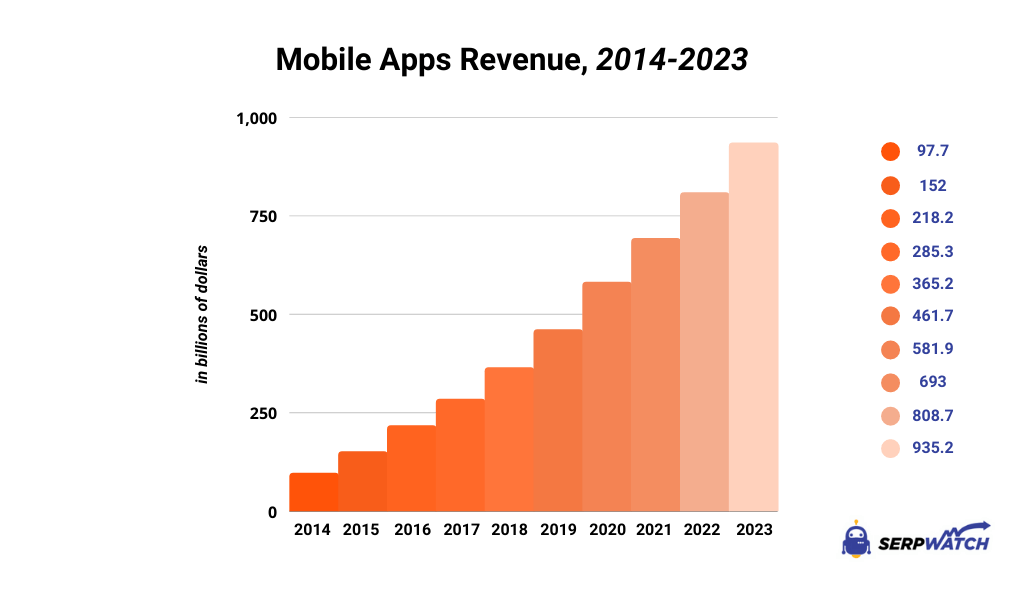
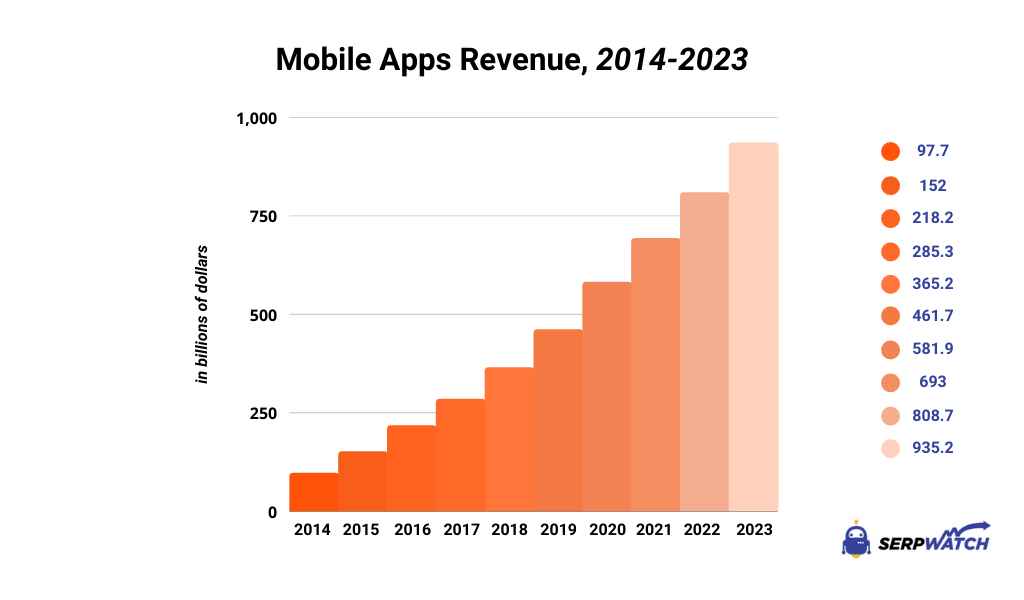
    Did you know that the number of available apps for download has increased by 82% since 2016? Mobile apps have generated more than $900 billion in revenue, which is why we can expect even more of them to pop up in the future. If you’re looking to add more revenue to your business, you’re probably considering building a mobile app.

    However, building one on your own can be complicated and expensive and you may end up spending months building something that just won’t work. There’s a simple solution – outsourcing your mobile app development.

    Today, we’re going to show you why it’s a good idea and how you can do it, step by step.

    Why should you outsource mobile app development?

    If you want to build a mobile app, there are two ways to go about it: hiring a team and building it in-house or outsourcing it to a team of specialized developers. Here are some of the reasons why the second option might be better for your business.

    the revenue from mobile apps, 2014-2023
    Source

    Cost-effectiveness

    Rounding up a team of developers specializing in mobile app development can be very costly. Your average mobile app dev is going to charge you anywhere from $44 to $57 for an hour of work. And you’re not looking to hire one – you want to build a team.

    Hiring full-time is not an option because you only need the dev team for one project. So, the most cost-effective solution is to hire a specialized team to come in, wrap up a project, and pay them for the completed work.

    Access to specialized skill sets

    You can pick and choose dev teams not only specializing in mobile apps, but also different types of mobile apps. Do you want a team that specializes in building cookbook apps? Productivity apps and time trackers? News apps or catalogs? You name it, there is someone who does it.

    Focusing on core competencies

    Perhaps you have dev talent at hand, but their expertise is better spent elsewhere. When you outsource developing a mobile app, it wins back free time for your team to focus on more important matters. For example, working on your SaaS product, website, marketplace or something else.

    Faster time to market

    A team that’s built 50 apps will likely build their 51st much faster than you would finish your first mobile app project. If time is of the essence and you want to go to production quickly, a team of outsourced developers is going to do the job more quickly compared to anyone who is already working in-house or a potential new hire.

    Scalability

    Need an additional set of hands on deck? Just ask your outsourced development company to give you more developers. As your projects scale up or down, you can add or remove people as needed without the significant impact that you would have if you were dealing with in-house developers.

    Reduced risk

    Established mobile developers teams have processes in place to prevent potential issues, such as compliance problems, data leaks, security concerns, having someone steal your code and similar. When working with a reputable mobile app developer, most of that risk is on them.

    How to outsource mobile app development in 9 easy steps

    If you’ve made the decision to outsource the development work to a partner, worry not – we’ll help you along the way. All it takes is nine simple steps.

    But before we get to that, did you know that you don’t have to hire a company to build an app from scratch? With Vendrux, you can convert your website into a mobile app in under two weeks. You can click here to find out what your app would look like.

    Define your project requirements

    This is the most important step of the way and this is where you need to spend most of your time. It impacts choosing the right outsourcing partner, as well as the final product you end up getting.

    Some of the main requirements for your project could be:

    • Your target audience
    • The features and functionalities you want in the app
    • Platform preferences (iOS vs Android, cross-platform)
    • Your budget
    • Your timeline (goal and milestones you want to hit)

    It’s best to round up all of your requirements before setting out to find an outsourcing partner. With all of these in one place, you’re going to have an easier time finding someone with the right skills who can do the work within your budget. If you don’t have any coding experience, you’re going to have to do some additional research first.

    Research potential outsourcing partners

    There are countless agencies and teams out there offering outsourced mobile app development. Do you want to work with someone based locally, or off-shore, or perhaps, the location doesn’t play a key part at all?

    Some of the things you want to pay attention to are:

    • Their portfolio of previous work
    • Client testimonials
    • Certifications
    • Technical skills in the team
    • Specialization in a specific type of app
    • Culture fit

    Even if all of the main requirements are there but the culture fit is lacking, you’re not going to have a good time working with an outsourced partner. Take some time to meet with the team and see if you’re aligned on how to work and communicate with each other.

    Request proposals and evaluate them

    This is where proper preparation pays off. Take all of the information from the first step and send it off to a shortlist of your potential partners. Ask them for a proposal for a completed mobile app and wait for the responses to come in.

    If you’ve done your job well, you can expect responses to start coming in so you can choose the best candidate for the job. And while the price is often the deciding factor, you should also consider other critical points such as their portfolio and experience with similar types of apps and audiences.

    Conduct interviews and due diligence

    At this point, you should have a list of a handful of serious contenders for the job, so book a call with them to assess their communication style and ask additional questions. If you end up hiring them, you’re going to have many calls similar to your introduction one, so this is a pretty good way to determine if you’re a good fit in terms of culture and communication.

    If someone seems like right fit for developing your mobile app, do some additional research and background checks. Verify that the portfolio is accurate, that the apps they’ve built are up on online stores, that their client testimonials are legit and that the company is in good standing.

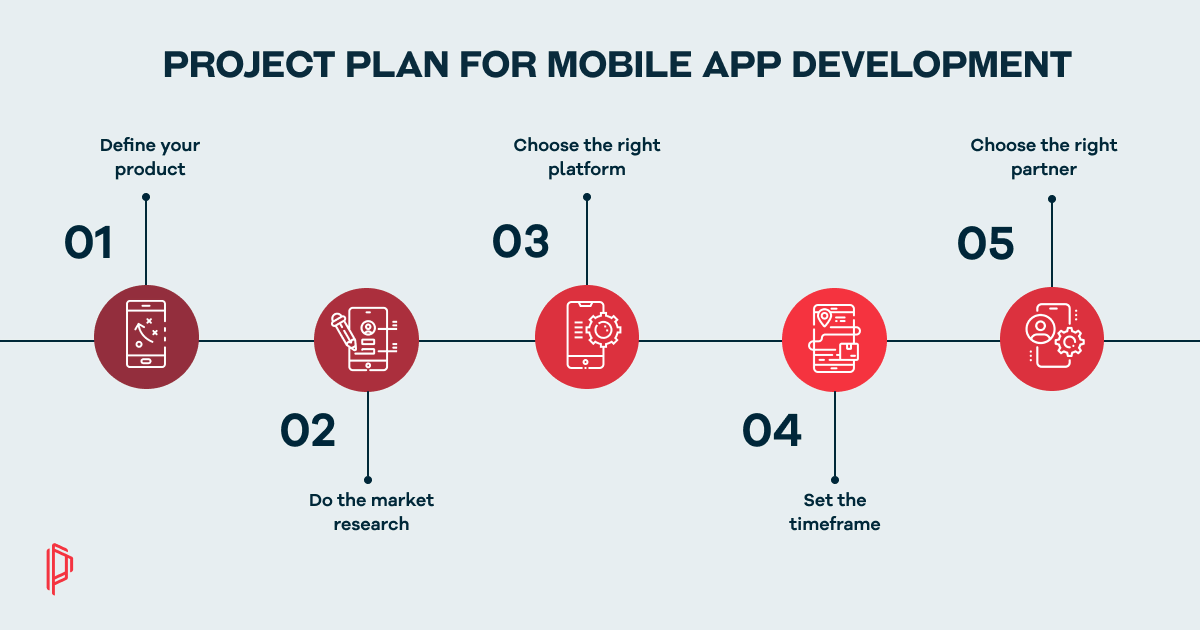
    Define a project plan and contract

    You’ve selected your mobile app outsourcing partner and it’s time to seal the deal and put everything on paper. At this point, determine how your potential collaboration is going to play out. Some key details include:

    • Milestones (when each portion of the project will be finished and sent to you for sign-off)
    • Deliverables (main parts of the projects that will be delivered for each milestone)
    • Project management methods and tools (how the team will work with you and which tool you can use to check up on their progress)
    • The scope of work (what constitutes as a finished project)
    • Payment terms (based on milestones, paid upon completion, etc.)
    • Intellectual property rights (who owns the code)
    • Confidentiality clauses (so that your code remains your own)
    a chart with mobile app project plan for development
    Source

    The partner may already have drafted contracts with the main details prepared, so go through them and consult with a legal professional before signing anything.

    Define the communication methods and tools

    You’re going to be in touch with your partner pretty often, so you might want to establish how and when you’re going to communicate ahead of time. Some may disagree, but excellent developers who communicate poorly are going to create a headache for your team before the work is completed.

    Determine:

    • How you can contact the outsourced partner (email, Slack, calls, in-person meetings, etc.)
    • When you will communicate (daily standups, weekly calls, monthly overviews)
    • How and where you can share feedback
    • When you can expect responses to come in

    Monitor progress and provide feedback

    As your partner is working on your app, be a fly on the wall and keep up with their work – not just for milestones. Check in on the completion of their daily tasks and the overall progress of the app – the back end, the user experience, connectivity with data sources and databases, and more.

    Provide feedback early to prevent problems and fix bugs before they turn into costly errors.

    Test and deploy the app

    Before you go live, your partner and you should do comprehensive testing:

    • Functionality testing
    • Usability testing
    • Performance testing
    • Security testing

    These are all necessary steps to make sure that when you go into production, you don’t get bug reports from day one. If you’re happy with the work and there are no errors in any of the testing, you can go live.

    Support and maintenance

    Make an agreement with your outsourced partner to offer support and maintenance post-launch. Some issues might slip through and they should be on standby to fix them. Also, determine how and when updates will be done on the app.

    And voila, you’re good to go!

    Wrapping up

    Choosing a partner to outsource your mobile app development too requires a huge leap of faith, especially if you don’t have a technical background. There are many options out there to choose from, but don’t let that scare you away – the framework above is an excellent starting point to help you find the right team for the job.

    And if you have a website that you want to turn into a mobile app – you don’t have to search far and wide. At Vendrux, we can convert your website into a beautiful, functional mobile app you will love in just a few weeks.

    Get a free preview of your app or book your free demo to learn more!

  • Ionic vs Cordova – Which Is Better for a Mobile App?

    Ionic vs Cordova – Which Is Better for a Mobile App?

    Before choosing the operating system you want to build your app on, there is another important decision to make: which development framework to choose. You want to choose something that allows you to build hybrid apps across platforms, that is easy to customize, and won’t give your developers headaches. Maybe you’re looking at a choice between Ionic and Cordova.

    Let’s compare them side by side and help you make a better decision for your dev team and future app users.

    What is Cordova?

    cordova as a platform for mobile app development

    To go from the beginning, we have to start with Cordova, a mobile app development framework that has been around since 2009. Apache Cordova’s founders Nitobi were purchased by Adobe Systems and have since carried the name of PhoneGap.

    Cordova is a popular choice for cross-platform development of mobile applications as it builds on top of the native features of an application. Even in 2026, it’s a popular choice for cross-platform application development, thanks to a wide range of benefits which we’ll discuss in a minute.

    What is Ionic?

    ionic as a platform for mobile app development

    Launched in 2014 by Drifty Co., Ionic is an open-source mobile development framework that was built on top of Cordova. Ionic uses HTML, CSS, and JavaScript to speed up the development process and easily build cross-platform apps.

    This open-source framework integrates with a wide array of libraries and technologies, including Cordova, Angular, Vue.js, React.js and many others.

    Ionic and Cordova compared

    These two popular technologies are technically not competitors, since the Ionic platform is built on top of Cordova. However, they’re both standard web technologies and if you have to make a choice, we’re here to help.

    By the way, did you know that you don’t have to choose between Ionic and Cordova? You can work with Vendrux – and turn your website into a mobile app. Within just a few weeks, you can get an app up and running, without spending tens of thousands of dollars on developers and their services.

    Check here what your website would look like as an app.

    The user interface (for end users)

    If you want to build out a user interface in Cordova as a development platform, you need to be aware that out of the box, it does not come with any UI components. To create the user interface for real devices, you need to build it from scratch, either by writing out the code or using third-party libraries. The good thing is, there are plenty of libraries to choose from.

    On the other hand, Ionic comes with a lot of predefined UI components, styling options, and themes for creating a superb user experience. App developers working in Ionic can choose these visualization options based on the mobile devices and platforms they want to work on. An Ionic application typically means you get native device functionality and design every time.

    The development experience

    Cordova has a command-line interface (CLI) where developers can type out the vode. To access native device functionalities, they can tap into plugins, which there are plenty to choose from. There are many active communities for Cordova if you get stuck and don’t know what to pick. Once you choose a plugin, you may still need to write some additional native code in the Cordova CLI to get the native functionalities of Android or iOS.

    You can also create your own Cordova plugins if you have the right skill set.

    Ionic offers pretty much the same thing since it’s built on top of Cordova, with some extras. You also get access to native APIs, which makes adding native components for different mobile platforms a breeze. In general, development cycles are shorter in Ionic, making it better suited for rapid prototyping.

    App performance

    Apps built in Apache Cordova are pretty much web apps built in a native container. This means that, unlike native applications, you will get slower performance. The more complex the mobile app project, the harder it is to get optimal performance.

    Ionic developers can benefit from this platform’s performance optimizations. Ionic technology uses hardware acceleration to make sure that even cross-platform mobile applications run smoothly and quickly when they create an app.

    The community

    Cordova is an app development platform that has been around for a good while, which means that there is a vast community of Cordova developers out there. This technology stack has many guides, walkthroughs, and video tutorials, so if you get stuck on Cordova CLI, you have somewhere to go.

    On the other hand, Ionic does not have a rich community but it makes up for it with different Ionic frameworks. For example, Appflow, Native, and Capacitor, making it easy to build hybrid applications with exceptional user experience.

    Which framework should you choose?

    Apache Cordova or Ionic – the choice depends on how much time you have, what kind of developers are in your team, and most importantly, the types of platforms you want to develop for.

    An application made in Cordova will certainly work, but the chances of getting a poor user experience are higher, especially if you don’t have seasoned developers available.

    An Ionic application will have smoother animations, better performance, and overall UX, but you need an experienced developer team to make the most of this framework.

    Take the third route instead

    You don’t need to choose between Cordova or Ionic. While they are popular frameworks, you can go with Vendrux instead. We can turn your website into a mobile app with a web-based UI. Every time you update your website, your mobile app gets updated as well!

    The best part is, that you can see what your website would like as an app – for free! Schedule a free, personalized demo to learn more about Vendrux today.

  • How Many Ecommerce Stores Have a Mobile App?

    How Many Ecommerce Stores Have a Mobile App?

    Mobile commerce is estimated to account for nearly 70% of all ecommerce sales worldwide (and fast approaching these numbers in the US too).

    With more consumers shopping on their smartphones, mobile apps are becoming a bigger and bigger opportunity for ecommerce brands.

    Apps offer deeper engagement, greater retention, and consistently deliver higher LTV on a user by user basis.

    But how many ecommerce businesses are taking advantage of this? If you don’t have an app yet, are you behind the curve? Or is there still space to be an early mover?

    Read on and find out.

    Vendrux helps you create the perfect, high-ROI ecommerce mobile app, by converting your existing website.
    Want to learn how? Start with a free preview of your app now.

    Ecommerce Mobile App Adoption by Business Size

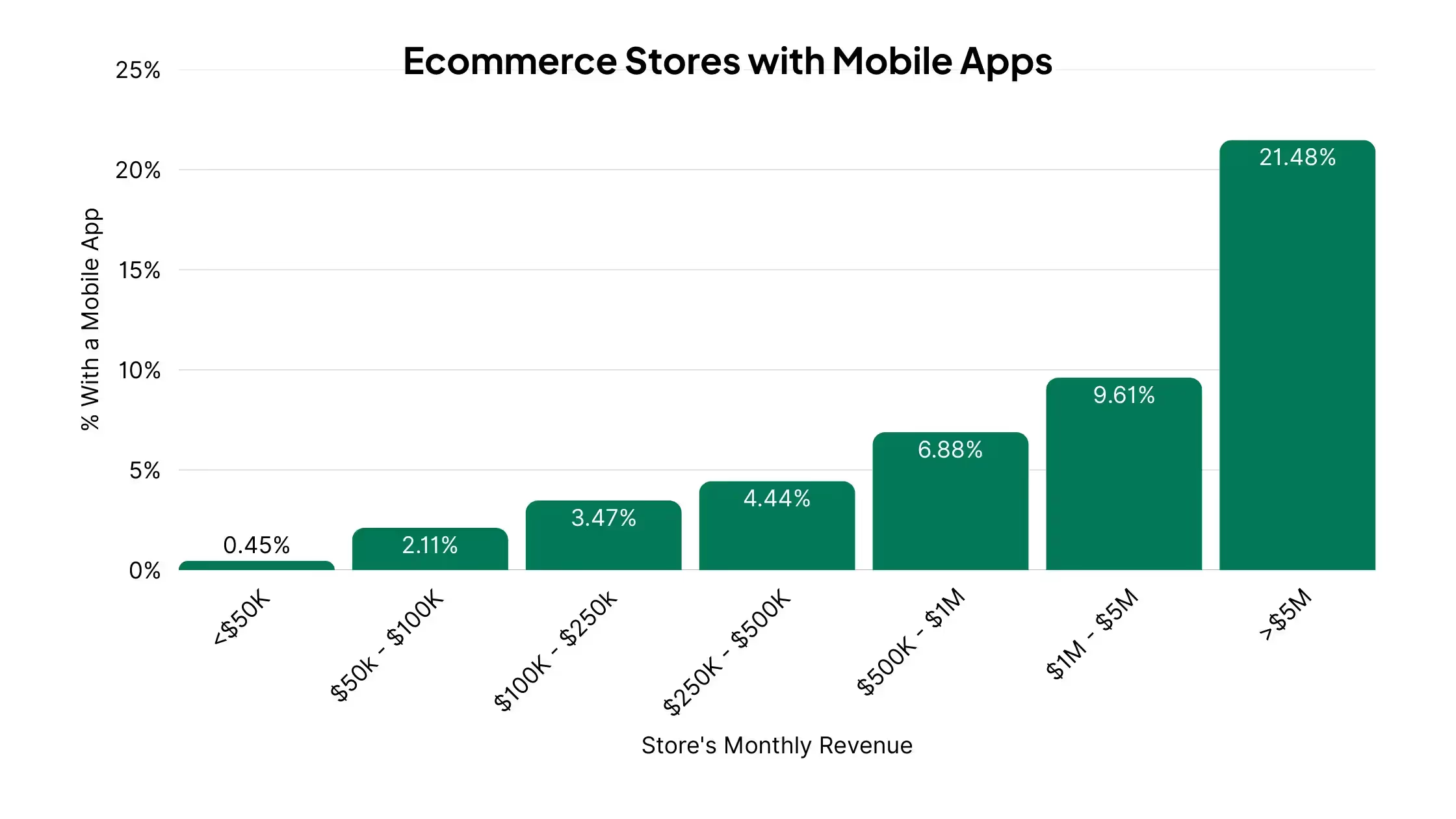
    Only 0.66% of US ecommerce stores have a mobile app.

    However, this number is heavily skewed by many small online stores, making little revenue (and thus too small or early-stage to think about mobile apps).

    It’s better to look at how many ecommerce stores have mobile apps, by revenue tiers:

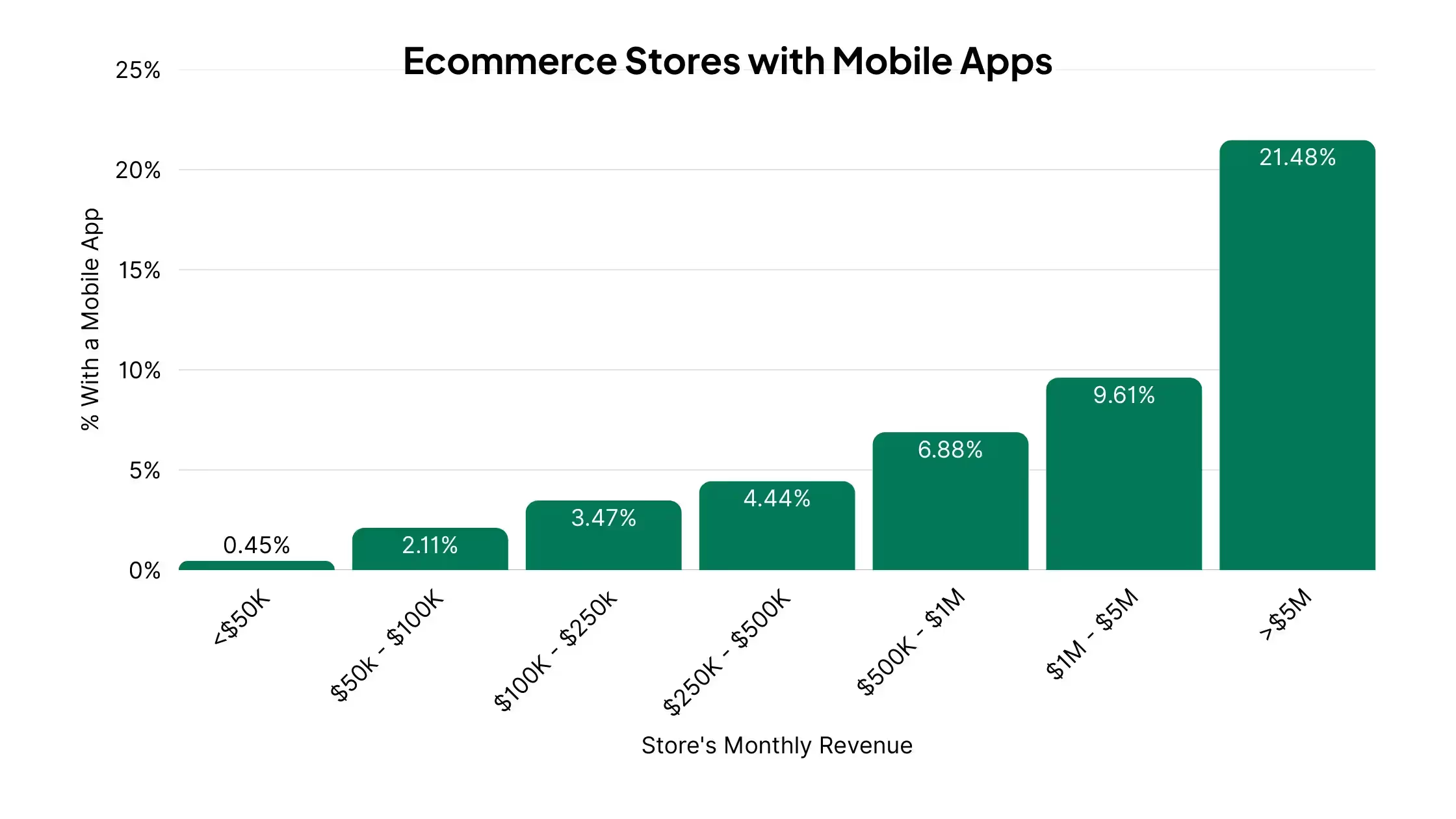
    • Under $50K/month in revenue: less than 0.5% have an app
    • $100K-$250K/month: around 3.5% have an app
    • $1M-$5M/month: nearly 10% have an app
    • $5M+/month: over 21% have a native app

    Notably, among ecommerce stores with $100K+ in monthly revenue, 4.56% of stores have a mobile app.

    App Adoption by Product Catalog Size

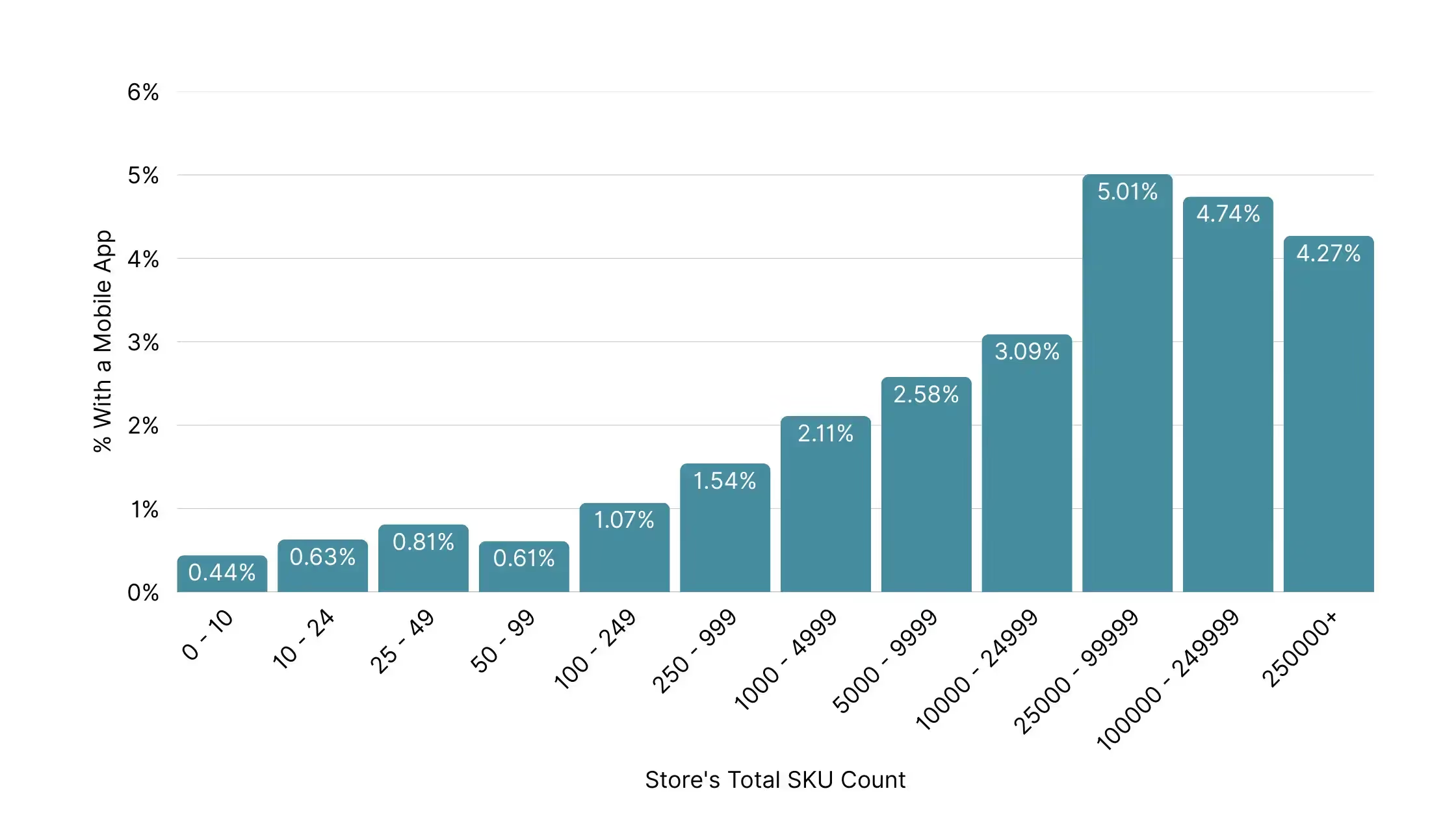
    A strong factor in whether a store launches a mobile app is how many products they sell. The more SKUs (stock keeping units) a store has, the more likely they are to invest in an app.

    Here’s what the data shows:

    • Stores with fewer than 50 SKUs: Adoption is low, between 0.4% and 0.8%
    • 50-249 SKUs: Slight uptick, ranging from 0.6% to 1.1%
    • 250-999 SKUs: 1.5% have an app
    • 1,000-4,999 SKUs: 2.1%
    • 5,000-9,999 SKUs: 2.6%
    • 10,000-24,999 SKUs: 3.1%
    • 25,000-99,999 SKUs: 5.0%
    • 100,000-249,999 SKUs: 4.7%
    • 250,000+ SKUs: 4.3%

    This shows a clear pattern: stores with larger product catalogs are more than 10 times more likely to have an app compared to stores with just a handful of SKUs.

    App Adoption by Platform

    Not all ecommerce platforms are equal when it comes to mobile apps. Some make it easier than others.

    Here’s what the data shows:

    • Shopify: Fewer than 0.5% have a native app
    • WooCommerce: Around 1.2% of stores have an app
    • Magento: Higher adoption at 2-4%, mostly among larger brands
    • Salesforce Commerce Cloud (SFCC): Over 6% of stores have an app, many of them custom-built
    • Other platforms (Wix, Squarespace, BigCommerce, etc.): App adoption is generally under 1%, with Wix & Squarespace under 0.4%
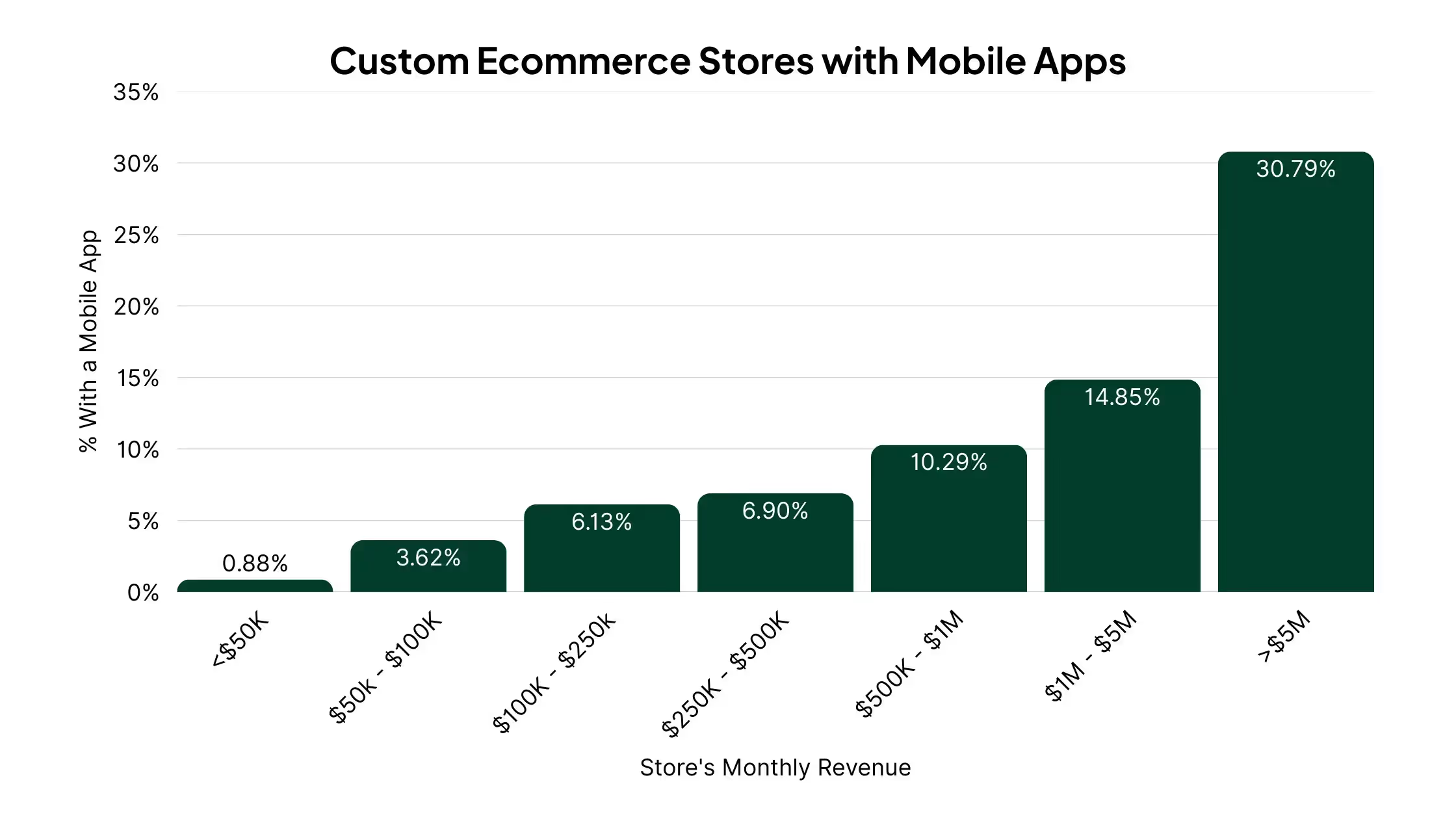
    • Custom ecommerce sites: slightly higher than average at 0.88% app adoption

    If we only take stores with roughly 7 figures+ in revenue ($100K+ per month), we find that:

    • 4.24% of Shopify stores have an app
    • 4.38% of WooCommerce stores have an app
    • 2.08% of Squarespace stores have an app
    • 8.50% of custom-built ecommerce stores have an app

    Takeaways:

    Shopify and WooCommerce are the largest, most general-purpose ecommerce platforms, so it makes sense that the average app adoption for these merchants would be around the overall average.

    Stores on platforms like Magento and Salesforce Commerce Cloud, or those with custom-built sites, typically have either bespoke shopping experiences, or are enterprise-focused brands, which make them more likely to have mobile apps.

    On the other hand, platforms like Squarespace and Wix are typically more beginner-focused, so these are smaller-scale stores that are less likely to invest in mobile apps.

    Vertical Trends: Which Categories Dominate Mobile Apps

    Mobile apps make a lot more sense in some industries than others. That’s because apps work best when customers shop often, stay loyal, and want the convenience of being able to shop on-the-go.

    Here’s how app distribution breaks down by several notable product categories:

    • Apparel & Fashion: 13.20% of ecommerce apps fall in this category
    • Food & Drink: 12%
    • Beauty & Fitness: 9.55%
    • Health: 6.92%
    • Home & Garden: 6.86%
    • Sports: 5.64%
    • Consumer Electronics: 4.18%
    • Autos & Vehicles: 3.33%
    • Pets & Animals: 1.91%
    • Travel: 1.82%
    • Toys & Hobbies: 1.28%

    Takeaway:

    The most common type of store to have an app is one selling lifestyle products that people buy regularly or engage with often. 

    • Fashion brands use apps to drop new collections and send push alerts for sales.
    • Beauty brands use them for subscriptions, reorders, and content like tutorials.
    • Food and drink apps support delivery, subscriptions, or loyalty programs.

    On the flip side, brands selling big-ticket or one-time purchase items (like mattresses, appliances, or niche electronics) are less likely to build apps. Their customers don’t shop often enough to justify it.

    Apps make more sense when there’s a need for fast reordering, strong branding, or community, which is why they’ve caught on in fashion and beauty first.

    Data sourced from Store Leads

    What’s Holding Brands Back from Launching Mobile Apps?

    Only 0.66% of US ecommerce stores have an app. And even among stores doing roughly $1M in annual revenue, only 4.56% have an app.

    Why is adoption so low?

    Let’s look at a few reasons.

    Perceived cost

    Many assume apps still come with a massive price tag ($100K+, over months of development). 

    As the wording suggests, this was true at one time. Now, however, it’s easy to go live with your own branded mobile app for around $1-2K, and just a few hundred dollars per month after that.

    Technical complexity

    Along with the cost, teams think they’ll need developers to maintain the app. They expect that the app will come along with a dedicated team to manage it, bringing both cost and operational overhead.

    Again, that’s not true anymore. With a web to app service like Vendrux, you can maintain a beautiful native app with zero development expertise or operational lift from your team.

    “Our mobile site is good enough”

    A lot of brands believe that, because they have a mobile website that looks good and works well, there’s no need for a mobile app.

    Your mobile site is most important – but the app is not supposed to replace the website. It’s supposed to be a home for a brand’s most engaged, loyal fans, who want a more convenient way to make regular purchases.

    Smart brands (as you’ll see from the stats – brands that do more revenue are more likely to have apps) recognize this, and offer a mobile app for their loyal, VIPs.

    “No one will use the app”

    Some are skeptical that customers will download and use the app.

    It’s true that not all customers prefer to use an app. New visitors will land on the brand’s website. And some would rather keep using the website than downloading an app.

    But brands that launch apps typically see ~10% of their customers jumping on the app – and these tend to be the most engaged, valuable customer segments.

    Misconceptions about mobile apps

    A lot of brands hold misconceptions about mobile apps. They cost too much. Too much work to manage. Mobile apps don’t work.

    These concerns are real, but often based on old assumptions.

    Modern solutions (like Vendrux) eliminate these barriers. You don’t need to rebuild your site, hire developers, or maintain two platforms. Your website powers the app, everything stays in sync, and our team handles all the setup and launch.

    You get the benefits for retention, engagement and LTV, without adding more work for your team.

    Want to see what your website could look like as an app? Find out now with a free, interactive preview of your website as an app.

    Forecast: What’s Next for Mobile Apps?

    Mobile apps aren’t just for the biggest brands anymore. The landscape is shifting, and fast.

    Here’s how the mobile commerce world is changing, and why it points to apps as a key area of focus for modern brands:

    • Mobile commerce is taking over: the majority of ecommerce traffic comes on mobile. And this share is only going to keep growing.
    • Acquisition costs are rising, brands are looking for lower-cost, higher-return channels – like mobile apps.
    • Email deliverability is declining, SMS is effective but expensive, and brands need low-cost, high-visibility channels like mobile app push notifications to keep in contact with their customers.
    • You no longer need to spend months and six figures building an app. Once more businesses realize this, we’ll see more trying an app.
    • Customer expectations: Shoppers are used to the speed and ease of Amazon, Shein, Temu, and TikTok Shop, and expect similar from all brands.

    For now, mobile apps remain a competitive edge. But in the near future, they’ll become table stakes, especially for high-frequency brands serious about retention and customer lifetime value.

    Conclusion: The Opportunity in the Gap

    Fewer than 1% of ecommerce stores currently have a mobile app.

    These numbers rise once you remove small-scale stores, with nearly 5% of US brands doing $100K or more in monthly revenue having their own mobile app (and a higher percentage for brands on Salesforce, Magento, and custom/headless builds).

    But for brands ready to grow faster and retain more customers, this is still a major opportunity.

    Native apps aren’t just about looking good in the App Store. They give you:

    • A direct line to your best customers
    • Low-cost, high-visibility communication with push notifications
    • A faster, smoother shopping experience that boosts conversion
    • A branded space that builds loyalty and keeps you top of mind

    Today, launching a mobile app is faster, simpler, and more accessible than ever, with solutions like Vendrux making it possible in just a few weeks.

    Mobile apps aren’t a luxury anymore. They’re a great strategic play for just about any brand, and more accessible than ever, whether your brand is VC-funded or lean and bootstrapped.

    Want to see what’s possible? Get a free preview of your mobile app now.

  • How to Send Push Notifications from a WooCommerce Store

    How to Send Push Notifications from a WooCommerce Store

    Do you wish there was a more direct way to reach customers than email, SMS or PPC?

    There is – push notifications.

    If you aren’t sending push notifications from your WooCommerce store, then frankly you’re leaving customers and revenue on the table.

    Imagine driving up conversions, dramatically reducing abandoned carts, and boosting average order value with just a couple of clicks. 

    You’ll do this (and more) by embracing push notifications for WooCommerce.

    In this article we’re going to help you get up and running with push notifications.

    We’ll cover why you need to send push notifications, the best tools and plugins that integrate with WooCommerce, how to send web and (more powerful) native mobile push notifications, and best practices to maximize effectiveness.

    Learn more: we took a deep dive into push notifications for eCommerce in this guide, including best practices and real examples of push notifications from successful eCommerce brands.

    Why Send Push Notifications from WooCommerce?

    Here at Vendrux we’ve built thousands of native mobile apps for clients, who’ve used their Vendrux apps to send millions of push notifications.

    We’re big believers in the power of push, because we’ve seen it first hand.

    Push notifications are the most direct way to reach your customers.

    Think about the last time you received a push notification; it caught your attention immediately, right? That’s because they land directly in your lock screen, which you likely check dozens (if not hundreds) of times daily.

    We aren’t telling you to drop any other channels, such as email or PPC. But we are telling you that you must start sending push notifications too.

    • PPC is amazing, but only if you can make it work.
    • Email is great but deliverability and engagement can be issues.
    • Social post reach is restricted (unless you pay big bucks).
    • SEO and content marketing are unpredictable and long-term plays.

    Comparing the drawbacks of these channels with the virtues of push, it’s easy to see why you need them in your toolbox.

    Push notifications are:

    • Better than email because there’s less opt-in friction, they’re more visible, and they’re simpler to set up and manage.
    • Better than PPC because they’re more cost effective and far likelier to deliver a positive ROI.
    • Better than social media because your reach isn’t dependent on a platform’s whims, they’ll be delivered to 100% of customers (who opted in).
    • Better than SMS because it’s easier to get opt-in, and there’s more scope to enhance messages with rich media and personalization.

    Push notifications break through the noise of crowded inboxes, messy social feeds and cluttered SERPs – giving you a channel with extremely high visibility and engagement rates.

    They’re great for all types of businesses, but particularly for eCommerce. Here are a few example use cases:

    • Promoting sales, special events and time-sensitive deals.
    • Alerts about product restocks, notifying customers the moment their items are available.
    • Behaviorally triggered reminders, prompting the users with abandoned carts to complete their purchase.

    You can even segment notifications based on user behavior, customizing messages to fit individual shopping habits and preferences leading to even higher conversion rates.

    __wf_reserved_inherit

    Web vs Native App Notifications for WooCommerce Stores

    There are two types of push notifications:

    1. Web Push Notifications sent to site visitors who give you permission to send them notifications.
    2. Native App Push Notifications sent to customers who have installed your app on their iOS or Android device.

    Both types have their own pros, cons and nuances

    But you’ll find that mobile push (aka native app push) is far superior.

    Sending push notifications through a mobile app allows you to reach your customers directly on their lock screen, at any time.

    Web push notifications only reach the customer while their browser is open, have a much lower opt-in rate, and have limited availability on iOS.

    While web push is easy to set up, your upside is limited. For this reason, we’ll primarily focus on  setting up native mobile push notifications for your WooCommerce store.

    __wf_reserved_inherit

    Sending Native App Notifications from WooCommerce

    Native app push notifications are the main event when it comes to push.

    Of course, at the risk of stating the obvious, to send native app notifications you need a native app.

    WooCommerce is exclusively a web platform, so the first step to sending mobile push notifications from WooCommerce is knowing how to build an app for your store.

    Every eCommerce store should have its own native shopping apps. 

    But building apps the traditional way costs hundreds of thousands of dollars and takes many months, while using cheap app builder tools results in cookie-cutter templated apps with weak functionality and only a tenuous connection to your web store.

    That’s why we built Vendrux.

    __wf_reserved_inherit

    Vendrux converts your WooCommerce store into iOS and Android eCommerce apps.

    It’s a fraction of the cost of traditional native development, and the end result is far superior to anything you’d get from cheap templated app builders.

    With Vendrux you can go from zero to App Store launch in just a couple of weeks, and you can keep everything from your site.

    Every feature of WooCommerce, every WordPress plugin you use, your theme and your entire product catalog will sync completely with the apps.

    The apps will update in real-time along with your site – so managing them is a breeze.

    WooCommerce Push Notifications with Vendrux

    Vendrux apps are the best way to send native app push notifications from WooCommerce.

    Once we’ve built your apps, you can use our deep integration with OneSignal to send unlimited push notifications to users. 

    Through our OneSignal integration, you can set up targeted, event-driven notifications to engage app users on a personalized level.

    We also built a special feature for abandoned cart notifications. 

    Our abandoned cart feature detects when one of your app users has closed the app with items left in their cart, which triggers a series of notifications designed to bring them back into the app to complete their purchase.

    It’s all automated and handled by our team, so you don’t need to do anything except watch those abandoned cart metrics improve month over month.

    To learn more about Vendrux apps and how we can get you on the App Stores and firing off notifications left and right, book a quick personalized demo.

    Now let’s wrap up with a few pieces of advice for sending push notifications, and best practices that we’ve seen working well over the years. 

    Key Components of a WooCommerce Push Notification

    Engagement hinges on relevance and appeal. 

    For the push notifications you’ll send from your WooCommerce store and your Vendrux native apps, you’ll rely on a few key elements every time: 

    • Captivating headlines: Grab attention fast
    • Clear messaging: Communicate your offer or update succinctly (
    • Branding: Incorporate your logo & color scheme if possible 
    • Call-to-Action (CTA): Make your CTAs compelling and clickable

    Use templates to streamline the push notification process, while tailoring content for various campaigns like abandoned cart notifications or special sales promos. 

    Segmenting and Targeting Push Notifications

    To ensure your messages hit home, segment your audience. Collect data based on user behavior, purchase history, and engagement levels to create targeted campaigns:

    • New subscribers: Welcome messages and introductory offers
    • Frequent buyers: Loyalty rewards and exclusive deals
    • Cart abandoners: Reminders and incentives to complete purchases
    __wf_reserved_inherit
    Welcome messages after someone downloads your app are a great way to prime customers to look for your next push notification.

    Advanced segmentation leads to more personalized and effective push notifications, driving sales and deeper relationships. 

    While web push notifications are good for sending out more general messages to site visitors, native app notifications are really perfect for targeting specific types of customers.  

    Timing and Frequency of Push Notifications

    Timing and frequency are crucial to ensure your WooCommerce push notifications make the biggest impact. 

    You need to strike a balance. 

    Bombarding customers with excessive notifications will annoy them and nudge them to opt out, while under-delivering could mean missed opportunities.

    The sweet spot is something you’ll have to find yourself, but generally an average of one per day works well for eCommerce.

    Make sure you consider your audience’s time zone and schedule notifications for optimal times when they’re most likely to be engaged. 

    Regular analysis of your customer data will help you to pinpoint these times.

    As a rule of thumb, limit notifications to a handful per week, and send them at times that common sense and data tells you make the most sense.

    There are some exceptions – for instance, abandoned cart notifications require prompt action, so sending them soon after a shopper has left your site is effective.

    Personalization and Localization of Push Notifications

    Personalizing your WooCommerce push notifications will drastically boost engagement rates. Start by segmenting your audience based on behavior, purchase history, and personal preferences. 

    Use the tools built into the push platform to include the customer’s name, reference past purchases, or suggest items similar to those they’ve shown interest in. 

    Personalization makes customers feel valued and encourages higher click-through rates.

    Localization goes a step further by adapting your message to fit the local language and cultural nuances. This might not be relevant to you, but if you get significant traffic from different parts of the world it could be key. 

    ‍Start Sending WooCommerce Push Notifications Today

    The best practices above are just the fundamentals, but push notifications really succeed on the basis of great copy, relevant messaging, and intelligent experimentation. 

    It’s important to constantly test and optimize, and to use notifications strategically for specific goals like recovering abandoned carts.

    The first step, though, and the biggest, is to start sending push notifications from WooCommerce in the first place.

    Luckily, it’s easier than ever to launch an app and send native push notifications, with Vendrux’s help.

    1. Book a free consultation to discuss your project with our team, and learn more about the process.
    2. Once your app is live, start sending push notifications, starting with some simple automated messages (such as a welcome message), abandoned cart notifications, and short promotional campaigns.
    3. Over time, optimize your push strategy and nail down the perfect playbook for driving sales and engagement via push.

    Vendrux apps give you much more than push notifications, but it’s true that push is one of the most compelling reasons to build eCommerce apps.

    “The power of push notifications is so strong. In a world where people open email less and less each day, everyone is jumping into SMS which is crazy expensive, and people are starting to tune these out too, being able to do push notifications is the reason you do an app.”

    – David Cost, VP of eCommerce & Marketing at Rainbow Shops

    Apps act as a magnet for your most loyal and engaged customers. And once someone downloads your app, you can use push to build an even deeper connection with them, promoting your hottest offers and rewarding them with special promotions and programs. 

    You’ll have an entire new marketing channel to build your business through, one that consistently works for the top eCommerce brands in the world. 

    We’ve built thousands of apps for thriving businesses in countless industries. Take a look at a few examples:

    You now know exactly how to send push notifications from WooCommerce – so let’s get started today. 

    Book a free consultation with one of our experts, and we’ll show you just how easy it is to launch your own app and start sending native mobile push notifications.

  • What is a Service Worker and why are they Important?

    What is a Service Worker and why are they Important?

    Service workers are a crucial piece of web infrastructure that enable web push notifications (and other things). 

    In this article we will explain what service workers are, how they work, and everything you need to know to deliver winning push campaigns to your users and customers. 

    Let’s begin. 

    What is a Service Worker?

    At the simplest level – a service worker is a JavaScript file that runs separately from the main web page, and acts as a middle “layer” between browser and server. They are often described as proxies between web browsers and servers. 

    This is important because it allows you to control certain aspects of your web app’s functionality even when the user is not actively browsing the site

    The service worker runs background processes and can perform tasks independently of the web page itself.

    What do Service Workers Do? 

    Service workers enable powerful features across web apps, like: 

    • Offline functionality
    • Background synchronization
    • Push notifications

    They’re an essential part of Progressive Web Applications (PWAs), playing a crucial role in their success and strong UX. 

    Now we’ve introduced service workers, let’s go into a bit more depth about how they work on a high level. 

    The Service Worker Lifecycle

    When a web user comes into contact with a website that has service worker code, a series of steps occur.

    These are known as the service worker “lifecycle”, and understanding it is important for understanding service workers in general.  

    1. Registration: When a user first visits a website with a service worker, their browser becomes aware and “registers” it. This is automatic, the user won’t notice anything, and no permissions are needed. 
    1. Installation: As the user interacts with the site or web app, the service worker starts caching certain parts of the website – for example images, scripts, and stylesheets). This again occurs without the users’ involvement, and allows for both faster loading on repeat visits and also offline functionality. 
    1. Activation: Once the service worker has successfully saved the necessary resources, it becomes active. The service worker takes control, replacing any older version, and manages cached resources to ensure the user accesses the most recent and relevant content.
    1. Idle: Now that the service worker is active, it waits in the background. As the user continues browsing, the service worker is ready to respond to any requests, such as loading content from the cache.
    1. Fetch/Functional: If the user makes a request (like clicking on a link or loading an image), the service worker decides whether to fetch the content from the cache or the internet. If the user is offline or on a slow network, the service worker can serve content from the cache, ensuring the website remains accessible and fast.
    1. Termination: If the browser needs to free up resources, it might stop the service worker when it’s not in use. But it can quickly restart the service worker when needed, and the user won’t notice this happening in the background.
    1. Update: On subsequent visits to the website, if the browser detects any changes in the service worker’s code, it will start the process of installing and activating the new version. This ensures that the user always experiences the most up-to-date version of the website.

    So that’s the service worker lifecycle. Throughout this process the user’s experience is smooth, with the service worker operating in the background. Now, are you starting to see why service workers are so powerful? 

    Let’s look at a few of the key functionalities they enable. 

    The Role of Service Workers in Web Applications

    For modern web apps, service workers are crucial for key parts of their UX, helping them to perform and feel closer to native apps than ever. 

    Three key functionalities they enable are: offline functionality, background sync, and push notifications. 

    We’re going to specifically focus on push notifications, but let’s briefly cover the other two first. 

    How Service workers enable offline functionality

    By caching key resources like HTML, CSS, JavaScript, and images, service workers allow users to access and interact with web apps even when they are offline or experiencing a poor network connection.

    Recall that when a user visits a site for the first time, the service worker caches necessary files and data. 

    Subsequent visits to the app can then be served from the cache, reducing the reliance on the network and allowing the user to interact with the site with low or even zero internet connection. 

    How service workers enable background sync

    Another valuable feature enabled by service workers is background sync. Background sync allows web applications to synchronize data with the server, even if the app is not currently open, the device is offline, or the user has a poor internet connection. 

    It ensures that any actions taken, or data entered, by users will be synced and processed once they come back online. 

    For example, if a user submits a form while offline, the service worker can capture that request and hold it in the background until a network connection is established. Once the connection is restored, the service worker will automatically send the request to the server and complete the action. 

    How service workers enable Push Notifications

    Now, a topic that is dear to our hearts at Vendrux – push notifications. 

    Push notifications are absolutely reliant on the capabilities of service workers to deliver timely and relevant messages to users – even when they’re not actively using your website. 

    So how do service workers help out here? 

    Modern browsers typically have “push services”, intermediary infrastructure that enables push notifications like Chrome’s Firebase Cloud Messaging, Windows Push Notification Services, and Mozilla’s Push Service. 

    Along with the browser’s native infrastructure, there’s a lively ecosystem of third party push notification tools and services that add additional features and functionality on top. 

    The service worker operates in the background, connected to but separate from your actual website or web app, and so “listens” for push events from the push service. 

    Here’s how it works in more detail, step-by-step:

    1. Permission: the user grants you permission to send notifications 
    2. Registration: The service worker is registered on the user’s device, allowing it to run independently in the background
    3. Subscription: The service worker requests a subscription object from the browser push service, which then creates a unique endpoint (or address) for the specific user device. This endpoint, along with some other data, forms the subscription object.
    4. Sending Notifications: When you want to send a push notification, your server sends a request to the push service associated with the user’s browser, addressed to the unique endpoint created in the previous step. The push service then communicates directly with the user’s device.
    5. Displaying the Notification: the service worker, always on standby, listens for incoming push events. When a push message is received, the service worker processes the data and uses the browser’s Notification API to display the notification to the user, regardless of whether they have the website open.

    And voila, your message is sent. This may seem like a laborious process, but it’s all largely automated and not too complex to add to your site. 

    Implementing Service Workers

    In this section we’re going to run through the process of registering a service worker, handling push notifications, & the best practices to ensure successful implementation.

    Registering a Service Worker

    The first step in implementing service workers is to register them in your web app. 

    Just to recap – a service worker is a JavaScript file that runs in the background, separate from the main web page. It acts as a proxy between your web application and the user’s browser, enabling features such as push notifications and offline functionality.

    Here’s an example of some code to register a service worker on your site, either within

    As you can see above, the code checks if the browser supports service workers and then registers the service worker by providing the path to the JavaScript file. 

    Once registered, the service worker is installed and ready to handle events and perform tasks in the background.

    Registering a service worker is pretty much that simple! But remember, the real power of service workers is in configuring it to work optimally for your own site and users. 

    Handling Push Notifications

    Speaking of configuring service workers, let’s see a brief example of how to start handling push notifications. 

    To handle push notifications, you need to have your service worker “listen” for the push event:

    In this code, the push event is triggered when a push notification is received from the browser push service. 

    The event data contains the notification payload, which can include the title, body, and other customizable options. 

    The service worker then uses the showNotification method to display the push notification to the user.

    Note: If you’re new to web development, learning the following definitions will help you understand this topic (and many others) on a deeper level:

    Service worker best practices

    To ensure a successful implementation of service workers, here are a few best practices that you (or your developer) should keep in mind: 

    • Test Across Browsers: While most modern browsers support service workers, there can be nuances in behavior and implementation. Ensure you test on all major browsers to guarantee consistent functionality.
    • Handle Errors Gracefully: Service workers operate in the background, and unexpected situations can arise. Implement robust error handling mechanisms to manage such scenarios without disrupting user experience.
    • Keep Service Workers Updated: As you refine your web app, ensure your service worker is also updated to reflect those changes. Increment the version number or change the service worker file’s contents to trigger updates.
    • Consider User Permission: For features like push notifications, always seek explicit user permission before subscribing them. Ensure that your approach respects user privacy and adheres to relevant regulations and best practices.
    • Cache Strategically: Decide on a caching strategy that fits your web app’s needs, such as cache-first or network-first. Periodically review and clean your cache to make sure everything is efficient.
    • Stay Informed: The web is ever-evolving, and best practices can change. Stay updated with the latest advancements and changes related to service workers and the broader web platform.

    By following these best practices, you’ll be set up to leverage service workers to their full potential. 

    Are web notifications enough? 

    Even though service workers can help to transform your web app and send notifications to users’ devices, web notifications in general have their downsides. 

    Native app notifications are an entirely different category that do not use service workers in any way. They have several advantages over web notifications:

    • Higher opt-in and engagement rates
    • Better for reaching iOS users
    • Better for personalisation

    You can read more in this comparison.

    Native app notifications are the clear winners except for one thing – traditionally it was expensive and difficult to build native apps. It took months of labour and a six figure investment.

    Luckily, that isn’t true anymore.

    With Vendrux, you can get native apps in just weeks, for a small fraction of the usual cost.

    You’ll be able to keep every feature and functionality of your web app – and also to send unlimited push notifications to users, no matter their mobile OS!

    We specialise in building apps for ecommerce, and power the apps of thousands of brands including multibillion dollar multinationals.

    Check out some of our app examples

    We give you everything you need to leverage push – including abandoned cart notifications, A/B testing, and more. Want to learn more about Vendrux? Get started with a free preview of your app, or schedule a free, personalized demo and get a first-hand look at the platform’s possibilities with one of our app experts.

    Getting back to the web – we hope this article has helped to inform you about service workers.

    Good luck with implementing them on your website.

  • Push Notifications on iOS vs Android: How They Work in 2026

    Push Notifications on iOS vs Android: How They Work in 2026

    Push notifications are the main reason most ecommerce brands want a mobile app. 

    They’re the most direct line to your customers – more immediate than email, cheaper than SMS, and harder to ignore than either.

    But iOS and Android don’t handle push notifications the same way. The differences aren’t just cosmetic. They affect how many of your users you can actually reach, how your notifications appear, and how much control the operating system gives users to filter, silence, or ignore them entirely.

    This guide explains how push works on each platform in plain terms; what happens behind the scenes, what your users experience, and what it all means if you’re running an app.

    How Push Notifications Work (The Simple Version)

    Before getting into platform differences, here’s the basic pipeline. It works roughly the same way on both iOS and Android:

    1. Your user installs your app and (on iOS) grants notification permission. The app registers with the platform’s push service and receives a unique token – think of it like a mailing address for that specific device.
    2. Your server stores that token. When you want to send a notification, you send the message and the token to the platform’s push service.
    3. The push service delivers it. On iOS, that’s Apple Push Notification service (APNs). On Android, it’s Firebase Cloud Messaging (FCM). These services handle the actual delivery to the device.
    4. The device displays it according to the user’s settings – as a banner, a sound, a badge on the app icon, or some combination.

    That’s it. Your server talks to Apple or Google, and they talk to the device. You never send a notification directly to someone’s phone.

    Where things diverge, and where it matters for your business, is in what happens at each step.

    The Permission Model

    This is the biggest difference. And it’s one of the most important parts of getting the most out of push notifications.

    iOS: You Get One Shot

    On iOS, your app cannot send a single push notification until the user explicitly says yes. 

    The first time your app requests permission, iOS shows a system dialog: “[App Name] Would Like to Send You Notifications” with two buttons: Allow and Don’t Allow.

    If the user taps Don’t Allow, that dialog never appears again. Your app can’t re-trigger it. 

    The only way the user can change their mind is by going into Settings > Notifications > Your App and manually turning notifications on.

    Most won’t.

    This is why timing the permission request matters so much. If you ask the moment someone opens your app for the first time (before they’ve seen any value) a lot of people will tap Don’t Allow out of reflex. 

    The smarter approach is what’s called a “soft ask”: show your own in-app screen first that explains what kind of notifications you’ll send and why they’re useful, and only trigger the real system dialog after the user taps something like “Yes, notify me.” 

    That way, the people who reach the system dialog are already primed to say yes.

    Current iOS opt-in rates for ecommerce apps average around 50%. That means roughly half your iOS users will never see a single push notification from you – if your opt-in strategy is no better than average.

    This makes the ask strategy one of the highest-leverage things you can optimize.

    Android: It Used to Be Automatic, Now It Asks Too

    Before Android 13 (released in 2022), push notifications were on by default for every installed app. 

    You didn’t need permission. The moment someone installed your app, you could send them notifications. Opt-in rates were effectively near 100%.

    Android 13 changed this. Apps now have to request the POST_NOTIFICATIONS permission, and users see an Allow/Don’t Allow dialog similar to iOS. 

    If they deny it, you can ask one more time. But after two denials, the system blocks further prompts, just like iOS.

    There’s a transitional wrinkle: apps that were already installed when a device upgraded to Android 13 were auto-granted permission. So the full impact of the change is still rolling out as people buy new phones.

    Current Android opt-in rates for ecommerce apps average around 68%, which is still significantly higher than iOS. But the gap is narrowing year over year as more Android users land on the opt-in model.

    What This Means for You

    The permission model is the single biggest factor in how many users you can reach. On a combined iOS/Android user base, you might be looking at roughly 50-70% of your users actually receiving your notifications – and that’s before accounting for users who later turn them off.

    Every percentage point of opt-in rate translates directly to revenue. The data on this is clear: users who receive at least one push notification in the first 90 days show roughly 3x higher retention rates than those who don’t. 

    Getting the permission prompt right is crucial if you want your app to succeed.

    How Notifications Appear on Each Platform

    Once a user has opted in, the two platforms display notifications differently.

    iOS: Clean and Controlled

    iOS notifications show up in three places:

    • Lock Screen — notifications stack up while the phone is locked
    • Notification Center — swipe down from the top to see recent notifications
    • Banners — a brief pop-up at the top of the screen when the phone is unlocked and in use

    Every notification looks more or less the same: your app icon, a title, a body, and optionally an image or media attachment. iOS enforces a consistent visual format across all apps. 

    You can include rich media (images up to 2MB, GIFs, even short video), and rich notifications see about 56% higher open rates than plain text – but you don’t have the freedom to completely redesign how the notification looks.

    iOS also groups notifications by app by default. If you send five notifications, they stack into one expandable group rather than flooding the lock screen with five separate items.

    Android: More Flexible, More Visible

    Android notifications appear in:

    • Status bar — a small icon at the top of the screen signals there’s something new
    • Notification shade — pull down from the top to see all notifications, with more detail than iOS shows
    • Notification dots — a colored dot (or number badge on Samsung/Xiaomi) appears on your app icon

    Android gives you significantly more control over how notifications look. You can include large images, custom layouts, progress bars, action buttons that work without opening the app, and expandable content. 

    Users can long-press a notification to see more detail, reply inline, or take actions directly from the shade.

    Android also supports notification channels (since Android 8.0), which are one of the platform’s most useful features. 

    You define categories for your notifications (“Order Updates,” “Promotions,” “Back in Stock”) and users can independently control each one. 

    Someone can silence your promotional notifications while keeping order updates at full volume. 

    This is a win for everyone: users get control, and you avoid the all-or-nothing situation where someone turns off all your notifications because they’re tired of promos.

    What the Operating System Does With Your Notifications

    This is where things have gotten more complicated in recent years. Both platforms are increasingly inserting themselves between your notification and the user’s eyeballs.

    iOS: Focus Mode, Notification Summary, and AI Filtering

    Focus Mode (iOS 15+) lets users create profiles (Work, Sleep, Personal, etc.) that silence most notifications. 

    When a Focus is active, your notification is delivered but hidden until the Focus ends. Only apps the user has specifically whitelisted will break through. 

    Time-Sensitive notifications (delivery updates, payment confirmations) can also break through if the user has allowed that option. But Apple restricts this category and expects you to use it honestly.

    Notification Summary (iOS 15+) lets users batch notifications into a scheduled digest. For example, delivered at 8 AM and 6 PM. If your user has this on, your flash sale notification sent at 10 AM might not be seen until 6 PM. 

    Time-Sensitive notifications bypass the summary.

    Apple Intelligence (iOS 18.1+) introduced AI-powered notification summaries that condense your notification text into shorter versions. 

    Starting with iOS 18.4, the system also applies “Priority Notifications” – the AI decides which notifications are important and surfaces those at the top.

    You have no API to influence this. The AI reads the content and makes its own judgment.

    Android: Notification Cooldown, AI Summaries, and Auto-Categorization

    Do Not Disturb on Android silences sound and vibration, but notifications still arrive in the shade – they’re visible but don’t interrupt. 

    Users can whitelist specific apps or even specific notification channels to override DND.

    Notification Cooldown (Android 15) progressively reduces the volume and vibration for rapid successive notifications from the same app. 

    If you send multiple notifications in quick succession, the later ones will be quieter. This doesn’t affect how they display, just how aggressively they alert.

    AI-powered summaries and auto-categorization (Android 16, mid-2025) are the newest development. 

    Google’s Notification Organizer automatically categorizes notifications and can silence lower-priority ones like promotions. This is currently limited to Pixel devices but is expected to expand. 

    For ecommerce apps, this means your promotional pushes may be auto-suppressed by the OS without the user doing anything.

    What This Means for You

    The trend on both platforms is the same: the operating system is becoming a gatekeeper between your notification and the user. 

    Both Apple and Google are using AI to decide what’s “important” and what isn’t, and promotional notifications are the most likely to be filtered.

    This makes two things more important than ever. 

    First, the quality and relevance of each notification matters more than volume. A well-timed, personalized notification about a product someone actually browsed will be treated differently (by both the AI and the user) than a generic “20% off everything!” blast. 

    Second, transactional and triggered notifications – order updates, back-in-stock alerts, cart reminders – are more resilient to filtering because both platforms recognize them as higher-priority content.

    The Numbers: iOS vs Android Push Performance

    Here’s how the two platforms compare on the metrics that actually matter:

    Metric iOS Android
    Ecommerce opt-in rate ~50% ~68%
    Ecommerce click-through rate 3.05% 3.78%
    Overall reaction rate 4.9% 10.7%
    Delivery reliability Very consistent (Apple controls full stack) High, but varies by device manufacturer
    Offline queuing 1 notification per app Up to 100 per app
    Rich media support Images, GIFs, video (up to 2MB) Images, custom layouts, inline actions
    User-level controls Per-app + Focus Mode + Notification Summary Per-app + per-channel + DND exceptions

    A few things stand out. Android has higher opt-in rates, higher click-through rates, and significantly higher reaction rates overall. 

    The reaction rate gap (10.7% vs 4.9%) is driven by Android’s notification shade being more persistent and interactive – users can act on notifications without fully opening the app.

    But iOS users who do opt in tend to be more intentional. They chose to receive your notifications, which can mean higher engagement quality per user even if the raw numbers are lower.

    The practical takeaway: you need a push strategy for both platforms, but the tactics should differ. 

    On iOS, optimize for getting the opt-in and making every notification count. On Android, take advantage of notification channels and richer formatting to give users a better experience.

    What This All Means If You’re Running an Ecommerce App

    Push notifications account for roughly 15% of ecommerce revenue from just 3% of total marketing messages – the best efficiency ratio of any channel. 

    Cart abandonment pushes can recover up to 20% of lost sales. Users with push enabled show 3x higher retention.

    But none of those numbers apply to you unless your app can actually use push properly on both platforms. Here’s the practical reality:

    First, you need a native app. 

    Web push and PWA push exist, but they don’t have access to the full push toolkit – no notification channels on Android, no Time-Sensitive priority on iOS, no Live Activities, no reliable background delivery. 

    PWA push opt-in rates on iOS are 10-15x lower than native because users have to manually add the site to their home screen before they can even be asked for permission.

    You need to handle both platforms. 

    Your customers are split across iOS and Android. Each platform has its own push service (APNs vs FCM), its own permission model, its own display rules, and its own filtering. 

    A push strategy that ignores these differences leaves performance on the table.

    Personalization is the multiplier. 

    Generic blasts get filtered and ignored. Personalized notifications see 2-4x higher reaction rates

    Triggered campaigns (cart abandonment, price drops, back-in-stock) see open rates of 16-22%, compared to 3-4% for batch sends. 

    The more relevant each notification is, the less likely either platform’s AI filtering is to suppress it.

    How Vendrux Handles Push on Both Platforms

    If you already have a website – on Shopify, WooCommerce, or another ecommerce platform – Vendrux turns it into native iOS and Android apps with full push notification support built in.

    That means your app communicates through Apple’s APNs and Google’s FCM directly, the same way any natively built app does. 

    Your notifications show up as real native notifications with full support for rich media, action buttons, and deep linking to specific products or pages. 

    On Android, your app gets proper notification channels. On iOS, it gets the Time-Sensitive priority for order updates and other transactional messages.

    Vendrux integrates with the push providers ecommerce brands already use – OneSignal, Klaviyo – so you’re not locked into a proprietary system. 

    You send notifications the same way you would with any native app; the difference is you didn’t have to build that native app from scratch.

    For brands that have invested in their website and want the push notification performance that only a native app delivers (without rebuilding on a separate platform) this is the most direct path.

    Book a free demo to see how push notifications work in a Vendrux app, or get a free app preview to see what your app would look like.

    Frequently Asked Questions

    Do iOS and Android use the same push notification system?

    No. iOS uses Apple Push Notification service (APNs) and Android uses Firebase Cloud Messaging (FCM). They’re completely separate systems. Your server needs to communicate with both to reach all your users. Most push platforms (OneSignal, Klaviyo, etc.) handle this for you.

    Why are Android push notification opt-in rates higher than iOS?

    Historically, Android opted users in automatically – notifications were on by default. Android 13 changed this to an opt-in model similar to iOS, so the gap is narrowing. But because many existing Android users were grandfathered in with permission already granted, Android still leads at around 68% vs 50% for iOS in ecommerce.

    Can I re-ask for push notification permission on iOS if a user says no?

    No. iOS shows the system permission dialog once per app. If the user taps “Don’t Allow,” you cannot trigger it again. You can direct them to Settings, but most users won’t go there. This is why using a “soft ask” screen before the system prompt is so important. It lets you filter out users who would say no before you burn your one chance.

    What are notification channels on Android?

    Notification channels let you categorize your notifications. For example, “Order Updates,” “Promotions,” and “Back in Stock.” Users can independently control the volume, vibration, and visibility of each channel. This means a user can silence your promotional notifications without turning off order updates. Channels have been mandatory on Android since version 8.0.

    How does Focus Mode on iOS affect my push notifications?

    When a user has a Focus active (Work, Sleep, etc.), most notifications are silenced and held until the Focus ends. Your notification still gets delivered, the user just doesn’t see it in real time. Time-Sensitive notifications can break through if the user has allowed that, but Apple expects this category to be reserved for genuinely urgent content like delivery updates.

    Do push notifications work on PWAs?

    Partially. Android PWAs support push reasonably well. iOS added PWA push support in iOS 16.4, but it only works if the user has manually installed the PWA to their home screen, and opt-in rates are 10-15x lower than native apps. PWAs also lack access to notification channels, Time-Sensitive priority, Live Activities, and other native push features.

    How many push notifications should I send per day?

    Most data suggests 1-2 per day maximum for ecommerce, with 2-5 per week being the sweet spot. The key is relevance, a triggered cart abandonment reminder is far more welcome than a generic promo blast. Personalized, well-timed notifications can sustain higher frequencies without driving opt-outs.