Author: Vendrux

  • Flutter vs Kotlin – How Do They Stack Up?

    Flutter vs Kotlin – How Do They Stack Up?

    Flutter and Kotlin – two important technologies in the app development world.

    What are the key similarities and differences? Which should you consider for your app development project? 

    In this article we’re going to answer these questions. We’ll introduce Flutter and Kotlin, go through their merits and drawbacks, and guide you through the essential features of each. 

    First let’s introduce the basics of Flutter (go here for more detail). 

    What is Flutter? 

    Flutter was released by Google themselves in 2017. 

    At the fundamental level – Flutter is a powerful framework for building cross platform mobile apps. 

    That means that you use Flutter to develop apps for iOS and Android from one single codebase. 

    This makes app development faster and more efficient than traditional native development – which involves writing separate codebases for each platform. 

    Flutter’s core features are:

    • Widget-Based Architecture: Flutter’s foundation is widgets, reusable and modifiable UI components that are combined to create the UI 
    • High Performance: Flutter apps compile to native code that runs on a low level on the device, giving great performance comparable to native apps 
    • Ecosystem: Flutter has a vast range of widgets, tools, and general resources thanks to support from Google and a large, growing community

    The key thing about Flutter – everything is a widget. 

    Widgets are just reusable pieces of Dart (Flutter’s programming language) code, that define UI components. They can be thought of as the basic building blocks of Flutter apps. 

    There are hundreds of core widgets for everything from the text and images to complex layout, animation and interactivity features. 

    The widgets are combined by Flutter developers into a tree. This builds the UI, which is rendered onto the device’s screen via Skia, Flutter’s own graphics engine, giving granular control of every pixel. 

    Flutter has shot to the top of the app development world over the past few years, powering countless apps including AliBaba, ByteDance, Google Classroom, and other huge brands. 

    You can read about Flutter in much more depth in our Flutter 101 article, but now let’s move on to Kotlin.

    What is Kotlin? 

    Kotlin is not a framework like Flutter, but is rather a programming language. 

    It was developed by JetBrains – a well known company behind several successful developer tools – and designed to fully interoperate with Java.

    Back in the early days of Android development, Java was king, and the foundation of every app’s codebase. 

    After Kotlin was released in 2016 though, it was steadily embraced by the Android community thanks to its elegance, concise syntax, and excellent safety features. 

    It seemed to solve a lot of the core pain points of Java when it came to app development. 

    In 2017, Google announced official full support for Kotlin, and since then adoption has been rapid indeed. 

    And because Kotlin is interoperable with Java, developers were able to incrementally introduce Kotlin into their apps without needing to rewrite them from scratch. 

    This interoperability is powerful. It means that Kotlin can leverage the vast ecosystem of Java libraries, frameworks, and the JVM too.

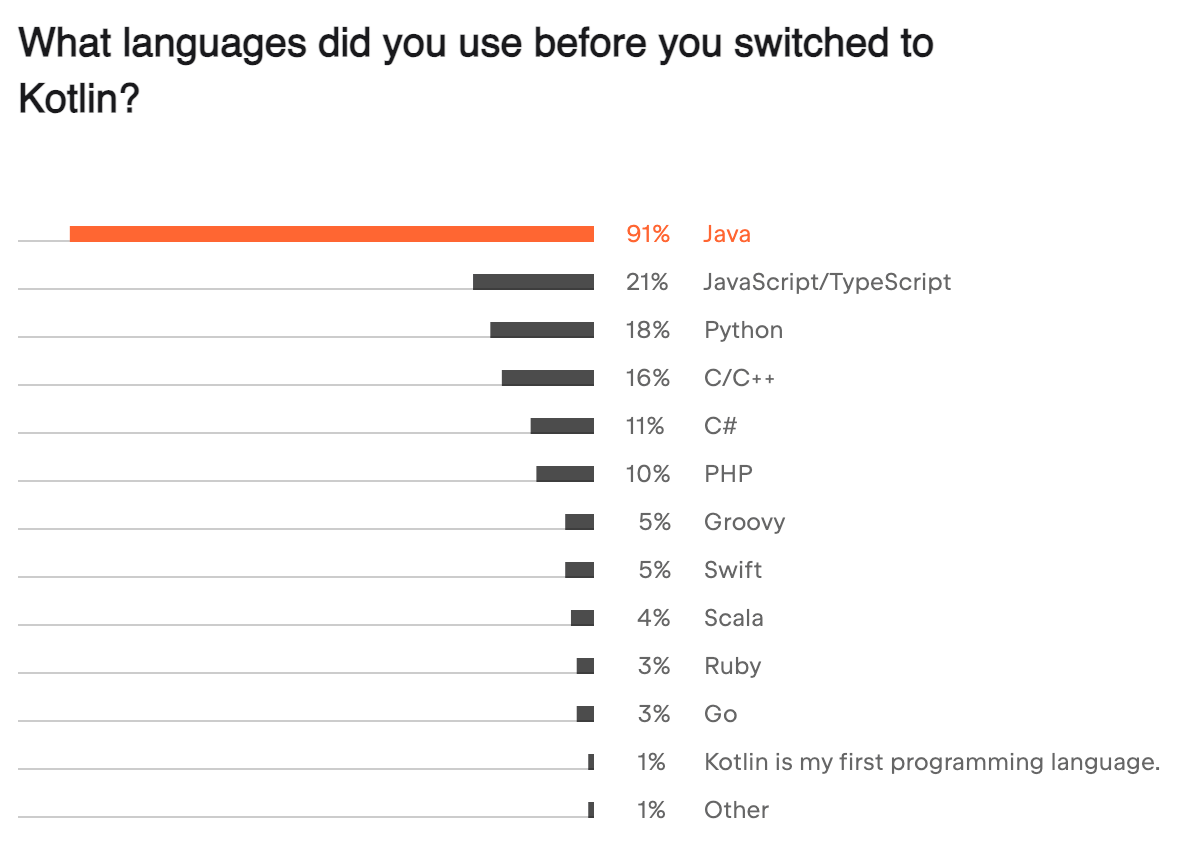
    Now, Kotlin has displaced Java as the king of Android programming. By 2021, 90% of active Kotlin developers had switched directly from Java according to JetBrains:

    Link

    Though Kotlin is famous for Android development – you can do a lot more with it too. 

    It supports backend development, web development, and even cross-platform mobile app development

    Though the majority of Kotlin developers use it for mobile development, other use cases aren’t far behind:

    So Kotlin is a versatile programming language, supported by Google and typically associated with Android development – although it can be used for much more. 

    Now let’s get a little deeper into the comparison. 

    Framework vs Language 

    The first thing to understand when comparing Flutter with Kotlin is that Flutter is a framework and Kotlin is a programming language. 

    Let’s define these terms. 

    A programming language is a bit like a human language, except it is for communicating with a computer. It has a set of rules like syntax, semantics, and grammar – that allow developers to write programs that run on computers. 

    The language defines the commands, operations and instructions that can be executed by the machine.

    You probably know plenty of programming languages like Python, JavaScript, C++, and many more. 

    Kotlin is one such language. 

    __wf_reserved_inherit
    Kotlin is the language of Android development

    Flutter, on the other hand, is a framework. 

    You can think of a framework as a set of tools for using a specific programming language for a specific purpose. 

    Frameworks typically have a set of libraries, APIs and tools for handling common tasks. 

    Flutter, as a framework, allows developers to use the Dart programming language for developing cross platform applications. 

    Which is better for Cross Platform Development? 

    Which is better for developing cross-platform applications? They both have cross-platform capabilities, but in a very different sense. Let’s find out how. 

    Flutter is the most popular cross-platform development framework around today. 

    Thousands of apps are built with it because of its amazing ability to write one codebase and have it compile to native code for iOS and Android. 

    Flutter gets this functionality from a few of its core components:

    • The Dart programming language: Dart’s just-in-time compilation enable features like hot reload, which allows developers to rapidly preview changes across platforms, and its ahead-of-time compilation for production builds compiles into native machine code for each platform, ensuring great UX and performance 
    • Widgets: everything in a Flutter app UI is a widget, and widgets are platform independent, allowing Flutter developers to build consistent UIs that look and perform the same across operating systems
    • Rendering engine: Flutter uses open-source 2D graphics engine Skia to render the UI from scratch across platforms, allowing for pixel-perfect replication of the UI independent of OS 

    There are other factors that contribute to Flutter’s powerful capabilities, but everything about the framework and its ecosystem is tailored toward this aim. 

    Flutter’s cross platform capabilities are all about the UI. You create the UI once, then it can look and perform the same not only on iOS and Android but across any screen size or device. 

    Kotlin Multiplatform is very different. It allows for the sharing of business logic, data models, and key functions across platforms – while the UI is left to be implemented in the native code of each. 

    __wf_reserved_inherit
    Kotlin multiplatform can be powerful

    If Flutter is “front end” multiplatform, then Kotlin Multiplatform is geared towards the backend. 

    This means that it is not possible to just “write once, deploy everywhere” in the same way. You can share the backend logic but still need to build the actual apps separately with separate codebases. 

    This could be particularly useful if you have an existing codebase in Kotlin, for example for an Android app. Kotlin Multiplatform could allow you to leverage existing code and expertise and extend it onto iOS.  

    You’d still need to build the iOS front end from scratch though!

    By contrast, Flutter is better for building cross-platform apps rapidly and efficiently, and allows complete reuse of 90%+ of UI code. 

    Performance

    When it comes to cross-platform frameworks, Flutter is known for excellent performance. 

    Unlike cross-platform alternatives like React Native, Flutter’s architecture allows it to communicate directly with the underlying platform, without the need to “bridge” to native components. 

    This results in fast and dynamic apps that feel native on iOS and Android. Kotlin performance is arguably even better. 

    Kotlin is a first-class language for Android, meaning it compiles into bytecode and executes on the JVM, giving Java-equivalent performance. 

    It is completely interoperable with Java – the language of Android’s standard libraries and SDK. This means that performance on Android can be truly optimal, and it can also fully access all native APIs and hardware features. 

    Through Kotlin multiplatform, it can also achieve excellent performance on iOS, although the actual iOS front end will not be written in Kotlin but rather in Swift, so this point is debatable. 

    Overall – both Kotlin and Flutter have excellent performance, but Kotlin could have the edge here on Android. 

    Flutter vs other platforms 

    If you’re hungry for more Flutter analysis – we also compared it to other app development options as part of this series.

    You can take a read of them to learn about how Flutter stacks up against other options too. For now though, let’s wrap up the comparison with Kotlin.

    Flutter vs Kotlin ideal use cases

    So we’ve covered the most important differences between Flutter and Kotlin. Let’s summarize by going over the ideal use cases. 

    Flutter is best suited for:

    • Projects that require rapid development 
    • Projects that require a single codebase for the UI on multiple platforms 
    • UI driven applications where very custom or sophisticated interfaces are key

    Use Flutter if you are building UI-focused apps from scratch, fast and more efficiently than native development. 

    On the other hand, Kotlin is ideal for:

    • Android app projects that require deep integration with native APIs
    • Applications that need to share a lot of back end business logic written in Java 
    • “Extending” existing Android applications to iOS through Multiplatform

    Kotlin can’t be beaten for Android development specifically, but you may well be able to achieve the same results with Flutter and get apps for iOS on top. Flutter on the other hand is more nimble, efficient, truly multiplatform, and powerful when it comes to animations and graphics. 

    Convert your site into native apps instead

    Although Flutter and Kotlin are very different, they share a few common downsides:

    • Cost – developing apps with either costs $50k+
    • Time – native app development takes many months 
    • Risk – can you get ROI? With such a high cost, it’s hard to say
    • Commitment – the apps require expensive updates and maintenance forever

    Vendrux is a way to offset these downsides, and still get fantastic apps. 

    With Vendrux, we convert your existing site or web app into high end, cross platform apps that we publish for you on iOS and Android. 

    If you have a solid web app, website, or online store – you already have everything you need. If it works for the web it’ll work in the apps and vice versa. With Vendrux you’ll keep everything from the web in the apps. 

    We take the web foundation, and we add all the native elements needed for a great app UX – including dozens of features like unlimited push notifications, native navigation, and much more. 

    __wf_reserved_inherit
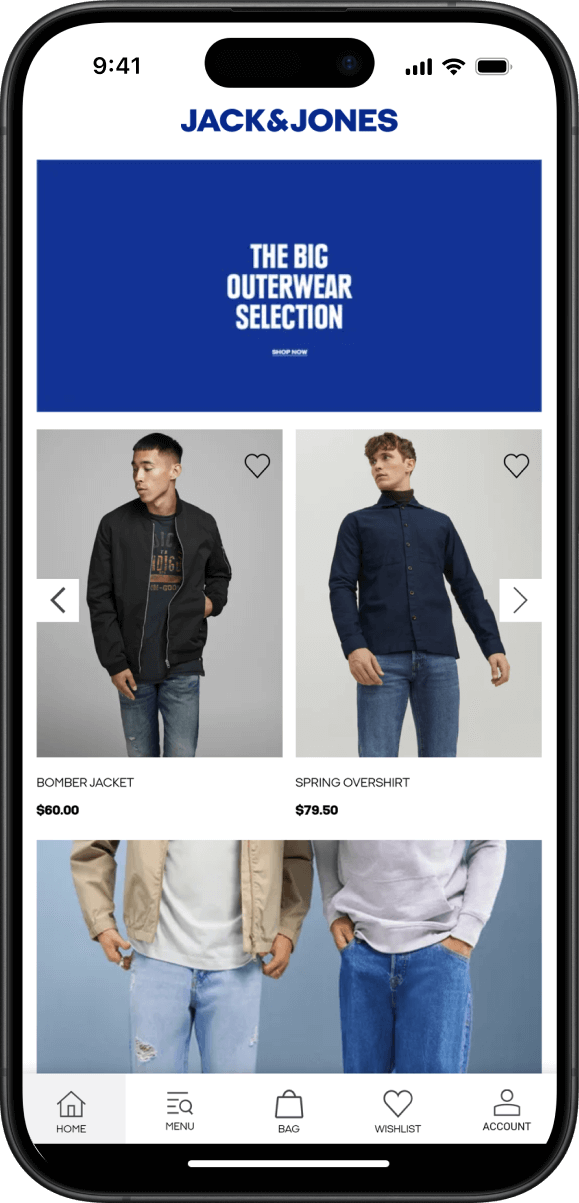
    The Jack & Jones app, powered by Vendrux

    From your perspective, they’re a powerful extension of your existing tech stack, which will update with any changes you make on the web. From your users’ perspective, they’re high end native apps that could have been built with Kotlin or Flutter. 

    The apps will be ready in weeks not months, and will cost of the typical price tag. 

    The model works great – Vendrux powers thousands of apps with millions of users, from small startups to multibillion dollar brands. 

    Vendrux is a proven, hyper-efficient platform that gets you all the benefits of iOS and Android apps with practically none of the risk. We also handle all ongoing updates and maintenance as part of our full service. 

    You can even preview what your app would look like, or even better – get in touch with one of our app experts, and have all your questions answered. 
    Book a demo call today.

  • Flutter vs Ionic – Which Should You Choose?

    Flutter vs Ionic – Which Should You Choose?

    Flutter and Ionic are both used to build cross-platform mobile apps, but that’s about where the similarities end. 

    They’re fundamentally different technologies that operate in fundamentally different ways.

    Here at Vendrux we’ve developed thousands of apps, and make sure we keep up to date on all the latest mobile technologies. 

    In this article, we’ll share our thoughts on Flutter and Ionic. 

    We’re going to explain how they work, cover the pros and cons of each, and guide you through choosing the right one. 

    Let’s get started

    What are Flutter and Ionic?  

    Let’s start off by covering the basics of what Flutter and Ionic are, and how they work on a fundamental level. 

    What is Flutter?

    Flutter was released by Google in 2017, and is a powerful framework for cross-platform app development

    That means you can build apps for iOS and Android from one single Flutter codebase. 

    __wf_reserved_inherit
    Flutter official site

    With traditional app development you had to write completely different codebases for iOS and Android – so Flutter is a huge efficiency improvement in comparison. 

    You can read more about Flutter vs native development in this article.

    Flutter’s core features are:

    • Widget-Based Architecture: Widgets are reusable, modifiable UI components and are at the core of Flutter
    • High Performance: Flutter compiles to native machine code for each platform, giving superior performance
    • Ecosystem: Flutter has a vast range of widgets, tools, and general resources thanks to support from Google and a large, growing community

    The important thing to understand about Flutter is that everything is a widget. 

    Widgets are reusable pieces of Dart code (Flutter’s programming language) that define specific UI components for things like text, images, graphics, layouts, and everything else you could imagine. 

    They are the core building blocks that lay the foundation of every Flutter app. There are hundreds of core widgets alone, which Flutter developers combine into a tree

    This builds the UI, which is rendered onto the device’s screen via Skia, an open-source 2D graphics engine beloved by Google. This gives granular control of every pixel on the screen, and allows for complete consistency of UX across platforms. 

    Flutter has shot to the top of the app development world over the past few years, powering countless well-known apps for brands like AliBaba, ByteDance, Google Classroom, and many others. 

    If you want to read about Flutter in more detail, check out this article where we break everything down.

    Otherwise, let’s move on to Ionic.

    What is Ionic?

    In tech terms, Ionic is rather old, released in 2012 by developer and designer duo, Max Lynch and Ben Sperry. 

    Fundamentally, it is an open-source framework for building mobile apps using web technologies like HTML, CSS, and JavaScript.

    __wf_reserved_inherit
    Ionic official site

    Like Flutter, Ionic is a cross platform framework, allowing developers to build apps for iOS and Android from a single codebase. 

    Ionic is the UI layer, consisting of a rich library of customizable and reusable UI components that are designed to mimic native elements. 

    Like Flutter, it provides the basic building blocks for the interface, as well as tools for animations and gestures. It relies on other technologies, like Capacitor, to create the actual apps. 

    Ionic also powers countless apps, including many for global brands, which we’ll showcase in a later section. 

    For now let’s move on to some of the key distinctions between Ionic and Flutter. 

    Hybrid vs Native 

    Let’s clarify a key point: 

    Flutter creates (arguably) native apps, while Ionic creates hybrid apps. 

    What do we mean by this? 

    Why Flutter apps are native

    Well, native apps are native because they are built using the native languages of the platform – Kotlin/Java for Android and Swift/Objective-C for iOS. 

    These languages compile directly to native machine code, which the underlying operating system and processor architecture execute directly

    This direct compilation into machine code is what typically characterizes a language or framework as “native” to a platform, and is why native apps have the best performance and design freedom. 

    Flutter, as a cross-platform framework, is different in many ways from traditional native development. For example Flutter apps do not directly harness the native APIs or components, but rather draw the UI (made of Flutter widgets) onto the screen. 

    But, Flutter does compile to native machine code for each platform, and so Flutter apps are “native” in this key sense – especially when compared to Ionic. 

    Why Ionic apps are hybrid 

    Ionic apps are hybrid apps. 

    Hybrid apps are essentially web apps that run in a native “wrapper” called a webview. A webview gives a way to render web content in an app, using the same device’s rendering engine. 

    This doesn’t mean that all hybrid apps are just a “box” with a website running in them. An app is hybrid because some parts of it are from the web, but other parts can be built natively. 

    With Vendrux apps for example, the apps are based on your website or web app. But we add a ton of native features and UI elements on top to make the experience just like a high-end native app. 

    This lets you keep the best parts of your website, and blend them with the best parts of native app tech. Get a preview of what your Vendrux app could look like here.

    Coming back to Ionic, it works in a different way. 

    The apps are built with web technologies like Angular, HTML, and CSS. Typically, the entire UI is built like this and rendered within the webview. 

    This is possible because Ionic provides a large range of pre-designed components that mimic native UI elements such as buttons, toggles, nav bars, tabs, and much more. 

    This is similar to Flutter’s widgets, on a high level. 

    These components are combined and styled to create the UI, which behaves consistently across different platforms thanks to the fact that the web is universal. 

    In this way Ionic, like Flutter, is a cross platform framework. 

    Native vs Hybrid

    So because Flutter apps compile to native machine code, we can say they’re native. 

    Because Ionic apps are essentially web apps that run in a native “container”, they are hybrid apps. 

    Next, let’s evaluate them on performance and possible use cases. 

    Flutter vs Ionic – performance and features

    So we’ve seen that Ionic apps are essentially webviews with your entire app rendered as web pages. Let’s see how they stack up in terms of features and performance. 

    Flutter apps have better performance

    This introduces some of the problems of web pages too – like issues in touch detection, weird scrolling problems, and potentially limited performance. 

    Although the web has come on a lot in recent years, it still can’t compare with native level performance. 

    Flutter on the other hand is actually using your mobile device to render a specific kind of native UI. 

    Through Skia, Flutter has complete control over every pixel, opening up far more options than can be achieved through a browser. 

    For basic applications that do not require complex or performant UIs, you might not notice much difference. 

    But where Flutter really excels is with apps that involve complex animations and graphics. The compilation to native code and leveraging of Skia allows for very smooth frame rates and slick UIs even in very graphically demanding use cases. 

    Ionic is probably not suitable for some of the apps you could build with Flutter. The reliance on web tech can lead to slower frame rates and lags with demanding animations and high volumes of dynamic content. 

    Access to native features

    Although Ionic is fundamentally built with web technologies, it can access native features of the device. 

    This is thanks, these days, to Capacitor. 

    Capacitor is a runtime, which is basically an environment that provides the necessary infrastructure – like memory handling and API interactions – to manage the execution of a program. 

    Capacitor provides the webview “container” for the Ionic UI to run in, but also the crucial infrastructure for interacting with the device itself. If Ionic is for creating the UI, Capacitor is what makes it actually work and run as a mobile app. 

    __wf_reserved_inherit
    Read more about how Capacitor works

    Capacitor allows developers to call native code from the Ionic app, providing a wide range of plugins to interact with the native APIs. This allows Ionic to interact with the camera, GPS, and sensors for example. 

    In Flutter, the same is achieved through platform channels. 

    These are essentially communication mechanisms that allow Dart code to interact with native code for iOS and Android – allowing for access to native functionality in a direct way. 

    In this sense, both Flutter and Ionic have a similar ability to tap into the native features of the device. 

    Successful Flutter Apps

    There are tens of thousands of Flutter apps on the market, including many very high profile brands and success stories. 

    A few standout examples include:

    These are all top brands, with mature tech capacities and sophisticated requirements. 

    The apps are used by millions, and probably cost millions to develop too!

    Successful Ionic Apps

    Ionic has appealed to many businesses over the years in all industries and niches. 

    Here are a few successful apps built with Ionic:

    Ionic has many other well known users too – like the British NHS, Southwest Airlines, Diesel, and more

    Clearly, both Ionic and Flutter are capable platforms that are used by real, successful, high-scale businesses.

    Which should you use? 

    So should you choose Flutter or Ionic?

    Whether you choose Flutter or Ionic is dependent on a few factors. As we’ve seen, they are very different technologies. We will suggest a few scenarios that might swing you one way or another though. 

    When to choose Ionic

    As some general advice, Ionic might be better for you in these cases:

    • Web expertise: you’re a web focused company, with a lot of web development expertise, and don’t want to reskill or hire Flutter developers 
    • Web focused: you care more about the web, and the apps are an afterthought (Ionic apps can be deployed as PWAs)
    • Rapid prototyping: if you want to build a quick prototype or MVP to validate an idea, Ionic could enable this well 
    • Web infrastructure: if you need apps that tightly integrate with existing web infrastructure, Ionic fits well with web APIs, standards, and services

    Ionic is a technology intimately connected to the web, and so all the reasons you might choose it reflect that. 

    It is much easier, and typically cheaper, to develop for the web – and a lot more businesses have existing competence in web technologies. 

    If that’s you, you’re on a tighter budget, and you don’t need a fancy UI, then Ionic may be right for you. 

    When to choose Flutter

    Flutter also has a lot of key advantages, and is more suitable for:

    • High performance requirements: if you need a high level of performance, like in demanding and sophisticated apps, Flutter’s compilation to native code and overall architecture is preferable 
    • Advanced UI customization: if your apps require complex and highly custom interfaces, Flutter’s powerful rendering engine and range of widgets are ideal, allowing for more scope and control than what could be achieved through Ionic 
    • Graphics focus: for apps that depend on advanced animations, graphic elements, and transitions, this is Flutter’s bread and butter 
    • Scalability: for large and complex applications – Flutter has a wide ecosystem for powerful state management and other tools that can manage large-scale apps better than the plugin-reliant approach of Ionic 
    • Mobile focused: thought Flutter can be used to develop web apps from the same codebase, it is still very much app-first

    Essentially – if you care a lot about performance and scalability, and especially if you want to build graphically intensive apps, then Flutter is the clear choice. 

    Flutter vs other platforms 

    We compared Flutter with several other app development options as part of this series. 

    You can take a read of them to learn about how Flutter stacks up against other options too.

    For now though, let’s wrap up our comparison with Ionic.

    Flutter vs Ionic – the bottom line

    In this article, we’ve covered the core differences between Flutter and Ionic. We have not gone deep into the technical weeds, because that could take up an entire book. 

    Rather, we’ve focused on the practical considerations that matter to businesses, and explaining them on a high level. 

    We’ve seen that the real reasons you’d choose Ionic is that you want to stick to web based technologies. This is understandable, it is much easier (and cheaper) to source web talent – most businesses already have it, in fact. 

    With Ionic, you can build decent apps, and integrate them with your existing web stack. If performance and snazzy graphics aren’t important to you, this can work well indeed. 

    On the other hand – Flutter is the better choice for highly custom UIs, native level performance, and graphically intensive applications. 

    You can read an interesting comparison by Ionic themselves here for a second opinion

    A better option: convert your site to native apps with Vendrux

    Our platform, Vendrux, is superior to Flutter and Ionic for a certain type of business. Let’s explain. 

    Vendrux isn’t a programming language or framework – we are a complete service. 

    We take your existing website or web app, and convert it into high-end iOS and Android apps.

    Vendrux apps, like Ionics, are technically hybrid. They display content from your website, via webviews, allowing you to give a consistent experience to app and web users. 

    But unlike Ionic apps, Vendrux apps are not all made from web technologies. We also add all the native elements required for you to both give your users a great UX, and to leverage the apps for full business benefits. 

    Think native navigation, push notifications, and dozens more powerful features

    Compared to both Ionic and Flutter, Vendrux has an excellent risk to reward ratio. 

    Both Flutter and Ionic will have you spend at least tens (or hundreds) of thousands of dollars and many months of effort to build decent apps. You’ll also saddle yourself with significant ongoing expenses for updates and maintenance. 

    This makes it a risky bet. 

    With Vendrux, the logic changes, and ROI becomes much more likely. 

    That’s because Vendrux costs 90% less, and the apps are ready to launch in just weeks. 

    __wf_reserved_inherit
    The Jack & Jones app – built with Vendrux

    Our team handles the entire process for you, and we also handle all ongoing updates and maintenance for the lifetime of the apps. 

    Vendrux apps update automatically with any changes you make on your site. They also allow you to reuse everything from your site, without needing to rebuild anything. 

    This, along with our full service, means that the apps will practically run themselves while you get all the benefits with virtually none of the costs. 

    Vendrux is a proven model that works great for thousands of businesses, from small startups to multibillion dollar multinationals. It works particularly well for ecommerce stores, elearning platforms, and content sites. 

    You can even preview what your app could look like, right now

    Basically – Flutter and Ionic can be good for building apps from scratch, and if you are starting off with an app. But if you’re already established on the web and have a great website – it’s a much better idea to convert it with Vendrux. 

    To learn more, get in touch with one of our app experts. They’ll answer all your questions, and help you decide if Vendrux is right for you. 

    Book a demo call today.

  • Flutter vs Expo: Which Cross-Platform Framework Should You Choose?

    Flutter vs Expo: Which Cross-Platform Framework Should You Choose?

    Flutter and Expo are two of the most popular ways to build mobile apps for iOS and Android from a single codebase. But they take fundamentally different approaches to the same goal.

    Flutter is a full framework from Google, with its own language and rendering engine. Expo is an extension of React Native, built to make React Native development faster and more accessible.

    At Vendrux, we’ve developed thousands of apps over the past 10 years, so we’ve learned a few things about the mobile world and mobile tech. 

    In this article, we’ll break down how both Flutter and Expo work, where they excel, and how to pick the right one for your project. 

    We’ll also explain when you might not need either – when converting your website into an app with Vendrux may be a better choice.

    What Is Flutter?

    Flutter is Google’s open-source framework for building cross-platform apps

    Released in 2017, it has grown into one of the most widely adopted mobile development frameworks in the world, with over 1 million monthly active developers and nearly 30% of new iOS apps built with it.

    Flutter uses Dart, a programming language originally created by Google. Dart compiles ahead-of-time (AOT) into native machine code for each platform, which is a big part of why Flutter apps perform as well as they do.

    What makes Flutter distinctive is its rendering approach. Instead of relying on the platform’s native UI components, Flutter draws every pixel on screen using its own rendering engine. 

    On mobile, this is now Impeller, a purpose-built engine that replaced Skia (which Flutter still uses for web and desktop). 

    Impeller eliminates shader compilation jank and delivers up to 50% faster frame rasterization compared to the old Skia pipeline.

    The result: pixel-perfect control over the UI, consistent rendering across platforms, and performance that rivals truly native apps.

    Flutter also supports web, Windows, macOS, and Linux from the same codebase, though mobile remains its primary strength. We covered Flutter’s fundamentals in more detail in our Flutter 101 guide.

    What Is Expo?

    To understand Expo, you need to understand React Native.

    React Native is Meta’s open-source framework for building mobile apps using JavaScript and React. Unlike Flutter, which draws its own UI, React Native translates your JavaScript components into actual native platform views: UIKit on iOS, Android Views on Android. 

    The end result uses real native components, not a custom rendering engine.

    Expo is built on top of React Native. It started as a way to simplify the setup and development process, but it has grown into something much more integral. 

    As of 2026, Expo is the officially recommended way to start new React Native projects, according to React Native’s own documentation.

    Here’s what Expo adds to the React Native experience:

    • Managed workflow and EAS (Expo Application Services): Cloud-based build, submit, and update services. You don’t need Xcode or Android Studio installed locally to ship an app.
    • Expo Router: A file-based routing system (similar to Next.js) that handles deep linking, navigation, and universal links out of the box.
    • Expo Modules API: A modern way to write native modules in Swift and Kotlin without ejecting from the managed workflow.
    • Over-the-air updates: Push code changes to users instantly, bypassing app store review cycles for non-native changes.
    • Expo Go: A companion app that lets you preview your project on real devices during development, without compiling a full build.

    Expo has matured well beyond a “convenience layer.” Over 2,200 top-trending iOS apps use Expo libraries, and the framework handles everything from build tooling to deployment pipelines.

    Flutter vs Expo: Key Differences

    Here’s a side-by-side look at the core differences.

    Flutter Expo (React Native)
    Language Dart JavaScript / TypeScript
    UI approach Custom engine (Impeller). Draws every pixel. Renders native platform UI components
    Backed by Google Meta (RN) + Expo team
    Platforms iOS, Android, Web, Windows, macOS, Linux iOS, Android, Web (experimental)
    Learning curve Moderate. Requires learning Dart + widget system Lower for JS/React devs. Steeper if new to React
    Hot reload Yes (stateful, incl. web) Yes (fast refresh via Metro)
    Native code access Full, via platform channels Full, via Expo Modules API or bare workflow
    OTA updates Not built-in (third-party options) Built-in via EAS Update
    Build system Local (Flutter CLI) Cloud (EAS Build) or local
    Community ~175K GitHub stars, strong in Europe/Asia ~121K GitHub stars (RN), dominant in US market

    Architecture

    This is where the two frameworks differ most fundamentally.

    Flutter compiles Dart code directly to native ARM machine code (or x64 for desktop). At runtime, Flutter doesn’t use the platform’s native UI toolkit at all. It renders everything through Impeller (on mobile) or Skia (on web/desktop), giving developers complete control over every pixel on screen.

    Expo / React Native takes a different approach. Your JavaScript code runs in a JavaScript engine (Hermes, by default) within the app. Since January 2026, React Native uses the New Architecture exclusively: JSI (JavaScript Interface) allows JavaScript to call native code directly through C++ bindings, Fabric handles UI rendering using real native components, and TurboModules provide lazy-loaded, type-safe access to native APIs.

    This is a significant change from React Native’s earlier design, which used an asynchronous “bridge” to serialize messages between JavaScript and native code. 

    That bridge has been completely removed as of React Native 0.82. The performance gap between the two frameworks has narrowed considerably as a result.

    Both approaches are “cross-platform native” in different ways. Flutter controls rendering at the pixel level. React Native delegates rendering to the platform’s own native components. Neither is a “hybrid” framework in the traditional sense (that term properly refers to WebView-based tools like Cordova or Ionic).

    UI and Design

    Flutter is known for design freedom. Its extensive widget catalog includes components that follow both Material Design (Android) and Cupertino (iOS) guidelines, plus the ability to build entirely custom UIs. 

    Because Flutter controls every pixel, you can create animations, transitions, and visual effects that would be difficult or impossible to achieve by relying on native components alone.

    Expo / React Native renders actual native UI components, which means your app automatically looks and feels like it belongs on each platform. This is an advantage for apps that should feel “native” to iOS or Android users. 

    The component library is solid for standard interfaces, and Expo’s UI library (heading toward 1.0 in mid-2026) aims for API parity with SwiftUI and Jetpack Compose.

    For most business applications, both frameworks produce clean, professional interfaces. Flutter has the edge for apps with heavy custom animations, complex graphics, or UIs that need to look identical across platforms. Expo has the edge when you want platform-native look and feel with less effort.

    Performance

    Flutter has traditionally held a performance advantage, particularly for graphically intensive workloads. 

    A SynergyBoat benchmark found Flutter iOS frame times of 1.72ms vs. React Native’s 16.65ms, with Flutter achieving 117.75 FPS at 120Hz on Android.

    That said, the New Architecture has closed a lot of this gap for typical app workloads. JSI’s synchronous native calls and Fabric’s optimized rendering mean most business apps built with Expo will perform indistinguishably from Flutter equivalents in real-world use. 

    The difference shows up primarily in:

    • High-frame-rate animations and transitions
    • Custom rendering and drawing
    • Apps with extremely complex, layered UIs
    • Games or media-heavy interfaces

    For standard ecommerce apps, content apps, productivity tools, and most B2B applications, both frameworks deliver smooth, responsive experiences.

    Learning Curve and Developer Experience

    Flutter requires learning Dart, which most developers won’t know already. Dart itself is approachable (similar to Java, Kotlin, or TypeScript in syntax), but Flutter’s widget-based architecture and reactive programming model have their own learning curve. 

    The payoff is a well-integrated development experience where the language, framework, and tooling were all designed to work together.

    Expo benefits enormously from the JavaScript/React ecosystem. If your team already builds with React on the web, the transition to React Native + Expo is significantly smoother. 

    You’re using familiar patterns (components, hooks, state management) in a familiar language, with an ecosystem of npm packages you already know.

    This is the single biggest factor in most teams’ decisions. The Stack Overflow 2025 survey shows React Native slightly ahead among professional developers (13.62% vs 12.56%), and React Native job postings outnumber Flutter’s roughly 6:1 in the US market.

    Ecosystem and Community

    Both frameworks have massive, active communities.

    Flutter: ~175,000 GitHub stars, 12,400+ contributors, and a strong package ecosystem through pub.dev. Google’s investment has been consistent, with eight stable releases shipped in 2025 alone. The ecosystem is particularly strong in Europe and Asia.

    React Native + Expo: ~121,000 GitHub stars for React Native, with Expo adding its own extensive library ecosystem. The npm ecosystem gives React Native access to a broader pool of JavaScript packages. Weekly npm downloads for React Native have grown to approximately 4.5 million. The ecosystem dominates in North America.

    Apps Built with Each Framework

    Both frameworks power apps at the highest scale.

    Expo / React Native apps include:

    Flutter apps include:

    These aren’t hobby projects. Both frameworks handle the performance, scale, and reliability requirements of apps with millions of daily active users.

    Which Should You Choose?

    The honest answer: it depends on your team and your project.

    Expo (React Native) is likely the better choice if:

    • Your team already works with JavaScript, TypeScript, or React
    • You want the fastest path from idea to app store
    • Your app uses standard UI patterns (lists, forms, navigation, media)
    • You need over-the-air updates for rapid iteration
    • You’re hiring in the US market (larger talent pool)

    Flutter is likely the better choice if:

    • Your app relies on custom animations, complex graphics, or pixel-perfect design
    • You need to target desktop platforms (Windows, macOS, Linux) alongside mobile
    • You’re building something visually distinctive that doesn’t follow standard platform patterns
    • You want a single framework that handles its own rendering end-to-end
    • Your team is open to learning Dart (or already knows it)

    Both are excellent, production-proven frameworks. For most business applications, either one will deliver a solid result. 

    The deciding factor is usually your team’s existing skills, not the frameworks’ technical capabilities.

    The Shared Challenge: Time, Cost, and Risk

    Whether you choose Flutter or Expo, you’re committing to a significant investment.

    Building a production-quality app with either framework typically means:

    • $100K+ in development costs (see our cost breakdown)
    • 3-6 months to reach the app stores with a v1
    • Ongoing maintenance, including OS updates, dependency management, and feature work, often costing $30K-50K+ annually
    • Separate QA, deployment, and monitoring processes for your mobile codebase

    For companies building something genuinely new, like a social platform, a game, a fintech tool, or an app with novel interactions, that investment makes sense. These frameworks exist to build things that don’t exist yet.

    But many businesses aren’t in that situation. If you already have a website or web app that does what your customers need, rebuilding that functionality from scratch in Dart or React Native may not be the best use of your budget.

    When Your Website Is Already the Product

    If your mobile app needs to deliver the same experience as your website (which is the case for most ecommerce brands, content publishers, SaaS products, and membership businesses) there’s a faster path.

    Vendrux takes your existing website and extends it into native iOS and Android apps.

    Your full site, including every feature, integration, and piece of custom functionality, works in the app from day one. 

    On top of that, you get the native capabilities that make apps worth having: push notifications, app store presence, native navigation, and deep linking.

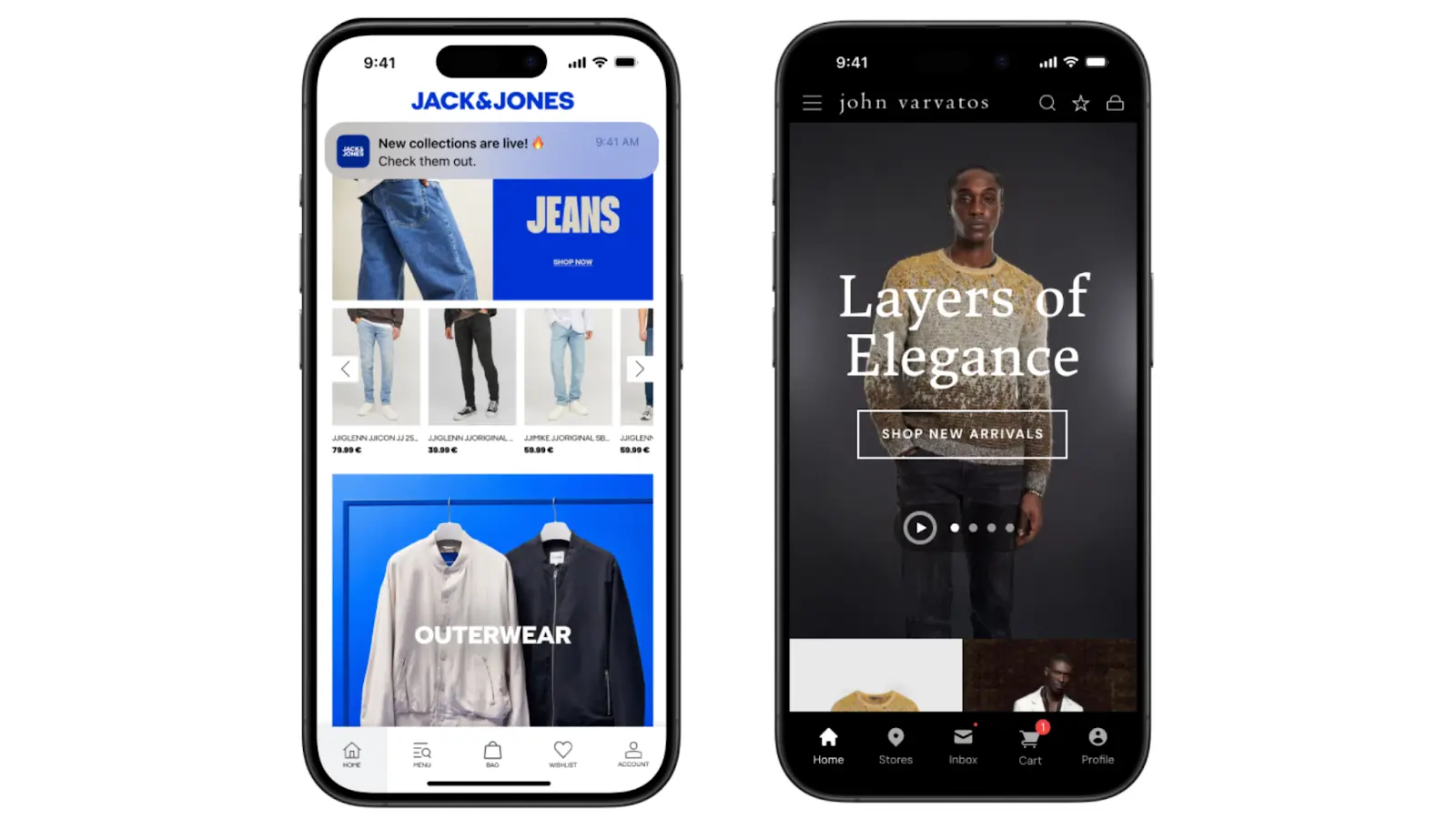
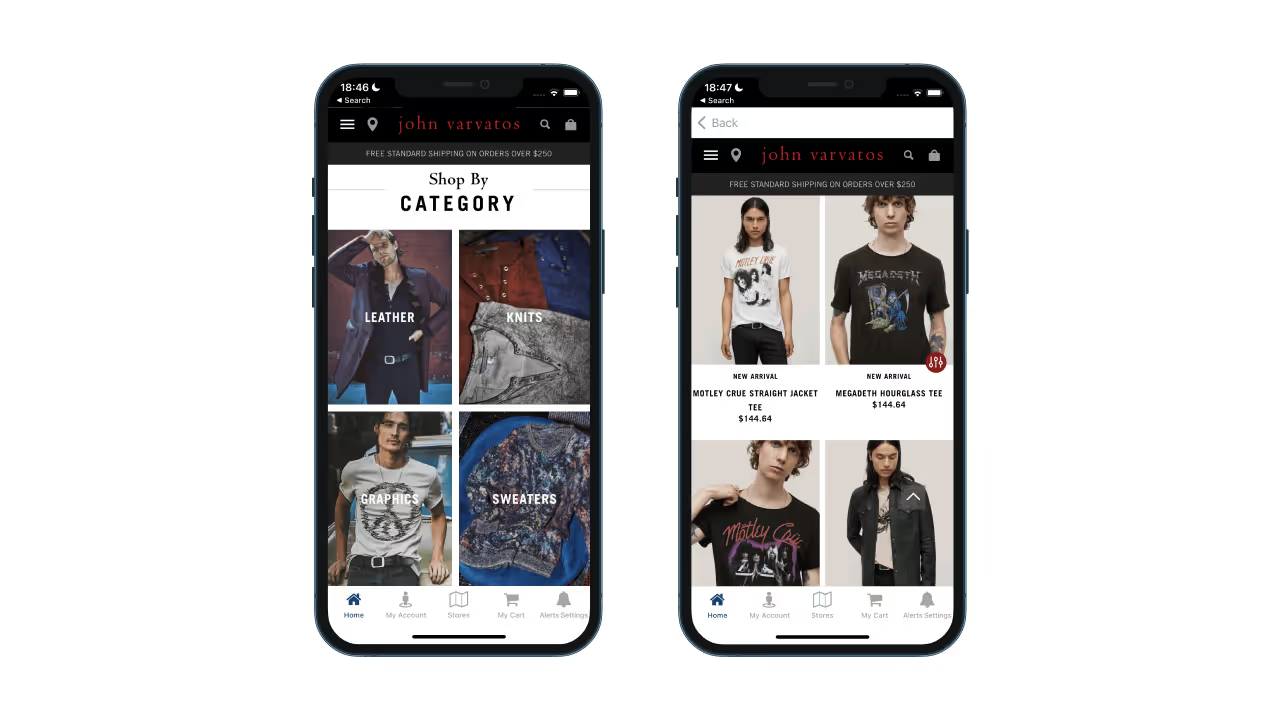
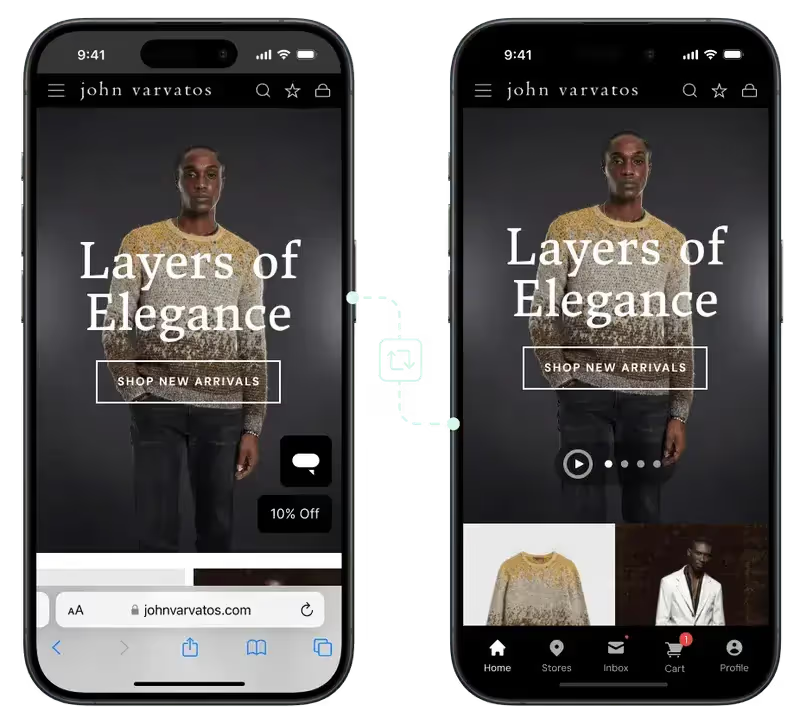
    Jack & Jones and John Varvatos are two global brands that preferred Vendrux’s approach to convert their websites into apps

    Here’s the practical difference:

    Flutter / Expo Vendrux
    Timeline 3-6+ months Weeks
    Cost $100K+ build, $30-50K+/yr maintenance Predictable monthly pricing, no revenue share
    Your involvement Hire or manage a dev team We handle everything
    Feature parity with site Rebuild from scratch Automatic, real-time sync
    Ongoing maintenance Your team’s responsibility Fully managed by Vendrux

    This isn’t the right fit for everyone. If you’re building a game, a camera app, or something that doesn’t have a web equivalent, you need Flutter or Expo. 

    But if you already have a website that works well on mobile and you want that same experience in the app stores with push notifications and native UX, rebuilding it from scratch is hard to justify.

    Vendrux powers apps for 2,000+ businesses, from startups to global brands like Jack & Jones and John Varvatos. The model is straightforward:

    1. Book a strategy call. We’ll look at your site, talk about your goals, and assess whether it’s a good fit.
    2. Get a custom app preview. Our team builds a working preview so you can see exactly how your app will look and feel.
    3. Launch in 30 days. We handle the build, configuration, testing, and app store submission. You focus on your business.

    Want to see what your site would look like as an app? Get a free strategy call now – no commitment required.

  • Flutter vs Dart – What’s the Difference?

    Flutter vs Dart – What’s the Difference?

    These days when you start researching app development – you’ll come across Flutter and Dart. 

    This confuses some. Are they the same thing? Which one do I use? 

    Flutter and Dart are intimately related. While Flutter is a cross-platform framework for building apps for iOS, Android, and desktop – Dart is the programming language used to develop Flutter apps. 

    In this article we’re going to explain everything clearly, teaching you everything you need to know about Flutter vs Dart. 

    Frameworks vs Programming Languages

    The key difference between Flutter and Dart: Flutter is a framework while Dart is a programming language. 

    In software development – a programming language is a bit like a human language, except it is specifically for communicating with and sending instructions to a computer. It’s a set of syntactical and semantic rules that let programmers send specific tasks to the computer, which together create sophisticated programs and applications. 

    __wf_reserved_inherit
    Programming languages – how humans talk to machines

    There are many programming languages you’ve probably heard of, like Python, JavaScript, C++, and countless others. Though these are very different and suited to different tasks, on some level they are all just “languages” for telling computers what to do. 

    Dart is a programming language too. 

    Flutter on the other hand is a framework. 

    A framework is a set of tools and best practices designed to help developers build applications. They provide libraries, pre-written code, templates, and commonly used components to help with common development tasks and goals. 

    Frameworks are usually for a specific programming language and a specific purpose. 

    For example:

    • React is a framework for JavaScript, used to build user interfaces for web development
    • Angular is a framework for HTML and TypeScript, used to build single page apps 
    • Django is a Python framework used for web development 

    If the programming language is the building blocks of the language – nouns, verbs, syntax and so forth. The framework could be seen as the style guide or a specialized dictionary designed to help you write as efficiently and effectively for specific tasks. 

    In this context – Flutter is a Dart framework for cross-platform app development. 

    In the next section, we will look more closely at each for deeper context. 

    What is Dart?

    Dart is now best known as the programming language of Flutter, but it has a more complex history. 

    Released by Google way back in November 2013, Dart was originally intended as a replacement for JavaScript for building web apps. 

    It never fulfilled this lofty goal, JavaScript is still the undisputed king of the web, but Dart has found its place as the language of cross-platform app development through Flutter. 

    __wf_reserved_inherit
    Dart is known for its hot reload

    Broadly, Dart is known for its intuitive syntax and great developer productivity features. We can understand it better by looking at its key features. Dart is:

    • Object Oriented: Dart is designed for a programming style that relies on “objects”, which are self-contained “entities” consisting of both data and methods. Think of them as “things” in the code which have both specific characteristics and “actions” they can perform
    • Class Defined: objects in Dart are defined by “classes”, which is like a recipe or blueprint for making an object. Classes define what data an object can hold and what it can do with it
    • C style Syntax: this just means that the way the language is written is similar to C, which is known for curly braces { } and semicolons. If you have experience in languages like C++ or Java you’ll have an easier time learning Dart
    • Sound Type System: Dart is very careful about types of data, this helps programmers to catch mistakes quickly and make code less buggy 

    A programming language is compiled when it is transformed by a compiler into machine code – the famous 1s and 0s. This compiled code is directly executable by the computer’s hardware.

    Dart has two types of compilation:

    • Just-in-time (JIT): used in development, allows parts of the code to be compiled in “real time” so developers can see changes instantly 
    • Ahead-of-time (AOT): used when the app is ready for production build and to be compiled into an entire codebase for different platforms

    JIT is great for the developer experience, allowing for features like hot reload, which lets you see changes in the code instantly.

    AOT, along with Flutter, gives Dart its powerful cross-platform capabilities. Traditionally when you built iOS and Android apps for example you’d need to write two separate codebases in the (very) different native languages of each. You’d also need to maintain them completely separately. 

    With Dart (and Flutter) compiling into native code for each platform, you can work from a single codebase which is far more efficient. 

    Now let’s move on to take a look at Flutter. 

    What is Flutter? 

    Flutter is a cross platform framework that uses Dart as its programming language. 

    You can think of frameworks a bit like “toolkits” that make specific programming languages much more practical to use for certain purposes. 

    Flutter is the toolkit that lets you use Dart to create iOS, Android, web, and even desktop applications from a single codebase. 

    It provides a comprehensive UI toolkit, with a rich set of widgets and tools designed to build user interfaces. 

    __wf_reserved_inherit
    Flutter is used for many famous apps

    With Flutter, everything the user sees in the interface is a widget – from simple elements like text and buttons to complex structures like scrollable lists. 

    The widgets are “made” with Dart code, and are “drawn” aka rendered onto the device’s screen with Skia, a 2D graphics engine relied on heavily by Google. Widgets are also organized hierarchically – Flutter apps are fundamentally a tree of widgets.

    Flutter has really taken the app development world by storm in recent years.

    To build high-end apps from a single codebase is a major time and money saver for countless businesses, and Flutter powers thousands of successful apps like AliBaba, ByteDance, and Google Classroom. 

    You can learn about Flutter in much more depth in this article.

    Now we understand Flutter vs Dart at the fundamental level. Let’s look more specifically at how they interact. 

    How do Flutter and Dart work Together? 

    With Dart and Flutter together, you can create iOS, Android, web, and even desktop applications from a single codebase. 

    An important point to note though – Dart itself isn’t only for Flutter. 

    Recall that it was originally intended as a replacement for Javascript? 

    Dart is a Turing complete, general purpose programming language. This essentially means that it can be used for a wide range (theoretically any) range of programming tasks and challenges. 

    For example, you can use Dart to build web applications with Dart Web to compile Dart to JavaScript so it can run in a web browser. Dart can also be used for server-side programming, allowing Dart programmers to write sophisticated back ends. 

    So, Dart doesn’t “need” Flutter. 

    But, Flutter does need Dart, and indeed Dart has gained popularity and fame through its association with Flutter. 

    Dart is perfect for Flutter. Many of its features, like JIT and AOT compilation, make it very suitable for the high performance, efficiency, and fast development cycles Flutter aims for.

    Dart is the foundation, which Flutter then extends to make it perfect for cross-platform app development. Flutter’s extremely rich library of pre-designed, customized widgets (written with Dart) make it easy to create almost any UI element conceivable. 

    This gives Dart developers an “out of the box” set of building blocks to create the UI, building blocks that would be highly tedious and laborious to write in Dart from scratch. 

    Flutter goes further in enabling Dart’s cross platform power. 

    Every widget is designed to look good and behave naturally on multiple platforms, giving a consistent UX on iOS and Android. 

    Flutter also uses Skia to render or “paint” the widgets and UI written in Dart onto the device’s screen, allowing the apps to look good and be easy to use. 

    Basically – Flutter and Dart work together in synergy to form an ecosystem for cross platform app development. 

    Ready to Build Apps?

    Hopefully, you now understand Dart vs Flutter. You know that Dart is the programming language, Flutter is the framework, and they work together to form a powerful app development combo. 

    Still though, developing apps with Flutter and Dart isn’t a cakewalk. 

    Even though it is twice as efficient as true native development from scratch, it is still a complex and expensive process requiring highly skilled specialists. 

    You’ll burn through tens of thousands and months of work to get good apps ready to launch on the App Store and Google Play. They’ll also need significant ongoing investment to keep them maintained over time.

    The same goes for any other cross-platform framework like React Native.

    An even more efficient way to get apps for both iOS and Android is Vendrux

    With Vendrux we build the apps for you. We publish them and maintain them too. 

    Our method involves converting your existing website or web app into native mobile apps. This means that you get to keep all the cool parts of your site, with all the most important native app parts added on top to give users a great experience.

    __wf_reserved_inherit
    The Jack & Jones app – built with Vendrux

    It’s of app development with Flutter, and you don’t need to hire anyone or manage anything new since the apps will update automatically.

    Check out some of 2000+ businesses using Vendrux, or get in touch with one of our team to get all your questions answered. 

    Book a demo today.

  • The DTC Operator’s Guide to First Order Profitability

    The DTC Operator’s Guide to First Order Profitability

    If you’re running a direct-to-consumer brand in 2026, you’ve probably felt the ground shift beneath your feet more than once. 

    The days of cheap Facebook ads and endless VC cash infusions are long gone, replaced by a landscape where profitability isn’t just a buzzword – it’s necessary if you’re going to survive.

    Enter first order profitability, a metric that’s been thrust into the spotlight as DTC operators grapple with rising costs and shrinking margins. 

    But what does it really mean, why should you care, and how do you balance it with the holy grail of retention? Let’s dive in and learn more.

    Want the latest insights into how 7, 8 and 9-figure brands are driving sustainable growth? That’s what you get with our weekly newsletter, The Retention Edge. Subscribe for free today.

    What is First Order Profitability?

    First Order Profitability is the ability to make a profit on a customer’s very first purchase after factoring in:

    • Customer Acquisition Costs (CAC) – Ad spend and other costs to acquire a customer.
    • Cost of Goods Sold (COGS) – What it costs to produce and fulfill the product.
    • Shipping & Logistics Costs – Delivery, packaging, and potential returns.
    • Payment Processing Fees – The unavoidable percentage platforms like Shopify, Stripe, or PayPal take.

    Picture this: a customer lands on your site, lured by a killer ad or a glowing recommendation. They buy your product (say, a $50 skincare set). 

    You celebrate the sale, but then the math kicks in. After subtracting CAC, COGS, and operational expenses like shipping or payment processing, are you still in the black? 

    If yes, congrats—you’ve achieved first order profitability. 

    If not, you’re banking on that customer coming back (preferably soon), or else you’ve lost money.

    Brands that can profit on the first sale have a major advantage:

    • They don’t rely on risky long-term payback periods.
    • They reinvest profits into scaling faster, without burning cash.
    • They have a clearer idea of the health of their business.

    For years, DTC brands played the “spend now, profit later” game, assuming strong Lifetime Value would make up for high acquisition costs. 

    But post-iOS 14, the old playbook of “lose money now, make it up later” started looking like a shaky bet, leading to much more talk about the importance of making immediate profit.

    Why First Order Profit is a Key Lever for DTC Brands

    Cash flow is the lifeblood of any business, and first order profitability is like a turbocharger for your cash conversion cycle. 

    When you’re profitable on that very first sale, you’re not just waiting around for months (or years) to recoup your investment. 

    That money can go straight back into inventory, ads, or hiring the next rockstar team member. 

    In an era where venture capital isn’t raining down like it did in the 2010s, bootstrapped brands and cash-efficient operators are leaning hard into FOP to keep the lights on.

    Retention is key for long-term profit and sustainability; but it can be hard to bank on revenue you haven’t realized yet.

    There’s no guarantee that a new customer will meet your current LTV benchmarks, and there’s no guarantee that they’ll come back in the near future.

    Thus if you can achieve a profit straight away, you’re in a safer spot to start thinking ahead to your next scaling move.

    When First Order Profit Comes Second

    While you’d always love to make a profit on your initial sale, there are situations where taking a loss on the first order makes strategic sense.

    Some categories can afford to take a hit upfront because the backend payoff is so juicy.

    It’s not that they don’t want to make a profit immediately; but competition in these industries tends to make it necessary to spend more to acquire new customers.

    Here are the kinds of business which might not be thinking about first order profit as a priority.

    Subscription & Consumables Brands (e.g., Supplements, Skincare, Coffee)

    These brands know that if a customer buys once, they’re likely to buy again and again.

    The real money is in LTV, not the first sale.

    There’s also a predictable re-up cycle (e.g. a daily supplement might contain 30 servings, giving you a clear idea of when someone’s likely to repurchase), so it’s easier to plan ahead for when you’re likely to see CAC paid off.

    High-LTV, Habit-Forming Products

    With products like haircare, pet food, meal kits, coffee pods, razors, once a customer is in, they tend to stick.

    These brands can afford a loss on the first sale if they’re confident in retention (and are big enough that they can weather those losses long enough for LTV to pay off).

    Brands with Low CAC via Organic/Referral Growth

    Then there’s the lucky few with strong organic acquisition. 

    If your brand’s killing it with user-generated content, referrals, or SEO, and customers are practically falling into your lap at low cost, negative first order profitability might not keep you up at night.

    Think brands like Feastables (MrBeast’s chocolate); high organic traffic = lower CAC = easier to sustain lower first order profitability on paid ads.

    These brands will often use that advantage to pump more money into paid ads and run aggressive acquisition strategies that lose money up front, but drive wide brand recognition that scales long-term.

    Brands Playing with VC Money

    Brands with millions of VC backing, can afford to throw buckets of money at ads to drive growth at whatever cost is necessary.

    However this is becoming rarer and rarer in DTC today. Funding is drying up, and those brands that did follow the “growth at all costs” playbook are finding it difficult to transition to a profitable operating model.

    Where First Order Profitability is Essential vs Where It’s Optional

    Where your brand sits on the business model spectrum dictates how much you should obsess over making a profit on the initial sale. 

    For some, it’s non-negotiable. For others, the winning strategy may be to overpay for acquisition, because the long-term repeat purchase value is so high.

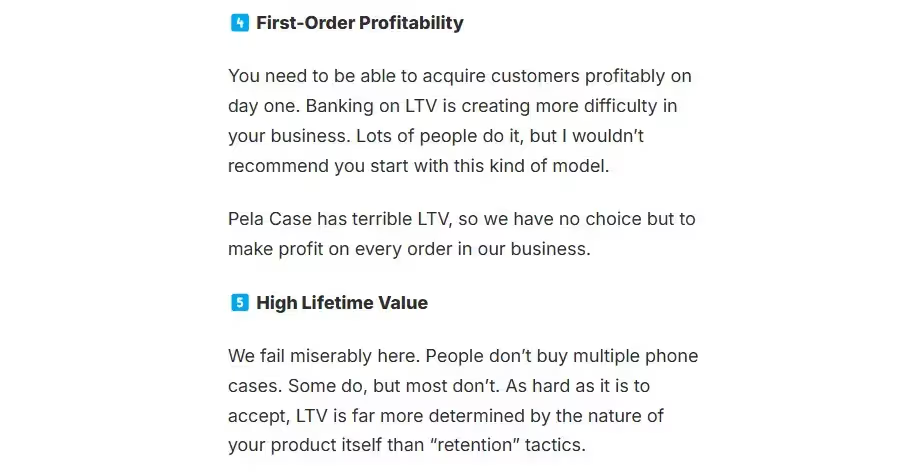
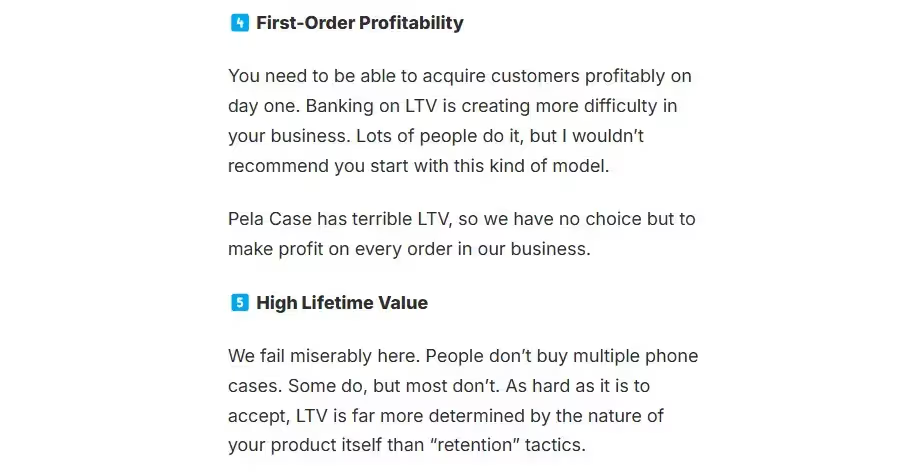
    For example, Matthew Bertulli, CEO of Pela Case, explained how first order profitability is vital for his business, as they don’t have the reliable repeat purchase rates to justify losses on the initial sale.

    ✅ Must-Have FOP:

    • One-Time Purchase Categories
      • Mattresses (Casper, Purple)
      • Luxury goods (high-end watches, jewelry)
      • Wedding-related products (rings, accessories, gifts)
    • Low-Repeat Categories
      • Novelty products (customized gifts, holiday items)
      • Niche DTC (one-off high-ticket gadgets)
    • Businesses with Weak Retention Pathways
      • If your AOV is low and there’s no strong upsell, FOP is non-negotiable.

    ❌ Can Lose on First Order:

    • Subscription-heavy brands (e.g., Daily Harvest, Ritual, Hims)
    • CPG with strong repeat purchase behavior (e.g., Magic Spoon, Athletic Greens)
    • Membership-based models (e.g., Costco, ButcherBox)

    Why You Won’t Scale With First Order Profitability Alone

    Making a profit on the first sale is great, but you don’t want to fall into the trap of optimizing everything around this, and ignoring LTV.

    First order profitability keeps the lights on, but LTV is how your brand scales, and withstands bumps in Meta ad costs and underperforming ad campaigns.

    Obsess over the initial profit too much, and you risk building a business that’s all about short-term wins, but falls apart when the landscape gets tougher and CAC goes up.

    Without retention, you’re stuck on an acquisition treadmill—constantly chasing new customers to replace the ones you couldn’t keep.

    The most successful brands find a balance between both initial profit and long-term revenue, and once they have enough of a buffer, start to funnel more focus (and investment) into retention.

    The Sustainable Scaling Playbook

    Here’s how you keep your brand in business, but build the stage for long-term, sustainable growth and high LTV.

    Do the following to improve first order profitability:

    • Boost AOV with bundles, cart drawer and post-purchase upsells and personalized product recommendations.
    • Constantly test new ad creatives to optimize ads and get CAC down.
    • Limit discount offers (experiment with other incentives, such as free content or gifts).
    • Don’t offer blanket free shipping (optimize your free shipping threshold to increase AOV). 
    • Invest in UGC and affordable traffic channels (e.g. SEO) that drive cheap traffic and offset more expensive acquisition campaigns.

    At the same time:

    • Add complementary product lines and subscription offers that increase repeat purchases.
    • Work on bottom of funnel traffic generation to build your email & SMS lists.
    • Set up automated email & SMS sequences (welcome sequences, abandoned cart, post-purchase, winback campaigns) that run on autopilot.
    • Funnel your top customers into branded communities and mobile apps (driving more engagement from your top spenders).

    If you have healthy first order profitability and dependable retention revenue, DTC is a great game to be in.

    Final Thoughts: Play to Your Strengths

    So, as you tweak your ad budgets, rethink your pricing, and test those checkout flows, keep the big picture in mind. 

    First order profitability matters. It’s your ticket to cash flow and stability in a brutal market. 

    But in the long-term, retention matters just as much.

    If your brand can balance the two, you’ve got a good chance at not just staying afloat, but winning.

  • 4 Important Apple App Store Ranking Factors

    4 Important Apple App Store Ranking Factors

    Anyone with a keen interest in SEO will tell you the importance of your App Store ranking.

    With approximately 63% of users finding an app through general browsing in the App Store, this is important stuff. A higher ranking gives your app more exposure and brings more traffic and downloads. So what determines whether your app features at the top of the App Store results, or the bottom?

    Today we take a look at the four factors that really impact your App Store Ranking.

    1. Your App’s Title
    2. Your targeted Keywords
    3. Number of Downloads
    4. Positive Ratings

    Let’s dive in to each factor now.

    1. Your App’s Title

    Of all the keywords attached to your app, the ones included in your title are weighted most heavily by Apple. In fact, apps which include keywords in their title rank on average 10.3% higher than their keywordless counterparts.

    Many app developers neglect this, opting for a short, brandable title for their app. This seems perfectly reasonable, but the two aren’t mutually exclusive. You can include your most important keywords and still create something that reflects your app and company brand.

    Consider an app for insomniacs: ‘Sweet Dreams’. Is your app really any less related to your brand if you re-named it ‘Sweet Dreams: Deep Sleep for Insomniacs’? Not at all.

    The revised title maintains the ‘Sweet Dreams’ branding, boosts your rank for targeted keywords by including them in your title and removes any ambiguity around your app’s purpose, bringing more targeted clicks. It’s a no-brainer, right?

    2. Your Targeted Keywords

    Your keywords in the App Store are somewhat similar to keywords for SEO purposes: the keywords you target directly impact the search terms you rank for. However, unlike with SEO, where theoretically you could produce enough content to rank for thousands of keywords, in the App Store you’re restricted to 100 characters.100 characters is nothing, so choose wisely.

    Make sure you use your full allocation of characters, and avoid targeting unnecessary search terms; if your keyword appears in your title, you don’t need to target it again.

    What does a winning keyword look like?

    The simple answer: high traffic volume, low competition.

    The right answer: It has a good volume-competition trade off, but crucially matches the search intent of your ideal app user.

    Your keywords are an important App Store ranking factor on both iOS and the Google Play store, so choose them wisely.

    3. Number of Downloads

    Of course, App Store Optimisation will only get you so far. Apple is more interested in giving users a great experience than how well optimised your app description is.

    The key metric Apple looks at is the number of downloads your app gets. If more people are downloading your app, this will significantly improve your ranking.

    More accurately, Apple focus on download velocity. An app released only a month ago might have fewer total downloads than a much older app, but if it’s being downloaded more frequently right now it will still rank strongly.

    4. Positive Ratings

    A relatively new addition to the App Store ranking algorithm: your app’s ratings will also impact your rank.

    From Apple’s point of view, this makes a lot of sense. Giving ‘better’ apps -at least in terms of rating- more exposure should improve user experience.

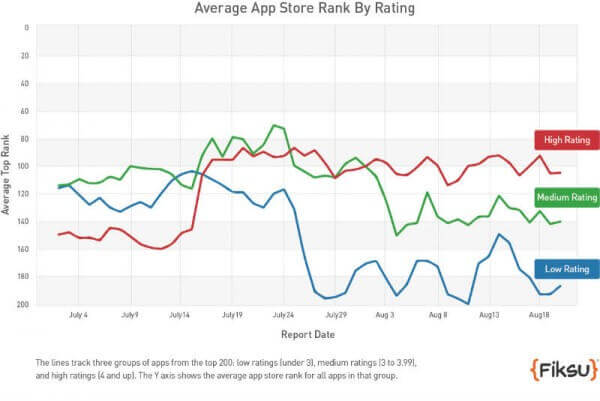
    The significant points seem to be around the 3-4 star mark. Apps above 4 stars receive a ranking boost, apps below 3 receive a penalty, as shown in this chart from Fiksu.

    App store ranking graph

    Sure, it’s important to create an app users love, but arguably more important is creating an app that is glitch free- glitches are the number one reason people leave a dreaded one-star rating.

    Even if your app has attracted some negative reviews, don’t write it off just yet. Work on creating an update that fixes the problems with your app as Apple weights the more recent ‘post-update’ reviews more heavily.

    After that, a flurry of good reviews is often enough to cancel out any penalty your app was given and get you moving back up the rankings.

    And, don’t forget, there is a strong positive correlation between your ratings and the number of downloads you get, so creating an awesome app will boost your rank on two accounts.

    Wrapping Up

    Focus on these four factors and you should benefit from a ranking boost in the App Store. And remember, many of these factors are strongly linked: Picking relevant keywords brings targeted traffic who are more likely to like your app and leave positive ratings.

    It’s also important to make sure that you have a great app in the first place. This naturally leads to good ratings and reviews and will organically help your app to rank better.If you already have an app live – make sure you keep it well maintained and updated. If you are planning to build one – consider Vendrux.

    Vendrux is for converting websites into mobile apps for iOS and Android. There’s no code required, you can go live in just a few weeks, our team handle all the tricky parts, and the apps will have all the features you need to grow and thrive on Google Play and the App Store.

    Vendrux is often used to convert WordPress sites to mobile apps. We have tools to integrate any WordPress plugin or functionality – so you can build WooCommerce apps, LearnDash apps, PeepSo apps, and anything else you can think of.

    If you don’t have a WordPress site – you can use Vendrux to build apps from any website or web app. Vendrux is ideal for building Laravel apps, Wix apps, Bubble apps, Webflow apps, Squarespace apps – and anything in-between.

    We hope that these tips help you to rank higher on the App Store and Google Play. It is a competitive space, but with time, effort and knowledge you can succeed!

  • Push Notifications vs SMS vs Email: Choosing the Best Channel for Your Business

    Push Notifications vs SMS vs Email: Choosing the Best Channel for Your Business

    When it comes to digital communication channels, more and more businesses today are using push notifications (vs SMS and email) to connect and engage with their customers.

    In this article we’re going to compare and break down these channels in detail, from their cost, to their performance in a couple of key metrics, to how they measure up in a number of other categories.

    At the end, we’ll share our opinion on the best way for businesses to connect digitally with their customers in 2026.

    Key Differences Between Push Notifications, SMS and Email

    Push notifications, SMS and email are all “owned” communication channels. This means, once you have someone subscribed to receive messages on any of these channels, you can message them again and again and again.

    You need to have certain information before you can send messages to people through each of these channels. For SMS (text messages) you need a person’s phone number, for email you need their email address. For both you should also have the person’s consent to contact them with marketing material.

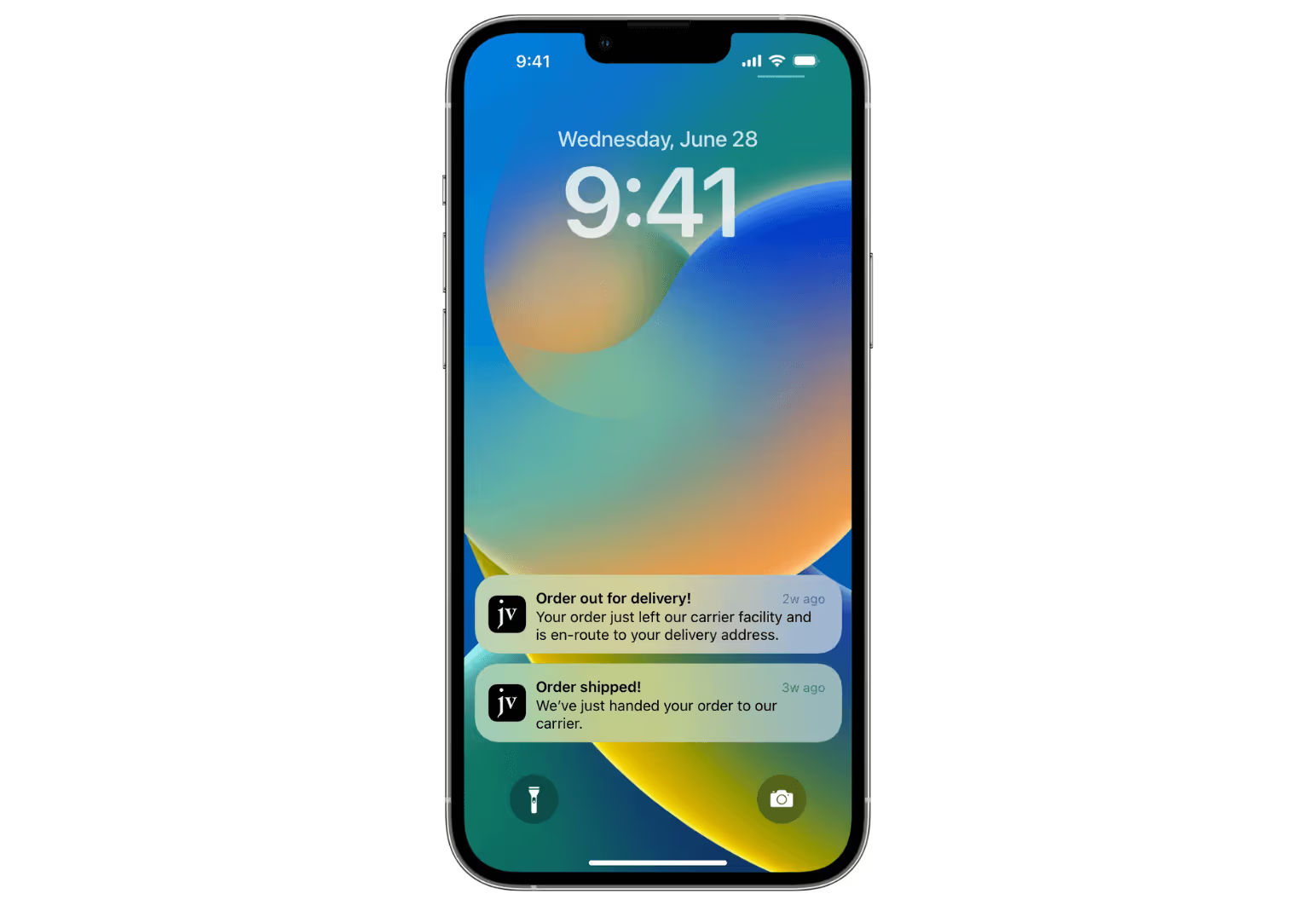
    Push notifications work a little differently, but the fundamentals are the same. You need a person to have downloaded your app to their mobile device (in the case of mobile push – web push notifications are slightly different). You’ll also need the recipient to allow your app to deliver push notifications to them.

    There are a few differences in terms of reach, deliverability, the amount and nature of information you can convey in each message, and a few more factors, as we’ll get into later.

    There’s also a difference in effectiveness and affordability between each channel, which is what we’ll look at first.

    Push Notifications vs SMS vs Email: Cost

    Let’s compare how push notifications, SMS and email stack up in terms of cost. Bear in mind the cost of each method varies a lot depending on the tool or service you use, and the level of features you need from each tool (e.g. choosing a push notification service’s simplest subscription level, or a higher plan that gives more complex features).

    Nevertheless we’ll try and give rough cost benchmarks for each method, in terms of what it costs to message 10,000 users.

    Push Notifications Cost

    • OneSignal: send unlimited push notifications to 10,000 subscribers from $39/mo ($129/mo for more complex plan)
    • PushEngage: send unlimited push notifications to 10,000 subscribers for $33/mo ($90.75/mo for more complex plan)

    SMS Cost

    • Twilio: $0.0079 per message to US numbers ($79 per broadcast to 10,000 subscribers).
    • ActiveCampaign: 10,000 SMS credits costs $160 (each message to a US number costs 1 credit). Also requires a subscription to the platform plus their SMS add-on (minimum of roughly $50/mo).
    • TextMagic: $0.049 per message to US numbers ($490 per broadcast to 10,000 subscribers).
    • Omnisend: $150/mo to send up to 10,000 SMS per month to US numbers (includes email marketing features).
    • Klaviyo: $170/mo to send up to 10,000 SMS per month to US numbers (includes email marketing features).

    These costs may be higher if you want to send messages to numbers in other countries, or to send multimedia (MMS) messages.

    Email Cost

    • ActiveCampaign: $287/mo (Marketing Plus Plan with 10,000 subscribers, paid monthly). Also has the option of transactional emails at $15/mo for 10,000 emails.
    • Omnisend: $115/mo (Email only Plan with up to 10,000 contacts. 120,000 emails per month).
    • Klaviyo: $80/mo (Email Marketing Plan with 3,001 – 10,000 contacts. 30,000 emails per month).
    • Drip: $154/mo for up to 10,000 contacts (unlimited emails).
    • MailChimp: $100/mo for up to 10,0000 contacts. 100,000 emails per month.

    Which Channel is the Most Affordable?

    The affordability of each channel depends on the frequency with which you want to contact your users.

    If you’re sending one message per month to each subscriber, you could do so for $80 with email (via Klaviyo), $79 with SMS text message (via Twilio) or $90.75 with push notifications (with PushEngage).

    As sending frequency increases, SMS text messaging becomes a lot more expensive, as you pay per message, not per subscriber.

    Email marketing tools are charged per subscriber, but many come with a monthly cap on the number of emails. If you’re looking to send multiple messages per month (approximately once per week), email and push are about equal.

    If your frequency is higher than that, push notifications become the cheapest, if you use a tool like OneSignal or PushEngage that offers unlimited monthly push notifications.

    Keep in mind that when we’re talking about which channel is the most affordable, you also need to consider the effectiveness of reaching your subscribers. If options A and B cost the same amount per message, but option A has a 50% open rate and B has a 25% open rate, A becomes a lot more cost-effective.

    We’ll look at this next.

    Comparison: Open Rate and Click-Through Rate

    Now we’ll compare the effectiveness of push notifications, SMS and email in open rate and click-through rate.

    Open Rate

    There are a lot of different figures for the average open rate for email, SMS and push notifications. For example, Reckless shows an average of 2% opens for email and 20% for push, while Omnisend puts this at 22.94% opens for email and 52.86% for push.

    Comparably, SMS boasts an extremely high open rate, some sources claiming as high as 98%.

    We’ve summarized the latest figures into these ballpark averages.

    • Email: 20%
    • SMS: 95%
    • Push: 50%

    Click-Through Rate

    Once again there are various sources that report different figures for click-through rates on email, SMS and push. For example, Clevertap reports an average CTR for push notifications of 2.25%, while Reckless puts this as high as 28%. 

    OneSignal reports an average CTR of 8% for push, while Business of Apps puts it between 21.6% and 42.5%.

    The same goes for SMS. Some sources report SMS click-through rate at around 20%, others as low as 6%. Tatango estimates the average CTR for SMS at between 5-10%, which is in line with our estimations as well.

    Average CTRs for email are much more consistent across the board, in the 1-2% range.

    • Email: 1%
    • SMS: 8%
    • Push: 10%

    Summary: Open Rates and Click-Through Rates for Push Notifications, SMS and Email

    Of the three channels, SMS has the highest open rates, with nearly 100% of SMS messages opened. Push is second, with potentially as many as 50% of notifications being read, while email is third, with 20%.

    Push notifications and SMS are close in terms of engagement, with 8% average CTRs for SMS, and 10% for push. Email lags quite a way behind, with a 1% average clickthrough rate.

    Push vs Email vs SMS: Opt-in Rate

    On average, roughly 60% of mobile app users opt in to push notifications.

    In comparison, email and SMS opt-in rates are much lower (but all website users are prompted to opt in, while push is only for people who download the mobile app).

    Overall, you can expect fewer people subscribed to push, compared to email and SMS; though the intent of these users is much higher.

    Other Factors to Consider

    So far we’ve looked at cost, open rate and click-through rate for push notifications vs SMS vs email. These are three huge factors to consider when deciding which channel ranks as the best communication channel for brands, but there are a number of other factors to look at as well.

    Let’s see how they compare in various other categories now.

    Reach

    Consider how easy it is to reach a specific user with each channel, and how many users you’re able to contact on each.

    With email and SMS, you need a piece of contact information (the user’s email or phone number). These are moderately easy to come by, if a little more difficult than in the past (due to greater awareness of privacy and misuse of personal data).

    For push notifications, you need someone to download your app, which presents quite a bit more friction than giving over your email or phone number.

    We give the edge to email over SMS, as it’s in general a little easier to get someone’s email, and easier to contact people in different countries with email.

    Winner: Email

    Deliverability

    Once you have the ability to contact someone on each of these channels, how reliably can you actually reach them?

    The main thing to consider here is how easy it is for people to opt out. There will also be some failed attempts at delivery for each channel, but the number of failed deliveries is likely to be inconsequential.

    With email, brands first need to worry about their emails being sent to spam. And consumers are unsubscribing from marketing emails at a higher rate these days, which hurts email’s effectiveness a little.

    Push is probably the lowest here, as it’s quite easy for users to simply turn off notifications, then you can’t reach them on this channel at all.

    Thus SMS is the winner for deliverability, with no spam folder and a higher rate of text messages making it to the user’s inbox. Users can also receive text messages to their mobile devices without an internet connection, using their cellular network.

    Winner: SMS

    Amount of Information

    How much information are you able to convey in a message on each channel?

    Email is the clear winner in this aspect. There’s virtually no limit to the amount of information you can send in an email, while text messages and push notifications give you a limited amount of real estate to work with.

    This allows you to send both long and short-form marketing messages with email, where you’re limited to short-form copy with the other two.

    Winner: Email

    Personalization

    Personalization makes marketing significantly effective. So whichever channel is easier to send personalized communications has a big edge.

    You can do a lot of personalization in email marketing, though it can take effort to set up and get the right information integrated with your email marketing tool.

    You can personalize with SMS as well, though you can do less with limited space to work with.

    Push notifications are generally the easiest to personalize, as they’re integrated directly with your app, making it easier to transfer data from users’ accounts to set up personalized notifications with a service like OneSignal.

    Winner: Push notifications

    Trust

    Which channel do users trust the most for commercial communications?

    Email’s trust is dipping, with it developing a bigger reputation for spam and unwanted communications. SMS is particularly low on the trust scale, as one of the favorite channels for scammers, such as phishing operations.

    Push notifications are easily #1 in this aspect, coming from a brand the user already knows, having made a conscious decision to download the app.

    Winner: Push notifications

    Visual Elements

    How easy is it to add visual elements to your messages?

    With SMS this is basically zero – unless you send MMS messages, which are extremely expensive, and even then don’t look very good.

    You can do a little to visually enhance push notifications, but it’s still limited with the space you have to work with.

    That leaves email as the winner for visual flexibility. 

    Winner: Email

    Interaction

    How well can users reply to messages, and thus allow businesses to create a direct dialogue with their users?

    With push notifications, users can’t open a dialogue directly in the notification, though they can often click from the push notification and take an action in-app that works similarly.

    With both email and SMS it’s quite easy for users to reply to messages and communicate with a brand. We put email as the winner here, as there are no messaging charges (as there are at times for SMS), and the trust factor is higher meaning people feel safer responding to emails than text messages.

    Winner: Email

    Usability

    Finally, how easy is it for brands to set up and run communications on each channel?

    Email marketing tools have been around a long time, and have become very sophisticated and user-friendly. It’s also extremely easy to set up email opt-ins today with the raft of SaaS tools, plugins and apps that help website or app owners do this.

    The SMS marketing industry is not quite as sophisticated or user-friendly, though many email marketing tools today do SMS as well, letting you utilize the same platform for opt-ins and sending SMS notifications or broadcasts.

    Push notifications can be a little more technical, at least in the setup. Though with platforms like OneSignal and PushEngage, it’s become much easier for non-developers to set up and send push notifications.

    Winner: Email

    Summing Up: What’s the Best Way to Connect With Your Customers?

    Though there’s no one-size-fits-all answer, push notifications have emerged as one of the most cost-effective ways for brands to communicate with their customers today.

    Push notifications are around equal with email as the cheapest way to send frequent messages to users. Yet each push notification is more likely to be read by the user than an email, and is more likely to generate engagement.

    Push notifications also have a higher level of trust and better personalization, two things that contribute to higher engagement levels.

    If you need longer-form communication with your users, or you want to start a dialogue, email is the better bet. That’s why we recommend an omnichannel approach that utilizes email, push and, from time to time, SMS in your marketing and communications strategy.

    Unlock Mobile Push Notifications with Vendrux

    When we’re talking about push notifications, the real power comes from mobile push notifications, not web.

    Web push notifications have a limited reach, not being able to reach mobile users on iOS devices. It’s also more difficult to subscribe users to receive push notifications via the web. When sent on desktop, push notifications don’t have quite the same impact that a mobile push messages does, delivering a personalized message straight to a user’s mobile phone lock screen.

    For full use of mobile push, you need a mobile app, and Vendrux is here to help you build it. 

    If you have a mobile-optimized website, you’re 90% of the way to having an app already. Vendrux wraps your website in native mobile code, allowing you to launch a mobile app in as little as a month, for minimal investment.

    The John Varvatos app, built with Vendrux

    When you do that, you’ll have full access to mobile push notifications through our integration with OneSignal, along with the many other benefits of having your own mobile app.

    Send push notifications like this, straight to your customers’ mobile phones

    Vendrux is the most effective way for many online businesses, from publishers to ecommerce brands, to grow. Launching your own app helps you offer a better mobile user experience, boost retention, conversion rate and average order value, and unlock mobile push notifications.

    You can learn more, and get the process of launching your own app started, by getting a free preview of your app and scheduling a free demo with a Vendrux product manager.

    This is your opportunity to take your business to the next level and connect with the growing majority of mobile users in a bigger and better way.

  • Ten Major Trends to Watch in Ecommerce

    Ten Major Trends to Watch in Ecommerce

    The eCommerce world is constantly evolving. There’s no guarantee that what worked yesterday will continue to work tomorrow, or even today.

    As we enter 2025, expect certain trends to emerge and dominate the online retail industry.

    To stay competitive, brand owners need to be informed and up to date with these latest eCommerce trends.

    Based on our own experience, and the opinions voiced by numerous eCommerce thought leaders, we predict the following list of eCommerce trends will define 2025 when it’s all said and done.

    10 Trends to Watch for eCommerce in 2025

    Here are the top ten eCommerce trends we’re thinking about, coming into 2025.

    AI

    We couldn’t start any article without mentioning AI.

    AI, by now, is far from a new trend. We all know the scale at which AI is taking over online content, whether by generating web and social content with LLMs or AI writing tools, or AI overviews and AI search engines changing the way we find information.

    The crazy thing is, there’s still so much room to grow with AI.

    AI tools are getting better every day, and consumers are slowly starting to trust AI more, after some shaky early experiences.

    Expect AI to keep growing in 2025, especially for eCommerce.

    It will become standard for brands to use AI in many different capacities, including:

    • Creating optimized web and social copy
    • Creating visuals for various marketing channels
    • Personalizing product recommendations
    • Answering basic questions and assisting buyers
    • Optimizing inventory management, logistics, pricing
    • Providing insights to boost conversion rate, retention, and other key metrics
    __wf_reserved_inherit
    Amazon’s “Rufus” AI shopping assistant

    Realistically, we’re just scratching the surface of what AI can do.

    In 2025, businesses not leaning into AI will have a hard time competing with the speed and agility of those who do.

    Human experiences

    The second big eCommerce trend for 2025 will be a direct response to the first.

    The bigger and more ubiquitous AI gets, the more people will crave for human interactions and human experiences in eCommerce.

    People want to buy from other people, not from nameless, faceless robots. 

    Thus, the brands that succeed will be those who embrace their human side.

    That’s not to say you shouldn’t use AI in your business. There are many ways AI can provide value, as mentioned above.

    But don’t become so in love with AI that you let it replace the human side of your brand.

    Make sure your brand still has a human face, and a human voice, and let your customers know there is a team of real people behind the products they love.

    Mobile commerce

    Mobile is another trend that’s not new, but that will continue to grow and take over a larger part of the eCommerce game.

    Mobile commerce has been growing steadily each year.

    Worldwide, Statista estimates that $2.51 trillion, or 59% of all eCommerce sales, will be spent on mobile devices in 2025.

    __wf_reserved_inherit

    By the end of 2024, 77% of retail site traffic around the world came on smartphones, contributing 68% of all online shopping orders.

    In the US, mobile is a little further behind, contributing approximately 45% of total retail sales.

    But tentpole events such as BFCM show the potential mobile has in the US, as 57% of all Cyber Monday sales in the US ($7.6 billion in total) came on mobile.

    If mobile is not a focus for you yet, it should be.

    Ensure your user experience is fully optimized for mobile shoppers, reducing friction and usability issues in your conversion flow.

    Invest in mobile-friendly marketing strategies, and consider launching an app, if you haven’t already, to capture more repeat traffic and more revenue on mobile.

    Read more: Why Top DTC Brands Are Going All-In on Mobile Apps

    Social commerce

    Like with mobile, social commerce will continue to grow in 2025.

    Social commerce was estimated to have generated $699.4 billion worldwide in 2024 – and experts predict that social commerce sales will top $1 trillion by 2028.

    We saw social come to play in a big way in 2024 with TikTok Shop.

    __wf_reserved_inherit
    Image source

    After first making an impact in other markets, the platform blew up in the US to drive over $600 million in monthly sales.

    __wf_reserved_inherit
    Image source

    The outcry, particularly from eCommerce brands, influencers and content creators, when TikTok was banned (at least temporarily) in January of this year shows the impact it’s had.

    Whether or not TikTok survives in the US remains to be seen, but the key takeaway shouldn’t be TikTok. 

    It’s that the kind of online shopping experience that resonates with customers today is a blend of social media and eCommerce.

    Just look at the rise of Shein and Temu if you want another example – two shopping apps that could be mistaken at times for social media or gaming apps.

    __wf_reserved_inherit

    These apps harness the power of small dopamine spikes to get shoppers coming back more often, and hanging around for longer, ultimately driving serious long-term revenue.

    Focus on retention and LTV

    2024 was a rocky year for many brands, as the customer acquisition landscape has become increasingly unpredictable.

    Paid acquisition channels are getting more expensive, while low-cost, organic channels are harder to rely on.

    Google search has been a mess for some time. Email deliverability is down. Organic social reach is down.

    All this leads to rapidly rising customer acquisition costs. To offset this rise, brands need to put more focus into customer retention and LTV.

    Higher retention and repeat purchase rates allow brands to weather higher CAC, and provides a safety net against the unpredictability of traditional acquisition platforms.

    You need to spend less time, energy and money on finding new customers, and more on selling to your existing customers.

    While brands are disappearing from Google, losing tens of thousands in revenue from the TikTok ban, and spending more on paid traffic for the same return, you’ll have a competitive advantage if most of your customers are coming back and buying again and again.

    Read more: How to Boost Loyalty and Retention with a Mobile App

    Ownership of data and customer interactions

    In 2025, more brands will cotton on to the danger of renting your audience, and relying fully on third-party platforms for a large chunk of your sales.

    Driving the bulk of your revenue from social commerce and eCommerce marketplaces leaves you vulnerable to platform risk, and gives you little ability to personalize your customer experiences.

    Add in the increasing difficulty for brands in getting data from web visitors, as modern browsers cut down the effectiveness of third-party cookies.

    In 2025, any brand with first-party data and ownership of their audience will have a major leg up.

    Focus on building direct, owned touchpoints with your customers.

    Build and grow channels like email, mobile apps and push notifications, where you don’t have to rely on a third party, and you have the ability to build real customer relationships with direct access to your audience.

    Convenience becomes a non-negotiable

    Modern shoppers want convenience.

    They don’t just want it – they want it easy, and they want it now.

    That’s why mobile shopping is rising, and cart abandonment is rising.

    Shoppers want the customer experience to be frictionless. They don’t want to have to get up and switch devices, find their wallet and type in their card details, or spend time typing in their address.

    With so much competition, shoppers will leave at the first sign of unnecessary friction, and buy from somewhere else.

    The same applies for shipping. No one, in 2025, is waiting around for weeks for their impulse TikTok buy to show up.

    They want it now.

    __wf_reserved_inherit
    Image source

    Expect a stronger focus on speed and convenience.

    Fast delivery times. Frictionless checkout processes. Customers’ info saved for quick checkout, and multiple payment options available (particularly mobile payment wallets).

    If you fall short, don’t be surprised if the competition overtakes you, simply by making the customer’s life easier.

    Rising demand for sustainability in eCommerce

    Another growing customer trend is the desire for sustainability.

    A rising number of people care about the impact their purchase has on the environment, and showing that your brand supports and cares about sustainability may positively impact your brand’s image.

    According to PwC, 75-80% of consumers today are willing to pay up to 5% more for locally sourced, eco-friendly, fair trade, biodegradable or ethically sourced products.

    __wf_reserved_inherit
    Image source

    50-55% of consumers are willing to pay 6-10% more, while 30-33% say they will pay a sustainability premium of more than 10%.

    You can meet consumers’ demands (not to mention being kinder to the planet, and its inhabitants) by switching to eco-friendly packaging and sustainable sourcing and production of your products.

    Sustainable business practices

    Sustainability is important in more ways than eco-friendly packaging and ethical sourcing.

    It’s also vital to keep overhead and operational complexity down, and maintain a sustainable business.

    The unpredictability of acquisition puts brands in a risky position if they constantly need to bring in waves of new customers to stay above water.

    With lower overhead, you have a better chance of weathering the storm that will inevitably come at some point in 2025.

    Additionally, the leaner your business is, the faster you can adapt to market changes (which, if 2024 was anything to go by, will come thick and fast in 2025 as well).

    With the help of AI to automate or speed up a lot of tasks, don’t be surprised if lean, independent brands with lower headcounts are in the best position to win in 2025.

    Omnichannel brand building

    There are so many more ways for customers to shop, or consume content today.

    Your audience is likely on multiple social media platforms. They consume content on YouTube, podcasts on Spotify, they search on Google and with Chat GPT, and they use dozens of apps.

    They use their mobile phone and smart TV at home, and their laptop during work hours.

    They buy things on Amazon, from a social post, from an email or push notification, or from a Google search.

    Brands need to be where their customers are. And today, your customers are everywhere.

    Your brand must be too.

    Build as many touchpoints as possible for your customers, to increase reach and decrease the number of ideal customers who slip through the cracks.

    Let people buy from your website, social media, or mobile app.

    Reach out to your audience on social, push, email and SMS.

    Show up on Instagram, TikTok, and Google.

    There’s more competition for attention today than ever before. More touchpoints means more shots on goal for your brand.

    __wf_reserved_inherit
    Mobile apps and push notifications are two powerful ways to capture more of your customers’ attention

    What eCommerce Trends Are You Betting On?

    Above, we introduced ten major eCommerce trends to be aware of in 2025.

    As a brand owner, you know the value of staying up to date with the latest consumer trends. But there’s no easy playbook for how to approach a new year in eCommerce, and it’s always a little like making a bet on how the year will play out.

    So, what are you betting on?

    Some brands are all-in on AI, or other rising tech trends such as AR (augmented reality) and voice search.

    Others may be betting on mobile, social, or a return to human-focused content and human experiences.

    If you’re betting on mobile, and on the importance of retention, data ownership and control over your audience, launching a mobile app is a must.

    Vendrux helps you do it by converting your website into an app, building deeper relationships with your customers, increasing AOV and LTV, and adding push notifications as an engagement channel – all for a low cost.

    __wf_reserved_inherit
    We helped high-revenue brands like Tobi, Jack & Jones and Only & Sons launch amazing mobile apps, fast

    Learn more about how Vendrux helps here – and if you want to explore building an app for your brand, feel free to book a free app strategy call to discuss your vision for the app and how Vendrux can make it happen.

  • What Is eCommerce Retention Rate? (and How to Improve It)

    What Is eCommerce Retention Rate? (and How to Improve It)

    Retention is key for the success of eCommerce businesses. The better you can retain and sell to existing customers, the less you’re likely to spend acquiring customers, and each customer you get becomes more valuable.

    In this article we’ll show you what a good eCommerce retention rate is, along with various factors that you should take into account when comparing your rate to the overall average. We’ll explain why focusing on increasing retention is a winning strategy, and finish up with some tips to help you do it.

    What is Retention Rate in eCommerce?

    In eCommerce, retention rate is the percentage of your customers who make more than one purchase.

    Retention rate is the percentage of your users or customers who continue to use your service or buy your products over a certain period of time.

    Retention rate can be different depending on the type of business, along with the criteria you choose to set. For example, an app’s retention rate would usually be the percentage of users who keep the app installed over a period of time, such as 7 days, 30 days, 90 days, etc.

    In eCommerce, retention rate is generally used to show the percentage of customers who make more than one purchase. It can also be called “repeat customer rate”.

    How to Calculate Retention Rate

    You can find your retention rate by taking the total number of customers and dividing this number by the number of customers who made more than one purchase.

    For example, if you had 100 unique customers make a purchase from your store, and 20 of those customers purchased more than once, your retention rate would be 20%.

    What’s the Average Retention Rate for eCommerce Stores?

    According to a rough estimation of a number of sources, the average customer retention rate for eCommerce is 28.2%.

    This means 28.2% of eCommerce customers buy from a brand more than once.

    This data varies by industry and product category. One study found the following averages:

    • Apparel: 26%
    • Branded Food Products: 24.5%
    • CBD: 36.2%
    • Coffee: 29.6%
    • Cosmetics: 25.9%
    • Meal Deliveries: 29%
    • Pet Products: 31.5%
    • Sports Clothing: 33%
    • Supplements: 29.1%
    • Tea: 20.9%
    __wf_reserved_inherit

    [Data Source: Metrilo]

    In this data set, Tea, Food Products and Apparel scored low in customer retention, while Sports Clothing, Pet Products and CBD Products all had higher repeat customer rates.

    Other sources give a range of answers for what a good ecommerce customer retention rate is, from as low as 15% to as high as 38%.

    How to Assess eCommerce Customer Retention in Context

    Like any metric, customer retention rate can be misleading if you look at it on its own, out of context.

    For example, let’s say you have a 10% retention rate. This is far below the average ecommerce retention rate. But it might not be something to worry about.

    You could sell products in a category where repeat purchases are very rare (i.e. people usually buy once, and have no need to buy another product).

    You could have very low customer acquisition costs (CAC) and a wide target audience, meaning you can generate a lot of revenue and profit just from new customers.

    You could also have a particularly high customer lifetime value (CLV), despite your low retention rate, meaning those customers who do come back tend to make a lot of purchases and spend a lot of money.

    It’s important to assess retention rate in context. Some products or industries just aren’t naturally suited for return customers. Or you may have made a conscious decision to focus on other metrics, like lowering CAC, or increasing conversion rate and prices to increase average order value (AOV).

    Whatever the case, it will still be beneficial to increase retention rate, but this one metric alone doesn’t tell the whole story of your business’ performance.

    Why Retention Rate is a Powerful Metric

    Though there are certainly other things that matter, a good retention rate is almost always a great sign for your business. It makes a lot of sense to make this one of your key focus metrics.

    For most businesses, it costs a lot more to attract a new customer than to sell to an existing one. Experts believe it is 6 to 7 times more expensive to get a new customer than to retain those you already have.

    It’s also believed that a 5% increase in retention can boost revenue by as much as 25 to 95%, as returning customers tend to buy more often and spend more than new customers

    Then there’s the loyalty and word of mouth factor. Repeat customers tend to be loyal brand advocates, those who will tell their friends about your brand, write reviews for your brand, and deliver more benefits than simply their own spending.

    How to Boost eCommerce Customer Retention

    It’s never a bad idea to put effort into improving your retention rate. Here are some of the best eCommerce customer retention strategies to help you retain customers and build a higher CLV through repeat purchases.

    Sell High-Quality Products with Great Customer Service

    First of all, get the fundamentals right. Customer loyalty comes from doing the basic things right.

    Happy customers will be more likely to come back and buy from you again. You make customers happy by selling good products and providing a high level of customer service.

    Create a Loyalty Program

    A loyalty or rewards program is a great way to entice people to come back and make multiple purchases.

    Just see how many places utilize loyalty programs for evidence of how effective they are. From Amazon to Starbucks to punch cards on your local coffee shop, almost everyone you shop with is competing to get you on their loyalty program, because they know that the incentive of eventually earning discounts or free stuff will make you want to shop with them again and again.

    Set Up Post-Purchase Marketing Campaigns

    You shouldn’t stop marketing once someone converts and becomes a customer. In fact, it makes sense to step up your marketing, as someone is more likely to buy if they already trust you and have bought from you in the past.

    Set up automated marketing campaigns (e.g. email, SMS, push notifications or retargeting ads) to push cross-sells, up-sells or restocks to existing customers, using the info from their previous purchase to personalize each campaign specifically for that customer.

    Save Customer Info for Low-Friction Login and Checkout

    Make it as easy as possible for customers to become repeat customers. When they buy from you the first time, you can give them the option to save their login and payment information to allow them to check out fast, with minimal friction.

    Offer Returning Customer Discounts & Subscription Deals

    Incentivize people to buy from you multiple times. A lot of stores offer discounts for first-time customers, but returning customer discounts can be even more effective, as encouraging people to buy multiple times can lead them to become loyal customers who buy over and over again, spending a huge amount over their lifetime as a customer.

    You can do the same with subscriptions for consumable products (e.g. supplements, beauty products). Make it cost-effective for someone to set up an automatic subscription and a lot of people will choose that option and become regular customers.

    Schedule Emails or Notifications Near Expected Restock Dates

    For consumable products that aren’t on a subscription, estimate the length of time someone’s likely to need a restock, and send reminders close to this time via email, SMS, push etc.

    Hitting a customer with a restock notification at just the right time makes it easy for them to buy with you again.

    For particularly competitive product categories, you might want to offer an incentive, such as a discount, if they restock with you.

    The idea is to help them build a habit of buying from you each time, to where they become a loyal customer who always comes to you each time they run out of this product.

    Push notifications are a powerful tool to boost loyalty and retention and generate more repeat purchases, and Vendrux makes it easy to integrate native mobile push notifications with your online store.

    Book a demo now to learn more about setting up push notifications for your store.

    Build a Mobile App

    Finally, launching your own mobile app is a phenomenal way to boost your customer retention rate.

    Customers who download and buy from your app are far more likely to become repeat customers than those who shop on your website. That’s because your app remains on their phone, and in their consciousness, even after the purchase is over.

    Even better, you’ll be able to send push notifications to these users to invite them to come back, open the app and shop again. Push notifications have 2.5x higher open rates than email, higher click-through rates than email and SMS combined, and a lower cost than both SMS and email.

    With their affordability, personalization, trust and convenience, push notifications are the perfect tool to reach out to customers with promotional offers, restock reminders and content that helps make them loyal, repeat customers. And you only have full access to mobile push notifications with an app.

    Mobile push notifications are a powerful tool for eCommerce stores

    Want to Boost Retention Rate, Conversion Rate and AOV By the End of the Month?

    Vendrux can boost your retention rate, along with mobile conversion rate and average order value, all in less than a month.

    We do this by helping you turn your eCommerce website into a mobile app, published in the app stores and able to be downloaded to your customers’ mobile devices.

    This lets you start turning regular customers into hyper-loyal repeat customers, who use the app to shop with you over and over.

    It takes minimal investment to launch your app, and as long as your site is already mobile-friendly, there’s very little work left for you to do. You’ll just talk to a product manager, sign up, and wait while we turn your mobile website into a professional, high-quality app.

    Many successful eCommerce stores, including Rainbow Shops, John Varvatos, ONLY and more, have used Vendrux to create their apps, with incredible results.

    The ONLY app, built with Vendrux

    Try it out now – book a free, personalized demo with one of our team members to get a closer look at the process, and get a preview of your app designed by our team.

    In less than a month, you could have your own mobile app, live and published in the app stores.

    Launching an app is the best thing you can do to increase retention for your eCommerce store. Get in touch with us now to learn more.

  • Ecommerce PWAs: A Viable Alternative to Native Apps?

    Ecommerce PWAs: A Viable Alternative to Native Apps?

    If your ecommerce platform offers PWA capabilities, you’ve probably considered using them. 

    Adobe Commerce has PWA Studio. Salesforce Commerce Cloud has its Composable Storefront (PWA Kit). Shopify has Hydrogen

    The message from every platform is the same: PWAs are the modern way to deliver mobile commerce.

    And they’re right, up to a point. PWAs are powerful, and they represent the modern capabilities of mobile websites. The issue? When you get to thinking a PWA is a substitute for a native app.

    If you’re in ecommerce, your site should be a PWA. We can say that pretty confidently.

    But that’s not all it should be.

    What Is an Ecommerce PWA?

    A progressive web app (PWA) is a website built with modern web technologies, that mimics some behaviors of a native app – like offline caching, push notifications, and home screen installation – while still running in the browser.

    In practice, it means your ecommerce store loads faster, feels more responsive, and offers a few features that regular mobile websites can’t match. 

    Users can add your store to their home screen without downloading anything from an app store. Pages can load even on spotty connections. You can send push notifications through the browser (on Android).

    How PWAs Differ from Regular Mobile Websites

    A standard mobile website is a collection of server-rendered pages. Every tap sends a request to the server, waits for a response, and renders a new page. 

    It works, but it can be slow. And a little clunky.

    PWAs are designed to improve on that.

    If you put a regular mobile website and a PWA side by side, you’d notice a few things:

    • Speed on return visits. A PWA caches content locally, so pages you’ve already visited load almost instantly the next time. A regular website fetches everything from the server on every visit.
    • No full page reloads. Tap a category or product on a PWA and the content swaps in smoothly, like an app. On a regular site, the whole page flashes white and reloads.
    • “Add to home screen” prompt. A PWA can prompt users to install it as an icon on their phone. Launch it from there and it opens full-screen, with no browser address bar or navigation buttons. It looks and feels like an app (even though it’s still running in the browser under the hood).
    • Working offline or on bad connections. Lose your signal on a regular website and you get a dead page. A PWA can still display cached content: product pages you’ve browsed, your cart, category listings.

    Under the hood, these capabilities come from technologies called service workers (background scripts that handle caching and offline behavior) and a web app manifest (a config file that defines the home screen icon, splash screen, and display mode). 

    But from the user’s perspective, the difference is simple: a PWA feels faster, smoother, and more like an app.

    PWA vs Headless Commerce: What’s the Difference?

    These terms get conflated, but they’re not the same thing. 

    Headless commerce is an architecture where your frontend (what the customer sees) is decoupled from your backend (your product catalog, checkout, order management). The frontend communicates with the backend through APIs, typically GraphQL or REST.

    A PWA is a type of frontend. You can build a PWA on a headless architecture (this is what Adobe Commerce PWA Studio and Salesforce’s Composable Storefront do), but you can also add PWA features to a traditional, non-headless website.

    Headless gives you architectural flexibility. PWA gives you a specific set of browser-based capabilities. 

    Many enterprise platforms now combine both, offering headless architectures with PWA-ready frontend tooling.

    What Does a PWA Do for Your Ecommerce Store?

    PWAs deliver measurable improvements across several dimensions that matter for ecommerce.

    Faster Page Loads and Better Core Web Vitals

    Speed is the most tangible benefit. Service worker caching means returning visitors get near-instant page loads because assets are served from the local cache rather than the network. Code splitting and lazy loading reduce initial load times for new visitors.

    Pinterest rebuilt their mobile experience as a PWA and reduced Time to Interactive from 23 seconds to 5.6 seconds. First Meaningful Paint dropped from 4.2 to 1.8 seconds. The result: a 44% increase in user-generated ad revenue and a 40% increase in time spent on site.

    For ecommerce, faster pages mean lower bounce rates and higher conversion. Google’s data shows that as page load time goes from 1 second to 3 seconds, the probability of bounce increases 32%. From 1 to 5 seconds, it increases 90%.

    App-Like Mobile UX Without an App Download

    PWAs offer an “app-like experience”, without the friction of app store downloads. 

    When launched from the home screen, a PWA runs in a full-screen window without browser chrome, making it visually indistinguishable from a native app for basic interactions.

    This matters because most ecommerce traffic today comes on mobile, and while apps provide a much better user experience, the average site visitor isn’t going to download your app. 

    A PWA lets you deliver a better-than-web experience to users who would never visit an app store for your brand.

    Push Notifications

    PWAs support web push notifications, which let you re-engage users with promotions, back-in-stock alerts, or abandoned cart reminders directly on their device. 

    Push is powerful. Push notifications contributed to the impact of Lancôme’s PWA, which generated a 17% increase in conversions.

    It is worth noting that web push is different from native push, which is what you get from a “real” mobile app. PWAs can’t match the impact of a push notification that lights up your customer’s lock screen, no matter where they are or what they’re doing.

    Offline Browsing and Reliability

    Service workers can cache product pages, category listings, and other static content so users can browse your catalog even when their connection drops. This is particularly valuable for brands with customers in regions with unreliable connectivity.

    Jumia, Africa’s largest ecommerce platform, built a PWA specifically to serve customers on 2G networks. The result: 33% higher conversion rates and 50% lower bounce rates.

    For most Western ecommerce brands, offline browsing is a nice-to-have rather than a core need. 

    Users can browse cached pages, but they can’t complete a purchase offline – and today, most people have an internet connection wherever they go, anyway. But it may still be a useful feature for some brands.

    Home Screen Installation

    Users can “install” your PWA to their home screen, creating a persistent shortcut that looks like a native app icon. 

    This reduces the steps between intent and purchase for repeat visitors.

    Rakuten 24 reported a 450% increase in visitor retention after enabling home screen installation, along with a 150% increase in sales per customer.

    It’s not as intuitive or as easy as downloading an app from the app store; but it can make your website a little more sticky.

    Which Ecommerce Platforms Support PWA?

    Most major enterprise ecommerce platforms now offer PWA tooling, either built-in or through their headless architecture. Here’s what the main platforms provide.

    Adobe Commerce (PWA Studio)

    Adobe Commerce PWA Studio is a set of open-source developer tools for building a React-based, headless PWA storefront on top of Adobe Commerce (formerly Magento 2). It replaces the aging Luma theme with a modern single-page application that communicates with the backend through GraphQL APIs.

    Key components include Venia (a reference storefront), Peregrine (React hooks for commerce logic), and UPWARD (a proxy server for routing). The result is dramatically faster page loads and a fluid mobile experience compared to traditional Magento storefronts.

    Riddle’s Jewelry saw a 47% increase in web traffic and a 5.7% boost in conversion rate after migrating to PWA Studio. Accent Group (Platypus Shoes) reported a 14% lift in AOV and a 68% increase in add-to-cart rate.

    Salesforce Commerce Cloud (Composable Storefront)

    Salesforce’s Composable Storefront, built on the PWA Kit framework, is a React-based headless frontend for B2C Commerce. It runs on Managed Runtime, Salesforce’s serverless hosting infrastructure, which handles scaling and deployment.

    Recent additions include social login, address autocomplete, Order Management integration, and Node 22 support. Salesforce also released a PWA Kit MCP Server in late 2025 for AI-assisted development.

    Shopify (Hydrogen)

    Hydrogen is Shopify’s React-based framework for building custom headless storefronts, hosted on Shopify’s Oxygen infrastructure. 

    While not strictly a “PWA builder,” Hydrogen supports all the building blocks for a progressive web app: service workers, offline caching, and the web app manifest.

    Hydrogen is optimized for speed with server-side rendering, edge deployment, nested routes, and progressive enhancement. It integrates directly with Shopify’s Storefront API and includes pre-built commerce components.

    The Winter 2026 update added Storefront MCP support, letting brands build AI agents directly into their storefronts.

    commercetools and Other Composable Platforms

    Composable commerce platforms like commercetools, Elastic Path, and Spryker are API-first by design, which means they work with any PWA frontend framework. 

    Vue Storefront (now Alokai) has emerged as the most popular open-source PWA frontend for these platforms, supporting multiple backends through a unified SDK.

    Ecommerce PWAs vs Mobile Apps: Is a PWA a Viable Alternative?

    There’s very little reason not to turn your standard website into a PWA. Cost would be the only thing – but PWAs are not oppressively so. If you’re an enterprise brand with a web development team, it’s not a massive project.

    The issue is that many people look at the “app-like experience” part and start to compare PWAs and native apps.

    The thought is that you can save on the cost of mobile app development and make do with a PWA, instead of a true native app.

    A PWA is not the same as a native app. It doesn’t give you the same benefits a mobile app does.

    Why a PWA is Not an App Replacement

    The thinking that you can replace your mobile app with a PWA is flawed. In this context, PWAs have real limitations.

    • They can’t be published to the App Stores
    • PWAs can’t send native push notifications (only web push; which requires the browser to send, and have limited opt-in/delivery rates)
    • Cannot send push at all on iOS (PWAs are very limited on iPhone in general)
    • Home screen installation is not intuitive (very few people will realistically “download” your PWA)
    • They can’t tap into native device features (which you may not really need from an ecommerce app; though native push is the one major exception)

    PWAs are powerful. But they’re web apps, not mobile apps.

    The home screen “installation” is more like a shortcut or bookmark to the web app. And running through the browser means it doesn’t have the same functionality as an app that runs on its own.

    Capability PWA Native App
    Page load speed FastCached assets, service workers FastCompiled code, local storage
    Push notifications (Android) YesVia web push YesVia FCM
    Push notifications (iOS) LimitedRequires home screen install, auto opt-out, no background sync Full supportStandard prompt, background delivery, badges
    App Store presence No YesApple App Store + Google Play
    Offline browsing YesCached pages YesFull offline support possible
    Offline checkout No PossibleVaries by implementation
    Home screen icon YesVia “add to home screen” YesVia app install
    Hardware access LimitedNo NFC, Bluetooth, or geofencing FullNFC, Bluetooth, biometrics, camera, GPS
    Development cost LowerSingle codebase, web technologies HigherPlatform-specific or cross-platform
    Update deployment InstantNo app store review 1-3 daysApp store review required
    SEO impact Pages indexable Not indexedApp content not indexed by default
    Customer retention / LTV Good for acquisitionWeaker for retention StrongBest for retention and repeat purchase
    Discoverability Search, links, social App Store, recommendations, ads

    Does Your Ecommerce Brand Need More Than a PWA?

    The flaw is thinking of it as PWA vs mobile app.

    Think of it as a progression:

    • Standard website
    • Progressive Web App
    • Mobile app

    A PWA can carry your mobile strategy for a time. But when you want to take retention and mobile engagement to the next level, you’ll want a true mobile app.

    A mobile app lets you:

    • Offer a simple download path
    • Get discovered on the App Stores
    • Reach customers at any time with push notifications
    • Build a more custom experience for your best shoppers

    The “Available on the App Store” badges hit different.

    One tap to download your app works a lot better than giving customers a set of instructions for how they can put your website on their home screen.

    And push is the big one. Push is the reason to launch an app; but with a PWA, you just don’t have the same reach.

    When a PWA Is Enough

    A PWA could be enough if:

    • You’re earlier-stage and mobile revenue is a small share of your total
    • Your audience skews heavily Android (emerging markets, certain demographics)
    • You don’t have the budget for a native app yet (though it probably costs less than you think)
    • You sell to an audience or in a category where a mobile app doesn’t make sense

    For brands in this position, a well-built PWA on your ecommerce platform is a genuine upgrade that will improve mobile performance and conversion rates – and it’s a powerful cornerstone for your mobile commerce strategy.

    Ecommerce PWA Examples and Results

    The world’s biggest brands use PWAs as part of their mobile strategy. Here are some examples:

    Alibaba

    The world’s largest B2B ecommerce platform rebuilt its mobile experience as a PWA and saw conversions increase 76% across browsers. Monthly active users grew 14% on iOS and 30% on Android. Alibaba notably runs both a PWA and native apps, using each for different segments of its user base.

    AliExpress

    AliExpress’s PWA increased new user conversion rates by 104%, with 2x more pages visited per session and 74% more time spent per session. Like Alibaba, AliExpress maintains both a PWA and native apps.

    Lancôme

    Lancôme’s PWA addressed a major conversion gap: mobile conversion was 15% compared to 38% on desktop. After launching the PWA, conversions increased 17%, mobile sessions grew 53% on iOS, and push notifications became a meaningful revenue driver, contributing to an 8% uplift.

    Accent Group (Platypus Shoes)

    Running on Adobe Commerce PWA Studio, Accent Group reported a 14% lift in AOV and a 68% increase in add-to-cart rate after migrating from a traditional Magento storefront. This is a more recent example than the commonly cited 2016-2017 case studies and demonstrates the performance gains available from modern PWA architecture on Adobe Commerce specifically.

    Starbucks

    Starbucks built a PWA for its ordering experience that’s 99.84% smaller than the iOS app (233KB vs 148MB). This was designed for users on slow connections or limited storage who couldn’t download the full native app, while the native app remains Starbucks’ primary mobile channel for its loyalty program and highest-value customers.

    The Complete Approach: PWA + Native App

    PWAs and native apps aren’t competing alternatives; they’re complementary channels that serve different parts of the customer journey.

    • A PWA optimizes your mobile web experience for the largest possible audience: organic search visitors, social media traffic, ad clicks, and anyone who lands on your site from a browser. It’s your acquisition and first-impression layer.
    • Native app creates a dedicated retention channel for your most valuable customers: repeat buyers, loyalty members, and brand fans who want a faster, deeper experience. It’s your LTV and retention layer.

    As David Cost from Rainbow Apparel puts it: “There are users who prefer to buy on the app and users who prefer using the browser. You can’t convince one to go the other way, you need to meet them where they are.”

    That’s the relationship between PWAs and native apps in a nutshell. PWAs for people who don’t want to download the app; native app for those who do.

    The gap? Turning your PWA into a mobile app.

    How Vendrux Bridges the Gap

    What makes PWAs and mobile apps so complementary is building a PWA makes it easy to turn your site into a mobile app.

    That’s what we do at Vendrux. We extend your website into iOS and Android apps – real mobile apps with push notifications, home screen icons, the works.

    And if you already have a PWA, this process is so simple.

    The app inherits the bulk of your mobile website’s UI and UX, so if you’ve already built that into a PWA, you’re 95% of the way to having an app already.

    Vendrux literally bridges the gap between your PWA and it functioning as a proper mobile app.

    What we do at Vendrux – turning your responsive website into a full-featured mobile app

    Whether you’re on Adobe Commerce with PWA Studio, Salesforce Commerce Cloud, Shopify, or any other platform, Vendrux works alongside what you already have. And it lets you launch a mobile app for potentially 1% of the cost of a typical custom mobile app (with much lower overhead to boot).

    It’s the best way to build a fast, powerful PWA, and extend that work to launch a legit mobile app for your best customers.

    If you want to see how it works for your store, book a free strategy call and we’ll walk you through everything.