Author: Vendrux

  • What is Lifetime Value (LTV)? (And Why It’s the Most Important Success Metric for Ecommerce)

    What is Lifetime Value (LTV)? (And Why It’s the Most Important Success Metric for Ecommerce)

    Customer Lifetime Value (LTV) answers a key question for every ecommerce business: How much is a customer worth to our business over the long run?

    In ecommerce, LTV is the total revenue or profit a single customer will generate over their entire relationship with your business. It’s the expected total income from a typical customer’s future interactions with your brand.

    For ecommerce brands, knowing your LTV is like having a north star for decision-making. It guides how much you can spend on acquiring customers. It shows where to focus your marketing. And it reveals which customers deserve the most attention.

    Online advertising costs are rising. Competition is fierce, and understanding LTV has never been more important. It shifts your mindset from “How many sales did we get today?” to “How can we keep customers coming back for years?”

    This perspective makes the difference between a one-hit-wonder store and a sustainable brand.

    Want the latest insights into how 7, 8 and 9-figure brands are driving sustainable growth? That’s what you get with our weekly newsletter, The Retention Edge. Subscribe for free today.

    What Exactly Is LTV and How Do You Define It?

    Lifetime Value (LTV) is the total value a customer brings to your business from their first purchase to their last.

    Some businesses calculate LTV using gross profit rather than revenue. This means total revenue minus cost of goods and direct costs – showing the true profit contribution of each customer.

    Despite the name, “lifetime” doesn’t usually mean the customer’s entire lifespan. Most ecommerce brands measure LTV over a fixed period. This could be 12 months, 24 months, or 3 years from the first purchase.

    Choose a timeframe that makes sense for your business. A subscription snack box might use a 12-month LTV. A mattress brand with rare purchases might consider the first purchase as the full LTV.

    Always specify the time frame when you quote an LTV figure. Say “12-month LTV of a 2023 cohort is $X.”

    The Simple LTV Formula

    A basic formula for LTV is:

    LTV = Average Order Value × Purchase Frequency × Customer Lifespan

    This means: how much they spend per order, times how many orders per period, times how long they stay a customer.

    Example: Your average customer spends $50 per order. They order 3 times a year. They stay with you for 2 years. Their LTV would be $50 × 3 × 2 = $300.

    Modern analytics improve this by using cohort data. Track customers who first purchased in Q1 2024. See how much revenue they generated by Q1 2025. This gives you a 12-month LTV for that cohort.

    Why Does LTV Matter for Growth and Profitability?

    Here’s why LTV is vital for ecommerce businesses:

    LTV Guides Smart Customer Acquisition

    LTV works symbiotically with Customer Acquisition Cost (CAC). Together, LTV and CAC tell you if your customer acquisition strategy works.

    Say your average customer will spend $300 over their lifetime. Your profit margin on that is $150. You now have a cap on what you can pay to acquire a customer.

    The LTV:CAC ratio is a key metric for many ecommerce businesses. It compares customer value to acquisition cost. A healthy ratio is above 3:1 after three years in business.

    If your LTV:CAC is 1:1 or below, you have a problem. You’re spending as much to acquire customers as they ever spend with you. This is not sustainable.

    Companies also track payback period. This is how many months until a customer’s profit covers the CAC. In fashion retail, top brands recover acquisition costs within 1–2 months. Repeat purchases often drop after 5 months.

    In food and beverage, some brands wait up to 6 months for payback if customers have strong repeat rates.

    LTV Shifts Focus to Retention

    Early-stage brands often focus on acquiring new customers. But digital ad costs have risen. Privacy changes have made targeting harder.

    Smart brands now focus on retaining existing customers as much as acquiring new ones.

    Acquiring a new customer can cost 5-25× more than retaining an existing one. Repeat customers tend to spend more and convert more easily.

    Bain & Company found that increasing customer retention by just 5% can boost profits by 25% to 95%. This is a huge opportunity.

    Recent data shows companies now spend 53% of marketing budgets on existing customers. Only 47% goes to acquisition. This is a historic shift toward retention-focused marketing.

    Why? Repeat customers drive profitability. They often generate most revenue for mature brands. On average, 65% of a company’s business comes from repeat customers.

    Understanding LTV helps you see that the second, third, and fourth purchases are where profit is made. Not just that first sale.

    LTV Informs Product and Marketing Strategy

    Analyzing LTV reveals which customer segments, products, or channels produce higher lifetime value. You can then double down on what works.

    Example: Harper Wilde discovered that customers who bought non-underwire bras first had much higher long-term value than those who first bought underwire bras.

    With this insight, the brand could adjust marketing. They could feature the high-LTV product in ads. Or make it a starter offer to attract better customers.

    You might find customers from email referrals have higher LTV than those from discount sites.

    LTV helps answer key questions:

    • Which acquisition channels bring the best customers?
    • Which products create loyal customers?
    • What’s the quality of customers this campaign brings?

    Smart marketers look at long-term value per channel. Sometimes a channel with higher CAC works if those customers stick around longer and spend more.

    Read more: 11 Proven Ways to Increase Customer Lifetime Value for Ecommerce Stores

    How Do You Calculate and Benchmark LTV?

    To use LTV effectively, you need to measure it and understand the key metrics.

    Basic LTV Calculation

    Use the formula mentioned earlier:

    LTV = Average Order Value × Average Purchase Frequency × Average Customer Lifespan

    Example: Customers spend $75 per order and make 4 purchases over two years. LTV = $75 × 4 = $300 over 2 years.

    This approach works for quick estimates.

    Cohort Analysis for Better Accuracy

    Companies often calculate LTV by analyzing cohorts. A cohort is customers acquired around the same time. Like all customers who first purchased in January 2023.

    Track each cohort’s spending over time. See how much value they generate and how quickly.

    You might find:

    • 90-day LTV (first 3 months): $50
    • 6-month LTV: $80
    • 1-year LTV: $100

    This shows most repeat purchases happen within the first year.

    The first 2–3 months after acquisition are critical. Customers who don’t return in this window rarely become high-LTV buyers.

    Key Metrics That Drive LTV

    LTV depends on several underlying metrics:

    • Average Order Value (AOV): How much customers spend per order. Increase AOV through upselling, bundles, or free shipping thresholds.
    • Purchase Frequency/Repeat Rate: How often customers buy in a given period. Measured as orders per customer per year. Or as Repeat Purchase Rate (percentage who make more than one purchase).
    • Customer Lifespan/Retention Rate: How long customers keep buying. Can be expressed as time (“customers stay 18 months on average”) or retention metrics.
    • Retention rate: The percentage of customers who remain active.
    • Churn rate: The percentage who stop buying.
    • Gross Margin: If calculating profit-based LTV, factor in gross margin (selling price minus cost of goods, shipping, etc.).

    Typically, any improvement in the above metrics will also provide a boost in LTV. If customers spend more in each order, their lifetime value goes up. So too if they buy more often, or fewer customers stop buying (i.e. churn).

    What Do LTV Benchmarks Look Like Across Industries?

    “Good” LTV varies by industry. Here are recent benchmarks across ecommerce verticals:

    Fashion and Apparel

    Fashion brands see moderate repeat rates. Median fashion brands’ LTV curves flatten around 5 months. Top-performing fashion brands earn about $59 more per customer by month 12.

    In one dataset, apparel retailers had about a 20.2% second-purchase rate within the same year. This means only around 1 in 5 first-time buyers made a second purchase in that year (the rest were one-and-done).

    Health and Beauty

    Beauty brands enjoy higher repeat rates. Customers replenish products like cosmetics or skincare if they like them.

    Health/beauty brands had the highest conversion to second purchase – about 21.5% of new customers make a second purchase within that year.

    Top beauty brands in one benchmark added about $40 extra LTV per customer by month 12 compared to average brands.

    Many DTC brands aim to break even on CAC within Month 1. High gross margins mean even one repeat purchase can make a customer profitable.

    Food and Beverage

    This category can have frequent purchase cycles but struggles with long-term retention. Customers might tire of subscriptions or have many alternatives.

    Median food and beverage brands see customers stop reordering by Month 6.

    Top performers keep growing LTV beyond Month 12. The best food and beverage brands make $40 more per customer in the first year than the median.

    Strong brands can have longer payback periods (6+ months) because customers stick around.

    Home Goods and Furniture

    This ranges from low-cost decor to big-ticket furniture. Purchase frequency is naturally lower.

    Home & Garden brands showed the highest potential LTV among Shopify verticals. Top brands earn almost 3x the revenue in Month 1 and ended with $122 more per customer by Year 1.

    This suggests successful home goods brands excel at upselling and cross-selling. They might sell room redesign suites upfront. Or use initial purchases to drive complementary item sales.

    Health and Wellness Supplements

    Supplements have seen strong LTV growth recently. Data from Q1 2024 showed supplement brands had a 37.7% repurchase rate (up from 33.1% the prior year).

    Their retention rate was about 23.4% vs 19% the year before. This beat growth in fashion, beauty, or food.

    The driver? Heavy use of subscriptions and loyalty programs. Many supplement brands offer monthly auto-ship, which locks in repeat revenue.

    How Do Successful Brands Leverage LTV in Practice?

    Smart ecommerce companies build LTV thinking into their growth strategies. Here are some notable examples:

    HelloFresh: Predictive LTV Models

    HelloFresh uses predictive LTV models to guide marketing spend. They forecast how much a new subscriber will be worth using machine learning. Then they adjust Google and Facebook ad bids accordingly.

    They bid more for customers predicted to have high LTV (like family plan subscribers who might stay 12 months). They bid less for those likely to churn early.

    The company states: “Understanding the long-term value of customers is crucial… by forecasting this metric, we can make smarter decisions on how we allocate marketing resources for maximum impact.”

    This approach optimizes for profitable growth rather than just cheap customer acquisition.

    Sephora: Beauty Insider Loyalty Program

    Sephora’s Beauty Insider loyalty program is retail gold standard. It massively increases customer lifetime value.

    __wf_reserved_inherit

    Sephora has over 25 million loyalty members. Members account for about 80% of Sephora’s sales. Members also spend 3x more on average than non-members.

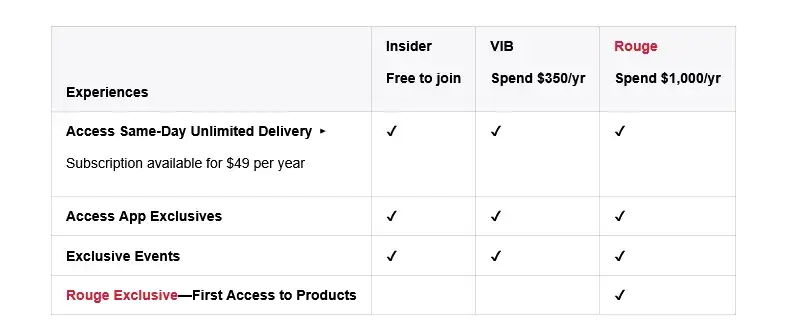
    Sephora creates a tiered rewards system (Insider, VIB, Rouge) that incentivizes higher spending with exclusive perks. Think deluxe samples, early access to products, free beauty classes.

    This gamification drives both frequency and AOV up. Customers strive to reach Rouge status by spending $1,000/year.

    Chewy: Autoship and Exceptional Service

    Chewy is known for great customer service and a successful subscription model (Autoship).

    Autoship lets customers get pet supplies delivered on schedule with a small discount. This boosts LTV by increasing purchase frequency and locking in repeat revenue.

    Chewy’s Autoship helped achieve a roughly 70% customer retention rate – extremely high in retail.

    Chewy goes above and beyond. Handwritten holiday cards. Flowers when a customer’s pet dies. 24/7 support. Easy returns.

    This customer experience focus builds trust and long relationships. Chewy turned one-off pet food purchases into multi-year subscription relationships.

    How Can You Start Tracking and Improving Your LTV?

    Improving LTV comes down to doing many things right for your customer. Here’s a practical framework:

    Measure Your Baseline LTV and Key Metrics

    Start with data you have. Use Shopify apps or built-in reports to find repeat purchase rate, average orders per customer, and LTV for customer cohorts.

    Simple spreadsheet analysis works too. List all customers acquired in 2022. Sum how much each spent through 2023. Average it. That’s your approximate 1-year LTV for 2022 cohort.

    Identify your repeat purchase rate. What percentage of customers have 2+ orders, 3+ orders, etc.? If 70% never reorder, that’s your starting point.

    Check your time to second order. If repeat customers typically take 45 days for their second purchase, engage them heavily in that first 45-day window.

    Track 90-day, 180-day, and 1-year LTV for cohorts. These short-term numbers are actionable.

    Identify High-Value vs Low-Value Segments

    Not all customers are equal. Some have 10x the LTV of others. Segment customers by value.

    Split last year’s customers into quartiles: top 25% (VIPs), middle, bottom 25%. What patterns do you see?

    Maybe VIPs all bought from a certain category. Or came through a particular campaign.

    Use RFM analysis – ranking customers by Recency, Frequency, and Monetary value. This highlights “champion” customers versus “at risk” ones.

    Optimize the Early Customer Experience

    The biggest drop-off is between first and second purchase. On average 74% of new customers are one-and-done. Convert more first-time buyers into repeat buyers.

    • Strong Post-Purchase Follow-up: Don’t treat first orders as transaction endings. They’re relationship beginnings. Send great confirmation emails. Message when products deliver. Follow up weeks later.
    • Personalize Early: Use first purchase learnings to personalize offers. Baby clothes buyers and men’s shoe buyers should get different follow-ups.
    • Capture Zero-Party Data: Engage new customers with quizzes or preference centers. Gather information they willingly share about preferences.
    • Fast, Friendly Service: Early relationship experiences decide if customers return. Good or bad service can make or break future purchases.

    Use Retention and Upsell Tactics

    Once basics are in place, use strategies to lift LTV:

    • Loyalty Programs: Simple punch cards (“10th purchase free”) or elaborate tiered rewards. Reward repeat business.
    • Subscription Options: For recurring products (coffee, pet food, vitamins, beauty), add subscription or “auto-ship” options.
    • Cross-Sell and Upsell: Increase average order value to boost LTV. Offer related products or upgrades.
    • Expand Product Lines: Meet more customer needs. Give them reasons to return and buy again.
    • Reactivation Campaigns: Target customers who haven’t purchased recently. Win them back proactively.

    Launch a Mobile App

    Your best customers want to come back, they want to spend more money with you. You’re just not making it easy for them.

    A mobile app does that.

    Apps are retention machines. They make it easy to come back, give your brand a natural touchpoint (on your customer’s device), and a cheap, direct communication channel in push notifications.

    __wf_reserved_inherit

    Mobile apps are proven to increase repeat purchase rates, customer retention, AOV, and engagement time – all of which leads to significantly higher LTV.

    Any ecommerce brand can launch their own app and boost LTV, with no rebuilding, no hiring developers, and virtually no overhead, with Vendrux. Want to see how? Get a free preview of your app now.

    The LTV Trap

    LTV is a powerful metric. But like any metric, solely focusing on LTV (without taking in a wider context) is dangerous.

    The “LTV trap” is overspending on paid acquisition because “LTV will pay it back.”

    Here’s how to avoid this:

    • Measure margin-LTV (not revenue-LTV). Look at the real profit per customer.
    • Track and optimize other metrics alongside LTV.
    • Track your payback window (as a rule of thumb, you should be making a profit from customers within two quarters at the most).
    • Only scale acquisition channels with a manageable payback window.
    • Compare actual net dollars collected to CAC every month; ignore “forecast” curves until they’re earned.

    The key is to ensure you’re not waiting a long time to pay back the cost of acquisition (unless your business model is specifically built around long payback periods.

    Building Your Brand With LTV as the North Star

    Customer Lifetime Value isn’t just another metric to track on your dashboard. It’s arguably the most important metric.

    Total sales or website traffic looks great on a dashboard or a social media post, but the true value you’re getting from each customer is what matters.

    Higher LTV means more return from your acquisition spend, and a more stable business.

    There is danger in focusing only on LTV, while blocking out everything else. But using LTV as your North Star is a smart way to run an ecom brand.

    Treat your customers as long-term partners, not one-time transactions. That’s how sustainable, profitable businesses work.
  • What 500k Push Notifications Taught Us About Ecommerce Customer Engagement

    What 500k Push Notifications Taught Us About Ecommerce Customer Engagement

    When it comes to ecommerce push notifications, what really makes a shopper click, engage, and convert?

    To find out, we dove deep into the data. The Pushwoosh team analyzed a massive dataset of 500,000 push notifications sent by ecommerce brands over the course of 2024 and the first half of 2025. The research spanned diverse subcategories (from apparel to e-pharmacies), regions, and business sizes, seeking insights into large-scale trends and granular factors driving success.

    Inside this post, we’ll share the key engagement trends and benchmarks we uncovered, reveal average CTR benchmarks, and distill crucial lessons on the power of segmentation, personalization, timing, and compelling content.

    By the end, you’ll have actionable takeaways to refine your own push notification strategy and cut through the noise.

    Know the Benchmarks (But Don’t Settle for Average CTRs)

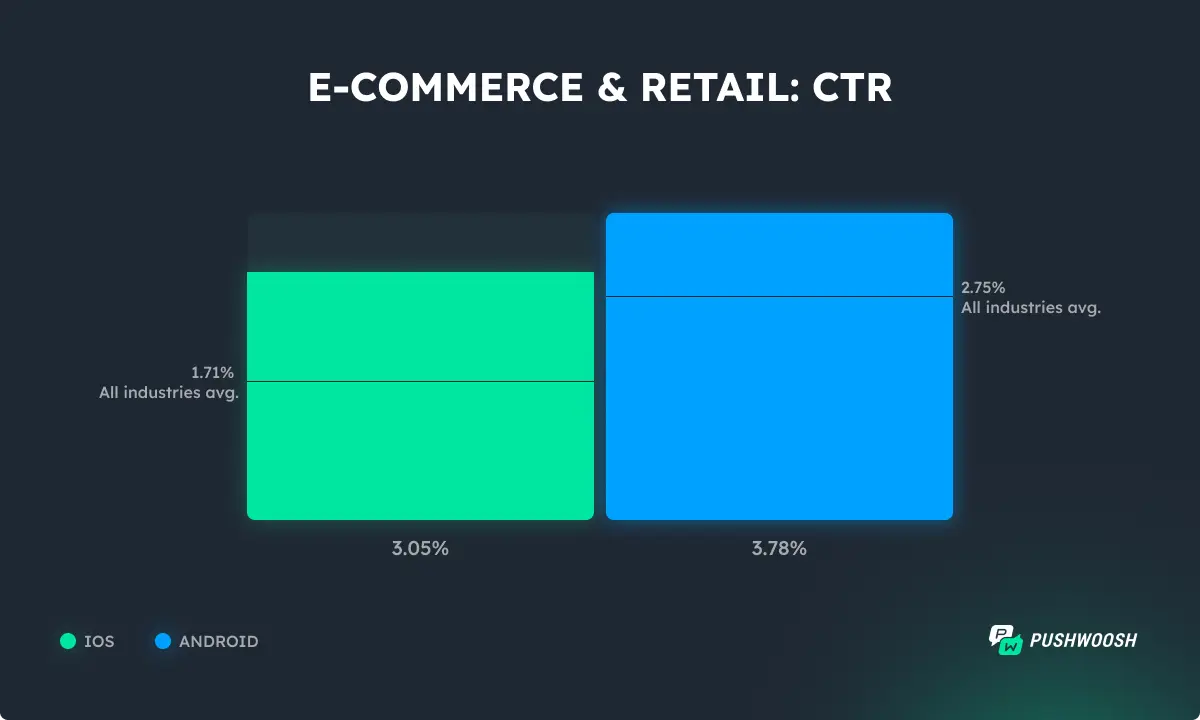
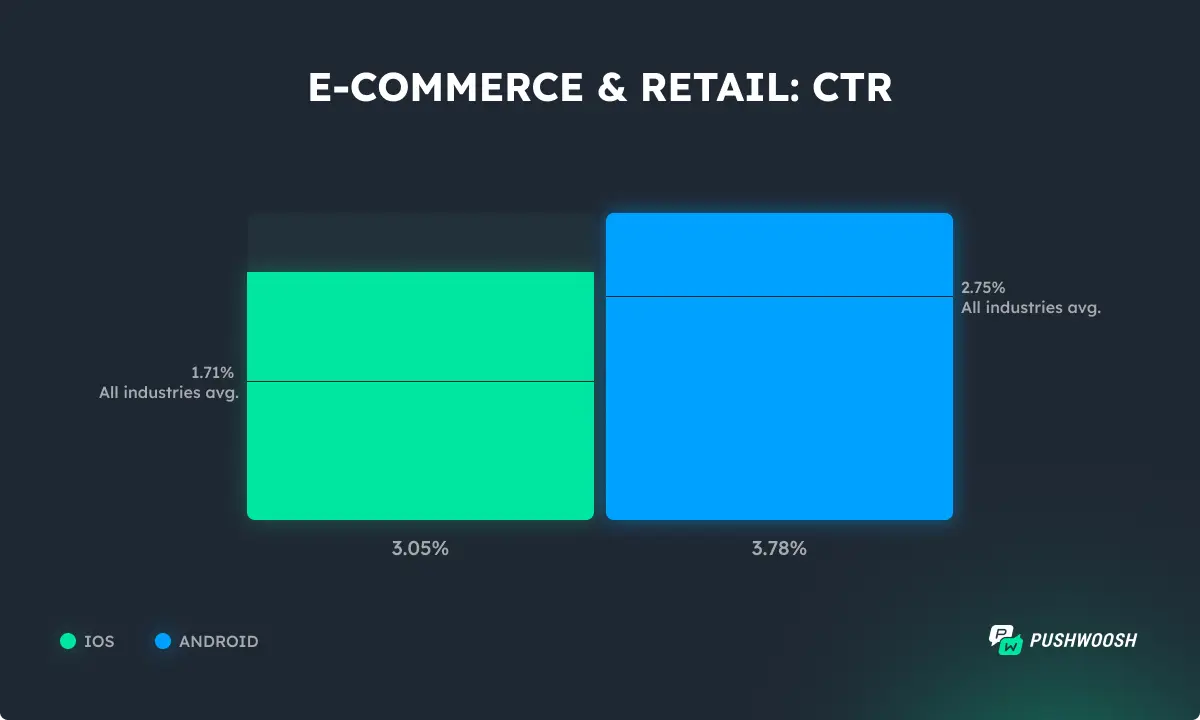
    Ecommerce is among the industries with the highest CTRs. When offers are relevant and timely, they keep shoppers tapping. When it comes to platforms, Android users engage with push notifications more than iOS users.

    Opt-in rates remain close to the all-industries average, indicating that customers expect relevant communication from brands they trust.

    Push notification opt-in rate benchmarks - Ecommerce

    Don’t Chase Daily Engagement: Aim for Regular, Meaningful Touchpoints

    Do shoppers expect to be engaged daily?

    Not at all: users don’t open shopping apps every day, as shown by lower DAU metrics.

    DAU benchmarks - Ecommerce

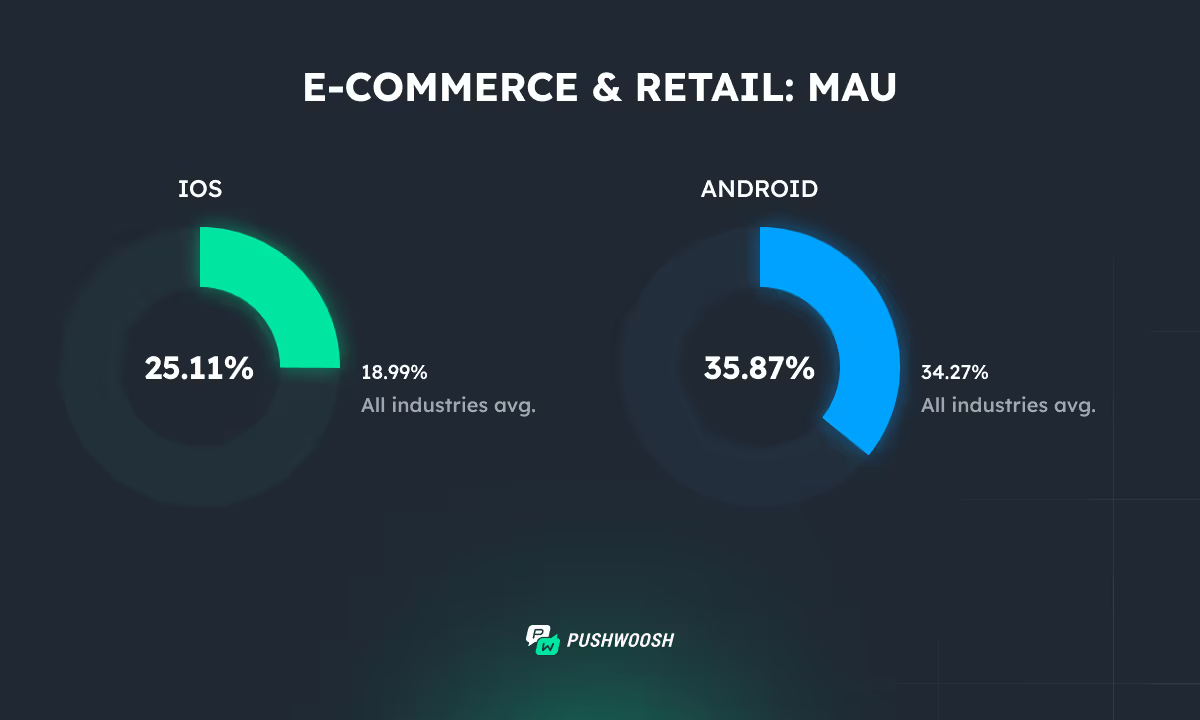
    However, monthly engagement tells a different story. MAUs are higher than the all-industries average.

    Pushwoosh data shows it’s possible to engage even up to 65% of app users monthly.

    MAU benchmarks - Ecommerce

    Align your strategy with this data. Instead of driving daily engagement or sending generic blasts, focus on:

    • Lifecycle campaigns;
    • Re-engagement sequences;
    • Timely promotions that meet users when they are most likely to shop.

    The best-performing ecommerce apps follow this blueprint to drive consistent engagement from push.

    Want more insights on how top brands are using push notifications to build loyalty and grow revenue?

    Here’s what 500k push notifications have to say on the matter.

    Simple, But Regular (Re-)Engagement Brings the Best Results

    Hyper-granular targeting and creative copy can work well. But many brands overcomplicate things.

    In reality, some of the most effective campaigns are the simplest.

    One Pushwoosh customer, an e-pharmacy, saw significant success with just two simple, automated customer journeys:

    1. New user activation: Got 44.3% of new users activated in the first 10 days after the app install.
    Push notifications to activate new e-commerce app users

    1. Inactive user re-engagement: Brought 49.1% of users who hadn’t been active in the past 30 days back to the app.
    Re-engagement push notifications - e-commerce app

    The beauty of these behavior-based targeted campaigns lies in their automation.

    You set them up once based on the simple ‘App Open’ trigger, and they run continuously, catching the right users at precisely the right moment.

    Behavior + Interest Targeting Drives Next-Level CTRs

    While simple triggers are a great start, adding layers of targeting based on what users do and what they like dramatically boosts engagement quality.

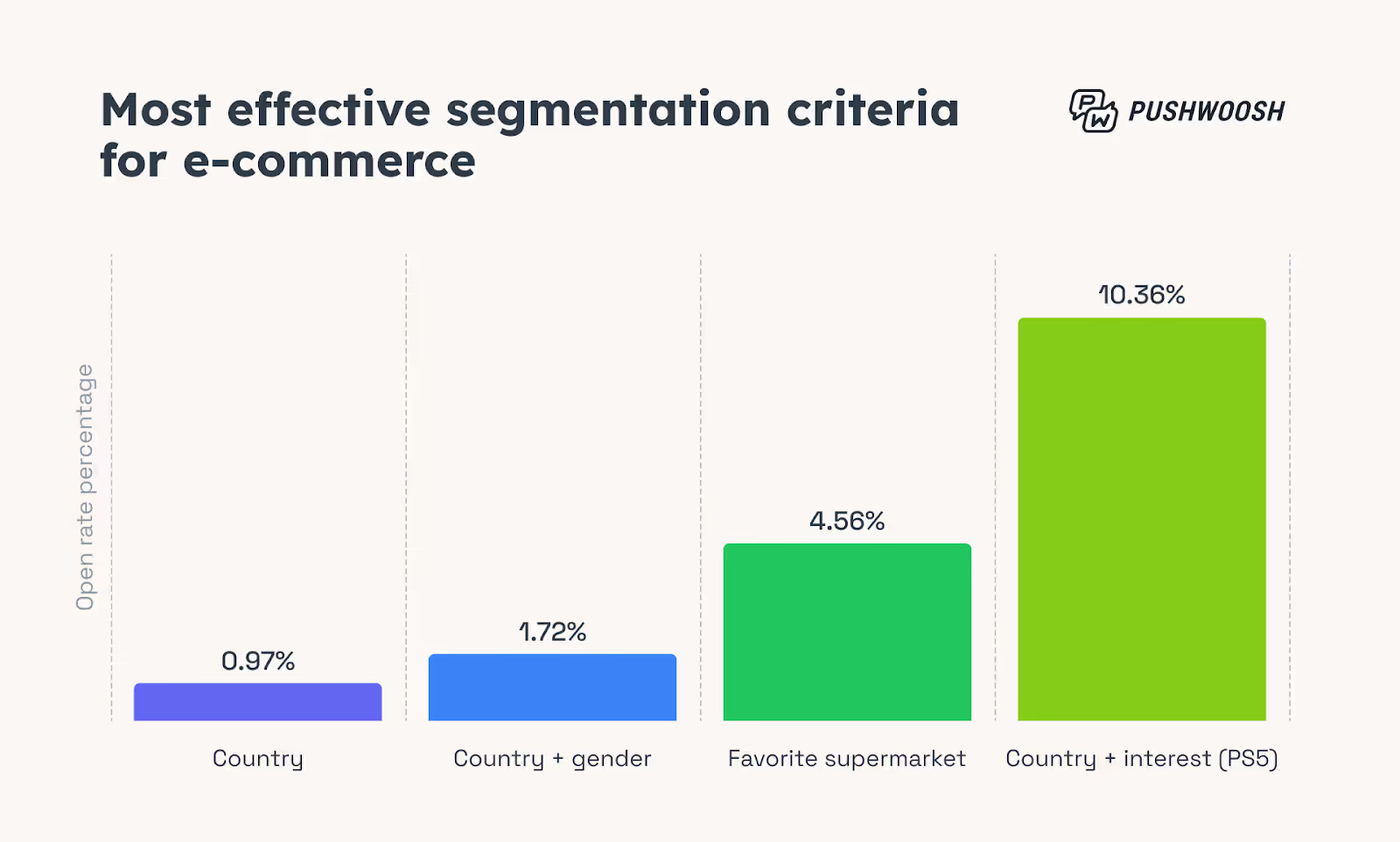
    Pushwoosh’s previous research, reinforced by this 500k dataset analysis, consistently shows that the most engaging campaigns for ecommerce apps use interest-based segmentation.

    Ecommerce brands targeting users based on browsing behavior + interests saw a 10x improvement in CTRs over average.

    Effective segmentation criteria - Ecommerce

    Targeting Loyal and High-Value Customers Pays Off

    Your loyal, high-value customers deserve more than the standard broadcast.

    When brands give tailored attention to this segment, the results speak for themselves: significantly higher CTRs and conversion rates.

    The key is smart segmentation.

    Use RFM analysis (Recency, Frequency, Monetary value) to identify top customers, or leverage your loyalty program tiers to create dynamic segments. Track how customers move between levels and use that as a trigger for exclusive offers, early access to sales, or simple “thank you” messages.

    For example, a beauty brand’s loyalty campaign offering special holiday deals to their “Friends” (top-tier customers) achieved record engagement, proving that a little extra recognition goes a long way.

    Push notification offer for loyal customers

    Simple Personalization = Double the CTR

    You don’t always need complex segmentation to make a message feel personal.

    Sometimes, the simplest tricks yield significant results, especially when they are easy to implement repeatedly.

    In one of the Pushwoosh clients’ experiments, a simple test compared two identical push notifications:

    • One generic;
    • One personalized with the user’s FirstName

    The result? The personalized version achieved double the CTR.

    Using first name in push notifications

    Should personalization go further than this? Yes.

    But this shows that even basic personalization in the message copy creates a stronger connection and significantly boosts engagement.

    Don’t Overlook Transactional and Back-in-Stock Notifications

    While promotional pushes get most of the spotlight, transactional and back-in-stock notifications quietly deliver some of the highest engagement rates.

    These messages work because they are inherently relevant and timely – they meet a clear user intent.

    Shipping updates, order confirmations, and payment notifications consistently outperform marketing campaigns in CTR, because users are actively expecting them.

    Similarly, back-in-stock alerts tap into existing interest and achieve up to 54.35% CTRs, often leading to quick conversions with minimal effort.

    Back in stock targeted push notification

    If you’re not leveraging these “utility” notifications, you’re missing out on easy wins.

    The lesson? Sometimes, the best-performing messages are the ones that don’t try to sell, but to serve.

    Broadcast Messaging Tips: Timing Matters

    Not every message can or needs to be hyper-targeted.

    Broadcast messages (sent to a large segment or your entire audience) still have their place, especially for major announcements or promotions.

    The secret sauce? Time your broadcast pushes right.

    • Special dates (sales events, holidays) naturally boost engagement.

    Whether it’s a Black Friday sale, a Valentine’s Day gift guide, or a summer collection launch, you’ll get a greater impact by sending messages when users are already thinking about shopping for specific occasions.

    Special offer - Valentine Day push notification

    Consider these trends when you schedule your push notifications.

    Key Takeaways for Ecommerce Marketers

    At the end of the day, customer engagement isn’t just clicks. It’s about nurturing habits and building relationships.

    Remember these essentials to maximize engagement from your push campaigns:

    • Smart segmentation isn’t a luxury; it’s a necessity.
    • Automated lifecycle campaigns are your low-effort, high-impact foundation.
    • Timing and content are still your biggest levers when combined strategically.
    • Aim higher: Don’t settle for the average. Significant engagement boosts are achievable through strategic targeting and content.

    By implementing these data-backed lessons, you can leverage push notifications as powerful drivers of both immediate engagement and lasting customer loyalty.

    Focus on these best practices, and the clicks will follow.

    Thanks to Elena Montoya for this post. Elena is the Head of Marketing @ Pushwoosh — an omnichannel customer engagement platform that helps app businesses turn user data into high-converting messaging campaigns and drive revenue at scale.

  • How Salesforce Commerce Merchants Can Launch a Mobile App (Without Rebuilding or Replatforming)

    How Salesforce Commerce Merchants Can Launch a Mobile App (Without Rebuilding or Replatforming)

    Mobile commerce isn’t the future – it’s here, right now. More than 70% of ecommerce traffic is on mobile, making mobile apps an essential retention tool for any ecommerce business.

    If your Salesforce Commerce Cloud store doesn’t offer an app, you risk losing loyal customers to competitors who benefit from push notifications, saved log-ins, and simplified checkout processes available through native apps.

    Customers now expect personalized, instant shopping experiences. And apps provide exactly that.

    Fortunately, launching a powerful native app doesn’t have to mean rebuilding everything from scratch (or abandoning Salesforce to settle for a less sophisticated platform). There are ways for Salesforce Commerce Cloud merchants to harness their current stack, preserving all the customizations, integrations, and workflows they’ve already optimized, without taking on a massive project in the process.

    In this guide, we’ll explore exactly how you can achieve this efficiently and with minimal risk, ensuring your brand stays competitive in mobile-first markets.

    Unique Pain Points for Salesforce Commerce Store Owners

    Here are several specific challenges Salesforce Commerce Cloud merchants face when it comes to launching a mobile app:

    Limited Compatible App Builders

    App builders are a great way for ecommerce brands to ship apps fast, for a low cost, without hiring developers.

    But most no-code app builders primarily cater to Shopify sites (with a few also supporting WooCommerce/Magento/BigCommerce).

    Finding app builders compatible with Salesforce Commerce Cloud’s APIs (SCAPI/OCAPI) can be particularly challenging, limiting available options and increasing complexity.

    Feature Parity

    Most Salesforce Commerce brands are on the platform because of SFCC’s ability to build unique, intricate features.

    You may have custom bundles, loyalty program integrations, detailed A/B testing, specialized payment flows, and other tweaks that you rely on. And you need these to carry over to your mobile apps.

    The question is if these unique web features will still work seamlessly in the app.

    Rebuild Fatigue

    Your team has already dedicated substantial resources to developing your web experience.

    Does building a mobile app mean starting all over again for iOS and Android?

    The idea of rewriting APIs or screens for mobile feels redundant, expensive, and exhausting.

    Scalability & Update Concerns

    Updates to the SFCC platform can inadvertently disrupt mobile apps. A small change can throw a wrench into the integration between your website and app, breaking your app (or sending the platforms out of sync).

    This can be costly, in terms of lost sales, brand damage, or the cost of calling in developers to re-build the integration.

    Total Cost of Ownership

    Maintenance for native apps can quickly escalate into significant recurring expenses (often reaching six figures annually). This is especially true if each web-based change needs extra work to replicate across both iOS and Android platforms.

    The Three Main Paths to an App

    Salesforce Commerce Cloud merchants generally have three options to launch a mobile app.

    Let’s look at these options now.

    1. Wrapper / Site-to-App Converter (e.g., Vendrux)

    What It Is: A lightweight native shell that renders your existing live storefront.

    Launch Timeline: Typically 3–6 weeks.

    Pros:

    • 100% feature parity with existing website.
    • Single codebase maintenance.
    • Built-in push notifications and deep linking.
    • UX mirrors your mobile web, ideal if your existing UX is already strong.

    Cons: Limited native customization.

    Best Fit: Brands prioritizing speed and minimal development effort.

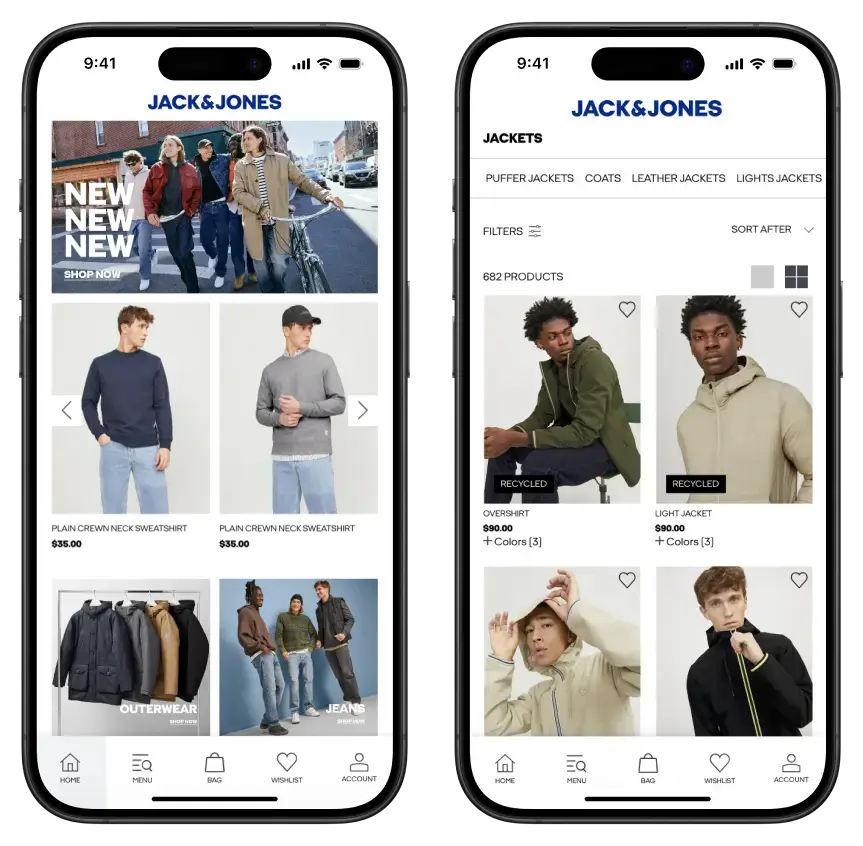
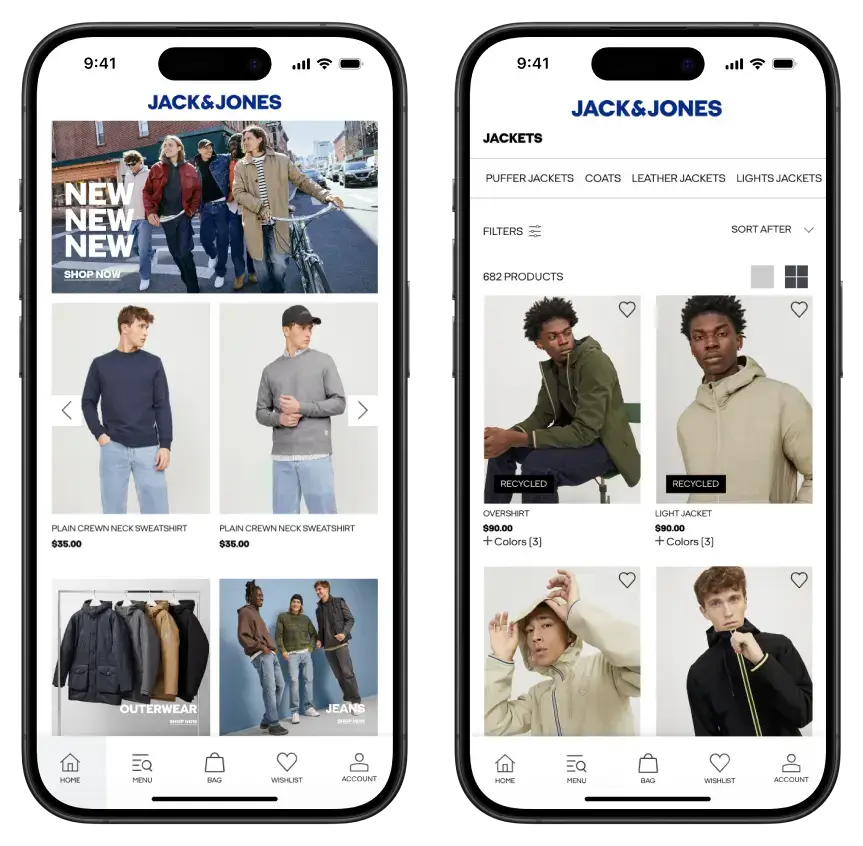
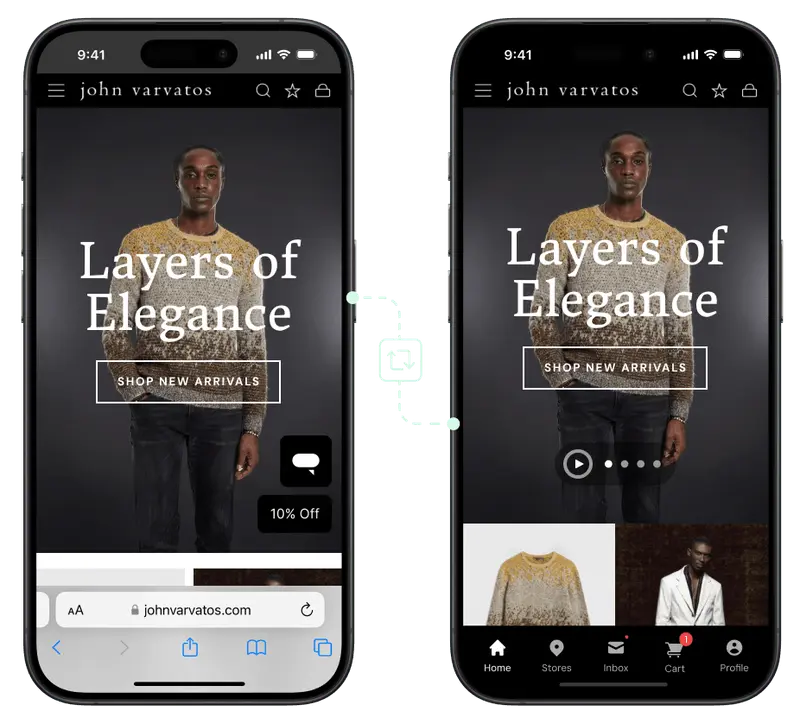
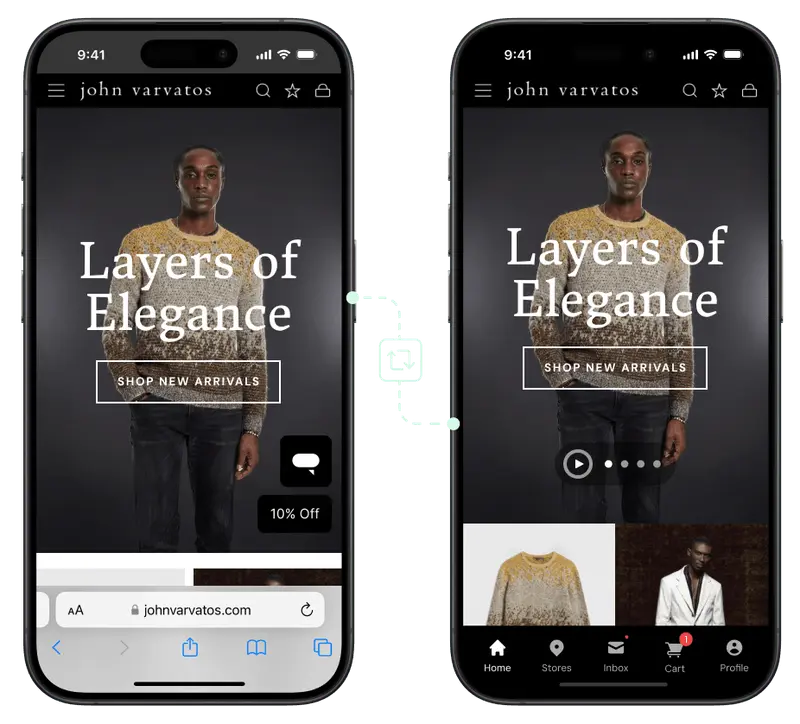
    Want to see what’s possible? Vendrux has helped 20+ Salesforce brands, including Jack & Jones and John Varvatos, build mobile apps for minimal cost and overhead (without sacrificing any features from their website).

    See it for yourself: Get a Free Preview of Your App Now.

    __wf_reserved_inherit

    2. Headless Native Build (e.g., React Native / Flutter)

    What It Is: A fully native app developed using technologies like React Native or Flutter, integrated with SFCC’s SCAPI.

    Timeline: 4–6 months.

    Pros:

    • High performance and full native capabilities.
    • Customized user flows and offline access.

    Cons:

    • Significant upfront build and API costs.
    • Continuous maintenance of dual-stack environments.

    Best Fit: Large teams pursuing highly customized user experiences.

    3. Composable PWA + Capacitor

    What It Is: Your storefront built as a Progressive Web App (PWA) and wrapped in Capacitor for native distribution.

    Timeline: 2–3 months.

    Pros:

    • Unified JavaScript codebase.
    • Moderate access to native device APIs.

    Cons:

    • Performance slightly lower than fully native apps.
    • Some native OS feature limitations.
    • Requires dev resources.

    Best Fit: Merchants already moving toward a composable storefront architecture.

    Why Vendrux Is the Best Way to Build Your App

    Vendrux is the most efficient and strategic path for Salesforce Commerce Cloud merchants to launch mobile apps (without sacrificing functionality, speed, or future scalability).

    Vendrux is a fully-managed service that turns your existing SFCC site into a high-performance iOS and Android app in just a few weeks. 

    Unlike DIY app builders or complex native development, there’s no need to rebuild or replicate your storefront. Everything you’ve already invested in (your custom features, integrations, and design) works out of the box.

    What sets Vendrux apart:

    • Full Feature Parity: Your app mirrors your live SFCC site, including advanced features like custom checkout flows, loyalty programs, and more.
    • No Duplicated Work: Updates to your website reflect instantly in your app. No double maintenance, no additional engineering required.
    • Fully Compatible: Vendrux supports any website, on any tech stack. This includes complex Salesforce environments, including headless setups and bespoke workflows.
    • Push Notifications: Unlock the power of direct customer engagement with built-in push support. Vendrux sets up everything – from Firebase/APNS keys to segmentation and campaigns. There’s also an option for Done-For-You push services if you need ongoing execution.
    • Predictable, Flat Pricing: No revenue sharing or variable fees. Transparent pricing based on usage means you always know your costs, with support, updates, and app maintenance included.
    • Fast, Reliable Launch: Your app is typically live in 4–6 weeks, with the Vendrux team handling setup, store submissions, testing, and optimization. We’ve done this 2,000+ times – you’re in experienced hands.
    • Long-Term Strategic Support: You’re not left to figure things out on your own. Our team stays engaged post-launch to help drive adoption, retention, and ROI through proactive support and growth consulting.

    Vendrux is more than a wrapper. It’s a high-touch mobile app partner.

    For Salesforce Commerce merchants looking to launch fast, avoid redundant dev work, and drive measurable results, there’s no better option.

    See your app in action: Get a Free Preview Now

    Decision Framework for Salesforce Teams

    Struggling to decide on the best strategy for your mobile app?

    Here’s a framework for Salesforce Commerce Cloud merchants to consider to make the right decision:

    • Audit Mobile Web UX: Ensure pages load quickly (
    • Identify Essential Native Features: Clearly list features only achievable with native apps, like offline functionality or barcode scanning.
    • Estimate Engineering Resources: Determine if you have adequate internal mobile development resources for a complex, native build (typically 1–2 dedicated engineers for at least six months).
    • Project ROI & Timeline: Calculate potential revenue uplift from enhanced mobile experiences (push notifications, saved logins) against the costs and delays associated with longer development cycles.
    • Run Proof-of-Concept: Quickly validate performance and compatibility with solutions like Vendrux, comparing key performance indicators (KPIs) against other prototypes.

    Implementation Roadmap (for the Vendrux Path)

    Let’s say you go with Vendrux, to convert your Salesforce Commerce site into an app. What will the process look like? How much work will it take to launch?

    Here’s how the roadmap shakes out.

    Week 0 – Kickoff & Setup

    We start with a brief kickoff call and onboarding form. You’ll share your website URL and a few brand assets, as well as any specific requirements for your app. Then we take over.

    Week 1 – App Configuration

    Our team configures your app to match your website’s navigation, design, and functionality, ensuring full feature parity. 

    Your checkout flows, loyalty programs, and third-party integrations all work the same in your app as they do on your website. 

    On the app side, we build several native functions, such as push notifications and native nav UI, to make your app feel more custom.

    Weeks 2–3 – Preview & Testing

    You’ll receive test versions of your app through TestFlight and Play Console. We walk through your app together to validate key journeys like login, cart, and checkout. 

    You provide feedback.. We refine until everything works exactly as expected.

    Week 4 – Quality Assurance

    Our QA team performs thorough testing across devices, screen sizes, and edge cases. We catch and resolve any issues before submission, ensuring a polished, stable experience.

    Weeks 5–6 – Store Submission & Launch

    We handle the full submission process to both Apple App Store and Google Play. This includes screenshot generation, metadata optimization, and ongoing reviewer communication. 

    Once approved, your app goes live. We help you coordinate the launch, activate your push strategy, and monitor early performance.

    Post-Launch – Growth Support

    After launch, we stay closely involved. From push notification campaigns and analytics support to app marketing and CRO consultation, we’re here to help you grow your app into a high-performing retention and revenue channel.

    Final Takeaways

    Salesforce Commerce Cloud merchants don’t need to reinvent their ecommerce platform to capture the benefits of a native mobile app. 

    A web to app solution like Vendrux significantly reduces engineering complexity while preserving all the customizations, integrations, and web architecture you’ve already built.

    Ready to see it in action? Get a free preview of your app to see it in action. All we need is your site’s URL – and we’ll show you a fully interactive version of your Salesforce Commerce Cloud storefront as a mobile app.

  • How to Create Mobile Apps With AI (2026 Guide)

    How to Create Mobile Apps With AI (2026 Guide)

    Building a mobile app used to require months of coding or tens of thousands in development costs. Not anymore.

    Thanks to AI-powered no-code platforms, even solo entrepreneurs can now create real, native mobile apps in weeks rather than months. The barrier to entry has dropped dramatically – you can build a functional AI-enhanced app for under $100 plus your time.

    But here’s the reality check: AI won’t magically build your entire app at the push of a button. Think of it as a very smart co-pilot that handles the grunt work while you guide the vision.

    Can AI Really Build a Complete Mobile App?

    The short answer? Not completely – but it can get you surprisingly far.

    What AI Can Fully Automate Today

    • UI scaffolding – Generate app layouts and screen designs from simple text prompts
    • Data schema generation – Automatically create databases and user workflows based on your app description
    • Boilerplate code – Write basic functionality like user authentication, data storage, and API calls
    • Basic CRUD workflows – Set up standard create, read, update, delete operations without manual coding

    Some platforms can generate app prototypes in minutes. You describe your idea (“a fitness app with workout tracking and AI meal suggestions”), and the AI creates the foundation automatically.

    But if you dig deeper, you might find some things missing.

    Where Human Expertise Is Still Essential

    • Product strategy – Deciding what features matter most and how users should navigate your app
    • Edge-case logic – Handling unusual scenarios that AI might miss or get wrong
    • Prompt refinement – Teaching the AI to generate better outputs through iterative feedback
    • QA & compliance – Ensuring your app meets App Store and Google Play review standards

    AI can get you roughly 80% of the way there. The final 20% – polishing, debugging, and user experience refinement – still requires human judgment.

    How to Build Your App with AI (Five Paths to Consider)

    If you want to leverage the power of AI to build your mobile app, there are a number of different ways to do it.

    Choose your approach based on your technical comfort level and app complexity:

    1. No-Code Tools w/AI Features

    Best for: Simple apps with standard features 

    Tools: Adalo, Glide, Bubble

    Pros: Visual drag-and-drop, AI assist

    Cons: Limited customization, potential platform lock-in, limited use of AI

    Pure no-code platforms are designed for complete beginners who want to build functional apps without touching a single line of code. 

    This value proposition aligns tightly with AI app building. So it makes sense that most of these tools now also have AI-powered features.

    It’s not exactly “building with AI”, more building “with the assistance of AI”. You’ll still need to work within the confines of the platform, and it’s not as easy as saying “make me a ___ mobile app”.

    2. Low-Code with AI Assist (Balanced)

    Best for: Apps with a little more customization (for builders with some dev knowledge)

    Tools: FlutterFlow, Draftbit

    Pros: More flexibility, can export code later 

    Cons: Steeper learning curve. Still some limitations

    Low-code is a midpoint between no-code and custom development. They come with a visual builder, like a no-code tool, but require a little knowledge about how coding works. The idea is not necessarily to allow non-developers to build apps, but to let developers build apps faster.

    Also like no-code tools, low-code tools are increasingly becoming AI-powered. They may have the ability to prompt AI to create a specific component, and have it spin the component up for you. 

    These AI features let you move faster, but again, are not 

    3. AI Coding Assistants (Developer-Friendly)

    Best for: Those with programming experience

    Tools: GitHub Copilot, ChatGPT, Claude 

    Pros: Flexibility, accessibility

    Cons: Requires coding knowledge

    For developers who want complete control over their mobile app, AI coding assistants act as incredibly smart pair programmers. 

    These tools understand your coding patterns and can generate entire functions, debug complex issues, and even architect app structures based on natural language descriptions.

    This includes LLMs like Chat GPT and Claude. You can ask these platforms to generate code for you. However, the downside is that you still need to understand how to use this code to deploy your mobile app. It’s easy to get stuck if the generated code doesn’t work as expected.

    4. AI-Generated Progressive Web Apps

    Best for: Quick prototypes and simple use cases 

    Tools: Replit, Cursor, Lovable, v0.dev, Chat GPT/Claude

    Pros: Fastest to build and deploy 

    Cons: Limited native mobile features

    5. AI Mobile App Builders

    Best for: Fully AI-built mobile apps

    Tools: Rork, Cursor

    Pros: Full control, no platform limitations 

    Cons: Less mature market, may be difficult for fully non-technical people

    AI mobile app builders are the way to directly create a mobile app with AI

    There are fewer of these tools available on the market. You’ll find a ton of results if you search for “AI app builder”, but most are either:

    • AI web app builders (not able to create native mobile apps)
    • No-code/low-code tools with AI features or assistants

    Tools like Rork and Cursor, however, actually let you send a prompt with your idea (“I want to create an expense tracking app”) and create a fully-functional mobile app.

    It won’t be a one-shot (it’s an iterative process; not creating an entire mobile app with one prompt). But it’s the most AI-first way to build a mobile app today.

    Extra: Turn Your AI Web App Into a Mobile App With Vendrux

    One more approach you can consider is building for the web first, with your AI tool of choice, then using using Vendrux to turn it into a real iOS and Android mobile app.

    Vendrux is a service to turn websites and web apps into mobile apps. It works with any platform or tech stack, giving you the freedom to use any AI app builder (Replit, Cursor, Lovable) and still get fully functional mobile apps.

    You’ll build for the web first, then we’ll turn that web app into a native mobile app. You’ll still only have to maintain the web side – your mobile app syncs up automatically.

    Why This Hybrid Strategy Works So Well:

    • Freedom of choice: Use any AI tool or web builder to create your app. No need to sift through new and fragile AI mobile app platforms.
    • Simplified codebase: Build once for the web, and that’s it. Vendrux keeps your app in sync with your site, so you never manage separate platforms.
    • Zero mobile-specific bugs: No worrying about confusing mobile framework errors. Your app works exactly like your site, just wrapped in a mobile shell with native features.
    • Real mobile advantages: You still get App Store/Play Store presence, home screen placement, and high-ROI push notifications.

    If your goal is to launch an AI-powered app that earns real revenue and doesn’t break on you, this combo is hard to beat.

    You focus on the web experience. Vendrux makes it into a mobile app, without any extra effort or complexity.

    Already have your website or web app live? Get a free preview of what it will look like as a mobile app.

    What To Watch Out For When Using AI to Create Apps

    Here are some things to look out for if you decide to go the AI-native route.

    Model Hallucinations & Inaccuracies

    AI sometimes generates plausible-sounding but incorrect code or advice. Always add guard-rails and human review, especially for regulated industries like healthcare or finance.

    Pro tip: Test your AI features extensively with edge cases and unusual inputs.

    Latency & Cost of Cloud AI

    API calls can add seconds of delay and rack up costs quickly. A popular app making thousands of AI requests daily could see bills in the hundreds per month.

    Solution: Budget using usage forecasts and consider caching common responses.

    Platform Lock-In

    Some builders charge hefty fees to export your raw code later.

    Smart move: Choose platforms like FlutterFlow or Draftbit that allow code export, or plan your exit strategy upfront.

    Data Privacy & Compliance

    When your app sends user data to AI services, you need to handle it responsibly.

    Requirements:

    • Disclose AI use in your privacy policy
    • Filter objectionable AI outputs
    • Meet GDPR/CCPA requirements for data handling

    App Store AI Policies

    Apple and Google now require labeling and moderation for AI-generated content.

    Key rules:

    • Clearly mark AI-generated content
    • Implement content moderation for user-facing AI features
    • Avoid deceptive or harmful AI outputs

    Skill Learning Curve

    “No-code” doesn’t mean “no effort.” Expect to invest 30-50 hours learning platform workflows if you’re building your first app.

    Reality check: You’ll still need to understand concepts like databases, API calls, and user authentication – the tools just make them visual instead of text-based.

    How Much Does it Cost to Build an App With AI?

    Cost is, obviously, one of the biggest advantages of being able to use AI to create mobile apps. So just how cheap is it?

    Let’s break it down, item by item.

    • No-code platform plans: $30–$60/month
    • AI API usage (OpenAI GPT-4): $0.002/1K tokens
    • Developer accounts: Google Play: $25 one-time; Apple: $99/year
    • MVP build time: 1–3 weeks solo

    Total realistic budget: $100-300 for your first app launch, plus your time investment.

    It can certainly vary by complexity. Some projects may cost a lot more.

    But compare this to hiring developers: even simple apps often cost $10,000-50,000+ when built traditionally.

    What Are Some Best Practices for Building Apps With AI?

    Here are some best practices to follow if you’re looking at going down the rabbit hole of AI app creation (especially if you’re planning to generate revenue from your app).

    Start With One “Hero” Feature

    Don’t try to build everything at once. Pick one AI-powered feature that delivers clear value and nail that first.

    Example: Instead of “an app that does everything with AI,” focus on “a plant identification app that uses AI vision to recognize species.”

    Prompt Engineering 101

    Maintain a library of your best prompts and iterate based on real-world edge cases.

    Good prompt structure:

    • Context: “You are a fitness coach chatbot…”
    • Task: “Help users create workout plans…”
    • Constraints: “Keep responses under 100 words and always recommend consulting a doctor…”

    Blend AI & Human QA

    Combine automated tests with human beta feedback to catch AI hallucinations and edge cases.

    Testing strategy:

    • AI agents can run thousands of test scenarios quickly
    • Human testers catch usability issues and nonsensical AI outputs
    • Real users provide the final validation

    Monitor & Iterate

    Use analytics plus AI summarization to prioritize roadmap updates quickly.

    Track which AI features users engage with most, then double down on what works.

    Plan for Scale Early

    Choose platforms that allow code export or custom plugins once your user base grows.

    Scaling path: Start no-code → Add custom features → Eventually migrate to fully custom development if needed.

    Final Thoughts

    The AI app development landscape in 2026 gives individual creators unprecedented power to build real, functional mobile apps quickly and affordably.

    You don’t need a computer science degree or a massive budget anymore. But you do need patience, willingness to learn platform workflows, and clear vision for what problem your app solves.

    AI accelerates the building process dramatically, but your guidance and iteration make the difference between a demo and a product people actually want to use.

    Make sure you understand that building mobile apps with AI isn’t as simple as a one-shot prompt, letting AI do all the work. You need to guide it, and it’s possible to get stuck if you run into bugs you don’t understand.

    If you’re looking for an AI-powered way to create a mobile app for your existing website, consider Vendrux instead. It’s essentially the same thing: no coding, no rebuilding, just a smooth conversion from website to app, but with no AI hallucinations, no API fees, and a stable mobile app that won’t break on you.

  • How Much Does It Cost to Build a Custom Shopify Mobile App?

    Bottom Line: Building a custom, native mobile app for your Shopify store requires a significant investment, typically ranging from $40,000 to $500,000 or more. The exact cost depends on your development approach, feature requirements, and team location. That’s why we advise brands to take a simpler approach, like Vendrux, which gives you all the value of a custom mobile app, for mid-five figures upfront, and $1,499 per month going forward.

    Mobile commerce now drives over 70% of ecommerce traffic. Paid acquisition is getting more expensive, and traditional retention channels like email and SMS are becoming more saturated.

    That makes having a dedicated mobile app essential for competitive Shopify stores.

    You might be thinking about building a custom mobile app. While this offers the highest level of performance, it comes with a significant cost as well.

    This guide breaks down development costs for different approaches (high-end agencies vs budget teams), explains the key factors driving pricing, and reveals the ongoing expenses you’ll face after launch.

    At the end, we’ll show you a more affordable way to launch your own mobile app – one that saves more than 90% of the cost, while maintaining the experience a fully custom Shopify mobile app.

    Want to skip ahead and find out the most cost-effective way to launch your mobile app? Start with a free preview of your app – then we’ll explain why this is unbeatable value for money.

    Shopify Mobile App Development Costs by Approach

    The cost to build a mobile app for a Shopify store is far from standard. There are a range of different ways to approach this, and even among agencies and mobile app developers, costs vary greatly.

    Here are a few different estimates to consider.

    Premium Agency Development: $200,000 – $500,000+

    Top agencies charge $200,000 to $500,000+ for custom Shopify mobile apps. These companies hire the best developers, designers, and project managers. As a result, they’re likely to deliver the highest-quality end product as well.

    Why premium agencies cost more:

    • Developers from the US or Europe charge $100-$150 per hour
    • You get complete service including planning and testing
    • Faster work with teams focused on your project
    • Advanced features like AI suggestions or virtual try-ons

    Budget-Friendly Custom Development: $40,000 – $100,000

    Budget custom development costs $40,000 to $100,000 for Shopify mobile apps with all the features you expect. 

    This option uses teams from countries where developers cost less. The hope (for you) is that these developers will still be able to deliver an end product that measures up to more expensive US-based teams.

    What you get for the price:

    • Developer rates: $30-$50 per hour (Eastern Europe/Asia)
    • Standard features: product pages, search, cart, loyalty points
    • Average custom ecommerce app cost: $50,000-$100,000

    What to expect:

    • Longer build times (6-12 months vs 3-6 months)
    • More project management work for you
    • Possible communication issues across time zones

    In-House Shopify Mobile App Development: $200,000 – $400,000+

    Want to bring it all in-house, and hire your own people? Building in-house costs $200,000 to $400,000+ when you add up hiring, salaries, and tools. You need iOS developers, Android developers, designers, and testers.

    Team costs breakdown:

    • 4-5 team members working for 6+ months
    • Each person costs $8,000-$15,000 per month (with benefits)
    • Extra costs for software tools and equipment

    Long-term costs:

    • You pay salaries even after the app launches
    • Need to keep the team for updates and fixes
    • Risk losing team members who know your app

    What Drives Shopify Mobile App Development Costs

    Let’s dive deeper. Where does this cost come from? Is there any way to jettison unnecessary costs and cut the price down?

    Six main factors decide how much you’ll pay for your mobile app. Understanding these helps you make smart choices about features and teams.

    App Features and Complexity Costs

    The features you want are the biggest cost factor. Basic apps with very simple shopping features cost $5,000-$25,000. But more feature-rich apps easily cost over $150,000.

    Basic Shopify app features:

    • Product pages with search and filters
    • User accounts and order history
    • Shopping cart and checkout
    • Push notifications for sales

    Advanced features that cost more:

    • Loyalty program integrations (Yotpo, Smile.io)
    • Subscription orders (Recharge, Bold)
    • Personal product suggestions
    • Virtual try-on features
    • Advanced tracking and marketing

    Each extra feature adds 20-40 hours of work. For example, adding and integration for Yotpo loyalty points needs API connections, new screens, and testing with different users.

    iOS vs Android Development Costs

    iOS vs Android development costs roughly double your investment when building natively for both platforms. 

    Most Shopify stores need both since customers use a mix of iPhones and Android devices.

    Platform-specific development:

    • iOS development requires Swift programming and Apple design guidelines
    • Android development uses Kotlin and Google Material Design standards
    • Shared elements: API integrations, design assets, project management

    Cost examples:

    • Single platform: $100,000
    • Both platforms: $170,000 (not quite double due to some shared work)
    • Native apps provide better performance than cross-platform alternatives

    You can save money by building with cross-platform frameworks, like React Native and Flutter. These frameworks let you build for both iOS and Android with the same programming language, and share more code across platforms.

    It doesn’t quite cut the cost in half, but close to it. For ecommerce apps, there’s not much need for fully native development on each platform, so React Native would certainly be a smarter way to go.

    Mobile App Design Costs

    Mobile app design costs range from $5,000 for basic layouts to $20,000+ for custom interfaces optimized for mobile commerce. 

    Budget design approach:

    • Reuse existing brand assets and color schemes
    • Leverage standard iOS/Android interface components
    • Simple layouts with minimal custom graphics

    Premium design investment:

    • Custom mobile-first interface design
    • Smooth animations and micro-interactions
    • Professional product photography optimization
    • Typically 400+ hours of design work

    Poor design hurts conversion rates more than missing features. Users expect smooth navigation, fast loading, and intuitive checkout flows. Investing in quality design pays dividends through higher user engagement and sales.

    Shopify Integration Costs

    Shopify integration costs vary based on the third-party services your store uses. Every additional integration adds development time for API connections, data synchronization, and testing.

    Core Shopify integrations:

    • Storefront GraphQL API for product data
    • Mobile Buy SDK for checkout processing
    • Customer account and order history sync

    Common third-party integrations:

    Each integration requires reading API documentation, handling data syncing, and ensuring the app stays synchronized with your website. 

    Experienced developers budget substantial time for integration work since APIs often have quirks requiring troubleshooting.

    Developer Rates by Location

    Where your developers are located will dramatically impact your total investment.

    Developers in high-cost areas (US and Europe, and especially centers like NYC, LA, London) charge more. While those in areas with lower cost of living can afford to offer lower rates.

    Geographic arbitrage allows you to access skilled developers at lower hourly rates without sacrificing quality.

    Rate ranges by region:

    • North America/Western Europe: $100-$150/hour
    • Eastern Europe: $40-$60/hour
    • South/Southeast Asia: $20-$50/hour
    • Latin America: $25-$60/hour

    Quality considerations:

    • Portfolio review and client references matter more than location
    • Communication skills and timezone overlap affect project efficiency
    • Some regions specialize in specific technologies (e.g., React Native, Flutter)

    A $300,000 project with a US agency might cost $80,000 with a skilled Eastern European team. However, factor in potential communication overhead and longer project management requirements when comparing options.

    App Testing and Quality Assurance Costs

    App testing and quality assurance costs represent 15-25% of your development budget but prevent costly post-launch issues. 

    Your mobile apps require thorough testing before launching. Checkout failures or other bugs directly impact revenue, and a few bad reviews can kill your momentum before you get started.

    Testing requirements:

    • Multiple device models and screen sizes
    • Different iOS and Android OS versions
    • Payment processing and checkout flows
    • Push notification delivery and timing

    QA process timeline:

    • 2-4 weeks of dedicated testing for standard apps
    • Beta user testing with real customers
    • App store submission and review process

    Agencies include QA in their pricing, but budget builds might require you to handle more testing internally. 

    Plan for a round of bug fixes after initial testing. No app launches perfectly on the first attempt.

    Ongoing Cost of Shopify Mobile Apps

    Perhaps you’re comparing the cost of building a custom Shopify mobile app to a subscription service, from a Shopify mobile app builder.

    We’ve heard this before. Brands don’t want the recurring cost of a subscription, and think they can save by spending more upfront, but as a one-time cost.

    Unfortunately, mobile app development isn’t a one-time cost. You’ll pay ongoing expenses for maintenance, updates, and improvements that typically equal 15-20% of your initial cost each year.

    There’s really no way to avoid this. If you think you can build once, and never invest in it again, you’re going to end up with an outdated app that soon doesn’t work.

    App maintenance typically costs 15-20% of your initial development cost each year. For a $100,000 app, budget at least $15,000-$20,000 annually for essential upkeep.

    This comes from standard app maintenance, which includes:

    • iOS and Android updates for new versions
    • Shopify API changes and third-party service updates
    • Security fixes and bug repairs
    • Speed improvements and monitoring

    Maintenance cost ranges:

    • Basic apps: $2,000-$6,000 per year
    • Standard shopping apps: $15,000-$20,000 per year
    • Complex apps (more integrations, multi-config): $25,000+ annually

    These are conservative estimates, too. It’s assuming that nothing major goes wrong, and workflows run smoothly.

    Some brands we’ve talked to ballparked this as mid-six figures per year. So much for a one-time expense.

    A Smarter Alternative: Convert Your Shopify Store into a Mobile App with Vendrux

    Here’s the problem with spending $50K+ on a custom mobile app.

    When you spend that much, it’s an uphill battle to achieve a positive ROI. You really need strong adoption to make your money back (and with the timeline, you’re not even going to launch for 6 months or more).

    Vendrux takes a different approach: instead of rebuilding your store as a custom native app, it converts your existing Shopify site into high-performing mobile apps for iOS and Android. 

    Your website powers the app. So the core of the app experience is your website, with native elements like a native onboarding screen, mobile navigation and push notifications added on top.

    Cost to Convert Your Shopify Store into an App

    Converting your Shopify store into a mobile app with Vendrux is simple and cost-effective. The whole process is done for you, including build, publishing to the app stores, and ongoing maintenance.

    As we’re reusing what you’ve already built, it’s significantly faster (around two weeks for a working version), and much more affordable.

    Costs break down as follows:

    • Setup fee: $5,000 (one-time)
    • Monthly subscription: $1,499 per month
    • Staff hours: virtually none. Your website updates automatically sync to your app, and our team handles app maintenance, updates, and store compliance.

    Cost Comparison

    Let’s see how that cost compares to the cost of building a custom mobile app.

    Custom Shopify Mobile App Development:

    • Upfront cost: Anywhere from $40,000 to $500,000+
    • Annual maintenance: $50,000+ (ongoing developer time, bug fixes, OS updates)

    Vendrux (Converting Your Site to an App):

    • Upfront cost: $6,499 (setup + first month)
    • Annual cost: $15,288 (on annual billing)
    Vendrux lets you launch high-quality mobile apps for a fraction of the cost of custom development.

    Quality & Performance Comparison

    “But I need a high-quality app, not a cheap imitation.”

    Vendrux apps give you 95% of what a custom mobile app gives you.

    Think about it. You’ve already poured untold money, time and effort into optimizing your mobile website. Realistically, you don’t need much more than this in your app.

    Small alterations and additions – like we do – turn your mobile website into a like-native app experience. Native navigation, a native welcome screen, push notifications, and an icon on the customer’s home screen.

    Custom apps will be a little faster, a little smoother. But is the improvement worth paying half a million dollars more? We don’t think so.

    Want to see what’s possible? Check out these case studies from major brands we work with.

    ROI Implications

    Because Vendrux removes the heavy upfront investment and ongoing engineering burden, your break-even point arrives dramatically faster. 

    Instead of needing years to pay back a six-figure build, you can see positive ROI within weeks of launching.

    We find brands typically generate 10-30% of their total revenue through their mobile app. Even considering not all of that is new (incremental) revenue, you can expect $150,000+ yearly in app revenue for a 7-figure brand.

    If you’re spending $500K on an app, that’s years before you break even. With Vendrux, just a couple of months.

    Final Thoughts

    Today, your brand needs an app. If only to provide a more convenient way for your best customers to interact with you.

    Your loyal customers want an app. They want direct updates and communication via push notifications, and one-tap access from their home screen.

    But the traditional approach of custom development comes with a six-figure price tag, long timelines, and ongoing maintenance headaches that few brands can realistically justify.

    Vendrux changes that equation. By converting your existing Shopify store into fully native iOS and Android apps, you get all the value of a custom build at a fraction of the cost. 

    Your app can be live in weeks, not months, with virtually no internal resources required.

    Want to see what’s possible? Get a free preview of your app now. We’ll show you a working demo that proves there’s no need to spend half a million dollars on a Shopify mobile app anymore.

    Shopify Mobile App Development Costs: FAQs

    How much does a basic Shopify mobile app cost?

    A basic Shopify mobile app costs $40,000-$100,000 for standard features like product browsing, user accounts, and checkout. More likely, you can expect the price tag to eclipse $200,000+.

    What’s the difference between native and cross-platform development costs?

    Native development costs about 50-70% more than cross-platform but delivers better performance and user experience. Native apps for both iOS and Android typically cost $40,000-$500,000 vs $25,000-$300,000 for cross-platform solutions.

    How much should I budget for app maintenance?

    Budget 15-20% of your initial development cost annually for maintenance. A $100,000 app typically needs $15,000-$20,000 per year for updates, security patches, and compatibility fixes.

    Can I build a quality Shopify app for under $50,000?

    You may be able to build a solid Shopify app for $40,000-$50,000 using skilled offshore developers or freelance teams. This works well for apps with standard ecommerce features, but apps for larger and more complex stores will be hard to fit under this limit.

    What integrations are essential for a Shopify mobile app?

    Essential integrations include Shopify’s Storefront API, Mobile Buy SDK for checkout, and your key business tools like loyalty programs (Yotpo), subscriptions (Recharge), and email marketing (Klaviyo).

    How long does custom Shopify app development take?

    Custom Shopify app development typically takes 3-12 months depending on complexity and team size. Premium agencies often deliver in 3-6 months, while budget teams may need 6-12 months for the same features.

  • How to Send Push Notifications for Your Salesforce Commerce Cloud Store: Complete Guide for 2026

    How to Send Push Notifications for Your Salesforce Commerce Cloud Store: Complete Guide for 2026

    For Salesforce Commerce Cloud (SFCC) merchants, growth depends on repeat purchases and loyal customers. 

    While email and SMS still play their part, in a mobile-first world, push notifications have become the fastest, most direct way to keep customers engaged and buying.

    The problem? Browser-based web push is limited; especially on mobile, where most ecommerce traffic lives. The real power of push comes from native mobile apps, where opt-in rates and engagement are significantly higher.

    In this guide, we’ll explain why native push notifications outperform web push, and show you the easiest way to unlock them, by turning your SFCC store into fully functional iOS and Android apps using Vendrux

    You’ll get push ready to go (including abandoned cart and marketing campaigns), without rebuilding your site or managing a separate tech stack.

    Quick Answer: To send push notifications from your SFCC store, the best option is to convert your existing website into a native mobile app with Vendrux. This gives you true native push notifications, through built-in OneSignal and Klaviyo integrations. Your storefront stays exactly as it is – no redevelopment required – and you can be live, sending automated and broadcast push campaigns, in just a few weeks.

    What Are Push Notifications and Why Do They Matter?

    Push notifications are short, clickable messages that pop up directly on a user’s device. This could be on their phone lock screen or desktop browser. 

    For ecommerce brands, they’re one of the most powerful tools you can have. They’re a direct line to your customers, letting you reach them instantly with timely and relevant updates.

    Unlike email, which requires customers to check their inbox, push notifications are immediate – perfect for capturing attention in the moment. And they’re cheaper to send than SMS, more flexible, and less friction.

    Why Push Matters for Ecommerce

    • Instant engagement: A sale, back-in-stock alert, or new collection can be in front of your customer in seconds.
    • Higher visibility: Push notifications show up on lock screens, even when the user isn’t browsing.
    • Higher retention: They drive users back to your store more often, increasing order frequency and lifetime value.
    • Personalized messaging: With integrations like Klaviyo, you can segment and personalize your notifications for higher conversion rates.

    In short, push notifications are one of the most efficient, low-friction ways to increase customer retention and revenue, especially when combined with the power of native mobile apps.

    Web Push Notifications vs Native Mobile Push Notifications

    When we talk about push notifications for Salesforce Commerce Cloud stores, we could be referring to one of two types: web push or native mobile push.

    Both let you send messages to customers, but their performance and capabilities differ significantly.

    Web Push Notifications

    Web push notifications are delivered through web browsers. They require the user to opt-in to allow notifications, and show up in the corner of the browser (on desktop), or the notification tray (on mobile).

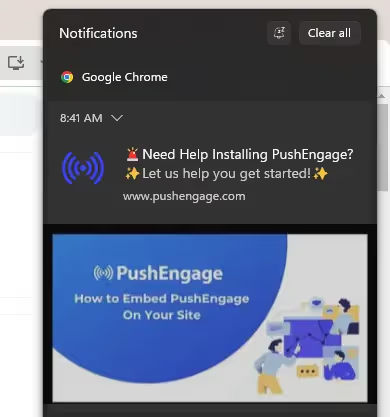
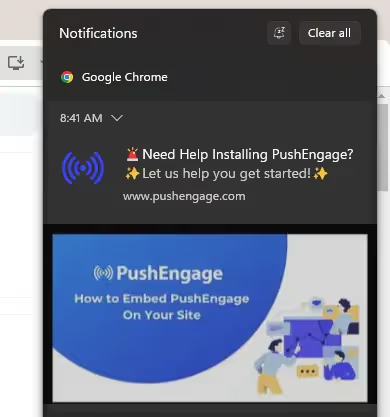
    Example of a web push notification sent through the Chrome desktop browser

    Pros:

    • Quick to implement (can be added directly to your website).
    • Can work on both desktop and mobile browsers.
    • No mobile app development required.

    Cons:

    • Limited mobile reach: Many users disable browser notifications, and iOS Safari has only recently started supporting web push (with extra steps).
    • No offline capability: Notifications only appear when the browser is running.
    • Basic customization: Design and interaction options are limited.
    • Lower engagement: Click-through rates often range from just 2-5% (on top of low opt-in rates).

    Native Mobile Push Notifications

    Native push notifications are delivered through an installed mobile app, directly integrated with iOS and Android operating systems.

    They’re much more effective than web push. And most of the time you see someone talking about the benefits of push notifications, they’ll be referring to native mobile push.

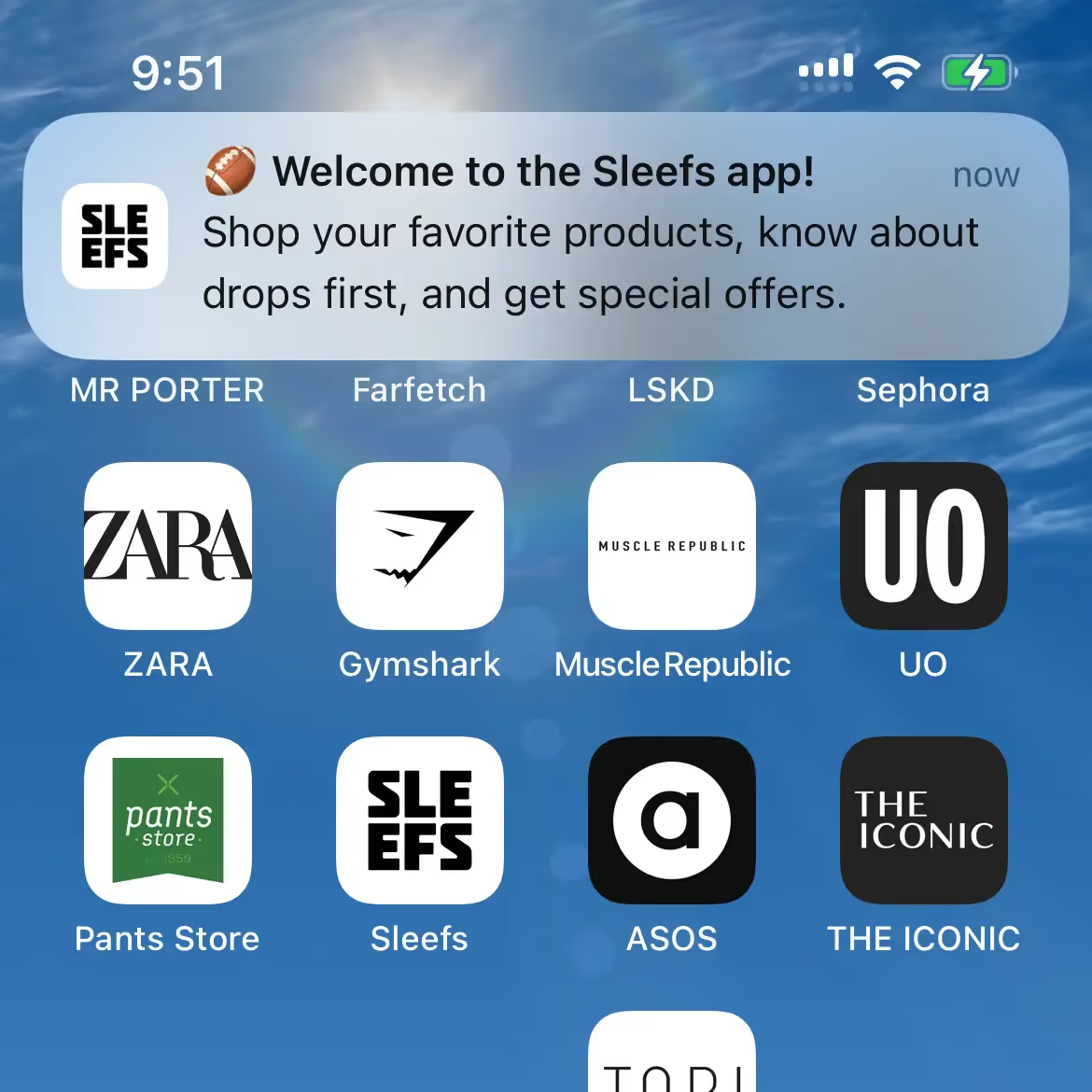
    Native push notificaitons appear directly on the user’s device – even if the app is not open

    Pros:

    • Higher engagement rates: Click-through rates of 10–25% are common.
    • Always on: Notifications appear even if the app isn’t open.
    • Rich media support: Include images, video, and interactive buttons.
    • Deep personalization: Integrate with customer data for highly targeted campaigns.
    • Full OS support: Built-in compatibility with iOS and Android for optimal reliability.

    Cons:

    • Requires a mobile app.
    • Slightly more setup effort upfront.

    Takeaway: Web push can be a quick win but is inherently limited on mobile – the platform where most ecommerce traffic lives. Native mobile push unlocks higher engagement, richer messaging, and more powerful automation.

    How Vendrux Enables Native Mobile Push From Your Salesforce Commerce Cloud Store

    The most effective way to access native mobile push notifications is by launching your own iOS and Android apps. 

    Traditionally, this meant hiring developers, building custom apps from scratch, and managing a separate mobile codebase – a time-consuming and expensive process.

    Vendrux solves this by turning your existing Salesforce Commerce Cloud site into fully functional, high-performance native apps.

    Vendrux has helped over 2,000 brands launch their own apps, with over 200 reviews on major sites like G2 and Capterra (averaging 4.8/5). We support a number of major global brands, including SFCC brands Jack & Jones, Vero Moda and John Varvatos.

    Just a few examples of ecommerce apps built with Vendrux

    With Vendrux, your apps maintain full feature parity with your website, with zero rebuilding required.

    Your current checkout, integrations, and storefront design carry over seamlessly, while native app features like push notifications are layered on top.

    Why Vendrux is the Best Way to Send SFCC Push Notifications

    There are many push notification services available, which are relatively easy to implement on your site and enable web push.

    But you need more than this. You need native push notifications, from an app. And Vendrux is the best way to unlock this.

    • True native push, no rebuild: Your apps are powered by your existing SFCC site, giving you all the functionality you already have plus native push out of the box.
    • Plug-and-play integrations: Built-in support for OneSignal and Klaviyo lets you send automated campaigns (e.g., abandoned cart, welcome series) and personalized broadcasts to any segment.
    • Single source of truth: No headaches trying to maintain consistency. You manage one store, and both web and app stay in sync automatically.
    • Fast, low-risk deployment: Launch in weeks, not months, without adding engineering overhead or delaying other roadmap priorities.
    • Strategic push support: We help you set up essential flows like abandoned cart, win-back, and post-purchase campaigns, and even offer a Done-For-You push service if you want us to run it for you.

    How It Works (Step-by-Step)

    With Vendrux, you can launch your own Salesforce Commerce Cloud-powered mobile app in under a month.

    In doing so, you’ll unlock the benefits of push notifications – which, for many stores, is reason in itself to build a mobile app.

    Here’s how it works.

    1. Discovery & Planning: You share your SFCC setup (SFRA, SiteGenesis, or headless – it doesn’t matter). We make sure it’s a good fit for a mobile app, and confirm any other special requirements you have from the app (multi-region support, unique app features, etc)
    2. App Build: We wrap your live website into native iOS and Android apps, maintaining 100% of your storefront features.
    3. Push Integration: OneSignal and/or Klaviyo are connected for automated and broadcast push. Native abandoned cart notifications are configured.
    4. Testing & Approval: We QA the apps on real devices, and handle App Store & Google Play submissions for you.
    5. Launch & Optimize: Go live and start sending push notifications, with the option for ongoing push campaign management from our team.

    Ready to see what your site can look like as an app? Get a free preview of your app now.

    Blueprint: High-Impact Push Campaigns for SFCC Stores

    Once your Salesforce Commerce Cloud store has push notifications enabled through your mobile app, the next step is to make sure you’re using them effectively.

    Here’s a proven blueprint to get the most value out of push from day one.

    Core Automations (Set It and Forget It)

    These flows run in the background and drive continuous revenue with minimal effort:

    • Welcome flow: Greet new app users with a warm brand introduction and a special first-purchase offer.
    • Abandoned cart reminders: Automatically nudge customers who leave items behind. These can recover 10-20% of lost carts. Some Vendrux users generate six figures per month through abandoned cart notifications alone.
    • Browse abandonment: Follow up with shoppers who viewed products but didn’t add to cart.
    • Post-purchase sequences: Thank customers for their order, cross-sell related products, and prompt reviews.
    • Win-back campaigns: Target lapsed customers with a time-sensitive offer to re-engage them.
    • Replenishment reminders: Perfect for repeatable products (e.g., beauty, supplements, consumables).

    Event & Broadcast Campaigns

    Use push for one-off campaigns and announcements that create urgency and excitement:

    • New product drops: Announce new arrivals or limited editions.
    • Seasonal promotions: BFCM, holiday sales, and special events.
    • Back-in-stock alerts: Notify customers instantly when high-demand products return.
    • Price-drop alerts: Convert fence-sitters when items go on sale.

    Segmentation & Personalization

    With Vendrux’s integrations (OneSignal & Klaviyo), you can:

    • Target VIPs with exclusive early access.
    • Personalize by purchase history (e.g., category interests, high-AOV segments).
    • Run geo-targeted campaigns for location-specific promos.
    • Schedule by time zone to optimize send times globally.

    Creative Best Practices

    • Keep it short: Aim for ~40–60 characters for the main message.
    • Use rich media: Add images or emojis to stand out.
    • Link deep: Push directly to product pages, collections, or the cart.
    • Create urgency: Limited-time offers and stock notifications work best.

    Cadence & Guardrails

    • Respect opt-in preferences with frequency caps.
    • Avoid sending at late-night or early-morning hours.
    • Monitor engagement metrics (click-through, conversion) and adjust strategy accordingly.

    Want to dive deeper? Check out our complete guide to Push Notifications for Ecommerce.

    Frequently Asked Questions

    Does Vendrux work with all SFCC architectures (SFRA, SiteGenesis, headless)?

    Yes. Vendrux works with SFRA, SiteGenesis, and even headless implementations of Salesforce Commerce Cloud. Because it wraps your live site into native apps, it doesn’t matter how your frontend is built, you retain your full existing experience.

    How does push notifications handle SFCC multi-site and multiple locales?

    If you use Salesforce Commerce Cloud’s multi-site or multi-locale features, your app can support them seamlessly. Each locale or storefront can be reflected in the app, and push campaigns can be targeted by region, language, or customer segment.

    Can I keep using Klaviyo or Salesforce Marketing Cloud for messaging?

    Absolutely. With Vendrux, you can continue using Klaviyo for email, SMS, and segmentation while adding native push to your marketing mix. You can also use Salesforce Marketing Cloud for other channels while handling app push through OneSignal (or Klaviyo’s push functionality if you prefer a single provider).

    Does the checkout process change inside the app?

    No. Your existing SFCC checkout flow stays the same. It’s the same code and logic running inside the app as on your website. This means all your payment integrations, discount logic, and tax settings carry over automatically.

    How long does it take to launch?

    On average, you can launch fully functional iOS and Android apps, complete with native push, in just 4-6 weeks. That includes setup, testing, and app store approvals.

    What kind of engagement can I expect from native push?

    Most ecommerce brands see 10-25% click-through rates on native push notifications, far higher than web push (2-5%) or email (1-3%). You’ll also see higher opt-in rates, since customers who install your app are more likely to allow push.

    Will adding an app affect my site performance or SEO?

    No. Your website continues to run exactly as it does today. Vendrux wraps it inside an app but doesn’t alter the core site or affect SEO.

    Who handles updates and maintenance?

    Vendrux manages app updates and keeps everything in sync with your site. If you make changes to your website, they’re reflected in the app automatically. No extra work for your team.

    Do you offer ongoing support for push campaigns?

    Yes. In addition to initial setup of essential push flows like abandoned cart and win-back, we offer an optional Done-For-You monthly push service, where our team manages your campaigns and ensures you’re getting the most from push notifications.

    Getting Started: Next Steps

    Adding native push notifications to your Salesforce Commerce Cloud store doesn’t need to be complex or time-consuming. 

    With Vendrux, you can have fully functional iOS and Android apps, complete with push notifications, abandoned cart reminders, and personalized campaigns, live in just a few weeks.

    Ready to unlock the full power of native push?

    Book a quick consultation with our team, and we’ll walk you through how to turn your SFCC site into a high-performing mobile app and start sending impactful push notifications in as little as 30 days.

  • How to Choose the Most Cost-Effective Mobile App Development Approach

    Building a mobile app used to mean:

    • Hire developers
    • Spend six figures on your project
    • Wait about a year just to see if it actually works

    As you can imagine, that priced a lot of businesses out.

    Today, there are multiple paths to a mobile app – from no-code builders you can set up yourself, to agencies that build custom solutions, to services that convert your existing website into an app.

    And the bottom line is, it’s a lot more cost-effective to develop a mobile app than it was 10 years ago.

    But “cost-effective” doesn’t just mean “cheapest upfront.” The real question is: what will this cost you over time, including maintenance, updates, and the hours your team spends managing it?

    This guide breaks down the three main approaches to mobile app development, with honest analysis of when each makes sense (and when it doesn’t).

    The Three Approaches to Mobile App Development

    Before diving into specifics, here’s the birds-eye view:

    Approach Upfront Cost Monthly Cost Your Time Best For
    DIY App Builders $50–1,000 $50–1,000/mo High (ongoing) Simple apps, tight budgets, technical teams
    Custom/Agency Development $50K–300K+ $1K–10K/mo Medium Unique functionality, complex requirements
    Website-to-App Conversion $500–2K $500–2K/mo Low Web apps, ecommerce, content sites

    Each approach has trade-offs. The right choice depends on what you’re building, what you already have, and how much time you can invest.

    Why “Cost-Effective” is Not Just About Sticker Price

    If you’re looking for cost-effectiveness, it’s easy to look at app development options and focus on one number: the upfront cost. 

    But that’s only part of the picture. A truly cost-effective approach considers all the resources you’ll invest to build, maintain, and grow your app. And the revenue you might lose if you choose a cheap but limiting solution.

    Here are four cost drivers to keep in mind:

    • Setup cost: The price you pay to get your app built and published. This can range from a one-time setup fee to a large custom development bill.
    • Ongoing cost: Apps aren’t one-and-done. They need updates, bug fixes, and platform maintenance to keep them running smoothly as iOS and Android evolve.
    • Labor cost: Even no-code tools take time (your time or your team’s). An app you can “build for $49” could cost you hundreds more in time investment.
    • Opportunity cost: The revenue you miss out on when an app can’t scale, deliver the right user experience, or offer growth-driving features like push notifications.

    When you view app development through this lens, the “cheapest” option often turns out to be the most expensive in the long run. 

    A slightly higher monthly fee, or a done-for-you service, can save you dozens of hours and unlock significantly more revenue potential.

    Key term: Total Cost of Ownership (TCO). This is the core of what makes something cost-effective. It includes not just the upfront cost of a tool or service, but also the operating costs, cost of maintenance & support, indirect costs (like training, downtime, lost productivity, or integration overhead) and much more. It gives the full picture of what it costs for your business to have an app.

    Approach 1: DIY App Builders

    DIY app builders are platforms that let you build a mobile app yourself, either from scratch or by connecting to your existing website.

    These include Shopify app builders (Tapcart, Vajro, Plobal), no-code platforms (FlutterFlow, Adalo, Glide), web-to-app converters (AppMySite, Median)

    The Appeal

    DIY builders have low upfront costs. Many start under $100/month, and some have free tiers. For someone with a simple use case and time to invest, this can work.

    The Shopify ecosystem has several options specifically for ecommerce stores. You connect your store, customize the design, and publish to the app stores. Setup can take a few hours to a few days.

    No-code platforms like FlutterFlow and Adalo let you build more custom apps without writing code. These are more flexible but require more time to learn and build.

    The Reality

    DIY builders save money upfront but cost time ongoing. Here’s what the pricing doesn’t tell you:

    You’re responsible for everything:

    • App store submissions and compliance
    • Handling rejections and resubmissions
    • iOS and Android updates that break things
    • Bug fixes and troubleshooting
    • Design changes and feature additions

    The hidden time cost: A “simple” app store submission can take hours if you hit issues. Apple’s review process is notoriously unpredictable; rejections happen, and resolving them requires understanding App Store guidelines.

    When iOS or Android releases a major update, your app may need changes. DIY builders handle some of this, but not all. You’ll spend time testing, reporting issues, and waiting for fixes.

    Limitations compound: Most DIY builders work from templates. That’s fine until you need something the template doesn’t support. At that point, you’re either stuck, paying for custom development anyway, or switching platforms entirely.

    When DIY Makes Sense

    • You have a technical team member who can own the app
    • Your requirements are simple and unlikely to change
    • You’re testing whether an app makes sense before investing more
    • Budget is the primary constraint and time is available

    When DIY Doesn’t Make Sense

    • You don’t have someone to manage ongoing maintenance
    • You need the app to “just work” without regular attention
    • Your website or store is complex (custom checkout, integrations, etc.)
    • App quality and performance are important to your brand

    Real Cost Example

    A Shopify store using a mid-tier app builder ($499/mo):

    Cost Type Year 1 Year 2 Year 3
    Platform fee ($499/mo) $5,988 $5,988 $5,988
    Setup time (20 hrs @ $50/hr) $1,000
    Ongoing management (5 hrs/mo @ $50/hr) $3,000 $3,000 $3,000
    Troubleshooting issues (estimate) $500 $500 $500
    Total $10,488 $9,488 $9,488

    The platform cost is ~$6K/year. The real cost (including your team’s time) is closer to $9.5-10.5K/year.

    That’s not to mention the potential opportunity cost, and the indirect cost of splitting your team’s time on a new project.

    Approach 2: Custom Development (Agency or In-House)

    The traditional approach means building a mobile app from scratch with developers, either through an agency or an internal team.

    This used to mean native iOS/Android development only. Today, there are more cost-effective options, like cross-platform frameworks (React Native, Flutter) or hybrid development (Ionic, Capacitor).

    These, however, are still rather costly. And while you might think you can pay once, get an app, and save by not having to pay a SaaS subscription fee, the reality works out a little differently.

    The Appeal

    Custom development gives you complete control. You can build exactly what you want, with no template limitations.

    For apps with unique functionality; think Uber, Airbnb, or a custom internal tool; this is often the only option.

    React Native and Flutter have made cross-platform development more efficient. Instead of building two separate apps, you build one codebase that runs on both iOS and Android. This reduces (but doesn’t eliminate) the cost and complexity.

    The Reality

    Custom development is expensive. Not just upfront, but forever.

    Upfront costs: A basic custom app from an agency typically starts around $50,000. A more complex app with backend development, integrations, and custom features can run $150,000-$300,000 or more.

    That’s not an exaggeration. Quality development is expensive, and cutting corners leads to technical debt you’ll pay for later.

    Ongoing costs: The app doesn’t maintain itself. You’ll need:

    • Bug fixes and updates (ongoing)
    • iOS and Android compatibility updates (annual, at minimum)
    • App store compliance changes (Apple and Google change requirements regularly)
    • Security patches
    • Feature additions

    Many brands budget $20,000-$50,000/year for maintenance on a custom app. Some spend more.

    When Custom Development Makes Sense

    • You’re building something that doesn’t exist as a template
    • You have unique functionality that requires custom code
    • You have budget for both initial development AND ongoing maintenance
    • You have technical leadership to manage the project and vendor relationships

    When Custom Development Doesn’t Make Sense

    • You already have a website that does what you need
    • You’re primarily trying to improve mobile engagement, not build new features
    • You don’t have budget for ongoing maintenance (which you will need)
    • You’re an ecommerce brand with a standard Shopify/WooCommerce/Magento store

    Real Cost Example

    An ecommerce brand building a custom React Native app:

    Cost Type Year 1 Year 2 Year 3
    Initial development $120,000
    Maintenance & updates $15,000 $25,000 $25,000
    Project management (internal) $10,000 $5,000 $5,000
    Feature additions $30,000 $20,000
    Total $145,000 $60,000 $50,000

    Three-year total: $255,000. And that assumes no major rebuilds or pivots.

    Approach 3: Website-to-App Conversion

    This approach is to take your existing website and convert it into a native app, giving you a real iOS and Android app without rebuilding anything.

    It’s like the no-code option, except for a couple of key differences:

    • It’s a managed approach, requiring minimal time from you or your team
    • The app is powered by your website, and fully synced with your website. It’s not a separate platform that needs to be updated separately.

    Of course, it’s only a realistic option for businesses that already operate on the web, and want to extend that experience to a mobile app.

    Examples include ecommerce, web apps or digital publishers.

    If you’re starting a business with an app, and you don’t have a website, it doesn’t work.

    But for web-first businesses like ecommerce, this ends up being the most cost-effective approach.

    The Appeal

    If you already have a website that works well on mobile, why rebuild it as an app? Website-to-app conversion takes what you’ve already built and packages it as a native app.

    The result: a real app in the App Store and Google Play, with push notifications, native navigation, and the performance users expect, without the cost or timeline of custom development.

    For ecommerce brands, this is particularly compelling. Your website already has mobile-optimized product pages, collections, checkout, account management, and integrations. An app that mirrors this experience leverages all that existing work.

    The Reality

    Website-to-app conversion isn’t magic. The quality depends heavily on two things:

    1. Your website’s mobile experience: If your website is slow, clunky, or broken on mobile, your app will be too. Conversion works best when your mobile web experience is already solid.
    2. The service provider: Not all conversion services are equal. Some produce apps that feel like “websites in a wrapper”: slow, with web-like navigation and no native feel. Others produce apps that are indistinguishable from custom-built native apps.

    Vendrux is the gold standard for converting websites into apps. We’ve done it over 2,000 times, and know exactly what it takes to create a native experience, without any unnecessary work or expense.

    The difference comes down to implementation: native navigation, performance optimization, deep linking, push notification strategy, and ongoing maintenance.

    What to Look For

    When evaluating website-to-app conversion services:

    • Native feel: Does the app feel like a native app or a website? Test the navigation, transitions, and responsiveness. Good conversion produces apps that users can’t distinguish from custom builds.
    • Full functionality: Does everything from your website work in the app? Custom checkout flows, third-party integrations, logged-in experiences? Some converters break on complex sites.
    • Push notifications: This is often the main reason to have an app. Can you send targeted push notifications? Automated flows? How easy is setup?
    • Ongoing maintenance: Who handles iOS and Android updates? App store compliance? Bug fixes? If the answer is “you,” factor that time into your cost analysis.
    • Track record: How long has the service been operating? How many apps have they launched? What do reviews say about support and reliability?

    When Website-to-App Conversion Makes Sense

    • You have a website that works well on mobile
    • You want push notifications and App Store presence
    • You don’t need app-only features that don’t exist on your website
    • You want an app without the cost and timeline of custom development
    • You don’t have a team to manage ongoing app maintenance

    When It Doesn’t Make Sense

    • Your website’s mobile experience is poor
    • You need significant functionality that doesn’t exist on your website
    • You’re building something completely new (no existing website)

    Real Cost Example

    An ecommerce brand using a managed website-to-app service like Vendrux:

    Cost Type Year 1 Year 2 Year 3
    Setup fee $2,000
    Monthly service $8,148 $8,148 $8,148
    Your team’s time Minimal Minimal Minimal
    Maintenance & updates Included Included Included
    Total $10,148 $8,148 $8,148

    The three-year total is a fraction of what you’d pay for a custom app built from scratch. And you’re not managing anything – updates, app store compliance, and maintenance are handled for you.

    Learn more: Check out our pricing options to get an idea of how much it will cost to launch your brand’s app

    A Framework to Decide the Right Mobile App Development Approach

    The right approach could be different from one business to the next.

    Here’s a decision framework you can use to decide:

    Start with what you have

    Do you have an existing website?

    • Yes, and it works well on mobile → Website-to-app conversion is likely your best path
    • Yes, but mobile experience is poor → Fix the website first, then consider conversion
    • No → You’ll need to build something (DIY or custom)

    Consider your requirements

    Do you need app-exclusive features that don’t exist on your website?

    • Yes, significant new functionality → Custom development may be necessary
    • Yes, but minor additions → Many conversion services can add native features
    • No, the app should mirror the website → Conversion is ideal

    Your resources

    Do you have someone to manage ongoing maintenance?

    • Yes, technical team member available → DIY could work
    • No, or you’d rather not → Managed services (conversion or agency retainer) make sense

    What’s your budget?

    • Under $5K/year → DIY or basic conversion
    • $5-25K/year → Managed conversion service
    • $50K+ upfront, $20K+/year ongoing → Custom development is an option

    Factor in opportunity cost

    The cheapest option isn’t always the most cost-effective. If a DIY app takes 10 hours/month to manage, that’s time your team isn’t spending on growth, marketing, or product.

    A managed service that costs more but requires no ongoing attention may be cheaper in total cost of ownership, especially if your team’s time is valuable.

    The Case for Vendrux

    We’re obviously biased, but here’s why we built Vendrux the way we did:

    Most brands don’t need custom apps.

    They need their website (which already works), available as an app with push notifications and App Store presence.

    DIY sounds good until it isn’t. The first app store rejection, the first iOS update that breaks something, the first time a customer reports a bug; that’s when “self-service” becomes a liability.

    We handle everything:

    • App store submissions and compliance
    • iOS and Android updates
    • Bug fixes and performance optimization
    • Push notification setup and strategy
    • Ongoing maintenance and support

    Your team’s involvement is minimal. We send you the apps to review, you approve, we handle the rest.

    If you have an existing website – especially an ecommerce store on Shopify, WooCommerce, BigCommerce, or Magento – this is the most cost-effective path to a mobile app.

    We specialize in helping high-growth ecommerce brands launch mobile apps that grow their business; not adding another headache.

    A few examples of high-quality apps built with Vendrux

    Ready to see what’s possible? Get a free preview of your app now.

  • Does Shopify Offer an App For Your Store?

    Does Shopify Offer an App For Your Store?

    If you’re running a Shopify store, you’ve probably wondered: is there an app for my customers to download? 

    You’re thinking about how to give loyal shoppers easier access, faster checkout, and push notifications. Just like your customers are getting when they shop on major sites like Amazon.

    The answer is a bit more complicated than a simple yes or no. Shopify does offer mobile apps. But not the kind most merchants are really asking for.

    In this article, we’ll break down exactly what Shopify provides its merchants, what’s missing, and how you can get a fully branded mobile app for your store without rebuilding anything from scratch.

    What Shopify Already Gives You

    Shopify offers two official mobile apps, but they serve very different purposes. And neither is a branded shopping app for your store.

    1. Shopify Admin App

    This app is built for you and your team, not your customers. 

    It lets you manage your store’s backend from anywhere – view orders, track inventory, manage products, and respond to customer messages. 

    It’s a powerful tool for store operations (and for checking every five minutes how many sales you’ve made today). But it’s not a mobile app for your store, like you’re thinking of.

    2. Shop App

    Shopify also offers the Shop app, a consumer-facing mobile app where shoppers can browse and buy from thousands of Shopify-powered stores. 

    It’s essentially a marketplace, similar to Amazon or Etsy. It’s worthwhile being on the Shop App. However:

    • Your store appears alongside competitors
    • Your brand experience is diluted
    • You have limited control over design, merchandising, and customer engagement

    You want to provide your customers with an “Amazon-like” experience. But you want to be Amazon – not just another merchant among tens of thousands.

    How You Can Get a Branded, Store-Specific Shopify Mobile App

    What’s missing from Shopify’s ecosystem is simple: a mobile app that’s just for your store, with your branding, your product catalog, and your customer experience.

    Loyal customers expect a one-tap shortcut on their home screen, personalized push notifications, and a seamless checkout that feels like an extension of your site.

    You want to provide it them; not force them to buy from crowded marketplaces

    Shopify’s native apps do not provide this. But you can build it on your own. Around 4% of Shopify brands doing 7 figures or more have their own mobile app.

    Here are two ways to do it.

    1. Build a Custom App with Shopify’s Storefront API

    First: you can develop a custom mobile app from scratch and connect it to your Shopify store.

    Shopify has an official API (application programming interface – the way two platforms, like a website and mobile app, or a server and a website, communicate and share data between each other).

    It’s called the Storefront API, and it essentially lets you create a mobile app on top of your Shopify backend.

    This is great – but not as simple as I made it sound.

    Mobile app development is a lot of work. It’s expensive, time-consuming, and you probably don’t have the budget, expertise or time to build custom iOS & Android apps (you’re looking at a $100K+ cost, and that’s just for the initial version).

    For lean ecommerce teams, this level of complexity and cost isn’t practical.

    2. Use a Shopify Mobile App Builder

    Instead of starting from scratch, you can use a third-party tool to convert your existing store into a mobile app. 

    These tools connect to your Shopify backend and recreate key elements of your site in a native app environment. And they let you go live without coding, which is important (since most brands don’t moonlight as app development studios).

    It’s a more accessible route. But you’ve got to choose the right mobile app builder.

    Many are generic drag-and-drop tools. They’re built on top of the storefront API, with pre-built blocks and templates for the front-end of your app.

    They’re typically quite limiting, especially if your store has custom features or unique design elements you want to transfer over to your mobile app (these often don’t work with drag-and-drop app builders).

    It also takes more work to build and manage apps with these builders, since it creates an app that lives separately from your website.

    Every update, every new promo or seasonal hero update or new collection needs to be done twice. Once for your site, once for your app.

    On the other hand, you’ve got Vendrux. Vendrux directly converts your Shopify website into an app.

    No rebuilding. No templates. Just your Shopify store as an app.

    Learn more about how Vendrux turns your Shopify site into a mobile app

    Why Vendrux Stands Out

    Most app builders ask you to rebuild your store inside their system. Vendrux takes a different approach. It’s more flexible, and doesn’t force you to recreate layouts or manage content in two places.

    It’s not a template. It’s not a drag-and-drop tool. It’s a full-service solution built for growth-focused ecommerce brands.

    Here’s what makes Vendrux the best choice for turning your Shopify store into an app:

    • Done-for-you service. We handle everything: setup, configuration, customization, testing, and publishing.
    • No duplication of effort. Your app stays in sync with your website automatically. No rebuilding, no extra maintenance.
    • It works with your existing design. Your current theme, custom features, and third-party integrations all work in the app, out of the box.
    • You get human support, not just software. You’ll work with a team that’s helped hundreds of Shopify brands launch high-performance apps.

    Vendrux is built for serious ecommerce brands that want to launch fast, keep their tech stack simple, and provide a premium mobile experience without custom dev headaches.

    It’s particularly powerful for brands with unique store setups.

    Kiokii, for example. They invested a lot of time, effort and money into building a visually striking site, and were able to replicate that perfectly in their app.

    MASC is another perfect example. A key part of their site is Instagram-style shoppable videos; a unique feature that other app builders can’t replicate. 

    With Vendrux, they’re able to include these videos in their mobile app, creating an engaging TikTok-style user experience that has been extremely successful for them.

    For brands like these two (or just brands with limited time to build and manage a separate platform), a full-conversion, fully-managed website to app service like Vendrux is a better way to launch.

    Want to see what your app could look like? Get a free preview now.

    How the Vendrux Process Works

    We’ve spent the last decade perfecting the mobile app launch process for Shopify stores. With Vendrux, you’re not buying a tool; you’re getting a partner, as invested in your growth as you are.

    Here’s how we take your store live on the App Store and Google Play in just a few weeks:

    1. Kickoff & Setup

    We start with a personalized onboarding session to understand your brand, tech stack, and goals.

    2. App Configuration

    Our team configures your app for optimal performance, navigation, and native functionality, based entirely on your live Shopify store.

    3. Testing & QA

    In a couple of weeks, you’ll get a test version of the app to explore and provide feedback. We refine the experience to match your vision.

    At the same time, we thoroughly test the app across devices and operating systems to ensure stability, speed, and consistency.

    4. App Store Submission

    We prepare and submit your app to the App Store and Google Play on your behalf, handling all requirements and rejections if they come up.

    5. Launch & Growth

    Once live, we stay involved with proactive support, app updates, strategic push notification planning, and app promotion best practices.

    You stay focused on running your store. We handle your app from concept to conversion machine.

    Ready to see what can be done? Book a free preview now.

    Final Thoughts & Next Steps

    So – does Shopify offer an app for your store? 

    Technically, yes. But if what you’re looking for is a fully branded, customer-facing mobile app, the kind your loyal customers can download, shop from, and stay engaged with… the real answer is no.

    If you want one, you’ve got two paths forward:

    • Build from scratch with the Storefront API (expensive, slow, resource-heavy)
    • Use a platform like Vendrux to convert your existing Shopify site into an app (fast, affordable, low-effort)

    If you’re serious about growing repeat revenue and giving mobile customers the experience they expect, you need a native app.

    And with Vendrux, you can launch one without starting from zero, without sacrificing the best features from your website.

    Book a free preview now to see how your Shopify store would look as a native app. We’ll show you a working prototype, walk you through the process, and help you decide if it’s the right move for your brand.

  • What is Total Cost of Ownership for Mobile Apps (And Why Does It Matter?)

    What is Total Cost of Ownership for Mobile Apps (And Why Does It Matter?)

    When you’re planning a mobile app, it’s easy to look only at the upfront price tag. Maybe it’s the monthly fee for an app builder, or a quote from an agency. But that number doesn’t tell the whole story.

    The real cost of a mobile app is the Total Cost of Ownership (TCO)

    This goes beyond what you pay to build or subscribe. It includes everything it takes to keep your app running, updated, and delivering value over time.

    Understanding TCO matters because the cheapest option at first glance can end up being the most expensive once you factor in maintenance, updates, and lost revenue from poor performance.

    In this article, we’ll break down what TCO means for mobile apps, why it’s critical to factor into your decision-making, and how different options stack up when you look at the full picture.

    What is Total Cost of Ownership (TCO)?

    Total Cost of Ownership (TCO) is the complete cost of running a mobile app over its entire life cycle. 

    It’s not just what you pay to create an app. It’s everything it takes to keep it live, functional, and delivering value for your business.

    What TCO Includes for Mobile Apps

    When you look at mobile apps through a TCO lens, you need to consider:

    • Development or build costs: the upfront expense of using an app builder, hiring an agency, or building in-house.
    • Design and customization: UI/UX tweaks, brand integration, and added features.
    • Infrastructure: servers, APIs, third-party services, and hosting.
    • App store compliance: Apple/Google developer accounts, review resubmissions, and mandatory updates.
    • Ongoing maintenance: bug fixes, OS compatibility updates, security patches.
    • Team and overhead: whether you need developers on retainer or in-house staff to manage the app.
    • Opportunity costs: lost revenue from downtime, missing features, or a poor user experience that reduces conversions.

    Bottom line: TCO gives you the real financial picture of an app, not just the sticker price.

    Why Does TCO Matter?

    When you only focus on upfront price, you risk underestimating the true cost. 

    That mistake can slow growth, hurt retention, and erode ROI.

    Why this matters for your business:

    • Price ≠ Cost. A $20k agency build or a $500/month app builder is only part of the story. Once you add updates, fixes, and maintenance, the numbers look very different.
    • Hidden costs add up. Cheaper options often mean cutting corners. That can lead to extra development down the line, higher maintenance bills, or lost sales from a clunky experience.
    • Apps are living products. iOS and Android constantly update. Devices evolve. Customer expectations grow. Every change requires upkeep.
    • For online stores, every bug, crash, or missing feature isn’t just a tech issue. It’s lost conversions and reduced lifetime value.

    Bottom line: the price you see upfront is rarely the true cost of an app. Total Cost of Ownership reveals the full financial commitment over time.

    How to Evaluate Mobile App Options by TCO

    If you’re in the market for a mobile app, TCO needs to be one of the primary factors you build your decision around.

    When you evaluate mobile app solutions with TCO in mind, you’ll avoid surprises and choose the option that’s truly cost-effective in the long run.

    However, it can be difficult. TCO isn’t listed on the box. It typically requires some manual estimation, beyond the quote you get from an agency, or the number on a pricing table.

    Here’s how to understand the TCO of any app development approach you’re considering:

    A Blueprint for Calculating TCO

    1. Map your app’s lifecycle. Think beyond launch. Consider what the app will cost to maintain over 1–3 years (updates, compliance, user growth).
    2. Break it down into cost categories. Include development, infrastructure, maintenance, app store fees, QA, and team costs.
    3. Estimate any hidden costs. Look for risks like rebuilds, downtime, lost conversions from poor UX, or expensive add-ons later.
    4. Normalize the comparisons. Put each option on the same timeline (e.g., three years). Compare total spend, not just upfront prices.
    5. Match with your goals. Tie the numbers back to outcomes: Will this option improve retention, conversions, and lifetime value, or hold you back?

    Bottom line: TCO is less about the sticker price and more about the real costs of sustaining an app as a growth channel. And this is likely something you’ll have to calculate on your own.

    Comparing TCO Across Different App Development Options

    When you break it down, you’ll see a significant difference between different approaches.

    And the most cost-effective app development options may not be what you think.

    Here’s how the main options stack up, and the main factors influencing TCO.

    DIY No-Code App Builders

    The appeal:

    DIY and no-code app builders look attractive at first glance. For $100–$500/month, you can launch an app without writing a single line of code. For a small ecommerce brand, the promise of speed and affordability can be hard to resist.

    The reality once you factor in TCO:

    • Upfront costs: Low. You might pay a setup fee and a recurring subscription.
    • Customization limits: These platforms rely on templates. Anything outside of their prebuilt features can be impossible or expensive to achieve.
    • Maintenance burden: The builder takes care of the basics, but you’ll still run into gaps — bugs, performance issues, or design changes that require workarounds.
    • Feature gaps: Many DIY apps can’t replicate the complexity of modern ecommerce sites. This leads to opportunity costs in the form of lost conversions and lower customer lifetime value.
    • Scalability issues: As your store grows, you’ll hit ceilings. Adding new features or integrations may require a costly migration to a custom solution later.

    Biggest factors in the TCO of no-code app builders:

    1. Subscription fees (usually predictable and fixed).
    2. Design and customization costs when you need workarounds or agency help.
    3. Maintenance and bug fixes not fully covered by the platform.
    4. Opportunity cost from missing ecommerce features (e.g., custom checkout flows, advanced loyalty programs, upsells).
    5. Migration/rebuild costs if you eventually outgrow the platform and have to start over.

    Final TCO takeaway:

    On paper, DIY builders look cheap. But once you factor in limited functionality, lost revenue from poor UX, and the eventual cost of moving to another platform, the long-term ownership cost can be far higher than the sticker price suggests.

    Custom Development (via Agencies)

    The appeal:

    Hiring an agency gives you a ready-made expert team. They handle everything; scoping, design, development, testing, and app store submission. The promise is a polished, custom app tailored to your brand.

    The reality once you factor in TCO:

    • Upfront costs: High. Most ecommerce apps built by agencies start at $25k–$50k, with many quotes running well into six figures.
    • Maintenance retainers: Agencies typically charge monthly or yearly retainers for bug fixes, OS updates, and new features. Without this, your app can quickly break when Apple or Google release new OS versions.
    • Dependency risk: You’re locked into the agency’s timeline, availability, and pricing. Simple changes can take weeks and cost thousands.
    • Slow ROI: Long timelines (often 6–12 months) delay launch and revenue impact.
    • Scalability costs: Every new feature requires a new project (and another round of invoices).

    Biggest factors in the TCO of agency-built apps:

    1. Large upfront build cost ($25k–$100k+).
    2. Ongoing retainer fees for maintenance and updates.
    3. Change request costs for new features or fixes.
    4. Time-to-market delays, which represent opportunity cost in missed revenue.
    5. Vendor lock-in, limiting flexibility and driving long-term costs higher.

    Final TCO takeaway:

    Agencies deliver professional apps but at a steep total cost. For most ecommerce brands, this path is only viable with very large budgets and a tolerance for ongoing dependency on outside developers.

    Custom Development In-House

    The appeal:

    Building your own team gives you full control. You own the code, set the roadmap, and customize every detail to your exact needs. On the surface, it feels like the most flexible and scalable option.

    The reality once you factor in TCO:

    • Upfront investment: Hiring skilled developers, designers, and product managers is expensive. Even a small team can run $250k+ per year in salaries.
    • Ongoing costs: Payroll doesn’t go away. Every bug, update, and new feature adds to your team’s workload.
    • Recruitment and churn: Developers leave. Replacing them costs time and money. Institutional knowledge is lost, driving costs up further.
    • Opportunity costs: Your team’s time is finite. Every hour spent on maintaining the app is time not spent on core ecommerce improvements.
    • High risk: Unless you’re already a tech company, managing an in-house app team stretches resources thin.

    Biggest factors in the TCO of in-house development:

    1. Salaries and benefits for developers, designers, and QA.
    2. Recruitment and training costs when staff churn.
    3. Infrastructure costs (servers, tools, monitoring).
    4. Ongoing maintenance workload for OS updates and bug fixes.
    5. Opportunity cost of time taken away from growth-driving ecommerce work.

    Final TCO takeaway:

    In-house development gives the most control but comes with the highest ongoing ownership cost. You not only need to manage the project and pay the developers, but you also become responsible for benefits and HR-related costs. For non-technical ecommerce brands, it often means massive overhead with limited payoff.

    Vendrux: Custom Mobile Apps, Built From Your Site

    The appeal:

    Vendrux takes a different path. Instead of rebuilding your app from scratch, it converts your existing website into fully branded iOS and Android apps. 

    You keep all your site’s functionality, while we handle the heavy lifting of app conversion, publishing, and maintenance.

    Vendrux seamlessly converts your website into a native mobile app

    Many brands come to us (and stay with us) specifically for the low TCO. A fully-managed, white-glove service means the number you see on the pricing table is as close as it comes to the true cost of ownership.

    The reality once you factor in TCO:

    • Upfront costs: Much lower than custom development, since you don’t need to rebuild your web experience in a new environment. Apps launch in weeks, not months.
    • Maintenance included: Vendrux takes care of OS updates, app store compliance, and ongoing technical support — eliminating one of the largest hidden costs of other approaches.
    • Feature parity from day one: Because your site powers the app, everything that works on your website works in the app. No expensive rebuilds or missed features that cause lost revenue.
    • Reduced opportunity cost: Launching faster means you capture revenue and retention benefits sooner. Avoiding feature gaps means fewer lost sales compared to DIY builders.
    • Predictable spend: Pricing is transparent and ongoing costs are clear, unlike agencies or in-house dev teams where bills spike with every change.

    Biggest factors in the TCO of Vendrux apps:

    1. Initial setup cost (significantly lower than agency builds).
    2. Predictable subscription that includes hosting, support, and maintenance.
    3. Time-to-market savings — launching in weeks vs. months translates into earlier ROI.
    4. No rebuild costs — your site already powers the app.
    5. Reduced opportunity costs — full feature parity avoids the lost sales common with limited DIY builders.

    Final TCO takeaway:

    Vendrux offers the most cost-efficient long-term ownership model for ecommerce brands. You avoid the heavy upfront cost of agencies, the long-term payroll of in-house teams, and the revenue-killing limitations of DIY builders. At the same time, you get a fully functional app live in just a few weeks, with no feature gaps compared to your website.

    Want to see what’s possible? Get a free preview of your app, and we’ll show you a working prototype of your site as an app.

    Conclusion: Why TCO Should Guide Your Decision-Making Process

    When it comes to mobile apps, the price tag is just the beginning. The real cost is in the Total Cost of Ownership — everything it takes to keep your app running, updated, and delivering results over time.

    • DIY builders look cheap but often bleed value through missing features, poor UX, and eventual rebuilds.
    • Agencies deliver polished apps, but at a steep total cost, with ongoing retainers and long timelines.
    • In-house development gives control, but the overhead and payroll make it viable only for tech-driven companies.
    • Vendrux offers a lower, more predictable TCO by turning your existing site into an app, handling updates, and ensuring feature parity from day one.

    Bottom line: TCO isn’t just an accounting exercise. It’s about protecting your ROI and making sure your mobile app is an asset, not a liability.

    If you’re considering an app for your ecommerce business, don’t stop at the sticker price. Look at the full cost of ownership. You’ll see why Vendrux is the smarter, more sustainable way to launch your own app.

    Talk to us about launching your app with Vendrux. We’ll do the heavy lifting, get you live in weeks, and help you grow with a lower total cost of ownership.

    Curious? Get a free consultation now.

  • How to Prepare for Black Friday as an Ecommerce Brand

    How to Prepare for Black Friday as an Ecommerce Brand

    Black Friday/Cyber Monday isn’t just another sale. It’s the most competitive, chaotic week of the year for ecommerce. Costs spike, inboxes flood, and customer attention is scattered everywhere.

    The brands that win aren’t the ones with the biggest discounts. They’re the ones that plan ahead, lock in their channels, and create a direct line to their best customers.

    This guide gives you a clear, actionable playbook to prepare:

    • How to structure offers that drive AOV and repeat sales
    • How to make your site and app “conversion ready”
    • How to use owned channels (especially push notifications) to cut through the noise
    • And how to avoid the common mistakes that cost brands six figures in missed revenue

    Follow this checklist, and you’ll not only maximize revenue during Cyber Week, but also set yourself up for stronger retention and LTV going into the new year.

    Want to learn how to drive low-cost sales and better retention this Black Friday? Get the 2025 BFCM Mobile App Playbook to learn why apps are a competitive advantage, and how to ace Cyber Week with mobile apps & push notifications.

    TL;DR – How to Win Black Friday

    • Plan early. Start 6–8 weeks out with site fixes, offer planning, and building your push + app audience.
    • Keep your offers simple. A clear, bold headline discount beats complicated promos. Use app-only perks (early access, exclusive bundles) to stand out.
    • Prioritize high-margin owned channels. Margins are squeezed by discounts + higher CPMs. Push notifications and your app cut through instantly.
    • Optimize for mobile. The majority of sales happen on phones. A fast app + checkout flow is non-negotiable.
    • Get serious about cart abandonment. Abandoned cart push flows can recapture 20%+ of otherwise lost revenue.
    • Follow a playbook. Morning “live now,” midday nudges, and evening “last chance” pushes keep momentum all weekend.
    • Think beyond BFCM. Use the surge to drive app installs, subscriptions, and repeat-purchase products for long-term LTV.

    Black Friday is your best shot to grow owned channels and lock in high-value customers. Treat it as the launchpad for retention, not just a weekend of revenue.

    Why BFCM is Different This Year

    Black Friday is no longer just a weekend. It’s a full season. Promotions start earlier, run longer, and competition is fiercer than ever.

    Here’s what makes it different now:

    • Mobile dominates. More than 70% of traffic and the majority of orders happen on mobile. If your mobile experience isn’t seamless, you’re leaking revenue.
    • Customer acquisition is expensive. Paid media CPMs and CACs spike by 2-3x during Cyber Week, making it tough to profit if you rely on ads alone.
    • Your customers have inbox overload. Customers are drowning in emails and SMS during BFCM. Even your loyal subscribers will miss messages simply because of volume.
    • Attention is fractured. With every brand competing for attention, distractions are everywhere. Keeping your customers in a distraction-free environment is key.

    Bottom line: competing in rented channels (ads, email, SMS) is a losing margin game.

    The brands that win are the ones that invest in owned, direct channels – like mobile apps + push notifications, which cut through the noise and keep customers close.

    Learn more: Black Friday Ecommerce Trends to Watch For

    Offer & Merchandising Strategy

    Black Friday is about offers. There’s no way around that.

    Your offer is your headline. Get it wrong, and nothing else will save you.

    Here’s how to approach it:

    • Keep it simple. Customers don’t have time to decode complicated promos. A clear “30% off sitewide” or “Buy 2, Get 1” beats stacked exclusions every time.
    • Use offers that drive AOV. You want customers buying more, not spending less. Layer in free shipping thresholds, free gift with purchase, or cross-sell bundles to raise cart sizes.
    • Plan inventory waves. Don’t blow all your bestsellers on Day 1. Hold back stock for Cyber Monday and restock triggers to keep momentum alive.
    • Use exclusivity. Exclusivity, like app-only perks, is a cheat code for running exciting BFCM deals without major discounts. Give early access (24–48 hours), exclusive bundles, or limited drops to app users and VIPs.
    • Use BNPL as a conversion lever. Highlight flexible payment options (Afterpay, Klarna) to reduce checkout friction on higher-ticket baskets.
    The exclusivity of app-only sales is a great way to drive excitement that carries over to retention

    Bottom line: a winning BFCM offer is bold, easy to understand, and designed to maximize both immediate conversion and long-term value. 

    Sweeten the deal with app-only exclusives to lock in your best buyers where they’re most likely to repeat.

    Channel Plan (Owned, Paid, Earned)

    Getting the channel mix right during BFCM is crucial.

    Everything’s more competitive. Paid CPMs are up 58%, and overall CACs are 2.5-3x higher. Your goal is to scale channels that bring those numbers down.

    Here’s an idea of how to mix in different acquisition & retention channels effectively:

    Owned

    • Push notifications: Your most powerful lever. They cut through noise, drive instant traffic, and convert abandoned carts better than any other channel.
    • Email/SMS: Still key, but expect lower visibility due to inbox overload. Tighten segmentation and send windows to avoid fatigue.
    • App: Anchor promotions in your app; dedicated sale hub, banners, early-access gates.

    Paid

    • Be prepared for up to 3x higher costs. Front-load budgets in the days leading up to Black Friday when attention is high but costs aren’t maxed out yet.
    • Creative strategy: Highlight urgency, app-only perks, and exclusive bundles.
    • Retargeting: Shorter retargeting cycles than normal (capture attention while excitement is still high).

    Earned

    • Creators & affiliates: Arm partners with unique codes or app-download links to create urgency.
    • PR & community buzz: Announce early-access windows or special drops that only happen in the app.

    Bottom line: Don’t fight the noise with email and ads alone. A multi-channel strategy is key; and a mobile app + push notifications gives you a competitive edge that not all brands have.

    Read more: Push Notification Ideas & Best Practices for Black Friday

    Site/App Readiness

    If your site or app slows down or breaks during BFCM, you’re leaving serious money on the table. 

    Your website should be fast, clean, and frictionless. Pages need to load instantly, PDPs should clearly show pricing, shipping, and returns, and checkout must be as simple as possible with one-tap wallets and guest checkout enabled. 

    Run load tests in advance so traffic surges don’t crash your store.

    On the app side, think of it as your control center for BFCM. 

    Create a dedicated sale hub so deals are front and center, refresh icons and banners with seasonal creative, and make sure push notifications deep link directly to the right PDP or offer. 

    Early access sales can be gated for app users to drive installs and reinforce loyalty.

    Finally, run a full QA sweep across top devices and checkout flows. Bugs, broken coupons, or failed payments are the kind of small cracks that turn into six-figure losses under peak traffic.

    Bottom line: performance and speed are the baseline, but an optimized app experience gives you the edge, keeping customers in a distraction-free environment built for conversion.

    Drive App Installs Before BFCM

    The more app downloads you have before Black Friday, the more leverage you’ll have when the weekend hits. 

    Every install puts your brand on the customer’s home screen and unlocks the ability to reach them instantly with push notifications; something email and ads can’t guarantee during the noisiest week of the year. 

    A major part of your BFCM prep should be:

    • Launching an app (if you don’t have one already)
    • Building your app user base (and push list) as much as possible before Black Friday hits

    By growing your app audience now, you’re effectively building a direct-response channel that doesn’t cost you per send, doesn’t get lost in inbox clutter, and consistently converts higher than mobile web.

    To maximize installs ahead of BFCM, seed app prompts across your entire customer journey: 

    • Smart banners on-site
    • Reminders in checkout
    • App mentions in email/SMS
    • QR codes on packaging and order confirmations. 
    Enable smart banners on your website to convert repeat mobile shoppers into app downloads

    Pair these with strong incentives like early access or app-exclusive bundles to give shoppers a clear reason to download before the sale begins. 

    The payoff is huge. By the time Black Friday rolls around, you’ll have a larger pool of customers you can activate instantly, at zero incremental cost, while your competitors fight for space in crowded inboxes and expensive ad auctions.

    Bottom line: think of app installs as your BFCM leverage. The bigger your app audience going into November, the more direct reach, control, and revenue you’ll unlock when it matters most.

    Don’t have an app yet? There’s still time. Vendrux can help you launch fast, while retaining a great user experience, by converting your website into an app. Get a free preview of your app to see what’s possible, and move forward in time for Black Friday.

    Recovery & Automations

    Cart abandonment is brutal on mobile (typically 85%+). And it gets even worse during BFCM when distractions are everywhere. 

    That’s why recovery flows and automations need to be dialed in well before the weekend starts.

    At a minimum, you should have:

    Push notifications stand out here. Unlike email or SMS, they reach your customer instantly and drop them back into their cart or PDP with one tap. 

    We’ve seen brands convert over 20% of abandoned cart pushes at times – numbers that can add six figures in revenue during Cyber Week.

    Automations also help you avoid leakage when your team is at its busiest. With flows running in the background, you can capture sales from shoppers who would otherwise slip away while your team is handling live campaigns.

    Bottom line: during BFCM, every lost cart is lost revenue. Prepping automations (especially push) ensures you recover those sales at scale without adding manual workload.

    Day-of Execution Playbook (Friday → Monday)

    BFCM weekend moves fast. Make sure you have a playbook in place, that ensures you’re not scrambling in the moment, and that every push, email, and offer lands at the right time.

    Here’s a proven cadence to anchor your schedule:

    • Morning: “Live now” pushes and emails to kickstart momentum
    • Midday: Reminders and urgency plays (“Only a few hours left,” “Selling fast”)
    • Evening: “Last chance” messaging to close out the day with a surge

    Lead the way with push – it’s your lowest-cost channel, and best on a user-for-user basis.

    Your app should back this up with a live “Sale Hub” where deals update in real-time, so customers never wonder what’s left.

    Follow with email & SMS to capture a wider net (as well as paid ads, which should be set up and ready to turn on from Friday, or whenever your promo starts).

    Don’t forget segmentation. Prioritize VIP customers with early alerts, re-target browsers with personalized reminders, and hit dormant customers with one strong, simple offer. 

    On the ops side, set up a “war room” for monitoring traffic, CX tickets, and inventory. Assign owners, have macros ready, and keep a rapid-response plan for stockouts or tech hiccups.

    Bottom line: the brands that win BFCM they orchestrate the weekend, they don’t play it by ear. With the right cadence, segments, and push-driven urgency, you can stay top-of-mind from Friday morning through Monday night.

    Post-BFCM Retention Plan

    For many brands, BFCM ends on Monday night. 

    These are the brands that come away with nothing to show for the weekend but low stock and little profit.

    The real winners are the ones who turn that surge of new customers into long-term loyal buyers.

    Here’s how to do it:

    Shift gears from discounts to value

    Once Cyber Monday closes, don’t keep blasting discounts. Instead, send content that adds value—style guides, setup tips, tutorials, or gift recommendations. These build trust and keep customers opening your app and push notifications without burning them out on constant promos.

    Acquisition that leads to retention

    Your goal shouldn’t just be to make sales. It should be to acquire long-term buyers.

    Most BFCM buyers will forget about you by January – they bought from 20 other brands at the same time.

    Focus your efforts on acquiring customers who are more likely to stick. 

    • Promote products with high repeat-purchase potential
    • Push subscription and other high-LTV products
    • Use the sale as a driver of app downloads.

    When you shift the lens to retention, you ensure you’re building a base of customers who will deliver LTV long after Cyber Week ends.

    Drive the second purchase

    The most reliable way to increase retention is getting new buyers to purchase again quickly. 

    After someone buys, start setting the stage for their next purchase.

    You can use post-purchase flows, loyalty nudges, and personalized “complete the look” bundles to drive that crucial second order. Or just follow up with non-salesy messages (email, push) that keep your brand in the customer’s mind until they’re ready to buy again.

    Bottom line: BFCM is the biggest acquisition spike of the year, but retention is where the real profit is. By engaging new customers immediately through your app and push, you transform one-time buyers into your highest-LTV audience.

    Common Mistakes & Missed Opportunities

    Every year, brands leave six or even seven figures on the table during BFCM because of preventable mistakes. Here are the big ones to avoid:

    Over-Relying on Email & Ads

    Email, SMS, and paid ads are at their noisiest and most expensive during Cyber Week. If these are your only levers, your message will get buried or cost too much to convert. Push notifications cut through with speed and visibility.

    Waiting Too Long to Finalize Offers

    Brands that wait until the last week to lock offers end up scrambling, leading to confusing discounts, margin leaks, or sloppy execution. Your headline promos should be planned, and tested, at least two weeks out.

    Ignoring App Installs During Peak Traffic

    BFCM brings your biggest traffic spike of the year. If you’re not actively driving app downloads, you’re wasting the chance to grow your owned channel when the audience is at its largest and most engaged.

    Skipping QA & Load Testing

    Many stores break under peak load. From broken discount codes to failed checkouts, these small cracks turn into huge losses during BFCM. Pre-launch QA and stress testing aren’t optional.

    Having No Post-BFCM Plan

    Treating BFCM like the finish line is a costly mistake. Without a post-Cyber Monday retention strategy, most of your new buyers will disappear by January.

    Bottom line: avoid these pitfalls, and you’ll be ahead of most brands. Plan early, use BFCM to grow your owned channels, and think beyond the weekend if you want lasting results.

    The 8-Week BFCM Prep Checklist

    Here’s a week-by-week breakdown of how to prep in the leadup to Black Friday:

    Weeks 8–7: Foundations

    Get the basics locked in: speed optimizations, checkout flows, and core automations. Choose your push provider, draft your offers, and start building your BFCM creative.

    • Fix site speed and checkout friction
    • QA PDPs (price, shipping, returns clarity)
    • Set up abandoned cart, browse, and low-stock automations
    • Lock push infrastructure and begin drafting offers

    Weeks 6–5: Grow Your Audience

    Use this window to build your owned channels – especially your app and push list. The more reach you have before November, the more leverage you’ll have.

    • Add app CTAs across site, checkout, and email/SMS
    • Launch an install landing page
    • Seed QR codes on packaging and inserts
    • Kick off influencer/affiliate content tied to “early access”

    Weeks 4–3: Prime Engagement

    Start training your audience to expect messages and getting them excited for what’s coming.

    • Send weekly pushes (teasers, content, light promos)
    • Announce “BFCM coming soon” in-app hub
    • Test push creative and copy variations
    • Segment VIP customers for early access lists

    Week 2: Lock It In

    No more guessing. Your offers, bundles, and schedule should be finalized.

    • Confirm discounts, exclusions, and bundles
    • Prep VIP/app-only perks
    • Schedule pushes and emails for launch weekend
    • Refresh app icons, banners, and splash screens

    Week 1: Hardening

    Now it’s about execution readiness. Stress-test everything before the traffic surge hits.

    • Run load tests for traffic and push volume
    • Full QA of site, app, and automations
    • Prep CS macros and escalation workflows
    • Push countdown live across all channels

    BFCM Weekend: Execution

    Stick to your playbook, monitor closely, and stay agile.

    • Push + email cadence: morning live, midday nudge, evening last chance
    • Monitor inventory and swap banners quickly for stockouts
    • Keep real-time triggers live (low stock, restock, price drop)
    • Run war room ops: traffic, CX, and campaign dashboards

    Weeks +1–4: Retain

    Don’t let the wave fade. This is where you turn short-term revenue into lasting growth.

    • Launch second-purchase flows and loyalty nudges
    • Send content-led pushes (guides, gift ideas, UGC)
    • Host an app-only drop or VIP event
    • Analyze cohort performance (app vs. web, push revenue, repeat rates)

    Bottom line: this timeline ensures you’re not scrambling. Start early, build owned-channel leverage, and you’ll hit Black Friday with a plan instead of panic.

    Final Thoughts

    A successful Black Friday for your brand is about preparation, control, and execution. 

    The brands that come out on top are the ones that start early, build leverage in owned channels, and keep customers engaged long after Cyber Monday ends.

    A mobile app and push notifications give you that edge. They cut through the noise, lower your reliance on crowded channels, and create a direct line to your best buyers. 

    Pair that with clear offers, a flawless shopping experience, and a retention-first mindset, and you’ll carry the momentum from Black Friday into the year ahead.

    If you don’t have a mobile app yet, there’s still time. Vendrux can help you launch in just a few weeks, giving you a powerful tool to turn Black Friday attention into long-term retention.

    As long as your website is already mobile-friendly, you’re already 90% of the way there. Get a free preview now to see what’s possible, and discuss with our experts how we can help you win BFCM.