Author: Vendrux

  • Five Reasons Why GCC Retailers Need Mobile Apps

    Five Reasons Why GCC Retailers Need Mobile Apps

    In the Gulf, smartphones are the primary way consumers connect with brands and shop online. 

    With some of the highest internet and smartphone penetration rates in the world, the GCC has become a truly mobile-first market. Shoppers overwhelmingly prefer using their phones to research, browse, and buy. And they expect retailers to meet them through dedicated apps.

    This isn’t just theory. Data shows that well over half of ecommerce transactions in Saudi Arabia, the UAE, and neighboring markets now come through mobile, with apps driving higher conversion rates and bigger basket sizes than mobile web. 

    As a retailer, if you want to capture and retain customers in the GCC, you need to meet them where they spend their time — in mobile apps.

    Why Mobile Apps Are Essential in the GCC (At a Glance)

    • Internet & Smartphone Penetration Is World-Leading. Virtually everyone in the GCC is online, and almost all of them access the internet via smartphones. Countries like Saudi Arabia and the UAE boast 99% internet penetration and some of the fastest mobile networks globally.
    • Consumers Are Mobile-First. Shoppers in Saudi, the UAE, and across the region overwhelmingly choose their phones for online shopping. In fact, over half of digital shoppers in these markets say mobile is their preferred device.
    • Mobile Commerce Dominates. Today, the majority of online purchases in GCC countries happen on mobile. 62% in Saudi Arabia, 60% in the UAE, and over 50% in every other Gulf market.
    • Apps Outperform Mobile Web. When given the choice, GCC consumers prefer to transact through dedicated shopping apps. Apps generate the bulk of mobile sales and deliver 3x higher conversion rates than mobile websites.
    • Apps Drive Bigger Baskets and Loyalty. Not only do apps convert better, they also lead to higher average order values and better retention. Shoppers who download a brand’s app are more likely to spend more, shop more often, and stick around.

    Five Reasons Every GCC Retail Brand Needs an App

    1. Internet & Smartphone Usage in the GCC is Among the Highest in the World

    The GCC is one of the most connected regions on the planet. Countries like the UAE, Saudi Arabia, and Qatar consistently rank among the global leaders for both internet penetration and smartphone adoption.

    Near-universal connectivity

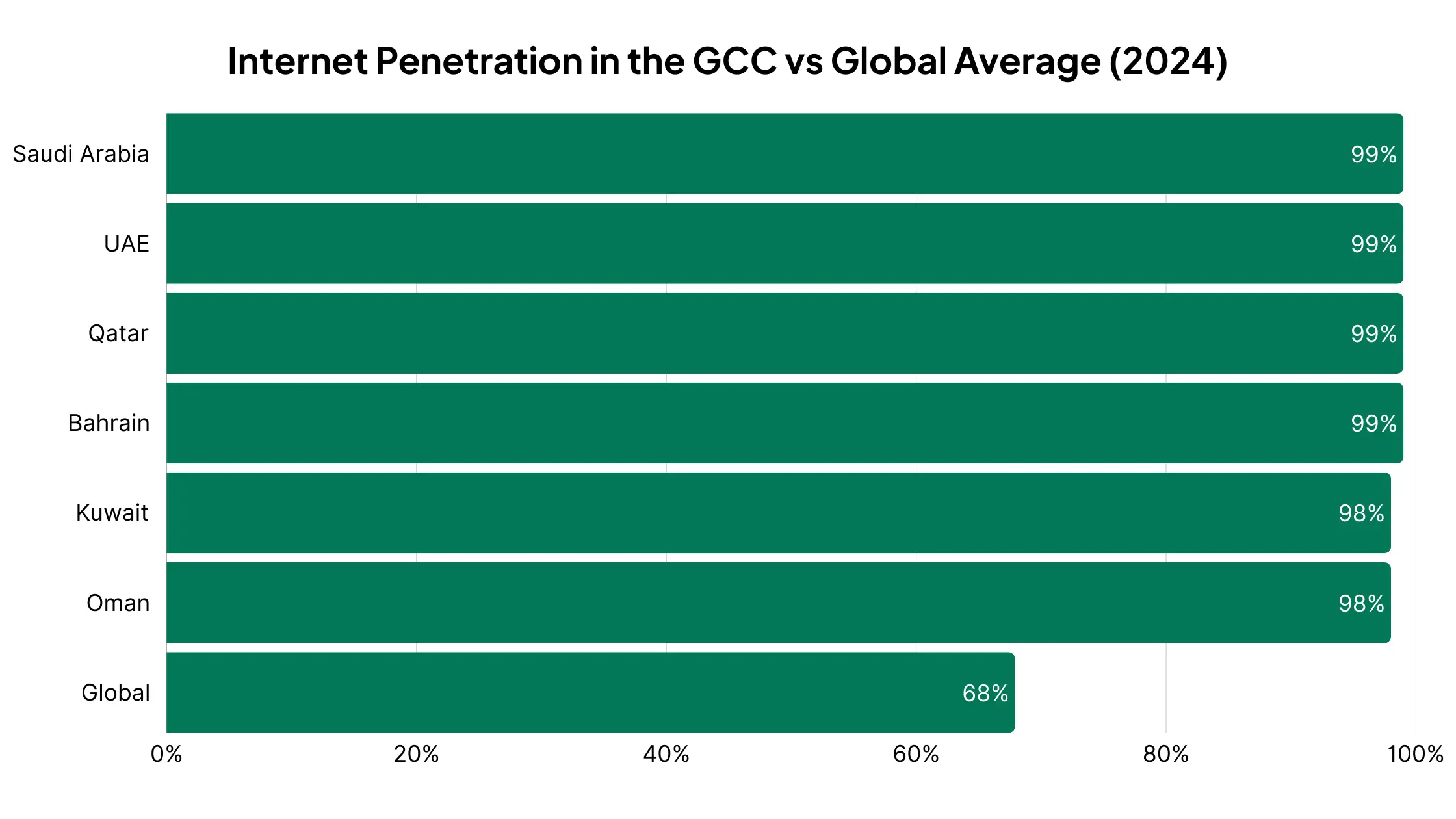
    By 2024, both Saudi Arabia and the UAE reported 99% internet penetration, meaning virtually everyone is online. 

    In Saudi Arabia, 98.9% of users access the internet primarily through mobile phones, making the smartphone the default gateway to the web.

    GCC countries lead the world in connectivity, with near-universal internet penetration compared to just 68% globally.

    More phones than people

    The UAE alone has mobile subscriptions equal to 219% of its population

    This means most people carry more than one active SIM card; showing how central mobile is to daily life.

    World-class mobile infrastructure

    GCC countries are at the forefront of 5G adoption and mobile internet speeds. In Saudi Arabia, for example, median mobile speeds exceed 100 Mbps, roughly double the worldwide average.

    2. Middle Eastern Consumers are Mobile-First

    Having world-leading smartphone penetration is one thing. But what really matters is how people use their devices. 

    In the GCC, consumers don’t just own smartphones, they live their digital lives through them.

    Smartphone-first shopping

    Surveys show that over half of digital shoppers in Saudi Arabia, the UAE, and Egypt prefer to shop online using their phones. In many cases, the smartphone is the only device they use to research, compare, and purchase products.

    UAE consumers spend nearly two-thirds of their online time on mobile devices — showing just how central smartphones are to daily life.

    Search behavior is mobile-led

    In both Saudi Arabia and the UAE, around 70% of shopping-related Google searches are made on mobile devices. Discovery, product research, and even price comparisons overwhelmingly happen on smartphones.

    Mobile across the customer journey

    From the first ad impression to checkout, mobile dominates the buyer’s path. Product videos are consumed on mobile, social discovery happens on apps like Instagram and TikTok, and conversions increasingly happen in mobile-native environments.

    A mobile-first digital culture

    Beyond commerce, this preference extends into media, banking, and communication, reinforcing the fact that for GCC consumers, the smartphone is not a secondary channel but the primary way they engage with the online world.

    3. Mobile Commerce is Expanding Rapidly in the GCC

    If mobile is how people in the Gulf go online, it’s also how they shop. 

    The GCC has become one of the world’s fastest-growing mobile commerce markets, with smartphones now driving the majority of online sales.

    Mobile is now the majority channel

    In 2024, mobile accounted for 62% of ecommerce transactions in Saudi Arabia, 60% in the UAE, and more than half in every other GCC market — Bahrain (59%), Oman (58%), Kuwait (57%), and Qatar (54%).

    In every GCC market, more than half of online purchases are now made on mobile — peaking at 62% in Saudi Arabia.

    Ahead of the curve

    The Gulf was already above the global average for mobile transaction share as far back as 2016, when nearly 43% of online sales were happening on phones. The region has only accelerated since, riding a wave of smartphone adoption and 5G coverage.

    Ecommerce growth overall is strong

    The UAE and Saudi Arabia alone posted ~23% year-over-year growth in ecommerce sales in 2023, with mobile being the main driver of that expansion.

    Seasonal surges reinforce the trend

    During Ramadan, for example, shopping app downloads spike and mobile transactions surge,  evidence that consumers not only prefer to shop via their phones, they turn to mobile apps for key seasonal purchases.

    4. GCC Consumers Prefer Apps

    It’s not just that Gulf shoppers use their phones to shop. It’s that they prefer doing so through mobile apps rather than mobile websites. 

    The data shows that, when retailers provide an app, consumers flock to it.

    Apps dominate mobile sales

    For retailers that offer both an app and a mobile site, apps capture the majority of mobile sales; in some cases up to 70%. That’s because apps are built for speed, convenience, and personalization, while mobile web still struggles with friction.

    Higher engagement in MENA

    Research shows that Middle Eastern consumers engage with shopping apps far more than consumers in Western markets, often at levels comparable to Asia, where app-first behaviors are strongest globally.

    Massive adoption growth

    In 2024, app installs for non-gaming apps grew 30%+ year-over-year in the UAE, Saudi Arabia, and Qatar, a surge that far outpaces global averages. Consumers are actively downloading and trying new apps, especially in ecommerce, fintech, and food delivery.

    Non-gaming app installs grew 30% in the UAE, KSA, and Qatar in 2024 — about 4× faster than the global average.

    Seasonal app spikes

    During high-demand periods like Ramadan or White Friday (the region’s Black Friday), shopping app downloads and usage skyrocket, showing that when the stakes are high, consumers choose apps as their default shopping channel.

    5. Mobile Apps Drive Better Results

    For GCC retailers, the value of an app goes beyond consumer preference, and translates directly into better performance metrics across the board.

    Higher conversion rates

    Shopping apps consistently convert at 3x the rate of mobile websites. In some categories, apps deliver conversion rates above 18–20%, compared to just 4–6% on mobile web.

    Bigger baskets

    Consumers spend more when shopping in-app. Benchmarks show average order values around $127 on apps, compared to $100 on desktop and just $91 on mobile web.

    App shoppers spend more — with an average basket size of $127, far above desktop ($100) and mobile web ($91).

    Stronger engagement

    App users browse more products, add more items to their cart, and check out more frequently. Push notifications and personalized app experiences keep customers active.

    Better retention

    While retention is a challenge for any app, those who succeed reap the rewards. Shoppers who download and keep a retailer’s app become loyal, high-value customers, returning more often and spending more over time.

    The bottom line: apps outperform every other channel. They generate higher revenue per customer, foster stronger loyalty, and give retailers a direct line of communication via push notifications, without the rising costs of ads and third-party platforms.

    For GCC retailers, where mobile dominates and consumer expectations are high, an app is a crucial part of your stack.

    The Best Way for Brands in the GCC to Launch a Mobile App

    With Vendrux, GCC retailers can convert their existing website into fully branded iOS and Android apps in as little as a month. 

    Your website powers the app. That means all the features from your website work in the app, there’s no rebuilding, and there’s little work required to keep it running.

    Here’s more on why Vendrux is the best way for GCC brands to launch a mobile app:

    • Vendrux works with any tech stack or ecommerce platform, from Shopify and Salesforce Commerce Cloud to regional platforms like Salla and Zid.
    • It supports multi-region stores – perfect for brands running multiple storefronts across the GCC and MENA.
    • It’s a fully managed service. We handle everything, including configuration, QA, App Store submissions, and ongoing maintenance. Perfect for teams that want to stay lean.
    • We work with your brand on growth, adoption, and engagement strategies, helping you expand into a new area comfortably.
    • No templates: unlike typical no-code tools, we don’t force you into a template. Anything that works on your site will work in the app.
    • You can go live in just a few weeks, making it quick to see the impact of your mobile app.

    Proven Track Record with GCC Brands

    Many mobile app builders have little to no experience working with brands in the GCC.

    Not Vendrux. We’ve worked with multiple GCC brands, and had excellent results.

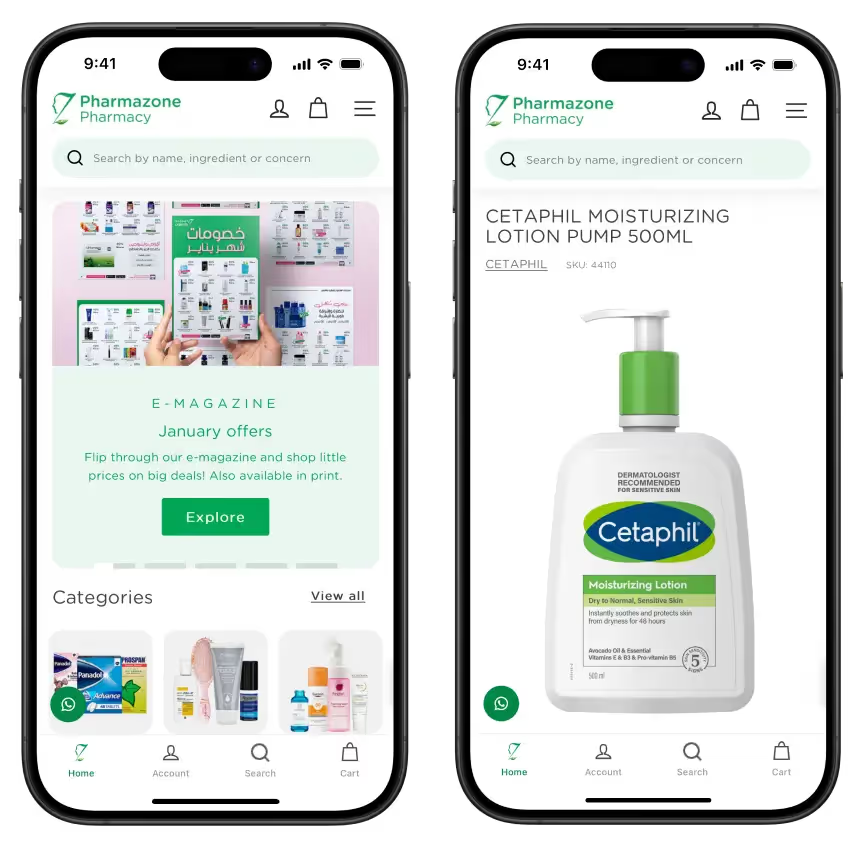
    Pharmazone is a great example. One of Kuwait’s leading online pharmacies, Vendrux helped them convert their Shopify site into a mobile app, which now contributes 63% of their total online revenue, with 15x more revenue per user vs their website.
    Health and beauty brand NumberC also came to Vendrux to launch a seamless app experience. Also based in Kuwait, their previous app was built with a popular DIY app builder, with many of their features not working properly in the app (or taking far too much time to manage).
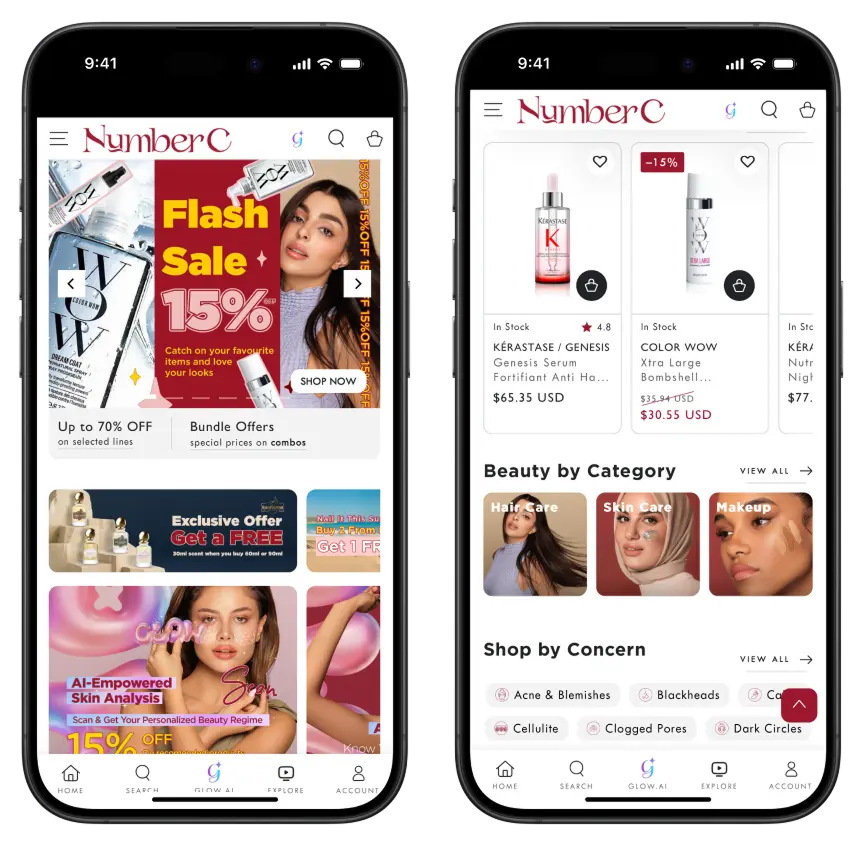
    Vendrux helped them build a new app, fully synced with their website – which drives 20-30% of their revenue, with less overhead and complete flexibility to build custom features.

    Next Steps

    If you’re a brand operating in the GCC, and want to give your customers the app-first experience they desire, Vendrux can help you do it.

    The next step is to book a consultation with our team. Our experts will walk you through the process, and show you examples of other apps doing the same thing you’re looking to do.

    We’ll discuss your goals, make sure Vendrux is the right fit, and give you a clear picture of everything you need to go live.

    Ready to get your brand in the App Stores and on your customer’s device? Book a free consultation now.


  • Website-to-App vs Custom Native Apps vs DIY Wrappers

    Website-to-App vs Custom Native Apps vs DIY Wrappers

    If you run an online business, you’ve probably asked yourself: what’s the best way to build a mobile app?

    It makes sense. Mobile internet traffic is consistently rising, and an app is a reliable way to build an audience you actually own.

    To launch an app, there are three main paths you’re likely to consider:

    1. Using a website-to-app service (a managed wrapper that converts your existing site into a mobile app).
    2. Building a custom native app from scratch with developers or an agency.
    3. Creating a DIY wrapper in-house, where your team puts your website inside an app shell.

    Your choice affects how fast you go live, how much the app will cost (upfront and ongoing), and the quality of the end user experience.

    Some will tell you always go for a custom build – others say it’s a waste of time.

    We’ve been in the app development industry for over 12 years, and know just what matters and what doesn’t with mobile apps.

    In this article, we’re going to use that experience, and give you a clear breakdown of the pros and cons of each approach, the hidden costs and sacrifices that you might not be aware of, and ultimately our recommendation on the best way forward for your mobile app.

    The Three Main Approaches Explained

    Let’s dive into the three most common ways to build a mobile app.

    Note: in general, we’re assuming your business has a website – or is launching both around the same time. This covers businesses like ecommerce stores, e-learning platforms, digital publishers and SaaS apps.

    If your business is built around the app, the question changes slightly. But you should still find some value in the breakdowns below (and you might find that a web-first, then app approach actually makes sense).

    Website-to-App Services (Managed Wrappers)

    A website-to-app service like Vendrux takes your existing website and converts it into a mobile app for iOS and Android.

    Instead of building a new app from scratch, these platforms wrap your website inside a native app shell. This shell is fully native code (we use Swift and Kotlin, the two most popular native languages for iOS and Android).

    What it essentially does is it lets your website run as a mobile app.

    The content comes from your website – pages, functionality, logins, etc. But your customers can download it, launch it from their homescreen, and interact with it much like they would with a native app built from the ground up.

    Why businesses choose this approach

    • Speed: You can launch in weeks, not months.
    • Lower cost: Instead of spending six figures on custom development, you pay a small amount upfront for the build, and usually a small cost per month for maintenance.
    • No extra workload: Updates you make on your website instantly appear in your app, so there’s no second codebase to manage.
    • Ongoing support: The service provider handles app store submissions, updates, and compatibility with new iOS/Android versions.

    The trade-offs

    • Less room for fully custom native features compared to a ground-up build.
    • Your app experience is tied closely to your website. This is an advantage for consistency, but not for brands wanting a radically different app experience.

    The bottom line: Website-to-app services are ideal for ecommerce stores and content-driven businesses that want to move fast, keep costs predictable, and avoid the heavy lift of custom development.

    Custom Native App Development

    A custom native app is built from the ground up for iOS and Android. 

    This is the traditional way of creating an app: hiring an in-house team or agency to design, code, and maintain everything.

    You can create a unique, fully custom app experience. If you have a website  as well, and you want to share data between your website and app (e.g. logins, product details, order information), you’ll do so via custom APIs (coded functions that allow different platforms, like your website and app, to communicate with each other).

    Why businesses choose this approach

    • You have full flexibility, able to design and build features that don’t exist on your website.
    • A native app can feel faster and smoother, with deep integrations into device features (camera, GPS, biometrics, etc.).
    • Ultimately it’s the highest-quality end product.

    The trade-offs

    • Custom apps cost a lot. Development can easily exceed $100,000, and that’s just the build. Ongoing updates cost thousands more each year.
    • Expect a long development timeline – typically 6-12 months to launch (assuming the build goes to plan).
    • Every update to iOS or Android requires development work. You’re maintaining two separate codebases in addition to your website, and paying expensive developers (potentially $9K+ monthly per person) to keep your apps live.
    • Scope creep is real – projects often go over budget or get delayed due to unforeseen complexities.

    The bottom line: Custom native development makes sense if you’re a large enterprise with deep pockets, or if your app needs features that simply can’t be achieved by extending your website. For most businesses, the cost and time investment make this option hard to justify.

    DIY Wrappers (Built In-House)

    If you want full control, without the massive cost of a native app, you can settle for a midpoint and do the wrapper approach in-house.

    Just like the first option, you’ll put together a native wrapper for your website, and do everything that a website to app service would do for you:

    • Build the native foundation
    • Integrate your website’s content and functionality within the app
    • Create native elements that make it feel like a real app
    • Manage QA, testing, ongoing maintenance
    • Submit your app to the App Stores for publishing

    Why businesses choose this approach

    • On the surface, it’s cheaper – you don’t pay an outside service or agency, just your team’s time.
    • You get full control. You decide exactly how the app is built, submitted, and maintained.
    • It’s flexible. If you only need a simple app shell, you can get something running quickly.

    The trade-offs

    • Wrapper has been a dirty word in app development for some time. The potential for what you can do with wrapper (or “hybrid”) technology has evolved massively, but poorly built hybrid apps stand out (in a bad way).
    • Apple and Google frequently reject low-quality wrappers. Without experience, managing the process and getting your apps approved can be frustrating.
    • Though you’re not paying an invoice, there’s still a major cost to bear. Your time, your team’s time – and you may need to hire new staff to build the app.
    • There’s maintenance to consider too. It’s not a “one and done”. There will be bugs to fix, features to add, kinks to smooth out. Expect a 2-3 person team required to keep your apps running.
    • Everything, from debugging to store compliance, falls on your team, potentially pulling away from other parts of your business.

    The bottom line: A DIY wrapper or hybrid app can be a decent option if you have a deep technical team, with experience building these kinds of apps. But the reality is, it won’t be as simple as you expect – especially if you’re going in with a lean development team.

    Key Factors to Compare

    So, what’s the best approach for your business?

    When deciding between website-to-app services, custom native apps, and DIY wrappers, four factors matter most: cost, time to launch, quality, and maintenance.

    1. Cost

    Cost is usually the first consideration when planning an app. That’s a natural concern for any project.

    And it’s not just about the upfront build. Ongoing expenses for updates, maintenance, and support add up over time. The three approaches differ sizeably in how much they’ll cost you both now and later.

    • Website-to-app services: Affordable, usually a monthly or yearly subscription. Predictable costs without the six-figure investment.
    • Custom native apps: The most expensive option. Expect $100k+ for development, plus ongoing costs for updates, fixes, and new features.
    • DIY wrappers: Cheapest upfront, but costs creep in over time. Your developers spend hours maintaining the app, which pulls them away from higher-value projects.

    2. Time to Launch

    Speed matters in ecommerce and digital business. The sooner your app is live, the sooner you can start driving installs, sending push notifications, and making revenue. Each approach comes with very different timelines, from weeks to a year or more.

    • Website-to-app services: Fast; often ready in weeks.
    • Custom native apps: Slow; 6–12 months is standard.
    • DIY wrappers: Variable. You might get a basic shell quickly, but debugging and app store rejections often cause delays.

    3. Quality & User Experience

    Users expect apps to feel fast, smooth, and reliable. A poor experience leads to bad reviews and low retention. 

    How you build your app directly impacts the quality your customers experience, the results you get from the app, and your brand reputation along with it.

    • Website-to-app services: Depends on the service – but a tested platform with a decade plus of experience, like Vendrux, will deliver a 
    • Custom native apps: The best possible experience if budget allows. Can integrate deeply with device features.
    • DIY wrappers: Risky. Many feel clunky, load slowly, and don’t deliver the polish users expect from a professional app.

    4. Maintenance

    An app isn’t a one-and-done project. iOS and Android change constantly, other features change and break parts of your app.

    Keeping your app running smoothly requires ongoing updates and fixes. Some approaches make this simple, while others create a heavy long-term burden.

    • Website-to-app services: Handled by the provider. iOS/Android updates, app store submissions, and bug fixes are included.
    • Custom native apps: Heavy, expensive lift. You’ll need a development team maintaining two codebases, plus ongoing updates as platforms change.
    • DIY wrappers: All on your team. Every update and bug fix is your responsibility, so maintenance can become a drain on your resources.

    Which Approach is Right for You?

    There’s no universal answer for this – since every business, every project is different.

    But the best option for the majority of cases is to use a website to app service.

    You get a professional app, quickly and affordably, without the huge costs or heavy workload of custom development.

    It’s much easier to maintain, and you’re guaranteed a consistent user experience between website and app.

    The key is that most online businesses don’t need a totally unique app.

    There aren’t many limits to what you can do with modern web tech. Ecommerce platforms like Shopify, BigCommerce and Magento can create a mobile web UI that looks and feels like an app.

    That means website to app services like Vendrux give you more or less the same end product you’d get from building a custom app, much simpler, faster, more affordable.

    There are some situations where the other approaches make sense. 

    • Custom native apps are worth considering if you’re a large enterprise with significant resources and a need for unique, complex mobile features that go beyond what your website offers. 
    • DIY wrappers might appeal to highly technical teams that want total control and are willing to handle the headaches of app store compliance, bug fixes, and ongoing maintenance in-house.

    But generally, if you’ve got a fast, mobile-friendly website, the first option you consider should be turning it into an app, with a service like Vendrux.

    The bottom line: For most businesses, website-to-app services are the best balance between cost, time, quality, and maintenance. You get a professional app without the risk, expense, or delays of other options. Web-first businesses like ecommerce stores or digital publishers almost always get a better ROI from a unified web to app approach.

    Final Thoughts

    Building a mobile app could be the next step in your business’ growth trajectory. But how you build it matters as much as the decision whether or not to build in the first place.

    Contrary to what app development agencies will tell you, a fully custom, bespoke app is not always best. In fact, it’s becoming less and less of a necessity to build natively, with the advancements in hybrid app technology and customizable web platforms.

    If your business is already well-established and optimized for mobile, it simply makes more sense to convert your website into an app.

    It’s your call on how much you want to invest in your app, and whether or not you need a fully custom build. But if you want to see how your site will look simply converted into a native/hybrid build with Vendrux, we’ll put together a free preview for you to test drive.

    Curious? Get your free app preview now.

  • Website-to-App vs Custom Native Apps vs DIY Wrappers

    Website-to-App vs Custom Native Apps vs DIY Wrappers

    If you run an online business, you’ve probably asked yourself: what’s the best way to build a mobile app?

    It makes sense. Mobile internet traffic is consistently rising, and an app is a reliable way to build an audience you actually own.

    To launch an app, there are three main paths you’re likely to consider:

    1. Using a website-to-app service (a managed wrapper that converts your existing site into a mobile app).
    2. Building a custom native app from scratch with developers or an agency.
    3. Creating a DIY wrapper in-house, where your team puts your website inside an app shell.

    Your choice affects how fast you go live, how much the app will cost (upfront and ongoing), and the quality of the end user experience.

    Some will tell you always go for a custom build – others say it’s a waste of time.

    We’ve been in the app development industry for over 12 years, and know just what matters and what doesn’t with mobile apps.

    In this article, we’re going to use that experience, and give you a clear breakdown of the pros and cons of each approach, the hidden costs and sacrifices that you might not be aware of, and ultimately our recommendation on the best way forward for your mobile app.

    The Three Main Approaches Explained

    Let’s dive into the three most common ways to build a mobile app.

    Note: in general, we’re assuming your business has a website – or is launching both around the same time. This covers businesses like ecommerce stores, e-learning platforms, digital publishers and SaaS apps.

    If your business is built around the app, the question changes slightly. But you should still find some value in the breakdowns below (and you might find that a web-first, then app approach actually makes sense).

    Website-to-App Services (Managed Wrappers)

    A website-to-app service like Vendrux takes your existing website and converts it into a mobile app for iOS and Android.

    Instead of building a new app from scratch, these platforms wrap your website inside a native app shell. This shell is fully native code (we use Swift and Kotlin, the two most popular native languages for iOS and Android).

    What it essentially does is it lets your website run as a mobile app.

    The content comes from your website – pages, functionality, logins, etc. But your customers can download it, launch it from their homescreen, and interact with it much like they would with a native app built from the ground up.

    Why businesses choose this approach

    • Speed: You can launch in weeks, not months.
    • Lower cost: Instead of spending six figures on custom development, you pay a small amount upfront for the build, and usually a small cost per month for maintenance.
    • No extra workload: Updates you make on your website instantly appear in your app, so there’s no second codebase to manage.
    • Ongoing support: The service provider handles app store submissions, updates, and compatibility with new iOS/Android versions.

    The trade-offs

    • Less room for fully custom native features compared to a ground-up build.
    • Your app experience is tied closely to your website. This is an advantage for consistency, but not for brands wanting a radically different app experience.

    The bottom line: Website-to-app services are ideal for ecommerce stores and content-driven businesses that want to move fast, keep costs predictable, and avoid the heavy lift of custom development.

    Custom Native App Development

    A custom native app is built from the ground up for iOS and Android. 

    This is the traditional way of creating an app: hiring an in-house team or agency to design, code, and maintain everything.

    You can create a unique, fully custom app experience. If you have a website  as well, and you want to share data between your website and app (e.g. logins, product details, order information), you’ll do so via custom APIs (coded functions that allow different platforms, like your website and app, to communicate with each other).

    Why businesses choose this approach

    • You have full flexibility, able to design and build features that don’t exist on your website.
    • A native app can feel faster and smoother, with deep integrations into device features (camera, GPS, biometrics, etc.).
    • Ultimately it’s the highest-quality end product.

    The trade-offs

    • Custom apps cost a lot. Development can easily exceed $100,000, and that’s just the build. Ongoing updates cost thousands more each year.
    • Expect a long development timeline – typically 6-12 months to launch (assuming the build goes to plan).
    • Every update to iOS or Android requires development work. You’re maintaining two separate codebases in addition to your website, and paying expensive developers (potentially $9K+ monthly per person) to keep your apps live.
    • Scope creep is real – projects often go over budget or get delayed due to unforeseen complexities.

    The bottom line: Custom native development makes sense if you’re a large enterprise with deep pockets, or if your app needs features that simply can’t be achieved by extending your website. For most businesses, the cost and time investment make this option hard to justify.

    DIY Wrappers (Built In-House)

    If you want full control, without the massive cost of a native app, you can settle for a midpoint and do the wrapper approach in-house.

    Just like the first option, you’ll put together a native wrapper for your website, and do everything that a website to app service would do for you:

    • Build the native foundation
    • Integrate your website’s content and functionality within the app
    • Create native elements that make it feel like a real app
    • Manage QA, testing, ongoing maintenance
    • Submit your app to the App Stores for publishing

    Why businesses choose this approach

    • On the surface, it’s cheaper – you don’t pay an outside service or agency, just your team’s time.
    • You get full control. You decide exactly how the app is built, submitted, and maintained.
    • It’s flexible. If you only need a simple app shell, you can get something running quickly.

    The trade-offs

    • Wrapper has been a dirty word in app development for some time. The potential for what you can do with wrapper (or “hybrid”) technology has evolved massively, but poorly built hybrid apps stand out (in a bad way).
    • Apple and Google frequently reject low-quality wrappers. Without experience, managing the process and getting your apps approved can be frustrating.
    • Though you’re not paying an invoice, there’s still a major cost to bear. Your time, your team’s time – and you may need to hire new staff to build the app.
    • There’s maintenance to consider too. It’s not a “one and done”. There will be bugs to fix, features to add, kinks to smooth out. Expect a 2-3 person team required to keep your apps running.
    • Everything, from debugging to store compliance, falls on your team, potentially pulling away from other parts of your business.

    The bottom line: A DIY wrapper or hybrid app can be a decent option if you have a deep technical team, with experience building these kinds of apps. But the reality is, it won’t be as simple as you expect – especially if you’re going in with a lean development team.

    Key Factors to Compare

    So, what’s the best approach for your business?

    When deciding between website-to-app services, custom native apps, and DIY wrappers, four factors matter most: cost, time to launch, quality, and maintenance.

    1. Cost

    Cost is usually the first consideration when planning an app. That’s a natural concern for any project.

    And it’s not just about the upfront build. Ongoing expenses for updates, maintenance, and support add up over time. The three approaches differ sizeably in how much they’ll cost you both now and later.

    • Website-to-app services: Affordable, usually a monthly or yearly subscription. Predictable costs without the six-figure investment.
    • Custom native apps: The most expensive option. Expect $100k+ for development, plus ongoing costs for updates, fixes, and new features.
    • DIY wrappers: Cheapest upfront, but costs creep in over time. Your developers spend hours maintaining the app, which pulls them away from higher-value projects.

    2. Time to Launch

    Speed matters in ecommerce and digital business. The sooner your app is live, the sooner you can start driving installs, sending push notifications, and making revenue. Each approach comes with very different timelines, from weeks to a year or more.

    • Website-to-app services: Fast; often ready in weeks.
    • Custom native apps: Slow; 6–12 months is standard.
    • DIY wrappers: Variable. You might get a basic shell quickly, but debugging and app store rejections often cause delays.

    3. Quality & User Experience

    Users expect apps to feel fast, smooth, and reliable. A poor experience leads to bad reviews and low retention. 

    How you build your app directly impacts the quality your customers experience, the results you get from the app, and your brand reputation along with it.

    • Website-to-app services: Depends on the service – but a tested platform with a decade plus of experience, like Vendrux, will deliver a 
    • Custom native apps: The best possible experience if budget allows. Can integrate deeply with device features.
    • DIY wrappers: Risky. Many feel clunky, load slowly, and don’t deliver the polish users expect from a professional app.

    4. Maintenance

    An app isn’t a one-and-done project. iOS and Android change constantly, other features change and break parts of your app.

    Keeping your app running smoothly requires ongoing updates and fixes. Some approaches make this simple, while others create a heavy long-term burden.

    • Website-to-app services: Handled by the provider. iOS/Android updates, app store submissions, and bug fixes are included.
    • Custom native apps: Heavy, expensive lift. You’ll need a development team maintaining two codebases, plus ongoing updates as platforms change.
    • DIY wrappers: All on your team. Every update and bug fix is your responsibility, so maintenance can become a drain on your resources.

    Which Approach is Right for You?

    There’s no universal answer for this – since every business, every project is different.

    But the best option for the majority of cases is to use a website to app service.

    You get a professional app, quickly and affordably, without the huge costs or heavy workload of custom development.

    It’s much easier to maintain, and you’re guaranteed a consistent user experience between website and app.

    The key is that most online businesses don’t need a totally unique app.

    There aren’t many limits to what you can do with modern web tech. Ecommerce platforms like Shopify, BigCommerce and Magento can create a mobile web UI that looks and feels like an app.

    That means website to app services like Vendrux give you more or less the same end product you’d get from building a custom app, much simpler, faster, more affordable.

    There are some situations where the other approaches make sense. 

    • Custom native apps are worth considering if you’re a large enterprise with significant resources and a need for unique, complex mobile features that go beyond what your website offers. 
    • DIY wrappers might appeal to highly technical teams that want total control and are willing to handle the headaches of app store compliance, bug fixes, and ongoing maintenance in-house.

    But generally, if you’ve got a fast, mobile-friendly website, the first option you consider should be turning it into an app, with a service like Vendrux.

    The bottom line: For most businesses, website-to-app services are the best balance between cost, time, quality, and maintenance. You get a professional app without the risk, expense, or delays of other options. Web-first businesses like ecommerce stores or digital publishers almost always get a better ROI from a unified web to app approach.

    Final Thoughts

    Building a mobile app could be the next step in your business’ growth trajectory. But how you build it matters as much as the decision whether or not to build in the first place.

    Contrary to what app development agencies will tell you, a fully custom, bespoke app is not always best. In fact, it’s becoming less and less of a necessity to build natively, with the advancements in hybrid app technology and customizable web platforms.

    If your business is already well-established and optimized for mobile, it simply makes more sense to convert your website into an app.

    It’s your call on how much you want to invest in your app, and whether or not you need a fully custom build. But if you want to see how your site will look simply converted into a native/hybrid build with Vendrux, we’ll put together a free preview for you to test drive.

    Curious? Get your free app preview now.

  • What Are In-App Banner Ads? Cost-Effective Mobile Reach for Ecommerce Growth

    What Are In-App Banner Ads? Cost-Effective Mobile Reach for Ecommerce Growth

    Banner ads are one of the oldest forms of digital advertising. In mobile apps, they show up as small rectangular ads built into the app’s design. They usually appear as a bar or box at the top or bottom of your screen.

    These ads mix images and text to grab user attention. They can be still pictures or animated. Most include a call-to-action that asks users to tap for more info.

    For ecommerce and direct-to-consumer brands, in-app banner ads offer a simple, cheap way to reach shoppers. Your customers use their phones constantly. Banner ads let you connect with them there.

    You might wonder: how well do simple banner ads work in mobile apps? The answer depends on how you use them.

    Banner ads may not get the highest engagement rates. But they offer huge reach at low cost. This matters in the mobile world where your customers spend most of their time.

    Why Do Banner Ads Still Matter in Mobile Apps?

    Banner ads are an older format. But they’ve stuck around for good reasons. They work on different screen sizes. They cost little to make and run.

    Banner ads make up over half of all in-app ad spots worldwide. That’s about 56% of placements.

    The numbers are huge. Billions of people use smartphones for hours each day. They use apps for social media, games, tools, news, and shopping.

    Research shows worldwide in-app ad spending hit $314 billion in 2023. It should grow nearly 50% to about $469 billion by 2027.

    In a mobile app, banner ads usually take up a small space. Common sizes are 320×50 or 300×250 pixels. They don’t stop users from using the app.

    For example, a shopping app might show a banner at the bottom with a special deal. A free game might show banner ads from other companies to make money.

    Even big companies use this approach. Zillow’s real estate app shows banner ads for home services. This lets other businesses reach Zillow’s users.

    Banner ads help brands reach user groups they couldn’t access otherwise.

    How Well Do Banner Ads Drive Results?

    Banner ads work in two main ways. They give you reach and some engagement. But they don’t always drive immediate clicks.

    Click-Through Performance

    Banner ads have always had low click rates. Often less than 1%. On desktop computers, banner ads might only get 0.3 to 0.5% of people to click.

    Mobile apps do better. In-app ads get around 0.56% click rate. That’s more than double the 0.23% rate on mobile websites.

    People are twice as likely to click an ad inside an app versus on a mobile website.

    This makes sense. Apps engage users more deeply. There are fewer distractions. No browser tabs to switch between. Apps can also target ads better using device data.

    But a 0.5% click rate still means 99.5% of people don’t click. Many users ignore banner ads out of habit. This is called “banner blindness.”

    Context Matters

    Banner ad success varies a lot based on where and how you use them. Some app types get much better results.

    Mobile gaming apps see the best performance. Users often see ads between game levels or as rewards. Some gaming ads get click rates as high as 11%. That’s the best of any app type.

    Regular banner ads won’t hit those numbers. But they can build awareness and bring steady traffic when targeted well.

    Video ads in apps get 7.5 times more clicks than static banners. Native ads (ads that look like app content) get about 3 times more attention than basic banners.

    Sales and Return on Investment

    Clicks are just the start. What really matters is sales and return on ad spend. Banner ads can help with ROI. But usually as support, not the main driver.

    Banner click rates are modest. So one banner campaign won’t flood your site with traffic. But the traffic you do get can be good quality if you target right.

    Research shows in-app ads overall work better than mobile web ads. One study found in-app ads got 150% higher conversion rates. They also kept users 3 times longer than mobile web campaigns.

    This suggests people who click in-app banners are more valuable. They’re more likely to buy something. App targeting is more precise. Apps also attract more engaged users.

    What Value Do Banner Ads Offer Ecommerce Brands?

    The main value is reaching mobile customers where they spend time. You can do this in a flexible, budget-friendly way.

    Mobile-First Shopping

    People now spend 3 to 5 hours per day on mobile devices. Over 90% of that time is in apps, not web browsers.

    Mobile apps are like the new shopping malls. That’s where attention lives now.

    In-app banner ads put your brand in these mobile spaces. This goes beyond Facebook or Google Search. You can diversify your ad channels. You can reach shoppers in places you might otherwise miss.

    Precise Targeting

    Apps collect rich data through device IDs. This allows very specific audience targeting. You can target banner ads based on:

    • Demographics
    • Location
    • User behaviors in apps
    • Purchase intent signals
    • And more

    A fitness clothing brand could target users of running apps. A cookware brand might target recipe app users.

    This level of targeting makes banner ads much more relevant. It reduces the risk of people ignoring your ads.

    Low Cost and Big Reach

    Cost matters a lot for banner ad success. Banner ads are cheap per impression. This can make them profitable if you measure right.

    As of 2024, banner ads cost about $2.80 per thousand views. That’s much less than full-screen ads at $4.80. It’s also less than native ads at $3.30.

    You can get lots of exposure with banners for a small budget.

    Even if only a tiny percent click and convert, the low cost might still give you positive ROI. Track the right numbers: conversion rate, cost per customer, and revenue per impression.

    Keeping Current Customers

    Banner ads can also help keep existing customers engaged. If your brand has a shopping app, use banner-style promotions inside your app. This can boost sales to current customers.

    A fashion retailer’s app might show a banner about a flash sale. Many successful retail apps use banners on the home screen. They personalize offers like “20% off just for you” for customers who haven’t shopped recently.

    What Challenges Should You Expect?

    Banner ads have advantages. But they also come with challenges you should know about.

    People Ignore Them

    Many users have learned to ignore banner ads. If your ad looks boring or appears in a cluttered space, people won’t see it.

    Fight this with compelling designs. Use high contrast. Make your value clear. Maybe add interactive elements. Use smart placement.

    Make sure your targeting matches the app’s audience and context.

    User Experience Problems

    Banner ads are cheap. So it’s easy to show users too many ads. This annoys people. They might delete the app or use ad blockers.

    Limit how often each person sees your ad. Rotate different creative versions. Quality beats quantity.

    It’s better to show fewer, better banner ads to the right people. Don’t plaster your ads everywhere.

    Limited Creative Space

    A banner on a phone screen has very little space. You can only say so much. Often you have room for:

    • An image
    • A short headline
    • Maybe a logo and button

    Your banner ads need a very clear, simple message. Focus on one main point like “Save 50% today” or “Free shipping on first order.”

    Don’t try to say everything at once.

    Accidental Clicks

    Banners sit next to app content. Sometimes people tap them by accident. These wrong clicks inflate your numbers but don’t bring real interest.

    Watch your bounce rates. Look at what people do after clicking your banner ads. If 90% leave your page in under a second, that’s a red flag.

    How Can You Get Better Results?

    Follow these best practices to make your banner ads work better.

    Design for Mobile

    Mobile banners need mobile-first design. Use bold, simple images. Use as little text as possible.

    Assume people will see your ad on a 5 to 6 inch screen. Tiny details get lost. Communicate visually.

    Many brands succeed with one good image and one line of text. Test different colors. Make sure your banner stands out from the app’s background.

    Clear Calls-to-Action

    Every banner ad needs a clear call-to-action. Tell users what to do or what they’ll get by tapping.

    Good CTAs include “Shop Now,” “Learn More,” or “Get 20% Off.”

    Make your CTA clear and prominent. This drives more clicks. It also sets the right expectation for what happens when people tap.

    Target Smart But Not Too Narrow

    Use in-app targeting power wisely. Match your targeting to your customer profile. Choose:

    • App categories
    • User demographics
    • Interest groups that match your shoppers

    A vegan snack brand might target health app users. Or people who buy organic food in grocery apps.

    Good targeting makes your banner more relevant and welcome.

    Start with a reasonably broad target. Then optimize based on which groups respond best. Use campaign data to keep improving your targeting.

    Test and Improve

    Run multiple versions of your banner ads. See which creative, copy, or CTA works best.

    Test different offers. Test different images. Even test different colors.

    Small changes can make a big difference in click rates or sales. These small gains add up to much better campaigns over time.

    Fix the Landing Experience

    A banner ad only works as well as where it sends people. After someone taps your banner, the next step must be smooth.

    If your banner said “50% off running shoes,” send them to those discounted shoes. Don’t send them to your homepage.

    The easier the journey, the more likely a click becomes a sale.

    What’s Next for Banner Ads?

    Banner ads in mobile apps will likely stay important. But their role is changing.

    Mobile usage keeps growing worldwide. More shopping happens in apps. Banner ads will remain a basic way to buy attention at scale.

    Their core strengths stay the same: low cost, flexibility, and broad reach.

    The industry is moving toward more “native” placements. These look like part of the app content. This can increase user engagement.

    Creative capabilities are improving too. Even in small banner spaces, new technology can customize content for each user.

    Interactive banners are emerging. They start as banners but expand when people interact with them. This combines the non-intrusive nature of banners with higher engagement.

    Privacy changes affect targeting. Advertisers will rely more on contextual targeting. Banners placed in relevant contexts will likely work better than random targeting.

    Making Banner Ads Work for You

    Banner ads offer a low-risk testing ground. You can try new ideas quickly and cheaply. They provide cost-effective reach at $2 to $3 per thousand views.

    Banner ads typically get 0.3 to 0.6% click rates. In-app banners work better than mobile web banners. With good targeting and design, they can drive steady traffic.

    Focus on conversions, not just clicks, to measure real ROI.

    For ecommerce brands, banner ads work best as part of a bigger mobile strategy. Use them with other channels. Re-engage app users with promo banners. Get new customers by advertising in popular apps.

    Treat banner advertising as a living tactic to improve. Focus on compelling creative and relevant placement. Use strong visuals and offers. Target your ideal audience. Don’t overwhelm users with too many ads.

    Consider new formats as they emerge. But banners remain a reliable starting point for mobile advertising. They offer unmatched reach and affordability where your customers spend most of their time.

  • What Are Behavioral Triggers? The Simple Strategy That Boosts App Retention by 88%

    What Are Behavioral Triggers? The Simple Strategy That Boosts App Retention by 88%

    Picture this: your app knows exactly when a customer is about to leave. It sends them the perfect message to bring them back. That’s behavioral triggers.

    Behavioral triggers are automatic messages that respond to what users do (or don’t do). Think of them as your app’s smart assistant that watches user behavior and reacts in real time.

    Here’s how it works: A user adds items to their cart but leaves without buying. Your system sends them a message saying “Forget something?”

    These triggers watch everything. Browsing activity. Feature usage. Purchase patterns. Signs of going inactive. The key difference? They respond to real actions, not random timing.

    This makes them super relevant. They hit users at exactly the right moment. For ecommerce and direct-to-consumer brands, this is huge. Your app becomes smart. It senses what customers do and responds instantly.

    Why Behavioral Triggers Matter for Your Business

    Customer retention drives revenue. It’s that simple.

    Research shows a 5% boost in retention can increase profits by 25–95%. That’s according to Bain & Co. Behavioral triggers are one of the best ways to get these gains.

    They work by reaching users with the right message at the right time. This stops people from leaving. It encourages repeat visits. And repeat visits mean more lifetime value.

    Here’s the problem most apps face: users disappear fast. Day 30 retention rates often drop to single digits. That’s a huge loss.

    Triggers fight this “retention cliff.” They step in before users vanish.

    Example: A fitness app notices you haven’t logged a workout in a week. It sends a friendly push: “Ready for a new training plan?” This catches you right when you might quit.

    These smart nudges work. They can mean the difference between an uninstall and a loyal customer.

    The Numbers Don’t Lie

    Trigger-based campaigns beat generic messages every time. They can boost app retention by 88%. User engagement goes up by over 50%.

    Why? Users respond to relevant messages. A trigger that responds to what they just did feels helpful. Random marketing feels like spam.

    The personalization effect is massive. Companies using personalized triggers see 61–74% retention rates. Generic messages? Only 49% retention. That’s a 25-point gap.

    Even simple triggers like order confirmations work better. They get 8× higher open rates than regular promotional emails.

    The money side looks good too. Well-made re-engagement flows deliver 3× ROI. They bring in extra revenue from users who would have left.

    Take ASOS, the fashion retailer. Their triggered cart reminders drove 10–15% more purchases. That’s real money from smart automation.

    How Triggers Work in Different Industries

    Behavioral triggers use simple rules: “IF user does X, THEN send Y.” Tools like Customer.io, Braze, and Klaviyo make this easy to set up.

    The trick is finding the right moments to trigger. Look for key actions, milestones, problems, or signs of going inactive.

    Here’s how different industries use them:

    Ecommerce and Retail

    Cart abandonment: User adds items but doesn’t buy. Send a “Still thinking it over?” message within an hour. Include the items they left behind. Maybe add a shipping offer.

    If they still don’t buy, try again the next day. This flow recovers lots of lost sales.

    Post-purchase: Someone buys something. Send a thank-you message. Then invite them to join your loyalty program. Strike while they’re happy.

    Subscription Services

    Renewal time: Send a summary of value they got this month. “Here’s what you enjoyed.” If they don’t engage, offer a loyalty reward.

    Inactive users: Meal-kit user skips deliveries for two weeks? Send: “Need new recipe ideas? Check out this week’s menu.” Gentle nudges work.

    Fintech and Banking

    Setup incomplete: New user hasn’t finished account setup. Send help offers. Early activation prevents churn.

    Bill reminders: Push notification before credit card bill is due. Or when account balance runs low. These feel helpful, not pushy. They save users from fees.

    This builds habits. Users log in regularly because the app helps them.

    Media and Content

    Watch patterns: User binges a show. Send recommendations for similar content. Or alert them when new seasons drop.

    Spotify and YouTube master this. They watch what you consume. Then they suggest new content you’ll love. This keeps users coming back instead of switching to competitors.

    Health and Fitness

    Inactive streaks: Haven’t logged a workout in days? Get an encouraging message: “Let’s get moving!”

    Milestones: Hit a 7-day workout streak? Get a celebration message or badge.

    These play on psychology. Rewards and reminders build habits. Duolingo uses streak notifications to keep learners coming back daily.

    Best Practices for Getting Started

    Starting with behavioral triggers needs planning and the right tools. Here’s how to do it right:

    1. Find Your Key Moments

    Map your customer journey. Find the actions that matter for retention. These might be:

    • Onboarding steps (account created, first purchase)
    • Usage patterns (days inactive, features used)
    • Conversion points (cart additions, checkout starts)

    Every business has different key moments. SaaS products might track “user invited teammate.” Ecommerce apps might watch “browsed specific category.”

    Use your analytics. Look at cohort data. Find funnel drop-offs. See which behaviors predict retention or churn. Those are your trigger points.

    Example: Users who add profile pictures stay longer. Make that a trigger. If someone hasn’t added a photo in 7 days, send a gentle prompt.

    2. Get Timing and Channels Right

    Timing matters most. Strike while interest is hot. Or before it goes cold.

    High intent actions (like browsing pricing pages) need fast responses. Routine nudges can wait a few days.

    Pick the right channel:

    • Push notifications: Great for urgent stuff (“Order delivered!”)
    • Email: Better for longer content or when users are off-app
    • SMS: High attention but use sparingly

    Some triggers need multiple channels. Try push first. If ignored, follow up with email.

    Always think from the user’s view. “Favorite item back in stock!” provides value. “Come shop!” at 3 AM doesn’t.

    3. Make It Personal

    Good triggers reference exactly what users did. Not just their name.

    Cart abandonment? Show the actual items they left. Re-engagement? Highlight features they used before.

    Segment your audience. Loan browsers need different messages than investment browsers. One wants education. The other wants webinar invites.

    Personal messages feel like helpful reminders from friends. Generic ones feel like spam.

    Quick Wins You Can Start Today

    You don’t need complex systems to see results. These simple triggers deliver fast wins:

    Abandoned Cart Reminders

    Most important trigger for ecommerce. Someone leaves without buying? Remind them what they liked.

    A basic “You left something behind” email with product images works. This single trigger can recover 10% of lost sales.

    Welcome Series

    Sign-up isn’t the finish line. It’s the start. Send a welcome email immediately. Show them how to get started. Highlight your app’s main value.

    If they stall during onboarding, offer help: “Need assistance setting up?”

    Apps that guide users through onboarding see 50% better retention. They make sure users find value early.

    Inactive User Re-engagement

    Define “inactive” for your app. No logins for 7 days? 30 days? When users hit that mark, reach out.

    Try: “We miss you – here’s what’s new.” Include an incentive or highlight new features.

    Catch churn before it’s final. Smart trigger sequences can almost eliminate churn completely.

    Milestone Celebrations

    Recognize user achievements. Thank them after first purchase. Reward them at 10 orders. Send anniversary messages.

    These “surprise and delight” moments build loyalty. Starbucks sends offers when users reach new loyalty tiers. It’s helped make their app one of retail’s most sticky.

    Even small wins work. “Completed 10 workouts!” reinforces good behavior.

    Common Mistakes to Avoid

    Triggers are powerful but easy to mess up. Avoid these pitfalls:

    Too Many Messages

    Don’t trigger everything. 71% of users turn off all notifications if they get too many irrelevant pings. That kills retention completely.

    Focus on high-value triggers. Set frequency limits. Quality beats quantity every time.

    Bad Timing

    Wrong timing feels jarring. Re-engagement pushes at 3 AM? Upsell offers after app crashes? These hurt trust.

    Think about user context. Use “quiet hours” for notifications. Don’t send promos to users with open support tickets.

    Generic Content

    Generic triggers waste behavioral targeting. “We miss you” could apply to anyone. “We miss you since you haven’t logged in this week” is better. “Here’s what you’re missing” is even better.

    Always reference actual user behavior.

    Ignoring Feedback

    Watch how users respond. If cart reminders get no clicks, change the timing or offer. If users opt out of notifications, respect that choice.

    The best systems adapt to user signals. Include options like “Not interested in these alerts?” and actually use that data.

    What’s Coming Next

    Behavioral triggers keep evolving. Here’s what’s ahead:

    AI and Prediction

    Instead of just reacting, apps now predict who might churn. Machine learning spots patterns early. Then triggers intervene before users even think about leaving.

    Example: An ecommerce brand scores customers on repeat purchase likelihood. Those scoring low get special offers automatically.

    More Channels

    Triggers expand beyond email and push. WhatsApp messages. SMS alerts. Browser notifications. On-site chatbots.

    The lines blur between app and web retention. Users get consistent experiences everywhere.

    Built-in Habits

    The best triggers create internal habits. External notifications train users until they don’t need reminders.

    A meditation app sends daily reminders. Eventually, users meditate automatically. The app becomes part of their routine.

    Privacy Focus

    Users want control over their data. Future triggers will be more transparent. Users will choose which alerts they want.

    Value-driven triggers align with user preferences anyway. People want helpful messages.

    The Bottom Line

    Behavioral triggers change how you connect with customers. They’re automatic responses to real user actions. They deliver relevant messages at perfect moments.

    The impact is huge. Retention rates jump from 50% to 60–70% with personalized triggers. Some apps see 88% retention boosts.

    This means more lifetime value. More revenue. Even small retention gains (5%) can boost profits by 25–95%.

    Top brands across industries use triggers. ASOS recovers 10–15% more sales. Apps with trigger-guided onboarding see 50% better retention.

    The future belongs to companies that ask: “Does this trigger help the customer?” Smart triggers assist users. They don’t annoy them.

    Think of triggers like a helpful store clerk. Available when needed. Suggesting the right thing at the right time. Never pushy.

    Get this balance right and users will appreciate the help. Your retention numbers will show it.

  • How to Use In‑App AI Chatbots to Drive Engagement

    How to Use In‑App AI Chatbots to Drive Engagement

    When most people hear “chatbot,” they picture the clunky boxes of the past. That era is over. Today’s in-app AI chatbots feel less like a dead end and more like a real conversation. They guide, answer, and smooth out the experience in ways that actually help.

    Why does this matter? Because your mobile app is often the front door to your brand. If users hit a wall and have to leave the app to email support or wait on hold, many won’t come back. An in-app chatbot keeps them moving. It solves simple problems in the moment and makes the whole experience feel effortless.

    Will it fix everything? No. But in a crowded app store, “smooth and supported” often makes the difference between an app that gets deleted and one that earns a permanent spot on the home screen.

    What is a Mobile App AI Chatbot?

    An in-app AI chatbot is a digital assistant built right into the app. Instead of bouncing users out to a website or FAQ page, it answers questions where they already are.

    And these aren’t the old keyword bots that spit out generic links. Thanks to natural language processing (NLP) and machine learning, modern chatbots understand intent. 

    If someone types, “I forgot my password,” the bot doesn’t just drop a login page link. It can walk them through troubleshooting, send them directly to reset, or even trigger the reset for them — depending on how it’s set up.

    It’s basically like having a support rep available 24/7, without the wait times. The result: faster answers, less frustration, and a smoother experience that keeps people inside your app.

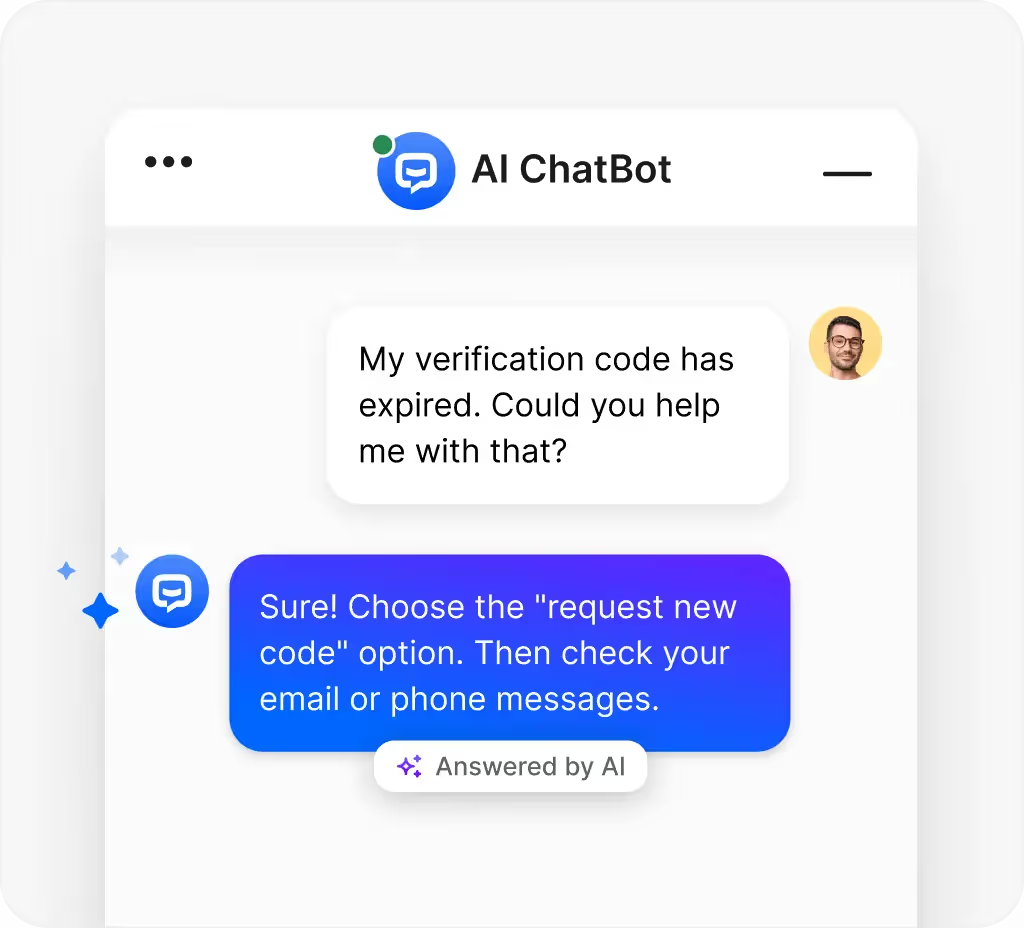
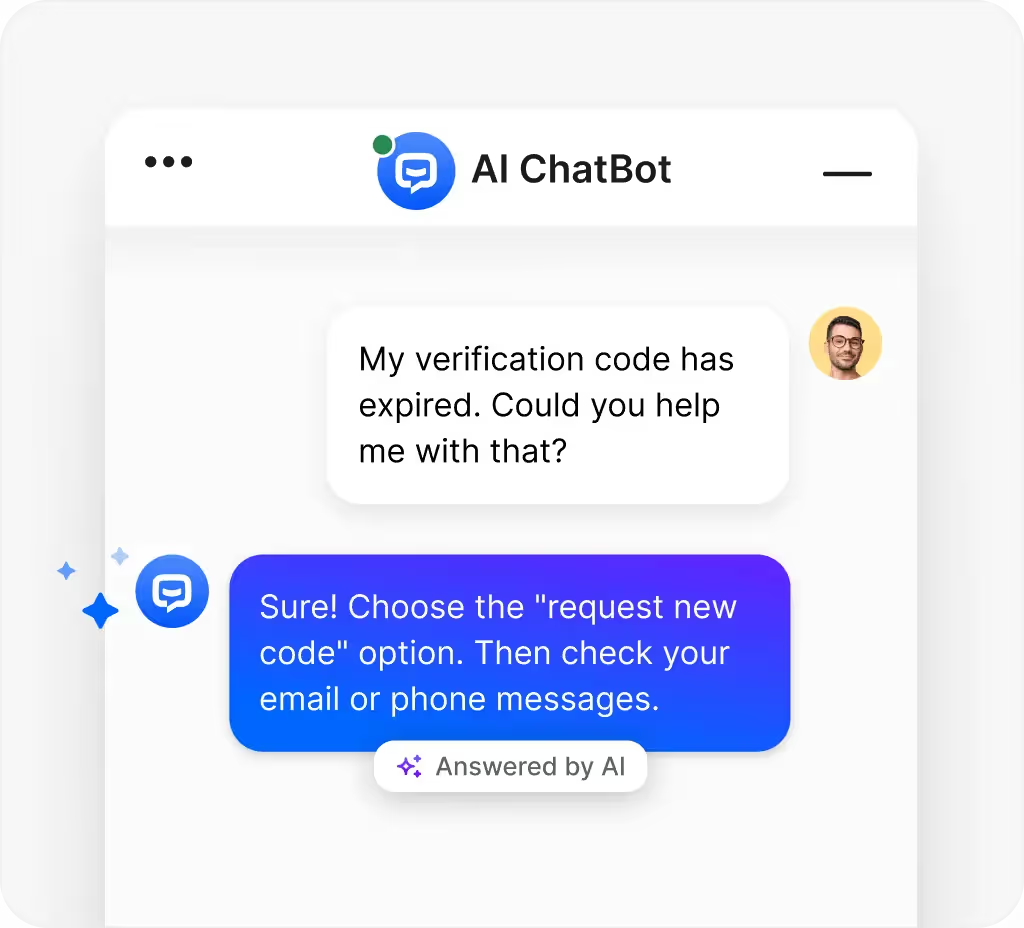
    example of an AI chatbot – via ChatBot

    Why In-App Conversational AI is Transforming Mobile Apps

    People download apps for convenience. They expect to shop, bank, book, or learn without friction. Slow them down, and they’ll move on.

    That’s where AI-powered chatbots shine. Instead of forcing users to dig through menus or wait for a human agent, they can just ask in plain language and get an immediate answer.

    The easier the experience, the more likely people are to stick around. Chatbots don’t need to be flashy. They just need to quietly remove friction. And often, that’s what keeps your app on someone’s home screen instead of the delete list.

    Benefits of AI Chatbots for Mobile Apps

    Integrating AI chatbots into mobile apps has multiple benefits. We’ve listed some of the major advantages below.

    1. A smoother user experience

    Picture this: someone forgets their login. Without a chatbot, they’re forced to close the app, dig through email, reset, and circle back. With a chatbot? They type “reset password” and are guided straight back in.

    These little moments don’t make headlines. But they make or break how your app feels. A smooth app feels invisible in the best way.

    2. Faster problem solving

    Unlike humans, chatbots don’t clock out. At midnight or midday, they can deliver instant answers to simple questions.

    Even a quick update like “your order shipped today” cuts frustration and keeps users engaged. Fast answers reduce abandonment.

    3. More reliable support

    Staffing a team to cover every question 24/7 is expensive. Chatbots handle the repetitive stuff and collect useful details before handing complex cases to humans. 

    The result? Consistency for users and a smoother handoff for your team.

    4. Lower costs

    Every ticket resolved by a bot is one less for your support team. That saves time, reduces overhead, and frees your people to focus on high-value work instead of repeating the same answers over and over.

    5. Extra sales opportunities

    Chatbots don’t just fix problems. They can drive growth. From suggesting add-ons to highlighting discounts or upgrades, they can spark incremental revenue that compounds over time.

    Use Cases of AI Chatbots in Mobile Apps

    AI chatbots aren’t just for customer service. They show up across industries, quietly removing friction wherever users get stuck. 

    Here are a few examples:

    • Ecommerce: Virtual shopping assistants, order tracking, returns, product recommendations.
    • Banking: Balance checks, transaction history, fraud alerts.
    • Healthcare: Appointment scheduling, patient inquiries, medication reminders.
    • Travel: Real-time flight updates, rebooking help, itinerary support.
    • Education: Study tips, progress tracking, tutoring assistance.

    The common thread: whenever users hesitate or hit a roadblock, the chatbot gives them a path forward, without leaving your app.

    Pro Tip: Combine in-app chatbots with Push Notifications, to spark engagement with your app users, both when they’re in the app or between sessions.

    How to Integrate an AI Chatbot Into a Mobile App

    There are a couple of parts to adding a chatbot to your app.

    One is technical – how the code works. We’re not going to get too deep into this (and a lot of chatbot apps will do this for you, without you having to code too much).

    The other is about weaving it into the flow of the app so it feels natural. 

    Here’s how to do it right:

    1. Map the conversations

    Start by listing the questions your users ask the most, and the problems they face repeatedly. 

    What do they expect the chatbot to do – reset a password, track an order, answer billing questions? There’s your foundation.

    2. Pick the right solution

    Some frameworks are quick to set up, others allow deep customization. 

    Decide what matters most: speed, flexibility, or advanced features. Choose a tool that fits both your goals and your team’s resources.

    Read more: The Best Chatbot Apps for Shopify Stores

    3. Design the interface

    Good design makes or breaks chatbot adoption. Users should know instantly where to type, how to send, and how to exit.

    • Small bubble in the corner or full-screen chat? Test what feels best.
    • Match the chatbot’s look and feel to the rest of your app so it doesn’t feel like a bolt-on.
    • Add quick-reply buttons or suggested prompts for users who don’t know what to type.

    4. Test, tweak, improve

    Launch day isn’t the finish line; it’s the starting point.

    Watch how real users interact. Do conversations stall? Do the same questions keep coming up unanswered? 

    Use that feedback to refine wording, add shortcuts, and smooth out rough edges. Small tweaks add up to a bot that feels natural over time.

    The Cost of Integrating an AI Chatbot in Your Mobile App

    How much does it cost to add an AI chatbot? The short answer: it depends on scope. A simple FAQ bot might cost a few thousand dollars. A fully customized system that hooks into back-end tools can easily climb into six figures.

    What drives the price:

    • Complexity of the bot’s functions
    • Level of customization (from off-the-shelf to fully bespoke)
    • Depth of integration with your existing systems
    • Ongoing maintenance and updates
    • Hosting and infrastructure needs

    And remember: this isn’t a one-and-done project. Chatbots need monitoring and refinements to stay useful. Budgeting for ongoing improvements is what keeps a bot feeling alive instead of outdated.

    Vendrux: Seamless Chatbot Integration Across Web and App

    Building a chatbot that works consistently between your website and mobile app is complex. Most solutions require separate implementations, creating inconsistent user experiences and doubling your development work.

    Vendrux solves this problem. When you integrate a chatbot into your website, Vendrux automatically makes it work in your app; no additional coding required. 

    Your chatbot functions identically across both platforms because they share the same codebase.

    This means:

    • One chatbot integration instead of two separate builds
    • Identical functionality and user experience on web and app
    • Automatic updates when you improve your web chatbot
    • No technical expertise needed on your end

    With Vendrux’s done-for-you service, we handle the entire app creation process while ensuring your chatbot integrates seamlessly. 

    Your users get the same smooth, AI-powered support whether they’re on your website or in your app.

    Looking to launch an app for your website? Learn how Vendrux helps you easily convert your website into a native mobile app.

    Final Thoughts

    AI chatbots aren’t magic. They won’t solve every issue or guarantee every user sticks around. But they do something powerful: they reduce friction, answer questions faster, and make apps feel easier to use.

    When users feel supported inside the app, they’re less likely to quit, and more likely to stay loyal. Over time, that means better retention, stronger engagement, and often higher revenue.

    For teams willing to invest and keep improving, chatbots become a quiet but steady driver of growth. Not flashy, not gimmicky. Just effective.

    Frequently Asked Questions on In-App AI Chatbots

    Can an AI chatbot work offline in a mobile app?

    No. Most chatbots need internet access to process language and fetch data.

    How much does a custom chatbot cost?

    It varies. A basic FAQ bot might be a few thousand dollars. A complex, deeply integrated bot can cost six figures.

    What data is needed to train a chatbot?

    FAQs, product info, past customer interactions, and behavior patterns are common training inputs.

    Do AI chatbots drain battery life?

    Not much. Most of the heavy processing happens on external servers, not the phone itself.

    Can a chatbot handle in-app purchases or transactions?

    Yes, but only with secure integrations. Make sure it complies with payment standards.

  • Gamification in Ecommerce Apps (How to Increase Engagement and AOV)

    Gamification in Ecommerce Apps (How to Increase Engagement and AOV)

    Acquiring customers is expensive; keeping them engaged and spending is harder. That’s why more ecommerce brands are turning to gamification, turning shopping into a loop of progress and reward.

    The global gamification market will reach $19.4 billion in 2025, growing 26% annually, with nearly a third coming from retail and ecommerce. Studies show gamified stores can lift purchase intent by 30% or more and drive repeat buying.

    Here’s how gamification in ecommerce apps helps brands grow:

    • Boosts engagement: Shoppers stay longer, interact more, and return for progress-based rewards.
    • Raises AOV: Incentives like spend milestones and free-shipping trackers encourage bigger baskets.
    • Builds loyalty: Achievements, points, and streaks turn shopping into habit and strengthen brand connection.

    This article explains how ecommerce teams can apply gamification to increase engagement, AOV, and long-term customer value.

    What is Gamification in Ecommerce?

    Gamification in ecommerce means applying the same mechanics that make games engaging (e.g., points, rewards, levels, and challenges) to the shopping experience.

    The goal isn’t to turn a store into a video game. It’s to make every action—browsing, adding to cart, checking out—feel like progress toward a reward. When shoppers see their effort pay off, they stay longer and spend more.

    Popular examples include:

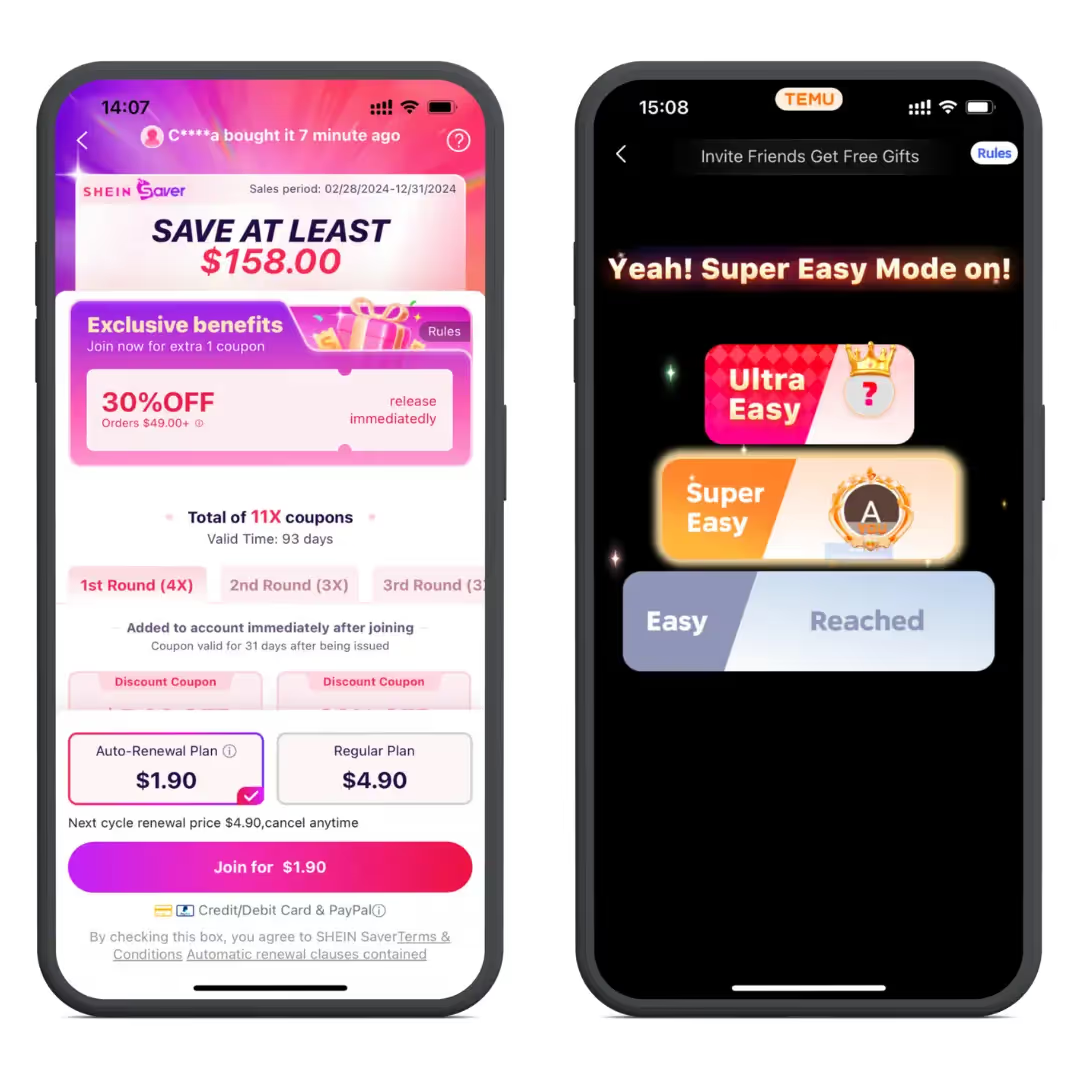
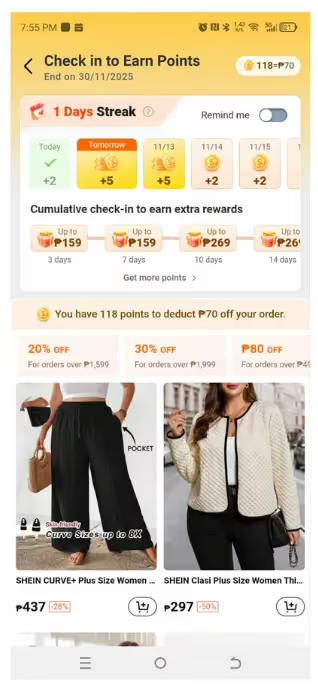
    • Shein and Temu: daily streaks, points, and reward wheels that turn shopping into habit.
    • Starbucks Rewards: tiers and stars that unlock perks and drive repeat orders.
    • Nike Run Club: badges and milestones that link activity to product engagement.

    Gamification makes buying interactive instead of transactional, motivating customers to return, spend again, and build loyalty over time.

    Why Gamification Is the Future of Ecommerce

    Ecommerce is entering a new phase where growth depends less on acquiring new customers and more on keeping existing ones active. Gamification addresses this shift directly by combining loyalty systems with the psychological triggers that drive engagement and repeat behavior.

    The data makes this clear:

    • The global gamification market is projected to have reached $19.4 billion by 2025, growing at an annual rate of 26%.
    • Nearly one-third of that growth comes from retail and ecommerce, as brands use gamified systems to drive engagement and retention.
    • Global ecommerce sales will have hit $6.4 trillion in 2025.
    • As competition and acquisition costs rise, ecommerce teams are using gamification to improve retention, lifetime value (LTV), and average order value (AOV).

    Research supports this shift:

    Another confirmed that habit formation and perceived enjoyment strongly predict loyalty and repeat purchases in gamified shopping.

    Shein andTemu’s mobile apps are a strong example of gamification in action

    Loyalty Apps: The Engine Behind Gamification

    Gamification works best when paired with loyalty programs. Points, tiers, and milestone-based perks turn routine purchases into progress.

    • Starbucks Rewards uses stars and tiers to increase order frequency and retention.
    • Temu and Shein use daily challenges and coins to drive repeat app visits.
    • Nike Membership connects achievements with exclusive offers and access.

    These systems do more than encourage purchases; they build emotional investment. Every repeat action earns recognition, which strengthens brand connection and raises lifetime value (LTV).

    The Psychology Behind Gamified Shopping

    Gamification taps into how people naturally think and behave. Customers love seeing progress, earning rewards, and being recognized.

    Study shows that:

    • Progress bars and levels trigger a sense of accomplishment.
    • Streaks and badges reinforce habit loops that increase repeat sessions.
    • Leaderboards and challenges activate friendly competition, boosting engagement and satisfaction.

    By connecting psychological motivation with business incentives, gamification transforms ecommerce from a series of purchases into a continuous cycle of interaction and reward. That’s why it’s not just a marketing tactic; it’s a long-term growth strategy.

    How Gamification Drives Engagement, Loyalty, and AOV

    Gamification impacts the metrics that matter most to ecommerce growth: engagement, repeat purchase rate, and average order value (AOV). By turning shopping into a series of small, rewarding actions, it builds momentum that keeps customers active and spending.

    1. Higher Engagement

    Gamification turns passive browsing into active participation.

    • Features like progress bars, streaks, and daily challenges motivate shoppers to return and maintain progress.
    • Gamified ecommerce experiences can increase engagement by up to 40%.
    • “Perceived enjoyment” and “habit formation” are top predictors of sustained app activity.

    Takeaway: Shoppers who feel progress stay longer and interact more often.

    2. Stronger Loyalty and Habit Formation

    Rewards create emotional commitment and routine buying behavior.

    • Gamified loyalty systems increase repurchase intention by 30–50%.
    • Habit-forming elements (like streaks and milestones) tap into the brain’s reward system, reinforcing repeat use.

    Takeaway: Rewarded behavior becomes repeated behavior — the foundation of retention.

    3. Higher Average Order Value (AOV)

    Gamification nudges shoppers to spend more through progress visibility and tiered rewards.

    • Progress-to-reward cues (“Spend $10 more for free shipping”) raise AOV by 12–20%.
    • Tier systems and spin-to-win incentives create positive reinforcement at checkout.

    Takeaway: Showing shoppers how close they are to a reward encourages them to spend more.

    4. Smarter Personalization and Data Collection

    Gamified quizzes and challenges collect valuable first-party data.

    • Customer choices during games and quizzes reveal preferences without invasive tracking.
    • That data powers better product recommendations and retention campaigns.

    Takeaway: Gamification personalizes the experience while enriching your marketing data.

    5. Brand Buzz and Organic Reach

    Gamified moments spark sharing and conversation.

    • Achievements, streaks, or “wins” naturally lead to user-generated content.
    • Brands using gamification see higher social engagement and referral activity.

    Takeaway: Fun experiences generate visibility without additional ad spend.

    What’s Trending in Gamified Shopping Apps

    Gamification in ecommerce is evolving fast as shoppers expect more than discounts—they want progress, recognition, and entertainment.

    • Points-based loyalty systems: Customers earn points for purchases, shares, or reviews, then redeem them for discounts or freebies.
    • Quick-win games: Features like “spin the wheel” deliver instant gratification and nudge impulse buys.
    • Progress tracking: Visual cues like bars and trackers show shoppers how close they are to unlocking rewards or perks.
    • Leaderboards and challenges: Competition, whether with friends or strangers, adds excitement and drives repeat engagement.

    Loyalty and progress-based systems now account for nearly one-third of gamified retail applications. These mechanics don’t just make shopping fun; they extend session time, increase purchase frequency, and strengthen loyalty over time.

    Gamification in Action: 12 Standout Examples

    If you want to know what ecommerce trends work, and which are vapor, look at what the world’s biggest brands are doing.

    Those brands are building fun, engaging, gamified experiences.

    Here are 12 brands showing how gamification can transform shopping into something engaging, sticky, and fun.

    1. Lego – An Interactive Playground

    Lego turned its brand into more than toys with digital platforms where people can build, share, and unlock achievements. By mixing creativity with game mechanics, Lego keeps fans engaged long after the purchase.

    Lego interactive playground helps maintain engagement.

    2. KFC – “Shrimp Attack” Mini-Game

    In Japan, KFC ran a playful mobile game where beating animated shrimp unlocked coupons. It turned promotions into entertainment, driving engagement and immediate purchases.

    3. Shein & Temu – Streaks, Points, Progress

    Shein and Temu offer a masterclass in gamification, with apps that feel like a hybrid between TikTok and Candy Crush – rather than a classic shopping app.

    Learn more about how these ecommerce giants use personalization to drive engagement.

    4. Forest – Habit Building Made Rewarding

    Stay off your phone, grow a virtual tree. Simple, visual, and motivating. The lesson for ecommerce: small, visible rewards make behavior change stick.

    5. William Painter – Spin-to-Win Discounts

    A spin-the-wheel on their site offers free shipping, % off, or freebies. It injects instant excitement at checkout and nudges bigger baskets.

    6. Casper – Guided “Mattress Finder” Quiz

    Casper turns choice overload into a game. A short quiz maps needs to products, making the purchase feel personalized (and faster).

    7. Fabulous – Personalization Through Quizzes

    Fabulous uses onboarding quizzes and progress milestones to tailor the journey. Retailers can mirror this to collect preferences and deliver spot-on recommendations.

    8. M&M’s – Design-Your-Own Candy

    Customization as play: pick colors, add text, make it yours. Creative control boosts time on site and repeat orders for gifts and events.

    9. Pit Viper – Playful UI That Feels Like a Game

    Humor, unexpected visuals, and interactive touches turn browsing into a vibe. It proves that tone and UI can gamify without literal “games.”

    10. Starbucks – Stars, Tiers, and Perks

    A gold standard loyalty loop: earn stars, hit tiers, unlock rewards. Clear progress + visible payoff = repeat visits and higher lifetime value.

    11. Nike Run Club – Challenges and Badges

    Community, streaks, and milestones keep runners motivated. That engagement flows back into apparel and gear – content and commerce reinforcing each other.

    12. L’Occitane – “Seeds of Dreams” Campaign

    An eco-themed interactive experience where planting virtual seeds leads to rewards. It ties values to incentives, turning participation into purchases.

    How to Add Gamification to Your Store

    Gamification only works if it’s done with intention. Here’s how to bring it into your ecommerce experience the right way:

    1. Set clear goals

    Decide what matters most: more engagement, higher average order value, or increased sales. Your goals should shape the mechanics you choose. Quizzes or challenges are great for engagement; purchase-based milestones work best for sales.

    2. Pick the right tools

    Not every game element fits every brand. A “spin-the-wheel” promo might excite deal hunters, while tiered levels and exclusive perks work better for status-driven customers. Match the tools to your audience.

    3. Build loyalty into the flow

    A loyalty program should feel baked into the experience, not bolted on. Keep the points system simple, easy to track, and visibly rewarding so customers see value right away.

    4. Track and improve

    Gamification isn’t set-and-forget. Pay attention to what customers actually respond to (challenges, discounts, streaks) and refine over time. Small tweaks compound into big results.

    Building unique features in a mobile app can be difficult. Vendrux lets you build exciting gamification features on your website, and seamlessly transfer these features to your mobile app. Learn more about how we help you build unique experiences, without the cost of traditional app development.

    What Are the Best Ways to Gamify Your Store?

    You don’t need to rebuild your ecommerce experience from scratch to use gamification effectively. The key is to apply mechanics that create progress, reward, and motivation—without disrupting the buying journey.

    Here are proven techniques that drive engagement, loyalty, and higher AOV:

    1. Quick-Win Discounts

    Use instant rewards like scratch cards or “spin-the-wheel” promos to spark excitement and boost conversions.

    • Encourages impulse buys and checkout completion.
    • Keeps the experience playful without hurting margins.

    Example: William Painter’s spin-to-win feature increases conversions by turning checkout into a game.

    2. Quizzes and Interactive Journeys

    Personalized quizzes make shopping interactive and help match products to customer needs.

    • Builds engagement through participation.
    • Doubles as zero-party data collection for better recommendations.

    Example: Casper’s “Mattress Finder” quiz simplifies decisions and shortens the path to purchase.

    3. Competitions and Challenges

    Create streaks, community leaderboards, or share-based contests to keep shoppers coming back.

    • Fosters friendly competition and repeat visits.
    • Expands reach when participants share progress or achievements.

    Example: Nike Run Club’s challenges link physical goals with digital rewards, driving both engagement and brand loyalty.

    4. Habit-Forming Streaks

    Reward consistency, not just purchases.

    • Daily login bonuses, activity streaks, or timed missions keep customers active in the app.
    • Builds long-term retention by tapping into habit loops.

    Example: Shein’s daily check-ins and coin rewards maintain high app re-engagement rates.

    Shein rewards check in to encourage continuous engagement.

    5. Progress Visualization

    Show customers how close they are to the next reward or perk.

    • Increases motivation to complete a purchase.
    • Can raise average order value by 12–20% when tied to visible milestones.

    Example: Free-shipping progress bars encourage customers to add extra items to hit the threshold.

    6. Loyalty Programs

    Tie rewards to actions that reinforce retention—purchases, referrals, and reviews.

    • Points and tier-based rewards encourage repeat buying.
    • Creates a clear sense of advancement over time.

    Example: Starbucks Rewards uses stars and tiers to drive repeat visits and higher lifetime value.

    Effective gamification isn’t about adding gimmicks. It’s about turning progress into motivation. So every visit, click, and purchase feels like part of a rewarding journey.

    Final Thoughts

    Gamification isn’t just about making shopping fun; it’s about turning interaction into growth. When done right, it lifts engagement, raises average order value, and turns one-time buyers into loyal customers.

    From progress bars to loyalty apps, the same principles that make games addictive can make ecommerce more profitable. As acquisition costs rise, retention-focused tools that reward action, rather than discounting it, are what set leading brands apart.

    The takeaway: customers who feel progress and recognition come back more often and spend more when they do.

    If you’d like to see how gamified experiences could work for your store, book a consultation with Vendrux and start building your own high-retention ecommerce app.

    Frequently Asked Questions

    What are the key benefits of gamification in ecommerce?

    It boosts engagement, loyalty, and sales. It also creates buzz around your brand and gives you valuable customer data for personalization.

    How does gamification impact retention and order value?

    Progress bars, streaks, and rewards make customers come back more often and spend more per visit. Habit drives retention; rewards drive bigger baskets.

    What’s the best gamification solution for my store?

    It depends on your audience. Bargain hunters love spin-to-win discounts; status-driven shoppers prefer tiered rewards and achievements.

    Can gamification work for B2B ecommerce?

    Yes. Progress tracking, milestones, and reward systems motivate professionals just as much as consumers.

    Does gamification apply outside of shopping?

    Absolutely. Education apps, fitness platforms, and productivity tools all use game-like elements to boost engagement, and the same tactics work in retail.

  • Adobe Commerce POS: Features, Integrations, and Who Should Use It

    Adobe Commerce POS: Features, Integrations, and Who Should Use It

    An Adobe Commerce POS is a point-of-sale system designed to connect Adobe Commerce online stores with physical locations seamlessly. It’s a real-time bridge between your ecommerce operations and in-store activities, keeping products, inventory, orders, and customer data perfectly in sync.

    If your business operates online and in-store, an integrated POS system is essential. Whether shoppers browse online or buy in-store, Adobe Commerce POS ensures a smooth, unified experience across all channels. 

    In this complete guide, we’ll break down Adobe Commerce POS’s core features, Adobe POS Commerce integration options, examples, and suggestions to adopt best-fit Adobe Commerce POS solutions for your businesses.

    What Is an Adobe Commerce POS?

    Adobe Commerce

    Adobe Commerce is an open-source ecommerce platform, formerly known as Magento, and is part of the Adobe Experience Cloud.

    It gives businesses the flexibility to build, customize, and scale their online stores to meet modern customer demands. 

    Adobe Commerce (Magento) includes 3 editions:

    • Adobe Commerce – the premium edition with advanced features for mid-to-large businesses
    • Magento Open Source – the free, highly customizable edition
    • Adobe Commerce Cloud – a fully managed, cloud-based solution for maximum scalability and performance.

    Learn more: Turn Your Adobe Commerce Store into a Mobile App

    POS (Point of Sale)

    A Point of Sale (POS) system is where sales happen.

    Traditionally, this meant a cash register at a brick-and-mortar store. Today’s POS systems are smarter: they handle not just payments, but also inventory tracking, customer profiles, loyalty programs, and reporting. 

    Modern POS systems are the digital backbone of in-store operations, helping businesses process transactions quickly while keeping data accurate and centralized.

    Adobe Commerce POS

    Unlike Shopify, Adobe Commerce (Magento) doesn’t have its own POS. POS systems for Adobe are developed by Adobe’s solution partners.

    An Adobe Commerce POS is a POS solution designed for all Magento/Adobe Commerce editions – including Magento Open Source, Adobe Commerce, and Adobe Commerce Cloud. It serves as a bridge between your online storefront and physical locations; by integrating the two systems, Adobe POS allows real-time data to flow seamlessly between channels. 

    For example, when a product sells in-store, inventory levels automatically update in the Adobe Commerce backend, reflecting changes on the website instantly.

    Similarly, customer profiles, order history, and pricing rules stay consistent across channels.

    The result is a single source of truth for all your operations – no more duplicate data entry or manual syncing.

    Read more: Mobile Commerce for Magento Stores.

    What Are the Key Adobe Commerce POS Features?

    An Adobe Commerce POS gives retailers the functionality needed to run both online and offline operations seamlessly.

    If you’re looking for a POS solution for Adobe, check whether the POS has the following features or not:

    Real-time Inventory Synchronization

    The system updates inventory levels instantly and accurately between the online store and physical locations.

    This capability eliminates overselling, ensures accurate stock visibility, and gives both staff and customers confidence that the information they see is always up to date.

    Unified Order Management

    Adobe POS allows businesses to manage all orders – whether placed in-store, online, or through a mix of channels – from a single system.

    With a unified approach, retailers can easily support scenarios such as “buy in-store, ship from warehouse” or “buy online, pick up in-store (BOPIS),” and handle returns or exchanges across channels.

    Customer Profiles & Loyalty Programs

    The POS system synchronizes customer profiles across all channels, including purchase history, reward points, gift cards, and store credit.

    This enables businesses to deliver personalized experiences and run targeted promotions that drive customer retention and repeat purchases.

    Multi-store & Multi-warehouse Support

    A good Adobe Commerce POS provides robust features and operates smoothly, no matter how many branches and warehouses you have.

    Businesses can manage inventory, pricing, and orders across different locations while maintaining centralized control and visibility right at the Magento backend.

    Payment Flexibility

    The POS system supports multiple payment methods, including cash, credit/debit cards, split payments, mobile wallets, and buy-now-pay-later options. It also integrates with a wide range of external payment processors to facilitate local and global payment flows.

    By offering this flexibility, retailers can speed up the checkout process, increase customer satisfaction, and improve conversion rates at the point of sale.

    Offline Mode for Uninterrupted Selling

    Offline mode might be an integral feature of your POS if you sell in pop-up shops, tradeshows, or events. Adobe POS allows staff to continue processing transactions even when they lose internet connectivity.

    Once the connection is restored, the system automatically synchronizes all offline data to maintain accurate records.

    Reporting & Analytics for Smarter Decisions

    The platform includes dashboards and reports that reveal sales performance, inventory movement, product trends, and store-level insights.

    These analytics enable decision-makers to make data-driven choices that optimize operations and increase revenue.

    How Does an Adobe Commerce POS Integration Work?

    The Basic Flow of Integration

    An Adobe Commerce POS integration is a normal way to enable a two-way data flow, meaning that any changes made in-store are instantly reflected online, and vice versa.

    This integration happens via APIs, modules, or extensions, which enable real-time communication between the POS system and the Adobe Commerce platform, keeping inventory, orders, and customer data consistent across both channels.

    There are 2 types of Adobe POS you can see on the market now:

    • Adobe Commerce native POS (Magento-native POS): The POS is built for Adobe Commerce and utilizes Adobe Commerce as its central hub.
    • Adobe Commerce non native POS (Magento non-native POS): an in-store POS or a standalone POS that needs connectors to link the POS and the Adobe Commerce platform. 

    Adobe Commerce-Native POS

    While Adobe Commerce offers powerful ecommerce capabilities, it does not include a built-in POS system by default. This is where native Adobe Commerce POS solutions come in.

    Adobe Commerce-native POS solutions (Magento-native POS) are POS systems designed exclusively for Magento/Adobe Commerce, rather than third-party platforms that rely on connectors or middleware.

    A Magento-native POS communicates directly with the Adobe Commerce database, creating a seamless and stable integration. 

    Example

    Magestore: Unlike other POS systems, Magestore POS is deeply aligned with Magento’s structure and logic, enabling retailers to run their omnichannel operations from a single, unified platform.

    Key Advantages of Magento (Adobe Commerce)-native POS

    • Seamless integration: The Adobe Commerce POS system eliminates double data entry and manual syncing, allowing all information to flow automatically between online and offline channels.
    • Single source of truth: Adobe Commerce serves as the central hub for products, orders, inventory, and customer data, ensuring consistency across all touchpoints.
    • Better performance: The direct database connection minimizes data conflicts, reduces syncing delays, and removes dependency on third-party middleware.
    • Universal compatibility: The POS works smoothly with both Adobe Commerce editions (Open Source and Enterprise), providing flexibility for different business scales.
    • Lower integration costs: Because the Adobe Commerce native POS connects directly with the platform, businesses can avoid extra expenses associated with third-party connectors or middleware.
    • Fewer contact points & faster support: With a native solution, you only work with one provider, which simplifies communication and ensures quicker, more effective support compared to dealing with multiple vendors.

    Adobe Commerce Non-Native POS (Via Connectors/Integration)

    Many businesses already use third-party POS platforms like Clover, Lightspeed, or Square, and intend to keep these systems.

    This means, to integrate their in-store POS with their Adobe Commerce site, they’ll need an Adobe Commerce retail POS integration service.

    These POS solutions are Magento non-native POS – because they were not built for Adobe Commerce. Instead, they might only work as an in-store POS or a standalone POS that works with every platform via connectors.

    Businesses usually connect their POS with Adobe Commerce via API connectors, middleware solutions, or internal custom code to synchronize data between the two systems.

    Example

    Popular Magento non-native POS systems, such as Lightspeed Retail, Retail Pro, and Microsoft Dynamics 365, are integrated with Adobe Commerce via middleware connectors like Patchworks and 247 CloudHub Multichannel Connector.

    Key Advantages of Magento Non-Native POS

    • Flexibility to keep existing systems: Retailers can continue using their current POS platforms without replacing hardware or retraining staff.
    • Access to specialized features: Some third-party POS systems provide unique hardware options or advanced functionalities that suit specific business models.

    Potential Challenges of Magento Non-Native POS

    • Risk of data duplication or delays: If the integration is not seamless, businesses may face issues like double entry, sync lags, or inconsistent data.
    • Higher maintenance and complexity: Managing connectors or middleware often requires ongoing technical support and additional costs.
    • Multiple contact points: When something goes wrong, troubleshooting can involve several vendors, leading to delays and rising operational costs.

    Key Takeaway

    Choosing between an Adobe Commerce native and non-native POS comes down to your business strategy and existing infrastructure.

    • If you want Adobe Commerce to act as the central hub for all products, inventory, and customer data, then a Magento native POS is the best choice for a seamless, unified experience.
    • If your business has already invested in a specific POS platform and you want to connect it to Adobe Commerce without replacing it, then a non-native POS may be the more practical option.

    Who Should Choose an Adobe Commerce POS

    For omnichannel brands, bridging the gap between in-store and online is crucial – and also challenging.

    An Adobe Commerce POS provides the infrastructure retailers need to deliver a unified shopping experience, streamline operations, and scale effectively.

    This solution is particularly well-suited for:

    • Retailers with both online and offline stores: These businesses can synchronize inventory, orders, and customer data in real time to ensure consistent experiences across every channel.
    • Businesses with multiple branches or warehouses: Adobe POS centralizes operations, making it easier to manage complex logistics and maintain accurate stock levels across locations.
    • Brands seeking a unified customer experience: By connecting online and offline data, retailers can recognize customers wherever they shop, build stronger loyalty, and personalize interactions.

    Final Thoughts

    If your business already runs on Adobe Commerce or Magento Open Source, implementing a Magento 2 POS system is the natural next step to becoming a truly omnichannel retailer.

    Whether you choose a native solution like Magestore POS for seamless integration or opt for a non-native POS to connect existing infrastructure, Adobe Commerce POS gives you the flexibility and power to grow smarter, faster, and more efficiently.

    If you are currently evaluating your options, we highly recommend that you fully research and compare Adobe Commerce retail POS solutions reviews to understand the operational fit before making a final decision.

    Want to take your omnichannel strategy even further? Explore Magestore’s Adobe Commerce mobile app development service to bring your storefront to customers’ fingertips and deliver seamless shopping experiences across every touchpoint.

  • How to Increase AOV in Ecommerce: Lessons from Beauty Brands

    How to Increase AOV in Ecommerce: Lessons from Beauty Brands

    When we think about growth, we often think – more customers, more leads, more new business.

    That’s important, sure. But what about getting more from the customers you already have?

    That’s where AOV (Average Order Value) comes in.

    What is AOV? 

    What is AOV in ecommerce? AOV is the average dollar amount a customer spends per transaction.

    It’s an important metric because increasing AOV directly impacts revenue without necessarily increasing traffic. While many brands try to get a higher AOV through discounts or aggressive upsells, others take a different approach: they focus on experience, emotion, and strategic design.

    In beauty, purchases are highly emotional and often habitual. Beauty brands understand the importance of creating strategies that make customers want to stay longer, engage deeper, and yes, spend more.

    As a private label cosmetics manufacturer, Selfnamed has a front-row view of how thousands of beauty brands increase AOV without purely relying on discounts or gimmicks. In this post, we’ll share how you can apply similar tactics to your ecommerce business.

    Emotional Connection Equals Higher Basket Size

    Beauty brands understand that purchasing decisions are deeply emotional. By creating strong personalization and brand storytelling, they inspire customers to buy more, repeatedly. 

    Let’s list some specific brand storytelling tactics with examples. 

    Ritual-based marketing

    Glossier doesn’t just sell skincare, they sell a feeling.

    Their “Skin First, Makeup Second” mantra transforms a simple moisturizer into a self-care moment. It becomes a part of a morning ritual that signals confidence and calm before the day starts.

    When customers see your product as part of their identity or daily rhythm, they continue to come back for it.

    For your brand, think about how your product fits into someone’s routine or lifestyle. Can it become a habit? A ritual? That’s where emotional loyalty starts to build.

    Sample sets

    The Ordinary and Drunk Elephant both understand the value of curiosity. Their discovery kits and minis invite customers to try multiple products without the pressure of a full-size commitment.

    Drunk Elephant
    The Ordinary

    This is a smart, playful and low-risk strategy. And once someone finds a product they love, upgrading to full-size feels like a natural next step.

    Think of this as offering a taste, not the whole meal. Whether it’s trial sizes, starter bundles, or limited-time samplers, giving customers room to explore builds trust. And trust leads to bigger baskets down the line – another proven method to increase AOV.

    Community-driven storytelling

    As we mentioned earlier, it’s usually the feeling a product or brand creates that makes someone hit “add to cart.”

    In the case of Rare Beauty and Glow Recipe, it’s a feeling of belonging. Both brands lead with honesty, emotion, and community. 

    Rare Beauty invites people to talk about self-expression and mental health, not just makeup. Glow Recipe builds confidence around natural skin and self-love, celebrating real people over perfection.

    The result? Their communities share routines, stories, and progress with pride, turning customers into advocates. It’s marketing that doesn’t feel like marketing at all.

    Glow Recipe

    Your story doesn’t have to be about beauty to be powerful. Share your “why.” Celebrate your customers. Ultimately, give them a voice and a reason to feel part of something bigger. When people see themselves reflected in your brand, they engage more deeply, return more often, and spend more willingly. 

    Brands that reinforce these experiences through mobile apps or mobile-first experiences (like those powered by Vendrux) can take that connection further. And this creates a direct path to increased AOV.

    Product Strategy That Encourages Add-Ons

    Increasing AOV doesn’t have to feel pushy. Successful beauty brands leverage thoughtful product strategies that encourage add-ons organically.

    What beauty brands commonly do is create bundles of products, where they group complementary products together.

    Customers see the bundle as a complete solution, not just multiple purchases. For your businesses, this approach can work by pairing related items in a way that solves a problem or improves the experience. As a result, customers will naturally spend more per order.

    Another strategy is discovery sets. The Ordinary and Glossier offer kits that let customers try multiple products at once. It’s low-risk, fun, and encourages experimentation.

    Many businesses can also use this tactic. You can introduce sample-sized products or mini kits that showcase your range. When customers discover new favorites, they’re likely to return and buy full-sized versions.

    Lastly, tiered pricing is a subtle but powerful way to increase AOV. Some beauty brands offer different product tiers (e.g. basic, mid, and premium) so customers can choose what fits their needs and budget.

    Your business could do the same by creating clear value tiers or packages. It’s not about forcing a higher spend; it’s about letting customers feel smart about their choices, which naturally increases basket size.

    As a private label cosmetics manufacturer, we know that giving brands flexibility in product formats, packaging, or customization options can make these strategies more effective. When customers feel they are getting something tailored or exclusive, they’re more likely to increase their spend.

    Retention and Post-Purchase Experience

    AOV grows most sustainably through repeat customers. Getting someone to buy once is easy. Getting them to come back (and spend more) is what separates okay brands from great ones. 

    Beauty businesses know this. That’s why they treat the post-purchase moment as the start of a relationship, not the end of a transaction.

    Many beauty brands send follow-up messages that feel personal (even if they’re actually automated). Sephora is a great example here: their emails suggest complementary products based on what you’ve actually bought, not random cross-sells. It feels thoughtful, and it works.

    They also use mobile notifications and app-based rewards to stay relevant between purchases. Glow Recipe’s app drops exclusive offers, early access, and skincare tips straight to a customer’s phone. This becomes part of their brand experience.

    And then there’s loyalty programs. Ulta’s Ultimate Rewards and Sephora’s Beauty Insider have turned re-ordering into a game people want to play. Points, birthday gifts, early launches – it all keeps customers engaged in a way that feels rewarding.

    A strong mobile channel can keep these relationships alive. And engaged customers won’t just return, but they’ll likely spend more per visit – another effective way to increase AOV in ecommerce.

    Lessons for Every Brand

    The takeaway is quite clear: there are many tactful ways you can grow AOV that don’t involve discounts or hard upsells.

    And from what we’ve seen, the beauty industry happens to be very good at it. Why? Because they focus on how people feel when they buy.

    Successful beauty brands combine three things:

    1. Emotional connection
    2. Strategic product design
    3. Post-purchase engagement

    They tell stories that make customers care, make it easy to add one more item to the cart, and invest in lasting connections, all of which strengthen their brand retention strategy

    The best part? You don’t need to sell beauty products to apply this. Whether you’re in fashion, wellness, home goods, or tech accessories, you can use a similar tactic.

    Make shopping feel personal, valuable, and rewarding. Use your mobile channels to keep that relationship alive. And when customers feel seen and supported, they come back, and they spend more.

    So yes, AOV is a growth metric. But done right, it’s also proof that your brand understands its customers deeply. It’s a win-win.

  • The World’s Most Online Shopping-Obsessed Nations Revealed

    The World’s Most Online Shopping-Obsessed Nations Revealed

    Buying things online has become second nature for billions of people worldwide. From daily essentials to luxury goods, ecommerce is now woven into everyday life — and in some countries, it’s practically the default way to shop.

    But which nations are taking this digital shift the furthest? Where are people spending the most, shopping the most often, and relying most heavily on ecommerce over traditional retail?

    That question inspired our new global study, which ranks 52 countries by their Online Shopping Obsession Score — a combined measure of annual online spending per shopper, the share of consumer goods purchased online, and the percentage of people who shop online.

    The results reveal fascinating regional patterns — with the United States emerging as the most online shopping-obsessed nation in the world, and the United Kingdom leading Europe.

    Key Takeaways:

    • The United States ranks first globally with a perfect Online Shopping Obsession Score of 100, spending an average of $3,950 per shopper annually.
    • The UK ranks second worldwide and first in Europe, with a score of 71.57 and average annual spending of $2,530.
    • European nations dominate the top 20, claiming 14 of the highest-ranking positions.

    Across the top 10, online shopping now accounts for an average of more than 20% of all consumer purchases.

    The Top 20 Most Online Shopping-Obsessed Countries

    Rank Country Online Spend (%) Annual Spend (USD) Shopper Rate (%) Score (/100)
    1 United States 33.70 $3,950 91.7 100
    2 United Kingdom 23.20 $2,530 84.3 71.57
    3 Netherlands 20.90 $2,620 84.7 69.74
    4 China 31.20 $961 86.3 67.65
    5 Canada 17.90 $2,200 82.6 61.49
    6 Japan 16.20 $2,090 80.4 57.63
    7 Norway 14.50 $1,970 89.4 57.63
    8 Sweden 14.00 $1,820 87.3 54.90
    9 Denmark 13.30 $1,880 84.9 53.75
    10 Switzerland 11.30 $2,100 84.7 53.26
    11 Germany 14.60 $1,840 77.9 52.51
    12 Finland 12.80 $1,630 85.7 51.14
    13 Austria 12.90 $2,080 72.3 50.66
    14 Australia 13.80 $1,710 78.5 50.55
    15 Ireland 14.00 $1,720 74.9 49.62
    16 France 13.40 $1,710 72.9 48.09
    17 Italy 14.90 $2,340 50.9 47.95
    18 Singapore 12.20 $1,210 83.1 45.64
    19 Spain 13.40 $1,140 74.5 43.43
    20 New Zealand 9.10 $1,650 73.9 42.65

    Founder’s take:

    The powerful growth of ecommerce is tightly linked to the dominance of the mobile web.

    Mobile accounts for 62.5% of all internet traffic worldwide, while mobile commerce drives approximately 60% of all global ecommerce traffic.

    With every individual having a direct line to any brand or retailer, in their pockets and at their fingertips, ecommerce has become easily the most convenient way to make a purchase.

    For retailers, understanding this shift in behavior is crucial.

    “With mobile commerce now driving most online sales, retailers need to meet customers where they are: on their phones. Every ecommerce business should be thinking mobile-first, not just in website design but across the entire customer journey. The brands getting it right are those creating faster, more personal experiences that reflect how people actually shop today.”
    – Pietro Saccomani, Founder & CEO, Vendrux.

    Europe’s Online Shopping Leaders

    Europe is home to 14 of the world’s top 20 most online shopping-obsessed nations, highlighting the continent’s advanced ecommerce infrastructure and consumer adoption.

    Top 20 Most Online Shopping-Obsessed Countries in Europe

    Rank Country Online Spend (%) Annual Spend (EUR) Shopper Rate (%) Score (/100)
    1 United Kingdom 23.20 €2,275 84.30 71.57
    2 Netherlands 20.90 €2,356 84.70 69.74
    3 Norway 14.50 €1,771 89.40 57.63
    4 Sweden 14.00 €1,636 87.30 54.90
    5 Denmark 13.30 €1,690 84.90 53.75
    6 Switzerland 11.30 €1,888 84.70 53.26
    7 Germany 14.60 €1,654 77.90 52.51
    8 Finland 12.80 €1,466 85.70 51.14
    9 Austria 12.90 €1,870 72.30 50.66
    10 Ireland 14.00 €1,546 74.90 49.62
    11 France 13.40 €1,537 72.90 48.09
    12 Italy 14.90 €2,104 50.90 47.95
    13 Spain 13.40 €1,025 74.50 43.43
    14 Belgium 8.70 €953 86.40 41.16
    15 Czechia 12.70 €896 71.10 40.07
    16 Poland 13.30 €1,412 43.00 36.16
    17 Portugal 7.30 €1,034 53.90 28.83
    18 Türkiye 9.00 €877 41.70 25.01
    19 Greece 6.00 €722 55.00 24.45
    20 Croatia 5.90 €693 52.50 23.15

    Regional Insights

    • Nordic Excellence: Norway leads Europe in online shopping penetration at 89.4%, followed by Sweden, Denmark and Finland — all in the continent’s top ten.
    • Western European Dominance: The UK and Netherlands are clear leaders in both spending and digital adoption, underlining their advanced ecommerce ecosystems.
    • Southern Gap: Italy and Spain remain outside the top ten, reflecting slower digital penetration despite high per-shopper spending.
    • Eastern Growth: Czechia and Poland are emerging as strong performers, driven by rapid digital adoption and growing trust in online transactions.
    • The Germany Paradox: Despite its economic strength, Germany ranks only seventh in Europe, with lower per-capita online spending than smaller markets such as the Netherlands and the UK.

    Founder’s take:

    While ecommerce is a key driver in markets like the US, UK, China and Japan, when we zoom out, we find major room for growth in emerging markets.

    These are the markets where the infrastructure may not be there just yet, where shipping is not as fast and easy, where not so many major brands are readily available.

    The interesting part is that emerging markets are often more mobile-centric; indicating that once the infrastructure catches up, we may see a sharp spike in ecommerce (and, in particular, mobile commerce).

    “Europe’s online shopping data highlights clear divides between the continent’s digital leaders and emerging markets. While Northern and Western Europe are now fully digital-first, Southern and Eastern regions are moving quickly to close the gap, driven by improved infrastructure and growing consumer confidence in online purchasing.”
    – Pietro Saccomani, Founder & CEO, Vendrux.

    Final Thoughts

    The online shopping revolution isn’t coming; it’s already here.

    The United States is leading the way in online shopping obsession, fast approaching the point where online may eclipse in-store as the most common way people buy things.

    Even traditional in-store dominant verticals, like grocery stores, are starting to go more online, with apps like Instacart making it more convenient to order weekly staples from your phone, saving the trip down to your local store.

    And yet, as our European data shows, the global market still has room to grow. Expect this trend to continue, and more consumers all over the world to become digital natives throughout the rest of the decade.

    Methodology

    This study identified the world’s most online shopping-obsessed countries by analyzing three key ecommerce metrics.

    We examined online share of consumer goods spend (labeled as “Online Spend on Consumer Goods”), average revenue per user or ARPU (labeled as “Annual Spend Per Shopper”), and user penetration rate (labeled as “Online Shopper Rate”). Data was sourced from Data Reportal’s Digital 2025 Global Overview Report and Statista’s eCommerce Market Insights (2025).

    Online Spend on Consumer Goods measures the proportion of purchases made online versus in stores. Annual Spend Per Shopper captures individual yearly spending in USD. Online Shopper Rate shows the percentage of the population who shop online. Annual Spend Per Shopper has been converted from USD to EUR using the European Central Bank annual average exchange rate from October 30, 2024 to October 30, 2025 (1 EUR = 1.1122 USD).

    Each metric was normalized to a 0-100 scale, then combined using weighted averaging: Online Spend on Consumer Goods (40%), Annual Spend Per Shopper (35%), and Online Shopper Rate (25%).