Category: App Development

  • React Native vs Ionic: The Best Mobile App Framework in 2026

    React Native vs Ionic: The Best Mobile App Framework in 2026

    If you’re looking for an easier way to build mobile applications, hybrid or cross-platform frameworks like React Native and Ionic are two great options.

    These tools cut down the time and cost to launch mobile apps, compared to fully native programming languages. Yet there are some key differences between the two, which you’ll need to be aware of before starting your project.

    Read on for all you need to know about Ionic vs React Native, including their pros and cons, the ideal use case for each framework, and any alternatives you should consider.

    Ionic vs React Native: Summing Up the Key Differences

    Before we dive right into it, here’s the short version of the most notable differences between Ionic and React Native.

    • Ionic is a hybrid framework, while React Native is a cross-platform framework.
    • Ionic allows you to reuse code between web and mobile, while React Native apps are mobile-only.
    • Ionic apps are built on top of the web browser, while React Native is all native code.
    • React Native has the edge in performance (in most cases).
    • Ionic lets you build Progressive Web Apps (PWAs), React Native does not.
    • Ionic is easier to use, especially for web developers, while React Native has a steeper learning curve.

    Hybrid vs Cross-Platform: it’s easy to confuse hybrid frameworks and cross-platform frameworks. In simplest terms, cross-platform apps are apps that can run on multiple operating systems (e.g. iOS and Android) with the same code. While hybrid is used to describe apps that utilize the same code for iOS and Android apps as well as a browser-based web app.

    Which Framework is More Popular?

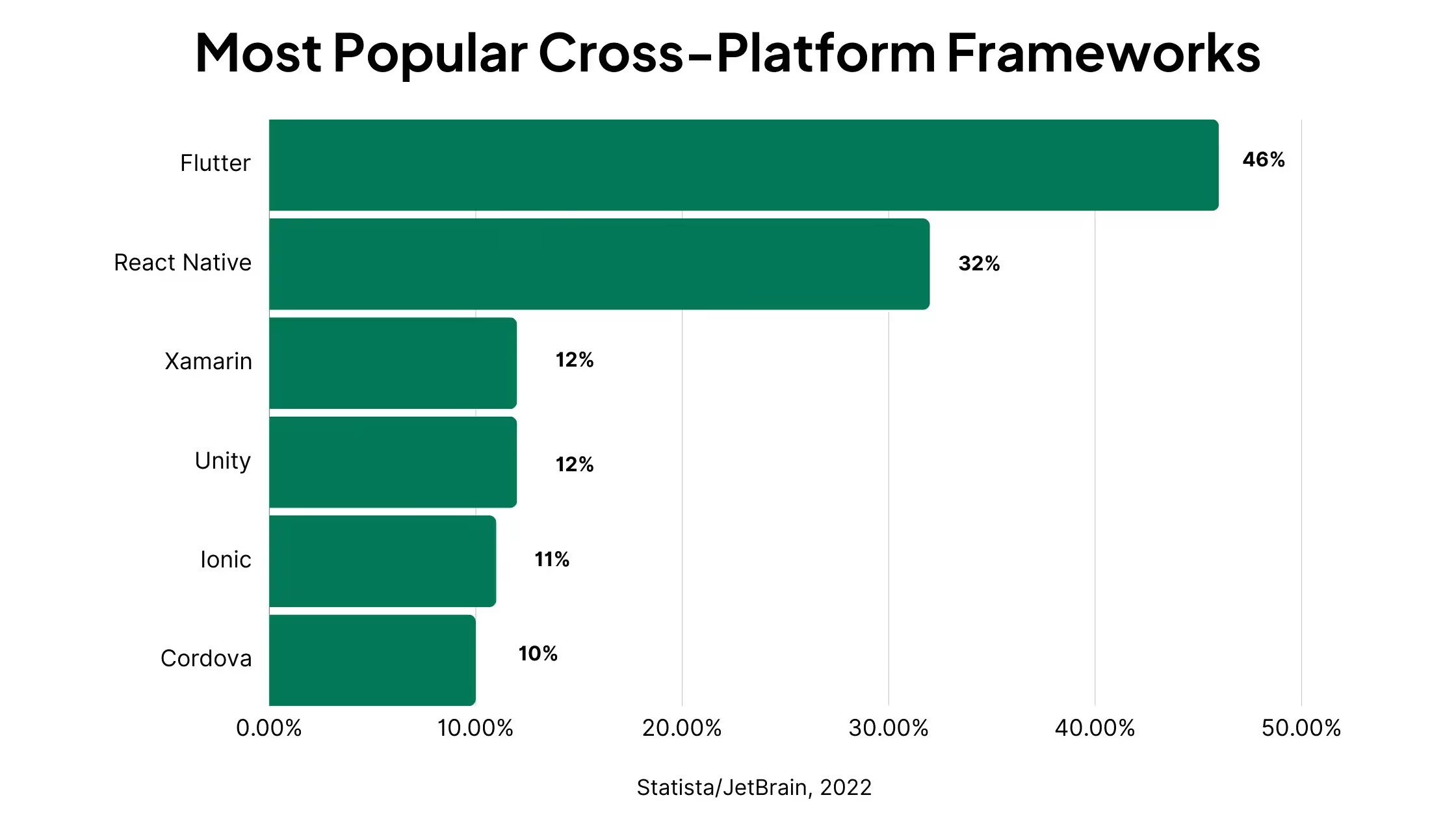
    React Native is more popular overall than Ionic (though that may be due to a wider range of possible use cases for React Native).

    A survey asking nearly 30,000 developers which cross-platform frameworks they are using found that React Native was the second most popular, with 32% of respondents saying they use React Native, compared to 11% for Ionic.
    In Stack Overflow’s 2023 Developer Survey, React Native also scored higher than Ionic, with 8.43% of the study’s 67,231 respondents vs 2.9% for Ionic.

    Among only professional developers (52,046 respondents), React Native scored 9.14% vs 3.33% for Ionic.

    According to AppBrain’s data, React Native is featured in 6.08% of all apps, with more than 30,000 apps and more than 60 billion combined downloads.

    The Ionic Framework is used in 3.49% of all apps, with over 20,000 apps and a combined 3 billion downloads.

    On Github, activity for React Native is about double that of Ionic, with 115k stars vs 50k, 3.6k users watching the React Native repository vs 1.6k for Ionic and nearly twice the amount of forks as well.

    Now that we’ve had a look at the key differences you need to be aware of, let’s dive deeper into each framework.

    What is React Native?

    “Learn once, write anywhere.”

    React Native is a cross-platform framework, which lets developers build mobile apps for multiple platforms with the same programming language.

    Usually, to create apps for both iPhone and Android, you would need two completely separate codebases in completely different programming languages (Swift or Objective-C for iOS, Java/Kotlin for Android).

    React Native lets you use just one programming language and largely the same code to build apps for both platforms, significantly reducing the time, cost and complexity to launch (and maintain) apps for mobile devices.

    React Native is free and open-source, created by Facebook to allow developers to use a React and JavaScript-based syntax to code mobile apps, and giving a standard of performance that’s close to that of fully native apps.

    Learn More: React vs React Native

    What Kind of Projects is React Native Used For?

    React Native can be used for a wide range of mobile applications. With its near-native performance, React Native is just as good as native app development for most use cases.

    The only situations where it wouldn’t be enough (and you’d need to go fully native) would be if you need full access to device features or specific native OS functionality that React Native doesn’t offer.

    React Native can be used for simpler projects as well, but with its complexity and learning curve, it may be overkill for more basic apps.

    In general, you’ll want to use React Native for mid-range to high-level apps, as long as you don’t require a lot of native device features.

    React Native App Examples

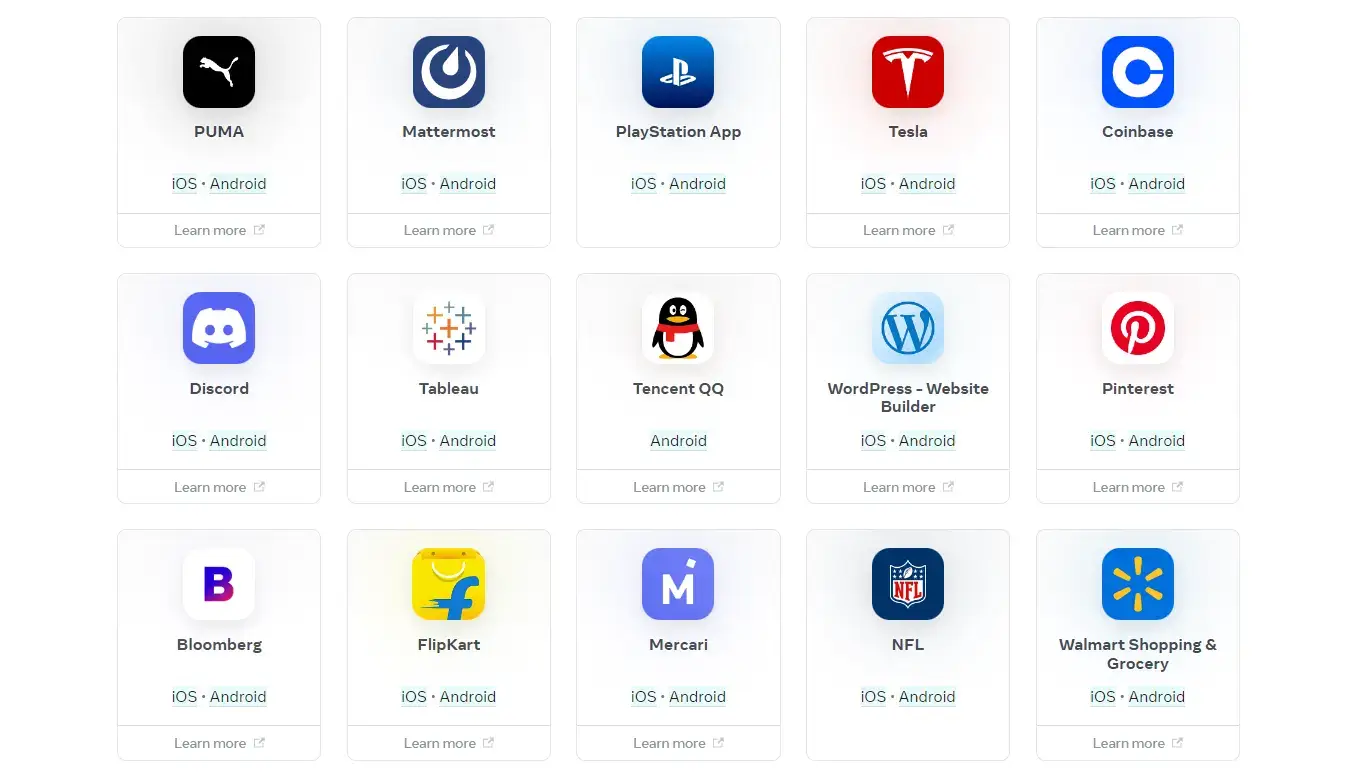
    There are many high-end apps using React Native, including apps from Meta, Microsoft, Amazon, Shopify and other massive companies.

    Examples include:

    Facebook:
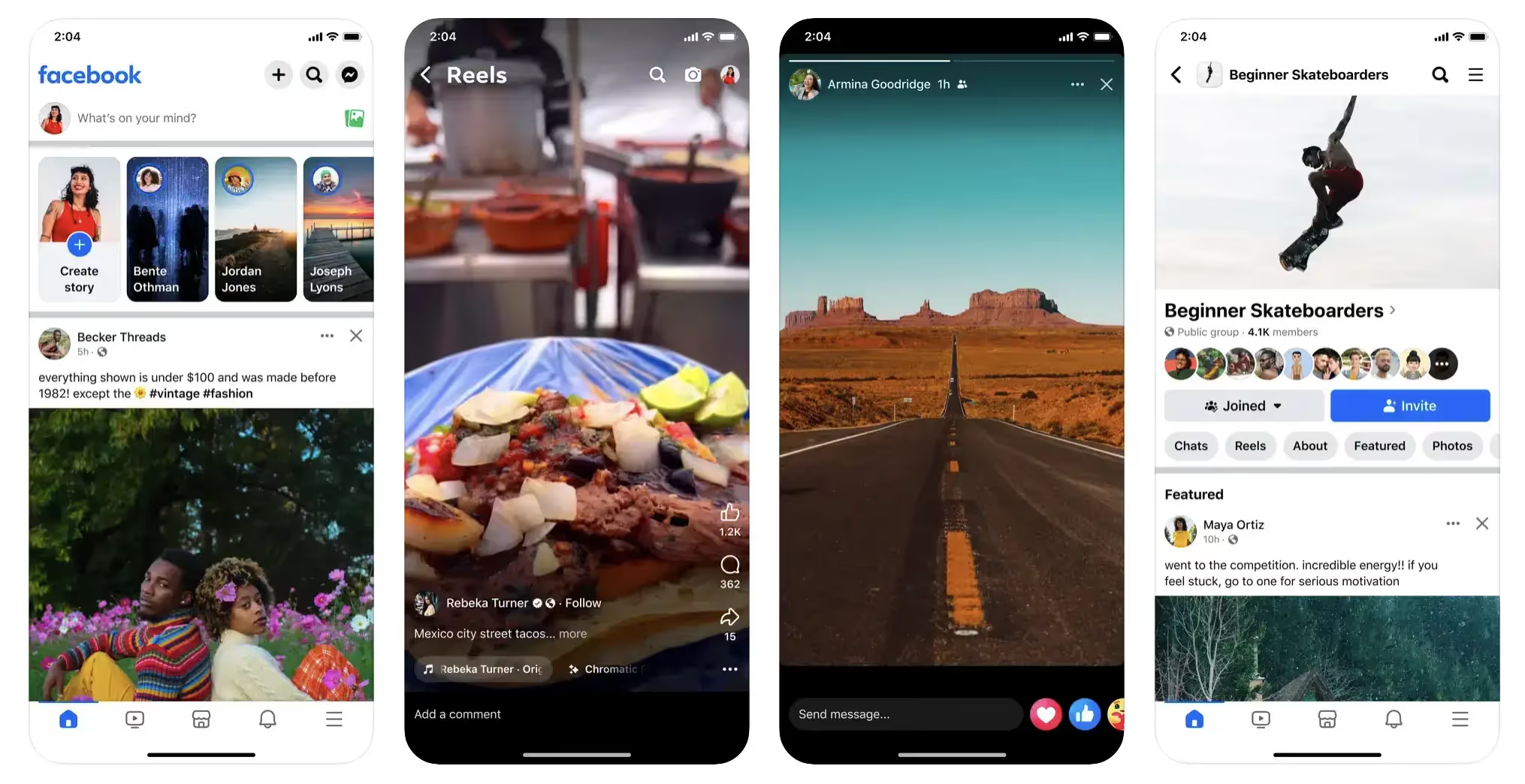
    Amazon Shopping:

    Discord:
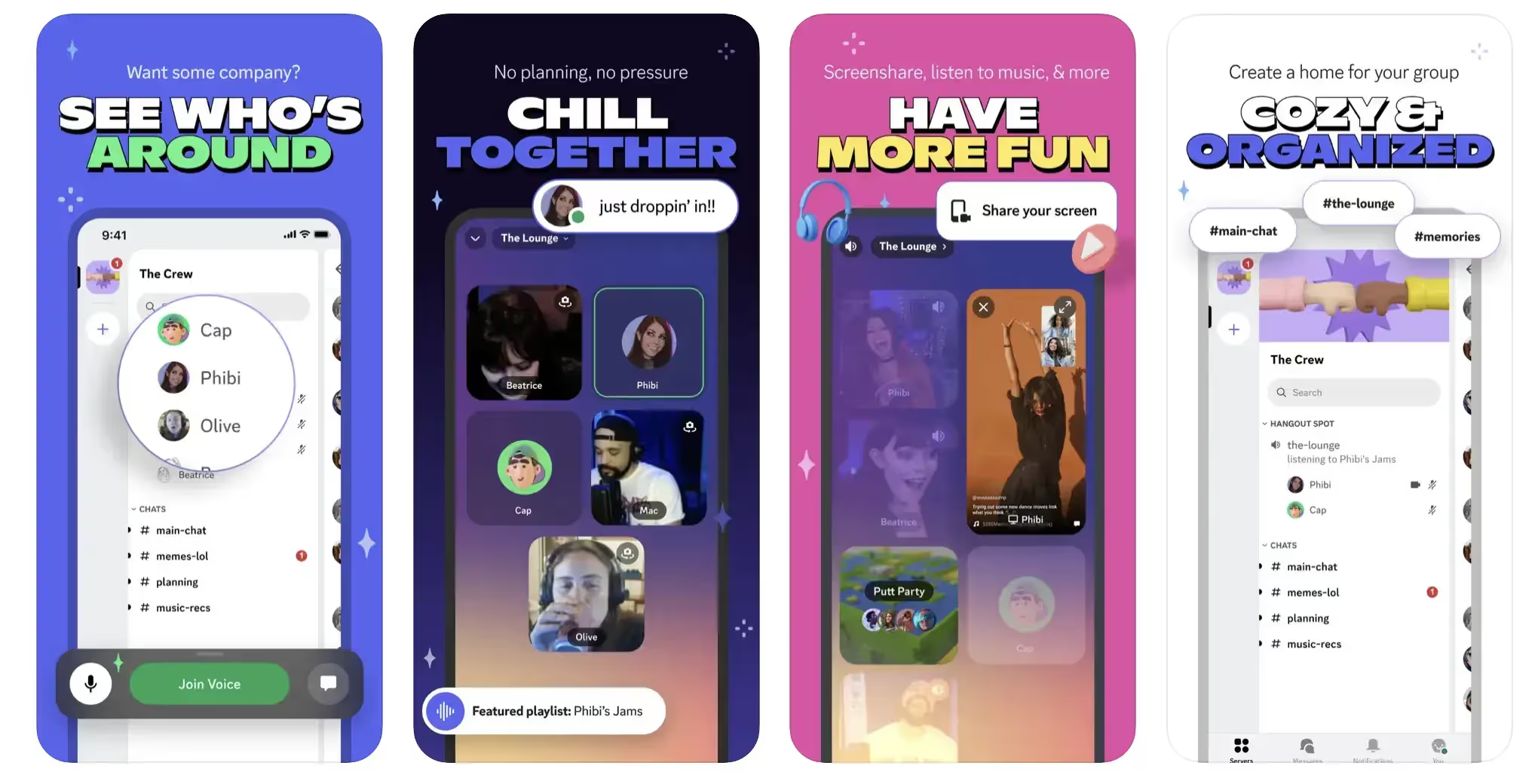
    The NFL app:

    Bloomberg:

    In addition, AppBrain states that React Native is used in Netflix and Uber and many other top apps.

    Pros and Cons of React Native for Mobile App Development

    In general, the benefits of React Native include faster development (compared to native), high performance (compared to hybrid frameworks like Ionic), and a strong community of developers and libraries. 

    On the downside, React Native comes with a somewhat steep learning curve, and may run into performance issues for complex use cases, or if developers aren’t careful.

    Pros:

    • React Native apps perform and feel similar to fully native apps, while taking less work to ship Android and iOS versions.
    • Apps actually use native components, not webviews.
    • The syntax is easier to understand and learn for developers familiar with JavaScript and/or React (compared to native mobile languages).
    • React Native has a rich ecosystem of developers, documentation and libraries.
    • Maintenance is easier (than native), as there is less code to update each time you make changes.
    • It’s cheaper and faster to build apps in React Native than to build fully native apps.

    Cons:

    • It has a larger learning curve than some alternatives (including Ionic).
    • It’s easy to end up with performance issues and memory leaks if code is not clean.
    • Debugging can be cumbersome.
    • There may be issues integrating with device features.
    • It requires a separate codebase for mobile and web.

    Now that we know the basics about React Native, let’s move onto the Ionic framework.

    What is Ionic?

    “Write once, use everywhere.”

    Ionic is a hybrid development framework, which allows developers to build apps that reuse code across web, Android and iOS platforms.

    Its primary use is if you have a web app or website that you want to convert into a mobile app. Ionic is an open-source mobile UI toolkit that handles the UI of your mobile app, inheriting the functionality from your web code.

    Mobile apps built with Ionic use webviews, which are like a working, embedded web browser within a native mobile wrapper.

    This lets you create apps with traditional web technologies and frameworks, instead of having to learn a native programming language and write a whole new codebase from the ground up.

    Ionic provides a serious reduction in time and effort to build apps for multiple platforms, especially for projects that already have something built out for the web.

    What Kind of Projects is Ionic Used For?

    Ionic is ideal for converting a website or app to mobile apps, without rebuilding from the ground up.

    It allows you to retain most of the code that you’ve already written, and manage web, iOS and Android all from a single codebase.

    It’s also a good fit for simple apps that don’t require much complex native functionality. Many will find it easier to write and manage code for the web, then extend it to mobile using Ionic, rather than learning a new programming language like React Native (which also requires you to manage a separate codebase if you want to have apps for web and mobile).

    Ionic App Examples

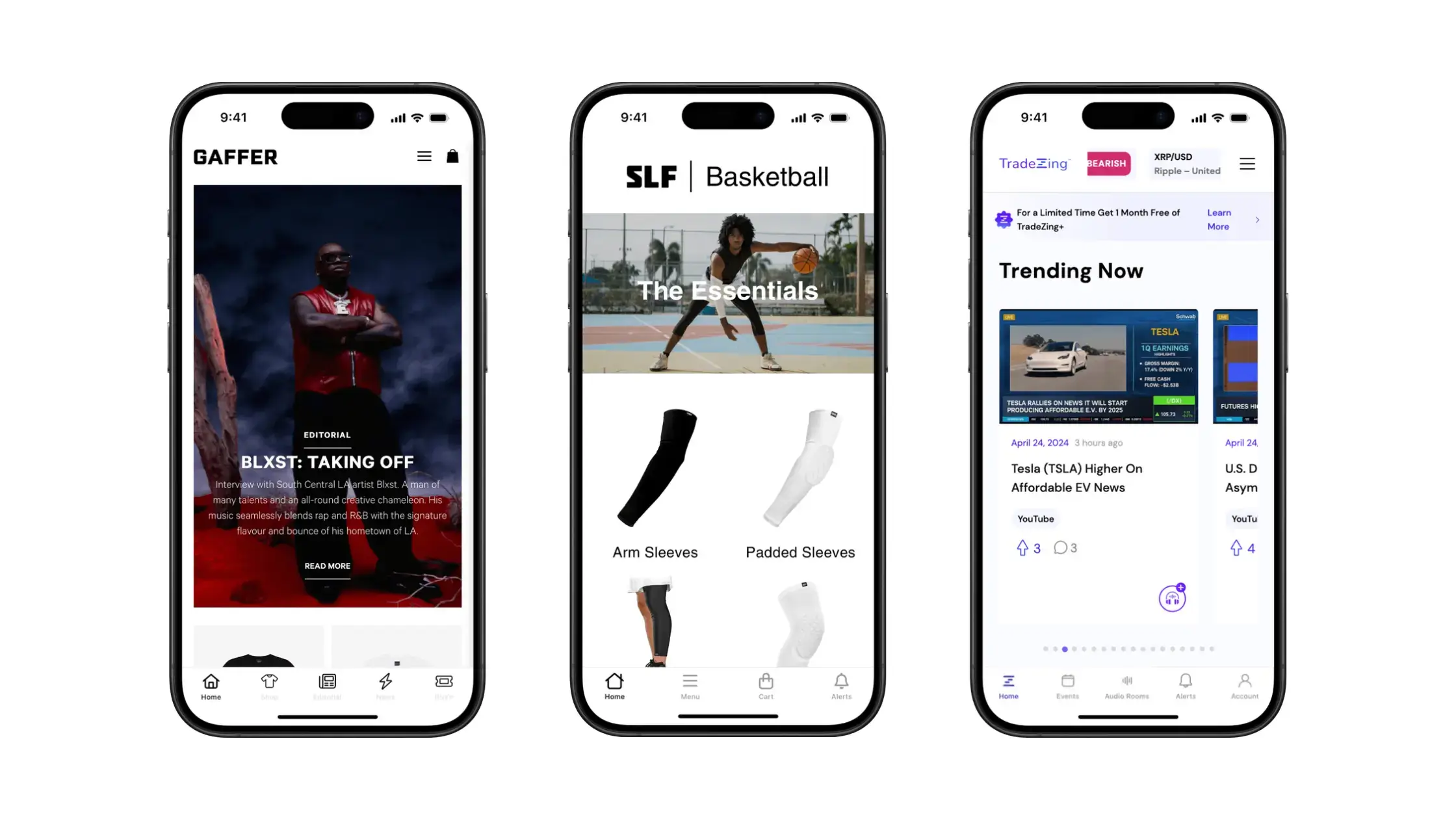
    Ionic is used by companies of varying sizes, from small businesses to large corporations like T-Mobile, Volkswagen, Disney and Southwest Airlines.

    Sworkit is a great example of a smaller company using Ionic.

    Sworkit developer Ryan Hanna used Ionic to create a mobile app while leaning on his background in web development, and claims it saved over over $200,000 in development costs compared to building natively.

    Some other examples of Ionic apps include:

    Sanvello:

    Burger King’s app:

    H&R Block:
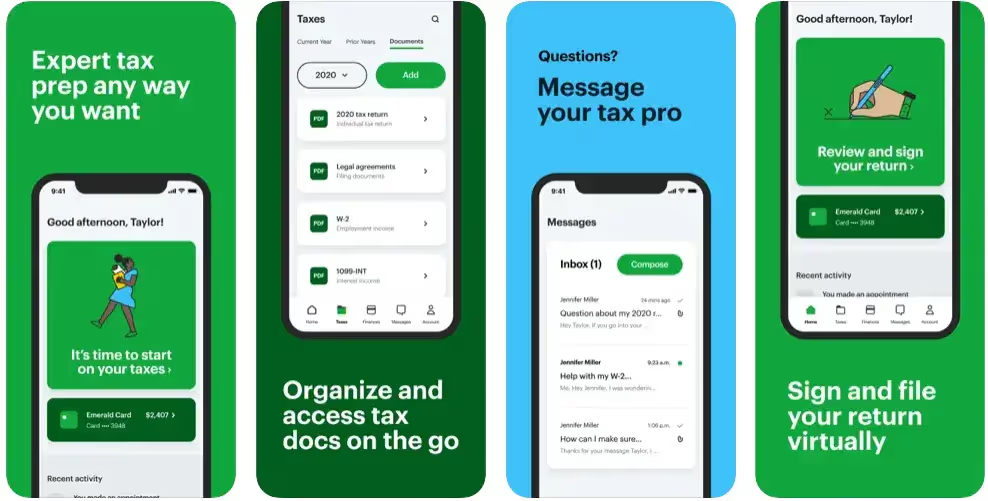
    Pros and Cons of Ionic for Mobile App Development

    Ionic provides a fast, simple way to deploy apps for mobile devices, particularly when the app already has a version built for the web. It’s also much quicker and easier to maintain Ionic apps, as there’s just one codebase to manage for all three platforms.

    With the added convenience comes some sacrifice in performance and functionality, however, including limited integration with native features.

    Pros:

    • Ionic is easy to learn, with a much lower learning curve than React Native or native development frameworks.
    • It allows a large amount of code reuse, which speeds up development time and makes maintenance and updates much simpler.
    • Ionic allows web developers to easily ship mobile apps, using their web frameworks of choice (e.g. React, Angular, Vue).
    • Ionic has an active community, along with many 
    • Testing and debugging is easy, and can be done in the browser.
    • It’s easy to build your app as a PWA as well as mobile apps.

    Cons:

    • Performance won’t match that of mobile-first frameworks like React Native.
    • It may be difficult to match your UI to the look and feel of the operating system, as UI components are standardized across both Android and iOS.
    • Native plugins are required for native functionality, and many native functions will not be possible to do with Ionic.

    How About Ionic React?

    Ionic has specialized versions for several popular JavaScript frameworks – Ionic Vue, Ionic Angular and Ionic React.

    These versions are specially designed for converting web apps built in that specific framework (e.g. React web apps) into hybrid mobile apps.

    Ultimately the pros and cons and key features of Ionic React are the same as those of the Ionic Framework in general. It’s just an extra advantage, if your app is built in React, to be able to translate your app to mobile without having to learn and use a new language.

    Learn More: How to Convert a React Web App to a Mobile App

    When to Use React Native and When to Use Ionic

    So, putting the two frameworks head to head, which should you use to build your mobile app?

    Both frameworks have their advantages and disadvantages, and it’s hard to say one is necessarily “better” than the other.

    It’s largely situational. Depending on what you’re trying to do, and the resources and knowledge you’re working with, either Ionic or React Native could be a better fit for your project.

    Use React Native if:

    • You’re building a project that’s mobile-first, and don’t need a web component.
    • You need your app to integrate with device features.
    • Your app is on the medium to high level in complexity.
    • You have the time/money/expertise to handle a complex development project.

    Use Ionic if:

    • You’re converting a website to a mobile app.
    • Your app doesn’t have any complex requirements or need to integrate with device features.
    • You or your team has a web development background (especially if you have expertise in React, Vue or Angular).
    • You want your project to have a web component as well (such as a web version or PWA).

    Learn More: Choosing Between Web, Hybrid and Native Apps

    Alternative Hybrid and Cross-Platform Frameworks

    Ionic and React Native are not the only ways to build hybrid apps or cross-platform mobile apps.

    Other frameworks that you could consider include:

    Native development is also an option (i.e. building native Android apps in Java/Kotlin and iOS apps in Swift/Objective-C). However, we don’t recommend this, unless you have really complex needs that only native development can serve. Today’s cross-platform frameworks are more than enough for 99% of projects, and come with a lot less baggage.

    One more alternative to Ionic/React Native to consider is a managed service like Vendrux.

    Vendrux works much the same way as Ionic, converting your website or web app into apps that work on iOS and Android, with all three platforms served from the same codebase.

    But as a Done-For-You service, it’s much quicker, cheaper and easier both upfront and moving forward, and will suit you better if you don’t want to dedicate the time and energy to handling mobile app development in-house.

    Examples of hybrid apps built with Vendrux

    How Vendrux Beats Both Ionic and React Native

    If you’re building a mobile app for your website or web app, Vendrux is almost always a better option to Ionic or React Native.

    It’s simpler, cheaper, faster, and the result will be nearly indistinguishable from what you’d get if you coded your mobile app yourself.

    The only reason not to use Vendrux is if you’re building a mobile app that doesn’t need a web counterpart, or you need complex features that require native integration to achieve.

    Let’s break down the advantages of using Vendrux to build hybrid mobile apps:

    No Coding Required

    With Vendrux you don’t need to learn a new language or framework. You don’t need to write any code at all. It’s perfect for non-technical teams or anyone who specializes in an area outside of mobile development.

    All the Work is Done For You

    Our team does the heavy lifting, all you need to do is let us know your vision for the app. You don’t need to take on any additional development load or bandwidth, you just sit back and wait to see your new app.

    Platform Agnostic

    Vendrux works no matter what platform or framework you use for your website.

    Whether you use a framework like React, Vue, Angular, Flask, Django, Ruby on Rails, Laravel, a CMS like WordPress or Shopify or a site builder or no-code app builder, all are compatible with Vendrux.

    You continue to use your preferred tech stack, without having to chop and change to fit your mobile app.

    It’s Cheaper and Faster, With a Similar End Result

    Vendrux lets you go live in as little as two weeks, starting from just $399 per month.

    Even with more efficient hybrid frameworks like Ionic, you’ll never be able to match this price and speed if you’re coding in-house or hiring a developer to build your app.

    To your users, the app will look like a professional app that took months to build. Get the same great user experience, for much less investment.

    Fully Synced, Low Overhead

    Vendrux apps are totally synchronized with your website or web app. You don’t need to worry about duplication of effort when you make changes to your site, or managing different platforms.

    Even cross-platform app development, which is more efficient than fully native mobile apps, can come with ongoing maintenance costs of six figures per year. With Vendrux, you cut out 90% or more of these costs.

    App Store Submission Included

    We also handle the app store submission process for you. This can be time-consuming and extremely draining if you don’t have any experience dealing with the app stores and their strict requirements.

    We’ve done it before, through the course of building apps for more than 2,000 companies, and we know what it takes to get an app approved for submission, which is why we guarantee approval for your app or your money back.

    Technical Maintenance Included

    Our team also does the technical maintenance required for operating system updates or routine security updates. If you code an app yourself, you’ll need a mobile developer on staff to handle this.

    By going with Vendrux, you keep your focus on your website – we take care of your apps.

    Ready to Build Your Mobile App?

    If you’re ready to convert your website or web app into a mobile app, get in touch with us now and schedule a free demo.

    We’ll give you a step-by-step look at how the process works, and even show you a working demo of your site as an app.

    If you want an easier way to build an app than learning Ionic or React Native, give Vendrux a try. There’s no risk – try it out and see how great your app can be with little to no effort.

    Get a free preview of your app and book a free demo now.
  • How Much Does It Cost to Convert a Website into an App?

    How Much Does It Cost to Convert a Website into an App?

    To convert a website into an app, you’ll typically need to bring mobile developers on staff, hire an agency, or use some kind of software or managed service.

    And that can come with a pretty large price attached.

    Converting a website into a mobile app can range from a modest project to a major investment for a small or medium-sized business. 

    The total cost and effort depend on the development approach, app complexity, and who builds it. 

    Below is a breakdown of key considerations, looking at several different development methods, ultimately giving you a ballpark estimate of what it costs (both for the initial build, and ongoing maintenance) to turn your website into an app.

    Learn more: Websites vs Mobile Apps: Key Functional Differences You Need to Know

    Development Approaches (& Cost Impact)

    There are a few different ways to turn a website into a mobile app. The method you choose can have a significant impact on the final cost.

    Native Development

    Native apps are built separately for each platform (Android and iOS) using platform-specific languages (e.g. Swift/Objective-C for iOS, Kotlin/Java for Android).

    This yields the best performance and user experience tailored to each platform. But it also comes with the highest price tag.

    Cross-Platform

    Cross-platform frameworks allow you to build a single codebase that runs on both Android and iOS. Popular options include React Native, Flutter, and others. The goal is to share a high percentage of code between platforms while still delivering a near-native experience in the UI.

    Cross-platform is largely preferred to fully native development today, as you can get a result of largely the same quality, with less work, maintenance, and cost.

    Hybrid (Vendrux)

    “Hybrid” in this context refers to apps that are essentially your website or web app packaged inside a native mobile framework.

    This is what Vendrux does – reusing what you’ve already built for the web to make up the bulk of your mobile app, rather than reconstructing it from scratch (while adding native features like push notifications).

    Learn more: Native, Web or Hybrid App: Which Is Right For You?

    Cost to Turn Your Website Into an App (3 Different Methods)

    Now let’s examine how much you can expect it to cost to turn your website into an app, with estimates for each of the development approaches discussed above.

    Cost of Native Development

    Developing two native apps (one for each platform) is the most expensive route. 

    You essentially have to build and maintain two codebases. Industry data shows native development can cost from around $50,000 up to $500,000 for one platform, depending on complexity​. 

    Building both iOS and Android natively often doubles the effort – for example, iOS alone might start around $75K, and Android $50K on the low end​. 

    Very simple apps may cost less, but for a website to app conversion (considering you likely need to build an API to share data between website and app), you’re unlikely to find anything less than 5 figures.

    Separate vs. simultaneous development

    With native development, you can choose to build for one platform first and the other later, or develop both in parallel. 

    Developing simultaneously (with two teams) shortens time-to-market but means paying two development streams at once. 

    Staggering the development (e.g. build an iOS app then later port to Android) spreads out costs over time, but the total cost remains about the same in the end. 

    Either way, two native apps mean roughly double the development effort and cost compared to one. There may be some savings by reusing design and backend components, but expect a substantially higher budget for true native apps on both platforms.

    Cost of Cross-Platform Development

    Cross-platform development is generally more cost-effective than separate native apps. 

    With one codebase to build and maintain, you can save a significant amount of effort. Estimates suggest this approach can save roughly 20–30% in development costs compared to building two native apps​. 

    For example, instead of spending $100K on two native apps, a cross-platform project might cost around $70K for equivalent functionality (on both iOS and Android).

    In practice, small to mid-sized apps built cross-platform often fall in the $25,000 to $60,000 range​, which is notably lower than the cost of native development. 

    These savings come from reusing code for both platforms and needing a smaller development team.

    Cost of Hybrid Development with Vendrux

    Hybrid approaches are typically cheaper and faster than building fully custom apps.

    This is because hybrid development reuses part of your web code in building the app, cutting down the amount that has to be built from scratch.

    If your website is already functional on mobile browsers, wrapping it into an app can be done at a fraction of the cost of bespoke development.

    With Vendrux, it’s likely to cost between $1-2K upfront, with a recurring cost of a few hundred per month thereon, for both iOS and Android apps, fully synced with your website.

    This approach is ideal for ecommerce sites, news sites, web apps, online courses, or any other digital-first businesses that already have a fast, well-optimized mobile web experience.

    __wf_reserved_inherit
    Just a few examples of web to app conversions from Vendrux

    Ongoing Maintenance Costs

    Aside from the initial development cost, the recurring cost of maintenance and updates must be a consideration.

    This is a crucial but often overlooked cost factor. Native apps require maintaining two separate codebases. That means if you need to fix a bug or update a feature, you have to do it twice (once in the iOS code, once in Android). 

    It also means when Apple or Google release OS updates, you may need to update each app to ensure compatibility. 

    This double workload increases ongoing maintenance costs, and typically adds 15-20% of the initial development cost per year in recurring expenses.

    Cross-platform apps simplify maintenance by having a single codebase – fix a bug once and it applies to both platforms (assuming the issue is in shared code). 

    This can reduce long-term costs and effort, but still requires extensive testing on multiple platforms and a large degree of expertise.

    Hybrid development with Vendrux is, again, the most cost-effective option.

    The subscription includes all technical maintenance and updates for the apps, costing a few hundred per month – far less than the maintenance costs for either native or cross-platform mobile apps.

    What’s the Best Way to Convert Your Website Into a Mobile App?

    The best option depends on the business – and the size of your budget, the resources at hand, and the performance and feature set required.

    In terms of cost, hybrid development (Vendrux) is easily the winner when it comes to converting your website into a mobile app.

    • Native development 
      • From $50,000-$500,000 per platform (potentially as much as $1M for native iOS and Android apps)
      • 15-20% of the initial cost per year in maintenance ($15K minimum; potentially six figures)
    • Cross-platform development
      • Starting from $25K (possibly up to six figures, for more demanding projects)
      • Likely five figures+ per year in maintenance
    • Vendrux
      • $1-2K to build (ready in under a month)
      • A few hundred per month to maintain (new features on your website sync automatically; no additional cost to integrate these with your mobile apps)

    For ROI, Vendrux gives you a much clearer path to a positive return.

    All you need is for your mobile app to generate a few thousand in new revenue, and clear four figures monthly, and you’ll be making a profit on your investment.

    For native and cross-platform development, your app needs to be a hit; or else it’ll be a loooong time until your investment is paid back.

    Want to see what’s possible?

    You might be asking; can you really build a high-quality mobile app for just $1-2K?

    The answer is yes. We’ve helped over 2,000 businesses do just that; turning their already well-optimized mobile web experience into mobile apps that drive higher mobile engagement, increased retention, and a significant boost in LTV.

    You can see a collection of case studies here to learn about the kinds of businesses that have had success with this approach.

    Even better, you can see for yourself what your own website could look like as an app.

    You can get a free, interactive preview of your app, using only your website URL. You’ll be able to play around and customize the app through our dashboard, and schedule a call when you’re ready to move forward (or if you want to learn more).

    __wf_reserved_inherit

    You’ll see how Vendrux apps deliver 95% of what a native app does, for 5% (or less) of the cost.

    Get your free app preview now and start the path towards launching your own mobile apps (without investing hundreds of thousands of dollars).

  • Ecommerce Mobile App Development Cost: How Much to Build an App in 2026?

    Ecommerce Mobile App Development Cost: How Much to Build an App in 2026?

    A mobile app can be one of the best investments you make as an ecommerce brand. But, like any investment, it depends significantly on how much you pay.

    Ecommerce mobile apps, as with any mobile apps, can come at a steep price. You could be looking at a price of $250,000 or more, along with recurring maintenance costs that add another $100K+ per year, just to keep it running.

    However, the cost can also be a lot more affordable, with more efficient development approaches that deliver an app that’s just about on the same level as what you’d get with a full custom build.

    We’ve been building mobile apps since 2013, successfully launching over 2,000 mobile apps. So we’ve got a lot of experience in the industry, and are acutely aware of the real costs you can expect.

    In this article, we’ll break it all down; from the estimated cost of custom ecommerce mobile app development, to the additional costs you need to budget for, how to cut down dev costs by hiring more affordable developers, and alternative app development approaches that flip the cost structure on its head.

    Short Answer: How Much Does It Cost to Build an Ecommerce Mobile App?

    Realistically, you could be looking at anywhere from $30,000 to $250,000 or more to build an ecommerce app.

    It’s a little bit like asking “how long is a piece of string”. The cost can vary greatly, depending on who you hire, how complicated your app needs to be, and how smoothly the project goes.

    There’s a big difference between a simple catalog app for a small retail store, and a multi-storefront app for a global fashion brand with AR try-on built in.

    There’s also a big difference between hiring the best mobile app developers in Silicon Valley and hiring a boutique dev agency from South Asia.

    What Determines Ecommerce App Development Cost

    So we’ve got a (very) rough ballpark figure. But to help you understand the cost of building an ecommerce app better, let’s take a look at what contributes to the cost, and how the cost can vary by features, hiring approach, and more.

    App complexity and feature scope

    This is the single biggest cost driver. A basic ecommerce app with product listings, a shopping cart, and payment processing is a fundamentally different project than a multi-vendor marketplace with AI-powered recommendations and AR product previews.

    Each additional feature adds development time and, in custom builds, ongoing maintenance burden. Features like real-time inventory sync, multi-currency support, and advanced search filtering can each add $2,000 to $15,000 to a custom build.

    Platform choice: iOS, Android, or both

    Building natively for iOS and Android means two separate codebases, two development teams, and roughly double the cost. 

    Cross-platform frameworks like React Native and Flutter reduce this premium to about 30-40% above a single-platform build, but still require platform-specific testing and optimization.

    Almost all ecommerce apps will want to support both platforms – so limiting yourself to just an iOS or Android version is likely not an option.

    Development approach

    Your technical approach has a major impact on cost:

    • Native development (Swift for iOS, Kotlin for Android): Highest performance, highest cost. Two codebases.
    • Cross-platform frameworks (React Native, Flutter): Single codebase, slightly lower cost. Good performance for most ecommerce use cases.
    • No-code tools and services: You can save a huge amount of money by NOT building a custom native (or cross-platform app), and using a no-code approach instead.

    Team type and location

    Who builds your app matters as much as what they build.

    Developer rates vary dramatically by geography:

    Region Avg Hourly Rate Monthly Rate (Full-Time)
    United States $150-$250/hr $25,000-$42,000
    Western Europe (UK, Germany) $100-$180/hr $17,000-$30,000
    Eastern Europe (Poland, Ukraine) $40-$80/hr $7,000-$13,000
    South Asia (India, Pakistan) $25-$50/hr $4,000-$8,000
    Latin America (Brazil, Argentina) $35-$65/hr $6,000-$11,000
    Southeast Asia (Vietnam, Philippines) $20-$40/hr $3,500-$7,000

    Sources: Accelerance Global Software Outsourcing Rates, Clutch Developer Survey 2025

    These rates explain why cost estimates vary so widely. A mid-level ecommerce app built by a US agency might cost $120,000, while a similar spec built by an Indian team could come in at $30,000-$40,000. 

    There are tradeoffs, of course, to paying lower rates. While you could get a result that’s just as good from cheaper offshore developers, there is usually some correlation between cost and quality.

    Ecommerce App Development Cost by Complexity

    Here’s what custom development typically costs at each tier, based on aggregated estimates from various ecommerce mobile app development agencies, and our own industry research.

    Basic ecommerce app ($15,000-$40,000)

    Timeline: 3-6 months

    A basic app covers the essentials: product catalog, search, shopping cart, a single payment gateway, user registration, and push notifications. Think of a simple storefront with a clean checkout flow.

    Typical feature set:

    • Product pages with images and descriptions
    • Basic search and category navigation
    • Shopping cart and checkout
    • One payment gateway (Stripe or PayPal)
    • User accounts and order history
    • Push notifications
    • Basic analytics

    Who this is for: Startups testing mobile commerce, or brands with a very narrow product catalog and simple requirements.

    Mid-level ecommerce app ($40,000-$100,000)

    Timeline: 6-9 months

    This is where most serious ecommerce apps land. You get everything from the basic tier, plus advanced search with filters, multiple payment options, product reviews, order tracking, multi-language or multi-currency support, and an admin panel for managing content and inventory.

    Typical additions over basic:

    • Advanced search with filters and sorting
    • Multiple payment gateways
    • Product reviews and ratings
    • Real-time order tracking
    • Multi-language/multi-currency
    • Wishlist and favorites
    • Admin dashboard
    • Social login (Apple, Google, Facebook)
    • Third-party integrations (loyalty programs, email platforms)

    Advanced ecommerce app ($100,000-$250,000+)

    Timeline: 9-15 months

    Enterprise-grade apps with AI-powered personalization, AR product visualization, sophisticated analytics, multi-vendor marketplace functionality, or deep integrations with ERP and inventory management systems.

    Typical additions over mid-level:

    • AI-driven product recommendations
    • AR try-on or product preview
    • Chatbot or live chat integration
    • Multi-vendor/marketplace architecture
    • Advanced analytics and A/B testing
    • Custom loyalty and rewards engine
    • Omnichannel inventory management
    • Complex third-party integrations (ERP, PIM, OMS)

    Marketplace or social commerce platform ($150,000-$500,000+)

    Timeline: 12-18+ months

    If you’re building a marketplace (multiple sellers, separate dashboards, transaction processing, dispute resolution) or a social commerce platform (user-generated content, live shopping, community features), you’re in a different category entirely.

    This isn’t a standard ecommerce app project. It’s a software product build.

    Ecommerce App Development Cost by Region

    The same app, built to the same spec, costs dramatically different amounts depending on where your development team is based. Here’s what a mid-level ecommerce app ($40,000-$100,000 at US rates) would cost by region:

    Region Estimated Cost Timeline Notes
    United States $80K-$150K 6-9 months Highest QA, easiest communication
    UK / Western Europe $60K-$120K 6-9 months Strong talent, similar timezone to US East
    Eastern Europe $30K-$60K 6-10 months Popular outsourcing, good technical talent
    India / South Asia $15K-$40K 5-9 months Lowest rates, largest talent pool
    Latin America $25K-$50K 6-10 months Nearshore, good timezone overlap
    Southeast Asia $15K-$35K 6-10 months Growing tech sector, competitive rates

    These are estimates for a cross-platform (React Native or Flutter) build including design, development, QA, and deployment. Native iOS + Android development would typically add 40-60% to each figure.

    A note on quality: Cheaper doesn’t always mean worse, and expensive doesn’t guarantee quality. But lower-cost regions often require more project management overhead, more detailed specifications upfront, and more rigorous QA. Factor that management cost into your estimates.

    Full Cost Breakdown by Development Phase

    Custom ecommerce app development isn’t a single line item. Here’s where the money actually goes:

    Discovery and planning ($3,000-$15,000)

    Before a line of code gets written, you need requirements documentation, technical architecture, wireframes, and a project plan. Skipping this phase is how $50,000 projects become $150,000 projects.

    • Requirements gathering and documentation
    • Technical feasibility analysis
    • Architecture design
    • Project planning and timeline

    UI/UX design ($5,000-$30,000)

    Your app’s interface and user experience. This includes wireframes, visual design, prototyping, and user testing. Ecommerce apps demand a higher bar here because any friction in the shopping or checkout flow directly costs you revenue.

    • Wireframes and user flows
    • Visual design (brand-consistent)
    • Interactive prototypes
    • Usability testing

    Frontend development ($15,000-$80,000)

    Building the user-facing app. This is typically the largest single cost in the project, covering everything the customer sees and interacts with.

    • Product catalog and browsing experience
    • Search, filtering, and navigation
    • Shopping cart and checkout flow
    • User accounts and profiles
    • Push notification handling

    Backend development ($10,000-$60,000)

    The server-side infrastructure: APIs, databases, authentication, payment processing, order management. If you already have a backend (your ecommerce platform), this cost drops significantly because you’re integrating with existing systems rather than building from scratch.

    • API development
    • Database architecture
    • Authentication and security
    • Payment gateway integration
    • Order and inventory management
    • Third-party service integrations

    Quality assurance and testing ($5,000-$25,000)

    Testing across devices, operating systems, payment flows, edge cases, and performance under load. This is often the first thing teams cut when budgets get tight, and almost always the most expensive mistake.

    • Functional testing across devices
    • Performance and load testing
    • Security testing
    • Payment flow testing
    • Regression testing

    Deployment and launch ($2,000-$8,000)

    App store submission, screenshots, descriptions, and navigating Apple’s and Google’s review processes. Apple’s review process is notoriously unpredictable. Budget time for at least one rejection and resubmission cycle.

    • App Store and Google Play submission
    • Store listing optimization (ASO)
    • Launch monitoring

    Total: custom build cost summary

    Phase Basic App Mid-Level App Advanced App
    Discovery & Planning $3K-$5K $5K-$10K $10K-$15K
    UI/UX Design $5K-$10K $10K-$20K $20K-$30K
    Frontend Development $15K-$25K $30K-$50K $50K-$80K
    Backend Development $10K-$15K $20K-$40K $40K-$60K
    QA & Testing $5K-$8K $10K-$15K $15K-$25K
    Deployment $2K-$3K $3K-$5K $5K-$8K
    Total $40K-$66K $78K-$140K $140K-$218K

    Cost Breakdown by Feature

    At the end of the day, the cost of an app really comes down to a sum of the cost of its individual parts.

    The more features, and the more complex features the more dev hours it takes and the higher the cost.

    If you’re scoping a custom build, here’s what individual features typically cost to develop, based on estimates from around the industry:

    Feature Estimated Cost Notes
    User registration & login $2K-$5K +$1K-$3K for social login
    Product catalog $5K-$15K Varies by catalog size & filter complexity
    Search with filters $3K-$10K AI-powered search at the high end
    Shopping cart $3K-$8K Multi-currency adds complexity
    Payment gateway $3K-$10K Per gateway; Stripe is simplest
    Push notifications $3K-$8K Automated flows cost more
    Order tracking $2K-$6K Real-time requires additional API work
    Reviews & ratings $2K-$5K Moderation features add cost
    Wishlist / favorites $1.5K-$3K Straightforward feature
    Multi-language support $3K-$8K Per language beyond the first
    Admin panel $8K-$25K Often underestimated in scope
    Analytics integration $2K-$5K Basic; custom dashboards cost more
    AR product visualization $15K-$40K Requires specialized development
    AI recommendations $10K-$30K Depends on model complexity
    Loyalty / rewards $5K-$15K Custom logic and UI
    Live chat / chatbot $5K-$15K Third-party vs custom build

    These are development costs only, not including design, testing, or ongoing maintenance for each feature.

    The Hidden Costs Most Estimates Leave Out

    The build is the visible cost, the cost that gets quoted to you upfront. But there are more costs to consider, particularly the recurring costs that add up over time.

    Ongoing maintenance ($6,000-$50,000+/year)

    Industry standard is 15-20% of the initial development cost per year, covering bug fixes, OS updates, security patches, and minor improvements. For a $100,000 app, that’s $15,000-$20,000 annually, at minimum.

    Hosting and infrastructure ($2,000-$15,000/year)

    Cloud hosting (AWS, Google Cloud, Azure), CDN, database hosting, and API costs. Traffic spikes during sales events can increase these costs dramatically if your infrastructure isn’t properly scaled.

    Third-party services ($3,000-$15,000/year)

    Payment processing fees, push notification services, analytics platforms, search services (Algolia, Elastic), email/SMS APIs, and any other SaaS integrations your app depends on. These are recurring costs that compound as your user base grows.

    App store fees ($124/year)

    Apple charges $99/year for a developer account; Google charges a one-time $25 fee. These costs are fairly negligible, but they do exist.

    Both app stores also take commissions on in-app purchases, however these generally don’t apply for ecommerce apps.

    Feature updates and iterations ($5,000-$30,000/year)

    Your app isn’t done when it launches. Users expect new features, your competitors are evolving, and your ecommerce platform keeps updating. Budget for at least 2-4 significant feature updates per year.

    3-Year Total Cost of Ownership: Custom Build vs Web-to-App

    When you launch an app, it’s never a one-time cost.

    You’re not building the app for a short time, or a single event. You’re launching it to be a long-term retention tool.

    And it costs to keep an app running. There’s regular maintenance, infrastructure costs, feature updates.

    That’s why you need to look at the total cost of ownership over a wider time horizon – such as a three-year window. 

    Custom-built mid-level ecommerce app (3-year TCO)

    Cost Category Year 1 Year 2 Year 3 3-Year Total
    Development (build) $80K-$140K $80K-$140K
    Maintenance (15-20%/yr) $12K-$28K $12K-$28K $12K-$28K $36K-$84K
    Hosting & infrastructure $5K-$10K $5K-$12K $6K-$15K $16K-$37K
    Third-party services $3K-$10K $3K-$12K $4K-$15K $10K-$37K
    Feature updates $10K-$25K $10K-$25K $10K-$25K $30K-$75K
    App store fees $124 $124 $124 $372
    Total $110K-$213K $30K-$77K $32K-$83K $172K-$373K

    More Cost-Effective Options for Ecommerce Mobile App Development

    Today, building a custom native app is not the only way build your own app.

    Services like Vendrux take your existing ecommerce website and turn it into a fully branded iOS and Android app. 

    Vendrux does this by building a native layer on top of your site, which includes all the native elements you need (native navigation, some UI elements, push notifications).

    The underlying content and functionality is all powered by your website – meaning you’re not rebuilding this, you’re extending what you’ve already built.

    Your site’s checkout, product pages, loyalty programs, and every other feature carry over automatically. Updates to your website appear in the app automatically, with no separate codebase to maintain.

    This saves you massively – not just on the initial build, but also long-term maintenance costs.

    Vendrux web-to-app conversion (3-year TCO)

    Cost Category Year 1 Year 2 Year 3 3-Year Total
    Setup fee $5K $5K
    Subscription $15,288 $15,288 $15,288 $45,864
    Maintenance Included Included Included Included
    Updates Included Included Included Included
    Hosting Included Included Included Included
    Push notifications Included Included Included Included
    Total $20,288 $15,288 $15,288 $50,864

    Numbers based on Vendrux Business plan at $1,499 per month, with 15% annual billing discount.

    Based on these estimates, the difference is significant: over three years, a custom build costs roughly 6-12x more than Vendrux.

    That’s not to mention the opportunity cost, and faster time to revenue. Vendrux ships your app in 6-8 weeks, compared to 6-15 months for a custom build.

    That means you’re making money from the app faster, and the development project takes away less of your team’s focus from other areas of your business.

    “A custom app build for our Salesforce Commerce Cloud setup would have been prohibitively expensive. Vendrux was the only realistic option.”
    — Nick Barbarise, Director of IT, John Varvatos

    But are you limiting yourself by going with a more cost-effective option, like Vendrux?

    Not really. For ecommerce apps, which often don’t need any complex app-specific functionality, the end result is barely discernible from a fully custom app.

    John Varvatos sees 10x revenue per user from the app vs mobile web, with a 4x higher purchase rate and close to seven figures in app sales since launch.

    Many other brands see sometimes millions in annual revenue through their app, without the expense and hassle of a custom native build.

    It’s 100% viable to build an ecommerce app this way. In fact, the real question is whether or not spending six figures on a custom app is a viable option.

    Want to see how these numbers apply to your store? Get a free strategy call and we’ll break it down for you.

    DIY No-Code App Builders

    Another option is to use a traditional template-based no-code app builder.

    The quality these tools are capable of putting out is quite impressive, and there’s a real question that it’s better to build an app using a no-code tool than paying for a custom native app.

    There are some limitations or issues with DIY no-code tools to consider:

    • You often can’t do everything you want with these tools, due to the limitations of their pre-built blocks and templates
    • Some of your website’s functionality may not carry over to the app (you’re reliant on their supported integrations)
    • The app needs to be managed separately from your website; maintenance is not as much as with a custom app, but more than with an approach like Vendrux.
    • It takes up your time (or your team’s time) to build and manage the app (factor in labor costs alongside the price you see on your invoice).
    • The majority of mobile app builders only support Shopify – the market is much thinner if you’re on any other platform (Magento, Salesforce Commerce Cloud, or any legacy/enterprise platform).

    In general, for the average Shopify store, a no-code tool is likely a better approach than a fully custom native app.

    However, Vendrux typically beats out these tools in terms of TCO.

    The upfront/monthly cost is similar, yet with Vendrux you spend less time on maintenance, since your app and website are automatically synced.

    DIY tools are a good choice if you’re looking to build a very unique app, separate from your website.

    If your goal is to extend your existing website’s experience, Vendrux is the way to go.

    What ROI Can You Expect From an Ecommerce App?

    Cost only matters relative to what you get back. Here’s what the data shows:

    Revenue per user

    Apps drive 3.5-7x higher average revenue per user compared to mobile web. This isn’t theoretical. Vendrux’s 2025 Benchmark Report outlines this lift, often leading to outsized revenue contributions from brands’ mobile apps:

    • One wellness brand generates 62% of total online revenue through the app, from only 15.8% of users
    • A luxury fashion brand sees 20.7% of revenue from the app, with only 7% of total users
    • A cosmetics brand drives $1.82M in app revenue, accounting for 15.2% of total online sales

    Conversion rates

    App users convert at 1.7-3x higher rates than mobile web visitors. Some Vendrux brands see even larger gaps, with app conversion rates 8-10x higher than mobile web.

    Retention and lifetime value

    This is the real story. Apps aren’t about acquiring new customers. They’re about keeping the ones you already have.

    • App customer LTV is 2.8-5x higher than web-only shoppers
    • 60% of first-time app buyers make at least one additional purchase
    • App users purchase roughly 33% more frequently than non-app users
    • Users spend 201.8 minutes per month in shopping apps vs 10.9 minutes on mobile websites

    Push notifications: the highest-ROI retention channel

    Push notifications are the primary reason ecommerce brands build apps. 

    Push gives you a zero-cost, direct line to your best customers. They’re not constrained by inbox filtering, ad costs or carrier fees, and show up on the customer’s lock screen with virtually guaranteed visibility.

    They’re a powerful way to drive net-new sales, via promo alerts, new product drop notifications, back-in-stock alerts, and more.

    In fact, abandoned cart notifications alone have the potential to add 5-6 figures in new revenue per month; potentially paying for the cost of your app by themselves.

    “Push notifications are the cheapest and most powerful communication channel we have. Users who prefer to interact via an app are more loyal, buy from us more often, and spend more time with our content.”
    — David Cost, VP of Ecommerce & Marketing, Rainbow Shops

    The ROI math

    Apps typically contribute anywhere from 10-35% of a brand’s total revenue, on average.

    If you’re doing $5M per year in revenue overall, you could potentially drive $1M per year in app revenue (20%).

    With Vendrux, that equates to the following ballpark figures:

    • Cost: ~$20K (setup fee + annual plan)
    • App revenue: $1,000,000
    • Net return: $980,000
    • ROI (cost to revenue): ~49x

    The math can still work for a custom app. But you’re pushing the timeline back 6+ months, which pushes back the time to revenue, and the time to make back the cost of your investment.

    Yet for Vendrux, the cost is so small (and the potential return so big), that it’s a true no-brainer. 

    How to Decide Which Approach Is Right for Your Brand

    Not every brand needs the same approach. Here’s a framework:

    Choose custom development if:

    • You’re building a marketplace with multiple sellers and complex transaction logic
    • Your app requires native device features that can’t be delivered through a website (offline mode, Bluetooth, AR, device sensors)
    • You need functionality that doesn’t exist on your website and can’t be built as a web feature
    • You have a dedicated technical team to maintain the app long-term
    • Your budget supports $100,000+ upfront and $30,000+/year in maintenance

    Choose a web-to-app solution like Vendrux if:

    • You already have a working ecommerce website on Shopify, WooCommerce, BigCommerce, Magento, or another platform
    • Your primary goal is retention, repeat purchases, and customer LTV (not net-new functionality)
    • You want push notifications as a marketing channel
    • You need the app to stay in sync with your website without managing two platforms
    • You want to be live in weeks, not months
    • Your budget is better allocated to marketing and growth than to app development

    “When I heard about Vendrux and that we could turn our website into a native app without additional development resources, it made perfect sense.”
    — Steven Kachtan, CIO, Dream On Me (buybuyBaby)

    Choose a DIY app builder if:

    • You’re on Shopify only (most builders are Shopify-exclusive)
    • You have a simple store with minimal customizations
    • You want to self-manage the app experience (and have the resources to do so)
    • You’re comfortable with template-based design and limited integration options

    When not to build an app

    Sometimes, an app isn’t the right move. It can be a powerful asset, but it’s not a panacea.

    Your website is almost always the #1 focus. It’s where all your new customers land, and what deserves your attention first and foremost.

    If your website isn’t performing well (especially on mobile), fix this first, then think about extending it to an app.

    And if you’re still in the early stages in terms of revenue (say sub-$1M annually), you’re usually better served focusing on acquisition at this stage.

    An app isn’t for everyone. It’s for the top 10-20% of your customers. When you’re an early stage brand, you likely don’t have enough customers to justify the cost, and may be better off revisiting it at a later stage.

    How to Reduce Ecommerce App Development Costs

    If you’ve determined that custom development is the right path, here are practical ways to manage costs:

    Start with an MVP

    Launch with core features (catalog, cart, checkout, push notifications) and add complexity based on user feedback and data. An MVP approach can significantly reduce initial costs while getting you to market faster.

    Use cross-platform frameworks

    React Native and Flutter let you build for iOS and Android from a single codebase, reducing development cost by 30-40% compared to native builds for both platforms. For most ecommerce use cases, the performance tradeoff is negligible.

    Build on your existing backend

    If you’re on Shopify, WooCommerce, or another established platform, build your app as a frontend that connects to your existing backend via APIs. Don’t rebuild what already works.

    Phase your feature releases

    Budget $40,000-$60,000 for a solid launch, then allocate $15,000-$25,000 per quarter for feature additions. This spreads cost over time and lets you prioritize based on actual user behavior.

    Consider hybrid approaches

    Your app doesn’t have to be 100% custom-built or 100% web-based. Some brands use a web-to-app approach for their core shopping experience and layer in custom native features where they add unique value.

    Launching a High-ROI Ecommerce Mobile App

    The question most brands should be asking isn’t “how much does ecommerce app development cost?” It’s “how can I launch an app that drives the best ROI?”

    Most brands think they need a full custom build, and that anything less means sacrificing quality. Yet as many of the world’s biggest apps show, this is not always the case.

    You’ve got a working website. It runs great on mobile. Do you really need to reinvent the wheel when it comes to launching an app?

    Converting your existing site into a native app is likely to deliver the same retention and revenue benefits as a fully custom app, at a fraction of the cost and timeline.

    Vendrux turns your existing ecommerce website into a fully branded iOS and Android app, complete with unlimited push notifications, automated cart recovery, and full feature parity with your site. 

    Vendrux’s team handles everything: setup, design, app store submission, and ongoing maintenance. Most brands are live within 30 days.

    Ready to see what your app would look like?

    Here’s how to kick-start the process.

    1. Book a free strategy call. We’ll walk you through a free app preview, answer your questions, and break down the business case for your store.
    2. We build the app. Vendrux handles everything: setup, design, configuration, testing, and app store submission.
    3. Go live. Your app launches on iOS and Android. Vendrux handles all ongoing technical maintenance.

    If you want to launch your own ecommerce app, but don’t want to spend six figures doing it, this is the way.

    Get a free strategy call now to learn if this is the right approach for your brand.

  • Ionic vs Cordova – Which Is Better for a Mobile App?

    Ionic vs Cordova – Which Is Better for a Mobile App?

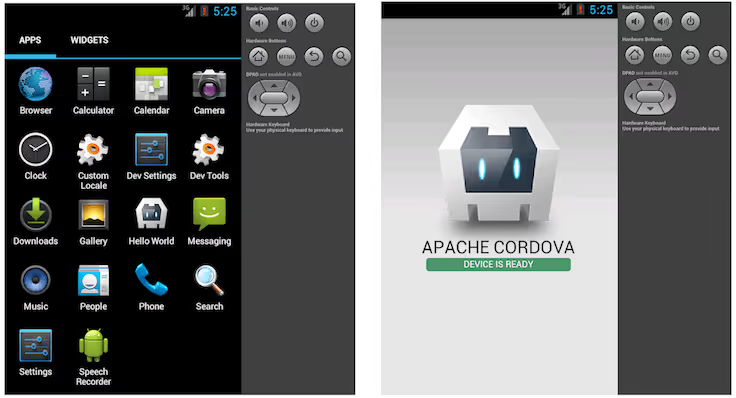
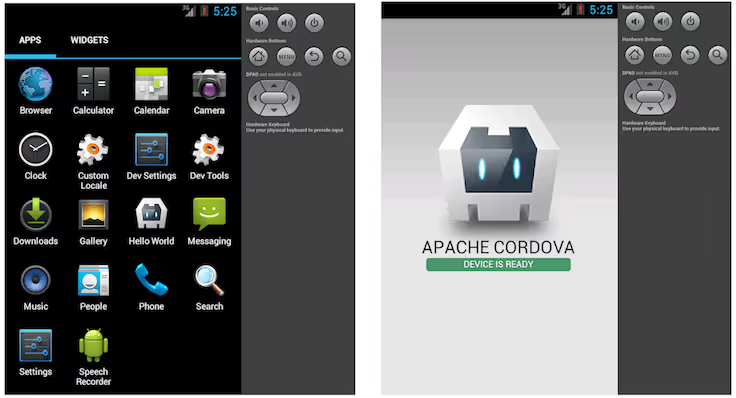
    Before choosing the operating system you want to build your app on, there is another important decision to make: which development framework to choose. You want to choose something that allows you to build hybrid apps across platforms, that is easy to customize, and won’t give your developers headaches. Maybe you’re looking at a choice between Ionic and Cordova.

    Let’s compare them side by side and help you make a better decision for your dev team and future app users.

    What is Cordova?

    cordova as a platform for mobile app development

    To go from the beginning, we have to start with Cordova, a mobile app development framework that has been around since 2009. Apache Cordova’s founders Nitobi were purchased by Adobe Systems and have since carried the name of PhoneGap.

    Cordova is a popular choice for cross-platform development of mobile applications as it builds on top of the native features of an application. Even in 2026, it’s a popular choice for cross-platform application development, thanks to a wide range of benefits which we’ll discuss in a minute.

    What is Ionic?

    ionic as a platform for mobile app development

    Launched in 2014 by Drifty Co., Ionic is an open-source mobile development framework that was built on top of Cordova. Ionic uses HTML, CSS, and JavaScript to speed up the development process and easily build cross-platform apps.

    This open-source framework integrates with a wide array of libraries and technologies, including Cordova, Angular, Vue.js, React.js and many others.

    Ionic and Cordova compared

    These two popular technologies are technically not competitors, since the Ionic platform is built on top of Cordova. However, they’re both standard web technologies and if you have to make a choice, we’re here to help.

    By the way, did you know that you don’t have to choose between Ionic and Cordova? You can work with Vendrux – and turn your website into a mobile app. Within just a few weeks, you can get an app up and running, without spending tens of thousands of dollars on developers and their services.

    Check here what your website would look like as an app.

    The user interface (for end users)

    If you want to build out a user interface in Cordova as a development platform, you need to be aware that out of the box, it does not come with any UI components. To create the user interface for real devices, you need to build it from scratch, either by writing out the code or using third-party libraries. The good thing is, there are plenty of libraries to choose from.

    On the other hand, Ionic comes with a lot of predefined UI components, styling options, and themes for creating a superb user experience. App developers working in Ionic can choose these visualization options based on the mobile devices and platforms they want to work on. An Ionic application typically means you get native device functionality and design every time.

    The development experience

    Cordova has a command-line interface (CLI) where developers can type out the vode. To access native device functionalities, they can tap into plugins, which there are plenty to choose from. There are many active communities for Cordova if you get stuck and don’t know what to pick. Once you choose a plugin, you may still need to write some additional native code in the Cordova CLI to get the native functionalities of Android or iOS.

    You can also create your own Cordova plugins if you have the right skill set.

    Ionic offers pretty much the same thing since it’s built on top of Cordova, with some extras. You also get access to native APIs, which makes adding native components for different mobile platforms a breeze. In general, development cycles are shorter in Ionic, making it better suited for rapid prototyping.

    App performance

    Apps built in Apache Cordova are pretty much web apps built in a native container. This means that, unlike native applications, you will get slower performance. The more complex the mobile app project, the harder it is to get optimal performance.

    Ionic developers can benefit from this platform’s performance optimizations. Ionic technology uses hardware acceleration to make sure that even cross-platform mobile applications run smoothly and quickly when they create an app.

    The community

    Cordova is an app development platform that has been around for a good while, which means that there is a vast community of Cordova developers out there. This technology stack has many guides, walkthroughs, and video tutorials, so if you get stuck on Cordova CLI, you have somewhere to go.

    On the other hand, Ionic does not have a rich community but it makes up for it with different Ionic frameworks. For example, Appflow, Native, and Capacitor, making it easy to build hybrid applications with exceptional user experience.

    Which framework should you choose?

    Apache Cordova or Ionic – the choice depends on how much time you have, what kind of developers are in your team, and most importantly, the types of platforms you want to develop for.

    An application made in Cordova will certainly work, but the chances of getting a poor user experience are higher, especially if you don’t have seasoned developers available.

    An Ionic application will have smoother animations, better performance, and overall UX, but you need an experienced developer team to make the most of this framework.

    Take the third route instead

    You don’t need to choose between Cordova or Ionic. While they are popular frameworks, you can go with Vendrux instead. We can turn your website into a mobile app with a web-based UI. Every time you update your website, your mobile app gets updated as well!

    The best part is, that you can see what your website would like as an app – for free! Schedule a free, personalized demo to learn more about Vendrux today.

  • Flutter vs Xamarin – Which Is Best For App Development?

    Flutter vs Xamarin – Which Is Best For App Development?

    Though they’re both used to build mobile apps – Flutter and Xamarin are very different technologies. 

    Choosing between them for your project requires deep knowledge of their key strengths and drawbacks, as well as your own specific requirements. 

    Here at Vendrux, we’ve built thousands of iOS and Android apps for businesses ranging from side project startups to multibillion dollar household names. We’ve had to stay at the cutting edge of mobile tech, and have formed some strong opinions over the years. 

    In this article we’re going to teach you what you need to know about Flutter and Xamarin. We’ll introduce both, break down their pros and cons, and guide you through your decision. 

    First off, let’s cut through the technical jargon and explain the fundamentals. 

    Understanding Xamarin and Flutter

    Before we get into the differences – let’s first look at what the two have in common. 

    Xamarin and Flutter share these important characteristics:

    • Cross-platform frameworks – both allow you to develop apps for multiple platforms from one codebase 
    • High performance – both compile (in different ways which we’ll cover) into native code, giving a high level of performance 
    • Big tech backed – Flutter = Google, Xamarin = Microsoft
    • Open source – both are open source, allowing for rich communities and customization options to form 
    • UX focused – both (again in different ways) frameworks share a strong emphasis on rich UIs 

    So they’re both tested and established cross-platform app development frameworks. Both are backed by the biggest names in tech, and offer high performance. 

    Now let’s look at them in more detail, before teasing out the key differences. 

    What Is Xamarin?

    Xamarin was launched in 2011 and later acquired by Microsoft in 2016. 

    __wf_reserved_inherit

    It’s an open-source framework for developing Android and iOS applications using .NET and C#, allowing you to reuse code across platforms – making development more efficient and consistent.

    Xamarin offers two main products: 

    • Xamarin.Forms for UI development across platforms with a single codebase
    • Xamarin.iOS and Xamarin.Android  – collectively referred to as Xamarin.native, for designing platform-specific UIs that require more control and flexibility

    Developers choose between Xamarin.forms and Xamarin.native – which are both frameworks –  for their projects.

    The two share a lot of similarities, but Xamarin.forms is more targeted toward rapid cross-platform development and code sharing through sharing a C# codebase across iOS, Android and Windows phone. 

    It provides developers with extensive libraries of controls (like buttons and sliders), that are mapped to the native controls on each platform. It also compiles to native code, allowing for high-end performance. 

    Xamarin.native goes one step further – providing more direct bridges to the native APIs on iOS and Android. This means developers can get a more granular level of control and interface with the phone OS in a deeper manner. 

    Generally, Forms is the default option. You can opt for Native if you want a highly custom UI and need to make extensive use of platform specific features that aren’t fully supported by Forms. 

    Both have:

    • Rich Development Environment: Xamarin uses Visual Studio, offering a comprehensive IDE with powerful debugging, publishing, and source control features
    • Native Performance: Xamarin provides direct access to platform-specific APIs, enabling apps to perform as well as native apps
    • Strong Community and Corporate Support: Being part of the Microsoft ecosystem, Xamarin benefits from excellent documentation, developer forums, and support options

    Now let’s take a look at Flutter.

    What Is Flutter?

    Flutter was introduced by Google in 2017 as an open source software development kit for building iOS and Android apps from a single Dart codebase. 

    __wf_reserved_inherit

    Flutter’s core features are:

    • Widget-Based Architecture: Flutter’s is centered around widgets, which can be combined and customized to build complex UIs
    • High Performance: Flutter applications compile to native code, which helps in achieving performance very close to natively developed apps on iOS and Android
    • Ecosystem: With support from Google and a growing community, Flutter has a vast selection of widgets and tools

    The most fundamental thing to understand about Flutter is that everything is a widget. Widgets are reusable pieces of Dart code that can be thought of as the building blocks of a Flutter app UI. 

    There are hundreds of core widgets, ranging from basic ones for text and images, to more complex widgets for layout, interactivity, animation, and styling. 

    Widgets are combined hierarchically in a tree structure to build the UI, which is then “drawn” aka rendered onto the device’s screen with Skia, a 2D graphics engine relied on heavily by Google. 

    This is how Flutter is able to “control” every pixel on the screen, allowing for flexible and custom UIs. 

    Flutter has really taken the app development world by storm in recent years – and powers thousands of successful apps like AliBaba, ByteDance, and Google Classroom. 

    You can read about Flutter in detail in Flutter 101, otherwise let’s move on with the comparison with Xamarin.

    Which has higher performance? 

    Xamarin offers near-native performance thanks to a few factors. 

    It leverages the Mono framework for Android and iOS, allowing your apps to run with minimal overhead compared to purely native applications. The critical aspect here is the “ahead-of-time” (AOT) compilation for iOS that compiles the Xamarin C# code into native ARM assembly code. 

    __wf_reserved_inherit
    Xamarin works great for both iOS and Android

    On the Android side, Xamarin uses “just-in-time” (JIT) compilation, which can introduce a slight delay at startup but generally delivers strong performance.

    Memory management in Xamarin is also optimized, interacting directly with the platform garbage collection. This can be great for efficiency but requires careful management.

    Flutter is also known for its solid performance. 

    This is mostly thanks to the Dart language and the unique rendering approach. 

    Unlike Xamarin, which uses native components for rendering, Flutter “draws” its own UI components with the Skia 2D graphics library. 

    This means that Flutter is optimal for graphics-heavy applications because it doesn’t rely on “bridging” between its code and native components – eliminating potential bottlenecks. 

    Dart is also compiled ahead-of-time into native code, which makes the apps fast with smooth animations at 60 fps.

    For startup founders, PMs and CTOs –  the choice between Xamarin and Flutter will largely depend on your specific performance requirements. 

    Xamarin offers a very close to native performance with direct access to native APIs and toolkits, which might be critical for apps that heavily rely on native functionality. 

    Flutter, on the other hand, is optimal for highly animated or graphically intensive applications, providing smooth performance and a flexible UI design that can be more easily customized.

    Developer experience

    Whether you choose Xamarin vs Flutter will really influence your team’s workflow, productivity, and ultimately success. 

    Xamarin integrates perfectly with Visual Studio, offering a familiar experience for .NET devs.

    If your team already has experience with .NET and C#, the transition and learning curve should not be too steep. Visual Studio has a robust debugger, UI design tools, and extensive libraries.

    Xamarin.Forms, a component of Xamarin, allows you to share code across platforms, reducing development time for simple(r) apps. 

    However, if your app needs intricate UIs, Xamarin.iOS and Xamarin.Android offer greater control at the cost of separate codebases for each platform.

    Flutter is also known for its great developer productivity features. 

    The most famous one is hot reload, which is enabled by Dart’s just in time compilation and allows developers to preview code changes in real time without needing to rebuild. Xamarin has this feature too, but it is not as robust or acclaimed. 

    Dart is known as an intuitive language very similar to others from the C family, and Flutter’s widget based ecosystem offers excellent control over the UI. 

    Overall – developers tend to love it. 

    Both Flutter and Xamarin are modern, cutting edge frameworks. It is impossible to say which is a “better” developer experience – but you should think about what you value, your team’s skill sets, and the specific UX goals of your apps to decide which is right for you. 

    Ecosystem & Investment 

    Xamarin, backed by Microsoft, has a strong community thanks to its long life and integration with Visual Studio. 

    It has a lively community of developers across forums, GitHub, and Stack Overflow, backed by professional Microsoft support and a wealth of learning resources. 

    However, Xamarin has a reputation for being “corporatey” and associated more with Enterprise applications and tech culture –  so the perception is that its growth may not completely match the pace of newer technologies. 

    That said, the community is undoubtedly strong, professional and knowledgeable. 

    Flutter – although it has only been around 7 years – has seen rapid community growth. 

    Its philosophy has attracted a dynamic base of developers keen on design and innovation. It is supported by an active community and frequent Google updates, making sure it stays at the cutting edge of new tech. 

    To summarize – both have great communities that you can find wherever developers hang out. The documentation and learning resources of each are also excellent!

    Cost and Time Efficiency

    It is hard to say which is faster and “cheaper” – since this will vary completely from app to app. 

    In general though, all things being equal, it should be faster and lower cost to develop comparable apps. 

    Flutter’s powerful “write once, run anywhere” approach and features like hot reload are great for speeding up UI development and shipping fast. 

    Its rich set of widgets cover almost all common use cases, and allows you to build rich UIs “out of the box”, often without needing to invest too much time into making custom widgets. 

    All this goes out of the window of course if your team already work with C# and the Microsoft stack. 

    Flutter vs Xamarin app examples

    The consistent theme of this article so far is that Xamarin and Flutter are both good. 

    They are both modern, well supported, and powerful frameworks for developing mobile apps without obvious general downsides. 

    This is shown by some of the famous apps built with both, let’s take a look at what’s possible. 

    Apps Made with Flutter

    Let’s look at some great examples of apps built with Flutter. Take a look at them on your own device to get a feel of them. 

    1. Google Ads (iOS/Android) – this app provides users with a mobile interface for managing their ad campaigns on the go
    2. Reflectly (iOS/Android)- an AI-driven personal journal app that uses Flutter to deliver a beautifully designed, intuitive, and interactive user interface.
    3. Alibaba (iOS/Android) – the world’s largest ecom company uses Flutter to power parts of its app, helping them handle millions of customers and transactions
    4. Philips Hue (iOS/Android)- Flutter was used in the redesign of the app controlling Philips’ line of smart home lighting products
    5. Hamilton Musical (iOS/Android) – The official app for the Broadway hit, offering fans news, a lottery, merchandise store, and more

    This is a very small fraction of the 1+ million Flutter apps that have launched over the past 7 years. 

    We can see that Flutter is well suited to high end app development. 

    Apps Made with Xamarin

    Xamarin powers fewer apps than Flutter, and is a slightly more niche choice. 

    That said, there are still plenty. We don’t have reliable data, but several years ago Microsoft stated that 15000+ businesses were using Xamarin. 

    Here are a few prominent ones.

    1. Alaska Airlines (iOS/Android) – a high performance app that allows travelers to book trips, check in, move easily through airports, and more
    2. Insightly (iOS/Android) a CRM app to help businesses manage contacts, projects, tasks, and sales pipelines efficiently.
    3. Storyo (iOS/Android) – A video storytelling app that automatically creates multimedia stories from users’ photos
    4. Good Food (iOS/Android) – formerly BBC Good Food, this app has thousands of recipes and cooking tutorials 
    5. UPS (iOS/Android) – enables users to track shipments, create shipping labels, find UPS service locations, and manage their deliveries conveniently

    As you can see – Xamarin is used by a lot of large enterprises with demanding requirements. 

    Xamarin vs Flutter – which one should you choose? 

    We’ve looked at both Xamarin and Flutter, seen how they work, and looked at some of the advantages and drawbacks of each. 

    We think both can be good choices, depending on your case. 

    Why Xamarin? 

    We mentioned that Xamarin is typically associated with large enterprises and corporations – although it is not only for this market. 

    That’s because many large corps are already deeply embedded with .NET, C#, and other parts of the Microsoft ecosystem. 

    __wf_reserved_inherit
    Xamarin is often used for Enterprise app development

    Many of these enterprises require complex business logic and data to be shared between their existing systems and the apps, and it makes complete sense to do that with familiar technologies and tools. 

    If a lot of your existing business logic – like code for data operations, network communications, validation and other back end functions – are already written in C#, then it makes sense to stick with that. You can not only build the front ends cross platform, but also the back end.

    If that describes you – Xamarin is likely the best shot. It would make little sense to switch to Flutter and Dart solely for the apps if your existing tech stack is already tailored toward Xamarin. 

    Your existing specialists will be more likely to upskill quickly, and the integration with your existing workflows will be smoother. 

    Xamarin also might give a higher level of native performance, because through Xamarin.native you can directly use the native APIs. This is in contrast to Flutter which “draws” its own UI components through its own rendering engine. 

    Why Flutter?

    Flutter is more associated with tech companies and startups because it’s all about creating beautiful and custom UIs – fast and efficiently. 

    Recall that Flutter draws its own UI using its own rendering engine? 

    Well this extremely fine control of the design allows for great UI consistency across platforms, with the apps looking and performing virtually identically on iOS and Android. 

    Flutter’s rendering through Skia is also well suited for high-end graphics, and for handling complex animations.

    Paired with Flutter’s extensive widget catalog which can be styled and customized to create any kind of UI – Flutter is the king of sophisticated and complex interfaces. 

    Shipping with Flutter should also, generally, be faster and more efficient. That is if you’re starting from scratch and not already C# centric. Because of features like hot reload and the endless pre-build widgets – Flutter is highly efficient. 

    Flutter can also be used to build desktop and web apps too – again from the single codebase – so it could be a great foundation of your tech stack if you’re starting from scratch. 

    Flutter vs other platforms 

    We compared Flutter with several other app development options as part of this series. 

    You can take a read of them to learn about how Flutter stacks up against other options too. For now though, let’s wrap up the comparison with Xamarin.

    Flutter vs Xamarin – the bottom line

    Essentially, our advice is this. 

    If your company already has a C# tech stack and needs to tightly integrate the apps with existing business logic, or you want to build complex business applications that integrate tightly with the native APIs – go with Xamarin. 

    If you’re a smaller business, startup, or starting from scratch, and you want to build slick and UI focused cross platform mobile (desktop, web?) apps from the single codebase – go with Flutter. 

    There are also shared problems with each though. 

    Building apps with either Flutter or Xamarin is a huge project. You’ll need (at least) several skilled developers working on them full time for months to get them ready to launch. 

    They’ll cost at least $100k+ for the first versions. 

    Then you’ve got expensive and specialized ongoing updates and maintenance that will cost tens of thousands annually. 

    This all makes the decision to build apps in general risky. 

    If you want to eliminate this risk, our platform Vendrux is better than both Flutter and Xamarin. 

    The best alternative: convert your site to native apps

    Why is Vendrux better than Flutter and Xamarin then? 

    Because we build you apps that are just as good for a fraction of the cost. 

    Vendrux apps are ready to launch in just weeks, and cost

    There’s no need to team members or to your workload either – because we build the apps for you, and handle all ongoing updates and maintenance, saving you thousands every year. 

    How are we able to do this? 

    Vendrux is so efficient because we build iOS and Android apps from your existing website or web app. 

    The apps are your website, converted into native apps and with all the native elements added to ensure a great UX – like push notifications, native navigation, and much more

    Are the apps good? 

    Yeah, they are. Vendrux has worked great for thousands of businesses ranging from small startups and side projects to multibillion dollar global brands. 

    __wf_reserved_inherit
    The Jack & Jones app, built with Vendrux

    The only requirement is that you already have a website or web app. That’s why it works best for web startups, ecommerce brands, elearning platforms, content sites, and similar businesses. 

    It’s effectively zero risk compared to the massive organizational and financial commitment of developing with Flutter or Xamarin. You’ve already done the work building for the web – now with Vendrux you can leverage that onto the App Store and Google Play too!

    To learn more about Vendrux – our team of app experts are waiting to answer all your questions. 

    Book a demo call today.

  • Flutter vs Swift

    Flutter vs Swift

    You can build great apps with both Flutter and Swift, but which is better? Which should you choose for your own apps? 

    The short answer:

    You should choose Swift if you want to create very high performance apps for iOS, like demanding games and cutting edge use cases. If you want to build apps for iOS and Android, and your requirements are not extreme, you should probably choose Flutter. 

    Now for the long answer, in this article we’re going to break down the key differences, advantages and drawbacks of each. 

    What is Flutter?

    Flutter is a cross-platform app development framework created by Google. It’s cross-platform because it lets developers write apps for iOS and Android from a single codebase – which then compiles into native code for each platform. 

    Flutter uses the Dart programming language and a rich library of widgets to construct intuitive and rich UIs for a vast range of app types. 

    You can read about Flutter in much more depth in our Flutter 101 guide, in this article we’re mostly going to focus on comparing it with Swift. 

    What is Swift?

    Swift is a programming language created by Apple designed for the iOS and MacOS ecosystems, as well as Apple Watch and TV applications. 

    __wf_reserved_inherit
    Swift – the language of iOS

    Swift is used to build native iOS apps, and is known for its high performance and ability to tightly integrate with the hardware of Apple devices. 

    Flutter vs Swift – key differences

    Swift and Flutter are quite different technologies with a different purpose. Let’s compare them on a few different criteria.   

    Programming Language vs Framework 

    Swift is a programming language but Flutter is a framework that enables cross-platform development with the Dart programming language. 

    Flutter uses Dart, a language developed by Google for both mobile and web development. It’s a C like language suited to a declarative programming style – making it suitable for teams with experience of similar paradigms. 

    __wf_reserved_inherit
    Swift and Flutter – different programming languages

    Swift on the other hand, is a language created by Apple specifically for iOS, macOS, watchOS, and tvOS app development. Swift is known for its clarity, efficiency, and safety, making it a preferred choice for developers aiming for native Apple platform applications.

    Native vs cross-platform performance

    Flutter has great performance thanks to its ability to compile directly to native code, setting it ahead of some other cross-platform frameworks that “bridge” to native. It is used in countless high-end apps and can give a great level of performance. 

    However, the highest possible level of performance comes from the native languages of the platform themselves. 

    Swift can (potentially) offer the ultimate speed and performance for iOS development, which could be necessary if your app is a high end game or very computationally demanding. 

    Ecosystem

    Flutter has an established and growing community and ecosystem, thanks to its cross-platform flexibility and the backing of Google. Its widget library is very extensive and documentation is thorough. 

    Swift’s community is very mature and well-established, particularly for developers focused on Apple’s ecosystem. Apple’s continuous updates and the language’s popularity have spawned a huge range of resources, from libraries and frameworks to tutorials and professional support. 

    Investment

    When it comes to cost, Flutter is generally seen as the cheaper option. This is usually in the context of developing apps for both iOS and Android and the expensive nature of developing and maintaining two separate native codebases. 

    If you only want to build iOS apps, there is nothing inherently more expensive about using Swift – although this will depend on a wide range of factors. 

    Flutter vs Swift – which should you choose?

    A key consideration is that Swift is only for iOS development. Do you only want to release mobile apps for iPhone users?

    Some apps have gone that route, like Clubhouse, Overcast and Apollo. iPhone exclusive apps are a good way to specifically target a more wealthy, US-centric audience. 

    But most apps these days cast a wider net and enter the massive Android market too. 

    With Swift, you’d need to develop Android apps completely separately in the tech stack native to the Android OS. Flutter on the other hand would let you develop iOS and Android apps from the one single codebase. 

    Let’s look more closely at the ideal use cases of each. 

    When to use Flutter

    There are some situations where Flutter is the clear choice over Swift.

    1. Cross-platform Development: If your aim is to launch on both Android and iOS with a single codebase, Flutter it is. 
    2. UI-Focused Apps: for apps where a custom, aesthetically pleasing user interface is the most important thing, Flutter’s widget-based architecture allows for flexible and fast development compared with native 
    3. MVP and Rapid Prototyping: startups looking to quickly validate an idea will like Flutter’s developer productivity features and fast development cycles 
    4. Applications with Limited Native Integration: if you don’t need to interface very deeply with the native features of iOS and Apple hardware, Flutter will be great

    When to use Swift

    Swift really still shines over Flutter in a few scenarios. 

    1. iOS-exclusive apps: Swift is built for high-performance, robust iOS applications. If your target audience exclusively uses Apple devices, using Swift is the gold standard
    2. High-performance: apps that require very high performance and speed, such as advanced games or intensive computational apps, will see better performance from Swift
    3. Apple ecosystem features: projects that need to integrate with the Apple ecosystem (e.g., iMessage apps, Apple Watch extensions) will love Swift’s deep integration with Apple’s native APIs and SDKs

    Flutter vs other platforms 

    We compared Flutter with several other app development options as part of this series. 

    Check out how it compares to:

    For now, let’s wrap up our discussion of Flutter vs Swift.

    Flutter vs Swift – the bottom line 

    In summary – use Swift if you want to build iOS exclusive apps, apps that deeply integrate with Apple’s ecosystem, or apps that are very computationally demanding. 

    Use Flutter if you want to build more UI focused apps, for both iOS and Android, from a single codebase. 

    We also want to share our own platform, Vendrux, and how it can be better than either Swift or Flutter for the right business. 

    Convert your site to native apps instead

    Building apps with Swift or Flutter is no joke. It will cost $100k+ and take many months of work to get launched, and a serious ongoing investment to keep the apps updated and maintained. 

    We built Vendrux to bring down the barriers to app development. 

    Vendrux builds both iOS and Android apps from your existing website or web app. 

    You already did the hard work building for the web, we take that and convert it into native app form, adding in all the necessary features and UX elements to ensure the apps are a powerful asset to your business and a great experience for your users. 

    __wf_reserved_inherit
    Convert your existing site or web app with Vendrux

    It works perfectly for eCommerce stores, web apps, elearning platforms, content sites – and a wide range of other businesses. Check out some of the 2000+ brands that use Vendrux for their apps today. 

    With Vendrux, you can get apps in just weeks, for a fraction of the cost of Swift or Flutter. 

    There’s no risk, and nothing for you to do on the technical side – our team builds the apps for you, publishes them on the App Store and Google Play, and maintains and updates them forever. 

    You can just focus on your core web business and using the apps strategically – they will effectively run themselves. 

    So there you go – if you already have an established presence on the mobile web, Vendrux blows Swift or Flutter out of the water in terms of convenience and potential ROI. 

    To learn more and get all your questions answered – get in touch with one of our app experts and let’s start building your App Store presence. 

    Book a demo call today.

  • React Native vs Flutter for App Development in 2026?

    React Native vs Flutter for App Development in 2026?

    Cross-platform frameworks are emerging as the best way to build mobile apps today, and React Native and Flutter are the two most popular ways to build cross-platform apps.

    These two frameworks share a lot of similar qualities, but also have some important differences you’ll need to be aware of if you’re planning on choosing one to build your app.

    In this article, we’ll give you a crash course on React Native vs Flutter, how they compare, and which framework is more popular with today’s mobile app developers, before sharing whether there are any other options you should consider if you’re planning to build a cross-platform or hybrid app.

    Flutter vs React Native: Key Points

    Let’s start with a quick summary of the key points you need to know when comparing Flutter vs React Native:

    • Both are cross-platform development frameworks, which allow you to create apps for Android and iOS with a single codebase.
    • Both are free, open-source frameworks.
    • React Native is built and maintained by Meta (aka Facebook), and based on the JavaScript programming language.
    • Flutter is built and maintained by Google, and based on the Dart programming language.
    • Both Flutter and React Native come with a hot reload feature, which makes it easy to iterate on code and see the results in real time.
    • Each framework is used in a number of high-profile apps, including Meta’s and Google’s suite of mobile apps.
    • React Native is older and boasts a more extensive community, though Flutter is catching up in that regard.

    Flutter and React Native: Two of Today’s Most Popular Cross-Platform Frameworks

    React Native and Flutter are, by most estimations, the two most popular ways to build cross-platform apps today.

    What are cross-platform apps, or cross-platform frameworks?

    They are an alternative to building platform-specific apps using native code.

    Generally, iOS apps (apps for iPhone/iPad) are built in Swift, or Objective-C. Android apps are built in Java or Kotlin.

    This means, if you want to launch apps for both platforms, you’re going to need two completely separate codebases, as you can’t reuse code between each programming language.

    This makes it much more expensive and time-consuming to launch apps that are available to all mobile users, and also means it takes twice the work to update and maintain your apps.

    Cross-platform app development, with frameworks like Flutter and React Native, makes it easier. These frameworks let you write code that can be deployed on multiple operating systems. You can write once and build apps for both iOS and Android platforms. You’re also left with just one codebase to maintain, which cuts overhead in half compared to native app development.

    More and more, developers are starting to prefer cross-platform frameworks to fully native apps. Unless your app relies heavily on native device features, you can achieve great results for less effort and expense by going cross-platform.

    Alternative cross-platform frameworks include Ionic, Xamarin and NativeScript, along with no-code tools that let you deploy one app across multiple environments, but React Native and Flutter are the two with the highest profile (likely due to the big names behind each of them).

    Learn more here about tools and frameworks for developing cross-platform apps.

    Now let’s give you a rundown on both Flutter and React Native, before diving into an in-depth comparison between the two.

    Beginner’s Guide to React Native

    So what is React Native?

    React Native is a framework that allows developers to build mobile applications using JavaScript and React. 

    It lets developers create cross-platform apps that work on both iOS and Android devices, sharing a significant portion of the codebase between the two platforms. 

    React Native’s tagline is “learn once, write anywhere”. It speeds up development time and streamlines the process of app development by allowing developers to use one development framework for multiple platforms.

    The syntax of React Native is very similar to React.js, the original web-based JavaScript framework. The difference is that it uses native iOS and Android components, instead of outputting HTML and CSS code, as you would if you build for the web.

    This means you can’t simply deploy a React web app as a native app using React Native, but developers with experience in React will be able to easily learn React Native and use this to build native apps.

    React Native App Examples

    React Native was created by Meta (formerly Facebook), with the intention of being used in their ecosystem of apps, including Facebook, Instagram and Messenger.

    Alongside Meta apps, React Native is used by more of the biggest names in tech:

    • Microsoft (used in the MS Office, Outlook, Teams, Skype and Xbox Game Pass mobile apps).
    • Amazon (Amazon Shopping, Alexa and Amazon Photos apps, as well as supporting Kindle devices and the Amazon Appstore).
    • Shopify (the Shopify mobile app, as well as the customer-facing Shop app).

    Other high-profile React Native app examples include:

    • Coinbase
    • Discord
    • Wix
    • Pinterest
    • NerdWallet
    • Walmart
    • Tesla
    • Bloomberg
    __wf_reserved_inherit
    A few examples of notable apps built with React Native

    Learn more about React Native examples on their showcase page.

    Beginner’s Guide to Flutter

    Flutter could be seen as Google’s answer to React Native.

    Flutter is Google’s UI toolkit for building beautiful, natively compiled applications for mobile, web, and desktop from a single codebase.

    It empowers developers to create stunning user interfaces using a single language, Dart, while achieving cross-platform compatibility. With Flutter, you can build apps that look and feel great on iOS, Android, and the web, all while maintaining a consistent experience across different devices.

    Flutter is made up of pre-built and customizable widgets. The framework comes with many built-in widgets for things like layout, animations, UI elements and more.

    These elements can be deployed on multiple operating systems, again massively reducing the time it takes to build and launch mobile apps, as well as the time and effort required to maintain and update apps on multiple platforms.

    Flutter can even be used to build apps and user interfaces for other types of devices with screens, such as smart appliances; hence their tagline, “Build for any screen”.

    Flutter App Examples

    Flutter, too, is currently being used in some of the world’s biggest apps.

    As expected, it’s used heavily in Google’s apps, including the Google Pay App.

    __wf_reserved_inherit

    It’s also being used by companies such as:

    • Tencent
    • BMW
    • Toyota
    • eBay
    • Alibaba

    A few other Flutter app examples include:

    SoVegan

    __wf_reserved_inherit

    Caribou Coffee

    __wf_reserved_inherit

    QuintoAndar

    __wf_reserved_inherit

    Learn more on the Flutter showcase page.

    Key Differences Between React Native and Flutter

    We’ve given you the one-minute pitch on both React Native and Flutter, and perhaps you now understand a little about each framework. 

    There’s a lot of overlap between the two frameworks from what we’ve discussed so far. So let’s take a deeper look at the differences between React Native vs Flutter, to help you understand the pros and cons of one and the other.

    JavaScript vs Dart

    One of the most notable differences is that React Native is built on the JavaScript programming language, while Flutter is built on Dart.

    JavaScript is one of the most well-known and widely used programming languages in web development, used in millions of web apps and websites, with React and React Native among many other frameworks built on top of it.

    Dart, on the other hand, is a newer programming language, which was created by Google in 2011. Dart has a lot of similarities with JavaScript, but less widely used and perhaps more challenging for beginners to learn.

    Meta vs Google

    Another difference is that React Native is built and maintained by Meta, while Flutter is built and maintained by Google. Whether this has any practical difference for you depends on your views on each company. Both frameworks are still open-source, with active communities and in-depth documentation, so it’s not like you’re going to be interacting directly with the frameworks’ creators.

    Third-Party Libraries vs Built-in Widgets

    A more practical difference is in the way you compile your app’s user interface with Flutter vs React Native.

    In Flutter, there are built-in widgets for just about everything, from the layout of your UI to components like nav bars and buttons.

    These widgets are customizable, but essentially work out of the box, working the same on multiple platforms.

    React Native uses third-party libraries, which allow developers to add native components to their apps. This means there’s less you can do out of the box, and library quality and availability can be inconsistent. 

    But on the plus side, it gives the ability to build apps with a more native feel, as there are more components that are specifically designed for certain platforms. There’s also more flexibility possible with React Native, though the tradeoff is that it may take longer to set up.

    Platforms

    React Native primarily supports building for iOS and Android apps.

    It can be used in Windows and MacOS apps, as well as for smart TVs, and the code used for React Native apps can have a lot of crossover with the code used to build React web apps. But it’s still primarily used for mobile apps.

    Flutter is easy to use for a wider range of platforms, including building web apps. So if you wanted to build apps that were accessible across web, iOS and Android, you could do so using only Flutter.

    If you were to use React Native, you’d need a separate codebase in React for your web app.

    That said, Flutter may not be ideal for web apps, as it’s hard to build SEO-optimized web apps in Flutter, and its performance in building for the web can be spotty. 

    Ecosystem

    Having been in existence for longer, React Native has a deeper community and a wider ecosystem.

    There’s a wider availability of resources and community-built features for React Native. There’s also more apps that use React Native, and a greater demand for developers with React Native expertise.

    Both frameworks have good documentation to follow, though React Native documentation is spottier, due to the number of third-party libraries you’re working with.

    Flutter, in comparison, has more structured and organized documentation, which makes it a bit easier to get up and running.

    Learning Curve

    React Native is generally perceived as having a shorter learning curve, as it’s based on a more popular programming language (JavaScript), with a more familiar syntax.

    Generally speaking, if you’re proficient in JavaScript, it should be relatively easy to pick up React Native. And if you have experience with React.js, the learning curve is even smaller.

    Flutter is based on a lesser-known programming language, Dart, so it’s not as easy for most web developers to pick up.

    However, the greater built-in capabilities of Flutter may make it easier to pick up for people who have no prior experience in JavaScript or Dart. 

    Time to Market

    The development process is typically faster with Flutter, again due to the built-in capabilities it provides via widgets.

    Not taking into account any time it takes to get your head around Dart, you should be able to go to market with a functional app quicker with Flutter. 

    The only thing that may hold you back is if you run into problems, or need to do something outside of the core capabilities of the framework.

    In this case, React Native may prove faster, as there is more community support and a wider range of third-party resources available.

    Performance

    Whether Flutter or React Native offers a higher level of performance is up in the air.

    Flutter apps tend to be faster than React Native apps, though it’s not a huge difference.

    This is due to React Native using a JavaScript bridge to communicate with native modules, while Flutter’s components are native by nature.

    However, React Native gives a greater ability to build apps that require deeper OS interactions or native features. 

    As Flutter components are shared across platforms, there may be some elements that don’t feel fully native on one platform or the other. React Native gives greater potential to optimize feel and performance for specific operating systems (though not as much as building fully native apps).

    Which Framework is More Popular?

    React Native and Flutter are largely considered to be the two most popular cross-platform development frameworks.

    In a 2022 study asking nearly 30,000 developers around the world which cross-platform frameworks they use, 46% responded with Flutter, compared to 32% for React Native.

    __wf_reserved_inherit

    It’s interesting to note that both frameworks trended in different directions. The study polled developers each year from 2019 through to 2022, with Flutter’s share increasing from 30% to 46%, while React Native decreased from 42% to 32%.

    Stack Overflow’s 2023 developer survey also includes numbers on the popularity of React Native vs Flutter.

    67,000 respondents were asked which frameworks and libraries they used, and 9.12% responded with Flutter, versus 8.43% for React Native.

    Flutter is more popular on Github, with 162k stars, versus 116k stars for React Native.

    These figures indicate that Flutter is, overall, slightly more popular than React Native. However, there are a lot more React Native job opportunities than there are for Flutter.

    At the time of writing, a LinkedIn job search for US postings found 1,068 Flutter jobs, versus 6,413 postings for React Native developers.

    A search on Indeed found 1,990 US React Native jobs, versus 388 for Flutter.

    Takeaways: more developers seem to prefer Flutter, but there are more job opportunities for React Native, likely due to the larger number of projects built using React Native, as it has been around longer.

    Why Developers Choose React Native

    To get a better idea of why some developers prefer React Native over Flutter, here are some responses to this exact question on the React Native subreddit:

    • “RN uses JSX syntax for building UI. Flutter uses these nested functions (?) which looks very ugly – with these ),),),), in the end of widgets. Functional components and hooks are a good way to go instead of Flutter classes as well.”
    • “RN uses real UI elements, not something drawn on canvas. The app behavior is truly native with React Native.”
    • “You can build desktop apps (Microsoft even uses RN in Windows in one of the screen in Settings) and web (react-native-web + familiarity with React.js) – it’s supported better than in Flutter (IMHO here)”
    • “Dart is unpleasant.”
    • “Jobs, career, more mature libraries, web support, less code for same result. Definitely more elegant.”
    • “Meta has spent decades on the react and native framework and has a lot of stakes in the success of the product. Microsoft has began showing support and is currently in alpha of their own component library Basically, I trust meta and their support of the product due to how heavily invested they are into it.”
    • “UI Flexibility – RN is designed as a mobile platform, so it uses the time battled tested native components that deliver years of bug solving and accessibility that is just thrown away with flutter.”
    • “Prominent companies like Shopify, Wix, Discord, Microsoft are choosing React Native, indicating their expertise and preference for RN over Flutter.”
    • “Easier to Learn – I don’t think there is something easier than JavaScript/TypeScript.”

    Overall, the most common responses mention preference for JavaScript over Dart, more job opportunities, more native UI components and the high-profile apps and companies that use React Native.

    Why Developers Choose Flutter

    Looking at the same question – why developers feel Flutter is better than React Native (and Xamarin, another popular cross-platform framework) – users on the Flutter subreddit said:

    • “The dev experience is easier because dart is a better language than javascript. It is type / null safe by default and supports many modern features like extensions.”
    • “Widgets make sense and have a defined lifecycle. React hooks and components are more confusing than Flutter state and widgets. Flutter is closer to traditional mobile dev here.”
    • “Flutter is a full render system with a UI library that works nicely. React Native is missing many things a dev needs (like sheets, alerts etc). This makes Flutter apps usually easier to build something higher quality.”
    • “Flutter apps compile to more than just ios / android. Web, macos, etc are all supported and usually just a few clicks away. Flutter web is not as nice as a nextjs/react app, but there is still a good use case.”
    • “Flutter apps are much smaller than React Native. A Flutter app is usually just a touch bigger in package size than a traditional mobile app. React Native apps are usually quite large.”
    • “Flutter feels polished, while react native is scrappy. Google maintains dart, pubdev and flutter, while Facebook maintains React Native, but not javascript and npm.”
    • “React was originally conceived for the web, for instance, it has bad roots. Flutter is half a decade new and it was originally thought for mobile.”
    • “In one word – off the shelf widgets. I just don’t see the set of widgets in RN as in Flutter. Also, animation is probably easier.”

    These responses generally prefer the built-in widgets Flutter comes with, the mobile app development experience, and in some cases a preference for Dart over JavaScript.

    React Native vs Flutter: Which to Choose?

    If you ask real developers, you’ll get a lot of different responses for whether they prefer React Native vs Flutter. As you can see above, different people will make the argument for different sides.

    There’s no clear answer we can give you as to which framework is the best. It largely depends on which one you have a better experience with.

    If you’re used to JavaScript and/or React, React Native will likely feel better to work with. React Native is also a good fit for projects with a high need for native functionality and flexibility.

    Flutter is better if you want a more structured approach, with more functionality available out of the box. It might also be a better fit if you don’t have any prior experience with JavaScript. As you’ll be learning a new language anyway, you may find it easier to pick up Dart and Flutter than JavaScript and React Native.

    React Native & Flutter vs Vendrux

    While React Native and Flutter are two of the best and most popular frameworks for building cross-platform apps, they are not necessarily the best options if you have an existing web app or website, and want to rebuild or extend it to mobile apps.

    You’ve already done the work to build it for the web, and rebuilding it as an app means duplicating all that effort, as well as adding multiple codebases to manage once your app launches.

    For this, there’s our platform, Vendrux.

    Vendrux is part software, part service. Our platform, built and perfected over more than 10 years of building apps, is designed to convert any website into high-quality, native-feeling mobile apps for iOS and Android.

    __wf_reserved_inherit
    Examples of a few apps built with Vendrux

    You manage everything from one codebase – your existing web code. The apps are synced with your website, meaning any changes or updates you make only need to be made once, and go live on your website, iPhone app and Android app automatically.

    Our team handles the conversion process, as well as technical maintenance for your mobile apps (which are built using Kotlin and Swift, native coding languages for Android and iOS.

    Launch Cross-Platform Apps with No Coding in Just Two Weeks

    React Native and Flutter are great, but they take a lot of work and specialized skills. Vendrux is a much simpler, much quicker, much cheaper way to get basically the same end result.

    With over 2,000 apps under our belt, we know what it takes to build apps that look and feel like custom native apps, which would otherwise cost six figures at a bare minimum.

    As long as your website or web app is mobile-friendly, turning it into mobile apps is a cinch. We’ll prove it to you by showing an interactive preview of your site as an app, when you book a free demo.

    As part of our process, we’ll put some minor but meaningful touches to your app to give it a seamless native experience, and once finished, we’ll handle the app store publishing process for you.

    Get in touch with us to schedule a free demo, and learn how Vendrux is a more efficient way to build apps than React Native, Flutter or any other cross-platform framework.

  • Flutter Apps vs PWAs – Which Should You Build?

    Flutter Apps vs PWAs – Which Should You Build?

    These days there are so many choices when it comes to creating a great mobile UX.

    The mobile internet is better than ever, building apps is more accessible than ever, and new tools, frameworks and services come out constantly. 

    A key question is whether you need to build mobile apps for iOS and Android or whether a mobile friendly web app is OK. 

    Researching this question will naturally lead you to progressive web apps (PWAs), and cross-platform app development frameworks like Flutter. 

    Although they may seem similar on the surface, Flutter vs PWA are two very different technology choices, with different advantages and drawbacks. 

    In this article we’re going to break down each, explain all the important considerations, and guide you through everything you need to know. 

    We’ll start off by explaining the basics of Flutter and PWAs, then we’ll get into the comparison. 

    What is a PWA? 

    Progressive web apps are the cutting edge in web app development. 

    They are built with web technologies like HTML, CSS and JavaScript – and run in web browsers on mobile and desktop. 

    __wf_reserved_inherit
    PWAs – modern and powerful web apps

    They behave like a cross between a website and a mobile app though. 

    By leveraging web technologies like service workers, PWAs bring many of the features traditionally associated with native mobile apps to the web, like:

    • Offline functionality 
    • Push notifications 
    • Access to device hardware

    There is no strict definition that helps us, but to put it simply: PWAs are modern web applications that behave in a similar manner to mobile apps. 

    A PWA isn’t something “separate” from your main website or web app, it’s better to think of it as a series of enhancements to your site that give it specific modern capabilities. 

    For a detailed breakdown, check out this article. 

    What is Flutter? 

    Flutter is a cross-platform app development framework.

    Cross-platform app development is building apps for multiple platforms from one single codebase. A framework is like a development “toolkit” that makes certain tasks vastly more efficient. 

    __wf_reserved_inherit
    Cross platform apps – iOS and Android in one!

    In the case of Flutter, it was released by Google in 2017. 

    It allows developers to use the Dart programming language to build apps once, writing code for them once, then “converts” that into machine code that can run natively on iOS, Android, the web, and even desktop programs. 

    This is very efficient, because traditionally you had to write separate code bases for each platform. You’d need to build specific apps for iOS and Android, effectively doubling the work (at least) compared to Flutter. 

    Though many businesses still opt for the traditional, expensive and laborious native development – many are embracing Flutter and other cross-platform frameworks like React Native in recent years. 

    Flutter is known for creating smooth and pleasing UIs, as well as making mobile app development much more efficient. 

    Flutter vs PWA 101 

    So we’ve seen that Flutter apps and PWAs are different things. 

    PWAs are web apps that run in browsers, and share several of the key characteristics of native mobile apps. Fundamentally though, they are a web technology that can be thought of as an “enhanced” and cutting edge website. 

    These days, they’re fast and efficient to build, especially if you already have a web app, and in recent years have led to more engaging web experiences. 

    Flutter is a tool for building “real” native mobile apps. The apps do not run on the browser, but rather on the chip of the iOS or Android device. 

    They go (far) beyond the capabilities of a PWA, can be deployed on the Apple App Store and Google Play, and can take full advantage of the capabilities of the device. 

    Ultimately – Flutter apps and PWAs are not really “alternatives” to one another, although there are overlaps in the business benefits.

    Flutter vs PWAs – the Tech Stack

    Let’s look at some of the more technical differences between Flutter apps and PWAs. 

    Flutter’s tech stack 

    Flutter is a framework for Dart.

    Dart was released by Google back in 2013, and was originally seen as an alternative to JavaScript for web development. 

    __wf_reserved_inherit
    Flutter is a framework for Dart

    While Dart is used for building both web and server applications, it has really found its niche as the language of Flutter development. 

    Dart is known for being great to work with and feature rich. 

    It is object oriented, meaning it uses “objects” – self contained units that have both data and methods. It’s also class defined, which means objects are made from “classes”, which are like reusable blueprints for objects. 

    Syntactically, Dart is similar to languages from the C family, but has some special features. One is hot reload, which allows developers to “preview” code changes in real time. 

    To build the UI, Flutter has a vast library of “widgets”.  

    Widgets are like pre-built components that developers can combine to create the UI and functionality of the apps. 

    When the apps are ready, the code is compiled into native code for the platform in question – for our purposes iOS or Android. 

    Finally, when the apps run, the widget-based UI is rendered onto the users’ screen via Skia, an open-source 2D graphics engine used extensively by Google. Flutter can control every pixel on the user’s screen – allowing very rich and sophisticated user experiences. 

    The PWA Tech Stack

    PWAs are simpler. 

    Like everything on the web – they leverage the most standard web technologies, including HTML, CSS, and JavaScript. 

    But the technological lynchpin of PWAs is the service worker, a handy script that runs in the web browser and manages requests, caching, and storage in a very efficient manner. 

    This allows PWAs to perform well regardless of even in areas with relatively poor network conditions, which can really improve UX. 

    PWAs can also use modern APIs for other powerful capabilities like push notifications, background data sync, and interaction with the device features like the camera and GPS. 

    Flutter apps vs PWAs – which is better? 

    As we mentioned earlier, Flutter apps and PWAs aren’t really alternatives. Both have pros and cons. 

    Why PWAs > Flutter apps

    For example – PWAs are easier and more affordable to build. 

    Because they use standard web technologies, and are relatively simpler on a technical level, you should be able to build (rough estimate):

    • A simple PWA for $5k – $20k
    • A sophisticated PWA for $20k – $50k

    If we’re talking about converting your existing website or web app into a PWA, the cost should be lower still. 

    They’re easier to launch, and also to push updates to, since you don’t need to go through the App Store or Google Play review process. 

    Flutter apps on the other hand are more complex to build, requiring more specialized expertise. Generally – they’ll cost $100k+ to build. They also require a significant ongoing investment to maintain and update. 

    Since they run in the browser, PWAs are cross-platform by default, and they can use some of the most useful app functionalities like push notifications and the ability to install on the users home screen. 

    PWAs are also more discoverable on the web through organic search. 

    Why Flutter apps > PWAs

    PWAs are great, and have made progress in leveling the playing field between native apps and the web. 

    But, they aren’t there yet. Far from it in fact. This is for a few reasons. 

    Compared to Flutter apps, PWAs fall short in the following ways:

    • Limited access to device features – they won’t be able to interact with the hardware capabilities and device APIs as deeply 
    • Performance – while PWAs are fast, they often can’t measure up to the speed and smooth UX of native
    • Offline capabilities – although PWAs can have some offline functionality, this is generally limited in comparison 

    With PWAs, you also lack a few critical aspects entirely. 

    Firstly, you have no presence on the App Store or Google Play. Only native apps can be deployed on the two major app stores. 

    Although the user can “install” a PWA on their home screen – but this is effectively only adding a shortcut to the web. You’ll have to get them to do it too, which isn’t an easy sell. 

    Speaking of hard sells, with PWAs it is harder to send push notifications. 

    Native app notifications have:

    • Higher opt in rates 
    • Better for iOS 
    • Better personalization (and therefore are more powerful)

    They’re also a much better way to target the lucrative iOS market, because the permissions are more forgiving. 

    With PWA web notifications, you first need the user to install on the homescreen, and only then can you ask for permission to send them. 

    This is high friction. 

    Giving permission for web notifications isn’t really a thing on mobile, although it can work on desktop. We covered all this in detail here

    There’s also the fact that a portion of your users and customers will just expect an app on top of a web presence, as well as trust it to a greater extent.

    A PWA is not an app in most people’s minds – rather a fancy website – and having Flutter apps on the App Store and Google Play taps into existing habits much better.

    Flutter vs other platforms 

    We compared Flutter with several other app development options as part of this series. 

    PWAs are one thing, but there are also many other cross-platform frameworks and programming languages for developing apps.

    You can take a read of these to learn about how Flutter stacks up against other the other mobile app options.

    For now though, let’s wrap up our comparison with PWAs.

    Why they aren’t actually alternatives

    PWAs and native apps aren’t really alternatives. They are different things. 

    A PWA is an upgraded version of your site, with new and improved features and UX. 

    A Flutter app is an entirely new channel that works in synergy but (somewhat) separately to your site. 

    We recommend you get both. 

    Start off with a PWA for your standard web experience, then build iOS and Android apps for deep engagement with your most loyal users. 

    You can do this with Flutter – but it will take a lot of work to both build the apps and share business logic between the apps and the web. 

    Think multiple six figures and months of effort to get something running smoothly. 

    A much better option, if you already have a PWA or web app, is Vendrux. 

    Convert your web app to native apps with Vendrux

    We’ve seen that Flutter apps are expensive and difficult to build, and that PWAs are no alternative to native apps. 

    Vendrux solves the problem by letting you convert your website or PWA into native iOS and Android apps. 

    __wf_reserved_inherit
    Vendrux converts your web app into native apps

    We build the apps for you, based on your website but with all the native elements – like push notifications, native navigation and much more.

    You’ll get apps that give you all the benefits of Flutter apps, but they’re much better. 

    For a start the cost is The apps will sync automatically with your site, updating with any changes you make on the web. Our team also handles all the updates and maintenance – so there’s nothing to add to your team’s workload. 

    A PWA and Vendrux iOS and Android apps is a powerful combination. 

    It has worked for thousands of businesses, from small startups to multibillion dollar brands.

    It can work for you too. 

    So if you already have a website or a web app, get in touch with one of our mobile app experts and learn about what Vendrux can do for you. 

    Book a demo call today. 

  • Flutter vs Native App Development

    Flutter vs Native App Development

    Back in the early days of mobile apps, Native development was the only way to get apps launched on the App Store of Google Play.  

    Technology evolves though, and now there are other options. 

    One is cross-platform app development

    Flutter has emerged as one of, if not the, top choices for cross platform development. It’s used in thousands of projects from small hobby apps to massive tech companies with millions of users. 

    But why would you choose Flutter over native development, and vice versa? When should you opt for one or the other? What are the key advantages and drawbacks of each? 

    In this article we’re going to break it all down. We’ll start with a brief introduction to both Flutter and native development, then we’ll go deep into the relative strengths of each. 

    By the end you’ll have a solid idea of when to go with one or the other.  

    What is native Development? 

    Unless you’ve been living under a brick – you know that there are two key mobile operating systems: iOS and Android. 

    Just like their desktop counterparts, Windows and MacOS, iOS and Android work very differently on a fundamental level – from the way the UI displays to how the software interacts with the chip. 

    The software and the hardware is very different on each – which means that the development tools and programming languages used to develop apps are very different on each too. 

    Traditionally this means:

    • On iOS: Swift (or Objective C) as a programming language, Xcode and Simulator for development and testing environments
    • On Android – Kotlin or Java for programming, Android Studio and SDK 

    For both platforms, you’ll work with the native APIs and build each app in a radically different manner – just like if you were developing desktop apps for MacOS vs Windows. 

    __wf_reserved_inherit
    Developing apps natively is a lot of coding

    You’ll need specialists skilled in each of these stacks, who will work on two separate codebases to develop and maintain the apps. 

    Practically this means iOS and Android developers, designers, PMs, and poentially dedicated backend developers too. 

    How is Flutter Different?

    Recall how native development has you working on two separate codebases. 

    These share nothing in common with each other, on the front end at least. You can’t reuse any of the code, and every single piece of the UI and functionality needs to be built separately for each. 

    As you can imagine, this is very expensive. Specialized talent costs top dollar, and you’ll need thousands of developer hours over 6+ months to build even relatively simple apps. 

    This is why native apps typically cost $200k+ to ship first versions on each platform. 

    Flutter simplifies things and makes them more efficient. 

    Flutter is a cross-platform framework. 

    This means you can build the apps once, and have them run on both iOS and Android.

    __wf_reserved_inherit
    iOS and Android apps – from one codebase

    It’s a UI kit and Dart framework for developing from one single codebase. Because it compiles into native code for each platform, you effectively halve your work. 

    At the core of Flutter is a set of pre-built widgets that are leveraged to build the UI. With these widgets and the Dart programming language, you can create sophisticated apps for practically any device size. 

    When the apps run on a device, Flutter uses Skia, an open source 2D graphics engine to “paint” whichever element, animation, or interaction needs to be rendered. 

    On both operating systems, this works in broadly the same manner. Flutter also allows you to customize the UI for each specifically, making sure the apps “look the part” on each platform. 

    Let’s summarize Flutter’s core features:

    • One codebase: Flutter lets you develop apps for iOS, Android, the web, and desktop from one codebase. You can typically reuse 90% of your code across platforms. 
    • Hot reload: Dart allows you to see changes to the code instantly, this is very helpful for developer productivity
    • Rich Widget Catalog: Flutter has over 14 categories of widget to work with .
    • Performance: Flutter apps compile Ahead Of Time (AOT) into native machine code for iOS and Android
    • Customizable and Flexible: Flutter’s layered architecture and “control” of every pixel on the screen gives plenty of design freedom 

    So, that’s an overview of Flutter. 

    The key point is that, compared to native development, it lets you build apps for multiple platforms from a single codebase. 

    We covered Flutter in more detail in this article – Flutter 101if you want a deeper dive.

    For now we’ll move on with the comparison. 

    Flutter vs Native development – which is better? 

    As with many things in tech, things aren’t “better” or “worse” in a blanket sense.

    Rather, different technology choices carry different costs, opportunities, advantages and drawbacks. 

    It’s no different when it comes to Flutter vs native development. 

    Generally, the overall theme is that Flutter is more efficient, faster and lower cost – and that native is (potentially) higher performance and can give access to more cutting edge tech. 

    But, the real life performance difference is probably only noticeable or relevant if you need really high end performance. 

    Let’s break it down. 

    Pros and Cons of Native Development

    The key advantages of native development boil down to 3 essential points. 

    1. Performance
    2. Features 
    3. Ecosystem 

    Because native apps are compiled into code that native to the platform, and use the native APIs, they can have the highest possible level of performance. 

    By “performance” we mean they have the potential to run the most computationally demanding applications fast and efficiently. 

    This isn’t a given, it’s a matter of potential, they need to be built optimally to harness it. 

    Also, we’re talking about a marginal difference for the average app. For most apps, you won’t see a huge performance difference between Flutter and native.

    But if we’re talking apps that rely on large amounts of real-time data or graphics processing, graphics requirements, or complex UI transitions – native might be necessary. Think high-end games, trading platforms, and other apps where a small lag could ruin the experience., 

    Native apps are also better for access to the latest platform features. 

    When a big update rolls out and some sophisticated new capability is released by Apple or Google – native app developers get immediate access. 

    Whether its new UI elements, security features, sensor capabilities – or anything else – they can be worked with and integrated as soon as they’re available. 

    This can be critical for apps relying on the cutting edge of tech, and with innovative and sophisticated products. 

    Now, Flutter can do almost all the same things – but there might be a lag for it to be integrated, and tradeoffs in how they’re used. 

    Finally, the native development ecosystem is rich and expansive. There are countless libraries, toolsets, and developers in the communities that you can leverage for your project. This is true for Flutter to a degree too – but native has the advantage here. 

    Now, there are of course drawbacks too. 

    Native apps are expensive, harder to develop, and take longer to build. 

    They typically require more expansive teams, cost twice as much (on average), and are far slower to market. The ongoing maintenance costs are also doubled compared to cross-platform. 

    Now move onto Flutter. 

    Flutter pros and cons

    The real key advantage of Flutter relative to native is that Flutter apps are:

    • Faster to develop 
    • Cheaper to develop 
    • Easier to update and maintain 

    It is an oversimplification – but essentially all work, both upfront and ongoing, is effectively halved due to the single codebase. 

    Other factors help too, Flutter’s hot reload for example boosts development speed and productivity, and the rich widget library makes it possible to quickly build sophisticated UIs. 

    Another advantage some developers note is UI consistency. 

    Flutter makes it easier to get a consistent, branded look and feel across platforms. This may or may not be important to you. 

    Flutter also comes with its downsides. 

    The biggest one is the potentially lower performance for demanding apps. As we’ve said, this probably only matters for a small subset of businesses, but it is significant. 

    Flutter is also somewhat notorious for resulting in a large app size, which could also be a downside for some users’ perspectives. This has improved though in recent versions. 

    __wf_reserved_inherit

    Finally – the range of third party libraries is smaller than for native development. This might mean that if you have some specific niche requirement you need to create custom solutions with native code. 

    Again, this is probably only going to be a problem if you have very unique requirements. 

    Flutter & Native App Examples 

    Now we know the key differences between these two app development approaches – let’s look at some examples of famous apps built with each. 

    Remember that there are countless thousands of apps built natively and with Flutter, these are just a few standout examples to show what’s possible. 

    Native App Examples 

    Many of the “big tech” apps you use are probably built natively, at least to a degree. Here are a few good examples:

    • WhatsApp native apps are lightning fast, integrating flawlessly with device features like the microphone, camera, and more 
    • Spotify’s native apps handle complex tasks like audio playback, real-time data synchronization, and deep integration with device hardware
    • Waze, a GPS navigation software, was developed natively to efficiently handle real-time GPS data, route mapping, user updates, and more 

    Flutter App Examples 

    The above apps could also have been built with Flutter these days, albeit with potential tradeoffs. Flutter powers thousands of high end apps like:

    • Google Ads allows users to manage ad campaigns, and showcases how Flutter can be used to build complex and data heavy business apps 
    • Reflectly uses AI to help users create a personal journal, leveraging Flutter to create a pleasing and consistent UX across iOS and Android
    • Philips Hue controls smart lighting and is built with Flutter, demonstrating Flutter’s potential in integrating with IoT devices

    As you can see, you can use Flutter for a wide range of applications, and its performance and features are only getting better. 

    Flutter vs Native use cases 

    There are still ideal use cases for each, situations in which Flutter or native is likely to be the best choice. 

    Let’s look at the most important ones. 

    • Cross-Platform Development without demanding requirements – if you want to keep things simple and work from the one codebase, Flutter is the way to go, and it will suit you fine for most applications. This is great for lean startups and bootstrapped businesses that want to keep things simple. 
    • Limited budget and tight deadlines – companies or individual developers working with limited budgets and tight timelines benefit from Flutter’s rapid development features. Using Flutter can potentially save hundreds of thousands and months of work. 
    • UI-Focused Applications – Flutter shines for custom, visually appealing UIs thanks to its widget-based architecture. For design and UX focused brands, this can be great.
    • Prototype Development – when the goal is to quickly validate an idea or a concept, Flutter’s development speed and ease of use make it a better choice. 

    So Flutter is probably the right choice if your requirements are not extreme, and budget and time to market are important to you. 

    When to choose Native Development 

    Native development is still the “gold standard” when it comes to some use cases. 

    • High-performance requirements – for computationally heavy apps like high-end games, augmented reality (AR), or video processing applications, native development is preferred.
    • Cutting-edge features – if you want to be first to market with the latest platform features as soon as they’re released, the native iOS and Android APIs are the way to do it 
    • Complex hardware interactions – applications that rely on intricate and extensive interactions with bluetooth, GPS, various sensors like the accelerometer and such, often benefit from being native. 
    • Regulatory requirements – in some industries like banking or healthcare, there are extremely stringent requirements for security and data handling. The fine control of native development might make compliance easier in some cases. 

    These are the only major reasons you might want to take on the additional cost and time investment to choose native over Flutter. 

    Flutter vs other options 

    Flutter vs native is only one angle.

    You can also compare Flutter itself to other app development methods and cross-platform frameworks.

    For example, React Native is the main cross-platform rival to Flutter which we compared here.

    We also compared Flutter to Android’s native language – Kotlin – and the native language of iOS, Swift.

    For now though, let’s wrap up the comparison with native development.

    Flutter vs Native: the bottom line 

    So to sum up. 

    Native development is for when you need something special or unusual. They’ll cost a couple of hundred thousand dollars, and take teams of specialists 6+ months to develop. 

    Flutter these days is good for almost everything, and is more affordable and faster to develop apps with. 

    We hope you enjoyed this primer on Flutter vs native development, and it helps you understand the options better. 

    Now to conclude, a shameless plug of our own platform, Vendrux, which is better than Flutter and native development for most businesses.  

    The efficient alternative – convert your site to native apps

    Flutter apps will still generally cost six figures though and take months to build. Even though you only have one codebase, it still requires constant and skilled maintenance.

    There’s a much better option for 90% of businesses – our service at Vendrux. 

    We build you high-end apps for iOS and Android in just weeks, for a fraction of the cost of both Flutter and native development. 

    We convert your existing website or web app into native apps – adding all the UI elements and features you need to leverage the apps fully and give your users a great UX. 

    It’s hyper efficient, results in fantastic apps, and is used by thousands of businesses including multi billion dollar brands. 

    __wf_reserved_inherit
    The Jack & Jones app – powered by Vendrux

    They take no effort on your part to maintain – our team handles all that for you – so you can just focus on making them work for the business. 

    Because you can get started right away, there’s no need to hire anyone, and the cost is small business friendly – Vendrux is effectively zero risk and all upside compared to Flutter or native development. 

    In summary – if you have a web app, site, or store already, Vendrux is probably the best option. 

    To get all your questions answered, and learn how Vendrux stacks up in more detail – get in touch with one of our team. 

    Book a demo call today!

  • Flutter vs Kotlin – How Do They Stack Up?

    Flutter vs Kotlin – How Do They Stack Up?

    Flutter and Kotlin – two important technologies in the app development world.

    What are the key similarities and differences? Which should you consider for your app development project? 

    In this article we’re going to answer these questions. We’ll introduce Flutter and Kotlin, go through their merits and drawbacks, and guide you through the essential features of each. 

    First let’s introduce the basics of Flutter (go here for more detail). 

    What is Flutter? 

    Flutter was released by Google themselves in 2017. 

    At the fundamental level – Flutter is a powerful framework for building cross platform mobile apps. 

    That means that you use Flutter to develop apps for iOS and Android from one single codebase. 

    This makes app development faster and more efficient than traditional native development – which involves writing separate codebases for each platform. 

    Flutter’s core features are:

    • Widget-Based Architecture: Flutter’s foundation is widgets, reusable and modifiable UI components that are combined to create the UI 
    • High Performance: Flutter apps compile to native code that runs on a low level on the device, giving great performance comparable to native apps 
    • Ecosystem: Flutter has a vast range of widgets, tools, and general resources thanks to support from Google and a large, growing community

    The key thing about Flutter – everything is a widget. 

    Widgets are just reusable pieces of Dart (Flutter’s programming language) code, that define UI components. They can be thought of as the basic building blocks of Flutter apps. 

    There are hundreds of core widgets for everything from the text and images to complex layout, animation and interactivity features. 

    The widgets are combined by Flutter developers into a tree. This builds the UI, which is rendered onto the device’s screen via Skia, Flutter’s own graphics engine, giving granular control of every pixel. 

    Flutter has shot to the top of the app development world over the past few years, powering countless apps including AliBaba, ByteDance, Google Classroom, and other huge brands. 

    You can read about Flutter in much more depth in our Flutter 101 article, but now let’s move on to Kotlin.

    What is Kotlin? 

    Kotlin is not a framework like Flutter, but is rather a programming language. 

    It was developed by JetBrains – a well known company behind several successful developer tools – and designed to fully interoperate with Java.

    Back in the early days of Android development, Java was king, and the foundation of every app’s codebase. 

    After Kotlin was released in 2016 though, it was steadily embraced by the Android community thanks to its elegance, concise syntax, and excellent safety features. 

    It seemed to solve a lot of the core pain points of Java when it came to app development. 

    In 2017, Google announced official full support for Kotlin, and since then adoption has been rapid indeed. 

    And because Kotlin is interoperable with Java, developers were able to incrementally introduce Kotlin into their apps without needing to rewrite them from scratch. 

    This interoperability is powerful. It means that Kotlin can leverage the vast ecosystem of Java libraries, frameworks, and the JVM too.

    Now, Kotlin has displaced Java as the king of Android programming. By 2021, 90% of active Kotlin developers had switched directly from Java according to JetBrains:

    Link

    Though Kotlin is famous for Android development – you can do a lot more with it too. 

    It supports backend development, web development, and even cross-platform mobile app development

    Though the majority of Kotlin developers use it for mobile development, other use cases aren’t far behind:

    So Kotlin is a versatile programming language, supported by Google and typically associated with Android development – although it can be used for much more. 

    Now let’s get a little deeper into the comparison. 

    Framework vs Language 

    The first thing to understand when comparing Flutter with Kotlin is that Flutter is a framework and Kotlin is a programming language. 

    Let’s define these terms. 

    A programming language is a bit like a human language, except it is for communicating with a computer. It has a set of rules like syntax, semantics, and grammar – that allow developers to write programs that run on computers. 

    The language defines the commands, operations and instructions that can be executed by the machine.

    You probably know plenty of programming languages like Python, JavaScript, C++, and many more. 

    Kotlin is one such language. 

    __wf_reserved_inherit
    Kotlin is the language of Android development

    Flutter, on the other hand, is a framework. 

    You can think of a framework as a set of tools for using a specific programming language for a specific purpose. 

    Frameworks typically have a set of libraries, APIs and tools for handling common tasks. 

    Flutter, as a framework, allows developers to use the Dart programming language for developing cross platform applications. 

    Which is better for Cross Platform Development? 

    Which is better for developing cross-platform applications? They both have cross-platform capabilities, but in a very different sense. Let’s find out how. 

    Flutter is the most popular cross-platform development framework around today. 

    Thousands of apps are built with it because of its amazing ability to write one codebase and have it compile to native code for iOS and Android. 

    Flutter gets this functionality from a few of its core components:

    • The Dart programming language: Dart’s just-in-time compilation enable features like hot reload, which allows developers to rapidly preview changes across platforms, and its ahead-of-time compilation for production builds compiles into native machine code for each platform, ensuring great UX and performance 
    • Widgets: everything in a Flutter app UI is a widget, and widgets are platform independent, allowing Flutter developers to build consistent UIs that look and perform the same across operating systems
    • Rendering engine: Flutter uses open-source 2D graphics engine Skia to render the UI from scratch across platforms, allowing for pixel-perfect replication of the UI independent of OS 

    There are other factors that contribute to Flutter’s powerful capabilities, but everything about the framework and its ecosystem is tailored toward this aim. 

    Flutter’s cross platform capabilities are all about the UI. You create the UI once, then it can look and perform the same not only on iOS and Android but across any screen size or device. 

    Kotlin Multiplatform is very different. It allows for the sharing of business logic, data models, and key functions across platforms – while the UI is left to be implemented in the native code of each. 

    __wf_reserved_inherit
    Kotlin multiplatform can be powerful

    If Flutter is “front end” multiplatform, then Kotlin Multiplatform is geared towards the backend. 

    This means that it is not possible to just “write once, deploy everywhere” in the same way. You can share the backend logic but still need to build the actual apps separately with separate codebases. 

    This could be particularly useful if you have an existing codebase in Kotlin, for example for an Android app. Kotlin Multiplatform could allow you to leverage existing code and expertise and extend it onto iOS.  

    You’d still need to build the iOS front end from scratch though!

    By contrast, Flutter is better for building cross-platform apps rapidly and efficiently, and allows complete reuse of 90%+ of UI code. 

    Performance

    When it comes to cross-platform frameworks, Flutter is known for excellent performance. 

    Unlike cross-platform alternatives like React Native, Flutter’s architecture allows it to communicate directly with the underlying platform, without the need to “bridge” to native components. 

    This results in fast and dynamic apps that feel native on iOS and Android. Kotlin performance is arguably even better. 

    Kotlin is a first-class language for Android, meaning it compiles into bytecode and executes on the JVM, giving Java-equivalent performance. 

    It is completely interoperable with Java – the language of Android’s standard libraries and SDK. This means that performance on Android can be truly optimal, and it can also fully access all native APIs and hardware features. 

    Through Kotlin multiplatform, it can also achieve excellent performance on iOS, although the actual iOS front end will not be written in Kotlin but rather in Swift, so this point is debatable. 

    Overall – both Kotlin and Flutter have excellent performance, but Kotlin could have the edge here on Android. 

    Flutter vs other platforms 

    If you’re hungry for more Flutter analysis – we also compared it to other app development options as part of this series.

    You can take a read of them to learn about how Flutter stacks up against other options too. For now though, let’s wrap up the comparison with Kotlin.

    Flutter vs Kotlin ideal use cases

    So we’ve covered the most important differences between Flutter and Kotlin. Let’s summarize by going over the ideal use cases. 

    Flutter is best suited for:

    • Projects that require rapid development 
    • Projects that require a single codebase for the UI on multiple platforms 
    • UI driven applications where very custom or sophisticated interfaces are key

    Use Flutter if you are building UI-focused apps from scratch, fast and more efficiently than native development. 

    On the other hand, Kotlin is ideal for:

    • Android app projects that require deep integration with native APIs
    • Applications that need to share a lot of back end business logic written in Java 
    • “Extending” existing Android applications to iOS through Multiplatform

    Kotlin can’t be beaten for Android development specifically, but you may well be able to achieve the same results with Flutter and get apps for iOS on top. Flutter on the other hand is more nimble, efficient, truly multiplatform, and powerful when it comes to animations and graphics. 

    Convert your site into native apps instead

    Although Flutter and Kotlin are very different, they share a few common downsides:

    • Cost – developing apps with either costs $50k+
    • Time – native app development takes many months 
    • Risk – can you get ROI? With such a high cost, it’s hard to say
    • Commitment – the apps require expensive updates and maintenance forever

    Vendrux is a way to offset these downsides, and still get fantastic apps. 

    With Vendrux, we convert your existing site or web app into high end, cross platform apps that we publish for you on iOS and Android. 

    If you have a solid web app, website, or online store – you already have everything you need. If it works for the web it’ll work in the apps and vice versa. With Vendrux you’ll keep everything from the web in the apps. 

    We take the web foundation, and we add all the native elements needed for a great app UX – including dozens of features like unlimited push notifications, native navigation, and much more. 

    __wf_reserved_inherit
    The Jack & Jones app, powered by Vendrux

    From your perspective, they’re a powerful extension of your existing tech stack, which will update with any changes you make on the web. From your users’ perspective, they’re high end native apps that could have been built with Kotlin or Flutter. 

    The apps will be ready in weeks not months, and will cost of the typical price tag. 

    The model works great – Vendrux powers thousands of apps with millions of users, from small startups to multibillion dollar brands. 

    Vendrux is a proven, hyper-efficient platform that gets you all the benefits of iOS and Android apps with practically none of the risk. We also handle all ongoing updates and maintenance as part of our full service. 

    You can even preview what your app would look like, or even better – get in touch with one of our app experts, and have all your questions answered. 

    Book a demo call today.