Category: Blog

  • Retention Marketing vs Acquisition (Why Retention-First Wins Long-Term)

    Retention Marketing vs Acquisition (Why Retention-First Wins Long-Term)

    Every DTC brand faces the same challenge: balancing customer acquisition and retention. 

    The default instinct (especially for early-stage brands) is to pour money into acquisition, running Meta and TikTok ads, optimizing for conversions, and driving new traffic to the site.

    It’s the sexy part of growth: big ad spends, viral campaigns, and hockey-stick charts. 

    But here’s the problem: acquisition costs are rising fast, and new customers don’t always mean profit.

    Want the latest insights into how 7, 8 and 9-figure brands are driving sustainable growth? That’s what you get with our weekly newsletter, The Retention Edge. Subscribe for free today.

    Retention vs Acquisition: The Growth Dilemma

    With CPMs increasing across all major ad platforms, the days of cheap customer acquisition are long gone.

    A brand that ignores retention in favor of acquisition will quickly find itself stuck in a cycle of unprofitable growth—spending more and more to acquire customers who don’t stick around.

    Yet you can’t just ignore acquisition. Every brand needs to bring in new customers in order to grow.

    But ultimately, the ROI of retention marketing works out to be more profitable long-term.

    Thesis: Why Retention Wins in the Long Run

    It’s always cheaper to sell to an existing customer than to acquire a new one. 

    Retention compounds over time; the longer a customer stays, the more they spend.

    Retention also makes acquisition more sustainable—If you increase LTV, you can afford to spend more on CAC without losing money. 

    Retention isn’t about choosing not to acquire new customers. It’s about making sure that every customer you bring in delivers maximum value over time.

    Why Acquisition Is Becoming Increasingly More Expensive than Retention

    Consider this: The average DTC brand loses 70-80% of new customers after their first purchase (depending on the industry). 

    That means your growth strategy might actually be more like a treadmill. 

    Retention flips the script by turning one-time buyers into loyal advocates, creating a flywheel effect that powers sustainable growth.

    Let’s dive deeper into why the ROI gap between acquisition and retention is getting wider by the day.

    The Cost of Paid Ads is Skyrocketing

    The days of $5 Facebook CPAs are long gone. Here’s why:  

    • Meta & TikTok CPMs are rising due to increased competition.
    • iOS privacy changes (App Tracking Transparency) mean retargeting is harder, making acquisition more expensive.
    • Organic reach is shrinking, forcing brands to rely on paid ads.  

    DTC brands that built their entire business model around cheap paid acquisition (think early Gymshark, MVMT, etc.) are now struggling to maintain profitability. 

    The playbook that worked in 2015 (hyper-targeted ads, low CPAs, and endless scaling) has been disrupted by a crowded market and stricter data regulations.

    Meanwhile, iOS 14.5’s ATT update slashed ad attribution accuracy—marketers report a 20-30% drop in ROAS (return on ad spend) overnight. 

    The result? Brands are spending more, for a lower return.

    The Math: Acquisition vs Retention

    The data shows just how much more financially efficient retention is.

    • Acquiring a new customer costs 5-7x more than retaining an existing one.  
    • A 5% increase in retention can increase profit by 25-95%.  
    • The best DTC brands get 50%+ of revenue from returning customers (compared to

    The cost benefits of sales from repeat customers are so much better.

    Since it costs less to convince an existing customer to buy (rather than someone new to your brand), and repeat customers typically spend more, retention marketing is always going to be more cost-effective.

    The CAC-to-LTV Ratio: The Metric That Really Matters

    The relationship between CAC and LTV tells a lot about the health of your business.

    • If CAC > LTV, you’re in trouble.
    • If CAC
    • If LTV increases, you can afford to scale faster and spend more on acquisition.  

    Here’s a quick example: Say your CAC is $50 and your average LTV is $75. 

    You’re netting $25 per customer. Decent, but not scalable. 

    Now, boost retention so LTV jumps to $150. Suddenly, you’re netting $100 per customer, and you can double your ad spend (and accelerate growth), without losing money on each customer you bring in.

    That’s the magic of retention. It doesn’t just save money; it unlocks growth. 

    (of course, there’s a limit to this. You can’t afford to wait years to pay back a customer’s acquisition costs, and it’s always great if you can achieve first-order profitability).

    Learn more: 11 Proven Ways to Boost Customer Lifetime Value

    The Compounding Effect of Retention Marketing

    The best part about retention marketing is that it compounds.

    The longer someone remains a customer, the more they spend, and the more profitable they become.

    Take Dollar Shave Club—they turned a $10 razor into a $1B business by locking in subscribers who reorder monthly. 

    Compare that to flash-sale brands who constantly rely on new customers coming in the door to pay the bills.

    The Power of Repeat Purchases

    A one-time customer might buy once and never return. But a retained customer:  

    • Spends more over time (returning customers have a higher AOV)  
    • Buys more frequently (more touchpoints mean more opportunities to sell)

    Example: A customer who makes four $50 purchases in a year is 4x more valuable than a one-time $75 customer.

    Why do returning customers spend more?

    Trust. 

    They know your brand, love your product, and don’t need convincing. 

    LTV Reduces Dependency on Acquisition

    A brand with strong retention doesn’t need to constantly acquire new customers to sustain growth.

    This is vital today, with so much uncertainty around traditional paid acquisition channels.

    Example:

    • Brand A (low retention): Needs to acquire 100,000 new customers per year just to maintain revenue.
    • Brand B (high retention): Can grow revenue even if new customer acquisition slows down.

    Look at a brand like Patagonia

    Their retention game is so strong—built on quality products and a loyal, values-driven community—that they can afford to scale back acquisition during lean seasons.

    Meanwhile, a low-retention competitor is stuck frantically buying ads to replace the 80% of customers who ghosted them.

    Retention = Lower Marketing Costs

    The biggest cost in ecommerce isn’t your product. It’s getting someone to buy it. 

    A high retention rate means:  

    • Lower reliance on paid ads.
    • More revenue from low-cost channels like email, SMS, and push notifications.  
    • Higher conversion rates (customers who know your brand convert faster).
    • More reach via viral/word of mouth marketing (loyal customers are more likely to tell their friends and family about your brand).

    A higher share of revenue from retention increases your overall marketing efficiency ratio, which means you keep a greater percentage of each sale you make.

    Retention Scales Infinitely (Acquisition Doesn’t)

    When optimizing acquisition, there’s always a limit to how low you can drive CAC.

    Acquisition caps out when the market’s saturated—retention just keeps climbing.

    • You can always optimize post-purchase flows, subscription models, and loyalty programs.
    • A single customer can buy 10-20x over their lifetime (especially with consumables, such as supplements or beauty products). 
    • The more customers you retain, the bigger your owned audiences (email & SMS lists, mobile app users).

    Think about a coffee brand (e.g. Death Wish). 

    One retained subscriber might order 20 bags a year ($300+ LTV) vs a one-time buyer’s $15. 

    Scale that to 10,000 subscribers, and you could cut ad spend and still have a $3M revenue stream.

    Acquisition’s Role in Your Growth Strategy

    Despite everything we’ve said, it’s unrealistic that any brand is going to switch off paid acquisition altogether, no matter how bulletproof their retention marketing strategy is.

    Even Coke and Nike run ads.

    So acquisition will always have a place, if you want to grow your business.

    Why Acquisition is Still Essential

    You can’t retain what you haven’t acquired. Acquisition fuels the funnel, and brings new customers you can mold into royal, repeat buyers.

    Acquisition is the spark; retention is the fire. 

    Early-stage brands need to lean hard into retention to grab attention and get their first customers in the door.

    From there, retention marketing can kick in and start nurturing buyers into high-value repeat customers.

    Adapting Your Strategy by Industry

    Not all brands have the same retention potential:

    • Consumables (food & beverage, skincare, supplements) → Retention is the primary growth driver. 
    • High-SKU, mid-high frequency products (apparel, consumer electronics, toys & hobbies) → Retention is key, but typically not enough on its own.
    • One-time purchases (mattresses, furniture, luxury goods) → Must prioritize acquisition + referral loops.  

    The key is to align your strategy with your product’s natural repeat purchase behavior.

    Skincare brands thrive on replenishment cycles—customers use up and reorder products at a predictable rate, meaning if customer retention is good enough it can fuel your growth without new customer acquisition.

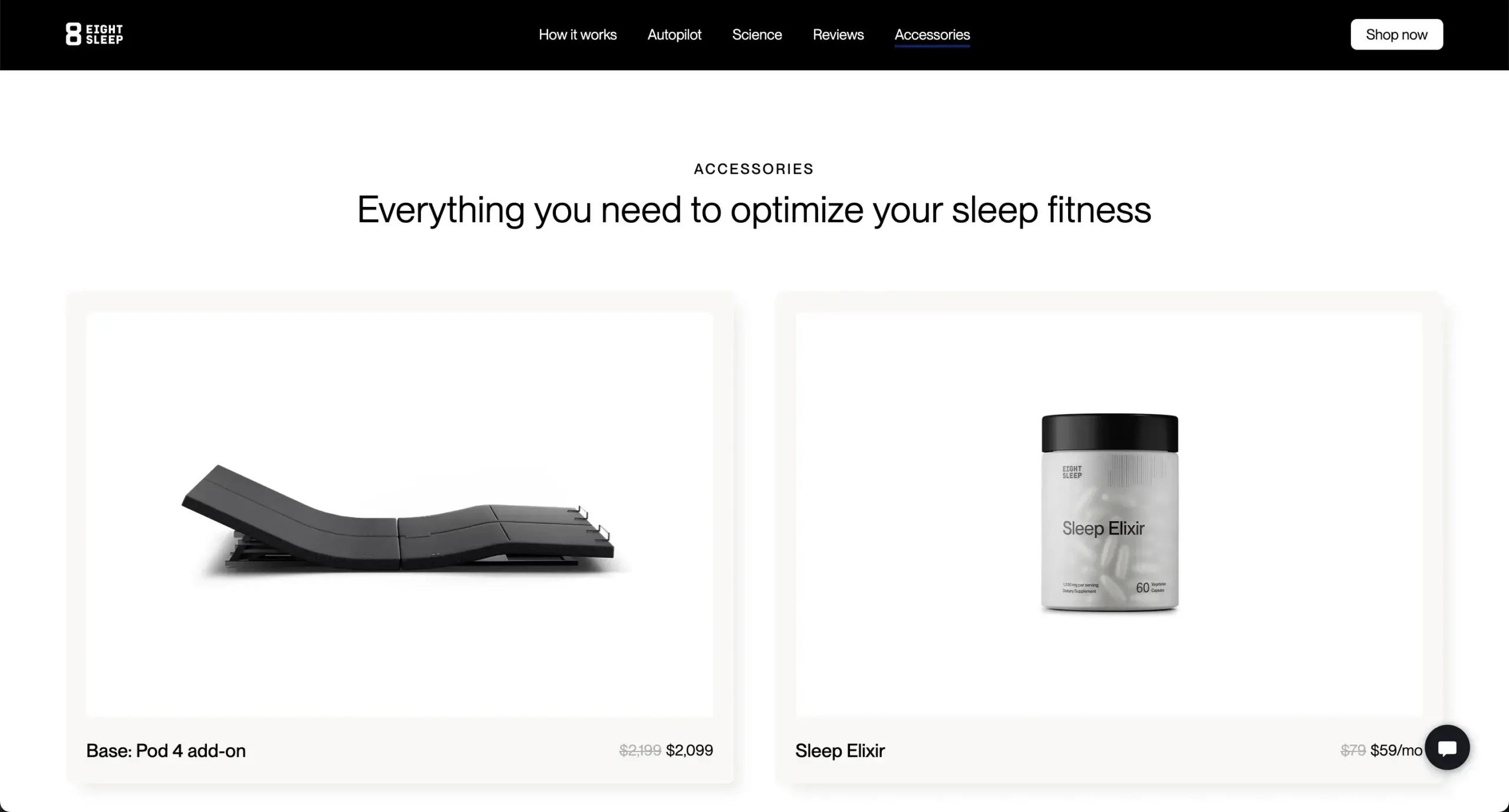
    Contrast that with a mattress company like Eight Sleep, where a long-term (10 years plus) purchase cycle means they can’t survive without acquiring new customers.

    Yet even they lean on upsells and products with a shorter purchase cycle (sheets, pillows) to stretch LTV.

    Eight Sleep has even recently launched a consumable subscription product (the Sleep Elixir sleep supplement), which tells you all you need to know about the value of high-retention products.

    __wf_reserved_inherit

    The Retention Marketing Playbook (How to Maximize LTV)

    So how can you build a bulletproof retention marketing strategy, that allows you to drive more revenue from repeat customers?

    Here’s a 5-point playbook that will help you flip your acquisition/retention ratio in favor of retention.

    1. Email & SMS Marketing

    Email and SMS are the core pillars of your retention marketing strategy.

    • Set up automated flows (post-purchase, win-back, replenishment).  
    • Use segmentation & personalization (recommendations based on past purchases). 
    • Leverage SMS for urgency (abandoned carts, limited-time offers).  

    Post-purchase emails with a “Thanks for your order!” plus a 10% off next-purchase coupon are a powerful way to lift repeat rates, while win-back flows targeting lapsed buyers—say, “We miss you! Here’s $15 off”—recover a lot of churned customers.

    Learn more: How to Craft High-Converting Abandoned Cart Sequences

    2. Loyalty & Rewards

    Build programs that incentivize customers to come back and shop more often.

    • Subscription models (Amazon Prime, Dollar Shave Club).  
    • VIP tiers that unlock benefits for high-value customers.  
    • Exclusive perks (early access, double rewards for repeat purchases).  

    Sephora’s Beauty Insider program tiers rewards by spend ($350 yearly spend unlocks exclusive gifts and higher savings, while $1,000 per year unlocks even greater rewards). 

    This is a great example of a retention machine that gives customers a reason to spend more.

    Even small brands can mimic this with points-for-purchases that redeem for discounts.

    __wf_reserved_inherit

    3. Mobile Apps

    Mobile apps are a fantastic retention tool.

    Think about it—when someone buys on your website, there’s a good chance they’ll forget about you.

    There are so many other brands out there competing for their attention. You might be sending emails, but so is everyone else. It’s not hard for emails to get buried.

    Even regularly using your product doesn’t guarantee they’ll come back (I often forget whether I got my shirts from H&M, Uniqlo, or Muji).

    But if they download your app, they won’t forget you.

    The app icon is free real estate on their phone’s home screen (which they look at 58 times per day), and push notifications give you a free way to get their attention, without the noise of email or the cost of SMS.

    __wf_reserved_inherit

    Don’t have your own mobile app yet? You’re at risk of falling behind. Vendrux can help you turn your existing web store into amazing mobile apps in less than a month. Book a free consultation to get a free preview of your app, and see how Vendrux can supercharge your retention marketing efforts.

    4. Product Expansion & Upsells

    Ultimately, driving repeat purchases will be difficult if your products aren’t naturally high-retention.

    • Introduce new variations for customers to try (think brands like OLIPOP or Surreal launching new flavors).
    • Launch new SKUs (apparel brands like John Varvatos or Bean Goods launching new designs).
    • Add complementary product lines (e.g. Ridge launching keycases, rings, luggage alongside their flagship wallets, supplement brands like Obvi or Naked Nutrition launching new products).
    • Launch accessories for your main product (Solo Stove introducing accessories for their Fire Pits and Pizza Ovens).

    Think—if a customer already bought from you, what reason do they have to buy again?

    You can only have so many shirts, and a tub of protein can only be eaten so fast.

    If you want customers to buy more often, give them more things to buy.

    5. Community & Brand Building

    Build a community around your brand.

    Community is one of the most underrated retention marketing strategies.

    Not only does it build an audience you can contact any time, for free, but at a certain point it begins to grow by itself, giving you a self-sustainable, owned marketing channel.

    • Leverage UGC & customer reviews in your marketing (social proof drives loyalty, and also makes acquisition more efficient).
    • Build a community-driven brand (regularly engage with customers on social media, like Glossier, or set up real-world events, like Lululemon).
    • Create an online for your customers (like Obvi and Kitsch do with Facebook communities).

    The one thing people want more than anything else (even more than the shirt they bought last month in a new color), it’s to be part of a community.

    Give them that and they’ll stay engaged with your brand for the long haul.

    The Ultimate DTC Growth Strategy (Retention + Acquisition Working Together)

    The best DTC brands get a significant share of their revenue from existing customers, rather than pacing the acquisition treadmill 24/7 just to keep the lights on.

    The best part is that higher retention actually feeds acquisition.

    And acquisition, in return, fuels retention.

    • Acquisition brings in new customers.  
    • Retention marketing works to boost lifetime revenue from these customers past the first order.  
    • Higher LTV lets you spend more on paid acquisition and scale faster.  

    Think of it as a relay race: Acquisition passes the baton to retention, which runs the marathon. 

    To optimize your retention marketing strategy, start tracking the following metrics:

    • Repeat Purchase Rate (RPR): How many customers come back?
    • Customer Lifetime Value (LTV): How much does the average customer spend with you, in total?
    • Customer Churn: How many customers leave after one purchase?  
    • Retention-Driven Revenue: What % of revenue comes from returning customers?  

    Next Steps

    Here’s how to turn your brand into a profitable, retention-first business.

    • Audit your retention efforts (What % of revenue is from repeat customers?)
    • Build automated email/SMS flows (Post-purchase, win-back, and replenishment flows).  
    • Create assets for your brand that drive higher retention (Mobile apps, communities).
    • Optimize your offerings for retention (Subscription models, loyalty perks, and upsells).

    Brands that prioritize retention-first growth will outlast those chasing one-time sales. 

    Because at the end of the day, the best customers aren’t the ones you acquire—they’re the ones you keep.
  • Retail App Development Blueprint (How to Save $100k+ and Assure a Positive ROI)

    Retail App Development Blueprint (How to Save $100k+ and Assure a Positive ROI)

    Mobile shoppers in the US spend more than $500 billion per year (and over $2 trillion worldwide). 

    Apps still contribute a fairly low percentage of this revenue, but it’s rising, with approximately 15% growth in shopping app revenue each year.

    If you’re thinking about building your own retail app, there’s never been a better time. But, despite the benefits to be had of launching a retail app, there are very real risks that put many retailers off the idea.

    We’re going to give you a blueprint for retail app development to avoid almost all of the risk, without robbing you of the potential benefits of launching your own app.
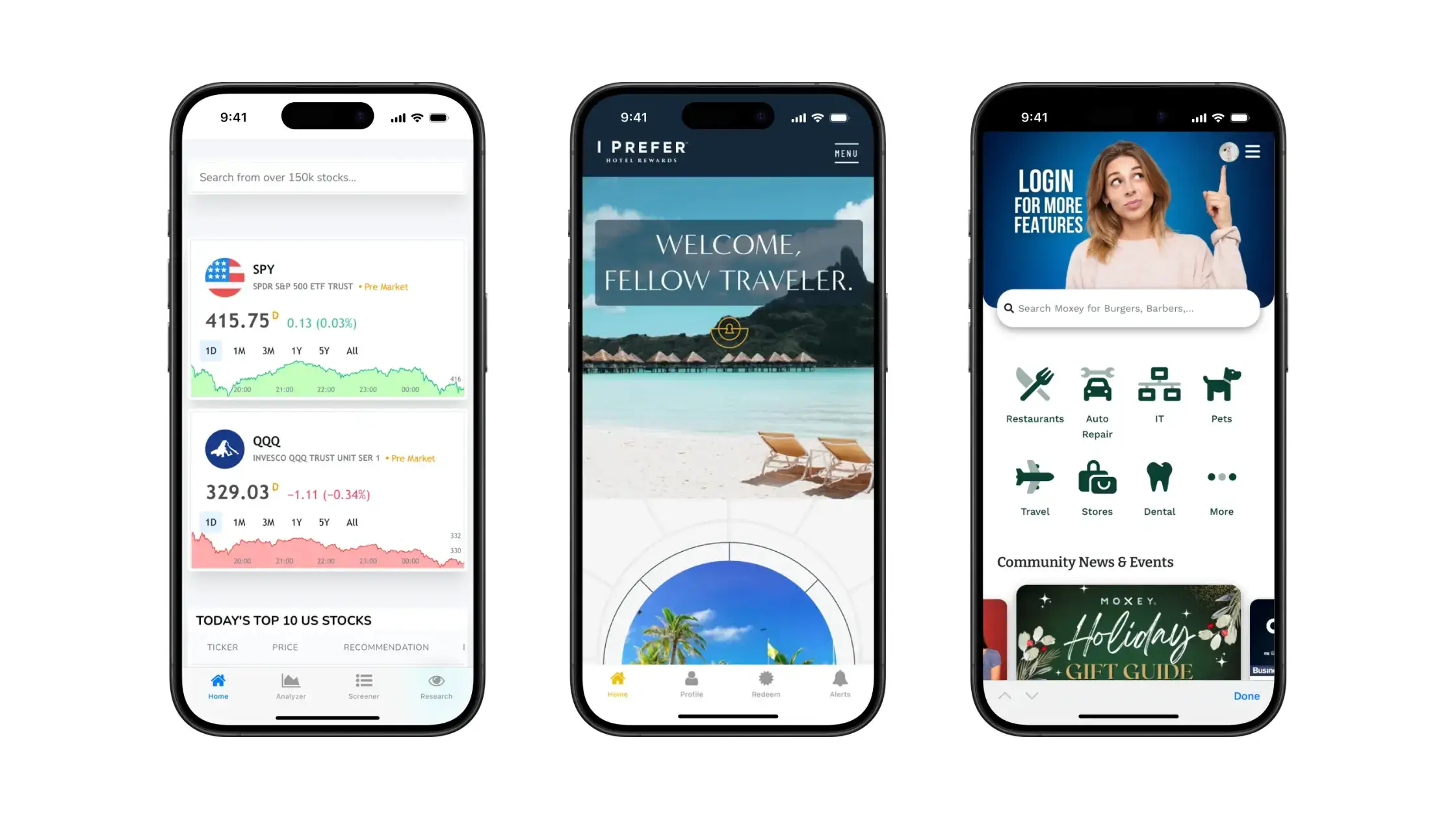
    We’ve been in the app development business for more than 10 years, and know what it takes to launch a great app, and we know that the process can get out of hand fast if you’re not careful.
    Keep reading to learn how to avoid the downsides and maximize the upside in retail app development.

    Why Traditional Retail App Development is Risky

    Every business decision involves a cost/benefit analysis.

    You need to weigh the benefits you expect to gain, with the cost it will take to achieve.

    With retail app development, the risks often outweigh the benefits, at least when we’re talking about the traditional way to build apps.

    Generally, this means hiring developers, a development agency, or using in-house talent to develop native apps for iOS and Android.

    Mobile app development is a brand new area for most retail businesses. Even those with a successful eCommerce presence managed in-house likely only have experience with web development.

    App development is another area altogether. It can be costly, complex, and there’s no guarantee that you’ll get a positive result from it.

    App Development is An Expensive, Complicated and Drawn-Out Process

    It takes a long time, and costs a lot of money, to build a high-quality native app.

    The actual cost can vary greatly depending on multiple factors. 

    Some apps are just simpler, with less to build, than others. And you can find developers in many different price brackets (but generally, you do get what you pay for).

    A broad estimate is that a mobile app can cost anywhere from $20,000 to $300,000.

    A retail app is likely to come in at the lower to middle end of this range. So you’re looking at $50,000-$100,000 to build.

    In terms of the time frame, expect it to take anywhere from three to nine months.

    And all these figures are assuming that everything goes more or less according to plan.

    There are many moving parts in software development, issues come up, and timetables invariably get pushed back.

    As development time lengthens, so does the cost.

    So we’ll say, if you’re fortunate, you can get an app for $50,000, in around six months’ development time.

    “We did consider building a custom app. But we don’t have a developer we’re comfortable with, and having to go through iterations and then parts not working… and as a small business, it’s just not worth it.”

    – Jamie from Sleefs

    The Cost of Maintaining Native Apps

    A big mistake many businesses make when deciding to build an app is ignoring the ongoing cost of having an app, outside of the initial investment.

    You don’t build an app and never have to touch it again.

    Apps require constant updates and maintenance. You need to make sure your app remains fast and bug-free, you need to build new features, improve existing features, and continually work on your app to keep it current.

    That means keeping developers on staff, or a development agency on retainer, which costs money.

    So expect to spend 10-15% of the initial cost (at a minimum) each year on maintaining your app (assuming you go with a custom native build).

    “If we had unlimited time and money, we would probably go for a custom native app, but that is half a million to a million a year to maintain.”

    – David Cost, Rainbow Shops

    “When you develop an app you can’t just have one person. When we built our app in 2014, the maintenance became very heavy. To keep a platform like this in-house I feel like you’d probably need around six people.”

    – Kenneth Chan, Tobi

    If You Build It, Will They Come?

    The popular phrase, “if you build it, they will come,” doesn’t usually translate well to software.

    You can spend hundreds of thousands building an app, but there’s no guarantee that people will use it.

    If you don’t promote it well, or you don’t build an experience that’s as good or better than your mobile website, you could be left with an expensive “asset” that only a small share of your customer base uses.

    This is an important part of the cost-benefit analysis – the likelihood that the benefits will actually come to fruition.

    Simpler Alternatives Can Be a Sunk Cost Altogether

    There are ways to reduce the cost of building a retail app, such as using no-code app builders.

    With an app builder, you don’t need to hire expensive developers, and can launch an app for a couple of hundred dollars (or less).

    While this is tempting, the results are often underwhelming. These apps tend to look like stock apps built from a template.

    Worst, you’ll struggle to recreate the experience on your mobile website. The app builder may not be able to integrate all the apps and plugins on your website, and any custom features or any tweaks you’ve made to optimize UX and boost conversions.

    If your app is just a weak reflection of your mobile website, why are customers going to use the app in the first place? They’ll just shop on your website instead.

    You might save hundreds of thousands of dollars on your app by using an app builder, but if you can’t build something that’s at least as good as your website, there’s little to no upside, even if you promote it well.

    “The app needs to be at least as functional as the website. It doesn’t need to be better than the website, but the user experience can’t be worse.”

    – David Cost, Rainbow Shops

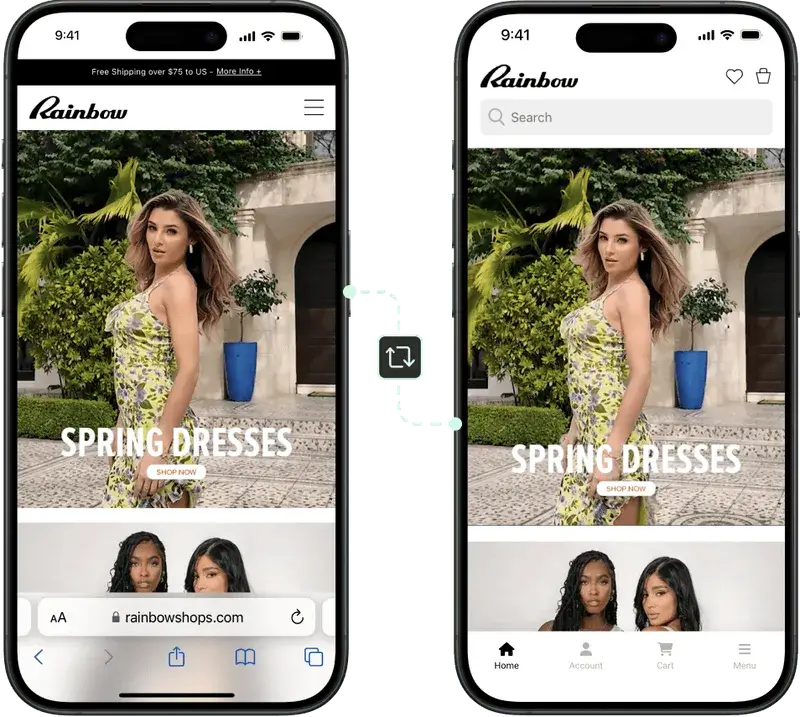
    Rainbow Shops’ mobile app is essentially a recreation of their website, with minor changes to optimize the user experience in the app.

    Is Building an App Worth It?

    So, after all of that, is it really worth it to build a mobile app, if you’re a retail business?

    The answer is yes – with the caveat that you need to find the right development approach.

    Assuming you market your app well, and assuming it provides a user experience as good or better than your website, you can estimate that 15-30% of your web customers will download your app. 

    You should get somewhere between 1.5-3x the conversion rate on the app as you do on your mobile website, and around a 20% higher average order value.

    There will likely also be a higher lifetime value from people who download your app.

    These figures need to match with the estimated cost. If you’re spending $100,000 on your app (plus tens of thousands per year in maintenance), it’s hard to make the math work.

    But finding a simpler and more cost-effective approach to retail app development (that doesn’t sacrifice on quality), you can get it to where the app only needs to do a fraction of these estimated figures, and it will already pay for itself.

    Vendrux lets you build amazing retail apps with no risk. Read on to find out how.

    The Best Way to Build a Retail App (and Almost Guarantee a Positive ROI)

    With Vendrux, you can build a retail app with zero risk, and be confident that you’ll come away with a positive return on your investment.

    Vendrux is a full service app builder that lets you convert any website into mobile apps, without rebuilding anything, and without the huge cost that comes with traditional retail app development.

    The apps are native, with all the features you need, such as native UI, push notifications, and fully customizable branding and design.

    Your iOS and Android apps will be fully synchronized with your website, and everything from your website will work inside of the apps.

    App users will get the same shopping experience as they do on your website (realistically a slightly better experience, with the quality of life enhancements they get from the app).

    Vendrux removes the risk in retail app development, meaning even with a small boost in revenue from the app, you’ll have made back your investment and then some.

    Why Vendrux is Virtually Risk-Free

    Here’s why Vendrux carries almost zero risk, compared to other forms of retail app development:

    • It’s a low cost, starting from as little as a few hundred dollars per month. You’re not spending hundreds of thousands of dollars for a speculative investment.
    • It takes less than a month to get working apps. You don’t need to wait half a year to a year to find out whether your app will actually work out.
    • You don’t need to hire developers or manage the project in-house. Everything is done for you, by an experienced team.
    • The apps fully replicate everything on your website, so you can be sure that they will be at least as good as your website – if not better.
    • You still have the freedom to make changes exclusive to the apps, such as removing elements from your website or adding app-only experiences.
    • There’s minimal overhead. Technical maintenance is included for a low monthly cost, and you can update the UI, UX or add new features yourself, just by adding them on your website.
    • Vendrux also handles the app store publishing process, and guarantees your apps will be approved by Apple and Google.
    • On top of everything, Vendrux offers a 60 day money-back guarantee if for whatever reason you’re not happy with the end product.

    With the low cost, almost no effort required, and complete feature parity with your website, there’s no downside.

    Even very small eCommerce sites can expect to get a boost in revenue of at least $1,000-$2,000 per month from launching an app, which is enough to pay for the app and then some.

    How to Build a Retail App with Vendrux (Step by Step)

    Part of what makes Vendrux risk-free is how simple it makes retail app development.

    It takes just a few steps, and minimal effort, to launch your own eCommerce app, and get in the app stores alongside some of the world’s largest retail brands.

    1. The first step is to ensure your website is fast and mobile-friendly. If your site is already optimized for mobile, it’s likely good enough to be turned into an app.
    2. Get in touch with the Vendrux team. We’ll show you a free, interactive preview of your site as an app to see what’s possible before committing to anything, and you’ll be able to talk with our team about any concerns you may have, or share any special requirements.
    3. Give the go-ahead, and sit back and wait while our team builds your apps.
    4. Test the apps before launching, to be sure the end result is something you’re happy with.
    5. Finally (and within a month, in most cases), we’ll get your apps published on the Apple App Store and Google Play Store.

    In just a few weeks, you can have your own app, live in the app stores and ready for customers to download.

    Vendrux is perfect for businesses on any eCommerce platform, from Shopify to BigCommerce to custom-built websites. All your plugins and integrations will work in the app, and you can easily make changes to the app through your website, without having to hire new developers. Book a demo now to learn more about how we help you build the perfect retail app.

    Wrapping Up: A Blueprint for Launching Risk-Free, High-Return Retail Mobile Apps

    As a retailer, launching your own app can have some amazing benefits. But if you’re paying hundreds of thousands of dollars for an app, the risk can just seem too much.

    With Vendrux, you get the perfect approach to retail app development.

    You can get native apps for a low investment, which takes just a tiny increase in revenue in order to recoup.

    Your apps will be at least as good, if not better, than your website, giving every incentive for your best customers to use the app and spend more money.

    All of this with no work from your team, no addition to your workflow, virtually no overhead, and a money-back guarantee on top of everything else.

    Get in touch now for a free preview of your app, and to talk with our team about how to make your project a success.

  • What’s a Good Repeat Customer Rate in Ecommerce? (Latest Benchmarks for 2026)

    What’s a Good Repeat Customer Rate in Ecommerce? (Latest Benchmarks for 2026)

    DTC ecommerce brands need repeat customers.

    Repeat customers are where most of your profit comes from. It costs a lot of money to acquire customers (some brands barely break even on the first sale), but when they come back a second time, the customer typically spends more, and costs less.

    So, with that in mind, what kind of repeat customer rate should you be aiming for? How do you know if your returning customer rate is good enough (or if your retention funnel is actually a leaky bucket)?

    Read on and we’ll help you know where your business stands, and what constitutes a good repeat customer rate, with the latest benchmarks from around the ecom world.

    Want the latest insights into how 8 and 9-figure brands are driving sustainable growth? That’s what you get with our weekly newsletter, The Retention Edge. Subscribe for free today.

    What Is Repeat Customer Rate?

    Your repeat customer rate is the percentage of customers who come back and buy from you more than once within a given time period (usually 12 months).

    The formula is straightforward:

    Repeat Customer Rate = (Number of customers who purchased more than once / Total number of customers) x 100

    If you had 1,000 customers last year and 280 of them bought from you at least twice, your repeat customer rate is 28%.

    It’s one of the clearest signals of whether your business is building lasting relationships or constantly chasing new buyers.

    What’s the Average Repeat Customer Rate in Ecommerce?

    Most sources put the average somewhere between 25% and 30%

    Shopify stores specifically average around 27%. Bluecore’s benchmark report, which analyzed 100+ retailers, found a somewhat lower average of 16.5%, though that study used a narrower measurement window.

    Here’s the quick breakdown:

    • Below 20%: You’re likely losing customers faster than you should be. There’s significant room to improve.
    • 20-30%: You’re in line with most ecommerce brands. Solid, but there’s still upside.
    • 30-40%: You’re outperforming the average. Your retention efforts are working.
    • Above 40%: You’re in strong territory, often seen with subscription models or high-frequency consumables.

    The “right” number depends heavily on what you sell. A furniture brand with a 20% repeat rate is doing well. A supplement brand with the same number has a problem.

    Repeat Customer Rate by Industry

    Here’s how repeat customer rates typically break down across major ecommerce categories. 

    (Industry-level data is drawn primarily from Bluecore’s Customer Growth Benchmarks Report and Opensend’s repeat purchase rate analysis, supplemented with company-specific data where noted.)

    Industry Repeat Customer Rate Key Driver
    Grocery & Food Delivery 40%+ Weekly replenishment cycle
    Pet Supplies 30–40%+ Autoship subscriptions, brand loyalty
    Health & Supplements ~29% Consumable products, auto-refill
    Fashion & Apparel 20–26% Seasonal buying, style loyalty
    Beauty & Cosmetics ~21–26% Replenishment cycles, deal-hunting
    Sporting Goods & Outdoor ~21% Mix of consumables and durables
    Electronics & Tech ~18% Long product lifecycles
    Home & Furniture ~15% Infrequent, high-ticket purchases
    Luxury Goods & Jewelry ~10% High price points, long consideration

    Grocery and Food Delivery

    Repeat rate: 40%+

    Grocery is at the top because people need to eat every week. About 40% of online grocery shoppers order weekly, and repeat purchase intent reaches roughly 65%

    Once someone gets comfortable with a delivery service, switching costs feel high (they’ve saved their favorites, they know the interface), even if they’re not actually locked in.

    Pet Supplies

    Repeat rate: 30-40%+

    Pet owners buy the same food, treats, and supplies on a regular cycle, and they’re not inclined to experiment with what their pet eats. 

    Chewy is the poster child here: roughly 78% of their sales come through auto-ship subscriptions, and about 90% of revenue comes from existing customers.

    Health and Supplements

    Repeat rate: ~29%

    Supplements and health products are consumable by nature, and customers who find something that works tend to stick with it. Auto-refill and subscription options push repeat rates even higher. This is one of the strongest categories for retention outside of grocery.

    Fashion and Apparel

    Repeat rate: 20-26%

    Apparel has a solid but not exceptional repeat rate. People buy clothes regularly, but they also shop around. Bluecore puts apparel at about 20%, while other sources cite closer to 25-26%. Seasonal trends and personal style loyalty both play a role.

    Beauty and Cosmetics

    Repeat rate: ~21-26%

    Beauty lands in a similar range to apparel. Deal-hunting behavior is common in this category, which drags the average down. But brands with strong loyalty programs and replenishment cycles (think skincare routines) can push well above 40%.

    Sporting Goods and Outdoor

    Repeat rate: ~21%

    A mix of consumable accessories (golf balls, supplements, socks) and bigger-ticket equipment keeps this category in the low twenties. The repeat rate depends heavily on how much of your catalog is replenishable vs. durable.

    Electronics and Tech

    Repeat rate: ~18%

    People don’t buy a new laptop or pair of headphones every few months. Long product lifecycles naturally suppress repeat rates. Brands that sell accessories and consumables alongside their hardware do better here.

    Home and Furniture

    Repeat rate: ~15%

    This is one of the lowest categories, and that makes sense. You buy a couch once every several years. 

    Bluecore’s data shows a 14.7% repeat purchase rate. Wayfair is a notable exception, reporting that nearly 80% of orders come from repeat customers, but they’ve built a massive catalog across home goods, decor, and smaller items that people reorder more frequently.

    Luxury Goods and Jewelry

    Repeat rate: ~10%

    Luxury has the lowest repeat purchase rate. Bluecore found that only about 9.9% of first-time luxury and jewelry customers made a second purchase within a year. High price points and long consideration cycles make this the hardest category for repeat purchases. 

    That said, when luxury customers do come back, they tend to spend significantly more.

    Why Repeat Customers Matter So Much

    Excuse me if it sounds dramatic – but most ecommerce businesses will live and die based on how many repeat customers they get.

    You’ve probably heard the stats, but they’re worth revisiting because the gap between new and repeat customers is genuinely dramatic.

    They cost less to convert

    Acquiring a new customer costs 5-25x more than getting an existing one to buy again. The probability of selling to someone who’s already bought from you is 60-70%. For a new prospect, it’s 5-20%.

    They spend more per order

    Repeat customers spend roughly 67% more per order than first-time buyers, according to BIA Advisory Services. Bluecore’s more recent data is consistent, showing active buyers spending about 69% more than new customers.

    They drive a disproportionate share of revenue

    About 65% of a company’s revenue comes from existing customers. The top 5% of customers alone generate 35% of total ecommerce revenue. Stores with a 40% repeat customer rate generate about 50% more revenue than stores sitting at 10%.

    The second purchase is the hardest

    After a first purchase, there’s roughly a 27% chance a customer will return. But once they make that second purchase, the probability of a third jumps to 54% or higher. Everything you do to earn that second order compounds from there.

    Small improvements have big payoffs

    A 5% increase in customer retention can boost profits by 25-95%, according to research from Bain & Company and Harvard Business School. That’s not a typo. The range is wide, but even the low end is significant.

    What Drives Repeat Purchases?

    Before jumping into tactics, it helps to understand the main factors that influence whether someone comes back.

    Product type and purchase frequency

    This is the biggest factor, and it’s largely outside your control. If you sell something people use up and need to replace (food, supplements, skincare), you’ll naturally see higher repeat rates than brands selling durable goods.

    Product quality

    57% of shoppers cite product quality as a top driver of loyalty. This is table stakes. If your product is good, people come back. If it’s inconsistent, they don’t.

    Customer experience

    45% of consumers have switched brands due to poor customer service. Fast shipping, easy returns, and responsive support aren’t differentiators anymore; they’re the baseline.

    Personalization

    About 60% of consumers say they’re more likely to become repeat buyers after a personalized experience. That could mean product recommendations based on past purchases, targeted email flows, or personalized offers.

    Loyalty programs

    83% of consumers say loyalty program membership influences their repurchase decisions. Well-structured programs with tiered rewards achieve 1.8x higher ROI than flat programs.

    Convenience and friction reduction

    Subscription options, one-click reordering, and saved payment methods all reduce the effort required to buy again. The easier you make it, the more likely it happens.

    How to Improve Your Repeat Customer Rate

    Here are the highest-impact levers, roughly in order of how quickly they can move the needle.

    1. Nail the post-purchase experience

    The period between a customer’s first order and their second is the most critical window you have. Use it well:

    • Send order confirmations and shipping updates promptly
    • Follow up after delivery to check satisfaction
    • Share product tips, care instructions, or usage ideas
    • Time your next outreach based on your product’s natural replenishment cycle

    Brands that send personalized post-purchase communications see up to 45% higher second-purchase rates.

    2. Launch (or improve) a loyalty program

    If you don’t have a loyalty program, start one. If you do, make sure it actually rewards meaningful behavior. 

    The best programs create a reason to consolidate spending with your brand rather than spreading it around.

    Tiered structures work particularly well because they give customers something to work toward. The feeling of “almost reaching Gold status” drives behavior in a way flat discounts don’t.

    Learn more: Best Shopify Loyalty Program Apps

    3. Offer subscriptions or auto-replenishment

    If you sell anything consumable, subscriptions should be part of your model. They take the decision-making out of repeat purchases and dramatically reduce churn. 

    Give customers a small discount (10-15%) for subscribing, and make it easy to skip, pause, or cancel.

    Learn more: Best Shopify Subscription Apps

    4. Personalize your marketing

    Generic email blasts don’t drive repeat purchases. Segmented, behavior-based campaigns do. At minimum:

    • Recommend products based on purchase history
    • Send replenishment reminders timed to your product’s usage cycle
    • Trigger win-back campaigns for customers who haven’t bought in a while

    5. Reduce friction everywhere

    Look at your reorder experience through the eyes of a returning customer. Can they reorder a previous purchase in two taps? Are their payment details saved? Is checkout fast on mobile?

    Free shipping increases repeat rates by about 20%. Easy returns add another 12%. These aren’t perks; they’re expectations.

    6. Build a mobile app

    Mobile apps are one of the best ways to increase loyalty and retention

    This one deserves its own section:

    How a Mobile App Drives Repeat Purchases

    A mobile app is one of the most effective tools for turning one-time buyers into repeat customers. The data backs this up consistently.

    App users buy more often

    Brands with mobile apps see up to 50% higher repeat purchase rates compared to mobile web alone. 60% of first-time app buyers go on to make additional purchases. App users purchase about 33% more frequently than non-app users.

    The reason is simple: your app sits on the customer’s home screen. It’s a persistent, low-friction path back to your store, compared to expecting someone to remember your URL or find you through a search engine again.

    Push notifications bring people back

    Push notifications are the single biggest retention advantage apps have over mobile web. They let you reach customers directly, without competing in a crowded inbox or paying for ads.

    The numbers are compelling:

    Push gives you a direct, owned channel to re-engage customers at exactly the right moment, whether that’s a restock reminder, a price drop alert, or a flash sale.

    The conversion and engagement gap is huge

    Mobile apps don’t just drive more repeat visits. They convert better when people do come back:

    • Apps convert at roughly 3x the rate of mobile websites
    • Average order value runs 10-50% higher in apps than on mobile web
    • Cart abandonment drops to about 20% in apps, compared to 86% on mobile web
    • Users spend 18x more time per month in shopping apps vs mobile web

    App users are worth more over their lifetime

    All of this adds up. App users generate 2.8-5x higher lifetime value than web-only shoppers. They visit more often, spend more per order, and are less likely to churn.

    For ecommerce brands doing meaningful mobile traffic, a well-built app is one of the highest-ROI retention investments available.

    Get the latest data on ecommerce mobile apps in our Benchmark Report.

    You don’t need to rebuild anything to get one

    This is where most brands stall out. Building a native app from scratch is expensive, time-consuming, and adds a second codebase to maintain. 

    For ecommerce brands, it’s overkill.

    Vendrux takes a different approach. We turn your existing website into a fully native iOS and Android app, so you get all the retention benefits (push notifications, home screen presence, native performance) without rebuilding your store or maintaining a separate platform.

    Everything you’ve already built, your checkout flow, your integrations, your loyalty program, your content, all of it works in the app from day one.

    Curious whether a mobile app could move the needle on your repeat customer rate?

    Get a free app preview to see what your store would look like as a native app – book a free consultation and we’ll present you with the preview, plus walk through your retention strategy and show you how a mobile app could help.

  • 15 Ways to Reduce Cart Abandonment in Your eCommerce Store

    15 Ways to Reduce Cart Abandonment in Your eCommerce Store

    On average, 7.52% of online shopping sessions result in a product being added to a cart. Yet the average conversion rate for eCommerce stores is only 1.89%

    The difference is all the shopping carts left abandoned.

    Over two-thirds of all carts are abandoned without resulting in a purchase – which presents a huge opportunity for eCommerce brands.

    Whether you reduce cart abandonment by reducing friction in your checkout process, or by reaching out to cart abandoners and convincing them to come back, there’s a huge amount of revenue on the table.

    If you want to realize part of this revenue, read on, and we’ll share a complete list of actions you can take to reduce cart abandonment in your eCommerce store.

    Is your store on Shopify? If so, check out these Shopify Cart Abandonment Apps that make recovering abandoned carts a breeze.

    What is Cart Abandonment?

    Cart abandonment is any time a shopper on your site adds a product to their cart but doesn’t check out and pay.

    Abandoned carts apply for any online purchase where the user begins the checkout process but doesn’t complete it, such as a signup flow for a software product or a booking form on a travel site. But we’ll be looking at this from the lens of an eCommerce store.

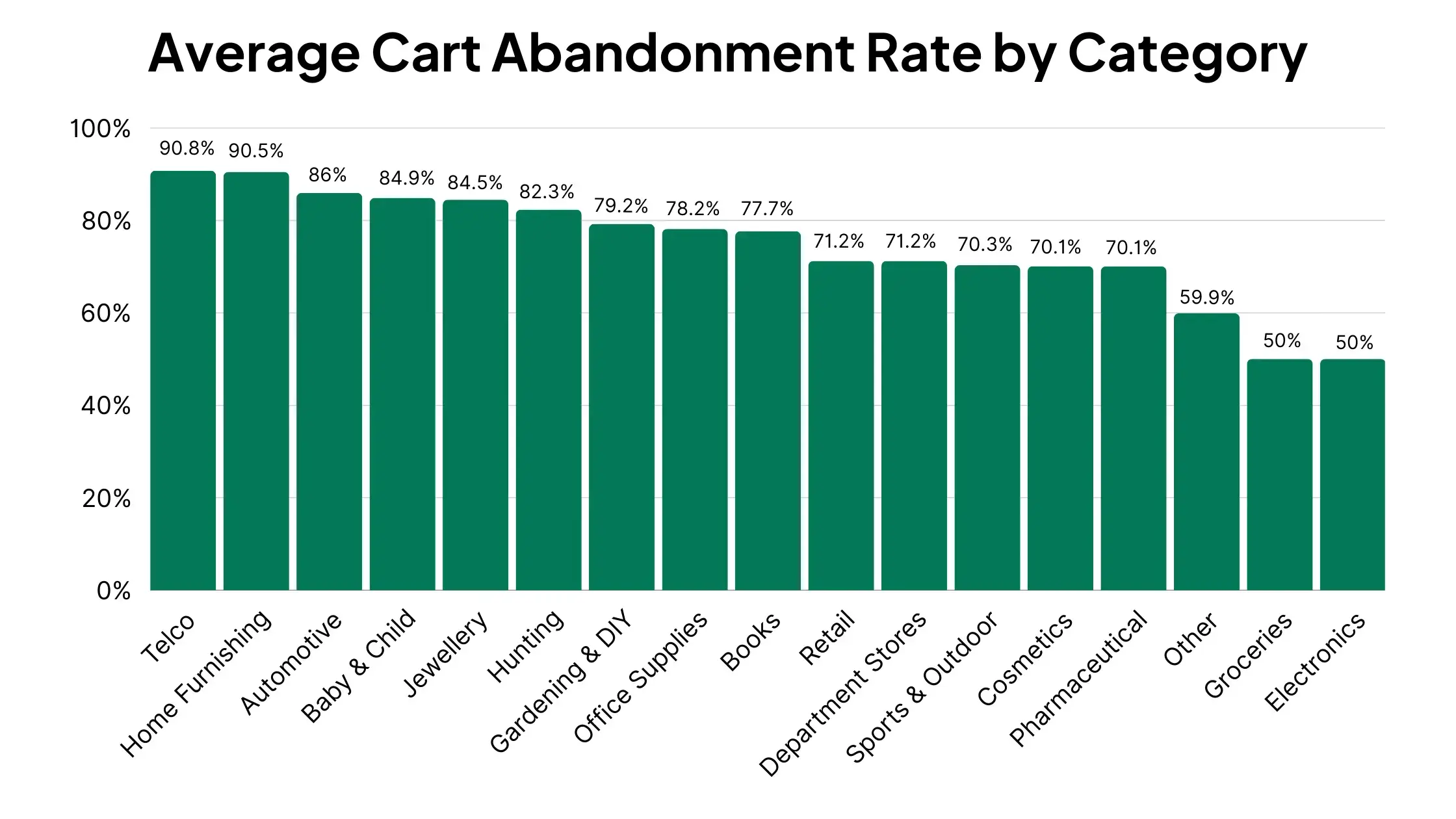
    On average, 70.19% of eCommerce carts are left abandoned.

    Cart abandonment happens more on mobile and tablet devices than on desktop, and varies greatly from category to category.

    __wf_reserved_inherit

    Experts believe there’s more than $260 billion in recoverable revenue from abandoned carts.

    If your brand can just take a tiny slice of that figure, you could seriously change the long-term outlook for your business.

    Why Do Shoppers Abandon Carts?

    The first step on your quest to reduce shopping cart abandonment is to understand why people leave a site without checking out.

    Once you know why, solutions will become clear.

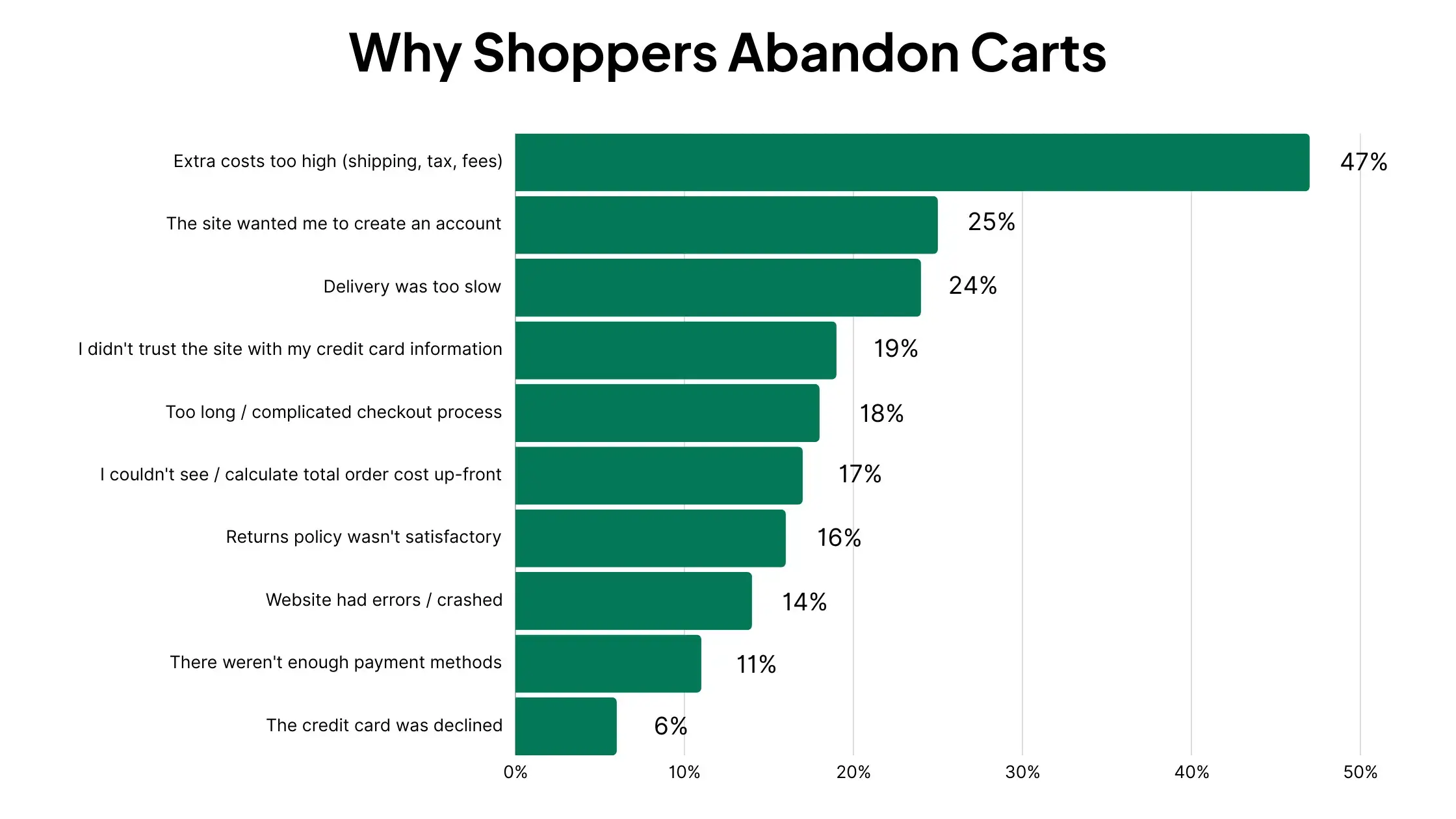
    Research from Baymard gives us a number of common reasons people leave without checking out:

    __wf_reserved_inherit
    • Extra costs (shipping, tax, fees) – 47%
    • The site wanted me to create an account – 25%
    • Slow delivery – 24%
    • Didn’t trust the site with my credit card information – 19%
    • Too long or complicated checkout process – 18%
    • I couldn’t see the total order cost up-front – 17%
    • Returns policy wasn’t satisfactory – 16%
    • Website had errors or crashed – 14%
    • Not enough payment methods – 11%
    • The credit card was declined – 6%

    Using this information, here are five board categories why cart abandonment happens.

    Friction

    With more friction comes more opportunity for potential customers to drop off.

    Shoppers want an online shopping experience that requires as little effort as possible.

    Once you require them to enter a lot of details, or go through multiple pages to complete their checkout, the likelihood of an abandoned cart drastically increases.

    Distractions

    There are a number of distractions that can derail a sure sale.

    Some distractions come from everyday life (the person could get called away, leave their device, and forget about their cart).

    Other distractions exist on the user’s device.

    The average internet user has between 2-4 browser tabs open at one time. 

    That’s only an average – it’s even common to have 11+ tabs open at the same time.

    Online shoppers are particularly guilty of this, as many consumers have a habit of browsing multiple stores at the same time.

    For brands, this means that you only have a shopper’s attention for so long.

    It takes just a split second for the shopper’s attention to go somewhere else, at which point they may not come back.

    Confusion

    Shoppers are not ready to do hard math or complete a puzzle just to figure out how to finish their purchase.

    We expect everything to be easy and spoon-fed. Especially with online shopping. The idea is convenience, and once it’s no longer convenient, most shoppers are out.

    If it takes work to find the checkout, or if details about price, sizing or delivery are unclear, the shopper will look for a simpler option somewhere else.

    Lack of Trust

    Trust is an important part of the online buyer’s journey.

    And adding a product to their cart doesn’t mean the shopper has complete trust in your website.

    They could still be on the fence, or have objections that are not yet answered.

    Any trust issues are amplified the closer it comes to entering payment details and hitting “Buy”. These issues make it more likely the customer will abandon their cart.

    Cost

    Cost is always one of the biggest obstacles to completing a purchase

    Price perception is lower on a product page, compared to when you’re in the checkout, typing your credit card details.

    Shoppers are often hit with extra costs in the checkout process, such as shipping costs and taxes, which make what seemed like a great deal turn into a high-ticket purchase.

    So whether the shopper changed their mind when it came time to put their money where their mouse click was, or the final price ended up being significantly more than they expected, many abandoned carts are financially driven.

    How to Reduce Shopping Cart Abandonment

    Now that you know the major reasons why shoppers leave their carts abandoned, you can work on a strategy to combat it.

    There are many ways to reduce cart abandonment. Some, you may already be doing, but there’s almost certainly at least one opportunity here to lower cart abandonment by a few percentage points.

    Here are 15 tactics to achieve a lower cart abandonment rate:

    1. Clear CTAs
    2. One-Page Checkout
    3. Offer a Range of Payment Options
    4. Flexible and Affordable Shipping
    5. Save Customer Details
    6. Offer Guest Checkout
    7. Show Savings During Checkout
    8. Live Chat
    9. Exit-Intent Popups
    10. Build More Social Proof
    11. Address Common Objections
    12. Avoid Hidden Costs
    13. Send Abandoned Cart Notifications
    14. Retargeting Abandoned Carts
    15. Get People Into Your Mobile App

    Let’s dive deeper into these actionable cart abandonment strategies now.

    1. Provide Clear CTAs

    The path to purchase must be clearly signposted for the user.

    Don’t leave anything up to assumption or require any unnecessary thinking.

    Use a call to action to make it clear when a product has been added to the customer’s cart, and show big, clear and obvious buttons showing how the customer can get to the checkout page and complete their purchase.

    Source: Goli

    2. Use a One-Page Checkout

    Every additional step in your checkout process is an opportunity for the customer to get frustrated and give up, or for their attention to drift away.

    Make checking out as simple as possible, with all the necessities on one page. Don’t add unnecessary work by introducing extra clicks.

    3. Offer a Range of Payment Options

    Payment information is one of the biggest points of friction in the checkout process.

    It’s cumbersome to have to get up, find your card and type your credit card details in, particularly on mobile.

    There’s also a trust issue, with a lot of customers hesitant to provide their credit card details to a strange website.

    You will overcome both these problems by offering multiple payment options. Many consumers prefer to use secure mobile payment services like Google Pay, Apple Pay, Shop Pay or PayPal, especially when shopping on a new site.

    Also consider offering Buy Now Pay Later options like Klarna and Afterpay.

    Source: Culture Kings

    4. Provide Flexible and Affordable Shipping Options

    Shipping makes a huge difference in eCommerce. We want fast, reliable, and cheap (ideally free) shipping.

    The ability to offer better shipping options than anyone else is a big reason why Amazon is so popular.

    High shipping costs are the most common reason for shopping cart abandonment. Yet for some shoppers, it’s more important to get the product fast than to get it with free shipping.

    According to a study from Advantec, free shipping is the most important delivery consideration for 49% of people, with an additional 9% prioritizing “low cost” shipping. For 31% of people, the most important thing is fast or same-day shipping.

    Ideally you’ll be able to provide shipping that’s both free and fast.

    If not, let customers choose between different options depending on what’s most important to them – pay for fast delivery, or minimize shipping costs and wait a few more days to get their product.

    5. Save Customer Details for Smooth Checkout

    Repeat sales to loyal customers becomes much easier by saving their details for an expedited checkout process each time they come back.

    Entering card details and delivery info in checkout is a significant point of friction.

    It’s even worse on mobile, where form input is more troublesome, which is a big reason why cart abandonment on mobile is much higher than desktop.

    Cut out this friction and allow your returning customers to finalize their payment in just a few clicks.

    Source: Maguire Shoes

    6. Offer Guest Checkout Options

    While saving customer details makes it easier for repeat customers to check out, many people don’t want to do this.

    25% of shoppers abandon their cart because they were required to create an account (the 2nd most common reason for cart abandonment).

    Offering guest checkout as an option will appeal to these users, giving them a way to make a purchase without handing over a bunch of personal information to an eCommerce site they don’t know.

    7. Show Savings at Checkout

    As discussed earlier, price perception is a lot different on a product page compared to the checkout page.

    Shoppers get squeamish about the price when it comes time to actually pay.

    To combat this, remind customers of how much they will save, on discounted products, bundles, or discount codes applied.

    Source: Goodfair

    By doing this, you shift the shopper’s attention away from how much they’ll pay, to how much free value they’re getting from their purchase.

    8. Enable Live Chat

    Live chat can help answer any questions or issues that are preventing the shopper from finalizing their order.

    These questions are often easy to answer, and can be dealt with by a support rep (or even an AI chatbot).

    But if the customer has to search and find these answers themselves, it’s more likely that they’ll bounce and go somewhere else.

    Source: Kirrin Finch

    9. Use Exit-Intent Popups

    Exit-intent popups are one of the most common tools used by eCommerce retailers to prevent cart abandonment.

    These popups trigger when a customer navigates away to another tab or moves their cursor towards the “X” button.

    If it looks like the customer’s about to leave, you will display a popup that reminds them to return and finish their purchase.

    __wf_reserved_inherit
    Source: Adoric

    10. Build Social Proof

    Trust is another thing that prevents online shoppers from completing the checkout process.

    It requires much less trust to click “Add to Cart” than to enter your payment details and click “Buy”.

    So if you have a high cart abandonment rate, you may not have enough social proof to get unsure customers over the line.

    You can build social proof with reviews on product pages, but also provide reviews and positive testimonials in the checkout flow, to provide an infusion of trust right when it’s needed most.

    Source: Pot Gang
    Source: Inspired By Blue

    11. Address Common Objections

    You will have an idea of the most common objections customers have that stop them from making a purchase.

    Get ahead of these objections by addressing them on your product pages, or even during checkout.

    Answer common objections in your product description, or directly address them in an FAQ section. You could also do this via a chat bubble that provides automatic answers to common questions.

    Source: Cocofloss

    12. Avoid Hidden Costs

    Avoid giving your customers nasty surprises with hidden costs in the checkout.

    We spoke on shipping costs earlier, but some stores hide other costs like taxes, service charges or setup fees, only to spring them on the customer when they go to pay.

    Not only does this make price more of an obstacle, it can also degrade the trust you’ve worked hard to build and make the customer feel uneasy about continuing with their purchase. 

    13. Send Abandoned Cart Follow Ups (Email & Push Notifications)

    Reducing cart abandonment is not just about stopping people from leaving without checking out.

    You can achieve the same result (more completed purchases, more revenue) by recapturing these abandoned carts later.

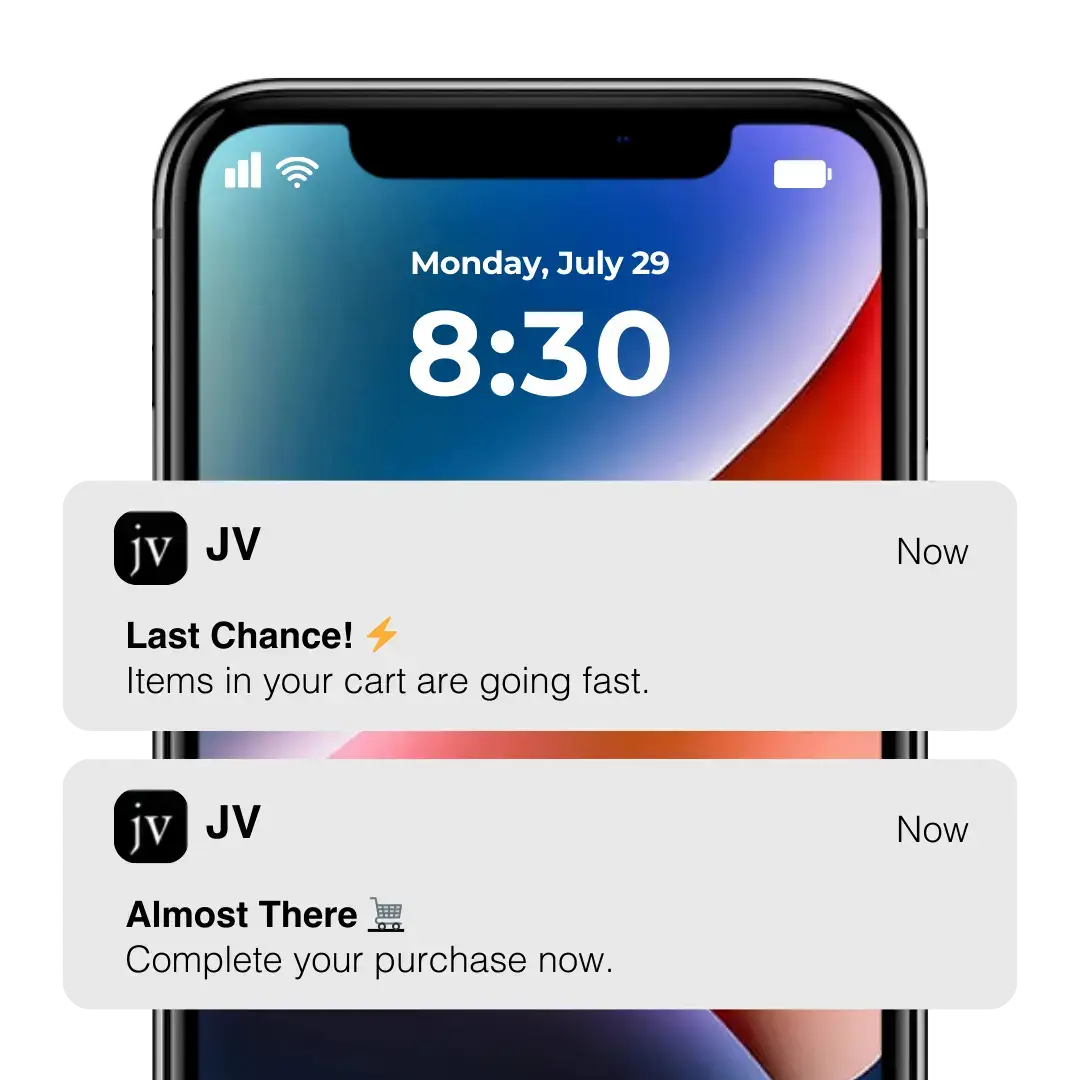
    Every site needs an automated workflow to reach out to people who leave their carts abandoned, through channels like email and push notifications.

    __wf_reserved_inherit
    __wf_reserved_inherit

    Push notifications, in particular, are a powerful way to recover abandoned carts.

    When someone shops in your app, you can set up an automated push sequence that sends a notification if they add a product to their cart but don’t complete their purchase.

    These notifications can recover a crazy amount of revenue – some of our users at Vendrux recovered as much as $200k in just 30 days!

    __wf_reserved_inherit

    14. Use Retargeting to Follow Up with Cart Abandoners

    Retargeting is another great way to recapture abandoned carts.

    Set up a campaign to automatically serve ads to people who left without paying for their cart.

    Overall this tactic might be even more effective than abandoned cart emails, as it allows you to follow up with people even if they didn’t log in or provide an email address.

    Of course, it costs more, as you need to pay to serve ads, but if you recover enough purchases you’ll make a clean profit.

    15. Get People to Shop in Your App

    App users are less likely to abandon carts. They’re also easier to reach with abandoned cart notifications.

    An app is a more enclosed shopping experience, with fewer distractions (such as other browser tabs) that could lead to cart abandonment.

    The checkout process is often smoother as well, compared to a mobile browser.

    The sub-standard mobile browser experience is a large reason why cart abandonment is significantly higher on mobile.

    You’ll improve this experience with a native app.

    Apps also make a brand more trustworthy (another barrier to purchasing), and as mentioned above, give access to native push notifications, which are incredible for sending abandoned cart follow ups.

    How to Build an App For Your Store and Reduce Cart Abandonment

    All eCommerce stores can reduce cart abandonment through website optimizations, such as improving your checkout flow and using intuitive UX practices leading customers toward a purchase.

    If you’ve done all this and want to reduce cart abandonment further, and your brand doesn’t already have a mobile app, you should absolutely launch one.

    App shoppers convert at a higher rate, spend more, abandon their carts less, and are easier to follow up with if they do.

    Launching your own app is easier (and cheaper) than you think.

    You don’t need to spend hundreds of thousands on developers and build a mobile development team, when Vendrux allows you to launch an app for a fraction of the time, cost and effort.

    Examples of real shopping apps built with Vendrux

    Vendrux simply converts your existing, mobile-optimized website into an app, completely synced with your website.

    It works no matter what eCommerce platform you use, and unlike most app builders, any custom features, apps or alterations on your site will work the same in your app.

    This gives you all the benefits of a native app for a negligible cost, with minimal work required (both upfront and ongoing), launched in less than a month.

    If you want to learn more, get in touch with us to schedule a free demo.

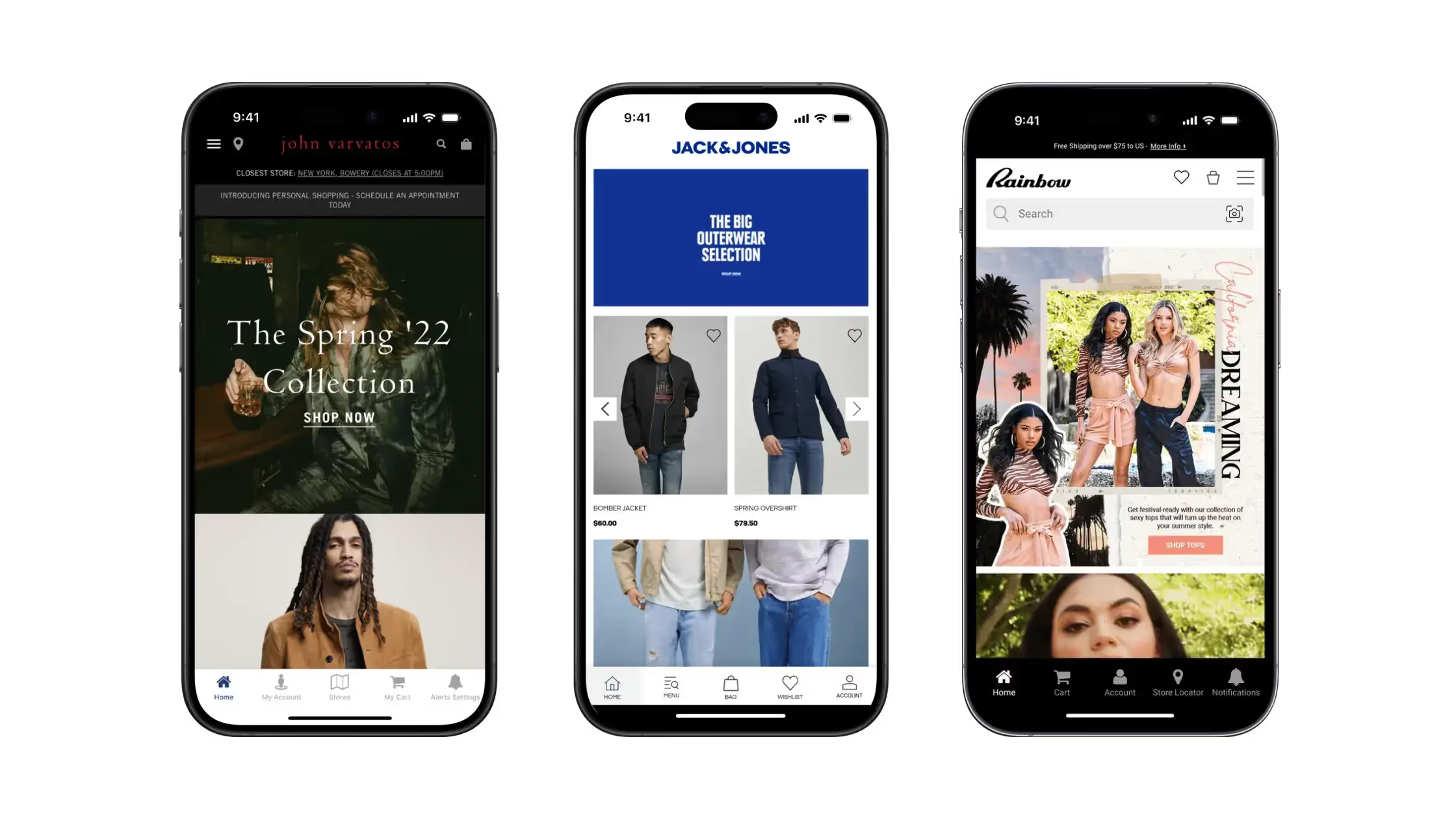
    We’ll give you an in-depth look at the process that companies such as John Varvatos, Rainbow Shops, Bestseller and Perfume.com used to launch mobile apps hassle-free, without compromising on quality, and explain how you can leverage an app to reduce cart abandonment and grow sustainable, long-term revenue for your brand.

  • React vs React Native: Key Differences and Use Cases

    React vs React Native: Key Differences and Use Cases

    Understandably, React and React Native often get confused. People often lump them in together, or struggle to understand just how much is shared and how much is unique between these two development frameworks.

    In this article we’ll clear all this up – explaining the key differences, what kind of projects each framework is best suited for, how interchangeable they are, and any alternative frameworks or platforms that you should consider.

    React vs React Native: Mobile vs Web Framework

    Let’s get right to it. The main difference between React and React Native is that React is a framework for building user interfaces for web applications, while React Native is used for building mobile user interfaces for Android apps and iPhone apps.

    They have a lot of similarities – the syntax is similar, both use JavaScript as a foundation, and both utilize reusable components to help developers build powerful applications efficiently.

    However, despite the similarities, the differences in where your app can be deployed with each framework means it’s essential to understand the distinction between React and React Native before you start building an app or hiring developers.

    What is React?

    React (or React JS, React.Js) is an open-source JavaScript library, used primarily for building front-end interfaces for websites and web apps.

    React JS was created by Facebook, and in its early days was used to build Facebook’s news feed.

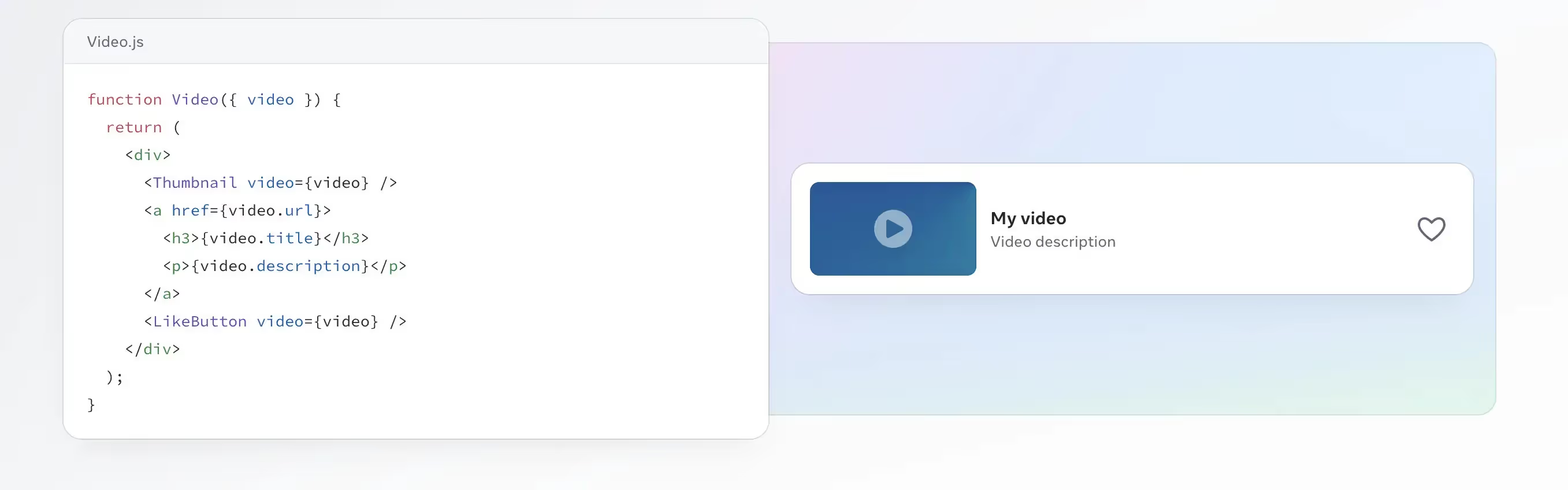
    The main idea of React is to break code down into components, which can be reused and managed independently, increasing scalability and making it easier to build complex user interfaces.

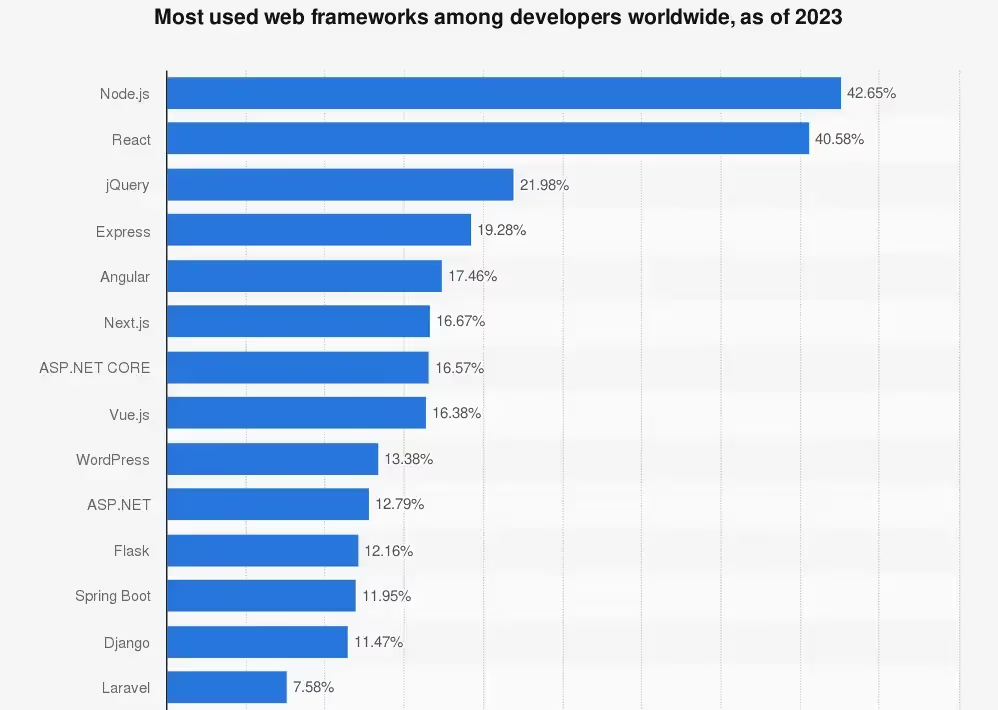
    As of 2023, React was the 2nd most used web framework, according to a worldwide survey of more than 70,000 developers. 40.58% of the respondents said they used React, second only to Node.js.

    React on its own is not a programming language or a full-stack architecture for building web apps. It’s a library that simplifies buidling a user interface of a web app or website, but the actual languages that the app runs on are still the classic HTML, CSS and JavaScript web technologies.

    React today is free and open-source, with an active community of developers working to improve its capabilities.

    A few well-known apps that have used React include Netflix, AirBnb, Codecademy and, of course, Meta’s suite of apps.

    Pros and Cons of React for Web Development

    React is largely considered one of the best, most user-friendly web development frameworks.

    Here’s a summary of the best features of React for web development:

    • React allows fast development and iteration by breaking code down into smaller, reusable components.
    • It utilizes JavaScript, a well-known and widely accessible programming language.
    • React works great for cross-browser, responsive, modern web apps.
    • It has an active community, providing a strong ecosystem for tools, resources, and educational content.

    In terms of cons, there are no major drawbacks to using React for your web app.

    The biggest issue is that it might be complex for anyone who is not already well-versed in JavaScript, particularly as it uses JSX (JavaScript XML), an extension of JavaScript that some feel is more difficult to learn and use.

    React code can become bloated, hurting performance. And since it’s not a full-stack framework, you’ll need to use additional languages and/or frameworks to build a complete web app.

    What is React Native?

    React Native is a JavaScript-based framework used for building mobile applications. In a nutshell, it allows developers to use JavaScript code to create mobile apps that function on multiple operating systems.

    As of 2022, React Native was the 2nd most popular cross-platform mobile framework, behind Flutter.

    React Native is a JavaScript library used in front-end development, as React is. It lets you write JavaScript code to build native app components, that work the same as code written specifically for a certain operating system.

    Like React JS, React Native is free and open source, and was built by Meta (previously Facebook). React Native is used heavily in the Facebook mobile app, and is also used in Microsoft’s mobile applications, the Amazon Shopping app, Bloomberg, Walmart, Discord and many more.

    For a deeper look, check out this ~20 minute talk from Facebook dev Olivia Bishop talking about React Native, and why it was created:

    Is React Native an Alternative to React JS?

    No.

    React and React Native have two distinct use cases. React JS is used for web apps, React Native for mobile apps.

    React Native is more an extension of React. It essentially lets you use React and JavaScript in mobile development, and build a real mobile app without having to learn and write platform-specific code.

    Pros and Cons of React Native for Mobile Development

    The biggest benefit of React Native is that it enables code reuse, for faster development and deployment of native mobile applications, requiring less work to update and maintain.

    With native mobile development, you need to write apps in specific programming languages for each mobile operating system.

    So if you want to make your app available on iPhone and Android devices, you’ll need two separate codebases, one in Java or Kotlin (for Android), and one in Swift or Objective-C (for iOS).

    React Native lets you write code once, in a language that’s likely more familiar to you, and make your app available on both major mobile platforms.

    Here’s a summary of the benefits (as well the disadvantages) of using React Native to create mobile apps:

    • React Native lets you write one set of code that can be deployed on both Android and iOS, instead of building separate native apps for each platform.
    • A single codebase also makes maintenance much easier, allowing you to make updates to your app once, without having to duplicate changes for each OS.
    • React Native is more accessible than native mobile programming languages. It’s fairly straightforward to learn if you’re proficient in JavaScript, and shares a lot of the same syntax with React and JS.
    • Compared to some other cross-platform or hybrid frameworks, React Native gives a more “native” experience, by using native platform APIs rather than webviews.

    There are not a lot of major downsides to React Native. Here are the biggest issues you might face:

    • React Native applications won’t be able to achieve quite the same performance and functionality of fully native mobile applications.
    • Though cheaper than native development, building an app with React Native is still somewhat complex and not exactly cheap.
    • You may run into limitations if you’re looking to build more complex interfaces with React Native.
    • Debugging may be more difficult if you’re not familiar with native code.
    • You’ll still need a separate codebase if you want to ship both mobile and web apps.

    Biggest Differences Between React and React Native

    Summing up the differences between React and React Native:

    • React (aka React JS) is for web apps or websites, React Native is for mobile apps.
    • React Native integrates with native APIs to run on specific operating systems, while React apps require a web browser and additional web technologies (e.g. HTML and CSS) to work.
    • There are some differences in syntax for React vs React Native.
    • React is older than React Native, with the latter based on largely the same syntax as React JS.
    • React has a larger base of users and ecosystem than React Native (as well as wider demand for React developers).

    Cost of Hiring React Developers vs React Native Developers

    How about differences in cost? Is it cheaper to build a React web app, or a React Native mobile app?

    This cost largely depends on the cost of hiring developers proficient in each framework.

    The cost to hire React vs React Native developers is fairly even.

    Development agency Bacancy puts the average cost of a senior React developer in the US at $121-$140 per hour, and the average cost of a senior React Native developer in the US at $100-$150 per hour.

    ZipRecruiter, on the other hand, doesn’t distinguish between the cost of React developers vs React Native developers, giving an average of $129,348 per year or $62 per hour for both – indicating the overlap between both frameworks.

    So, generally, it’s going to be around the same hourly cost to hire a developer for each one. 

    However, if you’re weighing up development costs, you need to consider how long it will take to ship your app. And in most cases, mobile app development is more complex and takes longer (thus costs more) than developing web applications.

    When to Use React Native vs React

    Deciding between React Native and React is simple.

    If your app is meant to be used on mobile, and don’t need a web version, go with React Native.

    Otherwise, if you want to build cross-platform apps that are available on desktop and mobile, React is likely a better choice.

    You will sacrifice a little on mobile user experience, but your app will still be available to mobile users, through the browser.

    You could also build a Progressive Web App (PWA) with React, which provides some of the benefits of a mobile app while still operating within the browser.

    Alternatives to React

    Other front-end JavaScript frameworks include:

    These frameworks serve a similar purpose to React, and some developers might prefer the capabilities, syntax or performance of one of these alternatives over React.

    Alternatives to React Native

    React Native alternatives include cross-platform frameworks such as:

    Some will also mention Expo as an alternative to React Native, as a React-heavy syntax that allows you to publish cross-platform mobile apps. However, Expo is more like an extension of React Native than an actual alternative.

    Other React Native alternatives include hybrid app tools and services, like Vendrux.

    Instead of coding a cross-platform app from scratch, with Vendrux you can convert an existing web app or website into apps for iOS and Android – which can make things a lot easier if you’ve already built an app using React. 

    Is It Easy to Translate a React Web App to a React Mobile App?

    With the similarities between React and React Native, how easy is it to take a React app built for the web and turn it into mobile apps with React Native?

    The answer: not that easy.

    To start with, it’s not possible to just convert your React web app into a React Native app. It’s not like you can click a button or run a couple of lines of code and turn your React code into React Native.

    React and React Native syntax is similar, but one is made for the web, the other made for mobile operating systems.

    If you want to turn your React app into React Native, you’ll need to go through and rewrite your entire codebase, converting React components in to React Native components.

    You might not need to rewrite each character, but still, checking and altering each line of code will be a huge task for any decent-sized app.

    You’re also likely to run into a lot of errors if you just try and edit your code from React to React Native, so it’ll likely be easier if you start again from scratch.

    And bear in mind that once you’ve finished, you’ll have two codebases to maintain, which means twice the effort required each time you make an update (assuming your mobile and web apps are meant to work the same).

    Long story short: there’s no easy way to convert React to React Native, despite their similarities.

    Should You Convert Your React App to Mobile Apps with React Native?

    With what we discussed in the previous section, if you have a React web app and want to make it into a mobile app, React Native is not the ideal solution.

    It’s not the worst – rewriting your code using React Native would be quicker and easier than coding new native iOS and Android apps.

    But it’s much better to convert your app with a method that lets you actually reuse the code you’ve already written and, ideally, maintain a single codebase moving forward.

    Why You Should Use Vendrux, Not React Native, to Convert Your React App to Mobile Apps

    Vendrux is a much more efficient way to convert a React web app to mobile apps.

    • Vendrux actually converts your web app to mobile apps, taking just a couple of weeks, rather than a few months of full-time coding.
    • The cost is a small percentage of what it would cost to pay React Native devs to build a full-featured app.
    • You’ll have a single codebase for web, Android and iOS, which means lower overhead and effort to maintain your apps.
    • All the work is done for you; you don’t need to worry about hiring the right devs or managing the project.
    • Apps have mobile-specific features (such as native mobile push notifications) built in, out of the box.
    • We also publish your apps to the Apple App Store and Google Play Store, saving you more time and effort.

    If you want to save time, money, effort and headspace, Vendrux is the way to go.

    You can go live in weeks, rather than months, starting from $1,499 per month – less than half the cost of one full-time React Native dev.

    The end result will be essentially the same as what you’d get with React Native apps, with much less work and cost to maintain.

    You can check out some case studies of successful Vendrux apps here.

    If you’ve got a website or app built with React (or any other framework or platform), and want to launch a native app for mobile devices, get in touch with us to see how we can help.

    Get a free preview of your app or book a demo now.

  • React Native vs Swift: Best Way to Build iOS Apps in 2026?

    React Native vs Swift: Best Way to Build iOS Apps in 2026?

    React Native and Swift are two of the most common development frameworks for building iOS apps. Both can be used to build incredible, feature-rich apps. But there are some important differences you need to know between the two before you start building your app.

    In this article we’re going to explain all there is to know about React Native vs Swift, including the best use cases for each, how they compare in a number of key areas and, ultimately, which framework you should choose if you’re planning to build an app.

    React Native vs Swift for iOS Development: Key Points to Know

    Before we dive deeper, here’s a summary of the essential facts you should know about React Native and Swift:

    • Swift is a native programming language for iOS.
    • React Native is a cross-platform framework, which uses JavaScript to build apps for iOS and Android.
    • Swift apps are faster, with smoother animations, and have deeper access to native OS features.
    • React Native sacrifices in performance, but most developers will find it easier to use, especially with prior experience in JavaScript (though Swift is still an intuitive language with a syntax that is fairly easy to understand).
    • React Native is built and maintained by Meta, while Swift is built and maintained by Apple.
    __wf_reserved_inherit

    What is Swift?

    Swift is a native programming language for iOS, used to write apps for iPhone, iPad and other Apple devices (including macOS, watchOS and tvOS).

    Swift is the default way to code native iOS apps today. It is built and maintained by iOS, launched in 2014, aimed at being a simpler and more flexible native iOS programming language than its predecessor, Objective-C.

    Swift code is intuitive and easy to read, with syntax similar to popular object-oriented languages like JavaScript and Python, making it relatively straightforward for developers to learn.

    The simplicity of Swift code also makes it easy to build and maintain apps, with its concise syntax easy to understand at a glance.

    What is Swift Used For?

    Swift, as mentioned, is used primarily for iOS applications. This includes:

    • iPhone apps
    • iPad apps
    • macOS apps (desktop apps for Apple computers)
    • Apple Watch apps
    • Apple TV apps
    • Vision Pro apps

    Swift can also be used to write apps for Linux and Windows (though compatibility with these operating systems is much newer and less sophisticated), as well as for server-side development.

    Xcode vs Swift

    When you start looking into iOS development, you’ll see Xcode mentioned a lot. So what is Xcode, and how is it different from Swift?

    Xcode is an integrated development environment (IDE) used for iOS app development. Think of it as a toolkit, or a canvas you use when developing an iOS app.

    You’ll use Xcode to write code, preview what you’ve built, test, debug and ultimately deploy your app to the App Store.

    So, while Swift is the language you’ll use to write your iOS app, Xcode is the environment in which you will write your Swift app. You can use Swift without Xcode, and you can use Xcode without Swift (it supports many other languages, including C++, Objective-C, Objective-C++, Java, AppleScript, Python, Ruby, and C.

    However, if you’re developing a native iOS application, you’re most likely going to be using Xcode and Swift in combination.

    Swift vs SwiftUI

    SwiftUI (or Swift UI) is another term you’ll see used a lot in iOS development.

    SwiftUI is a framework for the Swift language, which makes it easier to build user interfaces. It simplifies building things like UI elements and animations for the front-end of your app, with user-friendly declarative syntax.

    Like Xcode and Swift, SwiftUI and Swift are not “one or the other”. They’re two things that you will use together in the process of building your iOS app.

    Alternative iOS Programming Languages

    What are the other options available to develop native iOS apps?

    The most notable Swift alternative is Objective-C. Objective-C is another object-oriented programming language, and prior to Swift, was the most popular way to code iOS apps.

    Objective-C is generally considered to be more complex and difficult to understand and use than Swift.

    In Stack Overflow’s 2022 developer survey, developers were asked whether they “Loved” or “Dreaded” working with certain programming languages.

    From 1698 responses, 23.44% said they loved Objective-C, while 76.56% dreaded it.

    For Swift, 62.88% of the 3489 responses loved working with it, compared to 37.12% who dreaded it.

    These examples from Codecademy give a brief look at the differences in syntax between Objective-C and Swift, with Swift clearly a much simpler, more concise and more modern way of developing iOS apps.

    __wf_reserved_inherit
    Example Objective-C code snippet
    __wf_reserved_inherit
    A code snippet from Swift performing the same function

    Swift and Objective-C are the only dedicated iOS programming languages, however there are a number of cross-platform or hybrid languages and frameworks that present an alternative to Swift, including Flutter, Ionic, .NET MAUI and React Native.

    What is React Native?

    React Native is a cross-platform mobile app development framework that can be used to build apps for both iOS and Android devices.

    React Native is an extension of React, both built by Meta for use in apps like Facebook and Instagram. 

    The actual programming language behind React Native is JavaScript; React Native is a framework built on top of JavaScript, which gives developers access to native APIs through bridge modules, letting their code interact with the native device OS.

    In simplest terms, you can think of React Native as a way to use JavaScript code and JSX syntax to write mobile applications.

    React Native vs React

    React and React Native are very similar; both are built and maintained by Meta (formerly Facebook), and both are frameworks that help developers build JavaScript-based applications.

    The main difference is that React (also referred to as React JS or React.js) is used for web applications, while React Native is used for mobile apps.

    The syntax is very similar, though not exactly the same. If you have a React web app, you can’t just push a button or copy & paste your code to turn it into a mobile app. But developers with experience using React should be able to quickly and easily pick up React Native and start writing mobile apps.

    Learn more about React and React Native here.

    Is React Native an iOS Programming Language?

    React Native is not a native iOS programming language. However, it is a viable option for building iOS apps.

    Technically, it’s not a programming language, it’s a framework. JavaScript is the programming language used with React Native.

    JavaScript is a web programming language, which in its base form, can only be used with websites/web apps.

    React Native provides a bridge to allow JavaScript to work in different environments, such as mobile operating systems, like iOS and Android OS.

    Whether a React Native iOS App should be a considered a “native” app or not is up for debate. But in practical terms, for low to moderate-complexity use cases, the end user won’t be able to tell the difference between a fully native app and a React Native app.

    Learn more: the difference between Native, Web and Hybrid Apps

    Alternative Cross-Platform Frameworks

    React Native is one of many cross-platform app development frameworks that are gaining popularity today, for their ability to cut down the time, effort and cost required to build and maintain mobile apps, compared to native app development.

    Other popular cross-platform development frameworks include:

    • Flutter
    • .NET MAUI (formerly known as Xamarin)
    • Ionic
    • NativeScript

    Learn more:

    React Native vs Swift in 7 Key Areas

    Now we know what Swift is and what React Native is. But how do they compare? Is there a clear winner when it comes to developing iOS apps? 

    Let’s explore that now and compare React Native vs Swift in a number of important categories, from performance, to cost, to ease of use.

    Performance

    If you’re looking for fast, smooth, native performance on iOS, Swift is definitely the winner.

    A fully native language like Swift is naturally going to perform better than a cross-platform framework. The language is made specifically for the OS and Apple devices, and thus lets you build smoother and faster apps.

    That’s not to say that React Native apps perform poorly. With simpler apps, there may not be a noticeable difference, but it will become more clear the more dynamic and graphic-dense the application becomes.

    Winner: Swift

    Access to Native Features

    Swift, again, provides better access and integration with native device features.

    If your app involves heavy use of things like the camera, GPS, sensors, bluetooth and biometric features (e.g. FaceID, fingerprint), Swift is the better choice.

    React Native has some access to device features via bridge modules, but integration is not on the level of a fully native app.

    Winner: Swift

    Development Time

    There’s not a huge difference in the speed it takes to build an app using Swift or React Native. Both are quite intuitive and modern programming frameworks, well-maintained and optimized to allow developers to ship apps quickly and efficiently.

    We give a slight edge to Swift here, as the development experience is optimized fully for iOS, and Xcode/SwiftUI are great tools to help speed up development and deployment.

    That is assuming you’re just looking to build an iOS app. If your goal is to build both iOS and Android apps, React Native becomes quicker, as you don’t need to duplicate as much effort as you would if you were to build two completely separate native apps.

    Winner: Swift

    Developer Cost & Availability

    If you’re looking to hire developers to build your app, it will be cheaper and easier to find developers with React Native.

    React Native is a more versatile framework, used in a wider range of projects. The higher demand for React Native developers means there’s more developers who specialize in this area.

    With more talent available, the cost of React Native developers is generally a little lower than Swift developers.

    Winner: React Native

    Community & Resources

    Both frameworks are well-maintained and supported by two of the biggest names in tech (Meta and Apple). As such, they have a lot of resources to help developers, with in-depth, excellent documentation available.

    In terms of documentation, they’re more or less even, but React Native has a wider community of developers and more third-party resources available, so they get the slight edge here.

    Winner: React Native

    Learning Curve

    If you need to learn either language, the learning curve will likely be faster with React Native.

    This is because it’s built on JavaScript, the world’s most widely used programming language, it’s a lot more likely that you (or developers on your team) will already have a foundational understanding of React Native, due to familiarity with JavaScript.

    The learning curve for Swift is not massive. Swift is intuitive and easy to learn, more so if you are already proficient in object-oriented languages like JavaScript or Python. But it won’t be quite as fast as going from JS to React Native. 

    Winner: React Native

    Code Reusability

    If you want to reuse your code on multiple platforms, React Native is the runaway winner.

    This is the biggest “flaw” (if we can call it that) with Swift. The apps you build can only be built for iOS.

    If you want to enter the Google Play Store and launch on Android too (which you likely will, considering Android has approximately 70% market share among all mobile operating systems worldwide), you would need to rebuild your app completely in another programming language.

    With React Native, you use one language/framework for both Android and iOS.

    It’s still not the ideal solution to capture users on as many different platforms as possible (we’ll go into this in more detail shortly), but it’s much better for cross-platform coverage than Swift.

    Winner: React Native

    Is React Native Better than Swift?

    Based on the categories above, we had React Native winning four, and Swift winning three. So does that mean that React Native is a better way to build apps than Swift?

    Not necessarily – it depends on your goals, the resources you have available, and your prior technical experience.

    Overall, we would say that React Native is better in a wider range of situations. It’s more likely that the value it brings in cross-platform coverage and familiarity will be of use to you than the better native performance and device integration of Swift.

    But again, the choice between Swift vs React Native for your project depends on various factors.

    Choose React Native If:

    • You want to build apps for iOS and Android.
    • You don’t need a lot of native functionality or a high level of graphic performance.
    • You or your team is already familiar with/proficient in JavaScript (or even better, React).
    • You need to hire developers from outside your company to build the app.

    Choose Swift If:

    • You’re only building apps for iOS.
    • You want to launch your app on platforms like watchOS or tvOS as well.
    • Native performance and device integrations are a key component of your app.

    Why Vendrux Could Be a Better Alternative to React Native or Swift

    Swift and React Native are both excellent ways to build mobile apps. But if you have a web presence as well, both frameworks will involve a lot of duplication of effort, as you’ll be left with multiple platforms, completely separate, that you need to maintain and update.

    Let’s say you have a web app, or a website (like an online store). If you were to expand this into a mobile app using Swift or React Native, you’ll need to rebuild your web presence from scratch in the app, and then maintain two codebases.

    Any time you make an update or a change to your website, you’ll need to make that change again in your app’s codebase, which adds significant overhead and complexity to your workflow.

    In this case, Vendrux can be a much better solution.

    Vendrux converts your website to mobile apps, which can run on iOS and Android, all from the same codebase.

    The apps automatically update when your site updates. You only have one platform to manage, despite making your app available in the browser and on multiple operating systems.

    This allows you to save $100k+ per year in maintenance; not to mention six figures saved in initial development costs.

    “We literally had a dev team of about 30 people. We were able to cut the entire head count down to just a couple of core people working on our web tech stack.”

    Jordan Edelson from TradeZing

    If you need in-depth native integrations, you may still need to go the native route. But for the vast majority of apps, all you need is essentially what your app or website already does in the browser, with some small tweaks made, then deployed as a mobile app.

    That’s what we do for you, allowing you to ship iOS and Android apps for less cost, with lower overhead, all in less than a month.

    Build Synchronized Apps for the Web, iOS and Android with Vendrux

    __wf_reserved_inherit
    A few examples of native apps built with Vendrux

    If you’re deciding between Swift and React Native, first consider whether your project really needs a fully native app.

    In most cases, if you already have a website or web app, you’ll be able to save a huge amount of time and money by simply converting your site into an app with Vendrux.

    It works no matter the tech stack or platform your website it built on, and will give you 95% of what you’d get if you went through the long and complicated process of building a custom app from scratch.

    We’ve built more than 2,000 apps in our 10+ years in the industry, including apps for numerous high-revenue brands, in ecommerce, publishing, SaaS and more.

    If you want to learn more, check out our free preview tool to get a preview of your site as an app, or get in touch with us now and book a demo to discuss your project with one of our app development experts.

  • React Native vs Native Development (How to Save 90% of the Cost of Building an App)

    React Native vs Native Development (How to Save 90% of the Cost of Building an App)

    One of the most important decisions when building a mobile app is choosing your technology stack. Picking the wrong programming language or framework for your app can set you back a massive amount of time and money, and cause serious headaches over the lifecycle of your app.

    Earlier in the history of mobile apps, you had to use programming languages fully native to specific operating systems to build your apps. But in recent years, cross-platform frameworks like React Native have shaken up the mobile app landscape, providing a real alternative to native development.

    In this article, we’ll compare React Native vs native mobile app development, and explain the benefits of each path, as well as giving our opinion on the best way to create a mobile app today.

    Overview of React Native vs Native Development

    React Native and native app development are two ways to create mobile apps that users can download and install from the app stores.

    When we talk about native development languages, we’re talking about languages that are native to specific operating systems.

    For iOS, that means Swift or Objective-C. For Android apps, that means Java or Kotlin.

    Swift is the programming language of choice for iOS apps
    Kotlin is the official development language for Android

    The issue is that apps built using native app development languages can only run on the platform they are native to. So a Swift app can run on iOS, but not Android, while an app built with Java and Kotlin can run on Android, but not iOS.

    To build native apps for both platforms, you’ll need two separate codebases.

    Enter cross-platform frameworks like React Native.

    React Native, built and maintained by Meta

    React Native is a JavaScript framework for mobile apps. It’s an extension of the React framework, which is a component-based framework for building interactive web apps.

    The React Native framework uses the same approach, and a similar syntax, to allow developers to build mobile apps using JavaScript.

    On top of that, React Native (along with other cross-platform frameworks, like Flutter and Ionic) lets you use the same language/framework for both Android and iOS, making it more efficient if you plan to launch apps for both platforms.

    React Native offers a lot of benefits over native app development, but there are upsides to building natively as well.

    Read on and we’ll breakdown the selling points for each approach to building your app.

    Benefits of React Native App Development

    The benefits of React Native include:

    • A lower investment in cost and time.
    • Less complexity in your tech stack.
    • Lower learning curve/easier to find developers.
    • Simpler maintenance and less overhead.
    • Less work required if you want to reuse your web code.

    Let’s dive deeper into the benefits now.

    One Framework for iOS and Android

    In most cases, when you’re building a mobile app, you plan to launch for both Android and iOS.

    The biggest selling point of cross-platform frameworks like React Native is the ability to use a single framework/language to create apps for both platforms.

    React Native’s tagline is “Learn once, write anywhere.” Though you may have to make some changes to your code for iOS and Android apps, you can do it all with the same framework.

    That means more consistency between apps, the same development team can be responsible for both, and you can reuse a lot of the code you write, instead of building it in two completely separate languages.

    Save Time and Money

    The ability to reuse code and use just one framework lets you save a lot of time and money in building your mobile app.

    With React Native, there’s less duplication of effort, since you can share components across both apps. That means less development time, and less development time means lower cost.

    Add the fact that you can use one team to code both apps, and you’ll see even greater savings in cost and time.

    With native development, you’ll need to manage the iOS and Android teams separately. That means repeating instructions, double the code review, and many small increases in time due to the coordination effort that add up over the course of your development timetable.

    The React Native development process, using one team for both apps, is much more efficient and streamlined.

    Overall, using React Native might not cut your development time and cost exactly in half, but close to it, which with the cost of mobile development could easily save you six figures for the first version of your app.

    A More Accessible Mobile Framework

    Android and iOS app development are very specialized areas. Your average web developer won’t be able to jump in and code native mobile apps.

    You’ll need to cast a wide net for talent, and may end up paying a premium for a proficient and specialized mobile app developer.

    React Native, on the other hand, at its core is just JavaScript (arguably the world’s most popular programming language, used by 63% of respondents in Stack Overflow’s developer survey – 10% more than HTML and CSS).

    For developers with experience in JavaScript, React and JSX, learning React Native is a cinch.

    Even for developers who haven’t used React before, but are proficient in JavaScript, the learning curve for React Native will be minimal.

    That means two things.

    1. There’s a large pool of developers available to hire from.
    2. If you have web development experience, or you have web developers on staff, you might be able to code your apps without hiring anyone new.

    This is just another element that contributes to React Native’s lower cost, time investment and complexity compared to native development.

    A Better Development Experience with Hot Reloading

    React Native supports hot reloading, which makes for a smoother experience when iterating and working on code.

    Hot reloading means you can see code changes take effect in the UI in real time. If you change an element’s appearance or function, you’ll be able to preview your changes immediately, keeping your current state.

    Without hot reload, you need to restart the app, refreshing the app’s state in the process. While it might not be a big difference if you’re making a small change, the difference becomes significant when you’re making constant iterations and experimenting with different styles, trying to get the look and feel of your app just right.

    Hot reloading is certainly a quality of life improvement rather than a make or break feature, but it’s another thing that contributes to a better experience for developers.

    Maintenance is Quicker and Easier

    Maintaining React Native apps and making fixes is quicker and easier than with native apps (assuming you have different codebases for iOS and Android).

    Hot reloading helps in this case, as does having one framework for each of your mobile apps. Whether you’re debugging, shipping new features or making routine updates and refactoring, there’s less duplication of effort because you don’t have to repeat the process in two different languages.

    Lower Overhead Cost

    A smoother maintenance workflow, plus the ability to use the same development team for both apps, means you’ll spend less on overhead and maintenance costs over the lifecycle of your app.

    Over time, you’ll see these savings seriously add up. App maintenance costs can run into six figures yearly, and so by reducing the development hours spent maintaining your apps and  requiring fewer staff on payroll/retainer, you could save five figures each year.

    Better for Converting & Reusing Web Components

    Finally, React Native is likely to be a better option than native development if you’re converting a website into mobile apps, or you want to reuse some of your web code/functionality in the apps.

    Since React Native is based on JavaScript, it could well be fairly straightforward to translate your web features to your mobile apps. 

    React Native may not be the best option for this, however (as we’ll expand on soon). It will still take a lot of time, even for a straight conversion of React to React Native. But there’s definitely less rebuilding than if you were turning a web app into Swift/Java/Kotlin apps.

    Learn More: React vs React Native – Differences and Use Cases

    Downsides of React Native (Where Native Development is Better)

    The benefits of React Native are impressive, but looking at the entire picture, there are some downsides to choosing React Native for your project (or simply areas where native development is superior).

    In general, fully native apps are:

    • Superior performance.
    • Easier to integrate with device features.
    • Higher quality in terms of UX and UI.
    • Easier to build if you’re building for a single OS.

    Let’s examine the benefits of native mobile development in more detail.

    Performance

    React Native forces you to make some sacrifices for the convenience of building for multiple platforms at once. One of those sacrifices is performance.

    React Native relies on “bridges” to compile JavaScript into native components and allow JavaScript code to interact with and work on a mobile phone’s operating system.

    This can result in periodic slowness or lag, and general performance issues, increasing depending on the size and scope of your app.

    Native apps use native programming languages and native APIs, which allow them to run faster and smoother.

    Access to Native Device Features

    Native development also allows you fully integrate with the user’s device, and utilize the device’s hardware in building features for your app.

    This includes the ability to tap into the camera, microphone, accelerometer, GPS, bluetooth, biometric scanners, etc.

    React Native does provide native modules that allow some access to native APIs and native features, and the React Native community is constantly coming out with new third-party libraries that extend the potential of what you can do with React Native code.

    However, access to native OS features will never be as comprehensive nor as straightforward as it is with native technologies and native applications.

    Marginal UI and UX Gains

    If you’re using React Native, over the course of developing your app, you may find a lot of small touches here and there where you can’t get either the user interface or the user experience quite like you want it.

    It might be 95% perfect on Android and 95% perfect on iOS, but the sacrifices React Native has to make to work on Android and iOS devices prevent you from getting everything pixel-perfect.

    This comes down to much of what we discussed in the previous sections; React Native’s reliance on bridges and second-hand access to native APIs.

    Native programming languages are focused specifically on building for a single operating system, and building for iPhone or Android devices, so it stands to reason that they’ll be tied more strictly to the UI standards of the platform, and allow you to get your app perfect (or closer to it than with React Native).

    Building for a Single Platform

    Native development is generally going to be easier if you’re only building for one platform/operating system.

    Let’s say, for example, you’re building an app for internal use in your company, and your company devices are on Android. You don’t need an iPhone app, so many of the benefits of cross-platform are null and void.

    Since you’re only building for Android, you’ll likely have a better experience developing your app with a language built specifically for the Android OS, as opposed to one that’s trying to spread itself over multiple bases.

    Maybe you’ve decided that reaching iPhone users is enough, or perhaps you’re focused on markets like Africa, Asia or South America, where Android has >80% market share.

    In any of these situations, the benefits of native app development become more significant in comparison to React Native’s.

    Can You Develop High-Quality Apps with React Native?

    The summary you might take away from the pros and cons listed above is that React Native is more convenient, cheaper and faster, but lacks performance and end product quality in comparison to native app development.

    So you might be thinking, “I want my app to be the best it can be, am I limiting myself too much by going with React Native?”

    While the consensus is that React Native is better for simpler apps, and there are some performance limitations compared to fully native development, that doesn’t mean you can’t make successful apps and draw millions of users with React Native.

    Just look at their showcase page, and the huge names that use React Native, including:

    • Meta
    • Microsoft
    • Amazon 
    • Shopify
    • Discord
    • Bloomberg
    • Walmart
    • Tesla
    • The NFL
    • Playstation

    Would these apps be better if they were built with fully native languages? Probably.

    But the incredibly successful businesses behind these apps decided the small payoff in performance and functionality was worth it for the improvements to their workflow, greater efficiency and lower cost.

    React Native vs Native: Which to Choose?

    There’s no “one size fits all” answer here. There’s a time and a place and a situation for React Native, and so too for native development.

    In general, we’d push you to choose React Native over fully native development. This is assuming you’re building a commercial application, with the intention of reaching as many users as possible, and thus launching on both Android and iOS platforms.

    In this case, the time, money, effort and complexity you save with React Native is a big deal. You’ll find it’s not only simpler to launch React Native apps, but they’re also much simpler to maintain.

    The small tradeoff in performance and functionality is usually worth it.

    You might opt for building a native mobile app though if your project relies on device features and a deep integration with the device’s OS, or if you’re dealing with a complex app where the performance difference will be more easily noticeable.

    Ultimately it’s your call, depending on the size and scope of your project and the resources you have at your disposal.

    How to Save >90% of the Cost of App Development

    React Native is a great way to save time and money on both the launch and maintenance of your app.

    But if you’re converting a website or web app into a mobile app, the project still won’t be cheap, and it’ll come with its share of headaches.

    You can save a lot of this money, and virtually all the headaches, with Vendrux.

    Vendrux is a tech-enabled service to turn websites into native mobile apps. We use your website’s code to create your apps, together with elements of native code to ship apps that feel native, but essentially still run from a single codebase for web, iOS and Android.

    A selection of the successful, high-revenue native apps we’ve built with Vendrux

    You’ll save 5-6 figures on the initial cost, plus a similar amount each year on maintenance. There’s no need to hire or manage iOS and Android developers, no need to rebuild anything or learn a new language or framework. Our team does everything for you.

    “If we had unlimited time and money, we would probably go for a custom native app, but that is half a million to a million a year to maintain.”
    — David Cost,
    Rainbow Shops

    How Vendrux Works

    If your website is already mobile-friendly, and your app is meant to reflect your web experience, rather than doing something drastically different, you’re much closer to launching your mobile app than you might expect.

    All it takes is three easy steps:

    1. Make sure your web app or website is fast, responsive and mobile-friendly.
    2. Book a demo with our team to discuss your project, get an interactive demo of your app, and outline the next steps to turn your website into mobile apps.
    3. Hand it off to us. We’ll do all the work to build your app, test it, and even submit it to the app stores for publishing (we guarantee approval too).

    You can be live in the app stores in less than a month, for minimal effort, and less than four figures invested upfront.

    Compare that to React Native. Though you might be able to reuse some elements of your web code, you still need to comb through your code, compile these elements in React Native, and build your mobile apps’ UI from the ground up.

    Any time you make changes, fixes, or ship new features, the process will be more drawn out, having to repeat steps and ensure consistency between multiple native platforms.

    You may need to hire React Native developers, and you’ll need to keep developers on staff for updates and maintenance.

    It’s all so much easier, cheaper and quicker with Vendrux. You just maintain your website like you normally do, and your apps will update automatically, with no duplication of effort.

    Ready? Get started with a demo call now.

    Picking the Right Way to Build Your Mobile App

    It’s important to decide on the right tech stack for your app before you get started. Otherwise, you face a potential nightmare some way down the road, partway through development or perhaps even once a version of your app is live, if you decide you need to migrate to another framework.

    We gave our opinion on React Native vs Native development (if you choose the cross-platform route, there’s also Flutter to consider – we compared these two frameworks here). It’s up to you to decide which fits best for you.

    If you’re going from web app to mobile app, Vendrux is a better option than React Native, Swift, Kotlin, Java or any other mobile framework.

    You’ve already built a great mobile experience on your website, and Vendrux allows you to skip months of rebuilding, hundreds of thousands of dollars in development costs, and daily headaches from trying to manage multiple platforms at once.

    You get great Android and iOS apps in less than a month, for minimal expense, all while maintaining a single codebase.

    Get started with a free demo now.

  • React Native vs Native Development (How to Save 90% of the Cost of Building an App)

    React Native vs Native Development (How to Save 90% of the Cost of Building an App)

    One of the most important decisions when building a mobile app is choosing your technology stack. Picking the wrong programming language or framework for your app can set you back a massive amount of time and money, and cause serious headaches over the lifecycle of your app.

    Earlier in the history of mobile apps, you had to use programming languages fully native to specific operating systems to build your apps. But in recent years, cross-platform frameworks like React Native have shaken up the mobile app landscape, providing a real alternative to native development.

    In this article, we’ll compare React Native vs native mobile app development, and explain the benefits of each path, as well as giving our opinion on the best way to create a mobile app today.

    Overview of React Native vs Native Development

    React Native and native app development are two ways to create mobile apps that users can download and install from the app stores.

    When we talk about native development languages, we’re talking about languages that are native to specific operating systems.

    For iOS, that means Swift or Objective-C. For Android apps, that means Java or Kotlin.

    Swift is the programming language of choice for iOS apps
    Kotlin is the official development language for Android

    The issue is that apps built using native app development languages can only run on the platform they are native to. So a Swift app can run on iOS, but not Android, while an app built with Java and Kotlin can run on Android, but not iOS.

    To build native apps for both platforms, you’ll need two separate codebases.

    Enter cross-platform frameworks like React Native.

    React Native, built and maintained by Meta

    React Native is a JavaScript framework for mobile apps. It’s an extension of the React framework, which is a component-based framework for building interactive web apps.

    The React Native framework uses the same approach, and a similar syntax, to allow developers to build mobile apps using JavaScript.

    On top of that, React Native (along with other cross-platform frameworks, like Flutter and Ionic) lets you use the same language/framework for both Android and iOS, making it more efficient if you plan to launch apps for both platforms.

    React Native offers a lot of benefits over native app development, but there are upsides to building natively as well.

    Read on and we’ll breakdown the selling points for each approach to building your app.

    Benefits of React Native App Development

    The benefits of React Native include:

    • A lower investment in cost and time.
    • Less complexity in your tech stack.
    • Lower learning curve/easier to find developers.
    • Simpler maintenance and less overhead.
    • Less work required if you want to reuse your web code.

    Let’s dive deeper into the benefits now.

    One Framework for iOS and Android

    In most cases, when you’re building a mobile app, you plan to launch for both Android and iOS.

    The biggest selling point of cross-platform frameworks like React Native is the ability to use a single framework/language to create apps for both platforms.

    React Native’s tagline is “Learn once, write anywhere.” Though you may have to make some changes to your code for iOS and Android apps, you can do it all with the same framework.

    That means more consistency between apps, the same development team can be responsible for both, and you can reuse a lot of the code you write, instead of building it in two completely separate languages.

    Save Time and Money

    The ability to reuse code and use just one framework lets you save a lot of time and money in building your mobile app.

    With React Native, there’s less duplication of effort, since you can share components across both apps. That means less development time, and less development time means lower cost.

    Add the fact that you can use one team to code both apps, and you’ll see even greater savings in cost and time.

    With native development, you’ll need to manage the iOS and Android teams separately. That means repeating instructions, double the code review, and many small increases in time due to the coordination effort that add up over the course of your development timetable.

    The React Native development process, using one team for both apps, is much more efficient and streamlined.

    Overall, using React Native might not cut your development time and cost exactly in half, but close to it, which with the cost of mobile development could easily save you six figures for the first version of your app.

    A More Accessible Mobile Framework

    Android and iOS app development are very specialized areas. Your average web developer won’t be able to jump in and code native mobile apps.

    You’ll need to cast a wide net for talent, and may end up paying a premium for a proficient and specialized mobile app developer.

    React Native, on the other hand, at its core is just JavaScript (arguably the world’s most popular programming language, used by 63% of respondents in Stack Overflow’s developer survey – 10% more than HTML and CSS).

    For developers with experience in JavaScript, React and JSX, learning React Native is a cinch.

    Even for developers who haven’t used React before, but are proficient in JavaScript, the learning curve for React Native will be minimal.

    That means two things.

    1. There’s a large pool of developers available to hire from.
    2. If you have web development experience, or you have web developers on staff, you might be able to code your apps without hiring anyone new.

    This is just another element that contributes to React Native’s lower cost, time investment and complexity compared to native development.

    A Better Development Experience with Hot Reloading

    React Native supports hot reloading, which makes for a smoother experience when iterating and working on code.

    Hot reloading means you can see code changes take effect in the UI in real time. If you change an element’s appearance or function, you’ll be able to preview your changes immediately, keeping your current state.

    Without hot reload, you need to restart the app, refreshing the app’s state in the process. While it might not be a big difference if you’re making a small change, the difference becomes significant when you’re making constant iterations and experimenting with different styles, trying to get the look and feel of your app just right.

    Hot reloading is certainly a quality of life improvement rather than a make or break feature, but it’s another thing that contributes to a better experience for developers.

    Maintenance is Quicker and Easier

    Maintaining React Native apps and making fixes is quicker and easier than with native apps (assuming you have different codebases for iOS and Android).

    Hot reloading helps in this case, as does having one framework for each of your mobile apps. Whether you’re debugging, shipping new features or making routine updates and refactoring, there’s less duplication of effort because you don’t have to repeat the process in two different languages.

    Lower Overhead Cost

    A smoother maintenance workflow, plus the ability to use the same development team for both apps, means you’ll spend less on overhead and maintenance costs over the lifecycle of your app.

    Over time, you’ll see these savings seriously add up. App maintenance costs can run into six figures yearly, and so by reducing the development hours spent maintaining your apps and  requiring fewer staff on payroll/retainer, you could save five figures each year.

    Better for Converting & Reusing Web Components

    Finally, React Native is likely to be a better option than native development if you’re converting a website into mobile apps, or you want to reuse some of your web code/functionality in the apps.

    Since React Native is based on JavaScript, it could well be fairly straightforward to translate your web features to your mobile apps. 

    React Native may not be the best option for this, however (as we’ll expand on soon). It will still take a lot of time, even for a straight conversion of React to React Native. But there’s definitely less rebuilding than if you were turning a web app into Swift/Java/Kotlin apps.

    Learn More: React vs React Native – Differences and Use Cases

    Downsides of React Native (Where Native Development is Better)

    The benefits of React Native are impressive, but looking at the entire picture, there are some downsides to choosing React Native for your project (or simply areas where native development is superior).

    In general, fully native apps are:

    • Superior performance.
    • Easier to integrate with device features.
    • Higher quality in terms of UX and UI.
    • Easier to build if you’re building for a single OS.

    Let’s examine the benefits of native mobile development in more detail.

    Performance

    React Native forces you to make some sacrifices for the convenience of building for multiple platforms at once. One of those sacrifices is performance.

    React Native relies on “bridges” to compile JavaScript into native components and allow JavaScript code to interact with and work on a mobile phone’s operating system.

    This can result in periodic slowness or lag, and general performance issues, increasing depending on the size and scope of your app.

    Native apps use native programming languages and native APIs, which allow them to run faster and smoother.

    Access to Native Device Features

    Native development also allows you fully integrate with the user’s device, and utilize the device’s hardware in building features for your app.

    This includes the ability to tap into the camera, microphone, accelerometer, GPS, bluetooth, biometric scanners, etc.

    React Native does provide native modules that allow some access to native APIs and native features, and the React Native community is constantly coming out with new third-party libraries that extend the potential of what you can do with React Native code.

    However, access to native OS features will never be as comprehensive nor as straightforward as it is with native technologies and native applications.

    Marginal UI and UX Gains

    If you’re using React Native, over the course of developing your app, you may find a lot of small touches here and there where you can’t get either the user interface or the user experience quite like you want it.

    It might be 95% perfect on Android and 95% perfect on iOS, but the sacrifices React Native has to make to work on Android and iOS devices prevent you from getting everything pixel-perfect.

    This comes down to much of what we discussed in the previous sections; React Native’s reliance on bridges and second-hand access to native APIs.

    Native programming languages are focused specifically on building for a single operating system, and building for iPhone or Android devices, so it stands to reason that they’ll be tied more strictly to the UI standards of the platform, and allow you to get your app perfect (or closer to it than with React Native).

    Building for a Single Platform

    Native development is generally going to be easier if you’re only building for one platform/operating system.

    Let’s say, for example, you’re building an app for internal use in your company, and your company devices are on Android. You don’t need an iPhone app, so many of the benefits of cross-platform are null and void.

    Since you’re only building for Android, you’ll likely have a better experience developing your app with a language built specifically for the Android OS, as opposed to one that’s trying to spread itself over multiple bases.

    Maybe you’ve decided that reaching iPhone users is enough, or perhaps you’re focused on markets like Africa, Asia or South America, where Android has >80% market share.

    In any of these situations, the benefits of native app development become more significant in comparison to React Native’s.

    Can You Develop High-Quality Apps with React Native?

    The summary you might take away from the pros and cons listed above is that React Native is more convenient, cheaper and faster, but lacks performance and end product quality in comparison to native app development.

    So you might be thinking, “I want my app to be the best it can be, am I limiting myself too much by going with React Native?”

    While the consensus is that React Native is better for simpler apps, and there are some performance limitations compared to fully native development, that doesn’t mean you can’t make successful apps and draw millions of users with React Native.

    Just look at their showcase page, and the huge names that use React Native, including:

    • Meta
    • Microsoft
    • Amazon 
    • Shopify
    • Discord
    • Bloomberg
    • Walmart
    • Tesla
    • The NFL
    • Playstation

    Would these apps be better if they were built with fully native languages? Probably.

    But the incredibly successful businesses behind these apps decided the small payoff in performance and functionality was worth it for the improvements to their workflow, greater efficiency and lower cost.

    React Native vs Native: Which to Choose?

    There’s no “one size fits all” answer here. There’s a time and a place and a situation for React Native, and so too for native development.

    In general, we’d push you to choose React Native over fully native development. This is assuming you’re building a commercial application, with the intention of reaching as many users as possible, and thus launching on both Android and iOS platforms.

    In this case, the time, money, effort and complexity you save with React Native is a big deal. You’ll find it’s not only simpler to launch React Native apps, but they’re also much simpler to maintain.

    The small tradeoff in performance and functionality is usually worth it.

    You might opt for building a native mobile app though if your project relies on device features and a deep integration with the device’s OS, or if you’re dealing with a complex app where the performance difference will be more easily noticeable.

    Ultimately it’s your call, depending on the size and scope of your project and the resources you have at your disposal.

    How to Save >90% of the Cost of App Development

    React Native is a great way to save time and money on both the launch and maintenance of your app.

    But if you’re converting a website or web app into a mobile app, the project still won’t be cheap, and it’ll come with its share of headaches.

    You can save a lot of this money, and virtually all the headaches, with Vendrux.

    Vendrux is a tech-enabled service to turn websites into native mobile apps. We use your website’s code to create your apps, together with elements of native code to ship apps that feel native, but essentially still run from a single codebase for web, iOS and Android.

    A selection of the successful, high-revenue native apps we’ve built with Vendrux

    You’ll save 5-6 figures on the initial cost, plus a similar amount each year on maintenance. There’s no need to hire or manage iOS and Android developers, no need to rebuild anything or learn a new language or framework. Our team does everything for you.

    “If we had unlimited time and money, we would probably go for a custom native app, but that is half a million to a million a year to maintain.”
    — David Cost,
    Rainbow Shops

    How Vendrux Works

    If your website is already mobile-friendly, and your app is meant to reflect your web experience, rather than doing something drastically different, you’re much closer to launching your mobile app than you might expect.

    All it takes is three easy steps:

    1. Make sure your web app or website is fast, responsive and mobile-friendly.
    2. Book a demo with our team to discuss your project, get an interactive demo of your app, and outline the next steps to turn your website into mobile apps.
    3. Hand it off to us. We’ll do all the work to build your app, test it, and even submit it to the app stores for publishing (we guarantee approval too).

    You can be live in the app stores in less than a month, for minimal effort, and less than four figures invested upfront.

    Compare that to React Native. Though you might be able to reuse some elements of your web code, you still need to comb through your code, compile these elements in React Native, and build your mobile apps’ UI from the ground up.

    Any time you make changes, fixes, or ship new features, the process will be more drawn out, having to repeat steps and ensure consistency between multiple native platforms.

    You may need to hire React Native developers, and you’ll need to keep developers on staff for updates and maintenance.

    It’s all so much easier, cheaper and quicker with Vendrux. You just maintain your website like you normally do, and your apps will update automatically, with no duplication of effort.

    Ready? Get started with a demo call now.

    Picking the Right Way to Build Your Mobile App

    It’s important to decide on the right tech stack for your app before you get started. Otherwise, you face a potential nightmare some way down the road, partway through development or perhaps even once a version of your app is live, if you decide you need to migrate to another framework.

    We gave our opinion on React Native vs Native development (if you choose the cross-platform route, there’s also Flutter to consider – we compared these two frameworks here). It’s up to you to decide which fits best for you.

    If you’re going from web app to mobile app, Vendrux is a better option than React Native, Swift, Kotlin, Java or any other mobile framework.

    You’ve already built a great mobile experience on your website, and Vendrux allows you to skip months of rebuilding, hundreds of thousands of dollars in development costs, and daily headaches from trying to manage multiple platforms at once.

    You get great Android and iOS apps in less than a month, for minimal expense, all while maintaining a single codebase.

    Get started with a free demo now.

  • React Native vs Kotlin: Full Guide for Android App Development

    React Native vs Kotlin: Full Guide for Android App Development

    React Native and Kotlin are two of the most popular ways to develop Android apps. Both allow you to build fast, performant, feature-rich applications, with modern, readable syntaxes that are easy to use.

    So which one should you choose for your project? Read on and we’ll break down React Native and Kotlin in detail, and explain why you should choose one over the other.

    What is React Native?

    React Native is an open-source JavaScript framework, developed by Facebook and released in 2015.

    Its tagline is “Learn once, write anywhere.” The idea is to allow developers to use JavaScript to write applications for iOS and Android devices, eliminating the need for multiple codebases in multiple programming languages.

    React Native code snippet, from https://reactnative.dev/

    React Native apps are able to deliver like-native performance; not on the same level as a fully native app, but the framework provides native modules and native UI components that replicate, to a degree, the look and feel of a native app.

    The framework has a large and active community, is actively maintained by Meta, and is used in many high-profile mobile apps, including Facebook, Skype and Instagram.

    What is Kotlin?

    Kotlin is a native programming language for the Android operating system. It’s open-source, developed and maintained by JetBrains, released in 2016.

    Kotlin is currently the official language for Android app development. It’s a statically typed, object-oriented, functional programming language, with a modern, concise and readable syntax.

    Example of Kotlin code,  from https://kotlinlang.org/

    Kotlin was developed to improve on a number of aspects from Java (not to be confused with JavaScript), which used to be the preferred language for Android developers.

    Many consider Kotlin to be a simpler and more modern language than Java. The two languages are, however, interoperable, meaning Java code and Kotlin code can be used together.

    Kotlin’s ecosystem is steadily growing, with support from Google, and large companies such as McDonalds, Adobe, Forbes and Philips all using it in their apps.

    Key Differences Between React Native and Kotlin

    We know a little bit about React Native and Kotlin now, so let’s dig deeper into the differences between these two mobile app development frameworks.

    Cross-Platform vs Android

    Probably the most notable difference is that React Native is a cross-platform development framework, which can be used to build apps for both Android and iOS devices.

    Cross-platform frameworks cut down development time and effort, as well as maintenance load, by requiring less duplication of work and a smaller team to build and maintain apps on both platforms.

    Kotlin, on the other hand, is primarily a language for Android development. Though developers are able to use Kotlin to build apps for other platforms now through Kotlin Multiplatform (which we’ll get into a little later), its bread and butter is the Android OS.

    Performance

    For the convenience of cross-platform, you’ll need to make sacrifices, and one such sacrifice is performance.

    It’s not that React Native apps perform poorly, but the level of performance can’t match that of a native language like Kotlin.

    For simple apps, there might not be much of a noticeable difference, but the more complex your app, or the more you want to integrate with native device functionality, the more Kotlin will pull ahead.

    Language & Syntax

    React Native is essentially React for mobile apps, which in turn is a UI library for JavaScript. So JavaScript is the actual language behind your app, and the syntax will be familiar for anyone with previous experience with JS.

    Kotlin is itself a programming language, rather than a framework (as React Native is). The syntax, however, is fairly straightforward, with an object-oriented style similar to JavaScript, Python and other popular languages.

    Hot Reloading

    React Native supports hot reloading, which means developers are able to see code changes in real time, without reloading the app. This is a significant advantage for front-end developers in particular, as it allows much faster iteration and development.

    Kotlin does not come with hot reloading support, which may make the development experience a little more tedious.

    Ecosystem

    React Native has a more extensive ecosystem. It has a large community of developers, with extensive documentation and resources available, including a wide array of third-party libraries.

    Kotlin’s ecosystem is not lacking, but it’s not quite on the same level as React Native’s.

    Popularity

    React Native is overall more popular than Kotlin, though ultimately this is a matter of preference for each developer.

    React Native has 116k stars, 23.9k forks on Github, compared to 47.5k stars and 5.6k forks for Kotlin.

    Google Trends shows a consistently higher number of people interested in React Native, over the last five years.

    We can also gauge popularity by the demand for developers in each field. Indeed currently lists 846 React Native job openings in the US, versus 648 for Kotlin.

    On LinkedIn jobs, a US search comes up with 6,107 results for React Native jobs, and 3,833 results for Kotlin.

    So while it’s hard to say definitively that React Native is more popular, it does seem to be a programming speciality that is in higher demand.

    Learning Curve

    React Native will have a shorter learning curve for most. Since it’s based on JavaScript, one of the world’s most popular and widely used programming languages, the average developer will be able to pick up React Native without much trouble.

    Kotlin doesn’t have a massive learning curve itself, and anyone with experience in Java will find it quick and easy to learn Kotlin.

    For someone coming in without prior knowledge of either Java or JavaScript, the learning curve for React Native vs Kotlin should be fairly even, though a slight edge still for React Native.

    Development Cost and Time

    To develop apps for Android only, there’s unlikely to be a major difference in cost and time investment between React Native and Kotlin.

    Development outsourcing company YouTeam puts the average cost of a React Native developer slightly higher than Kotlin.

    Their data has the average cost of an offshore React Native developer at $50.10 per hour or $8,016 per month.

    Kotlin developers, in comparison, cost an average of $49.49 per hour or $7918.40 per month.

    Yet it may be easier to find React Native developers, and with a larger talent pool, it may be cheaper to find a viable option.

    In terms of time, the edge might go slightly to React Native, as its support for hot reloading makes iteration quicker and the syntax is generally a bit simpler, though the ability to write native code with Kotlin may make it faster, as there will be fewer kinks to iron out before shipping the final build.

    The question changes if you’re planning to launch both iOS and Android apps. The ability to use React Native for both cuts down development time (and as a result, cost) a lot.

    If you were to use Kotlin for Android and Swift, for example, for iOS, that would add a lot to the final cost.

    However, you may be able to achieve a similar result in terms of using one framework and one codebase for both iOS and Android if you use Kotlin Multiplatform, which we’ll expand on shortly.

    Is React Native or Kotlin Better?

    So let’s settle it – should you use React Native or Kotlin?

    There’s no right or wrong answer here, and both options have their upsides and downsides. React Native is more efficient and more accessible, while Kotlin provides better native performance.

    Below, we outline the situations when you’d want to choose one or the other.

    Why You Should Choose React Native

    In general, React Native is a better choice if you’re looking to build cross-platform mobile apps.

    Go with React Native if:

    • You or your team have experience working with JavaScript or JavaScript frameworks like React.
    • You want to launch apps for iOS as well as Android.
    • You prefer the development experience of a framework that supports hot reloading, and having access to a wider range of resources, libraries and developers.

    Why You Should Choose Kotlin

    Native app development is the choice if you’re only looking to build an Android app, or if native integration and performance is a priority.

    Choose Kotlin if:

    • You don’t need an iPhone app.
    • You need a high level of integration with device features, such as camera, GPS, biometric scanners, etc.
    • Native performance is a priority.
    • You have prior experience with Java, or prefer working with Java-based languages over JavaScript.

    React Native vs Kotlin Multiplatform

    Released in 2017, Kotlin Multiplatform allows you to write and deploy code across multiple platforms, including Android, iOS, web and desktop.

    You can share part of your code, or even your entire code, for multiple apps, making Kotlin Multiplatform a much closer competitor to React Native.

    McDonalds, 9GAG, Netflix, Philips and VMware are a few examples of high-profile companies using Kotlin Multiplatform for cross-platform apps.

    So is it worth using Kotlin Multiplatform over React Native, if it eliminates one of React Native’s biggest advantages (cross-platform compatibility)?

    Perhaps. Here are a few points to consider regarding Kotlin Multiplatform and how it compares to React Native:

    • Syntax is still Java-based. So there’s the same decision to make on whether you want to use a framework based on Java or JavaScript. For many, a JavaScript-based framework is preferable.
    • Kotlin Multiplatform has the potential to ship to more platforms, with compatibility for web and desktop apps as well as mobile.
    • Kotlin Multiplatform utilizes native components and APIs, which may mean better performance.
    • It is still in a somewhat experimental state, with a limited number of libraries available.
    • Development may not be as quick as with React Native.
    • Smaller pool of skilled developers to choose from with experience in Kotlin Multiplatform.

    Ultimately, Kotlin Multiplatform is still quite new, despite being launched not long after the main Kotlin language.

    In this survey on the most popular cross-platform mobile frameworks, just 3% of the respondents had used Kotlin Mutliplatform. In comparison, 32% responded for React Native, making it the second most popular framework (behind Flutter).

    Kotlin Multiplatform may be a better alternative to React Native, but it’s also untested and unrefined, so those wanting a safer option may want to go with React Native instead, or one of the alternatives below.

    Alternatives to React Native or Kotlin

    React Native and Kotlin are not the only games in town.

    Alternative cross-platform frameworks include:

    While other native mobile programming languages include:

    • Java (for Android)
    • Swift (for iOS)
    • Objective-C (for iOS)

    Another option, if you already have a working web app or website you want to convert into an app, is a hybrid app solution like Vendrux.

    Vendrux is a managed service that turns your website into mobile apps for Android in iOS, all pulling from the same codebase.

    Mobile apps built using Vendrux

    You’ll get apps that work on every device and platform, with all the same features as your website, with no additional maintenance or overhead required, as your apps are fully synchronized with your website.

    Vendrux is a much more efficient alternative to React Native or Kotlin if you’ve already built something that works great on the web.

    Want to learn more? Book a demo and get a free preview of your site as an app.

    Build Apps for Android and iOS and Go Live In Less Than a Month

    Vendrux has been used to build more than 2,000 high-quality apps for numerous high-revenue brands, from ecommerce stores to publishers, SaaS companies and more.

    It’s a great option if you don’t want to spend hundreds of thousands of dollars and six months+ of development time converting your site to an app – not to mention the cost and complexity of maintaining apps with a separate codebase to your website.

    “We literally had a dev team of about 30 people. We were able to cut the entire head count down to just a couple of core people working on our web tech stack.”

    – Jordan Edelson, TradeZing

    You’ll save hundreds of thousands of dollars, and get an end product that delivers 95% of what you’d get from a native app – all in less than a month of development time, all of which is done for you.

    Get a preview of your app, or book a demo now to learn more about how Vendrux works and see if it’s the right way for you to launch your mobile apps.

  • React Native vs Kotlin: Full Guide for Android App Development

    React Native vs Kotlin: Full Guide for Android App Development

    React Native and Kotlin are two of the most popular ways to develop Android apps. Both allow you to build fast, performant, feature-rich applications, with modern, readable syntaxes that are easy to use.

    So which one should you choose for your project? Read on and we’ll break down React Native and Kotlin in detail, and explain why you should choose one over the other.

    What is React Native?

    React Native is an open-source JavaScript framework, developed by Facebook and released in 2015.

    Its tagline is “Learn once, write anywhere.” The idea is to allow developers to use JavaScript to write applications for iOS and Android devices, eliminating the need for multiple codebases in multiple programming languages.

    React Native code snippet, from https://reactnative.dev/

    React Native apps are able to deliver like-native performance; not on the same level as a fully native app, but the framework provides native modules and native UI components that replicate, to a degree, the look and feel of a native app.

    The framework has a large and active community, is actively maintained by Meta, and is used in many high-profile mobile apps, including Facebook, Skype and Instagram.

    What is Kotlin?

    Kotlin is a native programming language for the Android operating system. It’s open-source, developed and maintained by JetBrains, released in 2016.

    Kotlin is currently the official language for Android app development. It’s a statically typed, object-oriented, functional programming language, with a modern, concise and readable syntax.

    Example of Kotlin code,  from https://kotlinlang.org/

    Kotlin was developed to improve on a number of aspects from Java (not to be confused with JavaScript), which used to be the preferred language for Android developers.

    Many consider Kotlin to be a simpler and more modern language than Java. The two languages are, however, interoperable, meaning Java code and Kotlin code can be used together.

    Kotlin’s ecosystem is steadily growing, with support from Google, and large companies such as McDonalds, Adobe, Forbes and Philips all using it in their apps.

    Key Differences Between React Native and Kotlin

    We know a little bit about React Native and Kotlin now, so let’s dig deeper into the differences between these two mobile app development frameworks.

    Cross-Platform vs Android

    Probably the most notable difference is that React Native is a cross-platform development framework, which can be used to build apps for both Android and iOS devices.

    Cross-platform frameworks cut down development time and effort, as well as maintenance load, by requiring less duplication of work and a smaller team to build and maintain apps on both platforms.

    Kotlin, on the other hand, is primarily a language for Android development. Though developers are able to use Kotlin to build apps for other platforms now through Kotlin Multiplatform (which we’ll get into a little later), its bread and butter is the Android OS.

    Performance

    For the convenience of cross-platform, you’ll need to make sacrifices, and one such sacrifice is performance.

    It’s not that React Native apps perform poorly, but the level of performance can’t match that of a native language like Kotlin.

    For simple apps, there might not be much of a noticeable difference, but the more complex your app, or the more you want to integrate with native device functionality, the more Kotlin will pull ahead.

    Language & Syntax

    React Native is essentially React for mobile apps, which in turn is a UI library for JavaScript. So JavaScript is the actual language behind your app, and the syntax will be familiar for anyone with previous experience with JS.

    Kotlin is itself a programming language, rather than a framework (as React Native is). The syntax, however, is fairly straightforward, with an object-oriented style similar to JavaScript, Python and other popular languages.

    Hot Reloading

    React Native supports hot reloading, which means developers are able to see code changes in real time, without reloading the app. This is a significant advantage for front-end developers in particular, as it allows much faster iteration and development.

    Kotlin does not come with hot reloading support, which may make the development experience a little more tedious.

    Ecosystem

    React Native has a more extensive ecosystem. It has a large community of developers, with extensive documentation and resources available, including a wide array of third-party libraries.

    Kotlin’s ecosystem is not lacking, but it’s not quite on the same level as React Native’s.

    Popularity

    React Native is overall more popular than Kotlin, though ultimately this is a matter of preference for each developer.

    React Native has 116k stars, 23.9k forks on Github, compared to 47.5k stars and 5.6k forks for Kotlin.

    Google Trends shows a consistently higher number of people interested in React Native, over the last five years.

    We can also gauge popularity by the demand for developers in each field. Indeed currently lists 846 React Native job openings in the US, versus 648 for Kotlin.

    On LinkedIn jobs, a US search comes up with 6,107 results for React Native jobs, and 3,833 results for Kotlin.

    So while it’s hard to say definitively that React Native is more popular, it does seem to be a programming speciality that is in higher demand.

    Learning Curve

    React Native will have a shorter learning curve for most. Since it’s based on JavaScript, one of the world’s most popular and widely used programming languages, the average developer will be able to pick up React Native without much trouble.

    Kotlin doesn’t have a massive learning curve itself, and anyone with experience in Java will find it quick and easy to learn Kotlin.

    For someone coming in without prior knowledge of either Java or JavaScript, the learning curve for React Native vs Kotlin should be fairly even, though a slight edge still for React Native.

    Development Cost and Time

    To develop apps for Android only, there’s unlikely to be a major difference in cost and time investment between React Native and Kotlin.

    Development outsourcing company YouTeam puts the average cost of a React Native developer slightly higher than Kotlin.

    Their data has the average cost of an offshore React Native developer at $50.10 per hour or $8,016 per month.

    Kotlin developers, in comparison, cost an average of $49.49 per hour or $7918.40 per month.

    Yet it may be easier to find React Native developers, and with a larger talent pool, it may be cheaper to find a viable option.

    In terms of time, the edge might go slightly to React Native, as its support for hot reloading makes iteration quicker and the syntax is generally a bit simpler, though the ability to write native code with Kotlin may make it faster, as there will be fewer kinks to iron out before shipping the final build.

    The question changes if you’re planning to launch both iOS and Android apps. The ability to use React Native for both cuts down development time (and as a result, cost) a lot.

    If you were to use Kotlin for Android and Swift, for example, for iOS, that would add a lot to the final cost.

    However, you may be able to achieve a similar result in terms of using one framework and one codebase for both iOS and Android if you use Kotlin Multiplatform, which we’ll expand on shortly.

    Is React Native or Kotlin Better?

    So let’s settle it – should you use React Native or Kotlin?

    There’s no right or wrong answer here, and both options have their upsides and downsides. React Native is more efficient and more accessible, while Kotlin provides better native performance.

    Below, we outline the situations when you’d want to choose one or the other.

    Why You Should Choose React Native

    In general, React Native is a better choice if you’re looking to build cross-platform mobile apps.

    Go with React Native if:

    • You or your team have experience working with JavaScript or JavaScript frameworks like React.
    • You want to launch apps for iOS as well as Android.
    • You prefer the development experience of a framework that supports hot reloading, and having access to a wider range of resources, libraries and developers.

    Why You Should Choose Kotlin

    Native app development is the choice if you’re only looking to build an Android app, or if native integration and performance is a priority.

    Choose Kotlin if:

    • You don’t need an iPhone app.
    • You need a high level of integration with device features, such as camera, GPS, biometric scanners, etc.
    • Native performance is a priority.
    • You have prior experience with Java, or prefer working with Java-based languages over JavaScript.

    React Native vs Kotlin Multiplatform

    Released in 2017, Kotlin Multiplatform allows you to write and deploy code across multiple platforms, including Android, iOS, web and desktop.

    You can share part of your code, or even your entire code, for multiple apps, making Kotlin Multiplatform a much closer competitor to React Native.

    McDonalds, 9GAG, Netflix, Philips and VMware are a few examples of high-profile companies using Kotlin Multiplatform for cross-platform apps.

    So is it worth using Kotlin Multiplatform over React Native, if it eliminates one of React Native’s biggest advantages (cross-platform compatibility)?

    Perhaps. Here are a few points to consider regarding Kotlin Multiplatform and how it compares to React Native:

    • Syntax is still Java-based. So there’s the same decision to make on whether you want to use a framework based on Java or JavaScript. For many, a JavaScript-based framework is preferable.
    • Kotlin Multiplatform has the potential to ship to more platforms, with compatibility for web and desktop apps as well as mobile.
    • Kotlin Multiplatform utilizes native components and APIs, which may mean better performance.
    • It is still in a somewhat experimental state, with a limited number of libraries available.
    • Development may not be as quick as with React Native.
    • Smaller pool of skilled developers to choose from with experience in Kotlin Multiplatform.

    Ultimately, Kotlin Multiplatform is still quite new, despite being launched not long after the main Kotlin language.

    In this survey on the most popular cross-platform mobile frameworks, just 3% of the respondents had used Kotlin Mutliplatform. In comparison, 32% responded for React Native, making it the second most popular framework (behind Flutter).

    Kotlin Multiplatform may be a better alternative to React Native, but it’s also untested and unrefined, so those wanting a safer option may want to go with React Native instead, or one of the alternatives below.

    Alternatives to React Native or Kotlin

    React Native and Kotlin are not the only games in town.

    Alternative cross-platform frameworks include:

    While other native mobile programming languages include:

    • Java (for Android)
    • Swift (for iOS)
    • Objective-C (for iOS)

    Another option, if you already have a working web app or website you want to convert into an app, is a hybrid app solution like Vendrux.

    Vendrux is a managed service that turns your website into mobile apps for Android in iOS, all pulling from the same codebase.

    Mobile apps built using Vendrux

    You’ll get apps that work on every device and platform, with all the same features as your website, with no additional maintenance or overhead required, as your apps are fully synchronized with your website.

    Vendrux is a much more efficient alternative to React Native or Kotlin if you’ve already built something that works great on the web.

    Want to learn more? Book a demo and get a free preview of your site as an app.

    Build Apps for Android and iOS and Go Live In Less Than a Month

    Vendrux has been used to build more than 2,000 high-quality apps for numerous high-revenue brands, from ecommerce stores to publishers, SaaS companies and more.

    It’s a great option if you don’t want to spend hundreds of thousands of dollars and six months+ of development time converting your site to an app – not to mention the cost and complexity of maintaining apps with a separate codebase to your website.

    “We literally had a dev team of about 30 people. We were able to cut the entire head count down to just a couple of core people working on our web tech stack.”

    – Jordan Edelson, TradeZing

    You’ll save hundreds of thousands of dollars, and get an end product that delivers 95% of what you’d get from a native app – all in less than a month of development time, all of which is done for you.

    Get a preview of your app, or book a demo now to learn more about how Vendrux works and see if it’s the right way for you to launch your mobile apps.