Category: Push Notifications

  • What’s the Optimal Sending Frequency for Ecommerce Push Notifications?

    What’s the Optimal Sending Frequency for Ecommerce Push Notifications?

    Push notifications can be a game-changer for ecommerce brands. But there’s also a risk involved with sending too many push notifications.

    Get it right, and you have a direct line to your customers, driving engagement, conversions, and repeat purchases. Get it wrong, and you risk annoying users, leading to opt-outs, uninstalls, and lost revenue.

    So, how often should you send push notifications?

    The key is balance; a frequency that keeps your brand top-of-mind without overwhelming users. 

    In this guide, we’ll break down industry benchmarks, best practices, and real-world case studies to help you fine-tune your push notification strategy for maximum engagement and retention.

    Want the latest insights into how 8 and 9-figure brands are driving sustainable growth? That’s what you get with our weekly newsletter, The Retention Edge. Subscribe for free today.

    Why Sending the Right Amount of Push Notifications is Crucial

    The optimal push notification frequency is about finding the point where you maximize engagement, without going too far and causing a negative response.

    Send too few notifications, and you’re leaving money on the table:

    • Missed opportunities to re-engage users who might be ready to purchase
    • Reduced conversion potential from abandoned carts or wishlist items
    • Lower customer lifetime value as shoppers forget about your brand between purchases

    It’s worse than just missed opportunities to engage users, though.

    If you rarely send notifications, many of the people who download your app will forget about you.

    The average person has 35 apps installed on their phone. The average millennial has 50+. It’s easy for one, silent app to be forgotten. When you finally do send a notification, you’ll be met with just strange looks, and likely a few uninstalls.

    The retention impact of push notifications: Well-timed push notifications can improve 90-day retention by up to 3-10% according to industry studies.

    But if you send too many push notifications, you’re in danger of triggering what experts call “notification fatigue”:

    • Increasing opt-out rates as users become overwhelmed
    • Higher app uninstall rates when notifications become perceived as spam
    • Damaged brand perception that can be difficult to repair

    The stakes are high: research shows that 71% of app users uninstall apps because of excessive notifications, while well-timed push notifications can increase app engagement by up to 88%.

    Learn more: The Economics of Push Notifications for DTC Brands

    Industry Benchmarks & Data on Push Notification Frequency

    Let’s get into how often you should be sending push notifications.

    The optimal push frequency depends on a few different factors. One factor is the industry your brand is in. Some industries tolerate/expect more frequency push notifications.

    Here are some general benchmarks:

    Fashion & Apparel

    • Suggested frequency: 2-5 per week
    • Common use cases: New arrivals, flash sales, trending items

    Electronics & Gadgets

    • Suggested frequency: 1-2 per week
    • Common use cases: Major product launches, price drops

    Groceries & Essentials

    • Suggested frequency: 2-4 per week
    • Common use cases: Fresh stock alerts, weekly deals

    Health & Beauty

    • Suggested frequency: 2-3 per week
    • Common use cases: Replenishment reminders, seasonal promotions

    The Golden Rule: Context Determines Frequency

    Some brands can get away with a wildly different push frequency compared to other brands in the same industry, sending to the same customers.

    The real key to understanding how many push notifications to send, and how often, is the context.

    Not all push notifications are created equal, and their appropriate frequency varies based on the type of message you’re sending:

    Transactional Notifications (High urgency, low annoyance)

    Transactional push notifications are the least likely to be annoying, as they serve a real purpose for the user – such as updating them about their order.

    These notifications have real utility, thus you don’t need to be concerned with sending too many (within reason – don’t send 15 notifications just to let someone know their order has been received).

    • Context: These notifications provide immediate value and expected information. They have high engagement rates and minimal opt-out risk.
    • Examples: Order confirmations, shipping updates, delivery notifications
    • Recommended frequency: Send as needed

    Behavioral Notifications (Personalized, medium frequency)

    Personalized notifications have more leeway than generic promotional notifications.

    These are typically relevant and timely; they might be in relation to an action the customer took (such as cart abandonment or browse abandonment), or notifications with personalized recommendations.

    • Context: These notifications are relevant to specific user actions, making them feel personalized rather than promotional.
    • Examples: Abandoned cart reminders, price drop alerts for wishlisted items, back-in-stock notifications
    • Recommended frequency: 1–2 times per week per trigger
    __wf_reserved_inherit

    Promotional Notifications (High risk, lower tolerance)

    The most common issue with brands sending too many push notifications is actually that they send too many promotional push notifications.

    If a brand sends a notification begging for a sale every day, you’re going to get sick of it quick. If the brand is lucky, the user just disables notifications. If not, they delete the app, and the negative sentiment lives on whenever they see that brand again.

    • Context: These have the highest opt-out risk if overused, as they’re perceived as marketing rather than service.
    • Examples: Sales announcements, new product launches, general promotions
    • Recommended frequency: No more than 2–3 times per week
    __wf_reserved_inherit

    The key?

    The less annoying or salesy your push notifications are, the more often you can send them.

    If your customers actually enjoy receiving your notifications, you can message them everyday. But if you’re butting in and trying to sell something on every notification, you want to limit it to 2-3 per week max (though transactional notifications can be sent as needed).

    __wf_reserved_inherit
    Non-intrusive, non-salesy messages give you a lot more freedom to send regular push notifications

    Real-World Case Studies: Lessons from Top Brands

    Amazon: Personalized Product Recommendations

    Amazon has mastered behavioral notifications by leveraging browsing history, purchase patterns, and wishlists to suggest highly relevant products. By focusing on personalization over frequency, Amazon maintains high engagement despite sending multiple weekly notifications.

    Key insight: Relevance can compensate for higher frequency. Amazon’s data shows that personalized recommendations have 3-5x higher engagement rates than generic promotional pushes.

    Nike: Product Launch Hype and Exclusivity

    Nike’s SNKRS app uses push notifications strategically to build anticipation for limited-edition sneaker drops. The exclusivity and urgency of these notifications make them highly anticipated rather than annoying.

    Notifications for high-demand, limited-quantity items are welcomed by users when they provide genuine value (access to products that might sell out).

    Domino’s: Effective Use of Time-Sensitive Offers

    Contextual timing dramatically improves effectiveness.

    Domino’s has perfected the time-sensitive push notification, sending discount codes during peak meal-ordering hours. These notifications have clear context (hunger) and immediate value (savings).

    Shein & Temu: High-Frequency Push Strategy

    Fast-fashion retailers like Shein and Temu push notifications multiple times daily, reinforcing flash sales, limited-time deals, and personalized recommendations. This high-volume approach works for their business model but comes with higher opt-out rates.

    __wf_reserved_inherit

    An aggressive frequency strategy can work for rapid customer acquisition and high-turnover inventory, but it requires accepting higher user churn. These brands compensate by constantly acquiring new users.

    Learn more: 10 Push Notification Best Practices for Ecommerce Brands

    Conclusion: The Right Balance is Brand-Specific

    Your optimal push notification frequency isn’t something you can copy from a competitor or benchmark report. It depends on:

    • Your specific audience demographics and engagement patterns
    • Your industry category and customer purchase frequency
    • The value proposition of your notifications
    • Your overall marketing mix across channels

    Data is your friend. Track key metrics related to push to get an idea of how your push notifications are affecting engagement and retention.

    These metrics include:

    • Open rates
    • Revenue attribution
    • Cart recovery rates
    • App engagement metrics
    • Opt-outs
    • Uninstalls

    The mistake a lot of brands make is looking at CTR or conversion rate on a message-by-message basis to understand the impact of their push notifications.

    Your goal should be overall app engagement. Since there’s no cost per send, it doesn’t matter whether you send 3 push notifications or 1 to get an app open.

    The real goal is to build a shopping habit, for which push notifications (when used strategically) are the best tool for the job.

    – 

    If you’re not sure where to start with push, or you just want to have your push notifications handled for you, we can help.

    Vendrux plans come with an optional done-for-you push notification service, in which we handle the strategy & planning, campaign management, analytics & reporting, and implementation of key automated flows like welcome messages and abandoned cart notifications.

    We’ll take care of strategy, creation, scheduling, and optimization, so you don’t have to.

    Our team of experts use the same playbook that numerous brands have followed to drive $10k+ in additional monthly revenue from push.

    Get a free consultation to discuss how Vendrux can help you manage your mobile app and push notifications for the highest return on your investment.

    Final Thoughts

    The most successful push notification strategies share these characteristics:

    1. They’re continuously tested and refined based on data, not assumptions
    2. They respect user preferences, often allowing customers to set their own notification frequency
    3. They prioritize relevance over volume, understanding that personalization allows for higher frequency without fatigue
    4. They vary frequency by notification type, sending transactional updates as needed while being more conservative with promotional messages

    When you find the right balance, push notifications become a powerful tool for increasing customer lifetime value, improving retention, and creating a more profitable app experience.
  • How to Integrate Onesignal With vendrux

    How to Integrate Onesignal With vendrux

    We’re excited to announce a new integration between OneSignal and Vendrux. This integration helps site owners take advantage of powerful mobile push notifications by launching their own mobile apps.

    With Vendrux, you can convert your website to mobile apps for Android and iOS devices, enter the app stores, and do it at a fraction of the time and cost of native development. Add OneSignal, and you can send push notifications from your apps and engage your audience like never before.

    About Vendrux

    Vendrux lets website owners convert their site to mobile apps. These apps look and feel like native apps, and retain 100% of the functionality of your website.

    Most companies don’t need fully native apps. Typically building the first version of a native app will cost anywhere from $20,000 to $300,000, and then take a huge amount of time and effort on an ongoing basis for maintenance and new feature releases, duplicating your efforts across web, iOS and Android.

    If your site is already optimized for mobile, it’s easy to convert it to a mobile app with Vendrux and go live in just a couple of weeks.

    Beyond the cost and time, the biggest advantage is you’ll have a single code base for your whole product. Make a change or add a new feature to your site and it’s immediately available on your iOS and Android apps.

    Example of an app built with Vendrux

    You’ll start by getting a preview of your app using the Vendrux builder, then work with their team to get a final version polished and perfected, ready to be submitted to the App Store and Google Play. The Vendrux team will take care of all the technical aspects and submission to the stores.

    You’ll retain everything that makes your website great, with added benefits like native navigation, mobile push notifications, and an app store presence.

    Vendrux has published thousands of apps with millions of app store downloads.

    Recent examples include global fashion company Besteller’s ONLY and ONLY & SONS ecommerce apps and the Riot Fest app.

    How OneSignal & Vendrux Work Together

    OneSignal makes it easy to enable powerful push notifications from your mobile apps.

    Whether or not you already use web push notifications, integrating this feature into your apps is easier than ever.

    You can customize and automate your notifications to reach the right person, with the right message, at the right time.

    WordPress site owners can even manage their mobile push notifications straight from their WordPress dashboard with the Vendrux WordPress plugin.

    Vendrux users love how easy it is to reach and engage users with push notifications.

    The Simple Flying app is a great example using push notifications from OneSignal successfully, as Arran Rice, the founder, described:

    “I’ve seen return visit rates go up since launching the apps, thanks to people getting notifications on their phone.”

    You can read more on how OneSignal push notifications work with Vendrux in the knowledge base.

    Engage Users and Boost Retention with Mobile Push Notifications

    Mobile push notifications are one of the biggest benefits of converting your site to mobile apps. 

    They allow you to reach your users in a personal and direct way, getting them into your apps more often.

    E-commerce sites, news sites, courses, learning platforms, forums and many other types of websites and web apps can benefit from using mobile apps and push notifications to enhance customer engagement and improve retention.

    Mobile push works great for promotions, order updates, new message notifications, abandoned cart notifications, new content announcements, and much, much more.

    Vendrux makes building mobile apps simple, affordable and straightforward, and OneSignal makes sending notifications easy. It’s the perfect combination. Want to learn more? Get started with a free preview of your app, or schedule a free, personalized demo and get a first-hand look at the platform’s possibilities with one of our app experts.

  • The Ultimate Guide to Push Notifications with Klaviyo

    The Ultimate Guide to Push Notifications with Klaviyo

    In this article we’re going to walk you through everything there is to know about using Klaviyo for push notifications – from why Klaviyo + Vendrux is the perfect combination, to actionable advice on setting up powerful flows and segmented push notification campaigns in Klaviyo to drive engagement and revenue.

    Keep reading for more!

    If you don’t have your own app yet, and want to learn how easy it is to build and launch an app with Vendrux, get in touch with us for a free consultation now!

    Why Vendrux’s Klaviyo Integration is Perfect for Brands Starting with Push Notifications

    There are a number of great push notification services available today. But Klaviyo adding push notifications to their platform makes it the easiest way for many brands to start out.

    Klaviyo is probably the most popular email marketing platform for eCommerce stores already. If you’re on a paid Klaviyo plan, you’ll have access to push notifications as well, meaning you don’t need to sign up for another service.

    It’s also extremely valuable to have your email and push (and SMS, if you’re using this channel) in the same place. 

    You want these channels to work in combination with each other, and being able to set up flows that touch customers on multiple channels is a huge plus.

    Vendrux’s Klaviyo integration makes getting started even easier. 

    Our apps (check out some examples of brands we’ve worked with here) have a native integration with Klaviyo for push notifications, meaning we’ll set up all the necessary code to integrate your app with Klaviyo’s push feature.

    As soon as your app is live, you’ll be able to start reaching out to customers with push notifications, with no extra dev work on your end, and no extra channels or platforms to juggle.

    Setting Up Push Notifications with Klaviyo

    If you’re already using Klaviyo for email marketing, there’s essentially nothing extra required to start using push notifications.

    You should have Klaviyo integrated with your website already, perhaps via code, or their Shopify app.

    Since Vendrux directly converts your website into an app, this integration remains intact in your mobile app (as well as any other tools, features or integrations from your website).

    Our native integration takes it a step further, though, directly integrating your app with Klaviyo for push notifications.

    We do all of this for you when we build your apps. There’s nothing for you to do, and once your app goes live, push notifications will be ready to go.

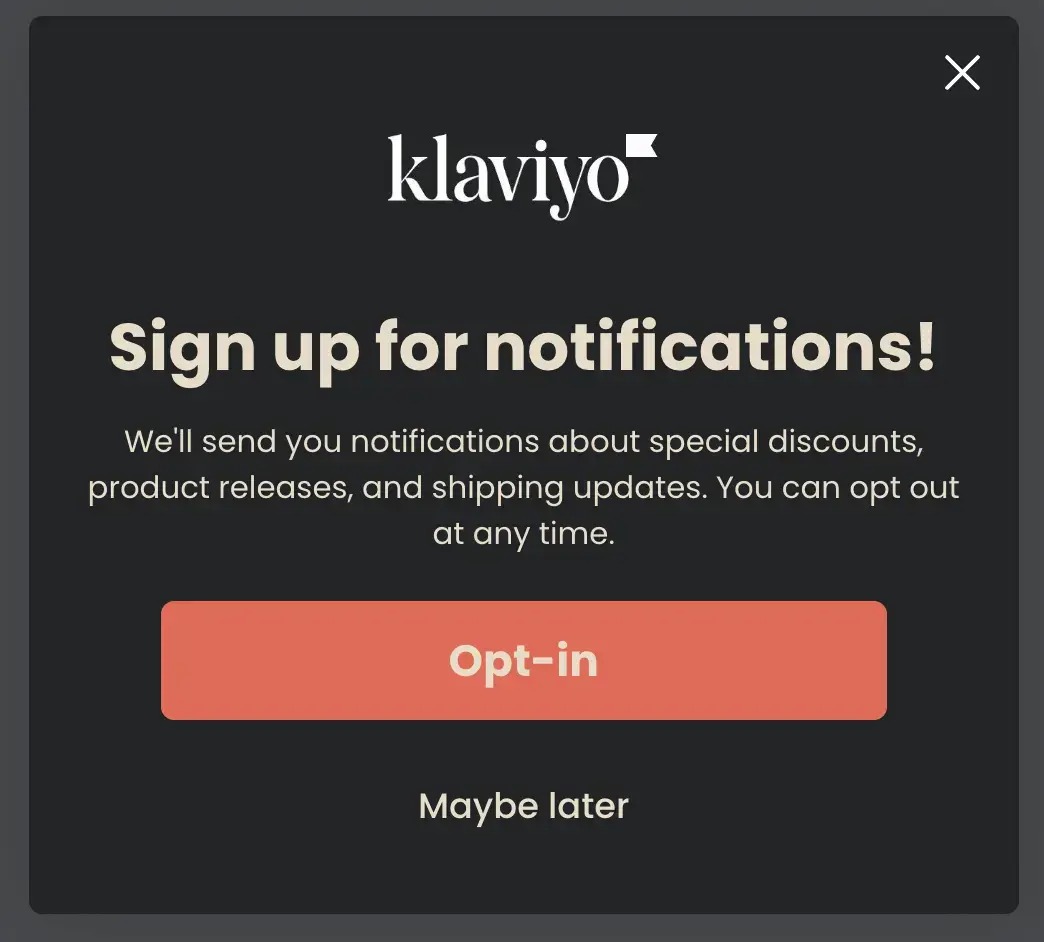
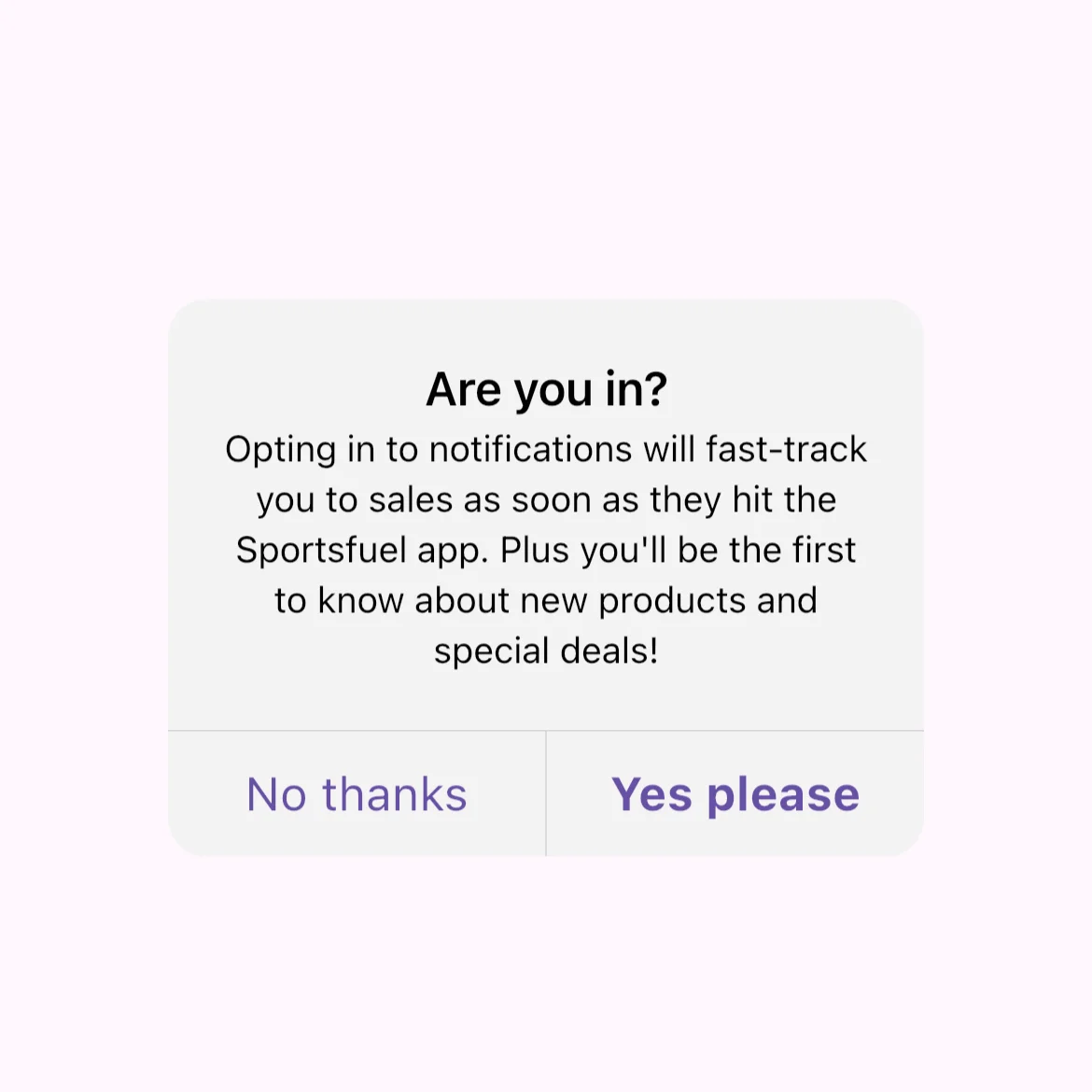
    Push notification opt-in prompt

    All you need to do is configure your opt-in prompt, to ensure app users give their consent to receiving push notifications.

    Klaviyo allows you to set up a custom prompt, like this example from Klaviyo’s docs

    __wf_reserved_inherit

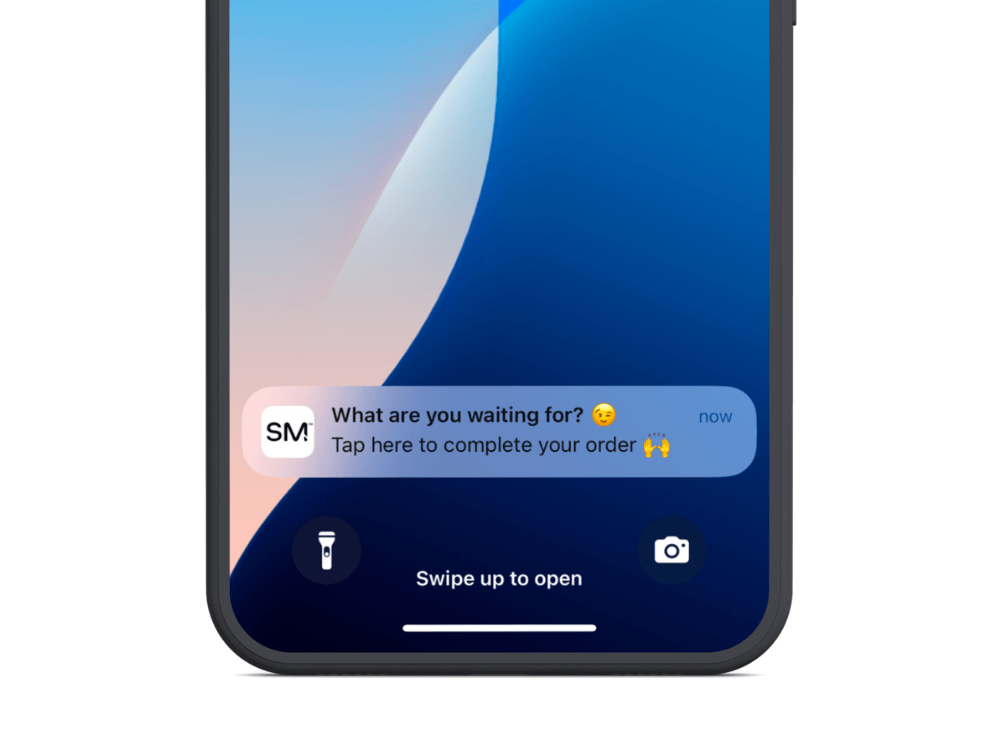
    Your custom prompt will be followed by the operating system’s native prompt:

    __wf_reserved_inherit

    How to Send Your First Push Campaign

    Once your app is live, and push notifications are set up, you can start sending push notifications to subscribed users.

    Here’s a basic walkthrough for sending a one-off push notification campaign in Klavyio.

    First, click on “Campaigns” in the left sidebar.

    __wf_reserved_inherit

    This will contain all your campaigns, including email and SMS as well.

    To start a new campaign, click the “Create Campaign” button, and choose “Push” as the campaign type.

    __wf_reserved_inherit

    Fill out the basic information about your campaign, and choose who to send it to (you could send it to all push subscribers, or a specific segment – we’ll discuss segmentation a little later).

    __wf_reserved_inherit

    Now set up the content for your notification, including the title, body and image (title and image are optional, though recommended for best results).

    __wf_reserved_inherit

    Specify the behavior settings for your notification, including the action that should happen when the user taps on the notification (we recommend you deep link to a certain page on your site).

    __wf_reserved_inherit

    Finally, hit “Save & continue”, review the details about your campaign, and either send it immediately or schedule for a specific time.

    __wf_reserved_inherit
    __wf_reserved_inherit
    __wf_reserved_inherit

    Sending a one-off push notification is fairly straightforward. There are some times you’ll want to send one-off campaigns like this, but for the most part, Klaviyo’s push notifications become particularly powerful when you utilize their advanced triggers and flows, which we’ll walk you through shortly.

    Different Ways to Use Push Notifications

    Once your mobile app is live, and you’re set up and ready to send push notifications in your Klaviyo account, there’s a plethora of ways you can use push notifications to boost engagement, retention and revenue.

    Here are some ideas:

    Sales and discounts
    Push notifications can alert users to limited-time deals, exclusive offers, and flash sales. This not only drives immediate traffic but also encourages impulse purchases.

    Product releases
    Notify users when new products or features become available, keeping your audience updated and driving excitement for your latest offerings.

    Events and holiday promotions
    Push notifications are perfect for promoting special events or holiday-themed sales (such as Black Friday, Halloween, Easter, Christmas, Father’s Day/Mother’s Day), reminding users of key dates and using the natural excitement of the holidays to generate engagement.

    Personalized campaigns based on browsing behavior
    Leverage user data to send targeted notifications about products or content they’ve shown interest in, enhancing relevance and boosting conversion rates.

    Abandoned cart notifications
    Remind users about items left in their cart, incentivizing them to complete the purchase with offers like free shipping or discounts.

    In-app minigames and contests
    Engage users with notifications about fun activities like contests or games within your app, enhancing user interaction and retention.

    Re-engagement campaigns
    Send notifications to users who haven’t opened the app in a while, offering incentives or reminders to bring them back to your app.

    App onboarding
    Help new users get familiar with your app by sending onboarding messages that guide them through key features and setup steps, or simply send a “welcome” message to condition them to look out for more push notifications in the future.

    Feedback requests
    Use push notifications to request user feedback, including product reviews, after a purchase or interaction.

    Shipping updates
    Keep users informed about their orders with real-time shipping and delivery updates, enhancing the post-purchase experience.
    Customer service updates
    Notify users when their support requests are updated or resolved, improving communication and satisfaction with your customer service.

    Rewards and loyalty program updates
    Push notifications can remind users about points earned, reward milestones, or new perks available in your loyalty program, which drives engagement and excitement and hammers home the benefits they get from participating in the program.

    How to Craft Effective Push Notifications

    How you craft your push notifications can have a sizable impact on visibility and reaction rates, and the overall effectiveness of your campaign.

    Here are a few tips on getting the most out of your push notifications:

    Short, concise copy

    Push notifications are an extremely short form of communication. At max, you have the following character limits:

    • Android: 65 characters for the title, 240 for the description
    • iOS: 178 characters total

    Anything over this amount will get cut off.

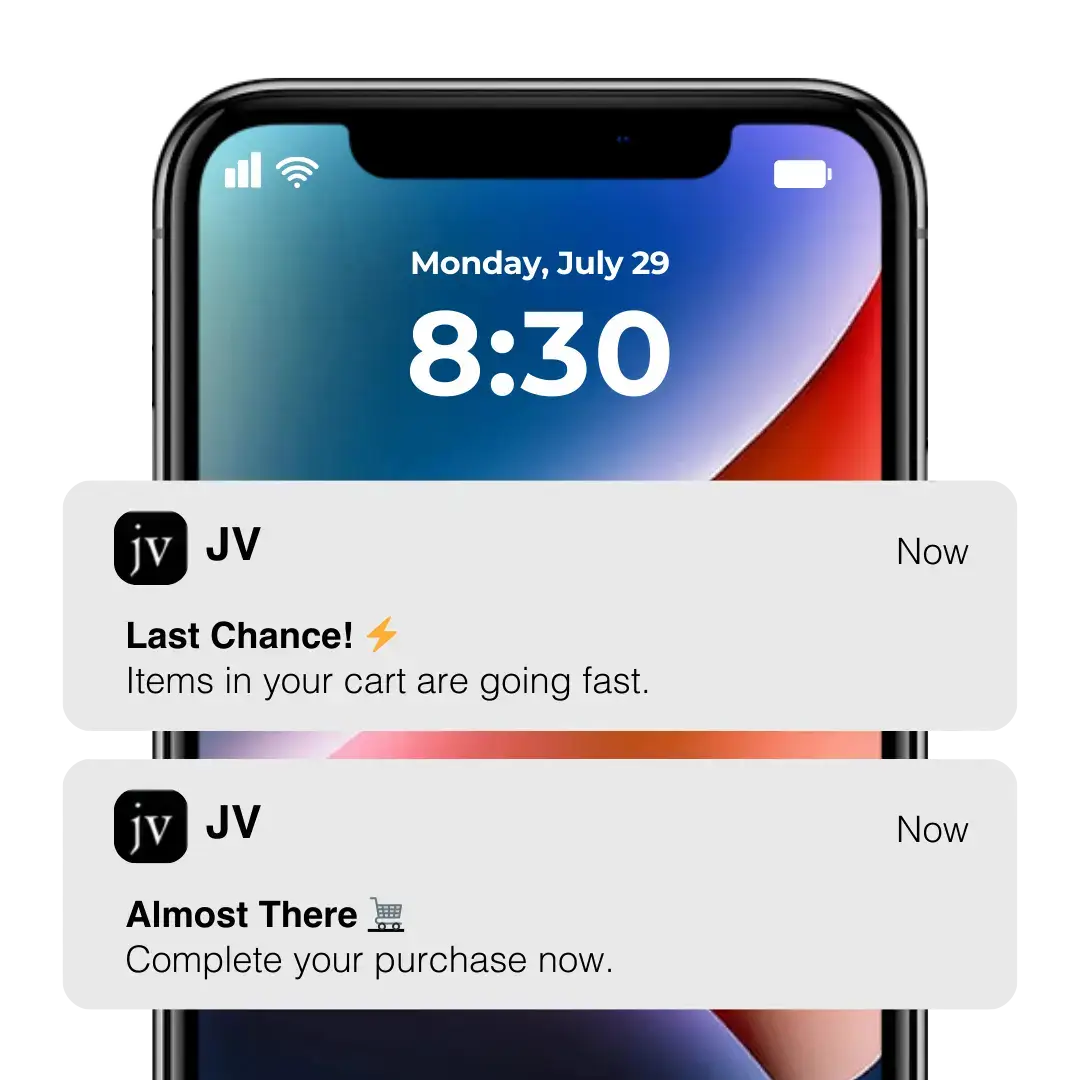
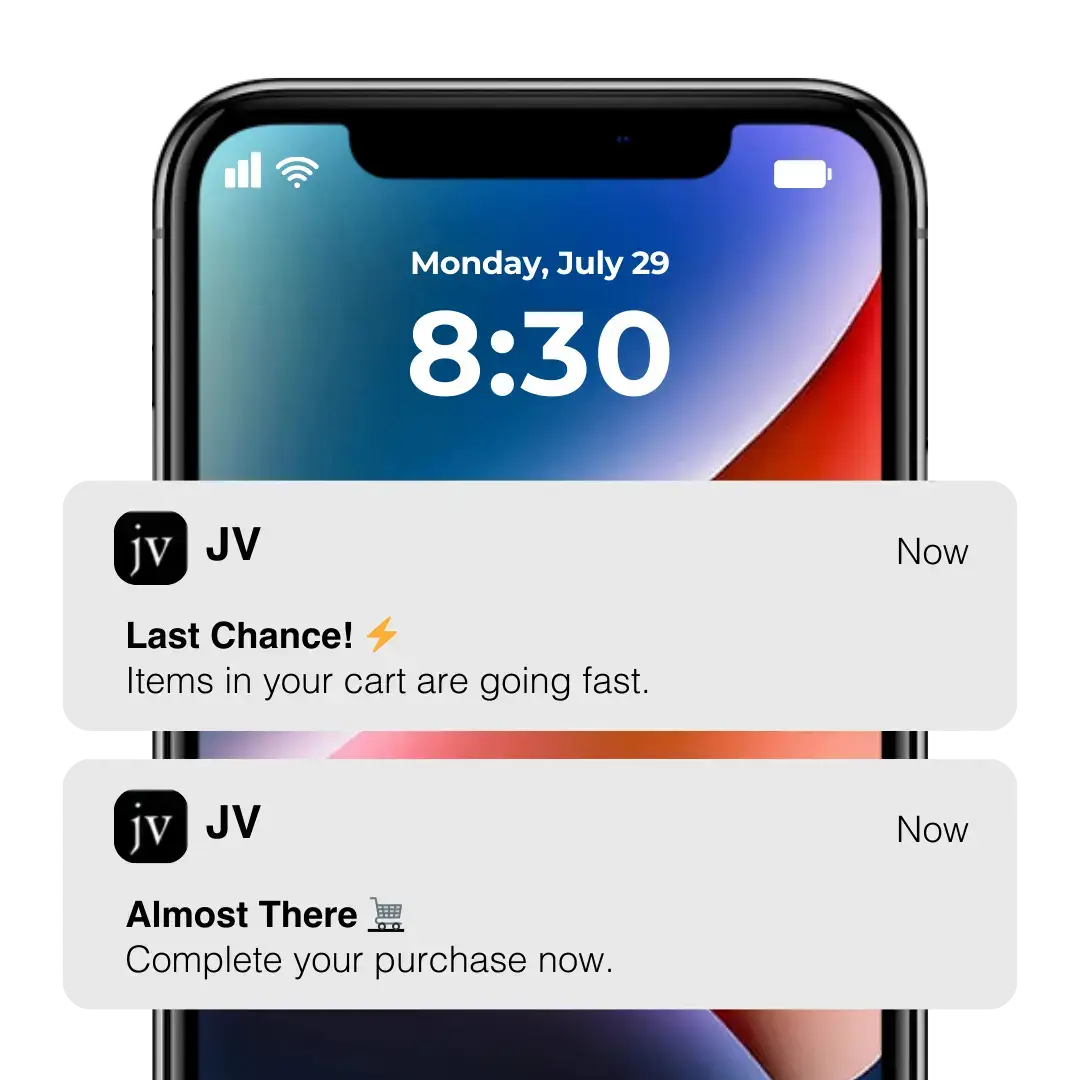
    That’s why you need to keep your message brief and to the point. There’s no space to write paragraphs. Use as few words as possible, and inject action-oriented verbs to inspire immediate engagement, such as “Shop Now”, “Unlock Your Offer”, or “Join the Sale.”

    __wf_reserved_inherit

    Use emojis and rich media

    Emojis are shown to increase push notification reaction rates by 20%, while push notifications with rich media (e.g. images, videos) have a 56% higher open rate on average.

    Emojis and rich media make your push notifications stand out more, and often communicate more than your copy can in the limited space you have to work with.

    __wf_reserved_inherit

    Sounds and badge notifications

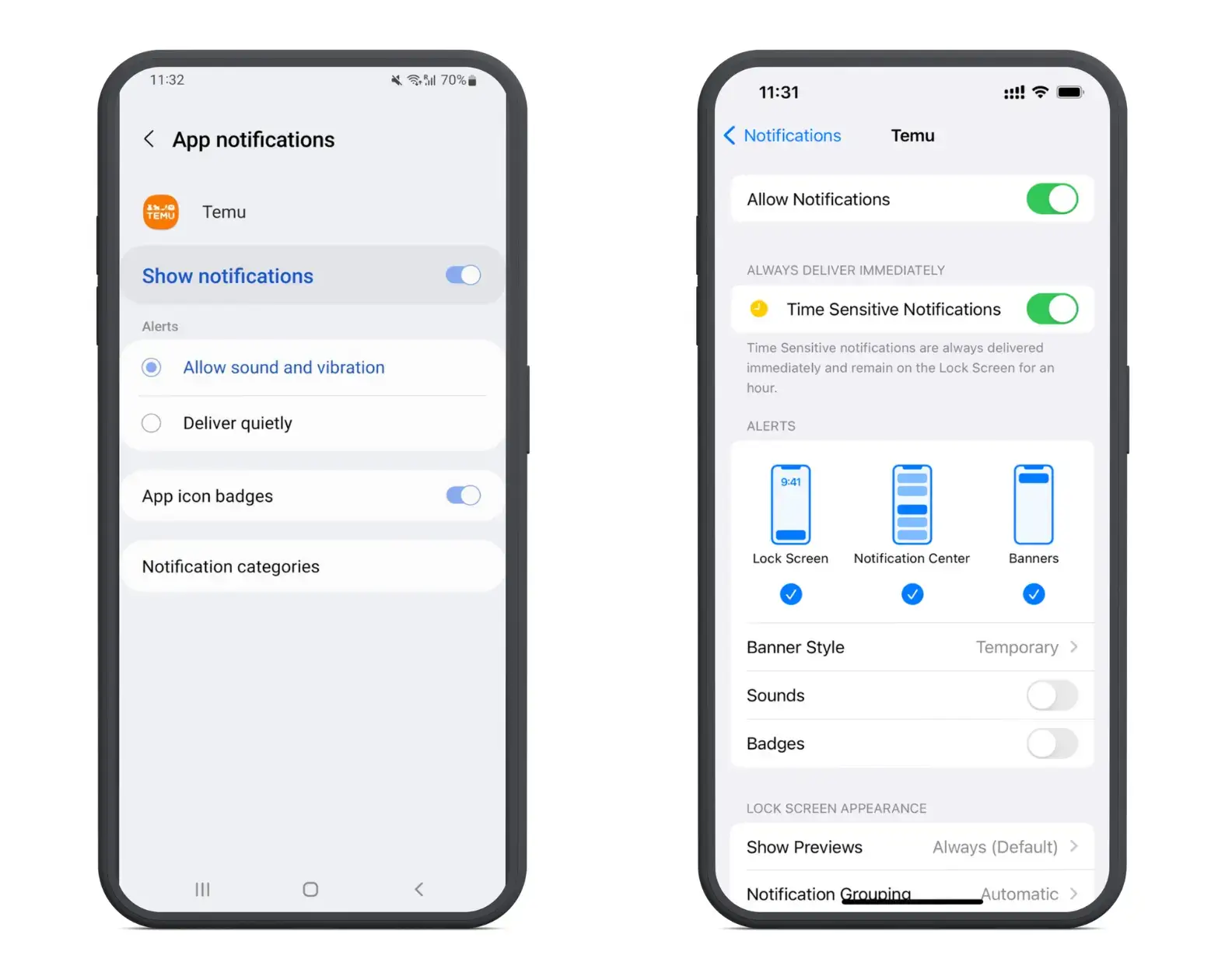
    With Klaviyo’s push notifications, you have the option to choose (for recipients on iOS) whether or not your notifications make a sound when delivered, and whether there’s a badge displayed on your app’s icon when the user has a new notification.

    __wf_reserved_inherit

    It’s up to you how you want to do this – enabling both will decrease the chance of your notifications being missed or ignored, though it will also make them more intrusive, which may slightly increase the likelihood that the user will disable notifications.

    That said, users can simply disable sounds/badges, without disabling notifications altogether, so the risk seems pretty low.

    __wf_reserved_inherit

    With that in mind, enabling these features on your push notifications could provide a nice boost in engagement.

    Timing and frequency

    There’s a lot said about how many push notifications is too many, and the risk of over-sending, and causing the user to disable notifications (or delete the app entirely).

    While this can happen, more brands are guilty of sending too few notifications than too many.

    Data shows that retail apps have 2-5x higher retention rates when sending weekly notifications, and 3-6x higher retention rates when sending daily push notifications.

    Some brands, like Temu and Shein, take this to the extreme, sending 5-10 notifications per day. While this might not be ideal for all brands, it does do a great job of keeping the app top-of-mind.

    __wf_reserved_inherit

    You might not want to send this many, but consider sending multiple notifications per week at least.

    As for timing, experiment with different times and see what generates the best results (though you’ll probably want to avoid sending push notifications overnight, which may upset your users, especially if you have sounds enabled).

    With Vendrux and Klaviyo’s deep integration with your store, it will be easy to track results and see which notifications, sent at which time, have the highest visibility and drive the most revenue.

    Personalization

    It’s best practice to personalize your push notifications wherever possible.

    The easiest way to do this is by adding your recipient’s name to the message (e.g. “Andrew, check out our new product drop!”).

    __wf_reserved_inherit

    You can go further and send targeted notifications based on the user’s activity and preferences, such as personal recommendations based on the kind of products a user tends to browse or buy most often.

    Personalized push notifications have 4x higher reaction rates, while advanced targeting methods are shown to increase retention rates by up to 3x, so it’s worth it to spend some time to make your campaigns more personal and relevant to the user.

    Check out this article for more on effective personalization strategies for push notifications.

    Deep linking

    Finally, in most cases you’ll want to enable deep links from your notification.

    A deep link is when tapping on the notification sends the user to a specific page in the app, rather than the homepage of the app (which is the default behavior).

    If you’re sending a notification for a specific product, or encouraging a specific action (e.g. a new product drop, or an abandoned cart notification), you’ll get higher conversion rates if you send the user directly to the page or action screen.

    Leveling Up Your Push Notification Strategy with Klaviyo’s Advanced Features

    You can have great results with simple, vanilla, one-off push notification campaigns. And if you’re not using any kind of push notifications yet, something as simple as sending a single manual broadcast each week is a great way to start, and should increase your app’s visibility and usage rate.

    But Klaviyo is billed as a “marketing automation platform”, and there’s so much more potential for what you can do than just sending basic, manual broadcasts.

    Once you’ve gotten your feet wet with push notifications, you’ll want to explore Klaviyo’s full feature set, and see how you can use these features (in combination with Vendrux’s native integration) to level up your push notification strategy.

    Here are some things you can do that will make push a truly pivotal tool for your business.

    User segments

    Segmenting users is a powerful way to serve hyper-relevant push notifications that convert at a higher rate.

    With the wealth of data that Klaviyo provides for you, there are endless possibilities for user segments to create.

    You can segment users based on:

    • Interests (e.g. different product categories purchased)
    • Demographics
    • Purchase frequency
    • Lifetime value
    • Engagement rate

    …and more.

    To create a segment, from your Klaviyo dashboard, click “Lists & segments”, under the “Audience” section in the sidebar.

    You’ll be able to view all your lists and segments here. Click the “Create New” button, then select “Create segment” from the dropdown to create a new segment.

    Finish up by naming your segment and defining the conditions for which users will be included in the segment.

    Event-triggered push notifications

    The ROI on push notifications grows significantly when you start automating your push notifications, with messages triggered by certain events.

    __wf_reserved_inherit

    Sometimes known as transactional push notifications, these messages are automatically sent in response to a specific action from the user, such as an abandoned cart, or a purchase.

    Automated, triggered notifications tend to be much more relevant and timely than a generic broadcast message, and thus are usually more effective.

    To set up triggered push notifications, go to the “Flows” tab, and create a new flow. 

    In your flow, you can define the event to trigger your flow, and segments or conditions to include/exclude from your flow, timing, and different messages to send.

    __wf_reserved_inherit
    Example of an abandoned cart email flow, via Klaviyo’s docs. You can set up the same kind of sequence with push notifications.

    For example, you could set up an abandoned cart notification that gets triggered when someone starts the checkout process, waits a few hours, and sends a notification if they didn’t complete their purchase.

    Triggered flows and notifications are so effective because they work in the background, continuously running to serve timely push notifications that drive extra sales, with very little labor required once initially set up.

    A simple abandoned cart notification like the example above can easily recapture at least 10-15% of otherwise lost carts, fully on autopilot.

    __wf_reserved_inherit

    Omnichannel Flows

    Another powerful part of the Klaviyo platform is how it allows you to combine multiple channels in your flows, and reach customers on multiple touchpoints.

    You can set up flows that include push notifications, emails and SMS. And if your user is subscribed to all three, you can reach them on each channel, all in the same campaign.

    With a Black Friday campaign, for example, you might start with an email, followed later by a push notification, followed again by an SMS “last chance” message when the sale is about to end.

    Or, you might set up an abandoned cart campaign, which sends a push notification, and then an email to follow up if the user didn’t react to the push notification.

    You could also set up flows that direct different segments through different paths, depending on the channel they’re most likely to engage with.

    There are some incredible possibilities for what you can set up with Klaviyo’s flows. By using email, push and SMS in combination, you can increase visibility for your campaigns, reach each customer where they’re most likely to respond, and ultimately get much better returns on your marketing efforts.

    Analysis and iteration

    Klaviyo is an amazing platform for the analytics they provide, and how it’s able to link your revenue back to specific channels, campaigns and flows.

    __wf_reserved_inherit

    You’ll want to make use of the data provided by Klaviyo to analyze how your push notification marketing is performing, and make constant improvements to get better results.

    For each campaign or flow you create, check up on the revenue generated (or other relevant metrics, such as engagement/clicks, conversion rate), as well as deeper insights, such as which type of messages, which segments, or which stages of your flows get the best results.

    For example, you might find that you get much higher engagement from promo campaigns sent to a certain segment, or it might turn out that people are more likely to take action after receiving multiple push notifications in a flow.

    Use these insights to craft future campaigns and alter your flows to improve future results, by making decisions based on hard data, rather than hunches and assumptions.

    Scaling Push Notifications

    Once you’ve started implementing push notifications, and iterated on your strategy to figure out the ideal formula for optimal returns, the biggest challenge becomes scaling your push notifications.

    Scaling tends to be one of the biggest barriers for brands with push notifications, as your reach is limited, not just to app users, but to app users who have push notifications enabled.

    In comparison, it’s much easier to build a large email list and contact tens, or hundreds of thousands of people with your emails (though a lower percentage of your emails will be seen).

    So the next step is to figure out how to increase the reach of your push notifications.

    You can do this by:

    • Getting more people to download your app, through app-specific promotions, first-time discounts for app users, and promoting your app in other channels, such as email.
    • Optimizing your opt-in message at the right time to increase push subscribers.
    • Minimizing the opt-out rate of your push subscribers, by always delivering value in your push notifications and optimizing your sending frequency.
    __wf_reserved_inherit

    The best part is that the cost of push notifications doesn’t scale as much as the potential return, as your subscriber base grows.

    If you can effectively boost reach for your push notifications, this channel can deliver a truly incredible ROI, massively reducing your reliance on paid acquisition channels, and providing a big boost to cash flow and profitability.

    3 Steps to Get Started with Klaviyo & Push Notifications

    Any eCommerce brand that isn’t using push notifications is missing out.

    Push notifications are a cheap and effective way to communicate with your customers and drive sales. The biggest barrier of entry is building your own app – but this is relatively simple with Vendrux (and there are numerous additional benefits to launching an app besides only push notifications).

    If you’re intrigued by the potential of push notifications, and perhaps already using Klaviyo for email marketing, here’s how to add push notifications to your toolbox:

    1. Get a free consultation with the Vendrux team’s app experts, to discuss the goals for your brand and how Vendrux fits in.
    2. Let us build and launch your app, which will include everything that works on your website, and push notification functionality built in.
    3. Start onboarding your customers to the app.

    That’s it. All the setup is done for you, and once you start getting app users, everything will be there for you to start building complex and powerful Klaviyo flows, with automated push notifications.

    The Final Word

    For more, you can check out our documentation on Klaviyo, as well as Klaviyo’s help center for push notifications.

    To learn more about how Vendrux works, and what’s possible with our platform, check out these case studies of successful, high-revenue brands who launched apps with us, or read more about why our approach is the ideal way for eCommerce brands to build mobile apps.

    If you want to discuss in more detail with one of our team of eCommerce experts, get in touch for a free consultation now.

    With Vendrux, Klaviyo, and the amazing power of push notifications, you can take your business to new heights, and be at the crest of the mobile commerce revolution.

  • How to Use OneSignal User Journeys

    How to Use OneSignal User Journeys

    Mobile push notifications are among the top reasons to convert your website into mobile apps. Push notifications boast impressive open rates and engagement rates, and help you boost key metrics such as retention and usage.

    OneSignal’s Journeys feature expands the possibilities for what you can do with push notifications. Journeys let you build automated, personalized workflows that guide your users along the path you want them to take.

    Keep reading to learn how OneSignal User Journeys work, and how to leverage them in your app.

    The Power of Push Notifications

    Traditional ways of reaching your users are becoming less and less effective. Email open rates are dropping, and it’s harder to reach people on social media.

    Push notifications, however, are a powerful and undiluted communication channel. Where email has open rates of less than 2% on average, the average open rate for push notifications is around 20%.

    It’s even better when you consider engagement rates. Compared to an average 1% clickthrough rate for email, push notifications score on average 28% – with some industries scoring as high as 44% clickthrough rates.

    Whatever your business type, there’s a way push notifications can help you get in front of your users, get them into your app more often, and boost revenue. 

    This includes sending promotional offers, abandoned cart notifications and order updates for e-commerce apps, to new content alerts, account updates, and re-engagement campaigns.

    The figures above are even more impressive when you consider that many businesses are not using push notifications to their full potential. Push notifications that hit users at exactly the right time, personalized for where they are on their user journey, have the potential to deliver even higher metrics, which is exciting.

    How OneSignal User Journeys Work

    The “Journeys” feature from leading push notification service OneSignal, allows you to craft automated and personalized workflows with your push notifications.

    Journeys is a drag-and-drop workflow builder that you can use to send push notifications based on certain triggers or timings.

    You can send users along various paths depending on the actions they take, and send the right message at the right touchpoint.

    Messages can even be personalized with user attributes, such as their name or purchase details.

    Once set up, these workflows operate on autopilot, delivering increased engagement with minimal time investment.

    How to Start Using Journeys

    The Journeys feature is available on OneSignal’s Professional and Enterprise plan levels, starting from $99 per month.

    If you’ve got an account at the Professional level or higher, you can get started and publish a workflow within minutes.

    While you can set up push notifications from within the MobiLouod builder, or (for WordPress users) within your WordPress dashboard, to set up a Journeys workflow, you’ll need to go into the OneSignal app.

    Go here to log in: https://dashboard.onesignal.com/login 

    From here, select your app, and navigate to the Journeys tab.

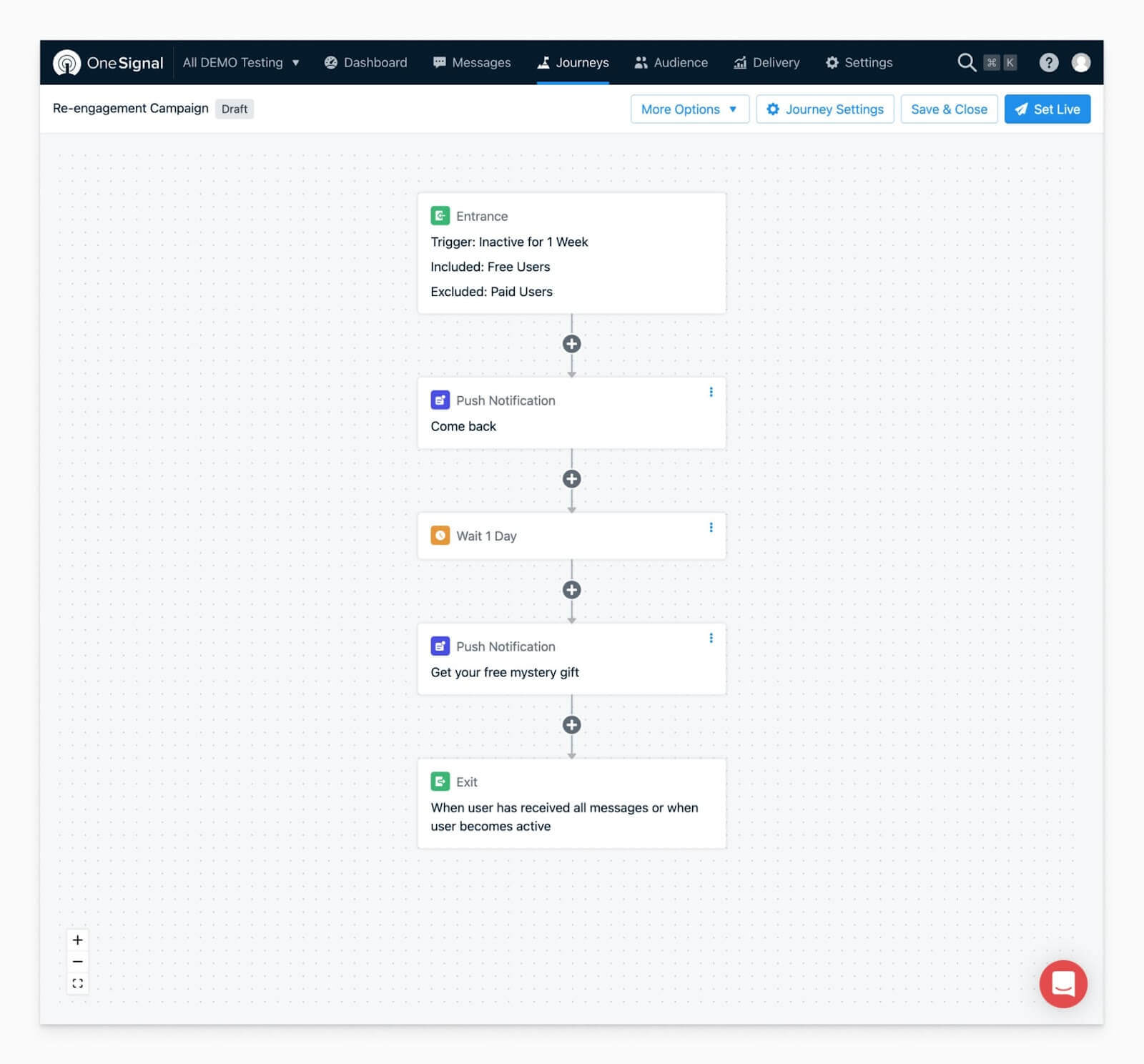
    Hit New Journey to get started. You’ll be sent to the visual Journeys builder, where you can start putting your workflow together.

    Here’s an example of what your workflow might look like:

    A workflow set up in OneSignal

    When you’re happy, just hit Set Live to let your workflow run.

    Check out OneSignal’s Journeys documentation for more on how to use this feature, and see more detailed examples here.

    Benefits of OneSignal’s Journeys

    Here are a few reasons why Journeys are so powerful.

    Relevant and personalized notifications

    User communications work so much better when they’re personalized, and relevant to the user.

    Though not as hard as with email, you still need to compete for the user’s attention with push notifications.

    If the user sees a clearly generic notification, most of the time it gets automatically dismissed. 

    The segmentation and personalization that Journeys offers means you can send notifications that actually interest users and speak to where they are on their own user journey.

    Automated to save time and resources

    Save time by not having to manually write and send individual notifications and campaigns over and over.

    A small time investment in setting up your workflow allows it to run in the background, delivering the benefits of targeted push notifications with very little in the way of labor.

    Great for engagement (and re-engagement)

    These workflows are an excellent way to bring people back into your app – especially when they’ve gone cold.

    You can time messages to send just at the right time to keep your users interested and your brand in the user’s mind. And when a user hasn’t been active in some time, you can have an automated workflow set up to re-engage them and make them a loyal user once again.

    No-code setup

    OneSignal Journeys require zero coding to set up. This allows anyone to set up and execute workflows, no matter their background. The user-friendly nature of the workflow builder means you spend more time thinking about what really matters – when and how to engage with your users.

    Cross-channel capability

    OneSignal Journeys even work across different channels – not just push notifications, but email, SMS and in-app messaging as well.

    This just gives you even more options to generate engagement and build a loyal following of app users.

    What Kind of User Journeys Can You Create?

    User Journeys are relevant for any business. There’s always an ideal path you’d like your users to follow, and Journeys helps you push users towards that path.

    Here are some examples:

    • Onboarding: push users to take the necessary actions to learn all the compelling features within your app.
    • Re-engagement: touch back with users who haven’t logged in for a while, and give them an incentive to become active again.
    • Promotional campaigns: send users relevant promotions, and increase the offer for those who don’t convert from the first message.
    • Personalized content: send content, offers or recommendations tailored to each individual, based on their actions in your app.
    • Account and order updates: keep users up to date with the status of their delivery, changes to their account, and other important information.
    • Post-purchase: follow up after someone makes a purchase, or a similar action, to deliver information or push users to take the next steps towards becoming power users.
    • Upgrades & upsells: use segmentation to identify your power users, and encourage them to upgrade or take more valuable actions.

    Get Started with Vendrux & OneSignal User Journeys

    Converting your site to mobile apps with Vendrux is a big step towards scaling your business. Get started with a free preview of your app, or schedule a free, personalized demo and get a first-hand look at the platform’s possibilities with one of our app experts.

    The next step is to harness the full power of push notifications. Even seemingly simple user journey workflows have the power to deliver huge benefits for your apps over time.

    Anyone who is familiar with email marketing knows the power of segmentation and personalization. OneSignal Journeys brings this same power to push notifications, letting you do the same thing in a much more personal communication channel.

    Enable push notifications in your apps, then head over to OneSignal to use their workflow builder to start crafting the path you want your power users to follow.

  • How Much Does SMS Marketing Cost? (Comparison to Push & Email)

    How Much Does SMS Marketing Cost? (Comparison to Push & Email)

    SMS marketing (aka text message marketing) is an effective way for brands to reach their customers with direct, time-sensitive messages.

    SMS also has a reputation for being somewhat expensive. But just how true is this? And how does the cost of SMS marketing compare to other channels, such as email and push notifications?

    This article will answer all of these questions for you, and help you understand whether SMS marketing is a good fit for your business.

    Vendrux helps brands launch mobile apps, which lets you unlock the power of push notifications for direct, mobile-first communications. Click here to learn more about how Vendrux helps your business boost engagement, retention and revenue.

    How SMS Marketing Pricing Works

    SMS is typically charged per text message sent.

    This differs from email and push, both of which you usually pay for a subscription to a marketing platform (e.g. MailChimp, Drip, Klaviyo), and you can essentially send as many emails/push notifications as you want without any extra costs.

    In most cases, with SMS marketing you’ll sign up for a subscription to a marketing platform as well. However, unlike these other channels, the cost of your SMS messages is calculated on top of the monthly subscription cost.

    Take note of this pricing structure, as it will make a big difference in how you decide what to use text messages for in your marketing strategy.

    The Cost of SMS Marketing

    So how much does SMS marketing actually cost?

    The exact cost depends on your choice of provider. Here are a few popular tools:

    • Klaviyo
    • Omnisend
    • Twilio
    • Sender
    • SimpleTexting

    Let’s see how much it costs to send text messages with each of these platforms.

    __wf_reserved_inherit
    • Klaviyo – $0.0090 – $0.0120 per SMS
    • Omnisend – $0.015 per SMS
    • Twilio – $0.0079 per SMS (cost decreases for bulk sends, starting after the first 150,000 monthly messages)
    • Sender – $0.015 per SMS
    • SimpleTexting – starting from $0.078 per SMS for 500 monthly texts, with the cost per SMS decreasing as volume increases.

    Some tools (Klaviyo and Sender from the list above) require an additional monthly subscription to their email marketing platform in order to access SMS marketing.

    In general, you’re looking at a baseline of 1-2c per SMS. (Twilio is cheaper, but is just a backend provider, and means you need to build the integration with your website or your app separately).

    *Note that sending messages with images or videos (MMS) or messages to non-US numbers may cost more.

    Comparing the Cost of SMS vs Push Notifications and Email

    So we now have a rough idea of how much SMS marketing costs. Does this make it cheaper, more expensive, or the same as email and push notifications?

    SMS marketing is roughly the same as email and push if you send a low quantity of messages, but scaling is a lot more expensive for SMS.

    Let’s look at an example.

    First, imagine you have 1,000 subscribers, who you want to message once per month.

    With SMS, assuming a cost of $0.015 per text, this would cost $15.

    For email and push notifications, most tools will charge you somewhere between $15-$40 per month for 1,000 subscribers, unless you have more complex automation needs.

    So at this volume, the cost of SMS works out to be similar or slightly less than email/SMS.

    There’s an important piece of information to note, however – if you want to send more messages, let’s say messaging your customers every two weeks, or even every week, it will cost 2x/4x as much with SMS, but no additional cost for email and push.

    You could even send multiple messages per week with email and push for no extra cost, while this would get expensive fast with SMS.

    Learn more about The Cost of Push Notifications, and why this channel is one of the most cost-effective ways to communicate with your customers.

    Is SMS Marketing Worth It?

    SMS marketing can be extremely effective in some situations.

    Text messages have high deliverability, extremely high visibility, with open rates averaging a massive 98%.

    They’re a great way to get in front of your customers, wherever they are (most people have their phones on them at all times), with messages that are almost certain to be seen.

    It can be expensive at scale, though. Our best advice is to pick and choose when to use SMS marketing.

    In a lot of situations, you can substitute SMS for push notifications (assuming your customers are also subscribed to push), and unlock greater flexibility with your messaging, and a better ROI when messaging at a higher scale.

    Best Use Cases for SMS Marketing

    SMS is typically best for important, time-sensitive messages, such as alerts or urgent updates.

    Some examples include:

    • Appointment reminders or confirmations of scheduled appointments.
    • Login/activity alerts.
    • Small-scale promotional messages.

    You could use SMS for a wider variety of promotional use cases, such as:

    • Product launches, sales and discount offers.
    • Abandoned cart notifications.
    • Order notifications and shipping updates.
    • Post-purchase cross-sells and up-sells.
    • Personalized promotions (e.g. birthdays, re-engagement offers).

    However, be aware that the cost of sending these messages in bulk will add up. If you can get customers to download your mobile app, you’ll be able to use push notifications instead, and send more messages for a lot less cost.

    Can Push Notifications Reduce SMS Spend?

    Push notifications can be a great way to spend less on SMS.

    Once you get a customer in your app, with push notifications enabled, you can contact them with push notifications for zero cost per message (unlike SMS).

    You could potentially save thousands in SMS spend by porting a large share of your SMS list over to your mobile app, and replacing SMS spend with low-cost push notifications (though consider that you won’t be able to get all of your SMS list over to push).

    How to Integrate SMS, Email and Mobile Push in Your Marketing Strategy

    Smart brands make use of multiple messaging channels in their marketing strategy, taking advantage of the benefits of each.

    Many marketing automation tools, such as Klaviyo, allow you to build flows with email, SMS and push together. This way, you can send out multiple touchpoints on multiple channels, and have a greater chance of getting your customer’s attention and making them take action.

    For example, you could send an abandoned cart sequence that starts with a push notification, then sends a text message if the customer hasn’t completed their purchase, and then an email after that.

    Omnichannel workflows are also great for promotions – the urgency of SMS fits well with opening/closing messages of your sequence, while the flexibility and affordability for email and push

    Blending multiple channels is particularly important today, with many consumers going mobile-first, increasing the potential of mobile-optimized channels like SMS and push.

    Vendrux’s abandoned cart notifications have helped some brands recover as much as $200,000 in would-be lost revenue in just 30 days. Learn more about how to recover abandoned carts, or get a free consultation call to discuss it with one of our app experts.

    How Vendrux Brings It All Together

    If you don’t have a mobile app, you won’t be able to utilize the incredible benefits of native push notifications.

    Vendrux makes it easy to launch your app. We help you turn your website into native mobile apps, with push notification functionality built in from the start.

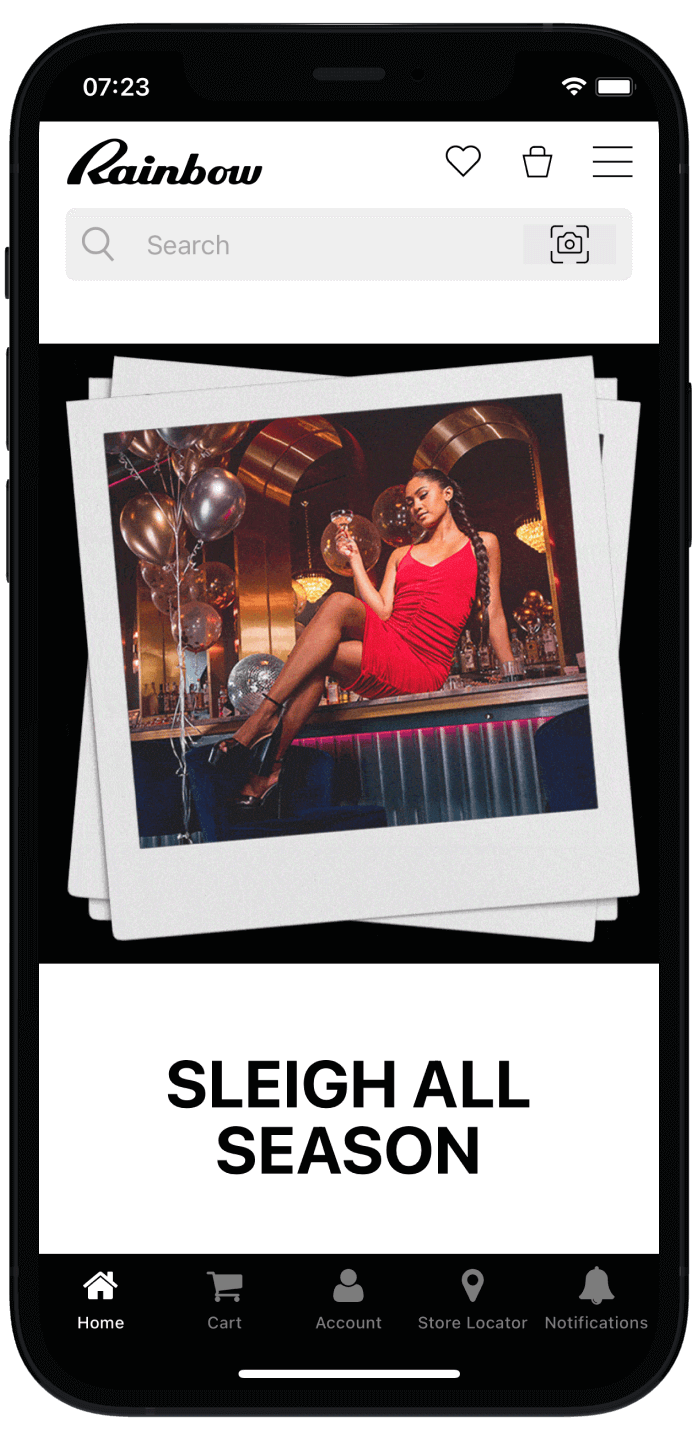
    “The power of push notifications is so strong. SMS which is crazy expensive, and people are starting to tune these out. Being able to do push notifications is the reason you do an app.”
    – David Cost, Rainbow Shops

    Our full-service approach leaves minimal lift for your team, and your apps fully reflect your website, with all the features and integrations from your website working within the apps.

    That means any SMS or email marketing providers you use will continue to gather customer data from within your apps, and you can build powerful omnichannel flows that boost revenue on autopilot.

    It’s easy and affordable to launch your own app, with no risk and minimal overhead. Start the process by getting a free preview of your app now, and let our experts show you what’s possible.

  • How Much Does Email Marketing Cost? (2026 Breakdown)

    How Much Does Email Marketing Cost? (2026 Breakdown)

    In a time of skyrocketing ad costs, email marketing seems like the last safe bet for DTC brands.

    But here’s the big question: Is email still the highest-ROI marketing channel in 2026, or is it getting too expensive to justify?

    • ESP pricing keeps going up.
    • Inbox placement is harder than ever thanks to Gmail & Yahoo’s spam updates.
    • SMS is 6X more expensive per send, but is email engagement strong enough to compete?
    • How are push notifications disrupting the retention marketing game?

    We’re breaking down the real costs of email marketing in 2026, covering:

    • What brands actually pay for ESPs, design, deliverability & list management.
    • How email compares to SMS & push notifications in cost and ROI.
    • Whether DTC brands should double down on email or shift to other retention levers.

    If you’re scaling an ecommerce brand, this is the deep dive you need before deciding if email still belongs in your marketing mix.

    For more high-level insights to help your brand scale profitably, check out The Retention Edge, our podcast and newsletter where ecom and retail leaders share their hot takes on the future of CX and retention.

    Why This Question Matters in 2026

    Email has been the highest-ROI marketing channel for decades, with an average ROI of $36 for every $1 spent.

    But, in 2026, the landscape is shifting.

    • Rising ad costs, privacy changes, and mobile adoption have brands rethinking where to invest.
    • Email costs are creeping up due to more sophisticated segmentation, automation, and compliance needs, plus the reduced effectiveness on a sub-by-sub basis.
    • Retention is the new growth, and while email is a key driver of LTV, how much should brands spend to keep it effective?

    There’s a certain crowd touting the idea that email is dead. But is that the truth, or just alarmist clickbait?

    This guide will break down the actual costs, ROI, and comparisons with other direct communication channels (SMS, Push), so you can get a real idea of whether the juice from email marketing is still worth the squeeze today.

    The Core Costs of Email Marketing

    A few things go into the cost of email marketing, from software, to creation costs, to maintenance.

    Let’s break these areas down.

    ESP (Email Service Provider) Costs

    The biggest cost variable is your ESP pricing model, which depends on list size, sending volume, and automation needs.

    There are three common pricing models for ESPs:

    1. Per-subscriber pricing (Klaviyo, Omnisend, Mailchimp)
      • Klaviyo: $720/month for 50K contacts (total 500K emails/month)
      • Omnisend: $413/month for 50K contacts (600K emails/month)
      • MailChimp: $450/month for 50K contacts (600K emails/month)
    2. Per-send pricing (Postmark, Amazon SES)
      • Amazon SES: $0.10 per 1,000 emails—cheaper but lacks automation.
    3. Feature-based pricing (Iterable, Braze)
      • Costs $1,500+ per month but includes advanced segmentation.

    The vast majority of brands will use the first model, or a variation – such as Yotpo’s email marketing feature, which charges based on # of emails rather than subscribers ($135/month for 100K emails, $535/month for 500K emails).

    So on a per-email basis, you’re looking at a cost roughly in the range of $1-$2 per 1000 emails sent ($0.001-0.002 per email).

    💡 Cost-saving tip: Brands with high list churn should prune inactive subscribers to reduce costs.

    Creative & Production Costs

    Email marketing isn’t just sending – it’s design, copy, testing, and automation.

    • In-house team (marketer + designer + copywriter): $5K–$15K/month
    • Freelancers (per email):
      • Copywriting: $150–$500
      • Design: $100–$300
      • Full creative package (copy + design): $300–$1,000 per email
    • AI-powered email tools (e.g., Claude, Jasper, ChatGPT for copy): $50–$150/month

    This cost can vary a lot by how much effort you put into your email campaigns, and how much importance you place on copy and creative.

    You could hire a crack team of retention experts, or spin it up with Chat GPT copy and stock design from Canva.

    The key thing to note is that this cost doesn’t really scale as you send more emails/have more contacts. 

    Unless you’re creating whole new campaigns for a large number of segments, creation costs will be more or less the same for an email reaching 100 people or 100,000 people.

    💡 Cost-saving tip: Many brands are shifting to UGC-driven email content, reducing creative costs while increasing authenticity.

    Deliverability & Compliance Costs

    ESP pricing doesn’t include deliverability optimization, which is becoming a bigger issue today.

    • Dedicated IP address: $30–$200/month (essential for high-volume senders).
    • Inbox placement monitoring (e.g., Validity, GlockApps): $50–$500/month.
    • List cleaning tools (e.g., ZeroBounce, NeverBounce): $15 per 10K emails.

    Gmail & Yahoo’s 2024 spam rule changes mean cleaning your list regularly is now more or less mandatory to avoid inbox penalties.

    This has to be factored into your email marketing ROI calculation.

    Other Hidden Costs

    Some other email marketing-related costs may include:

    • Discounts & incentives (emails with promo codes cost margin, not just send fees).
    • Transactional email costs (e.g., Shopify: $10/month for basic, $1,000+ for high-volume).
    • Integrations with Shopify, ReCharge, Attentive (some ESPs charge extra).

    Ultimately, the cost of email marketing has risen in recent years, with some ESPs raising prices, and new costs arising related to list optimization (though creative costs may be lower due to AI).

    But still, the cost of email marketing on a per-email or per-subscriber basis remains extremely low.

    Email Marketing ROI: Is It Still Worth It?

    So with what we know about the cost of email, how does the ROI shake out?

    The cost of email is more or less the same as it was 10 years ago, but the return can vary greatly.

    Let’s see if email’s performance is still enough to justify the cost.

    Industry Benchmarks for Email Performance

    Email still provides solid results in terms of visibility, reach and engagement.

    • The global average ROI for email is $36–$42 per $1 spent.
    • Open rates: 21.5% (avg), 30–40% (best-in-class DTC brands).
    • Click-through rates: ~2.6% (avg), 4–8% (top performers).
    • Conversion rates: ~4.2% (avg), up to 10%+ for high-intent campaigns.

    Sources: Dotdigital, Omnisend

    Cost per Acquisition (CPA) vs Retention Value

    Let’s compare email marketing CPA to paid acquisition (Meta, Google) and see how they match up in terms of CPA and long-term value.

    Email

    • Avg. CPA (DTC): $1–$3 per customer
    • Retention Impact: High (more likely to be repeat buyers)
    • Cost Scaling: Scales affordably

    Meta Ads

    • Avg. CPA (DTC): $30–$50 per customer
    • Retention Impact: Low (many one-time buyers)
    • Cost Scaling: Scaling = more expensive

    Google Ads

    • Avg. CPA (DTC): $40–$80 per customer
    • Retention Impact: Medium (brand intent)
    • Cost Scaling: Costly scaling

    Source: First Page Sage

    💡 Key Insight: Retargeting existing subscribers is 10X cheaper than acquiring new customers via paid ads. 

    Email’s Role in Retention & LTV Growth

    Many retention-focused brands rely on email flows to boost LTV.

    Many of these flows are automated – and these automated campaigns are a great ROI play, not only because of the low effort required to maintain, but because these emails actually perform better.

    Best-performing automated emails (2025 benchmarks):

    • Welcome flows: 30–50% open rate, 5–12% conversion rate.
    • Abandoned cart: 45%+ open rate, 8–15% conversion rate.
    • Post-purchase upsells: 25–35% open rate, 6–10% conversion rate.
    • Win-back campaigns: 20–30% open rate, 4–8% conversion rate.

    Source: Omnisend

    These automated campaigns are key in generating repeat engagement and driving higher LTV from your existing customers.

    💡 For cost-effective retention, scaling email automations keeps CAC lower while increasing LTV.

    Email vs SMS vs Push: Where Does Email Fit In?

    10 years ago, email was the #1 tool brands had to work with in terms of direct customer communication.

    Is that still true today? With smartphone usage rising, mobile-first channels like SMS and push notifications are rising in popularity.

    Let’s see how the ROI of these channels compares to email.

    SMS: Higher Costs, Higher Engagement

    Engagement rates for SMS are particularly high, with fantastic click and open rates.

    But the cost is also a lot higher, which makes SMS costly to scale.

    SMS also runs the risk of feeling more intrusive. And, interestingly, data shows that clicks from email have a much higher chance of converting than clicks from an SMS.

    The average conversion rate for email campaigns is only a little behind SMS (even factoring in lesser reach), while automated emails have a significantly higher conversion rate than automated SMS messages.

    SMS benchmarks vs email:

    • 6X higher CTR than email (15–20%), but 6X higher cost per send​.
    • $0.01–$0.05 per SMS sent vs $0.001 per email sent.
    • Conversion rate (campaigns) is 0.11% (SMS) to 0.07% (email).
    • Conversion rate (automated flows) is 0.24% (SMS) to 1.76% (email).
    • Best use cases: Time-sensitive offers, VIP customer engagement.

    Source: Omnisend

    Push Notifications: The Rising Challenger?

    The newest kid on the block is push.

    Push notifications, like SMS, are mobile-first. They offer the same immediacy as SMS, and are much cheaper at scale (no per-message pricing).

    Push has lower overall reach, as they require an app download (significantly easier to get an email or SMS signup), but for app users, they typically outperform other channels, for a lower investment.

    • Push open rates = 2X higher than email, but reach is lower (sent only to app users, with average 67.5% opt-in rate).
    • Cost is lower – both lower service provider costs, plus fewer creative costs.
    • Highly visible, without feeling as intrusive as SMS.
    • Average 28% click rate, 4.4% conversion rate.
    • Transactional push notifications have an average open rate of 69%.
    • Best use cases: Flash sales, app-based engagement, real-time updates, abandoned cart notifications.

    Source: Vendrux

    Omnichannel Synergy: The Smart Play

    A winning strategy? Email, SMS and push working together.

    There’s no need to stick stubbornly to one channel. Smart brands use multiple touchpoints.

    Email for broad reach. SMS for immediacy, high visibility. Push for app users.

    If you’re not using push notifications yet, you’re missing out. Over 80% open rates, with 10-20X the click rates vs email, and minimal cost, even at scale. Convert your site into an app with Vendrux to unlock this amazing channel for your brand.

    Learn more here, or get a free consultation to learn how easy it is to go live and start engaging your audience with push notifications.

    Key Takeaways: Is Email Marketing Still Worth It?

    With what we know about the cost and return of email marketing, is it still worth investing in?

    Undoubtedly, yes.

    ✅ Email remains the highest-ROI retention channel. No other platform offers a $36+ ROI per $1 spent.

    ✅ Costs vary based on ESP, list size, and automation depth, but email is still a low-cost, high-margin channel.

    ✅ SMS is more expensive but converts better. Best for high-AOV or urgency-driven campaigns.

    ✅ Push is a must for brands with a mobile app – the effectiveness and low cost of push is reason enough for many brands to build an app.

    ✅ Omnichannel is the future. Winning brands use email, SMS, and push together to maximize retention & LTV.

    Every brand should be doing email marketing. Even if your email campaigns are average or somewhat below average in terms of performance, it’s difficult to lose money with email marketing.

    Make sure your brand continues to evolve, though. Email alone is unlikely to be enough to sustain growth. You’ll still need ads for acquisition, and direct, mobile-first channels like push to round out your retention strategy.

  • How to Send Push Notifications from a WooCommerce Store

    How to Send Push Notifications from a WooCommerce Store

    Do you wish there was a more direct way to reach customers than email, SMS or PPC?

    There is – push notifications.

    If you aren’t sending push notifications from your WooCommerce store, then frankly you’re leaving customers and revenue on the table.

    Imagine driving up conversions, dramatically reducing abandoned carts, and boosting average order value with just a couple of clicks. 

    You’ll do this (and more) by embracing push notifications for WooCommerce.

    In this article we’re going to help you get up and running with push notifications.

    We’ll cover why you need to send push notifications, the best tools and plugins that integrate with WooCommerce, how to send web and (more powerful) native mobile push notifications, and best practices to maximize effectiveness.

    Learn more: we took a deep dive into push notifications for eCommerce in this guide, including best practices and real examples of push notifications from successful eCommerce brands.

    Why Send Push Notifications from WooCommerce?

    Here at Vendrux we’ve built thousands of native mobile apps for clients, who’ve used their Vendrux apps to send millions of push notifications.

    We’re big believers in the power of push, because we’ve seen it first hand.

    Push notifications are the most direct way to reach your customers.

    Think about the last time you received a push notification; it caught your attention immediately, right? That’s because they land directly in your lock screen, which you likely check dozens (if not hundreds) of times daily.

    We aren’t telling you to drop any other channels, such as email or PPC. But we are telling you that you must start sending push notifications too.

    • PPC is amazing, but only if you can make it work.
    • Email is great but deliverability and engagement can be issues.
    • Social post reach is restricted (unless you pay big bucks).
    • SEO and content marketing are unpredictable and long-term plays.

    Comparing the drawbacks of these channels with the virtues of push, it’s easy to see why you need them in your toolbox.

    Push notifications are:

    • Better than email because there’s less opt-in friction, they’re more visible, and they’re simpler to set up and manage.
    • Better than PPC because they’re more cost effective and far likelier to deliver a positive ROI.
    • Better than social media because your reach isn’t dependent on a platform’s whims, they’ll be delivered to 100% of customers (who opted in).
    • Better than SMS because it’s easier to get opt-in, and there’s more scope to enhance messages with rich media and personalization.

    Push notifications break through the noise of crowded inboxes, messy social feeds and cluttered SERPs – giving you a channel with extremely high visibility and engagement rates.

    They’re great for all types of businesses, but particularly for eCommerce. Here are a few example use cases:

    • Promoting sales, special events and time-sensitive deals.
    • Alerts about product restocks, notifying customers the moment their items are available.
    • Behaviorally triggered reminders, prompting the users with abandoned carts to complete their purchase.

    You can even segment notifications based on user behavior, customizing messages to fit individual shopping habits and preferences leading to even higher conversion rates.

    __wf_reserved_inherit

    Web vs Native App Notifications for WooCommerce Stores

    There are two types of push notifications:

    1. Web Push Notifications sent to site visitors who give you permission to send them notifications.
    2. Native App Push Notifications sent to customers who have installed your app on their iOS or Android device.

    Both types have their own pros, cons and nuances

    But you’ll find that mobile push (aka native app push) is far superior.

    Sending push notifications through a mobile app allows you to reach your customers directly on their lock screen, at any time.

    Web push notifications only reach the customer while their browser is open, have a much lower opt-in rate, and have limited availability on iOS.

    While web push is easy to set up, your upside is limited. For this reason, we’ll primarily focus on  setting up native mobile push notifications for your WooCommerce store.

    __wf_reserved_inherit

    Sending Native App Notifications from WooCommerce

    Native app push notifications are the main event when it comes to push.

    Of course, at the risk of stating the obvious, to send native app notifications you need a native app.

    WooCommerce is exclusively a web platform, so the first step to sending mobile push notifications from WooCommerce is knowing how to build an app for your store.

    Every eCommerce store should have its own native shopping apps. 

    But building apps the traditional way costs hundreds of thousands of dollars and takes many months, while using cheap app builder tools results in cookie-cutter templated apps with weak functionality and only a tenuous connection to your web store.

    That’s why we built Vendrux.

    __wf_reserved_inherit

    Vendrux converts your WooCommerce store into iOS and Android eCommerce apps.

    It’s a fraction of the cost of traditional native development, and the end result is far superior to anything you’d get from cheap templated app builders.

    With Vendrux you can go from zero to App Store launch in just a couple of weeks, and you can keep everything from your site.

    Every feature of WooCommerce, every WordPress plugin you use, your theme and your entire product catalog will sync completely with the apps.

    The apps will update in real-time along with your site – so managing them is a breeze.

    WooCommerce Push Notifications with Vendrux

    Vendrux apps are the best way to send native app push notifications from WooCommerce.

    Once we’ve built your apps, you can use our deep integration with OneSignal to send unlimited push notifications to users. 

    Through our OneSignal integration, you can set up targeted, event-driven notifications to engage app users on a personalized level.

    We also built a special feature for abandoned cart notifications. 

    Our abandoned cart feature detects when one of your app users has closed the app with items left in their cart, which triggers a series of notifications designed to bring them back into the app to complete their purchase.

    It’s all automated and handled by our team, so you don’t need to do anything except watch those abandoned cart metrics improve month over month.

    To learn more about Vendrux apps and how we can get you on the App Stores and firing off notifications left and right, book a quick personalized demo.

    Now let’s wrap up with a few pieces of advice for sending push notifications, and best practices that we’ve seen working well over the years. 

    Key Components of a WooCommerce Push Notification

    Engagement hinges on relevance and appeal. 

    For the push notifications you’ll send from your WooCommerce store and your Vendrux native apps, you’ll rely on a few key elements every time: 

    • Captivating headlines: Grab attention fast
    • Clear messaging: Communicate your offer or update succinctly (
    • Branding: Incorporate your logo & color scheme if possible 
    • Call-to-Action (CTA): Make your CTAs compelling and clickable

    Use templates to streamline the push notification process, while tailoring content for various campaigns like abandoned cart notifications or special sales promos. 

    Segmenting and Targeting Push Notifications

    To ensure your messages hit home, segment your audience. Collect data based on user behavior, purchase history, and engagement levels to create targeted campaigns:

    • New subscribers: Welcome messages and introductory offers
    • Frequent buyers: Loyalty rewards and exclusive deals
    • Cart abandoners: Reminders and incentives to complete purchases
    __wf_reserved_inherit
    Welcome messages after someone downloads your app are a great way to prime customers to look for your next push notification.

    Advanced segmentation leads to more personalized and effective push notifications, driving sales and deeper relationships. 

    While web push notifications are good for sending out more general messages to site visitors, native app notifications are really perfect for targeting specific types of customers.  

    Timing and Frequency of Push Notifications

    Timing and frequency are crucial to ensure your WooCommerce push notifications make the biggest impact. 

    You need to strike a balance. 

    Bombarding customers with excessive notifications will annoy them and nudge them to opt out, while under-delivering could mean missed opportunities.

    The sweet spot is something you’ll have to find yourself, but generally an average of one per day works well for eCommerce.

    Make sure you consider your audience’s time zone and schedule notifications for optimal times when they’re most likely to be engaged. 

    Regular analysis of your customer data will help you to pinpoint these times.

    As a rule of thumb, limit notifications to a handful per week, and send them at times that common sense and data tells you make the most sense.

    There are some exceptions – for instance, abandoned cart notifications require prompt action, so sending them soon after a shopper has left your site is effective.

    Personalization and Localization of Push Notifications

    Personalizing your WooCommerce push notifications will drastically boost engagement rates. Start by segmenting your audience based on behavior, purchase history, and personal preferences. 

    Use the tools built into the push platform to include the customer’s name, reference past purchases, or suggest items similar to those they’ve shown interest in. 

    Personalization makes customers feel valued and encourages higher click-through rates.

    Localization goes a step further by adapting your message to fit the local language and cultural nuances. This might not be relevant to you, but if you get significant traffic from different parts of the world it could be key. 

    ‍Start Sending WooCommerce Push Notifications Today

    The best practices above are just the fundamentals, but push notifications really succeed on the basis of great copy, relevant messaging, and intelligent experimentation. 

    It’s important to constantly test and optimize, and to use notifications strategically for specific goals like recovering abandoned carts.

    The first step, though, and the biggest, is to start sending push notifications from WooCommerce in the first place.

    Luckily, it’s easier than ever to launch an app and send native push notifications, with Vendrux’s help.

    1. Book a free consultation to discuss your project with our team, and learn more about the process.
    2. Once your app is live, start sending push notifications, starting with some simple automated messages (such as a welcome message), abandoned cart notifications, and short promotional campaigns.
    3. Over time, optimize your push strategy and nail down the perfect playbook for driving sales and engagement via push.

    Vendrux apps give you much more than push notifications, but it’s true that push is one of the most compelling reasons to build eCommerce apps.

    “The power of push notifications is so strong. In a world where people open email less and less each day, everyone is jumping into SMS which is crazy expensive, and people are starting to tune these out too, being able to do push notifications is the reason you do an app.”

    – David Cost, VP of eCommerce & Marketing at Rainbow Shops

    Apps act as a magnet for your most loyal and engaged customers. And once someone downloads your app, you can use push to build an even deeper connection with them, promoting your hottest offers and rewarding them with special promotions and programs. 

    You’ll have an entire new marketing channel to build your business through, one that consistently works for the top eCommerce brands in the world. 

    We’ve built thousands of apps for thriving businesses in countless industries. Take a look at a few examples:

    You now know exactly how to send push notifications from WooCommerce – so let’s get started today. 

    Book a free consultation with one of our experts, and we’ll show you just how easy it is to launch your own app and start sending native mobile push notifications.

  • What is a Service Worker and why are they Important?

    What is a Service Worker and why are they Important?

    Service workers are a crucial piece of web infrastructure that enable web push notifications (and other things). 

    In this article we will explain what service workers are, how they work, and everything you need to know to deliver winning push campaigns to your users and customers. 

    Let’s begin. 

    What is a Service Worker?

    At the simplest level – a service worker is a JavaScript file that runs separately from the main web page, and acts as a middle “layer” between browser and server. They are often described as proxies between web browsers and servers. 

    This is important because it allows you to control certain aspects of your web app’s functionality even when the user is not actively browsing the site

    The service worker runs background processes and can perform tasks independently of the web page itself.

    What do Service Workers Do? 

    Service workers enable powerful features across web apps, like: 

    • Offline functionality
    • Background synchronization
    • Push notifications

    They’re an essential part of Progressive Web Applications (PWAs), playing a crucial role in their success and strong UX. 

    Now we’ve introduced service workers, let’s go into a bit more depth about how they work on a high level. 

    The Service Worker Lifecycle

    When a web user comes into contact with a website that has service worker code, a series of steps occur.

    These are known as the service worker “lifecycle”, and understanding it is important for understanding service workers in general.  

    1. Registration: When a user first visits a website with a service worker, their browser becomes aware and “registers” it. This is automatic, the user won’t notice anything, and no permissions are needed. 
    1. Installation: As the user interacts with the site or web app, the service worker starts caching certain parts of the website – for example images, scripts, and stylesheets). This again occurs without the users’ involvement, and allows for both faster loading on repeat visits and also offline functionality. 
    1. Activation: Once the service worker has successfully saved the necessary resources, it becomes active. The service worker takes control, replacing any older version, and manages cached resources to ensure the user accesses the most recent and relevant content.
    1. Idle: Now that the service worker is active, it waits in the background. As the user continues browsing, the service worker is ready to respond to any requests, such as loading content from the cache.
    1. Fetch/Functional: If the user makes a request (like clicking on a link or loading an image), the service worker decides whether to fetch the content from the cache or the internet. If the user is offline or on a slow network, the service worker can serve content from the cache, ensuring the website remains accessible and fast.
    1. Termination: If the browser needs to free up resources, it might stop the service worker when it’s not in use. But it can quickly restart the service worker when needed, and the user won’t notice this happening in the background.
    1. Update: On subsequent visits to the website, if the browser detects any changes in the service worker’s code, it will start the process of installing and activating the new version. This ensures that the user always experiences the most up-to-date version of the website.

    So that’s the service worker lifecycle. Throughout this process the user’s experience is smooth, with the service worker operating in the background. Now, are you starting to see why service workers are so powerful? 

    Let’s look at a few of the key functionalities they enable. 

    The Role of Service Workers in Web Applications

    For modern web apps, service workers are crucial for key parts of their UX, helping them to perform and feel closer to native apps than ever. 

    Three key functionalities they enable are: offline functionality, background sync, and push notifications. 

    We’re going to specifically focus on push notifications, but let’s briefly cover the other two first. 

    How Service workers enable offline functionality

    By caching key resources like HTML, CSS, JavaScript, and images, service workers allow users to access and interact with web apps even when they are offline or experiencing a poor network connection.

    Recall that when a user visits a site for the first time, the service worker caches necessary files and data. 

    Subsequent visits to the app can then be served from the cache, reducing the reliance on the network and allowing the user to interact with the site with low or even zero internet connection. 

    How service workers enable background sync

    Another valuable feature enabled by service workers is background sync. Background sync allows web applications to synchronize data with the server, even if the app is not currently open, the device is offline, or the user has a poor internet connection. 

    It ensures that any actions taken, or data entered, by users will be synced and processed once they come back online. 

    For example, if a user submits a form while offline, the service worker can capture that request and hold it in the background until a network connection is established. Once the connection is restored, the service worker will automatically send the request to the server and complete the action. 

    How service workers enable Push Notifications

    Now, a topic that is dear to our hearts at Vendrux – push notifications. 

    Push notifications are absolutely reliant on the capabilities of service workers to deliver timely and relevant messages to users – even when they’re not actively using your website. 

    So how do service workers help out here? 

    Modern browsers typically have “push services”, intermediary infrastructure that enables push notifications like Chrome’s Firebase Cloud Messaging, Windows Push Notification Services, and Mozilla’s Push Service. 

    Along with the browser’s native infrastructure, there’s a lively ecosystem of third party push notification tools and services that add additional features and functionality on top. 

    The service worker operates in the background, connected to but separate from your actual website or web app, and so “listens” for push events from the push service. 

    Here’s how it works in more detail, step-by-step:

    1. Permission: the user grants you permission to send notifications 
    2. Registration: The service worker is registered on the user’s device, allowing it to run independently in the background
    3. Subscription: The service worker requests a subscription object from the browser push service, which then creates a unique endpoint (or address) for the specific user device. This endpoint, along with some other data, forms the subscription object.
    4. Sending Notifications: When you want to send a push notification, your server sends a request to the push service associated with the user’s browser, addressed to the unique endpoint created in the previous step. The push service then communicates directly with the user’s device.
    5. Displaying the Notification: the service worker, always on standby, listens for incoming push events. When a push message is received, the service worker processes the data and uses the browser’s Notification API to display the notification to the user, regardless of whether they have the website open.

    And voila, your message is sent. This may seem like a laborious process, but it’s all largely automated and not too complex to add to your site. 

    Implementing Service Workers

    In this section we’re going to run through the process of registering a service worker, handling push notifications, & the best practices to ensure successful implementation.

    Registering a Service Worker

    The first step in implementing service workers is to register them in your web app. 

    Just to recap – a service worker is a JavaScript file that runs in the background, separate from the main web page. It acts as a proxy between your web application and the user’s browser, enabling features such as push notifications and offline functionality.

    Here’s an example of some code to register a service worker on your site, either within

    As you can see above, the code checks if the browser supports service workers and then registers the service worker by providing the path to the JavaScript file. 

    Once registered, the service worker is installed and ready to handle events and perform tasks in the background.

    Registering a service worker is pretty much that simple! But remember, the real power of service workers is in configuring it to work optimally for your own site and users. 

    Handling Push Notifications

    Speaking of configuring service workers, let’s see a brief example of how to start handling push notifications. 

    To handle push notifications, you need to have your service worker “listen” for the push event:

    In this code, the push event is triggered when a push notification is received from the browser push service. 

    The event data contains the notification payload, which can include the title, body, and other customizable options. 

    The service worker then uses the showNotification method to display the push notification to the user.

    Note: If you’re new to web development, learning the following definitions will help you understand this topic (and many others) on a deeper level:

    Service worker best practices

    To ensure a successful implementation of service workers, here are a few best practices that you (or your developer) should keep in mind: 

    • Test Across Browsers: While most modern browsers support service workers, there can be nuances in behavior and implementation. Ensure you test on all major browsers to guarantee consistent functionality.
    • Handle Errors Gracefully: Service workers operate in the background, and unexpected situations can arise. Implement robust error handling mechanisms to manage such scenarios without disrupting user experience.
    • Keep Service Workers Updated: As you refine your web app, ensure your service worker is also updated to reflect those changes. Increment the version number or change the service worker file’s contents to trigger updates.
    • Consider User Permission: For features like push notifications, always seek explicit user permission before subscribing them. Ensure that your approach respects user privacy and adheres to relevant regulations and best practices.
    • Cache Strategically: Decide on a caching strategy that fits your web app’s needs, such as cache-first or network-first. Periodically review and clean your cache to make sure everything is efficient.
    • Stay Informed: The web is ever-evolving, and best practices can change. Stay updated with the latest advancements and changes related to service workers and the broader web platform.

    By following these best practices, you’ll be set up to leverage service workers to their full potential. 

    Are web notifications enough? 

    Even though service workers can help to transform your web app and send notifications to users’ devices, web notifications in general have their downsides. 

    Native app notifications are an entirely different category that do not use service workers in any way. They have several advantages over web notifications:

    • Higher opt-in and engagement rates
    • Better for reaching iOS users
    • Better for personalisation

    You can read more in this comparison.

    Native app notifications are the clear winners except for one thing – traditionally it was expensive and difficult to build native apps. It took months of labour and a six figure investment.

    Luckily, that isn’t true anymore.

    With Vendrux, you can get native apps in just weeks, for a small fraction of the usual cost.

    You’ll be able to keep every feature and functionality of your web app – and also to send unlimited push notifications to users, no matter their mobile OS!

    We specialise in building apps for ecommerce, and power the apps of thousands of brands including multibillion dollar multinationals.

    Check out some of our app examples

    We give you everything you need to leverage push – including abandoned cart notifications, A/B testing, and more. Want to learn more about Vendrux? Get started with a free preview of your app, or schedule a free, personalized demo and get a first-hand look at the platform’s possibilities with one of our app experts.

    Getting back to the web – we hope this article has helped to inform you about service workers.

    Good luck with implementing them on your website.

  • Push Notifications on iOS vs Android: How They Work in 2026

    Push Notifications on iOS vs Android: How They Work in 2026

    Push notifications are the main reason most ecommerce brands want a mobile app. 

    They’re the most direct line to your customers – more immediate than email, cheaper than SMS, and harder to ignore than either.

    But iOS and Android don’t handle push notifications the same way. The differences aren’t just cosmetic. They affect how many of your users you can actually reach, how your notifications appear, and how much control the operating system gives users to filter, silence, or ignore them entirely.

    This guide explains how push works on each platform in plain terms; what happens behind the scenes, what your users experience, and what it all means if you’re running an app.

    How Push Notifications Work (The Simple Version)

    Before getting into platform differences, here’s the basic pipeline. It works roughly the same way on both iOS and Android:

    1. Your user installs your app and (on iOS) grants notification permission. The app registers with the platform’s push service and receives a unique token – think of it like a mailing address for that specific device.
    2. Your server stores that token. When you want to send a notification, you send the message and the token to the platform’s push service.
    3. The push service delivers it. On iOS, that’s Apple Push Notification service (APNs). On Android, it’s Firebase Cloud Messaging (FCM). These services handle the actual delivery to the device.
    4. The device displays it according to the user’s settings – as a banner, a sound, a badge on the app icon, or some combination.

    That’s it. Your server talks to Apple or Google, and they talk to the device. You never send a notification directly to someone’s phone.

    Where things diverge, and where it matters for your business, is in what happens at each step.

    The Permission Model

    This is the biggest difference. And it’s one of the most important parts of getting the most out of push notifications.

    iOS: You Get One Shot

    On iOS, your app cannot send a single push notification until the user explicitly says yes. 

    The first time your app requests permission, iOS shows a system dialog: “[App Name] Would Like to Send You Notifications” with two buttons: Allow and Don’t Allow.

    If the user taps Don’t Allow, that dialog never appears again. Your app can’t re-trigger it. 

    The only way the user can change their mind is by going into Settings > Notifications > Your App and manually turning notifications on.

    Most won’t.

    This is why timing the permission request matters so much. If you ask the moment someone opens your app for the first time (before they’ve seen any value) a lot of people will tap Don’t Allow out of reflex. 

    The smarter approach is what’s called a “soft ask”: show your own in-app screen first that explains what kind of notifications you’ll send and why they’re useful, and only trigger the real system dialog after the user taps something like “Yes, notify me.” 

    That way, the people who reach the system dialog are already primed to say yes.

    Current iOS opt-in rates for ecommerce apps average around 50%. That means roughly half your iOS users will never see a single push notification from you – if your opt-in strategy is no better than average.

    This makes the ask strategy one of the highest-leverage things you can optimize.

    Android: It Used to Be Automatic, Now It Asks Too

    Before Android 13 (released in 2022), push notifications were on by default for every installed app. 

    You didn’t need permission. The moment someone installed your app, you could send them notifications. Opt-in rates were effectively near 100%.

    Android 13 changed this. Apps now have to request the POST_NOTIFICATIONS permission, and users see an Allow/Don’t Allow dialog similar to iOS. 

    If they deny it, you can ask one more time. But after two denials, the system blocks further prompts, just like iOS.

    There’s a transitional wrinkle: apps that were already installed when a device upgraded to Android 13 were auto-granted permission. So the full impact of the change is still rolling out as people buy new phones.

    Current Android opt-in rates for ecommerce apps average around 68%, which is still significantly higher than iOS. But the gap is narrowing year over year as more Android users land on the opt-in model.

    What This Means for You

    The permission model is the single biggest factor in how many users you can reach. On a combined iOS/Android user base, you might be looking at roughly 50-70% of your users actually receiving your notifications – and that’s before accounting for users who later turn them off.

    Every percentage point of opt-in rate translates directly to revenue. The data on this is clear: users who receive at least one push notification in the first 90 days show roughly 3x higher retention rates than those who don’t. 

    Getting the permission prompt right is crucial if you want your app to succeed.

    How Notifications Appear on Each Platform

    Once a user has opted in, the two platforms display notifications differently.

    iOS: Clean and Controlled

    iOS notifications show up in three places:

    • Lock Screen — notifications stack up while the phone is locked
    • Notification Center — swipe down from the top to see recent notifications
    • Banners — a brief pop-up at the top of the screen when the phone is unlocked and in use

    Every notification looks more or less the same: your app icon, a title, a body, and optionally an image or media attachment. iOS enforces a consistent visual format across all apps. 

    You can include rich media (images up to 2MB, GIFs, even short video), and rich notifications see about 56% higher open rates than plain text – but you don’t have the freedom to completely redesign how the notification looks.

    iOS also groups notifications by app by default. If you send five notifications, they stack into one expandable group rather than flooding the lock screen with five separate items.

    Android: More Flexible, More Visible

    Android notifications appear in:

    • Status bar — a small icon at the top of the screen signals there’s something new
    • Notification shade — pull down from the top to see all notifications, with more detail than iOS shows
    • Notification dots — a colored dot (or number badge on Samsung/Xiaomi) appears on your app icon

    Android gives you significantly more control over how notifications look. You can include large images, custom layouts, progress bars, action buttons that work without opening the app, and expandable content. 

    Users can long-press a notification to see more detail, reply inline, or take actions directly from the shade.

    Android also supports notification channels (since Android 8.0), which are one of the platform’s most useful features. 

    You define categories for your notifications (“Order Updates,” “Promotions,” “Back in Stock”) and users can independently control each one. 

    Someone can silence your promotional notifications while keeping order updates at full volume. 

    This is a win for everyone: users get control, and you avoid the all-or-nothing situation where someone turns off all your notifications because they’re tired of promos.

    What the Operating System Does With Your Notifications

    This is where things have gotten more complicated in recent years. Both platforms are increasingly inserting themselves between your notification and the user’s eyeballs.

    iOS: Focus Mode, Notification Summary, and AI Filtering

    Focus Mode (iOS 15+) lets users create profiles (Work, Sleep, Personal, etc.) that silence most notifications. 

    When a Focus is active, your notification is delivered but hidden until the Focus ends. Only apps the user has specifically whitelisted will break through. 

    Time-Sensitive notifications (delivery updates, payment confirmations) can also break through if the user has allowed that option. But Apple restricts this category and expects you to use it honestly.

    Notification Summary (iOS 15+) lets users batch notifications into a scheduled digest. For example, delivered at 8 AM and 6 PM. If your user has this on, your flash sale notification sent at 10 AM might not be seen until 6 PM. 

    Time-Sensitive notifications bypass the summary.

    Apple Intelligence (iOS 18.1+) introduced AI-powered notification summaries that condense your notification text into shorter versions. 

    Starting with iOS 18.4, the system also applies “Priority Notifications” – the AI decides which notifications are important and surfaces those at the top.

    You have no API to influence this. The AI reads the content and makes its own judgment.

    Android: Notification Cooldown, AI Summaries, and Auto-Categorization

    Do Not Disturb on Android silences sound and vibration, but notifications still arrive in the shade – they’re visible but don’t interrupt. 

    Users can whitelist specific apps or even specific notification channels to override DND.

    Notification Cooldown (Android 15) progressively reduces the volume and vibration for rapid successive notifications from the same app. 

    If you send multiple notifications in quick succession, the later ones will be quieter. This doesn’t affect how they display, just how aggressively they alert.

    AI-powered summaries and auto-categorization (Android 16, mid-2025) are the newest development. 

    Google’s Notification Organizer automatically categorizes notifications and can silence lower-priority ones like promotions. This is currently limited to Pixel devices but is expected to expand. 

    For ecommerce apps, this means your promotional pushes may be auto-suppressed by the OS without the user doing anything.

    What This Means for You

    The trend on both platforms is the same: the operating system is becoming a gatekeeper between your notification and the user. 

    Both Apple and Google are using AI to decide what’s “important” and what isn’t, and promotional notifications are the most likely to be filtered.

    This makes two things more important than ever. 

    First, the quality and relevance of each notification matters more than volume. A well-timed, personalized notification about a product someone actually browsed will be treated differently (by both the AI and the user) than a generic “20% off everything!” blast. 

    Second, transactional and triggered notifications – order updates, back-in-stock alerts, cart reminders – are more resilient to filtering because both platforms recognize them as higher-priority content.

    The Numbers: iOS vs Android Push Performance

    Here’s how the two platforms compare on the metrics that actually matter:

    Metric iOS Android
    Ecommerce opt-in rate ~50% ~68%
    Ecommerce click-through rate 3.05% 3.78%
    Overall reaction rate 4.9% 10.7%
    Delivery reliability Very consistent (Apple controls full stack) High, but varies by device manufacturer
    Offline queuing 1 notification per app Up to 100 per app
    Rich media support Images, GIFs, video (up to 2MB) Images, custom layouts, inline actions
    User-level controls Per-app + Focus Mode + Notification Summary Per-app + per-channel + DND exceptions

    A few things stand out. Android has higher opt-in rates, higher click-through rates, and significantly higher reaction rates overall. 

    The reaction rate gap (10.7% vs 4.9%) is driven by Android’s notification shade being more persistent and interactive – users can act on notifications without fully opening the app.

    But iOS users who do opt in tend to be more intentional. They chose to receive your notifications, which can mean higher engagement quality per user even if the raw numbers are lower.

    The practical takeaway: you need a push strategy for both platforms, but the tactics should differ. 

    On iOS, optimize for getting the opt-in and making every notification count. On Android, take advantage of notification channels and richer formatting to give users a better experience.
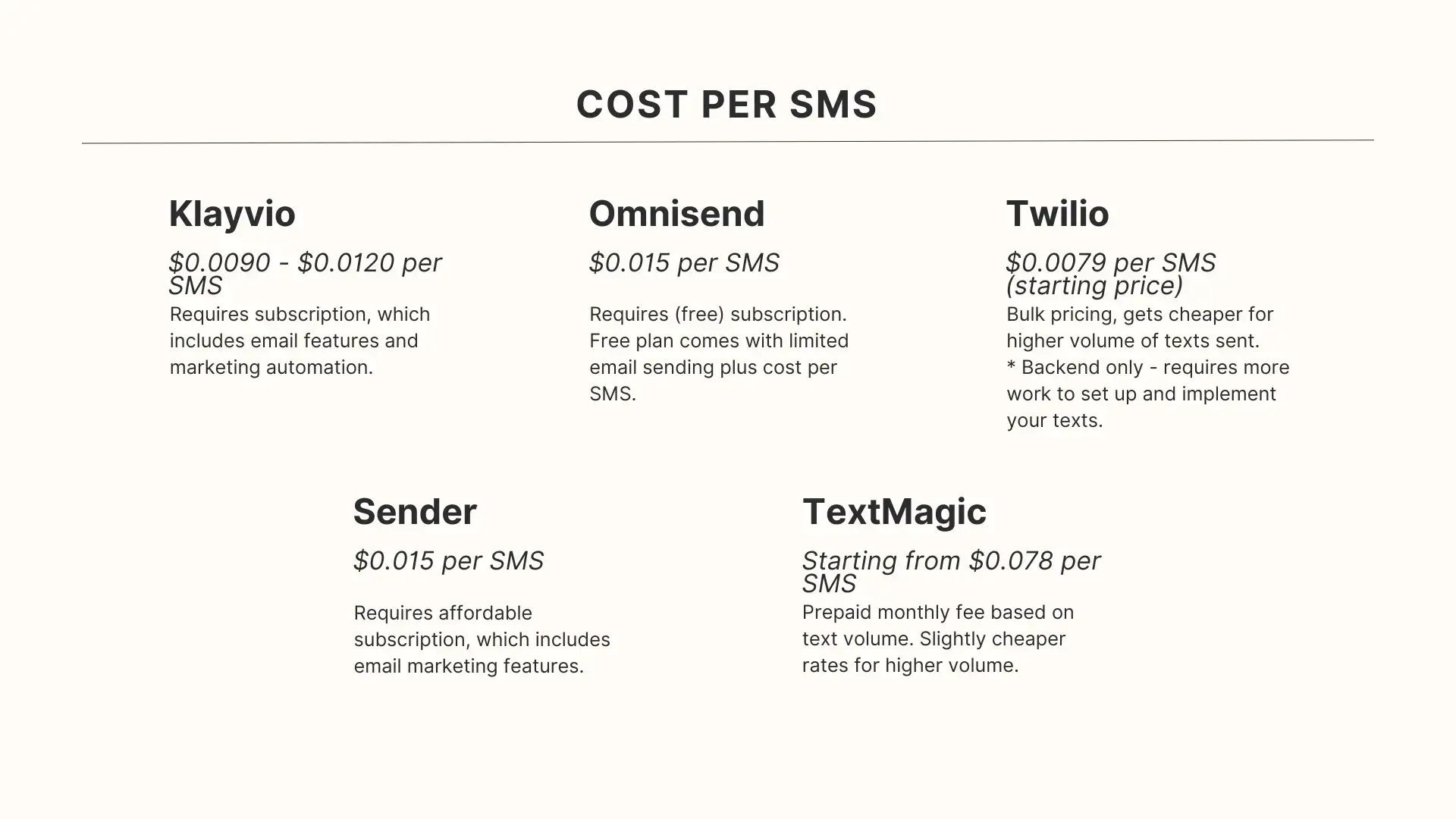
    What This All Means If You’re Running an Ecommerce App

    Push notifications account for roughly 15% of ecommerce revenue from just 3% of total marketing messages – the best efficiency ratio of any channel. 

    Cart abandonment pushes can recover up to 20% of lost sales. Users with push enabled show 3x higher retention.

    But none of those numbers apply to you unless your app can actually use push properly on both platforms. Here’s the practical reality:

    First, you need a native app. 

    Web push and PWA push exist, but they don’t have access to the full push toolkit – no notification channels on Android, no Time-Sensitive priority on iOS, no Live Activities, no reliable background delivery. 

    PWA push opt-in rates on iOS are 10-15x lower than native because users have to manually add the site to their home screen before they can even be asked for permission.

    You need to handle both platforms. 

    Your customers are split across iOS and Android. Each platform has its own push service (APNs vs FCM), its own permission model, its own display rules, and its own filtering. 

    A push strategy that ignores these differences leaves performance on the table.

    Personalization is the multiplier. 

    Generic blasts get filtered and ignored. Personalized notifications see 2-4x higher reaction rates

    Triggered campaigns (cart abandonment, price drops, back-in-stock) see open rates of 16-22%, compared to 3-4% for batch sends. 

    The more relevant each notification is, the less likely either platform’s AI filtering is to suppress it.

    How Vendrux Handles Push on Both Platforms

    If you already have a website – on Shopify, WooCommerce, or another ecommerce platform – Vendrux turns it into native iOS and Android apps with full push notification support built in.

    That means your app communicates through Apple’s APNs and Google’s FCM directly, the same way any natively built app does. 

    Your notifications show up as real native notifications with full support for rich media, action buttons, and deep linking to specific products or pages. 

    On Android, your app gets proper notification channels. On iOS, it gets the Time-Sensitive priority for order updates and other transactional messages.

    Vendrux integrates with the push providers ecommerce brands already use – OneSignal, Klaviyo – so you’re not locked into a proprietary system. 

    You send notifications the same way you would with any native app; the difference is you didn’t have to build that native app from scratch.

    For brands that have invested in their website and want the push notification performance that only a native app delivers (without rebuilding on a separate platform) this is the most direct path.

    Book a free demo to see how push notifications work in a Vendrux app, or get a free app preview to see what your app would look like.

    Frequently Asked Questions

    Do iOS and Android use the same push notification system?

    No. iOS uses Apple Push Notification service (APNs) and Android uses Firebase Cloud Messaging (FCM). They’re completely separate systems. Your server needs to communicate with both to reach all your users. Most push platforms (OneSignal, Klaviyo, etc.) handle this for you.

    Why are Android push notification opt-in rates higher than iOS?

    Historically, Android opted users in automatically – notifications were on by default. Android 13 changed this to an opt-in model similar to iOS, so the gap is narrowing. But because many existing Android users were grandfathered in with permission already granted, Android still leads at around 68% vs 50% for iOS in ecommerce.

    Can I re-ask for push notification permission on iOS if a user says no?

    No. iOS shows the system permission dialog once per app. If the user taps “Don’t Allow,” you cannot trigger it again. You can direct them to Settings, but most users won’t go there. This is why using a “soft ask” screen before the system prompt is so important. It lets you filter out users who would say no before you burn your one chance.

    What are notification channels on Android?

    Notification channels let you categorize your notifications. For example, “Order Updates,” “Promotions,” and “Back in Stock.” Users can independently control the volume, vibration, and visibility of each channel. This means a user can silence your promotional notifications without turning off order updates. Channels have been mandatory on Android since version 8.0.

    How does Focus Mode on iOS affect my push notifications?

    When a user has a Focus active (Work, Sleep, etc.), most notifications are silenced and held until the Focus ends. Your notification still gets delivered, the user just doesn’t see it in real time. Time-Sensitive notifications can break through if the user has allowed that, but Apple expects this category to be reserved for genuinely urgent content like delivery updates.

    Do push notifications work on PWAs?

    Partially. Android PWAs support push reasonably well. iOS added PWA push support in iOS 16.4, but it only works if the user has manually installed the PWA to their home screen, and opt-in rates are 10-15x lower than native apps. PWAs also lack access to notification channels, Time-Sensitive priority, Live Activities, and other native push features.

    How many push notifications should I send per day?

    Most data suggests 1-2 per day maximum for ecommerce, with 2-5 per week being the sweet spot. The key is relevance, a triggered cart abandonment reminder is far more welcome than a generic promo blast. Personalized, well-timed notifications can sustain higher frequencies without driving opt-outs.

  • Do Push Notifications Really Drain the Battery?

    Do Push Notifications Really Drain the Battery?

    It is a common belief that push notifications drain a mobile device’s battery. Is it true? 

    Short answer: not really, the effect is vastly exaggerated. 

    Long answer: they can, and it depends. In this article we’ll explain in detail, along with ways that mobile users can preserve their batteries and how developers can send notifications from their apps that cause minimal battery hits. 

    Let’s get into it. 

    Push Notifications’ Impact on Battery Life

    In today’s world mobile battery life has become a precious commodity, with many people experiencing “low battery anxiety”. 

    Users often look for ways to optimize their device’s battery, and one commonly cited culprit for rapid battery drain is push notifications. But is there any truth to this claim? 

    What are Push Notifications?

    Push notifications are short messages sent by apps or websites to inform users of updates, reminders, or new content. They can pop up even if the app is not actively running, ensuring that users don’t miss out on important alerts.

    Push notifications can be sent from websites or native apps, on iOS or Android devices.

    The Battery Impact of Push Notifications

    The bottom line is this. 

    Modern push notifications, by design, have a minimal impact on battery life. They operate on efficient connection protocols that maintain a relatively “light” link to the server. 

    The app or device does not continuously poll and check for new messages, which could indeed use up a lot of battery. Rather, the server “pushes” (hence the name) a message out which is then picked up by the device.  

    This event-driven model, combined with modern power-saving techniques implemented by mobile operating systems, means that the battery consumption of push notifications remains negligible for the average user.

    That’s not to say there’s no impact though. Excessive and poorly executed notifications can indeed use up unnecessary power. Here are a few situations where push notifications can cause battery problems:

    • High volume: if an app sends an excessive number of push notifications in a short time, it can cause frequent wake-ups of the device, leading to battery drain.
    • Background Processes: some push notifications can trigger background processes. For instance, a weather app might send a notification about an upcoming storm and then update its data in the background. This continuous activity can consume more power.
    • Rich Media: notifications with rich media content (like images or videos) or those that trigger sound or vibration can use more battery than simple text alerts.
    • Connection Type: push services typically rely on efficient connection protocols. For example, Google’s Firebase Cloud Messaging (FCM) uses a connection server to send messages, optimizing battery usage. However, if an app isn’t properly optimized or if there are network issues, maintaining this connection can impact battery life.
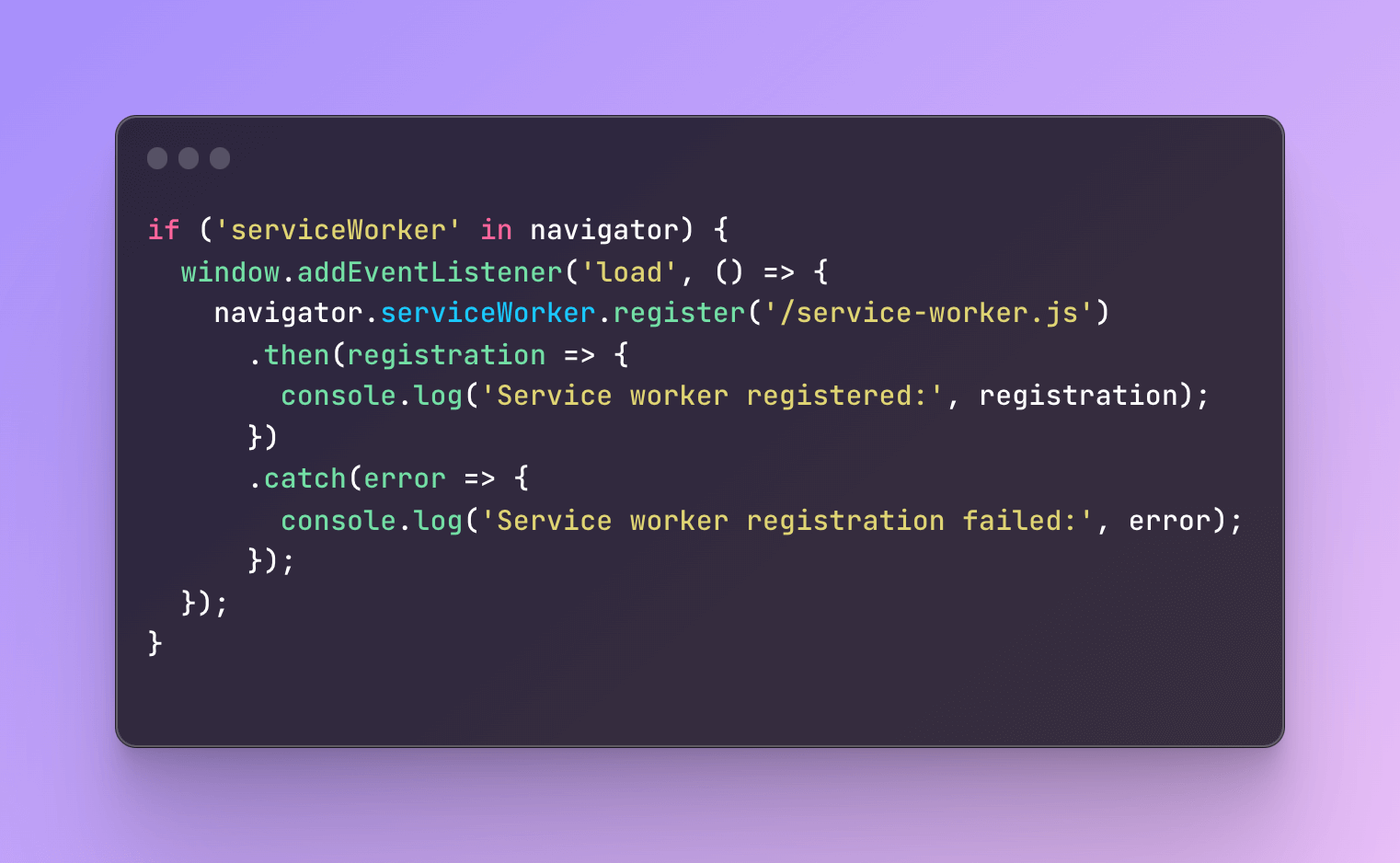
    A Practical Perspective on Push Notifications and Battery Life

    For the average user receiving a typical number of notifications, the battery drain attributed directly to push notifications is minimal. 

    The real concern arises when apps are poorly optimized or abusive in their frequency of notifications.

    Here are some tips for users on managing notifications and battery life:

    • Manage Notification Settings: most smartphones allow users to manage notification settings. If a particular app is sending too many unnecessary notifications, consider turning them off or adjusting their frequency.
    • Update Apps: developers often release updates to optimize app performance and battery usage. Ensure your apps are updated regularly.
    • Monitor Battery Usage: use your device’s built-in battery monitoring tools to see which apps are consuming the most power. If an app is draining your battery disproportionately, it might be worth investigating further.

    That’s what you can do as a user, now let’s look at how business owners, developers and brands can optimize their push notifications to be gentle on user batteries. 

    How Developers and Businesses can Respect Users Batteries

    Respecting your users’ batteries is simply good UX. Here are some best practices for developers to ensure that their web or native app notifications aren’t excessively draining. 

    • Limit the Frequency: avoid sending excessive notifications in a short period. Bombarding users with alerts not only annoys them but can also drain the battery due to frequent wake-ups. Use analytics to understand user behavior and tailor the frequency accordingly.
    • Optimize Background Processes: ensure that notifications aren’t triggering extensive background activities. For example, if a notification is meant to inform the user about new content, avoid pre-fetching excessive amounts of data unless necessary. 
    • Lightweight Payloads: when sending data with your notifications, keep it concise. Instead of sending large images or data directly in the notification, consider sending a reference or URL that the app can fetch when necessary.
    • Batch Notifications: if possible, batch multiple notifications into a single payload. This approach reduces the number of times the device needs to wake up, conserving battery life.
    • Avoid Continuous Connections: For web apps, avoid keeping a continuous connection to your server for notifications. Utilize service workers efficiently, and rely on push services that use battery-efficient protocols.

    It is also important to regularly and thoroughly test your apps – including their battery consumption. This is especially important after you make changes or updates in the notification system. Tools like Android’s Battery Historian or iOS’s xCode Organizer can be a good starting point to investigate. 

    It might also make sense to educate users, giving recommendations for optimizing notifications in your FAQs or support docs. 

    Finally, you should make sure that you give users plenty of options for exactly which notifications they want to receive and how.

    We made sure that Vendrux apps have everything out of the box to give users a great push notification UX. All apps have push preferences, allowing users to choose which notifications to receive. Your apps will also come with a message center for users to save and revisit your notifications and messages later on. 

    We also integrate with the best push provider on the market, OneSignal, to give you unlimited notifications. Their infrastructure is as optimized and efficient as you can get!

    Overall – don’t buy into the more sensationalist claims about push notifications and battery life. So long as you follow the simple tips in this article, you can be confident that it’s pretty much a non-issue.