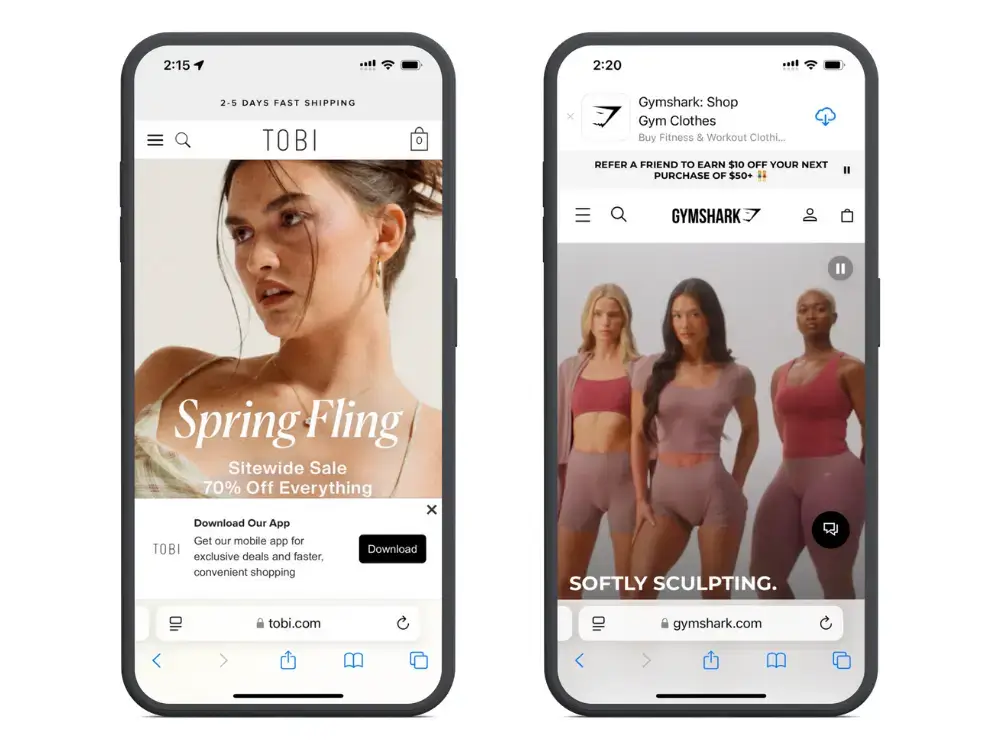
The retail & ecommerce space is constantly evolving. What worked last year may not work this year. And you simply cannot rely on the same techniques you used to drive sales 3, 4, 5+ years ago.
It’s important to stay on top of the latest trends in ecommerce, particularly when it comes to major events on the shopping calendar, like Black Friday and Cyber Monday.
This weekend can make or break a brand’s year. Any retailer will tell you this time is crucial, for giving you the momentum you need to own the holiday season, and enter the new year strong.
To help you out, we’ve compiled a list of the top ecommerce and Black Friday trends you need to be aware of, and for each, actionable steps to take to ensure this year’s Cyber Week is the best ever for your brand.
Want to learn how to drive low-cost sales and better retention this Black Friday? Get the 2025 BFCM Mobile App Playbook to learn why apps are a competitive advantage, and how to ace Cyber Week with mobile apps & push notifications.
Fastest-Rising Black Friday Trends (and Takeaways For Your Brand)
We like to stay on top of all the latest trends in the ecommerce and retail industry, so we can share the most up to date insights with you, our reader.
Here are (in our opinion), the top trends you need to know coming into this year’s Black Friday/Cyber Monday period, based on recent BFCM statistics, as well as recent trends in the ecommerce space.
More People Shopping Online
Ecommerce, in general, keeps rising every year, even more so during Black Friday, Cyber Monday and the days in between (“Cyber Week”).
Cyber Week 2023 accounted for $35.3 billion in online spending in the US, and a record $11.3 billion on Cyber Monday.
Cyber Monday’s numbers were up 5.8% on the previous year, while Cyber Week in general was up 4% year on year.
Overall, ecommerce’s share of retail sales in the US is growing each year at a pace of around 1% per year – projected to make up 20.3% of all retail spending in 2024.
With Black Friday’s reputation for drawing huge crowds (which many people say puts them off shopping), and the ease of shopping online today, expect another record-breaking Black Friday-Cyber Monday for ecommerce.
Takeaways: As an ecommerce brand, make sure you have enough stock on hand and the capability to handle more sales each year – don’t miss out on the BFCM gold rush because you run out of stock!
The Mobile Revolution
Like ecommerce revolutionized retail, another technology is currently staging a revolution in the ecommerce industry – mobile.
One notable statistic from Black Friday 2024 was mobile continuing to facilitate a greater share of all online sales.
For two years in a row, more sales came on mobile than desktop for Cyber Week (51% in 2022, 51.8% in 2023).
In 2024, this number increased to 57%.
Mobile sales on Thanksgiving day surged to a massive 59% of all online sales.
There’s no reason to assume this trend will slow down. Instead, expect mobile commerce to keep growing, and again make up the majority of all online sales during Cyber Week.
Takeaways: The mobile commerce trend is nothing new, so most brands should be well positioned to convert mobile shoppers in 2024. But if you’re still behind on this, make it a priority to get your website fully optimized for mobile. Additionally, launch your own mobile app to pounce on the opportunity to turn BFCM sales into loyal, long-term customers.
Higher Spend Per Person
There’s more money being spent online during Cyber Week, and the holiday period in general.
But it’s not just more people shopping online. People are typically spending more in each transaction, and more over the entire period.
Average holiday spending has been rising each year, with 23% of people spending more than $1,000 in the holiday season in 2023 (up from 14% just two years prior).
The average cart price for Shopify merchants during the 2023 BFCM period was $108.12 – up from $102.10 in 2022, and 100.70 in 2021.
Expect this to continue this year.
Takeaways: Understand the psychology of Black Friday shoppers – people are in more of a mood to spend money, and this is a great chance to boost sales volume and move inventory.
More Customers Using BNPL
The big winners of BFCM 2023 were Buy Now Pay Later services (such as Affirm, Afterpay and Klarna).
On Cyber Monday alone, $940 million was spent using these services, an increase of 44% from the previous year.
There were 85% more BNPL orders in Cyber Week 2023 than the week prior, and 88% more revenue generated – showing that shoppers are willing to get creative to take advantage of the great deals on offer.
Takeaways: Offering a range of payment options is essential. And along with allowing people to pay by various card types and mobile wallets, it’s becoming key to offer BNPL as an option, to capture as many conversions as possible.
Longer Promotional Period
Once upon a time, Black Friday was for brick-and-mortar sales, and all the big online deals reserved for Cyber Monday.
Then Black Friday grew to include ecommerce sales as well, “Small Business Saturday” emerged, and it became “Cyber Week”, rather than just Black Friday and Cyber Monday.
It’s not stopping there. Thanksgiving is growing as a part of Cyber Week, with 35% of people planning to start their Black Friday shopping on Thursday.
And don’t expect it to be contained to the period of Thursday-Monday – there’s even growing adoption of the term “Cyber Ten”, referring to the period of ten days starting from the Sunday before Black Friday through to the Tuesday after Cyber Monday.
With the intense competition for consumers’ attention (and money), more and more brands are starting their promotions early, instead of waiting until the traditional Cyber Week period.
Look for this to continue, as “early Black Friday” sales present an opportunity to get ahead of the primary Cyber Week rush.
Takeaways: While shorter promotions create a sense of urgency, it may be worth running longer promotions or starting your promotions before Cyber Week kicks off, in order to beat the virtual crowds, and the millions of other brands trying to make a sale.
Higher Discounts (In Most Categories)
Competition for discounts is on the rise. Each year, the standard for what is enough to capture consumers’ attention grows.
Electronics: average discount of 31% off (2023) vs 25% off (2022).
Computers: 24% off (2023) vs 20% off (2022).
Apparel: 23% off (2023) vs 18% off (2022).
Furniture: 21% off (2023) vs 8% off (2021).
The one category where the average discount declined in 2023 was Toys, which went from 34% off on average to 27% off (although this is still up on the average discount from 2021).
Don’t be surprised if the averages rise again this year.
Takeaways: Be prepared to have to offer higher discounts on your products than last year, or else come up with more creative ways of catching your customers’ attention during BFCM.
Less Reliance on Paid Advertising
While paid ads are still the most common way to drive traffic during BFCM, this channel’s market share is slowly decreasing, with paid search contributing 27% of sales in 2023 vs 28% in 2022.
These channels are becoming more competitive, more expensive, and less effective, with more stringent control of cookies and user privacy making it more difficult to target the right audiences.
Look for other channels to rise, particularly owned channels like SMS and push notifications.
According to Omnisend, merchants sent 308.9% more SMS messages on Cyber Monday 2023, and sent 12.7 million push messages over the Cyber Ten, a YoY increase of 91.3%.
These channels are the perfect low-cost alternative to paid ads, and a more effective option than fighting for visibility in consumers’ clogged email inboxes at this time.
Takeaways: Start working early on building your customers lists for channels like SMS and push, to be able to utilize these channels during Cyber Week. If you don’t already have one, consider building a mobile app for your store, to get access to native mobile push notifications for your BFCM campaigns.
Higher Competition, Higher Bar for the Shopping Experience
All up, there’s simply more competition in the retail space every year.
With more competition, the bar for what consumers expect gets higher. They want higher discounts, and you need more persuasive copy to convert them.
Just as importantly, you need a better shopping experience.
If shoppers find it frustrating to navigate your checkout process, or find what they’re looking for, there are deals from a hundred other brands waiting for them, and they’ll be quick to jump ship.
Takeaways: Put the work in to make sure your customer experience is fully optimized before Black Friday. Streamline your checkout flow and fix any bugs or usability issues on your website.
Check out our Ultimate PDP Guide for tips on building high-converting product pages.
How to Own Cyber Week 2025 with Mobile Apps
One of the best things you can do to own Cyber Week this year, and for years to come, is to launch your own mobile app.
A mobile app is a powerful tool to have in your Black Friday arsenal.
It lets you provide a contained shopping experience, free from many of the distractions shoppers are faced with during this period.
Apps offer a more mobile-friendly experience, catered towards the growing number of mobile-first shoppers.
You can cut through the noise on Black Friday, with an app icon on your users’ home screens and access to native push notifications.
Apps are geared towards retention, making it easier to build the momentum of BFCM into long-term revenue.
In the years to come, you’ll see brands with their own app dominate Black Friday and Cyber Monday.
Get Started Now
If you don’t have an app yet, it’s not too late to build one.
Contrary to popular belief, it doesn’t have to take 6 months to a year, and hundreds of thousands of dollars invested, to launch your own mobile app.
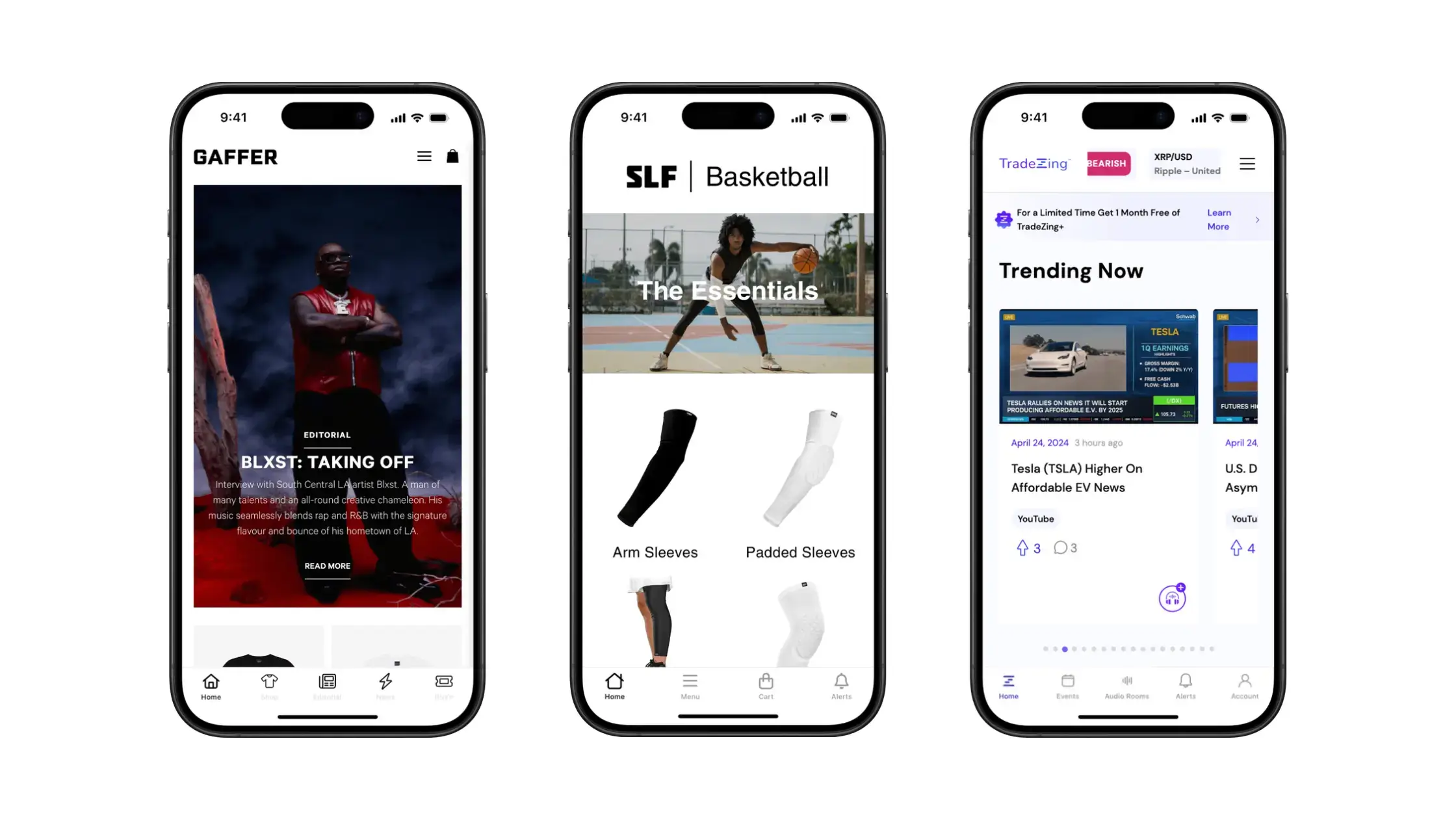
Want to build amazing ecommerce apps like these? Check out Vendrux.
With Vendrux, it takes just a few weeks to build your app, with no effort, expertise or major investment required.
You’ll simply convert your existing site into an app – no rebuilding, no overhead, no messing around with new codebases, developers, or agencies.
We do all the work for you, using what you’ve already built and the features and optimizations you already know work, to deliver an app experience your customers will love.
The latest Black Friday statistics shine a light on how the days following Thanksgiving have grown to become the most important period of the year for retailers.
We’ve almost come to think of Thanksgiving as the day before Black Friday, rather than the other way around.
Though Black Friday is nothing new – it’s been a thing since the 1970s, and possibly even earlier – the way we shop on Black Friday and subsequent days is evolving every year, from more people taking advantage of Black Friday-Cyber Monday sales, to a higher share of sales online and on mobile devices.
If you’re interested in what the data shows about how we shop during the biggest shopping event of the year, read on for the latest statistics.
Want to learn how to drive low-cost sales and better retention this Black Friday? Get the 2025 BFCM Mobile App Playbook to learn why apps are a competitive advantage, and how to ace Cyber Week with mobile apps & push notifications.
2024 Black Friday Shopping Statistics
According to the data, Black Friday (and the surrounding days, including Thanksgiving, Cyber Monday, and the newly coined “Small Business Saturday”) is bigger than ever.
Check out the following statistics from the most recent Black Friday/Cyber Week to get an idea of just how massive this period is for retailers, as well as getting an idea of what consumers’ shopping habits look like at the unofficial start of the holiday shopping season.
More than 1 in 2 Americans shop online or in-person during Cyber Week
In 2024, 197 million Americans made a purchase during Cyber Week, either online or in person.
That’s approximately 59% of the entire US population.
This figure is down slightly from 2023, where a record 200.4 million Americans participated in Cyber Week.
In-Store Shopping Up, Online Down
In a slight reversal of trends, 2024 saw more people shopping in person, and fewer online.
126 million people made a purchase in-store during Cyber Week, up from 121.4 million in 2023.
124.3 million Americans made a purchase online, down from 126 million in 2023.
Online Shopping Wins on Black Friday
The distribution flips for Black Friday – 87.3 million Americans made a purchase online, compared to 81.7 million in-person.
The figures are closer than the previous year, however, where we saw 76.2 million consumers shop in-store compared to 90.6 million online.
64 Million People Shopped Online on Cyber Monday
64.4 million people made a purchase online on Cyber Monday 2024, making it the second biggest day for ecommerce.
This number was down from 2023, which saw 73.1 million online shoppers on Cyber Monday.
A Record $41.1 Billion Was Spent Online During Cyber Week
Despite a decrease in overall shoppers, online sales for the “Cyber 5” period were up, setting a new record for Cyber Week sales in the US.
Shoppers spent $41.1 billion total across the period from Thanksgiving to Cyber Monday – up from $38 billion in 2023.
New Online Sales Records for Black Friday and Cyber Monday
Yet again, the two biggest days of the Cyber 5 set new records for online sales.
US shoppers spent $10.8 billion online on Black Friday, up from $9.8 billion in 2023.
Cyber Monday online sales totaled $13.3 billion, up from $12.4 billion a year ago.
Sales on Thanksgiving itself, as well as the Saturday-Sunday period, also set new records.
Global Cyber Week Online Sales Top $300 Billion
Worldwide, online shoppers spent $314.9 billion during Cyber Week, according to a report from Salesforce, up 6% on the previous year.
Black Friday contributed $74.4 billion in online sales (increase of 5% YoY), while Cyber Monday contributed $49.7 billion (up 2% YoY).
Mobile first beat out desktop in 2022, accounting for 51% of all online sales during Cyber Week.
The mobile shopping market share grew again in 2023, reaching 51.8% of all online sales.
And it continues to rise.
57% of all US online sales on Cyber Monday came on mobile devices – $7.6 billion in total, and a 13.3% increase YoY.
Worldwide, 70% of online spending came on mobile, up from 67% in 2023.
Mobile accounted for 57% of all online sales on Cyber Monday 2024, and 70% of all online spending worldwide during Cyber Week.
US holiday season sales expected to top $1 trillion
Experts predict a total of $1.353 billion in US retail sales over the holiday season for 2024, up slightly from the previous year.
19.7% of these sales happen online, meaning over $266 million in US ecommerce sales over the holiday period.
Nearly $1 Billion Spent with Buy Now Pay Later on Cyber Monday
Buy Now Pay Later (BNPL) services inch closer to driving $1 billion in sales on Cyber Monday alone.
In 2024, consumers spent $991.20 million – an increase of 5.5% on the previous year.
Of these sales, 75.2% came on mobile devices.
Consumers spent $15.7 million per minute during Cyber Monday peak
At the peak hour of 10pm-11pm EST on Cyber Monday, consumers spent a massive $15.7 million per minute.
AI having a major impact on Cyber Week shoppers
Analysis from Salesforce found AI to be a major player in online shopping during Cyber Week.
$60 billion worth of global online sales was influenced by AI in some way.
Retailers that used generative AI and AI agents 18% more during Cyber Week than the week before. Those who did use AI reportedly had 2% higher conversion rates than retailers not using AI.
Shoppers leaned heavily on AI to assist their purchasing journey too, using AI-powered customer service agents 38% more than the previous week.
Average order value for November 2023 was 2.7% higher than 2022
Consumers are spending more in each order than the previous year.
Between November 1 and November 27 2023, average order value was 2.7% higher than the same period the previous year.
The increase is even higher over Thanksgiving weekend, with a 3.2% increase in AOV for the period of 25-26 November.
82% of people shop during Cyber Week
More than four out of five people say they shop at some point during Cyber Week, whether it’s online, in-person, or both.
2.5x as many people shop online vs in-person
Of these people, the majority say they plan to shop online. 68% of people shop online during Cyber Week, while only 27% shop at a brick and mortar store.
52% of those who don’t plan to shop on BFCM say it’s because they don’t like crowds
For people who don’t plan to shop during Cyber Week, more than half say it’s to avoid crowds.
Some simply aren’t interested in buying anything, or don’t want to spend money, while 8% think that Black Friday is a scam.
Target and Walmart are the top in-person Black Friday shopping destinations
For people who shop in-person on Black Friday, more than two-thirds shop at Target, Walmart or both.
Kohl’s is the next most popular destination, with 41%, while Macy’s, Best Buy and Old Navy are a few other brands that get a spike in business on this date.
88% of people shop on Amazon on Black Friday weekend
Of people who shop online during Cyber Week, nearly all make a stop at Amazon.com.
88% of people report shopping on Amazon at some point during the period. Target (55%) and Walmart (51%) are also popular with the online crowd, as are the websites of some other big brick and mortar brands.
23% of people plan to spend over $1,000 this holiday season
Nearly a quarter of people say they plan to spend more than $1,000 this holiday season. 45% of people claimed they will spend $600 or more.
Consumers spent an average of $321.41 on holiday-related purchases during Thanksgiving weekend
Thanksgiving marks the start of the holiday shopping season, with an average of $321.41 spent on holiday-related items during this period.
Most popular gift purchases include clothing and accessories, toys and gift cards.
55% of people took advantage of pre-Thanksgiving sales
With Black Friday weekend becoming more and more competitive, many brands opt to start their promotions earlier to get in front of the pack.
It seems customers are responsive to this strategy, with 55% of people saying they made a purchase from an early sale or promotion.
Promotions are coming earlier and earlier too, with 35% of people buying something on sale in the week leading up to Thanksgiving, and 24% more than a week before.
Major categories see up to 2-2.5% more sales during Cyber Monday
It’s no surprise that Cyber Monday sales are much higher than the average day.
Most categories see double their regular sales on Cyber Monday, or more. Apparel sales, for example, grow 189% compared to a regular day in October.
Other top-performing categories include appliances (up 166%), toys (up 140%) and furniture (up 129%).
Discounts hit record highs in 2023
Discounts are hitting record highs during Black Friday and the surrounding days.
The average Black Friday discount for electronics was 31% off in 2023, compared to 25% off the year before.
The average discount for furniture increased from 8% in 2022 to 21% in 2023. Apparel, sporting goods, televisions and appliances all saw higher discounts as well, while the average discount for toys decreased, from 34% in 2022 to 27% in 2023.
Paid search drives 27% of online sales during Cyber Week
Paid search remains the top marketing channel for Cyber Week, driving 27% of online sales from Thanksgiving through to Cyber Monday.
However, this number is down slightly from 28% on 2022.
Direct is the #2 channel, with 21% share of sales. Organic search, email and affiliate are all fairly evenly distributed, while social media drives less than 5% of all Cyber Week sales.
Black Friday Trends: Three Predictions for the Future of Black Friday
The Black Friday figures above paint interesting reading on the current state of Black Friday, Cyber Monday and the overall Thanksgiving sales period.
But how about the future of BFCM? What do these stats tell us about what Black Friday-Cyber Monday will look like next year, five years, ten years from now?
Here are three predictions for how Black Friday will evolve in the coming years.
More sales on mobile: mobile commerce is growing at a fast rate, driving the majority of sales in the US, and 70% of all online sales worldwide. With mobile shopping experiences getting better every year, expect this trend to continue.
More early sales: we’ve seen that almost half of all shoppers already take advantage of pre-Thanksgiving sales. With the intense competition and ad costs during Cyber Week, look for more brands to run early promotions, potentially starting as soon as the start of November.
More brands driving sales through owned channels: paid ads drive more than a quarter of all Cyber Week sales, but the cost of this keeps going up. Expect to see smart brands utilize “owned” channels, where they can drive sales more or less for free – such as email, SMS and push notifications via their mobile apps.
If you’re running an ecommerce store, and you don’t have an app, you’re missing out. Our ecommerce App Revenue Calculator shows just how much your brand can gain from launching your own app.
US shoppers spent $9.8 billion online on Black Friday last year, and $12.4 billion on Cyber Monday. In total, ecommerce brands generate nearly $40 billion over Cyber Week.
There’s a lot of competition between brands for their piece of the pie. Inboxes are slammed, CPMs are 2.5-3x higher, and every single brand is desperately pushing their offer.
Push notifications are your secret weapon to stay ahead of the pack. Read on and we’ll explain why, and give you some ideas to help craft a winning Black Friday push notification campaign.
Want to learn how to drive low-cost sales and better retention this Black Friday? Get the 2025 BFCM Mobile App Playbook to learn why apps are a competitive advantage, and how to ace Cyber Week with mobile apps & push notifications.
Why Push is the Best Marketing Channel for Brands on Black Friday
Let’s touch on a few reasons why push is so powerful for ecommerce brands, particularly during the holiday season.
Push notifications are cost-effective
Cyber Week is super-competitive, with any brand that cares about getting sales likely running a promotion.
That means the cost of paid traffic channels like social media ads are through the roof.
Push notifications are the opposite. They’re virtually free to send, and yet more likely to be seen than an ad on Facebook or Instagram (which your target might just pass over in a scroll-enduced fugue state).
You can afford to run bigger promotions
One of the difficult parts about Black Friday is running promotions that actually capture attention.
Everyone’s running some kind of deal, and recent surveys show that consumers expect a minimum of 30% off for most product categories for Black Friday/Cyber Monday sales.
If you’re paying for super expensive ads as well, you may not be able to justify offering a big promo as well. But if you have the ability to drive ‘free’ traffic, you may be able to offer massive discounts that separate your brand from the competition.
Push notifications bypass crowded email inboxes
Email is another way to promote your deals for little to no cost. And while email marketing is effective, and worth doing, you’re also contending with massive competition here, and getting visibility during promotional periods is tough.
Your customers are going to have inboxes full of promos from every brand they’ve ever given their email to. Most people aren’t going to patiently look through every single email.
Push is a way to bypass the inbox and get your message straight to the source, landing on your user’s lock screen, where there’s likely to be a lot less competition for attention.
Recipients are already warmed up
Push notifications generally have better engagement and conversion rates than similar channels, largely because recipients are more familiar with your brand.
If you’re messaging them regularly, they’re used to seeing your messages, and the big offer you send them on Black Friday will come with more trust attached.
Compare that to a Black Friday email you get from some brand you bought a pair of shoes from 12 years ago, and who you forget about until their once-annual Black Friday promo comes around.
People are simply more likely to buy from a brand if that familiarity is there.
Push notifications are flexible and easy to personalize
It’s important to personalize your communications, from the content to the timing, to stand out from the hundreds of brands who send the same, boilerplate promos during this time.
Push notifications make it super easy to inject personalization, play around with copy, send different variations to different segments, and make your customers feel unique at a time when many other brands are doing the opposite.
Best Practices for Black Friday Push Notification Campaigns
Sending push notifications alone isn’t enough to make your Black Friday campaigns a success.
It’s important to follow some best practices, and put some thought into your campaigns, to maximize engagement.
Here are a few things to take on board.
Utilize urgency
During Black Friday/Cyber Week, you have urgency built in – whether you’re running a one-day promotion for Black Friday, or a promotion that ends at midnight on Cyber Monday.
Make sure you highlight this in your push messages. Urgency is a proven psychological tactic that increases conversion rates. If shoppers know that the amazing deal they’re looking at will only be around for a short time, they’re more likely to give in to FOMO and take action.
Personalize and segment
Don’t fall into the trap of sending mass-produced push messages that look like they’ve been copied and pasted from chat GPT.
Data shows that personalized push notifications have 4x higher reaction rates. Some ways you can personalize your push notifications is to inject the recipient’s name into the message, or mention some product they purchased in the past.
Additionally, you should segment your push notifications to ensure everyone gets a message and a promotion that’s relevant to them.
Send multiple messages
With all the noise during Cyber Week, don’t be surprised if your first message gets lost in the shuffle, ignored, or the customer just forgets to click it.
You’ll want to send multiple messages, to keep reminding customers of the great deal you’ve got going on.
You don’t want to overdo it and send a constant stream of messages every few minutes, but as long as you’re not going overboard, at least one notification a day (or three messages for a one-day sale) is recommended to ensure you get your customer’s attention.
A/B test before to find out what works best
When it comes to timing, the type of content, specific copy variations, A/B testing can uncover a wealth of insights as to what works best with your audience.
But you don’t want to be testing this during Black Friday. The best brands test this well in advance, and come to Cyber Week with a playbook of tactics and techniques that deliver results.
Run tests well ahead of time, and use the results from these tests to craft your campaign.
Keep copy short, use emojis
It’s not unique to Black Friday or Cyber Monday, but as always with push notifications, short and sharp copy is the best.
You need to capture the reader’s attention and imagination in just a few words.
Emojis are useful too – they’re shown to increase reaction rates by 20%, and offer a great way to convey emotion in a small space, as well as making your messages stand out more.
Now we’ve run through some general push notification best practices, let’s look at some examples of push notifications you can send during Black Friday and Cyber Week.
Pre-Black Friday message
It’s a good idea to warm up your subscribers before Black Friday, and let them know something big is coming.
This gets people excited for what’s to come, and allows them to start thinking about what they’re going to buy once the sale starts.
Example message:
“Stay tuned, {customer’s name}! Our massive Black Friday deal is almost here. 70% off on everything starts Friday 🤯”
First promo message
Once your promo starts, send a message to let your customers know the sale is live.
Make sure to use urgency and personalization!
Example message:
“{customer’s name}, get it while it’s hot! 🔥 Massive savings store-wide for a limited time only.”
Mid-sale notification
Send another notification midway through the sale (multiple if your sale lasts more than one day), again playing on urgency and FOMO to catch the customer’s attention.
Example message:
⌛Time’s running out⌛Use code BFDEAL at checkout to save 70% on EVERYTHING.
Sale ending soon/last chance
Even if you inject urgency into your earlier messages, some people will still leave it to the last minute.
This is your last opportunity to capture the customer’s attention, but it’s also when urgency works the best.
Example message:
🕓This is it! Our massive Black Friday promo ends at midnight tonight 🌙 Your last chance to save 70%!
Abandoned cart notification
On average, 70% of online shopping carts are left abandoned. And with all the craziness going on, all the brands vying for attention, you’re going to have some people fall off before they finish their checkout.
Set up an automatic abandoned cart notification to reach out get them to come back and finish their purchase.
Example message:
🤔{customer’s name}, did you forget something? Your cart is waiting for you. Finish your checkout now and lock in your Black Friday discount!
Personalized deal notification
Use information you have about the customer, such as items they put on their wishlist, to send ultra-personalized promotions with a much higher chance of getting a reaction.
Example message:
{customer’s name}, those shoes you put on your wishlist are now 50% off! 😱
Early access promo
You can also make your app users feel special by giving them exclusive early access to your promo.
This is also a great way to convince people to keep your app installed, and an incentive to convince new people to download your app.
Example message:
🤫 Don’t tell anyone. You’re on the exclusive early access list 😶🌫️ Get shopping with our massive Black Friday discount now!
Not Using Push Notifications Yet?
As we’ve established, push notifications are one of the most powerful tools for ecommerce brands, especially when it comes to the holiday season.
But for the full power of push notifications – mobile notifications sent to your customers’ lock screen – you need a mobile app.
If you don’t have an app yet, let Vendrux help you build one.
Vendrux converts your existing web store into mobile apps, keeping all the features, plugins, integrations and small optimizations that your site relies on for conversions.
We do it with a minimal investment, and little to no overhead, unlike the long and expensive process that is custom app development.
Our apps come with native integrations for OneSignal and Klaviyo, allowing you to set up powerful push notification flows and send customized notifications with just a few clicks.
Black Friday is a huge opportunity for ecommerce businesses to boost revenue, create extra cash flow, and take steps towards building a bigger business long-term.
But you need to approach Black Friday (and the days/weeks surrounding Black Friday) with a carefully planned strategy. You can’t simply expect sales to go through the roof just because it’s Black Friday.
If you fail to plan, you plan to fail, as the saying goes. This article is here to help you plan. Read on as we help you build a powerful Black Friday ecommerce marketing strategy that will deliver a long-term boost to your store.
Want to learn how to drive low-cost sales and better retention this Black Friday? Get the 2025 BFCM Mobile App Playbook to learn why apps are a competitive advantage, and how to ace Cyber Week with mobile apps & push notifications.
Why is Black Friday Such a Big Deal for Ecommerce?
Over the years, Black Friday has morphed into the shopping event of the year.
It’s no longer just the “Friday after Thanksgiving”. Thanksgiving is now the “Thursday before Black Friday”.
Consumers have become accustomed to finding great Black Friday deals, along with deals the days before and after. And for more and more people, online shopping (ecommerce sites and shopping apps) is the first place they look when they want to buy something.
They come with a herd mentality that leads to huge amounts of money spent online. In 2022, Black Friday accounted for $9.12 billion in ecommerce sales.
In addition, conversion rates are significantly higher, with Adobe Analytics showing average conversion rates of 5.6% on desktop and 3.3% on mobile during Black Friday.
According to Shopify, conversion rates for Shopify Plus merchants were even higher, at 7.38% on average over Black Friday.
More active online shoppers means a big opportunity for your store. But it also means more competition which is why a smart Black Friday marketing strategy is important.
When we say “Black Friday”, we’re not only talking about one day.
At one point, this was a one-day shopping event, but as Prime Day is now a two-day event, Black Friday has morphed into a week-long gold rush.
Cyber Monday is actually a bigger day for ecommerce merchants than Black Friday. Cyber Monday sales totaled $13.3 billion in 2024, $2.5 billion higher than Black Friday and the highest single day of the holiday shopping season.
The increase in conversion rate is bigger as well, with 6.9% on desktop and 3.6% on mobile.
Overall, “Cyber Week” generated $41.1 billion in sales in 2024. And each year, more merchants are starting earlier and extending the BFCM (Black Friday-Cyber Monday) excitement later, to further capitalize on the benefit they get out of the year’s top shopping event.
Some even refer to “Black November” instead of Black Friday, as a lot of retailers run sales over the whole month, instead of waiting for Cyber Week to begin.
Thinking Long-Term About BFCM
Similar to how Black Friday is not just a one-day event, smart brands don’t approach BFCM as an isolated event, only seeking a short-term boost. It’s an opportunity to build long-term momentum and bring new, loyal customers into your brand.
Short-sighted businesses see BFCM as a cash grab. Smart businesses use BFCM to build relationships and leverage the excitement of Black Friday into long-term benefits.
With the December holiday season coming up right after Cyber Week, you really need to be thinking long-term. A five-day increase in revenue and a spike in cash flow is great, but bringing new fans in for your brand who continue to shop with you through December is better.
19 Black Friday Ecommerce Strategy Tips
Now let’s move on to a bumper list of proven tips to help you get the most out of Black Friday, Cyber Monday and the surrounding days for your ecommerce business.
1. Make Sure Your Site is Fast and Responsive
Before you start thinking about how to win Black Friday, first make sure you don’t lose it.
You’ll lose Black Friday if your site is too slow or if there are technical issues with your site that drive shoppers away. Speed and responsiveness are always important, but with more people shopping during BFCM, their importance is magnified.
Longer time for a page to load has been proven to increase bounce rate, potentially by as much as 123%. You can expect an even shorter leash during Black Friday with the competition for consumers’ attention.
And as responsiveness goes, any site that’s not mobile-friendly today is missing out on a huge share of their audience. Expect the share of mobile vs desktop traffic to skew even heavier in favor of mobile over Black Friday/Cyber Monday. Data from Shopify stores in 2021’s BFCM period showed 71% of purchases were made on mobile, as more people go for the convenience of being able to shop from their phone.
2. Be Prepared for Increased Activity
There’s no point dreaming up a list of unique Black Friday marketing ideas if you can’t actually handle the increased activity. So spend the time leading up to Cyber Week making sure you’re ready for a hectic sales week.
There are a number of facets to this. Inventory is one. You need enough stock to handle more sales. Many unprepared retailers cap their Black Friday gains by running out of stock because they didn’t plan ahead.
Your website also needs to be able to handle an increase in traffic. Make sure your hosting and the technical architecture of your site is not going to give out if you end up getting 4-5x your usual traffic numbers.
Finally, make sure you have enough staff to keep business operations running smoothly. Get all hands on deck from your support team, and have team members ready to answer customers’ questions immediately. You can’t leave customers waiting 24 hours to get an answer – by then they’ll have already taken a similar deal from a competitor.
3. Audit Your UX and Checkout Flow
With more traffic on your site, the shopping experience becomes all the more important. Small issues are magnified. Things that may have cost you a few hundred in lost sales in an ordinary weekend could cost you tens of thousands during Black Friday/Cyber Monday.
Before Black Friday, do a self-audit of the customer journey and look for any areas you can improve. You need to ensure the navigation is smooth, intuitive and easy to locate. Make your CTAs big, bold and obvious. Look through every part of your site from a CRO angle. Minimal improvements will make a big difference come late November.
Look at your checkout flow and see if there are any opportunities to make this smoother and more streamlined. During BFCM, customers will be rushing to finish their purchase and start looking for the next deal. Anything you can do to remove friction from the buying process and make impulse purchases easier will result in a lot of extra sales.
4. Automatically Apply Discount Codes
As part of your checkout flow, it’s a good idea to cut out the friction of having to enter discount codes.
This just adds hassle for the customer. They might forget the code, they might enter the wrong code, or they might not realize they need to enter a discount code, check out, and come back upset when they realize they paid full price.
Discount codes are a good marketing tool – they make the promotion feel more exclusive and are great for generating shares and helping your Black Friday sale go viral. But during a big promotional period like Cyber Week, they can also be a barrier to conversions.
If you use codes, have them automatically applied at checkout, or do away with codes entirely (but still show the savings in the checkout flow).
5. Supersize Your Deals
Black Friday is not the time to offer 5% off. Even 10-20% off is unlikely to raise many eyebrows.
Shoppers will be seeing big discounts all over the internet during BFCM, so you need to up your game to stay competitive. As long as your margins can afford it, Black Friday is the time to go big.
Discounts in the range of 35% off, 45% off or 50%+ get people excited.
This might temporarily hurt your profit margins, but you get a range of benefits to make up for it, such as increased cash flow. More importantly, you introduce people to your brand and acquire new customers who you can market to in the future for full-price, high-margin sales.
6. Offer Exclusive Discounts to Your Top Customers
Leverage BFCM to boost loyalty with customers who have already shown an inclination towards your brand. Along with promotions to a wide audience, you can run exclusive, higher value promotions specifically for your “VIP” customers.
How you define your VIPs is up to you – it could be people who have spent over a certain threshold, those who have made multiple purchases, or even everyone on your email list who has bought from you in the past.
For these customers, getting an exclusive discount cultivates good vibes, making them feel special and appreciated. Many will remember this feeling later, and come back to buy from you again, as well as providing positive reviews and testimonials that further boost your brand.
7. Run Strategic Promotions
There’s no getting around the fact that running high-discount promotions will put a bit of a dent in your margins.
A lot of merchants try to hedge their bets and offer smaller discounts to maintain margin, and end up with little benefit while still losing out on profit.
A better way to do it is to use high-discount promotions strategically to help boost sales of higher-margin products. You essentially make these promotions your Loss Leaders – products that get customers in the door, where you can market other products to them or make a cross-sell which makes you more money.
For example, you could run a big promotion on one product, then advertise accessories for this product in the checkout flow or as a follow-up email. Or you could heavily discount consumable products, with the idea that customers will come back and re-order at full price at a later time.
8. Push Subscription Products
Subscriptions are another way to use big promotions in a strategic way. Consumable subscription products bring their value not from just a single order, but from the long-term value of customers who subscribe and pay you every month, 90 days, or whatever the subscription term is.
Things like supplements, beauty products, food products and even clothing in some cases work well as regular subscriptions. For BFCM you can offer these subscriptions at a huge discount – potentially even giving the first month free, or close to it, with the idea that the deal will be too good to pass up on, and then once you’ve got them hooked, a lot of customers will keep paying the regular subscription price.
Just make sure you have some previous data for your subscription products that shows the churn rate (the rate of customers who cancel their subscription) is relatively low. You can expect a higher churn rate from people who got a discount on the initial purchase, so if this number is already high you might make a loss from your promotion in the end.
9. Promote Bundles and Threshold Discounts
Another great discount strategy is to offer attractive discounts for people who spend above a certain threshold.
The higher the order value, the higher the discount you can afford to give. So instead of just offering a blanket 50% discount across your store, you can offer a big money-off discount for people who spend $100, or $150, for example (check your average order value and set this threshold comfortably above what people regularly spend).
Similarly you can promote bundles or deals that require multiple products in an order, such as a Buy Two Get One deal, or a discount that unlocks when a customer buys X number of products.
Learn more about the average order value in ecommerce and how to increase it in this article.
10. Use Scarcity and Urgency
You need to make your promotion feel exclusive and make potential buyers feel like they need to act now if they want to take advantage.
That’s why most successful online retailers lean heavily on scarcity and urgency tactics.
Scarcity is the idea that there are only a certain number of discounts available, while urgency is the idea that there discount will only be around for a limited time.
Both achieve the same goal: to make the shopper take action. This helps you close the sale when you have the customer’s attention – more often than not, if they leave, they’re not coming back.
You may need to manufacture these two states somehow. Though there is some innate sense of urgency with BFCM (it doesn’t last forever), five days (for a promotion running from Thursday to Monday) doesn’t really convey the kind of urgency that tells people it’s now or never. And as far as scarcity goes, you might actually want as many people to participate in the promotion as possible, but customers will be more likely to take action if they feel like there’s only a limited number of discounts available.
11. Rotate Promotions Throughout BFCM
Rotating promotions are a great way to manufacture scarcity and urgency without making anything up, as well as keeping things fresh for people who visit your store multiple times over Cyber Week.
For example, you might start with a 12 hour promotion offering 50% off on a particular product line. When the 12 hours are up, it could be Buy One Get One on a different set of products. Later, you run a flash one-hour discount offering 75% off on one product, limited to X number of redemptions.
This generates excitement, along with the scarcity and urgency you want, making customers feel like a deal will be gone soon if they don’t act fast. It also incentivizes people to keep coming back to regularly check your store and see what the next deal is going to be.
Amazon executes this strategy brilliantly during Prime Day. They constantly change promotions over the 2-day event, with deals only available for a limited time.
If you’re wondering whether this works, Amazon did an estimated $12 billion in sales for Prime Day 2023, doing almost as much as Black Friday + Cyber Monday on their own.
12. Run Gamified Promotions
Another way to make your Black Friday marketing campaigns stand out is to use gamification.
Gamification means using game mechanics in your promotions to make them more fun and engaging. Common gamification strategies in marketing include “spin to win” games, mystery coupons, and challenges that unlock more discounts.
A gamified “spin to win” promo on Temu.com
An example you could use for BFCM is a ticker tracking how many discounts have been redeemed over the week. When you reach certain thresholds, new (or higher) discounts get unlocked.
This encourages customers to spend more to unlock better deals, and also functions as social proof when shoppers see that other people have been spending big.
If your gamified promotion is novel enough, it can even generate publicity and drive additional customers to your store.
13. Lean On Owned Traffic Channels
Moving from promotion strategy to customer acquisition strategy for Black Friday/Cyber Monday, the first tip is to heavily utilize owned traffic channels.
Email is the most likely owned traffic channel you’ll have to work with, but you could also have push notifications, an SMS list or an owned audience on social media.
Push notifications are a powerful and largely underutilized Black Friday promo channel
Paid channels are incredibly competitive during Cyber Week, which makes them extremely expensive as well. The more owned channels you have, which allow you to get in front of people without paying, the more you can afford to offer heavy discounts without crippling your profit margins.
14. If You Run Ads, Run Them Early
Though competitive and expensive, paid ads are not necessarily a no-go for Cyber Week. They’re still a great way to get your Black Friday deals in front of new people.
But if you’re going to use paid ads as part of your Black Friday strategy, start early – perhaps even before Cyber Week.
As it gets to Black Friday, ad prices shoot up. You can get in at more reasonable prices the earlier you run your campaigns, along with getting in front of customers before the floodgates open and every brand is competing for attention.
This also gives the algorithm more time to optimize your ads and serve the right ads to the right people come crunch time, and allows you to build an audience that will cut costs down during the busiest part of Cyber Week.
15. Run Personalized Ads and Promotions
Shoppers see thousands of ads and promotions during Cyber Week. You need something to make yours stand out.
Personalization is a great tool for ecommerce stores, particularly during BFCM. The more you can make your promotions speak directly to the customer, the better your chance of standing out from all the other “save 50% this Black Friday” emails and ads.
If it takes more time to segment your audience and create unique offers for each customer, it’s worth it. According to Klaviyo, a high level of segmentation on marketing campaigns has the potential to return over 3x the revenue of a broad, unsegmented campaign.
16. Use BFCM to Recover Abandoned Carts
Black Friday and Cyber Monday are a great opportunity to capture people who were on the fence but didn’t end up completing their purchase.
You can reach out to abandoned carts during Cyber Week to let them know the product they were looking at is now on sale, giving them a great incentive to come back, pushing them over the finish line to becoming a customer.
17. Refresh Creatives Often
Ad fatigue is leveled up to the nth degree during Black Friday. Ads and deals are everywhere someone looks when they go online, from their social media feed to their email inbox, and even on their phone’s lock screen.
It’s vital you mix it up and avoid showing the same images, video or copy over and over. Potential customers will quickly become blind to your ads, automatically passing them over for fresh ads from other brands.
18. Use Social Media to Build Excitement
Your social media channels can help drum up excitement in the weeks leading up to Black Friday. Utilize hashtags, giveaways, teasers that promise things like “The Biggest Black Friday Ever!”
You could run competitions to unlock limited, “early access” on upcoming Black Friday deals, or start promoting a Black Friday landing page that slowly reveals more details as it gets closer to launch.
It’s all about building buzz and anticipation. Make it so that people are counting down until 12:01 on Friday to jump on your site or app and see what awesome deals are available.
19. Offer App-Specific Discounts
Black Friday is a great opportunity to build long-term revenue by setting the stage for customers to spend more over their lifetime as a customer. And getting people to download your app is one of the best ways to boost LTV.
When someone downloads your app, they’re likely to shop with you more often and spend more in each transaction. It also lets you reach out to them with mobile push notifications, a great tool to increase engagement and order frequency.
During Black Friday you can offer exclusive discounts only available in the app. It’s a no-brainer for the customer to download the app to get the deal, and you get a powerful touchpoint with the customer you can use to drive sales after the holidays.
The Value of Having an App During BFCM
There are a number of big benefits to having an app as an ecommerce store, but brands who have an app are particularly well positioned to have a great Black Friday.
As explained in the last point, Black Friday presents the perfect situation to run app-specific discounts to get new downloads.
An app also gives you an owned communication channel, with push notifications, that help you break through the clutter and noise on social media and email during Cyber Week.
And when you get people into your app, it’s a contained, mobile-optimized shopping experience that will convert a higher rate of shoppers on mobile devices.
If you don’t have an app yet, building an app for your site is easy (and fast) with Vendrux. We help you convert your entire site, as is (including any custom features or modifications) into apps for iOS and Android.
You’ll still manage everything from the same backend (e.g. Shopify, WooCommerce, Squarespace), and anything you change your site will reflect automatically in your app.
Examples of ecommerce Apps built with Vendrux
You can go live with your app in as little as a month, for less than you’ll spend on ads in an hour on Black Friday. And it’s totally hands-off – our team does all the technical work for, even as far as submitting your app to the app stores.
The holiday shopping season makes or breaks retailers every year. Smart brands take advantage of Black Friday/Cyber Monday to increase online sales and generate momentum they can take into December and get more valuable holiday shoppers.
The list of Black Friday marketing strategies presented in this post are all easily actionable tips to help you get a bigger boost during Black Friday. It’s vital you plan ahead, because a half-hearted effort at building excitement is not going to cut it when all your competitors are running their own Black Friday sales.
It’s best to start preparing your Black Friday marketing strategy as soon as possible. Plan out your Black Friday promotions and figure out what’s going to make you stand out. Start building the assets you’re going to need during Black Friday, such as owned traffic channels (including building and launching your own app), and fix any issues with your ecommerce site (e.g. site speed and customer experience improvements).
Do the hard work to prepare and you’ll come out of Thanksgiving weekend with a bigger and more profitable online store than ever.
Push notifications are one of the most powerful and underutilized tools in marketing today.
The ability to reach your audience with timely, personalized notifications, with significantly higher visibility and engagement rates than traditional channels like email, at an extremely low cost, can make an enormous difference to your bottom line.
But like any tool, they need to be used the right way. Timing is particularly important for push notifications; send push notifications at the right time, you can capture the recipient’s attention immediately. Send them at the wrong time, and your push notifications may fall into the abyss.
In this article we’ll help you understand the best time to send push notifications, and share some more insights on how to optimize timing to get better results.
If you don’t have an app, you won’t be able to access the full power of push notifications. Luckily, if you’ve got a website, converting it to an app is easy with Vendrux. Get a free preview of your app to see how it works, and learn how you can start driving revenue on autopilot with push notifications.
What Data Says About the Best Time to Send Push Notifications
The first thing we want to do to figure out the best time to send push notifications is look at data, and see if there are any clear insights from what the data says.
Data from Smartech shows that push notifications perform the best when sent between 10am and 1pm, while the hours of 1am to 6am, understandably, are the worst.
This data is perhaps too broad, though, not taking into account the big differences between industries (the ideal time for a shopping app to send a notification may be a lot different to a productivity app, for example).
In 2019, CleverTap studied more than 300 billion push notifications, giving some great insights on the best and worst times to send notifications.
They looked at various industries and which time slots had the best/worst performance (in terms of CTR) for push notifications.
Here are some of the results:
For Business & Finance apps, the best time was between 3pm and 5pm (for a 3.92% average CTR), and between 1pm and 2pm (3.07% CTR). Notifications after 3pm didn’t perform as well.
Retail apps had best results between 8am and 9am (3.98% CTR) and between 6pm and 8pm (3.48%). The worst performing time was between 4pm and 5pm (2.36%).
Education & Training apps performed best between 12pm and 3pm (2.50%) and between 4pm and 5pm (3.05%), and worst after 8pm / before 10am (1.71%).
Health & Fitness apps had a big difference in performance for best time vs worst time. Notifications sent between 5am and 7am had an average CTR of 5.33%, compared to 1.26% when sent between 11am and 12pm.
The report also looked at the most common times overall for sending push notifications.
They found the majority were, predictably, sent between 8am and 10pm. Between these hours, the most popular slots were 12pm to 1pm, 7pm to 8pm, and 11am to 12pm, with a lull around the mid-afternoon.
This doesn’t necessarily indicate that these times are the best time to send push notifications though, and it may be better to choose a quieter time, when there will be fewer apps competing for attention.
Though every situation is unique, timing your push notifications correctly often makes a huge difference.
A lot of the value of push notifications comes from their immediacy. You can reach your customers wherever they are – on the sofa, on the bus, even on the toilet – and get them to open your app and take action with a well-timed, well-crafted push notification.
Yet if you send it when your customer is busy, or unlikely to be looking at their phone, your notification can easily be missed.
It may be lost in the shuffle with notifications they get from other apps (people get an average of 46 push notifications per day), or the user will just swipe it to the side, where they will almost certainly forget about it.
In the worst case scenario, your timing could anger or annoy your customers. Imagine someone gets a loud notification from your app in the middle of a meeting, or in the middle of the night, waking them up.
Poorly timed push notifications can cause your user to turn off notifications, or even delete the app altogether.
At the very least, sending your notification at an inopportune time will lead to lower reaction rates and clickthrough rates, and a lot of revenue left on the table.
How to Find the Right Time for Your Push Notifications
The data we shared earlier gives some idea of the most effective time to send push notifications. But honestly, there’s no single best time that works for every brand, every push notification, and every end user.
You’ll need to do some work to figure out the ideal time and maximize engagement from your notifications. Here are some things to consider when working this out.
Industry
There’s a big difference in the ideal time to send push notifications for different industries or types of apps.
You generally want to send push notifications at a time when it’s convenient for people to use your app.
For example, a stock trading app, an eCommerce app and a workout app may all have different low/peak times.
That’s why CleverTap’s report showed that Health & Fitness apps have a significantly higher CTR early in the morning (5-7am) and in the early evening (5-8pm) compared to late morning (11am-12pm).
Most people work out either first thing in the morning or after work, while a lot less people work out in the late morning.
Think about your industry, and when might be the most convenient time for your users to open your app.
Day of the Week
Consider that the ideal time could be vastly different depending on the day – most notably, weekdays vs the weekend.
With an eCommerce app, it might not make sense to send push notifications at 3pm on a weekday, when most people are at work and likely busy.
Yet at 3pm on Saturday or Sunday, it’s a lot more likely that they have free time and therefore be able to browse your newest collection.
Type of Notification
Optimal timing may differ depending on the type of notification.
Some notifications you want to send right away, no matter the time (except overnight, when you generally don’t want to send any notifications).
These include breaking news, score updates and other “alert”-type notifications where the value to the user is in getting them immediately.
For others, such as promotional notifications from a shopping app, the timing is more flexible and it’s better to play around with the time to figure out when engagement is highest.
Consider the User’s Time Zone
Remember that you might have app users in different time zones, and you’ll need to account for this when scheduling a time to send push notifications.
Most push notification services should give you the ability to automatically adjust the sending time to account for the recipient’s time zone.
OneSignal, for example, makes this easy. They also provide an “intelligent delivery” feature which lets you automatically target users with notifications at times when they’re most active.
Dead Times
As we’ve mentioned earlier, there’s potential to do real damage to your brand if you’re sending push notifications at 2am that wake people up.
These times are less likely to be effective for generating engagement as well, so it doesn’t make much sense to schedule notifications to be sent overnight.
However if you have any notifications that get sent immediately, like breaking news alerts, you may want to set it up so that your notifications don’t get sent to users between the hours of 10pm to 8am, for example.
The exception would be any particularly urgent notifications, such as transaction alerts for a banking app for instance, where it’s important that the user gets the notification right away, no matter the time.
Test & Analyze Results
FInally, instead of blindly trusting third-party data and opinions from others, you should test different times and gather data specific to your audience and your app.
For a shopping app, for instance, you might believe that the best time to send a notification is after work, between 6 and 8pm. But it pays to test a few different time slots. By doing so, you might actually find that people respond better to notifications earlier or later in the day.
Drive Revenue and Engagement on Autopilot with Vendrux
Push notifications are a hugely powerful tool for today’s brands. And as organic reach on social media platforms and search engines declines, traditional messaging channels like email and SMS become more crowded, and your customers spend more of their time on mobile, push notifications will only continue to grow.
Push gives you a way to reach your customers where they are, and drive traffic with a click of a button (perhaps not even that, when you set up automated push notifications).
If you don’t have an app yet, and you’re not already using push notifications to grow your brand, Vendrux is the best way to do it.
Vendrux converts your website into mobile apps, with none of the effort, cost and overhead of traditional app development.
You’ll get high-quality apps to connect with your customers on multiple channels, with no major overhaul to your current workflow.
Best of all, you’ll unlock the power of push notifications. The new revenue you get from push notifications may even pay for the app by itself, as push has done for many of our existing customers.
So which apps are winning the lion’s share of the market?
Temu has held the #1 spot on the App Store for three consecutive years. Whatnot, a live shopping platform most people hadn’t heard of in 2023, is now the fourth most-downloaded shopping app in the US. Secondhand marketplaces like Depop have cracked the top 10. And TikTok Shop generated $15.8 billion in US sales in 2025 without even having a standalone app.
All these apps are clear signals of how modern shoppers prefer to browse and buy on mobile.
Let’s dive in – here are the 15 best shopping apps right now, what makes each one stand out, and what brands can learn from them.
Want weekly insights into how 7, 8 and 9-figure brands are driving sustainable growth? That’s what you get with our value-packed newsletter, The Retention Edge. Subscribe for free today.
Types of Shopping Apps
Not all shopping apps are the same. The shopping app market covers a range of different types of apps, big and small, branded apps and utility apps. Let’s take a quick look at these different types of shopping apps.
Marketplace Apps
Example: Amazon, eBay
Marketplace apps connect buyers and sellers of all kinds of products and services. Amazon and eBay are great examples, which offer products for sale from a large number of individual sellers and small businesses.
Because of the variety and competitive nature of sellers on online marketplaces, they typically have a wide variety of items to choose from, and offer competitive prices.
Brand apps are created by individual brands to sell their own products. They often provide exclusive deals and discounts to shoppers on the app, above what’s offered to in-store customers or shoppers on their website.
Multi-Brand Retail Apps
Example: ASOS, Target
Multi-brand apps are retailers offering products from a range of different brands. All products are sold by a single retailer (unlike marketplace apps, which have many individual sellers), but there’s a wider selection of branded products available than with a single brand app.
Grocery Apps
Example: Instacart, Shipt
These are only grocery stores, right there on your mobile device. Grocery apps are not too different from multi-brand retail apps, but specialize in groceries and household essentials. They generally allow users to create digital shopping lists and order groceries online to be delivered to their door or picked up in-store.
Buy and Sell Apps
Example: Poshmark, OfferUp
These are apps that directly connect buyers and sellers in a less formal setting than with marketplace apps like Amazon. Like a digital thrift store, buy and sell apps are focused on used items, letting users sell old or unwanted items to other users.
Coupon, Deal & Cashback Apps
Example: Rakuten, Groupon, Capital One Shopping
These apps offer cashback, deals, coupons and rewards on a wide variety of products and services. They may be used in-store, on retailers’ websites, or in some cases allow shoppers to buy products on the app as well.
Mobile app users spend more, shop more frequently, and are more loyal to your brand. Use our eCommerce App Revenue Calculator to see just how much you stand to gain by launching an app.
Most Popular Shopping Apps on iOS
There’s a lot of overlap between the best shopping apps and those which are most popular on the app stores.
With that in mind, let’s take a look at the most popular shopping apps, starting with shopping apps for iPhone/iOS.
Most Popular Shopping Apps on Android
Here are the most popular shopping apps in the Google Play Store.
There are the top download charts – which we showed above. Then there are the “best” shopping apps. The apps that consistently dominate the charts (across both mobile operating systems), maintaining high ratings, and massive profiles.
That’s what this list is – the 15 shopping apps that come first in any “best shopping apps” debate.
Now let’s take a deeper look at the world’s best shopping apps today.
1. Amazon
App Store rating: 4.8/5 | Play Store rating: 4.3/5 | Downloads: 500M+ (Play Store)
Amazon remains the default shopping app for most US consumers, with 105+ million monthly active mobile users. The app’s strength isn’t any single feature; it’s the combination of Prime shipping, one-tap purchasing, and a product catalog that covers practically everything.
The app experience leans heavily on personalization: recommended products, reorder suggestions, and deal alerts based on browsing history. Subscribe & Save, same-day delivery, and in-app Alexa integration keep users coming back.
Why it works: Convenience and trust. Amazon has trained consumers to start their product searches in the app rather than a browser.
2. Temu
App Store rating: 4.6/5 | Play Store rating: 4.6/5 | Downloads: 500M+ (Play Store)
Temu has been the #1 most-downloaded shopping app globally for three consecutive years, with 1.2 billion cumulative downloads and 530 million monthly active users at its peak. The app connects buyers directly with manufacturers, cutting out middlemen to offer prices that undercut most competitors.
What sets Temu apart is engagement. Users spend an average of 21 minutes per session, more than double Amazon or eBay. Gamified features like spin-the-wheel discounts, group buying, and daily check-in rewards keep people opening the app.
Why it works: Rock-bottom prices combined with addictive app mechanics that drive daily engagement.
3. Shein
App Store rating: 4.7/5 | Play Store rating: 4.7/5 | Downloads: 100M+ (Play Store)
Shein pulled in 74 million downloads in the first half of 2025 alone and maintains 215 million monthly active users globally. The app adds thousands of new styles daily, powered by a vertically integrated supply chain that moves from trend identification to finished product in as little as two weeks.
The app experience is built around discovery. Personalized feeds, style recommendations, and user-generated outfit photos make it feel more like a social platform than a traditional store.
Why it works: Speed-to-trend and price, delivered through a social-first app experience that resonates with Gen Z shoppers.
4. Walmart
App Store rating: 4.8/5 | Play Store rating: 4.7/5 | Downloads: 50M+ (Play Store)
Walmart’s app benefits from something most pure-play ecommerce apps can’t match: 4,700 physical stores. The app bridges online and in-store seamlessly, with features like curbside pickup, in-store maps, pharmacy management, and Walmart+ membership perks including free delivery.
With 64+ million monthly active users and a growing third-party marketplace, the app has become a genuine multi-category competitor to Amazon, particularly for groceries and everyday essentials.
Why it works: Omnichannel integration. The app makes Walmart’s physical footprint a competitive advantage rather than a legacy burden.
5. Whatnot
App Store rating: 4.9/5 | Play Store rating: 4.6/5
Whatnot is the breakout shopping app of the past two years. The live auction and shopping platform saw 541% year-over-year download growth and hit $6 billion in gross merchandise value in 2025, doubling from $3 billion the year prior. Users spend an average of 80+ minutes per day on the app.
Originally focused on collectibles like trading cards and sneakers, Whatnot has expanded into 15+ categories including food, luxury goods, and cars. The format, live video with real-time bidding, creates urgency and entertainment value that static listings can’t replicate.
Why it works: Live commerce combines entertainment with shopping, creating engagement levels that traditional apps struggle to match.
App Store rating: 4.8/5 | Play Store rating: 4.5/5 | Downloads: 10M+ (Play Store)
Shop aggregates the Shopify ecosystem into a single consumer-facing app. Users can browse and buy from thousands of independent brands, track orders across all Shopify-powered stores in one place, and discover new products through personalized recommendations.
For consumers, it’s a unified inbox for independent brand purchases. For Shopify merchants, it’s a discovery channel that puts their products alongside other brands without the competitive pressure of a traditional marketplace.
Why it works: It gives independent brands marketplace-level visibility while letting them keep their own branding and customer relationships.
7. eBay
App Store rating: 4.8/5 | Play Store rating: 4.3/5 | Downloads: 500M+ (Play Store)
eBay has carved out a durable niche in collectibles, vintage goods, refurbished electronics, and hard-to-find items. The auction format still drives engagement for certain categories, while Buy It Now serves everyday shoppers who want fixed pricing.
The app’s Authenticity Guarantee program, which verifies sneakers, watches, handbags, and trading cards, has helped the platform maintain trust in categories where counterfeits are a concern.
Why it works: Unique inventory you can’t find anywhere else, backed by buyer protections that make high-value purchases less risky.
8. Etsy
App Store rating: 4.9/5 | Play Store rating: 4.9/5 | Downloads: 10M+ (Play Store)
Etsy remains the go-to marketplace for handmade, vintage, and one-of-a-kind goods. The app experience highlights the maker behind each product, with shop stories, process photos, and direct messaging that create a personal connection between buyers and sellers.
Gift shopping is a major use case: Etsy’s personalization options (custom engravings, monogramming, made-to-order items) give it an edge that mass-market platforms can’t easily replicate.
Why it works: Differentiated inventory and an emotional connection to makers that turns browsing into discovery.
9. Depop
App Store rating: 4.8/5 | Play Store rating: 4.3/5 | Downloads: 10M+ (Play Store)
Depop has climbed to #7 on the App Store shopping charts by making secondhand shopping feel like scrolling a social feed. The app’s interface borrows heavily from Instagram: profile pages, follower counts, and a discovery feed that surfaces items based on your style preferences.
Popular with Gen Z buyers and sellers, Depop has become a cultural platform as much as a shopping one. Sellers build personal brands, and limited drops create the same urgency you’d see from a streetwear label.
Why it works: It made resale feel aspirational rather than budget-driven, turning secondhand shopping into a lifestyle.
10. Nike
App Store rating: 4.9/5 | Play Store rating: 4.5/5 | Downloads: 50M+ (Play Store)
Nike’s app is the gold standard for branded retail apps. Members get early access to new releases, exclusive products, and personalized recommendations based on sport preferences, size, and purchase history.
The app goes beyond transactions: workout tracking, style guides, and member-only events create reasons to open the app even when you’re not buying. This keeps Nike top-of-mind and drives repeat purchases.
Why it works: It blends shopping with content and community, creating ongoing engagement that extends well beyond checkout.
11. Target
App Store rating: 4.9/5 | Play Store rating: 4.8/5 | Downloads: 50M+ (Play Store)
Target’s app ties together its digital and physical retail experiences with features like same-day delivery (via Shipt), in-store order pickup, and the Target Circle loyalty program, which offers personalized deals and 1% earnings on every purchase.
The Wallet feature consolidates Circle offers, gift cards, and payment methods, making checkout fast both online and in-store. Drive Up, which brings orders to your car, has become one of the most popular features.
Why it works: A seamless bridge between online browsing and in-store convenience, with loyalty rewards that keep customers in the Target ecosystem.
12. Poshmark
App Store rating: 4.8/5 | Play Store rating: 4.7/5 | Downloads: 10M+ (Play Store)
Poshmark combines social commerce with resale, offering both secondhand items and new products from over 9,000 brands. Posh Parties, live virtual shopping events organized by category or brand, add a community layer that static listings lack.
Seller tools are a differentiator: listing takes about 60 seconds, and Poshmark handles shipping logistics with a prepaid label for every sale.
Why it works: It turned resale into a social experience, making it easy for casual sellers to participate while giving buyers a curated, community-driven marketplace.
13. Instacart
App Store rating: 4.8/5 | Play Store rating: 4.3/5 | Downloads: 10M+ (Play Store)
Instacart connects shoppers with personal shoppers across 1,500+ retail partners, including grocery chains, convenience stores, and specialty shops. Same-day delivery and curbside pickup are available in most US markets.
The app’s strength is selection across stores. Rather than being locked into one retailer, users can compare prices and shop from multiple stores in a single order.
Why it works: Aggregation. One app to shop from virtually every grocery chain in your area, with the convenience of delivery or pickup.
14. OfferUp
App Store rating: 4.8/5 | Play Store rating: 4.4/5 | Downloads: 50M+ (Play Store)
OfferUp (which absorbed Letgo) is the leading local buy-and-sell app for furniture, electronics, vehicles, and other items you’d rather not ship. Location-based browsing shows what’s available nearby, and in-app messaging makes it easy to arrange meetups.
TruYou verification and community meetup spots at police stations add safety features that differentiate it from older classifieds platforms.
Why it works: Simple, fast listings and local discovery make it the easiest way to buy and sell in your area.
15. Rakuten
App Store rating: 4.8/5 | Play Store rating: 3.9/5 | Downloads: 10M+ (Play Store)
Rakuten offers cashback of up to 10% at over 3,500 partner retailers, including major brands like Nike, Sephora, and Walmart. The app also surfaces deals, coupon codes, and price comparisons.
It works as a layer on top of your existing shopping habits. Link a card, shop at participating stores, and cash back accumulates automatically. Quarterly payouts via check or PayPal keep users engaged over time.
Why it works: Passive savings. Once set up, users earn cashback without changing how they shop.
What the Top Shopping Apps Have in Common
What makes each of these apps so successful?
Part of it is simply the broad reach of each ecommerce platform. Amazon, Walmart, Shopify are at the top of the charts because they’ve already built up ecosystems with massive userbases.
But that’s not the whole picture.
Looking across these 15 apps, a few patterns stand out:
Personalization drives engagement. Every top app uses browsing history, preferences, and behavior to surface relevant products. Generic catalogs don’t hold attention.
The line between content and commerce is blurring. Whatnot’s live streams, Depop’s social feeds, and Nike’s workout content all create reasons to open the app beyond buying.
Omnichannel wins. Walmart and Target’s apps succeed because they enhance the in-store experience rather than competing with it.
Trust features matter. eBay’s Authenticity Guarantee, OfferUp’s TruYou, and Poshmark’s shipping labels all reduce friction and risk.
Takeaways for Brands
The common thread? The best shopping apps create habits, not just transactions.
They give customers reasons to come back daily, whether that’s new inventory, exclusive content, cashback rewards, or community features.
For ecommerce brands looking at this list, the lesson isn’t to compete with Amazon or Temu on selection or price.
It’s that having your own mobile app, one that delivers a native experience with push notifications, personalized content, and frictionless checkout, is one of the best moves you can make for serious retention and repeat revenue.
Building a native app doesn’t have to mean a six-figure development project. Vendrux lets you extend your existing website into a fully native iOS and Android app, complete with push notifications, native navigation, and your full ecommerce experience, without rebuilding your stack.
Vendrux has helped over 2,000 businesses enter the App Stores and launch their own apps, including hundreds of high-end ecommerce brands.
Want to do the same? Book a free demo to see how your store would look and perform as a native app.
Hybrid app development is the new way to build mobile apps. As frameworks and development tools have matured, it’s no longer absolutely necessary to build and maintain separate apps with separate codebases to serve users on different platforms.
Today, you can build once, and ship to Android, iOS, and sometimes the web as well, significantly cutting down the barrier of entry to launching a mobile app.
This article breaks down the technology behind hybrid mobile apps, so you can understand the best way to move forward with your app, and how to go live as efficiently as possible.
Note: We’re including cross-platform frameworks like React Native and Flutter here, though many would argue these don’t count as hybrid frameworks. However, they’re often included in the conversation, so we’ll include them in ours as well.
At a Glance: Hybrid App Frameworks Compared
Framework
Best For
Language
Flutter
Custom UI & animations
Dart
React Native
JS teams & enterprise
JS / TypeScript
Ionic + Capacitor
Web devs wanting app stores
HTML / CSS / JS
Kotlin Multiplatform
Shared logic, native UI
Kotlin
.NET MAUI
Microsoft / .NET teams
C# / XAML
NativeScript
Direct native API access
JS / TypeScript
Framework7
Prototypes & MVPs
HTML / CSS / JS
Apache Cordova
Legacy (declining)
HTML / CSS / JS
How Do Hybrid App Frameworks Work?
The term “hybrid app framework” gets used loosely, and most guides treat every cross-platform tool as the same category. They are not.
Understanding the rendering approach behind each framework is the most important factor in choosing one, because it determines your app’s performance ceiling, the skills your team needs, and how the finished app looks and feels to users.
Your app is built with HTML, CSS, and JavaScript. A native container displays your web code inside a WebView, and a bridge layer (Capacitor or Cordova) gives that web code access to native device features like the camera, GPS, and push notifications.
This is hybrid development in the traditional sense. The advantage is maximum code reuse (95-100%) and the ability to use any web framework. The trade-off is a lower performance ceiling for animation-heavy or compute-intensive apps.
Native rendering via bridge (React Native, NativeScript)
You write your logic in JavaScript, but the framework translates your UI code into actual native components.
A React Native button is a real iOS UIButton or Android MaterialButton. The result looks and performs more like a native app than a WebView-based approach. You share 80-90% of code across platforms, though platform-specific UI tweaks sometimes require writing native modules.
Custom rendering engine (Flutter)
Flutter takes a different approach entirely. Instead of using native UI components or a WebView, it draws every pixel on screen with its own rendering engine (Impeller, formerly Skia). You write in Dart, and Flutter compiles to native ARM code.
This gives you complete control over how every element looks and animates, with consistent 60 FPS performance across platforms. The trade-off: Dart is specific to Flutter, and app bundle sizes tend to be larger.
Shared logic, native UI (Kotlin Multiplatform)
KMP shares business logic (networking, data models, validation) across platforms using Kotlin, but keeps the UI layer fully native. You write SwiftUI for iOS and Jetpack Compose for Android. This gives you truly native look and feel with no compromise, while eliminating duplication of core logic. The trade-off: you still need platform-specific UI developers, and the code sharing percentage (50-70%) is lower than other approaches.
The Best Frameworks for Hybrid App Development in 2026
Let’s break down the top hybrid app frameworks used today – how they work, what they’re best for, and which is the right choice for your project.
Flutter: Best for Custom UI and Rich Animations
Flutter is Google’s open-source UI toolkit, and it has become the most popular cross-platform framework by developer adoption. According to the 2025 Statista developer survey, 46% of developers building cross-platform apps use Flutter, up from 42% the year before.
The framework has over 174,000 GitHub stars and one of the most active package ecosystems in mobile development (pub.dev).
Flutter uses Dart, a language developed by Google that compiles to native ARM code. The framework’s key technical advantage is its rendering engine. While most frameworks rely on the platform’s built-in UI components, Flutter draws everything from scratch using Impeller (the successor to Skia). That means every button, animation, and transition looks identical on iOS and Android, and you have pixel-level control over the entire interface.
This rendering approach makes Flutter the strongest choice for apps with complex, custom interfaces. If your app needs rich animations, custom design systems, or highly interactive UI (think: fintech dashboards, media players, or interactive retail experiences), Flutter handles it with consistent 60 FPS performance.
Apps built with Flutter include Google Ads, BMW’s connected car experience, Alibaba’s Xianyu marketplace, eBay Motors, and Toyota’s infotainment system.
The trade-offs are real. Dart is not widely used outside Flutter, so your team’s skills do not transfer easily to other projects. Flutter apps also tend to have larger bundle sizes than React Native apps (the baseline binary adds roughly 4-5 MB). And while Flutter’s package ecosystem is growing fast, it is still smaller than React Native’s.
Choose Flutter if: your app demands custom UI, smooth animations, and visual consistency across platforms, and your team is willing to learn Dart.
React Native: Best for JavaScript Teams and Large Ecosystems
React Native is Meta’s open-source framework for building mobile apps with JavaScript and TypeScript. It has been around since 2015, making it one of the most mature cross-platform options available. While Flutter leads in developer survey adoption, React Native has a larger footprint in production: 12.57% of the top 500 US Play Store apps use React Native, compared to 5.24% for Flutter.
The framework works by mapping JavaScript components to native UI elements through a bridge layer. A in React Native becomes a UIView on iOS and an android.view.View on Android. Your code is JavaScript, but the rendered output uses real platform components, which gives apps a native feel without writing platform-specific code for most features.
React Native’s New Architecture (Fabric renderer and TurboModules) is a significant upgrade that reduces the overhead of the JavaScript bridge. Apps built on the new architecture see lower memory usage and faster interactions, particularly in list-heavy and animation-heavy screens.
The ecosystem is the largest in cross-platform development. The npm package registry has thousands of React Native libraries, and finding experienced developers is easier than for any other framework. If your team already knows React for web development, the learning curve for React Native is manageable.
Instagram, Facebook Marketplace, Walmart, Discord, Shopify, and Tesla all use React Native in production.
The trade-offs: complex native interactions sometimes require writing native modules in Swift or Kotlin, which increases the skill requirements for your team. And while the New Architecture improves performance, heavy JavaScript thread usage can still cause frame drops in edge cases.
Choose React Native if: your team has JavaScript or React experience, you need access to a large ecosystem of third-party packages, or you are building an enterprise app that requires a proven framework with deep industry adoption.
Ionic + Capacitor: Best for Web Developers Who Want Native Distribution
Ionic is the leading framework for building mobile apps using web technologies. It pairs with Capacitor (Ionic’s native runtime layer, which replaced Apache Cordova) to give web apps access to native device features and distribution through the App Store and Google Play.
The combination works like this: you build your app using any web framework you prefer (Angular, React, Vue, or plain JavaScript), then Capacitor packages it as a native app and provides plugins for camera access, push notifications, geolocation, biometrics, and other device features. Your app runs in a WebView, but Capacitor’s plugin system bridges the gap to native APIs.
This approach has the highest code reuse of any framework (95-100%). If you already have a web application or your team primarily writes HTML, CSS, and JavaScript, Ionic + Capacitor lets you reuse that expertise directly.
Apps built with Ionic include MarketWatch, the NHS COVID-19 app, Target, and Cisco Webex. The framework has over 50,000 GitHub stars and a mature plugin ecosystem.
The trade-off is performance. WebView-based apps cannot match Flutter or React Native for complex animations, real-time data rendering, or graphics-intensive interactions. For content-focused apps, dashboards, and CRUD apps, the performance is more than sufficient. For games, media editors, or apps with complex gesture-driven interfaces, the WebView layer becomes a bottleneck.
Another consideration: while web-based apps look consistent across platforms, they do not automatically adopt platform-specific design patterns (Material Design on Android, Cupertino on iOS). Ionic provides pre-built components that mimic both platforms, but the result is an approximation rather than truly native styling.
Choose Ionic + Capacitor if: your team knows web technologies, your app is content-focused or form-based, and you want maximum code sharing between your web app and mobile apps.
Kotlin Multiplatform (KMP): Best for Shared Logic with Native UI
Kotlin Multiplatform is JetBrains’ approach to cross-platform development, and it is rising fast. Unlike other frameworks on this list, KMP does not attempt to share UI code across platforms. Instead, it shares the business logic layer (networking, data persistence, validation, state management) while keeping the UI fully native on each platform. You write SwiftUI for iOS and Jetpack Compose for Android.
The result is an app that looks and behaves like a genuinely native app on every platform, because it is. There is no bridge, no WebView, and no custom rendering engine in the way. The shared Kotlin layer handles the parts of your app that do not need to look different across platforms, while the UI layer takes full advantage of each platform’s design system and capabilities.
Netflix, Cash App, VMware, and Philips have adopted KMP for their mobile apps. Google has also endorsed KMP for Android development, and JetBrains continues to invest heavily in the tooling.
The trade-off is the lower code sharing percentage. Since you write UI separately for each platform, you share 50-70% of your total codebase (compared to 90-95% with Flutter). You also need developers who are comfortable writing native iOS and Android UI, in addition to the shared Kotlin logic layer. For teams without native mobile expertise, this increases hiring requirements.
Compose Multiplatform (JetBrains’ experimental shared UI layer) aims to close this gap by letting you share Compose-based UI across platforms. It is maturing quickly but is not yet as production-ready as Flutter or React Native’s UI sharing.
Choose KMP if: your team has Kotlin or native mobile experience, you prioritize truly native UI quality over maximum code sharing, and you want a future-proof approach backed by JetBrains and endorsed by Google.
.NET MAUI: Best for Teams in the Microsoft Ecosystem
.NET MAUI (Multi-platform App UI) is Microsoft’s successor to Xamarin, and it uses C# with XAML to build apps for iOS, Android, Windows, and macOS. If your organization already invests in .NET and your developers write C#, .NET MAUI lets you extend that existing expertise to mobile without adopting a new language.
The framework uses native UI controls under the hood, so your app renders real platform components on each OS. Visual Studio provides a mature development environment with hot reload, debugging tools, and integrated testing. For enterprise teams already using Azure, Visual Studio, and .NET services, the integration is tight.
Apps built with .NET MAUI (or its predecessor Xamarin) include the UPS Mobile app, Alaska Airlines, and NBC Sports Next.
The trade-offs are notable. .NET MAUI has a smaller mobile developer community than Flutter or React Native, which means fewer third-party packages, fewer tutorials, and a smaller talent pool to hire from. The framework has also experienced stability issues since its initial release, with some developers reporting more bugs and edge cases than competing frameworks. Visual Studio for Mac (the primary IDE for macOS development) has been discontinued by Microsoft, which limits the development experience for iOS builds.
Choose .NET MAUI if: your team writes C#, your organization is invested in the Microsoft ecosystem, and you need mobile apps that integrate with existing .NET backend services.
NativeScript: Best for Direct Native API Access from JavaScript
NativeScript takes a unique approach among JavaScript frameworks: it provides direct access to native platform APIs without requiring plugins or bridges. You can call any iOS or Android API directly from JavaScript or TypeScript code. This means you are not limited to the features that a plugin author has chosen to expose.
The framework uses native UI rendering (not WebView), so the performance profile is comparable to React Native. It integrates with Angular and Vue for developers who prefer those web frameworks.
The trade-off is ecosystem size. NativeScript has a significantly smaller community than React Native or Flutter (~24,000 GitHub stars), fewer third-party packages, and less corporate backing since Progress Software transferred governance to the OpenJS Foundation. Finding experienced NativeScript developers is harder, and the long-term investment trajectory is less certain than the top-tier frameworks.
Choose NativeScript if: you need direct native API access without plugin dependency, your team knows Angular or Vue, and you are comfortable with a smaller ecosystem.
Framework7: Best for Lightweight Prototypes
Framework7 is an open-source framework for building iOS and Android apps with HTML, CSS, and JavaScript. It includes a rich set of pre-built UI components that mimic native iOS and Android design patterns, making it useful for rapid prototyping and lightweight apps.
The limitation is that Framework7’s UI theming comes from the framework itself, not the operating system. If a user changes their OS theme or an OS update shifts the design language, your app will not reflect those changes. This makes Framework7 better suited for prototyping and internal tools than customer-facing production apps.
Choose Framework7 if: you need a fast prototype or lightweight MVP with a native-like feel, and you do not need deep native integration.
Apache Cordova (formerly PhoneGap) was one of the first hybrid app frameworks. It pioneered the approach of packaging web apps inside a native WebView container with plugin-based access to device features.
Cordova is still functional, but it is declining. Adobe discontinued PhoneGap in 2020, and the Cordova ecosystem has seen falling download numbers and fewer plugin updates. Capacitor (from the Ionic team) is the direct successor and is actively maintained with a modern plugin architecture, better TypeScript support, and improved native API access.
If you have an existing Cordova app, migrating to Capacitor is straightforward. Capacitor supports most Cordova plugins and provides a clear migration path.
If you are starting a new project, use Capacitor instead of Cordova.
Detailed Framework Comparison
Criteria
Flutter
React Native
Ionic + Capacitor
KMP
.NET MAUI
Language
Dart
JS / TS
HTML / CSS / JS
Kotlin
C# / XAML
Rendering
Custom engine
Native bridge
WebView
Native per platform
Native controls
Code Sharing
90-95%
80-90%
95-100%
50-70%
80-90%
UI Customization
Full control
High (native widgets)
Moderate (web-based)
Full native
Native controls
Animation Performance
Excellent (60 FPS)
Good (New Arch)
Limited
Native-level
Good
Learning Curve
Moderate (Dart)
Low-moderate (JS)
Low (web skills)
High (native + Kotlin)
Moderate (C#)
Community Size
174K+ stars
120K+ stars
50K+ stars
Growing fast
22K+ stars
Backed By
Google
Meta
Ionic (Drifty Co.)
JetBrains
Microsoft
Platforms
iOS, Android, Web, Desktop
iOS, Android, (Web partial)
iOS, Android, Web, Desktop
iOS, Android, Web, Desktop
iOS, Android, Windows, macOS
Hot Reload
Yes (fast)
Yes (Fast Refresh)
Yes (live reload)
Partial
Yes (.NET Hot Reload)
How to Choose the Right Hybrid App Framework
The right framework depends on your team’s skills, your app’s requirements, and your budget. Here is a scenario-based decision framework:
If your team writes JavaScript or TypeScript and you want a native-feeling app, start with React Native. The ecosystem is the largest, the talent pool is the deepest, and the New Architecture has closed the performance gap with Flutter for most use cases. Apps like Instagram, Discord, and Shopify prove the framework scales.
If your app needs rich, custom animations and a unique visual identity, choose Flutter. The custom rendering engine gives you pixel-level control that no other framework matches. Google Ads, BMW, and Alibaba demonstrate what Flutter can do with complex interfaces.
If your team primarily builds web applications and you want to distribute through app stores, use Ionic + Capacitor. You get to use your existing web skills and share nearly 100% of your code between web and mobile. For content apps, dashboards, and form-driven interfaces, this approach ships fast with minimal ramp-up.
If you are an Android-first team adding iOS support and native quality matters, look at Kotlin Multiplatform. Sharing business logic in Kotlin while writing fully native UI for each platform is the most uncompromising approach to platform fidelity. Netflix and Cash App use it for exactly this reason.
If your organization is built on Microsoft technologies, .NET MAUI is the natural fit. C# developers can build mobile apps without learning a new language, and the integration with Azure and Visual Studio is tight.
If you need to call native APIs directly without waiting for plugin support, NativeScript gives you unmediated access to every native API from JavaScript. The trade-off is a smaller community.
What About Team Size and Budget?
The framework you choose affects more than the technology stack. It also affects who you need to hire and how much the project costs.
Flutter and React Native have the largest talent pools, which means easier hiring and more competitive rates. Kotlin Multiplatform requires developers with native mobile expertise in addition to Kotlin, which narrows the hiring pool. .NET MAUI developers need C# skills and mobile experience, a combination that is less common than JavaScript + mobile.
For a rough comparison: experienced React Native developers typically command $80-$150/hr in the US (less with nearshore teams), while specialized KMP developers may cost 15-25% more due to scarcity.
What Does Hybrid App Development Cost?
Every framework follows the same cost pattern: complexity drives the price more than the framework itself.
Project Complexity
Typical Cost
Timeline
Annual Maintenance
Simple app / MVP
$10K-$50K
2-4 months
$5K-$15K/yr
Mid-complexity app
$50K-$150K
4-8 months
$15K-$40K/yr
Complex / enterprise app
$150K-$500K+
8-14+ months
$40K-$100K+/yr
These ranges apply across all major frameworks. The cost differences between frameworks come from developer rates (Dart and Kotlin specialists cost more than JavaScript generalists), development speed (Ionic ships faster for simple apps because it reuses web code), and the maintenance burden (custom rendering engines like Flutter require framework-version upgrades that can be time-consuming).
The cost that surprises most teams is maintenance. Plan for 15-25% of your initial build cost annually to cover OS updates, framework upgrades, dependency patches, and feature iteration. An app that costs $100K to build will likely cost $15K-$25K per year to maintain. That adds up fast over a multi-year lifecycle.
Developer rates also vary significantly by geography:
US / Western Europe: $100-$200+/hr
Eastern Europe / Latin America: $40-$100/hr
South / Southeast Asia: $20-$60/hr
Nearshore teams (Eastern Europe, Latin America) are the most popular compromise between quality and cost for hybrid app projects.
For a deeper breakdown of app development costs, see our complete cost guide.
When You Don’t Need a Framework
Frameworks are for building apps from scratch. They assume you are writing new code, designing new screens, and creating something that does not exist yet.
That makes sense for plenty of projects. But if your business already has a website that works well on mobile, building a separate app from scratch may be the wrong approach entirely.
Consider what Ionic + Capacitor actually produces: a native app built from web code, with push notifications, app store distribution, and access to native device features.
Now consider that many businesses already have that web code. Think about an ecommerce website. They have a mobile-responsive website, with their product catalog, checkout flow, user accounts, and content already built and working.
Vendrux is a managed service that takes that existing website and extends it into native iOS and Android apps. You get the same end result that Ionic would produce (web code running as a native app with native features), without needing a development team to build it.
The practical difference matters. With a framework, you need developers to write the app, testers to QA it, and ongoing engineering resources to maintain it.
With Vendrux, the app mirrors your website. When you update your website, your app updates automatically. There is no second codebase, no separate deployment pipeline, and no duplicate maintenance.
For ecommerce brands in particular, this changes the math. Brands like John Varvatos, and Bestseller (Jack & Jones) use Vendrux because they already invested in building a high-quality website. Rebuilding that same experience in Ionic or React Native would cost tens of thousands of dollars (minimum) and months of development time, with no guarantee of a better result.
Some of the apps we’ve built at Vendrux
Want to learn more about how Vendrux works, and what’s possible? Check out these case studies of successful Vendrux users, and book a free consultation if you’re ready to discuss your project in more detail.
Framework vs Vendrux: When to Use Which
To say one approach is universally best, for any kind of mobile app, would be foolish. Each framework has their place – and so do more efficient, managed approaches like Vendrux.
Use a framework (Ionic, Flutter, React Native, etc.) when:
You are building a brand-new app with functionality that does not exist on your website
Your app needs custom interactions that go beyond what a website can do (AR experiences, complex gesture-driven interfaces, real-time collaboration, hardware integrations like Bluetooth or NFC)
You have an in-house or outsourced development team ready to build and maintain the app long-term
Your product is the app itself (a SaaS tool, a game, a utility app)
Use Vendrux when:
You already have a website that works well on mobile and want a native app in the App Store and Google Play
Your app’s core functionality (browsing, purchasing, account management, content consumption) already lives on your website
You want push notifications, a home screen icon, and native navigation without building a separate app from scratch
You don’t want to maintain two separate codebases or hire a mobile development team
You want to launch in weeks, not months
The distinction is your starting point.
If you’re starting from zero, you need a framework. If you already have a working website and want to extend it into a native app, Vendrux skips the framework entirely and gets you to the same destination faster.
Final Thoughts
The hybrid and cross-platform framework landscape in 2026 is more capable than ever.
Flutter and React Native handle the vast majority of mobile app projects (though technically, one might not consider them “hybrid”).
Ionic + Capacitor remains the fastest path for web teams.
Kotlin Multiplatform offers a genuinely new approach for teams that refuse to compromise on native UI quality.
The declining frameworks (Cordova, Framework7) have clear successors.
Choosing a framework comes down to three questions: what does your team already know, what does your app need to do, and what is your budget for building and maintaining it?
If you already have a website that does what your app needs to do, you may not need a framework at all.
Vendrux extends your website into native apps with push notifications, app store presence, and native navigation, without the development overhead that comes with every framework on this list.
Despite only being around since 2017, Flutter has already become the king of cross-platform frameworks – with recent research from Statista putting it ahead of all competitors:
If you want to develop natively compiled mobile, web and desktop apps all from a single codebase, then you need to learn about Flutter and consider it for your project.
At Vendrux, we’ve developed thousands of native apps, and learned all the ins and outs of app development over the years. We wrote this article to teach you all you need to know about Flutter – what it is, how it works, and who it is for.
By the end, you’ll know everything you need to make a sound decision about your app project. Let’s get into Flutter 101.
What is Flutter?
Flutter was released by Google back in 2017, as an open-source UI SDK.
It’s often associated with Android and iOS native apps – but it’s also used to develop for Linux, Mac, Windows, Google Fuchsia, and the web from a single codebase.
Flutter’s 7 year History
Since 2017, Flutter has evolved, going from strength to strength. Before we get into the technical details, skim this timeline for context.
2017: Flutter Beta announced, introduced as a cross-platform framework for building mobile apps from a single codebase
2018: Google announces the Flutter Release Preview at Google I/O, bringing improved stability and a bigger widget library
2019: Flutter 1.0 launches, the first stable release establishing its readiness for production apps
2021: Flutter 2 released, introducing support for web and desktop app
2022: Flutter 2.8 brought performance improvements, app size reduction, and the Flutter Casual Games Toolkit
2023: Flutter 3.0 announced, bringing support for macOS and Linux desktop apps, along with the rollout of Material 3 support and various performance and tooling upgrades
So Flutter has really been going places, and taking the world of cross-platform development by storm.
Now let’s get a little more into exactly what Flutter is.
To illustrate exactly what that means, consider the original way of building mobile apps – native development.
The Problem with Traditional Native Development
There have always been two operating systems that dominate the smartphone market – iOS and Android.
Just like Windows and MacOS on Desktop – iOS and Android work very differently at the foundational level, from the way the UI is structured to the way the software interacts with the hardware.
The entire architecture is different in both software and hardware terms. So the programming languages and development tools required are different for each platform.
Traditionally this means:
iOS – Swift (or Objective C) as a programming language, Xcode and Simulator for development and testing environments
Android – Kotlin or Java for programming, Android Studio and SDK
You need to use these very different and distinct technologies to build the apps for iOS and Android separately, with two different codebases.
This means that you need to hire different specialists (or teams) for each app, along with PMs and designers to work across teams.
You’ll forever have two separate codebases to manage. When you have updates or bug fixes, you’ll need to work separately, pushing them to each. Whenever you want to build a new feature or functionality – you guessed it – you’ll have to build it specifically for each platform.
This is all a lot of work, as you can imagine.
Even worse, consider all the different screen sizes and aspect ratios within the iOS ecosystem – all the different iPhones and the iPad. And when it comes to Android, devices can be made by literally anyone, and there are countless devices and specifications.
You need to test for all of these, and make sure your apps (on both platforms) display smoothly and give a great UX.
This all sounds hard right? Like doubling the work?
Well, it is.
That’s why native app development is a painstaking process, costing hundreds of thousands of dollars and many months to develop relatively simple apps.
Flutter helps to make things more efficient – let’s find out how.
How Flutter makes App Development more Efficient
So the problem with native development is how difficult and expensive it is – which is partially because of having to work with two separate codebases.
Flutter solves this.
Flutter is both a UI kit and a framework for developing apps for both iOS and Android from a single codebase.
It has a large set of pre-built widgets that make it easier to layout your app, borrowing concepts from web design like padding and centering.
You can use this foundational system to design and develop apps for almost any device and screen size.
At the most basic level, Flutter “asks” for a blank window from the device, whatever that may be. It will then draw onto that blank screen whatever UI element, interaction, or animation needs to be rendered.
So whatever the OS, this will work the same, and the UI will “look the part” too – you can define and specify different styles and designs for iOS, Android, or specific devices.
Now we’ve had a high level overview – let’s get more into the details of Flutter’s core features.
Flutter: The Core Features
There are several cross-platform frameworks, but Flutter is unique.
Later on, we’ll compare Flutter with alternatives like React Native, but for now let’s review Flutter’s core value propositions:
Develop from a single codebase: build for iOS, Android, web, and desktop with just one codebase for much more efficiency and speed. Typically, you can reuse at least 90% of your code.
Hot reload: make changes to your app and see the results instantly without losing the current application state. We’ll cover this more later – but it’s great for developer productivity.
Rich Widget Catalog: Flutter provides a comprehensive catalog of pre-designed widgets over 14 categories. They follow specific platform guidelines, so your app can look and feel native on any device.
Performance: Flutter apps are compiled Ahead Of Time (AOT) into native machine code for iOS and Android, without the need for a “bridge” or interpretation layer like other cross-platform frameworks. The Dart (more shortly) code you write can execute directly, which can be great for creating a fast and smooth UX.
Customizable and Flexible: Thanks to its layered architecture, and the fact that Flutter “controls” every pixel on the screen – you have the potential for incredible customization.
These are a few of the reasons why Flutter has pulled ahead of the competition to become the world’s most popular cross-platform framework.
We will revisit all these in more detail later in the article.
Flutter – the Technical Details
Now we’ve gone through the basics, let’s go a little deeper and review some of the technical details.
We’ll start off with the Dart programming language.
The Dart Programming Language
Dart is relatively “young” in programming language terms, but it has still been around a while.
Initially released in 2011 by Google, Dart was intended to replace JavaScript for web development.
It never reached this lofty goal, but it did find its niche as the programming language for the Flutter ecosystem.
Some key facts about Dart:
Object Oriented: designed for programming styles that use “objects”, which are self-contained “entities” consisting of both data and methods. Think of them as “things” in the code which have both specific characteristics and “actions” they can perform.
Class Defined: objects in Dart are defined by what is known in programming as a “class”, which is like a recipe or blueprint for making an object – defining what data it can hold and what actions it can perform. For example in Flutter to create a new button, you define a button class with its color, size, and what should happen when it’s tapped. You can then reuse this any time you want.
C style Syntax: this just means that the way the language is written is similar to C, known for its curly braces { } and semicolons to end commands. Those with experience in C, C++, or Java will find Dart easier to understand.
Sound Type System: Dart is very careful about the types of data your code is working with, this helps programmers to catch mistakes more easily and ship less buggy apps
Dart supports two different types of compilation – just-in-time (JIT) and ahead-of-time (AOT). These support different phases in the app development process:
JIT – used during development, and allows code to be compiled on-the-fly in small pieces through Dart’s virtual machine. It enables hot reload, allowing developers to see changes instantly, and is the default in development environments.
AOT – used when the app is ready for deployment to create a production build. Dart compiles the entire codebase into native machine code for iOS or Android, so that the apps can run directly on the device’s CPU. This is triggered when you build a release version of your apps.
These allow for efficient development cycles and fast, predictable performance in production environments.
Dart’s architecture is specifically designed for Flutter, and has a rich standard library and set of modules that can be used to build any type of app.
To summarize – Dart is a modern and sophisticated programming language that you can use to build fast, powerful, and beautiful mobile apps.
Now we’ve covered Dart, let’s move on to another important Flutter concept – widgets.
Widgets: The Building Blocks of Flutter Apps
Widgets act as the fundamental UI components for apps, which Flutter combines in the UI to create complex designs and functionalities.
Everything you see in a Flutter app is a widget, from a simple text label or an icon to more complex structures like buttons, sliders, and even the entire screen layout itself.
Some common and useful widgets are:
Text: For displaying text.
Row and Column: For creating flexible layouts.
Container: For decorating its child with features like padding, margins, borders, or color.
Image: To add images.
Scaffold: Offers a host of UI features like drawers, snack bars, and bottom navigation.
There are 15 categories of widget in total. By combining these widgets in a widget tree – you can create apps of virtually any functionality or complexity.
Rendering Engine and Framework
Skiais an open source, 2d graphics engine. It is used heavily by Google on various platforms – and Flutter is one of them. Flutter relies entirely on Skia for rendering the UI build with widgets.
It’s what allows Flutter to paint UIs onto the canvas of the device screen at 60fps or more, making UIs smooth and crisp across platforms. This performance is critical for creating seamless, responsive applications.
Setting up a Flutter Development Environment
We’ve learned the fundamentals about how Flutter works, let’s quickly cover setting up a development environment.
Required Tools and SDKs
Flutter SDK is, unsurprisingly, a must. It offers a comprehensive suite of tools for building, testing, and compiling Flutter apps.
Dart SDK is also required and comes bundled with Flutter.
For code editing, Visual Studio Code or Android Studio are good choices and recommended for their solid support for Dart and Flutter. Both support the Flutter plugin which simplifies development.
Technically though – you can use any IDE or text editor combined with Flutter’s command-line tools!
Setting Up for iOS and Android Development
Even though you develop your apps from a single codebase – you also need to test them on the major platforms. They each have their own quirks and unique features – and might need some minor tweaks and adjustments for each.
For iOS development, Xcode is essential, and you’ll need an iOS simulator to test your apps. Alternatively, an actual device can offer a more accurate testing environment.
For Android, Android Studio provides not only an excellent IDE but also an emulator to test your apps.
This basic setup allows you to develop, test, and deploy your Flutter apps across both major platforms efficiently.
Flutter also lets you Implement platform-specific UI features and functionality if needed! You still get to reuse the vast majority of the code, but also account for edge cases and platform quirks.
Integrating Flutter into Developer Workflows
Apart from its sheer power, there are a few reasons why developers love Flutter and it gets more and more popular every year.
One of the most popular features is hot reload. It basically allows you to see the effect of your code changes in real-time, without needing to restart your apps. This is thanks to the previously mentioned JIT compilation. This makes developers’ lives easier, and lets them experiment with bug fixes and new designs faster.
From the business owner’s perspective, this speeds up development and frees up your team.
Flutter also lends itself well to testing and debugging.
This is absolutely crucial to make sure the apps perform well and succeed, and Flutter comes with all the testing and debugging tools you need.
It supports unit, widget, and integration testing – and integrates well with several IDEs (mentioned above) to make things simple.
Finally, Flutter integrates perfectly with various continuous integration and deployment tools (CI/CD).
These tools allow for automated testing, building and deployment processes – making your team more productive and ensuring app quality. Flutter works great with platforms like Codemagic, Bitrise, and GitHub Actions, and you can easily set up effective pipelines.
Overall – from a developer and devops perspective – Flutter is an excellent choice with all the features needed to succeed.
Businesses using Flutter
To get an idea of Flutter’s capabilities, let’s look at a few famous brands who are using Flutter. If you want, give these a download and take a look around for a live Flutter demo.
These are all top brands with mature tech capacities. The apps they built are used by millions, which shows the possibilities.
(Keep in mind though – they probably spent millions on them too).
Now we’ve seen some examples of Flutter apps and learned some key facts about the framework – lets directly compare it to alternatives.
Flutter Alternatives – How does it Measure Up?
We have now covered key aspects of Flutter.
We’ve seen how Flutter can be a great choice for developing apps the cross platform way – but it isn’t the only option. Not by a long shot.
Not only do many businesses still build apps the traditional native way, but there are other cross-platform frameworks too, as well as hyper-efficient app development services like Vendrux.
The Pros and Cons of Flutter
Before we compare the alternatives, let’s briefly review the pros of Flutter.
Single Codebase for Multiple Platforms, making app development very efficient and making it a great choice for startups
Rich Widget Library that allows for the creation of highly customizable and visually appealing user interfaces.
Performance nearly indistinguishable from native apps because it compiles to native machine code
Hot Reload and the Dart ecosystem that enhances the development process
Vibrant Ecosystem and Community providing a wealth of resources, including packages, plugins, and tools.
What we haven’t mentioned yet is the cons of Flutter. They do exist, and they’re important for evaluating the framework objectively.
Here are the most important drawbacks:
Larger App Size – Flutter apps tend to have larger file sizes compared to native apps. This can be a drawback, especially in markets where users have limited storage space on their devices or slower internet connections for downloading apps.
Limited Library Support for Advanced Features – while Flutter’s library support is excellent, it may lack some advanced features found in native development. This limitation means that for very specific or advanced functionalities, and for “innovating” with something very new and cutting edge, you might need to build custom solutions or rely on external tools.
Learning Curve – for teams unfamiliar with Dart (Flutter’s programming language) or declarative UI programming, there can be a learning curve. However, once overcome, Flutter becomes a powerful tool in your development arsenal.
Another important point.
Flutter apps are still “difficult” and expensive to build – they’re just much less so than traditional native apps. They’ll still cost tens of thousands of dollars and months to ship.
So while they’re very efficient compared to native development – they may be “inefficient” compared to hybrid development and especially compared to Vendrux which can get you comparable apps in just weeks for of the cost.
Let’s compare Flutter in more detail versus the alternatives.
Flutter vs Native Development
While Flutter was developed to improve on native development, the original native way to build apps still has some advantages in some scenarios.
If the following are very important to you, native might be the way to go.
When Native > Flutter
Optimal Performance: Native apps are known for their speed and optimal performance, because they use the operating systems’ core programming languages and APIs. For extremely demanding applications like high-end games or apps relying on complex animations, native can (theoretically) offer the edge in performance. For the majority of apps though – you won’t see the difference.
Advanced Capabilities: some advanced or cutting edge features might be easier to integrate natively. Flutter does allow you to call native APIs via bridging, but this might not always be straightforward and without tradeoffs.
Some make further arguments.
For example, they’ll say that the native ecosystems are more established, that the community and support is better, that it is easier to comply with platform specific best practices.
In our opinion – these points are either subjective or outdated.
Back in the earlier days of Flutter they were true, but the community and ecosystem has evolved massively. Flutter is a big player now, used by the biggest and most tech savvy companies on earth.
In our opinion – unless you need a cutting edge or extremely high performance application Flutter beats native in most cases.
Let’s reiterate why.
Why Flutter > Native
Development Time: the single codebase, productivity boosters like hot reload, and deep library of widgets makes it easier and faster to develop apps
Development cost: fewer developer hours are required, and instead of hiring separate (specialist) teams for iOS and Android, you can have a single, smaller team working on both platforms.
Maintenance: maintaining and updating a single codebase is more efficient. Bug fixes and new features can be rolled out in one go.
You can see that Flutter beats native on efficiency, and because of the time and cost savings that come from working from a single codebase.
It is impossible to give an exact figure, but as a rough estimate time and money savings of 50% are possible.
Now let’s move on to comparing Flutter with another popular cross-platform framework.
Flutter vs React Native
React native is another cross-platform framework developed by Meta. It allows developers to build iOS and Android apps using JavaScript and the React framework.
It shares several of Flutter’s advantages – like a single codebase and a strong community and ecosystem.
Let’s compare some important differences.
Why React Native > Flutter
Familiarity: because React Native leverages JavaScript and one of its most popular frameworks, it can be more familiar to existing web teams and easier to upskill and adapt
Code reuse: if your existing tech stack is JavaScript and React heavy, you might find it easier to reuse some of your existing code in the apps
React Native also has a great community and a mature ecosystem. But, so does Flutter. Now, let’s look at a few compelling reasons why many prefer Flutter.
Why Flutter > React Native
Performance: React Native “bridges” JavaScript code with native components. This can introduce performance bottlenecks and tradeoffs compared to Flutter’s direct compilation to native code.
Speed: this is subjective, but many believe that Flutter apps are faster to develop due to a superior developer experience and inherent drawbacks of React Native
Beyond this, there are a lot of strong opinions each way.
Many React Native advocates say that Flutter apps do not “feel” as native because they don’t directly use native components (they “draw” on the screen, remember) but React Native apps do.
They also say Google is unreliable and could stop maintaining Flutter in the future (Same for Meta?).
On the other hand – Flutter fans point to the superior developer experience and less “scrappy” workflows compared to React. They say that although Flutter apps may be “less native” in a sense – because of the superior performance they feel more native.
Like many things in tech, opinion is divided.
Here are our two cents though.
If your team is already skilled in JavaScript/TypeScript and React, React Native is probably best.
If performance is crucial to you, a modern widget-based experience is a pro, and “backed by Google” appeals – Flutter might be the best choice.
If you already have a web app or a website, Vendrux is a much better option than Flutter, let alone React Native or native development.
Vendrux is not a framework, but an app development service. It works by taking your existing website, online store or web app andconverting it into iOS and Android apps.
Why Vendrux > Flutter
Time and cost: although Flutter is “efficient” compared to Vendrux it is still an expensive and time consuming nightmare. Flutter apps will take months and cost tens (hundreds) of thousands. Vendrux apps are ready for launch in weeks, for a tiny fraction of the cost.
Keep what works: you can keep all the features and functionality from the web, with no compromise. With Flutter, you will never exactly recreate your web experience.
No extra work: Vendrux builds and publishes and maintains and updates the apps for you. The apps also sync automatically with your site. So there’s no need to hire, give work to your team, or worry about expensive future headaches.
Vendrux is a way to convert what you’ve already built. You’ve done all the hard work already building for the web, so you can keep focusing on that while the apps, compared to Flutter, run themselves.
Because it is so fast and affordable, it’s a realistic way of seeing fast ROI from your apps. Building apps with Flutter is much more risky because of the time and capital investment.
That said, there are cases where you would opt for Flutter over Vendrux:
Why Flutter > Vendrux
App only: if you are building app first and do not already have a web presence, Vendrux can’t help you
Unusual use case: Vendrux works best for ecommerce stores, online communities, media sites, and web apps. If you want to build a game or a demanding application Flutter may be better for you.
As we’ve seen, Flutter has really made a dent in the world of mobile development.
Some skeptics warn that Google has a tendency to drop projects and leave entire communities hanging. But from what we can see, the ecosystem continues to evolve.
Better Speed and More Device Support: making apps run smoother and faster, especially for iPhone users, while also making sure Flutter works well on a wide range of modern devices
Improving App Looks and Ease of Use: updating Flutter to include the latest design features, making it easier for apps to look good on Apple devices, and simplifying how developers create and manage the app’s appearance
Easier Integration with Phone Features: deeper integration withiPhone and Android
Tools and Language Updates: new tools and language updates to help developers build apps more easily, especially for AI app development
Flutter will keep getting better for the foreseeable future – and seems committed to continual maintenance and evolution.
Is Flutter for you?
We hope you’ve enjoyed this article and that you’ve learned a lot about Flutter.
As mobile developers, we’re impressed with how the framework has evolved to conquer the cross-platform world in recent years.
Remember – if you want to build apps from scratch, are willing to hire skilled specialists, and have months and tens of thousands of dollars to spend….. Then Flutter could be perfect for you.
If you already have a website/app/store, you want to get to market fast and with no risk, and you want to keep all your web features and functionality – Vendrux is the better option.
If you’re like our 2000+ clients, we build you apps at least as good as what you’d get with Flutter for a fraction of the investment. They’ll be much easier to maintain and integrate into your operations and workflows, and far more likely to generate ROI.
Mobile apps aren’t just a nice-to-have anymore. They’re a retention powerhouse.
With mobile usage at an all-time high and acquisition costs continuing to rise, your app is one of the best tools you have to build sustainable, long-term revenue.
But here’s the reality: an app that nobody downloads won’t drive results.
That’s the #1 reason most apps fail. It’s not about bad code or missing features. It’s that the business didn’t have a solid plan to get users.
This guide is here to help you avoid that. Based on data, industry benchmarks, and insights from launching over 2,000 apps, we’re breaking down the best channels for mobile app user acquisition – primarily for successful ecommerce and media brands who want to launch a new asset that actually makes a difference to the bottom line.
Want our help to build (and launch) your app? Vendrux helps web-first businesses launch apps for minimal cost, with little effort, and little work to maintain. Curious? Get a free preview of your app now – all you need is your website’s URL.
Organic vs Paid Acquisition: What’s the Right Balance?
When acquiring users, your strategy falls into two camps:
Organic acquisition: Users find your app naturally, through search, word-of-mouth, your website, or content.
Paid acquisition: You pay to get users, via ads, sponsored content, or influencers.
As of 2022, roughly 60% of installs were organic and 40% paid.
Most users still discover apps on their own; but paid channels are essential for fast growth.
Organic downloads are, obviously, preferable. The less you spend on user acquisition, the faster you make a profit.
But they also tend to yield better results over time. In fact, while organic users made up 58% of installs, they drive 72% of all app sessions.
They’re more likely to stick around because they sought you out. If someone is an active customer, or actively looked for your app, there’s a higher level of intent, which means they’re more likely to be long-term, engaged users.
That said, paid acquisition isn’t dead; it’s just expensive.
In 2023, the average cost to acquire a user in Western markets hit $29, up 60% from five years earlier. And Apple’s privacy changes (ATT) made tracking harder, though advertisers adapted by late 2023.
A sustainable user acquisition strategy is about balancing reach with retention – and knowing which channels to invest in at each stage.
The Top Mobile App User Acquisition Channels
Let’s dive into the most effective acquisition channels in 2026, starting with your most valuable (and underused) asset: your existing audience.
1. Your Website
The mobile version of your site is likely your highest-traffic touchpoint. It’s the most direct path from interested visitors to app installs.
Use smart banners or modals prompting users to download the app. Sell the benefits to website visitors of using the app, like faster checkout or exclusive features, to make the app feel like an upgrade.
While you’d love to get these downloads for free, you’ll often need to pair it with an incentive. Incentives could range from discounts on the customer’s first in-app purchase, to exclusive content or free gifts.
Pros:
Low cost
High intent
Reaches users already browsing your brand
Cons:
Requires some development setup
May come off as intrusive
Tips for success:
Use personalized messaging (e.g. “Shop faster with our app”)
Test when and where banners, popups appear
A/B test CTAs, incentives for install rates
2. Customer Lists (Email & SMS)
Your existing customers lists (email, SMS) are another key channel to tap into for mobile app users.
Like with your website, these are more likely to be engaged, high-intent users, than if you were to promote your app to people new to your brand.
It’s also free – you already have direct access to these people (though you may also add incentives to increase the chance of getting downloads).
Include download links in your regular campaigns, launch announcements, or even transactional messages (like order confirmations). Incentivize with app-only offers or early access to new products and promotions.
Pros:
Zero CAC
Direct access to your best customers
Highly measurable
Cons:
Limited to your list size
Needs segmentation to avoid over-messaging
Tips for success:
Add a “Get the App” CTA in email footers
Create a dedicated install campaign with incentives
Segment by device type (iOS vs Android) for personalized messaging
3. App Stores
Make sure your app is discoverable in the Apple App Store and Google Play.
Optimize your app title, keywords, screenshots, and description. Higher ratings and reviews improve both visibility and conversion rates.
Ecommerce and media apps typically don’t get a lot of new users from the App Stores – people who download your app are likely to know about your brand already. They might be directed to the App Store from an email or your website, or they might seek out your app by searching on the App Store.
Regardless, it’s low-hanging fruit. Make sure your App Store listing is optimized, primarily so that your web users can easily find you, but also so you might get some bonus visibility in front of new people.
Pros:
Organic and cost-effective
Users can be high-intent (already searching for apps)
Cons:
Not the most natural way for people to find new ecommerce/media brands
Tips for success:
Target keywords tied to your brand + use case (e.g. “discount fashion app,” “aviation news”)
Use video previews that demonstrate real benefits
Prompt power users for ratings right after positive actions
4. Word-of-Mouth & Referrals
Some users may find your app through friends, family, creators, or community chatter.
These downloads are extremely valuable; they’re cheap, come with a lot of trust, and have the potential to drive viral acquisition spikes.
You can influence this by setting up and promoting referral programs, viral loops, or shareable content to make it easy to recommend the app.
Pros:
High trust
Organic reach
Potential for virality
Cons:
Hard to control or scale
Relies on product satisfaction
Tips for success:
Ecommerce: Reward both referrer and referee (e.g. “Give $10, Get $10”)
Media: Build social sharing into the app (e.g. “Share this clip”)
Spotlight UGC and testimonials across your channels
5. Paid User Acquisition (Mobile Ads)
To scale app downloads past your existing audience, you may consider advertising your app across channels like Meta, TikTok, Google, and Apple Search Ads.
This is more expensive, obviously, than promoting to your existing audience. There’s also research indicating lower retention rates from app users acquired through paid ads.
But paid advertising is still the most dependable, scalable promotional channel, once you’re able to get your CAC low enough through testing and iteration.
Run campaigns targeted by interest, behavior, or previous interaction with your brand, and track results (including engagement and retention rates from users from paid ads) to assess whether these channels are viable for you.
Pros:
Highly scalable
Great for launches or promo pushes
Cons:
Expensive (avg. $29 CAC)
Lower retention than organic
Tips for success:
Use deep links that take users straight to the right app page
Test creatives constantly
Track ROI by purchase/subscription, not just installs
6. Influencer & Creator Marketing
Another proactive way to get mobile app users is partnering with creators to showcase your app in authentic content.
This can be paid or organic – it typically involves a walkthrough, demo, or app-related story that links to the app stores.
It’s not going to work in all situations, and requires some creativity, but can be high-upside if done right.
Pros:
High engagement
Trusted voice among niche audiences
Cons:
Variable pricing and performance
Harder to attribute direct installs
Tips for success:
Ecommerce: Focus on value (e.g. deals, app-only access)
Media: Let creators tease app-only content (early drops, behind-the-scenes)
Use trackable links or promo codes to measure performance
7. Offline & Traditional Media
This involves using physical channels, like packaging, signage, TV, or print, to promote your mobile app.
You’ll typically use QR codes or branded CTAs to push people to install. Most ecommerce brands can easily and cheaply promote their app with QR codes on product packaging, while brands with a brick-and-mortar presence can create some simple physical assets to promote the app in-store.
Larger brands might find traditional media beneficial, while direct mail can be an interesting wrinkle to try.
Pros:
High visibility
Great during major campaigns or launches
Cons:
Expensive
Harder to measure ROI
Tips for success:
Include app CTAs in product packaging
Use TV/radio to drive app installs during peak content drops
How does user acquisition differ for brands in different industries?
Media brands tend to get more organic installs thanks to strong brand recognition and high-value content.
Their apps are more likely to provide obvious utility to users, by allowing regular users to consume content with less friction and get notifications for breaking news and updates.
With an ecommerce mobile app, it’s more likely that you’ll need to provide incentives for someone to download the app.
A customer might ask, “Why should I download the app when I can just buy through the website?”
While some of your top fans, or regular buyers (such as B2B customers) will see the natural utility in a faster and smoother buying process, you’ll need to convince others, via incentives like discounts or exclusive access to app-only deals or product launches.
The good news is that app users are much more valuable (our research shows that app users spend 6-11x more than website users), so small incentives like this almost always pay off.
Crafting Your Mobile App Launch Plan
Before launching your app, you should put together a structured launch plan.
A good launch isn’t a single event – it’s a series of intentional steps:
Pre-Launch
Optimize your App Store listing (keywords, visuals, metadata)
Build email, SMS, and web-based install campaigns
Prepare creatives and targeting strategy
Launch Week
Announce to your full audience across every owned channel
Launch paid ads targeting warm leads (optional)
Push referral programs and influencer partnerships live
Post-Launch (Weeks 2–4)
Review ASO performance and update as needed
Scale winning paid ads, cut what’s not working
Implement retention flows: onboarding, push notifications, and offers
Want a comprehensive look at how top brands launch their apps, and get hundreds (or thousands) of new users soon after going live? Check out this guide.
Final Tips & Best Practices
Here are a few best practices to follow when crafting your user acquisition strategy:
Start with what you own – your customers, your traffic, your brand
Don’t rely on one channel. The best strategies blend multiple touchpoints
Think long-term. Optimize not for installs, but retention and lifetime value
Ride seasonal waves – plan big pushes around holidays, launches, or events
Your mobile app is one of your best tools for building long-term growth. But for it to work, people need to actually use it. And that starts with a smart acquisition strategy.
When you launch with Vendrux, we’re here to support you with a crafted launch strategy, drawn from our decade plus experience in mobile apps.
That means, not only do we help you turn your website into an app with no coding, no rebuilding, no effort on your part, we also help you get past the roadblock that stops so many brands from experiencing the benefits of their own mobile app.
We’ll help you create assets for your website and email list, and set up tracking in your analytics to see the results.
Our team also helps you set up automated push campaigns, so once you do get users, they won’t slip away – they’ll become engaged, loyal fans who regularly use the app.
If you’re interested in launching an app for your brand that actually drives results, start with a free preview.
With just your website’s URL, you can generate an interactive demo to see what the end result will look like. Then once you’re ready to move forward, get in touch – and we’ll help you launch an app that moves the needle.
Having a strong presence on smartphones is no longer just beneficial. It’s essential.
While every online business needs a responsive website, native mobile apps offer a more immersive and accessible experience that can drive serious growth (and profit) for your business.
More than 2,000 successful companies have turned to Vendrux for help, coming away with high-quality mobile apps for very little investment (and no risk).
Let’s explore why you’d want to do it – and why Vendrux provides the perfect solution for transforming your website into a powerful mobile app without the traditional headaches of app development.
Just a few examples of successful apps built with Vendrux
Why Convert Your Website into an App with Vendrux?
Some industries, such as ecommerce, are becoming firmly mobile-first.
Mobile apps have become an essential part of any long-term retention strategy. But they can still be a drain on your resources if you choose the wrong way to build your app.
Here are five reasons why your business needs an app, and why Vendrux is the right way to build it.
1. Increase User Engagement on Mobile
The statistics don’t lie—mobile usage continues to dominate digital consumption patterns.
According to recent data, users spend over 4 hours per day on mobile devices, with 88% of that time happening within apps (rather than mobile browsers).
When you convert your website into an app with Vendrux, you tap into this behavioral shift and create a more engaging mobile experience. App users consistently demonstrate:
Longer session durations: On average, mobile app sessions last 3-4 times longer than mobile web sessions.
Higher interaction rates: Users engage with more content and features when using native apps.
More frequent visits: App users return to your platform 2-3 times more often than mobile website visitors.
This enhanced engagement stems from the improved user experience apps provide—faster loading times, smoother navigation, and the convenience of having your brand just a tap away on their home screen.
2. Drive Higher Retention and Incremental Revenue Gains
Apps naturally drive higher retention rates.
The business impact of improved retention can’t be overstated. Converting your website visitors into app users creates a more sticky relationship with your brand.
Reduced churn: App users are 3-5 times less likely to abandon your platform compared to mobile web visitors.
Increased lifetime value: The combination of greater usage frequency and longer customer relationships leads to substantially higher customer lifetime value.
Incremental revenue: Turning more web users into app users creates more high-LTV power users, resulting in incremental revenue gains from people using your app instead of your website.
This revenue boost comes from multiple sources, depending on the industry.
Ultimately, the math is clear. More usage and more stickiness = more profit.
3. Create a Direct Line to Your Customers
Reaching your audience has become increasingly challenging for modern businesses.
Organic social media reach continues to decline (these platforms have been “pay to play” for a while now).
Email deliverability faces challenges, with open rates hovering around 20% for most industries.
Search algorithms constantly change, creating uncertainty in your traffic sources.
A mobile app establishes an owned communication channel that bypasses these limitations.
Push notifications provide an immediate, highly visible way to reach users, with:
Near-instant visibility compared to other channels.
Zero incremental cost per message sent (unlike SMS).
Sophisticated targeting options based on user behavior.
This direct line to your customers enables you to drive engagement, promote new offerings, and nurture relationships without depending on third-party platforms or algorithms.
4. Save $100k+ vs Custom Development
Traditional app development represents a significant investment of both time and money:
Development timelines often stretch 6-12 months before launch.
Ongoing maintenance requires dedicated developers and additional budget.
Vendrux eliminates these barriers by:
Reducing costs by 90%+ compared to custom development.
Launching your app in under 30 days, rather than months or years.
Requiring zero technical resources from your team.
Handling all maintenance and updates automatically.
This dramatic reduction in cost and complexity removes the risk traditionally associated with mobile app launches, making it accessible to businesses of all sizes.
5. Maintain a Single Codebase and a Streamlined Workflow
Perhaps one of the most compelling benefits of Vendrux is the operational simplicity:
No duplicate content management: Update your website and your app updates automatically.
No separate development teams: Your existing web developers can maintain everything.
No synchronization issues: All content, features, and updates stay consistent across platforms.
No additional QA processes: Testing your website ensures your app works properly.
This unified approach eliminates the common headache of managing multiple platforms with different codebases, freeing your team to focus on improving your core web experience (and allowing you to focus on business growth), rather than juggling multiple versions of your digital presence.
How it Works
The process of converting a website into a mobile app with Vendrux is streamlined and managed entirely by our team.
Here’s a step-by-step overview:
1. Kickoff & Setup
Start with a free preview of your app – and use our configuration dashboard to customize it to your liking, and play around with an interactive preview.
2. App Configuration
When you give the go-ahead, the Vendrux team builds the app, mirroring your website’s design and functionality, while adding small touches that make your website come to life as a true mobile app with a fully native look and feel.
3. Customer Testing
In 1-2 weeks you’ll receive preview versions for testing.
Try out the app on your own devices, and send us any feedback on features and experience for us to incorporate into the build.
4. Quality Assurance
At the same time, Vendrux’s QA team tests the app on all devices, fixing bugs, clearing kinks and catching any usability issues before proceeding.
5. Store Submission
Once your app is ready for launch, we take care of submitting your app to both the Apple App Store and Google Play.
We’ll create eye-catching screenshots, writing optimized descriptions to help with discovery, and handling all the technical requirements that the stores ask for.
We manage the whole submission process, including any back-and-forth with the review teams. There’s nothing at all for you to do here!
6. Final Optimization
During the review period, we proactively monitor your app’s status.
Whether we get feedback from your team or the app store reviewers, this is our chance to make those final adjustments that will make your app really shine.
7. Launch & Growth
We’ll coordinate the release of your app, providing a launch strategy and helping you set up engagement tools like push notifications, as well as promotional banners on your website to start bringing in your first app users.
Want to learn more? Get a free preview of your app; a live prototype that shows what’s possible with Vendrux (and how the end product is 97% as good as what you’d get from a custom, million-dollar app).
Final Thoughts: Are You Ready to Build a High-Impact, Risk-Free Mobile App?
Your business can’t afford to miss the opportunities that come with launching your own mobile app.
Vendrux offers the perfect balance—all the benefits of native mobile applications without the traditional costs, technical challenges, or ongoing maintenance headaches.
Custom app development is fraught with risk.
Hundreds of thousands of dollars invested that your app needs to recoup.
Massive opportunity cost from undertaking such a big project.
The risk that the app won’t measure up to your mobile web experience (and thus be a total waste of money).
Juggling multiple teams, and hiring developers that are unfamiliar with your business and existing codebase.
Operational complexity going forward (more than double the work, and often mid-5 figures per month in maintenance costs).
By leveraging your existing website investment and extending it to native mobile apps, you create new channels for engagement, retention, and revenue growth while maintaining operational simplicity.
The question isn’t whether you can afford to build a mobile app—with Vendrux, it’s whether you can afford not to.
Ready to take the next step? Get a free consultation now to see how quickly and affordably we can transform your website into powerful iOS and Android apps that drive real business results.
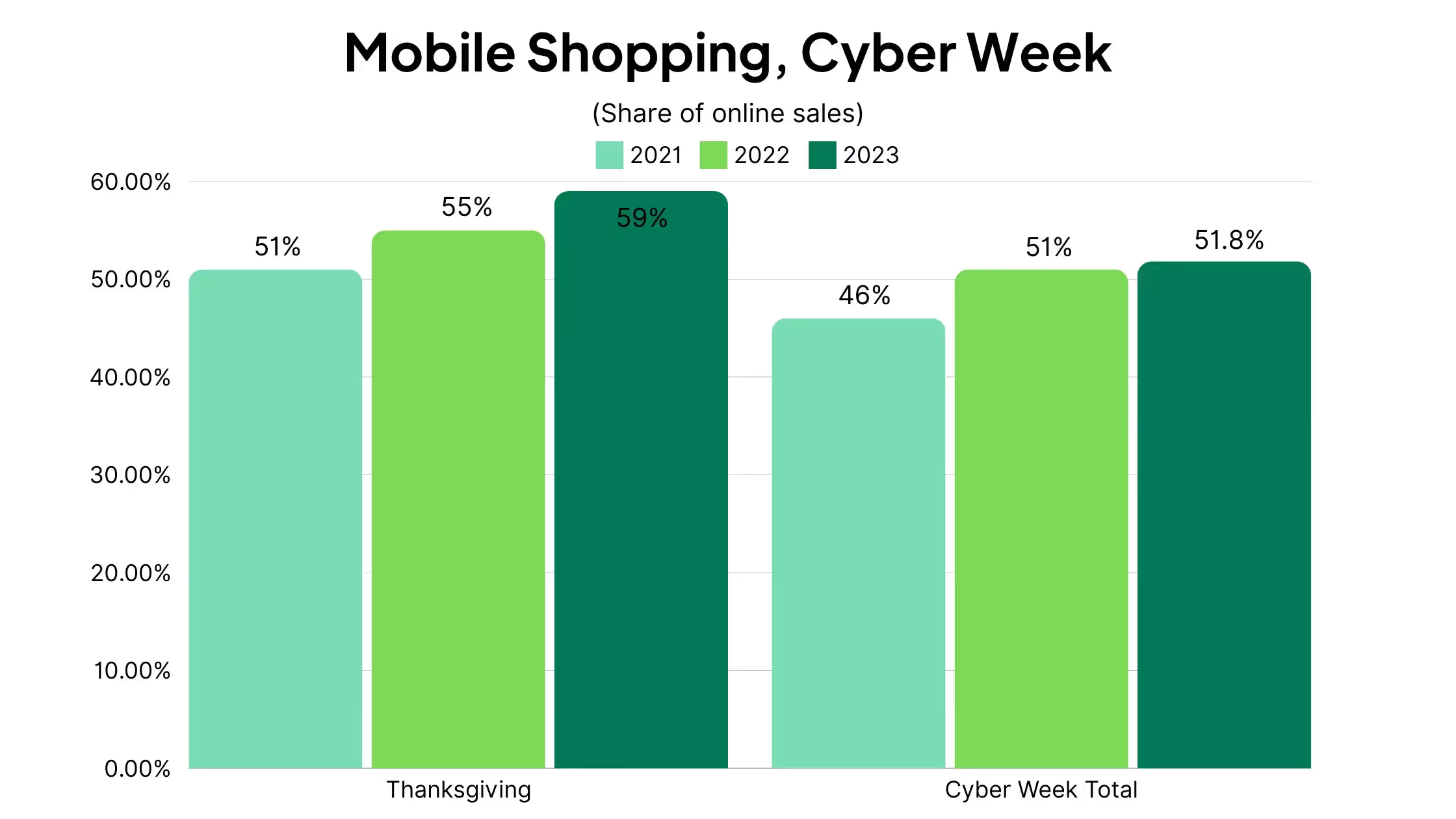

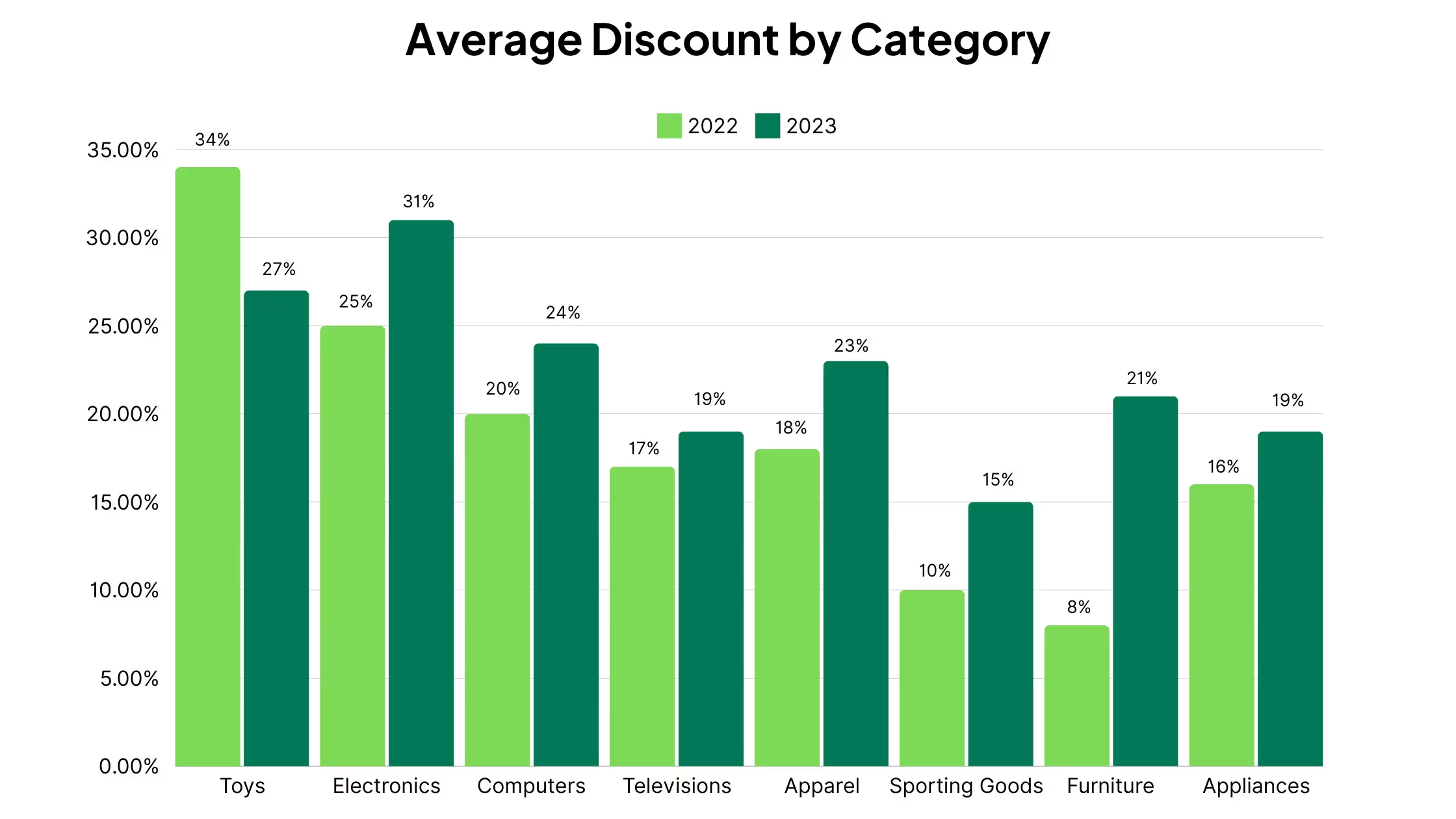
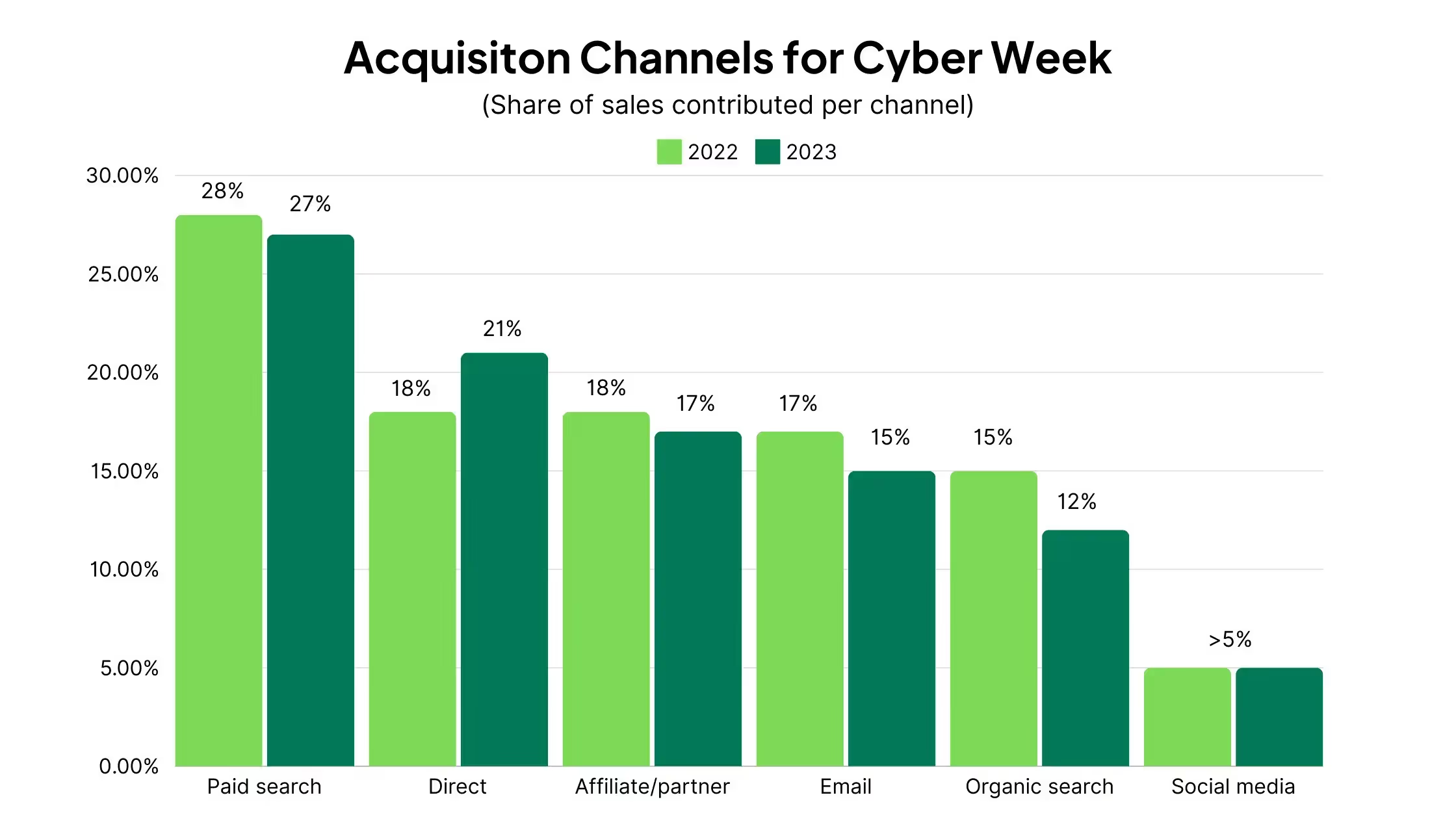

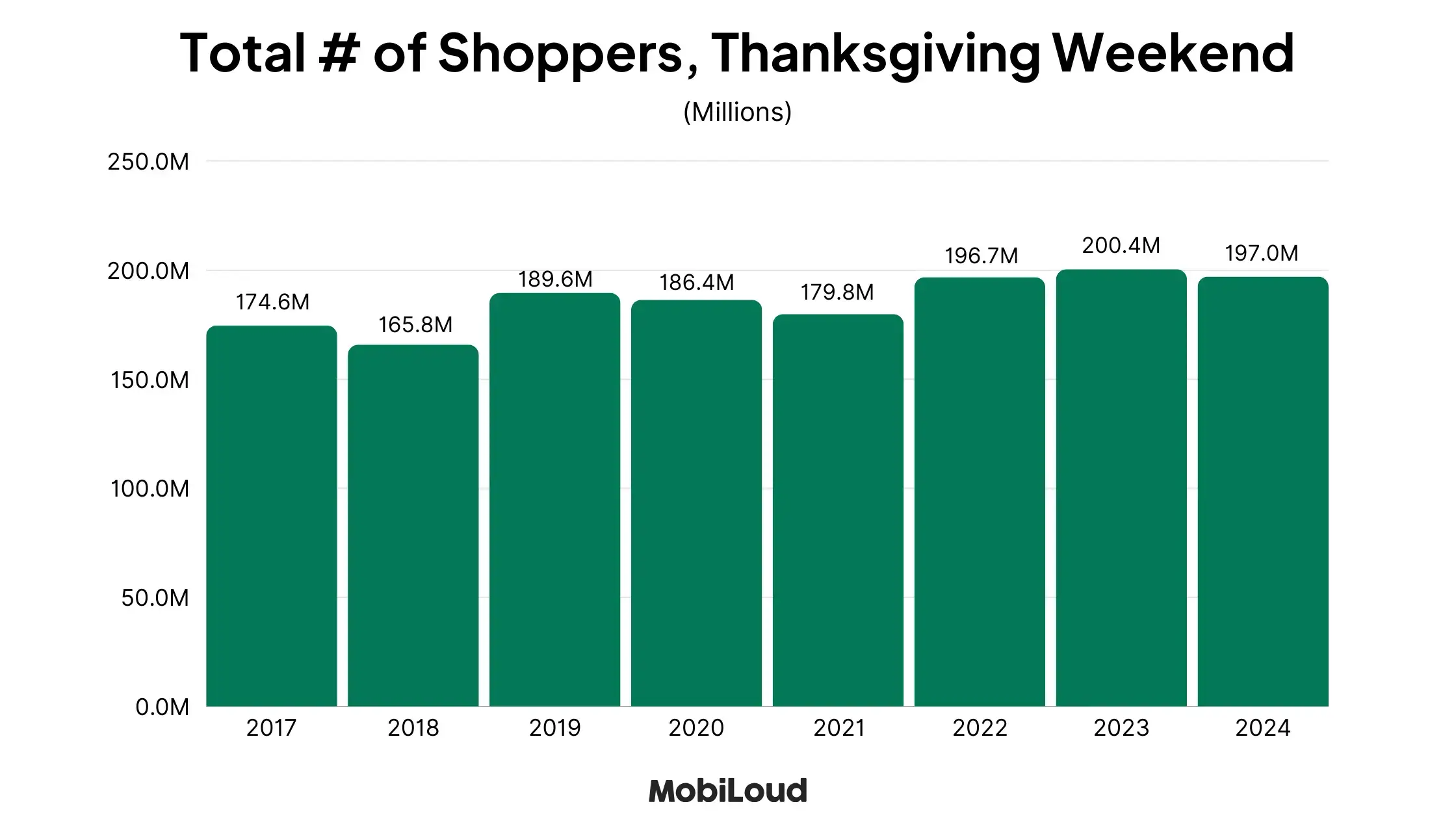

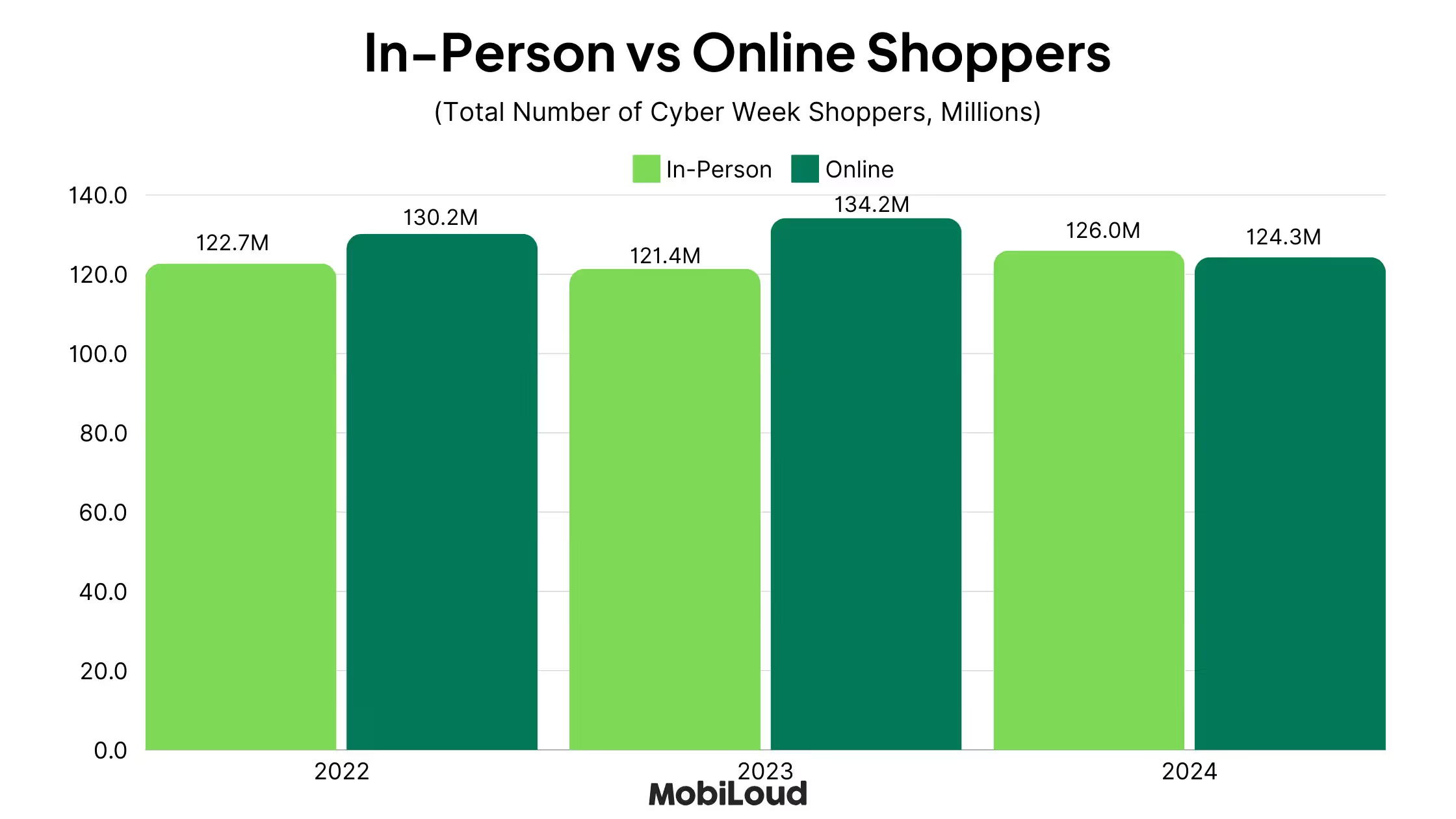
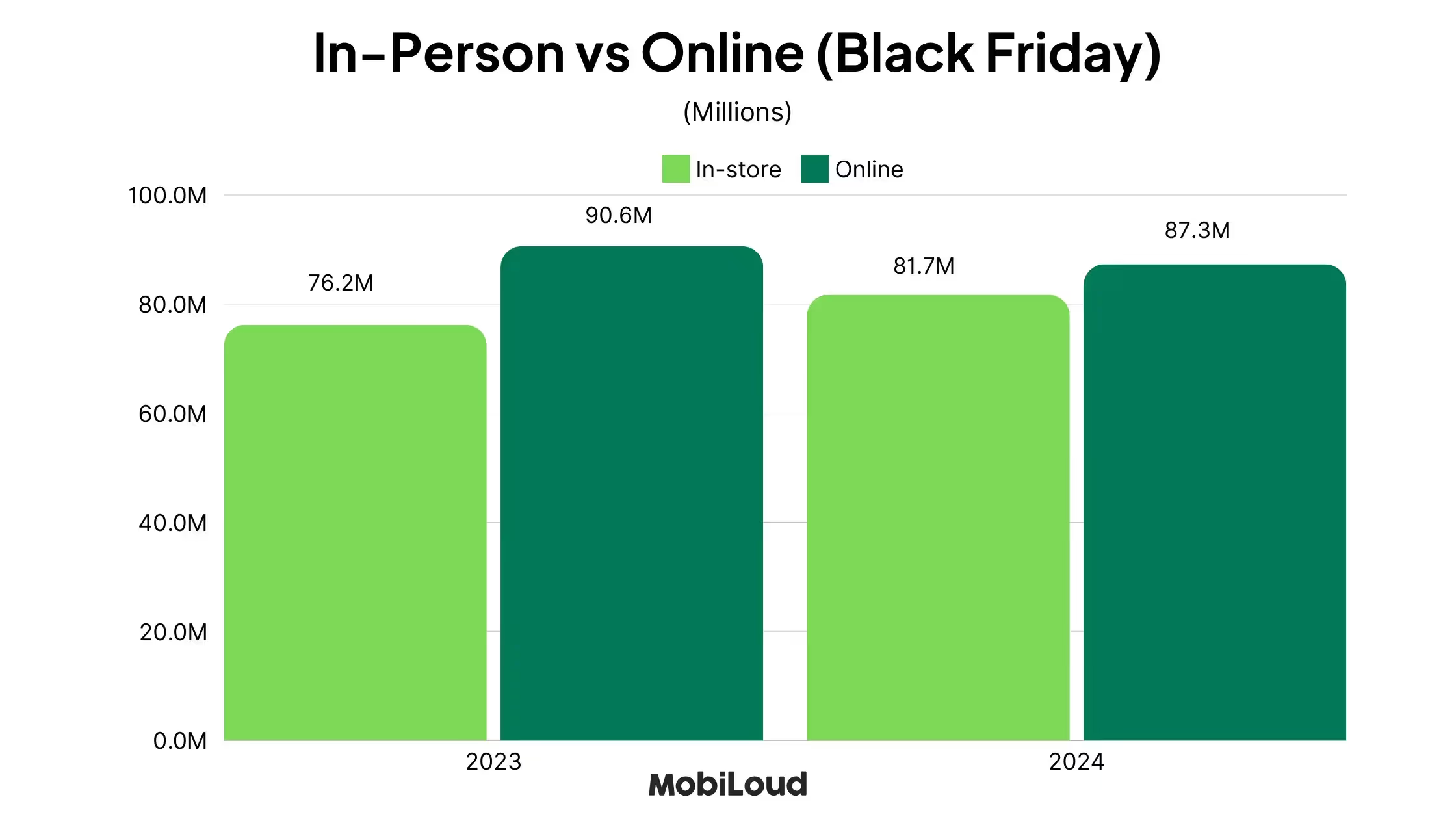
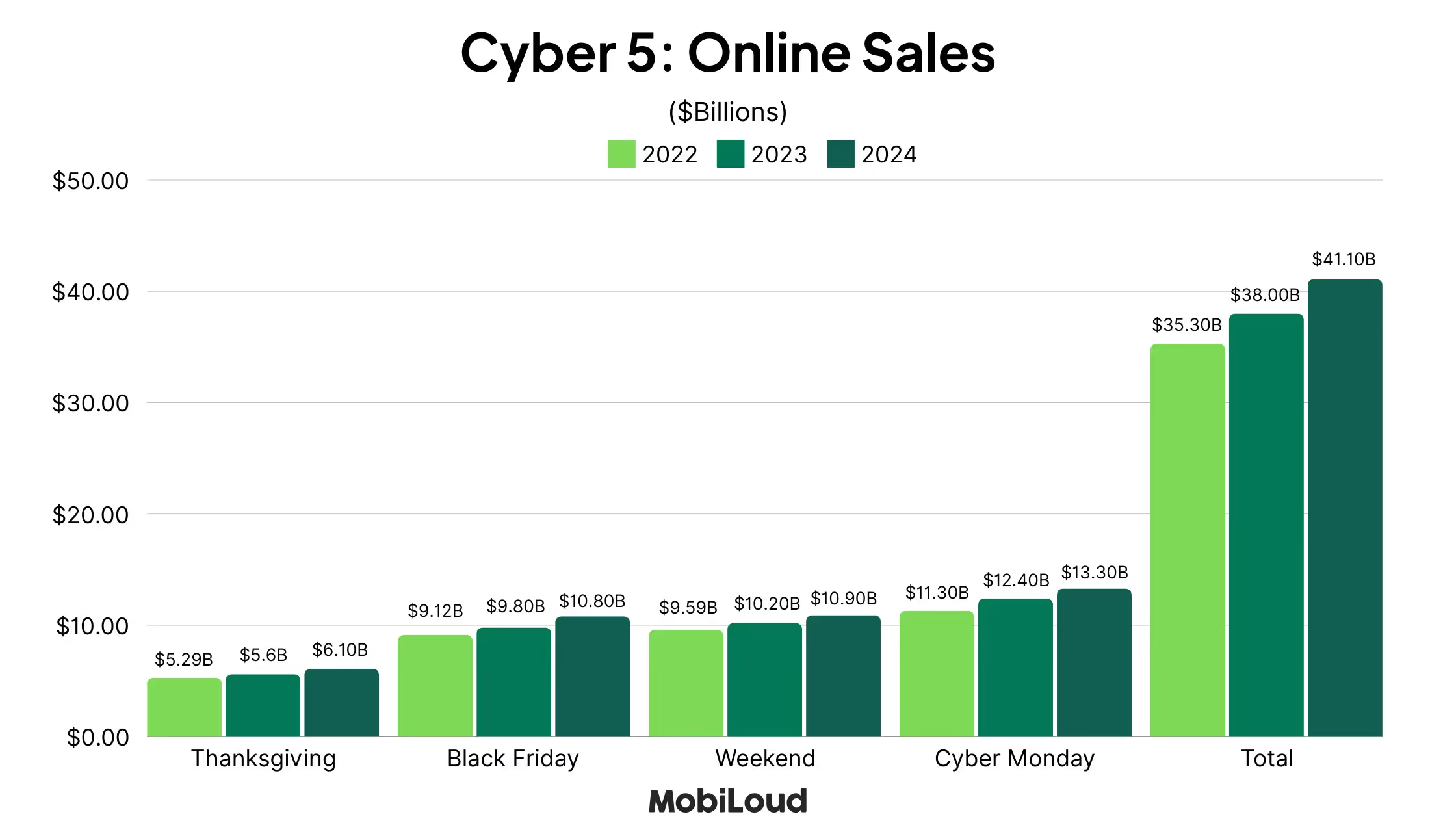


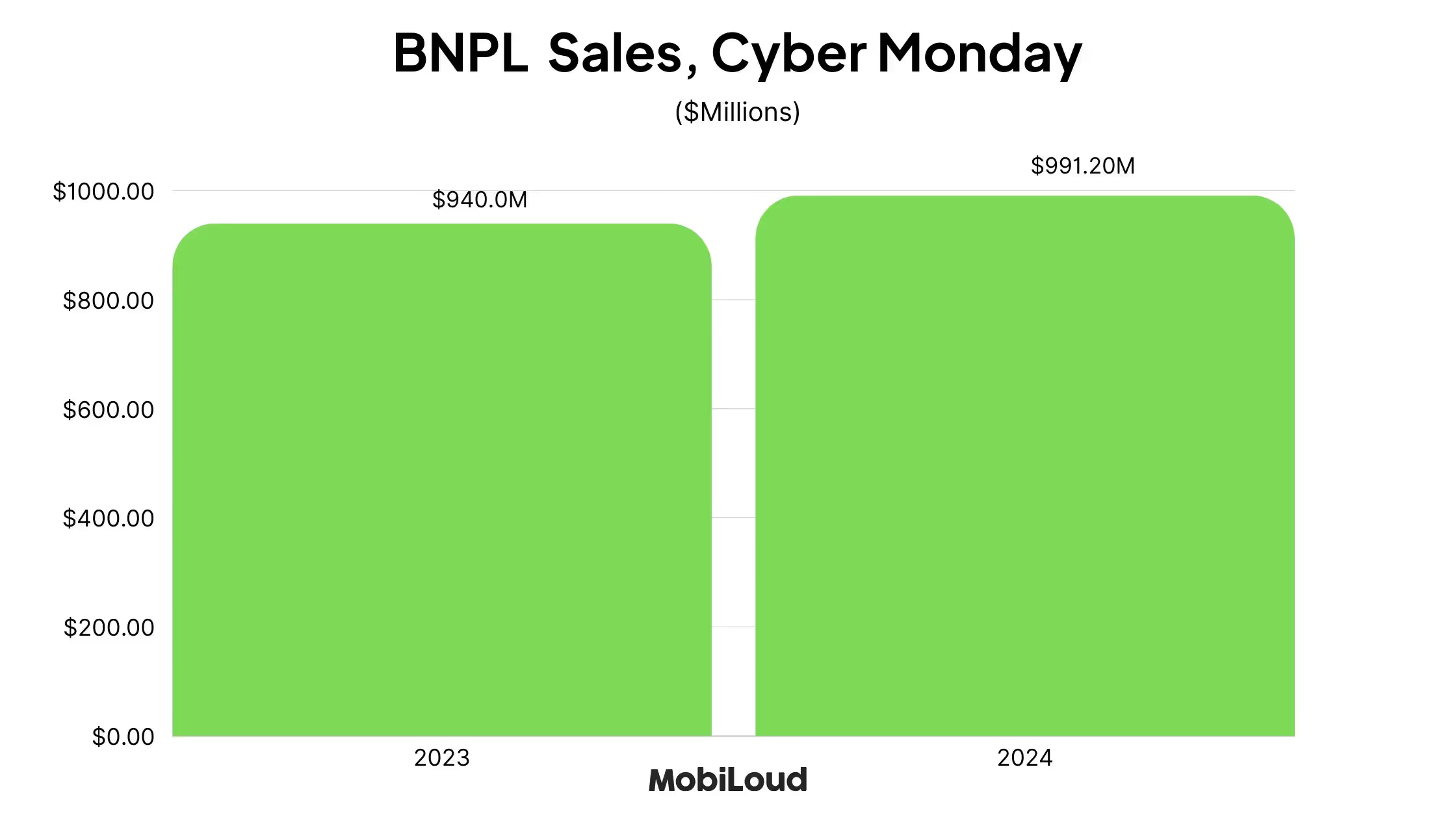
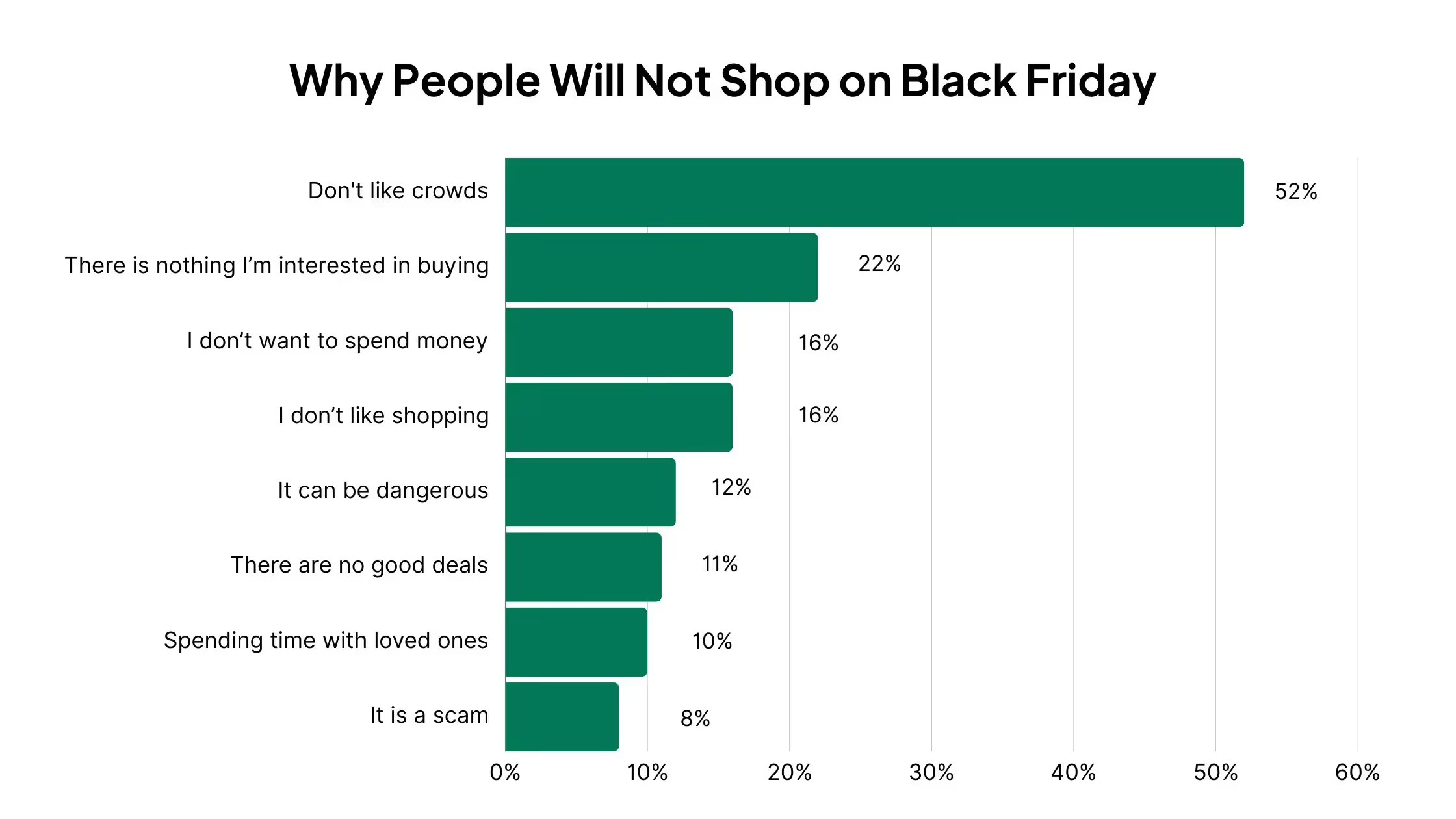


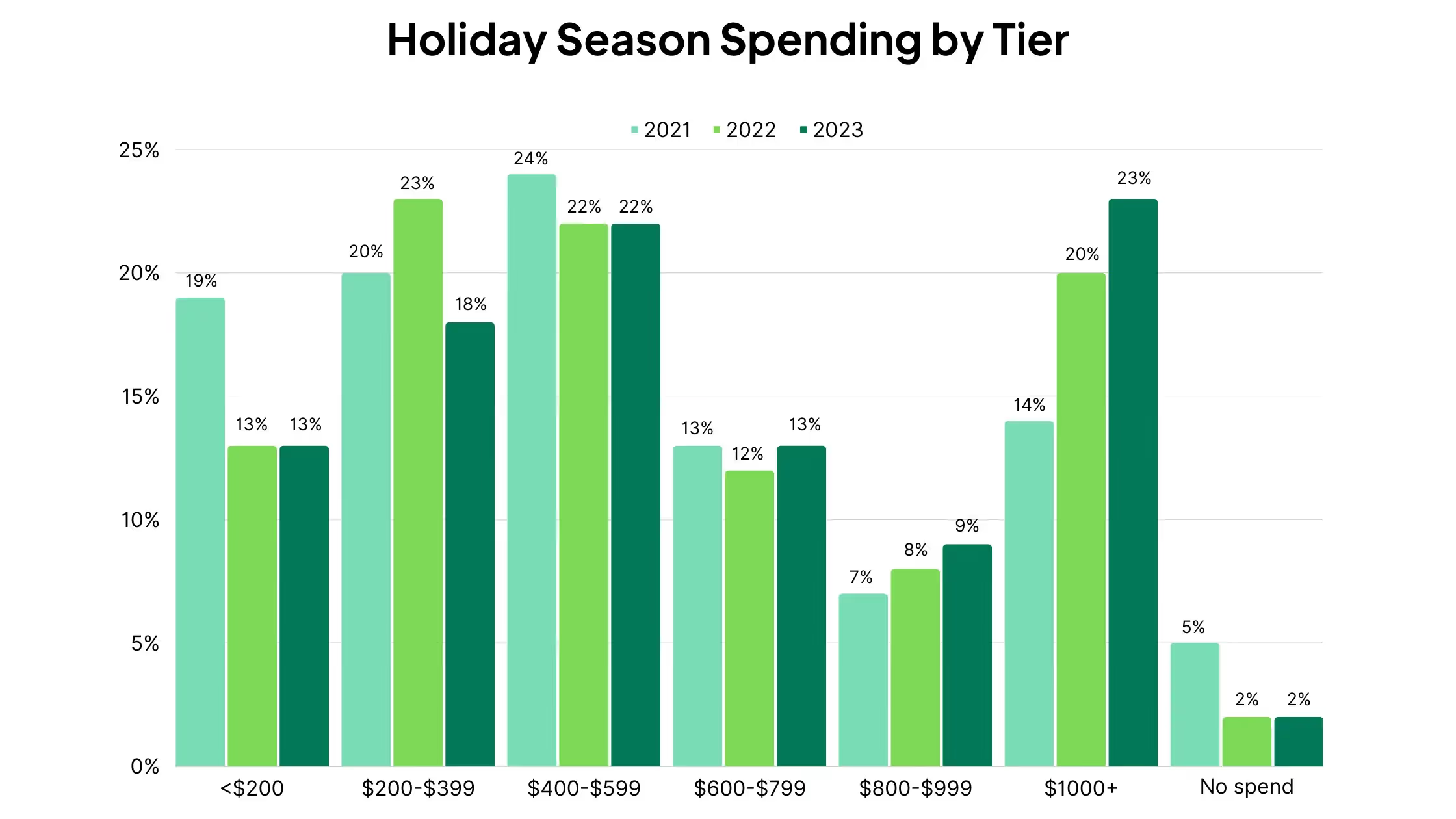

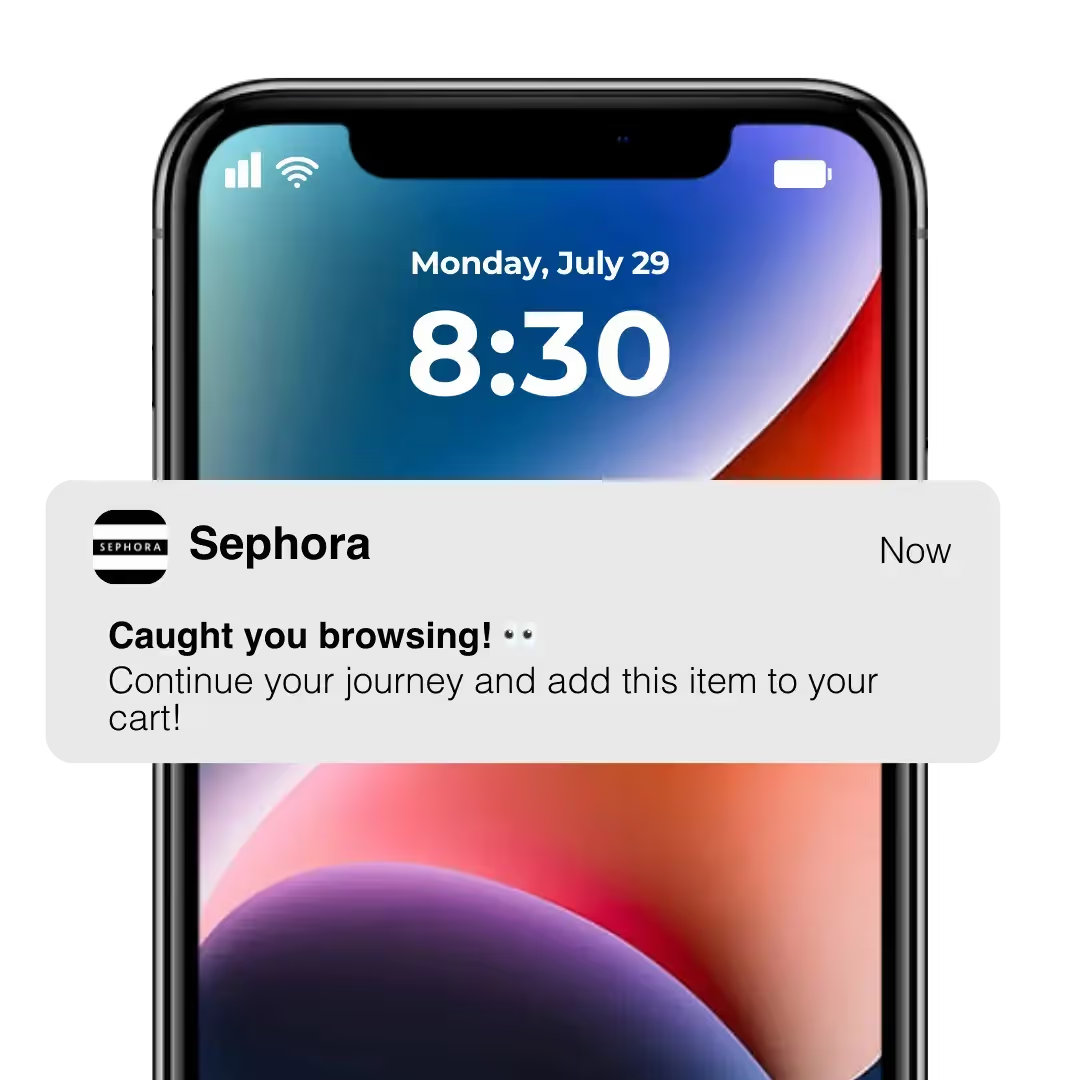
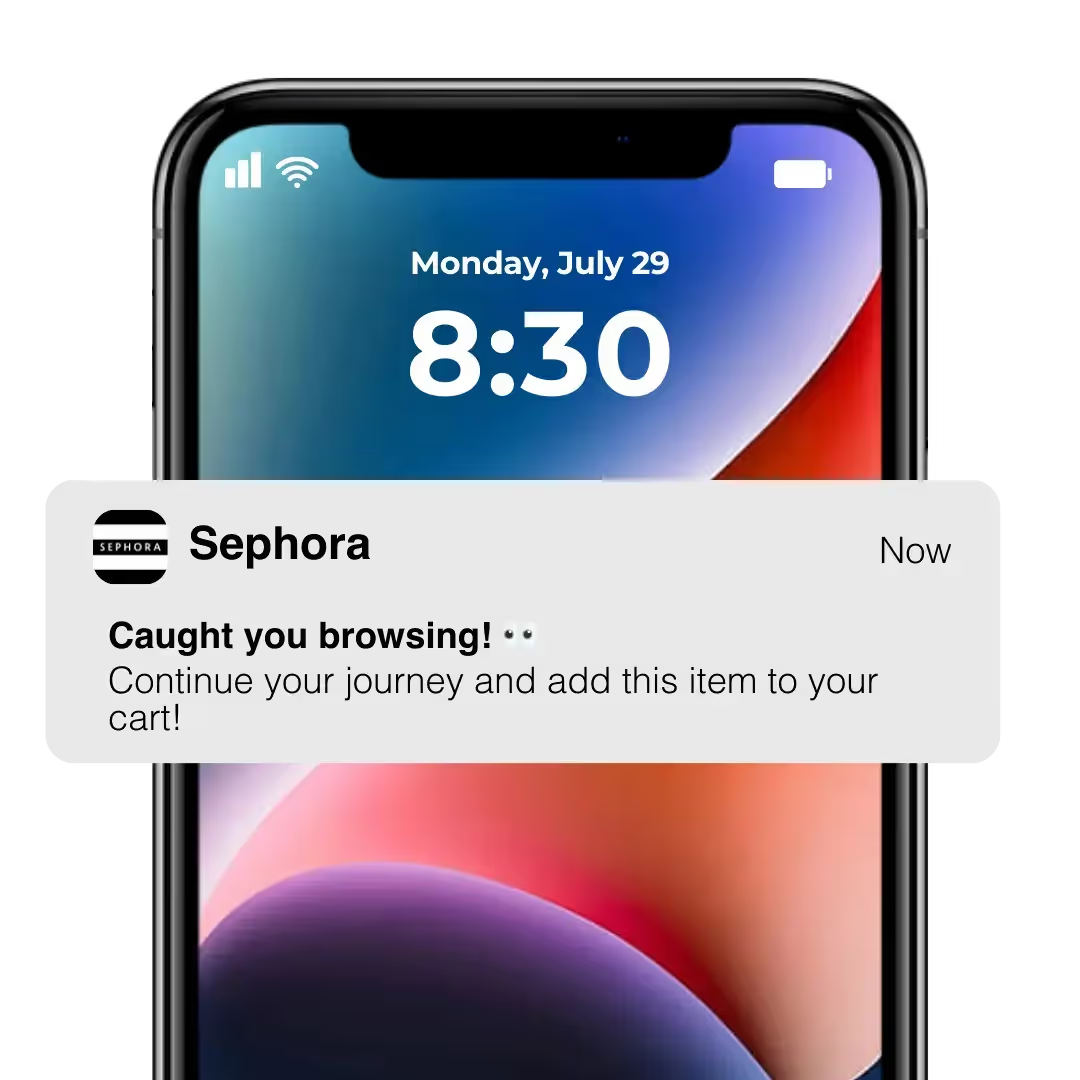

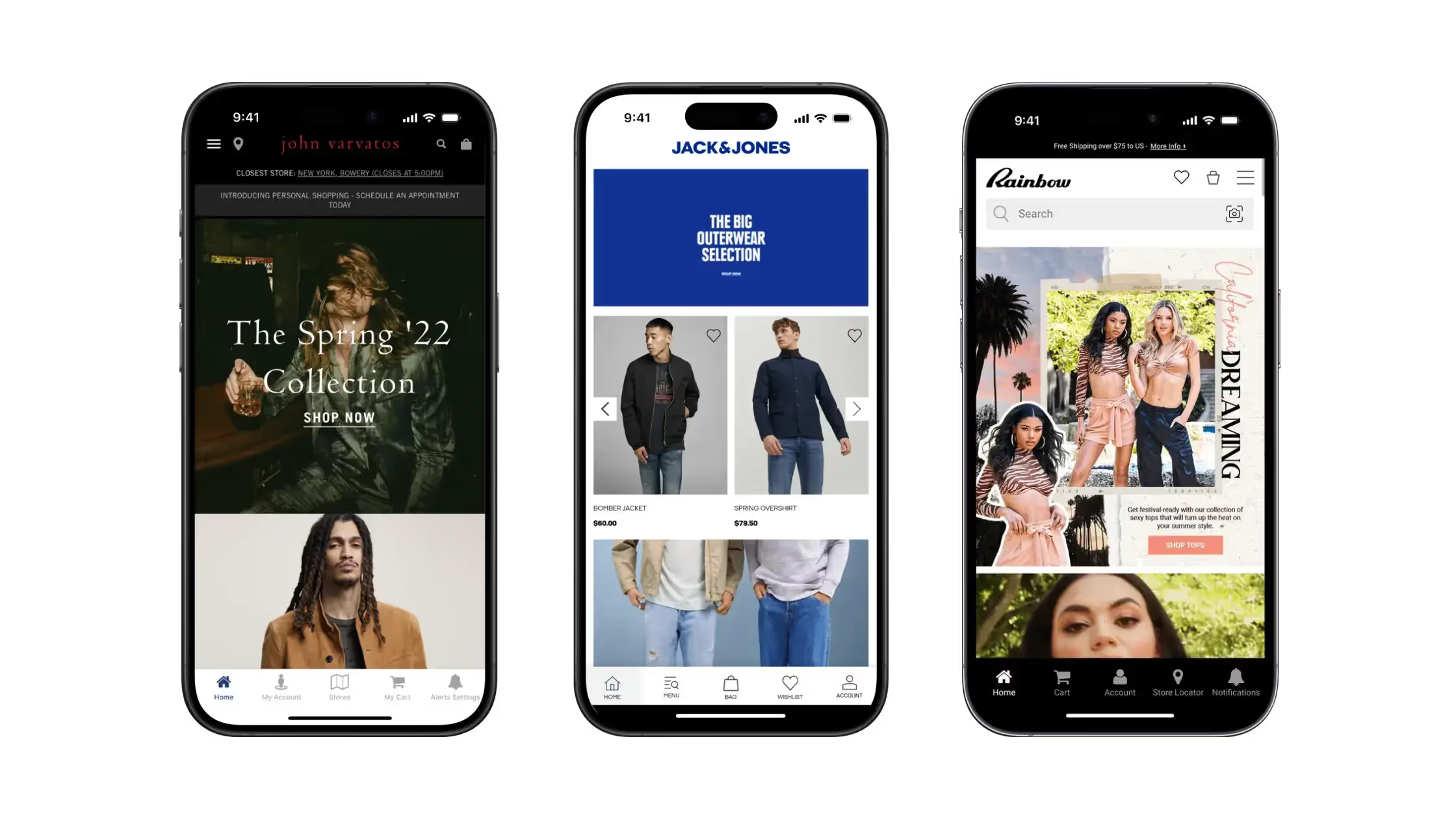
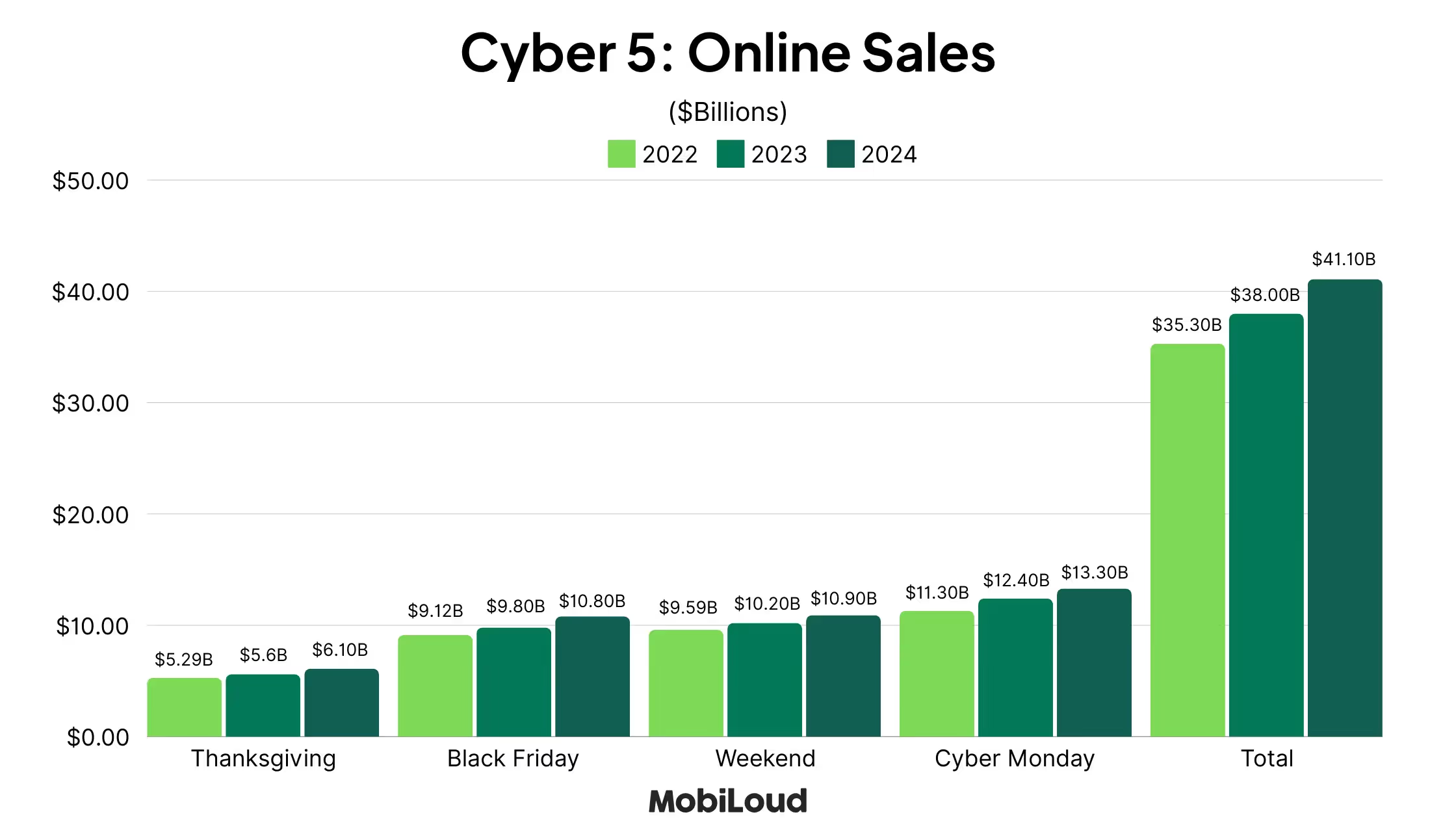
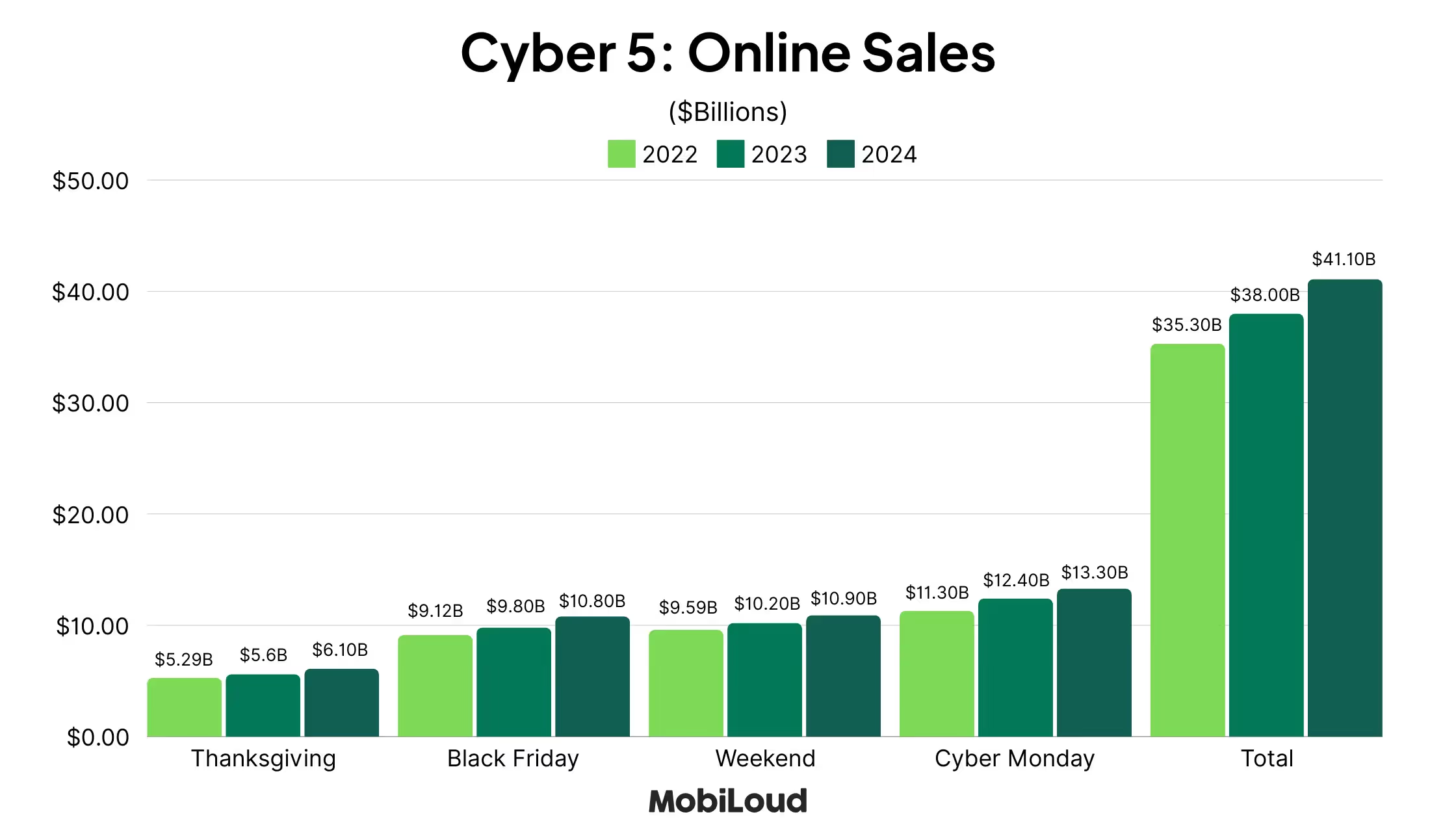


.avif)
.avif)

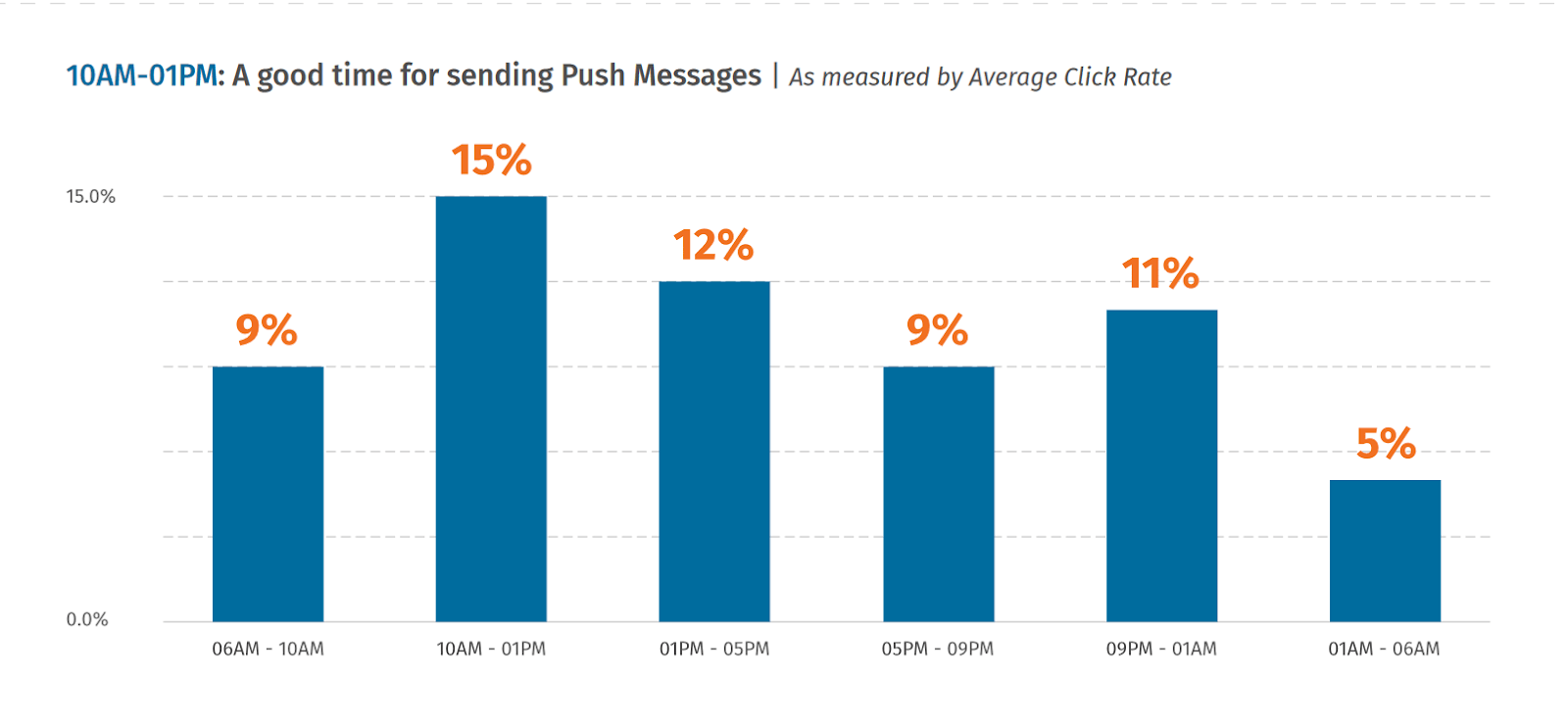


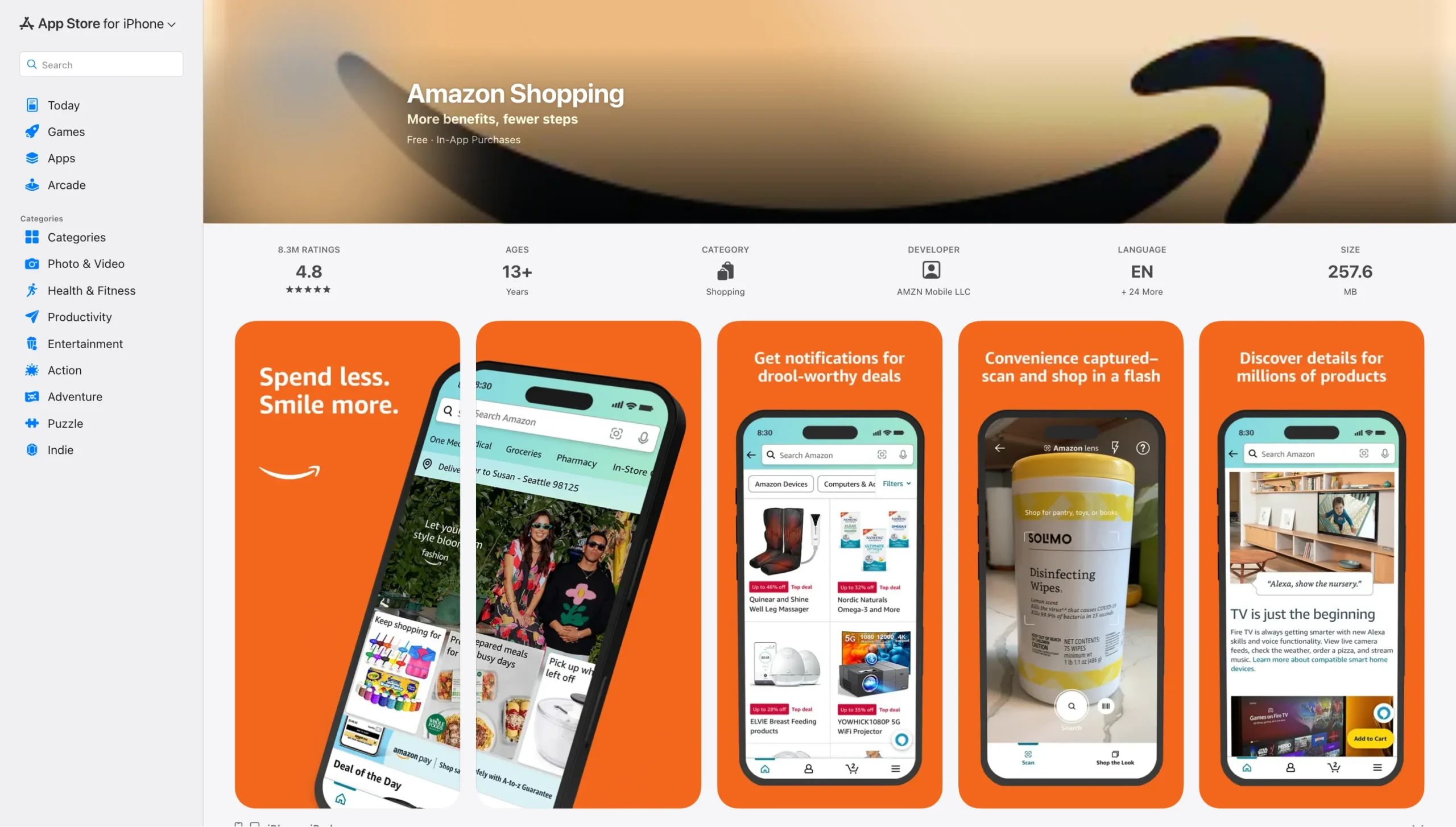
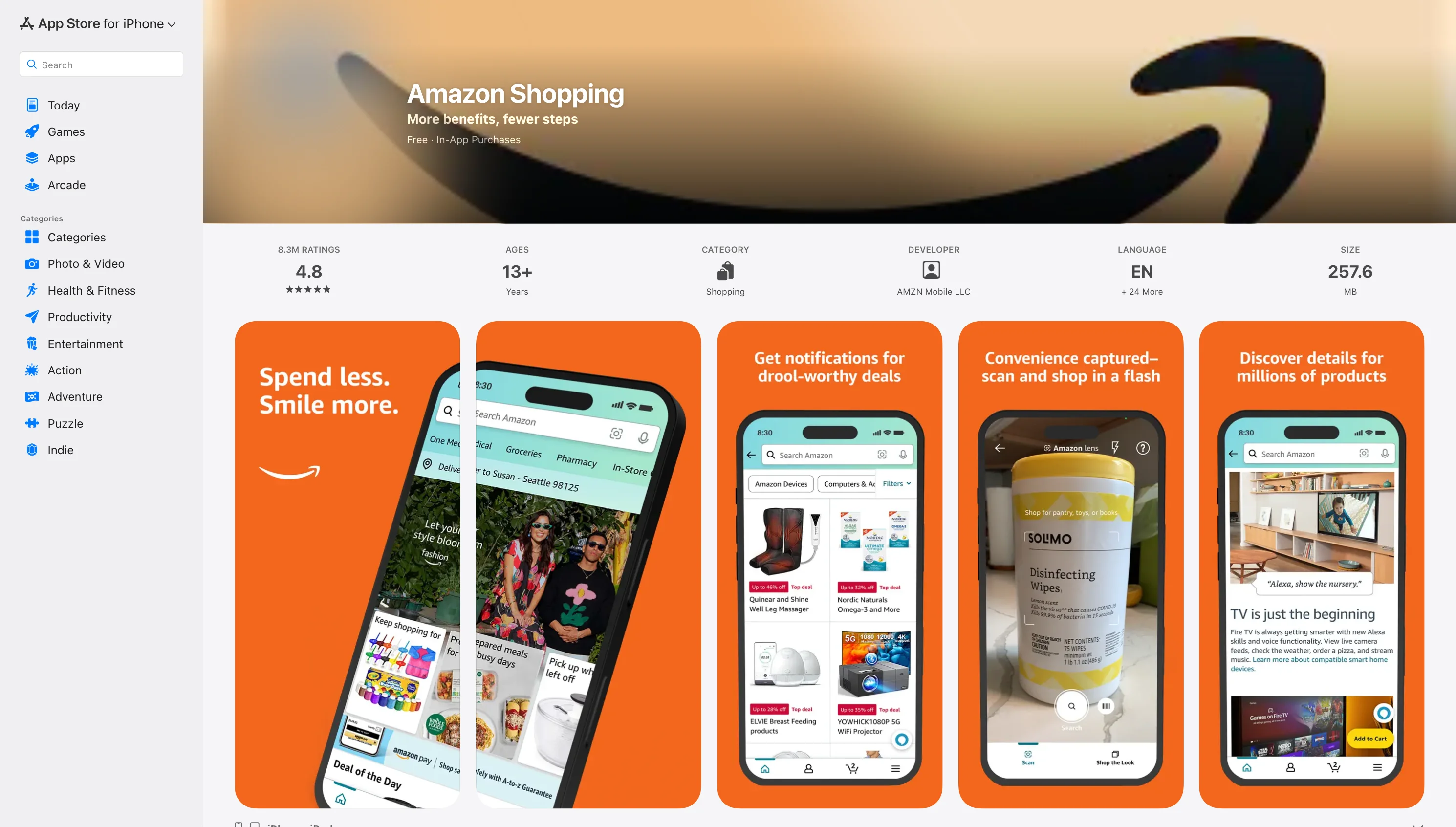
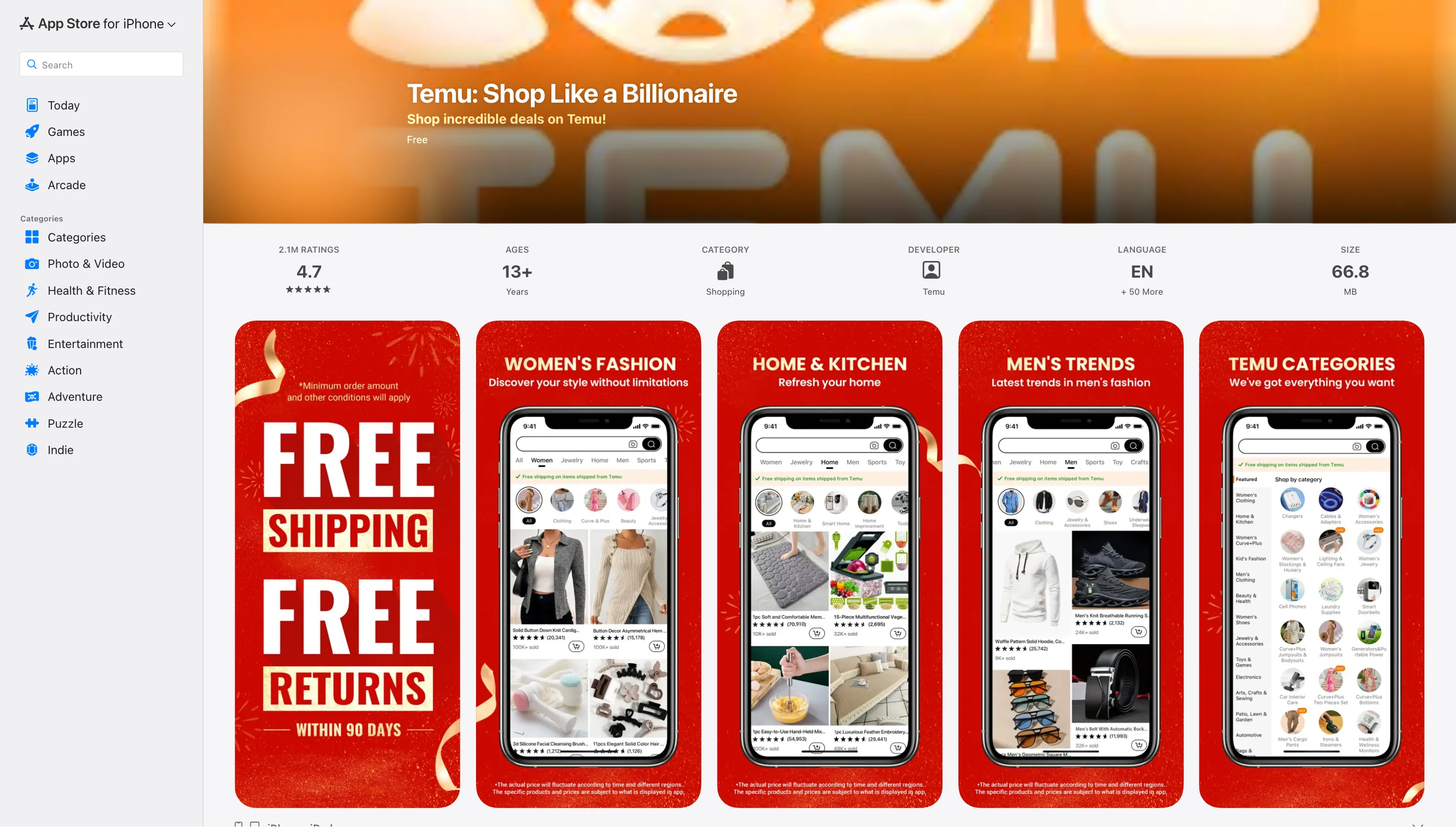
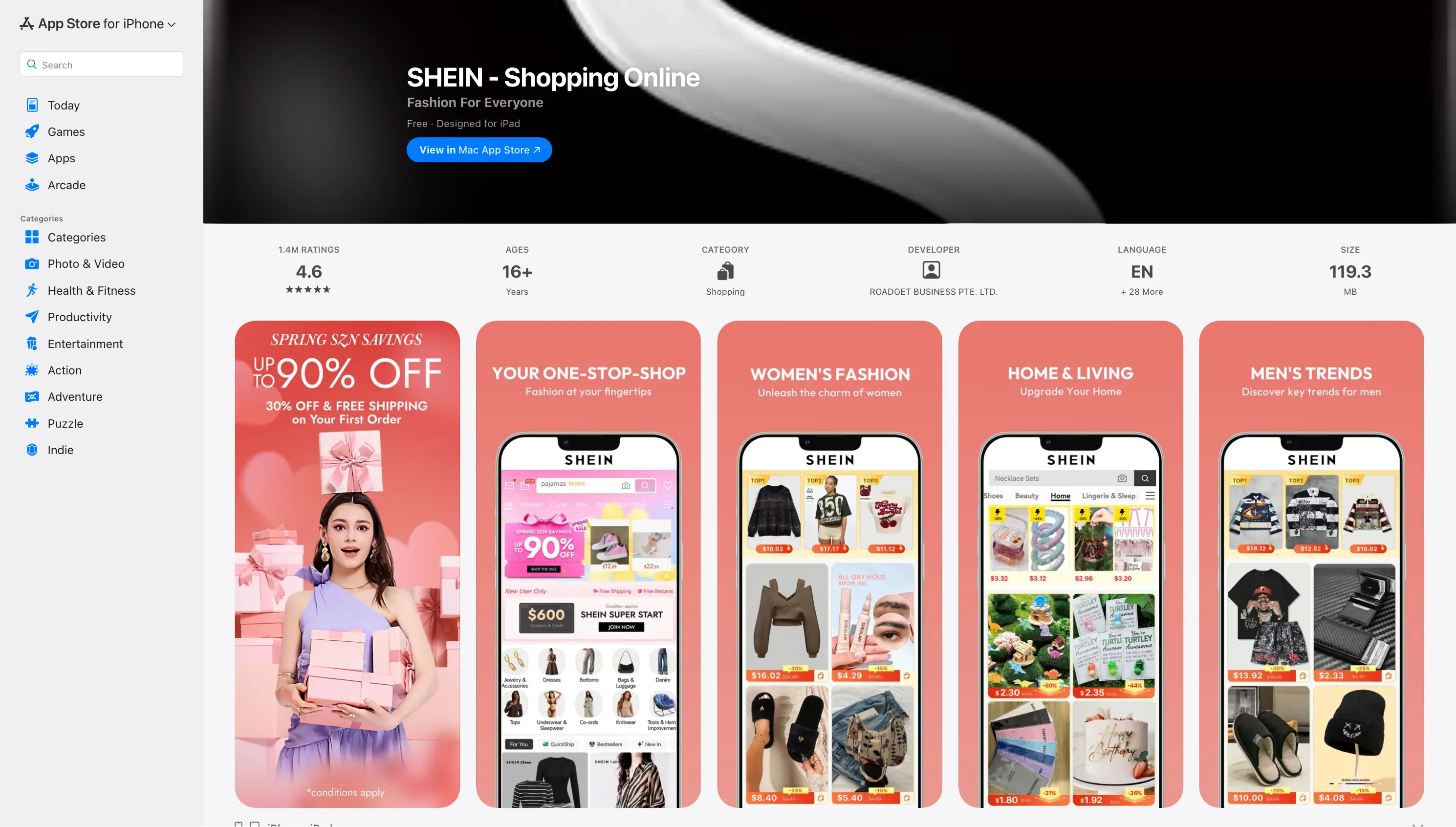
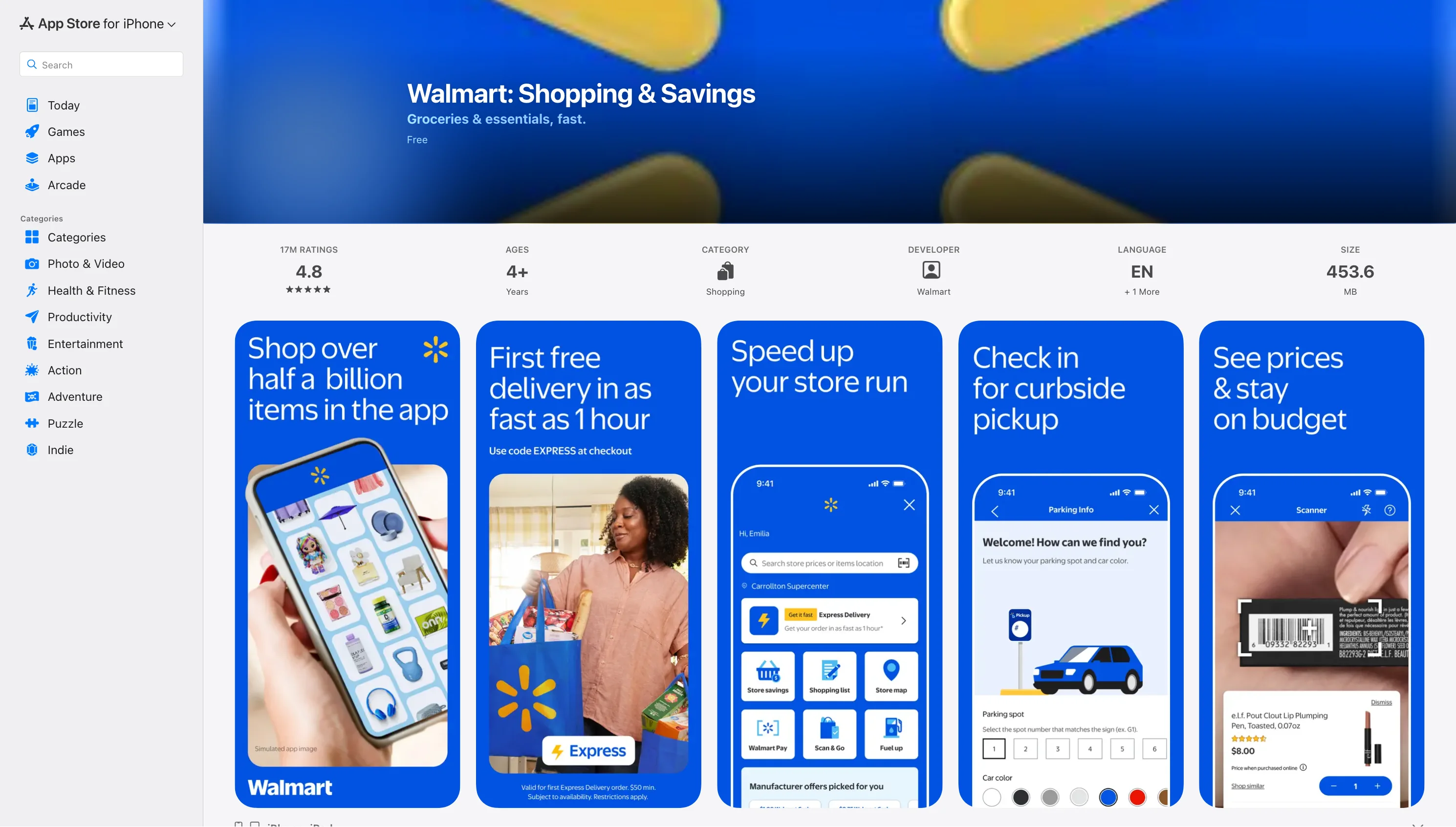
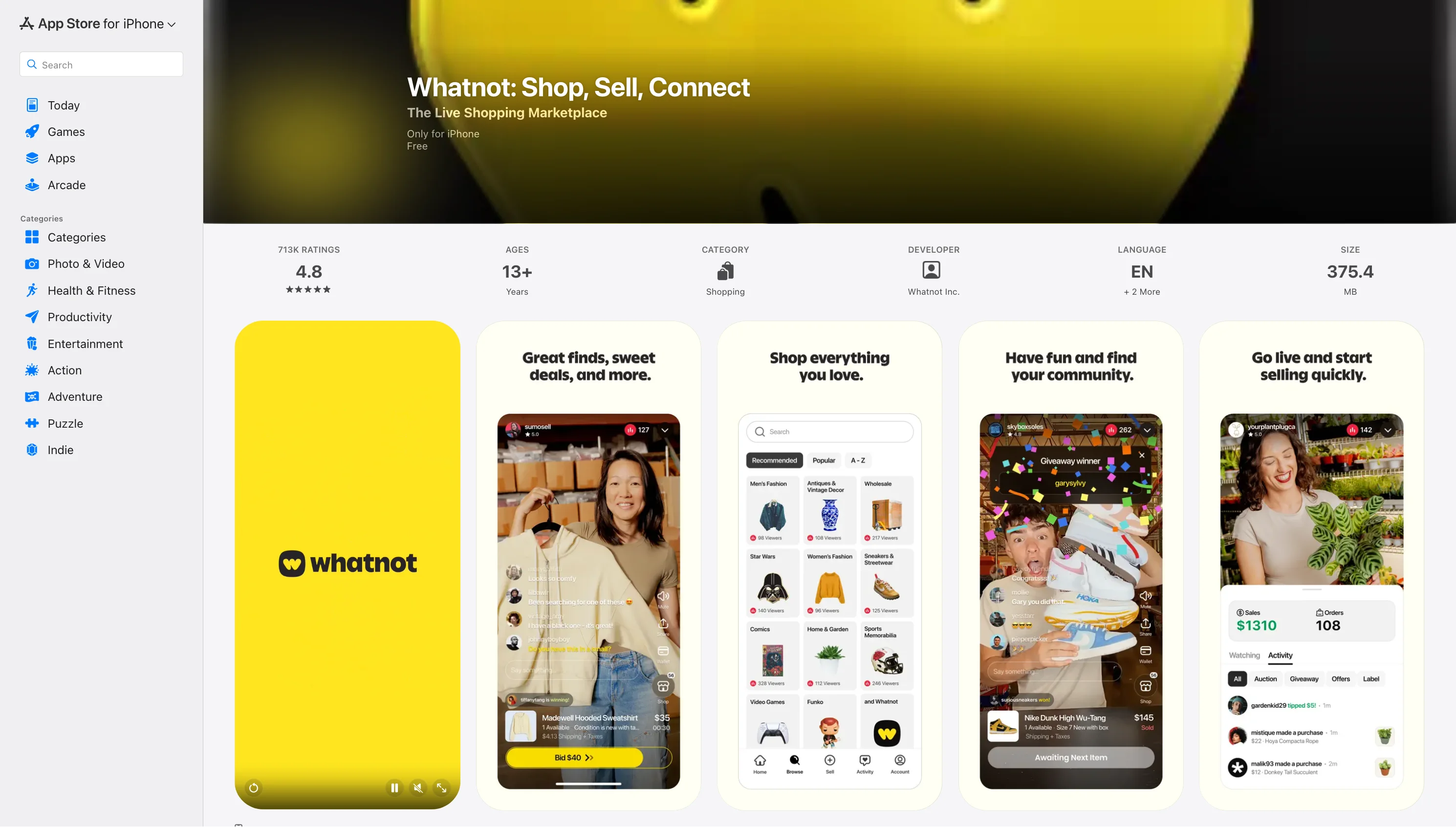
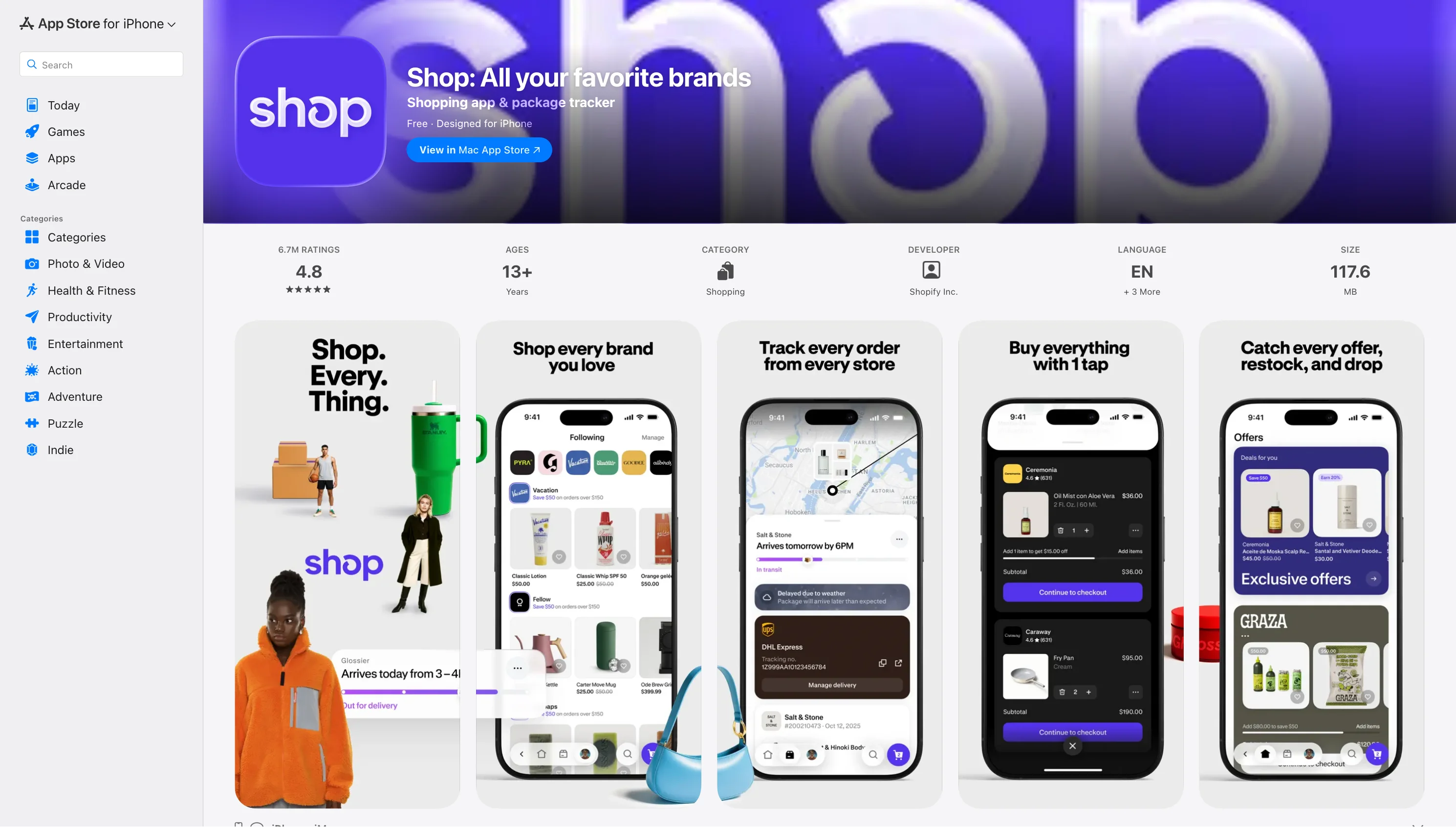
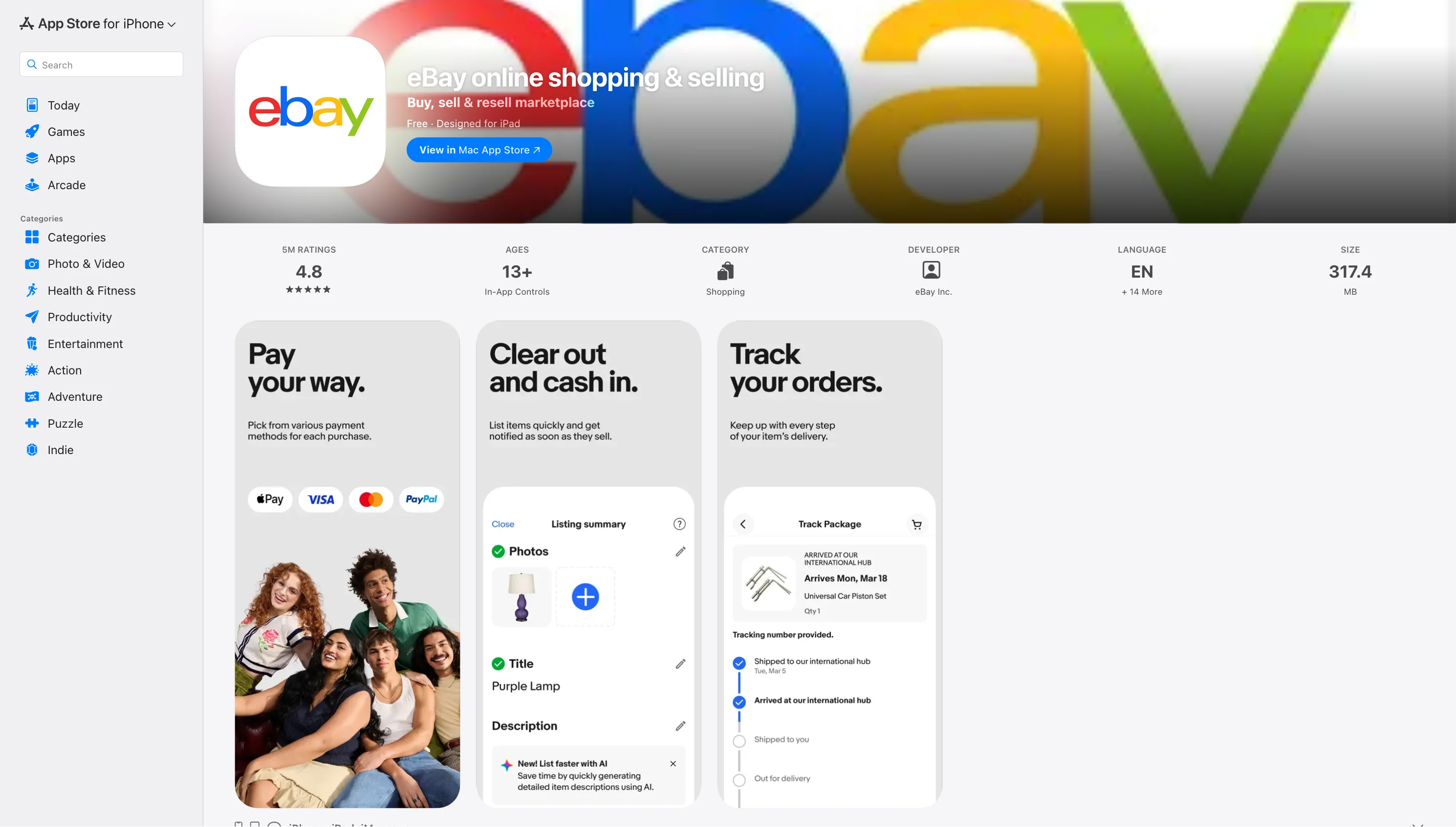
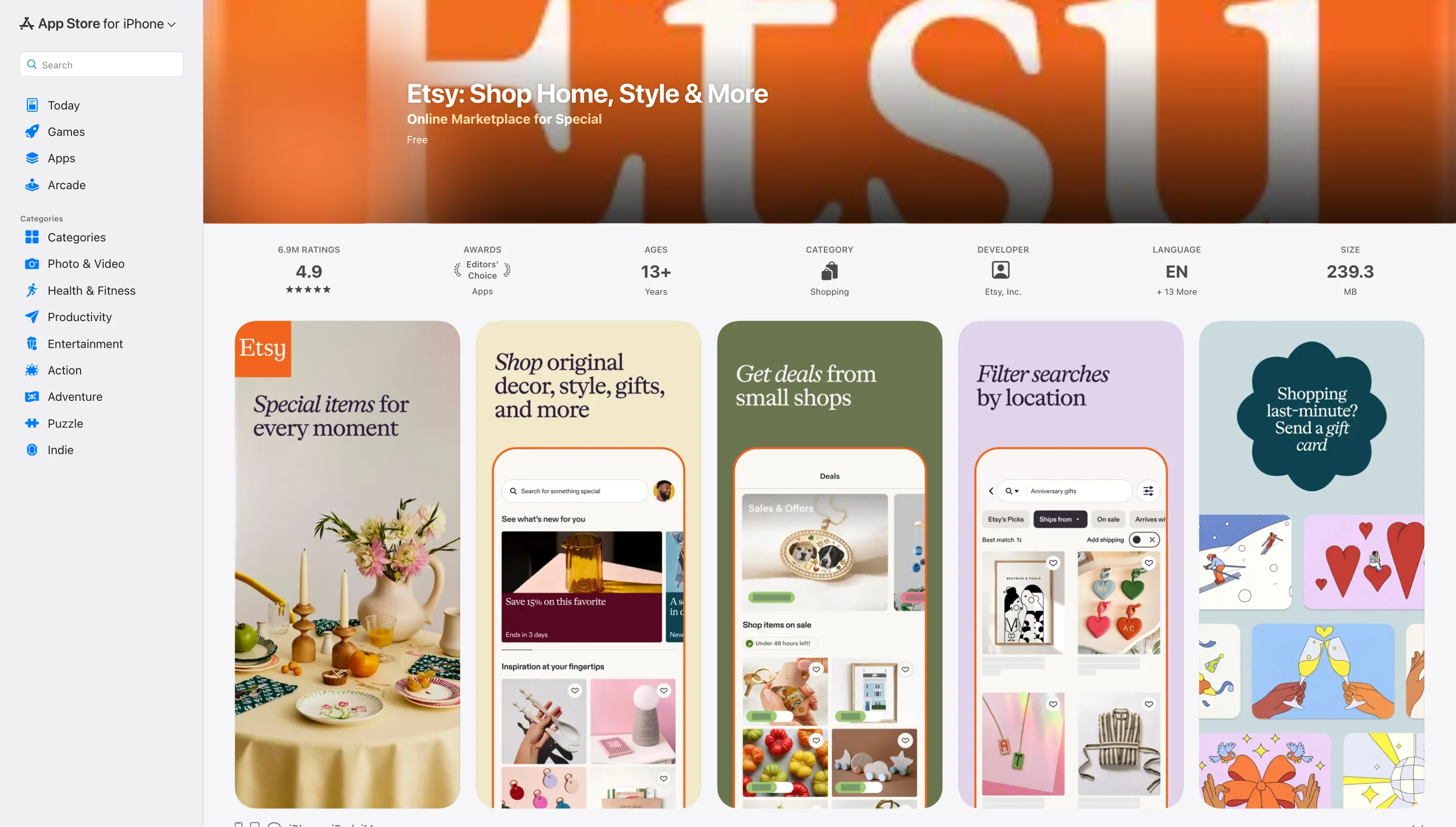
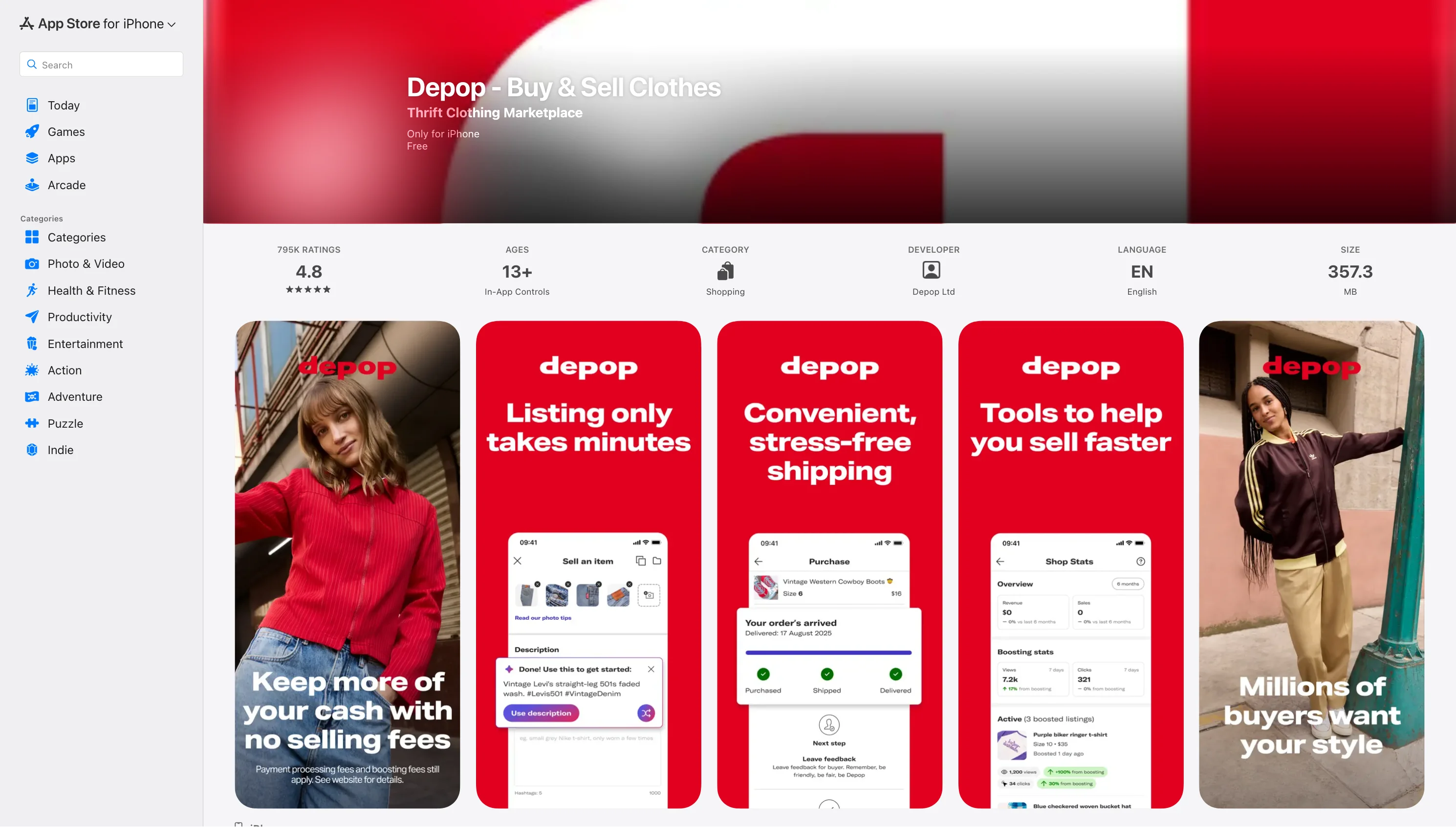
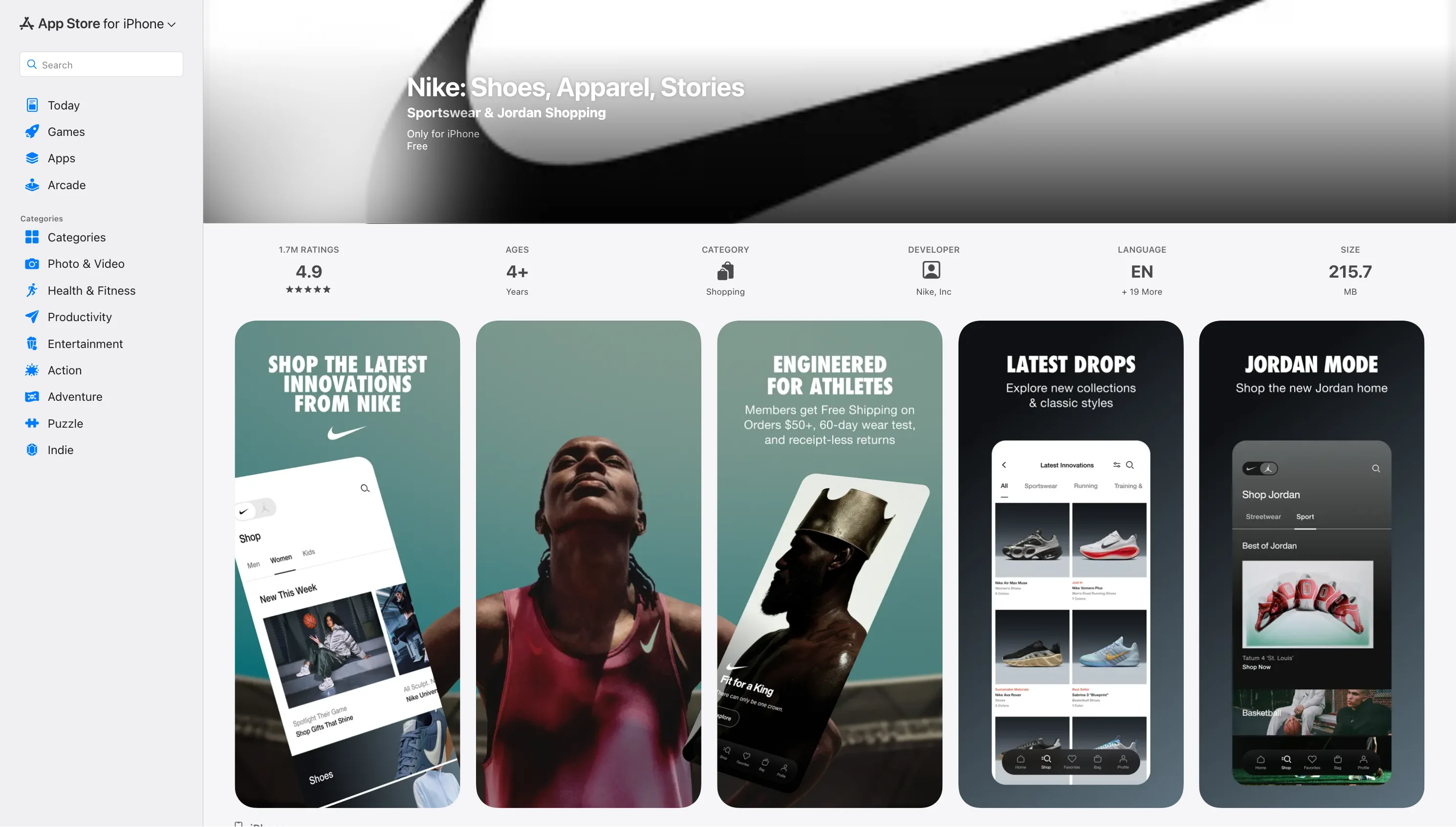
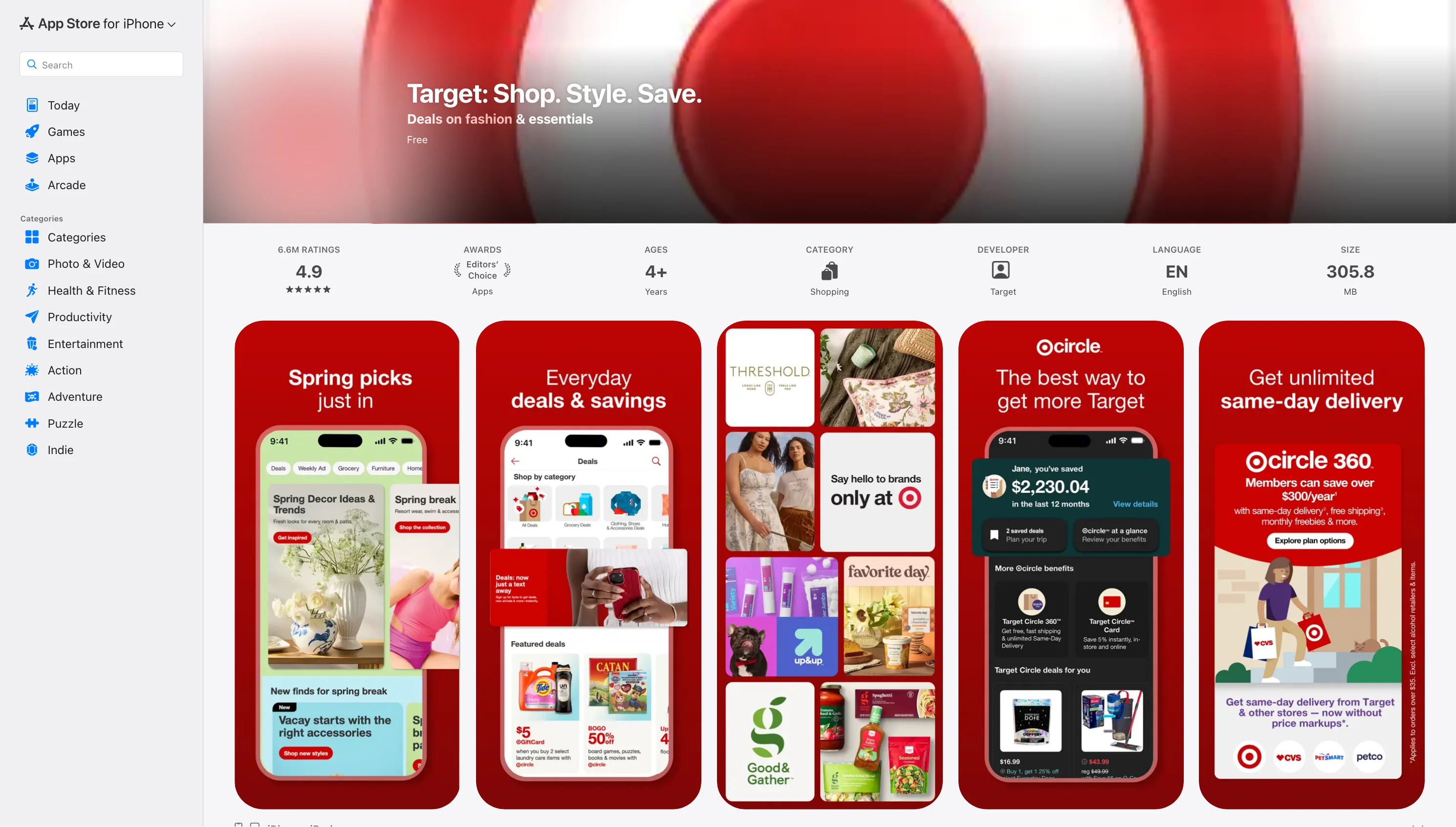
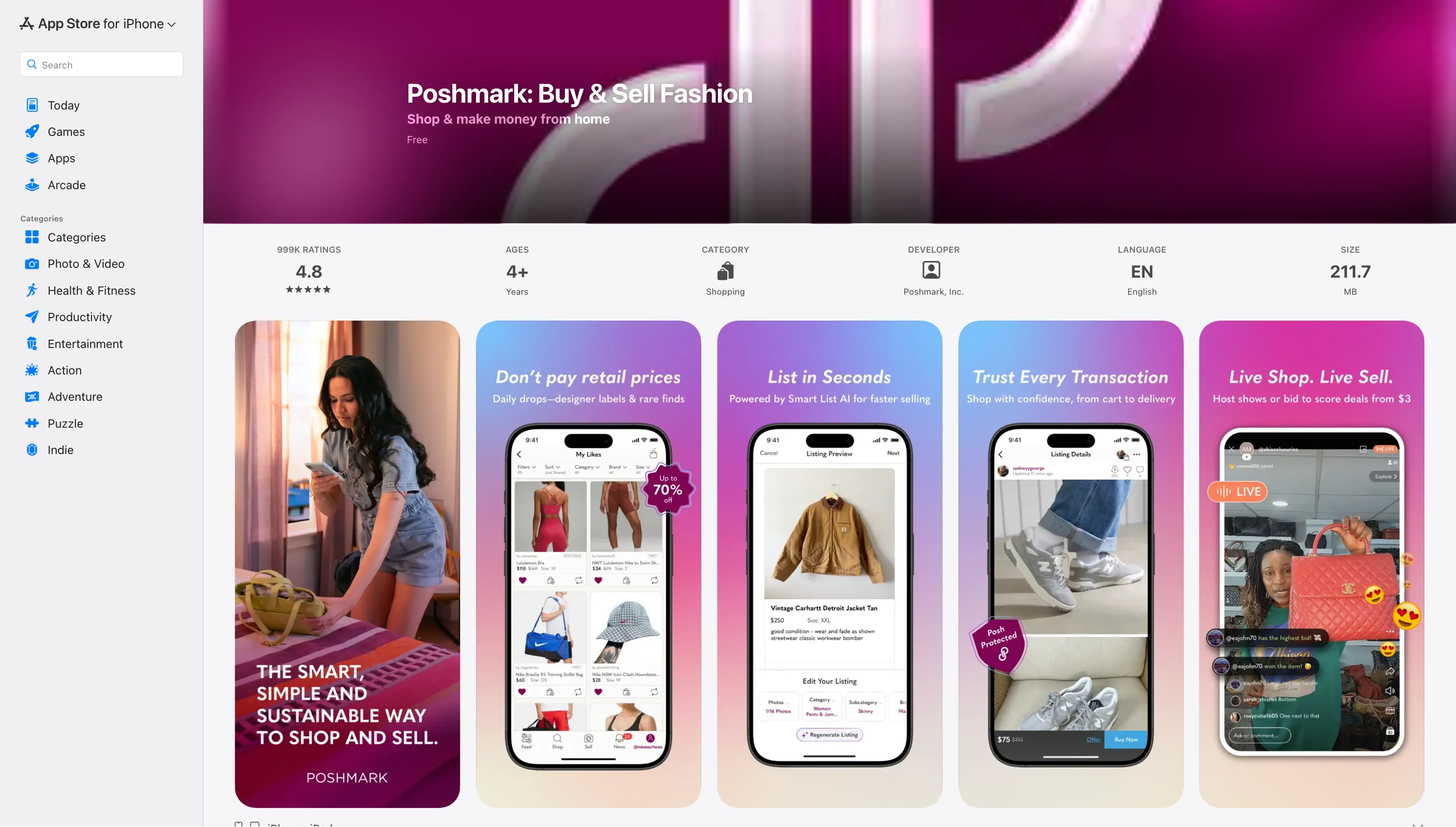
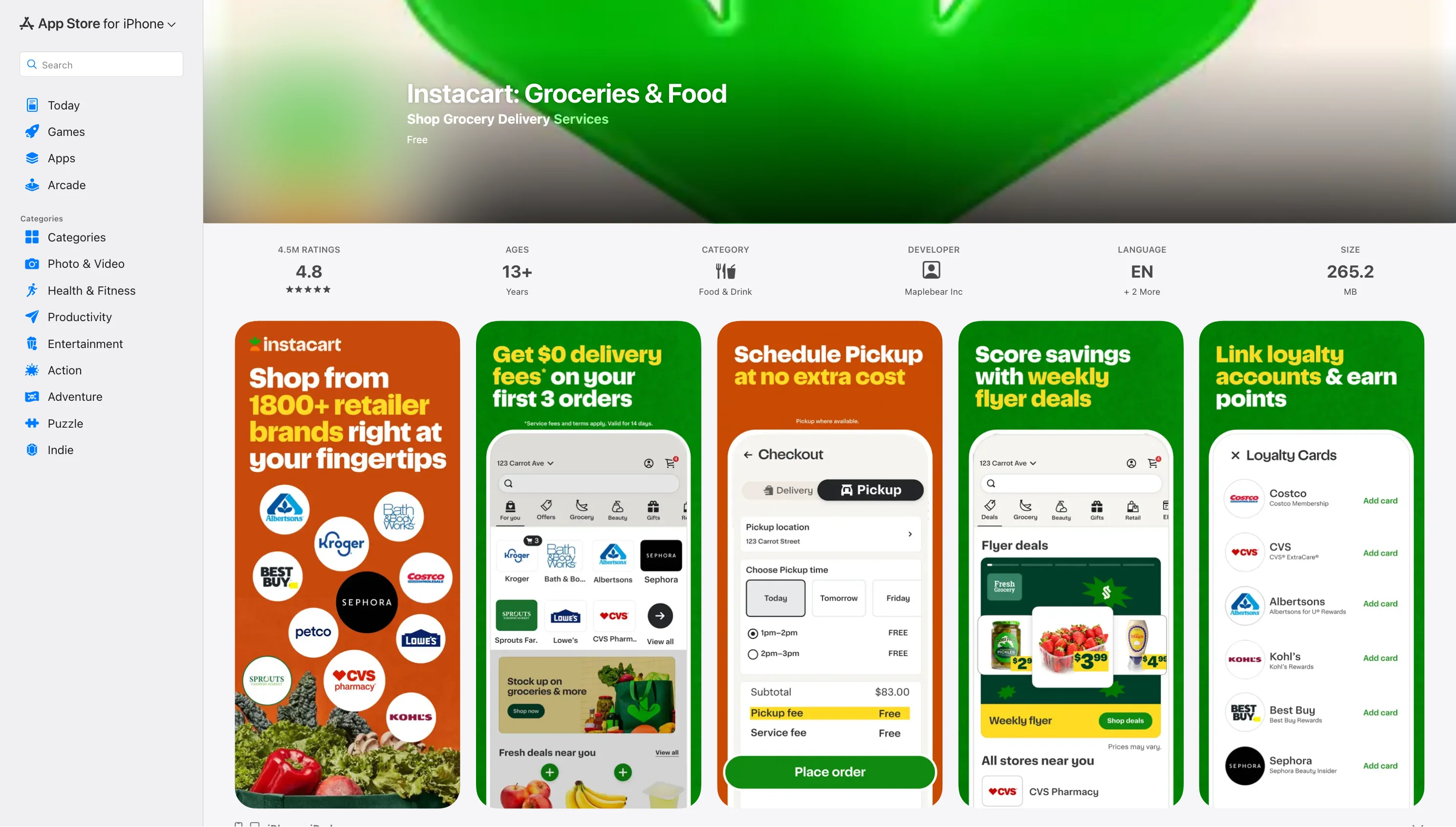
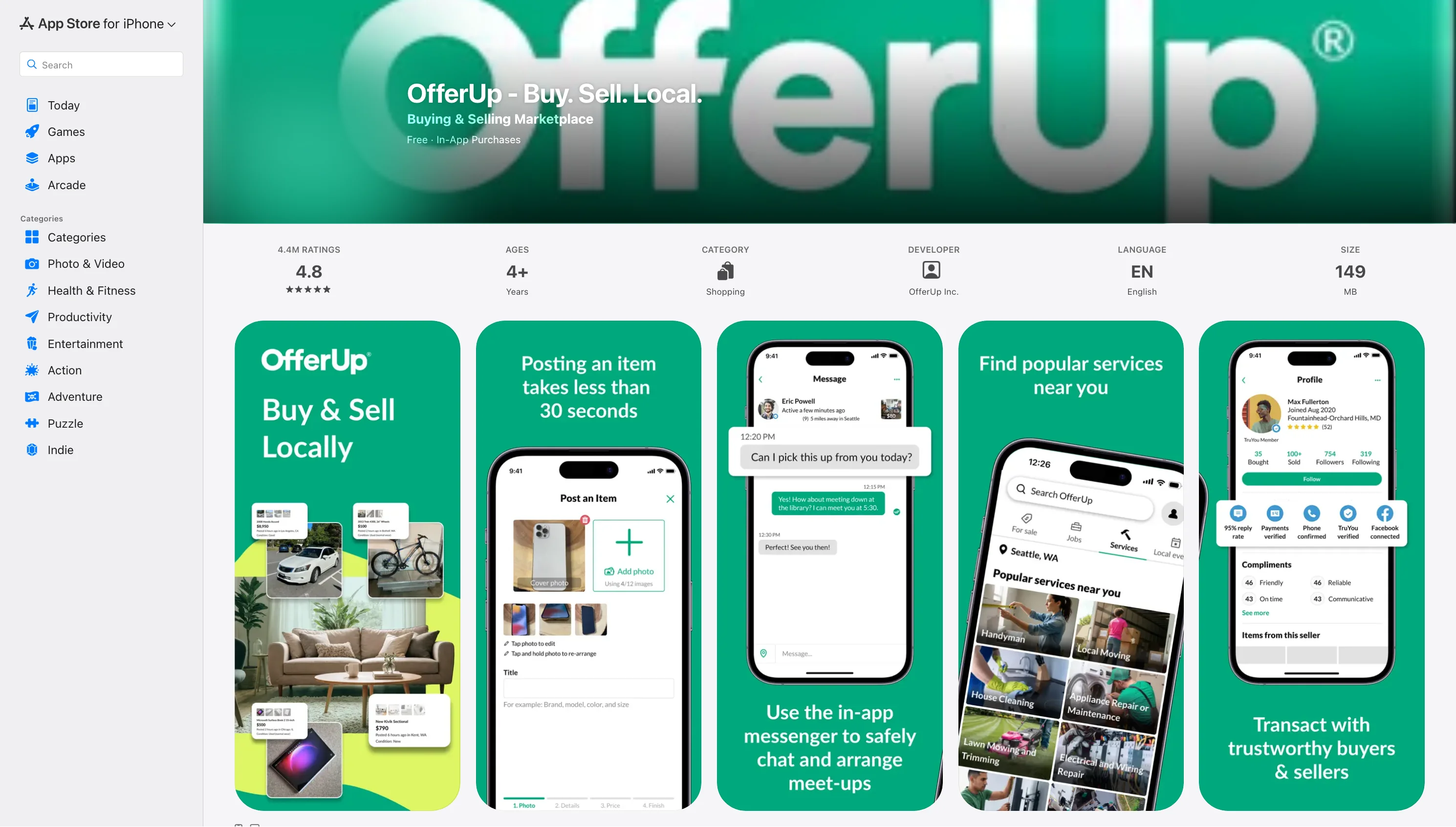
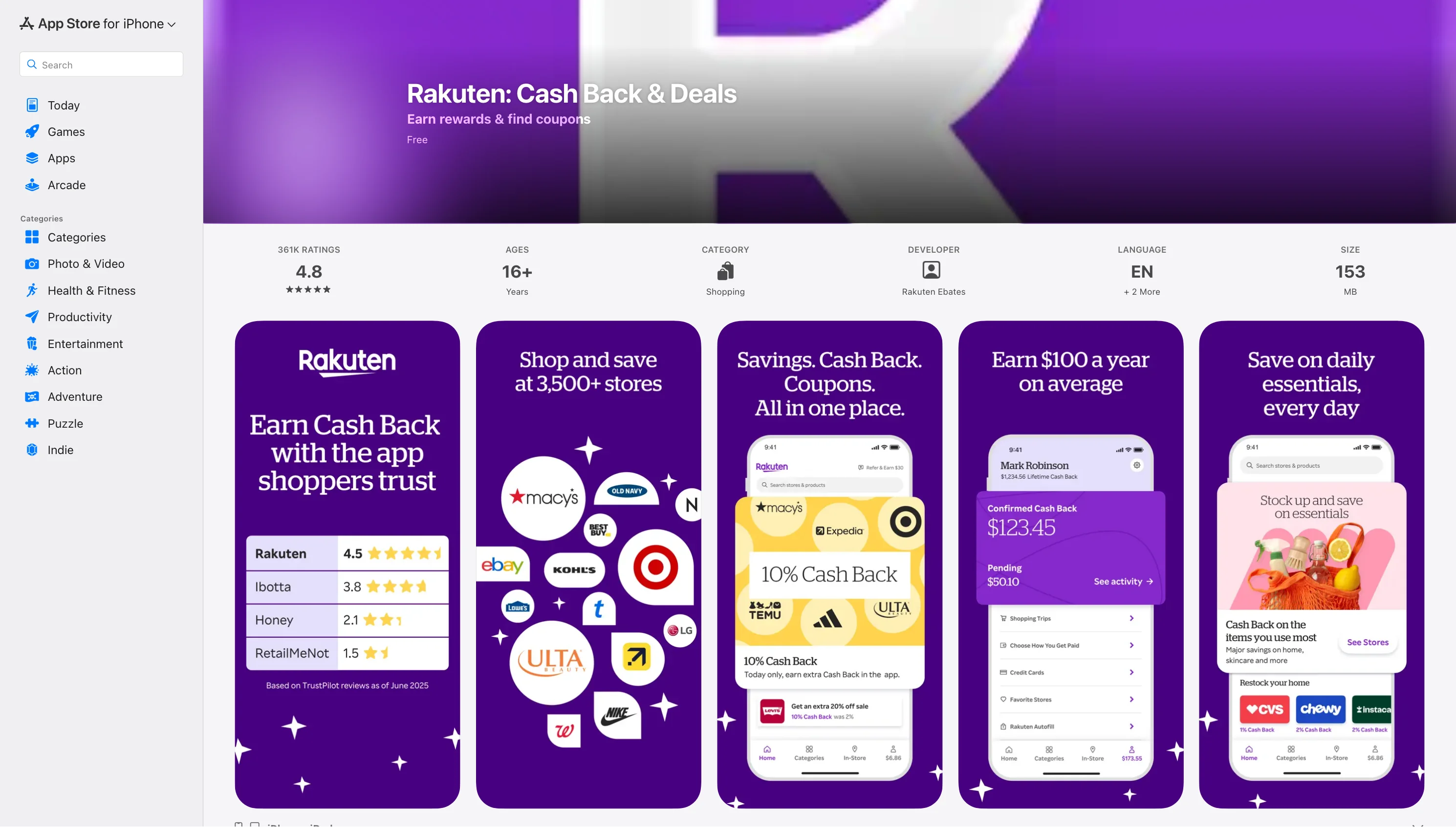

.webp)


.webp)