Category: Blog

  • 12 Automated Push Notifications That Drive Revenue on Autopilot

    12 Automated Push Notifications That Drive Revenue on Autopilot

    Push notifications continue to be the most underrated, underutilized communication and marketing channel there is.

    They give businesses a powerful, cheap and efficient way to reach their customers, right on their customers’ mobile devices.

    With a greater percentage of people now going mobile-first with how they shop, consume content, or interact with brands in any way, every brand should be looking to utilize mobile-first channels like push notifications.

    Part of the power of push notifications is the ability to easily set up automated campaigns, which deliver an incredible ROI because of the minimal cost and effort needed to manage.

    Keep reading and we’ll show you some examples of automated push notifications that allow you to drive new revenue and grow your business on autopilot.

    Don’t have an app yet? Web push notifications are fine, but not nearly as effective as native push notifications sent from an app. Get a free preview of your app to learn how easy it is to unlock the full power of push notifications.

    12 Automated Push Notification Ideas That Work

    You can do some incredible things with push notifications. 

    Push gives you a direct line to your customers at just about any time. And with automation, you can set up intuitive workflows and triggered notifications that hit people with the right message, at the right time, to drive key results for your business, such as increased engagement, improved customer experience, and ultimately more sales/revenue.

    Here are a number of automated push notifications you can set up and run to generate boatloads of revenue for your brand.

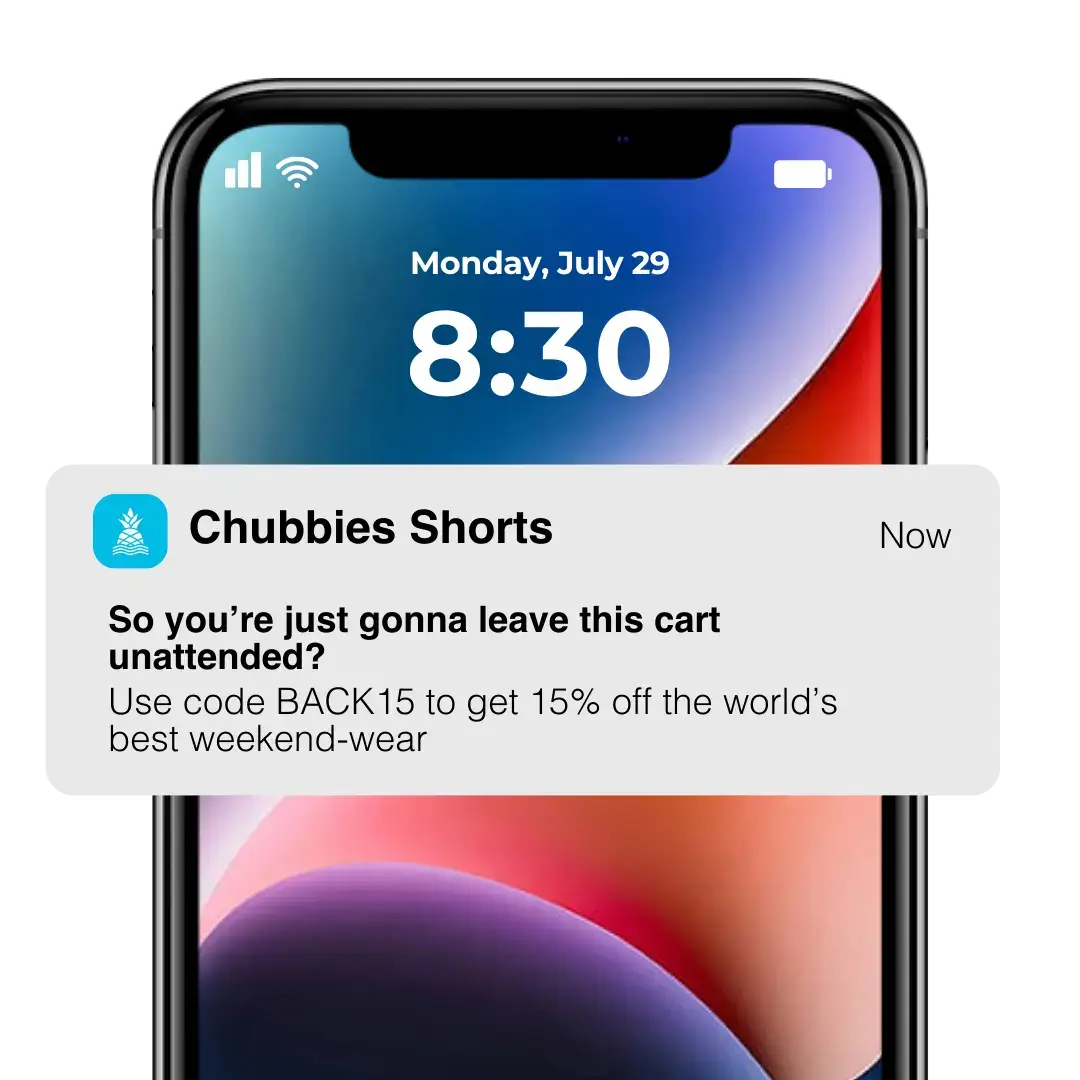
    Abandoned Cart Notifications

    The biggest opportunity to use automated push notifications to drive revenue is with abandoned cart notifications.

    70% of all shopping carts are abandoned. That means for every 10 shoppers who add a product to their cart, only three will actually complete their purchase.

    Automated abandoned cart push notifications are an effective way to recover some of this lost revenue, with very little effort and cost.

    After a certain amount of time, you send a push notification to the customer reminding them they have products left in their cart.

    __wf_reserved_inherit

    In many cases, the customer just got distracted and forgot to check out. A simple reminder like this gets them to come back to the app and check out, and you get a ton of revenue that would have otherwise been lost.

    Vendrux apps have abandoned cart notifications built in and ready to go, and some of our users have gotten some amazing results from this feature, in some cases recovering as much as $200,000 in revenue in the space of just 30 days.

    Browse Abandonment Notifications

    You could also use triggered push notifications to re-engage store visitors who get distracted before adding anything to their cart.

    Browse abandonment notifications (sometimes known as funnel abandonment notifications) are triggered when someone spends a significant amount of time browsing a site, app, or page, before going inactive.

    A great use for this type of notification is when a user dwells on a particular product page for a while, before navigating away or becoming inactive.

    __wf_reserved_inherit

    If they were looking at the product for a while, there’s a good chance they’re interested in it, and a subtle push may be enough to get them to go through and make a purchase.

    You could also trigger it when a user looks at the same product a number of times, or views a number of related products.

    Shipping Updates

    Shipping/delivery updates are a common use for automated push notifications. You’ll set up an automation that keeps the customer in the loop with where their order is, such as sending a notification when the delivery status changes (e.g. “picked” to “shipped”).

    __wf_reserved_inherit

    While shipping updates don’t directly impact revenue (the notification itself isn’t selling anything), they enhance the customer experience, which makes it a lot more likely the customer will come back and buy from you again.

    Welcome Notifications

    A very simple automated push notification idea is a “welcome” notification sent immediately or soon after the user opts in to push notifications.

    The notification could come with a first-time app user discount, an offer for a free gift, or it could simply say “hi” and thank the user for downloading your app and enabling push notifications.

    These notifications are effective because, along with extending gratitude towards the user, they condition the user to expect push notifications from your app in the future.

    This makes it more likely that they’ll take notice and take action on future notifications, and less likely that they will feel intrusive and cause the user to turn off notifications.

    Automatic Re-Engagement Notifications

    Keeping app users engaged long-term is a big challenge, and one that automated push notifications can help with.

    You can set up a triggered notification to send when a user hasn’t opened your app in a certain length of time (e.g. one or two months).

    The notification can give the user a friendly push to open the app, reminding them of the value they’ll get if they do. If you want to sweeten the deal, you could offer an incentive (like a coupon for their next purchase) as well.

    Duolingo is the perfect example of this; the app’s constant reminder notifications encourages regular use and increases user retention, all on autopilot.

    Loyalty Program Updates

    Loyalty programs are a powerful way to drive retention, lifetime value and long-term revenue.

    Push notifications go great with loyalty programs. You can set up automated notifications to notify a customer when they earn reward points, and update them with their new points balance.

    __wf_reserved_inherit

    This keeps the loyalty program top of mind for the customer, increasing their future participation in the program and boosting long-term retention.

    Feedback Requests

    Push notifications can be set up to automatically ask customers for feedback after they make a purchase.

    You might set up a specific length of time after their order has been received to send a push notification to ask for feedback or a review.

    You can use this review to provide social proof on your site, and touching base with the customer helps improve the customer experience and increase the chance that they’ll come back and shop again.

    Page Visit Triggered Notifications

    Automated push notifications can be triggered by a range of different events, including when a customer visits a specific page.

    This lets you send very creative, personalized and targeted push notifications. For example, an eCommerce store could send personalized promotions or recommendations related to the page they’re looking at, to increase the chance of a conversion.

    In another example, publishers could send a push notification recommending related articles, boosting engagement time and user retention.

    Action-Triggered Notifications

    You could trigger push notifications to send on many other events that you can identify as key moments in your user or customer’s journey.

    Let’s take a budget tracking app as an example. An automatic push notification could be set up when a user creates a new budget, congratulating them and offering some advice for next steps they could take to track their finances further.

    A meditation app could send push notifications after a user completes a successful meditation session. A booking app could send push notifications after someone makes a hotel booking through the app, suggesting other things to book (taxi, rental car, nearby attractions).

    This kind of notification guides the user along the ideal path that will lead them to becoming a loyal, long-term user, and gives positive reinforcement that encourages them to use the app more.

    Communication Updates

    With the immediate visibility of push notifications, they’re great for notifying app users of new messages or communications.

    From dedicated messaging apps like Messenger and WhatsApp, to apps with messaging features, such as Tinder or Slack, many apps make the user experience significantly more convenient by automatically notifying the user when they have a new message, rather than requiring them to manually open the app to check.

    Push notifications can also be used for customer service updates, such as an eCommerce store notifying the customer of a reply to their support ticket.

    Alerts

    Push notifications are great for urgent and time-sensitive alerts.

    Think a banking app sending a balance alert, a flight booking app notifying you that your flight was delayed, or a calendar app notifying you of an event that’s about to start.

    All these notifications are automatically triggered by certain events, and greatly improve user experience, giving the user a reason to keep the app installed.

    New Content/Breaking News Notifications

    Finally, publishers can increase reader engagement and drive views for new articles with automated push notifications.

    As we discussed in this article, life is getting progressively more difficult for digital publishers, with declining organic reach and changes to how people consume content.

    Push notifications are a great solution – automatic notifications for new articles (you could let readers customize these notifications to fit their interests) and breaking news give you a low-cost, highly effective way to get more eyeballs on your content.

    How to Automate Your Push Notifications

    With most push notification services, you shouldn’t have too much trouble setting up different kinds of automatic triggers for push notifications.

    Look at the list of notifications above and think about what kind of automatic notifications might make sense for your app.

    With eCommerce apps, for example, there are a number of triggers (shipping updates, feedback requests, abandoned cart notifications) which make a lot of sense to create.

    Services like Klavyio make it extremely easy to pull in data and events from your store and use them to set up push notification triggers.

    Once set up, regularly check on your push notification campaigns to analyze their performance, and see if you might be able to make changes (i.e. adjusting the copy, or changing the timing) to get more engagement and improve results.

    If you’re intrigued by the potential of what you can do with automated push notifications, but you don’t already have an app (or you do, but maintaining your app or setting up push notifications is too cumbersome), read on below to learn how to build an amazing app for minimal effort and expense.

    Use Vendrux to Build an App and Drive Engagement on Autopilot

    If your business is only, and you’ve got a website that works well on mobile, creating a mobile app and unlocking the power of push notifications is easy with Vendrux.

    Vendrux is a full service to convert websites into mobile apps. Our team of experts takes your website, complete with all its features, quirks and optimizations, and uses it to build native mobile apps that are completely synced with your website.

    __wf_reserved_inherit

    It’s a fully done-for-you experience, but with none of the time investment, cost and overhead of traditional app development.

    All the mobile-specific features you need, including push notifications, come built in, out of the box.

    We’ve helped more than 2,000 businesses build apps over the course of over 10 years, including high-revenue eCommerce stores, digital publishers, web apps and more.

    Click here to learn more about what we do and how we help you grow into a mobile-first world, without massive capital or overhead.

    If you’d like to discuss your project with one of our app experts, and get a free preview of what your site can look like as an app, book a free, personalized demo now.
  • App Store Requirements, Avoiding Common Pitfalls, and Ensuring a Smooth Submission Process

    App Store Requirements, Avoiding Common Pitfalls, and Ensuring a Smooth Submission Process

    The Apple and Android app stores get you in front of a huge base of potential app users, and also offer powerful benefits for your brand’s image.

    Yet getting past the extensive requirements for app store submissions can be hard. When you build an app with Vendrux, we handle all of this for you, and with the experience of launching over 2,000 customer apps, we know what needs to be done to get your apps accepted.

    If you’re doing it yourself, read on to learn what’s to be expected from each of the major app stores’ requirements, and the most common ways that publishers slip up and lose valuable time by having their submissions rejected.

    One-Minute Summary:
    -The guidelines for Apple’s App Store and the Google Play Store are fundamentally very similar (though Apple’s are more strict).
    -Follow best practices in regards to content, minimum functionality, design, data security and legality to comply with both app stores’ requirements.
    -Before you launch, make sure your app and its information are complete, and that you’ve double checked the app store requirements, to avoid any delays in your listing going live.

    Check out the following video for a summary of our top tips to follow when submitting your app to the app stores:

    The iOS App Store vs Google Play Store

    Though there are other mobile app stores you can consider launching on, the iOS App Store and Google Play Store are the big two. Any e-commerce publisher should be looking to get their app on these two platforms at a minimum.

    The core principles of submitting apps to each of these app stores are largely the same. Though there are some differences in the guidelines and regulations for each, much of it involves following a few best practices to ensure your app submission gets accepted.

    Apple is generally considered to be more strict than Google in terms of app store requirements, though it’s important you check through both thoroughly to ensure you don’t run into problems.

    Pre-Submission Checklist

    The app store submission process can take a while even when everything runs smoothly. If you submit your app before it’s ready, or forget to include key information, it’s going to take even longer, and it’s easy for this process to drag out and become a huge time and money sink.

    To avoid unnecessary delays, check these items off before you begin the submission process:

    • Thoroughly test your app for bugs and usability issues.
    • Make sure you have all the necessary information and metadata required by the app stores.
    • Provide up to date contact information.
    • Ensure everything in your app is complete, live and ready for actual users.
    • If your app requires an account or login to use, create a demo account for app reviews to use (that enables them to test all the features of your app).
    • Write up explanations for how to use any non-obvious features in your app.
    • Double check the app store guidelines and documentation.

    Rushing to start the process is likely to cost you more time and money in the long run, so check and double check everything is in order before you submit.

    Complying with App Store Requirements

    When you go through the submission process for each app store, check the official guidelines in-depth for both Apple and Google. 

    You can read through these guidelines here for the iOS App Store and here for the Google Play Store.

    There’s a lot of overlap in each store’s requirements. Here we’ll summarize what you should aim for in terms of best practices, to increase the chance of your app being accepted on the first attempt.

    Content

    Apple and Google both have certain standards for content in apps in their app stores. Apps should not have content that can be deemed objectionable, offensive, risks physical, mental or emotional harm, puts users in danger, or encourages any behavior that may do so.

    Content should not facilitate or promote illegal activities, and should not exploit or abuse users.

    This also covers user-generated content, with app publishers needing to take steps to prevent users from sharing any content that goes against guidelines as well.

    Minimum Functionality

    Apps need to meet a minimum level of functionality to be accepted to the app stores. The most notable example of this is an app that is a simple copy of a website, with nothing else added.

    Apple and Google (Apple particularly) want to see an “app-like” experience, not a repackaged website. This is particularly important to note if you’re converting an e-commerce store into an app. It’s vital to add some small touches to make your app feel like an app, such as mobile navigation features, a native tab menu and push notifications.

    Design & Performance

    Apps should also meet a minimum standard for design (UI & UX) and performance. If an app is an incoherent mess, if it has broken or incomplete features, it will likely be rejected.

    The same goes if it crashes constantly, if it’s riddled with bugs or if it causes the user’s battery to drain particularly fast.

    Data Security & Privacy

    Apps’ handling of data is particularly important today, for both app stores. The app needs to be secure in how it handles data, that data is collected and used with permission, and that certain steps are taken to keep user data safe.

    Monetization

    Both platforms have regulations regarding how in-app payments (e.g. in-app purchases, subscriptions, paid app purchases) work. These payments generally need to happen through the Apple/Google payment systems, and users can’t circumvent this (and thus avoid their payment fees) by taking payments off-platform.

    E-commerce apps are excepted from this, however. For both Apple and Google, payments for goods and services used outside the app (e.g. physical product sales) should use an external payment method (e.g. credit cards).

    IP, Deception & Impersonation

    Apps must not violate any intellectual property (IP) laws. They shouldn’t represent a relationship with a person or brand (unless they have the right to do so), and shouldn’t attempt to impersonate another app, or in any way deceive users.

    Malware/Harmful Software

    Apps should not contain any malware, viruses, or software that may harm users or their devices. This includes harvesting/transmitting information without a user’s knowledge and software that is abusive, harmful or deceptive.

    Common Pitfalls & Things to Avoid

    If you want to cut down the time from submitting your review to going live, watch out for a few common issues that cause apps to be rejected and have to be re-submitted.

    Incomplete Apps/Information

    Don’t submit beta builds, partial builds, or anything else that could cause your app to appear incomplete. Also ensure you’ve got all the necessary information and metadata required for submission.

    Broken Links & Placeholder Text

    Make sure all links work, and you don’t have any placeholder text (e.g. lorem ipsum) left anywhere in the app. It should work exactly as you intend for real users.

    Meeting Minimum Functionality for an App

    Don’t submit a direct copy of your website. This is probably the most common reason for apps to be rejected. Apple specifically mentions that apps should have features, content, and UI that elevate it beyond a repackaged website.

    Google Play is a bit more lenient in this area, but they still don’t like apps that have very little utility or value.

    If you use Vendrux, you can be safe knowing that we’ve found the sweet spot for website-to-app conversions that adds enough to get your app approved while maintaining what makes your website great.

    Poor UI & UX

    This is likely to be an issue if your website is not optimized for mobile before you start. If your app looks bad or is awkward to use, it’ll likely be rejected. This is especially true if you try to convert a website that’s not responsive and optimized for mobile screens.

    Not Giving Reviewers the Ability to Test Your App

    Many publishers have lost valuable time having to regather and re-submit their app because they didn’t provide the necessary information, permissions and resources to allow full testing of their app. This includes giving an explanation of non-obvious features and how to test them, and creating a demo account for testers to review account-specific features.

    Mentioning Other Platforms

    Finally, don’t mention any competing platforms in your app store listing. This is mostly an issue when submitting to the iOS app store, and often results in app submissions being rejected because the publisher mentioned Android or Google in their listing.

    How to Submit Your App

    For the iOS app store, you’ll submit everything through your App Store Connect account, including all the information, metadata and listing details. When you’re ready to submit your app, hit “Add for Review”. Make sure this is the full, complete, release-ready version of your app.

    For the Google Play Store, submit your app through the Play Console. Go to the “All apps” tab and hit “Create Application”. From here you’ll give your app a title, provide information about your app’s content, category, tags and other details (including your listing copy, title, description etc). Finally you’ll upload the files of your app (app bundles or APK).

    In the Google Play Store you can upload a beta version of your app for closed or open testing, or go straight to submitting the final version for review.

    Final Thoughts

    Unless you’re building an app that’s specifically for private use, you’re going to want to get in the app stores. There’s minimal downside – very little expense, no risk – yet big benefits for your brand and huge upside as a user acquisition channel.

    The only downside is the time and effort you put into getting your app past the app store review. And though a lot of what’s required lines up with simple best practices for launching an app, the app store submission process can certainly be frustrating and difficult for first-time publishers.

    This is one of the most valuable parts about launching your app with Vendrux. We’ve done this countless times, and know the process inside and out. As part of our service, we submit your apps to the App Store and Google Play for you. Our knowledge of the process means you can get approved much faster, and start enjoying the benefits of launching your own shopping app to the public.

    Want to learn more about Vendrux? Get started with a free preview of your app, or schedule a free, personalized demo and get a first-hand look at the platform’s possibilities with one of our app experts.

    In the next article we’ll dive deeper into how to optimize your app store listing for visibility and downloads, as well as a few other ways you can start getting users after launch.

  • How to Create a Great Apple App Store Product Page

    How to Create a Great Apple App Store Product Page

    Your app store product page is crucial for driving downloads of your app. As with any important landing page, you need to understand each element, and take time to thoughtfully craft the perfect design and copy. 

    You can build and maintain your product page through App Store Connect or through the Connect API, and our team is on hand to guide you. 

    Let’s look at each element of the App Store product page and how you can optimize to drive downloads and App Store rankings. 

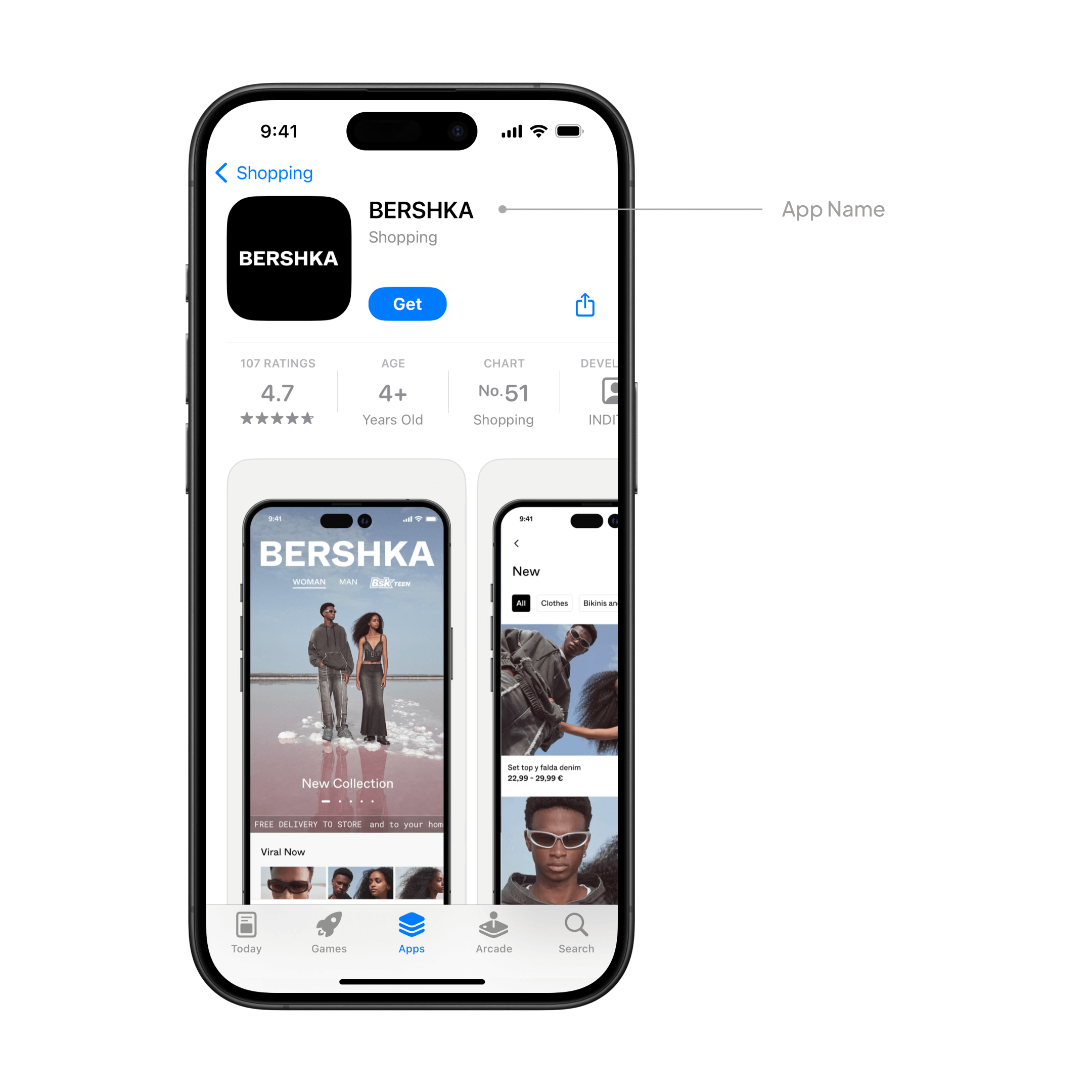
    App name

    __wf_reserved_inherit

    The name of your app is all important, playing a crucial role in discovery and conversion. For most ecommerce brands, there’s no need to overthink it though. Since you used Vendrux to convert your web store into native shopping apps, in 99% of cases you’ll use your main brand name for the like our customers Rainbow Stores, Jack & Jones, SYN*DI*CATE, and many others.  

    If you do deviate from your main brand name, choose something distinctive, punchy and memorable. Be sure to avoid names that are boring, generic, already taken, or over 30 characters long. 

    Icon

    __wf_reserved_inherit

    Your app icon is all important. It is the first thing that potential customers see on the App Store, as well as what they see on their home screen after they install it. 

    It’s important to make a great first impression with a professionally designed, sharp icon that’s recognizable, distinctive and visually pleasing. 

    As part of our full set up, we work with professional graphic designers to create the perfect icon for you that is simple and eye-catching. We prepare it in all the necessary formats, resolutions and sizes, and tailor it to your brand and target customer. 

    You can read more about Apple’s take on creating beautiful icons in the Human Interface Guidelines. 

    Subtitle

    __wf_reserved_inherit

    This is where you summarize the core value proposition of your app in a concise, simple phrase. It’s a great opportunity to explain the value of your app in more detail, and highlight exactly why potential users should learn more and ultimately download. 

    Some examples from Vendrux customers:

    • Elevate Your Style with rue21
    • Shop women’s clothes & shoes
    • Hot Trends for Less

    Your subtitle isn’t set in stone, you can always update it when submitting a new version of your app if you think something new could engage users better.  

    Your subtitle can be up to 30 characters and will appear throughout the App Store below the main name. 

    We can help you out with this for your Vendrux app if you’re short on ideas. 

    App previews

    __wf_reserved_inherit

    No less essential is the app preview, a short video on your product page that demos the core functionality, UX, and features of your app. 

    It can be up to 30 seconds long, and can use footage of real user interaction with your app. It’s possible to feature up to three previews on the App Store and Mac App Store pages, and to localize them for different languages. 

    An important consideration is that app previews are muted by default, so it’s even more important to make the beginning of the video visually compelling and encourage visitors to watch. 

    You can read more about creating a great app preview here.  

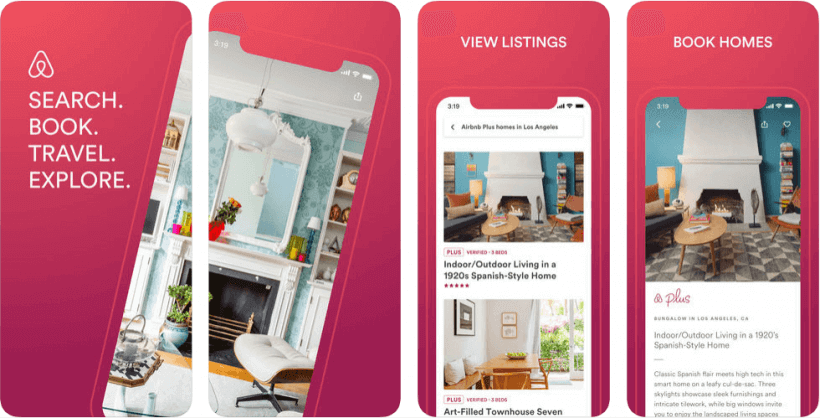
    Screenshots

    __wf_reserved_inherit

    Humans are visual, and like to be shown things rather than just told about them. 

    That’s why screenshots demonstrating your app’s UX are an essential part of your App Store product page. You can use up to 10 images in total, with the first three appearing in the app store search result pages when there’s no preview available. 

    Make sure these really show off the core, most valuable features of your app, and that each one is distinct and demos a specific important screen or functionality. 

    Apple also recommends adding at least one dark mode screenshot if appropriate, since this is important for some users. 

    As part of our setup service, we handle all your App Store screenshots for you, working with our design team to make sure they really work to show off your app and entice potential users to download. 

    You can read more about the specs in detail here from Apple. 

    Description

    __wf_reserved_inherit

    This is the part where you write an engaging, concise and informative description of your app, showing users why they’ll love it and why they should download. 

    Begin with a punchy introductory sentence that sums up the essence and core value of your app, letting users see it immediately without needing to expand the description. Use your brand voice and speak directly to your target audience, using the language you know they’ll connect with and understand.

    Every word counts. 

    It’s then good to follow up with a bullet list that ranks and explains the key features so that users can quickly scan and learn what your app is all about. 

    Apple recommends that you avoid stuffing in prices, accolades, or excessive keywords – these are all better suited for the promotional text. Focus on value and informing the user above all. 

    Remember that this too isn’t set in stone, and you can edit and change your description each time you update your app. If you want to make more frequent changes, you can use the promotional text instead. 

    Promotional text

    The promotional text is at the top of the description, and can be updated any time without the need to submit a new version of your actual app. 

    This is a great place to show the latest news, new shipped features, cool anecdotes and figures about your apps, or special offers and promotions.. 

    You’ve got 170 characters to make your points, so keep it fresh, concise and engaging. 

    Keywords

    __wf_reserved_inherit

    The App Store is a search engine and so the results are partially determined by keywords. 

    Think about which key terms, words or phrases potential users might search for to look for an app like yours. What would they call it? How would they describe it? 

    Including these will help to make your app more discoverable for your target users. 

    Like on the web, there’s often a tradeoff between the search volume of a keyword and how difficult it is to rank highly for it. So we recommend focusing on longer tail, specific keywords that can bring you in targeted traffic. 

    You can include keywords up to 100 characters in total, separated only by commas. Apple specifically warns against the following:

    • Repeating words in plural form 
    • Using the word “app” 
    • Various forms of synonymous or duplicate words
    • Special characters like hashtags or @ symbols 

    The real things to avoid are unauthorized usage of any trademarked terms or the names of real people like celebrities. You should also not use anything offensive or inappropriate, or the brand names of your competitor’s apps. 

    This is one of the main reasons why apps get rejected from the App Store, so it’s important to get it right. 

    In-app purchases

    __wf_reserved_inherit

    If your app has in-app purchases & subscriptions, the user can view and buy from the product page. You can display up to 20 items, defining the copy in the description & title, the promotional images, and the order they’re displayed.

    Again there’s a strict character limit of 30 for titles and 45 for descriptions, so concision is important as always. 

    Now, if like most of our customers you’re an ecommerce brand selling physical items, these are not classed as in-app purchases. Thankfully, because otherwise you’d need to pay Apple a 30% cut. So you really only need to worry about this if you sell purely digital products. Speak to one of our team if you need clarification. 

    What’s New

    __wf_reserved_inherit

    What’s new is the perfect place to inform users and potential users of important changes after an update.

    Whether you shipped new features, squashed a bug, or made a UX improvement – you can share it here, with it appearing on both the main product page and the updates tab. Apple recommends listing new features in order of importance and using punchy copy to excite users about the updates. 

    At Vendrux we handle all updates and maintenance for you, so we also handle this part of the product page. You’ll have the freedom to make changes or updates to the copy as you see fit. 

    Ratings and reviews

    __wf_reserved_inherit

    Ratings and reviews are really crucial. Not only do they provide social proof and entice new users to download your app – but they’re an important ranking factor on the App Store. Here you can see individual reviews as well as a summary rating. 

    All Vendrux apps are designed to be slick, performant, and to give the user a great native UX. Vendrux apps get overwhelmingly positive reviews, which will encourage even more users to download. 

    It’s important to get as many reviews as you can, that’s why all Vendrux apps have automatic ratings prompts which remind your users to leave a review and rating at key times. 

    On your end, it’s a good idea to respond to App Store reviews to address users feedback and questions. The original reviewer will be notified when you respond, and other users browsing the page will see that you proactively engage with and value your user base. You can read more about ratings from Apple here

    Categories

    __wf_reserved_inherit

    Categories are helpful for users browsing for and discovering new apps, and you’ll give your app both a primary and a secondary category.

    The primary is particularly important, helping to rank the app for specific keywords and allowing users to find it through searching and filtering results. The primary category should be as accurate as possible. 

    The secondary category gives you a bit more flexibility to niche down, allowing your app to appear in a wider range of searches. 

    It’s really important to be accurate and honest when it comes to categorisation, not least because getting it wrong can lead to rejection by Apple. 

    Localization

    __wf_reserved_inherit

    At Vendrux, our apps are multi-language, supporting most major languages as well as RTL for Arabic and Hebrew. 

    If your app is multi-language, it’s important to localize your description, keywords, preview, screenshots, and keywords for all the markets you offer your app in. 

    You might want to translate your app’s name and branding too so that it resonates better with the local audience. 

    Product page testing & optimization

    Apple has an inbuilt testing feature where you can test out alternative versions of your product page with different icons, screenshots, and previews to see which one performs the best. 

    Users are randomly selected to see different versions, and you can measure the results in your App Analytics. 

    If you get a high volume of traffic, this might make sense for you. Speak to one of our team about the possibility. 

    Custom product pages

    You can make specific versions of your product page to highlight a particular feature or key selling point. You can then share them with your audience through unique URLs. 

    These can have unique copy, images and localization, so you can really drill down to what you want to show off on each page!

    Ready for the App Store?

    At Vendrux, we build apps for you, based on your existing website, online store, or web app. With our custom platform and experienced team, we build you top class iOS and Android apps that let you reuse everything you already built for the mobile web.

    It’s the perfect way to build apps fast and cost-effectively, as the model is proven – having worked fantastically for thousands of businesses from small startups to multibillion dollar global brands.

    We built the apps for you, handling everything from the app build to ongoing updates and maintenance. That includes publishing to both the Apple App Store and Google Play. All the elements we covered above, we handle for you – our team of app experts and designers have it covered.

    Ready to get on the App Store?

    You can get started today, check out a preview of what your app could look like – and book a demo call to get all your questions answered.

  • The Practical Guide to App Store Optimization (ASO)

    The Practical Guide to App Store Optimization (ASO)

    We crunched the data – there are over 2.6 million Android apps in the Google Play store and over 2 million apps in Apple’s App Store, used by approximately 3 billion smartphone users worldwide, which these figures growing every year.

    These are enormous, staggering numbers, especially if you’re a developer trying to get your app noticed.

    How do you stand out in a crowded field of competitors? And perhaps more importantly, how do you get your app to rank high in an App Store search, and make sure it matches the intent of searches in the App Store searches?

    The key is using strong App Store Optimization strategies for the Google Play and iOS App Store.

    To help your mobile app rank highly in the App Stores and be seen by more potential users and fans, you’re going to need an App Store Optimization strategy.

    Want to enter the app stores without spending 5-6 figures on developing a native app? Vendrux is the perfect solution to convert your existing site into a like-native mobile app. Click here to schedule a free consultation to see exactly how it works.

    What is App Store Optimization?

    Just like internet marketers use Search Engine Optimization, or SEO, to get their web pages ranking highly in Google’s search results, app developers must use App Store Optimization, or ASO, techniques to get their app to the top of app store search results. It can be seen as effectively App Store SEO.

    Unfortunately, the true algorithms for ranking in both Apple’s App Store and the Google Play store for Android apps, just like the true algorithms for SEO, are not actually known, and change regularly.

    However, we do know that certain things affect your App Store rankings more than others.

    By taking advantage of this these App Store Optimization tips, your app could rank higher, be seen by more people, and receive more downloads.

    Here are ten important steps you’ll want to take to improve your ASO in both the Apple App Store and Google Play.

    1. Use a Descriptive Title
    2. Use Keywords Wisely
    3. Describe Your App Well
    4. Use High Quality Screenshots
    5. Add an App Preview Video
    6. Pick the Right Category
    7. Focus on Icon Design
    8. Encourage Positive Reviews
    9. Use App Store Analytics
    10. Re-evaluate Regularly

    1. Start With a Descriptive Title

    What’s in a name? Plenty, especially when you’re talking about the name of your app and ASO.

    A good name not only identifies what your app does to prospective users, but it can also improve your rankings.

    We highlighted how a strong, relevant title can improve your ASO in this post, with an example of how to make your app title relevant. In fact, including a keyword or two in your app’s title can help you rank at least 10% higher than if you didn’t include one.

    Of course, both the Apple iOS App Store and Google Play handle titles and keywords differently, so how you approach your title should depend on if you’re marketing to Apple or Android users.

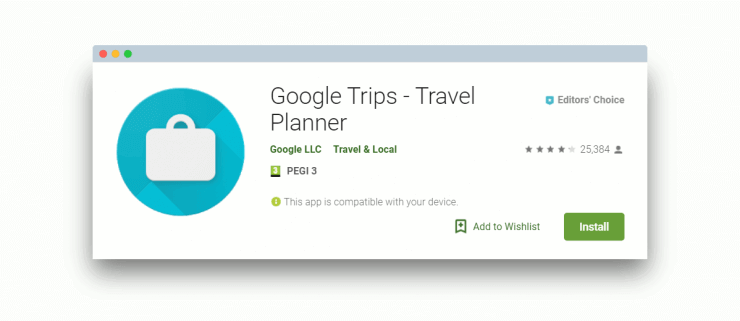
    Here’s how Google Trips includes their main keyword (“Travel Planner”) in their app title to improve rankings:

    Use relevant keywords in your App name
    Use relevant keywords in your App name

    The Apple App Store

    The Apple App Store gives you 255 characters for your title. So, while a succinct title can help with your branding efforts, it will do you no favors if you’re trying to boost your Apple ASO.

    Take the time to come up with a creative title that is unique, descriptive, and keyword rich; it’s not a bad idea to create a title and then a subtitle with your keywords. Doing so will help you both establish market share and improve your ranking.

    The Google Play Store

    Titles are handled a bit differently in the Google Play store. There, you get a paltry 30 characters for your title, so you have to be extremely concise.

    However, you don’t have to be as concerned about keywords in the title with Android apps; for Google Play, the keywords should go in the description, as we explain in step two.

    2. Use Keywords Wisely

    Like in SEO, Keywords are an important factor in ASO.

    Just like with app titles, how you should handle app keywords differs from the Apple App Store to Google Play.

    With Apple, you get only 100 characters for all of your keywords, so obviously, you need to choose wisely; it should go without saying that you should get as close to this 100 character limit as you possibly can.

    With Google Play, though, there is no specific keyword field. However, the app description is searchable, and you have a comfortable 4000 characters to work with.

    For the best App Store Optimization, you’ll want to put your most important keywords in your description five times. However, be careful not to overdo it –  keyword stuffing will get your app penalized (just like keyword stuffing on a website would get your site penalized by Google), leading to a drop in your ranking.

    There’s a fine line between optimizing your app description, and stuffing it with keywords – the key is to make sure it reads well and makes sense for a person reading it, not just for the App Store algorithm!

    Keyword Research

    Before you actually publish your app with the keywords you have selected, though, you will want to do some research to learn about the traffic, difficulty, and demand for those keywords, as well as how many apps are already using it.

    MobileDevHQ and TheTool are a couple of App Store Optimization tools that’ll help find the best App Store keywords for your app.
    Be sure to include select keywords in your app’s title and description. According to Fiksu, this simple step can potentially up your rankings anywhere from 80-100 positions, and 10-20 positions, respectively.

    Keywords with high traffic and a low to moderate number of apps will be best for your ASO.

    It’s also a good idea to take a look at what the top apps are for each keyword to get an idea of what people are looking for when they search for that term. If your app does something completely different than the top apps for that keyword, you may not have as much interest as you’d like.

    App Store Optimization tools like SensorTower can help you evaluate your keywords and much more. We’ll discuss more tools to help your ASO efforts in Step #8.

    Finally, here are a few other tips to help you pick the best keywords for your app:

    • Try to put your top keyword in your app name – a test conducted by MobileDevHQ reveals that placing a keyword in the title alone can improve your app’s search ranking (for the keyword inserted) by 10.3 percent.
    • Use words rather than phrases, unless a phrase is an absolutely integral keyword (such as “tug of war”).
    • When researching keywords, look at singular versus plural and choose the one with the best numbers.
    • Try to avoid using conjunctions and prepositions as keywords.
    • Use commas rather than spaces to separate keywords.
    • Use digits instead of spelling out numbers.

    3. Describe Your App Well

    For both Apple and Android apps, your app description is like your website’s landing page.

    If you’ve brought your potential buyer this far, you want to be able to close the deal and make the sale! Therefore, your app’s description and page within the app store should be viewed as an important part of your App Store Optimization Strategy.

    Start by assuming that users know very little about your app besides, its name. You need to think like your customer would. It often helps to think in terms of bullet points:

    • What does your app do?
    • What problem does it solve?
    • How will it make the buyer’s life easier?
    • Why is it worth the price?

    Be persuasive yet succinct, saving the more extensive write-up and how-to guide for your app’s website, or in-app onboarding process.

    And, as we mentioned in Step 2, you’ll want to pay extra attention to keywords for your Google Play description.

    Visually, you’ll want to include useful screenshots that look appealing in your app description and are relevant to what your potential customers are looking for. These should showcase the key parts of your app, making it look approachable to encourage downloads and, in turn, boost ranking.

    sleep as android screenshot

    A good example of how to create visuals that represent the benefits of your app can be seen in Sleep as Android‘s app page:

    Notice how they highlight the key benefits of using the app alongside screenshots of the app itself? This should help improve your conversion rate of people viewing your app to downloading it.

    4. Use High-Quality Screenshots

    People only spend 7 seconds deciding if they’re going to download an app or not. How your app store page looks is a crucial factor in their decision, and high quality app store screenshots are going to make a big difference.

    Combine app store screenshots

    In fact, they’re cited as being the second most influential factor when it comes to convincing someone to download your app (second only to your App Rating).

    You should use your screenshot real estate wisely, and focus on the key benefits and most engaging parts of your app. There are a host of tools available to help you create app screenshots that look great, such as Figma, MockUPhone, and AppLaunchpad.

    If you build apps with Vendrux – we can prepare the screenshots (as well as all other design assets) for you to the highest standard. 

    5. Add an App Preview Video

    85% of the US internet audience watch videos online, and over half of video content is consumed on mobile.

    You can harness the power of video for your App Store page to give prospective users a better insight into what your app can offer them.

    Pro Tip: “Most people will view this on auto play with muted audio. So have text overlays to explain pertinent sections or features that you’re showing. And, only include footage of the app itself, don’t waste precious seconds filming happy, smiling people using the app. This isn’t 2009 anymore, people!”

    – Lionel Valdellon, Content Marketing Manager at CleverTap

    App Previews in the iOS App Store allow you to upload 30 second long videos to showcase the features and benefits of your app. You can merge videos of different features into one smooth preview to make the most of the time limit.

    You can only show recordings of the in-app experience, so make sure your mobile app UX looks good, and matches what your prospective audience is looking for!

    This App Store Optimization technique is going to help your App Store page convert higher as you’re providing valuable content.

    When you build an app with Vendrux, our team is here to help you submit your app to the app stores, as well as crafting the perfect app store listing. Hit the button below for a free demo of the platform to see how it works.

    6. Pick the Right Category

    Placing your app in the proper category on both the Apple App Store and on Google Play is not only helpful for users who are browsing apps by category, but it is also best practice for helping your app to rank well.

    If you feel like your app fits into more than one category, there are 3 ways to approach your problem:

    1. First, and most obviously, you’ll want to pick the category that best describes your mobile app.
    2. Next, it’s a good idea to check out just how many apps are in each category; choosing the least competitive category gives your app a better chance of ranking closer to the top.
    3. Finally, look at the estimated app worth (EAW) of the apps near the top of those categories. Put your app in the one with the lower numbers may be to your advantage as well.

    It’s also important to remember that putting your app in a category that’s blatantly wrong can lead to trouble.

    Apple reviews all submitted apps before publishing them to the App Store, and adding your app to the wrong category for App Store Optimization purposes will probably mean a rejection stamp.

    As for Google Play, users can report violations for review. If you have a major error like Sports app in the Medical category, it’s only a matter of time before someone points that out.

    7. Focus on Icon Design

    There’s a direct correlation between downloads and ranking: the more downloads your app has, the more popular it is perceived to be, therefore the higher it’s ranked.

    Knowing how to design and an engaging app icon is very important as well. You only get one image to show app store audiences why your app is worth their time for consideration, so choose carefully!

    Pro Tip:Test four app icon variants before launch. Just because you like the icon, doesn’t mean your target audience will. The app icon is the first visual impression people have of your app and it’s crucial to get it right. It also doesn’t hurt to do the same with screenshots.”

    – Carissa Lintao, Founder at Apptuitive

    And, since it’s been demonstrated that icon design plays a significant role in how many downloads an app gets, it definitely pays to spend some time and energy coming up with a great one, and it’s a crucial part of App Store Optimization.

    You can argue about the injustice of judging a book by its cover (or an app by its icon), but at the end of the day, that’s exactly what a lot of people do.

    Your app’s icon should be engaging, eye-catching, and not too similar to other apps.

    Of course, that’s easier said than done, which is why it is worth the investment to bring in an experienced designer to develop a few icon options. Try to choose the one that is most visually appealing and most representative of what the app actually does. If you build apps through our Vendrux platform we’ll create a great app icon for you!

    Remember, if app store visitors are drawn to your app icon while browsing, they’ll take a look and may decide to download it. Make sure you’re staying on the safer side in regards to explicit content, and that you don’t copy any another app’s icon too similarly.

    8. Encourage Positive Reviews

    Positive ratings and reviews, both in terms of quality and quantity, have a huge impact on your App Store Optimization efforts. It’s in your best interest to get as many as you can.

    Of course, they need to be honest reviews from people who have actually downloaded the app.

    Pro Tip: “Nothing is better for App Store Optimization than an app that has a great user experience! If people like the app, understand it, and are easily able to incorporated it into their daily routine, they’re going to be happy to provide a glowing review.”

    – Bennet, Chief Experience Officer at TheUsabilityPeople

    You can encourage users you know through word of mouth to leave a good review of your app on the App Store or Google Play.

    Another way to get app store reviews might be sending a push notification to encourage users to review your app (as long as you’ve gotten permission to send push notifications!).

    You can also have an in-app pop-up notification asking the user to leave a good review if he or she liked it. (Vendrux includes this features in your apps for you and the results are encouraging, with a 4.5 average rating for Vendrux customer apps.)

    We would recommend having the notification appear after a certain number of times the app has been opened; if a user is opening the app frequently, chances are that they like it and will put in a good review. If they haven’t used your app much, the review won’t reflect their experience accurately.

    9. Use App Store Analytics

    Just like Google Analytics for web page marketing, there are a number of powerful app store analytics tools that are designed to help your mobile marketing strategy. You will be able to see where your app stands in relation to the competition, and boost your store ranking accordingly.

    Just to name a few, there are:

    These app analytics tools are helpful because they give you hard data about all sorts of measurements related to your app. They can show you what you’re doing wrong in marketing your app, what you could be doing to improve your app store ranking, and much more.

    10. Re-evaluate Regularly

    If it’s been a few weeks, and you’re not pleased with your app’s current app store ranking, it’s time to take a look at your data, make some assessments, and change some things around:

    1. Maybe the keywords aren’t right?
    2. Is the description isn’t persuasive enough?
    3. Are you sure it’s in the right category?
    4. Does the icon needs some fine tuning?

    All of these things and more can be improved upon to get a higher ranking.

    When you do make changes, it’s important to make them one at a time, and then wait a week or so to see if there’s any impact.

    What you want to avoid is changing everything at once; doing that won’t give you any idea what the initial problem was, and it could lead to a fall in your app store ranking if the changes a

    The Bottom Line

    If you want to have a successful app with lots of visibility and downloads — and income-generating potential — you’ve got to pay close attention to your App Store Optimization strategy. While Apple and Google do not share their exact methodology for establishing app rank, it has been established that there are certain things that will have a positive impact on how well your app ranks.

    One thing to mention is that a lot of this is based on making sure you have a great app to begin with. 

    If you already have an app – be sure to keep the UX fast and smooth, and keep it updated and well maintained. This will naturally lead to good reviews which are a ranking factor. If you have not built an app yet but you’re researching the possibilities make sure that you either build it yourself to a high standard, or you hire reputable and skilled developers (which don’t come cheap). 

    If you already have a website or web app – the best option is to convert your website into apps for iOS and Android. This is what our platform Vendrux does best. 

    Vendrux works for any kind of site:

    We add all the elements to ensure the optimal app UX and a provide you with a wide range of features to guarantee great reviews and ratings. We also equip you with unlimited push notifications, automatic ratings prompts, and all the other features you need for effective ASO. 

    If you think Vendrux could be for you, check out our solutions, or book a free app consultation with one of our experts today to learn everything about the app building process. 

  • How to Optimize App Store Keywords for Improved Rankings

    How to Optimize App Store Keywords for Improved Rankings

    App Store Keyword Optimization is an important step in ensuring that people can find your app listing the Google Play and Apple App Stores.

    You need to pick the right keywords, put them in the right places, and incorporate a range of different keywords, all the while making sure your listing reads well and converts visitors.

    Where do you start with this? We’re here to help with that question and provide some key App Store Optimization (ASO) tips to help you organically grow your app.

    What is App Store Optimization (ASO)?

    App Store Optimization, or ASO for short, is the process of adjusting app listing information to increase search result rankings and conversions. You could have a great app, but without an effective ASO strategy, you’ll struggle to attract users. However, by incorporating ASO best practices into your mobile marketing strategy, you can increase your app’s organic growth potential.

    When it comes to succeeding in the App Store and Google Play Store, several different factors come into play. From selecting the right creatives and developing engaging copy, to making your in-app experience smooth and enjoyable, many steps affect your App Store Optimization (ASO) strategy. However, one of the most important is implementing a keyword strategy and continuously refining its execution.

    Below, we’ll touch upon how you can set your app up for success using keywords. We’ll show you a few strategies that have proven useful in the past and continue to work today.

    Source: Unsplash

    Understanding Keywords for ASO

    Keywords are the backbone of your rankings in the App Store and Google Play Store. They are the terms users search for when looking for an app and are the ones you determine as essential to your app identity, feature set, and category.

    Your title, subtitle, keyword bank, short description, and full description are the areas provided by Apple and Google that should contain keywords you believe are relevant to your app. The app store algorithms will use these terms to rank your app in search results, depending on how well you establish relevance for them. For visible fields, it’s recommended to structure copy around keywords in a way that keeps the reading experience engaging for users.

    Optimal Keyword Selection

    Understanding your current metadata is the first step in keyword selection. If your app is published, consider looking at which keywords it currently ranks for and deciding which ones are relevant to your overall App Store keyword optimization strategy. This baseline is important in determining which terms contribute more to higher visibility and which ones should be phased out in favor of potentially better-performing ones.

    After establishing a baseline understanding of your existing keyword rankings, we recommend taking a look at the top-performing competitors in your industry. Observe which keywords they are using in their metadata, and how they are implementing them. This is an important step in your App Store Optimization strategy to understand how competitors’ strategies differ from yours. It can also provide insight as to what could work for your app.

    ASO technology is critical in proper App Store keyword optimization. Using the right tools will allow you to understand competitor performance and overall trends in the larger market to help shape your ASO strategy.

    The Relationship Between Keyword Search Volume & Relevancy

    While it may be tempting to specifically target high-volume keywords, incorporating lower volume terms of higher relevancy can help create a solid baseline for the type of terms you want your app ranking for. Your target audience is also much more likely to use terms with a low search volume given their relevance to your app. Ideally, select a mix of relevant high-volume, highly searched terms and low-volume but hyper-relevant terms.

    Many mobile marketers and developers often assume that the more they use a keyword in their metadata, the better their chances of ranking for it. However, keyword stuffing on both platforms neither helps in the indexation process nor does it help you gain relevance.

    Sweeping a keyword strategy with a broad brush to capture as many keywords as possible misses the fundamental element of relevance – the critical factor that helps you find your most receptive and lucrative audience. Visible keywords speak to your audience and the algorithm simultaneously, so it’s crucial to hit a balancing point.

    Once you have determined the keywords you want to include, decide which of those terms are most essential to your app, your App Store Optimization objectives, and current market conditions.

    How Keywords Affect Visibility

    When the algorithms have enough information to provide an initial baseline ranking for your keywords, you can adapt your keyword strategy accordingly. Correctly optimizing your keywords will increase your app visibility and its chances of being clicked on in app stores.

    These new views to your app listing affect your clickthrough rate, which represents the percentage of users who saw your listing and tapped on your app. An increase in the clickthrough rate further provides the app stores’ algorithms with the information needed to adjust your app ranking. 

    Constantly analyzing and adapting your keyword placement is what will help your app rank higher. Pair this with engaging copy and you’re on the right track to increasing downloads too.

    App Store Keyword Optimization: a crucial step in launching and marketing your app
    Source: Unsplash

    Including Keywords in Your ASO Strategy

    Where you place your keywords also plays a major role in your App Store Optimization efforts. The Apple App Store and Google Play Store indexation process determine how relevant certain keywords are to your app in comparison to others. 

    Here’s how you can use the provided fields to effectively place keywords that will help your app rank higher.

    Related: How to Get Your App Featured on Apple’s App Store

    Apple App Store

    For the App Store, include keywords in the title, subtitle, and keyword bank. Apple takes these three fields into account when ranking your app for keywords, so incorporating the most important terms here is the recommended strategy.

    The title and subtitle are the two areas where your keywords are visible to users. You’ll want to include hyper-relevant terms that accurately describe your app or its feature set here. However, avoid repeating keywords since these fields provide a limited character count. The same term will not cause your app to rank higher simply by being listed twice.

    The keyword bank, while not visible to users, is an area you can use to include relevant terms not mentioned in the two previous fields. Utilizing terms of varying volume while staying hyper-relevant can help cover a broad range of search terms.

    Apple’s App Store currently provides 30 characters for the title and subtitle, and 100 characters for keywords included in the keyword bank. 

    Google Play Store

    For the Google Play Store, indexation takes place in the title, short description, and full description. Although there is no dedicated keyword bank, Google offers considerably more characters to include a higher number of keywords when compared to the App Store. Google provides 30 characters for the title, 80 characters for the short description, and 4000 characters for the full description. 

    However, this doesn’t mean that you should use as many keywords as possible just for the sake of it. Rather, it is recommended to incorporate relevant phrases that include the terms you are trying to target while also maintaining high readability.

    Source: Unsplash

    App Store Indexation

    To accurately report the results of any metadata update you should generally wait at least 30-45 days for full indexation. During this time, Apple and Google are still determining where your app should be positioned, so don’t panic if the rankings aren’t what you expect. Take this opportunity to learn what is currently working in the market and perform your competitive analysis.

    After indexation, you’ll have a better idea of how to adapt your App Store keyword optimization strategy. Insights into your keyword performance will help you adjust your keyword selection to better align with your ideal user profile.

    Don’t Ignore Creatives

    Another area where keywords could contribute to your app store performance is in the app creatives. While creatives are not indexed by the App Store or Google Play Store, including terms that describe the app functionalities and features can help users further relate to the content, potentially resulting in more downloads. 

    Illustrating the words that individuals are searching for, while at the same time providing a visual representation of the in-app experience is an effective strategy for attracting potential users. By combining engaging visuals and relevant keywords, your creatives can be another avenue to increase downloads.

    Regularly updating your metadata’s visual experience can contribute to higher downloads as creatives are primarily a conversion-driving element. These continuous tests can then provide you with the data necessary to make future decisions on which creatives to change and update. Gradual modifications and performance analysis will allow you to fine-tune your creative strategy and determine what attracts more users.

    From different calls to action, feature callouts, to seasonal keyword inclusions, there are several elements within your creatives that developers can adjust when testing.

    Strategically modifying your app listing images and keywords depending on seasonality, new features, and promotions are a great way to see what drives conversions for your app with each iteration.

    The Importance of Iterations

    Adding keywords to your metadata is not a one-and-done task. Some developers make the mistake of believing a one-time App Store keyword optimization is enough to launch their app to the top of search results and maintain that position.

    The reality is that stagnation does happen and will affect any app that doesn’t regularly update its metadata. With new apps joining the App Store and Google Play Store every day, many will target the same keywords you are. While your metadata stays the same, competitor apps are being freshly indexed, eventually causing a steady decline in your keyword positioning over time.

    It’s best to prioritize regular updates and improvements to your fields as part of your App Store Optimization strategy. Regular modifications are enough to keep the App Store and Google Play algorithms up to date with what terms you feel your app should be ranking for. 

    How to Update Your App Metadata

    As a general rule, it’s a good idea to update your metadata every 30-45 weeks. This is the sweet spot for keyword optimization as you allow the algorithm enough time to scan your metadata, but also perform consistent updates to avoid stagnation. Any more changes made within the same timeframe will result in inaccurate data representing the keywords you are trying to target.

    Consider adding seasonal themes, app updates, standout features, promotions, and other aspects of your app as part of your metadata edits. This will keep your metadata content relevant to the current state of not only your app but the market itself. Constant iterations and continued analysis will help maintain momentum in growing your app. They can also contribute to an increase in conversions as you regularly include new features and information in the description that may be more effective in driving downloads than the previous copy. 

    An effective way to decide how to modify your existing metadata is to take a look at what your competitors are doing. By studying strategies that are proving successful in your app category, you can learn how to adapt your approach to what users are responding well to. This includes targeting similar keywords and adjusting your copy to see what works and what doesn’t. Regular updates to your metadata fields will equip you with the insight necessary to further understand your target audience and cater your offering to them.

    Further Reading: The Practical Guide to App Store Optimization (ASO)

    App Store Keyword Optimization: In Summary

    One of your main objectives with your new app is to set it up for success in the app stores. Your App Store keyword optimization efforts are sure to contain a plethora of moving parts both in and out of the App Store and Google Play Store that will ultimately affect your positioning and overall conversions.

    From understanding how keywords affect your app ranking, selecting those that balance volume and relevancy, to performing regular adjustments to your metadata, many steps encompass your ASO strategy.

    Analysis of one’s current position, competitor research, and market knowledge will determine which terms you decide to include in your app metadata fields, while studying current conversion performance will allow you to adjust other areas, such as creatives. Having access to this information with ASO technology will equip you with the data you need to make more informed decisions. Approach keyword optimization as detailed above so you can better position your app in the long run.

    About the Author

    Dave Bell, Gummicube Co-Founder & CEO

    Gummicube is a global leader in App Store Optimization with more than 12 years of experience optimizing and marketing apps. We offer the leading enterprise ASO technology and agency services, providing support to clients around the world. Our company is trusted by thousands of enterprise brands and leading startups including Microsoft, LinkedIn, Bethesda, SWEAT, GrubHub, McAfee and many others.

  • App-Exclusive Product Drops: How to Turn Scarcity into Sales & Loyalty

    App-Exclusive Product Drops: How to Turn Scarcity into Sales & Loyalty

    App-exclusive product drops have moved from streetwear culture into the mainstream DTC playbook. 

    What started as a hype-driving tactic for sneakerheads is now being used by skincare brands, food companies, and even fast food giants to spark engagement and drive meaningful revenue. 

    At a time when paid ads are pricier than ever and retention is the new acquisition, this play might be one of the most effective you can make for your brand’s long-term success.

    A well-executed drop can spike same-day sales, boost mobile app engagement, and deepen loyalty through anticipation and exclusivity. But it’s not a silver bullet. Brands that win with this tactic understand how to align execution with customer psychology and broader lifecycle strategy.

    Let’s break down how app exclusives work, and how to do them right.

    Vendrux not only helps you create the perfect, high-ROI mobile app, we also make it easy to set up app-exclusive drops that drive big spikes in retention and engagement. Want to learn how? Start with a free preview of your app now.

    What Are App-Exclusive Product Drops?

    An app exclusive product drop is a time- or quantity-limited product release made available only through a brand’s mobile app.

    These products might be:

    • Limited-edition SKUs
    • Collab or influencer tie-ins
    • Seasonal or event-based bundles
    • Early access to future core items

    These products aren’t available for purchase on the brand’s website; only their mobile app. 

    Drops are typically supported by push notifications, SMS alerts, and countdowns that build anticipation and create a sense of urgency. For DTC operators, they serve as a lever for:

    • Activating your most loyal audience
    • Incentivizing app downloads and installs
    • Generating buzz that converts to sales (and installs)

    Why They Work: The Psychology Behind the Drop

    App-exclusives (as well as other exclusive releases, like VIP lists or limited-availability products) are an incredibly powerful strategy. It seems counterintuitive, though. Why would you increase sales by decreasing availability?

    The answer is psychological, but you don’t need to be a shrink to understand the factors at work.

    There are three key levers that make app exclusives so powerful.

    Scarcity = Urgency

    People want what they can’t easily have. When products are limited in quantity or availability, they carry perceived higher value. One survey found that 45% of consumers are drawn to drops specifically because they want access to hard-to-get items.

    Drops tap into FOMO. And FOMO drives action.

    Anticipation = Memory

    Anticipation plays a massive role in making the experience feel memorable and emotionally rewarding. 

    Studies show that when people look forward to something, their eventual experience of it is heightened. That’s part of why 76% of drop participants report feeling “very satisfied” with the experience (even when they pay full price).

    It turns a transaction into a moment.

    Status = Affinity

    When someone gets a product that others can’t, it creates a sense of social capital. Think of limited SKUs like badges of insider access. 

    That exclusivity drives not just satisfaction but increased brand affection. According to one report, 67% of consumers say they feel more positively about a brand after participating in a drop.

    Strategic Benefits of App-Exclusive Product Drops for DTC Brands

    Exclusive drops are a smart way to drive measurable, margin-friendly growth – which is crucial in a time when CACs are sky-high, profit is hard to come by, and many brands are facing uncertain times.

    Here’s how this strategy makes a difference for ecom brands:

    Driving App Installs and Stickiness

    Access to exclusive drops can be the strongest incentive to download and keep your brand’s app installed.

    Unlike offering a one-time discount as an incentive to get the app, exclusive product drops actually give app users a reason to keep the app and stay active (and to keep push notifications turned on).

    Once you have them in the app, they’ll naturally shop more often and spend more (our data shows app users are 6-10x more valuable than the average customer).

    Increased Engagement Without Fatigue

    Unlike routine marketing campaigns, drops feel like events. This makes it easier to reach your audience via push notifications, SMS, or in-app messaging without burning them out.

    The context is exciting, not just promotional, which drives higher open rates and click-throughs compared to your typical “10% off this weekend” promo.

    Higher LTV

    Drops introduce a reason for customers to come back repeatedly. Whether it’s monthly drops or seasonal exclusives, the rhythm creates habitual engagement. 

    Repeat customers tend to buy more over time, and app-based drops make it easy to layer in loyalty programs, upsells, and post-purchase flows that maximize value.

    First-Order Profitability at Full Price

    Because of the scarcity effect, consumers are more likely to pay full price without expecting discounts.

    You’re not forced to throw discounts at customers to convince them to buy. FOMO does the selling for you.

    This is a big win for brands trying to improve contribution margin on first orders and reduce reliance on discounting for conversion.

    Capturing Rich First-Party Data

    App users provide better tracking, more behavior data, and more actionable segmentation. 

    This is super valuable in a time when cookie deprecation and stricter privacy laws are severely limiting the amount of data you’re able to collect on your customers.

    Every drop becomes an opportunity to learn about customer preferences (what they clicked on, when they shopped, what they ignored), which can inform future merchandising and marketing.

    Supporting Brand Positioning and Perceived Value

    Limited releases elevate the perceived exclusivity of your brand. 

    Done well, they can position your products as aspirational without needing luxury price points. That halo effect lifts performance across the full product catalog.

    How to Execute App-Exclusive Drops (A 5-Step Playbook)

    Want to know how to run a successful app-exclusive product drop? Here’s a simple playbook to follow.

    1. Pick the Right Product

    Not everything should be a drop. Choose items that are:

    • Genuinely new or novel
    • Tied to a moment or theme
    • Backed by limited inventory or windowed access

    2. Build the Hype

    • Tease the drop across email, SMS, push and organic social
    • Use waitlists or RSVP pages to gather interest
    • Create content that builds desire (UGC, influencer previews)

    3. Launch Through the App

    • Notify users with push alerts and in-app banners
    • Reinforce urgency (e.g., countdown clocks, “X left”)
    • Use a loyalty mechanic (VIP early access, referral unlocks)

    4. Follow Up Like a Pro

    • Post-drop, send a “thank you” to buyers
    • Create a secondary offer for those who missed out
    • Ask for UGC from those who purchased to drive social proof

    5. Measure and Iterate

    Track:

    • App installs during promo window
    • Push open + conversion rates
    • Drop sell-through time
    • Repeat purchase behavior of drop customers

    Brands Doing Exclusive Product Drops Right

    Here are some real examples of major brands that do exclusives (through their app, or similar exclusive drops through their website) to drive real business results.

    These brands don’t just sell products. They sell experiences, identity, and access. And they prove the point: app-exclusive drops, done right, can build more than hype. They build community and lasting brand equity.

    SKIMS

    SKIMS has built a playbook around high-intensity drops that routinely sell out. 

    Kim Kardashian’s brand uses drops not just to sell products but to build community. Drops are previewed via influencer content, Kardashian’s own account, and TikTok UGC, then pushed via email and SMS with exclusive access to waitlist members. 

    Customers often celebrate their “wins” on social media, reinforcing the brand’s perceived exclusivity. This fuels organic buzz, drives app downloads, and builds FOMO for the next launch.

    Nike SNKRS

    Nike essentially wrote the book on app-exclusive drops. The SNKRS app offers tiered access based on user engagement and history, with geo-targeted releases and gamified launch moments.

    Drops happen with countdowns, lotteries, and push notifications, all designed to replicate the adrenaline of a live event. 

    The result? A sticky user base and consistently sold-out releases.

    Glossier

    Glossier strategically uses drops to test new products and shades. 

    Drops are often preceded by waitlists, influencer seeding, and behind-the-scenes content, and they drum up excitement that grows organically on community channels (like Reddit).

    They’ve used this strategy to launch limited-edition lip colors and skincare sets, then promote user feedback and UGC to guide future core line decisions. It’s both a product and a research tool.

    McDonald’s

    Yes, even McDonald’s has used the play. 

    They partnered with artists like Travis Scott to release app-exclusive meals that fans initially could only access via the mobile app. 

    These campaigns created social media frenzies and drove record-breaking app downloads, proving that exclusivity works even in QSR.

    Telfar

    Luxury fashion disruptor Telfar plans exclusive drops for their bags on a limited availability basis.

    The releases sell out in minutes, reinforcing the cultural cachet of the brand. Their playbook blends scarcity with social equity, deliberately avoiding wholesale or retail partnerships to keep control of distribution and build a direct customer connection.

    Ffern

    Ffern is a standout in the fragrance category, largely because it fully embraces scarcity as a core growth strategy.

    The brand only releases four fragrances a year, one per season, and each edition is made to order. Customers must be on “The Ledger” (Ffern’s version of a waitlist) to receive it.

    This seasonal model creates built-in urgency. Once a fragrance edition is locked and production begins, no additional units are made. FOMO isn’t a side effect of their strategy – it’s a feature.

    Mistakes to Avoid

    Understand this: app-exclusives are great, but not a magic bullet. You’ve still got to execute well.

    Even the best-executed drop can fall flat (or worse, damage trust) if you don’t watch out for the common pitfalls.

    Here are the most frequent mistakes DTC brands make with app-exclusive drops:

    Overuse

    If every week is a drop, customers stop caring. 

    Scarcity only works when it feels rare. Drops should be spaced out to feel like special events, not just another Thursday. 

    A quarterly rhythm (like Ffern) or monthly cadence (like SKIMS) works better than flooding the calendar.

    Tech problems

    Nothing can turn an exclusive drop sour like a tech outage.

    If you’re doing app-exclusive product drops, make sure your app is stable and battle-tested for traffic surges.

    A crash during launch or buggy UX kills trust and conversions. 

    Prioritize infrastructure that supports high concurrency, smooth checkout, and fast load times. Consider staging your drop to segments if you’re unsure of scale.

    No follow-up

    A drop isn’t a one-time win. Without a strong follow-up flow, you lose the momentum. 

    Always build in post-purchase touchpoints: thank-you messages, loyalty offers, cross-sells, and upcoming drop previews. 

    The goal is to keep buyers in a loop, not just celebrate a one-off win.

    Poor segmentation

    Sending the same drop message to your entire list is a missed opportunity. 

    Use app activity, past purchase behavior, and engagement signals to tailor who gets early access, who gets a reminder, and who might need extra incentive.

    Ignoring the data

    Drops are goldmines of insight. 

    What converted fast? What didn’t? Did push notifications outperform SMS? Was there cart abandonment at scale? 

    Use post-mortems to refine your next launch. Every drop should teach you something.

    Lack of narrative

    If the drop lacks story, context, or meaning, it’ll feel transactional. 

    Use creative, founder notes, or seasonal tie-ins to make the drop feel like a moment. 

    Remember: you’re not just selling product, you’re building anticipation and emotional engagement.

    Want to start using app-exclusives to scale engagement, brand loyalty and revenue for your biz? We’ve got you covered on the app. Vendrux helps you launch an app for your brand with zero fuss, minimal cost, and no ongoing management required. Get a free preview now to see how it works.

    Final Word: Why This Matters in 2026

    With CAC high, privacy tightening, and paid social in flux, owned-channel engagement is your best friend. Mobile is the new storefront. Exclusive drops are the perfect blend of urgency, loyalty, and data capture.

    Make your products – and your brand – feel exclusive, memorable, and worth talking about. Do that, and you’ll build more than just a spike in sales. You’ll build fans who come back, again and again.

  • Android vs iOS Market Share: Most Popular Mobile OS in 2026

    Android vs iOS Market Share: Most Popular Mobile OS in 2026

    The smartphone market is a two-player game. 

    Android and iOS together account for over 99% of all mobile devices worldwide. Every other mobile operating system is either dead or statistically irrelevant.

    So which platform is actually winning? That depends on what you’re measuring. 

    In this guide, we break down the latest market share data across regions, countries, app stores, and revenue to give you the full picture for 2026.

    Want to launch an app, but not sure which platform to build it for? With Vendrux, you can easily launch apps for both iOS and Android, with no extra lift. Click here to learn more about how we can help you launch the perfect iOS and Android apps.

    Android vs iPhone Market Share: Which Smartphone OS Is More Popular?

    According to StatCounter data, Android holds a 70.36% global market share compared to iPhone’s 29.25%.

    In raw numbers, that translates to approximately 3.9 billion Android users versus 1.56 billion iPhone users worldwide.

    There are roughly 4.7 billion smartphone users globally, though the total number of active smartphone devices is higher (over 7 billion) since many people own more than one device.

    Android’s dominance comes primarily from its availability across hundreds of manufacturers at every price point. Samsung leads with about 31% of the Android vendor market, followed by Xiaomi (16%), Vivo (11%), and Oppo (10%). Apple, of course, is the sole manufacturer of iOS devices.

    Key Android vs iOS Statistics

    In the US, the market share data flips: iOS is the clear winner with nearly 60% of the market.

    Let’s dive into more Android vs iOS statistics now.

    Market Share by Country

    The split between Android and iOS varies significantly by country. In wealthier markets, iOS tends to lead or run close to even. In emerging markets, Android dominates by wide margins.

    Country iOS Android
    United States 59.8% 40.0%
    Canada 60.9% 38.8%
    United Kingdom 49.7% 49.8%
    Germany 41.2% 57.9%
    China 22.3% 77.3%
    India 4.8% 94.9%

    Source: StatCounter

    A few things stand out. 

    • The US and Canada remain strong iOS markets, with Apple holding roughly 60% in both countries.
    • The UK is now essentially a coin flip, with Android and iOS virtually tied at just under 50% each. 
    • In India, Android’s dominance is nearly total at 95%.

    Market Share by Continent

    Zooming out to a continental level, the pattern is clear: iOS leads in North America and Oceania, while Android dominates everywhere else.

    Region iOS Android
    North America 58.7% 41.0%
    Oceania 56.9% 42.3%
    Europe 39.0% 60.5%
    Asia 18.7% 80.9%
    South America 18.3% 81.5%
    Africa 15.8% 83.0%

    Source: StatCounter

    One notable shift: Europe has moved significantly toward iOS over the past couple of years. iOS now holds 39% in Europe, up from around 33% previously. 

    That’s a meaningful gain and reflects growing iPhone adoption across Western European markets.

    Mobile Operating System Market Share: 2009 to Present

    The smartphone market looks nothing like it did 15 years ago. 

    In 2009, the landscape was fragmented across Symbian, BlackBerry, Windows Mobile, and the early versions of iOS and Android.

    Android didn’t overtake iOS in global market share until 2012. By 2017, it had crossed 70% worldwide and has hovered in the 70-73% range ever since. iOS has remained stable in the 27-30% range during the same period.

    Every other platform has effectively disappeared. Symbian is gone. BlackBerry is gone. Windows Phone is gone. 

    The market consolidated into a duopoly, and it’s been that way for nearly a decade.

    Mobile OS Market Share Trends in the US

    The US is an exception to the global pattern. iPhone has been the dominant smartphone platform in America for years, and that hasn’t changed.

    As of 2026, iOS holds 59.8% of the US mobile market compared to Android’s 40%.

    That’s remained relatively stable, fluctuating within a few percentage points year to year.

    The reasons are partly economic (higher average incomes support premium device pricing), partly ecosystem-driven (iMessage, AirDrop, and Apple’s integrated ecosystem create strong lock-in), and partly cultural. In the US, the iPhone is the default, especially among younger demographics.

    Android vs iOS App Store Statistics

    Both the Google Play Store and Apple App Store are massive, but the gap between them has narrowed significantly.

    Metric Google Play Apple App Store
    Total apps 2.21 million 2.12 million
    Free apps 97.0% 95.2%
    Paid apps 3.0% 4.8%
    Gaming apps 12.1% 10.0%
    Non-gaming apps 87.9% 90.0%

    Source: 42matters

    This is a big change from previous years. Google Play used to have roughly twice as many apps as Apple. That’s no longer the case. 

    Google undertook a major cleanup effort, removing millions of low-quality and abandoned apps from the store. The result is that both stores now sit at roughly the same size, around 2.1-2.2 million apps.

    The distribution of free vs paid apps is similar on both platforms, with free apps making up the vast majority. 

    Apple has a slightly higher percentage of paid apps (4.8% vs. 3.0%), which aligns with its user base’s greater willingness to pay.

    iOS vs Android Revenue Statistics

    Despite Android’s much larger install base, iOS generates significantly more revenue.

    In 2025, total global consumer spending on mobile apps and games reached $155.8 billion, up 21.6% year-over-year. iOS accounted for approximately 70% of that spending.

    Category Total (2025) iOS Share
    Total spending $155.8 billion ~70%
    Gaming $72.2 billion ~61%
    Non-gaming apps $82.6 billion ~75%
    Subscriptions $79.5 billion ~73%

    Sources: Appfigures via Dataconomy, Business of Apps

    There are a couple of things worth highlighting.

    First, 2025 marked the first year that non-gaming apps generated more revenue than games

    Non-gaming spending hit $82.6 billion (up 33.9% year-over-year) while gaming came in at $72.2 billion. This is a significant shift from even just a few years ago when gaming dominated mobile revenue.

    Second, subscription revenue has exploded

    At $79.5 billion, subscriptions now account for roughly half of all consumer spending on mobile apps. iOS users drive nearly three-quarters of that, which explains why the App Store remains so much more lucrative for developers despite having fewer users.

    The bottom line: Android has the users, but iOS has the wallets. If you’re building a business on mobile, you can’t afford to ignore either platform.

    Android vs iOS Market Share (Tablets)

    The tablet market tells a slightly different story from smartphones. Apple’s iPad still leads, and it’s actually gained a bit of ground recently.

    Platform Tablet Share (Jan 2026)
    iOS (iPadOS) 55.9%
    Android 43.8%

    Source: StatCounter

    Back in 2012, Apple controlled around 85% of the tablet market. Android tablets gradually chipped away at that lead throughout the 2010s. 

    But the current split of roughly 56/44 in Apple’s favor has held fairly stable, and iPad has actually regained a few points recently.

    Other Players in the Mobile OS Market

    Beyond Android and iOS, there’s not much left. Here’s the complete breakdown of mobile operating systems according to StatCounter’s data:

    Operating System Market Share
    Android 70.36%
    iOS 29.25%
    Samsung 0.25%
    KaiOS 0.02%
    Linux 0.01%
    Other / Unknown 0.11%

    Source: StatCounter

    It wasn’t always this way. In 2012, Symbian, BlackBerry OS, Series 40, and Windows Phone all held meaningful market share. By 2026, every one of those platforms is gone. 

    The mobile OS market is a two-player game, and there’s no realistic challenger on the horizon.

    Samsung’s Tizen still technically exists at 0.25%, primarily on older devices in specific markets. KaiOS, which powers basic feature phones, registers at 0.02%. Neither is relevant for app development or mobile strategy decisions.

    Is It Better to Develop for Android or iPhone?

    If you’re deciding where to launch a mobile app for your business, the answer is straightforward: develop for both.

    Android and iOS together represent over 99.6% of the global smartphone market. Choosing one platform means leaving a massive portion of potential users on the table. 

    If you go iOS-only, you’re missing 70% of the world’s smartphone users. If you go Android-only, you’re missing the platform that generates 70% of app revenue.

    The traditional barrier has been cost. Building native apps for both platforms means two separate codebases, two development teams, and double the maintenance. That’s a significant investment, easily $100K+ for a custom build, plus ongoing costs.

    That’s where a different approach comes in. 

    Instead of building two separate apps from scratch, you can extend your existing website into native iOS and Android apps. 

    Your website already has your full product catalog, checkout flow, account management, and every integration you’ve set up. A native app built on top of your website inherits all of that, without rebuilding anything.

    With Vendrux, your website becomes a fully native mobile app on both platforms. You keep your entire existing tech stack. Every update you make to your website is instantly reflected in the app. And you unlock native features like push notifications, a home screen icon, and an App Store and Google Play presence, all without separate development projects.

    We’ve built 2,000+ apps for brands across every major ecommerce platform, including Shopify, WooCommerce, Magento, Salesforce Commerce Cloud, and custom-built sites.

    Curious whether a mobile app makes sense for your brand? Book a free strategy call to see your website as a native app. No commitment.

  • 37 Amazon Statistics for 2025 (Order Volume, Market Share, Amazon Prime)

    37 Amazon Statistics for 2025 (Order Volume, Market Share, Amazon Prime)

    Looking for the latest, most insightful, craziest Amazon statistics? We’ve got it all for you right here.

    The company has come a long way from its beginnings in Jeff Bezos’ garage. Amazon is now the biggest name in eCommerce, and one of the biggest companies in the world, as you’ll see from the statistics that are to follow.

    Stick around and buckle in for all the latest data behind the company that reinvented online shopping.

    Want to learn more? Check out this video from our YouTube channel:

    Want weekly insights into how 7, 8 and 9-figure brands are driving sustainable growth? That’s what you get with our value-packed newsletter, The Retention Edge.
    Subscribe for free today!

    Amazon’s Market Share

    Let’s start with proof of Amazon’s dominance over the eCommerce industryAmazon has 37.8% of the US eCommerce market share. No other company has more than 10%, with their closest rival, Walmart, at just 6.3%.

    Data Source

    It’s not just online where Amazon controls a significant portion of the market. They hold 10.4% of the overall retail market share in the United States, second only to Walmart.

    Data Source

    Worldwide, Amazon also ranks top when it comes to eCommerce. Statista reports that Amazon.com accounts for more than 20% of all desktop visits to online shopping marketplaces, while Similarweb shows Amazon.com as the #1 eCommerce website in the world in terms of monthly visits.

    Data Source

    Amazon Revenue, GMV, Order Volume and User Statistics

    How does being the #1 eCommerce site in the world look in terms of revenue and orders?

    Let’s have a look at a few key statistics you need to know.

    Amazon Made $513.98 Billion Net Revenue in 2022

    Amazon’s yearly net revenue totals nearly $514 billion US.

    Data Source

    Yet only a little over half of Amazon’s revenue actually comes from eCommerce. Per Statista, the company generates $220 billion in net sales revenue from online stores, along with $117.72 billion from services related to third-party sellers (much of which is commission and fulfillment fees).

    The rest comes from advertising, subscription services (such as Amazon Prime fees) and revenue from Amazon Web Services (AWS).

    Data Source

    Amazon’s Gross Merchandise Value (GMV) Totals $692.8 Billion

    If we’re just looking at how much product Amazon goes through, the numbers are staggering.

    Worldwide, Amazon does nearly $700 billion in product sales. More than half of this comes from the US marketplace ($362.7 billion GMV, 52.35% of total sales), with Japan coming in second ($64.9 billion GMV, 9.37% of total sales).

    Data Source

    Amazon is Still Growing at 10% Year on Year

    Though Amazon is already one of the biggest companies in the world, it keeps getting bigger. Among the top 15 eCommerce retail companies in the US, Amazon ranks as the 4th fastest growing company.

    The company is projected to grow by 9.9% in 2023, and 11.7% in 2024 – which would put it as the 2nd fastest growing company at that time.

    Data Source

    Amazon Ships 1.6 Million Packages Per Day

    How many orders does amazon get per day?

    Data shows that Amazon ships a massive 1.6 million packages per day.

    That’s over 66,000 packages per hour, and over 1,000 per minute.

    Small US Businesses Sell More Than 4,000 Items Per Minute on Amazon

    Amazon reports that small and medium sized businesses on their platform sell over 4,000 products per minute.

    These businesses make up a large portion of the 2 million+ individual sellers on Amazon’s third-party marketplace.

    More Than 350 Million Products Are Sold on the Amazon Marketplace

    The total number of products on Amazon, including those from third-party sellers, is in excess of 353 million.

    Amazon itself sells over 12.2 million products, through Amazon-owned brands such as Amazon Basics.

    Amazon Has Over 300 Million Active Users

    As of 2022, the number of Amazon users totaled more than 300 million. This includes online shoppers in over 100 countries around the world.

    Amazon Sites Have Over 230 Million Unique Visitors Per Month

    Amazon websites (including Prime Video and AWS) receive 231 million unique visitors per month. That puts it below only Google, Microsoft and Facebook websites as the companies with the most visitors across all properties in the United States.

    The Average American Spends $91.75 on Amazon Per Month

    A study by Upgraded Points found that, on average, Americans spend $91.75 on Amazon each month.

    The state with the highest monthly Amazon spend was Tennessee, with an average of $124.22 per month.

    The study also found that 25% of Americans shop on Amazon more than once a week.

    Amazon Prime Statistics

    A large reason for Amazon’s success is their subscription service, Amazon Prime, which offers free and fast delivery, exclusive discounts and more.

    Let’s look at some of the top statistics that underline the impact of Amazon Prime on the eCommerce landscape.

    There are 168 Million Amazon Prime Members in the US

    As of 2022, Amazon Prime had over 168 million members in the United States. Approximately half of the US population has a Prime Membership.

    More than 76.6 million households in the United States have at least one Amazon Prime membership, which makes up 58% of all US households.

    Data Source

    Amazon Prime Has Over 220 Subscribers Worldwide

    Worldwide, Amazon Prime subscribers total more than 220 million.

    This number has more than doubled since 2018, and increased more than 4.5x from 46 million in 2016.

    Data Source

    Amazon Prime Members Spend an Average of $1400 on Amazon Per Year

    Data from Statista finds that Amazon Prime members in the US spend, on average, $1400 per year on Amazon.

    In comparison, the data showed that non-Prime members spend just $600 per year.

    82% of Americans Born Between 1980 and 1989 are Prime Members

    A survey by Statista conducted in late 2022 showed that 82% of Americans born in the 1980s have an Amazon Prime membership.

    This age group is that most likely to use Amazon Prime, while 80% of millennials reported to be Amazon Prime members.

    US Prime Day Sales Topped $12.7 Billion in 2023

    Prime Day has become one of the biggest shopping events of the year, reaching close to Black Friday-Cyber Monday in total sales.

    2023 was the biggest Prime Day to date, with $12.7 billion in sales during the two-day event spent in the US. For perspective, Cyber Monday accounts for around $11 billion in online sales.

    Prime Day sales have tripled since 2018, jumping from $4.1 billion to the current number.

    Data Source

    Prime Members Purchased Over 375 Million Items During Prime Day 2023

    The first day of 2023’s event turned out to be the biggest single day of sales in Amazon’s history, with over 375 million items purchased by Prime Members worldwide.

    This included an aggregate $2.5 billion saved on Prime Day specials compared to regular prices.

    The Average Order Value on Prime Day 2023 Was $58.67

    The Prime Day orders in 2023 averaged $58.67 per order.

    This indicates a lot of value for consumers on Prime Day, with the average order value around half the usual AOV for eCommerce of $125.66.

    It may be more inline with the overall average order value on Amazon, which aged data puts at $47.31, and is now more likely in the range of $50-$55.

    Want to boost mobile AOV on your store by up to 15%? Do this, and more, by building an app. Our eCommerce App Revenue Calculator shows just how much your brand can gain from launching your own app today.

    Amazon Mobile Statistics

    Amazon, like many eCommerce businesses, is part of a global revolution in which more and more shoppers are choosing to shop on mobile first.

    US mobile eCommerce sales are currently around $431 billion per year, and projected to grow to $710 billion by 2025. Mobile commerce makes up approximately 38% of all US digital sales.

    To no surprise, Amazon is ahead of the curve on mobile, with a perfectly responsive and optimized mobile website and a user-friendly mobile app.

    Here are some statistics on the Amazon Shopping app and their mobile shopping experience in general.

    Mobile apps are key to Amazon’s strategy, and they should be for any other brand too – big or small. To see how you can build an app for your brand and get in the app stores next to other huge names, check out Vendrux, and learn how we help you launch an app that almost guarantees a positive ROI.

    Amazon Shopping Has 7.7 Million Ratings on the Apple App Store

    Considering the small amount of people who write reviews for apps they download, the 7.7 million app store reviews for the Amazon Shopping app gives you an idea of just how many people shop on Amazon via the app on iPhone alone.

    And the app has an average rating of 4.8 out of 5. Not bad.

    Amazon Shopping Has Over 500 Million Downloads and More Than 3.5 Million Reviews on Google Play

    Amazon is clearly popular with Android users too, with over half a billion total downloads and an average rating of 4.2 out of 5.

    The Amazon app is one of only five shopping apps with over 500 million downloads from the Google Play Store, alongside AliExpress, Flipkart, Wish and Vivo.com.

    The Amazon App is the 3rd Ranked Shopping App in the Apple App Store for the US

    The Amazon Shopping app is consistently one of the most downloaded shopping apps in the App Store, particularly in the US.

    However, it has faced competition of late from new competitors, with apps from Temu and Shein generating more new downloads to become the top 2 most popular shopping apps in the App Store.

    The Amazon App is the 4th Ranked Shopping App in the Google Play Store for the US

    It’s a similar story for Android users, with Amazon’s app ranking 4th in the Google Play Store.

    This puts it behind Temu and Shein again, as well as Walmart’s shopping app.

    The Amazon iPhone App Had 25.46 Million Downloads in 2021

    Amazon Shopping ranked #1 in the App Store for shopping apps in 2021 with 25 million new downloads, 8 million ahead of the next highest, Shein.

    The Amazon App Had 5.5 Million Downloads in August 2022

    Though the Amazon app already has a huge mobile user base, its numbers continue to grow.

    Apptopia reported that the app hit a new record for monthly US downloads in August of 2022, when it brought in 5.5 million new downloads – up 65% year-on-year.

    The Amazon Shopping App Has an Average of 98 Million Monthly Active Users in the US

    Data from Statista states that Amazon’s app has a monthly audience of 98 million active users.

    This is not enough to make it the most widely used shopping app in the US, however, as it’s second to Walmart – which has 120 million active users.

    Over 150 Million People Shop on the Amazon App Each Year

    The Amazon shopping app has 150.6 million total users who use the app at least once a year.

    App Users Make Up 42% of Amazon Mobile Visitors

    According to data cited in Business Insider, nearly half of Amazon’s smartphone users shop on the app.

    App users account for 42% of mobile visits, with the other 58% shopping online via the browser.

    App Users Spend 12.8 Billion Minutes Per Month in the Amazon App

    The same data cited above shows that Amazon users spend a total of 12.8 billion minutes per month in the app.

    Mobile browser users, despite making up more than half of all visits, only average 2.4 billion minutes per month on the Amazon website.

    Learn more about how the Amazon app seamlessly blends web and mobile technologies to deliver a seamless user experience across all channels.

    More Fascinating Amazon Statistics

    If that’s not enough for you, here are some more incredible Amazon statistics that offer insight into the world’s leader in eCommerce.

    Why People Shop on Amazon

    A 2020 study looked at the most popular reasons people give for shopping on Amazon.

    The most common reason people buy products from Amazon is for Fast and Free Shipping, a driving factor for 79.8% of Amazon customers.

    68.9% of people shop on Amazon because they have a Broad Selection of Products, while 65.7% shop on Amazon because they are a Prime Member.

    Data Source

    Third-Party Sellers Account for 59% of Sales on the Amazon Platform

    As of the end of 2022, third-party Amazon sellers made up more than half and a little under two-thirds of all sales on the Amazon marketplace.

    This share has been steadily increasing each year, rising from 51% at the end of 2017 to 59% now.

    Data Source

    15,000 Amazon Sellers Drive Half of Amazon’s Third-Party GMV

    Though there are millions of independent sellers operating on the Amazon platform, a small percentage of these sellers bring in a majority of the revenue.

    Marketplace Pulse reports that 15,000 Amazon sellers are responsible for nearly half of all third-party marketplace sales.

    This small group makes up less than 1% of all Amazon sellers.

    While there are 240,000 sellers doing more than 1,000 orders per year, just 15,000 Amazon sellers generate more than 100,000 orders per year each, making up more than 1.5 billion yearly orders in total.

    45% of US Brands Sell on Amazon

    A Feedvisor study of 1,000 US eCommerce brands found that 45% of brands sell on the Amazon marketplace.

    43% of brands reported selling on their own website and 31% also have brick and mortar stores. In terms of competing marketplaces, 25% of brands said they sell on Walmart, and 15% sell on eBay.

    Data Source

    75% of Consumers Check Prices on Amazon

    Feedvisor’s report finds that for three out of four customers, Amazon is the first place they go to check product information.

    75% of people report that, before they make a purchase, they go to Amazon to check prices, reviews and other information.

    56% of Consumers Start Their Product Search on Amazon

    Over half of consumers start their search for something to buy on Amazon.

    For 56% of people, Amazon is step one in the buying journey, well ahead of Google (21%) and Walmart 12%).

    Amazon Does $35 Billion in B2B Sales

    The growing B2B marketplace Amazon Business is now responsible for $35 billion in annual sales.

    This marks strong growth, up from $25 billion in 2020, and just $1 billion in 2016.

    Data Source

    Amazon Has Over 400 Private Label Brands Doing More Than $1 Billion in Revenue

    Marketplace Pulse revealed that Amazon has at least 406 private label brands. These brands have over 23,000 products in total.

    Amazon makes approximately $1 billion in sales from its own private label brands, which represents a small percentage of its overall sales.

    Summing Up

    Amazon is a great example for any eCommerce brand to follow when it comes to customer experience best practices – the results speak for themselves.

    With the e-commerce market share Amazon commands, plus the trust it conveys to consumers, Amazon’s marketplace also presents a great opportunity for Amazon sellers to reach a wider audience and increase their sales (along with the convenience of Amazon FBA for order fulfillment).

    Yet it’s unwise to rely entirely on a platform like Amazon, where you don’t have control over your traffic and audience. Brands still need a presence outside Amazon and other third-party marketplaces, where they can communicate directly with their customers and take control over their audience.

    Brands should ensure they have their own store, CRO optimized and optimized for mobile shoppers. Better yet, follow Amazon’s lead by building your own mobile app to build an even better connection with your customers on mobile.

    To explore how you can create an app for your eCommerce store, for a minor investment and with zero mobile app experience necessary, check out Vendrux. We help you ship an app that legitimizes your brand, without the hundreds of thousands that building apps usually costs.

    Learn more here, or get in touch with us to book a free demo, and see how easily you can level up your business with a branded shopping app.

    Sources

    Amazon.com | Statista | Retail Info Systems | Similarweb | Statista | Statista | ecommercedb | eMarketer | Market.us | 360pi | Investing.com | Statista | CIRP | Statista | Business of Apps | Amazon SMB Impact Report | UpgradedPoints | Statista | Statista | eMarketer | Amazon | Numerator | Statista | Feedvisor | AppFigures | Statista | Business Insider | Apptopia | Statista | MarketplacePulse | Marketplace Pulse | Marketplace Pulse

  • How the Amazon App Uses a Hybrid of Native and Web Technologies to Stand Out

    How the Amazon App Uses a Hybrid of Native and Web Technologies to Stand Out

    The Amazon Shopping app is one of the most popular shopping apps worldwide, and its ability to offer a seamless user experience across both Android and iOS is key to its success.

    But many people wonder: How is the app built?

    The answer lies in a hybrid approach.

    Amazon combines native app components with WebViews (a method of displaying web content inside an app).

    This approach allows Amazon to leverage the strengths of both native and web technologies, and it results in a flexible, efficient, and user-friendly shopping experience.

    Vendrux, similar to Amazon’s approach, helps websites become mobile apps by using web technologies inside a native app shell.

    In this article, we’ll dive deeper into how the Amazon app is built, specifically focusing on how it utilizes hybrid development to maximize efficiency, without sacrificing on the customer experience.

    We’ll then show how we can help you take a similar approach to the world leader in eCommerce, by converting your site to an app with Vendrux.

    Mobile app users spend more, shop more frequently, and are more loyal to your brand. Use our eCommerce App Revenue Calculator to see just how much you stand to gain by launching an app.

    Native Components in the Amazon App

    Let’s take a look at a few parts of the Amazon Shopping app that are native (meaning built specifically for the app):

    Nav Bar

    __wf_reserved_inherit

    The navigation bar is a native element. It helps users move between key areas of the app, like home, categories, and their account. This is designed to be quick and responsive, making it easier to navigate large sections of the app without delays.

    Native Menus

    The menus are also native, ensuring smooth interaction when users browse options like settings or product categories. Native menus load instantly, avoiding any delays that web-based menus might introduce.

    Search Controller

    __wf_reserved_inherit

    The search controller is another critical native feature. Since searching is one of the most frequent actions in the app, Amazon uses native code to make it fast and responsive. Users get suggestions as they type, and search results load quickly, improving the overall experience.

    Push Notifications

    Push notifications are native too. They rely on the app’s direct integration with the phone’s system. Native code is used here to ensure notifications are timely and relevant, such as updates on orders, special deals, or recommended products.

    Camera Integration

    __wf_reserved_inherit

    Finally, Amazon uses native access to the phone’s camera. This feature is key for scanning barcodes or QR codes, allowing users to quickly find products or track deliveries.

    These native components work together to ensure the app feels fast, responsive, and integrated with the device, similar to how Vendrux builds native wrappers for websites to provide a seamless app experience.

    Vendrux’s Approach

    For eCommerce brands, Vendrux creates mobile apps that directly improve customer engagement and sales. 

    By delivering a more convenient shopping experience, mobile apps increase session frequency and repeat purchases. Push notifications remind users about offers, cart abandonment, and order updates, bringing them back to shop.

    Features like faster load times, one-tap checkout, and optimized mobile navigation reduce friction and boost conversions. Customers are more likely to complete purchases when the experience is smooth, leading to higher retention and long-term loyalty.

    WebView Usage in the Amazon App

    Amazon relies on WebViews to load dynamic content like product pages, reviews, and promotions. 

    __wf_reserved_inherit

    These sections are not built into the app itself but are pulled directly from Amazon’s web servers in real-time. This ensures that content like pricing and availability is always accurate.

    Using WebViews allows Amazon to update content without having to update the app itself. It also reduces development time by using the same content across both iOS and Android.

    Though WebViews can be slower than native components, they enable consistency and flexibility in handling large amounts of dynamic data.

    With Vendrux, eCommerce brands can benefit from the same strategy. The app integrates the website’s content seamlessly, ensuring real-time updates without the need to rebuild anything. 

    __wf_reserved_inherit
    The Tobi app – one of the many successful brands that have launched hybrid apps with Vendrux

    This approach is ideal for brands looking to reduce friction and manage everything from one platform.

    Performance Considerations

    Amazon’s hybrid approach, combining native elements with WebViews, helps balance flexibility and speed. 

    Native components handle critical features like the navigation bar, search, and smooth transitions. These ensure fast interactions and reduce any lag when users perform essential actions.

    WebViews, though slightly slower, allow real-time updates of product listings, prices, and reviews.

    For Vendrux, native components include features like: 

    • Push notifications
    • A management UI
    • Login and loading screens
    • Smooth animations

    Additionally, it supports tab bar navigation and integrations with platforms like Shopify and WooCommerce. 

    These integrations enable automated cart abandonment notifications and direct communication with customers through push notifications, enhancing performance while keeping the app flexible.

    Further Reading: In our Ultimate Guide to Push Notifications for eCommerce, see why push notifications are such a powerful tool for eCommerce brands, plus get tips and real examples to help you craft impactful and high-converting push campaigns.

    Challenges and Trade-offs

    While hybrid apps offer flexibility, WebViews can sometimes load slower than native components. 

    However, modern eCommerce frontends, such as Shopify themes and headless solutions like Hydrogen, are now highly optimized. They can match or even exceed native app performance. 

    With the technology available today, you can build fast and responsive web features, making pure native code less essential for eCommerce apps.

    The major advantage of the hybrid approach is compatibility with your full tech stack (i.e. the tools you use for analytics, conversion rate optimization (CRO), reviews, and loyalty programs). 

    Most of these tools are built for the web. They often lack support or APIs for native apps, making integration into a fully native app difficult or impossible.

    For established brands, this is a significant limitation. There are always essential tools that won’t function properly in a native environment. With a hybrid app, you can keep these tools fully functional within the app, without needing major custom development.

    The hybrid model allows your eCommerce tools to operate just as they do on the web. From reviews to loyalty programs, nothing is left out. You can manage everything from one central platform, ensuring your app mirrors the web experience with no sacrifices.

    In contrast, building a fully native app might mean missing out on these key tools. Even with effort, some tools don’t offer APIs, making integration impossible. 

    The hybrid approach ensures that all your important tools, built for the web, continue to work in the app seamlessly. This flexibility is critical for brands that rely on a sophisticated set of tools and integrations to drive performance, optimize user experience, and increase engagement.

    Development Efficiency and Control

    The Amazon app’s use of WebViews offers a significant reduction in development time and complexity. 

    Instead of developing separate native code for both Android and iOS, the app leverages web content that works across platforms. This means fewer platform-specific adjustments and easier maintenance.

    By relying on WebViews, Amazon can update content (like product pages, deals, and promotions) without needing a full app update. This ensures that the app always displays the latest information without requiring users to download a new version from the app store.

    This efficiency allows brands to manage content updates swiftly and maintain a consistent experience across devices. 

    With Vendrux, eCommerce brands can achieve similar efficiency, avoiding complex platform-specific development, and managing the app’s content centrally, just like updating a website.

    Final Thoughts

    Amazon’s hybrid approach, combining native components with WebViews, offers a smart balance between performance and flexibility. Native elements ensure fast, responsive core functions like navigation and search, while WebViews allow for dynamic content updates without the need for full app updates.

    This hybrid model is ideal for a content-heavy app like Amazon, where real-time changes in product information and promotions are essential. It ensures that users always see the latest updates, while keeping development and maintenance efficient across platforms.

    It’s also ideal (we’d argue even more so) for brands operating on a much smaller scale than Amazon.

    When you have a limited amount of resources (capital, staff, time) to work with, you can’t be wasting these resources on duplication of effort, updating content and building features twice to maintain consistency between app and website.

    That’s where the hybrid approach is so valuable. You can launch an app (and access all the benefits of having an app, such as increased engagement and retention, access to native push notifications, and greater brand authority), without having to manage another platform.

    You’ll just manage everything on your website, and any changes you make automatically reflect on your app, cutting down the overhead and extra work that often comes with trying to juggle an app and a website.

    Launch an Amazon-Style App in Just a Few Weeks

    Vendrux helps brands convert their website into mobile apps, which function much like the Amazon app does.

    The core content of your app is synced with the website, meaning the app stays consistent with your website, and requires little added work to maintain.

    But the mobile apps come with native features, such as mobile navigation UI, a tab menu, and native push notifications, to give app users a proper native experience.

    All of this is delivered with a done-for-you service, for low four-figures up front, in a timeframe of less than a month.

    That means you don’t need a million-dollar budget, or a team of app developers on staff, to launch an app that looks and feels like Amazon’s.

    For an idea of what’s possible, just see these examples of other brands who launched successful mobile apps with Vendrux.

    __wf_reserved_inherit
    John Varvatos, Jack & Jones, Rainbow Shops and many more brands used Vendrux to build their apps

    If you’re ready to learn more, and see if this approach will work for you, book a free demo now. Our app experts will walk you through the process, show you a preview of your website as an app, and help you understand what Vendrux can do for your brand.
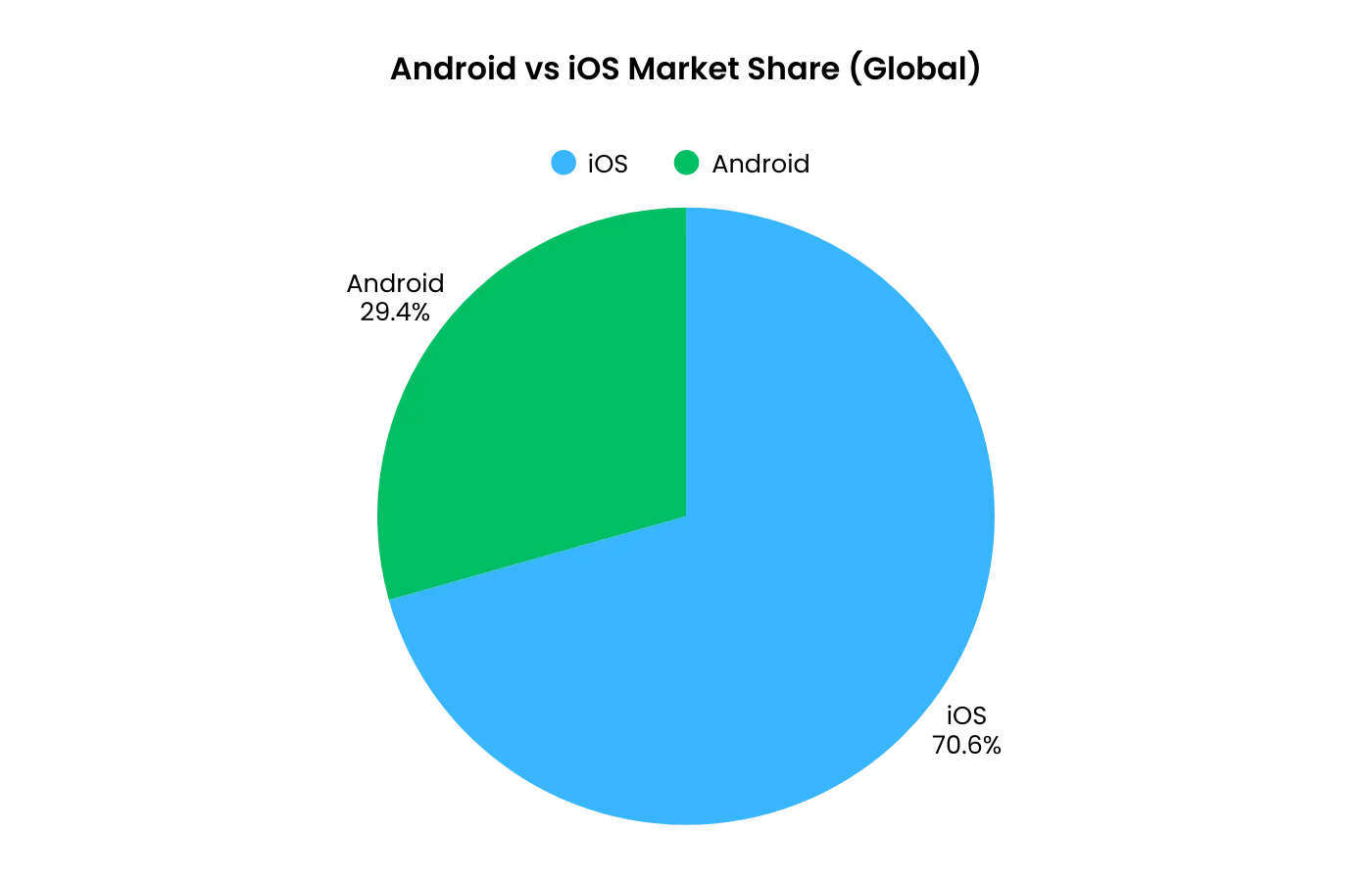
  • How Leading Retail and Ecommerce Brands Are Using AI in 2026 (Real Insights)

    How Leading Retail and Ecommerce Brands Are Using AI in 2026 (Real Insights)

    In January, I attended the New York Fashion Ecommerce Summit, where I had the honor of moderating the “Fashion Forward Technologies” panel.

    The discussion brought together leaders from major retail brands to explore how AI, AR, and other emerging technologies are reshaping the fashion landscape.

    The amazing group of panelists included:

    • Maddie Katz, Director of Ecommerce at Retrofête
    • Marie Prune de Batz, Performance Marketing & Merchandising Director at Adore Me
    • Sabrina Wong, Head of UX at Tapestry
    • Mike Coble, IT Director Digital and CRM Technologies at Eileen Fisher
    • Jeff Mergy, VP of Growth, Partnership and Strategy at Bold Metrics

    (and then there’s me – Nihal Mandanna C.P., Head of Growth at Vendrux).

    Here are the top insights I took away from the panel, and the first-hand experience shared by these ecommerce leaders.

    How are brands integrating AI into their existing workflows?

    I kicked off our panel discussion with what’s probably on everyone’s mind right now – AI and how brands are actually using it in their operations. I was particularly curious about how they’re introducing it both internally and in customer-facing roles.

    Sabrina from Tapestry shared a fascinating example of how they’re approaching AI implementation. Rather than going all-in on cutting-edge tech, they’re focusing on using AI as an assistive technology, particularly for their store associates.

    “We are training our LLM with customer data, and we were inspired to create our own AI app for store associates.”

    What made this really interesting was the practical example she shared from this past holiday season. 

    “When we’re testing our AI app at the store, one customer came in and told our store associate that the music in the store didn’t feel that festive. So the store associate used our AI app to message it and then with AI, we were able to immediately change the music in the store to customize the experience.”

    But it goes beyond just in-store ambiance. Sabrina explained how they’re using this technology to make data-driven decisions in their international markets: 

    “Japan is going through high tourism at the moment, and we’ve been able to track tourist customer profiles – what they like, what they don’t like, shopping behavior – and immediately change the assortment strategy on the floor.”

    Mike from Eileen Fisher offered a different perspective on AI implementation, noting how it’s often happening in ways that might not be immediately obvious.

    “If you ask many of the business people that work there, they’ll say, you know, where does AI fit in the company and many of them will say, well, I’m not exactly sure. But we have a lot of AI initiatives going on that might be a little bit below the radar.”

    He shared a concrete example of their partnership with Veesual:

    “We take our Tech Packs and we give them the tech pack information and what they are able to do is to show what a garment would look like on various models. So when you go to the PDPs and you sort of click around, you can get an idea of what a garment would look like on your body type.”

    What struck me most from this part of our discussion was how these brands are finding practical, focused ways to implement AI – whether it’s improving store operations, enhancing the customer experience, or solving specific business challenges.

    It’s less about the AI itself and more about how it can support and enhance existing business operations.

    How do brands build personalized shopping experiences with AI?

    I was curious which way the panelists would go on this topic, since AI has the potential to create hyper-personalized shopping experiences, or miss the human element that’s so crucial for engaging customers.

    Marie from Adore Me shared honest insights about the challenges, particularly in terms of building personalization at scale:

    “Everyone talks about having a website created at customer level. The difficulty isn’t knowing what customers want – we’re data driven. It’s implementing it in the tools and having enough tech resources.”

    She outlined specific challenges:

    • Losing merchandising visibility
    • Difficulty tracking and fixing issues
    • Complications with automated product feeds
    • Challenge of replicating problems when they occur
    • Integration difficulties with platforms like Google Retail API

    “Today, our merchandising is made automatically but with supervision from merchandisers that know the products perfectly. Tomorrow, if it’s 100% data driven by AI, we won’t have any control, and if there’s an issue, we won’t know.”

    But, from another perspective, AI and AR could have a positive impact when it comes to reducing returns.

    It’s estimated that returns cost brands $550 billion annually – largely because 70% of online shoppers struggle to find clothes that fit, and many new customers, unsure of what their ideal size is, tend to buy 2-3 sizes at once and return those that don’t fit.

    Several panelists shared how they’re using technology to cut down on returns and, more importantly, make customers feel more confident about picking the right fit from the website.

    For Adore Me, with 67 sizes, it’s been crucial for first-time buyers, as Marie explained to us:

    “The most challenging part with intimate shopping online is often fit. If you’re not sure about your size or have no idea how a garment will look on your body, it’s hard to shop intimates online.”

    This is a problem that Bold Metrics are trying to tackle. They’re helping brands move past traditional size metrics which, as Jeff put it, are often ignored:

    “Only half a percent of shoppers click size charts, and they’re not going to measure themselves.”

    Bold Metrics are using AI to calculate measurements from simple questions, then maps to brand-specific sizing. They helped Retrofête implement special AI-assisted sizing on their site, which not only recommends the ideal size for customers, but also gives unique, personal insights into how different sizes will fit, as Maddie told the panel:

    “This gives customers the ability to enter certain dimensions of their body. Then we can say ‘this size will fit perfectly’ or ‘if you size up, it may be loose here and tight there.’”

    How important is the human element in the age of AI?

    It’s always been important for brands to cultivate personal connections with their customers, so I was interested to see what the panelists thought of this, and what they were doing in terms of human interactions to build loyalty.

    All members of the panel, while excited about the possibilities of AI and data-driven technology, were simultaneously increasing the human touch, particularly for their top customer segments.

    (this was one of our top predictions for ecommerce in 2025 – that brands will need to prioritize human experiences alongside AI)

    Eileen Fisher hosts exclusive WebEx sessions where they will have a talk and show for their top 100-200 customers, discussing new products and sustainability practices. They’re also curating social influencers as brand ambassadors with dedicated website spaces.

    Maddie said that Retrofête found success with in-house VIP stylists.

    “Whether it’s an in-store shopping appointment or via texting, [stylists] can access customer data across any channel. Once customers build a relationship with the stylist, they keep coming back for any event.”

    While Sabrina explained how Tapestry’s Coach brand combines tech and tradition:

    “We have a robust loyalty profile called Coach Insider with exclusive bags and promotions. Through Coach Insider data, we discovered Gen Z customers really liked bag charms, so we started pushing more targeted promotions.”

    These insights reinforce that AI is simply a tool for ecommerce brands, and goes best if it’s hand-in-hand with a human touch.

    Your customers are still real people, and loyalty is a human characteristic.

    Brands should find ways to use AI to elevate their retention marketing strategy, without replacing the parts of your strategy that appeal to human emotions and desires.

    Alongside the insights and automation provided by AI, leaning into retention-focused channels like email, mobile apps and push notifications will help you build a brand that customers love, while using tech to streamline more of your backend operations.

    How do brands balance AI with their unique brand identity?

    We finished up the panel by inviting questions from the audience.

    One attendee raised a question that I found very interesting: How do brands balance personalization with their design aesthetic, especially when certain products are designed to fit a specific way?

    Mike from Eileen Fisher offered a few ideas, and believes that AI is not going to take over the A to Z of the entire process just yet.

    “Think of AI like hiring an intern. You never have them churn out the final product. You say this person’s going to help me get stuff done quicker.” 

    He suggested using AI to generate initial options – like 50 different outfit combinations from existing products – but having merchandisers make final decisions.

    Sabrina added her insight and reinforced this perspective:

    “AI is assistive technology meant to help you with your work but never replace your creativity. It always has to amplify human creativity and human connection.”

    What does the future hold for AI and ecommerce?

    We’re all interested in what’s next, especially with a phenomenon as fresh and fast-moving as AI.

    So, of course, I had to put this question to the panel and ask for their predictions on what we’re going to see from the future in terms of AI in ecommerce.

    Really loved these takeaways from each panelist: 

    Major shifts in the online shopping experience

    Marie wondered if technology will bring more disruptions to the traditional online shopping experience, and perhaps change the way we look at ecommerce websites:

    “Ecommerce websites haven’t really been disrupted since creation. Virtual try-on is the first real disruption because you lose the notion of category pages. You just see products on models and swap around. I’m sure within weeks we’ll see more disruption of this traditional funnel.”

    The rise of AR/VR experiences

    Sabrina is excited about the potential for AR to bring the fashion show experience straight to the consumer:

    “Imagine watching a runway in your living room with AR glasses. You don’t have to go to an exclusive runway show anymore, you can just put on your AR glasses and watch it.”

    AI becoming more embedded in the customer journey

    Maddie is optimistic about the future role of AI in improving the customer experience especially as it gets more refined over time: 

    “It’s hard to know for sure, but I believe AI-powered tools will have a major role to play in improving the overall customer experience and reducing operational challenges.”

    Forecasting and predicting logistical issues will become easier

    Mike is hopeful that AI will become a “crystal ball” of sorts, helping brands improve their forecasting and reduce the impact of unforeseen logistical issues: 

    “I imagine we’ll end up in a situation where AI is a “crystal ball” that anyone on the team can go to for a temperature check on any upcoming issues we might face as a business.”

    Personalized, on-demand custom clothing

    Jeff predicted that brands will be able to use customer data to take personalization to a whole new level – not just personalized marketing, but personalizing the products themselves.

    “In five years, brands will use shopper body data to design products. It’s not going to be ‘I have to decide between a medium and large and make a sacrifice.’ Some players will move to mass-producing custom clothing.”

    Key takeaways on AI for retail and ecommerce

    There were so many incredible insights shared from these industry leaders, and I’m already looking forward to the next one.

    I’m incredibly grateful to the Retail Summits team for the opportunity to be a part of it, and to the panelists themselves for sharing their time and insights.

    If I had to boil down the panel into five bite-sized takeaways regarding AI for ecommerce, here’s what I’d say:

    1. Focus on specific problems: returns, sizing, customer service
    2. Keep humans supervising AI decisions
    3. Build tech incrementally – don’t try to personalize everything at once
    4. Remember top customers still need human connection
    5. Consider implementation costs and resources before chasing full personalization

    As Sabrina emphasized, AI is there to help you, not replace you. It’s a tool, not something that’s going to run your business by itself.AI can provide a whole lot of value, and all ecommerce brands, big or small, should be exploring ways to use AI to improve their business and workflows.

    However, as we’ve seen from the insights of these industry leaders, it’s about using AI as a means to an end.

    And that end is, ultimately, to provide a better customer experience for the humans that are buying your products.

    Looking for more high-level insights from the ecommerce & retail world?

    Check out The Retention Edge, our podcast and newsletter where ecom and retail leaders share their hot takes on the future of CX and retention.