Category: Blog

  • How to Send Push Notifications for Your Salesforce Commerce Cloud Store: Complete Guide for 2026

    How to Send Push Notifications for Your Salesforce Commerce Cloud Store: Complete Guide for 2026

    For Salesforce Commerce Cloud (SFCC) merchants, growth depends on repeat purchases and loyal customers. 

    While email and SMS still play their part, in a mobile-first world, push notifications have become the fastest, most direct way to keep customers engaged and buying.

    The problem? Browser-based web push is limited; especially on mobile, where most ecommerce traffic lives. The real power of push comes from native mobile apps, where opt-in rates and engagement are significantly higher.

    In this guide, we’ll explain why native push notifications outperform web push, and show you the easiest way to unlock them, by turning your SFCC store into fully functional iOS and Android apps using Vendrux

    You’ll get push ready to go (including abandoned cart and marketing campaigns), without rebuilding your site or managing a separate tech stack.

    Quick Answer: To send push notifications from your SFCC store, the best option is to convert your existing website into a native mobile app with Vendrux. This gives you true native push notifications, through built-in OneSignal and Klaviyo integrations. Your storefront stays exactly as it is – no redevelopment required – and you can be live, sending automated and broadcast push campaigns, in just a few weeks.

    What Are Push Notifications and Why Do They Matter?

    Push notifications are short, clickable messages that pop up directly on a user’s device. This could be on their phone lock screen or desktop browser. 

    For ecommerce brands, they’re one of the most powerful tools you can have. They’re a direct line to your customers, letting you reach them instantly with timely and relevant updates.

    Unlike email, which requires customers to check their inbox, push notifications are immediate – perfect for capturing attention in the moment. And they’re cheaper to send than SMS, more flexible, and less friction.

    Why Push Matters for Ecommerce

    • Instant engagement: A sale, back-in-stock alert, or new collection can be in front of your customer in seconds.
    • Higher visibility: Push notifications show up on lock screens, even when the user isn’t browsing.
    • Higher retention: They drive users back to your store more often, increasing order frequency and lifetime value.
    • Personalized messaging: With integrations like Klaviyo, you can segment and personalize your notifications for higher conversion rates.

    In short, push notifications are one of the most efficient, low-friction ways to increase customer retention and revenue, especially when combined with the power of native mobile apps.

    Web Push Notifications vs Native Mobile Push Notifications

    When we talk about push notifications for Salesforce Commerce Cloud stores, we could be referring to one of two types: web push or native mobile push.

    Both let you send messages to customers, but their performance and capabilities differ significantly.

    Web Push Notifications

    Web push notifications are delivered through web browsers. They require the user to opt-in to allow notifications, and show up in the corner of the browser (on desktop), or the notification tray (on mobile).
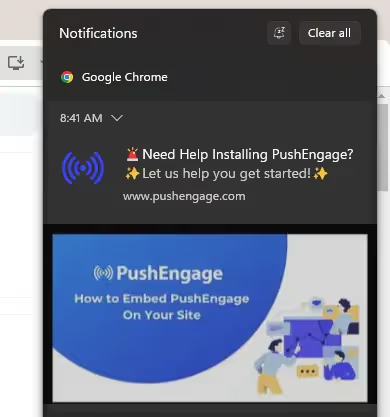
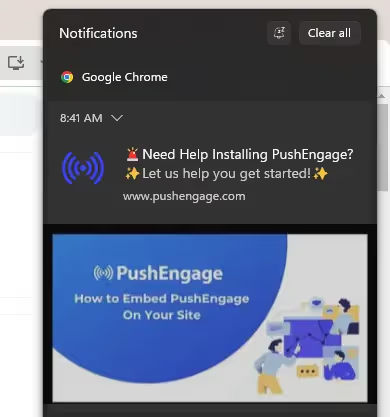
    Example of a web push notification sent through the Chrome desktop browser

    Pros:

    • Quick to implement (can be added directly to your website).
    • Can work on both desktop and mobile browsers.
    • No mobile app development required.

    Cons:

    • Limited mobile reach: Many users disable browser notifications, and iOS Safari has only recently started supporting web push (with extra steps).
    • No offline capability: Notifications only appear when the browser is running.
    • Basic customization: Design and interaction options are limited.
    • Lower engagement: Click-through rates often range from just 2-5% (on top of low opt-in rates).

    Native Mobile Push Notifications

    Native push notifications are delivered through an installed mobile app, directly integrated with iOS and Android operating systems.

    They’re much more effective than web push. And most of the time you see someone talking about the benefits of push notifications, they’ll be referring to native mobile push.
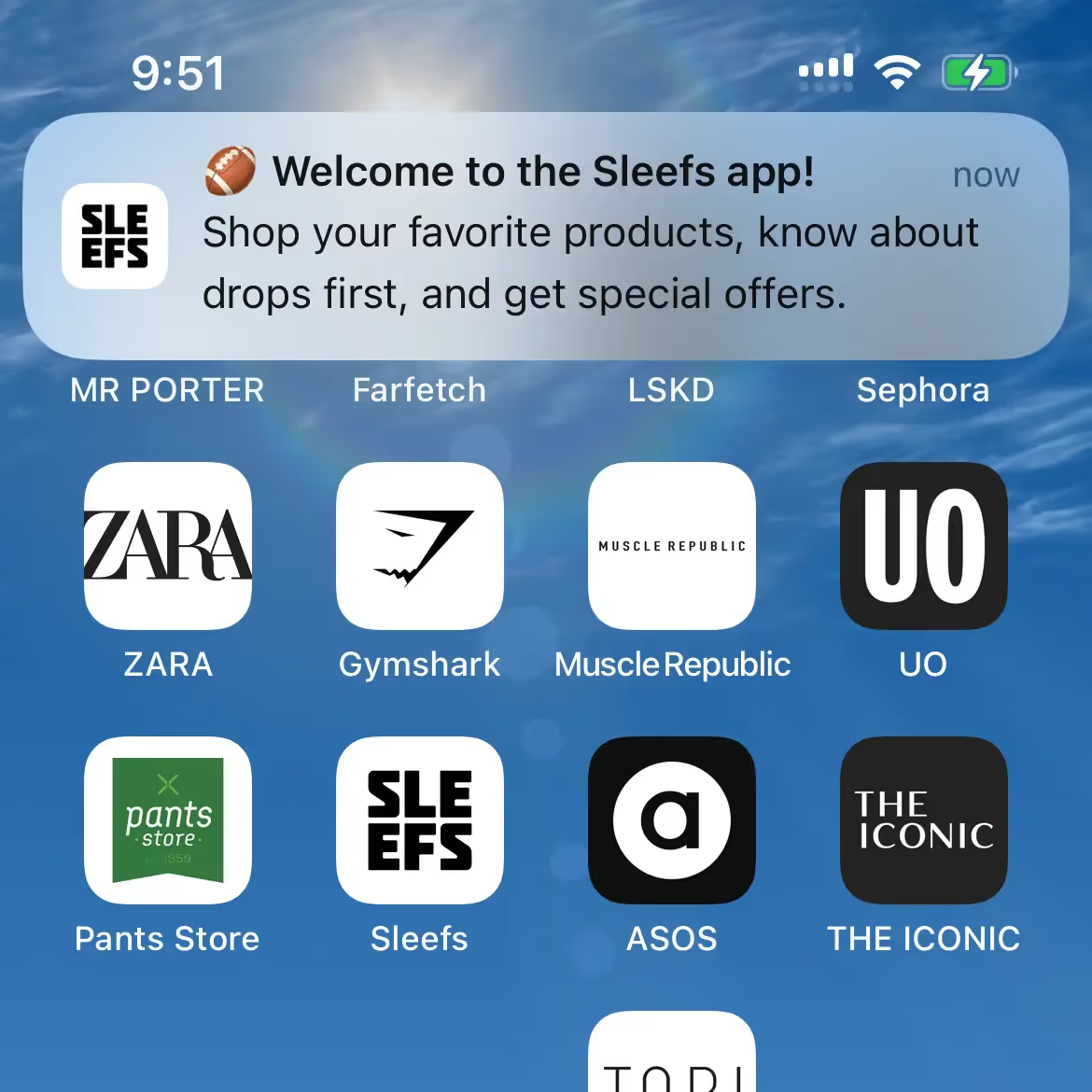
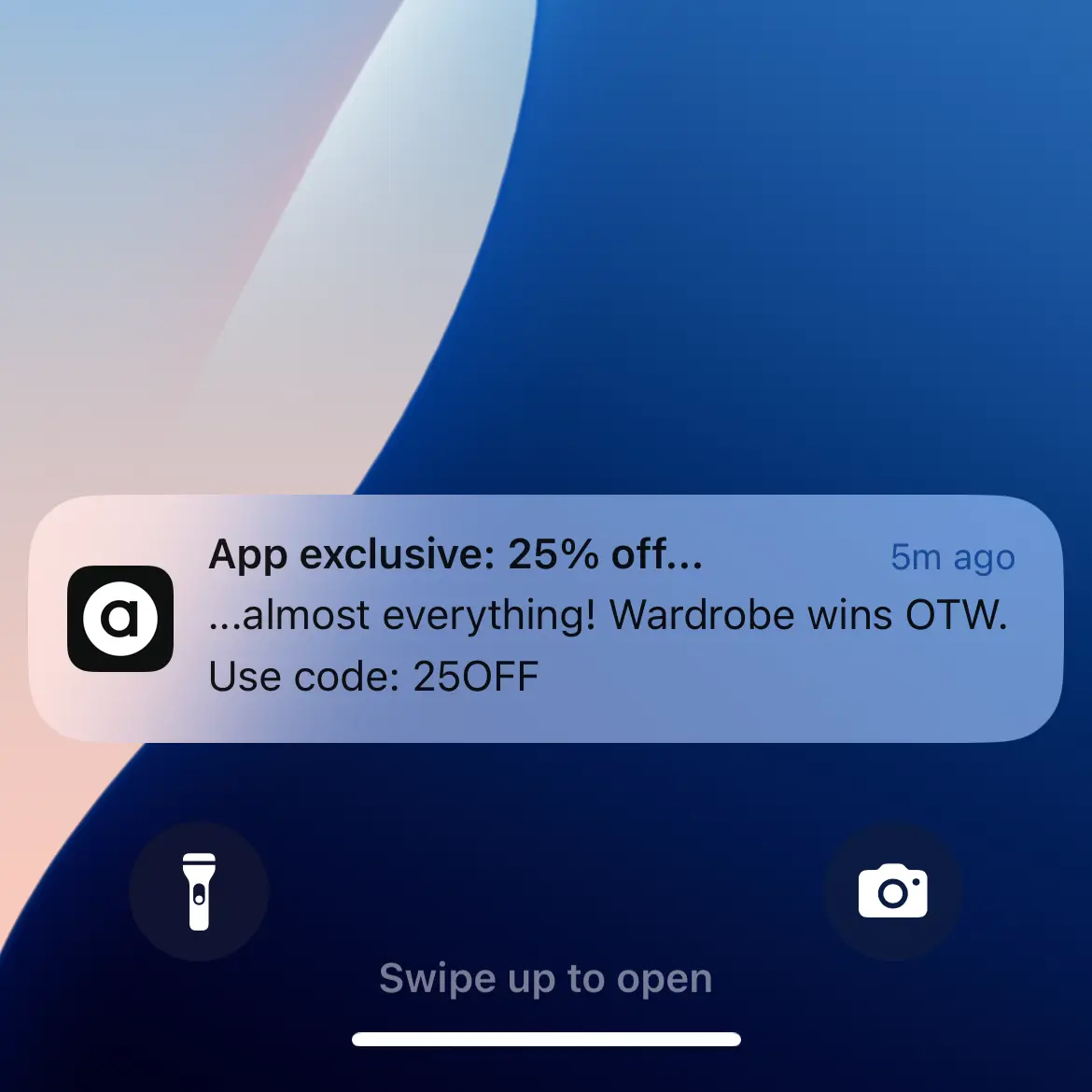
    Native push notificaitons appear directly on the user’s device – even if the app is not open

    Pros:

    • Higher engagement rates: Click-through rates of 10–25% are common.
    • Always on: Notifications appear even if the app isn’t open.
    • Rich media support: Include images, video, and interactive buttons.
    • Deep personalization: Integrate with customer data for highly targeted campaigns.
    • Full OS support: Built-in compatibility with iOS and Android for optimal reliability.

    Cons:

    • Requires a mobile app.
    • Slightly more setup effort upfront.

    Takeaway: Web push can be a quick win but is inherently limited on mobile – the platform where most ecommerce traffic lives. Native mobile push unlocks higher engagement, richer messaging, and more powerful automation.

    How Vendrux Enables Native Mobile Push From Your Salesforce Commerce Cloud Store

    The most effective way to access native mobile push notifications is by launching your own iOS and Android apps. 

    Traditionally, this meant hiring developers, building custom apps from scratch, and managing a separate mobile codebase – a time-consuming and expensive process.

    Vendrux solves this by turning your existing Salesforce Commerce Cloud site into fully functional, high-performance native apps.

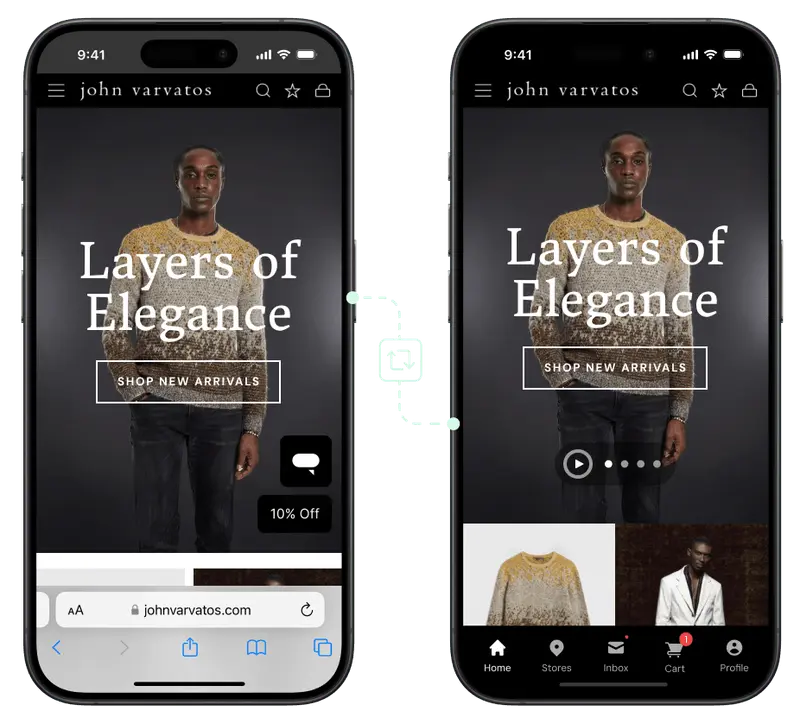
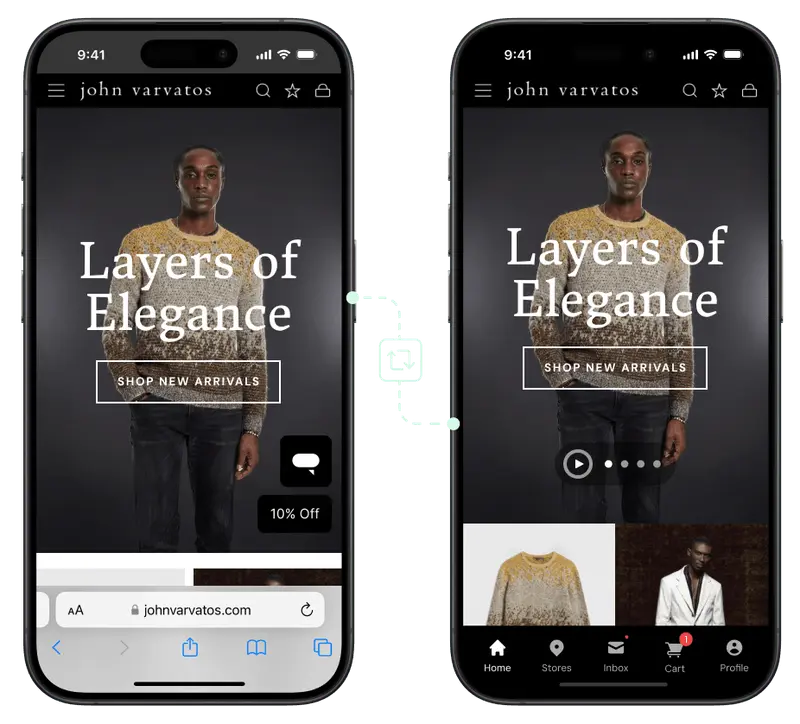
    Vendrux has helped over 2,000 brands launch their own apps, with over 200 reviews on major sites like G2 and Capterra (averaging 4.8/5). We support a number of major global brands, including SFCC brands Jack & Jones, Vero Moda and John Varvatos.

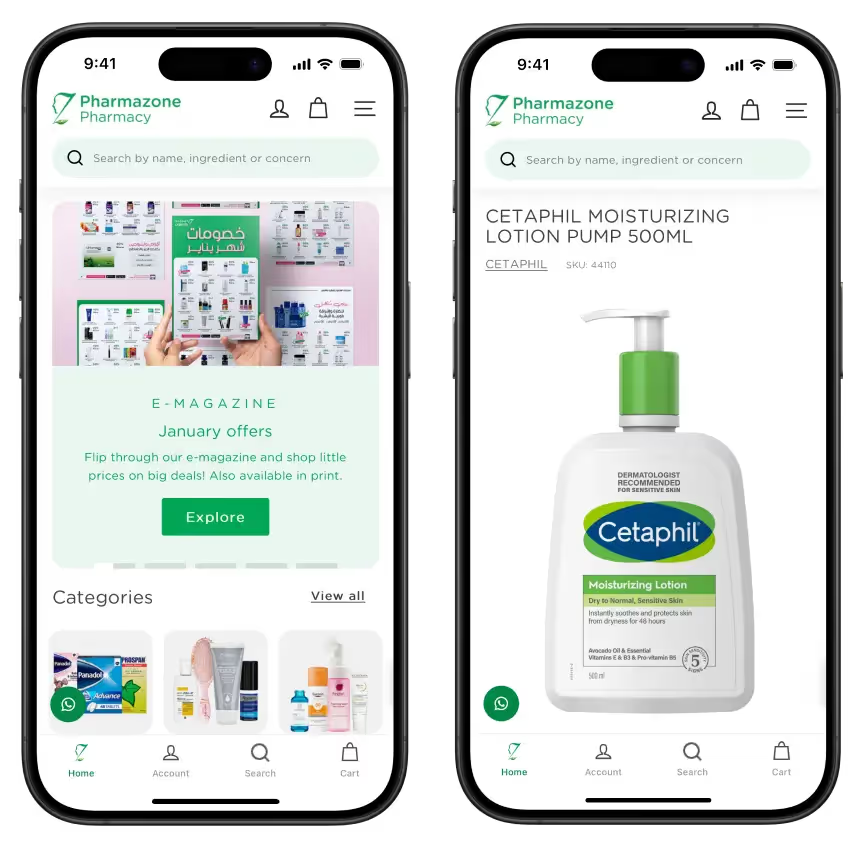
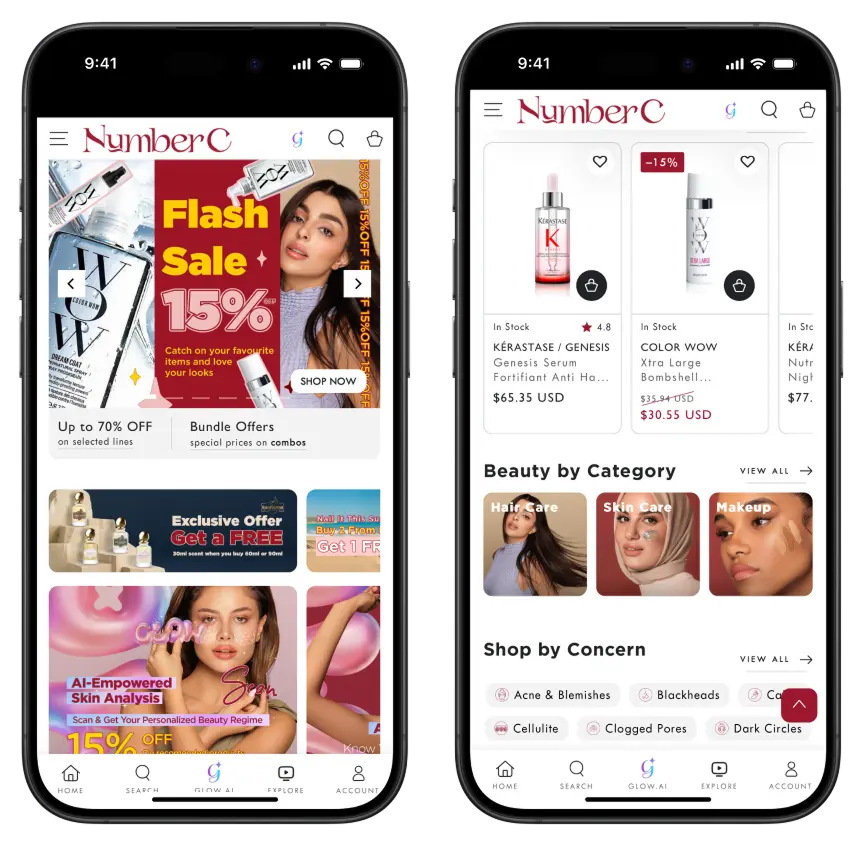
    Just a few examples of ecommerce apps built with Vendrux

    With Vendrux, your apps maintain full feature parity with your website, with zero rebuilding required.

    Your current checkout, integrations, and storefront design carry over seamlessly, while native app features like push notifications are layered on top.

    Why Vendrux is the Best Way to Send SFCC Push Notifications

    There are many push notification services available, which are relatively easy to implement on your site and enable web push.

    But you need more than this. You need native push notifications, from an app. And Vendrux is the best way to unlock this.

    • True native push, no rebuild: Your apps are powered by your existing SFCC site, giving you all the functionality you already have plus native push out of the box.
    • Plug-and-play integrations: Built-in support for OneSignal and Klaviyo lets you send automated campaigns (e.g., abandoned cart, welcome series) and personalized broadcasts to any segment.
    • Single source of truth: No headaches trying to maintain consistency. You manage one store, and both web and app stay in sync automatically.
    • Fast, low-risk deployment: Launch in weeks, not months, without adding engineering overhead or delaying other roadmap priorities.
    • Strategic push support: We help you set up essential flows like abandoned cart, win-back, and post-purchase campaigns, and even offer a Done-For-You push service if you want us to run it for you.

    How It Works (Step-by-Step)

    With Vendrux, you can launch your own Salesforce Commerce Cloud-powered mobile app in under a month.

    In doing so, you’ll unlock the benefits of push notifications – which, for many stores, is reason in itself to build a mobile app.

    Here’s how it works.

    1. Discovery & Planning: You share your SFCC setup (SFRA, SiteGenesis, or headless – it doesn’t matter). We make sure it’s a good fit for a mobile app, and confirm any other special requirements you have from the app (multi-region support, unique app features, etc)
    2. App Build: We wrap your live website into native iOS and Android apps, maintaining 100% of your storefront features.
    3. Push Integration: OneSignal and/or Klaviyo are connected for automated and broadcast push. Native abandoned cart notifications are configured.
    4. Testing & Approval: We QA the apps on real devices, and handle App Store & Google Play submissions for you.
    5. Launch & Optimize: Go live and start sending push notifications, with the option for ongoing push campaign management from our team.

    Ready to see what your site can look like as an app? Get a free preview of your app now.

    Blueprint: High-Impact Push Campaigns for SFCC Stores

    Once your Salesforce Commerce Cloud store has push notifications enabled through your mobile app, the next step is to make sure you’re using them effectively.

    Here’s a proven blueprint to get the most value out of push from day one.

    Core Automations (Set It and Forget It)

    These flows run in the background and drive continuous revenue with minimal effort:

    • Welcome flow: Greet new app users with a warm brand introduction and a special first-purchase offer.
    • Abandoned cart reminders: Automatically nudge customers who leave items behind. These can recover 10-20% of lost carts. Some Vendrux users generate six figures per month through abandoned cart notifications alone.
    • Browse abandonment: Follow up with shoppers who viewed products but didn’t add to cart.
    • Post-purchase sequences: Thank customers for their order, cross-sell related products, and prompt reviews.
    • Win-back campaigns: Target lapsed customers with a time-sensitive offer to re-engage them.
    • Replenishment reminders: Perfect for repeatable products (e.g., beauty, supplements, consumables).

    Event & Broadcast Campaigns

    Use push for one-off campaigns and announcements that create urgency and excitement:

    • New product drops: Announce new arrivals or limited editions.
    • Seasonal promotions: BFCM, holiday sales, and special events.
    • Back-in-stock alerts: Notify customers instantly when high-demand products return.
    • Price-drop alerts: Convert fence-sitters when items go on sale.

    Segmentation & Personalization

    With Vendrux’s integrations (OneSignal & Klaviyo), you can:

    • Target VIPs with exclusive early access.
    • Personalize by purchase history (e.g., category interests, high-AOV segments).
    • Run geo-targeted campaigns for location-specific promos.
    • Schedule by time zone to optimize send times globally.

    Creative Best Practices

    • Keep it short: Aim for ~40–60 characters for the main message.
    • Use rich media: Add images or emojis to stand out.
    • Link deep: Push directly to product pages, collections, or the cart.
    • Create urgency: Limited-time offers and stock notifications work best.

    Cadence & Guardrails

    • Respect opt-in preferences with frequency caps.
    • Avoid sending at late-night or early-morning hours.
    • Monitor engagement metrics (click-through, conversion) and adjust strategy accordingly.

    Want to dive deeper? Check out our complete guide to Push Notifications for Ecommerce.

    Frequently Asked Questions

    Does Vendrux work with all SFCC architectures (SFRA, SiteGenesis, headless)?

    Yes. Vendrux works with SFRA, SiteGenesis, and even headless implementations of Salesforce Commerce Cloud. Because it wraps your live site into native apps, it doesn’t matter how your frontend is built, you retain your full existing experience.

    How does push notifications handle SFCC multi-site and multiple locales?

    If you use Salesforce Commerce Cloud’s multi-site or multi-locale features, your app can support them seamlessly. Each locale or storefront can be reflected in the app, and push campaigns can be targeted by region, language, or customer segment.

    Can I keep using Klaviyo or Salesforce Marketing Cloud for messaging?

    Absolutely. With Vendrux, you can continue using Klaviyo for email, SMS, and segmentation while adding native push to your marketing mix. You can also use Salesforce Marketing Cloud for other channels while handling app push through OneSignal (or Klaviyo’s push functionality if you prefer a single provider).

    Does the checkout process change inside the app?

    No. Your existing SFCC checkout flow stays the same. It’s the same code and logic running inside the app as on your website. This means all your payment integrations, discount logic, and tax settings carry over automatically.

    How long does it take to launch?

    On average, you can launch fully functional iOS and Android apps, complete with native push, in just 4-6 weeks. That includes setup, testing, and app store approvals.

    What kind of engagement can I expect from native push?

    Most ecommerce brands see 10-25% click-through rates on native push notifications, far higher than web push (2-5%) or email (1-3%). You’ll also see higher opt-in rates, since customers who install your app are more likely to allow push.

    Will adding an app affect my site performance or SEO?

    No. Your website continues to run exactly as it does today. Vendrux wraps it inside an app but doesn’t alter the core site or affect SEO.

    Who handles updates and maintenance?

    Vendrux manages app updates and keeps everything in sync with your site. If you make changes to your website, they’re reflected in the app automatically. No extra work for your team.

    Do you offer ongoing support for push campaigns?

    Yes. In addition to initial setup of essential push flows like abandoned cart and win-back, we offer an optional Done-For-You monthly push service, where our team manages your campaigns and ensures you’re getting the most from push notifications.

    Getting Started: Next Steps

    Adding native push notifications to your Salesforce Commerce Cloud store doesn’t need to be complex or time-consuming. 

    With Vendrux, you can have fully functional iOS and Android apps, complete with push notifications, abandoned cart reminders, and personalized campaigns, live in just a few weeks.

    Ready to unlock the full power of native push?

    Book a quick consultation with our team, and we’ll walk you through how to turn your SFCC site into a high-performing mobile app and start sending impactful push notifications in as little as 30 days.

  • How to Choose the Most Cost-Effective Mobile App Development Approach

    Building a mobile app used to mean:

    • Hire developers
    • Spend six figures on your project
    • Wait about a year just to see if it actually works

    As you can imagine, that priced a lot of businesses out.

    Today, there are multiple paths to a mobile app – from no-code builders you can set up yourself, to agencies that build custom solutions, to services that convert your existing website into an app.

    And the bottom line is, it’s a lot more cost-effective to develop a mobile app than it was 10 years ago.

    But “cost-effective” doesn’t just mean “cheapest upfront.” The real question is: what will this cost you over time, including maintenance, updates, and the hours your team spends managing it?

    This guide breaks down the three main approaches to mobile app development, with honest analysis of when each makes sense (and when it doesn’t).

    The Three Approaches to Mobile App Development

    Before diving into specifics, here’s the birds-eye view:

    Approach Upfront Cost Monthly Cost Your Time Best For
    DIY App Builders $50–1,000 $50–1,000/mo High (ongoing) Simple apps, tight budgets, technical teams
    Custom/Agency Development $50K–300K+ $1K–10K/mo Medium Unique functionality, complex requirements
    Website-to-App Conversion $500–2K $500–2K/mo Low Web apps, ecommerce, content sites

    Each approach has trade-offs. The right choice depends on what you’re building, what you already have, and how much time you can invest.

    Why “Cost-Effective” is Not Just About Sticker Price

    If you’re looking for cost-effectiveness, it’s easy to look at app development options and focus on one number: the upfront cost. 

    But that’s only part of the picture. A truly cost-effective approach considers all the resources you’ll invest to build, maintain, and grow your app. And the revenue you might lose if you choose a cheap but limiting solution.

    Here are four cost drivers to keep in mind:

    • Setup cost: The price you pay to get your app built and published. This can range from a one-time setup fee to a large custom development bill.
    • Ongoing cost: Apps aren’t one-and-done. They need updates, bug fixes, and platform maintenance to keep them running smoothly as iOS and Android evolve.
    • Labor cost: Even no-code tools take time (your time or your team’s). An app you can “build for $49” could cost you hundreds more in time investment.
    • Opportunity cost: The revenue you miss out on when an app can’t scale, deliver the right user experience, or offer growth-driving features like push notifications.

    When you view app development through this lens, the “cheapest” option often turns out to be the most expensive in the long run. 

    A slightly higher monthly fee, or a done-for-you service, can save you dozens of hours and unlock significantly more revenue potential.

    Key term: Total Cost of Ownership (TCO). This is the core of what makes something cost-effective. It includes not just the upfront cost of a tool or service, but also the operating costs, cost of maintenance & support, indirect costs (like training, downtime, lost productivity, or integration overhead) and much more. It gives the full picture of what it costs for your business to have an app.

    Approach 1: DIY App Builders

    DIY app builders are platforms that let you build a mobile app yourself, either from scratch or by connecting to your existing website.

    These include Shopify app builders (Tapcart, Vajro, Plobal), no-code platforms (FlutterFlow, Adalo, Glide), web-to-app converters (AppMySite, Median)

    The Appeal

    DIY builders have low upfront costs. Many start under $100/month, and some have free tiers. For someone with a simple use case and time to invest, this can work.

    The Shopify ecosystem has several options specifically for ecommerce stores. You connect your store, customize the design, and publish to the app stores. Setup can take a few hours to a few days.

    No-code platforms like FlutterFlow and Adalo let you build more custom apps without writing code. These are more flexible but require more time to learn and build.

    The Reality

    DIY builders save money upfront but cost time ongoing. Here’s what the pricing doesn’t tell you:

    You’re responsible for everything:

    • App store submissions and compliance
    • Handling rejections and resubmissions
    • iOS and Android updates that break things
    • Bug fixes and troubleshooting
    • Design changes and feature additions

    The hidden time cost: A “simple” app store submission can take hours if you hit issues. Apple’s review process is notoriously unpredictable; rejections happen, and resolving them requires understanding App Store guidelines.

    When iOS or Android releases a major update, your app may need changes. DIY builders handle some of this, but not all. You’ll spend time testing, reporting issues, and waiting for fixes.

    Limitations compound: Most DIY builders work from templates. That’s fine until you need something the template doesn’t support. At that point, you’re either stuck, paying for custom development anyway, or switching platforms entirely.

    When DIY Makes Sense

    • You have a technical team member who can own the app
    • Your requirements are simple and unlikely to change
    • You’re testing whether an app makes sense before investing more
    • Budget is the primary constraint and time is available

    When DIY Doesn’t Make Sense

    • You don’t have someone to manage ongoing maintenance
    • You need the app to “just work” without regular attention
    • Your website or store is complex (custom checkout, integrations, etc.)
    • App quality and performance are important to your brand

    Real Cost Example

    A Shopify store using a mid-tier app builder ($499/mo):

    Cost Type Year 1 Year 2 Year 3
    Platform fee ($499/mo) $5,988 $5,988 $5,988
    Setup time (20 hrs @ $50/hr) $1,000
    Ongoing management (5 hrs/mo @ $50/hr) $3,000 $3,000 $3,000
    Troubleshooting issues (estimate) $500 $500 $500
    Total $10,488 $9,488 $9,488

    The platform cost is ~$6K/year. The real cost (including your team’s time) is closer to $9.5-10.5K/year.

    That’s not to mention the potential opportunity cost, and the indirect cost of splitting your team’s time on a new project.

    Approach 2: Custom Development (Agency or In-House)

    The traditional approach means building a mobile app from scratch with developers, either through an agency or an internal team.

    This used to mean native iOS/Android development only. Today, there are more cost-effective options, like cross-platform frameworks (React Native, Flutter) or hybrid development (Ionic, Capacitor).

    These, however, are still rather costly. And while you might think you can pay once, get an app, and save by not having to pay a SaaS subscription fee, the reality works out a little differently.

    The Appeal

    Custom development gives you complete control. You can build exactly what you want, with no template limitations.

    For apps with unique functionality; think Uber, Airbnb, or a custom internal tool; this is often the only option.

    React Native and Flutter have made cross-platform development more efficient. Instead of building two separate apps, you build one codebase that runs on both iOS and Android. This reduces (but doesn’t eliminate) the cost and complexity.

    The Reality

    Custom development is expensive. Not just upfront, but forever.

    Upfront costs: A basic custom app from an agency typically starts around $50,000. A more complex app with backend development, integrations, and custom features can run $150,000-$300,000 or more.

    That’s not an exaggeration. Quality development is expensive, and cutting corners leads to technical debt you’ll pay for later.

    Ongoing costs: The app doesn’t maintain itself. You’ll need:

    • Bug fixes and updates (ongoing)
    • iOS and Android compatibility updates (annual, at minimum)
    • App store compliance changes (Apple and Google change requirements regularly)
    • Security patches
    • Feature additions

    Many brands budget $20,000-$50,000/year for maintenance on a custom app. Some spend more.

    When Custom Development Makes Sense

    • You’re building something that doesn’t exist as a template
    • You have unique functionality that requires custom code
    • You have budget for both initial development AND ongoing maintenance
    • You have technical leadership to manage the project and vendor relationships

    When Custom Development Doesn’t Make Sense

    • You already have a website that does what you need
    • You’re primarily trying to improve mobile engagement, not build new features
    • You don’t have budget for ongoing maintenance (which you will need)
    • You’re an ecommerce brand with a standard Shopify/WooCommerce/Magento store

    Real Cost Example

    An ecommerce brand building a custom React Native app:

    Cost Type Year 1 Year 2 Year 3
    Initial development $120,000
    Maintenance & updates $15,000 $25,000 $25,000
    Project management (internal) $10,000 $5,000 $5,000
    Feature additions $30,000 $20,000
    Total $145,000 $60,000 $50,000

    Three-year total: $255,000. And that assumes no major rebuilds or pivots.

    Approach 3: Website-to-App Conversion

    This approach is to take your existing website and convert it into a native app, giving you a real iOS and Android app without rebuilding anything.

    It’s like the no-code option, except for a couple of key differences:

    • It’s a managed approach, requiring minimal time from you or your team
    • The app is powered by your website, and fully synced with your website. It’s not a separate platform that needs to be updated separately.

    Of course, it’s only a realistic option for businesses that already operate on the web, and want to extend that experience to a mobile app.

    Examples include ecommerce, web apps or digital publishers.

    If you’re starting a business with an app, and you don’t have a website, it doesn’t work.

    But for web-first businesses like ecommerce, this ends up being the most cost-effective approach.

    The Appeal

    If you already have a website that works well on mobile, why rebuild it as an app? Website-to-app conversion takes what you’ve already built and packages it as a native app.

    The result: a real app in the App Store and Google Play, with push notifications, native navigation, and the performance users expect, without the cost or timeline of custom development.

    For ecommerce brands, this is particularly compelling. Your website already has mobile-optimized product pages, collections, checkout, account management, and integrations. An app that mirrors this experience leverages all that existing work.

    The Reality

    Website-to-app conversion isn’t magic. The quality depends heavily on two things:

    1. Your website’s mobile experience: If your website is slow, clunky, or broken on mobile, your app will be too. Conversion works best when your mobile web experience is already solid.
    2. The service provider: Not all conversion services are equal. Some produce apps that feel like “websites in a wrapper”: slow, with web-like navigation and no native feel. Others produce apps that are indistinguishable from custom-built native apps.

    Vendrux is the gold standard for converting websites into apps. We’ve done it over 2,000 times, and know exactly what it takes to create a native experience, without any unnecessary work or expense.

    The difference comes down to implementation: native navigation, performance optimization, deep linking, push notification strategy, and ongoing maintenance.

    What to Look For

    When evaluating website-to-app conversion services:

    • Native feel: Does the app feel like a native app or a website? Test the navigation, transitions, and responsiveness. Good conversion produces apps that users can’t distinguish from custom builds.
    • Full functionality: Does everything from your website work in the app? Custom checkout flows, third-party integrations, logged-in experiences? Some converters break on complex sites.
    • Push notifications: This is often the main reason to have an app. Can you send targeted push notifications? Automated flows? How easy is setup?
    • Ongoing maintenance: Who handles iOS and Android updates? App store compliance? Bug fixes? If the answer is “you,” factor that time into your cost analysis.
    • Track record: How long has the service been operating? How many apps have they launched? What do reviews say about support and reliability?

    When Website-to-App Conversion Makes Sense

    • You have a website that works well on mobile
    • You want push notifications and App Store presence
    • You don’t need app-only features that don’t exist on your website
    • You want an app without the cost and timeline of custom development
    • You don’t have a team to manage ongoing app maintenance

    When It Doesn’t Make Sense

    • Your website’s mobile experience is poor
    • You need significant functionality that doesn’t exist on your website
    • You’re building something completely new (no existing website)

    Real Cost Example

    An ecommerce brand using a managed website-to-app service like Vendrux:

    Cost Type Year 1 Year 2 Year 3
    Setup fee $2,000
    Monthly service $8,148 $8,148 $8,148
    Your team’s time Minimal Minimal Minimal
    Maintenance & updates Included Included Included
    Total $10,148 $8,148 $8,148

    The three-year total is a fraction of what you’d pay for a custom app built from scratch. And you’re not managing anything – updates, app store compliance, and maintenance are handled for you.

    Learn more: Check out our pricing options to get an idea of how much it will cost to launch your brand’s app

    A Framework to Decide the Right Mobile App Development Approach

    The right approach could be different from one business to the next.

    Here’s a decision framework you can use to decide:

    Start with what you have

    Do you have an existing website?

    • Yes, and it works well on mobile → Website-to-app conversion is likely your best path
    • Yes, but mobile experience is poor → Fix the website first, then consider conversion
    • No → You’ll need to build something (DIY or custom)

    Consider your requirements

    Do you need app-exclusive features that don’t exist on your website?

    • Yes, significant new functionality → Custom development may be necessary
    • Yes, but minor additions → Many conversion services can add native features
    • No, the app should mirror the website → Conversion is ideal

    Your resources

    Do you have someone to manage ongoing maintenance?

    • Yes, technical team member available → DIY could work
    • No, or you’d rather not → Managed services (conversion or agency retainer) make sense

    What’s your budget?

    • Under $5K/year → DIY or basic conversion
    • $5-25K/year → Managed conversion service
    • $50K+ upfront, $20K+/year ongoing → Custom development is an option

    Factor in opportunity cost

    The cheapest option isn’t always the most cost-effective. If a DIY app takes 10 hours/month to manage, that’s time your team isn’t spending on growth, marketing, or product.

    A managed service that costs more but requires no ongoing attention may be cheaper in total cost of ownership, especially if your team’s time is valuable.

    The Case for Vendrux

    We’re obviously biased, but here’s why we built Vendrux the way we did:

    Most brands don’t need custom apps.

    They need their website (which already works), available as an app with push notifications and App Store presence.

    DIY sounds good until it isn’t. The first app store rejection, the first iOS update that breaks something, the first time a customer reports a bug; that’s when “self-service” becomes a liability.

    We handle everything:

    • App store submissions and compliance
    • iOS and Android updates
    • Bug fixes and performance optimization
    • Push notification setup and strategy
    • Ongoing maintenance and support

    Your team’s involvement is minimal. We send you the apps to review, you approve, we handle the rest.

    If you have an existing website – especially an ecommerce store on Shopify, WooCommerce, BigCommerce, or Magento – this is the most cost-effective path to a mobile app.

    We specialize in helping high-growth ecommerce brands launch mobile apps that grow their business; not adding another headache.

    A few examples of high-quality apps built with Vendrux

    Ready to see what’s possible? Get a free preview of your app now.

  • Does Shopify Offer an App For Your Store?

    Does Shopify Offer an App For Your Store?

    If you’re running a Shopify store, you’ve probably wondered: is there an app for my customers to download? 

    You’re thinking about how to give loyal shoppers easier access, faster checkout, and push notifications. Just like your customers are getting when they shop on major sites like Amazon.

    The answer is a bit more complicated than a simple yes or no. Shopify does offer mobile apps. But not the kind most merchants are really asking for.

    In this article, we’ll break down exactly what Shopify provides its merchants, what’s missing, and how you can get a fully branded mobile app for your store without rebuilding anything from scratch.

    What Shopify Already Gives You

    Shopify offers two official mobile apps, but they serve very different purposes. And neither is a branded shopping app for your store.

    1. Shopify Admin App

    This app is built for you and your team, not your customers. 

    It lets you manage your store’s backend from anywhere – view orders, track inventory, manage products, and respond to customer messages. 

    It’s a powerful tool for store operations (and for checking every five minutes how many sales you’ve made today). But it’s not a mobile app for your store, like you’re thinking of.

    2. Shop App

    Shopify also offers the Shop app, a consumer-facing mobile app where shoppers can browse and buy from thousands of Shopify-powered stores. 

    It’s essentially a marketplace, similar to Amazon or Etsy. It’s worthwhile being on the Shop App. However:

    • Your store appears alongside competitors
    • Your brand experience is diluted
    • You have limited control over design, merchandising, and customer engagement

    You want to provide your customers with an “Amazon-like” experience. But you want to be Amazon – not just another merchant among tens of thousands.

    How You Can Get a Branded, Store-Specific Shopify Mobile App

    What’s missing from Shopify’s ecosystem is simple: a mobile app that’s just for your store, with your branding, your product catalog, and your customer experience.

    Loyal customers expect a one-tap shortcut on their home screen, personalized push notifications, and a seamless checkout that feels like an extension of your site.

    You want to provide it them; not force them to buy from crowded marketplaces

    Shopify’s native apps do not provide this. But you can build it on your own. Around 4% of Shopify brands doing 7 figures or more have their own mobile app.

    Here are two ways to do it.

    1. Build a Custom App with Shopify’s Storefront API

    First: you can develop a custom mobile app from scratch and connect it to your Shopify store.

    Shopify has an official API (application programming interface – the way two platforms, like a website and mobile app, or a server and a website, communicate and share data between each other).

    It’s called the Storefront API, and it essentially lets you create a mobile app on top of your Shopify backend.

    This is great – but not as simple as I made it sound.

    Mobile app development is a lot of work. It’s expensive, time-consuming, and you probably don’t have the budget, expertise or time to build custom iOS & Android apps (you’re looking at a $100K+ cost, and that’s just for the initial version).

    For lean ecommerce teams, this level of complexity and cost isn’t practical.

    2. Use a Shopify Mobile App Builder

    Instead of starting from scratch, you can use a third-party tool to convert your existing store into a mobile app. 

    These tools connect to your Shopify backend and recreate key elements of your site in a native app environment. And they let you go live without coding, which is important (since most brands don’t moonlight as app development studios).

    It’s a more accessible route. But you’ve got to choose the right mobile app builder.

    Many are generic drag-and-drop tools. They’re built on top of the storefront API, with pre-built blocks and templates for the front-end of your app.

    They’re typically quite limiting, especially if your store has custom features or unique design elements you want to transfer over to your mobile app (these often don’t work with drag-and-drop app builders).

    It also takes more work to build and manage apps with these builders, since it creates an app that lives separately from your website.

    Every update, every new promo or seasonal hero update or new collection needs to be done twice. Once for your site, once for your app.

    On the other hand, you’ve got Vendrux. Vendrux directly converts your Shopify website into an app.

    No rebuilding. No templates. Just your Shopify store as an app.

    Learn more about how Vendrux turns your Shopify site into a mobile app

    Why Vendrux Stands Out

    Most app builders ask you to rebuild your store inside their system. Vendrux takes a different approach. It’s more flexible, and doesn’t force you to recreate layouts or manage content in two places.

    It’s not a template. It’s not a drag-and-drop tool. It’s a full-service solution built for growth-focused ecommerce brands.

    Here’s what makes Vendrux the best choice for turning your Shopify store into an app:

    • Done-for-you service. We handle everything: setup, configuration, customization, testing, and publishing.
    • No duplication of effort. Your app stays in sync with your website automatically. No rebuilding, no extra maintenance.
    • It works with your existing design. Your current theme, custom features, and third-party integrations all work in the app, out of the box.
    • You get human support, not just software. You’ll work with a team that’s helped hundreds of Shopify brands launch high-performance apps.

    Vendrux is built for serious ecommerce brands that want to launch fast, keep their tech stack simple, and provide a premium mobile experience without custom dev headaches.

    It’s particularly powerful for brands with unique store setups.

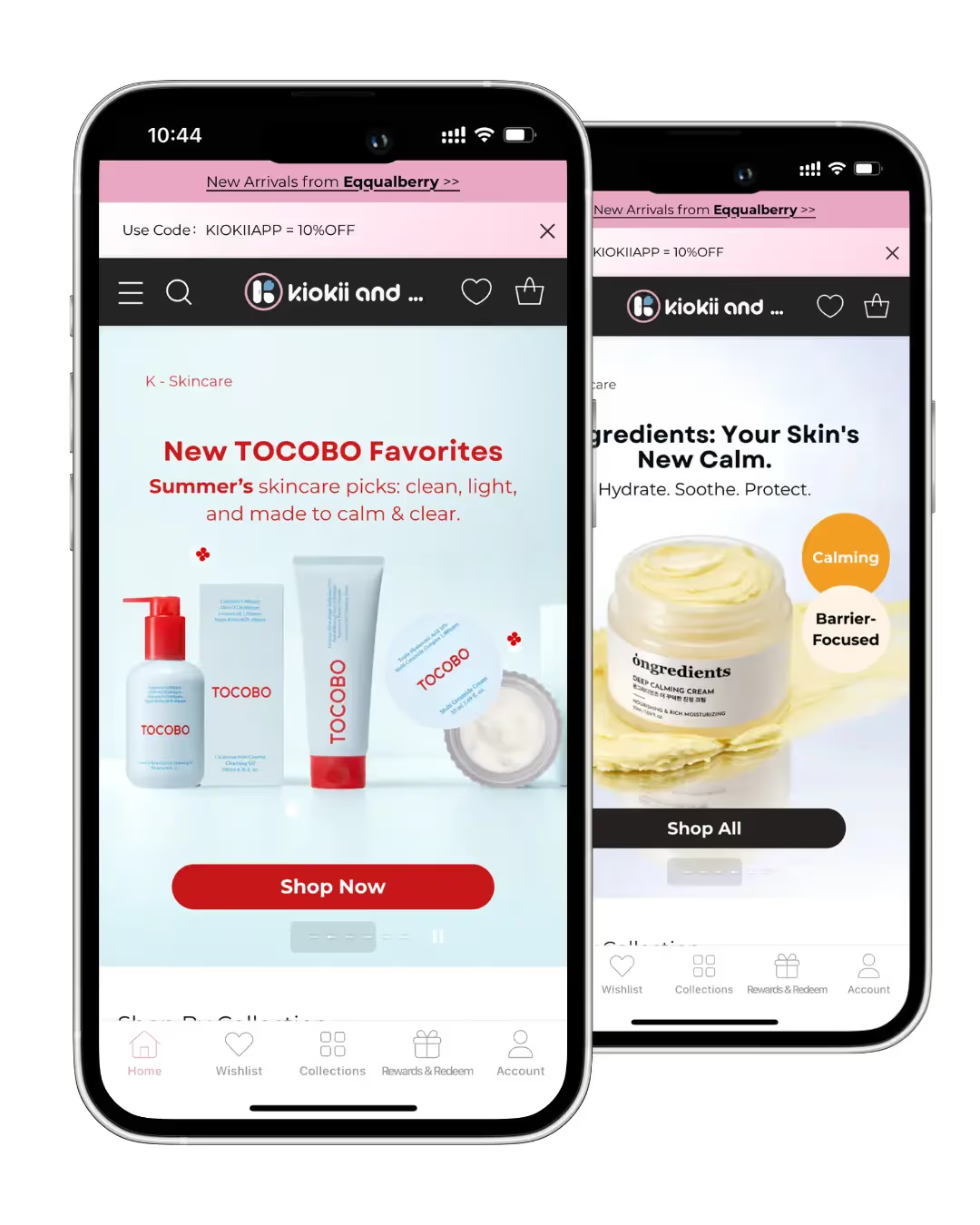
    Kiokii, for example. They invested a lot of time, effort and money into building a visually striking site, and were able to replicate that perfectly in their app.

    MASC is another perfect example. A key part of their site is Instagram-style shoppable videos; a unique feature that other app builders can’t replicate. 

    With Vendrux, they’re able to include these videos in their mobile app, creating an engaging TikTok-style user experience that has been extremely successful for them.

    For brands like these two (or just brands with limited time to build and manage a separate platform), a full-conversion, fully-managed website to app service like Vendrux is a better way to launch.

    Want to see what your app could look like? Get a free preview now.

    How the Vendrux Process Works

    We’ve spent the last decade perfecting the mobile app launch process for Shopify stores. With Vendrux, you’re not buying a tool; you’re getting a partner, as invested in your growth as you are.

    Here’s how we take your store live on the App Store and Google Play in just a few weeks:

    1. Kickoff & Setup

    We start with a personalized onboarding session to understand your brand, tech stack, and goals.

    2. App Configuration

    Our team configures your app for optimal performance, navigation, and native functionality, based entirely on your live Shopify store.

    3. Testing & QA

    In a couple of weeks, you’ll get a test version of the app to explore and provide feedback. We refine the experience to match your vision.

    At the same time, we thoroughly test the app across devices and operating systems to ensure stability, speed, and consistency.

    4. App Store Submission

    We prepare and submit your app to the App Store and Google Play on your behalf, handling all requirements and rejections if they come up.

    5. Launch & Growth

    Once live, we stay involved with proactive support, app updates, strategic push notification planning, and app promotion best practices.

    You stay focused on running your store. We handle your app from concept to conversion machine.

    Ready to see what can be done? Book a free preview now.

    Final Thoughts & Next Steps

    So – does Shopify offer an app for your store? 

    Technically, yes. But if what you’re looking for is a fully branded, customer-facing mobile app, the kind your loyal customers can download, shop from, and stay engaged with… the real answer is no.

    If you want one, you’ve got two paths forward:

    • Build from scratch with the Storefront API (expensive, slow, resource-heavy)
    • Use a platform like Vendrux to convert your existing Shopify site into an app (fast, affordable, low-effort)

    If you’re serious about growing repeat revenue and giving mobile customers the experience they expect, you need a native app.

    And with Vendrux, you can launch one without starting from zero, without sacrificing the best features from your website.

    Book a free preview now to see how your Shopify store would look as a native app. We’ll show you a working prototype, walk you through the process, and help you decide if it’s the right move for your brand.

  • What is Total Cost of Ownership for Mobile Apps (And Why Does It Matter?)

    What is Total Cost of Ownership for Mobile Apps (And Why Does It Matter?)

    When you’re planning a mobile app, it’s easy to look only at the upfront price tag. Maybe it’s the monthly fee for an app builder, or a quote from an agency. But that number doesn’t tell the whole story.

    The real cost of a mobile app is the Total Cost of Ownership (TCO)

    This goes beyond what you pay to build or subscribe. It includes everything it takes to keep your app running, updated, and delivering value over time.

    Understanding TCO matters because the cheapest option at first glance can end up being the most expensive once you factor in maintenance, updates, and lost revenue from poor performance.

    In this article, we’ll break down what TCO means for mobile apps, why it’s critical to factor into your decision-making, and how different options stack up when you look at the full picture.

    What is Total Cost of Ownership (TCO)?

    Total Cost of Ownership (TCO) is the complete cost of running a mobile app over its entire life cycle. 

    It’s not just what you pay to create an app. It’s everything it takes to keep it live, functional, and delivering value for your business.

    What TCO Includes for Mobile Apps

    When you look at mobile apps through a TCO lens, you need to consider:

    • Development or build costs: the upfront expense of using an app builder, hiring an agency, or building in-house.
    • Design and customization: UI/UX tweaks, brand integration, and added features.
    • Infrastructure: servers, APIs, third-party services, and hosting.
    • App store compliance: Apple/Google developer accounts, review resubmissions, and mandatory updates.
    • Ongoing maintenance: bug fixes, OS compatibility updates, security patches.
    • Team and overhead: whether you need developers on retainer or in-house staff to manage the app.
    • Opportunity costs: lost revenue from downtime, missing features, or a poor user experience that reduces conversions.

    Bottom line: TCO gives you the real financial picture of an app, not just the sticker price.

    Why Does TCO Matter?

    When you only focus on upfront price, you risk underestimating the true cost. 

    That mistake can slow growth, hurt retention, and erode ROI.

    Why this matters for your business:

    • Price ≠ Cost. A $20k agency build or a $500/month app builder is only part of the story. Once you add updates, fixes, and maintenance, the numbers look very different.
    • Hidden costs add up. Cheaper options often mean cutting corners. That can lead to extra development down the line, higher maintenance bills, or lost sales from a clunky experience.
    • Apps are living products. iOS and Android constantly update. Devices evolve. Customer expectations grow. Every change requires upkeep.
    • For online stores, every bug, crash, or missing feature isn’t just a tech issue. It’s lost conversions and reduced lifetime value.

    Bottom line: the price you see upfront is rarely the true cost of an app. Total Cost of Ownership reveals the full financial commitment over time.

    How to Evaluate Mobile App Options by TCO

    If you’re in the market for a mobile app, TCO needs to be one of the primary factors you build your decision around.

    When you evaluate mobile app solutions with TCO in mind, you’ll avoid surprises and choose the option that’s truly cost-effective in the long run.

    However, it can be difficult. TCO isn’t listed on the box. It typically requires some manual estimation, beyond the quote you get from an agency, or the number on a pricing table.

    Here’s how to understand the TCO of any app development approach you’re considering:

    A Blueprint for Calculating TCO

    1. Map your app’s lifecycle. Think beyond launch. Consider what the app will cost to maintain over 1–3 years (updates, compliance, user growth).
    2. Break it down into cost categories. Include development, infrastructure, maintenance, app store fees, QA, and team costs.
    3. Estimate any hidden costs. Look for risks like rebuilds, downtime, lost conversions from poor UX, or expensive add-ons later.
    4. Normalize the comparisons. Put each option on the same timeline (e.g., three years). Compare total spend, not just upfront prices.
    5. Match with your goals. Tie the numbers back to outcomes: Will this option improve retention, conversions, and lifetime value, or hold you back?

    Bottom line: TCO is less about the sticker price and more about the real costs of sustaining an app as a growth channel. And this is likely something you’ll have to calculate on your own.

    Comparing TCO Across Different App Development Options

    When you break it down, you’ll see a significant difference between different approaches.

    And the most cost-effective app development options may not be what you think.

    Here’s how the main options stack up, and the main factors influencing TCO.

    DIY No-Code App Builders

    The appeal:

    DIY and no-code app builders look attractive at first glance. For $100–$500/month, you can launch an app without writing a single line of code. For a small ecommerce brand, the promise of speed and affordability can be hard to resist.

    The reality once you factor in TCO:

    • Upfront costs: Low. You might pay a setup fee and a recurring subscription.
    • Customization limits: These platforms rely on templates. Anything outside of their prebuilt features can be impossible or expensive to achieve.
    • Maintenance burden: The builder takes care of the basics, but you’ll still run into gaps — bugs, performance issues, or design changes that require workarounds.
    • Feature gaps: Many DIY apps can’t replicate the complexity of modern ecommerce sites. This leads to opportunity costs in the form of lost conversions and lower customer lifetime value.
    • Scalability issues: As your store grows, you’ll hit ceilings. Adding new features or integrations may require a costly migration to a custom solution later.

    Biggest factors in the TCO of no-code app builders:

    1. Subscription fees (usually predictable and fixed).
    2. Design and customization costs when you need workarounds or agency help.
    3. Maintenance and bug fixes not fully covered by the platform.
    4. Opportunity cost from missing ecommerce features (e.g., custom checkout flows, advanced loyalty programs, upsells).
    5. Migration/rebuild costs if you eventually outgrow the platform and have to start over.

    Final TCO takeaway:

    On paper, DIY builders look cheap. But once you factor in limited functionality, lost revenue from poor UX, and the eventual cost of moving to another platform, the long-term ownership cost can be far higher than the sticker price suggests.

    Custom Development (via Agencies)

    The appeal:

    Hiring an agency gives you a ready-made expert team. They handle everything; scoping, design, development, testing, and app store submission. The promise is a polished, custom app tailored to your brand.

    The reality once you factor in TCO:

    • Upfront costs: High. Most ecommerce apps built by agencies start at $25k–$50k, with many quotes running well into six figures.
    • Maintenance retainers: Agencies typically charge monthly or yearly retainers for bug fixes, OS updates, and new features. Without this, your app can quickly break when Apple or Google release new OS versions.
    • Dependency risk: You’re locked into the agency’s timeline, availability, and pricing. Simple changes can take weeks and cost thousands.
    • Slow ROI: Long timelines (often 6–12 months) delay launch and revenue impact.
    • Scalability costs: Every new feature requires a new project (and another round of invoices).

    Biggest factors in the TCO of agency-built apps:

    1. Large upfront build cost ($25k–$100k+).
    2. Ongoing retainer fees for maintenance and updates.
    3. Change request costs for new features or fixes.
    4. Time-to-market delays, which represent opportunity cost in missed revenue.
    5. Vendor lock-in, limiting flexibility and driving long-term costs higher.

    Final TCO takeaway:

    Agencies deliver professional apps but at a steep total cost. For most ecommerce brands, this path is only viable with very large budgets and a tolerance for ongoing dependency on outside developers.

    Custom Development In-House

    The appeal:

    Building your own team gives you full control. You own the code, set the roadmap, and customize every detail to your exact needs. On the surface, it feels like the most flexible and scalable option.

    The reality once you factor in TCO:

    • Upfront investment: Hiring skilled developers, designers, and product managers is expensive. Even a small team can run $250k+ per year in salaries.
    • Ongoing costs: Payroll doesn’t go away. Every bug, update, and new feature adds to your team’s workload.
    • Recruitment and churn: Developers leave. Replacing them costs time and money. Institutional knowledge is lost, driving costs up further.
    • Opportunity costs: Your team’s time is finite. Every hour spent on maintaining the app is time not spent on core ecommerce improvements.
    • High risk: Unless you’re already a tech company, managing an in-house app team stretches resources thin.

    Biggest factors in the TCO of in-house development:

    1. Salaries and benefits for developers, designers, and QA.
    2. Recruitment and training costs when staff churn.
    3. Infrastructure costs (servers, tools, monitoring).
    4. Ongoing maintenance workload for OS updates and bug fixes.
    5. Opportunity cost of time taken away from growth-driving ecommerce work.

    Final TCO takeaway:

    In-house development gives the most control but comes with the highest ongoing ownership cost. You not only need to manage the project and pay the developers, but you also become responsible for benefits and HR-related costs. For non-technical ecommerce brands, it often means massive overhead with limited payoff.

    Vendrux: Custom Mobile Apps, Built From Your Site

    The appeal:

    Vendrux takes a different path. Instead of rebuilding your app from scratch, it converts your existing website into fully branded iOS and Android apps. 

    You keep all your site’s functionality, while we handle the heavy lifting of app conversion, publishing, and maintenance.

    Vendrux seamlessly converts your website into a native mobile app

    Many brands come to us (and stay with us) specifically for the low TCO. A fully-managed, white-glove service means the number you see on the pricing table is as close as it comes to the true cost of ownership.

    The reality once you factor in TCO:

    • Upfront costs: Much lower than custom development, since you don’t need to rebuild your web experience in a new environment. Apps launch in weeks, not months.
    • Maintenance included: Vendrux takes care of OS updates, app store compliance, and ongoing technical support — eliminating one of the largest hidden costs of other approaches.
    • Feature parity from day one: Because your site powers the app, everything that works on your website works in the app. No expensive rebuilds or missed features that cause lost revenue.
    • Reduced opportunity cost: Launching faster means you capture revenue and retention benefits sooner. Avoiding feature gaps means fewer lost sales compared to DIY builders.
    • Predictable spend: Pricing is transparent and ongoing costs are clear, unlike agencies or in-house dev teams where bills spike with every change.

    Biggest factors in the TCO of Vendrux apps:

    1. Initial setup cost (significantly lower than agency builds).
    2. Predictable subscription that includes hosting, support, and maintenance.
    3. Time-to-market savings — launching in weeks vs. months translates into earlier ROI.
    4. No rebuild costs — your site already powers the app.
    5. Reduced opportunity costs — full feature parity avoids the lost sales common with limited DIY builders.

    Final TCO takeaway:

    Vendrux offers the most cost-efficient long-term ownership model for ecommerce brands. You avoid the heavy upfront cost of agencies, the long-term payroll of in-house teams, and the revenue-killing limitations of DIY builders. At the same time, you get a fully functional app live in just a few weeks, with no feature gaps compared to your website.

    Want to see what’s possible? Get a free preview of your app, and we’ll show you a working prototype of your site as an app.

    Conclusion: Why TCO Should Guide Your Decision-Making Process

    When it comes to mobile apps, the price tag is just the beginning. The real cost is in the Total Cost of Ownership — everything it takes to keep your app running, updated, and delivering results over time.

    • DIY builders look cheap but often bleed value through missing features, poor UX, and eventual rebuilds.
    • Agencies deliver polished apps, but at a steep total cost, with ongoing retainers and long timelines.
    • In-house development gives control, but the overhead and payroll make it viable only for tech-driven companies.
    • Vendrux offers a lower, more predictable TCO by turning your existing site into an app, handling updates, and ensuring feature parity from day one.

    Bottom line: TCO isn’t just an accounting exercise. It’s about protecting your ROI and making sure your mobile app is an asset, not a liability.

    If you’re considering an app for your ecommerce business, don’t stop at the sticker price. Look at the full cost of ownership. You’ll see why Vendrux is the smarter, more sustainable way to launch your own app.

    Talk to us about launching your app with Vendrux. We’ll do the heavy lifting, get you live in weeks, and help you grow with a lower total cost of ownership.

    Curious? Get a free consultation now.

  • How to Prepare for Black Friday as an Ecommerce Brand

    How to Prepare for Black Friday as an Ecommerce Brand

    Black Friday/Cyber Monday isn’t just another sale. It’s the most competitive, chaotic week of the year for ecommerce. Costs spike, inboxes flood, and customer attention is scattered everywhere.

    The brands that win aren’t the ones with the biggest discounts. They’re the ones that plan ahead, lock in their channels, and create a direct line to their best customers.

    This guide gives you a clear, actionable playbook to prepare:

    • How to structure offers that drive AOV and repeat sales
    • How to make your site and app “conversion ready”
    • How to use owned channels (especially push notifications) to cut through the noise
    • And how to avoid the common mistakes that cost brands six figures in missed revenue

    Follow this checklist, and you’ll not only maximize revenue during Cyber Week, but also set yourself up for stronger retention and LTV going into the new year.

    Want to learn how to drive low-cost sales and better retention this Black Friday? Get the 2025 BFCM Mobile App Playbook to learn why apps are a competitive advantage, and how to ace Cyber Week with mobile apps & push notifications.

    TL;DR – How to Win Black Friday

    • Plan early. Start 6–8 weeks out with site fixes, offer planning, and building your push + app audience.
    • Keep your offers simple. A clear, bold headline discount beats complicated promos. Use app-only perks (early access, exclusive bundles) to stand out.
    • Prioritize high-margin owned channels. Margins are squeezed by discounts + higher CPMs. Push notifications and your app cut through instantly.
    • Optimize for mobile. The majority of sales happen on phones. A fast app + checkout flow is non-negotiable.
    • Get serious about cart abandonment. Abandoned cart push flows can recapture 20%+ of otherwise lost revenue.
    • Follow a playbook. Morning “live now,” midday nudges, and evening “last chance” pushes keep momentum all weekend.
    • Think beyond BFCM. Use the surge to drive app installs, subscriptions, and repeat-purchase products for long-term LTV.

    Black Friday is your best shot to grow owned channels and lock in high-value customers. Treat it as the launchpad for retention, not just a weekend of revenue.

    Why BFCM is Different This Year

    Black Friday is no longer just a weekend. It’s a full season. Promotions start earlier, run longer, and competition is fiercer than ever.

    Here’s what makes it different now:

    • Mobile dominates. More than 70% of traffic and the majority of orders happen on mobile. If your mobile experience isn’t seamless, you’re leaking revenue.
    • Customer acquisition is expensive. Paid media CPMs and CACs spike by 2-3x during Cyber Week, making it tough to profit if you rely on ads alone.
    • Your customers have inbox overload. Customers are drowning in emails and SMS during BFCM. Even your loyal subscribers will miss messages simply because of volume.
    • Attention is fractured. With every brand competing for attention, distractions are everywhere. Keeping your customers in a distraction-free environment is key.

    Bottom line: competing in rented channels (ads, email, SMS) is a losing margin game.

    The brands that win are the ones that invest in owned, direct channels – like mobile apps + push notifications, which cut through the noise and keep customers close.

    Learn more: Black Friday Ecommerce Trends to Watch For

    Offer & Merchandising Strategy

    Black Friday is about offers. There’s no way around that.

    Your offer is your headline. Get it wrong, and nothing else will save you.

    Here’s how to approach it:

    • Keep it simple. Customers don’t have time to decode complicated promos. A clear “30% off sitewide” or “Buy 2, Get 1” beats stacked exclusions every time.
    • Use offers that drive AOV. You want customers buying more, not spending less. Layer in free shipping thresholds, free gift with purchase, or cross-sell bundles to raise cart sizes.
    • Plan inventory waves. Don’t blow all your bestsellers on Day 1. Hold back stock for Cyber Monday and restock triggers to keep momentum alive.
    • Use exclusivity. Exclusivity, like app-only perks, is a cheat code for running exciting BFCM deals without major discounts. Give early access (24–48 hours), exclusive bundles, or limited drops to app users and VIPs.
    • Use BNPL as a conversion lever. Highlight flexible payment options (Afterpay, Klarna) to reduce checkout friction on higher-ticket baskets.
    The exclusivity of app-only sales is a great way to drive excitement that carries over to retention

    Bottom line: a winning BFCM offer is bold, easy to understand, and designed to maximize both immediate conversion and long-term value. 

    Sweeten the deal with app-only exclusives to lock in your best buyers where they’re most likely to repeat.

    Channel Plan (Owned, Paid, Earned)

    Getting the channel mix right during BFCM is crucial.

    Everything’s more competitive. Paid CPMs are up 58%, and overall CACs are 2.5-3x higher. Your goal is to scale channels that bring those numbers down.

    Here’s an idea of how to mix in different acquisition & retention channels effectively:

    Owned

    • Push notifications: Your most powerful lever. They cut through noise, drive instant traffic, and convert abandoned carts better than any other channel.
    • Email/SMS: Still key, but expect lower visibility due to inbox overload. Tighten segmentation and send windows to avoid fatigue.
    • App: Anchor promotions in your app; dedicated sale hub, banners, early-access gates.

    Paid

    • Be prepared for up to 3x higher costs. Front-load budgets in the days leading up to Black Friday when attention is high but costs aren’t maxed out yet.
    • Creative strategy: Highlight urgency, app-only perks, and exclusive bundles.
    • Retargeting: Shorter retargeting cycles than normal (capture attention while excitement is still high).

    Earned

    • Creators & affiliates: Arm partners with unique codes or app-download links to create urgency.
    • PR & community buzz: Announce early-access windows or special drops that only happen in the app.

    Bottom line: Don’t fight the noise with email and ads alone. A multi-channel strategy is key; and a mobile app + push notifications gives you a competitive edge that not all brands have.

    Read more: Push Notification Ideas & Best Practices for Black Friday

    Site/App Readiness

    If your site or app slows down or breaks during BFCM, you’re leaving serious money on the table. 

    Your website should be fast, clean, and frictionless. Pages need to load instantly, PDPs should clearly show pricing, shipping, and returns, and checkout must be as simple as possible with one-tap wallets and guest checkout enabled. 

    Run load tests in advance so traffic surges don’t crash your store.

    On the app side, think of it as your control center for BFCM. 

    Create a dedicated sale hub so deals are front and center, refresh icons and banners with seasonal creative, and make sure push notifications deep link directly to the right PDP or offer. 

    Early access sales can be gated for app users to drive installs and reinforce loyalty.

    Finally, run a full QA sweep across top devices and checkout flows. Bugs, broken coupons, or failed payments are the kind of small cracks that turn into six-figure losses under peak traffic.

    Bottom line: performance and speed are the baseline, but an optimized app experience gives you the edge, keeping customers in a distraction-free environment built for conversion.

    Drive App Installs Before BFCM

    The more app downloads you have before Black Friday, the more leverage you’ll have when the weekend hits. 

    Every install puts your brand on the customer’s home screen and unlocks the ability to reach them instantly with push notifications; something email and ads can’t guarantee during the noisiest week of the year. 

    A major part of your BFCM prep should be:

    • Launching an app (if you don’t have one already)
    • Building your app user base (and push list) as much as possible before Black Friday hits

    By growing your app audience now, you’re effectively building a direct-response channel that doesn’t cost you per send, doesn’t get lost in inbox clutter, and consistently converts higher than mobile web.

    To maximize installs ahead of BFCM, seed app prompts across your entire customer journey: 

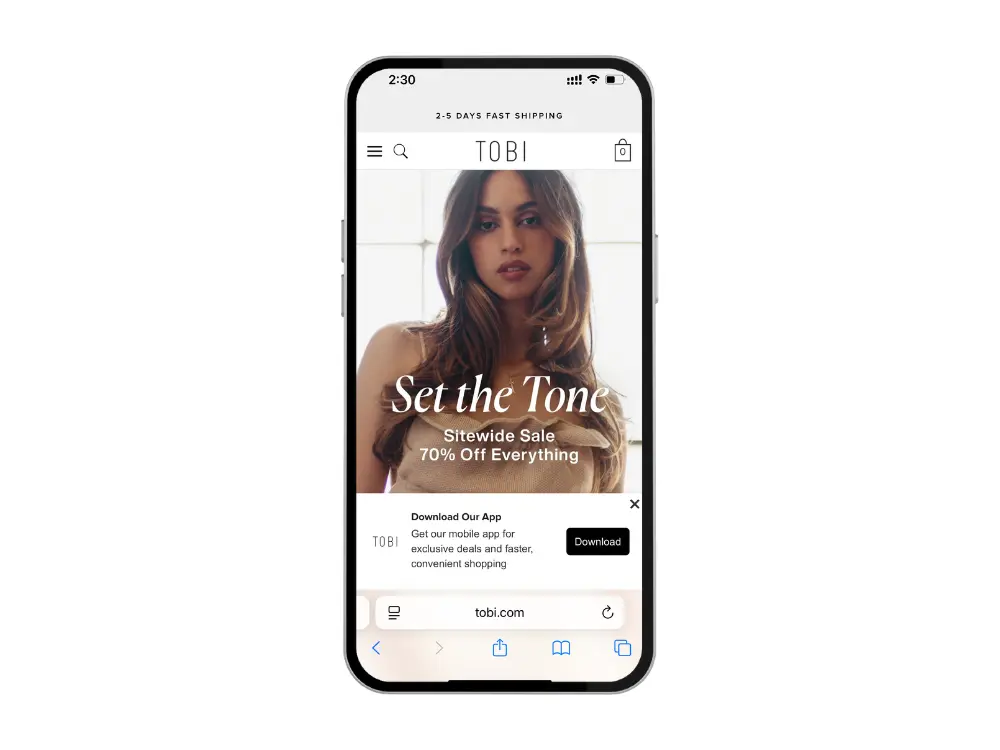
    • Smart banners on-site
    • Reminders in checkout
    • App mentions in email/SMS
    • QR codes on packaging and order confirmations. 
    Enable smart banners on your website to convert repeat mobile shoppers into app downloads

    Pair these with strong incentives like early access or app-exclusive bundles to give shoppers a clear reason to download before the sale begins. 

    The payoff is huge. By the time Black Friday rolls around, you’ll have a larger pool of customers you can activate instantly, at zero incremental cost, while your competitors fight for space in crowded inboxes and expensive ad auctions.

    Bottom line: think of app installs as your BFCM leverage. The bigger your app audience going into November, the more direct reach, control, and revenue you’ll unlock when it matters most.

    Don’t have an app yet? There’s still time. Vendrux can help you launch fast, while retaining a great user experience, by converting your website into an app. Get a free preview of your app to see what’s possible, and move forward in time for Black Friday.

    Recovery & Automations

    Cart abandonment is brutal on mobile (typically 85%+). And it gets even worse during BFCM when distractions are everywhere. 

    That’s why recovery flows and automations need to be dialed in well before the weekend starts.

    At a minimum, you should have:

    Push notifications stand out here. Unlike email or SMS, they reach your customer instantly and drop them back into their cart or PDP with one tap. 

    We’ve seen brands convert over 20% of abandoned cart pushes at times – numbers that can add six figures in revenue during Cyber Week.

    Automations also help you avoid leakage when your team is at its busiest. With flows running in the background, you can capture sales from shoppers who would otherwise slip away while your team is handling live campaigns.

    Bottom line: during BFCM, every lost cart is lost revenue. Prepping automations (especially push) ensures you recover those sales at scale without adding manual workload.

    Day-of Execution Playbook (Friday → Monday)

    BFCM weekend moves fast. Make sure you have a playbook in place, that ensures you’re not scrambling in the moment, and that every push, email, and offer lands at the right time.

    Here’s a proven cadence to anchor your schedule:

    • Morning: “Live now” pushes and emails to kickstart momentum
    • Midday: Reminders and urgency plays (“Only a few hours left,” “Selling fast”)
    • Evening: “Last chance” messaging to close out the day with a surge

    Lead the way with push – it’s your lowest-cost channel, and best on a user-for-user basis.

    Your app should back this up with a live “Sale Hub” where deals update in real-time, so customers never wonder what’s left.

    Follow with email & SMS to capture a wider net (as well as paid ads, which should be set up and ready to turn on from Friday, or whenever your promo starts).

    Don’t forget segmentation. Prioritize VIP customers with early alerts, re-target browsers with personalized reminders, and hit dormant customers with one strong, simple offer. 

    On the ops side, set up a “war room” for monitoring traffic, CX tickets, and inventory. Assign owners, have macros ready, and keep a rapid-response plan for stockouts or tech hiccups.

    Bottom line: the brands that win BFCM they orchestrate the weekend, they don’t play it by ear. With the right cadence, segments, and push-driven urgency, you can stay top-of-mind from Friday morning through Monday night.

    Post-BFCM Retention Plan

    For many brands, BFCM ends on Monday night. 

    These are the brands that come away with nothing to show for the weekend but low stock and little profit.

    The real winners are the ones who turn that surge of new customers into long-term loyal buyers.

    Here’s how to do it:

    Shift gears from discounts to value

    Once Cyber Monday closes, don’t keep blasting discounts. Instead, send content that adds value—style guides, setup tips, tutorials, or gift recommendations. These build trust and keep customers opening your app and push notifications without burning them out on constant promos.

    Acquisition that leads to retention

    Your goal shouldn’t just be to make sales. It should be to acquire long-term buyers.

    Most BFCM buyers will forget about you by January – they bought from 20 other brands at the same time.

    Focus your efforts on acquiring customers who are more likely to stick. 

    • Promote products with high repeat-purchase potential
    • Push subscription and other high-LTV products
    • Use the sale as a driver of app downloads.

    When you shift the lens to retention, you ensure you’re building a base of customers who will deliver LTV long after Cyber Week ends.

    Drive the second purchase

    The most reliable way to increase retention is getting new buyers to purchase again quickly. 

    After someone buys, start setting the stage for their next purchase.

    You can use post-purchase flows, loyalty nudges, and personalized “complete the look” bundles to drive that crucial second order. Or just follow up with non-salesy messages (email, push) that keep your brand in the customer’s mind until they’re ready to buy again.

    Bottom line: BFCM is the biggest acquisition spike of the year, but retention is where the real profit is. By engaging new customers immediately through your app and push, you transform one-time buyers into your highest-LTV audience.

    Common Mistakes & Missed Opportunities

    Every year, brands leave six or even seven figures on the table during BFCM because of preventable mistakes. Here are the big ones to avoid:

    Over-Relying on Email & Ads

    Email, SMS, and paid ads are at their noisiest and most expensive during Cyber Week. If these are your only levers, your message will get buried or cost too much to convert. Push notifications cut through with speed and visibility.

    Waiting Too Long to Finalize Offers

    Brands that wait until the last week to lock offers end up scrambling, leading to confusing discounts, margin leaks, or sloppy execution. Your headline promos should be planned, and tested, at least two weeks out.

    Ignoring App Installs During Peak Traffic

    BFCM brings your biggest traffic spike of the year. If you’re not actively driving app downloads, you’re wasting the chance to grow your owned channel when the audience is at its largest and most engaged.

    Skipping QA & Load Testing

    Many stores break under peak load. From broken discount codes to failed checkouts, these small cracks turn into huge losses during BFCM. Pre-launch QA and stress testing aren’t optional.

    Having No Post-BFCM Plan

    Treating BFCM like the finish line is a costly mistake. Without a post-Cyber Monday retention strategy, most of your new buyers will disappear by January.

    Bottom line: avoid these pitfalls, and you’ll be ahead of most brands. Plan early, use BFCM to grow your owned channels, and think beyond the weekend if you want lasting results.

    The 8-Week BFCM Prep Checklist

    Here’s a week-by-week breakdown of how to prep in the leadup to Black Friday:

    Weeks 8–7: Foundations

    Get the basics locked in: speed optimizations, checkout flows, and core automations. Choose your push provider, draft your offers, and start building your BFCM creative.

    • Fix site speed and checkout friction
    • QA PDPs (price, shipping, returns clarity)
    • Set up abandoned cart, browse, and low-stock automations
    • Lock push infrastructure and begin drafting offers

    Weeks 6–5: Grow Your Audience

    Use this window to build your owned channels – especially your app and push list. The more reach you have before November, the more leverage you’ll have.

    • Add app CTAs across site, checkout, and email/SMS
    • Launch an install landing page
    • Seed QR codes on packaging and inserts
    • Kick off influencer/affiliate content tied to “early access”

    Weeks 4–3: Prime Engagement

    Start training your audience to expect messages and getting them excited for what’s coming.

    • Send weekly pushes (teasers, content, light promos)
    • Announce “BFCM coming soon” in-app hub
    • Test push creative and copy variations
    • Segment VIP customers for early access lists

    Week 2: Lock It In

    No more guessing. Your offers, bundles, and schedule should be finalized.

    • Confirm discounts, exclusions, and bundles
    • Prep VIP/app-only perks
    • Schedule pushes and emails for launch weekend
    • Refresh app icons, banners, and splash screens

    Week 1: Hardening

    Now it’s about execution readiness. Stress-test everything before the traffic surge hits.

    • Run load tests for traffic and push volume
    • Full QA of site, app, and automations
    • Prep CS macros and escalation workflows
    • Push countdown live across all channels

    BFCM Weekend: Execution

    Stick to your playbook, monitor closely, and stay agile.

    • Push + email cadence: morning live, midday nudge, evening last chance
    • Monitor inventory and swap banners quickly for stockouts
    • Keep real-time triggers live (low stock, restock, price drop)
    • Run war room ops: traffic, CX, and campaign dashboards

    Weeks +1–4: Retain

    Don’t let the wave fade. This is where you turn short-term revenue into lasting growth.

    • Launch second-purchase flows and loyalty nudges
    • Send content-led pushes (guides, gift ideas, UGC)
    • Host an app-only drop or VIP event
    • Analyze cohort performance (app vs. web, push revenue, repeat rates)

    Bottom line: this timeline ensures you’re not scrambling. Start early, build owned-channel leverage, and you’ll hit Black Friday with a plan instead of panic.

    Final Thoughts

    A successful Black Friday for your brand is about preparation, control, and execution. 

    The brands that come out on top are the ones that start early, build leverage in owned channels, and keep customers engaged long after Cyber Monday ends.

    A mobile app and push notifications give you that edge. They cut through the noise, lower your reliance on crowded channels, and create a direct line to your best buyers. 

    Pair that with clear offers, a flawless shopping experience, and a retention-first mindset, and you’ll carry the momentum from Black Friday into the year ahead.

    If you don’t have a mobile app yet, there’s still time. Vendrux can help you launch in just a few weeks, giving you a powerful tool to turn Black Friday attention into long-term retention.

    As long as your website is already mobile-friendly, you’re already 90% of the way there. Get a free preview now to see what’s possible, and discuss with our experts how we can help you win BFCM.

  • Five Reasons Why GCC Retailers Need Mobile Apps

    Five Reasons Why GCC Retailers Need Mobile Apps

    In the Gulf, smartphones are the primary way consumers connect with brands and shop online. 

    With some of the highest internet and smartphone penetration rates in the world, the GCC has become a truly mobile-first market. Shoppers overwhelmingly prefer using their phones to research, browse, and buy. And they expect retailers to meet them through dedicated apps.

    This isn’t just theory. Data shows that well over half of ecommerce transactions in Saudi Arabia, the UAE, and neighboring markets now come through mobile, with apps driving higher conversion rates and bigger basket sizes than mobile web. 

    As a retailer, if you want to capture and retain customers in the GCC, you need to meet them where they spend their time — in mobile apps.

    Why Mobile Apps Are Essential in the GCC (At a Glance)

    • Internet & Smartphone Penetration Is World-Leading. Virtually everyone in the GCC is online, and almost all of them access the internet via smartphones. Countries like Saudi Arabia and the UAE boast 99% internet penetration and some of the fastest mobile networks globally.
    • Consumers Are Mobile-First. Shoppers in Saudi, the UAE, and across the region overwhelmingly choose their phones for online shopping. In fact, over half of digital shoppers in these markets say mobile is their preferred device.
    • Mobile Commerce Dominates. Today, the majority of online purchases in GCC countries happen on mobile. 62% in Saudi Arabia, 60% in the UAE, and over 50% in every other Gulf market.
    • Apps Outperform Mobile Web. When given the choice, GCC consumers prefer to transact through dedicated shopping apps. Apps generate the bulk of mobile sales and deliver 3x higher conversion rates than mobile websites.
    • Apps Drive Bigger Baskets and Loyalty. Not only do apps convert better, they also lead to higher average order values and better retention. Shoppers who download a brand’s app are more likely to spend more, shop more often, and stick around.

    Five Reasons Every GCC Retail Brand Needs an App

    1. Internet & Smartphone Usage in the GCC is Among the Highest in the World

    The GCC is one of the most connected regions on the planet. Countries like the UAE, Saudi Arabia, and Qatar consistently rank among the global leaders for both internet penetration and smartphone adoption.

    Near-universal connectivity

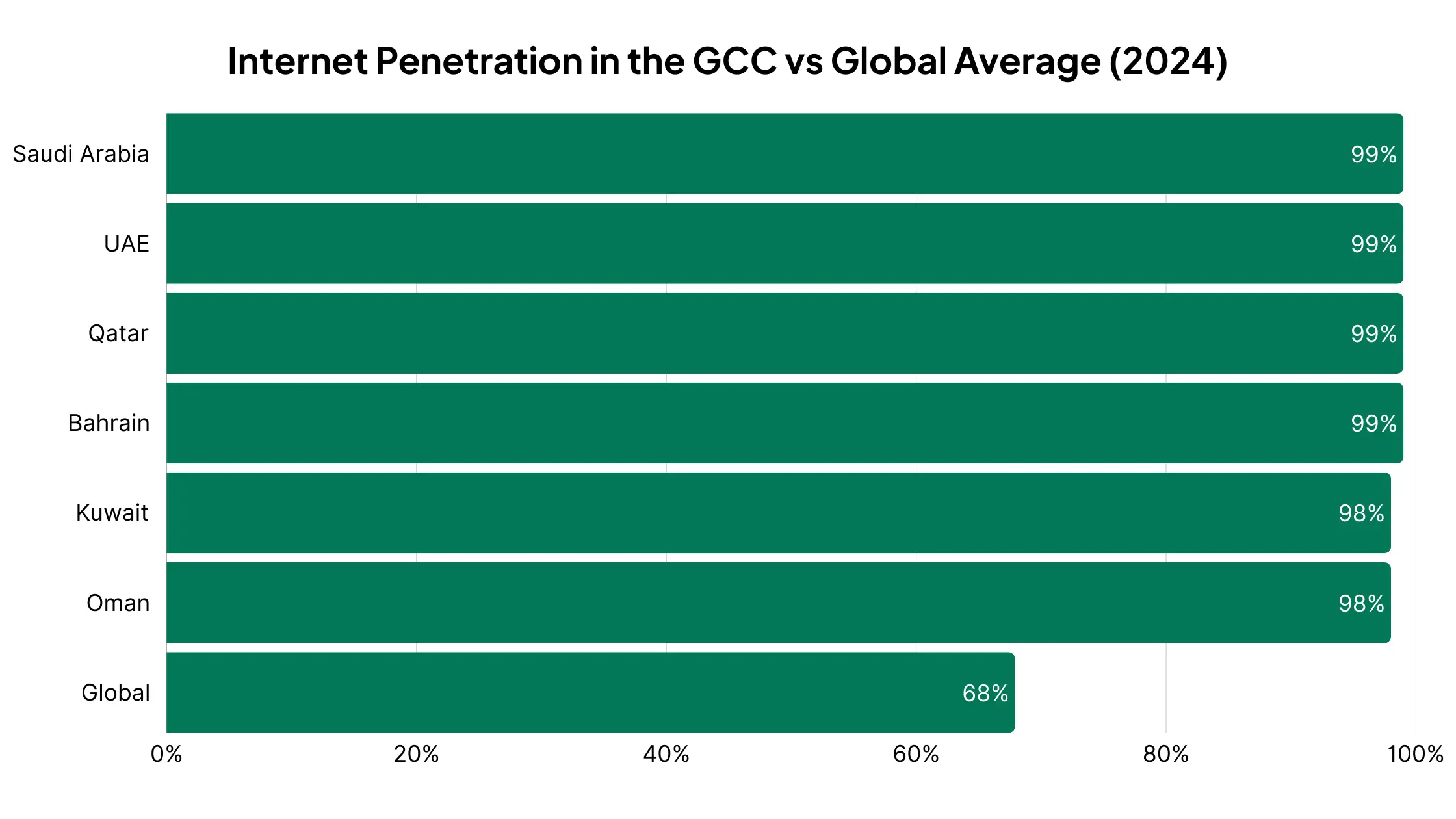
    By 2024, both Saudi Arabia and the UAE reported 99% internet penetration, meaning virtually everyone is online. 

    In Saudi Arabia, 98.9% of users access the internet primarily through mobile phones, making the smartphone the default gateway to the web.

    GCC countries lead the world in connectivity, with near-universal internet penetration compared to just 68% globally.

    More phones than people

    The UAE alone has mobile subscriptions equal to 219% of its population

    This means most people carry more than one active SIM card; showing how central mobile is to daily life.

    World-class mobile infrastructure

    GCC countries are at the forefront of 5G adoption and mobile internet speeds. In Saudi Arabia, for example, median mobile speeds exceed 100 Mbps, roughly double the worldwide average.

    2. Middle Eastern Consumers are Mobile-First

    Having world-leading smartphone penetration is one thing. But what really matters is how people use their devices. 

    In the GCC, consumers don’t just own smartphones, they live their digital lives through them.

    Smartphone-first shopping

    Surveys show that over half of digital shoppers in Saudi Arabia, the UAE, and Egypt prefer to shop online using their phones. In many cases, the smartphone is the only device they use to research, compare, and purchase products.

    UAE consumers spend nearly two-thirds of their online time on mobile devices — showing just how central smartphones are to daily life.

    Search behavior is mobile-led

    In both Saudi Arabia and the UAE, around 70% of shopping-related Google searches are made on mobile devices. Discovery, product research, and even price comparisons overwhelmingly happen on smartphones.

    Mobile across the customer journey

    From the first ad impression to checkout, mobile dominates the buyer’s path. Product videos are consumed on mobile, social discovery happens on apps like Instagram and TikTok, and conversions increasingly happen in mobile-native environments.

    A mobile-first digital culture

    Beyond commerce, this preference extends into media, banking, and communication, reinforcing the fact that for GCC consumers, the smartphone is not a secondary channel but the primary way they engage with the online world.

    3. Mobile Commerce is Expanding Rapidly in the GCC

    If mobile is how people in the Gulf go online, it’s also how they shop. 

    The GCC has become one of the world’s fastest-growing mobile commerce markets, with smartphones now driving the majority of online sales.

    Mobile is now the majority channel

    In 2024, mobile accounted for 62% of ecommerce transactions in Saudi Arabia, 60% in the UAE, and more than half in every other GCC market — Bahrain (59%), Oman (58%), Kuwait (57%), and Qatar (54%).

    In every GCC market, more than half of online purchases are now made on mobile — peaking at 62% in Saudi Arabia.

    Ahead of the curve

    The Gulf was already above the global average for mobile transaction share as far back as 2016, when nearly 43% of online sales were happening on phones. The region has only accelerated since, riding a wave of smartphone adoption and 5G coverage.

    Ecommerce growth overall is strong

    The UAE and Saudi Arabia alone posted ~23% year-over-year growth in ecommerce sales in 2023, with mobile being the main driver of that expansion.

    Seasonal surges reinforce the trend

    During Ramadan, for example, shopping app downloads spike and mobile transactions surge,  evidence that consumers not only prefer to shop via their phones, they turn to mobile apps for key seasonal purchases.

    4. GCC Consumers Prefer Apps

    It’s not just that Gulf shoppers use their phones to shop. It’s that they prefer doing so through mobile apps rather than mobile websites. 

    The data shows that, when retailers provide an app, consumers flock to it.

    Apps dominate mobile sales

    For retailers that offer both an app and a mobile site, apps capture the majority of mobile sales; in some cases up to 70%. That’s because apps are built for speed, convenience, and personalization, while mobile web still struggles with friction.

    Higher engagement in MENA

    Research shows that Middle Eastern consumers engage with shopping apps far more than consumers in Western markets, often at levels comparable to Asia, where app-first behaviors are strongest globally.

    Massive adoption growth

    In 2024, app installs for non-gaming apps grew 30%+ year-over-year in the UAE, Saudi Arabia, and Qatar, a surge that far outpaces global averages. Consumers are actively downloading and trying new apps, especially in ecommerce, fintech, and food delivery.

    Non-gaming app installs grew 30% in the UAE, KSA, and Qatar in 2024 — about 4× faster than the global average.

    Seasonal app spikes

    During high-demand periods like Ramadan or White Friday (the region’s Black Friday), shopping app downloads and usage skyrocket, showing that when the stakes are high, consumers choose apps as their default shopping channel.

    5. Mobile Apps Drive Better Results

    For GCC retailers, the value of an app goes beyond consumer preference, and translates directly into better performance metrics across the board.

    Higher conversion rates

    Shopping apps consistently convert at 3x the rate of mobile websites. In some categories, apps deliver conversion rates above 18–20%, compared to just 4–6% on mobile web.

    Bigger baskets

    Consumers spend more when shopping in-app. Benchmarks show average order values around $127 on apps, compared to $100 on desktop and just $91 on mobile web.

    App shoppers spend more — with an average basket size of $127, far above desktop ($100) and mobile web ($91).

    Stronger engagement

    App users browse more products, add more items to their cart, and check out more frequently. Push notifications and personalized app experiences keep customers active.

    Better retention

    While retention is a challenge for any app, those who succeed reap the rewards. Shoppers who download and keep a retailer’s app become loyal, high-value customers, returning more often and spending more over time.

    The bottom line: apps outperform every other channel. They generate higher revenue per customer, foster stronger loyalty, and give retailers a direct line of communication via push notifications, without the rising costs of ads and third-party platforms.

    For GCC retailers, where mobile dominates and consumer expectations are high, an app is a crucial part of your stack.

    The Best Way for Brands in the GCC to Launch a Mobile App

    With Vendrux, GCC retailers can convert their existing website into fully branded iOS and Android apps in as little as a month. 

    Your website powers the app. That means all the features from your website work in the app, there’s no rebuilding, and there’s little work required to keep it running.

    Here’s more on why Vendrux is the best way for GCC brands to launch a mobile app:

    • Vendrux works with any tech stack or ecommerce platform, from Shopify and Salesforce Commerce Cloud to regional platforms like Salla and Zid.
    • It supports multi-region stores – perfect for brands running multiple storefronts across the GCC and MENA.
    • It’s a fully managed service. We handle everything, including configuration, QA, App Store submissions, and ongoing maintenance. Perfect for teams that want to stay lean.
    • We work with your brand on growth, adoption, and engagement strategies, helping you expand into a new area comfortably.
    • No templates: unlike typical no-code tools, we don’t force you into a template. Anything that works on your site will work in the app.
    • You can go live in just a few weeks, making it quick to see the impact of your mobile app.

    Proven Track Record with GCC Brands

    Many mobile app builders have little to no experience working with brands in the GCC.

    Not Vendrux. We’ve worked with multiple GCC brands, and had excellent results.

    Pharmazone is a great example. One of Kuwait’s leading online pharmacies, Vendrux helped them convert their Shopify site into a mobile app, which now contributes 63% of their total online revenue, with 15x more revenue per user vs their website.

    Health and beauty brand NumberC also came to Vendrux to launch a seamless app experience. Also based in Kuwait, their previous app was built with a popular DIY app builder, with many of their features not working properly in the app (or taking far too much time to manage).

    Vendrux helped them build a new app, fully synced with their website – which drives 20-30% of their revenue, with less overhead and complete flexibility to build custom features.

    Next Steps

    If you’re a brand operating in the GCC, and want to give your customers the app-first experience they desire, Vendrux can help you do it.

    The next step is to book a consultation with our team. Our experts will walk you through the process, and show you examples of other apps doing the same thing you’re looking to do.

    We’ll discuss your goals, make sure Vendrux is the right fit, and give you a clear picture of everything you need to go live.

    Ready to get your brand in the App Stores and on your customer’s device? Book a free consultation now.

  • Website-to-App vs Custom Native Apps vs DIY Wrappers

    Website-to-App vs Custom Native Apps vs DIY Wrappers

    If you run an online business, you’ve probably asked yourself: what’s the best way to build a mobile app?

    It makes sense. Mobile internet traffic is consistently rising, and an app is a reliable way to build an audience you actually own.

    To launch an app, there are three main paths you’re likely to consider:

    1. Using a website-to-app service (a managed wrapper that converts your existing site into a mobile app).
    2. Building a custom native app from scratch with developers or an agency.
    3. Creating a DIY wrapper in-house, where your team puts your website inside an app shell.

    Your choice affects how fast you go live, how much the app will cost (upfront and ongoing), and the quality of the end user experience.

    Some will tell you always go for a custom build – others say it’s a waste of time.

    We’ve been in the app development industry for over 12 years, and know just what matters and what doesn’t with mobile apps.

    In this article, we’re going to use that experience, and give you a clear breakdown of the pros and cons of each approach, the hidden costs and sacrifices that you might not be aware of, and ultimately our recommendation on the best way forward for your mobile app.

    The Three Main Approaches Explained

    Let’s dive into the three most common ways to build a mobile app.

    Note: in general, we’re assuming your business has a website – or is launching both around the same time. This covers businesses like ecommerce stores, e-learning platforms, digital publishers and SaaS apps.

    If your business is built around the app, the question changes slightly. But you should still find some value in the breakdowns below (and you might find that a web-first, then app approach actually makes sense).

    Website-to-App Services (Managed Wrappers)

    A website-to-app service like Vendrux takes your existing website and converts it into a mobile app for iOS and Android.

    Instead of building a new app from scratch, these platforms wrap your website inside a native app shell. This shell is fully native code (we use Swift and Kotlin, the two most popular native languages for iOS and Android).

    What it essentially does is it lets your website run as a mobile app.

    The content comes from your website – pages, functionality, logins, etc. But your customers can download it, launch it from their homescreen, and interact with it much like they would with a native app built from the ground up.

    Why businesses choose this approach

    • Speed: You can launch in weeks, not months.
    • Lower cost: Instead of spending six figures on custom development, you pay a small amount upfront for the build, and usually a small cost per month for maintenance.
    • No extra workload: Updates you make on your website instantly appear in your app, so there’s no second codebase to manage.
    • Ongoing support: The service provider handles app store submissions, updates, and compatibility with new iOS/Android versions.

    The trade-offs

    • Less room for fully custom native features compared to a ground-up build.
    • Your app experience is tied closely to your website. This is an advantage for consistency, but not for brands wanting a radically different app experience.

    The bottom line: Website-to-app services are ideal for ecommerce stores and content-driven businesses that want to move fast, keep costs predictable, and avoid the heavy lift of custom development.

    Custom Native App Development

    A custom native app is built from the ground up for iOS and Android. 

    This is the traditional way of creating an app: hiring an in-house team or agency to design, code, and maintain everything.

    You can create a unique, fully custom app experience. If you have a website  as well, and you want to share data between your website and app (e.g. logins, product details, order information), you’ll do so via custom APIs (coded functions that allow different platforms, like your website and app, to communicate with each other).

    Why businesses choose this approach

    • You have full flexibility, able to design and build features that don’t exist on your website.
    • A native app can feel faster and smoother, with deep integrations into device features (camera, GPS, biometrics, etc.).
    • Ultimately it’s the highest-quality end product.

    The trade-offs

    • Custom apps cost a lot. Development can easily exceed $100,000, and that’s just the build. Ongoing updates cost thousands more each year.
    • Expect a long development timeline – typically 6-12 months to launch (assuming the build goes to plan).
    • Every update to iOS or Android requires development work. You’re maintaining two separate codebases in addition to your website, and paying expensive developers (potentially $9K+ monthly per person) to keep your apps live.
    • Scope creep is real – projects often go over budget or get delayed due to unforeseen complexities.

    The bottom line: Custom native development makes sense if you’re a large enterprise with deep pockets, or if your app needs features that simply can’t be achieved by extending your website. For most businesses, the cost and time investment make this option hard to justify.

    DIY Wrappers (Built In-House)

    If you want full control, without the massive cost of a native app, you can settle for a midpoint and do the wrapper approach in-house.

    Just like the first option, you’ll put together a native wrapper for your website, and do everything that a website to app service would do for you:

    • Build the native foundation
    • Integrate your website’s content and functionality within the app
    • Create native elements that make it feel like a real app
    • Manage QA, testing, ongoing maintenance
    • Submit your app to the App Stores for publishing

    Why businesses choose this approach

    • On the surface, it’s cheaper – you don’t pay an outside service or agency, just your team’s time.
    • You get full control. You decide exactly how the app is built, submitted, and maintained.
    • It’s flexible. If you only need a simple app shell, you can get something running quickly.

    The trade-offs

    • Wrapper has been a dirty word in app development for some time. The potential for what you can do with wrapper (or “hybrid”) technology has evolved massively, but poorly built hybrid apps stand out (in a bad way).
    • Apple and Google frequently reject low-quality wrappers. Without experience, managing the process and getting your apps approved can be frustrating.
    • Though you’re not paying an invoice, there’s still a major cost to bear. Your time, your team’s time – and you may need to hire new staff to build the app.
    • There’s maintenance to consider too. It’s not a “one and done”. There will be bugs to fix, features to add, kinks to smooth out. Expect a 2-3 person team required to keep your apps running.
    • Everything, from debugging to store compliance, falls on your team, potentially pulling away from other parts of your business.

    The bottom line: A DIY wrapper or hybrid app can be a decent option if you have a deep technical team, with experience building these kinds of apps. But the reality is, it won’t be as simple as you expect – especially if you’re going in with a lean development team.

    Key Factors to Compare

    So, what’s the best approach for your business?

    When deciding between website-to-app services, custom native apps, and DIY wrappers, four factors matter most: cost, time to launch, quality, and maintenance.

    1. Cost

    Cost is usually the first consideration when planning an app. That’s a natural concern for any project.

    And it’s not just about the upfront build. Ongoing expenses for updates, maintenance, and support add up over time. The three approaches differ sizeably in how much they’ll cost you both now and later.

    • Website-to-app services: Affordable, usually a monthly or yearly subscription. Predictable costs without the six-figure investment.
    • Custom native apps: The most expensive option. Expect $100k+ for development, plus ongoing costs for updates, fixes, and new features.
    • DIY wrappers: Cheapest upfront, but costs creep in over time. Your developers spend hours maintaining the app, which pulls them away from higher-value projects.

    2. Time to Launch

    Speed matters in ecommerce and digital business. The sooner your app is live, the sooner you can start driving installs, sending push notifications, and making revenue. Each approach comes with very different timelines, from weeks to a year or more.

    • Website-to-app services: Fast; often ready in weeks.
    • Custom native apps: Slow; 6–12 months is standard.
    • DIY wrappers: Variable. You might get a basic shell quickly, but debugging and app store rejections often cause delays.

    3. Quality & User Experience

    Users expect apps to feel fast, smooth, and reliable. A poor experience leads to bad reviews and low retention. 

    How you build your app directly impacts the quality your customers experience, the results you get from the app, and your brand reputation along with it.

    • Website-to-app services: Depends on the service – but a tested platform with a decade plus of experience, like Vendrux, will deliver a 
    • Custom native apps: The best possible experience if budget allows. Can integrate deeply with device features.
    • DIY wrappers: Risky. Many feel clunky, load slowly, and don’t deliver the polish users expect from a professional app.

    4. Maintenance

    An app isn’t a one-and-done project. iOS and Android change constantly, other features change and break parts of your app.

    Keeping your app running smoothly requires ongoing updates and fixes. Some approaches make this simple, while others create a heavy long-term burden.

    • Website-to-app services: Handled by the provider. iOS/Android updates, app store submissions, and bug fixes are included.
    • Custom native apps: Heavy, expensive lift. You’ll need a development team maintaining two codebases, plus ongoing updates as platforms change.
    • DIY wrappers: All on your team. Every update and bug fix is your responsibility, so maintenance can become a drain on your resources.

    Which Approach is Right for You?

    There’s no universal answer for this – since every business, every project is different.

    But the best option for the majority of cases is to use a website to app service.

    You get a professional app, quickly and affordably, without the huge costs or heavy workload of custom development.

    It’s much easier to maintain, and you’re guaranteed a consistent user experience between website and app.

    The key is that most online businesses don’t need a totally unique app.

    There aren’t many limits to what you can do with modern web tech. Ecommerce platforms like Shopify, BigCommerce and Magento can create a mobile web UI that looks and feels like an app.

    That means website to app services like Vendrux give you more or less the same end product you’d get from building a custom app, much simpler, faster, more affordable.

    There are some situations where the other approaches make sense. 

    • Custom native apps are worth considering if you’re a large enterprise with significant resources and a need for unique, complex mobile features that go beyond what your website offers. 
    • DIY wrappers might appeal to highly technical teams that want total control and are willing to handle the headaches of app store compliance, bug fixes, and ongoing maintenance in-house.

    But generally, if you’ve got a fast, mobile-friendly website, the first option you consider should be turning it into an app, with a service like Vendrux.

    The bottom line: For most businesses, website-to-app services are the best balance between cost, time, quality, and maintenance. You get a professional app without the risk, expense, or delays of other options. Web-first businesses like ecommerce stores or digital publishers almost always get a better ROI from a unified web to app approach.

    Final Thoughts

    Building a mobile app could be the next step in your business’ growth trajectory. But how you build it matters as much as the decision whether or not to build in the first place.

    Contrary to what app development agencies will tell you, a fully custom, bespoke app is not always best. In fact, it’s becoming less and less of a necessity to build natively, with the advancements in hybrid app technology and customizable web platforms.

    If your business is already well-established and optimized for mobile, it simply makes more sense to convert your website into an app.

    It’s your call on how much you want to invest in your app, and whether or not you need a fully custom build. But if you want to see how your site will look simply converted into a native/hybrid build with Vendrux, we’ll put together a free preview for you to test drive.

    Curious? Get your free app preview now.

  • Website-to-App vs Custom Native Apps vs DIY Wrappers

    Website-to-App vs Custom Native Apps vs DIY Wrappers

    If you run an online business, you’ve probably asked yourself: what’s the best way to build a mobile app?

    It makes sense. Mobile internet traffic is consistently rising, and an app is a reliable way to build an audience you actually own.

    To launch an app, there are three main paths you’re likely to consider:

    1. Using a website-to-app service (a managed wrapper that converts your existing site into a mobile app).
    2. Building a custom native app from scratch with developers or an agency.
    3. Creating a DIY wrapper in-house, where your team puts your website inside an app shell.

    Your choice affects how fast you go live, how much the app will cost (upfront and ongoing), and the quality of the end user experience.

    Some will tell you always go for a custom build – others say it’s a waste of time.

    We’ve been in the app development industry for over 12 years, and know just what matters and what doesn’t with mobile apps.

    In this article, we’re going to use that experience, and give you a clear breakdown of the pros and cons of each approach, the hidden costs and sacrifices that you might not be aware of, and ultimately our recommendation on the best way forward for your mobile app.

    The Three Main Approaches Explained

    Let’s dive into the three most common ways to build a mobile app.

    Note: in general, we’re assuming your business has a website – or is launching both around the same time. This covers businesses like ecommerce stores, e-learning platforms, digital publishers and SaaS apps.

    If your business is built around the app, the question changes slightly. But you should still find some value in the breakdowns below (and you might find that a web-first, then app approach actually makes sense).

    Website-to-App Services (Managed Wrappers)

    A website-to-app service like Vendrux takes your existing website and converts it into a mobile app for iOS and Android.

    Instead of building a new app from scratch, these platforms wrap your website inside a native app shell. This shell is fully native code (we use Swift and Kotlin, the two most popular native languages for iOS and Android).

    What it essentially does is it lets your website run as a mobile app.

    The content comes from your website – pages, functionality, logins, etc. But your customers can download it, launch it from their homescreen, and interact with it much like they would with a native app built from the ground up.

    Why businesses choose this approach

    • Speed: You can launch in weeks, not months.
    • Lower cost: Instead of spending six figures on custom development, you pay a small amount upfront for the build, and usually a small cost per month for maintenance.
    • No extra workload: Updates you make on your website instantly appear in your app, so there’s no second codebase to manage.
    • Ongoing support: The service provider handles app store submissions, updates, and compatibility with new iOS/Android versions.

    The trade-offs

    • Less room for fully custom native features compared to a ground-up build.
    • Your app experience is tied closely to your website. This is an advantage for consistency, but not for brands wanting a radically different app experience.

    The bottom line: Website-to-app services are ideal for ecommerce stores and content-driven businesses that want to move fast, keep costs predictable, and avoid the heavy lift of custom development.

    Custom Native App Development

    A custom native app is built from the ground up for iOS and Android. 

    This is the traditional way of creating an app: hiring an in-house team or agency to design, code, and maintain everything.

    You can create a unique, fully custom app experience. If you have a website  as well, and you want to share data between your website and app (e.g. logins, product details, order information), you’ll do so via custom APIs (coded functions that allow different platforms, like your website and app, to communicate with each other).

    Why businesses choose this approach

    • You have full flexibility, able to design and build features that don’t exist on your website.
    • A native app can feel faster and smoother, with deep integrations into device features (camera, GPS, biometrics, etc.).
    • Ultimately it’s the highest-quality end product.

    The trade-offs

    • Custom apps cost a lot. Development can easily exceed $100,000, and that’s just the build. Ongoing updates cost thousands more each year.
    • Expect a long development timeline – typically 6-12 months to launch (assuming the build goes to plan).
    • Every update to iOS or Android requires development work. You’re maintaining two separate codebases in addition to your website, and paying expensive developers (potentially $9K+ monthly per person) to keep your apps live.
    • Scope creep is real – projects often go over budget or get delayed due to unforeseen complexities.

    The bottom line: Custom native development makes sense if you’re a large enterprise with deep pockets, or if your app needs features that simply can’t be achieved by extending your website. For most businesses, the cost and time investment make this option hard to justify.

    DIY Wrappers (Built In-House)

    If you want full control, without the massive cost of a native app, you can settle for a midpoint and do the wrapper approach in-house.

    Just like the first option, you’ll put together a native wrapper for your website, and do everything that a website to app service would do for you:

    • Build the native foundation
    • Integrate your website’s content and functionality within the app
    • Create native elements that make it feel like a real app
    • Manage QA, testing, ongoing maintenance
    • Submit your app to the App Stores for publishing

    Why businesses choose this approach

    • On the surface, it’s cheaper – you don’t pay an outside service or agency, just your team’s time.
    • You get full control. You decide exactly how the app is built, submitted, and maintained.
    • It’s flexible. If you only need a simple app shell, you can get something running quickly.

    The trade-offs

    • Wrapper has been a dirty word in app development for some time. The potential for what you can do with wrapper (or “hybrid”) technology has evolved massively, but poorly built hybrid apps stand out (in a bad way).
    • Apple and Google frequently reject low-quality wrappers. Without experience, managing the process and getting your apps approved can be frustrating.
    • Though you’re not paying an invoice, there’s still a major cost to bear. Your time, your team’s time – and you may need to hire new staff to build the app.
    • There’s maintenance to consider too. It’s not a “one and done”. There will be bugs to fix, features to add, kinks to smooth out. Expect a 2-3 person team required to keep your apps running.
    • Everything, from debugging to store compliance, falls on your team, potentially pulling away from other parts of your business.

    The bottom line: A DIY wrapper or hybrid app can be a decent option if you have a deep technical team, with experience building these kinds of apps. But the reality is, it won’t be as simple as you expect – especially if you’re going in with a lean development team.

    Key Factors to Compare

    So, what’s the best approach for your business?

    When deciding between website-to-app services, custom native apps, and DIY wrappers, four factors matter most: cost, time to launch, quality, and maintenance.

    1. Cost

    Cost is usually the first consideration when planning an app. That’s a natural concern for any project.

    And it’s not just about the upfront build. Ongoing expenses for updates, maintenance, and support add up over time. The three approaches differ sizeably in how much they’ll cost you both now and later.

    • Website-to-app services: Affordable, usually a monthly or yearly subscription. Predictable costs without the six-figure investment.
    • Custom native apps: The most expensive option. Expect $100k+ for development, plus ongoing costs for updates, fixes, and new features.
    • DIY wrappers: Cheapest upfront, but costs creep in over time. Your developers spend hours maintaining the app, which pulls them away from higher-value projects.

    2. Time to Launch

    Speed matters in ecommerce and digital business. The sooner your app is live, the sooner you can start driving installs, sending push notifications, and making revenue. Each approach comes with very different timelines, from weeks to a year or more.

    • Website-to-app services: Fast; often ready in weeks.
    • Custom native apps: Slow; 6–12 months is standard.
    • DIY wrappers: Variable. You might get a basic shell quickly, but debugging and app store rejections often cause delays.

    3. Quality & User Experience

    Users expect apps to feel fast, smooth, and reliable. A poor experience leads to bad reviews and low retention. 

    How you build your app directly impacts the quality your customers experience, the results you get from the app, and your brand reputation along with it.

    • Website-to-app services: Depends on the service – but a tested platform with a decade plus of experience, like Vendrux, will deliver a 
    • Custom native apps: The best possible experience if budget allows. Can integrate deeply with device features.
    • DIY wrappers: Risky. Many feel clunky, load slowly, and don’t deliver the polish users expect from a professional app.

    4. Maintenance

    An app isn’t a one-and-done project. iOS and Android change constantly, other features change and break parts of your app.

    Keeping your app running smoothly requires ongoing updates and fixes. Some approaches make this simple, while others create a heavy long-term burden.

    • Website-to-app services: Handled by the provider. iOS/Android updates, app store submissions, and bug fixes are included.
    • Custom native apps: Heavy, expensive lift. You’ll need a development team maintaining two codebases, plus ongoing updates as platforms change.
    • DIY wrappers: All on your team. Every update and bug fix is your responsibility, so maintenance can become a drain on your resources.

    Which Approach is Right for You?

    There’s no universal answer for this – since every business, every project is different.

    But the best option for the majority of cases is to use a website to app service.

    You get a professional app, quickly and affordably, without the huge costs or heavy workload of custom development.

    It’s much easier to maintain, and you’re guaranteed a consistent user experience between website and app.

    The key is that most online businesses don’t need a totally unique app.

    There aren’t many limits to what you can do with modern web tech. Ecommerce platforms like Shopify, BigCommerce and Magento can create a mobile web UI that looks and feels like an app.

    That means website to app services like Vendrux give you more or less the same end product you’d get from building a custom app, much simpler, faster, more affordable.

    There are some situations where the other approaches make sense. 

    • Custom native apps are worth considering if you’re a large enterprise with significant resources and a need for unique, complex mobile features that go beyond what your website offers. 
    • DIY wrappers might appeal to highly technical teams that want total control and are willing to handle the headaches of app store compliance, bug fixes, and ongoing maintenance in-house.

    But generally, if you’ve got a fast, mobile-friendly website, the first option you consider should be turning it into an app, with a service like Vendrux.

    The bottom line: For most businesses, website-to-app services are the best balance between cost, time, quality, and maintenance. You get a professional app without the risk, expense, or delays of other options. Web-first businesses like ecommerce stores or digital publishers almost always get a better ROI from a unified web to app approach.

    Final Thoughts

    Building a mobile app could be the next step in your business’ growth trajectory. But how you build it matters as much as the decision whether or not to build in the first place.

    Contrary to what app development agencies will tell you, a fully custom, bespoke app is not always best. In fact, it’s becoming less and less of a necessity to build natively, with the advancements in hybrid app technology and customizable web platforms.

    If your business is already well-established and optimized for mobile, it simply makes more sense to convert your website into an app.

    It’s your call on how much you want to invest in your app, and whether or not you need a fully custom build. But if you want to see how your site will look simply converted into a native/hybrid build with Vendrux, we’ll put together a free preview for you to test drive.

    Curious? Get your free app preview now.

  • What Are In-App Banner Ads? Cost-Effective Mobile Reach for Ecommerce Growth

    What Are In-App Banner Ads? Cost-Effective Mobile Reach for Ecommerce Growth

    Banner ads are one of the oldest forms of digital advertising. In mobile apps, they show up as small rectangular ads built into the app’s design. They usually appear as a bar or box at the top or bottom of your screen.

    These ads mix images and text to grab user attention. They can be still pictures or animated. Most include a call-to-action that asks users to tap for more info.

    For ecommerce and direct-to-consumer brands, in-app banner ads offer a simple, cheap way to reach shoppers. Your customers use their phones constantly. Banner ads let you connect with them there.

    You might wonder: how well do simple banner ads work in mobile apps? The answer depends on how you use them.

    Banner ads may not get the highest engagement rates. But they offer huge reach at low cost. This matters in the mobile world where your customers spend most of their time.

    Why Do Banner Ads Still Matter in Mobile Apps?

    Banner ads are an older format. But they’ve stuck around for good reasons. They work on different screen sizes. They cost little to make and run.

    Banner ads make up over half of all in-app ad spots worldwide. That’s about 56% of placements.

    The numbers are huge. Billions of people use smartphones for hours each day. They use apps for social media, games, tools, news, and shopping.

    Research shows worldwide in-app ad spending hit $314 billion in 2023. It should grow nearly 50% to about $469 billion by 2027.

    In a mobile app, banner ads usually take up a small space. Common sizes are 320×50 or 300×250 pixels. They don’t stop users from using the app.

    For example, a shopping app might show a banner at the bottom with a special deal. A free game might show banner ads from other companies to make money.

    Even big companies use this approach. Zillow’s real estate app shows banner ads for home services. This lets other businesses reach Zillow’s users.

    Banner ads help brands reach user groups they couldn’t access otherwise.

    How Well Do Banner Ads Drive Results?

    Banner ads work in two main ways. They give you reach and some engagement. But they don’t always drive immediate clicks.

    Click-Through Performance

    Banner ads have always had low click rates. Often less than 1%. On desktop computers, banner ads might only get 0.3 to 0.5% of people to click.

    Mobile apps do better. In-app ads get around 0.56% click rate. That’s more than double the 0.23% rate on mobile websites.

    People are twice as likely to click an ad inside an app versus on a mobile website.

    This makes sense. Apps engage users more deeply. There are fewer distractions. No browser tabs to switch between. Apps can also target ads better using device data.

    But a 0.5% click rate still means 99.5% of people don’t click. Many users ignore banner ads out of habit. This is called “banner blindness.”

    Context Matters

    Banner ad success varies a lot based on where and how you use them. Some app types get much better results.

    Mobile gaming apps see the best performance. Users often see ads between game levels or as rewards. Some gaming ads get click rates as high as 11%. That’s the best of any app type.

    Regular banner ads won’t hit those numbers. But they can build awareness and bring steady traffic when targeted well.

    Video ads in apps get 7.5 times more clicks than static banners. Native ads (ads that look like app content) get about 3 times more attention than basic banners.

    Sales and Return on Investment

    Clicks are just the start. What really matters is sales and return on ad spend. Banner ads can help with ROI. But usually as support, not the main driver.

    Banner click rates are modest. So one banner campaign won’t flood your site with traffic. But the traffic you do get can be good quality if you target right.

    Research shows in-app ads overall work better than mobile web ads. One study found in-app ads got 150% higher conversion rates. They also kept users 3 times longer than mobile web campaigns.

    This suggests people who click in-app banners are more valuable. They’re more likely to buy something. App targeting is more precise. Apps also attract more engaged users.

    What Value Do Banner Ads Offer Ecommerce Brands?

    The main value is reaching mobile customers where they spend time. You can do this in a flexible, budget-friendly way.

    Mobile-First Shopping

    People now spend 3 to 5 hours per day on mobile devices. Over 90% of that time is in apps, not web browsers.

    Mobile apps are like the new shopping malls. That’s where attention lives now.

    In-app banner ads put your brand in these mobile spaces. This goes beyond Facebook or Google Search. You can diversify your ad channels. You can reach shoppers in places you might otherwise miss.

    Precise Targeting

    Apps collect rich data through device IDs. This allows very specific audience targeting. You can target banner ads based on:

    • Demographics
    • Location
    • User behaviors in apps
    • Purchase intent signals
    • And more

    A fitness clothing brand could target users of running apps. A cookware brand might target recipe app users.

    This level of targeting makes banner ads much more relevant. It reduces the risk of people ignoring your ads.

    Low Cost and Big Reach

    Cost matters a lot for banner ad success. Banner ads are cheap per impression. This can make them profitable if you measure right.

    As of 2024, banner ads cost about $2.80 per thousand views. That’s much less than full-screen ads at $4.80. It’s also less than native ads at $3.30.

    You can get lots of exposure with banners for a small budget.

    Even if only a tiny percent click and convert, the low cost might still give you positive ROI. Track the right numbers: conversion rate, cost per customer, and revenue per impression.

    Keeping Current Customers

    Banner ads can also help keep existing customers engaged. If your brand has a shopping app, use banner-style promotions inside your app. This can boost sales to current customers.

    A fashion retailer’s app might show a banner about a flash sale. Many successful retail apps use banners on the home screen. They personalize offers like “20% off just for you” for customers who haven’t shopped recently.

    What Challenges Should You Expect?

    Banner ads have advantages. But they also come with challenges you should know about.

    People Ignore Them

    Many users have learned to ignore banner ads. If your ad looks boring or appears in a cluttered space, people won’t see it.

    Fight this with compelling designs. Use high contrast. Make your value clear. Maybe add interactive elements. Use smart placement.

    Make sure your targeting matches the app’s audience and context.

    User Experience Problems

    Banner ads are cheap. So it’s easy to show users too many ads. This annoys people. They might delete the app or use ad blockers.

    Limit how often each person sees your ad. Rotate different creative versions. Quality beats quantity.

    It’s better to show fewer, better banner ads to the right people. Don’t plaster your ads everywhere.

    Limited Creative Space

    A banner on a phone screen has very little space. You can only say so much. Often you have room for:

    • An image
    • A short headline
    • Maybe a logo and button

    Your banner ads need a very clear, simple message. Focus on one main point like “Save 50% today” or “Free shipping on first order.”

    Don’t try to say everything at once.

    Accidental Clicks

    Banners sit next to app content. Sometimes people tap them by accident. These wrong clicks inflate your numbers but don’t bring real interest.

    Watch your bounce rates. Look at what people do after clicking your banner ads. If 90% leave your page in under a second, that’s a red flag.

    How Can You Get Better Results?

    Follow these best practices to make your banner ads work better.

    Design for Mobile

    Mobile banners need mobile-first design. Use bold, simple images. Use as little text as possible.

    Assume people will see your ad on a 5 to 6 inch screen. Tiny details get lost. Communicate visually.

    Many brands succeed with one good image and one line of text. Test different colors. Make sure your banner stands out from the app’s background.

    Clear Calls-to-Action

    Every banner ad needs a clear call-to-action. Tell users what to do or what they’ll get by tapping.

    Good CTAs include “Shop Now,” “Learn More,” or “Get 20% Off.”

    Make your CTA clear and prominent. This drives more clicks. It also sets the right expectation for what happens when people tap.

    Target Smart But Not Too Narrow

    Use in-app targeting power wisely. Match your targeting to your customer profile. Choose:

    • App categories
    • User demographics
    • Interest groups that match your shoppers

    A vegan snack brand might target health app users. Or people who buy organic food in grocery apps.

    Good targeting makes your banner more relevant and welcome.

    Start with a reasonably broad target. Then optimize based on which groups respond best. Use campaign data to keep improving your targeting.

    Test and Improve

    Run multiple versions of your banner ads. See which creative, copy, or CTA works best.

    Test different offers. Test different images. Even test different colors.

    Small changes can make a big difference in click rates or sales. These small gains add up to much better campaigns over time.

    Fix the Landing Experience

    A banner ad only works as well as where it sends people. After someone taps your banner, the next step must be smooth.

    If your banner said “50% off running shoes,” send them to those discounted shoes. Don’t send them to your homepage.

    The easier the journey, the more likely a click becomes a sale.

    What’s Next for Banner Ads?

    Banner ads in mobile apps will likely stay important. But their role is changing.

    Mobile usage keeps growing worldwide. More shopping happens in apps. Banner ads will remain a basic way to buy attention at scale.

    Their core strengths stay the same: low cost, flexibility, and broad reach.

    The industry is moving toward more “native” placements. These look like part of the app content. This can increase user engagement.

    Creative capabilities are improving too. Even in small banner spaces, new technology can customize content for each user.

    Interactive banners are emerging. They start as banners but expand when people interact with them. This combines the non-intrusive nature of banners with higher engagement.

    Privacy changes affect targeting. Advertisers will rely more on contextual targeting. Banners placed in relevant contexts will likely work better than random targeting.

    Making Banner Ads Work for You

    Banner ads offer a low-risk testing ground. You can try new ideas quickly and cheaply. They provide cost-effective reach at $2 to $3 per thousand views.

    Banner ads typically get 0.3 to 0.6% click rates. In-app banners work better than mobile web banners. With good targeting and design, they can drive steady traffic.

    Focus on conversions, not just clicks, to measure real ROI.

    For ecommerce brands, banner ads work best as part of a bigger mobile strategy. Use them with other channels. Re-engage app users with promo banners. Get new customers by advertising in popular apps.

    Treat banner advertising as a living tactic to improve. Focus on compelling creative and relevant placement. Use strong visuals and offers. Target your ideal audience. Don’t overwhelm users with too many ads.

    Consider new formats as they emerge. But banners remain a reliable starting point for mobile advertising. They offer unmatched reach and affordability where your customers spend most of their time.

  • What Are Behavioral Triggers? The Simple Strategy That Boosts App Retention by 88%

    What Are Behavioral Triggers? The Simple Strategy That Boosts App Retention by 88%

    Picture this: your app knows exactly when a customer is about to leave. It sends them the perfect message to bring them back. That’s behavioral triggers.

    Behavioral triggers are automatic messages that respond to what users do (or don’t do). Think of them as your app’s smart assistant that watches user behavior and reacts in real time.

    Here’s how it works: A user adds items to their cart but leaves without buying. Your system sends them a message saying “Forget something?”

    These triggers watch everything. Browsing activity. Feature usage. Purchase patterns. Signs of going inactive. The key difference? They respond to real actions, not random timing.

    This makes them super relevant. They hit users at exactly the right moment. For ecommerce and direct-to-consumer brands, this is huge. Your app becomes smart. It senses what customers do and responds instantly.

    Why Behavioral Triggers Matter for Your Business

    Customer retention drives revenue. It’s that simple.

    Research shows a 5% boost in retention can increase profits by 25–95%. That’s according to Bain & Co. Behavioral triggers are one of the best ways to get these gains.

    They work by reaching users with the right message at the right time. This stops people from leaving. It encourages repeat visits. And repeat visits mean more lifetime value.

    Here’s the problem most apps face: users disappear fast. Day 30 retention rates often drop to single digits. That’s a huge loss.

    Triggers fight this “retention cliff.” They step in before users vanish.

    Example: A fitness app notices you haven’t logged a workout in a week. It sends a friendly push: “Ready for a new training plan?” This catches you right when you might quit.

    These smart nudges work. They can mean the difference between an uninstall and a loyal customer.

    The Numbers Don’t Lie

    Trigger-based campaigns beat generic messages every time. They can boost app retention by 88%. User engagement goes up by over 50%.

    Why? Users respond to relevant messages. A trigger that responds to what they just did feels helpful. Random marketing feels like spam.

    The personalization effect is massive. Companies using personalized triggers see 61–74% retention rates. Generic messages? Only 49% retention. That’s a 25-point gap.

    Even simple triggers like order confirmations work better. They get 8× higher open rates than regular promotional emails.

    The money side looks good too. Well-made re-engagement flows deliver 3× ROI. They bring in extra revenue from users who would have left.

    Take ASOS, the fashion retailer. Their triggered cart reminders drove 10–15% more purchases. That’s real money from smart automation.

    How Triggers Work in Different Industries

    Behavioral triggers use simple rules: “IF user does X, THEN send Y.” Tools like Customer.io, Braze, and Klaviyo make this easy to set up.

    The trick is finding the right moments to trigger. Look for key actions, milestones, problems, or signs of going inactive.

    Here’s how different industries use them:

    Ecommerce and Retail

    Cart abandonment: User adds items but doesn’t buy. Send a “Still thinking it over?” message within an hour. Include the items they left behind. Maybe add a shipping offer.

    If they still don’t buy, try again the next day. This flow recovers lots of lost sales.

    Post-purchase: Someone buys something. Send a thank-you message. Then invite them to join your loyalty program. Strike while they’re happy.

    Subscription Services

    Renewal time: Send a summary of value they got this month. “Here’s what you enjoyed.” If they don’t engage, offer a loyalty reward.

    Inactive users: Meal-kit user skips deliveries for two weeks? Send: “Need new recipe ideas? Check out this week’s menu.” Gentle nudges work.

    Fintech and Banking

    Setup incomplete: New user hasn’t finished account setup. Send help offers. Early activation prevents churn.

    Bill reminders: Push notification before credit card bill is due. Or when account balance runs low. These feel helpful, not pushy. They save users from fees.

    This builds habits. Users log in regularly because the app helps them.

    Media and Content

    Watch patterns: User binges a show. Send recommendations for similar content. Or alert them when new seasons drop.

    Spotify and YouTube master this. They watch what you consume. Then they suggest new content you’ll love. This keeps users coming back instead of switching to competitors.

    Health and Fitness

    Inactive streaks: Haven’t logged a workout in days? Get an encouraging message: “Let’s get moving!”

    Milestones: Hit a 7-day workout streak? Get a celebration message or badge.

    These play on psychology. Rewards and reminders build habits. Duolingo uses streak notifications to keep learners coming back daily.

    Best Practices for Getting Started

    Starting with behavioral triggers needs planning and the right tools. Here’s how to do it right:

    1. Find Your Key Moments

    Map your customer journey. Find the actions that matter for retention. These might be:

    • Onboarding steps (account created, first purchase)
    • Usage patterns (days inactive, features used)
    • Conversion points (cart additions, checkout starts)

    Every business has different key moments. SaaS products might track “user invited teammate.” Ecommerce apps might watch “browsed specific category.”

    Use your analytics. Look at cohort data. Find funnel drop-offs. See which behaviors predict retention or churn. Those are your trigger points.

    Example: Users who add profile pictures stay longer. Make that a trigger. If someone hasn’t added a photo in 7 days, send a gentle prompt.

    2. Get Timing and Channels Right

    Timing matters most. Strike while interest is hot. Or before it goes cold.

    High intent actions (like browsing pricing pages) need fast responses. Routine nudges can wait a few days.

    Pick the right channel:

    • Push notifications: Great for urgent stuff (“Order delivered!”)
    • Email: Better for longer content or when users are off-app
    • SMS: High attention but use sparingly

    Some triggers need multiple channels. Try push first. If ignored, follow up with email.

    Always think from the user’s view. “Favorite item back in stock!” provides value. “Come shop!” at 3 AM doesn’t.

    3. Make It Personal

    Good triggers reference exactly what users did. Not just their name.

    Cart abandonment? Show the actual items they left. Re-engagement? Highlight features they used before.

    Segment your audience. Loan browsers need different messages than investment browsers. One wants education. The other wants webinar invites.

    Personal messages feel like helpful reminders from friends. Generic ones feel like spam.

    Quick Wins You Can Start Today

    You don’t need complex systems to see results. These simple triggers deliver fast wins:

    Abandoned Cart Reminders

    Most important trigger for ecommerce. Someone leaves without buying? Remind them what they liked.

    A basic “You left something behind” email with product images works. This single trigger can recover 10% of lost sales.

    Welcome Series

    Sign-up isn’t the finish line. It’s the start. Send a welcome email immediately. Show them how to get started. Highlight your app’s main value.

    If they stall during onboarding, offer help: “Need assistance setting up?”

    Apps that guide users through onboarding see 50% better retention. They make sure users find value early.

    Inactive User Re-engagement

    Define “inactive” for your app. No logins for 7 days? 30 days? When users hit that mark, reach out.

    Try: “We miss you – here’s what’s new.” Include an incentive or highlight new features.

    Catch churn before it’s final. Smart trigger sequences can almost eliminate churn completely.

    Milestone Celebrations

    Recognize user achievements. Thank them after first purchase. Reward them at 10 orders. Send anniversary messages.

    These “surprise and delight” moments build loyalty. Starbucks sends offers when users reach new loyalty tiers. It’s helped make their app one of retail’s most sticky.

    Even small wins work. “Completed 10 workouts!” reinforces good behavior.

    Common Mistakes to Avoid

    Triggers are powerful but easy to mess up. Avoid these pitfalls:

    Too Many Messages

    Don’t trigger everything. 71% of users turn off all notifications if they get too many irrelevant pings. That kills retention completely.

    Focus on high-value triggers. Set frequency limits. Quality beats quantity every time.

    Bad Timing

    Wrong timing feels jarring. Re-engagement pushes at 3 AM? Upsell offers after app crashes? These hurt trust.

    Think about user context. Use “quiet hours” for notifications. Don’t send promos to users with open support tickets.

    Generic Content

    Generic triggers waste behavioral targeting. “We miss you” could apply to anyone. “We miss you since you haven’t logged in this week” is better. “Here’s what you’re missing” is even better.

    Always reference actual user behavior.

    Ignoring Feedback

    Watch how users respond. If cart reminders get no clicks, change the timing or offer. If users opt out of notifications, respect that choice.

    The best systems adapt to user signals. Include options like “Not interested in these alerts?” and actually use that data.

    What’s Coming Next

    Behavioral triggers keep evolving. Here’s what’s ahead:

    AI and Prediction

    Instead of just reacting, apps now predict who might churn. Machine learning spots patterns early. Then triggers intervene before users even think about leaving.

    Example: An ecommerce brand scores customers on repeat purchase likelihood. Those scoring low get special offers automatically.

    More Channels

    Triggers expand beyond email and push. WhatsApp messages. SMS alerts. Browser notifications. On-site chatbots.

    The lines blur between app and web retention. Users get consistent experiences everywhere.

    Built-in Habits

    The best triggers create internal habits. External notifications train users until they don’t need reminders.

    A meditation app sends daily reminders. Eventually, users meditate automatically. The app becomes part of their routine.

    Privacy Focus

    Users want control over their data. Future triggers will be more transparent. Users will choose which alerts they want.

    Value-driven triggers align with user preferences anyway. People want helpful messages.

    The Bottom Line

    Behavioral triggers change how you connect with customers. They’re automatic responses to real user actions. They deliver relevant messages at perfect moments.

    The impact is huge. Retention rates jump from 50% to 60–70% with personalized triggers. Some apps see 88% retention boosts.

    This means more lifetime value. More revenue. Even small retention gains (5%) can boost profits by 25–95%.

    Top brands across industries use triggers. ASOS recovers 10–15% more sales. Apps with trigger-guided onboarding see 50% better retention.

    The future belongs to companies that ask: “Does this trigger help the customer?” Smart triggers assist users. They don’t annoy them.

    Think of triggers like a helpful store clerk. Available when needed. Suggesting the right thing at the right time. Never pushy.

    Get this balance right and users will appreciate the help. Your retention numbers will show it.