Category: Blog

  • How to Craft High-Converting Abandoned Cart Sequences

    How to Craft High-Converting Abandoned Cart Sequences

    Most abandoned carts aren’t lost sales – they’re just unfinished ones. 

    The brands that win are those with a killer recovery strategy that turns ghosted checkouts into revenue (on autopilot).

    This isn’t another “send a reminder email” fluff piece. We’re diving deep into:

    • The 3-channel attack: why email, SMS, and push together crush conversions
    • The perfect abandoned cart sequence: timing, messaging, and exact scripts that work
    • Psychology-backed tactics: how to eliminate buyer hesitation and remove checkout friction
    • Proven revenue boosters: real-world DTC examples that increase AOV and LTV

    This guide is built for serious operators who want to maximize conversions, minimize lost revenue, and grow profitably. 

    No guesswork, just battle-tested strategies that work today. Let’s get into it.

    Want the latest insights into how 7, 8 and 9-figure brands are driving sustainable growth? That’s what you get with our weekly newsletter, The Retention Edge.
    Subscribe for free here.

    Why Abandoned Cart Recovery is Mission Critical

    The hard truth is that over $4 trillion is lost annually due to abandoned carts. It’s a staggering figure, but there are complex reasons behind why shoppers bail on their purchases.

    Friction in the checkout process, last-minute doubts, and real-world distractions all play a role.

    However, research shows that many cart abandonments are simply part of natural browsing behavior. 48% of shoppers add items to their cart with no immediate intent to purchase – they’re just digital window shopping.

    The good news is that studies show effective abandoned cart campaigns can recover a significant share of this lost revenue. 

    Typical recovery rates are in the range of 5–10% with well-crafted follow-up sequences. And if you’re able to get above-average clicks, you can print money; the average click-to-conversion rate is a staggering 42% for abandoned cart emails.

    That’s a major boost to your bottom line that you can’t afford to ignore.

    The Three-Pillar Approach to Abandoned Cart Recovery

    To maximize your recovery rates, you need a multi-pronged approach that leverages the strengths of each communication channel:

    1. Email: The reliable workhorse of ecommerce marketing. While email often gets overshadowed by newer, flashier channels, it remains an incredibly effective tool when used strategically. However, most brands underutilize email’s potential for cart recovery.
    2. SMS: The urgency amplifier. SMS boasts sky-high open rates and near-instant engagement. When you need to drive immediate action, SMS is your ace in the hole. The key is crafting succinct, compelling messages that spur shoppers to complete their purchase.
    3. Push Notifications: The gentle nudge that converts. Push notifications offer a low-cost, high-ROI way to re-engage cart abandoners. When timed right and paired with a clear call-to-action, they can be the perfect reminder to seal the deal.

    Learn more: Do Push Notifications Work for Abandoned Carts?

    How to Nail Your Abandoned Cart Email Sequence

    Here’s a simple three-email sequence you can use to follow up with abandoned carts 

    Want more insights into writing abandoned cart emails, plus real examples from successful brands? Check out this article.

    Email 1: The Soft Reminder (Sent 1-2 Hours Post-Abandonment)

    💡 Goal: Recover the “Oops, I Forgot” shoppers

    • Subject line: “Still thinking it over? Your cart’s waiting for you!”
    • CTA: One-click checkout (No distractions, just convert)
    • Social proof: “Over 10,000 happy customers love this product!”
    • Risk reversal: Hassle-free returns, secure checkout

    Your initial follow-up email has one primary goal: recover the crowd that simply forgot to check out. 

    These are the shoppers who fully intended to buy but got distracted and simply forgot to complete their purchase. A friendly reminder is often all it takes to bring them back.

    Keep your messaging lighthearted and low-pressure. Just let them know their cart is saved and waiting, with a direct link back to a streamlined, one-click checkout. 

    Don’t clutter this email with unnecessary distractions – your singular focus should be on converting the sale.

    To increase the chance of converting, add in a couple of small touches to overcome common objections, such as social proof and trust signals.

    Email 2: Addressing Objections (Sent 12-24 Hours Later)

    💡 Goal: Handle friction points before they kill the sale

    If your initial reminder didn’t do the trick, it’s time to proactively handle common objections before they kill the sale for good. 

    Think about the friction points that make shoppers hesitate: concerns about price, fit, necessity, etc.

    For each objection, provide a reassuring counterpoint:

    • “Too expensive?” → Offer a small incentive or highlight buy-now-pay-later options to make it more affordable.
    • “Will it fit/work for me?” → Include a link to glowing customer reviews, product FAQs, or fit guides.
    • “Do I really need this?” → Play up FOMO and scarcity. Remind them why they wanted the item and that it may sell out soon.

    The goal of this follow-up is to systematically remove any roadblocks keeping the shopper from converting. Anticipate their hesitations and nip them in the bud with this email.

    Email 3: The Urgency Push (Sent 48 Hours Later)

    💡 Goal: Create a now-or-never decision

    This is your final shot to create a now-or-never moment that spurs the shopper to take action. The key elements to include:

    1. An eye-catching subject line: “Last chance: Your cart is expiring!”
    2. A genuine sense of urgency: Highlight low-inventory alerts or a limited-time discount code to give them a reason to act now.
    3. Trust cues: Reiterate your free returns, money-back guarantee, or glowing customer testimonials. Make them feel confident taking the leap.
    4. A clear, frictionless CTA: A prominent direct checkout link with copy like “Complete My Order”. Make converting a no-brainer.

    Remember, this email is your final attempt to win them back, so make every element count. Urgency and clarity are paramount.

    Abandoned Cart SMS Sequence: Cutting Through the Noise

    In today’s noisy digital landscape, SMS is an incredibly powerful channel for cutting through the clutter and driving immediate action.

    With open rates as high as 98%, SMS is nearly impossible for shoppers to ignore.

    Here’s how to craft an abandoned cart SMS sequence that converts:

    SMS 1: Gentle Reminder (1 Hour Post-Abandonment)

    📲 “Hey [Name], we saved your cart for you! Grab it here before it’s gone: https://www.vendrux.com/blog/abandoned-cart-sequences”

    Your initial text should be a friendly, low-pressure nudge.

    Remind the shopper that you’ve saved their cart and make it easy for them to jump back in and complete their purchase.

    SMS 2: Addressing Concerns (12 Hours Later)

    📲 “Not sure? Over 95% of buyers love it! Plus, easy returns. Complete your order: https://www.vendrux.com/blog/abandoned-cart-sequences”

    If your first message didn’t do the trick, it’s time to proactively address potential hesitations head-on.

    Tackle common objections like uncertainty about the product, price concerns, or shipping questions.

    SMS 3: The Final Nudge (48 Hours Later)

    📲 “Final call! Your cart is expiring. Grab it now with [10% off] before it’s too late: https://www.vendrux.com/blog/abandoned-cart-sequences”

    Your last message is all about urgency.

    Give the shopper a compelling reason to act now, whether that’s a time-sensitive discount code, a low-stock alert, or an exclusive bonus gift. Make it crystal clear that now is the time to buy.

    A major advantage of SMS is the ability to have 2-way conversations and answer questions in real-time.

    Brands who utilize this see a 50%+ boost in conversions. So consider this a prime opportunity for person-to-person engagement if shoppers reply with concerns.

    Push Notifications: Low-Lift, High-Impact Conversion Boosters

    Push notifications are the perfect complement to your email and SMS efforts. They’re a low-friction way to give shoppers the extra nudge they need to convert.

    A solid push sequence might look like:

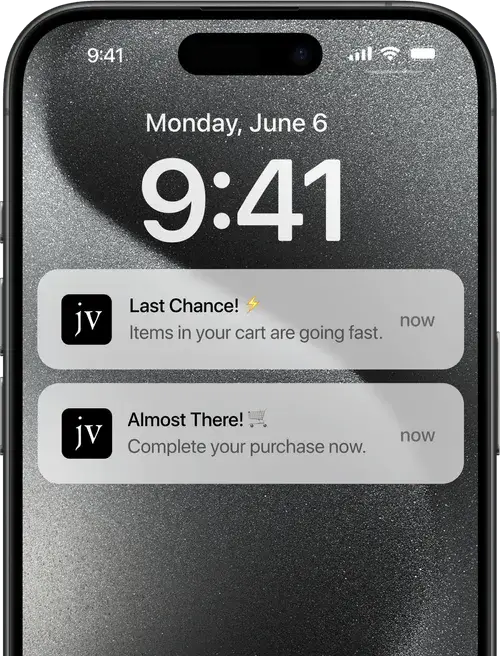
    1. “Hey [First Name], your cart is waiting! Checkout now with one click.” (Sent 2 hours post-abandonment)
    2. “Almost gone! Your items might sell out soon. Complete your order now.” (Sent 24 hours later)
    3. “Final reminder: Your cart disappears soon! Act now.” (Sent 48 hours later)
    __wf_reserved_inherit

    Given that over 85% of carts are abandoned on mobile devices, it’s crucial that your push notifications are well-optimized and include a prominent, mobile-friendly CTA that links directly back to a streamlined checkout process.

    If you’re not using push notifications for abandoned carts, you’re leaving money on the table. Push is the perfect tool to follow up with app users and recover lost revenue.

    If you don’t have an app yet, check out Vendrux. We help you build the perfect mobile app, with a native experience that requires no rebuilding or custom development. And best of all, you’ll have an abandoned cart sequence built in, ready to turn on and drive revenue at the click of a button.

    Read to learn more? Book a free consultation here to see how Vendrux can help you grow LTV and boost profits.

    Personalization & Segmentation: The Secret Sauce

    To take your cart recovery game to the next level, personalization is key. Segment your abandoners and tailor your messaging accordingly:

    • VIP Shoppers: Recognize and reward your best customers with exclusive perks like free expedited shipping or bonus gifts to incentivize them to complete high-value orders.
    • New vs. Returning Customers: Customize your approach. Offer new buyers a first-purchase discount while emphasizing loyalty rewards for existing customers.
    • High-AOV Carts: For your biggest abandoned carts, consider offering white-glove service via personal SMS outreach to close the sale.

    The more relevant and targeted your abandoned cart communications are, the higher your recovery rates will climb. Dig into your data and let it guide your personalization strategy.

    Bonus Tactics to Supercharge Your Recovery Rate

    Beyond the core email, SMS and push strategies, here are some additional plays to incorporate:

    • Dynamic UGC: Feature real-time customer reviews and testimonials in your abandonment follow-ups for potent social proof.
    • Exit-Intent Popups: When a shopper goes to bail, trigger an exit popup with an enticing, limited-time offer.
    • Gamified Discounts: Make converting fun with gamified popups like spin-to-win wheels or mystery offer reveals.
    • Retargeting Ads: Build retargeting audiences of cart abandoners and reach them with highly-relevant ads via paid social and Google Display Network.

    Key Takeaways & Execution Blueprint

    To put all these strategies into action and start recovering more abandoned carts, here’s your step-by-step playbook:

    1. Implement your core abandoned cart email sequence with the three key messages outlined above. Remember: timing is critical. Kick off your sequence within 1 hour post-abandonment for optimal results.
    2. Layer on SMS follow-ups, keeping messages ultra-focused on driving direct conversions. Prioritize 2-way engagement.
    3. Set up an abandoned cart push notification sequence to complement your email and SMS efforts. Make sure your CTAs are dialed in for mobile shoppers.
    4. Add in personalization and segmentation based on factors like customer lifetime value, average order value, and new vs. returning buyer status. Your goal is to tailor incentives and messaging to specific shopper segments.
    5. Experiment with at least one of the bonus tactics like exit popups, dynamic UGC, or retargeting ads to add an extra conversion lift.
    6. A/B test every element of your abandoned cart sequences relentlessly. From subject lines to offer types, send times to copy – leave no stone unturned in your pursuit of optimization.
    7. Monitor your results and continue honing your approach based on performance data. Cart recovery is an ongoing process of iteration and improvement.

    By implementing this multi-channel, full-funnel strategy, you’ll be well on your way to turning abandoned carts from lost revenue into a major growth opportunity for your ecommerce business. Stay focused, get creative, and happy recovering!
  • How to Drive More Revenue With Abandoned Cart Emails

    How to Drive More Revenue With Abandoned Cart Emails

    Only 3 out of every 10 shoppers who add a product to their cart will actually complete their purchase.

    This figure is likely to keep rising, as the mobile shopping market share is growing, and the average cart abandonment rate on mobile is higher – 86.7%, compared to 69.8% on desktop.

    That’s a lot of revenue left on the table. But the good news is that there’s something you can do about it right now, to recapture a significant amount of would-be lost revenue, with very little effort required.

    Keep reading and we’ll explain how to set up abandoned cart emails to recover thousands in lost revenue, plus an underutilized cart abandonment tool that can have an even bigger impact on your bottom line.

    Vendrux can help you add tens of thousands in new and incremental revenue (for minimal cost) by launching a mobile app. Check out our Ecommerce App Revenue Calculator to see how much new revenue you could add.

    What Are Abandoned Cart Emails?

    Abandoned cart emails are automated emails sent to shoppers who added a product to their cart, but never completed their purchase.

    These emails contain a reminder about the products waiting in their cart, and sometimes a small incentive (such as a discount) to convince the shopper to come back and complete their checkout.

    Why Abandoned Cart Emails Are So Powerful

    According to Klaviyo, abandoned cart emails have an average revenue per recipient (RPR) of $3.65, while the top 10% of performers generate $28.89 RPR. 

    Both these figures are the best out of any kind of email flow.

    Their data also shows the following for abandoned cart emails:

    • Average open rate of 50.5%
    • Average click rate of 6.25%
    • Average conversion rate (order placed from the email) of 3.33%

    Omnisend found these statistics for abandoned cart emails:

    • Average open rate of 46.6%
    • Average click rate of 5.7%
    • Average conversion rate of 2.56%

    Both these datasets show that roughly half of the people who click on a link in an abandoned cart email make a purchase.

    Few, if any, email campaigns can compare to this.

    It’s even better when you consider the ROI of abandoned cart campaigns.

    You set up your workflow once and, other than making small tweaks over time, you don’t need to do anything else.

    The campaign runs in the background of your business, recovering revenue on autopilot, almost certainly delivering a positive ROI.

    How Much Can I Recover With Abandoned Cart Emails?

    Let’s assume the following averages:

    • 70% cart abandonment rate
    • 3% conversion rate for abandoned cart emails

    A site doing $15k in revenue per month, with an average order value of $50 and 300 orders per month, could recover $1,050 per month from abandoned carts.

    That’s a 7% increase in revenue, just by setting up an automated email sequence that you don’t need to touch again.

    If you were to improve your conversion rate from these emails (the top 10% of performers on Klaviyo have a 7.69% conversion rate from abandoned cart emails), you’d be looking at a 17.73% increase in overall revenue.

    Realistically, your results will likely be a little lower, as not all abandoned carts have an email attached, and you won’t be able to send abandoned cart emails to shoppers without an account (or who aren’t logged in).

    But even assuming you only reach half of your abandoned carts, you could increase your revenue by at least 3-4% with a cart abandonment workflow.

    Why do shoppers abandon their carts? There can be many reasons, and we broke down the most common – plus what you can do about it – in this article.

    How to Set Up a Cart Abandonment Email Workflow

    Cart abandonment workflows are usually very easy to set up, assuming you’re using any popular email marketing automation software or eCommerce platform.

    These tools generally have workflow templates in place already, and as long as you’re sending the requisite data to your email tool, there’s little left for you to do but customize the emails with your company’s branding and voice.

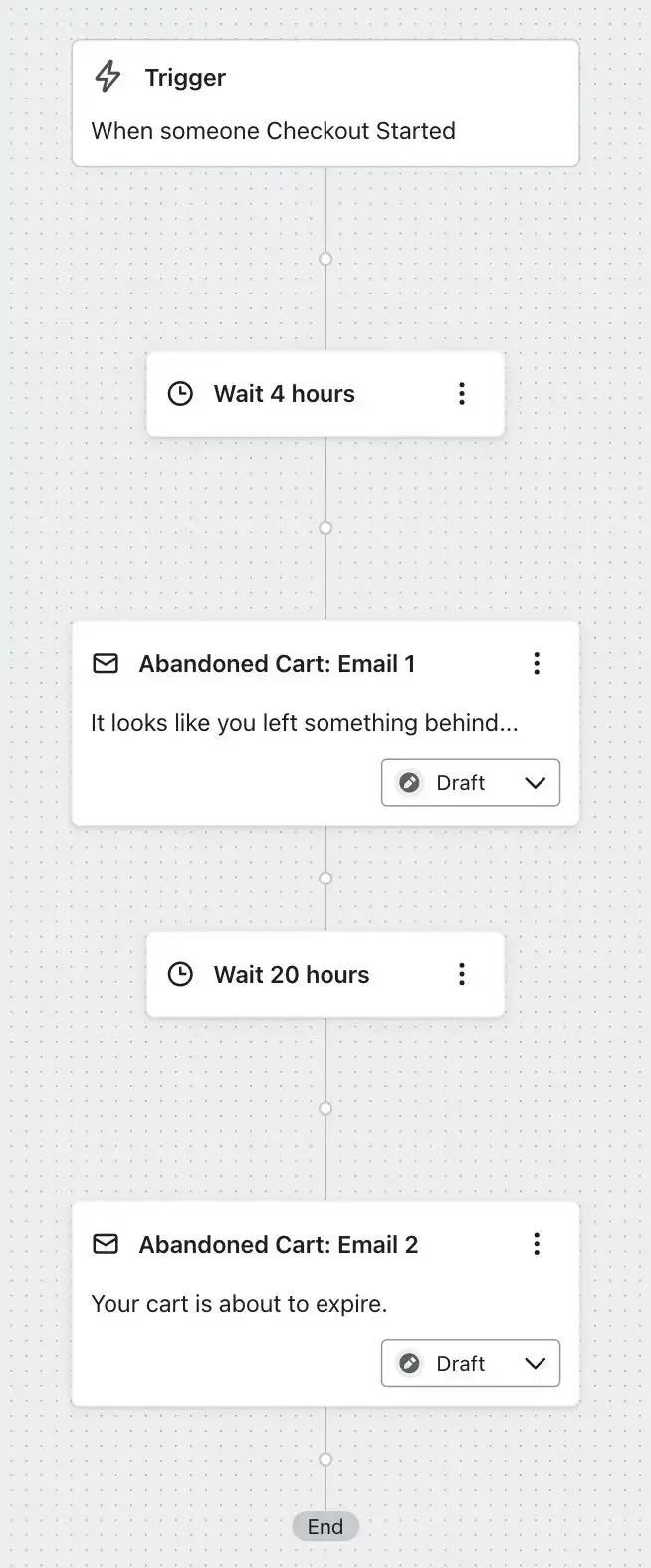
    This article walks you through setting up a cart abandonment workflow in Klaviyo. Here’s an example of what your workflow might look like:

    __wf_reserved_inherit

    Other tools have similar documentation for you to follow.

    Before we get into some examples of abandoned cart emails, here are a few tips and best practices to follow for abandoned cart email campaigns.

    Delay

    You’ll need to decide on the right delay between the user starting the checkout process (or adding a product to their cart) and initiating the abandoned cart workflow.

    You don’t want to send it too early – you’ll turn customers away if they get bombarded with a cart reminder email when they’re still shopping. But too late, and their interest may have waned, or perhaps they bought the product somewhere else.

    It’s generally recommended to start abandoned cart emails after a 2-4 hour delay. But you may want to test this yourself to decide on the optimal timing.

    Personalization

    Like any email, you want to make it feel personal, and not like a generic, automated email.

    Use the customer’s name, if you have it. If not, use a fallback value that doesn’t make it obvious that something was supposed to be there.

    Most importantly, customize the email with the details of the product(s) in the customer’s cart – name, price, quantity, images.

    Show the customer what’s waiting for them.

    Follow-up Emails

    Most abandoned cart sequences don’t stop at one email. You’ll get better results with a series of emails, catching those whose first email slipped through the cracks, or who are a little more difficult to convert.

    The ideal number of emails is two or three (though feel free to test this yourself). This gives you multiple chances to capture the sale, while more than three emails starts to feel overbearing, and is more likely to have a negative impact (i.e. unsubscribes, bad image for your brand).

    Space them out around 24-48 hours apart – don’t bombard your customer with emails every five minutes.

    Make sure you set up your workflow so that if the customer converts from the first (or second) email, they’re removed from the sequence.

    You can also use the series as an opportunity to push harder for the sale for those who don’t convert straight away.

    The first email can be a friendly reminder, then you follow up with an incentive in the following emails for those who still haven’t converted.

    Urgency, Scarcity & Other CRO Techniques

    Abandoned cart emails should be designed with the same CRO techniques in mind as product pages and checkout pages.

    You’ll often see these emails lean heavily into urgency and scarcity. It’s much easier to convince someone to take action and complete their purchase if you instill FOMO (Fear of Missing Out), and make them feel like they have limited time to act.

    Wording like “check out now before it’s too late”, or “time’s running” is a simple yet effective way to encourage action.

    If there’s a limited-time discount attached to the products in their cart, or the products are low in stock, use this in your email copy (and perhaps even the subject line) to deliver an even bigger hit of FOMO.

    Subject Lines

    There’s no straightforward formula for the ideal subject line.

    The best subject lines are ones that raise curiosity and make the customer want to know more.

    Here are some examples of abandoned cart subject lines:

    • You left this behind
    • Come on back…
    • Hey, you forgot something…
    • A Last Glance at Your Selections

    Keep it short, sharp, imbue a sense of mystery, and try to fit in some kind of urgency or scarcity.

    As you’ll see from our abandoned cart email examples in the next section, many brands use almost the exact same subject lines.

    Do you want to go with what everyone else is doing? Or try something different, to make your brand stand out?

    Ultimately, you’ll want to test this to find the approach that best resonates with your audience.

    13 Real Abandoned Cart Email Examples

    We dug up a number of real abandoned cart emails from successful eCommerce brands, to give you some examples to use for inspiration.

    For each, we’ll list a few key takeaways that will help you craft effective cart abandonment workflows for your own brand.

    Cocofloss

    Subject line: You’re *so close* to an even-more-sparkling smile

    __wf_reserved_inherit
    Visit Website
    • Well designed, visually striking email.
    • Email links back to their Black Friday special, which increases urgency.
    • Product name and details could be more more prominent.

    Allbirds

    Subject line: Your Cart Feels A Little Left Out…

    __wf_reserved_inherit
    Visit Website
    • Two clear CTAs makes it easy for the shopper to get back to their checkout.
    • Product details are clear and center of the email.
    • Short piece of copy in the header is clear, convincing, and instills a sense of urgency.

    BLK & Bold

    Subject line: We saw you checkin’ us out…👀

    __wf_reserved_inherit
    Visit Website
    • Unique approach; short and sharp and well-designed.
    • Clear and bold CTA.
    • Doesn’t include product details in the email, which is unconventional (but may work for them).

    Maguire

    Subject line: Andrew, left something behind?

    __wf_reserved_inherit
    Visit Website
    • Personalized subject line grabs attention.
    • Puts the product first, reminding the customer of what they were looking at.
    • Product recommendations below seek to sell the customer on alternative options.

    Bruvi

    Subject line: Come on back…

    __wf_reserved_inherit
    Visit Website
    • Short, sharp, and effective.
    • Visually striking design.
    • Gives all the key information in a small space – great for mobile users.

    Italic

    Subject line: Re: Your Cart—Now 30% Off

    __wf_reserved_inherit
    Visit Website
    • Black Friday sale banner gives an extra incentive for customers to come back and shop.
    • Large product image can’t be missed.
    • Sparse product details – could benefit by adding product name and pricing to the email.

    ABLE

    Subject line: Oh no! You left something behind

    __wf_reserved_inherit
    Visit Website
    • Attention-grabbing subject line.
    • Doesn’t overdo it with copy – lets the images sell themselves.
    • Two clear CTAs.

    Peak Design

    Subject line: Your phone (but way, way better).

    __wf_reserved_inherit
    Visit Website
    • Visually striking.
    • Clearly shows the products (and associated details) left in the user’s cart.
    • Personalization has gone awry (placeholder for customer’s name in copy) – always test your emails, and add a natural fallback value.

    John Varvatos

    Subject line: Did You Leave Something Behind?

    __wf_reserved_inherit
    Visit Website
    • Tried & true subject line.
    • Prominent product image – reminds the user of what they could be missing out on.
    • Uses free shipping and first-time purchase discount as a strong incentive.

    Adidas

    Subject line: Hey, you forgot something…

    __wf_reserved_inherit
    Visit Website
    • Simple, very straightforward.
    • No confusing what this email is about.
    • “We’ll keep it for 10 days” adds a sense of urgency.

    MR PORTER

    Subject line: Have you forgotten something in your shopping bag, Mr Buck?

    __wf_reserved_inherit
    Visit Website
    • Personalized subject line stands out in the customer’s inbox.
    • Adds an extra incentive (10% discount) for the customer to finish their purchase.
    • Product recommendations to potentially drive additional revenue.

    Hyphen Sleep

    Subject line: It’s in the bag

    __wf_reserved_inherit
    Visit Website
    • Strongly pushes the unique selling point of the business.
    • Adds an extra incentive in the email.
    • Extra effort to push the sale, designed for higher-ticket items (such as mattresses).

    Saks Fifth Avenue

    Subject line: Your Toteme item is still here. You deserve it.

    __wf_reserved_inherit
    Visit Website
    • Uses product recommendations well.
    • Short, convincing copy with a sense of urgency.
    • Positive tone gets the customer in a good frame of mind.

    Abandoned Cart Email Template

    Your email marketing tool will almost certainly have pre-made templates ready for you to use. And your emails don’t need to be rocket science, anyway.

    Many of the emails you see above are not complicated. The best abandoned cart emails just:

    • Capture the customer’s attention with a short, snappy subject line
    • Remind the customer of what they have in their cart
    • Give a small nudge that the items in their cart, or any limited-time discounts, won’t be around forever
    • Have a clear CTA that makes it easy for the customer to resume their checkout.

    Following these simple tips, here’s a straightforward abandoned cart email template you can plug and play for your brand.

    Subject line: You left this behind…

    Hey, { customer name }, we noticed you left some items in your cart, and we wouldn’t want you to miss out! 

    Your picks are patiently waiting for you, but they won’t stick around forever.

    Here’s what you left behind:

    { product details }

    Hurry! We won’t be able to hold your cart forever.

    Finish your purchase now before it’s too late!

    { CTA: Reclaim Your Cart Now }

    Need help or have questions? We’re here for you. Simply reply to this email or contact our support team at { support email/phone number }.

    { end with dynamic product recommendations & company footer }

    Push Notifications for Abandoned Carts

    What if we told you there was another, even more effective way to recover abandoned carts?

    Abandoned cart push notifications are the perfect way for brands to recover lost revenue today. They’re direct, with high visibility and engagement rates, and like email, extremely easy to set up and automate.

    You don’t have to choose between email and push, either. These tools are perfect in combination with each other, helping you increase reach for your cart abandonment campaigns and recover more lost revenue.

    If you use a tool like Klaviyo, you can even set up a single workflow that features both email and push notifications, to hit customers on different touch points.

    You won’t be able to reach every customer with push notifications, but for those who are subscribed to push, you’ll likely find you get a higher cart recovery rate from using abandoned cart push notifications.

    Just look at these results from three different Vendrux users, and how much revenue they recovered over just 30 days using push notifications:

    __wf_reserved_inherit

    Win Back Lost Revenue Now

    Push notifications are reason enough, on their own, for eCommerce brands to launch an app.

    They give you a new, powerful way to go after abandoned carts, with a higher success rate than abandoned cart emails.

    Vendrux makes launching an app easy, fast, and affordable, by simply converting what you already have on your website into a mobile app.

    You’ll get your brand in the app stores, boost AOV, conversion rate and LTV for users who download the app, and add thousands of dollars in extra revenue through abandoned cart notifications.

    If you want to add potentially tens of thousands per month to your bottom line, here’s how to do it in three easy steps:

    • Step One: Set up an cart abandonment email sequence
    • Step Two: Convert your site into an app with Vendrux
    • Step Three: Turn on abandoned cart push notifications and print money

    If you want to know what’s possible, check out these case studies – just a small cross-section of the 2,000+ successful brands we’ve worked with to launch apps.

    __wf_reserved_inherit
    Just a few of the great apps we’ve built for high-revenue brands.

    Launching an app is the best thing you can do for your brand right now, with organic reach declining and mobile taking over the global eCommerce market.

    Book a free consultation now to learn more about how Vendrux can help your brand grow and thrive with mobile apps and push notifications.

  • How 5 Brands use Push Notifications to Succeed

    How 5 Brands use Push Notifications to Succeed

    Push notifications are exploding as an eCommerce channel. 

    We see this all the time with our customers. 

    In this article we’ll share five Ecommerce push notification examples. Each brand uses push strategically to drive up order value, conversions, revenue, and other key metrics.

    Read on and get some inspiration for using push notifications to grow your own business. 

    1. Sephora

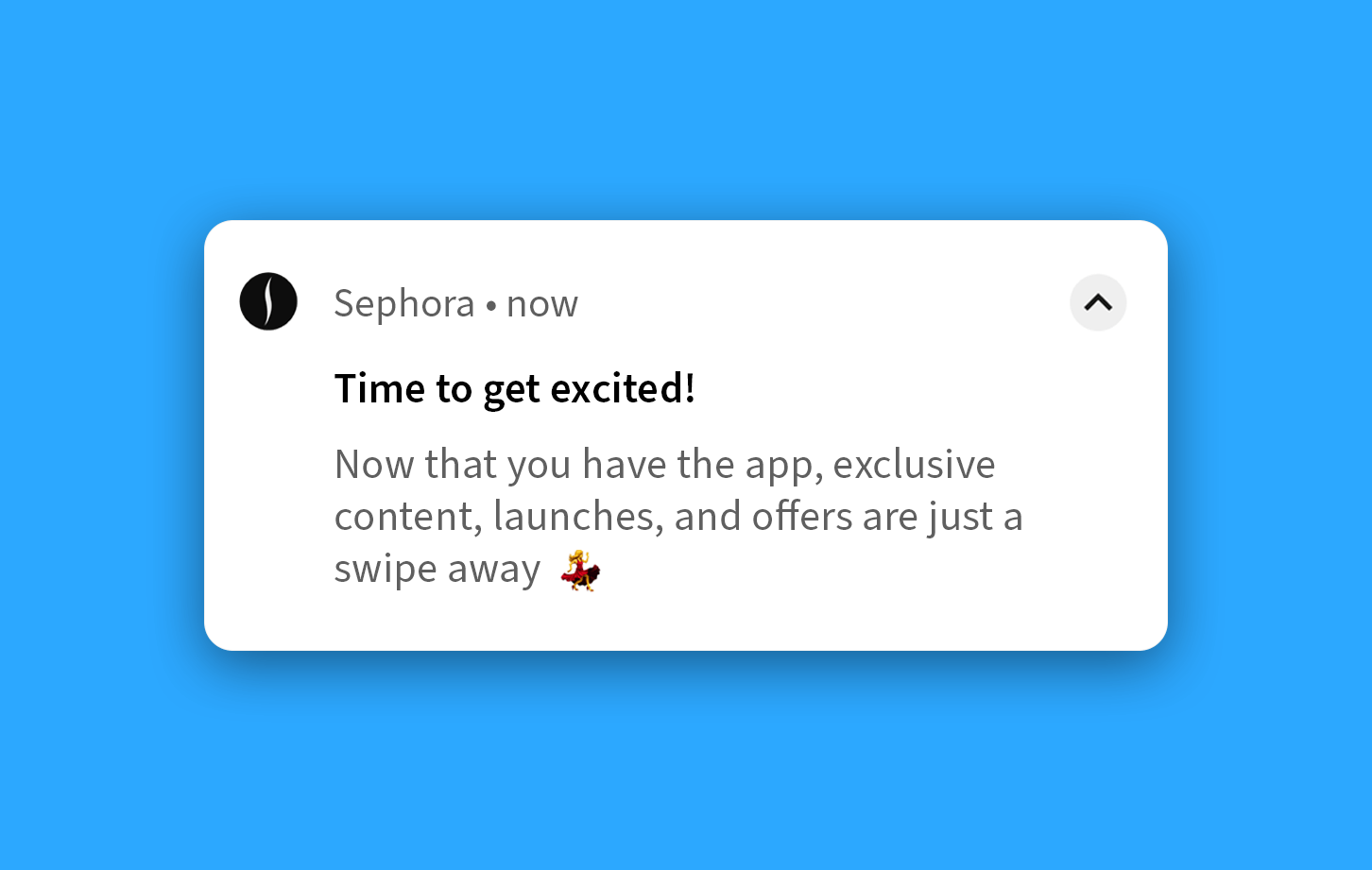
    Sephora’s mobile app has been downloaded more than 35 million times, and is a critical channel for them.

    They’re known for using push notifications skillfully and at scale. 

    Sephora is known for sending notifications about:

    • Personalized Recommendations to suggest products based on previous purchases & behavior
    • Promotions & Discounts like special deals, discounts, and promo codes
    • New Launches and the arrival of new products in stock
    • Sale Alerts and Information about upcoming sales and promotions

    They do a good job of reminding customers about products they checked but didn’t yet buy, nudging abandoned carts, and sending helpful info about special deals or nearby physical events. 

    Read more about Sephora’s marketing strategies here.

    2. H&M 

    This fashion giant uses push notifications mostly to:

    • Retarget customers
    • Cross-sell & upsell 
    • Send targeted offers based on customer history

    Their well-designed mobile app is great at recommending products that complement previously purchased items. 

    It also uses sophisticated automations and triggers to maximize engagement and order value. 

    H&M’s push strategy is based on hyper-personalized engagement, using customer browsing and purchase history to send tailored offers. This approach, along with leveraging artificial intelligence and machine learning, has driven a measurable increase in both sales and in-app engagement. 

    They particularly excel in suggesting complementary products, like recommending boots to match a recently purchased jacket. 

    3. SuperJeweler

    SuperJeweler’s push strategy is laser-focused on driving engagement and revenue.

    Image via PushEngage

    They use notifications to keep customers informed about daily deals, special offers and new products.

    They also heavily use abandoned cart notifications to recover those carts and nudge customers to complete their purchase. 

    According to PushEngage, push notifications have led to a whopping 8.2% increase in revenue for SuperJeweler. Huge. 

    Read more about SuperJeweler’s strategy in this case study. 

    4. Chubbies 

    Chubbies is an American brand focused on mens shorts and swimming shorts. 

    Their brand has a humorous, tongue-in-cheek vibe and their push notifications reflect this. 

    They treat push notifications like tweets, sending short and funny one-liners to users. 

    This helps them stand out from other brands’ more formal and sales-focused messaging. 

    Chubbies take their push messaging seriously, with a whole team working on them!

    Read more about their push strategy here. 

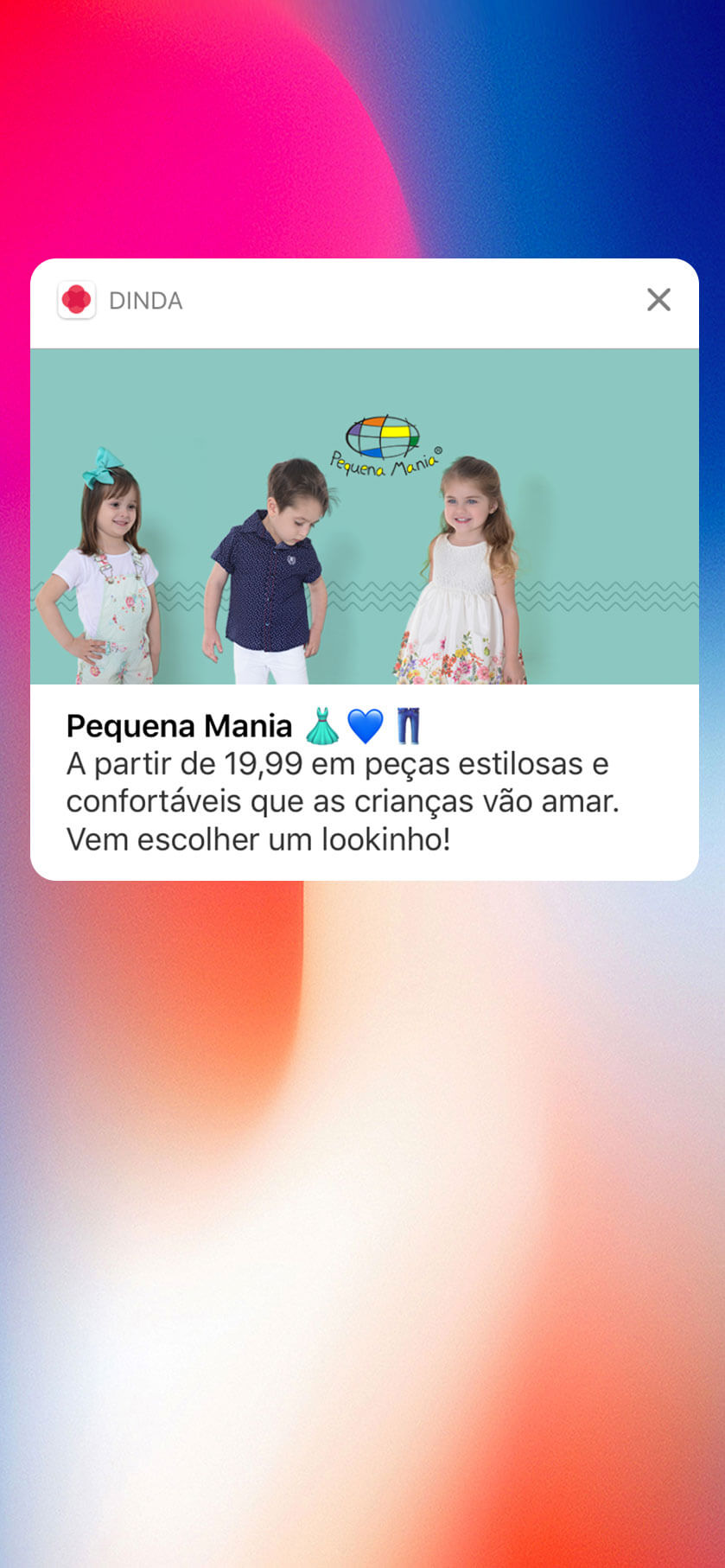
    5. Dinda

    Dinda is a Brazilian eCommerce brand focused on children’s clothing. 

    Image via Airship

    Their push notification strategy is notable for:

    • Personalized and Targeted Messaging
    • Rich Media and A/B Testing
    • Impacting revenue & engagement metrics

    Dinda sends tailored messages based on user interests and past behavior, boosting engagement and reducing churn.

    They also make use of rich media like images and emojis, and A/B test everything. This has boosted app revenue by 60%. 

    Read more about Dinda’s tactics here

    How to Use Push Notifications for eCommerce: Key Takeaways

    Some common themes have emerged through this list. See if you can work them into your own push notification campaigns:

    • Try out humor and lighthearted messages like Chubbies 
    • Leverage abandoned cart notifications like SuperJeweller
    • Use personalized and targeted notifications like Sephora 
    • Use notifications to cross sell and upsell like H&M
    • A/B test your notifications to optimize them like Dinda

    With Vendrux you can get apps just as good as Sephora, H&M, or Chubbies.

    We can build them for you for a fraction of the cost, and in just weeks through our platform refined over 5+ years and thousands of iOS and Android apps. 

    We’ve built apps for thousands of brands – including major retailers. Check out our example apps and case studies.

    We’ll get you set up to send unlimited push notifications, so you can test out all the above tactics and more. We also built custom tools for abandoned cart notifications, handling the process for you and nudging your customers to complete those checkouts. 

    Read more about Vendrux apps, and speak to one of our app experts to learn how we can build your app store presence.

    Get started with a free preview of your app and book a demo call today….

  • What is a Native App?

    What is a Native App?

    A native app is a mobile app made for one specific platform (typically iOS or Android), which users download directly to their phones.

    Native apps are different from other mobile solutions, like hybrid apps and Progressive Web Apps. Hybrid apps wrap web code in an app shell. Progressive Web Apps (PWAs) make websites feel like apps. Native apps are built from scratch for each platform, using Swift (for iOS apps) and Java/Kotlin (for Android apps).

    Native frameworks let apps use all phone features, like the camera, GPS, push notifications, and secure storage. Native apps also run faster and smoother than other options.

    The Distinction Between Native Apps and Hybrid Apps

    Technically, a native app is different from a hybrid app (or a cross-platform app, like an app built using React Native or Flutter).

    However, the term “Native App” is often used to describe all mobile apps that users can download and run locally on their phones.

    So you’ll generally see apps broken down into two categories:

    • Web apps (including Progressive Web Apps): interactive websites that run in the browser.
    • Native apps (including hybrid and cross-platform apps): mobile apps that a user can download from the app store and use on their phone.

    For a deeper look at the differences between Native, Hybrid and Web apps, check out this article.

    Why Mobile Apps Matter for Online Stores

    Mobile apps (including native and hybrid apps) convert better, and contribute significant revenue potential for ecommerce businesses (and other types of online business).

    Brands see 2-3 times higher purchase rates in apps than on mobile websites. Some brands report app users spend 4-7 times more over their lifetime.

    Why Do Apps Convert Better Than Mobile Websites?

    Native apps work better because they’re built for phones. They load faster. Scrolling is smoother. Touch responses happen instantly. These small improvements add up when you’re shopping on a small screen.

    Apps also remove common shopping headaches. Users stay logged in, payment info stays saved, and checkout takes just a few taps with Apple Pay or Google Pay. On mobile websites, users often re-enter info and deal with slower loading speeds.

    There’s also a mental difference. When someone downloads your app, they’re choosing to connect with your brand. The app icon reminds them of you every day. The full-screen experience feels more focused than a web browser.

    Data backs this up. Brands see about 63% more sales in apps than on mobile web. App users also browse more products and engage more with content.

    How Apps Build Customer Loyalty

    Apps excel at keeping customers coming back. As ads get more expensive, and traditional retention channels like email are becoming saturated, apps give brands a direct line to their best customers.

    Push notifications are the star feature. Unlike emails that get lost in crowded inboxes, push messages appear instantly on phone screens. They have much higher open rates. Brands can send timely alerts about new products, restocks, or sales.

    Beauty brand Recode Studios gets 17% of people to buy when they send cart reminder pushes. You can’t do this with mobile web users.

    Apps also work great for loyalty programs. About 42% of people download apps to show brand loyalty. And 60% stay loyal because of app-only perks. The cycle reinforces itself. Your best customers download the app. They get the best deals, and their loyalty grows even stronger.

    Apps can personalize better than websites. Since users stay logged in, you can greet them by name. Show their loyalty status. Display products based on what they’ve bought before.

    This makes shopping feel more personal, and improves the user experience – driving higher conversion rates and retention.

    The Business Case for Apps

    Native apps have the potential to drive real business results for online brands.

    Let’s look at real results from different brands.

    • Hobbiesville found that 10% of customers use their app. But those customers bring in 40% of revenue. The app converts 3 times better than their mobile site. Push messages work twice as well as emails.
    • BrüMate saw 43% more conversions in their app. Sales per visit were 56% higher. Within months, the app drove 10-20% of all sales.
    • Rainbow Shops gets 10% of online revenue from their app. App shoppers have 7 times higher lifetime value. They spend 10% more per order.

    The pattern is clear. App users buy more often and spend more money. As long as you can keep startup costs and overhead low, the return makes sense.

    How to Build an App Without Breaking the Bank

    High costs used to stop brands from building apps. But new tools have changed that.

    Instead of building custom native apps, many brands now convert their mobile website into an app. They use special frameworks or service providers, like Vendrux, which costs 95% less than building from scratch.

    The difference in quality between a native app and a hybrid app (which is what you get with a service like Vendrux) is rapidly decreasing.

    Sleefs said their hybrid app was “99% as good as native.” They got 30% higher order values and 40% better conversions through their hybrid mobile app.

    You don’t need fully custom apps to see results.

    Start small. Launch a basic version of your mobile site as an app. Add native features like push notifications. Then improve based on user feedback.

    This lets you start making money from your app without huge startup costs.

    One key is to make sure your app connects to your existing systems. Customers should have the same experience everywhere.

    Hybrid apps make this easy. You can maintain one shared codebase, and ensure the experiences are fully synced across all platforms.

    When going live, launch to your best customers first. Email loyal shoppers with an invite and first-purchase discount. They’ll give you feedback before you launch to everyone.

    Making Your App Successful

    Building an app is just the start. Success comes from ongoing work to keep users engaged. Here’s how top brands do it.

    Push Notifications – Your Secret Weapon

    Push notifications need strategy. Nobody wants spam on their phone. But done right, they’re incredibly powerful.

    Segment Your Messages

    • Don’t blast everyone with the same message
    • High-value customers should feel like VIPs
    • New users need different messages than loyal fans
    • Someone who bought shoes doesn’t need baby clothes alerts

    Use Smart Targeting

    • Location matters: promote rain boots when rain is coming to their area
    • Behavior matters: remind someone about items in their cart
    • Timing matters (send lunch deals at 11 AM, not midnight)

    Make It Personal

    • Use their name
    • Reference their past purchases
    • Mention their loyalty status
    • Show you know what they like

    Personalization That Converts

    Since users stay logged in, you can create magic. Here’s what works:

    Smart Product Display

    • Show items in their size first
    • Display their favorite categories up front
    • Hide products they never buy
    • Feature complementary items to past purchases

    Easy Reordering

    • One-tap reorders
    • Show “buy again” buttons for consumable products
    • Send reminders when they might run out
    • Make subscription setup simple

    Curated Collections

    • Create “Picked for You” sections
    • Use quiz results to guide recommendations
    • Show trending items in their style
    • Feature new arrivals in their preferred brands

    Loyalty Programs That Work

    Apps and loyalty programs are perfect partners. Here’s why:

    App-Exclusive Benefits

    • Give app users early access to sales
    • Offer bonus points for app purchases
    • Create app-only products or colors
    • Send surprise rewards through push notifications

    Seamless Integration

    • Show point balance prominently
    • Make redemption one-tap easy
    • Display progress to next reward level
    • Celebrate milestones with special offers

    VIP Treatment

    • Create tiers that unlock in-app features
    • Give top customers a special app experience
    • Offer concierge chat for best customers
    • Provide exclusive content or tutorials

    Fresh Content Strategy

    Apps need reasons for people to open them. Successful brands update regularly:

    Product Launches

    • Debut new items in-app first
    • Create countdown timers for drops
    • Allow pre-orders for app users
    • Show behind-the-scenes content

    Flash Sales and Deals

    • Run app-only sales weekly
    • Create time-sensitive offers
    • Use push alerts for surprise deals
    • Reward daily check-ins

    Valuable Content

    • Add style guides and lookbooks
    • Create how-to videos
    • Share user-generated content
    • Build community features

    Interactive Elements

    • Add wishlists and boards
    • Enable social sharing
    • Create polls and quizzes
    • Let users rate and review

    The key is consistency. Update something every week. Give people a reason to open your app regularly. Soon it becomes a habit. And habits drive sales.

    Tracking Success

    To get an idea of your mobile app’s performance, watch these key metrics:

    • Downloads and Active Users: Track daily and monthly active users. Good apps retain 20-30% of users after 30 days.
    • Conversion Rates: Apps typically convert 2-3 times better than the mobile web.
    • Order Values: Track average order values in your app (mobile apps generally drive more value per session/order than mobile web).
    • Lifetime Value: This is your most important metric. App users often spend 4-7 times more over time.
    • Revenue Share: Successful apps drive 10-30% of online sales (some categories see even higher percentages).
    • Push Performance: Track push open rates and conversion rates, as well as optin rates (you should aim for at least 60-70% optin rates for push notifications).

    Common Mistakes to Avoid

    • Don’t assume people will find your app. Promote it on your website. Email customers about it. Give reasons to download.
    • The app can’t be worse than the website. Users expect apps to work better, not worse. Poor apps, with recurring bugs or missing features, hurt your brand.
    • Don’t forget maintenance. Apps need updates for new phone features and bug fixes. Plan for ongoing costs.
    • Don’t overspend at the start. Prove the concept with a simple app before adding expensive features.
    • Follow app store rules. Each app store store has specific guidelines to follow. Breaking them delays launch or gets your app removed.

    The Future of Shopping Apps

    Several trends are shaping the future:

    AI Integration

    Artificial intelligence will transform how apps understand and serve customers.

    This isn’t science fiction. It’s happening right now.

    Apps will get smarter at recommending products. They’ll use weather, trends, and preferences to personalize shopping. Apps will guess what you need before you know.

    AR Shopping

    Augmented Reality removes the biggest online shopping fear: “Will this work for me?” Native apps can use phone cameras in ways websites can’t.

    New apps will let you try on makeup virtually. See furniture in your room. All this will make apps much more useful than websites.

    Better Web Apps

    PWA technology is improving. More brands will use both – PWAs for everyone and native apps for best customers. We’ll become used to seeing more app-like experiences on the web.

    Privacy Focus

    First-party data becomes more valuable as tracking gets harder. Apps provide this data, but customers want transparency.

    Apps collect valuable data with permission. As long as this permission is granted, and apps are transparent about how they collect and use data, apps will become a crucial tool for brands to use to understand their customers.

    More Features

    Apps might expand beyond shopping.

    While more common in Asia, the super app concept is spreading. Apps are becoming more than shopping destinations.

    Think resale features or social communities within shopping apps, as well as mobile payment solutions (like Alipay in China).

    Your Next Steps

    Native apps are no longer optional for serious online brands. They drive more sales, create loyal customers, and provide a direct connection to shoppers.

    Success comes from using app strengths well. Push notifications, easy checkout, and personalization create real value. Start simple, measure everything, and improve based on data.

    Remember that apps need ongoing attention. Plan for marketing, updates, and new features. The brands winning with apps treat them as living products.

    As mobile shopping grows and ads get pricier, apps offer a path to better customer relationships. The question isn’t if you need an app. It’s whether you’re ready to build one that truly serves your customers and grows your business.

    Ready to turn your website into a high-performing mobile app?

    Vendrux helps ecommerce brands launch fully branded apps that drive more conversions, higher order values, and better retention (without rebuilding from scratch).

    We handle everything for you, from setup to App Store approval, with ongoing support to guarantee ROI.

    If you want to launch your own mobile app, without the tax of custom development, start by getting a free preview of your app now.

  • What Are App Clips? Are They a Viable Alternative to Native Apps?

    What Are App Clips? Are They a Viable Alternative to Native Apps?

    Friction is a major factor in conversions.

    77% of consumers keep five or fewer retail apps on their phone at any time. 78% of users won’t download an app for a one-off transaction. 80% of younger shoppers may abandon a purchase entirely if forced to install an app to complete it.

    You want customers to experience your mobile app’s superior features and lock into your ecosystem. But the very process of requiring an install can drive them away.

    That’s what App Clips are designed to combat this. Let’s examine what App Clips are, and whether they’re a tool worth using.

    What Are App Clips, And How Do They Work?

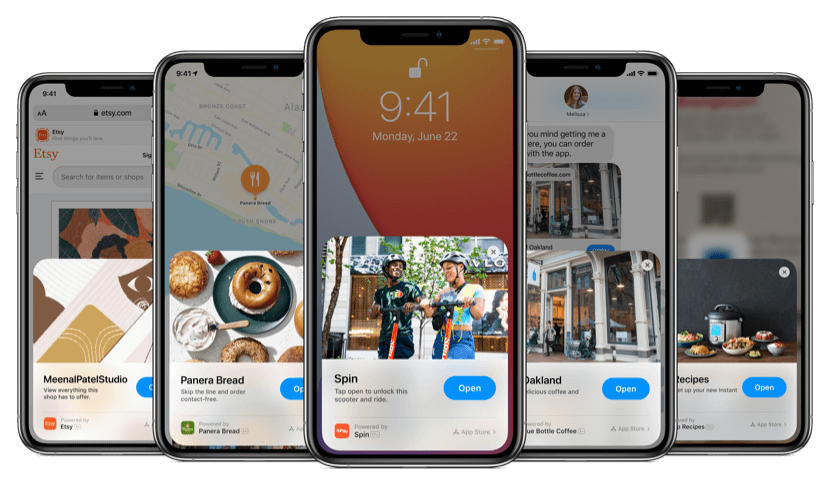
    App Clips are a small part of an app, that a user can open and interact with, without having to download and install the app.

    Think of them as lightweight mini-apps. They launch instantly on demand. Users can perform focused tasks without downloading your full app.

    __wf_reserved_inherit
    image via Apple

    Common examples include ordering food, paying for parking, or renting a bike. App Clips load as a small card on the iPhone screen. One tap opens the mini-app, and users complete their task. Then the App Clip can prompt them to download the full app.

    App Clips are built into your main iOS app bundle. They’re not listed separately on the App Store. They remain temporary on the user’s device and are automatically removed after inactivity.

    Despite being temporary, App Clips offer native iOS capabilities. They can use Apple Pay for one-tap payments and Sign in with Apple for instant account setup. They can even send push notifications for up to 8 hours after use.

    Users encounter App Clips through specific entry points:

    • Scanning QR codes or Apple’s App Clip Codes
    • Tapping NFC tags in physical locations
    • Clicking App Clip links in Safari, Messages, or Mail
    • Via Apple Maps place cards
    • Through Siri Suggestions
    __wf_reserved_inherit
    App Clip codes, via Apple’s documentation

    App Clips are size-limited (originally 10 MB, now up to 15-50 MB depending on iOS version). This means they download and start in just seconds.

    An App Clip is not a standalone app. It’s a “teaser” of your app’s functionality. You must have a full iOS app to offer an App Clip. The Clip should focus on a single, high-value use case with no more than 3–5 screens.

    The Benefits of App Clips

    App Clips tackle the biggest friction point in mobile commerce: the install barrier.

    Many retailers struggle with this. Convincing customers to download a 100+ MB app for a single purchase is hard. Many users suffer from “app fatigue.”

    This creates the “app download paradox.” You want users to experience your app’s superior features. But requiring an install often drives them away.

    App Clips solve this directly. They let customers access a native app experience immediately. No App Store trip. No install. This removes friction and captures users in the moment of intent.

    This dramatically improves conversion rates.

    • Ecommerce flows using App Clips see 35–50% higher conversion compared to traditional flows that force App Store redirects or mobile web.
    • One fast-casual restaurant chain saw first-time user order completion jump to 72% with App Clips. Only 34% completed orders when forced to download the full app first.
    • One analysis found 82% higher transaction completion with Apple Pay in App Clips versus mobile web checkout.
    • One study found App Clips cut a typical 6-step signup flow down to 2–3 steps, yielding a 67% decrease in abandonment.

    App Clips let brands “meet customers where they are.” You can offer interactive experiences at various touchpoints. Scan a code on a product box to demo it instantly. Tap a link in an email for a personalized offer. Use Apple Maps to order from a store in one tap.

    The Downsides Of App Clips

    While App Clips are a great way to increase conversions, there are some important trade-offs you’re making, especially when comparing App Clips to native apps.

    Reduced User Retention

    App Clips are short-lasting by design.

    Users don’t “keep” them like installed apps. This means lower long-term retention compared to full app downloads. You lose the stickiness that comes with having your app icon on someone’s home screen.

    With a full app install, users see your brand daily. They get regular push notifications. They’re more likely to return for repeat purchases. App Clips don’t provide this ongoing presence.

    Limited Engagement Depth

    App Clips are designed for single, focused tasks. You can’t build the deep engagement patterns that full apps allow.

    Features like comprehensive user profiles, complex loyalty programs, or extensive browsing histories don’t work well in the Clip format.

    Missed Notification Opportunities

    App Clips can send push notifications for 8 hours after the user opens it. This is nothing compared to the ongoing notification capabilities of installed apps.

    You miss opportunities for re-engagement campaigns, cart abandonment emails, and personalized push notifications. You only get a limited window to be able to commiunicate with the customer, and then they’re gone.

    Harder To Build Habits

    Installed apps become part of users’ daily routines. App Clips are more transactional – users invoke them for specific needs but don’t build habits around them.

    Platform Limitations

    App Clips only work on iOS 14+. If your audience skews toward older iOS versions or Android, you’re missing a significant portion of potential users.

    Lower Discoverability

    Unlike apps in the App Store, App Clips don’t have organic discovery mechanisms. Users can’t browse or search for them. You must drive all traffic to your App Clip entry points.

    Data Collection Constraints

    App Clips have privacy restrictions that limit data collection compared to full apps. This can impact your ability to build detailed user profiles or track long-term behavior patterns.

    The key is viewing App Clips as a top-of-funnel tool rather than a replacement for full apps. Use them to demonstrate value and convert skeptical users into full app downloads. Don’t expect the same retention and engagement metrics you get from installed apps.

    How App Clips Compare To Android Instant Apps (Google Play Instant)

    Google’s Android Instant Apps are the closest equivalent to App Clips. Both let users try app portions immediately without full installation.

    Here are the key differences between App Clips and Instant Apps:

    Access: App Clips trigger “in the wild” – via links, QR codes, Maps, Siri. They work completely outside the App Store. Android Instant Apps can be discovered through the Play Store as well as web links.

    Technology: Android Instant Apps require developers to modularize their app and upload instant-enabled APKs to Google Play. Apple’s approach is more straightforward – you add an App Clip target to your Xcode project.

    Adoption: Neither solution has become mainstream yet. By many accounts, Instant Apps never caught on at scale. App Clips haven’t seen widespread adoption either since launch.

    Best Use Cases for App Clips

    Here are some potential use cases for App Clips in various industries.

    Retail And Fashion

    Deploy App Clip Codes on in-store displays or print ads. A fashion retailer could place a code on a window poster that opens a “lookbook” App Clip. Users instantly see a curated catalog or AR overlay, then get prompted to download the full app for a discount.

    Beauty And Cosmetics

    An App Clip can let users instantly try products virtually. Imagine scanning a QR code at a makeup counter to launch a “virtual try-on” App Clip that shows how a lipstick shade would look – without installing the brand’s app.

    Food Service And Delivery

    Panera Bread’s App Clip is a great example. In Apple Maps, when you find a Panera location, there’s an “Order Food” button. This opens Panera’s App Clip, allowing complete order and Apple Pay payment without the full app.

    __wf_reserved_inherit
    Source

    One restaurant chain’s App Clip ordering flow had over double the conversion rate of their previous “install app to order” flow.

    Fitness And Wellness

    A gym could put an App Clip code at the entrance saying “Try a Free Workout.” Scanning opens a Guest Pass App Clip where users sign in with Apple ID and receive a one-time pass to enter.

    Travel And Hospitality

    Caesars Entertainment in Las Vegas launched an App Clip for hotel guests. By scanning a code on property, visitors access a “digital concierge” App Clip that helps them navigate the resort and book restaurant reservations.

    App Clips let you deliver app functionality exactly when and where users need it. This drives higher engagement in contexts where asking for an app install would stop the journey cold.

    The Strategic Case for App Clips in Mobile Commerce

    There is growing noise for App Clips as a low-friction alternative to native mobile apps.

    App Clips let you harness the conversion and UX benefits of a native app (including push notification follow-ups for up to 8 hours). It makes sense that you’ll see significantly more conversions by showing someone an App Clip than asking them to download your app.

    But this thinking is flawed. You shouldn’t be thinking of App Clips vs Native apps. The two serve vastly different purposes.

    An App Clip brings short-term benefits. It’s better for immediate conversions, but you lose contact with the customer after 8 hours.

    A Native App is designed for retention and long-term value. It’s not about an instant CRO boost, but driving value from building a long-term relationship with the customer, and turning one-time buyers into loyal, repeat customers.

    Thinking that App Clips are a replacement for native apps is short-sighted. There’s a place for them. You could use App Clips in ads (in place of links to your mobile website), or for in-store experiences (like virtual try-ons or menus).

    But you’ll still want to get people to download your native app, for a long-term touchpoint that’s going to drive more sales and revenue over time.

    The Bottom Line (App Clips Are Not a Replacement for Native Apps)

    App Clips provide instant app experiences, without the friction of asking someone to download an app.

    They let users complete tasks in seconds, with no commitment, leading to higher conversion rates.

    However, understand that the benefits of App Clips are short-term; and if you think that a Clip is a replacement for a native app, you’re missing the full picture.

    The best brands will still have native mobile apps, providing easy access and direct connection to their best customers.

    For those customers who aren’t ready to download your app (e.g. someone just learning about your brand from a Facebook ad), an App Clip is a great way to give them a supercharged experience, with minimal friction.

    Choose your tools wisely.

  • What is Lifetime Value (LTV)? (And Why It’s the Most Important Success Metric for Ecommerce)

    What is Lifetime Value (LTV)? (And Why It’s the Most Important Success Metric for Ecommerce)

    Customer Lifetime Value (LTV) answers a key question for every ecommerce business: How much is a customer worth to our business over the long run?

    In ecommerce, LTV is the total revenue or profit a single customer will generate over their entire relationship with your business. It’s the expected total income from a typical customer’s future interactions with your brand.

    For ecommerce brands, knowing your LTV is like having a north star for decision-making. It guides how much you can spend on acquiring customers. It shows where to focus your marketing. And it reveals which customers deserve the most attention.

    Online advertising costs are rising. Competition is fierce, and understanding LTV has never been more important. It shifts your mindset from “How many sales did we get today?” to “How can we keep customers coming back for years?”

    This perspective makes the difference between a one-hit-wonder store and a sustainable brand.

    Want the latest insights into how 7, 8 and 9-figure brands are driving sustainable growth? That’s what you get with our weekly newsletter, The Retention Edge. Subscribe for free today.

    What Exactly Is LTV and How Do You Define It?

    Lifetime Value (LTV) is the total value a customer brings to your business from their first purchase to their last.

    Some businesses calculate LTV using gross profit rather than revenue. This means total revenue minus cost of goods and direct costs – showing the true profit contribution of each customer.

    Despite the name, “lifetime” doesn’t usually mean the customer’s entire lifespan. Most ecommerce brands measure LTV over a fixed period. This could be 12 months, 24 months, or 3 years from the first purchase.

    Choose a timeframe that makes sense for your business. A subscription snack box might use a 12-month LTV. A mattress brand with rare purchases might consider the first purchase as the full LTV.

    Always specify the time frame when you quote an LTV figure. Say “12-month LTV of a 2023 cohort is $X.”

    The Simple LTV Formula

    A basic formula for LTV is:

    LTV = Average Order Value × Purchase Frequency × Customer Lifespan

    This means: how much they spend per order, times how many orders per period, times how long they stay a customer.

    Example: Your average customer spends $50 per order. They order 3 times a year. They stay with you for 2 years. Their LTV would be $50 × 3 × 2 = $300.

    Modern analytics improve this by using cohort data. Track customers who first purchased in Q1 2024. See how much revenue they generated by Q1 2025. This gives you a 12-month LTV for that cohort.

    Why Does LTV Matter for Growth and Profitability?

    Here’s why LTV is vital for ecommerce businesses:

    LTV Guides Smart Customer Acquisition

    LTV works symbiotically with Customer Acquisition Cost (CAC). Together, LTV and CAC tell you if your customer acquisition strategy works.

    Say your average customer will spend $300 over their lifetime. Your profit margin on that is $150. You now have a cap on what you can pay to acquire a customer.

    The LTV:CAC ratio is a key metric for many ecommerce businesses. It compares customer value to acquisition cost. A healthy ratio is above 3:1 after three years in business.

    If your LTV:CAC is 1:1 or below, you have a problem. You’re spending as much to acquire customers as they ever spend with you. This is not sustainable.

    Companies also track payback period. This is how many months until a customer’s profit covers the CAC. In fashion retail, top brands recover acquisition costs within 1–2 months. Repeat purchases often drop after 5 months.

    In food and beverage, some brands wait up to 6 months for payback if customers have strong repeat rates.

    LTV Shifts Focus to Retention

    Early-stage brands often focus on acquiring new customers. But digital ad costs have risen. Privacy changes have made targeting harder.

    Smart brands now focus on retaining existing customers as much as acquiring new ones.

    Acquiring a new customer can cost 5-25× more than retaining an existing one. Repeat customers tend to spend more and convert more easily.

    Bain & Company found that increasing customer retention by just 5% can boost profits by 25% to 95%. This is a huge opportunity.

    Recent data shows companies now spend 53% of marketing budgets on existing customers. Only 47% goes to acquisition. This is a historic shift toward retention-focused marketing.

    Why? Repeat customers drive profitability. They often generate most revenue for mature brands. On average, 65% of a company’s business comes from repeat customers.

    Understanding LTV helps you see that the second, third, and fourth purchases are where profit is made. Not just that first sale.

    LTV Informs Product and Marketing Strategy

    Analyzing LTV reveals which customer segments, products, or channels produce higher lifetime value. You can then double down on what works.

    Example: Harper Wilde discovered that customers who bought non-underwire bras first had much higher long-term value than those who first bought underwire bras.

    With this insight, the brand could adjust marketing. They could feature the high-LTV product in ads. Or make it a starter offer to attract better customers.

    You might find customers from email referrals have higher LTV than those from discount sites.

    LTV helps answer key questions:

    • Which acquisition channels bring the best customers?
    • Which products create loyal customers?
    • What’s the quality of customers this campaign brings?

    Smart marketers look at long-term value per channel. Sometimes a channel with higher CAC works if those customers stick around longer and spend more.

    Read more: 11 Proven Ways to Increase Customer Lifetime Value for Ecommerce Stores

    How Do You Calculate and Benchmark LTV?

    To use LTV effectively, you need to measure it and understand the key metrics.

    Basic LTV Calculation

    Use the formula mentioned earlier:

    LTV = Average Order Value × Average Purchase Frequency × Average Customer Lifespan

    Example: Customers spend $75 per order and make 4 purchases over two years. LTV = $75 × 4 = $300 over 2 years.

    This approach works for quick estimates.

    Cohort Analysis for Better Accuracy

    Companies often calculate LTV by analyzing cohorts. A cohort is customers acquired around the same time. Like all customers who first purchased in January 2023.

    Track each cohort’s spending over time. See how much value they generate and how quickly.

    You might find:

    • 90-day LTV (first 3 months): $50
    • 6-month LTV: $80
    • 1-year LTV: $100

    This shows most repeat purchases happen within the first year.

    The first 2–3 months after acquisition are critical. Customers who don’t return in this window rarely become high-LTV buyers.

    Key Metrics That Drive LTV

    LTV depends on several underlying metrics:

    • Average Order Value (AOV): How much customers spend per order. Increase AOV through upselling, bundles, or free shipping thresholds.
    • Purchase Frequency/Repeat Rate: How often customers buy in a given period. Measured as orders per customer per year. Or as Repeat Purchase Rate (percentage who make more than one purchase).
    • Customer Lifespan/Retention Rate: How long customers keep buying. Can be expressed as time (“customers stay 18 months on average”) or retention metrics.
    • Retention rate: The percentage of customers who remain active.
    • Churn rate: The percentage who stop buying.
    • Gross Margin: If calculating profit-based LTV, factor in gross margin (selling price minus cost of goods, shipping, etc.).

    Typically, any improvement in the above metrics will also provide a boost in LTV. If customers spend more in each order, their lifetime value goes up. So too if they buy more often, or fewer customers stop buying (i.e. churn).

    What Do LTV Benchmarks Look Like Across Industries?

    “Good” LTV varies by industry. Here are recent benchmarks across ecommerce verticals:

    Fashion and Apparel

    Fashion brands see moderate repeat rates. Median fashion brands’ LTV curves flatten around 5 months. Top-performing fashion brands earn about $59 more per customer by month 12.

    In one dataset, apparel retailers had about a 20.2% second-purchase rate within the same year. This means only around 1 in 5 first-time buyers made a second purchase in that year (the rest were one-and-done).

    Health and Beauty

    Beauty brands enjoy higher repeat rates. Customers replenish products like cosmetics or skincare if they like them.

    Health/beauty brands had the highest conversion to second purchase – about 21.5% of new customers make a second purchase within that year.

    Top beauty brands in one benchmark added about $40 extra LTV per customer by month 12 compared to average brands.

    Many DTC brands aim to break even on CAC within Month 1. High gross margins mean even one repeat purchase can make a customer profitable.

    Food and Beverage

    This category can have frequent purchase cycles but struggles with long-term retention. Customers might tire of subscriptions or have many alternatives.

    Median food and beverage brands see customers stop reordering by Month 6.

    Top performers keep growing LTV beyond Month 12. The best food and beverage brands make $40 more per customer in the first year than the median.

    Strong brands can have longer payback periods (6+ months) because customers stick around.

    Home Goods and Furniture

    This ranges from low-cost decor to big-ticket furniture. Purchase frequency is naturally lower.

    Home & Garden brands showed the highest potential LTV among Shopify verticals. Top brands earn almost 3x the revenue in Month 1 and ended with $122 more per customer by Year 1.

    This suggests successful home goods brands excel at upselling and cross-selling. They might sell room redesign suites upfront. Or use initial purchases to drive complementary item sales.

    Health and Wellness Supplements

    Supplements have seen strong LTV growth recently. Data from Q1 2024 showed supplement brands had a 37.7% repurchase rate (up from 33.1% the prior year).

    Their retention rate was about 23.4% vs 19% the year before. This beat growth in fashion, beauty, or food.

    The driver? Heavy use of subscriptions and loyalty programs. Many supplement brands offer monthly auto-ship, which locks in repeat revenue.

    How Do Successful Brands Leverage LTV in Practice?

    Smart ecommerce companies build LTV thinking into their growth strategies. Here are some notable examples:

    HelloFresh: Predictive LTV Models

    HelloFresh uses predictive LTV models to guide marketing spend. They forecast how much a new subscriber will be worth using machine learning. Then they adjust Google and Facebook ad bids accordingly.

    They bid more for customers predicted to have high LTV (like family plan subscribers who might stay 12 months). They bid less for those likely to churn early.

    The company states: “Understanding the long-term value of customers is crucial… by forecasting this metric, we can make smarter decisions on how we allocate marketing resources for maximum impact.”

    This approach optimizes for profitable growth rather than just cheap customer acquisition.

    Sephora: Beauty Insider Loyalty Program

    Sephora’s Beauty Insider loyalty program is retail gold standard. It massively increases customer lifetime value.

    __wf_reserved_inherit

    Sephora has over 25 million loyalty members. Members account for about 80% of Sephora’s sales. Members also spend 3x more on average than non-members.

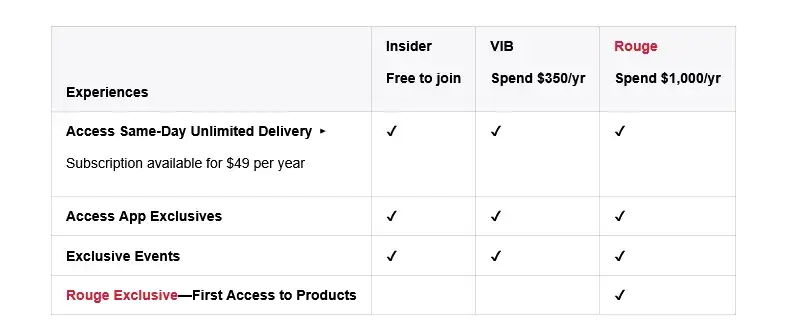
    Sephora creates a tiered rewards system (Insider, VIB, Rouge) that incentivizes higher spending with exclusive perks. Think deluxe samples, early access to products, free beauty classes.

    This gamification drives both frequency and AOV up. Customers strive to reach Rouge status by spending $1,000/year.

    Chewy: Autoship and Exceptional Service

    Chewy is known for great customer service and a successful subscription model (Autoship).

    Autoship lets customers get pet supplies delivered on schedule with a small discount. This boosts LTV by increasing purchase frequency and locking in repeat revenue.

    Chewy’s Autoship helped achieve a roughly 70% customer retention rate – extremely high in retail.

    Chewy goes above and beyond. Handwritten holiday cards. Flowers when a customer’s pet dies. 24/7 support. Easy returns.

    This customer experience focus builds trust and long relationships. Chewy turned one-off pet food purchases into multi-year subscription relationships.

    How Can You Start Tracking and Improving Your LTV?

    Improving LTV comes down to doing many things right for your customer. Here’s a practical framework:

    Measure Your Baseline LTV and Key Metrics

    Start with data you have. Use Shopify apps or built-in reports to find repeat purchase rate, average orders per customer, and LTV for customer cohorts.

    Simple spreadsheet analysis works too. List all customers acquired in 2022. Sum how much each spent through 2023. Average it. That’s your approximate 1-year LTV for 2022 cohort.

    Identify your repeat purchase rate. What percentage of customers have 2+ orders, 3+ orders, etc.? If 70% never reorder, that’s your starting point.

    Check your time to second order. If repeat customers typically take 45 days for their second purchase, engage them heavily in that first 45-day window.

    Track 90-day, 180-day, and 1-year LTV for cohorts. These short-term numbers are actionable.

    Identify High-Value vs Low-Value Segments

    Not all customers are equal. Some have 10x the LTV of others. Segment customers by value.

    Split last year’s customers into quartiles: top 25% (VIPs), middle, bottom 25%. What patterns do you see?

    Maybe VIPs all bought from a certain category. Or came through a particular campaign.

    Use RFM analysis – ranking customers by Recency, Frequency, and Monetary value. This highlights “champion” customers versus “at risk” ones.

    Optimize the Early Customer Experience

    The biggest drop-off is between first and second purchase. On average 74% of new customers are one-and-done. Convert more first-time buyers into repeat buyers.

    • Strong Post-Purchase Follow-up: Don’t treat first orders as transaction endings. They’re relationship beginnings. Send great confirmation emails. Message when products deliver. Follow up weeks later.
    • Personalize Early: Use first purchase learnings to personalize offers. Baby clothes buyers and men’s shoe buyers should get different follow-ups.
    • Capture Zero-Party Data: Engage new customers with quizzes or preference centers. Gather information they willingly share about preferences.
    • Fast, Friendly Service: Early relationship experiences decide if customers return. Good or bad service can make or break future purchases.

    Use Retention and Upsell Tactics

    Once basics are in place, use strategies to lift LTV:

    • Loyalty Programs: Simple punch cards (“10th purchase free”) or elaborate tiered rewards. Reward repeat business.
    • Subscription Options: For recurring products (coffee, pet food, vitamins, beauty), add subscription or “auto-ship” options.
    • Cross-Sell and Upsell: Increase average order value to boost LTV. Offer related products or upgrades.
    • Expand Product Lines: Meet more customer needs. Give them reasons to return and buy again.
    • Reactivation Campaigns: Target customers who haven’t purchased recently. Win them back proactively.

    Launch a Mobile App

    Your best customers want to come back, they want to spend more money with you. You’re just not making it easy for them.

    A mobile app does that.

    Apps are retention machines. They make it easy to come back, give your brand a natural touchpoint (on your customer’s device), and a cheap, direct communication channel in push notifications.

    __wf_reserved_inherit

    Mobile apps are proven to increase repeat purchase rates, customer retention, AOV, and engagement time – all of which leads to significantly higher LTV.

    Any ecommerce brand can launch their own app and boost LTV, with no rebuilding, no hiring developers, and virtually no overhead, with Vendrux. Want to see how? Get a free preview of your app now.

    The LTV Trap

    LTV is a powerful metric. But like any metric, solely focusing on LTV (without taking in a wider context) is dangerous.

    The “LTV trap” is overspending on paid acquisition because “LTV will pay it back.”

    Here’s how to avoid this:

    • Measure margin-LTV (not revenue-LTV). Look at the real profit per customer.
    • Track and optimize other metrics alongside LTV.
    • Track your payback window (as a rule of thumb, you should be making a profit from customers within two quarters at the most).
    • Only scale acquisition channels with a manageable payback window.
    • Compare actual net dollars collected to CAC every month; ignore “forecast” curves until they’re earned.

    The key is to ensure you’re not waiting a long time to pay back the cost of acquisition (unless your business model is specifically built around long payback periods.

    Building Your Brand With LTV as the North Star

    Customer Lifetime Value isn’t just another metric to track on your dashboard. It’s arguably the most important metric.

    Total sales or website traffic looks great on a dashboard or a social media post, but the true value you’re getting from each customer is what matters.

    Higher LTV means more return from your acquisition spend, and a more stable business.

    There is danger in focusing only on LTV, while blocking out everything else. But using LTV as your North Star is a smart way to run an ecom brand.

    Treat your customers as long-term partners, not one-time transactions. That’s how sustainable, profitable businesses work.

  • What 500k Push Notifications Taught Us About Ecommerce Customer Engagement

    What 500k Push Notifications Taught Us About Ecommerce Customer Engagement

    When it comes to ecommerce push notifications, what really makes a shopper click, engage, and convert?

    To find out, we dove deep into the data. The Pushwoosh team analyzed a massive dataset of 500,000 push notifications sent by ecommerce brands over the course of 2024 and the first half of 2025. The research spanned diverse subcategories (from apparel to e-pharmacies), regions, and business sizes, seeking insights into large-scale trends and granular factors driving success.

    Inside this post, we’ll share the key engagement trends and benchmarks we uncovered, reveal average CTR benchmarks, and distill crucial lessons on the power of segmentation, personalization, timing, and compelling content.

    By the end, you’ll have actionable takeaways to refine your own push notification strategy and cut through the noise.

    Know the Benchmarks (But Don’t Settle for Average CTRs)

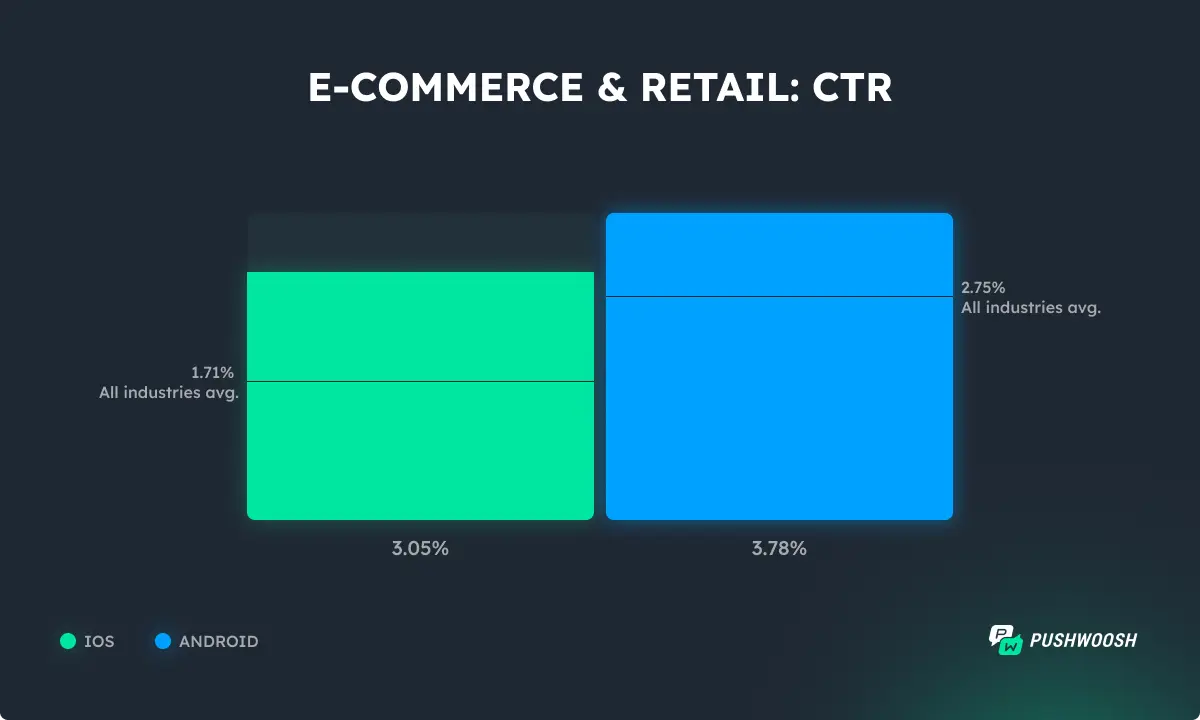
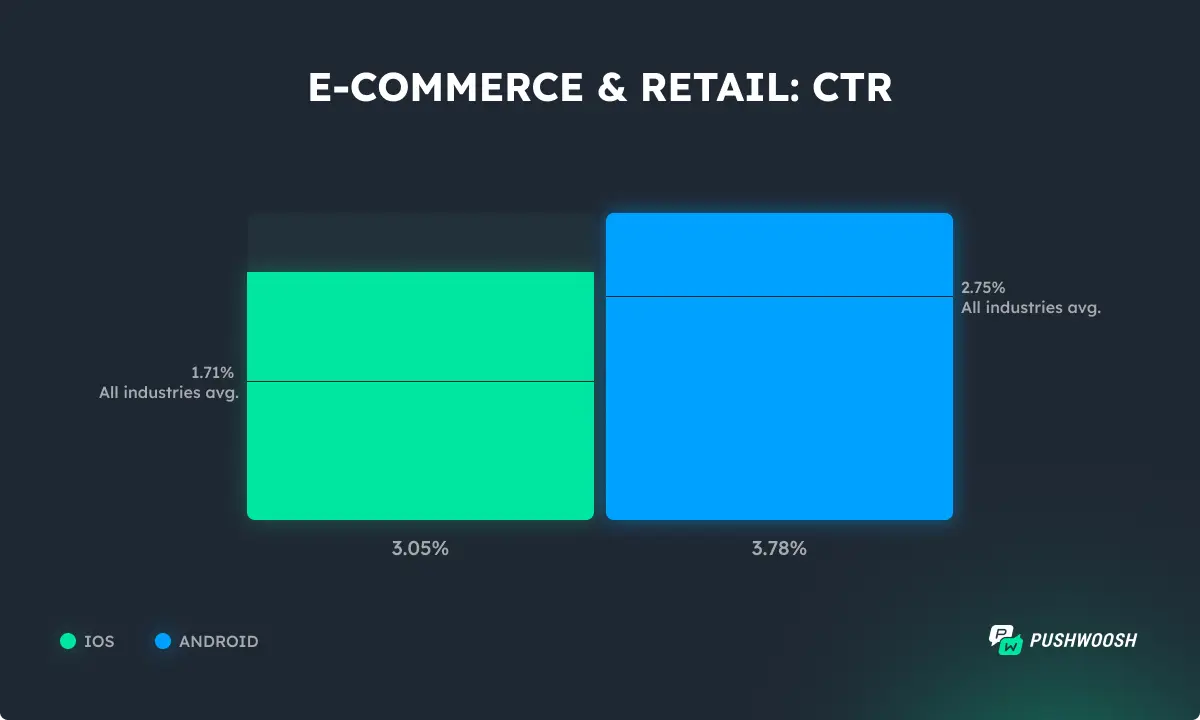
    Ecommerce is among the industries with the highest CTRs. When offers are relevant and timely, they keep shoppers tapping. When it comes to platforms, Android users engage with push notifications more than iOS users.

    Opt-in rates remain close to the all-industries average, indicating that customers expect relevant communication from brands they trust.

    Push notification opt-in rate benchmarks - Ecommerce

    Don’t Chase Daily Engagement: Aim for Regular, Meaningful Touchpoints

    Do shoppers expect to be engaged daily?

    Not at all: users don’t open shopping apps every day, as shown by lower DAU metrics.

    DAU benchmarks - Ecommerce

    However, monthly engagement tells a different story. MAUs are higher than the all-industries average.

    Pushwoosh data shows it’s possible to engage even up to 65% of app users monthly.

    MAU benchmarks - Ecommerce

    Align your strategy with this data. Instead of driving daily engagement or sending generic blasts, focus on:

    • Lifecycle campaigns;
    • Re-engagement sequences;
    • Timely promotions that meet users when they are most likely to shop.

    The best-performing ecommerce apps follow this blueprint to drive consistent engagement from push.

    Want more insights on how top brands are using push notifications to build loyalty and grow revenue?

    Here’s what 500k push notifications have to say on the matter.

    Simple, But Regular (Re-)Engagement Brings the Best Results

    Hyper-granular targeting and creative copy can work well. But many brands overcomplicate things.

    In reality, some of the most effective campaigns are the simplest.

    One Pushwoosh customer, an e-pharmacy, saw significant success with just two simple, automated customer journeys:

    1. New user activation: Got 44.3% of new users activated in the first 10 days after the app install.
    Push notifications to activate new e-commerce app users

    1. Inactive user re-engagement: Brought 49.1% of users who hadn’t been active in the past 30 days back to the app.
    Re-engagement push notifications - e-commerce app

    The beauty of these behavior-based targeted campaigns lies in their automation.

    You set them up once based on the simple ‘App Open’ trigger, and they run continuously, catching the right users at precisely the right moment.

    Behavior + Interest Targeting Drives Next-Level CTRs

    While simple triggers are a great start, adding layers of targeting based on what users do and what they like dramatically boosts engagement quality.

    Pushwoosh’s previous research, reinforced by this 500k dataset analysis, consistently shows that the most engaging campaigns for ecommerce apps use interest-based segmentation.

    Ecommerce brands targeting users based on browsing behavior + interests saw a 10x improvement in CTRs over average.

    Effective segmentation criteria - Ecommerce

    Targeting Loyal and High-Value Customers Pays Off

    Your loyal, high-value customers deserve more than the standard broadcast.

    When brands give tailored attention to this segment, the results speak for themselves: significantly higher CTRs and conversion rates.

    The key is smart segmentation.

    Use RFM analysis (Recency, Frequency, Monetary value) to identify top customers, or leverage your loyalty program tiers to create dynamic segments. Track how customers move between levels and use that as a trigger for exclusive offers, early access to sales, or simple “thank you” messages.

    For example, a beauty brand’s loyalty campaign offering special holiday deals to their “Friends” (top-tier customers) achieved record engagement, proving that a little extra recognition goes a long way.

    Push notification offer for loyal customers

    Simple Personalization = Double the CTR

    You don’t always need complex segmentation to make a message feel personal.

    Sometimes, the simplest tricks yield significant results, especially when they are easy to implement repeatedly.

    In one of the Pushwoosh clients’ experiments, a simple test compared two identical push notifications:

    • One generic;
    • One personalized with the user’s FirstName

    The result? The personalized version achieved double the CTR.

    Using first name in push notifications

    Should personalization go further than this? Yes.

    But this shows that even basic personalization in the message copy creates a stronger connection and significantly boosts engagement.

    Don’t Overlook Transactional and Back-in-Stock Notifications

    While promotional pushes get most of the spotlight, transactional and back-in-stock notifications quietly deliver some of the highest engagement rates.

    These messages work because they are inherently relevant and timely – they meet a clear user intent.

    Shipping updates, order confirmations, and payment notifications consistently outperform marketing campaigns in CTR, because users are actively expecting them.

    Similarly, back-in-stock alerts tap into existing interest and achieve up to 54.35% CTRs, often leading to quick conversions with minimal effort.

    Back in stock targeted push notification

    If you’re not leveraging these “utility” notifications, you’re missing out on easy wins.

    The lesson? Sometimes, the best-performing messages are the ones that don’t try to sell, but to serve.

    Broadcast Messaging Tips: Timing Matters

    Not every message can or needs to be hyper-targeted.

    Broadcast messages (sent to a large segment or your entire audience) still have their place, especially for major announcements or promotions.

    The secret sauce? Time your broadcast pushes right.

    • Special dates (sales events, holidays) naturally boost engagement.

    Whether it’s a Black Friday sale, a Valentine’s Day gift guide, or a summer collection launch, you’ll get a greater impact by sending messages when users are already thinking about shopping for specific occasions.

    Special offer - Valentine Day push notification

    Consider these trends when you schedule your push notifications.

    Key Takeaways for Ecommerce Marketers

    At the end of the day, customer engagement isn’t just clicks. It’s about nurturing habits and building relationships.

    Remember these essentials to maximize engagement from your push campaigns:

    • Smart segmentation isn’t a luxury; it’s a necessity.
    • Automated lifecycle campaigns are your low-effort, high-impact foundation.
    • Timing and content are still your biggest levers when combined strategically.
    • Aim higher: Don’t settle for the average. Significant engagement boosts are achievable through strategic targeting and content.

    By implementing these data-backed lessons, you can leverage push notifications as powerful drivers of both immediate engagement and lasting customer loyalty.

    Focus on these best practices, and the clicks will follow.

    Thanks to Elena Montoya for this post. Elena is the Head of Marketing @ Pushwoosh — an omnichannel customer engagement platform that helps app businesses turn user data into high-converting messaging campaigns and drive revenue at scale.

  • How Salesforce Commerce Merchants Can Launch a Mobile App (Without Rebuilding or Replatforming)

    How Salesforce Commerce Merchants Can Launch a Mobile App (Without Rebuilding or Replatforming)

    Mobile commerce isn’t the future – it’s here, right now. More than 70% of ecommerce traffic is on mobile, making mobile apps an essential retention tool for any ecommerce business.

    If your Salesforce Commerce Cloud store doesn’t offer an app, you risk losing loyal customers to competitors who benefit from push notifications, saved log-ins, and simplified checkout processes available through native apps.

    Customers now expect personalized, instant shopping experiences. And apps provide exactly that.

    Fortunately, launching a powerful native app doesn’t have to mean rebuilding everything from scratch (or abandoning Salesforce to settle for a less sophisticated platform). There are ways for Salesforce Commerce Cloud merchants to harness their current stack, preserving all the customizations, integrations, and workflows they’ve already optimized, without taking on a massive project in the process.

    In this guide, we’ll explore exactly how you can achieve this efficiently and with minimal risk, ensuring your brand stays competitive in mobile-first markets.

    Unique Pain Points for Salesforce Commerce Store Owners

    Here are several specific challenges Salesforce Commerce Cloud merchants face when it comes to launching a mobile app:

    Limited Compatible App Builders

    App builders are a great way for ecommerce brands to ship apps fast, for a low cost, without hiring developers.

    But most no-code app builders primarily cater to Shopify sites (with a few also supporting WooCommerce/Magento/BigCommerce).

    Finding app builders compatible with Salesforce Commerce Cloud’s APIs (SCAPI/OCAPI) can be particularly challenging, limiting available options and increasing complexity.

    Feature Parity

    Most Salesforce Commerce brands are on the platform because of SFCC’s ability to build unique, intricate features.

    You may have custom bundles, loyalty program integrations, detailed A/B testing, specialized payment flows, and other tweaks that you rely on. And you need these to carry over to your mobile apps.

    The question is if these unique web features will still work seamlessly in the app.

    Rebuild Fatigue

    Your team has already dedicated substantial resources to developing your web experience.

    Does building a mobile app mean starting all over again for iOS and Android?

    The idea of rewriting APIs or screens for mobile feels redundant, expensive, and exhausting.

    Scalability & Update Concerns

    Updates to the SFCC platform can inadvertently disrupt mobile apps. A small change can throw a wrench into the integration between your website and app, breaking your app (or sending the platforms out of sync).

    This can be costly, in terms of lost sales, brand damage, or the cost of calling in developers to re-build the integration.

    Total Cost of Ownership

    Maintenance for native apps can quickly escalate into significant recurring expenses (often reaching six figures annually). This is especially true if each web-based change needs extra work to replicate across both iOS and Android platforms.

    The Three Main Paths to an App

    Salesforce Commerce Cloud merchants generally have three options to launch a mobile app.

    Let’s look at these options now.

    1. Wrapper / Site-to-App Converter (e.g., Vendrux)

    What It Is: A lightweight native shell that renders your existing live storefront.

    Launch Timeline: Typically 3–6 weeks.

    Pros:

    • 100% feature parity with existing website.
    • Single codebase maintenance.
    • Built-in push notifications and deep linking.
    • UX mirrors your mobile web, ideal if your existing UX is already strong.

    Cons: Limited native customization.

    Best Fit: Brands prioritizing speed and minimal development effort.

    Want to see what’s possible? Vendrux has helped 20+ Salesforce brands, including Jack & Jones and John Varvatos, build mobile apps for minimal cost and overhead (without sacrificing any features from their website).

    See it for yourself: Get a Free Preview of Your App Now.

    __wf_reserved_inherit

    2. Headless Native Build (e.g., React Native / Flutter)

    What It Is: A fully native app developed using technologies like React Native or Flutter, integrated with SFCC’s SCAPI.

    Timeline: 4–6 months.

    Pros:

    • High performance and full native capabilities.
    • Customized user flows and offline access.

    Cons:

    • Significant upfront build and API costs.
    • Continuous maintenance of dual-stack environments.

    Best Fit: Large teams pursuing highly customized user experiences.

    3. Composable PWA + Capacitor

    What It Is: Your storefront built as a Progressive Web App (PWA) and wrapped in Capacitor for native distribution.

    Timeline: 2–3 months.

    Pros:

    • Unified JavaScript codebase.
    • Moderate access to native device APIs.

    Cons:

    • Performance slightly lower than fully native apps.
    • Some native OS feature limitations.
    • Requires dev resources.

    Best Fit: Merchants already moving toward a composable storefront architecture.

    Why Vendrux Is the Best Way to Build Your App

    Vendrux is the most efficient and strategic path for Salesforce Commerce Cloud merchants to launch mobile apps (without sacrificing functionality, speed, or future scalability).

    Vendrux is a fully-managed service that turns your existing SFCC site into a high-performance iOS and Android app in just a few weeks. 

    Unlike DIY app builders or complex native development, there’s no need to rebuild or replicate your storefront. Everything you’ve already invested in (your custom features, integrations, and design) works out of the box.

    What sets Vendrux apart:

    • Full Feature Parity: Your app mirrors your live SFCC site, including advanced features like custom checkout flows, loyalty programs, and more.
    • No Duplicated Work: Updates to your website reflect instantly in your app. No double maintenance, no additional engineering required.
    • Fully Compatible: Vendrux supports any website, on any tech stack. This includes complex Salesforce environments, including headless setups and bespoke workflows.
    • Push Notifications: Unlock the power of direct customer engagement with built-in push support. Vendrux sets up everything – from Firebase/APNS keys to segmentation and campaigns. There’s also an option for Done-For-You push services if you need ongoing execution.
    • Predictable, Flat Pricing: No revenue sharing or variable fees. Transparent pricing based on usage means you always know your costs, with support, updates, and app maintenance included.
    • Fast, Reliable Launch: Your app is typically live in 4–6 weeks, with the Vendrux team handling setup, store submissions, testing, and optimization. We’ve done this 2,000+ times – you’re in experienced hands.
    • Long-Term Strategic Support: You’re not left to figure things out on your own. Our team stays engaged post-launch to help drive adoption, retention, and ROI through proactive support and growth consulting.

    Vendrux is more than a wrapper. It’s a high-touch mobile app partner.

    For Salesforce Commerce merchants looking to launch fast, avoid redundant dev work, and drive measurable results, there’s no better option.

    See your app in action: Get a Free Preview Now

    Decision Framework for Salesforce Teams

    Struggling to decide on the best strategy for your mobile app?

    Here’s a framework for Salesforce Commerce Cloud merchants to consider to make the right decision:

    • Audit Mobile Web UX: Ensure pages load quickly (
    • Identify Essential Native Features: Clearly list features only achievable with native apps, like offline functionality or barcode scanning.
    • Estimate Engineering Resources: Determine if you have adequate internal mobile development resources for a complex, native build (typically 1–2 dedicated engineers for at least six months).
    • Project ROI & Timeline: Calculate potential revenue uplift from enhanced mobile experiences (push notifications, saved logins) against the costs and delays associated with longer development cycles.
    • Run Proof-of-Concept: Quickly validate performance and compatibility with solutions like Vendrux, comparing key performance indicators (KPIs) against other prototypes.

    Implementation Roadmap (for the Vendrux Path)

    Let’s say you go with Vendrux, to convert your Salesforce Commerce site into an app. What will the process look like? How much work will it take to launch?

    Here’s how the roadmap shakes out.

    Week 0 – Kickoff & Setup

    We start with a brief kickoff call and onboarding form. You’ll share your website URL and a few brand assets, as well as any specific requirements for your app. Then we take over.

    Week 1 – App Configuration

    Our team configures your app to match your website’s navigation, design, and functionality, ensuring full feature parity. 

    Your checkout flows, loyalty programs, and third-party integrations all work the same in your app as they do on your website. 

    On the app side, we build several native functions, such as push notifications and native nav UI, to make your app feel more custom.

    Weeks 2–3 – Preview & Testing

    You’ll receive test versions of your app through TestFlight and Play Console. We walk through your app together to validate key journeys like login, cart, and checkout. 

    You provide feedback.. We refine until everything works exactly as expected.

    Week 4 – Quality Assurance

    Our QA team performs thorough testing across devices, screen sizes, and edge cases. We catch and resolve any issues before submission, ensuring a polished, stable experience.

    Weeks 5–6 – Store Submission & Launch

    We handle the full submission process to both Apple App Store and Google Play. This includes screenshot generation, metadata optimization, and ongoing reviewer communication. 

    Once approved, your app goes live. We help you coordinate the launch, activate your push strategy, and monitor early performance.

    Post-Launch – Growth Support

    After launch, we stay closely involved. From push notification campaigns and analytics support to app marketing and CRO consultation, we’re here to help you grow your app into a high-performing retention and revenue channel.

    Final Takeaways

    Salesforce Commerce Cloud merchants don’t need to reinvent their ecommerce platform to capture the benefits of a native mobile app. 

    A web to app solution like Vendrux significantly reduces engineering complexity while preserving all the customizations, integrations, and web architecture you’ve already built.

    Ready to see it in action? Get a free preview of your app to see it in action. All we need is your site’s URL – and we’ll show you a fully interactive version of your Salesforce Commerce Cloud storefront as a mobile app.

  • How to Create Mobile Apps With AI (2026 Guide)

    How to Create Mobile Apps With AI (2026 Guide)

    Building a mobile app used to require months of coding or tens of thousands in development costs. Not anymore.

    Thanks to AI-powered no-code platforms, even solo entrepreneurs can now create real, native mobile apps in weeks rather than months. The barrier to entry has dropped dramatically – you can build a functional AI-enhanced app for under $100 plus your time.

    But here’s the reality check: AI won’t magically build your entire app at the push of a button. Think of it as a very smart co-pilot that handles the grunt work while you guide the vision.

    Can AI Really Build a Complete Mobile App?

    The short answer? Not completely – but it can get you surprisingly far.

    What AI Can Fully Automate Today

    • UI scaffolding – Generate app layouts and screen designs from simple text prompts
    • Data schema generation – Automatically create databases and user workflows based on your app description
    • Boilerplate code – Write basic functionality like user authentication, data storage, and API calls
    • Basic CRUD workflows – Set up standard create, read, update, delete operations without manual coding

    Some platforms can generate app prototypes in minutes. You describe your idea (“a fitness app with workout tracking and AI meal suggestions”), and the AI creates the foundation automatically.

    But if you dig deeper, you might find some things missing.

    Where Human Expertise Is Still Essential

    • Product strategy – Deciding what features matter most and how users should navigate your app
    • Edge-case logic – Handling unusual scenarios that AI might miss or get wrong
    • Prompt refinement – Teaching the AI to generate better outputs through iterative feedback
    • QA & compliance – Ensuring your app meets App Store and Google Play review standards

    AI can get you roughly 80% of the way there. The final 20% – polishing, debugging, and user experience refinement – still requires human judgment.

    How to Build Your App with AI (Five Paths to Consider)

    If you want to leverage the power of AI to build your mobile app, there are a number of different ways to do it.

    Choose your approach based on your technical comfort level and app complexity:

    1. No-Code Tools w/AI Features

    Best for: Simple apps with standard features 

    Tools: Adalo, Glide, Bubble

    Pros: Visual drag-and-drop, AI assist

    Cons: Limited customization, potential platform lock-in, limited use of AI

    Pure no-code platforms are designed for complete beginners who want to build functional apps without touching a single line of code. 

    This value proposition aligns tightly with AI app building. So it makes sense that most of these tools now also have AI-powered features.

    It’s not exactly “building with AI”, more building “with the assistance of AI”. You’ll still need to work within the confines of the platform, and it’s not as easy as saying “make me a ___ mobile app”.

    2. Low-Code with AI Assist (Balanced)

    Best for: Apps with a little more customization (for builders with some dev knowledge)

    Tools: FlutterFlow, Draftbit

    Pros: More flexibility, can export code later 

    Cons: Steeper learning curve. Still some limitations

    Low-code is a midpoint between no-code and custom development. They come with a visual builder, like a no-code tool, but require a little knowledge about how coding works. The idea is not necessarily to allow non-developers to build apps, but to let developers build apps faster.

    Also like no-code tools, low-code tools are increasingly becoming AI-powered. They may have the ability to prompt AI to create a specific component, and have it spin the component up for you. 

    These AI features let you move faster, but again, are not 

    3. AI Coding Assistants (Developer-Friendly)

    Best for: Those with programming experience

    Tools: GitHub Copilot, ChatGPT, Claude 

    Pros: Flexibility, accessibility

    Cons: Requires coding knowledge

    For developers who want complete control over their mobile app, AI coding assistants act as incredibly smart pair programmers. 

    These tools understand your coding patterns and can generate entire functions, debug complex issues, and even architect app structures based on natural language descriptions.

    This includes LLMs like Chat GPT and Claude. You can ask these platforms to generate code for you. However, the downside is that you still need to understand how to use this code to deploy your mobile app. It’s easy to get stuck if the generated code doesn’t work as expected.

    4. AI-Generated Progressive Web Apps

    Best for: Quick prototypes and simple use cases 

    Tools: Replit, Cursor, Lovable, v0.dev, Chat GPT/Claude

    Pros: Fastest to build and deploy 

    Cons: Limited native mobile features

    5. AI Mobile App Builders

    Best for: Fully AI-built mobile apps

    Tools: Rork, Cursor

    Pros: Full control, no platform limitations 

    Cons: Less mature market, may be difficult for fully non-technical people

    AI mobile app builders are the way to directly create a mobile app with AI

    There are fewer of these tools available on the market. You’ll find a ton of results if you search for “AI app builder”, but most are either:

    • AI web app builders (not able to create native mobile apps)
    • No-code/low-code tools with AI features or assistants

    Tools like Rork and Cursor, however, actually let you send a prompt with your idea (“I want to create an expense tracking app”) and create a fully-functional mobile app.

    It won’t be a one-shot (it’s an iterative process; not creating an entire mobile app with one prompt). But it’s the most AI-first way to build a mobile app today.

    Extra: Turn Your AI Web App Into a Mobile App With Vendrux

    One more approach you can consider is building for the web first, with your AI tool of choice, then using using Vendrux to turn it into a real iOS and Android mobile app.

    Vendrux is a service to turn websites and web apps into mobile apps. It works with any platform or tech stack, giving you the freedom to use any AI app builder (Replit, Cursor, Lovable) and still get fully functional mobile apps.

    You’ll build for the web first, then we’ll turn that web app into a native mobile app. You’ll still only have to maintain the web side – your mobile app syncs up automatically.

    Why This Hybrid Strategy Works So Well:

    • Freedom of choice: Use any AI tool or web builder to create your app. No need to sift through new and fragile AI mobile app platforms.
    • Simplified codebase: Build once for the web, and that’s it. Vendrux keeps your app in sync with your site, so you never manage separate platforms.
    • Zero mobile-specific bugs: No worrying about confusing mobile framework errors. Your app works exactly like your site, just wrapped in a mobile shell with native features.
    • Real mobile advantages: You still get App Store/Play Store presence, home screen placement, and high-ROI push notifications.

    If your goal is to launch an AI-powered app that earns real revenue and doesn’t break on you, this combo is hard to beat.

    You focus on the web experience. Vendrux makes it into a mobile app, without any extra effort or complexity.

    Already have your website or web app live? Get a free preview of what it will look like as a mobile app.

    What To Watch Out For When Using AI to Create Apps

    Here are some things to look out for if you decide to go the AI-native route.

    Model Hallucinations & Inaccuracies

    AI sometimes generates plausible-sounding but incorrect code or advice. Always add guard-rails and human review, especially for regulated industries like healthcare or finance.

    Pro tip: Test your AI features extensively with edge cases and unusual inputs.

    Latency & Cost of Cloud AI

    API calls can add seconds of delay and rack up costs quickly. A popular app making thousands of AI requests daily could see bills in the hundreds per month.

    Solution: Budget using usage forecasts and consider caching common responses.

    Platform Lock-In

    Some builders charge hefty fees to export your raw code later.

    Smart move: Choose platforms like FlutterFlow or Draftbit that allow code export, or plan your exit strategy upfront.

    Data Privacy & Compliance

    When your app sends user data to AI services, you need to handle it responsibly.

    Requirements:

    • Disclose AI use in your privacy policy
    • Filter objectionable AI outputs
    • Meet GDPR/CCPA requirements for data handling

    App Store AI Policies

    Apple and Google now require labeling and moderation for AI-generated content.

    Key rules:

    • Clearly mark AI-generated content
    • Implement content moderation for user-facing AI features
    • Avoid deceptive or harmful AI outputs

    Skill Learning Curve

    “No-code” doesn’t mean “no effort.” Expect to invest 30-50 hours learning platform workflows if you’re building your first app.

    Reality check: You’ll still need to understand concepts like databases, API calls, and user authentication – the tools just make them visual instead of text-based.

    How Much Does it Cost to Build an App With AI?

    Cost is, obviously, one of the biggest advantages of being able to use AI to create mobile apps. So just how cheap is it?

    Let’s break it down, item by item.

    • No-code platform plans: $30–$60/month
    • AI API usage (OpenAI GPT-4): $0.002/1K tokens
    • Developer accounts: Google Play: $25 one-time; Apple: $99/year
    • MVP build time: 1–3 weeks solo

    Total realistic budget: $100-300 for your first app launch, plus your time investment.

    It can certainly vary by complexity. Some projects may cost a lot more.

    But compare this to hiring developers: even simple apps often cost $10,000-50,000+ when built traditionally.

    What Are Some Best Practices for Building Apps With AI?

    Here are some best practices to follow if you’re looking at going down the rabbit hole of AI app creation (especially if you’re planning to generate revenue from your app).

    Start With One “Hero” Feature

    Don’t try to build everything at once. Pick one AI-powered feature that delivers clear value and nail that first.

    Example: Instead of “an app that does everything with AI,” focus on “a plant identification app that uses AI vision to recognize species.”

    Prompt Engineering 101

    Maintain a library of your best prompts and iterate based on real-world edge cases.

    Good prompt structure:

    • Context: “You are a fitness coach chatbot…”
    • Task: “Help users create workout plans…”
    • Constraints: “Keep responses under 100 words and always recommend consulting a doctor…”

    Blend AI & Human QA

    Combine automated tests with human beta feedback to catch AI hallucinations and edge cases.

    Testing strategy:

    • AI agents can run thousands of test scenarios quickly
    • Human testers catch usability issues and nonsensical AI outputs
    • Real users provide the final validation

    Monitor & Iterate

    Use analytics plus AI summarization to prioritize roadmap updates quickly.

    Track which AI features users engage with most, then double down on what works.

    Plan for Scale Early

    Choose platforms that allow code export or custom plugins once your user base grows.

    Scaling path: Start no-code → Add custom features → Eventually migrate to fully custom development if needed.

    Final Thoughts

    The AI app development landscape in 2026 gives individual creators unprecedented power to build real, functional mobile apps quickly and affordably.

    You don’t need a computer science degree or a massive budget anymore. But you do need patience, willingness to learn platform workflows, and clear vision for what problem your app solves.

    AI accelerates the building process dramatically, but your guidance and iteration make the difference between a demo and a product people actually want to use.

    Make sure you understand that building mobile apps with AI isn’t as simple as a one-shot prompt, letting AI do all the work. You need to guide it, and it’s possible to get stuck if you run into bugs you don’t understand.

    If you’re looking for an AI-powered way to create a mobile app for your existing website, consider Vendrux instead. It’s essentially the same thing: no coding, no rebuilding, just a smooth conversion from website to app, but with no AI hallucinations, no API fees, and a stable mobile app that won’t break on you.

  • How Much Does It Cost to Build a Custom Shopify Mobile App?

    Bottom Line: Building a custom, native mobile app for your Shopify store requires a significant investment, typically ranging from $40,000 to $500,000 or more. The exact cost depends on your development approach, feature requirements, and team location. That’s why we advise brands to take a simpler approach, like Vendrux, which gives you all the value of a custom mobile app, for mid-five figures upfront, and $1,499 per month going forward.

    Mobile commerce now drives over 70% of ecommerce traffic. Paid acquisition is getting more expensive, and traditional retention channels like email and SMS are becoming more saturated.

    That makes having a dedicated mobile app essential for competitive Shopify stores.

    You might be thinking about building a custom mobile app. While this offers the highest level of performance, it comes with a significant cost as well.

    This guide breaks down development costs for different approaches (high-end agencies vs budget teams), explains the key factors driving pricing, and reveals the ongoing expenses you’ll face after launch.

    At the end, we’ll show you a more affordable way to launch your own mobile app – one that saves more than 90% of the cost, while maintaining the experience a fully custom Shopify mobile app.

    Want to skip ahead and find out the most cost-effective way to launch your mobile app? Start with a free preview of your app – then we’ll explain why this is unbeatable value for money.

    Shopify Mobile App Development Costs by Approach

    The cost to build a mobile app for a Shopify store is far from standard. There are a range of different ways to approach this, and even among agencies and mobile app developers, costs vary greatly.

    Here are a few different estimates to consider.

    Premium Agency Development: $200,000 – $500,000+

    Top agencies charge $200,000 to $500,000+ for custom Shopify mobile apps. These companies hire the best developers, designers, and project managers. As a result, they’re likely to deliver the highest-quality end product as well.

    Why premium agencies cost more:

    • Developers from the US or Europe charge $100-$150 per hour
    • You get complete service including planning and testing
    • Faster work with teams focused on your project
    • Advanced features like AI suggestions or virtual try-ons

    Budget-Friendly Custom Development: $40,000 – $100,000

    Budget custom development costs $40,000 to $100,000 for Shopify mobile apps with all the features you expect. 

    This option uses teams from countries where developers cost less. The hope (for you) is that these developers will still be able to deliver an end product that measures up to more expensive US-based teams.

    What you get for the price:

    • Developer rates: $30-$50 per hour (Eastern Europe/Asia)
    • Standard features: product pages, search, cart, loyalty points
    • Average custom ecommerce app cost: $50,000-$100,000

    What to expect:

    • Longer build times (6-12 months vs 3-6 months)
    • More project management work for you
    • Possible communication issues across time zones

    In-House Shopify Mobile App Development: $200,000 – $400,000+

    Want to bring it all in-house, and hire your own people? Building in-house costs $200,000 to $400,000+ when you add up hiring, salaries, and tools. You need iOS developers, Android developers, designers, and testers.

    Team costs breakdown:

    • 4-5 team members working for 6+ months
    • Each person costs $8,000-$15,000 per month (with benefits)
    • Extra costs for software tools and equipment

    Long-term costs:

    • You pay salaries even after the app launches
    • Need to keep the team for updates and fixes
    • Risk losing team members who know your app

    What Drives Shopify Mobile App Development Costs

    Let’s dive deeper. Where does this cost come from? Is there any way to jettison unnecessary costs and cut the price down?

    Six main factors decide how much you’ll pay for your mobile app. Understanding these helps you make smart choices about features and teams.

    App Features and Complexity Costs

    The features you want are the biggest cost factor. Basic apps with very simple shopping features cost $5,000-$25,000. But more feature-rich apps easily cost over $150,000.

    Basic Shopify app features:

    • Product pages with search and filters
    • User accounts and order history
    • Shopping cart and checkout
    • Push notifications for sales

    Advanced features that cost more:

    • Loyalty program integrations (Yotpo, Smile.io)
    • Subscription orders (Recharge, Bold)
    • Personal product suggestions
    • Virtual try-on features
    • Advanced tracking and marketing

    Each extra feature adds 20-40 hours of work. For example, adding and integration for Yotpo loyalty points needs API connections, new screens, and testing with different users.

    iOS vs Android Development Costs

    iOS vs Android development costs roughly double your investment when building natively for both platforms. 

    Most Shopify stores need both since customers use a mix of iPhones and Android devices.

    Platform-specific development:

    • iOS development requires Swift programming and Apple design guidelines
    • Android development uses Kotlin and Google Material Design standards
    • Shared elements: API integrations, design assets, project management

    Cost examples:

    • Single platform: $100,000
    • Both platforms: $170,000 (not quite double due to some shared work)
    • Native apps provide better performance than cross-platform alternatives

    You can save money by building with cross-platform frameworks, like React Native and Flutter. These frameworks let you build for both iOS and Android with the same programming language, and share more code across platforms.

    It doesn’t quite cut the cost in half, but close to it. For ecommerce apps, there’s not much need for fully native development on each platform, so React Native would certainly be a smarter way to go.

    Mobile App Design Costs

    Mobile app design costs range from $5,000 for basic layouts to $20,000+ for custom interfaces optimized for mobile commerce. 

    Budget design approach:

    • Reuse existing brand assets and color schemes
    • Leverage standard iOS/Android interface components
    • Simple layouts with minimal custom graphics

    Premium design investment:

    • Custom mobile-first interface design
    • Smooth animations and micro-interactions
    • Professional product photography optimization
    • Typically 400+ hours of design work

    Poor design hurts conversion rates more than missing features. Users expect smooth navigation, fast loading, and intuitive checkout flows. Investing in quality design pays dividends through higher user engagement and sales.

    Shopify Integration Costs

    Shopify integration costs vary based on the third-party services your store uses. Every additional integration adds development time for API connections, data synchronization, and testing.

    Core Shopify integrations:

    • Storefront GraphQL API for product data
    • Mobile Buy SDK for checkout processing
    • Customer account and order history sync

    Common third-party integrations:

    Each integration requires reading API documentation, handling data syncing, and ensuring the app stays synchronized with your website. 

    Experienced developers budget substantial time for integration work since APIs often have quirks requiring troubleshooting.

    Developer Rates by Location

    Where your developers are located will dramatically impact your total investment.

    Developers in high-cost areas (US and Europe, and especially centers like NYC, LA, London) charge more. While those in areas with lower cost of living can afford to offer lower rates.

    Geographic arbitrage allows you to access skilled developers at lower hourly rates without sacrificing quality.

    Rate ranges by region:

    • North America/Western Europe: $100-$150/hour
    • Eastern Europe: $40-$60/hour
    • South/Southeast Asia: $20-$50/hour
    • Latin America: $25-$60/hour

    Quality considerations:

    • Portfolio review and client references matter more than location
    • Communication skills and timezone overlap affect project efficiency
    • Some regions specialize in specific technologies (e.g., React Native, Flutter)

    A $300,000 project with a US agency might cost $80,000 with a skilled Eastern European team. However, factor in potential communication overhead and longer project management requirements when comparing options.

    App Testing and Quality Assurance Costs

    App testing and quality assurance costs represent 15-25% of your development budget but prevent costly post-launch issues. 

    Your mobile apps require thorough testing before launching. Checkout failures or other bugs directly impact revenue, and a few bad reviews can kill your momentum before you get started.

    Testing requirements:

    • Multiple device models and screen sizes
    • Different iOS and Android OS versions
    • Payment processing and checkout flows
    • Push notification delivery and timing

    QA process timeline:

    • 2-4 weeks of dedicated testing for standard apps
    • Beta user testing with real customers
    • App store submission and review process

    Agencies include QA in their pricing, but budget builds might require you to handle more testing internally. 

    Plan for a round of bug fixes after initial testing. No app launches perfectly on the first attempt.

    Ongoing Cost of Shopify Mobile Apps

    Perhaps you’re comparing the cost of building a custom Shopify mobile app to a subscription service, from a Shopify mobile app builder.

    We’ve heard this before. Brands don’t want the recurring cost of a subscription, and think they can save by spending more upfront, but as a one-time cost.

    Unfortunately, mobile app development isn’t a one-time cost. You’ll pay ongoing expenses for maintenance, updates, and improvements that typically equal 15-20% of your initial cost each year.

    There’s really no way to avoid this. If you think you can build once, and never invest in it again, you’re going to end up with an outdated app that soon doesn’t work.

    App maintenance typically costs 15-20% of your initial development cost each year. For a $100,000 app, budget at least $15,000-$20,000 annually for essential upkeep.

    This comes from standard app maintenance, which includes:

    • iOS and Android updates for new versions
    • Shopify API changes and third-party service updates
    • Security fixes and bug repairs
    • Speed improvements and monitoring

    Maintenance cost ranges:

    • Basic apps: $2,000-$6,000 per year
    • Standard shopping apps: $15,000-$20,000 per year
    • Complex apps (more integrations, multi-config): $25,000+ annually

    These are conservative estimates, too. It’s assuming that nothing major goes wrong, and workflows run smoothly.

    Some brands we’ve talked to ballparked this as mid-six figures per year. So much for a one-time expense.

    A Smarter Alternative: Convert Your Shopify Store into a Mobile App with Vendrux

    Here’s the problem with spending $50K+ on a custom mobile app.

    When you spend that much, it’s an uphill battle to achieve a positive ROI. You really need strong adoption to make your money back (and with the timeline, you’re not even going to launch for 6 months or more).

    Vendrux takes a different approach: instead of rebuilding your store as a custom native app, it converts your existing Shopify site into high-performing mobile apps for iOS and Android. 

    Your website powers the app. So the core of the app experience is your website, with native elements like a native onboarding screen, mobile navigation and push notifications added on top.

    Cost to Convert Your Shopify Store into an App

    Converting your Shopify store into a mobile app with Vendrux is simple and cost-effective. The whole process is done for you, including build, publishing to the app stores, and ongoing maintenance.

    As we’re reusing what you’ve already built, it’s significantly faster (around two weeks for a working version), and much more affordable.

    Costs break down as follows:

    • Setup fee: $5,000 (one-time)
    • Monthly subscription: $1,499 per month
    • Staff hours: virtually none. Your website updates automatically sync to your app, and our team handles app maintenance, updates, and store compliance.

    Cost Comparison

    Let’s see how that cost compares to the cost of building a custom mobile app.

    Custom Shopify Mobile App Development:

    • Upfront cost: Anywhere from $40,000 to $500,000+
    • Annual maintenance: $50,000+ (ongoing developer time, bug fixes, OS updates)

    Vendrux (Converting Your Site to an App):

    • Upfront cost: $6,499 (setup + first month)
    • Annual cost: $15,288 (on annual billing)
    Vendrux lets you launch high-quality mobile apps for a fraction of the cost of custom development.

    Quality & Performance Comparison

    “But I need a high-quality app, not a cheap imitation.”

    Vendrux apps give you 95% of what a custom mobile app gives you.

    Think about it. You’ve already poured untold money, time and effort into optimizing your mobile website. Realistically, you don’t need much more than this in your app.

    Small alterations and additions – like we do – turn your mobile website into a like-native app experience. Native navigation, a native welcome screen, push notifications, and an icon on the customer’s home screen.

    Custom apps will be a little faster, a little smoother. But is the improvement worth paying half a million dollars more? We don’t think so.

    Want to see what’s possible? Check out these case studies from major brands we work with.

    ROI Implications

    Because Vendrux removes the heavy upfront investment and ongoing engineering burden, your break-even point arrives dramatically faster. 

    Instead of needing years to pay back a six-figure build, you can see positive ROI within weeks of launching.

    We find brands typically generate 10-30% of their total revenue through their mobile app. Even considering not all of that is new (incremental) revenue, you can expect $150,000+ yearly in app revenue for a 7-figure brand.

    If you’re spending $500K on an app, that’s years before you break even. With Vendrux, just a couple of months.

    Final Thoughts

    Today, your brand needs an app. If only to provide a more convenient way for your best customers to interact with you.

    Your loyal customers want an app. They want direct updates and communication via push notifications, and one-tap access from their home screen.

    But the traditional approach of custom development comes with a six-figure price tag, long timelines, and ongoing maintenance headaches that few brands can realistically justify.

    Vendrux changes that equation. By converting your existing Shopify store into fully native iOS and Android apps, you get all the value of a custom build at a fraction of the cost. 

    Your app can be live in weeks, not months, with virtually no internal resources required.

    Want to see what’s possible? Get a free preview of your app now. We’ll show you a working demo that proves there’s no need to spend half a million dollars on a Shopify mobile app anymore.

    Shopify Mobile App Development Costs: FAQs

    How much does a basic Shopify mobile app cost?

    A basic Shopify mobile app costs $40,000-$100,000 for standard features like product browsing, user accounts, and checkout. More likely, you can expect the price tag to eclipse $200,000+.

    What’s the difference between native and cross-platform development costs?

    Native development costs about 50-70% more than cross-platform but delivers better performance and user experience. Native apps for both iOS and Android typically cost $40,000-$500,000 vs $25,000-$300,000 for cross-platform solutions.

    How much should I budget for app maintenance?

    Budget 15-20% of your initial development cost annually for maintenance. A $100,000 app typically needs $15,000-$20,000 per year for updates, security patches, and compatibility fixes.

    Can I build a quality Shopify app for under $50,000?

    You may be able to build a solid Shopify app for $40,000-$50,000 using skilled offshore developers or freelance teams. This works well for apps with standard ecommerce features, but apps for larger and more complex stores will be hard to fit under this limit.

    What integrations are essential for a Shopify mobile app?

    Essential integrations include Shopify’s Storefront API, Mobile Buy SDK for checkout, and your key business tools like loyalty programs (Yotpo), subscriptions (Recharge), and email marketing (Klaviyo).

    How long does custom Shopify app development take?

    Custom Shopify app development typically takes 3-12 months depending on complexity and team size. Premium agencies often deliver in 3-6 months, while budget teams may need 6-12 months for the same features.