Category: Blog

  • 8 Benefits of Mobile Apps for Your Business (And 4 For Your Users)

    8 Benefits of Mobile Apps for Your Business (And 4 For Your Users)

    Today, most customer journeys start and finish on mobile devices.

    More than half of all internet traffic comes on mobile. Mobile dominates ecommerce. And most web-first businesses are missing one of the most powerful assets for the mobile customer experience; a mobile app.

    Only 4.5% of successful ecommerce businesses have an app. The numbers are similar in other segments, such as SaaS, publishing, and membership sites. That means the majority of businesses are missing out on some powerful benefits.

    We’re going to explore those benefits in this article. Keep reading and learn all the top benefits of mobile apps – for both your business, and your customers.

    Vendrux helps businesses like yours launch fast, powerful mobile apps – with none of the overhead of custom development. Learn more: check out the benefits of turning your website into an app with Vendrux.

    The Benefits of Mobile Apps for Businesses (Greater Retention, Higher Revenue & Profits)

    A mobile app isn’t just a vanity project. It’s a powerful (mobile-first) customer engagement tool for your brand.

    Mobile apps help build stronger customer relationships, drive higher revenue, and create a powerful moat for your business.

    And with the cost of building an app today (assuming your business already has a mobile-optimized website), the ROI is almost too good to ignore.

    Let’s dive deeper into the biggest benefits of mobile apps for your business.

    1. Increased Retention and Customer Loyalty

    Many businesses in many different industries struggle with retention. It’s very difficult to get customers consistently coming back to your website.

    Your app lives on your customer’s home screen; always just a tap away.

    That kind of visibility and convenience makes it far more likely for your customers to return.

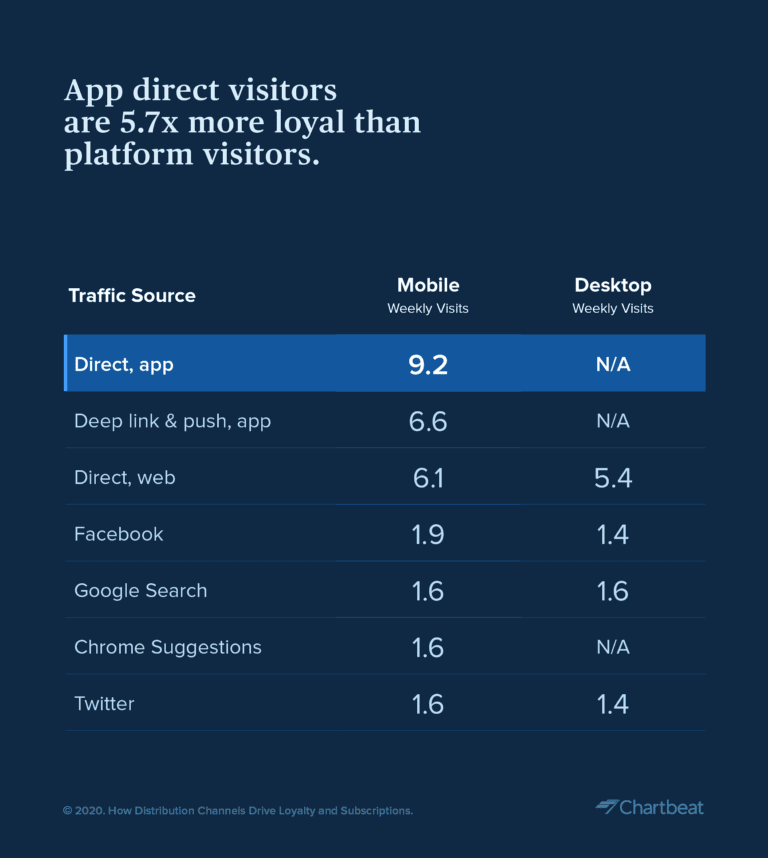
    Mobile apps average more repeat visits, more purchases (app users purchase 3-7x more often), and overall much better customer retention than websites.

    “When looking at weekly visits by traffic sources across mobile and desktop experiences, we saw that app direct visitors are nearly 6x more loyal than platform visitors.” – Chartbeat

    Image via Chartbeat

    2. Direct, High-Impact Communication

    Mobile apps give you access to mobile push notifications.

    __wf_reserved_inherit

    Push notifications cut through the noise in a way email and SMS just can’t anymore.

    With open rates of 80-90%, they’re one of the most effective tools you have for driving action.

    Whether you’re promoting a sale, chasing after abandoned carts, announcing a new product drop, or sharing breaking news, apps let you reach your audience instantly, with messages that actually get seen.

    3. Better Revenue Metrics

    When customers use your app, they have longer sessions, more frequent sessions, and convert at 3x as often.

    Apps reduce distractions, keeping the user attentive and engaged for longer, and makes every part of the experience smoother for smartphone users.

    It’s easy to get into the app. Native payment options like Apple Pay and Google Pay make paying easy.

    There are fewer drop-offs, less friction, and a much higher chance of turning visits into purchases.

    This all adds up to more revenue for your business.

    4. Better Profit and Sustainability

    Most business are built on a foundation of sand. They rely on paid acquisition (Google/Meta ads), algorithms (Google Search) or inconsistent referral traffic for the bulk of their sales.

    Mobile apps let you own your customers. You get a direct line to their home screen. You don’t have to worry about being throttled by an algorithm, or constantly rising acquisition costs.

    Revenue you make from app users is all profit. Push notifications cost nothing to send, and there’s no ad spend to stay on your customer’s home screen.

    The more engagement comes through your app, the more profitable, and sustainable your business becomes.

    5. Enhanced Visibility and Brand Authority

    Your brand being in the App Store and Google Play Store adds a new layer of legitimacy.

    It puts your brand in a place reserved for established players, and trustworthy companies.

    It also gives you new ways to be found. People can find you through the app stores. Your brand shows up in more organic searches.

    You’re easier to find, and harder to forget.

    __wf_reserved_inherit

    6. Personalization & First-Party Data

    Businesses are struggling for reliable data from their customers today.

    Cookies, stringent privacy protections from platforms like iOS, are making it difficult to track user behavior and understand your audience.

    A mobile app is a source of first-party data. It’s an owned platform, where you own all the analytics and all the data.

    This allows you much better insights into your customers, and the ability to build hyper-personalized, hyper-relevant experiences.

    7. Expanded Revenue Streams

    Your app can also open up new ways to monetize and engage your audience.

    In-app memberships. Exclusive product drops. App-only content and experiences. In-app purchases. Loyalty programs that integrate with the real world.

    Apps give you the ideal sandbox to test and scale new revenue plays (without a third-party controlling what you can and can’t do).

    The Starbucks rewards app – a great example of building a loyalty program through mobile apps.

    8. A Better User Experience

    Apps are a better experience for your users too.

    That’s why 90% of mobile time is spent on apps. Users spend an average of 3.5 hours per day using apps, compared to less than half an hour on mobile browsers.

    More user engagement is a win for your business. It means higher customer satisfaction, more time spent with your brand, and more valuable customer interactions.

    Even if your app just mirrors your website, it still feels better to use for returning customers than having to remember and type the URL every time. That’s why app users stick around for much longer.

    Ready to explore launching your own mobile app? It’s easy – and you could be live in less than a month. Get a free preview of your app to see what’s possible.

    Benefits of Mobile Apps for Users (More Convenient, Mobile-First UX)

    We’ve talked about the business upside. But your customer base aren’t begrudgingly using apps. Your best customers will willingly download your app, because the user experience is so much better.

    Here’s what makes apps a win from your customers’ point of view:

    1. Speed and Convenience

    Apps are faster, more efficient, more convenient.

    It’s not just a tech thing. While native apps load content faster, even hybrid apps (which are mostly built from the same code as a website) are still smoother and faster to use.

    __wf_reserved_inherit
    The Amazon Shopping app is a hybrid app – and it drives billions of dollars in revenue

    You can open from one tap on the home screen. No typing a URL, no browser tabs. Automatically logged in. Smoother navigation, fast checkout, with mobile payments integrated by default.

    2. Personalized and Relevant Experiences

    Again, direct access to first-party data is not just a win for you. It’s a win for your customer.

    Brands are able to create more personalized, more relevant experiences. The experience in an app feels tailored to the user.

    It makes them feel more like a VIP. Like the app is built for them; on the web, you’re just one of millions.

    3. Native Features

    Mobile websites are built for the browser; and most are built for desktop browsers.

    The mobile browser experience has gotten a lot better, but it’s still a square peg in a round hole, not made for mobile users.

    Apps are built specifically for mobile devices. They open up native device features, like push notifications, camera and GPS integration, and offline mode (in some cases).

    All of this elevates the user experience in a way the browser can’t.

    4. Exclusivity

    If there’s one thing your customers crave more than anything, it’s exclusivity.

    They want to feel special. They want to be a VIP. They want perks and content and access to experiences that not everyone has.

    Exclusive product drops, early access, these are perks that customers will gladly download an app for.

    How to Build Your Own Mobile App

    Launching your own mobile app is a great way to make meaningful progress towards your business goals.

    Yet for many, mobile app development feels daunting. It’s a new, possibly costly, time-consuming endeavor.

    But if you already have a website, and it’s already well-optimized for mobile, creating a mobile app is easy with our web to app platform, Vendrux.

    It’s a low cost, all the work is done for you, and you’ll get apps for both iOS and Android operating systems that look and feel like million-dollar native apps.

    __wf_reserved_inherit

    The apps fully replicate your web experience, with the necessary native mobile features added on top. All up, you could be live in less than a month.

    Here’s how it works:

    1. Connect your website and book your onboarding call
    2. Our team reviews your site and configures the first version of your app within 1 business day.
    3. Once you receive your app preview, we’ll help customize the app’s design, navigation, and branding based on your feedback. We’ll align on final details to get your app ready for testing.
    4. Test your app on real devices. We’ll do our own testing, and implement any final updates based on your team’s feedback.
    5. Prepare for launch. We submit your app to the App Store and Google Play, manage approvals, and provide promotional templates and assets to help you plan your rollout.
    6. Launch your app to your customers. We help you set up app marketing campaigns, as well as push notifications (welcome sequences, cart abandonment reminders).

    We help you every step of the way to start building customer loyalty, increasing repeat purchases, and boosting retention from day one.

    Vendrux handles everything. From app configuration, to testing, app store submission, and post-launch maintenance.

    You get a polished, branded app, that provides a seamless user experience for your users, backed by a team that’s done this thousands of times.

    Vendrux is great for ecommerce apps, SaaS apps, marketplaces, digital publishers, and more. Want to see what kind of businesses are thriving with Vendrux? Check out these case studies.

    Wrapping Up

    When you put it all together, it’s clear: mobile apps offer numerous advantages for today’s businesses.

    From providing a more engaging experience for users, to higher retention rates, mobile apps are the best way to connect with your customers and get more revenue.

    Apps aren’t just marketing channels. They’re a direct line to your customers’ mobile phones.

    And the best news is, with Vendrux, you can build an app with all the essential features of a native app, and none of the downsides.

    Interesting? Get a free preview of your app now to see what’s possible.
  • The Best Way to Build a B2B Mobile App in 2026

    The Best Way to Build a B2B Mobile App in 2026

    The B2B market is growing fast. B2B ecommerce sales in the US are projected to top $3 trillion by 2027, and a significant chunk of that activity is happening on mobile devices. 

    Your buyers are placing reorders between meetings, checking stock from job sites, reviewing invoices on the train. They expect the same frictionless experience they get from consumer apps.

    But building a B2B mobile app isn’t the same as building a B2C shopping app. B2B has

    • Custom pricing tiers
    • Account-based catalogs
    • Approval workflows
    • Complex integrations with ERPs and CRMs

    The approach that works for a DTC brand on Shopify won’t necessarily work for a distributor running a custom portal on Magento, a B2B storefront on BigCommerce, or a procurement platform built on Salesforce.

    So instead of ranking tools in a list, this guide walks you through a decision framework. Start at the top, find the path that matches your situation, and skip everything that doesn’t apply.

    Start Here: What Are You Actually Building?

    Before you evaluate any tool, answer two questions:

    1. Do you already have a B2B website, portal, or web application? If your buyers can already log in, browse products, place orders, and manage their accounts through a browser, you’re further along than you think.
    2. Is the app customer-facing or internal? A customer ordering app has very different requirements than an internal tool for your field sales team.

    Your answers determine which path makes the most sense.

    The B2B Mobile App Development Guide: 4-Step Decision Framework

    “B2B” is an impossibly wide category. If someone’s asking “what’s the best way to build a B2B mobile app”, this can mean many different things, and cover many different types of business.

    To help you figure out the best B2B app builder or B2B app development approach for you, here’s a simple cascade framework.

    Our framework lists the most common scenarios for building a B2B mobile app, and the best tools for each.

    1. You Already Have a B2B Website: Turn It Into a Native App

    Best approach: Vendrux

    If you’re already selling through your website, the most efficient option to launch a mobile app is to convert your site into an app.

    You may already have a customer portal, with custom pricing, account logins, order history, reordering, and all the other moving parts of a B2B brand. It’s most likely mobile-optimized, because your buyers are most likely busy, ordering on their phones, not sitting down behind a desk and a chunky monitor.

    If this is you, Vendrux is the best way to build your B2B mobile app.

    Vendrux converts your existing website – every part of it – into a full-featured mobile app. 

    Everything from your site runs in the app. Custom pricing tiers, account-specific catalogs, approval workflows, ERP integrations, CRM connections: none of it needs to be recreated.

    Why this approach works for B2B brands

    B2B websites tend to be deeply customized. Years of development have gone into the business logic, the integrations, the user flows that your buyers rely on. 

    A typical B2B web portal might connect to SAP or NetSuite for inventory, Salesforce for CRM, custom middleware for pricing rules, and a payment system that handles net-30 terms and purchase orders.

    Rebuilding all of that in a native app is a massive project. Vendrux sidesteps it entirely. 

    Your web infrastructure stays exactly as-is. The app is a native layer that gives your buyers push notifications, a home screen icon, faster access, and a better mobile experience, all powered by what you’ve already built.

    What you get

    • Full feature parity with your website. Every feature, integration, and workflow works in the app.
    • Push notifications. Restock alerts, order updates, pricing changes, promotional offers: delivered directly to your buyer’s phone. For B2B, where repeat purchasing drives revenue, this is the single biggest advantage of having a native app.
    • No duplicate maintenance. Update your website and the app reflects those changes automatically. No separate codebase to manage.
    • App Store and Google Play presence. Your brand in the store, discoverable and downloadable, with ratings and reviews that build credibility.
    • Fully managed service. Vendrux handles the build, the app store submissions, and ongoing maintenance. You don’t need to hire a mobile team.

    Who this is right for

    • B2B companies with an existing website or web portal that handles ordering, account management, and customer interactions
    • Businesses running on any web platform (Magento, Salesforce B2B Commerce, BigCommerce, WooCommerce, custom-built platforms, or anything else)
    • Teams that want a native app without a 6-12 month development project
    • Companies where the web experience is already strong and doesn’t need to be redesigned for mobile

    Pricing

    Vendrux starts at $1,499 per month, with a one-time setup fee. It’s priced to fit the kind of brands it’s best for: high-end B2B ecommerce brands, wanting something that’s more cost-effective than a $250K+ native app, but still needing a reliable service to manage their app (not a cheap no-code tool).

    If this sounds like your situation, book a free strategy call to discuss your project with our app development team, and learn if Vendrux is right for you.

    2. If You Need a Lightweight Internal Tool: Use a Low-Code Platform

    Best options: Glide, Google AppSheet, Microsoft Power Apps

    Not every B2B mobile app is customer-facing. Sometimes you need a tool for your sales reps to log visits, for your warehouse team to do inventory checks, or for your field service crew to submit reports.

    For these kinds of apps, low-code platforms are the right call. They connect directly to your existing data (spreadsheets, databases, CRMs) and let you build functional apps without writing code.

    Glide

    Glide is the simplest option here. It builds apps directly from spreadsheets and databases, automatically generating a mobile-friendly interface from your data. 

    It’s particularly strong for internal tools like CRMs, inventory trackers, and employee dashboards. 

    If your data lives in Google Sheets, Airtable, or Excel, Glide can have a working app in front of your team within a day.

    Pricing: Free tier available. Paid plans start around $60/month for team use.

    Google AppSheet

    If your company runs on Google Workspace, AppSheet is the natural fit. 

    It pulls data from Google Sheets, BigQuery, and other Google services, and lets you build mobile apps with automation, barcode scanning, GPS tracking, and offline support. Particularly useful for field data collection and mobile-first workflows.

    Pricing: Starts at $5/user/month. Included in some Google Workspace plans.

    Microsoft Power Apps

    For companies in the Microsoft ecosystem, Power Apps integrates tightly with Dynamics 365, SharePoint, SQL Server, and the rest of the Microsoft stack. 

    It’s more powerful (and more complex) than Glide or AppSheet, but if you’re already paying for Microsoft 365, you may already have access to it.

    Pricing: Starts at $20/user/month.

    Who these tools are right for

    • Internal tools for sales teams, warehouse staff, field service crews
    • Simple data collection and reporting apps
    • Companies that need a functional app quickly, without custom development
    • Scenarios where the app doesn’t need to replicate a complex web experience

    Who they’re NOT right for

    If you’re building a customer-facing ordering app, portal, or marketplace, low-code platforms will hit their limits fast. They’re designed for internal workflows and simple data apps, not for replicating the kind of complex business logic that a B2B ecommerce platform handles. For that, see the section above.

    3. If You’re Building Something New From Scratch: Consider AI-Powered Builders

    Best options: FlutterFlow, Replit, Natively

    Maybe you don’t have an existing website to extend. Maybe you’re launching a new B2B product, building a marketplace, or creating a mobile experience that doesn’t map to anything you currently have on the web.

    In that case, a new wave of AI-powered and visual app builders can get you from idea to working prototype significantly faster than traditional development.

    For deeply complex projects with a lot of moving parts (and a lot of money riding on their success), building with AI may be too risky. But for simpler apps, or MVPs, AI is quickly becoming the best choice.

    FlutterFlow

    FlutterFlow is the strongest option if you want a real, production-ready mobile app. 

    It’s a visual builder that generates Flutter code, which means you get native iOS and Android apps from a single project. 

    The key advantage: you can export the code and continue development in a standard Flutter project if you outgrow the visual builder. No vendor lock-in.

    It supports Firebase, Supabase, and custom API integrations, and has a growing library of pre-built components. For B2B, you can build authentication flows, role-based access, data dashboards, and custom forms without writing code, then add custom logic where needed.

    Pricing: Free tier available. Pro plans start at $30/month.

    Replit

    Replit’s Agent lets you describe your app in plain language, and the AI generates a working native mobile app using Expo. You can preview it instantly on a physical device via QR code, which makes the feedback loop extremely fast. Need user accounts, a database, an API connection? Replit handles the backend alongside the frontend, so you’re not juggling separate tools.

    Where Replit stands out is iteration speed. You can chat with the Agent like you’re texting a collaborator, asking it to add features, change layouts, or fix bugs in real time. For B2B teams exploring what their app should look like and do, that conversational workflow is more natural than dragging blocks around a canvas.

    Pricing: Free tier available. Paid plans start at $20/month.

    Natively

    Natively is an AI app builder purpose-built for mobile. Describe your app idea in natural language, and it generates a real React Native + Expo application, not a prototype, not a web app, but native code that compiles to iOS and Android. You get full source code ownership, so if you outgrow the platform, you take your code and keep building.

    The platform includes a built-in backend through Supabase (database, authentication, storage, serverless functions), which means you’re not stitching together separate services to get a working app. For B2B, you can describe features like user roles, account management, ordering workflows, and data dashboards, and Natively generates the scaffolding. From there, a developer can refine and extend the code as your requirements grow.

    Pricing: Plans start at $5/month with all features included.

    Who these are right for

    • Companies building a net-new B2B product or service that doesn’t have a web version yet
    • Teams that want to validate an idea with a working prototype before committing to full development
    • Technical founders or teams with some development experience who can extend the generated code

    The reality check

    Keep this in mind. AI builders are excellent for getting started quickly, but the further you get from a simple CRUD app (an app with straightforward Create, Read, Update, and Delete functions), the more you’ll need custom development on top of whatever the AI generates.

    If the app is central to your business, relying on AI is extremely risky. The best uses for AI app builders are:

    • Small, simple projects (like a basic calculator app)
    • MVPs and prototypes, which you can test, assess viability, and then pass on to a development team
    • Productivity enhancers for a team of human developers

    4. If Nothing Else Fits: Go Custom With React Native or Flutter

    Go this route when you need hardware integration, complex offline requirements, unique UX needs that can’t be achieved any other way

    The traditional way to approach B2B mobile app development is to look at custom development first.

    You should be approaching this the opposite way.

    Custom development with React Native or Flutter gives you complete control over every pixel and every interaction in your mobile app. And for some B2B apps, that level of control is genuinely necessary. 

    Think: a field service app that needs to interface with Bluetooth hardware, an inspection tool that works fully offline in areas with no connectivity, a logistics app with custom mapping and route optimization: these are legitimate reasons to go custom.

    But custom development should be your last choice, not your first instinct. Here’s why.

    The (real) cost

    A custom B2B mobile app built with React Native or Flutter typically costs $200K-$500K+ for the initial build, depending on complexity.

    Enterprise apps with deep integrations (ERP, CRM, custom backends) can run $500K-$1M+. Development timelines range from 6 to 12+ months for an initial release.

    And the initial build is just the beginning. Ongoing maintenance, OS updates, feature additions, and bug fixes typically cost 15-25% of the original build annually. 

    A $400K app can easily cost >$100K/year to maintain.

    When it’s actually worth it

    There are thousands of mobile app development companies out there – and sometimes, this is the right way to go for your app.

    Think custom when: 

    • You need native hardware access (Bluetooth, NFC, specialized sensors) that web technologies can’t provide
    • Your app needs to function fully offline with complex data synchronization
    • The UX requirements are so specific that no existing platform or framework can accommodate them
    • You’ve already tried the approaches above and confirmed they don’t meet your needs

    When it’s overkill

    We’ve put this option last, because we think you should explore more efficient, more cost-effective methods first, instead of defaulting to the most complicated, expensive, and time-intensive way to build a B2B mobile app.

    You can save a huge amount of time, money and effort through other methods if:

    • You want a mobile version of your existing B2B website (use Vendrux instead)
    • You need an internal tool for your team (use a low-code platform)
    • You’re building an MVP to test an idea (use an AI builder)

    If you find yourself spec’ing a $300K custom app to do something your website already does, take a step back. The most common mistake in B2B mobile development is rebuilding what already exists.

    React Native vs Flutter

    Cross-platform frameworks like these two are, in almost all cases, the best way to build a custom mobile app.

    They allow you to build iOS and Android apps with the same language, which is a lot more efficient than building in separate frameworks for each.

    There are differences between the two – React Native uses JavaScript and has a larger ecosystem of third-party libraries. Flutter uses Dart and tends to produce more consistent UI across platforms. 

    But both are solid options. The choice often comes down to your team’s existing skills and preferences. Neither is a wrong answer.

    Quick Decision Summary

    If you’re in the market to build a B2B mobile app, our guide (built using our experience of launching over 2,000 mobile apps over the last 10+ years) is made to help you settle on the right option.

    Here’s the cascade in its simplest form:

    1. Do you have an existing B2B website or portal that your customers already use? Yes → Vendrux. Turn it into a native app without rebuilding anything.
    2. Do you need a simple internal tool for your team? Yes → Glide, AppSheet, or Power Apps. Build it in days, not months.
    3. Are you building something entirely new? Yes → FlutterFlow, Replit, or Natively. Get a working prototype fast, then iterate.
    4. Do you have requirements that none of the above can handle? Yes → Custom development with React Native or Flutter. Budget accordingly.

    Most B2B companies fall into category 1 – they have a website that works, buyers who’d prefer an app, and no desire to spend six figures rebuilding what they already have. 

    If that’s you, the decision is straightforward. Vendrux can help you go live in around a month, with minimal overhead, no tech debt, and no limitations on what features you can convert from your website to your app.

    Ready to see what’s possible? Book a free consultation now and discuss your project with our app development experts.

    Next Steps

    If your B2B site is customer-facing, it’s probably mobile-friendly already. If not, fix this now.

    And if you’ve checked this box, if your customers are ordering via their phones, and you want to give them a more convenient, stickier way to order, Vendrux is the best way to do it.

    If you’re looking for something else – whether it’s an internal company app, or a B2B ordering app built from scratch, there are plenty of other app builders out there, as well as AI app builders that can get you a solid app from plain language prompting.

    Use our framework to land on the right way to build your B2B mobile app, and watch the app become a core asset for your business.

  • 16 Reasons Why Your App Could Be Rejected by Apple

    16 Reasons Why Your App Could Be Rejected by Apple

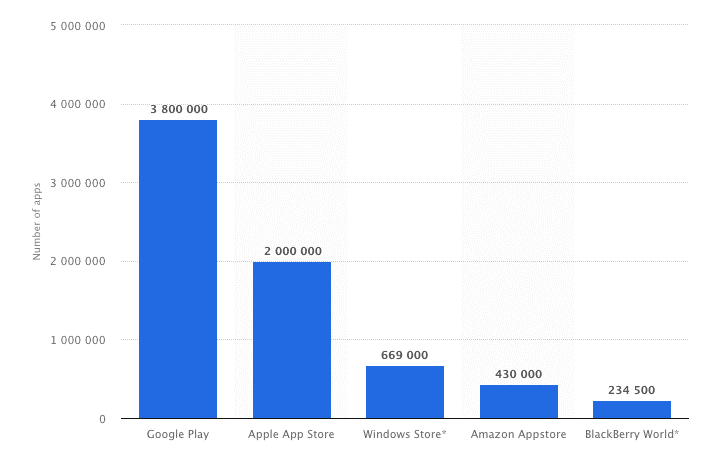
    With over 2 million apps now in the iOS app store, entering such a crowded market is not an easy feat.

    Statista - Apple apps
    Source

    Every day, more and more mobile apps are being built and published.

    If you can successfully pass Apple’s rigorous review process and get your app approved by the gatekeepers the first time around, you’ll find that great benefits await!

    For example, upon approval:

    1. You’re no longer left waiting for users to find you in search, on social media, or by word-of-mouth. The apps stores open up a completely new acquisition channel for you.
    2. Users can begin downloading your app right away, and you can start to generate more revenue through mobile advertising immediately.
    3. Push notifications will enable you to instantly connect and engage with users, sharing with them real-time updates regarding new content, in-app activity, special offers, and more.

    Unfortunately, some apps do get rejected straight out the gate. It’s not always easy to find out what you need to do in order to avoid app store rejection.

    According to Apple, 88% of those rejections occur because of the most common faux pas.

    Apple Rejections

    It’s clear that even making it into the app store is a labor in and of itself.

    But that doesn’t mean you can afford to miss any of Apple’s guidelines. If your app isn’t accepted the first time you submit–especially if the reason is due to poor quality of content or app construction – it will be very difficult to change Apple’s mind when you resubmit.

    If you want to maintain a strong reputation as you submit more apps to the iOS app store, you must play by their rules.

    That’s why we’ve compiled a list of tips that will help you traverse the minefield of guidelines that lie between developers and a space on the iOS app store, to help you avoid app store rejection!

    If you prefer to get this content in video form, check it out below via our YouTube channel:

    Launch your app with Vendrux and you won’t have to worry about getting rejected by the app stores. We handle the publishing process for you, guaranteeing your apps will be approved. Book a free demo with one of our app experts to learn more about how we can help.

    Technical Reasons for App Store Rejection

    There are generally two categories of reasons for app store rejection. Technical reasons are the first:

    1. Crashes and Bugs

    We will reject incomplete app bundles and binaries that crash or exhibit obvious technical problems.
    Guideline 2.1 – App Completeness

    As you can imagine, Apple doesn’t take too kindly to apps that contain explicit bugs or full-out system failures. If your testing of the app demonstrates an unstable performance and ongoing crashes, get that fixed first before submitting for review – if not your app is almost guaranteed to be rejected. Make sure your app works

    2. Poor Performance

    It doesn’t matter how stunning your app looks or how entertaining it is, Apple expects it to run fluidly. If the entry screen causes confusion or frustration, if navigation is choppy, if pages take too long to load – users will be unhappy. Apple will keep that from happening by outright rejecting your app.

    3. Privacy

    All apps must include a link to their privacy policy in the App Store Connect metadata field and within the app in an easily accessible manner.
    Guideline 5.1.1 – Privacy – Data Collection and Storage

    Apple has a very strict privacy policy requirement for all apps that appear in the iOS app store. Specifically, this includes:

    • Placing a privacy policy statement in your metadata
    • Providing an explanation of your data retention policies
    • Enabling users to withdraw consent to data collection, among other things.

    Specifically, Apple has made a point of mentioning that there are two kinds of links it requires apps to have. First, all apps must include a direct link to Support along with contact information.

    Secondly, if you have an app for children or there is a subscription service offered through the app, you must include a link to a Privacy Policy page.

    If you’re not already, make sure you’re compliant with GDPR as well as with Apple’s privacy policy.

    4. Broken Links

    Submissions to App Review, including apps you make available for pre-order, should be final versions with all necessary metadata and fully functional URLs included; placeholder text, empty websites, and other temporary content should be scrubbed before submission.
    Guideline 2.1 – Performance – App Completeness

    Apple has explicitly called out broken links as one of the top reasons for rejecting an app. If you haven’t taken the time to walk through your mobile app and test out each page and link, do so now.

    5. Hardware and Software Compatibility

    We noticed that your app did not run or display as expected when viewed on [Apple’s latest devices]
    Guideline 2.4.1 – Performance – Hardware Compatibility

    Per Apple’s guidelines, your app must work on all the latest systems–hardware and software. They’ve placed extra importance on apps’ ability to run on the iPad, so take note of that for your tests.

    Apple also stresses the importance of designing apps so they don’t inefficiently use up the resources or put strain on devices (e.g. excessive heat, battery draining, etc.) They also strongly discourage apps from encouraging or asking users to disable core iOS features. In other words, if your app can’t work everywhere and on every Apple mobile device, you have a problem.

    6. Payment System

    Use payment mechanisms other than in-app purchase to unlock features or functionality in the app
    Guideline 3.1.1 – Payments –  In-App Purchase

    If your app takes payments to unlock functionality or allow the user to download digital content, transactions must go through the official Apple in-app purchasing system. This is to ensure that money is securely transferred via Apple’s marketplace.

    This is something to be aware of when converting your website into a mobile app since traditional payment systems will be connected to the site.

    When using Vendrux News, you can sell access to content, remove ads, and so on for a subscription fee using in-app payment tools from Apple, and eCommerce apps built with us can integrate whatever payment gateway necessary!

    7. Lacking Standard Functionality

    Your app appears to be a pre-release, test, or trial version with a limited feature set. Apps that are created for demonstration or trial purposes are not permitted on the App Store.
    Guideline 2.2 –  Performance

    Creating a mobile app for the wrong reasons–i.e. for the purposes of giving customers another contact channel–could result in app store rejection.

    The key thing to remember is that a mobile app must be useful. If all you want to do is share a contact form, and there’s no other functionality or features to the app, then there’s no reason to have it in the first place.

    Demo content or trial versions are also to be avoided. All content in your app must be real and final.

    Content-Related Reasons for App Store Rejection

    The second type of reason Apple rejects apps is because the quality of the content is lacking:

    8. Copycat of Another App

    Are a duplicate of another app or are conspicuously similar to another app
    Guideline 4.1 – Design – Copycats

    Think twice before going to the trouble of remodeling the latest mobile craze. Apple may not feel that it’s a welcome addition to its market (along with the 15 other versions of it already out there…). Plus, Apple hates wasting its reviewers’ and users’ time with unoriginal content. Creating your own unique app and content is a good way to avoid app store rejection.

    9. Website or Application?

    Your app provides a limited user experience as it is not sufficiently different from a mobile browsing experience. As such, the experience it provides is similar to the general experience of using Safari. Including iOS features such as push notifications, Core Location, and sharing do not provide a robust enough experience to be appropriate for the App Store.
    Guideline 4.2 – Design – Minimum Functionality

    If your app is based on a website, make sure that what you upload is, in fact, an app rather than a website in an app wrapper. If you’re looking for a solution to convert your site into an app and want to avoid any risk of a rejection, check out Vendrux. While the apps are built from your existing site or web app – Vendrux gives them functionality that goes way beyond that, and there’s no chance of an Apple rejection!

    10. Placeholder Content

    One of the most frustrating things for anyone on the receiving end of an app–Apple’s review team or the end users that encounter it in the store–is to find placeholder content still in there.

    This is a sign that your mobile app is incomplete and wasn’t ready to be sent over. It will also give reviewers an extra reason to dig and find more things wrong with it.

    11. Inaccurate Description

    Make sure your app description is as to the point and accurate as possible.  Also, make sure your app doesn’t describe itself as something it’s not. In sum, if your description misleads users to download the app, you’ll find yourself in hot water.

    12. Lack of Valuable Content

    Similar to the point made about the lack of standard functionality, the same goes here if there is a lack of valuable content. If you’re simply aggregating a bunch of web pages with no rhyme or reason, or there isn’t much substance in the content, you can’t expect users to gain much from the experience.

    13. Poor UI

    Before designing your app, get up to speed with Apple’s Human Interface Guidelines. They’ll provide you with a good baseline on how to properly design a user interface that leads to good results. As you can see from this example from Apple, there are clear dos and don’ts when it comes to designing mobile interfaces:

    Apple - Bad Interface

    14. Bad UX

    The first thing you should ask during testing is: “Is my app easy to use?” This includes reviewing the navigation, the customer journey through design, as well as custom features and functionality you’ve introduced to the app. If it doesn’t comply with standard iOS design specifications, take it back to the drawing board.

    15. Mentioning Other App Platforms

    If it’s clear the app wasn’t built strictly for iOS, you’re going to have a difficult time getting it approved. In other words, don’t mention Android apps or any other platforms. And, when creating screenshots for the store, make sure they come from iOS devices.

    16. Incomplete Information

    The last reason why Apple might reject your app is if the information you provide for the store and for review purposes is incomplete or out-of-date. In other words, make sure to include:

    • Your contact details
    • The title, description, specifications, and other details about the app
    • Categorization information
    • Special configuration notes
    • Demo video if there’s something regarding hardware or software you have to explain

    Other Reasons for App Store Rejection

    If you have submitted your app to the store and it was rejected for a reason not listed here, call Apple directly to get more details.

    Apple Telephone Support

    Apple’s support team is really helpful during the review process and can walk you through whatever went wrong.

    Wrapping Up

    If Apple became lenient in its rules and allowed buggy, spammy, or misleading apps into the store, how long do you think its users would continue to trust the store’s ability to provide high-quality apps for their devices? Needless to say, there’s a valid reason behind each app store rejection from Apple.

    That’s why you should invest more time and energy in making your app. If you can spare yourself the hassle of being rejected by Apple, you can start reaping the benefits of having an app in the iOS store right away.

    We hope that this guide will help you avoid app store rejection when you go to publish your own mobile app. If you want to do away with stress of building your app, conforming to the iOS app store requirements, and setting up your app store listing, get in touch with us.

    At Vendrux we do all the work to create mobile apps from your website, for minimal lift, expense, and overhead.

    That includes app store publishing — we’ve published more than 2,000 apps to the app stores, so we know what it takes to get approved.

    We’re so confident in our process that we guarantee 100% of your money back if we can’t get Apple’s approval.

    If you’re interested in turning your website into mobile apps with a full-service approach, book a demo now to learn more about how we can help.

    Once your app has been successfully published, follow these App Store Optimization strategies to make sure you’ve optimized your app to rank well on the iOS and Google Play App Stores to start getting more downloads!

  • Average Page Views Per Visit: How Many Should Your Ecommerce Site Get?

    Average Page Views Per Visit: How Many Should Your Ecommerce Site Get?

    Average page views per visit is one of a number of metrics that provide insight on how well your website is performing.

    This metric is one of the best ways to tell how engaged your users are – i.e. how actively they interact with your website. More engaged users almost always leads to a higher conversion rate and more revenue.

    In this article we’ll share the benchmark you should shoot for in terms of average page views per visit, along with explaining a little more about this metric and why it matters. To finish up, we’ll give you a few key tips on increasing it in your business, including one that could turn out to be a home run for your eCommerce store.

    Average Page Views Per Visit by Industry

    Key Statistics
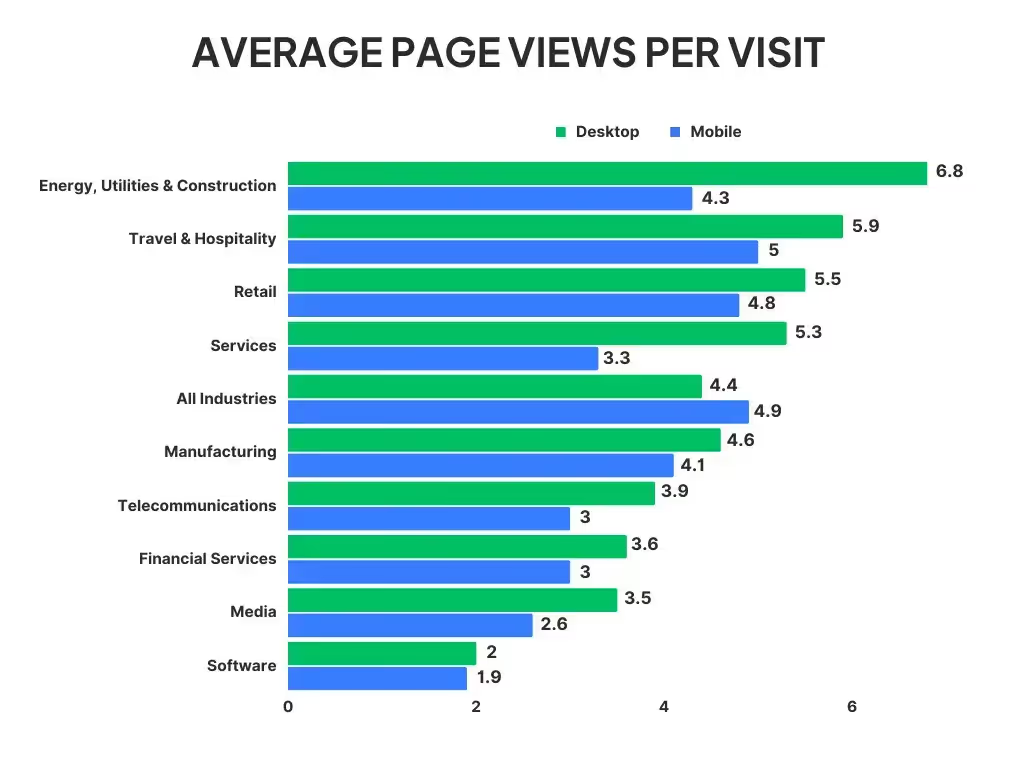
    – Average Page Views Per Visit (all websites): 4.9 (desktop), 4.4 (mobile)
    – Average Page Views Per Visit (retail websites): 5.5 (desktop), 4.8 (mobile)

    Most sources put the average page views per visit for all websites at around 4-5 page views. But the benchmark to aim for will look very different depending on which industry the website is in.

    Here are the averages per industry, separated between desktop and mobile:

    Data source: Statista

    How to Calculate Average Page Views Per Visit

    Average page views per visit is pretty self-explanatory. It’s the average number of pages a user views each time they visit your website.

    The best way to figure out your site’s average is to pull up the reports in Google Analytics (or whichever analytics tool you prefer).

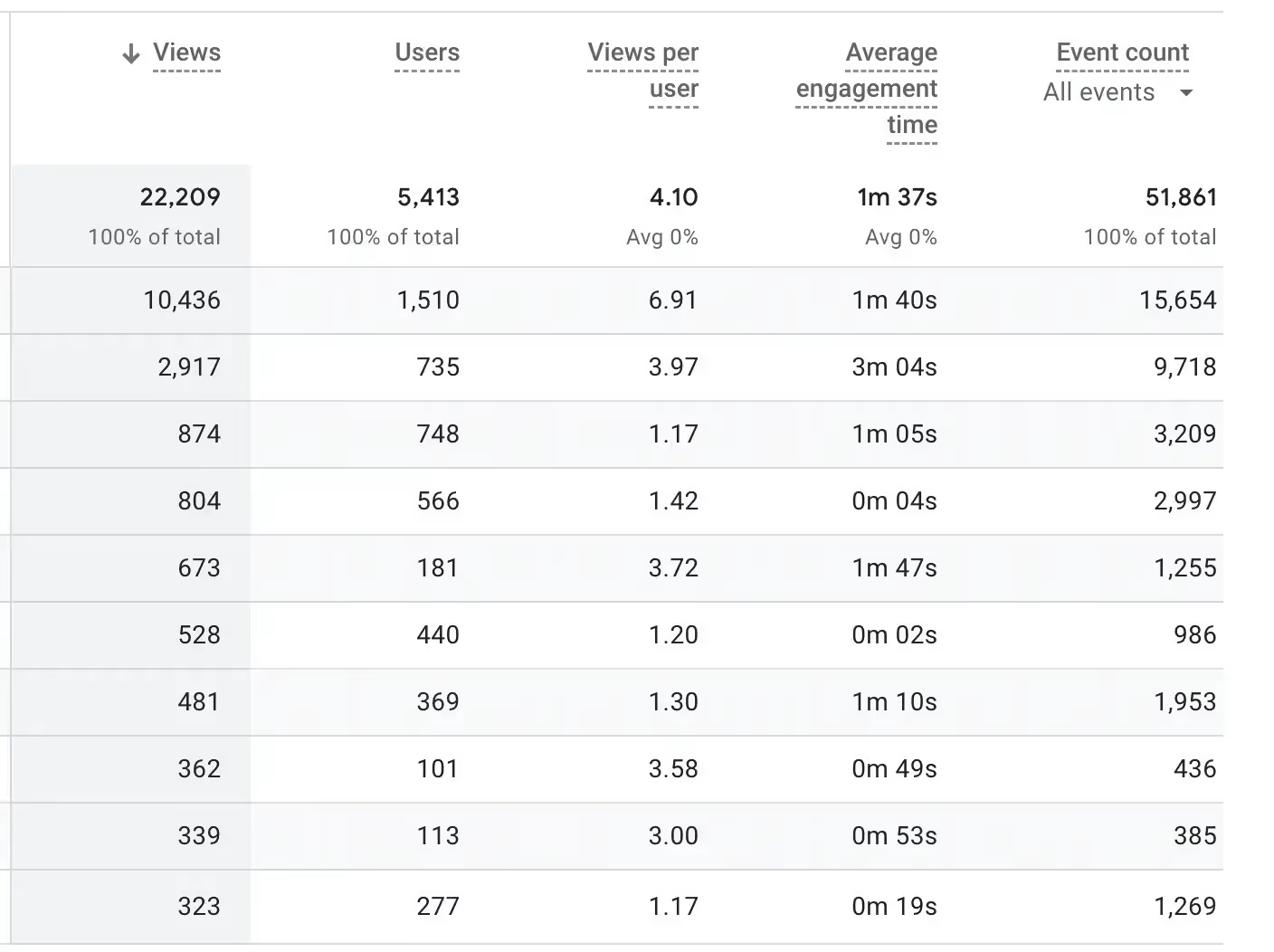
    First, figure out how many page views you had over the given period. If you’re using Google Analytics 4, you can find this under Life Cycle > Engagement > Pages and screens.

    Then find how many visits you had for the same period. A quick way to find this is under Life Cycle > Acquisition > Traffic acquisition.

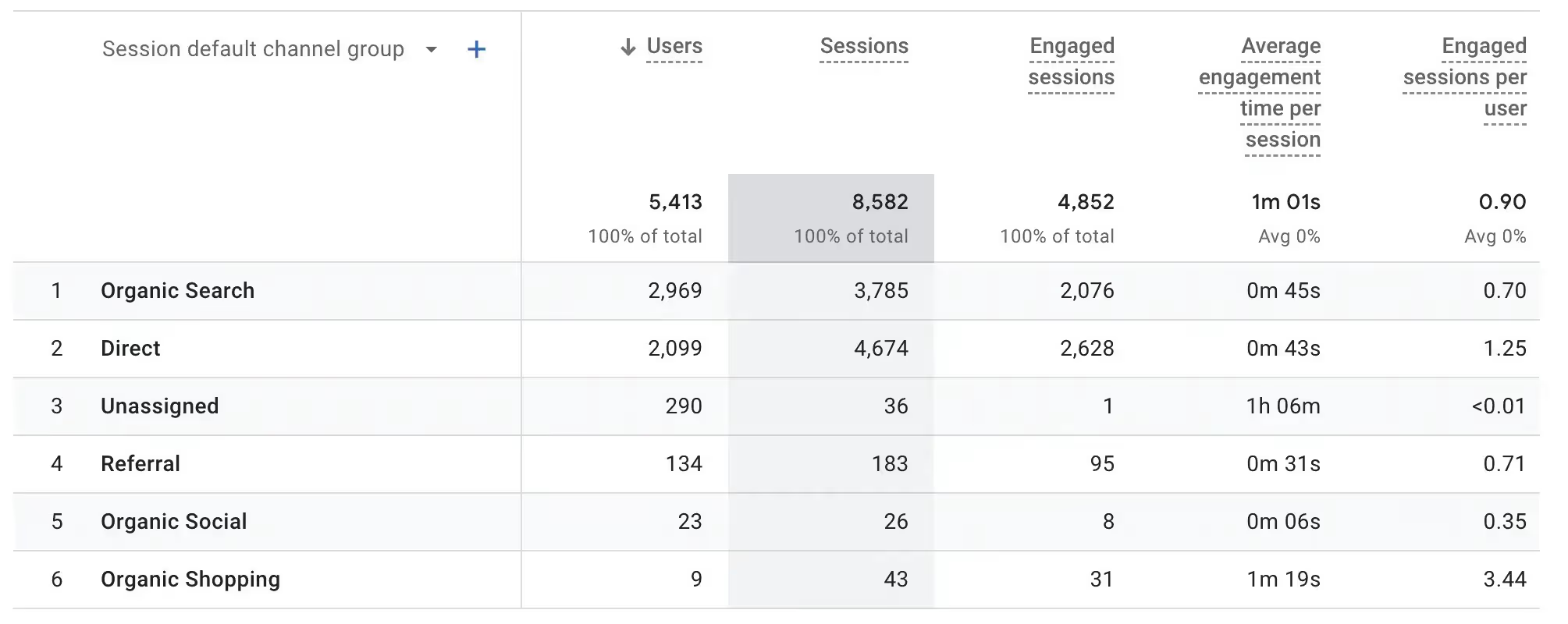
    The number you want here is that for sessions. Don’t mistake this for users, which is the total number of unique users who viewed your site over the selected period, some of whom may have had multiple visits.

    Once you have these two figures, make a simple calculation.

    In the example above, there were 22209 page views and 8582 sessions (i.e. visits).

    That gives us an average page views per visit of 2.59 (22209 / 8582).

    Why This Metric is Important for eCommerce Sites

    Page views per visit can vary in importance depending on the industry. For eCommerce/retail sites, it’s an extremely important metric.

    When a user views multiple pages on your site, it generally means they’re more interested in your site and your products, and more likely to make a purchase.

    It also gives you more opportunities to get in front of the shopper and convince them to buy something when they view more pages and spend longer in your store.

    The top 100 eCommerce sites in the world average 7.8 page views per visit, according to Similarweb, above the overall average for retail websites. This shows a correlation between page views per visit and success for eCommerce stores.

    Page views per visit is not everything, but then again, neither is any metric if you don’t take it in context. Doing millions of dollars in revenue, for example, can be great – or it can be not so great, if it turns out your expenses are more than your revenue.

    How Many Page Views Per Visit Should an eCommerce Site Get?

    Based on current benchmarks, a good number of page views per visit for retail eCommerce websites is anything above 5.5 on desktop and 4.8 on mobile.

    However, you can’t take this alone as an indicator of success or failure. Other factors can come into play.

    For example, if your conversion rate optimization is really, really good, you might end up converting a lot of users in their first or second page view.

    Thus you might have a low average pages per visit, but it’s fine because you have a high conversion rate.

    On the other hand, you may average a large number of views per visit, but struggle to convert users into customers, even after spending a lot of time on your site.

    Generally, you should be invested in trying to boost your average page views per visit. But be careful about viewing this metric on its own, without viewing the wider context.

    How to Get More Page Views From Each Visit

    Though you need to be careful of optimizing solely for one metric, increasing the number of page views that come from each visit is likely to correlate with higher sales and revenue.

    Here are a few tips to help you increase this metric for your website.

    Build a Fast, Bug-Free, Responsive Website

    The quickest way for someone to leave your site is if it doesn’t work properly.

    If each page on your site loads fast, users will be much more likely to jump around to different pages. On the other hand, if they’re left waiting 10 seconds each time they click a link, most will give up.

    The same goes for bugs – make sure everything on your site works as intended. And finally, ensure it looks and works great on all devices, as an increasing number of shoppers today prefer to go online on their mobile devices.

    If you’re using WordPress, reliable SEO plugins can help you monitor site speed, fix technical issues, and improve mobile responsiveness to enhance user experience and search visibility.

    Deliver a Great UX

    Your site needs to feel smooth, intuitive and pleasant to navigate.

    A great user experience means not making the user think. Everything should come naturally, whether it’s finding more information about a product, adding it to their cart, or finding a specific product or category.

    If the user starts getting frustrated or confused, or has trouble finding what they want, they’ll be fast to close the tab and go to another store to get what they need.

    Experts’ POV: For ecommerce sites, well-structured storefront layouts, with clear collection grouping, consistent sections, and obvious paths to related products, help guide shoppers between pages and increase the likelihood they view multiple pages in a single visit.

    A/B Test

    Seemingly minor changes can make a big difference to user engagement. But the only way to find these small but significant changes is to test.

    Run isolated tests where you change minor details in your UX, such as your navigation, how you order collections, which products you recommend, and so on.

    Compare your average pages per visit for each variable. Often you’ll find that small changes can actually have significant results, which can deliver a lot of extra revenue if your site is doing a lot of traffic.

    Drive the Right Traffic to Your Site

    A common reason for low pages per visit is that you’re attracting a lot of low-intent or irrelevant traffic.

    These people land on your site, realize it’s not something that interests them, and leave straight away.

    If you’re putting resources (i.e. time, money, or often both) into getting these people to your site, these resources will be going to waste. Making positive changes to your user targeting will often show itself as higher on-site engagement metrics, such as average time spent on site and more page views per visit.

    Get People to Shop In Your App

    Distractions are another common reason for below average pages viewed per visit.

    At any given time, the typical internet user has a number of tabs open in their browser. You’re competing with those tabs for the user’s attention.

    But if you get people to shop in your app, there are no longer any browser tabs to contend with. You give the person a contained shopping experience, which is more conducive to extended shopping sessions.

    If you have an app, try incentives like app-only discounts to get more people to download and shop in your app. If you don’t have an app for your store, create one now to enjoy the benefits you get for user engagement and retention.

    Boost Engagement With Your Own Mobile App Today

    If you don’t have your own app, and thought launching an app was something only the biggest ecommerce stores were capable of, you’ll be surprised how easy it is with Vendrux – our full-service ecommerce app builder.

    With Vendrux you can go live with an app that looks and feels like what you’d get from some of the world’s biggest brands, all in less than a month.

    All you need is a mobile-optimized website. Vendrux converts your website into apps for Android and iOS, ready to engage and convert users.

    It works with eCommerce sites built on any platform (Shopify, WooCommerce, Squarespace, etc), and lets you fully replicate your website in the app, including all apps, integrations, and even custom-built features (something many eCommerce mobile app builders don’t do).

    Mobile shopping apps built with Vendrux

    We do all the work for you, including shipping your app, submitting it to the app stores and keeping it bug-free and up-to-date after launch.

    Get a free preview of your site as an app, to see how easily you can build a high-quality and professional shopping app. If you want to learn more, or you’re ready to move forward, schedule a free demo and see how Vendrux can elevate your eCommerce store.

  • What is the Average Order Value for eCommerce? (Plus 5 Tips to Boost AOV)

    What is the Average Order Value for eCommerce? (Plus 5 Tips to Boost AOV)

    One of the most important metrics to track in your eCommerce business is Average Order Value, or AOV.

    In this article, we’ll share the definition of average order value, followed by the eCommerce AOV in a range of categories.

    We’ll finish up with some easily applicable tips to boost your store’s AOV.

    Read on if you’re ready to start making more from your eCommerce business.

    Mobile app users spend more, shop more frequently, and are more loyal to your brand. Use our eCommerce App Revenue Calculator to see just how much you stand to gain by launching an app.

    What Does Average Order Value (AOV) Mean?

    Average Order Value, or AOV, is the average amount spent with each purchase on your site.

    To calculate average order value, simply divide your total revenue by the total number of orders in the same period.

    For example, if in one month you had $80,000 in revenue with 2,000 orders, your average order value would be $40 (80,000 divided by 2,000).

    AOV is one of the top KPI’s (key performance indicators) for any online store.

    It’s a sign of how much value you get from each conversion, which is a crucial part of understand your marketing ROI.

    What is the Average Order Value for eCommerce Stores?

    Wondering how your average order value stacks up?

    According to the latest data from IRP Commerce, the average order value across the entire eCommerce market is £98.38, or $125.66.

    Here are a few other key metrics:

    • Average conversion rate: 1.89%
    • Average item sale price: £49.42 ($63.12)
    • Average revenue per visitor: £1.47 ($1.88)

    Of course, there are a lot of variables to consider here, so don’t take it as an ultimate pass/fail if your store is above or below this figure.

    eCommerce AOV By Category

    Comparing your AOV to the industry average in your particular category is a better way to judge how well you’re doing.

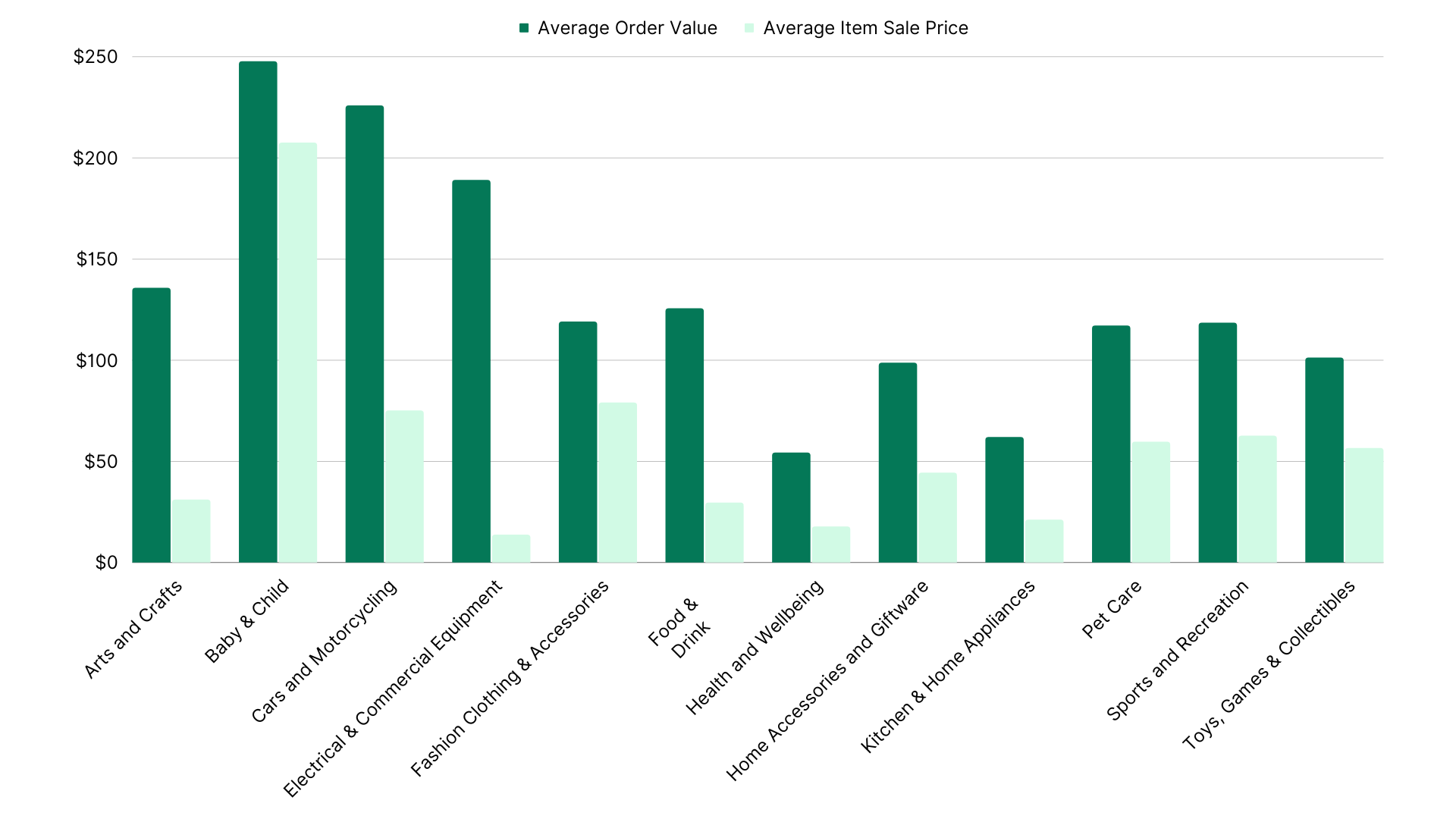
    The figures below show the average AOV in several different product categories.

    Arts and Crafts

    • Average order value:  $135.57
    • Average item sale price: $31.08

    Baby & Child

    • Average order value: $247.63
    • Average item sale price: $207.47

    Cars and Motorcycling

    • Average order value: $225.74
    • Average item sale price: $75.10

    Electrical & Commercial Equipment

    • Average order value: $188.92
    • Average item sale price: $13.73

    Fashion Clothing & Accessories

    • Average order value: $118.89
    • Average item sale price: $78.91

    Food & Drink

    • Average order value: $125.52
    • Average item sale price: $29.51

    Health and Wellbeing

    • Average order value: $54.17
    • Average item sale price: $17.74

    Home Accessories and Giftware

    • Average order value: $98.56
    • Average item sale price: $44.32

    Kitchen & Home Appliances

    • Average order value: $61.87
    • Average item sale price: $21.05

    Pet Care

    • Average order value: $116.97
    • Average item sale price: $59.59

    Sports and Recreation

    • Average order value: $118.39
    • Average item sale price: $62.54

    Toys, Games & Collectibles

    • Average order value: $101.11
    • Average item sale price: $56.51

    Takeaways

    Here are a few things we can learn from the average AOV and average sale price per item shown above.

    • Baby & Child, Cars and Motorcycling are the two categories with the highest average AOV.
    • Arts and Crafts and Electrical & Commercial Equipment are both also significantly higher than the overall average.
    • Health and Wellbeing and Kitchen & Home Appliances are less than half the overall average.
    • The average AOV for Home Accessories and Giftware and Toys, Games & Collectibles are not as drastic, but still significantly lower than average.
    • Many product categories rely on multiple products in each purchase to make up their AOV, with Arts and Crafts, Electrical & Commercial Equipment, Food & Drink, Health & Wellbeing and Kitchen & Home Appliances all averaging 3+ items in each sale.

    Is Average Order Value the Best Success Metric for eCommerce Stores?

    Average order value is an important and valuable metric.

    You could make the argument that it’s the best success metric for an online store.

    But it doesn’t necessarily tell the whole picture on its own.

    For example, a high average order value doesn’t matter much if you have few total orders.

    On the other hand, a low AOV may not be such a bad thing if you have a lot of orders, each customer makes a lot of separate purchases, or you have high profit margins.

    Other metrics that play a large part in revenue and profitability include:

    • Number of orders
    • Conversion rate
    • Customer lifetime value (CLV)
    • Customer acquisition cost (CAC)
    • Cost of goods sold (COGS)

    Improving any of these metrics (including AOV) will boost revenue and/or profit.

    To boost revenue, there are three things you can do:

    • Get more customers (through more traffic or a higher conversion rate)
    • Sell more in each order (higher AOV)
    • Sell to each customer more often (higher CLV)

    Reducing CAC and COGS, on the other hand, will increase profitability.

    Average order value, conversion rate, and customer lifetime value all have a positive impact on profitability as well.

    So, since increasing AOV increases both revenue and profitability, we can be safe in saying it’s at least one of the most important eCommerce KPIs.

    5 Ways eCommerce Stores Can Increase AOV

    Increasing average order value is the low-hanging fruit for boosting your store’s total revenue and profitability.

    It’s easier to get a little more revenue out of your existing traffic than to get more customers or make your customers come back and shop more often.

    But what can you do to get a higher AOV for your store?

    Here are five proven and effective ways to increase eCommerce AOV.

    Set a Free Shipping Threshold (or Increase It)

    AOV is the reason why so many companies set a minimum spend to be eligible for free shipping.

    People are strongly averse to spending money on shipping.

    If there’s an easy way to get free shipping we’ll take it, even if that means buying more than we initially planned to.

    When our cart is at $30, and we see that we can get free shipping if we spend $40, most people will add another $10 worth of products to make it up to the free shipping threshold.

    Rowan, like most eCommerce stores, offer free shipping above a certain amount

    If you don’t have a free shipping threshold, look at your average order value and offer free shipping on orders that reach a threshold around 30% above your AOV.

    If you already have a free shipping threshold in place, think about running a test to raise the threshold and track the results on your AOV.

    Promote Product Bundles

    Getting customers to buy more products in each purchase is key to increasing average order value.

    Bundles are a great way to do that.

    Pair products that go well together, such as knife and knife sharpener, or a shampoo and conditioner set, and offer them at a slight discount compared to the cost of buying them separately.

    Customers who came to buy just one product will figure they might as well buy the bundle instead, spending more than they would have originally.

    A simple product bundle from Fresh Heritage

    You could also offer discounts or a free gift when people buy multiple products, such as a “Buy 3 get 1 free” promotion, to encourage customers to spend more in each order.

    Show Cross-Sells and Up-Sells

    Cross-sells and up-sells are the simplest, most cost-effective way to increase average order value.

    It doesn’t cost you anything (like offering free shipping or discounts), and it works at getting customers to buy more a lot of the time.

    Amazon has huge success with this, with their “Frequently Bought Together” section, which makes it extremely easy to add additional items to your order.

    Cross-sells in action on Amazon

    Cross-promoting complementary products is a powerful tactic.

    Alternatively, you can promote smaller impulse buys. These work great as part of the checkout flow, just like how grocery stores place confectionery next to the register.

    Set Up a Loyalty Program

    Aside from the promise of free shipping, there’s nothing that’s better at convincing us to spend more money than earning points.

    Loyalty programs are used all over retail, from earning points with your credit card, to Starbucks, to Uber.

    A loyalty program (aka rewards program) from Meow Meow Tweet

    The main function of a loyalty program is to boost return customers (and thus lifetime value), but it’s also a strong incentive to spend more in a single order, as we feel like we’re getting more for the money we spend.

    Launch a Mobile App

    If you want a more creative way to increase average order value, while getting a host of other benefits, launch your own branded mobile app.

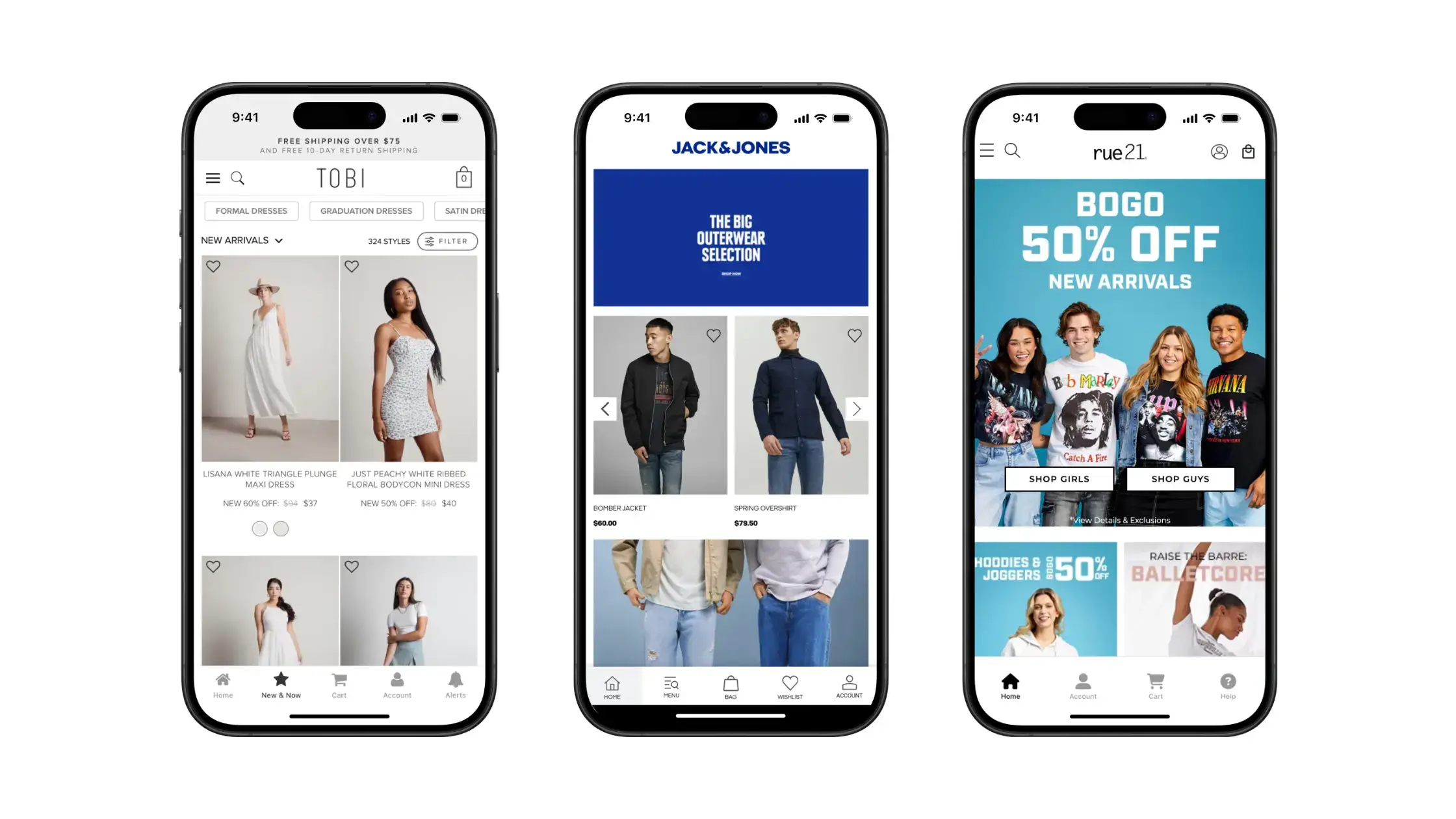
    The Jack & Jones branded mobile app

    Data from IRP Commerce shows 56% of eCommerce revenue comes from mobile devices. According to Statista, Smartphones account for 74% of retail website visits, and 63% of orders.

    This data shows us a couple of things.

    • More people shop and buy on mobile than desktop.
    • Desktop has a comparatively higher average order value, as mobile’s revenue share is lower than their share of visits and orders.

    The takeaway is that it’s harder to convert visitors on mobile, mostly due to the suboptimal user experience offered by mobile websites.

    You can fix that by launching an app. The app experience is smoother, faster and more immersive than mobile websites, resulting in more time spent shopping in apps, more products viewed and higher conversion rates.

    The better customer experience correlates to a higher AOV.

    Besides AOV, there are many additional benefits you can get from launching your own app, such as increased retention (and thus higher CLV), increased trust (which leads to a higher conversion rate), and the ability to get into the app stores, which provides a low-cost acquisition channel and makes your brand look more authoritative.

    How to Easily Create a Mobile App for Guaranteed ROI

    The prevailing notion is that only high-level brands with huge budgets can afford to make their own app.

    If you’re talking about coding custom native apps from scratch, this is true.

    But with another development approach, any eCommerce store can launch their own app.

    __wf_reserved_inherit

    Vendrux is a tech-enabled service that lets you directly convert your website into Android and iOS apps.

    Your website and app are totally in sync, and the app fully replicates everything you’ve built for the web, with some small touches (such as native navigation and menus, plus native push notifications) to make it feel like a true native app.

    This is all for a very minimal investment, something that any eCommerce store making consistent monthly revenue can afford.

    Many online stores have launched apps this way and found excellent results.

    “The only reason more people haven’t done it [built apps] is because everybody’s experience with apps is that they’re very expensive and a pain to maintain. Vendrux knocks both of those hesitations down.”
    – David Cost, VP of eCommerce & Marketing at Rainbow Shops

    The Rainbow Shops App, built with Vendrux

    With Vendrux, you:

    • Don’t need any technical expertise to do with mobile app development.
    • Don’t need a big budget or outside investment to launch an app.
    • Can launch an app in less than two weeks.
    • Get ongoing support to keep your app up to date and maintained (which will cost you tens of thousands per year, at least, if you build a custom app)
    • Will get your brand into the app stores, which is a huge show of social proof (Vendrux even handles the app store submission and publishing process for you).

    To explore the process deeper, book a personalized demo with a Vendrux project manager.

    Once you move forward, it’s more or less hands-off from there, as the Vendrux team builds, tests, compiles, and ships your app for you.

    With minimal work required and a low cost, there’s almost no risk in launching a mobile app for your brand.

    Even if you get zero app users, the brand authority you get from an app store presence alone could increase your average order value and deliver a positive ROI.

    Get a free demo of Vendrux now!

    Wrapping Up

    Increasing the average dollar amount of each transaction is one of the best ways to simultaneously boost your store’s revenue and profitability.

    While you still need to take into account other metrics, such as customer lifetime value, total orders and revenue, and profitability metrics like COGS and CAC, increasing average order value is the holy grail for online businesses.

    In this article we gave you a few ideas for how to increase average order value, from harnessing the attractiveness of free shipping, to volume discounts and cross-selling, to launching a loyalty program.

    But if you want to do something that none of your competitors are, launch a mobile app.

    Your customer base is already skewed towards mobile users, and that share is only going to rise as mobile commerce becomes more mainstream.

    Get the most out of your mobile customers by giving them what they want – an app.

  • What is the Average Mobile Ecommerce Conversion Rate? (And How to Beat It)

    What is the Average Mobile Ecommerce Conversion Rate? (And How to Beat It)

    Mobile is the biggest growth opportunity for ecommerce brands today.

    The share of ecommerce sales on mobile continues to grow each year, yet the mobile shopping experience for many stores is lacking.

    With many sites built primarily for desktop, along with the natural limitations of the mobile browser in terms of user experience, conversion rates are typically lower on mobile than on desktop.

    That just means there’s a huge opportunity to increase your sales, and set your brand apart, if you can get this right.

    Keep reading and we’ll explain more about the mobile conversion rate problem with most ecommerce stores, and a bumper list of tips to help your brand turn this around.

    Did you know that mobile app users spend more, shop more frequently, and are more loyal to your brand?
    Use our Ecommerce App Revenue Calculator to see just how much you can gain by launching an app.

    What is the Average Mobile Ecommerce Conversion Rate?

    The average conversion rate for ecommerce stores on mobile devices is 1.8%.

    In comparison, the average conversion rate on desktop is more than double, at 3.9%.

    Each year, this becomes a bigger problem, as the market share for mobile commerce continues to grow.

    More people worldwide shop on mobile than desktop, and this share is projected to increase further.

    Yet the average mobile ecommerce conversion rate continues to lag behind, as many stores haven’t caught up to the fact that the majority of their customers are mobile-first.

    What is a Good Mobile Ecommerce Conversion Rate?

    If 1.8% is the average mobile ecommerce conversion rate, should this be the bar you’re aiming for?

    Considering most ecommerce brands are stuck in a desktop-first mindset, forward-thinking brands should be able to attain a conversion rate significantly higher.

    There’s no reason you can’t convert visitors on mobile at close to the same rate as desktop.

    This means you should be aiming for at least 2.5-3% conversion rate on mobile – perhaps even higher, if you really dial in on mobile-first CRO.

    With 5.22 Billion Mobile Users, Fixing Mobile Conversion Rates Should Be Your Top Priority

    Why do mobile shoppers convert at a lower rate?

    Desktop sites have more real estate to work with. 

    Bigger screens means it’s easier to fit key, conversion-driving elements, without making the page feel cramped.

    Mobile users are typically more prone to distractions, too. Notifications appear, and people are already conditioned to bouncing around between multiple actions on their phone, more so than on desktop.

    Then, some consumers just have a higher level of trust when using a desktop site than a mobile site.

    Whatever the reason, there’s almost certainly something you can do to fix the problem and boost your conversion rate on mobile.

    Next, we’ll list more than 20 things you can do to turn more mobile shoppers into paying customers.

    How to Beat the Average Mobile Ecommerce Conversion Rate of 1.8%

    Let’s explore best practices to optimize your mobile ecommerce conversion rate. Focusing on creating a better customer experience, particularly on mobile, is key to getting a higher conversion rate.

    A large part of this is to build better, more optimized PDPs (product detail pages). If you want to dive deeper into this topic, our Ultimate Guide to Ecommerce PDPs is the best resource for this on the internet.

    Here are 21 strategies to significantly improve your mobile ecommerce conversion rate and close the mobile-desktop conversion rate gap. 

    1. Launch a Mobile App

    One of the best ways to increase conversion rates for mobile shoppers is by launching a mobile app.

    Mobile apps drive 3x higher conversion rates than mobile websites (and our data shows as much as 6-10x higher conversion rates in some cases).

    Mobile apps are tailor-made for higher conversion rates.

    By removing the browser tabs and serving shoppers a more immersive, contained experience, you remove a lot of the distractions that lead to lost sales.

    If the cost has you thinking a mobile app is out of reach, think again.

    By simply converting your existing website into a mobile app with Vendrux, you can launch an app for a small expense, in as little as two weeks.

    A few examples of ecommerce apps built with Vendrux

    Click here to learn more about how to convert your website into an app, and why Vendrux is the best way to do it.

    Want to launch your own app in less than 30 days, with zero effort and minimal investment?
    Get a free preview of your app to see what’s possible.

    2. Make Call-to-Action Buttons Stand Out

    Optimizing your calls to action (CTAs) is important for your CRO strategy.

    Test and analyze various elements of your CTAs, such as buy and add-to-cart buttons, to stop your customers from scrolling and get them to take action.

    Tools like HotJar can help track the effectiveness of your buttons. Make your buttons visible and “sticky” to improve mobile conversion rates.

    3. Make Navigation as Easy as Possible

    It’s vital you make navigation easy for mobile users.

    An expandable, hamburger-style menu is standard on mobile. But along with this, you should ensure key sections of your site are easy to find.

    It should take zero thought to get to wishlist, add to cart, account, and category sections.

    On category pages, make product filters clearly visible, and easy to use.

    All in all, just make your mobile shopping experience easy.

    4. Show Product Recommendations (in the Right Place)

    Display product recommendations on all mobile product pages.

    Product recommendations help boost AOV, but can also increase conversion rates.

    When someone views a product which is not quite what they’re looking for, you may be able to convert them by showing a few similar options.

    Just be careful where you place these product recommendations.

    Shoppers still want to see the key details for the product they clicked on first.

    Below that, below important details like pricing, product description, shipping and return information, display your recommendations.

    This ensures the shopper’s journey doesn’t stop at that page, but doesn’t obscure anything that will help you close the sale then and there.

    5. Optimize Load Speed

    Reduce load times and optimize the speed of your mobile store to improve CRO.

    The longer shoppers have to wait for a page to load, the more likely they’ll get fed up and go somewhere else.

    Make sure your images are optimized, and the underlying architecture of your website is clean.

    If you have an app, reduce app launch time by delaying resource-intensive tasks until after the first screen is rendered.

    Load data when required instead of when the app launches.

    6. Simplify Mobile Forms

    Mobile forms should be simple to fill out by design – from sign-up forms to booking forms.

    Optimize mobile forms with clear labels and use single-column layouts and larger form fields.

    Additionally, forms should be as concise as possible to minimize user effort and make them easy to complete on mobile devices.

    Pre-fill information, if you have it (e.g. if the user has an account and is logged in), and in general, do anything you can do reduce friction with user input.

    7. Shorten Mobile Processes With Smartphone Features

    Design your app to make autofill available, especially for payment details and mobile forms.

    Autofill can also save users time and make checkout processes quicker.

    66% of consumers expect online checkout to take four minutes or less.

    If yours takes longer than this, you’ll almost certainly be losing out on sales.

    8. Provide Different Payment Methods

    Entering payment details on a mobile device is time-consuming, and requires a lot of trust from the customer.

    Offer shortcuts by saving customer payment details or providing alternative payment options like PayPal, Amazon Pay, Apple Pay, or Google Pay.

    Not only does this make it quicker and easier for the customer, but there’s an higher level of trust when they’re not giving a store their actual credit card details.

    9. Offer Guest Checkout

    To reduce friction for mobile customers, offer a guest checkout option, where you allow users to complete their purchase without creating an account.

    This eliminates an additional step that may deter customers from completing a purchase – even if you’d prefer to have someone’s contact details, to be able to market to them in the future.

    10. A/B Test Your Checkout Process

    Optimize your ecommerce checkout process and prevent customer drop-offs by tweaking and testing the process continuously.

    A long and complicated checkout process can deter customers from completing their purchases – but you often won’t know what the problem is until you test and gather data.

    Things like adding guest checkout, reducing the number of input fields, or changes in copy or page design, might bring an improvement – or they might not.

    Continuously test factors like this, to come up with the perfect formula to get the highest conversion rate possible for your audience.

    11. Use Mobile Conversion Messaging

    To increase mobile commerce sales, try being pro-active about communicating with your site/app visitors.

    Browse abandonment notifications can recapture shoppers who let their attention drift away, while abandoned cart notifications are a great way to recover abandoned carts.

    Otherwise, in-app messages and customer service prompts may help solve questions or objections that otherwise would result in lost sales.

    Apps provide the perfect way to communicate with your customers, via push notifications. Check out our complete guide to Push Notifications for Ecommerce to learn just how powerful a tool this can be.

    12. Use Color Blocks to Highlight Promotions

    Make your best deals stand out!

    Implement color block items to highlight ongoing sales in your mobile storefront.

    Use vibrant and eye-catching colors for sale items to help them stand out, create a sense of urgency, and catch the attention of mobile shoppers.

    You could also use pop-ups or push notification to improve mobile conversions (just avoid being too intrusive).

    This visual distinction is crucial in a digital landscape saturated with numerous sales and promotions.

    13. Use Video Content to Keep Shoppers Engaged

    Mobile shoppers are conditioned to watch video.

    Hours of Reels, TikToks, and Shorts have trained customers to expect video-first feeds on their phones. When they land on a static product page, the experience feels flat by comparison, and their thumb keeps scrolling.

    Adding video is one of the easiest ways to hold their attention on mobile. And attention = higher chance of conversions.

    Product demos, UGC clips, AI UGC, shoppable videos, unboxings, and creator videos give shoppers something to stop for. Instead of skimming text and bouncing, they watch, linger, and spend more time with your product, which gives you more chances to answer questions and convert.

    Learn more: Why Video Commerce is a Winning Strategy for Brands in 2026

    14. Build Trust With Mobile Audiences

    Design your mobile app with trust signals in mind. According to Marqeta’s 2021 Fraud Report, 67% of all consumers think shopping online puts them at a higher risk of scams.

    To increase trust, ensure all mobile data is safe by offering user authentication, displaying your data privacy policy, and integrating with trusted payment methods.

    Making the buying experience safe can build trust in your brand and improve mobile conversions.

    15. Let Users Zoom and Swipe

    Most image sections on product pages are designed for desktop first, and fall short on mobile.

    Mobile shoppers use pinch and swipe actions to zoom in on or navigate between product images.

    If this functionality is unavailable or poorly implemented, it can put a big dent in your CRO.

    Images are absolutely vital for conversions, so ensure that mobile shoppers have no difficulty getting up close and personal with products they’re considering buying.

    16. Let Users Go ‘Back’ Easily

    The ‘back’ button is a crucial and often overlooked UI element.

    On many apps or mobile websites, interactive experiences and desktop-first navigation leads to unexpected behavior when a user hits the back button.

    As a result, they get lost, they can’t get back to where they’re supposed to be, and leave your store in frustration.

    Make sure your back functionality works intuitively, and include a “previously viewed products” section to make it even easier for shoppers to find their way around.

    17. Improve Copy and Product Descriptions

    Persuasive copy, detailed, and easy to skim are important for conversion rate.

    Find the ideal mix of readability and sales-oriented copy.

    Proactively address pain points and common objections, and use real, functional benefits to sell your products.

    You should also include important information such as:

    • Dimensions,
    • Sizing (with links to size guides if applicable),
    • Materials or ingredients,
    • Compatibility details,
    • Included accessories.

    However, don’t lead with the technical details. Focus on emotion first, and go into more detail lower down the page for shoppers who want to learn more.

    18. Create Mobile-Only Exclusive Coupons, Discounts, and Offers

    Creating special promotions for mobile users can incentivize mobile users and website visitors to purchase through your mobile app.

    Mobile-only promotions, such as free shipping, can create a sense of exclusivity and urgency.

    This drives customers to act and purchase on their mobile devices.

    Whether it’s a limited-time discount, a coupon code, or a special offer for mobile users, these incentives can get mobile shoppers over their trust or usability issuesand boost mobile ecommerce conversion rates.

    19. Improve Post-Purchase Mobile Experience

    Improving the post-purchase mobile experience can improve your CRO on mobile.

    Allowing customers to track the progress of their orders easily is one way of doing this.

    Offer real-time updates on order status and estimated delivery time via push notifications or messages in their account, and be clear and prompt with any post-purchase communication.

    Do what you can to minimize frustration and provide a more inviting, end-to-end shopping experience, and you’ll get more return customers (who will convert at a higher rate than new visitors).

    20. Make Reviews and Social Proof Visible

    It’s important to establish credibility from the moment someone enters your ecommerce store.

    Include customer testimonials or other forms of social proof below product descriptions, around CTA, and in your checkout flow, that highlight your product’s benefits and value.

    Real customer reviews, UGC, and social feeds all help built more trust and credibility, and break down the barriers that stop customers from going through with a purchase.

    21. Offer In-App or On-Site Customer Support

    You can offer in-app customer support through chatbots or chat support software to quickly answer user questions and objections.

    Most people won’t go through the effort of emailing you or calling you up, so you want to make it extremely easy for them.

    An on-site chat widget with live chat can achieve this, and oftentimes answer very minor questions that otherwise would have resulted in a lost sale.

    22. Personalize the In-App Experience

    Personalization can have a big influence on a consumer’s journey towards purchasing.

    This is true for any device, including mobile.

    80% of consumers are more inclined to purchase when brands provide personalized experiences.

    Personalization strategies can range from how content is displayed in the customer’s local language or currency to product recommendations.

    Tailored in-app experiences ultimately drive higher conversions, improve customer satisfaction, and improve app engagement.

    Building an app is the best way to boost mobile conversion rate, AOV and LTV. If you’re new to app development, and don’t know where to start, we made a full guide on building an ecommerce app, that shows you that launching your own app might be a lot easy than you think.

    Increase Mobile Commerce Conversions and Optimize CRO with Vendrux

    By following these tips to beat the average mobile ecommerce conversion rate, your business can set itself apart and capitalize on the growing share of mobile-first shoppers.

    Many CRO issues can be solved by offering mobile shoppers the option to shop through an app.

    All ecommerce businesses should have their own mobile app, and Vendrux is the best way to do it.

    Vendrux requires little to no effort from you, minimal overhead, minimal investment, yet allows you to ship a full-featured app that looks and feels like a fully native, custom app.

    We’ve created thousands of apps, including apps for high-revenue ecommerce brands such as Rainbow Shops, Jack & Jones and John Varvatos.

    Let’s beat the average mobile ecommerce conversion rate and boost mobile conversions together.

    Get in touch with us and book a free consultation now to see how we can help you build and launch your own mobile app.

  • What’s the Average eCommerce Conversion Rate in 2026?

    What’s the Average eCommerce Conversion Rate in 2026?

    Understanding the average eCommerce conversion rate (CVR) is important for you to get an idea of how well your site is performing and how you can improve.

    As we’ll establish later, there are a number of factors you should consider when you compare your conversion rates to others.

    Still, conversion rate is one of the most important metrics for an ecommerce store. The better your conversion rate, the more effective you are at converting your hard-earned visitors into paying customers.

    Read on and we’ll show you the average eCommerce conversion rate, average conversion rates for different categories and a few factors to take into account, before sharing some conversion rate optimization tips for your business.

    What’s a Good Conversion Rate for an eCommerce Store?

    According to IRP Commerce, the average eCommerce conversion rate across all industries and categories is 1.89%.

    Before you start cheering (or crying) because your store’s conversion rate is above (or below) that average, understand that the market average conversion rate is far too broad to paint a picture of how well your site is performing.

    You’ll be better to compare your site to the average for your industry – but even then, there are many other things that influence whether your conversion rate is good or not, which we’ll share a little later.

    How to Calculate Conversion Rate

    You calculate conversion rate by dividing your total number of orders by the total number of site visitors.

    Using the average eCommerce conversion rate as an example, this would mean that for every 10,000 visitors, 189 make a purchase.

    189 / 10,000 = 0.0189 (1.89%)

    Completed orders per site visit is the generally accepted formula if we’re talking about eCommerce conversion rate. But you can use conversion rate for a lot of different metrics and conversion events, such as:

    • Add to carts
    • Email signups
    • Form submissions
    • App downloads
    • Customer service inquiries
    • Video views
    • Landing page views
    • Clicks from a specific traffic channel

    For example, you could use conversion rate to define how many people claimed a coupon code after viewing a landing page, if this is what you wanted to test and optimize for.

    The point being that conversion rate is a very broad and flexible term. For the purposes of this article, though, we’ll keep it simple and just talk about your basic purchase conversion rate.

    Average eCommerce Conversion Rates by Industry

    You want to know what a good eCommerce conversion rate is? This figure can vary greatly depending on the product category. So you’ll be better off comparing your store’s CVR against the average CVR from your industry/category, rather than taking the overall average conversion rate.

    Here’s the benchmark for a few of the most popular eCommerce categories:

    • Arts and Crafts: 4.60%
    • Baby & Child: 0.78%
    • Cars and Motorcycling: 1.33%
    • Electrical & Commercial Equipment: 1.44%
    • Fashion Clothing & Accessories: 1.57%
    • Food & Drink: 1.36%
    • Health and Wellbeing: 3.56%
    • Home Accessories and Giftware: 1.49%
    • Kitchen & Home Appliances: 2.97%
    • Pet Care: 2.01%
    • Sports and Recreation: 1.72%
    • Toys, Games & Collectibles: 1.68%

    These figures show why it’s so important to compare your conversion rate to the industry average, rather than the average eCommerce conversion rates across the market as a whole.

    If you were selling a product in the Health and Wellbeing market with a conversion rate of 2%, you might think that your conversion rate is above average if you only look at the broad average. Yet by looking at the average for this category, you’ll find you’re actually below average.

    Still, this is not the be all and end all. This conversion rate might actually be ok, depending on certain factors we will establish very shortly.

    Mobile vs Desktop Conversion Rates

    We need to consider device type when looking at average eCommerce conversion rates as well.

    According to Retail Touchpoints and Endertech, the average conversion rate on desktop is 3.9%, compared to 1.8% on mobile.

    This is most likely due to the sub-par user experience many websites offer on mobile, as well as the distractions and usability issues present with most mobile websites.

    This presents a clear opportunity for growth if you can improve your user experience and conversion rate on mobile. We’ll share a great way to do this later on in the article.

    Why eCommerce Conversion Rate Benchmarks Don’t Tell the Whole Story

    Conversion rate is important, no doubt.

    Improving conversion rate is almost always going to result in better revenue and profitability. But there are a number of reasons why comparing your conversion rate to the industry average, or to another store, can be deceiving.

    A “good” conversion rate for one store may be not-so-good for another. Or it could be incredible for one store and alarming for another.

    That’s because of the range of factors that influence conversion rate. You need to take all these factors into consideration before deciding whether or not your conversion rate is acceptable or not.

    Price Point

    Higher priced items usually have a lower conversion rate. These products require more thought and deliberation from customers before making the decision to buy or not.

    Often you’ll find people take a look at the product, shop around, check reviews and recommendations, and if they decide to buy, it will be after a longer period of time.

    A lower conversion rate is expected and acceptable for high-ticket items. The value of each purchase is higher, so you can be ok with a lower volume of sales.

    Traffic Source

    You also need to consider where your customers are coming to you from.

    Customers from different traffic sources have different levels of awareness and intent. Customers from some sources are hyper-focused on making a purchase and thus will have a higher average conversion rate. While others will be less focused, and you can expect them to convert at a lower rate.

    Here are some conversion rate benchmarks for various traffic sources, according to the same data from Retail Touchpoints/Endertech we shared above:

    • Direct: 2.2%
    • Email: 5.2%
    • Search: 2.1%
    • Facebook: 0.9%
    • Adwords: 1.4%
    • Referral: 5.4%
    • Social: 0.7%

    To know how well you’re doing, consider where you get the majority of your traffic from, and even consider segmenting your conversion rate by traffic source.

    If you’re converting 2% of your traffic from Facebook and social media, for example, you’re probably doing very well. A 2% conversion rate from email or referral traffic, however, is not so good.

    Platform

    Some platforms are better suited for conversions than others.

    We’re generally referring to your own, branded website in this article. But you may be selling products on other platforms, which are better or worse for conversion.

    For example, shoppers on a marketplace like Amazon, or on your own mobile app, have higher intent and thus convert at a higher rate than new visitors to your site. While other platforms – like your shopping page on a social media site like Instagram or TikTok – may naturally have a lower conversion rate.

    Retention

    You also want to think about how good your retention rate is. How often do people come back to your site? Do most of your visitors land on the site, look around and leave?

    Or do people visit, leave, but come back and potentially buy later?

    The better your retention rate for visitors and buyers, the lower you can afford your conversion rate to be. You can still benefit from increasing that rate, but you may be able to maintain good revenue and profitability with a lower than average CVR.

    Retargeting

    Similar to the section above, think about what you’re doing to retarget site visitors and market to them after they leave your site.

    If you’re not doing any retargeting, it’s extremely important that you convert people the first time they land on your site. But if you have a good retargeting funnel, you can get by with a lower conversion rate.

    Secondary Conversions

    Finally, take into account any “secondary” conversions, other than purchases.

    Do you have a newsletter or VIP list signup form? Is there anything else, such as a demo or a pre-sale inquiry form, that signals intent and higher likelihood of the customer ultimately making a purchase?

    You prefer to get the purchase, of course, but a very high secondary conversion rate can make up for a lower than average purchase rate.

    How to Increase Your Conversion Rate

    Now onto what you really want to know: how to increase your conversion rate.

    A higher conversion rate is something that benefits any eCommerce store. Generally, this means more revenue, more profit and a lower average customer acquisition cost.

    There’s no shortage of ways that eCommerce websites can increase their conversion rates. Here are some of our top eCommerce conversion rate optimization tips.

    Improve site speed

    A slow website is one of the top reasons people bounce and don’t convert. So one of the first things you should look at when it comes to eCommerce conversion rate optimization is site speed.

    A few things you can do to improve your site speed includes optimizing the images on your site, getting rid of any bloated plugins or apps, and using a CDN (content delivery network).

    You may even want to move your site to a different host if your load speed is significantly slower than average.

    Build more social proof

    In ecommerce (and all business), social proof is king. Customers want to see proof that other people bought the product and loved it in order to be comfortable making a purchase themselves.

    Reviews are the most common way to display social proof in ecommerce. Make sure you’ve got reviews on your product pages – the more positive reviews, the better.

    Consider other ways you can show social proof as well, such as recommendations from influencers or other brands, or more impactful reviews, like video reviews.

    Get better (or more) product images

    Images are another key for ecommerce sites. Since customers can’t see or feel the product, they rely on images to get a good understanding of what they’re about to buy.

    If your images are unclear or unconvincing, the customer isn’t going to buy. Make sure you have clear, high-quality images, showing the product from a variety of angles and in different use cases and environments.

    Add video to product pages

    Videos are even more effective than images for showing off your product to potential buyers.

    A video gives a more immersive look at the product and a better demonstration of what the customer is about to buy. Many customers prefer to consume content in video form too, so adding a video explaining the features and benefits of your product may help convert a wider range of visitors.

    Cut down your copy

    Written content is still important, and a lot of ecommerce sites have room for improvement in their copywriting.

    Most commonly, this means condensing your copy. Online shoppers don’t want to read walls of text, especially with today’s shortening attention spans.

    The more concise you can be with your copy, while still communicating why the reader should buy your product, the better.

    Add product FAQs

    Potential customers often have a few questions about the product. They can get these questions answered when shopping in-store, but ecommerce sites aren’t always as convenient.

    Shoppers often have to take a leap of faith and make a purchase with these questions unanswered, or search around online for answers (which gives the opportunity for other sites to jump in and steal the sale).

    Do your best to answer any common questions on the product page, and give the customer everything they need to comfortably make a purchase (like Amazon does in their Q&A section).

    Put a live chat on your website

    If you want to take your conversion rate optimization efforts a step further, provide a live chat bubble for customers to interact with a member of your team and get any questions answered in real time.

    The added cost of having someone on hand to answer questions all the time won’t be worth it for some stores, but for higher priced items it may be a smart move.

    Test different CTAs

    A/B tests are a great way to make small, low-effort changes to your site and assess what difference they make to conversion rate.

    One of the easiest areas to test are your call-to-actions (CTAs). Switch up the text on your CTA buttons, the color, position, and more.

    You might find the difference is not statistically significant, or you might find a small change makes a big impact on your conversion rate.

    Streamline the checkout process

    In general, less friction means more conversions. The longer and more complicated it is to check out, the more chance there is of a potential customer dropping off and leaving.

    You want to make this process as simple as possible. Many checkout flows require a lot of additional information from the customer, which is valuable to you, but weigh up the choice of collecting this information vs shortening the checkout process.
    You might want to allow guest checkout, where people can make a purchase without creating an account, or integrate with mobile payment solutions like Google/Samsung/Apple Pay.

    Build an app

    Our last tip to help you increase your conversion rate is to create a mobile app for your store.

    This is one of the best ways to increase conversion rate for users on mobile devices, which as we established, is around half that of desktop.

    A mobile app provides a better, smoother user experience than a mobile website, leading to higher conversion rates. On top of this, without other browser tabs in the picture, there are fewer distractions and less chance for the user’s attention to be diverted to other sites.

    The data backs this up, as apps convert on average 3x as much as mobile websites.

    In addition, getting your app into the app stores is a big social proof signal. Just being able to display the “Available on the App Store” badges on your site may even boost conversion rate for your desktop website visitors, by showing them that your brand is legitimate and trustworthy enough to have your own app.

    Apps provide even more benefits, such as increased retention and higher AOV. But the increased conversion rate alone may be worth the decision to create your own app.

    Want to read more about eCommerce mobile apps and why you need one for your business? This Ultimate Guide has everything you’ll ever need to know about eCommerce apps and mobile commerce.

    How to Build an App for Your Site

    Building your own shopping app is easier and more affordable than you might think. Gone are the days when the only way to do it was to pay developers tens (or hundreds) of thousands of dollars for a custom mobile app.

    With Vendrux, you can launch native apps for a fraction of the cost, in less than a month. Instead of building custom apps from scratch (which is expensive and time-consuming), Vendrux converts your existing website, with all your existing themes, plugins, apps and custom features, into mobile apps.

    This lets you get into the app stores and onto your user’s home screen, contact users with push notifications and give customers a better mobile UX.

    Your apps and website are fully synced, meaning you still just have one platform to manage moving forward.

    Rainbow Apparel is just one of many examples of eCommerce websites who launched an app with Vendrux. VP of Marketing David Cost had this to say:

    “The expense isn’t that big, and operationally, there’s not that much we have to do for the app. It’s a no-brainer, especially when you add push notifications on top.”

    They also found that their conversion rate increased after launching their Vendrux app – proof that this can be a great way to increase conversion rate for your store too.

    The Rainbow Shops mobile app

    Not sure whether an app is right for you? Get a free preview of your app and book a free demo to get a first-hand look at Vendrux’s capabilities with one of our app experts.

    Wrapping Up

    Increasing your conversion rate is one of the key steps to building a more profitable and successful online store. The average conversion rates across all eCommerce businesses shows there’s a lot of room for growth here.

    Understand the eCommerce conversion rate benchmarks for your industry and calculate how your website’s conversion rate compares. Just be sure to take into account the other factors we mentioned, like price point, traffic source and retention rate.

    Even if your conversion rates are above average, it’s still worth putting effort into improving it. Use the tips from this post as a guide – a faster site, with better images and a more streamlined checkout flow is a good start.

    If you want to go a step further, build an app. This is the best way to boost conversion rates on mobile, and also increases retention, unlocks the power of push notifications and positions your brand as an authority in your field.

  • Average Customer Acquisition Cost for Ecommerce (2026 Benchmarks)

    Average Customer Acquisition Cost for Ecommerce (2026 Benchmarks)

    Ecommerce customer acquisition costs have been rising steadily for years, and 2025-2026 data confirms the trend isn’t slowing down. 

    Between iOS privacy changes, ad auction inflation from mega-retailers like Temu, and Google Ads CPCs climbing 12.88% year-over-year, every dollar spent acquiring a customer buys less than it did a year ago.

    This article breaks down what ecommerce brands are actually paying to acquire customers in 2026, across industries, channels, and business models, and what the data says about where those numbers are headed.

    Like this kind of thinking? You’ll like the Retention Edge. Every week, we break down what separates DTC brands that grow from the ones that just spend more. Free, practical, no BS. Check it out →

    What Is Customer Acquisition Cost (CAC)?

    Customer acquisition cost measures the average amount your business spends to convert someone into a paying customer. It includes everything that goes into getting that sale: ad spend, marketing team salaries, agency fees, creative production, software tools, and sales costs.

    The formula:

    Total sales & marketing spend / Number of new customers acquired = CAC

    For example, if you spend $15,000 on marketing in a month and acquire 200 new customers, your CAC is $75.

    CAC on its own doesn’t tell you much. A $75 CAC is excellent if your average customer spends $400 over their lifetime. It’s terrible if they buy once for $50 and never come back. The benchmarks below give you a starting point, but the real question is always how your CAC relates to what each customer is worth.

    Average Ecommerce CAC: The Overall Benchmark

    No one has complete data on average ecom acquisition costs – that’s why we gathered data from a range of sources.

    Most sources converge on a similar range for ecommerce retail:

    The practical takeaway: if your ecommerce CAC falls between $50 and $90, you’re within the normal range for most verticals.

    Anything above $130 warrants a closer look at your channel mix and conversion funnel, unless you’re selling high-ticket items where the unit economics still work.

    CAC by Industry

    Vertical matters more than most brands realize. A beauty brand and an electronics retailer operate in completely different cost environments, even if they’re running ads on the same platforms.

    Industry Avg CAC CAC Range LTV:CAC Ratio
    Food & Beverage $45-$53 $25-$80 4.5:1
    Pet Supplies $52 $30-$90 3.8:1
    Household Goods $58
    Beauty & Personal Care $61-$68 $28-$120 3.2:1
    Fashion & Apparel $66-$72 $32-$250 2.5:1
    Sporting Goods $67
    Cannabis / CBD $72
    Consumer Electronics $76-$85 $35-$150 2.1:1
    Furniture $77
    Home & Lifestyle $98 $45-$300 2.8:1
    Jewelry $91
    Luxury Goods $175 $120-$400 5.2:1

    Sources: First Page Sage (2025, 80+ clients), Upcounting (2025). Where both sources report data for the same vertical, ranges reflect both.

    A few things stand out. 

    • Food and beverage brands consistently have the lowest CAC across sources, likely because the purchase decision is low-risk and repeat purchases happen naturally. 
    • Luxury goods have the highest CAC but also the highest LTV:CAC ratio (5.2:1), which means the unit economics still work despite spending $175 or more per customer. 
    • Fashion and electronics sit in a tighter spot, with above-average acquisition costs and below-average LTV ratios.

    Learn more about LTV:CAC ratio and why it’s one of the most important metrics you can track.

    CAC by Marketing Channel

    Where you spend your budget changes your CAC dramatically. The gap between the cheapest and most expensive channels can be 10x or more.

    Channel B2C CAC B2B CAC Notes
    Referral Programs $40-$65 ~$150 Lowest CAC channel overall
    Social Media (organic + paid) $212 $658 Facebook avg: $230
    Email Marketing $287 $510 Lowest for owned audiences
    SEO / Organic Search $298 $647 Compounding returns over time
    Paid Search (Google Ads) $50-$130 $802 CPC up 12.88% YoY
    Paid Social (LinkedIn) $982 Primarily B2B

    Sources: First Page Sage (2025), Phoenix Strategy Group (2025)

    To put these numbers in some context:: The SEO and email figures look high because they include all the upfront investment (content production, list building, tooling) divided across customers acquired. 

    Over time, both channels compound: the content you create and the list you build keep generating customers at near-zero marginal cost. 

    Paid search and paid social, by contrast, stop producing the moment you stop spending.

    Referral programs consistently deliver the lowest CAC. Referred customers also have 16% higher lifetime value and are 4x more likely to refer others, creating a compounding effect.

    Influencer and Affiliate Marketing

    Influencer-generated content delivers roughly 30% lower cost per acquisition than brand-produced content, according to Impact.com’s 2026 data. 

    Micro-influencers cost 60-70% less than macro-influencers while producing higher engagement rates, making them particularly interesting for brands watching their CAC closely.

    US affiliate marketing spending crossed $10 billion for the first time in 2024, reflecting how seriously brands are investing in performance-based acquisition channels.

    CAC by Business Model

    How you sell matters as much as what you sell.

    Business Model Avg CAC Notes
    DTC / B2C ecommerce $68 First Page Sage (startup avg)
    B2B ecommerce $84 First Page Sage (startup avg)
    Marketplace (Amazon) ~50% lower than DTC Built-in traffic (eMarketer)
    Wholesale Lowest acquisition cost Uses retailer’s traffic (Yotpo)

    DTC brands face a particularly challenging environment right now. 69% are increasing their marketing spend in 2025, but 88% of subscription-based brands report higher acquisition costs compared to last year. 

    The DTC share of total retail ecommerce has plateaued around 19%, suggesting the easy growth phase is over.

    The marketplace advantage is real but comes with tradeoffs. 

    Amazon sellers benefit from built-in traffic that cuts CAC roughly in half, but they give up margin, customer data, and brand control. 

    Wholesale is the cheapest acquisition channel of all, but the same limitations apply. 

    For brands that want to own their customer relationships and build long-term value, DTC remains the right model. It just requires a sharper approach to both acquisition and retention.

    CAC by Company Size

    Geography also plays a role. Southeast Asian markets see CAC 40-60% lower than the US, while Australia runs 20-35% higher

    Even within the US, West Coast brands tend to pay 15-25% more than the national average, likely reflecting higher competition density in those markets.

    How Ecommerce CAC Has Changed Over Time

    This is where the data gets uncomfortable. CAC isn’t just high, it’s been climbing faster than most brands’ margins can absorb.

    That SimplicityDX stat is worth sitting with. Ecommerce brands now lose an average of $29 on every new customer they acquire, after accounting for marketing costs and returns. 

    The only way to make up that loss is through repeat purchases, where profits average $39 per transaction.

    In other words: the first sale is a loss leader. If your customers don’t come back, you’re paying to lose money.

    Ad Platform Cost Trends

    The major ad platforms tell a consistent story of rising costs.

    Meta (Facebook/Instagram)

    Meta’s Q1 CPM hit an all-time high of $10.88 in 2025, up 19.2% year-over-year, based on benchmarking data from Varos (6,000+ companies, $4B in annual ad spend). 

    During Q4 2025, CPMs averaged $22.98, with November peaking at $25.22 during Black Friday/Cyber Monday.

    The lead generation picture is similarly inflated. The average cost per lead on Meta rose to $27.66 in 2025, up 20.94% from $22.87 the year before, while conversion rates dropped from 8.67% to 7.72%.

    Google Ads

    87% of industries saw CPC increases in 2025, with an overall average CPC of $5.26, up 12.88% year-over-year. 

    Shopping ads specifically jumped 33.72% to $3.49, and beauty/personal care saw the steepest climb at +60.11%.

    TikTok

    TikTok remains the most affordable major ad platform with an average CPM of $4.26, roughly 49-53% cheaper than Meta during peak holiday periods

    CPCs range from $0.20 to $2.00, with optimized in-feed and Spark ads landing around $0.40-$0.70. 

    The trade-off is typically lower purchase intent: TikTok’s ecommerce conversion rates range 0.5-5%.

    What’s Driving CAC Up?

    Four structural forces are pushing acquisition costs higher. These aren’t temporary blips; they’re shifts in the landscape.

    1. iOS App Tracking Transparency

    Apple’s ATT update in April 2021 was the single biggest shock to ecommerce advertising economics. 96% of US iPhone users opted out of tracking in the first month. The effects cascaded quickly:

    The global ATT opt-in rate has settled at around 13.85% as of Q2 2024. This isn’t getting better. 

    Brands that relied heavily on Meta’s pixel-based targeting in the pre-ATT era have had to fundamentally rethink their acquisition strategies.

    2. Temu and Shein Flooding Ad Auctions

    Between them, Temu and Shein spent an estimated $2.7 billion on digital advertising in 2023 alone, with Temu reportedly funneling $1.2 billion into Meta

    As Etsy’s CEO put it, these companies were “almost single-handedly impacting ad costs” across the industry.

    3. Google Ads Inflation

    Google’s ad costs have been rising steadily, with CPCs up 12.88% year-over-year in 2025 and 87% of industries seeing increases

    Shopping ads, the bread and butter for many ecommerce brands, saw a 33.72% CPC jump to $3.49

    Meanwhile, overall ROAS declined 10.03% in 2025, meaning you’re paying more and getting less back.

    4. The Privacy Landscape

    Google ultimately reversed its plan to phase out third-party cookies in April 2025, keeping them enabled by default. 

    But the damage was already done in terms of market direction: roughly 90% of marketers have shifted toward first-party and zero-party data strategies. 

    Even under Google’s alternative Privacy Sandbox, early testing showed ~30% lower publisher revenue per impression compared to traditional cookie-based targeting.

    The overall direction is clear: targeting will continue getting less precise and more expensive, regardless of what happens with cookies specifically.

    What Makes a “Good” CAC?

    Raw CAC numbers are meaningless without context. The metrics that matter are how your CAC relates to what each customer is worth, and how quickly you earn that investment back.

    The LTV:CAC Ratio

    The universally cited benchmark is 3:1, meaning you earn $3 in customer lifetime value for every $1 you spend on acquisition. Here’s how to think about different ratios:

    LTV:CAC Ratio What It Means
    Below 2:1 Unsustainable. Spending too much relative to customer value.
    2:1 to 3:1 Acceptable but tight. Little room for operational costs.
    3:1 The standard target. Healthy, scalable growth.
    4:1 Strong. Some experts recommend this over 3:1.
    Above 5:1 Potentially underinvesting. Leaving growth on the table.

    That last point surprises people. A 10:1 ratio sounds great, but it often means you’re not investing enough in growth and a competitor who’s willing to spend more aggressively will eventually take your market share.

    LTV:CAC by Vertical

    Not every industry can hit the same ratios. Here’s how current benchmarks break down:

    Vertical LTV:CAC Ratio
    Luxury Goods 5.2:1
    Food & Beverage 4.5:1
    Pet Supplies 3.8:1
    All Categories Avg 3.4:1
    Beauty & Personal Care 3.2:1
    Home & Lifestyle 2.8:1
    Fashion & Apparel 2.5:1
    Electronics 2.1:1

    Source: Upcounting (2025)

    Luxury and food brands have the best ratios for different reasons: luxury because of high order values, and food because of high purchase frequency. 

    Electronics brands sit at just 2.1:1, which means they need either higher-margin products, better retention programs, or both to build a sustainable business.

    CAC Payback Period

    How quickly you recover your acquisition cost matters as much as the ratio. Current benchmarks from Qubit Capital:

    • Typical ecommerce payback: 3-6 months
    • Elite operators: 5-7 months (at scale with healthy margins)
    • Maximum healthy target: 12 months

    If it takes longer than 12 months to earn back what you spent acquiring a customer, your cash flow will struggle to support growth, even if the lifetime unit economics eventually work.

    How to Reduce Your CAC

    There are a number of ways to get your CAC down.

    • Improve your conversion rate. If you’re spending $10,000/month on ads and converting at 2%, moving to 3% cuts your effective CAC by a third, without spending an extra dollar. Audit your product pages, checkout flow, and mobile experience.
    • Shift budget toward lower-CAC channels. Referral programs ($40-$65 CAC) and email marketing to existing audiences are dramatically cheaper than paid social or search.
    • Narrow your targeting. Broad audiences feel like they cast a wider net, but they also mean your ads reach people who are unlikely to buy. Tighter targeting around your highest-value customer segments typically reduces waste and lowers CAC.
    • Invest in SEO and content. Organic search has a high upfront cost but compounds over time. The content you publish today will still generate traffic and customers a year from now at near-zero marginal cost.

    But focusing all your efforts on lowering acquisition costs is not always the best way.

    Get More Value from Each Customer

    There’s only so much you can do to reduce CAC.

    The real boost for your acquisition economics: increasing the value of each customer.

    This is where the math gets interesting. If your average customer buys once and never comes back, even a low CAC might not save you. But if you can turn one-time buyers into repeat customers, the economics shift in your favor quickly.

    Consider: it’s 5-25x more expensive to acquire a new customer than to retain an existing one. A 5% improvement in retention can drive 25-95% more profit. 

    The probability of selling to an existing customer is 60-70%, compared to just 5-20% for a new prospect.

    This is why the smartest ecommerce brands are shifting their focus from acquisition to retention. Not abandoning acquisition, just recognizing that the fastest path to profitability runs through the customers they’ve already paid to acquire.

    Why a Mobile App Changes the CAC Equation

    When acquisition costs keep rising and you can’t meaningfully control the forces driving them up (privacy changes, ad inflation, competition), the highest-leverage move is getting more lifetime value from each customer. A mobile app is one of the most effective ways to do that.

    Here’s why.

    Push notifications are a free, owned marketing channel

    Every time you want to reach a customer through paid ads or even email, there’s a cost. Push notifications go directly to their phone’s lock screen at essentially zero marginal cost. They’re also harder to ignore than an email sitting in a promotions tab, which translates to higher engagement and more repeat purchases.

    Apps drive higher order values and purchase frequency

    Mobile app users consistently spend more per order and buy more often than mobile web visitors. That’s partly because of the frictionless experience (saved payment, one-tap checkout) and partly because of the ongoing relationship a home screen icon creates. When your brand is on someone’s phone, you’re part of their daily environment.

    Retention compounds against rising CAC

    If your CAC is $75 and a customer buys once for $90, you’ve barely covered your acquisition cost. But if that same customer buys four times over the next year because they have your app on their phone and you’re reaching them with relevant push notifications, that $75 CAC now returns $360 in revenue. You didn’t lower your CAC; you made it matter less.

    Launching Your Mobile App

    Vendrux is the most effective way for an ecommerce brand to launch a mobile app.

    You’re not rebuilding anything, you’re not managing a new system, you’re not making a $100K gamble on a new channel.

    You’re simply converting your existing website – the website that works, that you’ve spent countless hours and dollars perfecting – into a mobile app.

    All your integrations work, all your features work, everything works as it does on the site, with the addition of native features that make your app feel like a real, professional, native mobile app.

    If you want to see what your store looks like as a native mobile app, book a free strategy call. We’ll show you what’s possible, share some examples of other brands we’ve helped to launch their own mobile app, and help you understand if this is the right way forward for you.

  • Average Ecommerce Bounce Rate in 2026 (and How to Improve It)

    Average Ecommerce Bounce Rate in 2026 (and How to Improve It)

    Of all the metrics to track for your ecommerce website, bounce rate is one that can make the biggest impact.

    Getting website visitors to stick around on your site longer is usually going to translate to more revenue and profit. If profit and revenue is important for your ecommerce business, stick around to learn more.

    What is Bounce Rate, and How Is It Calculated?

    Bounce rate is the percentage of one page visits, i.e. site visitors who leave without viewing any more pages than the one they originally land on.

    As long as you know the number of pages each visitor views per session, calculating bounce rate is pretty straightforward. Just divide the number of sessions with just one page view by the total number of sessions.

    For example, if you have 100 user sessions on your site, and 40 result in just a single page view, your bounce rate is 40%.

    What is the Average Bounce Rate for Ecommerce Sites?

    The average bounce rate for ecommerce websites is 45.68%, according to bounce rate data from CXL.

    Other sources may return different results, and there will be different benchmarks depending on niche and a number of different factors. But on the whole, the average for ecommerce websites generally falls between 20 and 45%.

    With that knowledge, we can conclude that a “good” bounce rate for ecommerce is anything below 45%, though again, there are more factors you need to take into account before throwing a celebration or hitting the panic button.

    Average Bounce Rate by Industry

    Let’s take a look at a few more granular bounce rate benchmarks.

    First, we’ll take a step back and see the average bounce rate by industry.

    You’ll see “Shopping” comes in near the bottom of the list, with the average of 45.68% we mentioned earlier.

    That means online shopping websites traditionally have lower bounce rates than all other types of websites, aside from real estate sites. This makes sense, as both ecommerce and real estate sites are designed to get people to browse multiple pages (product pages/collections on ecommerce sites, and listings on real estate sites).

    Average Ecommerce Bounce Rate by Traffic Source

    Traffic source is one of the most important things to take into account when assessing your website’s bounce rate. Where someone came to your site from has a big difference in their interest level and the likelihood of them browsing multiple pages in their session.

    The sources with the lowest average bounce rate for ecommerce sites are email and referral. Visitors from these sources are traditionally warmer, with higher intent to buy.

    The traffic channels with the highest average bounce rate are social and display. The opposite is true for these sources. Generally, these visitors are less familiar with your site, not necessarily in the mood to browse or buy, and more likely to leave quickly.

    Average Ecommerce Bounce Rate by Device

    Finally let’s look at how the user’s device (mobile devices vs desktop vs tablet) affects bounce rate.

    Mobile users bounce most often, and desktop visitors the least (tablet in the middle, closer to the average number of desktop).

    Is a High Bounce Rate Bad?

    Let’s say you have a 50% bounce rate, or even higher. Is this cause for concern?

    Generally speaking, yes, you don’t want to have a high bounce rate. But you should also consider the context.

    For one, think about where the majority of your traffic comes from. As we showed, there’s a big difference between the expected bounce rate for email traffic vs social, for example.

    If the majority of your traffic comes from display ads and social media, a 50% bounce rate might actually be pretty good.

    There are also some situations where a bounce (i.e. the visitor leaving after viewing just one page) is not necessarily bad. If you get the visitor to subscribe to email updates or push notifications, for example, this is a big win, and allows you to build more touch points and grow the relationship with this visitor.

    On the flip side, a low bounce rate is good, but doesn’t bring in revenue on its own. You need to combine a low bounce rate with an average or above average conversion rate. Don’t optimize solely for bounce rate without thinking about the ultimate goal (conversions).

    Why Do Visitors Bounce?

    Let’s look at some of the most common reasons website visitors bounce, so you can start to understand the problem in more depth and thus understand how to fix it and improve bounce rate in your online store.

    Slow load speed

    One of the most common thing contributing to bounce rates is how fast the site loads.

    No one wants to wait around for a slow website. According to Google, an increase in page load time increases the probability of a bounce from 32% to 123%.

    Image Source

    15 years ago a user might have been ok waiting 3 seconds for a page to load, but today they’re going to bounce and go straight for another option.

    Poor UI

    First impressions are important. If a user lands on your website and it looks bad, most will be out of there ASAP. You need to capitalize on your first impression and get the visitor excited to view more of your site.

    Ensure your website looks clean and inviting on first glance, and meets the standards of what online shoppers expect today.

    Poor, confusing or unclear UX

    It’s also important to guide website visitors towards the actions you want them to take, such as adding a product to their cart or shopping around for more products on your site.

    If visitors are unclear or confused about where to go next, they’re not going to stick around for a while to figure it out. They’re going to bounce and find a site with better UX.

    Lack of trust

    For ecommerce in particular, trust is a big deal. When you’re looking to buy something, you need to have a good feeling that the site you’re on is legitimate and isn’t going to scam you.

    Your site needs to convey a feeling of trust and safety to the visit right away. At this stage, it’s not so much about positive trust signals (like reviews and testimonials), but avoiding negative trust signals like spammy popups and intrusive banner ads.

    Irrelevant content

    If a user lands on your site and feels like it’s irrelevant to them, they’ll probably close the tab or hit the back button. Think someone who’s looking for men’s shoes, and when the site opens all the products showing are womens’ dresses.

    With an ecommerce website you may have a brief opportunity to direct people to find the content or products relevant to their desires, but don’t expect them to dig around to find it.

    Distractions

    Another very common reason people bounce today is not so much a conscious decision to leave your site, but from the user’s attention being pulled away somewhere else.

    Most people have multiple tabs open when they’re browsing the web. One study of Firefox users found that one half of users averaged 2.38 tabs open at one time, and one quarter had an average of 3.59 tabs open.

    On top of this, one quarter of users in the study had more than 11 tabs open at one time during the week in which data was collected.

    All these tabs are other websites competing for your potential customers’ attention. If you’re not able to capture the user’s attention and hold on, you’re going to lose them.

    Bad traffic or misleading directions

    The quality of your traffic is a common factor that affects bounce rate. If you’re sending a lot of cheap, spammy traffic to your site, you can expect low bounce rates as a result. An example would be a paid traffic campaign with an incredibly broad audience that includes a lot of people who aren’t your target customer.

    The same thing goes if you try to cut corners or mislead people in getting them to click to your site, such as promising one thing in an email, social media post or display ad, and serving a page that gives them something else.

    The visitor got what they wanted

    Some of the time there’s not necessarily something wrong, it’s just that the user got what they wanted and had no need to view another page.

    Think of someone who Googled a specific question (“can my dog eat pineapple?”). They click on a result, get their answer, and bounce.

    This one is more common for content sites than ecommerce sites. Still, it can lead to high bounce rates if your site is targeting a lot of informational queries rather than just transactional keywords. This is not necessarily bad (you may be pixeling these visitors and retargeting them with ads, or getting them to opt in to email or push notifications), but if informational keywords are part of your strategy, make sure to separate site-wide bounce rate from page-level bounce rate when assessing how well you’re doing.

    How to Improve Bounce Rate for Ecommerce Stores

    Now onto the important part: how ecommerce stores can improve (i.e. decrease) bounce rates.

    Once you understand the reasons people bounce (as outlined above), it’s pretty easy to reverse-engineer and figure out ways to solve these issues and decrease bounce rate. That’s what we’ll give you below.

    Make sure your site is fast and responsive

    The first thing to do is ensure your site meets modern standards for speed and responsiveness.

    Check your pages using tools like GTmetrix and Google’s Core Web Vitals report, and fix any issues. Additionally, ensure your site loads fast and works fine on mobile, including a variety of different devices and screen sizes.

    If you need to, hire a web developer to come in and fix any technical problems with your site. With modern users’ demand for fast-loading sites, along with the impact of load speed for ranking in search engines, it’s simply not acceptable to have a slow website today. 

    Build a clear, focused UI

    Put some effort into building a clean, inviting and professional first impression. Standards for how websites look have gone up. If your site looks like it’s stuck in the 1990s, don’t be surprised if you have a high bounce rate.

    Avoid distractions, confusing UI elements, and center everything on the areas of the page you want your users to focus on.

    Use clear and obvious CTAs

    We could go in-depth into building the perfect UX, but the 80/20 of it is to optimize your call to actions.

    Generally speaking, every page should have a CTA. It might be to opt in to an email list, add a product to a cart or sign up for a demo call – whatever the next step is you want users to take.

    Make these CTAs clear and obvious (users should know exactly what’s going to happen when they click the button), and ensure they stand out, so there’s no confusion that may lead to users bouncing.

    Build in personalization

    Personalization is key for modern ecommerce sites. Give users a personalized experience and serve content that’s tailored to them.

    With email, segment your users and send them to pages geared towards their interests. If you’re running display ads or social media ads, create a personalized landing page for each ad and/or each audience, and ensure when someone lands on your site they feel like the site is speaking directly to them.

    Drive high-quality traffic

    Don’t get caught in the trap of blindly chasing traffic, without considering the quality of the traffic you send.

    It’s easy to trick someone into coming to your site via an ad, or to rank on Google for low-competition keywords that aren’t relevant to your brand, but these visitors do nothing but make you feel good when your traffic numbers look good in Google Analytics.

    By focusing only on high-quality traffic, your overall numbers may be lower, but the metrics that actually make a difference will be higher.

    Convert your site into an app

    Finally, you can fight the issue of a high bounce rate by removing distractions and getting your store’s visitors into a contained, stickier experience. You can do that by launching an app for your ecommerce store.

    When someone shops in your app, you get a greater share of their attention. You don’t need to contend with other browser tabs open, so people are more likely to view multiple pages and go deeper along the buying journey.

    It also provides a better, faster mobile user experience than what you get in a browser (the lower quality mobile UX is a big reason why ecommerce bounce rates are higher on mobile than desktop).

    Being able to show you have an app, and that you’re published in the app stores, is also a great trust signal and can help convince website visitors to stick around on your site longer.

    Learn more: Check out all the features of Vendrux’s Ecommerce App Builder

    Convert Any Ecommerce Site to Mobile Apps with Vendrux

    Building your own, branded shopping app used to take a huge investment in time and money, but not anymore. With Vendrux, you can go live with an app in less than a month, for a cost that’s negligible for any ecommerce store making steady revenue.

    Vendrux converts your site as is, including any custom features, apps, theme alterations built into your site. It works with sites built on any platform, from Shopify to WooCommerce, Magento, Squarespace, etc.

    Examples of ecommerce apps built with Vendrux

    You’ll still manage everything from the backend of your website, and any changes you make to the site will be synced with your mobile apps.

    To get an idea of what your app will look like, get on a demo call, and we’ll show you a free, interactive preview of your app.

    The process is simple and requires zero coding experience, yet doesn’t fit you into limiting templates like so many other app builders. Best of all, you get the support of our team for everything from app store submission to routine updates and maintenance.

    Get started and book a free, personalized demo with one of our ecommerce mobile app experts today to learn more about how Vendrux can solve your bounce rate problem.

  • What Is the Average Add-to-Cart Rate in eCommerce? (And How to Increase It)

    What Is the Average Add-to-Cart Rate in eCommerce? (And How to Increase It)

    There are a few important metrics to track and optimize for in your eCommerce business, one of which is your add-to-cart rate.

    Improving this is a clear way to boost your store’s revenue and profitability. But first, you’ll want to know what the average add-to-cart rate is for eCommerce stores, so you know how much room you have to grow.

    Stick with us and we’ll share all you need to know, including what is a good add-to-cart rate, and how to maximize it for your business.

    What is Add-to-Cart Rate?

    Add-to-cart rate means the percentage of website visitors who added a product to their cart after browsing your eCommerce website.

    Add-to-cart rate is calculated by taking a ratio of the total number of website sessions by the total number that resulted in a product being added to a cart.

    It doesn’t take into account purchases or abandoned carts – only the shopper clicking the “add-to-cart” button.

    Why Does Add-to-Cart Rate Matter?

    This is one of the most important metrics to track in your business because it represents a clear statement of interest and intent from the shopper. Many of your visitors will view a few pages and bounce without doing anything. Adding a product to their cart instantly signifies they are further along in the buyer’s journey.

    Adding a product to their cart also gives you more data you can use to market to the customer, as you have a clear idea of what kind of products the shopper is interested in. Even if they don’t purchase, you can now send abandoned cart notifications, emails or retargeting ads personalized towards that shopper.

    What is a Good Add-to-Cart Rate?

    The average add-to-cart rate in eCommerce is 7.52%, according to data from Dynamic Yield.

    This means that for every 10,000 sessions, 783 will result in a product being added to a cart, on average.

    In comparison, the average eCommerce conversion rate is 1.89%, meaning that less than a third of add-to-carts actually end in purchases.

    The data can vary greatly depending on a few factors. So let’s look a little deeper now.

    Predictably, high-ticket industries such as Home & Furniture and Luxury & Jewelry have lower average add-to-cart rates, while Food & Beverage and Consumer Goods, which have more repeat purchases and necessity items, are above the overall average.

    In terms of regional averages, the Americas score slightly above average, Asia-Pacific slightly below, and add-to-cart rates in Europe, Middle-East & Africa the lowest.

    Tablet, interestingly, has above-average add-to-cart rates, though the sample size of people shopping on tablet is considerably smaller.

    Between desktop and mobile, desktop has a higher reliability that people will add a product to their cart, similar to how desktop has higher average conversion rates than mobile.

    How to Improve Your Add-to-Cart Rate

    There’s little reason why you wouldn’t want to improve your add-to-cart rate. Even if your add-to-cart rate is already above average, there’s probably still potential for you to increase it further, which will mean more leads, and likely more purchases and revenue from your existing traffic.

    Here are six tips to help you boost your add-to-cart conversion rate.

    Use Clear and Obvious Call-to-Action Buttons

    Don’t leave anything up to the customer to figure out when it comes to taking actions you want them to take. CTA buttons (e.g. “Buy Now” or “Add to Cart”) should be big, bold and easy to notice. Any confusion here will result in lost sales.

    Provide Complete Product Details

    A lot of people leave without adding a product to their cart because they didn’t get the information they needed. This could be product specs, pricing, images or video, or more details the shopper feels they need to be comfortable making a purchase.

    Display Reviews & Testimonials

    Social proof is another key necessity for eCommerce sites. You can say that your product is top of the line, but shoppers are less inclined to believe brands talking up their own product than hearing the experiences of past customers. Use customer testimonials and reviews to provide this, and convince potential customers that your product is going to meet their expectations.

    Improve Your Customer Experience

    If your store is frustrating to navigate, takes too long to load, or for any other reason has a poor customer experience, people are going to leave without taking meaningful actions. Improve your customer experience and many other things will improve, starting with your add-to-cart rate.

    Cut Out Noise

    Similar to a poor user experience, excess “noise” on your site and product pages will cause people to bounce without adding anything to their cart.

    This includes excess copy on your product pages, distracting popups or confusing visual elements. “Noise” can even come from other browser tabs, and if you can find a way to get people to focus on your store and your store only, you’ll get fewer shoppers pulled away to other websites who leave your store without purchasing.

    Optimize Your Site for Mobile

    Average add-to-cart rates and conversion rates are both lower on mobile devices, showing the impact of many sites’ suboptimal mobile user experience.

    That leaves a clear opportunity for you to increase add-to-cart rate by improving how mobile shoppers navigate your site. And the impact of improving your mobile UX is only going to get bigger, with mobile commerce predicted to increase by 50% over the next two years.

    Let Vendrux Help You Boost Add-to-Cart Rate

    Vendrux is the best way to improve your mobile user experience and provide a contained environment that leads to higher add-to-cart rates, along with delivering many other benefits, such as increased conversion rate, average order value and retention.

    Vendrux converts your eCommerce store into mobile apps for Android and iOS. With a mobile app, you can provide a better mobile UX, by ensuring that mobile shoppers are getting an experience tailored for mobile phones.

    This also lets you cut out the noise of other browser tabs, as people only see your store, nothing else, when they’re shopping with you.

    The clear benefits you get from launching your own app, coupled with the minimal cost and time investment to do it with Vendrux means there’s little downside and incredible upside.

    Just hear what David Cost from Rainbow Apparel had to say about building an app with Vendrux:

    “The expense isn’t that big, and operationally, there’s not that much we have to do for the app. You’re essentially offering an app for free, there’s no reason not to try it.”

    The Rainbow Shops app, built with Vendrux

    To see how easy it is to convert your online store into an app, book a demo now.

    We’ll show you an interactive preview of your site as an app, and walk you through the process of turning your web store into a mobile app.

    Launching an app is the number one way for eCommerce sites to boost key revenue and engagement metrics, take control of their customer’s journey, and build a business that’s fully optimized for mobile commerce.