Category: Help Knowledge Base

  • Tracking app usage in Google Analytics with custom dimensions

    While the app includes support for Analytics for mobile apps, the amount of information collected will be much less than what your site’s own Analytics can collect, since almost every user action inside the app will correspond to a page load on your site.To be able to isolate the app’s usage from the rest of web usage, you can use a Google Analytics feature called Custom Dimensions.

    Adding a Custom Dimension to track your app’s usage

    By adding a custom dimension in Google Analytics you’ll be able to track your app’s usage separately from the rest.

    1. Switch to the property where the data will be saved
    2. Click Admin, then select Custom Definitions, then Custom Dimensions
    3. Create a new custom dimension
    4. Choose “Canvas Mobile App” as the name
    5. Select “Session” in the Scope drop down menu
    6. Mark the “Active” checkbox

    Take a note of the Dimension number used when it’s created.To populate this with the right data, we need to add some code to your Analytics tag, so that the user agent is detected and tracked.Custom dimensions and metrics are sent to Analytics as parameters attached to other hits, like pageviews. As such, custom dimension or metric values need to be set before a tracking call is made in order for that value to be sent to Analytics.Find this line in your Analytics tracking code:ga(‘create’, ‘UA-XXXX-Y’, ‘auto’);
    Now add this just below it.var ua = navigator.userAgent || navigator.vendor || window.opera;
    ga(‘set’, ‘dimension1’,(ua.indexOf(“Canvas”) > -1) ? ‘Canvas’ : ‘None’);
    Note that if this isn’t the first Dimension you have created then you may need to change dimension1 to match the dimension number created in analytics earlier.Now you can start using this new dimension in any reports within Analytics and filter users accessing your site through your Canvas mobile app.For more information see these posts:Complete guide to dimensions and metricsDimensions and metricsHow to Report Custom Dimensions in Google Analytics

  • Getting started with vendrux News

    Getting started with vendrux News

    In this guide, we will go through the main settings available in the Vendrux News Plugin as well as some frequently asked questions.

    Before we begin, keep in mind that any changes to the plugin configuration will instantly reflect in the apps, so be careful in case your apps are already live.

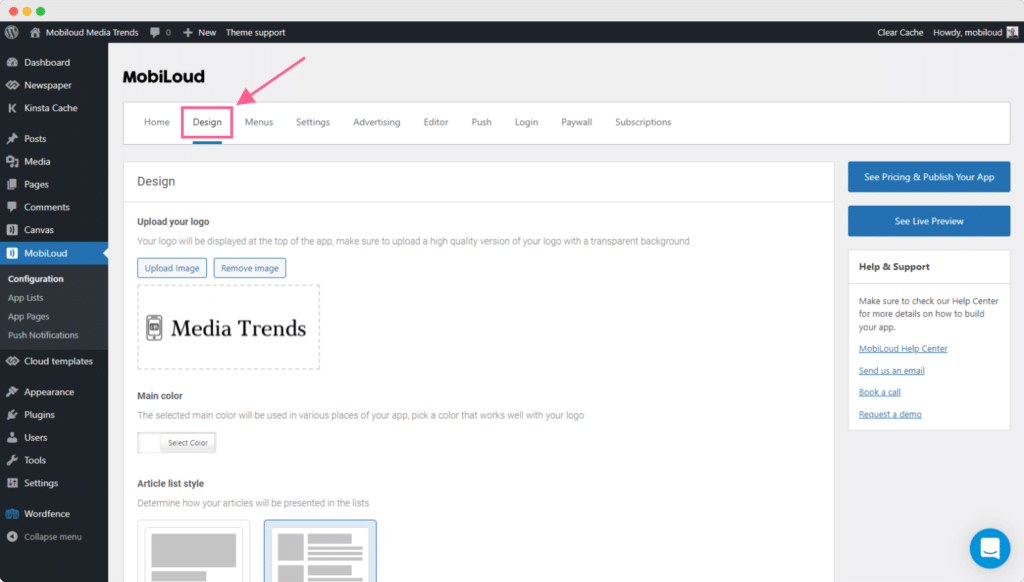
    Design

    The first step would be to configure your “Design” settings, as they will dictate the branding and the colors applied throughout your apps.

    In this area, you will be able to upload your logo and set the main color for your app.

    For the logo, there are a few things to keep in mind:

    1. Use a version of your logo that looks good in small sizes
    2. Make sure to use a .png file with a transparent background
    3. Make sure that the color of your logo works well with the selected “Main color”

    Here you can also define the style of your article lists, using the extended mode for a bigger featured image, or compact for fitting more articles on the screen.

    Menus

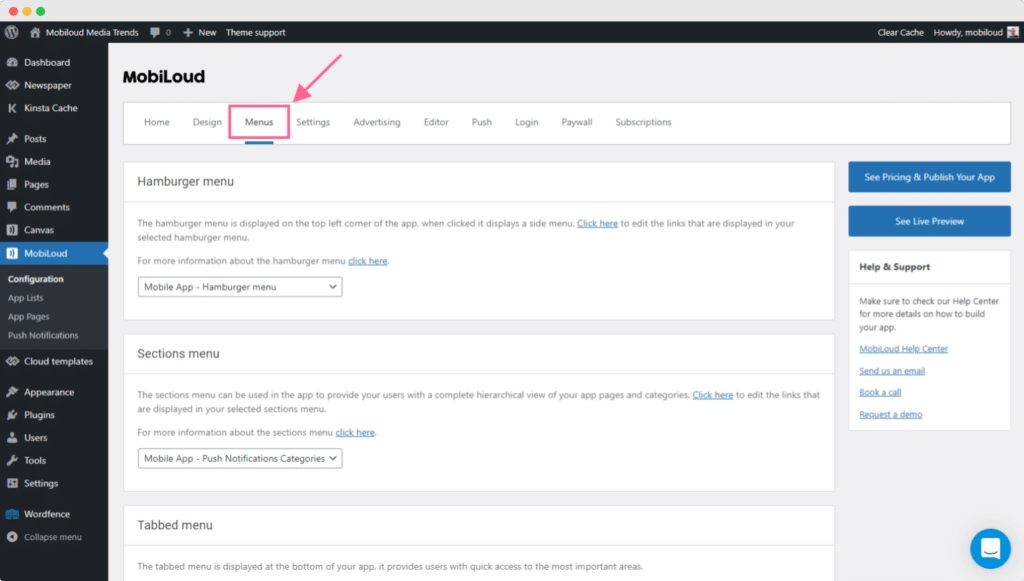
    Moving forward, you will want to configure your menus, as they are probably the most important aspect of your app.

    Menus will define which sections users will have access to but also what they will see as soon as they open the app.

    We have quite a few different menus, and most of them will come with a pre-defined configuration. For each menu we have a corresponding guide in our knowledge base, you can find all of them in one place here: How to configure menus

    Settings

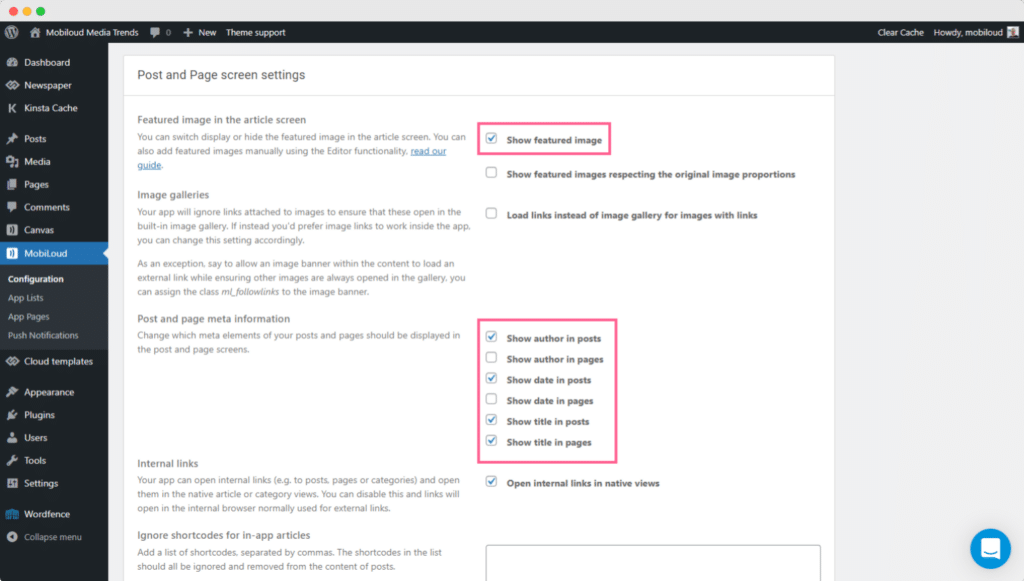
    Under “Settings” you will be able to define how the content must be presented in the app, on your lists, articles, and settings.

    The default configuration should give you a clean look for the most part, but if you would like to hide/show certain elements in different areas of your app, this is the place to go.

    As you can see in the screenshots below here you have a range of settings for each area and element:

    Push Notifications

    Finally, once the apps are configured as per your requirements, it is time to start sending some push notifications.

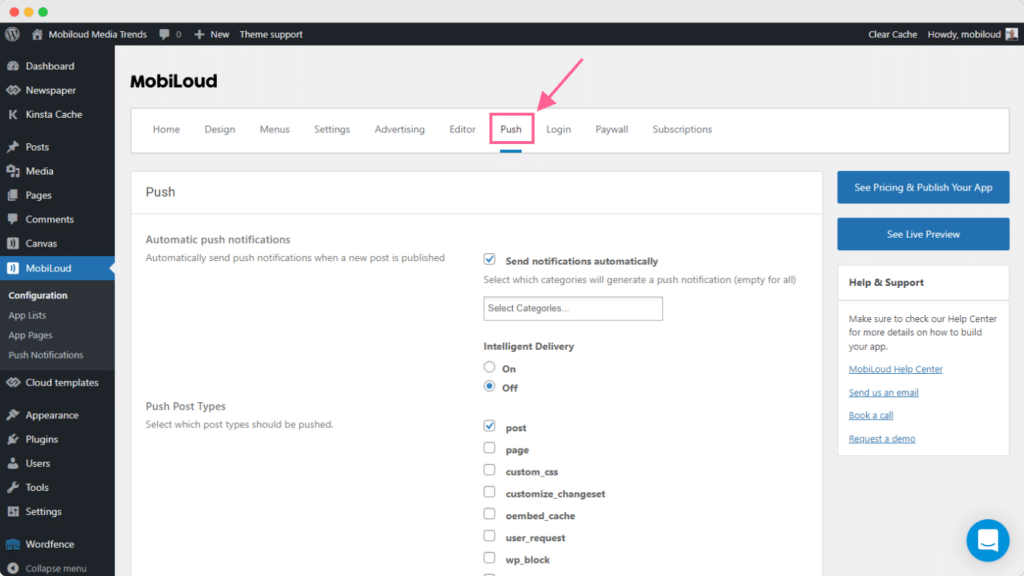
    Under “Configuration > Push” you will find general settings related to push notifications:

    Here you will be able to configure the push keys for your app as well as automatic notifications for specific categories of posts or custom post types.

    Once you have your push keys in place, you will want to go to “Push Notifications” so you can send your first manual notification:

    You can find a complete guide with more details on how to send push notifications from your WordPress Dashboard, here: How to send push notifications with News

  • Getting started with vendrux News

    Getting started with vendrux News

    In this guide, we will go through the main settings available in the Vendrux News Plugin as well as some frequently asked questions.

    Before we begin, keep in mind that any changes to the plugin configuration will instantly reflect in the apps, so be careful in case your apps are already live.

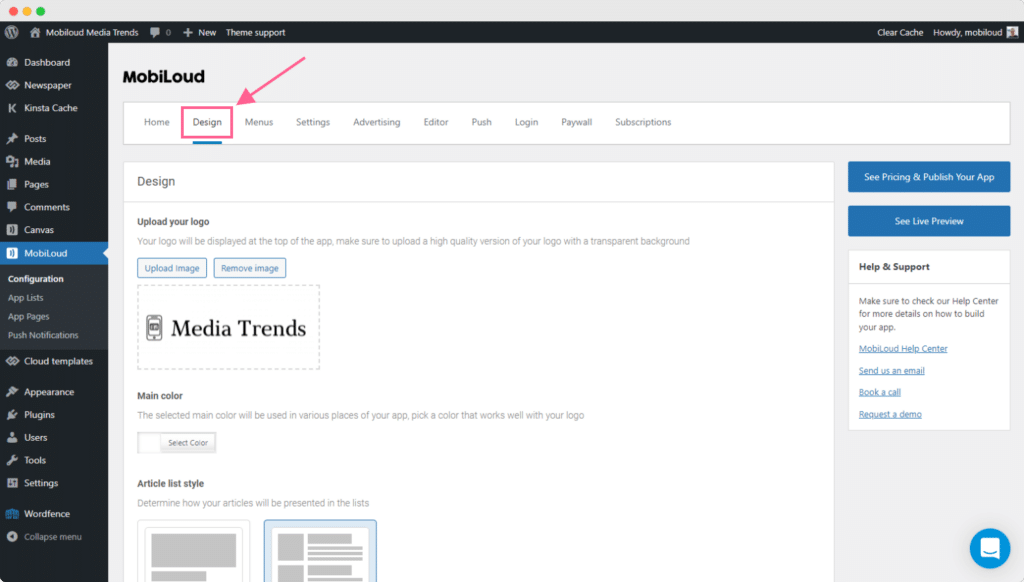
    Design

    The first step would be to configure your “Design” settings, as they will dictate the branding and the colors applied throughout your apps.

    In this area, you will be able to upload your logo and set the main color for your app.

    For the logo, there are a few things to keep in mind:

    1. Use a version of your logo that looks good in small sizes
    2. Make sure to use a .png file with a transparent background
    3. Make sure that the color of your logo works well with the selected “Main color”

    Here you can also define the style of your article lists, using the extended mode for a bigger featured image, or compact for fitting more articles on the screen.

    Menus

    Moving forward, you will want to configure your menus, as they are probably the most important aspect of your app.

    Menus will define which sections users will have access to but also what they will see as soon as they open the app.

    We have quite a few different menus, and most of them will come with a pre-defined configuration. For each menu we have a corresponding guide in our knowledge base, you can find all of them in one place here: How to configure menus

    Settings

    Under “Settings” you will be able to define how the content must be presented in the app, on your lists, articles, and settings.

    The default configuration should give you a clean look for the most part, but if you would like to hide/show certain elements in different areas of your app, this is the place to go.

    As you can see in the screenshots below here you have a range of settings for each area and element:

    Push Notifications

    Finally, once the apps are configured as per your requirements, it is time to start sending some push notifications.

    Under “Configuration > Push” you will find general settings related to push notifications:

    Here you will be able to configure the push keys for your app as well as automatic notifications for specific categories of posts or custom post types.

    Once you have your push keys in place, you will want to go to “Push Notifications” so you can send your first manual notification:

    You can find a complete guide with more details on how to send push notifications from your WordPress Dashboard, here: How to send push notifications with News

  • What is vendrux’s Full Service Option?

    When it comes to the initial app build and publishing process on our Canvas and News, you have the choice to either configure and customize the app on your own or take our Full Service Package.

    Our App Submission fee, on all plans, is $500 (required). This covers the cost of compiling, extensively testing the apps, submitting them to Google and Apple, and publishing them on the App Store and Google Play.

    The Submission Fee does not cover our team configuring and customizing the apps, or providing all the necessary design work for the app itself and the app stores. That’s where our optional Full Service Package comes in at an additional $1,350.

    When you consider the time and money you’ll save creating all of the design assets, developer time or fees for customization, you’ll probably find it’s well worth the cost.

    You should go the “self serve” route if you’re technical (e.g. you built your WordPress site, know HTML/CSS) or have a team of developers and designers that can take a few hours to a week to customize your app.

    Full Service is for you if you want to save time and energy, focus on your core product (your website or web app), and get the apps handled as fast and smoothly as possible, by relying on our expert team for everything you need

    Roughly 80% of new customers go for the full service package because of the convenience, the time saving and the guarantee they’ll get the app they want, in the time they want, without distracting their team with a new project.

    Whether you take the full service package or not, you still get our fast and knowledgeable technical support, and everything included in our initial App Submission fees: we will compile and test your apps, generate versions you can test yourself, and get your app submitted on both App Store and Google Play. 

    So why go full service? Let’s take a look at some of the reasons to go the full service route. 

    Everything Handled For You

    While Vendrux is a ‘no code’ platform, it does require some technical aptitude or experience to really customize your app. 

    With Full Service, our team handles the entire app building process, after a kick-off consultation with Vitor, our senior Product Manager, where you’ll go over your specific needs and requirements.

    Here’s what the Full Service package includes:

    • Your app completely configured on our platform
    • Small design customizations and plugin integrations
    • Professional icons, splash screens for your app, at all resolutions required
    • Professional screenshots: we’ll take screenshots of your apps and turn them into a beautiful showcase of all the functionality your app provides
    • We work directly with Apple and Google until your app is approved – if after several attempts your app still won’t be approved, we’ll refund all fees paid. NOTE: we will support you to get your app approved whether you’re on full service or not, but if we take care of configuring and customizing the app we can respond and implement changes to your app for you, speeding up the approval process.

    There’s nothing for you to do except provide the overall direction and requirements. You can get back to focusing on your core web product and growing your business without getting side tracked or distracted.

    We Configure The Apps For You

    All our products include an admin area that allow you to control the look and feel of the application e.g. add menu items. While you can figure out how to configure and customize the app on your own, we can be very effective at putting together a new app in a short time frame and can save you a lot of time as a consequence by doing it for you.

    What’s included?

    • Configuring the app’s navigation
    • Customizing the app with your branding
    • Configuring a welcome screen for your app or privacy policy acceptance screen
    • Styling the app with your colors and fonts (where applicable)
    • Small customizations that require code (see below)
    • Setting up content categories for push notifications
    • Setting up ads integrations in a News app
    • Setting up subscriptions and login requirements in a News or eCommerce app
    • Setting up login authentication in a Canvas app, using one of the different methods supported
    • Customizing the login and registration screens in a Canvas app
    • Integrating functionality from third party plugins
    • Adding and styling a related posts list in a news app

    Small Customizations are Included

    What does this mean exactly? We should differentiate between our different platforms:

    • For a Canvas app, where your website or web app provides most of the user interface for the app (and our platform adds native navigation), we’ll add custom code to hide elements of your site that shouldn’t be part of the app (e.g. a pricing or checkout page for a subscription site). We also make small modifications to the design that make the site or web app fit better with the app’s native navigation (e.g. removing header/footer elements and other parts of the interface that the native app already provides or that perhaps are not typical of an app).
    • For a News or eCommerce app, the app has a unique design, separate from your site’s theme. You will probably want the app to look similar to your mobile site, include your branding, colors, fonts and elements from your site’s design, as well as functionality coming from your theme, third party plugins or custom code. This level of customization is possible using our code editor (for deeper customization, a plugin extension with custom code would be required). We include in the full service package customizations to style article or product lists and single article or product pages similarly to your site (design, colors, fonts) and integrate third party plugins (where possible in a short timeframe) that we can implement with our code editor.

    Note that this does not include custom development work for complex plugin integrations or custom designs we can’t implement without building a custom extension or adding a lot of extra code. To learn exactly what would be included and what not, get in touch for a demo and tell us about your site.

    We Prepare all Necessary Design Assets

    In order to get your apps successfully published on the App Store and Google Play – you need to prepare a set of design assets at various required resolutions. These are:

    • App Icons for iOS and Android
    • Splash screens for iOS and Android
    • Screenshots to turn into eye-catching showcases for the App Store and Google Play

    With self-serve, you’ll prepare all of these yourself. This would cost hundreds of dollars through a good designer or take quite some time even if you go the DIY route. With Full Service though, our own designers create them for you, at all the resolutions required, so you don’t need to worry about this at all. 

    Hands-On Support for Lifetime

    We take a hands on approach to support for all customers, but with full service you’ll have something more – you’ll be able to make configuration changes on your own, but we also expect to provide support whenever you want to make a change to the app’s configuration and we’ll implement it directly for you (since we did the initial configuration, we don’t expect you to take care of configuration changes). 

    So while you pay for it in advance, as the bulk of the work is done upfront, you’ll enjoy the benefits of the full service package through your app’s lifetime by having a team taking care of everything you might need changed or fixed with your app.

    Peace of Mind

    With full service you are guaranteed a smooth app build process and launch. For many of our busy clients, this is the main benefit. 

    You know that a team of app experts are working to create you a great presence on the app stores, there’s no anxiety or stress around the process, and your time and energy are freed up to focus on your business. 

    The Choice is Yours

    A brief summary of the benefits of Full Service:

    • We configure the apps for you, there’s no work for you to do for the app build except filling in a form
    • We prepare everything necessary for your app’s submission to the App Stores including all design assets
    • We include design tweaks and customizations
    • You get premium, hands-on support through the lifetime of your app

    Full Service is for you if you want to truly minimize the time, energy, and effort that you and your team personally invest into bringing the apps live.

    It’s up to you to decide which tier fits your priorities, budget and strategy best. Whichever you go with we are fully committed to helping you to build great apps with Vendrux. If you want to learn more – get in touch with one of our team!
  • Showing featured images in your News app

    Vendrux offers an option to include your featured image at the top of every article. This will be the default behavior in your app.

    If you’d rather show the image elsewhere in the article, for example below the title, you can use the Editor functionality and add the following code in any PHP positions, such as “PHP before content”.

    $image_feature = wp_get_attachment_url( get_post_thumbnail_id($post->ID) );
    if(!empty($image_feature)) {
    echo ‘‘;
    }

  • Showing featured images in your News app

    Vendrux offers an option to include your featured image at the top of every article. This will be the default behavior in your app.

    If you’d rather show the image elsewhere in the article, for example below the title, you can use the Editor functionality and add the following code in any PHP positions, such as “PHP before content”.

    $image_feature = wp_get_attachment_url( get_post_thumbnail_id($post->ID) );
    if(!empty($image_feature)) {
    echo ‘‘;
    }

  • Enabling caching for my app

    Enabling caching for my app

    The Importance of Caching

    Caching is a really nice way to speed up your website as it can drastically reduce the loading speed of your website. There are several plugins out there that you can use on your WordPress website to help with the cache configuration, click here to see some examples.Our Vendrux News plugin also helps with caching the content of your app and its loading speed, more details can be found below.

    What does the Vendrux News plugin caching feature do?

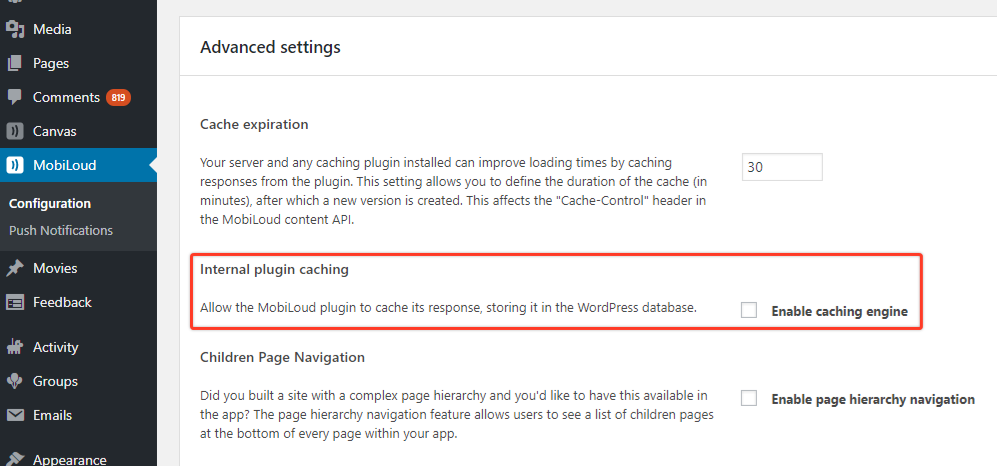
    Our internal caching will save some of the objects from the content feed in WordPress elements known as transients, reducing the number of requests to the database. You can activate it but make sure to test the app well and keep an eye on it to make sure it’s updating with the latest content.

    What does cache expiration do?

    Cache duration will set the app own data feed to expire after the duration you set, so that any server-side caching you use is forced to request a fresh copy

  • Enabling caching for my app

    Enabling caching for my app

    The Importance of Caching

    Caching is a really nice way to speed up your website as it can drastically reduce the loading speed of your website. There are several plugins out there that you can use on your WordPress website to help with the cache configuration, click here to see some examples.Our Vendrux News plugin also helps with caching the content of your app and its loading speed, more details can be found below.

    What does the Vendrux News plugin caching feature do?

    Our internal caching will save some of the objects from the content feed in WordPress elements known as transients, reducing the number of requests to the database. You can activate it but make sure to test the app well and keep an eye on it to make sure it’s updating with the latest content.

    What does cache expiration do?

    Cache duration will set the app own data feed to expire after the duration you set, so that any server-side caching you use is forced to request a fresh copy

  • Dropsource vs vendrux | vendrux

    Dropsource and Vendrux are two solid options for businesses looking to build an app – how do they compare and what are the key differences?In this post, we’ll explore these two solutions. We’ll look at how they work, who they are for and the key benefits of each. We’ll also take a look at the pricing and see what past customers have to say about each.Ultimately we’ll see that:Dropsource is right for you if:

    • You want to visually create a mobile app, from scratch, without much coding….. but still want access to the source code
    • You want to make an app that leverages your existing company data and business systems
    • You’re an entrepreneur with an idea and you want to build an MVP and prove concept
    • You’re not completely green when it comes to software development, understand the logic of programming – and you’re willing to get your hands a dirty in the creation process

    Vendrux is right for you if:

    • You want a painless and fast way to convert any existing site or web app into iOS and Android apps
    • You want mobile apps that leverage your existing web infrastructure and content
    • You don’t want to be bothered with any development, coding, or challenging projects to manage
    • You want to build news apps from a publisher site, eCommerce apps for a WooCommerce site, social apps with Peepso or BuddyBoss, eLearning apps from LearnDash – or convert a web app to native

    What is Dropsource?

    Dropsource is a mobile app development platform that uses a combination of visual app design and automated native code generation – eliminating the requirement for manual programming while still providing editable native source code.The solution allows you to:Step 1 : DevelopUsing a drag-and-drop interface you start by defining your app’s design and UI by dragging elements on to canvas to define the style and layout.Dropsource is a “bring your own backend” solution – so you need to connect your app to external data through an API and directly bind it to the UI. This allows your app to carry out operations involving existing data sources, user accounts, or services – and is why Dropsource is popular with businesses that already have significant data sets and systems that they want to leverage through native apps.Next it’s time to add functionality to the user’s interaction and journey through the app, defining what will happen when specific actions are taken and how your app will process the data needed to deliver the best experience.You can also add many native functions such as:

    • Photos, video and audio
    • Offline storage

    Click here to see a full list of UI elements and functionality supported by Dropsource You can integrate with many third parties too, such as:

    • AdMob to monetize your app’s traffic with advertising
    • Amazon Pinpoint, Amplitude and Firebase to analyse your users
    • Facebook and GitHub for social sharing and Authentication
    • Intercom to support sales, marketing and support
    • OneSignal to engage your audience using rich push notifications
    • PayPal to process fees and payments

    Dropsource is quite versatile and you can use it to create a range of apps. Their users have created successful social networking, educational, news apps and more. Take a look here for some examples of apps created on Dropsource.Step 2 : TestDropsource allows you to iteratively test your app. You can create a fully functioning virtual simulation straight from the editor and share it with investors or your team at any point in the development process.You can also send a working version to your mobile device.This is a great way to get valuable feedback and helps to streamline the development and testing process.Once you’re happy with the first version of your app it’s time to:Step 3 : LaunchYou do this by:

    • Publishing to Google play or the App Store under the individual license you will do this yourself by taking the source code and publishing the app under your own developer account. Dropsource takes care of the process for customers on an enterprise plan.
    • Deploying for beta testingthrough a platform like TestFlight, Google Play Beta Testing, or Crashlytics Beta
    • Downloading the source code – for ongoing customization and development. Note that this requires an additional license and any modified code cannot be reimported into dropsource.

    Going forward you can continue to develop and improve the app – releasing future versions as often as you want.In summary the platform gives you great tools to build, test, launch, and iterate on your mobile app yourself – without having to do any highly technical workThat doesn’t mean it will be easy for anybody though, as dropsource themselves say that the platform is best suited to “web and software developers”. Although they’ve had some successful users “with no prior programming experience” – they recommend at the very least a “development mindset”. Afterall, they say their platform is “low code”and not“no code”…………

    Dropsource Pricing

    The Individual Developer pricing tier lets you build and test as many app ideas as you want, as long as you want, for free. However, to deploy your app you must purchase a Source Code License for $999 per year. That’s for iOS and Android. So $1998 per year for apps on both major platforms.To get developer assistance you buy an add-on for $1000 per month. With the Enterprise Developer package, you get access to features like app versioning, encrypted offline storage, pre-built business system connectors, and MDM deployment.Enterprise packages are priced according to individual spec and negotiated with Dropsource. If you don’t renew your Source Code License, you’ll no longer be able to download updated source code to deploy new versions of your app – but existing apps will be unaffected.

    Dropsource Alternatives

    Now we’ve thoroughly gone over Dropsource let’s move on and take a look at Vendrux.

    What is Vendrux?

    Established in 2013, Vendrux is a platform for building mobile apps from existing websites or web apps. We have several distinct products:

    News is for WordPress based digital publishers, and allows them to convert their existing news site into native content apps.Canvas is not WordPress specific, but can be used to convert any website or web app, no matter the features or CMS. Canvas recreates the website exactly within mobile apps, and is popular with startups, online communities, fitness apps, and eLearning sites.Commerce is for WooCommerce site owners to build native eCommerce apps. It works in a similar way to News, converting the existing site into native apps and adding all the features needed for an optimal UX.All three work in a slightly different way. The key point though is that the apps are built from your existing site. Unlike Dropsource you do not need to “bring your own back end”, your site is your back end.Vendrux apps mirror your website or web app, and update automatically with any changes you make on the web or new content you publish.This is a great advantage over Dropsource when it comes to the ease of building the apps and fitting their management into your ongoing workflow!Dropsource vs Vendrux AppsIf you are happy with your site or web app, and essentially want to convert it to apps, going with Vendrux is a no-brainer. It’s cheaper, much easier and you’ll get a better result.If you don’t have a website or web app, and you want to build apps from scratch fromThe end resultYou’ll have an app you can be proud of – with features on a par with top publishers like the New York Times or the Huffington Post – having spent a fraction of the time and money you would building it yourself or through an agency. Your life will be easier thanks to our deep integration with WordPress, and you don’t need to worry about any hassle maintaining your new channel. All your existing plugins will work seamlessly in your new app and you can manage everything through your existing WordPress admin panel.As far as publishing – all legacy content can be rapidly dropped into the app which will automatically update with anything new you publish to your site. Of course we’ll never leave your side and our personalised support will quickly deal with any tweaks, updates or maintenance needed going forward. When you work with Vendrux you get a team of developers and app experts at your service to make your app a success; you can build an app with the website you already have, and there’s nothing new to learn.Past clients love our apps and how we’ve helped them to:

    • Boost traffic and engagement, growing their brand
    • Make more money through ad revenue
    • Get a top quality native app with minimal time, expense and stress

    Key features

    • Save timeget to market in weeks rather than months
    • Save moneybuild at a fraction of the cost of agency or in-house development, without compromising on quality or features
    • Own your brand, keep what workscompletely white labeled and styled to your exact specifications
    • Increase engagement with recently published content Use rich push notifications to notify your audience automatically when you publish new content or manually whenever you see fit
    • Make money by growing your Ad revenueWe’re fully integrated with Admob, Mopub, Facebook Audience Network and more
    • Manage your app easily through our simple but powerful WP plug-in
    • Drive subscriptions – by offering premium content to your most loyal readers
    • Peace of mind, no stress our tried and tested solution takes all the hassle out of your end. It has worked wonderfully for hundreds of clients and it will work for you too

    As you can see, Vendrux is designed for high-traffic WordPress sites and supports a number of mobile app specific advertising, engagement and analytics solutions – as well as other features to help you toward success. Vendrux pricingPlans start from $199/moDifferent price plans include different features for higher traffic news apps such as:

    • Monetization through subscriptions and in-app ads
    • Integration with third party SDKs for advertising and analytics
    • CDN and caching
    • Support for higher or even limitless traffic
    • Priority support for launch, promotion and monetization

    There’s no risk with our 60 day money back guarantee. Price includes all development, configuration, publishing and maintenance. For more detailed information about Vendrux pricing click here.Let’s move on and take a look at what customers have to say about each solution

    Dropsource user reviews

    We looked through the 17 reviews on Capterra to get a sense of what users think of Dropsource.Chris W, the CEO of a consumer Service company said that the dev tools are so easy to use that it’s “amazing”. He goes on to note though that you need to understand the “basic logic flow of programming”. According to Chris, if you do you can “build an app without any familiarity with native mobile technology”.However, “for more experienced developers, there is still a ton of functionality needed which at this time is still not available, such as dynamic cell resizing in collection views, video uploading, UI position locking, and undo functionality to name a few”. Dropsource – and Vendrux – are both always adding new features and improvements for users so we hope these will be available soon.Eric S, the founder of a computer software firm called Dropsource a “useful platform” because of the “ability to directly build a native app without explaining to a dev team what I needed. This means our startup (without developers) can launch and validate an MVP very quickly”. He goes on to note though that “it was missing some functionality to integrate with my backend database/app” but after explaining this to the Dropsource team they quickly “committed to enhancing their product. This was then available in the next release cycle which was less than 3 weeks from request.”Other users comment on the utility of the platform for testing new ideas and building MVPs. Dmitry K, who works in Information Technology Services, liked “the speed with which you can test your ideas, experiment and push them to Apple Store. Easy to build UI, easy to integrate with backend and additional services.” On the downside, however, “some build errors are not explained therefore we have to spend a lot of time figuring what caused them”.

    Vendrux user reviews

    For comparison, we looked through 31 reviews on Capterra to see what users think of Vendrux.Building high performance apps that perfectly sync with existing WordPress operations is a key goal for our customers.Writing on Capterra, Stephan W recalls:“Vendrux was all about getting content out of WordPress and into a native app specifically branded for us – this was by far the most important thing for us”We keep our clients happy by providing this exact solution. John M, co-founder of a digital media company and longtime Vendrux user, agrees:“It just works. We can use our existing WordPress install and have our material presented in a beautiful way on both iOS and Android……. We worked for a year trying to create our own app – and then decided to go with Vendrux and haven’t looked back. We’ve been happy customers for over three years and our readers love our iOS and Android apps”Others love how easy it is to manage their new app. Josh G, a digital publisher, loves the:“Simple to navigate the backend, great at sending alerts and notifications”He goes on to explain how he “needed a bit of help on some advanced customizations – however the team was extremely easy to work with……. EXCELLENT customer service. They made sure I was totally satisfied which I appreciate”A high performance app can also help you to make more money:Walter M, a web designer in the publishing industry explained that “it has also grown our advertising revenue as we can use the app with Adsense and that has become our top performing advertising platform via the app”.As far as our support – it’s personalised, fast and never leaves your side. If you check out our reviews on capterra you’ll notice that’s a common thread. Stephan W, a Vice President of Client Services was happy with our service standards – calling them “amazing” and adding that our team “work tirelessly to ensure you are happy with your apps. We can’t recommend Vendrux enough”.

    Vendrux vs Dropsource

    There are fundamental differences in using Dropsource and Vendrux to build a mobile app. They are clearly both great solutions but aimed at different use cases.

    • Dropsource is for enterprise level businesses, startups and entrepreneurs who want to develop a wide range of native apps from scratch
    • Vendrux is specifically for digital publishers and news sites who want to convert their existing WordPress site into a native app
    • Dropsource is a platform and it’s up to you to put the tools to good use
    • Vendrux is a full service, with everything done for you and your end goal guaranteed by our team of app experts

    3.

    • Dropsource is low code – in theory anybody can build an app using their tools but without an understanding of programming logic and something of a learning curve you might struggle
    • Vendrux is no code – you don’t need to worry about any part of the process apart from telling us exactly what you want
    • Dropsource leverages your existing data and systems from your business
    • Vendrux leverages your existing WordPress site – you already created everything you need to make your app, there’s no need to change anything!

    Wrapping upWe hope this article has helped you to make an informed choice about what’s right for you.Essentially:If you have a hot idea for an app, you’ve some experience with development, and can see yourself making use of the Dropsource platform – it’s an excellent solution! If you’re a digital publisher with a successful WordPress site, you can’t go wrong with Vendrux.Get in touch now for a demo call and we can get to work building something great.

  • Dropsource vs vendrux | vendrux

    Dropsource and Vendrux are two solid options for businesses looking to build an app – how do they compare and what are the key differences?In this post, we’ll explore these two solutions. We’ll look at how they work, who they are for and the key benefits of each. We’ll also take a look at the pricing and see what past customers have to say about each.Ultimately we’ll see that:Dropsource is right for you if:

    • You want to visually create a mobile app, from scratch, without much coding….. but still want access to the source code
    • You want to make an app that leverages your existing company data and business systems
    • You’re an entrepreneur with an idea and you want to build an MVP and prove concept
    • You’re not completely green when it comes to software development, understand the logic of programming – and you’re willing to get your hands a dirty in the creation process

    Vendrux is right for you if:

    • You want a painless and fast way to convert any existing site or web app into iOS and Android apps
    • You want mobile apps that leverage your existing web infrastructure and content
    • You don’t want to be bothered with any development, coding, or challenging projects to manage
    • You want to build news apps from a publisher site, eCommerce apps for a WooCommerce site, social apps with Peepso or BuddyBoss, eLearning apps from LearnDash – or convert a web app to native

    What is Dropsource?

    Dropsource is a mobile app development platform that uses a combination of visual app design and automated native code generation – eliminating the requirement for manual programming while still providing editable native source code.The solution allows you to:Step 1 : DevelopUsing a drag-and-drop interface you start by defining your app’s design and UI by dragging elements on to canvas to define the style and layout.Dropsource is a “bring your own backend” solution – so you need to connect your app to external data through an API and directly bind it to the UI. This allows your app to carry out operations involving existing data sources, user accounts, or services – and is why Dropsource is popular with businesses that already have significant data sets and systems that they want to leverage through native apps.Next it’s time to add functionality to the user’s interaction and journey through the app, defining what will happen when specific actions are taken and how your app will process the data needed to deliver the best experience.You can also add many native functions such as:

    • Photos, video and audio
    • Offline storage

    Click here to see a full list of UI elements and functionality supported by Dropsource You can integrate with many third parties too, such as:

    • AdMob to monetize your app’s traffic with advertising
    • Amazon Pinpoint, Amplitude and Firebase to analyse your users
    • Facebook and GitHub for social sharing and Authentication
    • Intercom to support sales, marketing and support
    • OneSignal to engage your audience using rich push notifications
    • PayPal to process fees and payments

    Dropsource is quite versatile and you can use it to create a range of apps. Their users have created successful social networking, educational, news apps and more. Take a look here for some examples of apps created on Dropsource.Step 2 : TestDropsource allows you to iteratively test your app. You can create a fully functioning virtual simulation straight from the editor and share it with investors or your team at any point in the development process.You can also send a working version to your mobile device.This is a great way to get valuable feedback and helps to streamline the development and testing process.Once you’re happy with the first version of your app it’s time to:Step 3 : LaunchYou do this by:

    • Publishing to Google play or the App Store under the individual license you will do this yourself by taking the source code and publishing the app under your own developer account. Dropsource takes care of the process for customers on an enterprise plan.
    • Deploying for beta testingthrough a platform like TestFlight, Google Play Beta Testing, or Crashlytics Beta
    • Downloading the source code – for ongoing customization and development. Note that this requires an additional license and any modified code cannot be reimported into dropsource.

    Going forward you can continue to develop and improve the app – releasing future versions as often as you want.In summary the platform gives you great tools to build, test, launch, and iterate on your mobile app yourself – without having to do any highly technical workThat doesn’t mean it will be easy for anybody though, as dropsource themselves say that the platform is best suited to “web and software developers”. Although they’ve had some successful users “with no prior programming experience” – they recommend at the very least a “development mindset”. Afterall, they say their platform is “low code”and not“no code”…………

    Dropsource Pricing

    The Individual Developer pricing tier lets you build and test as many app ideas as you want, as long as you want, for free. However, to deploy your app you must purchase a Source Code License for $999 per year. That’s for iOS and Android. So $1998 per year for apps on both major platforms.To get developer assistance you buy an add-on for $1000 per month. With the Enterprise Developer package, you get access to features like app versioning, encrypted offline storage, pre-built business system connectors, and MDM deployment.Enterprise packages are priced according to individual spec and negotiated with Dropsource. If you don’t renew your Source Code License, you’ll no longer be able to download updated source code to deploy new versions of your app – but existing apps will be unaffected.

    Dropsource Alternatives

    Now we’ve thoroughly gone over Dropsource let’s move on and take a look at Vendrux.

    What is Vendrux?

    Established in 2013, Vendrux is a platform for building mobile apps from existing websites or web apps. We have several distinct products:

    News is for WordPress based digital publishers, and allows them to convert their existing news site into native content apps.Canvas is not WordPress specific, but can be used to convert any website or web app, no matter the features or CMS. Canvas recreates the website exactly within mobile apps, and is popular with startups, online communities, fitness apps, and eLearning sites.Commerce is for WooCommerce site owners to build native eCommerce apps. It works in a similar way to News, converting the existing site into native apps and adding all the features needed for an optimal UX.All three work in a slightly different way. The key point though is that the apps are built from your existing site. Unlike Dropsource you do not need to “bring your own back end”, your site is your back end.Vendrux apps mirror your website or web app, and update automatically with any changes you make on the web or new content you publish.This is a great advantage over Dropsource when it comes to the ease of building the apps and fitting their management into your ongoing workflow!Dropsource vs Vendrux AppsIf you are happy with your site or web app, and essentially want to convert it to apps, going with Vendrux is a no-brainer. It’s cheaper, much easier and you’ll get a better result.If you don’t have a website or web app, and you want to build apps from scratch fromThe end resultYou’ll have an app you can be proud of – with features on a par with top publishers like the New York Times or the Huffington Post – having spent a fraction of the time and money you would building it yourself or through an agency. Your life will be easier thanks to our deep integration with WordPress, and you don’t need to worry about any hassle maintaining your new channel. All your existing plugins will work seamlessly in your new app and you can manage everything through your existing WordPress admin panel.As far as publishing – all legacy content can be rapidly dropped into the app which will automatically update with anything new you publish to your site. Of course we’ll never leave your side and our personalised support will quickly deal with any tweaks, updates or maintenance needed going forward. When you work with Vendrux you get a team of developers and app experts at your service to make your app a success; you can build an app with the website you already have, and there’s nothing new to learn.Past clients love our apps and how we’ve helped them to:

    • Boost traffic and engagement, growing their brand
    • Make more money through ad revenue
    • Get a top quality native app with minimal time, expense and stress

    Key features

    • Save timeget to market in weeks rather than months
    • Save moneybuild at a fraction of the cost of agency or in-house development, without compromising on quality or features
    • Own your brand, keep what workscompletely white labeled and styled to your exact specifications
    • Increase engagement with recently published content Use rich push notifications to notify your audience automatically when you publish new content or manually whenever you see fit
    • Make money by growing your Ad revenueWe’re fully integrated with Admob, Mopub, Facebook Audience Network and more
    • Manage your app easily through our simple but powerful WP plug-in
    • Drive subscriptions – by offering premium content to your most loyal readers
    • Peace of mind, no stress our tried and tested solution takes all the hassle out of your end. It has worked wonderfully for hundreds of clients and it will work for you too

    As you can see, Vendrux is designed for high-traffic WordPress sites and supports a number of mobile app specific advertising, engagement and analytics solutions – as well as other features to help you toward success. Vendrux pricingPlans start from $199/moDifferent price plans include different features for higher traffic news apps such as:

    • Monetization through subscriptions and in-app ads
    • Integration with third party SDKs for advertising and analytics
    • CDN and caching
    • Support for higher or even limitless traffic
    • Priority support for launch, promotion and monetization

    There’s no risk with our 60 day money back guarantee. Price includes all development, configuration, publishing and maintenance. For more detailed information about Vendrux pricing click here.Let’s move on and take a look at what customers have to say about each solution

    Dropsource user reviews

    We looked through the 17 reviews on Capterra to get a sense of what users think of Dropsource.Chris W, the CEO of a consumer Service company said that the dev tools are so easy to use that it’s “amazing”. He goes on to note though that you need to understand the “basic logic flow of programming”. According to Chris, if you do you can “build an app without any familiarity with native mobile technology”.However, “for more experienced developers, there is still a ton of functionality needed which at this time is still not available, such as dynamic cell resizing in collection views, video uploading, UI position locking, and undo functionality to name a few”. Dropsource – and Vendrux – are both always adding new features and improvements for users so we hope these will be available soon.Eric S, the founder of a computer software firm called Dropsource a “useful platform” because of the “ability to directly build a native app without explaining to a dev team what I needed. This means our startup (without developers) can launch and validate an MVP very quickly”. He goes on to note though that “it was missing some functionality to integrate with my backend database/app” but after explaining this to the Dropsource team they quickly “committed to enhancing their product. This was then available in the next release cycle which was less than 3 weeks from request.”Other users comment on the utility of the platform for testing new ideas and building MVPs. Dmitry K, who works in Information Technology Services, liked “the speed with which you can test your ideas, experiment and push them to Apple Store. Easy to build UI, easy to integrate with backend and additional services.” On the downside, however, “some build errors are not explained therefore we have to spend a lot of time figuring what caused them”.

    Vendrux user reviews

    For comparison, we looked through 31 reviews on Capterra to see what users think of Vendrux.Building high performance apps that perfectly sync with existing WordPress operations is a key goal for our customers.Writing on Capterra, Stephan W recalls:“Vendrux was all about getting content out of WordPress and into a native app specifically branded for us – this was by far the most important thing for us”We keep our clients happy by providing this exact solution. John M, co-founder of a digital media company and longtime Vendrux user, agrees:“It just works. We can use our existing WordPress install and have our material presented in a beautiful way on both iOS and Android……. We worked for a year trying to create our own app – and then decided to go with Vendrux and haven’t looked back. We’ve been happy customers for over three years and our readers love our iOS and Android apps”Others love how easy it is to manage their new app. Josh G, a digital publisher, loves the:“Simple to navigate the backend, great at sending alerts and notifications”He goes on to explain how he “needed a bit of help on some advanced customizations – however the team was extremely easy to work with……. EXCELLENT customer service. They made sure I was totally satisfied which I appreciate”A high performance app can also help you to make more money:Walter M, a web designer in the publishing industry explained that “it has also grown our advertising revenue as we can use the app with Adsense and that has become our top performing advertising platform via the app”.As far as our support – it’s personalised, fast and never leaves your side. If you check out our reviews on capterra you’ll notice that’s a common thread. Stephan W, a Vice President of Client Services was happy with our service standards – calling them “amazing” and adding that our team “work tirelessly to ensure you are happy with your apps. We can’t recommend Vendrux enough”.

    Vendrux vs Dropsource

    There are fundamental differences in using Dropsource and Vendrux to build a mobile app. They are clearly both great solutions but aimed at different use cases.

    • Dropsource is for enterprise level businesses, startups and entrepreneurs who want to develop a wide range of native apps from scratch
    • Vendrux is specifically for digital publishers and news sites who want to convert their existing WordPress site into a native app
    • Dropsource is a platform and it’s up to you to put the tools to good use
    • Vendrux is a full service, with everything done for you and your end goal guaranteed by our team of app experts

    3.

    • Dropsource is low code – in theory anybody can build an app using their tools but without an understanding of programming logic and something of a learning curve you might struggle
    • Vendrux is no code – you don’t need to worry about any part of the process apart from telling us exactly what you want
    • Dropsource leverages your existing data and systems from your business
    • Vendrux leverages your existing WordPress site – you already created everything you need to make your app, there’s no need to change anything!

    Wrapping upWe hope this article has helped you to make an informed choice about what’s right for you.Essentially:If you have a hot idea for an app, you’ve some experience with development, and can see yourself making use of the Dropsource platform – it’s an excellent solution! If you’re a digital publisher with a successful WordPress site, you can’t go wrong with Vendrux.Get in touch now for a demo call and we can get to work building something great.