Every change in your app’s content or configuration will be automatic and does not require an update.In general you don’t pay anything extra for updates required to fix any bugs or make your apps compatible with the latest iOS/Android versions. All maintenance updates are included in your subscription fees.To request an app update, just get in touch at support@vendrux.com
Category: Docs
-
How is vendrux Different? | vendrux
There are quite a few different app builders out there that target small and medium sized businesses. Many of them can work well in some limited cases – but all come with serious drawbacks for serious businesses.
How so?
In a nutshell – most app builders will restrict you with a cookie-cutter template that doesn’t let you create the apps you really want. They’ll leave you to figure it out on your own for the most part, and won’t be very proactive in helping you to build and maintain the apps in the future.
Vendrux is different to any other mobile app platform you have come across. How?
We set out to combine the quality of native, custom development’s end result, with the speed and affordability of automated app builder platforms – combined with a premium service and tools that anyone can use without touching a single line of code.

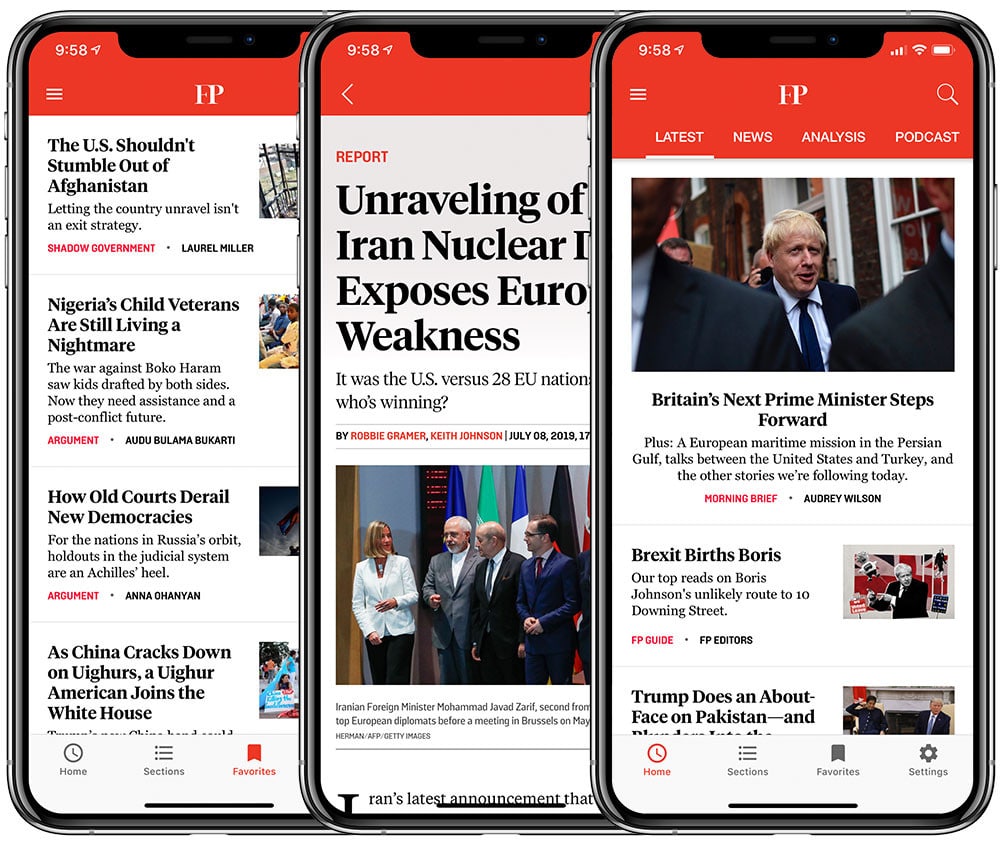
Foreign Policy could not have built their native apps with a DIY builder – but Vendrux was ideal We decided to give you all the benefits of native apps and a modern, high-end mobile UX – with none of the major downsides in terms of effort and investment.
Did we achieve that? We think so. But you be the judge.
Here’s how Vendrux is unique.
Vendrux is a Truly Flexible Platform
In the mobile app world, flexibility in terms of features and functionality traditionally came from native development – for which you’d need to contract a team of specialists.
This generally isn’t the way to go for small and medium sized businesses though. Why? Because it’s prohibitively expensive and takes many months.
At this point, many turn to the various app development platforms that are just a Google search away. These are cheaper, and faster, but may not be worth the effort – let’s look at why.
Most App Builders are Restrictive
These tools look initially promising, and it makes sense. When you’re building for the browser these days – platforms like WordPress make it ‘simple’ for non-developers to build all manner of sites and web apps. Surely the same thing exists for mobile apps?
Well, not really.
There’s a big problem with most app builders. While these tools can get you into the App Stores – with an app that does “something” and has your logo on it – you’ll soon realise that you’re severely limited.
Your ideas and vision for the apps will be forced to fit into their pre-built templates and modules. You’ll likely have to make serious compromises and tradeoffs.
Here’s where Vendrux comes in, and here’s why Vendrux’s different.
Vendrux Integrates the Best of the Web
The web is amazing, and very flexible. With the huge proliferation of no-code tools, platforms like WordPress, and the increasing flexibility of major browsers – there has never been a better time to build your ideas on the web.
We are the only mobile app platform that allows you to integrate the flexibility of the web into the native mobile app format.
Every feature, plugin, customization and tweak you’ve made for your site or web app can be integrated into the mobile apps you build with Vendrux – whether that’s through Canvas or News.

No matter what you built for the web, Vendrux can turn it into top-quality mobile apps News and Commerce build fully native apps that are easy to integrate the features and logic of your site into. The apps are highly customizable, and can take functionality from plugins or custom code that you now run on the web.
Canvas on the other hand is designed for maximum flexibility out of the box. Canvas apps provide everything your site does with no need for customization or integration, and they’re always 100% synced with your site – so there’s never any need to worry about design changes to the apps or porting functionality to them.
Get the Apps you Really Want
The apps can integrate everything from your web experience, or some of it. You aren’t limited. If you can build for web browsers you can now build for the App Store and Google Play too with Vendrux.
While the process differs in terms of specifics, flexibility is what really unites our products and sets them apart from other options on the market.
By leveraging our platform and the expertise of our team – you can get the web’s flexibility and diversity of features on your mobile apps too.
You can get the flexibility of native apps built from scratch, but at a fraction of the price. The apps will be just as unique as your site is, nobody will ever know you took a shortcut, and you only have to wait weeks – not months.
A Professional Level of Design and UX
Unlike many app builder platforms, we are not a good option for hobbyists or people tinkering with building simple apps.
Rather, we’re completely zeroed in on the needs of successful and growing businesses. We understand what site owners and growing companies need and work with you to find the right solution and roadmap for the apps, maximising efficiency as well as the quality of the end result.
This means a strong focus on design and User Experience. As we mentioned above – we are not about templates or cookie cutter apps. Our platform, and the apps we create, are constantly optimized with the end user in mind.

Vendrux apps are built with modern UX and usability best practices Everything is customized, right down to the push notification icons that your users will see popping up on their lockscreens. We create unique designs for everything from the splash screens, to the App Store icons – personally taking care of all the small but important details that usually get skipped over or templated.
You’ll get apps that match your brand exactly. Your users will get a modern, fast user experience that is simple, intuitive and enjoyable.
We Don’t Just Sell you Software, we Partner with you and Guarantee Success
The typical SAAS model is to sell you a license to the software, point you in the direction of some explainer videos and documentation – and then set you loose.
This works fine for a lot of things, but not so well for a complex process like app development. It’s the model a lot of app builders use, and it can work for them as the options are so limited that a simple drag and drop suffices.
We Manage the App Project with You
As Vendrux builds higher end, unique, custom apps – this won’t do. So we take a very proactive approach to customer support and manage the project with you – from the initial concept stage to going live on the App Stores and beyond.
Every site is different, and every app is different. We’ve seen it all over the last seven years and 1000+ app projects.
It’s a Personal Experience
Getting you the best apps for your business requires a personal touch.
You’ll know our team members by name, and you’ll always be able to count on help from a fast and competent team. We are real people that you can chat with directly via email – but also on the phone or on a Zoom call whenever necessary.
We solve any issues that crop up directly, hands on. You’ll never be left alone to fix things or on hold with some hopeless support bot or impersonal ticket system.
Success is Guaranteed
Your success is also guaranteed. As we don’t leave you to figure things out or go through the pain of dealing with Apple’s stringent requirements – there’s no chance of you failing and not getting your apps approved.
We handle submission and publishing the apps on the App Store and Google Play, and deal with them on your behalf.
The App Stores often have certain changes or tweaks required to get the apps approved, and this can be tricky. We know the process inside and out though – having gone through it more than 1000 times – so we guarantee a successful outcome.
With no long term contracts, and a 60 day satisfaction guarantee – there’s no risk that you get apps that you don’t like or that don’t work for you. In the unlikely event that you feel that way – we just refund you!
A Platform for Every Goal
Vendrux has two different platforms that we have developed over the last 7 years.
Canvas is for converting any site (woocommerce stores or community sites) or web app into mobile apps. News is for WordPress based digital publishers.
If you have a website or web app, and you want to turn it into apps in the most effective way possible – chances are Vendrux is for you.
Other app builders will try to squeeze whatever you have into one of their templates, then connect it with your existing CMS with an API (if you’re lucky) or an RSS feed. More accurately, they’ll likely leave you to set that up, as generally they won’t have much enthusiasm for solving any unusual or unique problems for your use case.
On the other hand – we’ll work with you to figure out which of our platforms is the best fit, and then we’ll work with you to get the optimal result.
Whether you’re a publisher, a growing startup, or an eCommerce brand – you can use Vendrux to build apps that you can be proud of. They’ll be completely custom, bringing the best of your web experience to the native app world.
We Never Leave your Side
What about when the apps are published? Do you then have to handle everything yourself?
Thankfully no.
Although the apps are simple for you to manage – they will automatically sync with any changes or updates to your site and you can manage everything from a simple plugin – we offer lifetime support.
Operating systems bring out frequent updates, new phones are launched, regulations change. This means that apps have to be constantly maintained by developers or they will fail. Usually this costs five figures a year at a minimum.
As part of our license though – we handle everything, for the lifetime of the apps.
We’re here to recompile, retest, rebuild and republish your apps as many times as necessary. We’re here to release updates to the stores – you’re never alone to deal with these crucial parts. Most app builders might assist with the initial setup – but few will be around to handle maintenance which is just as important.
There’s nothing for you to worry about, and no expensive surprises around the corner. We save you money and give you peace of mind.
Now you know how we’re different – get in touch with one of our team and let’s start building something great!
-
How login works in Canvas
The Canvas platform makes use of a mix between Cookies and Headers to identify a proper user login in the apps.
Below you will find more details on how that approach works in a more technical perspective.
In order to enable the login functionality in your app you will first need to adjust two parameters, located in the “General” group of settings of your app:
- Remote_Server_Available: this parameter needs to be set to “true” if you want to enable the native login handling in the app. It will basically tell the app to look for the proper headers when it starts and in all subsequent requests.
- Remote_Server_URL: this parameter will determine which URL should be used for a quick check when the app starts, looking for the login headers. We recommend using a fast loading URL. If you are on WordPress make sure to use the /canvas-api/loginstate endpoint as it will only output the information we need.

Now that you have configured the app to use the native login here is what will happen when you first open the app:
- The app will perform a request to the URL defined in the “Remote_Server_URL”, looking for the “ml_available” and “ml_username” parameters, if the user is logged-in those parameters should be set in the form of headers as you can see below:

- The app will check both parameters but will look for the ml_username to determine whether the user should be logged in or not. If ml_username is set as a header the app will understand that the user is logged in and will bypass the login screen.
- If ml_available is set as a header but ml_username is not, the app will understand that the user is not logged in and will present the login screen to him.
There are a few things to keep in mind:
- ml_available should always be set as a header and its value should always be true, no matter if the user is logged in or not
- ml_username should only be set as a header when the user is logged-in
- The value for ml_username will be stored in OneSignal, so it can be used to target specific users for push notifications. If you are using WordPress its value will be a hashed user id, if you are not on WordPress we’d recommend using a similar solution.
- Cookies and sessions should be handled by the website to avoid conflicts where the ml_username header is set but the user is not logged in, if you are on WordPress this will be automatically handled by the Vendrux Canvas plugin
- The apps will not perform any specific checks to your website’s cookies
-
How is vendrux different from other app makers?
Other app building solutions have one or both of these problems: either their app building tools are complex and unintuitive, or the apps they create are low-quality because they use non-native technologies like HTML5. These apps don’t look and feel like the native apps we enjoy using every day.
Unlike other solutions, Vendrux gives you a completely “native” app. Native apps look and feel great on Android and iOS, and don’t have the sluggish and glitchy behavior of non-native apps.
Building an app with Vendrux is simple: we take care of every element of complexity for you, so you can focus on creating amazing content and growing your business.
Vendrux is also the only native app solution exclusively dedicated to WordPress, which means we understand the platform your site runs on better than anyone else.
We offer 1:1 personal support which none of our competitors offers. Test us out, just write to support@vendrux.com.
-
How can I customize the article screen?
https://www.youtube.com/watch?v=1tEz4BKh7jMThe Settings / Content tab offers many opportunities to affect how your content is visible inside your application.Namely you can change:
- Whether to show or not a featured image at the top of the article screen
- Whether you want to show date / author / title for posts and pages
- You can enable RTL – right to left, for Hebrew or Arabic content
- You can decide whether images should always open in the gallery (default) or whether images with a link should enable users to reach the linked location when tapped.
You can also define which commenting system to use in your app, WordPress, Disqus, Facebook or whether to disable comments completely.For advanced customization options, read more about the Code Editor feature.
-
How can I customize the article list?
https://www.youtube.com/watch?v=T1aKKwSJPo4Among other settings, the General tab under Settings allows you to decide what content to display in the main screen – article list – of your app and how much information to display for each article.You’ll have the option of:
- Showing the date for posts in the article list
- Showing excerpts – summaries – in the list
- Showing a count of comments for each post in the list
You’ll also be able to decide exactly which content will be accessible from the list, filtering all your site’s content by category and/or post type.
-
Tracking app usage in Google Analytics with custom dimensions
While the app includes support for Analytics for mobile apps, the amount of information collected will be much less than what your site’s own Analytics can collect, since almost every user action inside the app will correspond to a page load on your site.To be able to isolate the app’s usage from the rest of web usage, you can use a Google Analytics feature called Custom Dimensions.
Adding a Custom Dimension to track your app’s usage
By adding a custom dimension in Google Analytics you’ll be able to track your app’s usage separately from the rest.
- Switch to the property where the data will be saved
- Click Admin, then select Custom Definitions, then Custom Dimensions
- Create a new custom dimension
- Choose “Canvas Mobile App” as the name
- Select “Session” in the Scope drop down menu
- Mark the “Active” checkbox
Take a note of the Dimension number used when it’s created.To populate this with the right data, we need to add some code to your Analytics tag, so that the user agent is detected and tracked.Custom dimensions and metrics are sent to Analytics as parameters attached to other hits, like pageviews. As such, custom dimension or metric values need to be set before a tracking call is made in order for that value to be sent to Analytics.Find this line in your Analytics tracking code:ga(‘create’, ‘UA-XXXX-Y’, ‘auto’);
Now add this just below it.var ua = navigator.userAgent || navigator.vendor || window.opera;
ga(‘set’, ‘dimension1’,(ua.indexOf(“Canvas”) > -1) ? ‘Canvas’ : ‘None’);
Note that if this isn’t the first Dimension you have created then you may need to change dimension1 to match the dimension number created in analytics earlier.Now you can start using this new dimension in any reports within Analytics and filter users accessing your site through your Canvas mobile app.For more information see these posts:Complete guide to dimensions and metricsDimensions and metricsHow to Report Custom Dimensions in Google Analytics -
Getting started with vendrux News
In this guide, we will go through the main settings available in the Vendrux News Plugin as well as some frequently asked questions.
Before we begin, keep in mind that any changes to the plugin configuration will instantly reflect in the apps, so be careful in case your apps are already live.
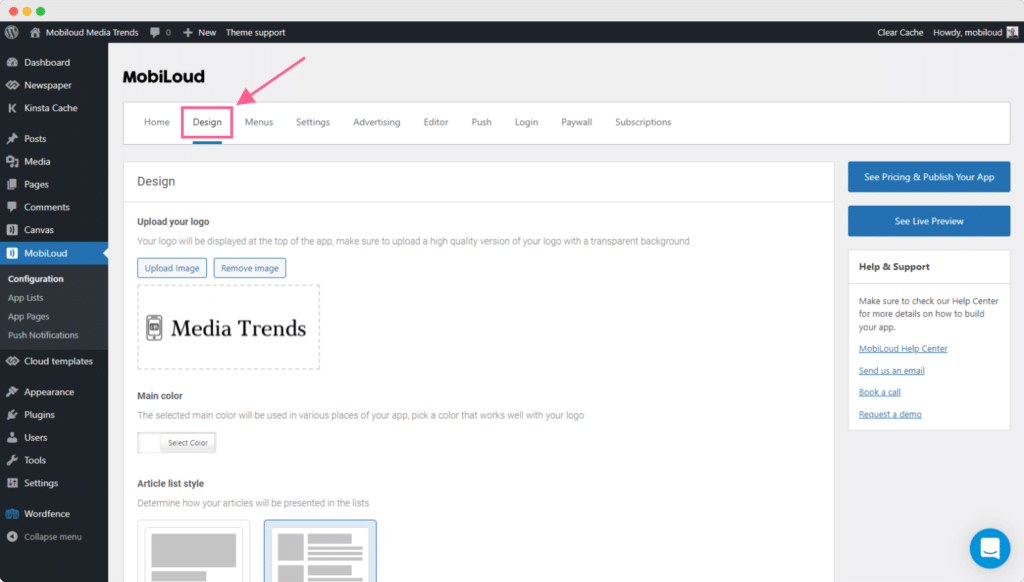
Design
The first step would be to configure your “Design” settings, as they will dictate the branding and the colors applied throughout your apps.
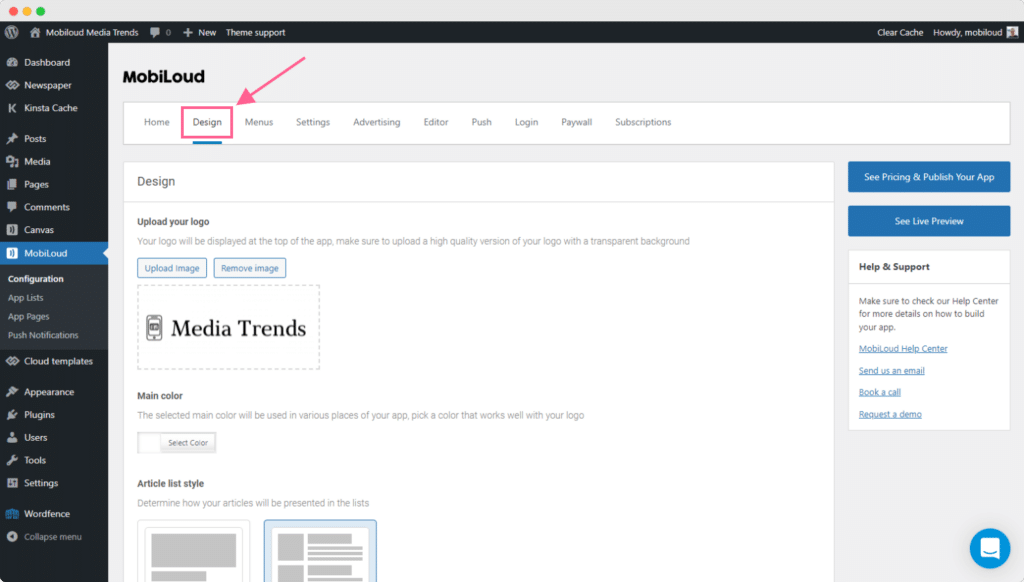
In this area, you will be able to upload your logo and set the main color for your app.
For the logo, there are a few things to keep in mind:
- Use a version of your logo that looks good in small sizes
- Make sure to use a .png file with a transparent background
- Make sure that the color of your logo works well with the selected “Main color”
Here you can also define the style of your article lists, using the extended mode for a bigger featured image, or compact for fitting more articles on the screen.
Menus
Moving forward, you will want to configure your menus, as they are probably the most important aspect of your app.
Menus will define which sections users will have access to but also what they will see as soon as they open the app.
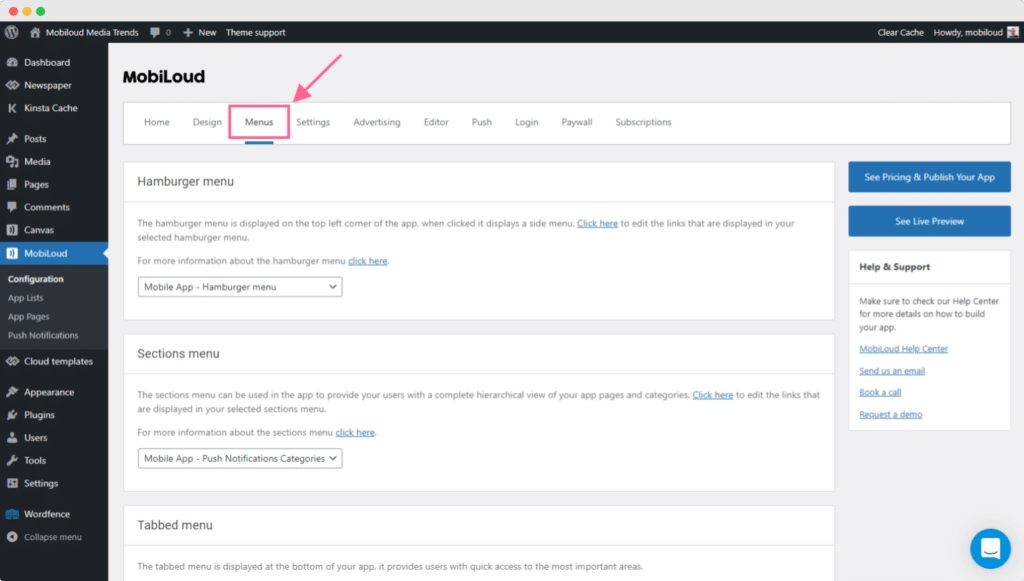
We have quite a few different menus, and most of them will come with a pre-defined configuration. For each menu we have a corresponding guide in our knowledge base, you can find all of them in one place here: How to configure menus
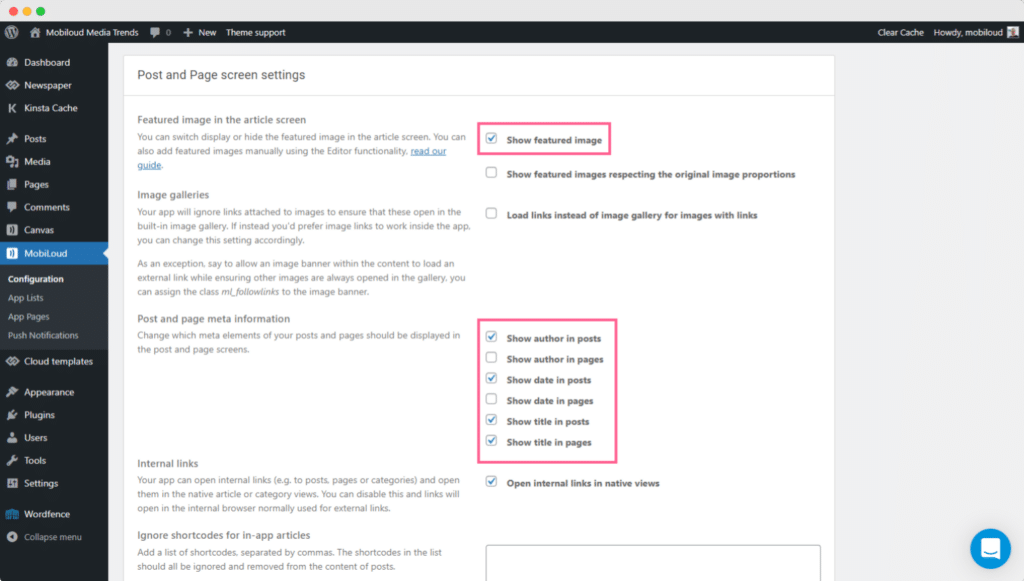
Settings
Under “Settings” you will be able to define how the content must be presented in the app, on your lists, articles, and settings.

The default configuration should give you a clean look for the most part, but if you would like to hide/show certain elements in different areas of your app, this is the place to go.
As you can see in the screenshots below here you have a range of settings for each area and element:
Push Notifications
Finally, once the apps are configured as per your requirements, it is time to start sending some push notifications.
Under “Configuration > Push” you will find general settings related to push notifications:
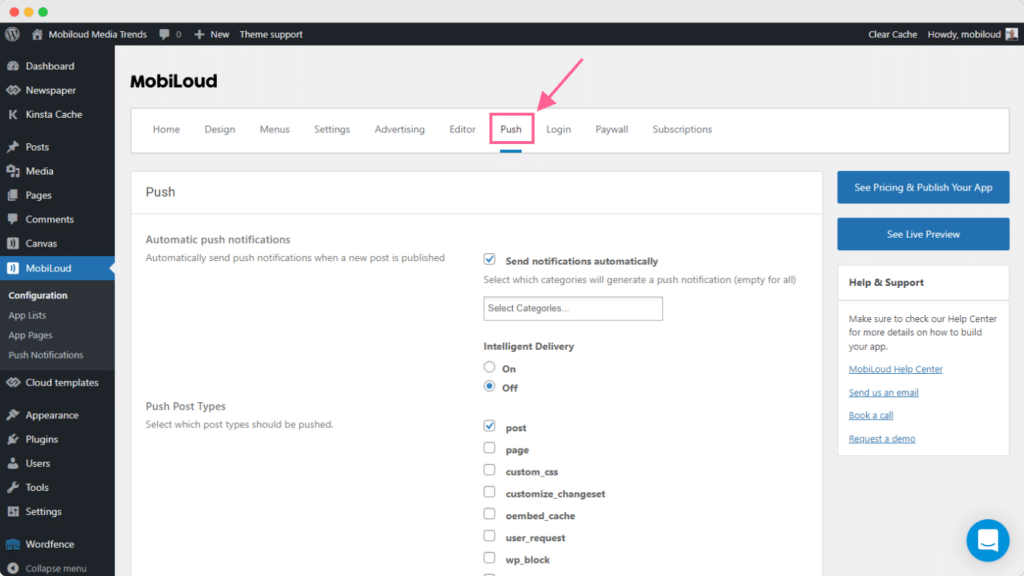
Here you will be able to configure the push keys for your app as well as automatic notifications for specific categories of posts or custom post types.
Once you have your push keys in place, you will want to go to “Push Notifications” so you can send your first manual notification:

You can find a complete guide with more details on how to send push notifications from your WordPress Dashboard, here: How to send push notifications with News
-
Getting started with vendrux News
In this guide, we will go through the main settings available in the Vendrux News Plugin as well as some frequently asked questions.
Before we begin, keep in mind that any changes to the plugin configuration will instantly reflect in the apps, so be careful in case your apps are already live.
Design
The first step would be to configure your “Design” settings, as they will dictate the branding and the colors applied throughout your apps.
In this area, you will be able to upload your logo and set the main color for your app.
For the logo, there are a few things to keep in mind:
- Use a version of your logo that looks good in small sizes
- Make sure to use a .png file with a transparent background
- Make sure that the color of your logo works well with the selected “Main color”
Here you can also define the style of your article lists, using the extended mode for a bigger featured image, or compact for fitting more articles on the screen.
Menus
Moving forward, you will want to configure your menus, as they are probably the most important aspect of your app.
Menus will define which sections users will have access to but also what they will see as soon as they open the app.
We have quite a few different menus, and most of them will come with a pre-defined configuration. For each menu we have a corresponding guide in our knowledge base, you can find all of them in one place here: How to configure menus
Settings
Under “Settings” you will be able to define how the content must be presented in the app, on your lists, articles, and settings.
The default configuration should give you a clean look for the most part, but if you would like to hide/show certain elements in different areas of your app, this is the place to go.
As you can see in the screenshots below here you have a range of settings for each area and element:
Push Notifications
Finally, once the apps are configured as per your requirements, it is time to start sending some push notifications.
Under “Configuration > Push” you will find general settings related to push notifications:
Here you will be able to configure the push keys for your app as well as automatic notifications for specific categories of posts or custom post types.
Once you have your push keys in place, you will want to go to “Push Notifications” so you can send your first manual notification:
You can find a complete guide with more details on how to send push notifications from your WordPress Dashboard, here: How to send push notifications with News
-
What is vendrux’s Full Service Option?
When it comes to the initial app build and publishing process on our Canvas and News, you have the choice to either configure and customize the app on your own or take our Full Service Package.
Our App Submission fee, on all plans, is $500 (required). This covers the cost of compiling, extensively testing the apps, submitting them to Google and Apple, and publishing them on the App Store and Google Play.
The Submission Fee does not cover our team configuring and customizing the apps, or providing all the necessary design work for the app itself and the app stores. That’s where our optional Full Service Package comes in at an additional $1,350.
When you consider the time and money you’ll save creating all of the design assets, developer time or fees for customization, you’ll probably find it’s well worth the cost.
You should go the “self serve” route if you’re technical (e.g. you built your WordPress site, know HTML/CSS) or have a team of developers and designers that can take a few hours to a week to customize your app.
Full Service is for you if you want to save time and energy, focus on your core product (your website or web app), and get the apps handled as fast and smoothly as possible, by relying on our expert team for everything you need
Roughly 80% of new customers go for the full service package because of the convenience, the time saving and the guarantee they’ll get the app they want, in the time they want, without distracting their team with a new project.
Whether you take the full service package or not, you still get our fast and knowledgeable technical support, and everything included in our initial App Submission fees: we will compile and test your apps, generate versions you can test yourself, and get your app submitted on both App Store and Google Play.
So why go full service? Let’s take a look at some of the reasons to go the full service route.
Everything Handled For You
While Vendrux is a ‘no code’ platform, it does require some technical aptitude or experience to really customize your app.
With Full Service, our team handles the entire app building process, after a kick-off consultation with Vitor, our senior Product Manager, where you’ll go over your specific needs and requirements.
Here’s what the Full Service package includes:
- Your app completely configured on our platform
- Small design customizations and plugin integrations
- Professional icons, splash screens for your app, at all resolutions required
- Professional screenshots: we’ll take screenshots of your apps and turn them into a beautiful showcase of all the functionality your app provides
- We work directly with Apple and Google until your app is approved – if after several attempts your app still won’t be approved, we’ll refund all fees paid. NOTE: we will support you to get your app approved whether you’re on full service or not, but if we take care of configuring and customizing the app we can respond and implement changes to your app for you, speeding up the approval process.
There’s nothing for you to do except provide the overall direction and requirements. You can get back to focusing on your core web product and growing your business without getting side tracked or distracted.
We Configure The Apps For You
All our products include an admin area that allow you to control the look and feel of the application e.g. add menu items. While you can figure out how to configure and customize the app on your own, we can be very effective at putting together a new app in a short time frame and can save you a lot of time as a consequence by doing it for you.
What’s included?
- Configuring the app’s navigation
- Customizing the app with your branding
- Configuring a welcome screen for your app or privacy policy acceptance screen
- Styling the app with your colors and fonts (where applicable)
- Small customizations that require code (see below)
- Setting up content categories for push notifications
- Setting up ads integrations in a News app
- Setting up subscriptions and login requirements in a News or eCommerce app
- Setting up login authentication in a Canvas app, using one of the different methods supported
- Customizing the login and registration screens in a Canvas app
- Integrating functionality from third party plugins
- Adding and styling a related posts list in a news app
Small Customizations are Included
What does this mean exactly? We should differentiate between our different platforms:
- For a Canvas app, where your website or web app provides most of the user interface for the app (and our platform adds native navigation), we’ll add custom code to hide elements of your site that shouldn’t be part of the app (e.g. a pricing or checkout page for a subscription site). We also make small modifications to the design that make the site or web app fit better with the app’s native navigation (e.g. removing header/footer elements and other parts of the interface that the native app already provides or that perhaps are not typical of an app).
- For a News or eCommerce app, the app has a unique design, separate from your site’s theme. You will probably want the app to look similar to your mobile site, include your branding, colors, fonts and elements from your site’s design, as well as functionality coming from your theme, third party plugins or custom code. This level of customization is possible using our code editor (for deeper customization, a plugin extension with custom code would be required). We include in the full service package customizations to style article or product lists and single article or product pages similarly to your site (design, colors, fonts) and integrate third party plugins (where possible in a short timeframe) that we can implement with our code editor.
Note that this does not include custom development work for complex plugin integrations or custom designs we can’t implement without building a custom extension or adding a lot of extra code. To learn exactly what would be included and what not, get in touch for a demo and tell us about your site.
We Prepare all Necessary Design Assets
In order to get your apps successfully published on the App Store and Google Play – you need to prepare a set of design assets at various required resolutions. These are:
- App Icons for iOS and Android
- Splash screens for iOS and Android
- Screenshots to turn into eye-catching showcases for the App Store and Google Play
With self-serve, you’ll prepare all of these yourself. This would cost hundreds of dollars through a good designer or take quite some time even if you go the DIY route. With Full Service though, our own designers create them for you, at all the resolutions required, so you don’t need to worry about this at all.
Hands-On Support for Lifetime
We take a hands on approach to support for all customers, but with full service you’ll have something more – you’ll be able to make configuration changes on your own, but we also expect to provide support whenever you want to make a change to the app’s configuration and we’ll implement it directly for you (since we did the initial configuration, we don’t expect you to take care of configuration changes).
So while you pay for it in advance, as the bulk of the work is done upfront, you’ll enjoy the benefits of the full service package through your app’s lifetime by having a team taking care of everything you might need changed or fixed with your app.
Peace of Mind
With full service you are guaranteed a smooth app build process and launch. For many of our busy clients, this is the main benefit.
You know that a team of app experts are working to create you a great presence on the app stores, there’s no anxiety or stress around the process, and your time and energy are freed up to focus on your business.
The Choice is Yours
A brief summary of the benefits of Full Service:
- We configure the apps for you, there’s no work for you to do for the app build except filling in a form
- We prepare everything necessary for your app’s submission to the App Stores including all design assets
- We include design tweaks and customizations
- You get premium, hands-on support through the lifetime of your app
Full Service is for you if you want to truly minimize the time, energy, and effort that you and your team personally invest into bringing the apps live.
It’s up to you to decide which tier fits your priorities, budget and strategy best. Whichever you go with we are fully committed to helping you to build great apps with Vendrux. If you want to learn more – get in touch with one of our team!